
跟着 Lua 5.1 官方参考文档学习 Lua (12)
文章目录
- 5.7 – Input and Output Facilities
- 补充内容
- `io.input ([file])`
- `io.read (···)`
- `io.write (···)`
- `io.output ([file])`
- `io.lines ([filename])`
- `io.flush ()`
- `io.close ([file])`
- `io.open (filename [, mode])`
- `io.popen (prog [, mode])`
- `io.tmpfile ()`
- `io.type (ob)`
- `file:read (···)`
- `file:lines ()`
- `file:write (···)`
- `file:flush ()`
- `file:seek ([whence] [, offset])`
- `file:setvbuf (mode [, size])`
- `file:close ()`
- 5.8 – Operating System Facilities
- `os.clock ()`
- `os.date ([format [, time]])`
- `os.difftime (t2, t1)`
- `os.execute ([command])`
- `os.exit ([code])`
- `os.getenv (varname)`
- `os.remove (filename)`
- `os.rename (oldname, newname)`
- `os.setlocale (locale [, category])`
- `os.time ([table])`
- `os.tmpname ()`
- 5.9 – The Debug Library
- 6 – Lua Stand-alone
- 7 – Incompatibilities with the Previous Version
- 8 – The Complete Syntax of Lua
5.7 – Input and Output Facilities
The I/O library provides two different styles for file manipulation. The first one uses implicit file descriptors; that is, there are operations to set a default input file and a default output file, and all input/output operations are over these default files. The second style uses explicit file descriptors.
When using implicit file descriptors, all operations are supplied by table io. When using explicit file descriptors, the operation io.open returns a file descriptor and then all operations are supplied as methods of the file descriptor.
The table io also provides three predefined file descriptors with their usual meanings from C: io.stdin, io.stdout, and io.stderr. The I/O library never closes these files.
Unless otherwise stated, all I/O functions return nil on failure (plus an error message as a second result and a system-dependent error code as a third result) and some value different from nil on success.
补充内容
21.1 The Simple I/O Model
The simple model does all of its operations on two current files. The library initializes the current input file as the process standard input (stdin) and the current output file as the process standard output (stdout). Therefore, when we execute something like io.read(), we read a line from the standard input. We can change these current files with the io.input and io.output functions. A call like io.input(filename) opens the given file in read mode and sets it as the current input file. From this point on, all input will come from this file, until another call to io.input; io.output does a similar job for output. In case of error, both functions raise the error. If you want to handle errors directly, you must use io.open, from the complete model.
As write is simpler than read, we will look at it first. The io.write function simply gets an arbitrary number of string arguments and writes them to the current output file. Numbers are converted to strings following the usual conversion rules; for full control over this conversion, you should use the
string.format function:
> io.write("sin (3) = ", math.sin(3), "\n")
--> sin (3) = 0.14112000805987
> io.write(string.format("sin (3) = %.4f\n", math.sin(3)))
--> sin (3) = 0.1411
Avoid code like io.write(a…b…c); the call io.write(a,b,c) accomplishes the same effect with fewer resources, as it avoids the concatenations.
As a rule, you should use print for quick-and-dirty programs, or for debugging, and write when you need full control over your output:
> print("hello", "Lua"); print("Hi")
--> hello Lua
--> Hi
> io.write("hello", "Lua"); io.write("Hi", "\n")
--> helloLuaHi
Unlike print, write adds no extra characters to the output, such as tabs or newlines. Moreover, write uses the current output file, whereas print always uses the standard output. Finally, print automatically applies tostring to its arguments, so it can also show tables, functions, and nil.
The io.read function reads strings from the current input file. Its arguments control what is read:
“*all” reads the whole file
“*line” reads the next line
“*number” reads a number
num reads a string with up to num characters
The call *io.read("all") reads the whole current input file, starting at its current position. If we are at the end of the file, or if the file is empty, the call returns an empty string
Because Lua handles long strings efficiently, a simple technique for writing filters in Lua is to read the whole file into a string, do the processing to the string (typically with gsub), and then write the string to the output:
t = io.read("*all") -- read the whole file
t = string.gsub(t, ...) -- do the job
io.write(t) -- write the file
The call io.read(“*line”) returns the next line from the current input file, without the newline character. When we reach the end of file, the call returns nil (as there is no next line to return). This pattern is the default for read.
Usually, I use this pattern only when the algorithm naturally handles the file line by line; otherwise, I favor reading the whole file at once, with *all, or in blocks, as we will see later.
As a simple example of the use of this pattern, the following program copies
its current input to the current output, numbering each line:
for count = 1, math.huge dolocal line = io.read()if line == nil then break endio.write(string.format("%6d ", count), line, "\n")
end
However, to iterate on a whole file line by line, we do better to use the io.lines iterator. For instance, we can write a complete program to sort the lines of a file as follows:
local lines = {}
-- read the lines in table ’lines’
for line in io.lines() do lines[#lines + 1] = line end
-- sort
table.sort(lines)
-- write all the lines
for _, l in ipairs(lines) do io.write(l, "\n") end
Besides the basic read patterns, you can call read with a number n as an argument: in this case, read tries to read n characters from the input file. If it cannot read any character (end of file), read returns nil; otherwise, it returns a string with at most n characters.
As an example of this read pattern, the following program is an efficient way (in Lua, of course) to copy a file from stdin to stdout:
while true dolocal block = io.read(2 ^ 13) -- buffer size is 8Kif not block then break endio.write(block)
end
As a special case, io.read(0) works as a test for end of file: it returns an empty string if there is more to be read or nil otherwise.
21.2 The Complete I/O Model
For more control over I/O, you can use the complete model. A central concept in this model is the file handle, which is equivalent to streams (FILE*) in C: itrepresents an open file with a current position.
To open a file, you use the io.open function, which mimics the fopen function in C. It takes as arguments the name of the file to open plus a mode string. This mode string may contain an ‘r’ for reading, a ‘w’ for writing (which also erases any previous content of the file), or an ‘a’ for appending, plus an optional ‘b’ to open binary files. The open function returns a new handle for the file. In case of error, open returns nil, plus an error message and an error number:
print(io.open("non-existent-file", "r"))
--> nil non-existent-file: No such file or directory 2
print(io.open("/etc/passwd", "w"))
--> nil /etc/passwd: Permission denied 13
The interpretation of the error numbers is system dependent.
A typical idiom to check for errors is
local f = assert(io.open(filename, mode))
If the open fails, the error message goes as the second argument to assert, which then shows the message. After you open a file, you can read from it or write to it with the methods read/write. They are similar to the read/write functions, but you call them as methods on the file handle, using the colon syntax. For instance, to open a file and read it all, you can use a chunk like this:
local f = assert(io.open(filename, "r"))
local t = f:read("*all")
f:close()
The I/O library offers handles for the three predefined C streams: io.stdin, io.stdout, and io.stderr. So, you can send a message directly to the error stream with a code like this:
io.stderr:write(message)
We can mix the complete model with the simple model. We get the current input file handle by calling io.input(), without arguments. We set this handle with the call io.input(handle). (Similar calls are also valid for io.output.) For instance, if you want to change the current input file temporarily, you can write something like this:
local temp = io.input() -- save current file
io.input("newinput") -- open a new current file
-- <do something with new input>
io.input():close() -- close current file
io.input(temp) -- restore previous current file
A small performance trick
Usually, in Lua, it is faster to read a file as a whole than to read it line by line. However, sometimes we must face a big file (say, tens or hundreds megabytes) for which it is not reasonable to read it all at once. If you want to handle such big files with maximum performance, the fastest way is to read them in reasonably large chunks (e.g., 8 Kbytes each). To avoid the problem of breaking lines in the
middle, you simply ask to read a chunk plus a line:
local lines, rest = f:read(BUFSIZE, "*line")
The variable rest will get the rest of any line broken by the chunk. We then concatenate the chunk and this rest of line. This way, the resulting chunk will always break at line boundaries.
The example in Listing 21.1 uses this technique to implement wc, a program that counts the number of characters, words, and lines in a file.
local BUFSIZE = 2 ^ 13     -- 8K
local f = io.input(arg[1]) -- open input file
local cc, lc, wc = 0, 0, 0 -- char, line, and word counts
while true dolocal lines, rest = f:read(BUFSIZE, "*line")if not lines then break endif rest then lines = lines .. rest .. "\n" endcc = cc + #lines-- count words in the chunklocal _, t = string.gsub(lines, "%S+", "")wc = wc + t-- count newlines in the chunk_, t = string.gsub(lines, "\n", "\n")lc = lc + t
end
print(lc, wc, cc)
Binary files
The simple-model functions io.input and io.output always open a file in text mode (the default). In Unix, there is no difference between binary files and text files. But in some systems, notably Windows, binary files must be opened with a special flag. To handle such binary files, you must use io.open, with the letter ‘b’ in the mode string.
Binary data in Lua are handled similarly to text. A string in Lua may contain any bytes, and almost all functions in the libraries can handle arbitrary bytes. You can even do pattern matching over binary data, as long as the pattern does not contain a zero byte. If you want to match this byte in the subject, you can use the class %z instead.
Typically, you read binary data either with the *all pattern, that reads the whole file, or with the pattern n, that reads n bytes. As a simple example, the following program converts a text file from DOS format to Unix format (that is, it translates sequences of carriage return–newlines to newlines). It does not use the standard I/O files (stdin–stdout), because these files are open in text mode. Instead, it assumes that the names of the input file and the output file are given as arguments to the program:
local inp = assert(io.open(arg[1], "rb"))
local out = assert(io.open(arg[2], "wb"))
local data = inp:read("*all")
data = string.gsub(data, "\r\n", "\n")
out:write(data)
assert(out:close())
As another example, the following program prints all strings found in a binary file:
local f = assert(io.open(arg[1], "rb"))
local data = f:read("*all")
local validchars = "[%w%p%s]"
local pattern = string.rep(validchars, 6) .. "+%z"
for w in string.gmatch(data, pattern) doprint(w)
end
The program assumes that a string is any zero-terminated sequence of six or more valid characters, where a valid character is any character accepted by the pattern validchars. In our example, this pattern comprises the alphanumeric, the punctuation, and the space characters. We use string.rep and concatenation to create a pattern that captures all sequences of six or more validchars. The %z at the end of the pattern matches the byte zero at the end of a string.
As a last example, the following program makes a dump of a binary file:
vlocal f = assert(io.open(arg[1], "rb"))
local block = 16
while true dolocal bytes = f:read(block)if not bytes then break endfor _, b in pairs { string.byte(bytes, 1, -1) } doio.write(string.format("%02X ", b))endio.write(string.rep(" ", block - string.len(bytes)))io.write(" ", string.gsub(bytes, "%c", "."), "\n")
end
Again, the first program argument is the input file name; the output goes to the standard output. The program reads the file in chunks of 16 bytes. For each chunk, it writes the hexadecimal representation of each byte, and then it writes the chunk as text, changing control characters to dots. (Note the use of the idiom {string.byte(bytes,1,-1)} to create a table with all bytes of the string bytes.)
21.3 Other Operations on Files
The tmpfile function returns a handle for a temporary file, open in read/write mode. This file is automatically removed (deleted) when your program ends.
The flush function executes all pending writes to a file. Like the write function, you can call it as a function, io.flush(), to flush the current output file; or as a method, f:flush(), to flush a particular file f.
The seek function can both get and set the current position of a file. Its general form is f:seek(whence,offset). The whence parameter is a string that specifies how to interpret the offset. Its valid values are “set”, when offsets are interpreted from the beginning of the file; “cur”, when offsets are interpreted from the current position of the file; and “end”, when offsets are interpreted from the end of the file. Independently of the value of whence, the call returns the final current position of the file, measured in bytes from the beginning of the file.
The default value for whence is “cur” and for offset is zero. Therefore, the call file:seek() returns the current file position, without changing it; the call file:seek(“set”) resets the position to the beginning of the file (and returns zero); and the call file:seek(“end”) sets the position to the end of the file and returns its size. The following function gets the file size without changing its current position:
function fsize(file)local current = file:seek()   -- get current positionlocal size = file:seek("end") -- get file sizefile:seek("set", current)     -- restore positionreturn size
end
All these functions return nil plus an error message in case of error.
io.input ([file])
When called with a file name, it opens the named file (in text mode), and sets its handle as the default input file. When called with a file handle, it simply sets this file handle as the default input file. When called without parameters, it returns the current default input file.
In case of errors this function raises the error, instead of returning an error code.
io.read (···)
Equivalent to io.input():read.
io.write (···)
Equivalent to io.output():write.
io.output ([file])
Similar to io.input, but operates over the default output file.
io.lines ([filename])
Opens the given file name in read mode and returns an iterator function that, each time it is called, returns a new line from the file. Therefore, the construction
for line in io.lines(filename) do body end
will iterate over all lines of the file. When the iterator function detects the end of file, it returns nil (to finish the loop) and automatically closes the file.
The call io.lines() (with no file name) is equivalent to io.input():lines(); that is, it iterates over the lines of the default input file. In this case it does not close the file when the loop ends.
io.flush ()
Equivalent to file:flush over the default output file.
io.close ([file])
Equivalent to file:close(). Without a file, closes the default output file.
io.open (filename [, mode])
This function opens a file, in the mode specified in the string mode. It returns a new file handle, or, in case of errors, nil plus an error message.
The mode string can be any of the following:
- “r”: read mode (the default);
- “w”: write mode;
- “a”: append mode;
- “r+”: update mode, all previous data is preserved;
- “w+”: update mode, all previous data is erased;
- “a+”: append update mode, previous data is preserved, writing is only allowed at the end of file.
The mode string can also have a ‘b’ at the end, which is needed in some systems to open the file in binary mode. This string is exactly what is used in the standard C function fopen.
io.popen (prog [, mode])
Starts program prog in a separated process and returns a file handle that you can use to read data from this program (if mode is "r", the default) or to write data to this program (if mode is "w").
This function is system dependent and is not available on all platforms.
io.tmpfile ()
Returns a handle for a temporary file. This file is opened in update mode and it is automatically removed when the program ends.
io.type (ob)
Checks whether obj is a valid file handle. Returns the string "file" if obj is an open file handle, "closed file" if obj is a closed file handle, or nil if obj is not a file handle.
file:read (···)
Reads the file file, according to the given formats, which specify what to read. For each format, the function returns a string (or a number) with the characters read, or nil if it cannot read data with the specified format. When called without formats, it uses a default format that reads the entire next line (see below).
The available formats are
- “*n”: reads a number; this is the only format that returns a number instead of a string.
- “*a”: reads the whole file, starting at the current position. On end of file, it returns the empty string.
- “*l”: reads the next line (skipping the end of line), returning nil on end of file. This is the default format.
- *number*: reads a string with up to this number of characters, returning nil on end of file. If number is zero, it reads nothing and returns an empty string, or nil on end of file.
file:lines ()
Returns an iterator function that, each time it is called, returns a new line from the file. Therefore, the construction
for line in file:lines() do body end
will iterate over all lines of the file. (Unlike io.lines, this function does not close the file when the loop ends.)
file:write (···)
Writes the value of each of its arguments to the file. The arguments must be strings or numbers. To write other values, use tostring or string.format before write.
file:flush ()
Saves any written data to file.
file:seek ([whence] [, offset])
Sets and gets the file position, measured from the beginning of the file, to the position given by offset plus a base specified by the string whence, as follows:
- “set”: base is position 0 (beginning of the file);
- “cur”: base is current position;
- “end”: base is end of file;
In case of success, function seek returns the final file position, measured in bytes from the beginning of the file. If this function fails, it returns nil, plus a string describing the error.
The default value for whence is "cur", and for offset is 0. Therefore, the call file:seek() returns the current file position, without changing it; the call file:seek("set") sets the position to the beginning of the file (and returns 0); and the call file:seek("end") sets the position to the end of the file, and returns its size.
file:setvbuf (mode [, size])
Sets the buffering mode for an output file. There are three available modes:
- “no”: no buffering; the result of any output operation appears immediately.
- “full”: full buffering; output operation is performed only when the buffer is full (or when you explicitly
flushthe file (seeio.flush)). - “line”: line buffering; output is buffered until a newline is output or there is any input from some special files (such as a terminal device).
For the last two cases, size specifies the size of the buffer, in bytes. The default is an appropriate size.
file:close ()
Closes file. Note that files are automatically closed when their handles are garbage collected, but that takes an unpredictable amount of time to happen.
5.8 – Operating System Facilities
This library is implemented through table os.
os.clock ()
Returns an approximation of the amount in seconds of CPU time used by the program.
os.date ([format [, time]])
Returns a string or a table containing date and time, formatted according to the given string format.
If the time argument is present, this is the time to be formatted (see the os.time function for a description of this value). Otherwise, date formats the current time.
If format starts with ‘!’, then the date is formatted in Coordinated Universal Time. After this optional character, if format is the string “*t”, then date returns a table with the following fields: year (four digits), month (1–12), day (1–31), hour (0–23), min (0–59), sec (0–61), wday (weekday, Sunday is 1), yday (day of the year), and isdst (daylight saving flag, a boolean).
If format is not “*t”, then date returns the date as a string, formatted according to the same rules as the C function strftime.
When called without arguments, date returns a reasonable date and time representation that depends on the host system and on the current locale (that is, os.date() is equivalent to os.date("%c")).
os.difftime (t2, t1)
Returns the number of seconds from time t1 to time t2. In POSIX, Windows, and some other systems, this value is exactly t2-t1.
os.execute ([command])
This function is equivalent to the C function system. It passes command to be executed by an operating system shell. It returns a status code, which is system-dependent. If command is absent, then it returns nonzero if a shell is available and zero otherwise.
os.exit ([code])
Calls the C function exit, with an optional code, to terminate the host program. The default value for code is the success code.
os.getenv (varname)
Returns the value of the process environment variable varname, or nil if the variable is not defined.
os.remove (filename)
Deletes the file or directory with the given name. Directories must be empty to be removed. If this function fails, it returns nil, plus a string describing the error.
os.rename (oldname, newname)
Renames file or directory named oldname to newname. If this function fails, it returns nil, plus a string describing the error.
os.setlocale (locale [, category])
Sets the current locale of the program. locale is a string specifying a locale; category is an optional string describing which category to change: "all", "collate", "ctype", "monetary", "numeric", or "time"; the default category is "all". The function returns the name of the new locale, or nil if the request cannot be honored.
If locale is the empty string, the current locale is set to an implementation-defined native locale. If locale is the string “C”, the current locale is set to the standard C locale.
When called with nil as the first argument, this function only returns the name of the current locale for the given category.
os.time ([table])
Returns the current time when called without arguments, or a time representing the date and time specified by the given table. This table must have fields year, month, and day, and may have fields hour, min, sec, and isdst (for a description of these fields, see the os.date function).
The returned value is a number, whose meaning depends on your system. In POSIX, Windows, and some other systems, this number counts the number of seconds since some given start time (the “epoch”). In other systems, the meaning is not specified, and the number returned by time can be used only as an argument to date and difftime.
os.tmpname ()
Returns a string with a file name that can be used for a temporary file. The file must be explicitly opened before its use and explicitly removed when no longer needed.
On some systems (POSIX), this function also creates a file with that name, to avoid security risks. (Someone else might create the file with wrong permissions in the time between getting the name and creating the file.) You still have to open the file to use it and to remove it (even if you do not use it).
When possible, you may prefer to use io.tmpfile, which automatically removes the file when the program ends.
5.9 – The Debug Library
This library provides the functionality of the debug interface to Lua programs. You should exert care when using this library. The functions provided here should be used exclusively for debugging and similar tasks, such as profiling. Please resist the temptation to use them as a usual programming tool: they can be very slow. Moreover, several of these functions violate some assumptions about Lua code (e.g., that variables local to a function cannot be accessed from outside or that userdata metatables cannot be changed by Lua code) and therefore can compromise otherwise secure code.
All functions in this library are provided inside the debug table. All functions that operate over a thread have an optional first argument which is the thread to operate over. The default is always the current thread.
略
6 – Lua Stand-alone
略
7 – Incompatibilities with the Previous Version
略
8 – The Complete Syntax of Lua
Here is the complete syntax of Lua in extended BNF. (It does not describe operator precedences.)
chunk ::= {stat [`;´]} [laststat [`;´]]block ::= chunkstat ::= varlist `=´ explist | functioncall | do block end | while exp do block end | repeat block until exp | if exp then block {elseif exp then block} [else block] end | for Name `=´ exp `,´ exp [`,´ exp] do block end | for namelist in explist do block end | function funcname funcbody | local function Name funcbody | local namelist [`=´ explist] laststat ::= return [explist] | breakfuncname ::= Name {`.´ Name} [`:´ Name]varlist ::= var {`,´ var}var ::= Name | prefixexp `[´ exp `]´ | prefixexp `.´ Name namelist ::= Name {`,´ Name}explist ::= {exp `,´} expexp ::= nil | false | true | Number | String | `...´ | function | prefixexp | tableconstructor | exp binop exp | unop exp prefixexp ::= var | functioncall | `(´ exp `)´functioncall ::= prefixexp args | prefixexp `:´ Name args args ::= `(´ [explist] `)´ | tableconstructor | String function ::= function funcbodyfuncbody ::= `(´ [parlist] `)´ block endparlist ::= namelist [`,´ `...´] | `...´tableconstructor ::= `{´ [fieldlist] `}´fieldlist ::= field {fieldsep field} [fieldsep]field ::= `[´ exp `]´ `=´ exp | Name `=´ exp | expfieldsep ::= `,´ | `;´binop ::= `+´ | `-´ | `*´ | `/´ | `^´ | `%´ | `..´ | `<´ | `<=´ | `>´ | `>=´ | `==´ | `~=´ | and | orunop ::= `-´ | not | `#´
相关文章:
)
跟着 Lua 5.1 官方参考文档学习 Lua (12)
文章目录 5.7 – Input and Output Facilities补充内容io.input ([file])io.read ()io.write ()io.output ([file])io.lines ([filename])io.flush ()io.close ([file])io.open (filename [, mode])io.popen (prog [, mode])io.tmpfile ()io.type (ob)file:read ()file:lines (…...

操作系统控制台-健康守护我们的系统
引言基本准备体验功能健康守护系统诊断 收获提升结语 引言 阿里云操作系统控制平台作为新一代云端服务器中枢平台,通过创新交互模式重构主机管理体验。操作系统控制台提供了一系列管理功能,包括运维监控、智能助手、扩展插件管理以及订阅服务等。用户可以…...

FreeRTOS任务状态查询
一.任务相关API vTaskList(),创建一个表格描述每个任务的详细信息 char biaoge[1000]; //定义一个缓存 vTaskList(biaoge); //将表格存到这缓存中 printf("%s /r/n",biaoge); 1.uxTaskPriorityGet(…...

blender学习25.3.6
【02-基础篇】Blender小凳子之凳面及凳脚的创作_哔哩哔哩_bilibili 【03-基础篇】Blender小凳子之其他细节调整优化_哔哩哔哩_bilibili 这篇文章写的全,不用自己写了 Blender 学习笔记(一)快捷键记录_blender4.1快捷键-CSDN博客 shifta&a…...

Tensorflow 2.0 GPU的使用与限制使用率及虚拟多GPU
Tensorflow 2.0 GPU的使用与限制使用率及虚拟多GPU 1. 获得当前主机上特定运算设备的列表2. 设置当前程序可见的设备范围3. 显存的使用4. 单GPU模拟多GPU环境 先插入一行简单代码,以下复制即可用来设置GPU使用率: import tensorflow as tf import numpy…...

RabbitMQ 2025/3/5
高性能异步通信组件。 同步调用 以支付为例: 可见容易发生雪崩。 异步调用 以支付为例: 支付服务当甩手掌柜了,不管后面的几个服务的结果。只管库库发,后面那几个服务想取的时候就取,因为消息代理里可以一直装&#x…...

每日一题-----面试
一、什么是孤儿进程?什么是僵尸进程? 1.孤儿进程是指父进程在子进程结束之前就已经退出,导致子进程失去了父进程的管理和控制,成为了 “孤儿”。此时,这些子进程会被系统的 init 进程(在 Linux 系统中&…...

JSP+Servlet实现对数据库增删改查功能
前提概要 需要理解的重要概念 MVC模式: Model(person类):数据模型View(JSP):显示界面Controller(Servlet):处理业务逻辑 请求流程: 浏览器 …...

C++【类和对象】
类和对象 1.this 指针2.类的默认成员函数3.构造函数4.析构函数5.拷贝构造函数 1.this 指针 接上文 this指针存在内存的栈区域。 2.类的默认成员函数 定义:编译器自动生成的成员函数。一个类,我们不写的情况下会默认生成六个成员函数。 3.构造函数 函…...

GStreamer —— 2.13、Windows下Qt加载GStreamer库后运行 - “教程13:播放控制“(附:完整源码)
运行效果(音频) 简介 上一个教程演示了GStreamer工具。本教程介绍视频播放控制。快进、反向播放和慢动作都是技术 统称为 Trick Modes,它们都有一个共同点 修改 Normal playback rate。本教程介绍如何实现 这些效果并在交易中添加了帧步进。特别是,它 显…...

MongoDB winx64 msi包安装详细教程
首先我们可以从官网上选择对应版本和对应的包类型进行安装: 下载地址:Download MongoDB Community Server | MongoDB 这里可以根据自己的需求, 这里我选择的是8.0.5 msi的版本,采用的传统装软件的方式安装。无需配置命令。 下载…...

要查看 SQLite 数据库中的所有表,可以通过查询 SQLite 的系统表 sqlite_master
要查看 SQLite 数据库中的所有表,可以查询 SQLite 的系统表 sqlite_master。 每个 SQLite 数据库都包含一个名为 sqlite_master 的系统表。该表定义了数据库的模式,存储了数据库中所有表、索引、视图和触发器等对象的信息。 通过查询 sqlite_master&am…...

WinUI 3 支持的三种窗口 及 受限的窗口透明
我的目标 希望能够熟悉 WinUI 3 窗口的基本使用方式,了解可能出现的问题 。 WinUI 3 支持三种窗口模式,分别为:常规窗口模式、画中画模式、全屏模式。 窗口模式:常规 即我们最常见的普通窗口。 支持:显示最大化按钮…...

如何借助 ArcGIS Pro 高效统计基站 10km 范围内的村庄数量?
在当今数字化时代,地理信息系统(GIS)技术在各个领域都发挥着重要作用。 特别是在通信行业,对于基站周边覆盖范围内的地理信息分析,能够帮助我们更好地进行网络规划、资源分配以及市场分析等工作。 今天,就…...

Linux网络之数据链路层协议
目录 数据链路层 MAC地址与IP地址 数据帧 ARP协议 NAT技术 代理服务器 正向代理 反向代理 上期我们学习了网络层中的相关协议,为IP协议。IP协议通过报头中的目的IP地址告知了数据最终要传送的目的主机的IP地址,从而指引了数据在网络中的一步…...

如何使用 PyInstaller 打包 Python 脚本?一看就懂的完整教程!
PyInstaller 打包指令教程 1. 写在前面 通常,在用 Python 编写完一个脚本后,需要将它部署并集成到一个更大的项目中。常见的集成方式有以下几种: 使用 PyInstaller 打包。使用 Docker 打包。将 Python 嵌入到 C 代码中,并封装成…...

解锁DeepSpeek-R1大模型微调:从训练到部署,打造定制化AI会话系统
目录 1. 前言 2.大模型微调概念简述 2.1. 按学习范式分类 2.2. 按参数更新范围分类 2.3. 大模型微调框架简介 3. DeepSpeek R1大模型微调实战 3.1.LLaMA-Factory基础环境安装 3.1大模型下载 3.2. 大模型训练 3.3. 大模型部署 3.4. 微调大模型融合基于SpirngBootVue2…...
Hadoop、Hive、Spark的关系
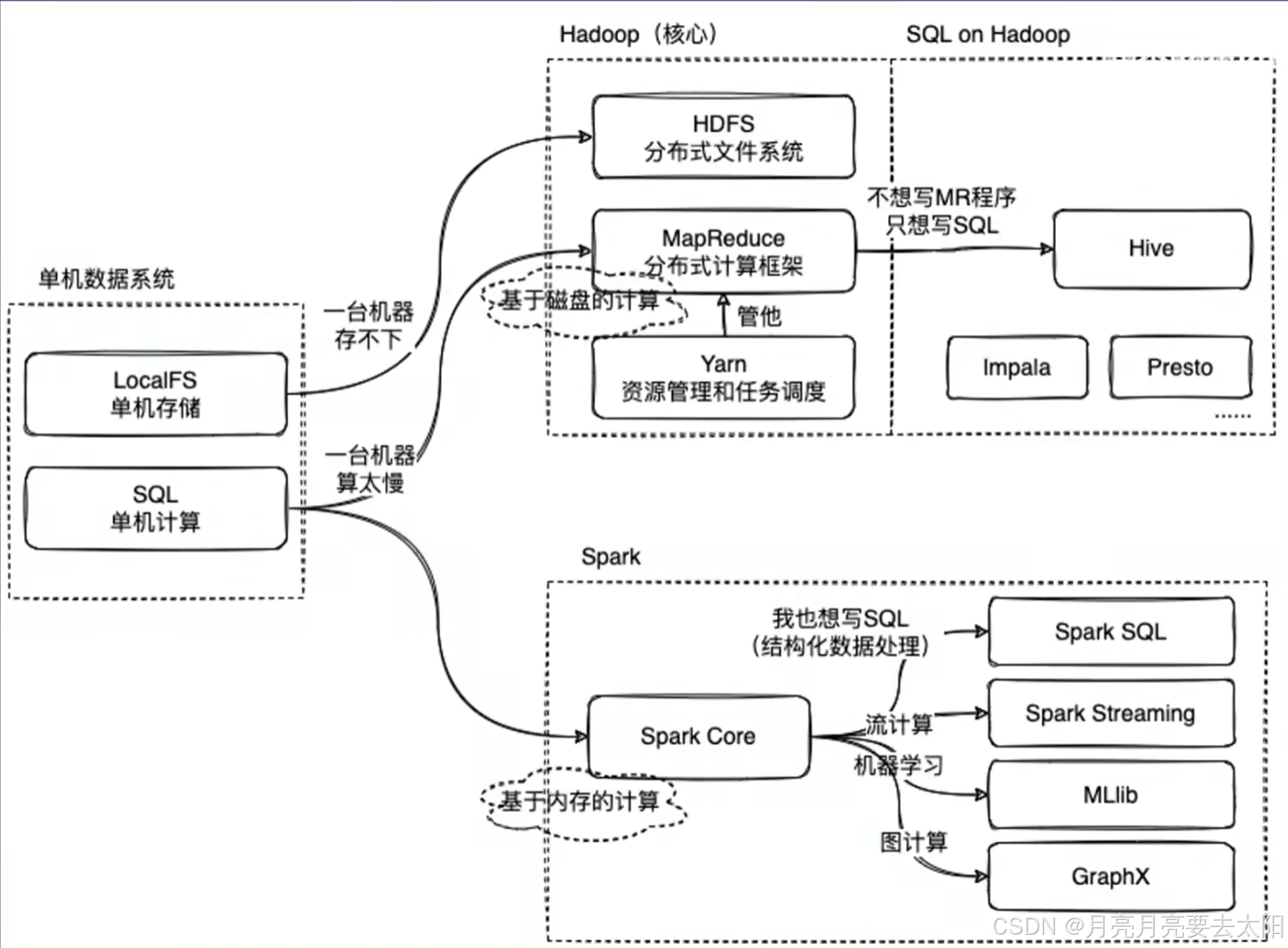
Part1:Hadoop、Hive、Spark关系概览 1、MapReduce on Hadoop 和spark都是数据计算框架,一般认为spark的速度比MR快2-3倍。 2、mapreduce是数据计算的过程,map将一个任务分成多个小任务,reduce的部分将结果汇总之后返回。 3、HIv…...

基于VMware虚拟机的Ubuntu22.04系统安装和配置(新手保姆级教程)
文章目录 一、前期准备1. 硬件要求2. 软件下载2-1. 下载虚拟机运行软件 二、安装虚拟机三、创建 Ubuntu 系统虚拟机四、Ubuntu 系统安装过程的配置五、更换国内镜像源六、设置静态 IP七、安装常用软件1. 编译工具2. 代码管理工具3. 安装代码编辑软件(VIM)…...
)
Python|基于DeepSeek大模型,自动生成语料数据(10)
前言 本文是该专栏的第10篇,后面会持续分享AI大模型干货知识,记得关注。 在本专栏之前,笔者在文章《Python|基于DeepSeek大模型,实现文本内容仿写(8)》中,有详细介绍通过Python+DeepSeek大模型,实现对目标文本内容的仿写。 而在本文中,笔者将基于DeepSeek大模型,通…...

基于SpringBoot的历史馆藏系统设计与实现(源码+SQL脚本+LW+部署讲解等)
专注于大学生项目实战开发,讲解,毕业答疑辅导,欢迎高校老师/同行前辈交流合作✌。 技术范围:SpringBoot、Vue、SSM、HLMT、小程序、Jsp、PHP、Nodejs、Python、爬虫、数据可视化、安卓app、大数据、物联网、机器学习等设计与开发。 主要内容:…...

蓝桥杯[每日两题] 真题:好数 神奇闹钟 (java版)
题目一:好数 题目描述 一个整数如果按从低位到高位的顺序,奇数位(个位、百位、万位 )上的数字是奇数,偶数位(十位、千位、十万位 )上的数字是偶数,我们就称之为“好数”。给定…...
基于BMO磁性细菌优化的WSN网络最优节点部署算法matlab仿真
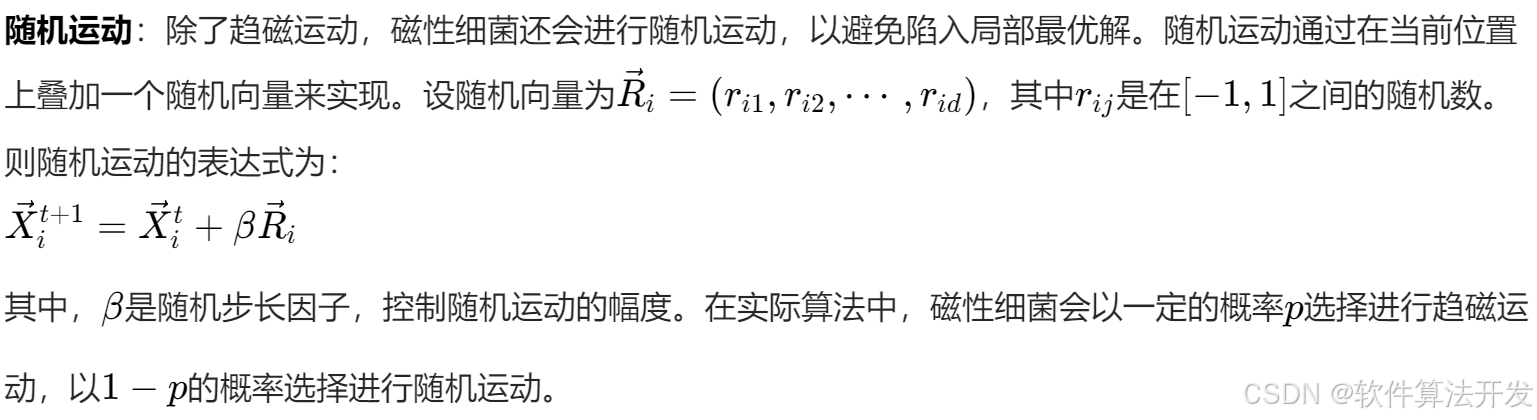
目录 1.程序功能描述 2.测试软件版本以及运行结果展示 3.核心程序 4.本算法原理 5.完整程序 1.程序功能描述 无线传感器网络(Wireless Sensor Network, WSN)由大量分布式传感器节点组成,用于监测物理或环境状况。节点部署是 WSN 的关键问…...

学习笔记:Python网络编程初探之基本概念(一)
一、网络目的 让你设备上的数据和其他设备上进行共享,使用网络能够把多方链接在一起,然后可以进行数据传递。 网络编程就是,让在不同的电脑上的软件能够进行数据传递,即进程之间的通信。 二、IP地址的作用 用来标记唯一一台电脑…...

Laya中runtime的用法
文章目录 0、环境:2.x版本1、runtime是什么2、使用实例情景需要做 3、script组件模式 0、环境:2.x版本 1、runtime是什么 简单来说,如果创建了一个scene,加了runtime和没加runtime的区别就是: 没加runtimeÿ…...

Docker中GPU的使用指南
在当今的计算领域,GPU(图形处理单元)已经成为了加速各种计算密集型任务的关键硬件,特别是在深度学习、科学模拟和高性能计算等领域。Docker作为流行的容器化平台,允许开发者将应用程序及其依赖打包成一个可移植的容器,在不同的环境中运行。当需要在Docker容器中利用GPU的…...

OpenCV计算摄影学(16)调整图像光照效果函数illuminationChange()
操作系统:ubuntu22.04 OpenCV版本:OpenCV4.9 IDE:Visual Studio Code 编程语言:C11 算法描述 对选定区域内的梯度场应用适当的非线性变换,然后通过泊松求解器重新积分,可以局部修改图像的表观照明。 cv::illuminati…...

【爬虫】开篇词
一、网络爬虫概述 二、网络爬虫的应用场景 三、爬虫的痛点 四、需要掌握哪些技术? 在这个信息爆炸的时代,如何高效地获取和处理海量数据成为一项核心技能。无论是数据分析、商业情报、学术研究,还是人工智能训练,网络爬虫&…...

C#变量与变量作用域详解
一、变量基础 1. 声明与初始化 声明语法:<数据类型> <变量名>(如 int age; string name)初始化要求: 1、 类或结构体中的字段变量(全局变量)无需显式初始化,默认值…...

深度解析 slabtop:实时监控内核缓存的利器
文章目录 深度解析 slabtop:实时监控内核缓存的利器slabtop 简介基本语法与选项命令语法主要选项详解 实际应用实例示例 1:每 5 秒刷新显示 slab 缓存信息示例 2:按名称排序,每 10 秒刷新一次显示 slab 缓存信息 如何解读 slabtop…...