
仿modou库one thread one loop式并发服务器
源码:田某super/moduo
目录
SERVER模块:
Buffer模块:
Socket模块:
Channel模块:
Connection模块:
Acceptor模块:
TimerQueue模块:
Poller模块:
EventLoop模块:
TcpServer模块:
HTTP协议组件模块:
Util模块:
HttpRequest模块:
HttpContext模块:
HttpServer模块:
通过咱们实现的⾼并发服务器组件,可以简洁快速的完成⼀个⾼性能的服务器搭建。
并且,通过组件内提供的不同应⽤层协议⽀持,也可以快速完成⼀个⾼性能应⽤服务器的搭建(当前 ,为了便于项⽬的演⽰,项⽬中提供HTTP协议组件的⽀持)。 在这⾥,要明确的是咱们要实现的是⼀个⾼并发服务器组件,因此当前的项⽬中并不包含实际的业务内容。
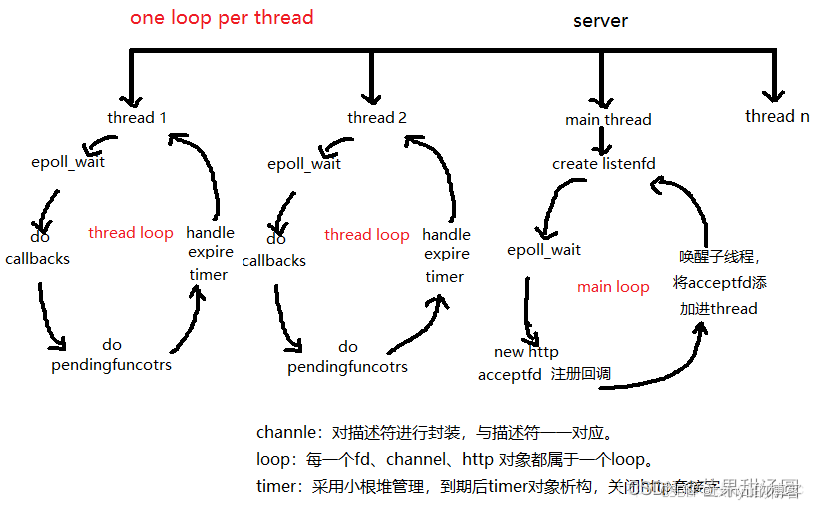
图片来源: 图解one loop per thread:使用muduo网络库实现web服务器_znzxc的博客-CSDN博客
本项目总共分为两大模块分别为Server和HTTP模块。
SERVER模块:
SERVER模块就是对所有的连接以及线程进⾏管理,让它们各司其职,在合适的时候做合适的事,最终完成⾼性能服务器组件的实现。
管理⽅⾯:
监听连接管理:对监听连接进⾏管理
通信连接管理:对通信连接进⾏管理
超时连接管理:对超时连接进⾏管理
基于以上可以将其分为多个子模块:
Buffer模块:
⽤于实现用户态缓冲区,提供数据缓冲,取出等功能。
class Buffer {private:std::vector<char> _buffer; //使用vector进行内存空间管理uint64_t _reader_idx; //读偏移uint64_t _writer_idx; //写偏移public:Buffer():_reader_idx(0), _writer_idx(0), _buffer(BUFFER_DEFAULT_SIZE){}char *Begin() { return &*_buffer.begin(); }//获取当前写入起始地址, _buffer的空间起始地址,加上写偏移量char *WritePosition() { return Begin() + _writer_idx; }//获取当前读取起始地址char *ReadPosition() { return Begin() + _reader_idx; }//获取缓冲区末尾空闲空间大小--写偏移之后的空闲空间, 总体空间大小减去写偏移uint64_t TailIdleSize() { return _buffer.size() - _writer_idx; }//获取缓冲区起始空闲空间大小--读偏移之前的空闲空间uint64_t HeadIdleSize() { return _reader_idx; }//获取可读数据大小 = 写偏移 - 读偏移uint64_t ReadAbleSize() { return _writer_idx - _reader_idx; }//将读偏移向后移动void MoveReadOffset(uint64_t len) { if (len == 0) return; //向后移动的大小,必须小于可读数据大小assert(len <= ReadAbleSize());_reader_idx += len;}//将写偏移向后移动 void MoveWriteOffset(uint64_t len) {//向后移动的大小,必须小于当前后边的空闲空间大小assert(len <= TailIdleSize());_writer_idx += len;}//确保可写空间足够(整体空闲空间够了就移动数据,否则就扩容)void EnsureWriteSpace(uint64_t len) {//如果末尾空闲空间大小足够,直接返回if (TailIdleSize() >= len) { return; }//末尾空闲空间不够,则判断加上起始位置的空闲空间大小是否足够, 够了就将数据移动到起始位置if (len <= TailIdleSize() + HeadIdleSize()) {//将数据移动到起始位置uint64_t rsz = ReadAbleSize();//把当前数据大小先保存起来std::copy(ReadPosition(), ReadPosition() + rsz, Begin());//把可读数据拷贝到起始位置_reader_idx = 0;    //将读偏移归0_writer_idx = rsz;  //将写位置置为可读数据大小, 因为当前的可读数据大小就是写偏移量}else {//总体空间不够,则需要扩容,不移动数据,直接给写偏移之后扩容足够空间即可DBG_LOG("RESIZE %ld", _writer_idx + len);_buffer.resize(_writer_idx + len);}} //写入数据void Write(const void *data, uint64_t len) {//1. 保证有足够空间,2. 拷贝数据进去if (len == 0) return;EnsureWriteSpace(len);const char *d = (const char *)data;std::copy(d, d + len, WritePosition());}void WriteAndPush(const void *data, uint64_t len) {Write(data, len);MoveWriteOffset(len);}void WriteString(const std::string &data) {return Write(data.c_str(), data.size());}void WriteStringAndPush(const std::string &data) {WriteString(data);MoveWriteOffset(data.size());}void WriteBuffer(Buffer &data) {return Write(data.ReadPosition(), data.ReadAbleSize());}void WriteBufferAndPush(Buffer &data) { WriteBuffer(data);MoveWriteOffset(data.ReadAbleSize());}//读取数据void Read(void *buf, uint64_t len) {//要求要获取的数据大小必须小于可读数据大小assert(len <= ReadAbleSize());std::copy(ReadPosition(), ReadPosition() + len, (char*)buf);}void ReadAndPop(void *buf, uint64_t len) {Read(buf, len);MoveReadOffset(len);}std::string ReadAsString(uint64_t len) {//要求要获取的数据大小必须小于可读数据大小assert(len <= ReadAbleSize());std::string str;str.resize(len);Read(&str[0], len);return str;}std::string ReadAsStringAndPop(uint64_t len) {assert(len <= ReadAbleSize());std::string str = ReadAsString(len);MoveReadOffset(len);return str;}char *FindCRLF() {char *res = (char*)memchr(ReadPosition(), '\n', ReadAbleSize());return res;}/*通常获取一行数据,这种情况针对是*/std::string GetLine() {char *pos = FindCRLF();if (pos == NULL) {return "";}// +1是为了把换行字符也取出来。return ReadAsString(pos - ReadPosition() + 1);}std::string GetLineAndPop() {std::string str = GetLine();MoveReadOffset(str.size());return str;}//清空缓冲区void Clear() {//只需要将偏移量归0即可_reader_idx = 0;_writer_idx = 0;}
};
Socket模块:
封装套接字
class Socket {private:int _sockfd;public:Socket():_sockfd(-1) {}Socket(int fd): _sockfd(fd) {}~Socket() { Close(); }int Fd() { return _sockfd; }//创建套接字bool Create() {// int socket(int domain, int type, int protocol)_sockfd = socket(AF_INET, SOCK_STREAM, IPPROTO_TCP);if (_sockfd < 0) {ERR_LOG("CREATE SOCKET FAILED!!");return false;}return true;}//绑定地址信息bool Bind(const std::string &ip, uint16_t port) {struct sockaddr_in addr;addr.sin_family = AF_INET;addr.sin_port = htons(port);addr.sin_addr.s_addr = inet_addr(ip.c_str());socklen_t len = sizeof(struct sockaddr_in);// int bind(int sockfd, struct sockaddr*addr, socklen_t len);int ret = bind(_sockfd, (struct sockaddr*)&addr, len);if (ret < 0) {ERR_LOG("BIND ADDRESS FAILED!");return false;}return true;}//开始监听bool Listen(int backlog = MAX_LISTEN) {// int listen(int backlog)int ret = listen(_sockfd, backlog);if (ret < 0) {ERR_LOG("SOCKET LISTEN FAILED!");return false;}return true;}//向服务器发起连接bool Connect(const std::string &ip, uint16_t port) {struct sockaddr_in addr;addr.sin_family = AF_INET;addr.sin_port = htons(port);addr.sin_addr.s_addr = inet_addr(ip.c_str());socklen_t len = sizeof(struct sockaddr_in);// int connect(int sockfd, struct sockaddr*addr, socklen_t len);int ret = connect(_sockfd, (struct sockaddr*)&addr, len);if (ret < 0) {ERR_LOG("CONNECT SERVER FAILED!");return false;}return true;}//获取新连接int Accept() {// int accept(int sockfd, struct sockaddr *addr, socklen_t *len);int newfd = accept(_sockfd, NULL, NULL);if (newfd < 0) {ERR_LOG("SOCKET ACCEPT FAILED!");return -1;}return newfd;}//接收数据ssize_t Recv(void *buf, size_t len, int flag = 0) {// ssize_t recv(int sockfd, void *buf, size_t len, int flag);ssize_t ret = recv(_sockfd, buf, len, flag);if (ret <= 0) {//EAGAIN 当前socket的接收缓冲区中没有数据了,在非阻塞的情况下才会有这个错误//EINTR  表示当前socket的阻塞等待,被信号打断了,if (errno == EAGAIN || errno == EINTR) {return 0;//表示这次接收没有接收到数据}ERR_LOG("SOCKET RECV FAILED!!");return -1;}return ret; //实际接收的数据长度}ssize_t NonBlockRecv(void *buf, size_t len) {return Recv(buf, len, MSG_DONTWAIT); // MSG_DONTWAIT 表示当前接收为非阻塞。}//发送数据ssize_t Send(const void *buf, size_t len, int flag = 0) {// ssize_t send(int sockfd, void *data, size_t len, int flag);ssize_t ret = send(_sockfd, buf, len, flag);if (ret < 0) {if (errno == EAGAIN || errno == EINTR) {return 0;}ERR_LOG("SOCKET SEND FAILED!!");return -1;}return ret;//实际发送的数据长度}ssize_t NonBlockSend(void *buf, size_t len) {if (len == 0) return 0;return Send(buf, len, MSG_DONTWAIT); // MSG_DONTWAIT 表示当前发送为非阻塞。}//关闭套接字void Close() {if (_sockfd != -1) {close(_sockfd);_sockfd = -1;}}//创建一个服务端连接bool CreateServer(uint16_t port, const std::string &ip = "0.0.0.0", bool block_flag = false) {//1. 创建套接字,2. 绑定地址,3. 开始监听,4. 设置非阻塞, 5. 启动地址重用if (Create() == false) return false;if (block_flag) NonBlock();if (Bind(ip, port) == false) return false;if (Listen() == false) return false;ReuseAddress();return true;}//创建一个客户端连接bool CreateClient(uint16_t port, const std::string &ip) {//1. 创建套接字,2.指向连接服务器if (Create() == false) return false;if (Connect(ip, port) == false) return false;return true;}//设置套接字选项---开启地址端口重用void ReuseAddress() {// int setsockopt(int fd, int leve, int optname, void *val, int vallen)int val = 1;setsockopt(_sockfd, SOL_SOCKET, SO_REUSEADDR, (void*)&val, sizeof(int));val = 1;setsockopt(_sockfd, SOL_SOCKET, SO_REUSEPORT, (void*)&val, sizeof(int));}//设置套接字阻塞属性-- 设置为非阻塞void NonBlock() {//int fcntl(int fd, int cmd, ... /* arg */ );int flag = fcntl(_sockfd, F_GETFL, 0);fcntl(_sockfd, F_SETFL, flag | O_NONBLOCK);}
};
Channel模块:
Channel模块是对⼀个描述符需要进⾏的IO事件管理的模块,实现对描述符可读,可写,错误...事件的管理操作,以及Poller模块对描述符进⾏IO事件监控就绪后,根据不同的事件,回调不同的处理函数功能。
class Channel {private:int _fd;EventLoop *_loop;uint32_t _events;  // 当前需要监控的事件uint32_t _revents; // 当前连接触发的事件using EventCallback = std::function<void()>;EventCallback _read_callback;   //可读事件被触发的回调函数EventCallback _write_callback;  //可写事件被触发的回调函数EventCallback _error_callback;  //错误事件被触发的回调函数EventCallback _close_callback;  //连接断开事件被触发的回调函数EventCallback _event_callback;  //任意事件被触发的回调函数public:Channel(EventLoop *loop, int fd):_fd(fd), _events(0), _revents(0), _loop(loop) {}int Fd() { return _fd; }uint32_t Events() { return _events; }//获取想要监控的事件void SetREvents(uint32_t events) { _revents = events; }//设置实际就绪的事件void SetReadCallback(const EventCallback &cb) { _read_callback = cb; }void SetWriteCallback(const EventCallback &cb) { _write_callback = cb; }void SetErrorCallback(const EventCallback &cb) { _error_callback = cb; }void SetCloseCallback(const EventCallback &cb) { _close_callback = cb; }void SetEventCallback(const EventCallback &cb) { _event_callback = cb; }//当前是否监控了可读bool ReadAble() { return (_events & EPOLLIN); } //当前是否监控了可写bool WriteAble() { return (_events & EPOLLOUT); }//启动读事件监控void EnableRead() { _events |= EPOLLIN; Update(); }//启动写事件监控void EnableWrite() { _events |= EPOLLOUT; Update(); }//关闭读事件监控void DisableRead() { _events &= ~EPOLLIN; Update(); }//关闭写事件监控void DisableWrite() { _events &= ~EPOLLOUT; Update(); }//关闭所有事件监控void DisableAll() { _events = 0; Update(); }//移除监控void Remove();void Update();//事件处理,一旦连接触发了事件,就调用这个函数,自己触发了什么事件如何处理自己决定void HandleEvent() {if ((_revents & EPOLLIN) || (_revents & EPOLLRDHUP) || (_revents & EPOLLPRI)) {/*不管任何事件,都调用的回调函数*/if (_read_callback) _read_callback();}/*有可能会释放连接的操作事件,一次只处理一个*/if (_revents & EPOLLOUT) {if (_write_callback) _write_callback();}else if (_revents & EPOLLERR) {if (_error_callback) _error_callback();//一旦出错,就会释放连接,因此要放到前边调用任意回调}else if (_revents & EPOLLHUP) {if (_close_callback) _close_callback();}if (_event_callback) _event_callback();}
};
Connection模块:
Connection模块是对Buffer模块,Socket模块,Channel模块的⼀个整体封装,实现了对⼀个通信套接字的整体的管理,每⼀个进⾏数据通信的套接字(也就是accept获取到的新连接)都会使⽤ Connection进⾏管理。
class Connection : public std::enable_shared_from_this<Connection> {private:uint64_t _conn_id;  // 连接的唯一ID,便于连接的管理和查找//uint64_t _timer_id;   //定时器ID,必须是唯一的,这块为了简化操作使用conn_id作为定时器IDint _sockfd;        // 连接关联的文件描述符bool _enable_inactive_release;  // 连接是否启动非活跃销毁的判断标志,默认为falseEventLoop *_loop;   // 连接所关联的一个EventLoopConnStatu _statu;   // 连接状态Socket _socket;     // 套接字操作管理Channel _channel;   // 连接的事件管理Buffer _in_buffer;  // 输入缓冲区---存放从socket中读取到的数据Buffer _out_buffer; // 输出缓冲区---存放要发送给对端的数据Any _context;       // 请求的接收处理上下文/*这四个回调函数,是让服务器模块来设置的(其实服务器模块的处理回调也是组件使用者设置的)*//*换句话说,这几个回调都是组件使用者使用的*/using ConnectedCallback = std::function<void(const PtrConnection&)>;using MessageCallback = std::function<void(const PtrConnection&, Buffer *)>;using ClosedCallback = std::function<void(const PtrConnection&)>;using AnyEventCallback = std::function<void(const PtrConnection&)>;ConnectedCallback _connected_callback;MessageCallback _message_callback;ClosedCallback _closed_callback;AnyEventCallback _event_callback;/*组件内的连接关闭回调--组件内设置的,因为服务器组件内会把所有的连接管理起来,一旦某个连接要关闭*//*就应该从管理的地方移除掉自己的信息*/ClosedCallback _server_closed_callback;private:/*五个channel的事件回调函数*///描述符可读事件触发后调用的函数,接收socket数据放到接收缓冲区中,然后调用_message_callbackvoid HandleRead() {//1. 接收socket的数据,放到缓冲区char buf[65536];ssize_t ret = _socket.NonBlockRecv(buf, 65535);if (ret < 0) {//出错了,不能直接关闭连接return ShutdownInLoop();}//这里的等于0表示的是没有读取到数据,而并不是连接断开了,连接断开返回的是-1//将数据放入输入缓冲区,写入之后顺便将写偏移向后移动_in_buffer.WriteAndPush(buf, ret);//2. 调用message_callback进行业务处理if (_in_buffer.ReadAbleSize() > 0) {//shared_from_this--从当前对象自身获取自身的shared_ptr管理对象return _message_callback(shared_from_this(), &_in_buffer);}}//描述符可写事件触发后调用的函数,将发送缓冲区中的数据进行发送void HandleWrite() {//_out_buffer中保存的数据就是要发送的数据ssize_t ret = _socket.NonBlockSend(_out_buffer.ReadPosition(), _out_buffer.ReadAbleSize());if (ret < 0) {//发送错误就该关闭连接了,if (_in_buffer.ReadAbleSize() > 0) {_message_callback(shared_from_this(), &_in_buffer);}return Release();//这时候就是实际的关闭释放操作了。}_out_buffer.MoveReadOffset(ret);//千万不要忘了,将读偏移向后移动if (_out_buffer.ReadAbleSize() == 0) {_channel.DisableWrite();// 没有数据待发送了,关闭写事件监控//如果当前是连接待关闭状态,则有数据,发送完数据释放连接,没有数据则直接释放if (_statu == DISCONNECTING) {return Release();}}return;}//描述符触发挂断事件void HandleClose() {/*一旦连接挂断了,套接字就什么都干不了了,因此有数据待处理就处理一下,完毕关闭连接*/if (_in_buffer.ReadAbleSize() > 0) {_message_callback(shared_from_this(), &_in_buffer);}return Release();}//描述符触发出错事件void HandleError() {return HandleClose();}//描述符触发任意事件: 1. 刷新连接的活跃度--延迟定时销毁任务;  2. 调用组件使用者的任意事件回调void HandleEvent() {if (_enable_inactive_release == true)  {  _loop->TimerRefresh(_conn_id); }if (_event_callback)  {  _event_callback(shared_from_this()); }}//连接获取之后,所处的状态下要进行各种设置(启动读监控,调用回调函数)void EstablishedInLoop() {// 1. 修改连接状态;  2. 启动读事件监控;  3. 调用回调函数assert(_statu == CONNECTING);//当前的状态必须一定是上层的半连接状态_statu = CONNECTED;//当前函数执行完毕,则连接进入已完成连接状态// 一旦启动读事件监控就有可能会立即触发读事件,如果这时候启动了非活跃连接销毁_channel.EnableRead();if (_connected_callback) _connected_callback(shared_from_this());}//这个接口才是实际的释放接口void ReleaseInLoop() {//1. 修改连接状态,将其置为DISCONNECTED_statu = DISCONNECTED;//2. 移除连接的事件监控_channel.Remove();//3. 关闭描述符_socket.Close();//4. 如果当前定时器队列中还有定时销毁任务,则取消任务if (_loop->HasTimer(_conn_id)) CancelInactiveReleaseInLoop();//5. 调用关闭回调函数,避免先移除服务器管理的连接信息导致Connection被释放,再去处理会出错,因此先调用用户的回调函数if (_closed_callback) _closed_callback(shared_from_this());//移除服务器内部管理的连接信息if (_server_closed_callback) _server_closed_callback(shared_from_this());}//这个接口并不是实际的发送接口,而只是把数据放到了发送缓冲区,启动了可写事件监控void SendInLoop(Buffer &buf) {if (_statu == DISCONNECTED) return ;_out_buffer.WriteBufferAndPush(buf);if (_channel.WriteAble() == false) {_channel.EnableWrite();}}//这个关闭操作并非实际的连接释放操作,需要判断还有没有数据待处理,待发送void ShutdownInLoop() {_statu = DISCONNECTING;// 设置连接为半关闭状态if (_in_buffer.ReadAbleSize() > 0) {if (_message_callback) _message_callback(shared_from_this(), &_in_buffer);}//要么就是写入数据的时候出错关闭,要么就是没有待发送数据,直接关闭if (_out_buffer.ReadAbleSize() > 0) {if (_channel.WriteAble() == false) {_channel.EnableWrite();}}if (_out_buffer.ReadAbleSize() == 0) {Release();}}//启动非活跃连接超时释放规则void EnableInactiveReleaseInLoop(int sec) {//1. 将判断标志 _enable_inactive_release 置为true_enable_inactive_release = true;//2. 如果当前定时销毁任务已经存在,那就刷新延迟一下即可if (_loop->HasTimer(_conn_id)) {return _loop->TimerRefresh(_conn_id);}//3. 如果不存在定时销毁任务,则新增_loop->TimerAdd(_conn_id, sec, std::bind(&Connection::Release, this));}void CancelInactiveReleaseInLoop() {_enable_inactive_release = false;if (_loop->HasTimer(_conn_id)) { _loop->TimerCancel(_conn_id); }}void UpgradeInLoop(const Any &context, const ConnectedCallback &conn, const MessageCallback &msg, const ClosedCallback &closed, const AnyEventCallback &event) {_context = context;_connected_callback = conn;_message_callback = msg;_closed_callback = closed;_event_callback = event;}public:Connection(EventLoop *loop, uint64_t conn_id, int sockfd):_conn_id(conn_id), _sockfd(sockfd),_enable_inactive_release(false), _loop(loop), _statu(CONNECTING), _socket(_sockfd),_channel(loop, _sockfd) {_channel.SetCloseCallback(std::bind(&Connection::HandleClose, this));_channel.SetEventCallback(std::bind(&Connection::HandleEvent, this));_channel.SetReadCallback(std::bind(&Connection::HandleRead, this));_channel.SetWriteCallback(std::bind(&Connection::HandleWrite, this));_channel.SetErrorCallback(std::bind(&Connection::HandleError, this));}~Connection() { DBG_LOG("RELEASE CONNECTION:%p", this); }//获取管理的文件描述符int Fd() { return _sockfd; }//获取连接IDint Id() { return _conn_id; }//是否处于CONNECTED状态bool Connected() { return (_statu == CONNECTED); }//设置上下文--连接建立完成时进行调用void SetContext(const Any &context) { _context = context; }//获取上下文,返回的是指针Any *GetContext() { return &_context; }void SetConnectedCallback(const ConnectedCallback&cb) { _connected_callback = cb; }void SetMessageCallback(const MessageCallback&cb) { _message_callback = cb; }void SetClosedCallback(const ClosedCallback&cb) { _closed_callback = cb; }void SetAnyEventCallback(const AnyEventCallback&cb) { _event_callback = cb; }void SetSrvClosedCallback(const ClosedCallback&cb) { _server_closed_callback = cb; }//连接建立就绪后,进行channel回调设置,启动读监控,调用_connected_callbackvoid Established() {_loop->RunInLoop(std::bind(&Connection::EstablishedInLoop, this));}//发送数据,将数据放到发送缓冲区,启动写事件监控void Send(const char *data, size_t len) {//外界传入的data,可能是个临时的空间,我们现在只是把发送操作压入了任务池,有可能并没有被立即执行//因此有可能执行的时候,data指向的空间有可能已经被释放了。Buffer buf;buf.WriteAndPush(data, len);_loop->RunInLoop(std::bind(&Connection::SendInLoop, this, std::move(buf)));}//提供给组件使用者的关闭接口--并不实际关闭,需要判断有没有数据待处理void Shutdown() {_loop->RunInLoop(std::bind(&Connection::ShutdownInLoop, this));}void Release() {_loop->QueueInLoop(std::bind(&Connection::ReleaseInLoop, this));}//启动非活跃销毁,并定义多长时间无通信就是非活跃,添加定时任务void EnableInactiveRelease(int sec) {_loop->RunInLoop(std::bind(&Connection::EnableInactiveReleaseInLoop, this, sec));}//取消非活跃销毁void CancelInactiveRelease() {_loop->RunInLoop(std::bind(&Connection::CancelInactiveReleaseInLoop, this));}//切换协议---重置上下文以及阶段性回调处理函数 -- 而是这个接口必须在EventLoop线程中立即执行//防备新的事件触发后,处理的时候,切换任务还没有被执行--会导致数据使用原协议处理了。void Upgrade(const Any &context, const ConnectedCallback &conn, const MessageCallback &msg, const ClosedCallback &closed, const AnyEventCallback &event) {_loop->AssertInLoop();_loop->RunInLoop(std::bind(&Connection::UpgradeInLoop, this, context, conn, msg, closed, event));}
};
Acceptor模块:
Acceptor模块是对Socket模块,Channel模块的⼀个整体封装,实现了对⼀个监听套接字的整体的管理。
class Acceptor {private:Socket _socket;//用于创建监听套接字EventLoop *_loop; //用于对监听套接字进行事件监控Channel _channel; //用于对监听套接字进行事件管理using AcceptCallback = std::function<void(int)>;AcceptCallback _accept_callback;private:/*监听套接字的读事件回调处理函数---获取新连接,调用_accept_callback函数进行新连接处理*/void HandleRead() {int newfd = _socket.Accept();if (newfd < 0) {return ;}if (_accept_callback) _accept_callback(newfd);}int CreateServer(int port) {bool ret = _socket.CreateServer(port);assert(ret == true);return _socket.Fd();}public:/*不能将启动读事件监控,放到构造函数中,必须在设置回调函数后,再去启动*//*否则有可能造成启动监控后,立即有事件,处理的时候,回调函数还没设置:新连接得不到处理,且资源泄漏*/Acceptor(EventLoop *loop, int port): _socket(CreateServer(port)), _loop(loop), _channel(loop, _socket.Fd()) {_channel.SetReadCallback(std::bind(&Acceptor::HandleRead, this));}void SetAcceptCallback(const AcceptCallback &cb) { _accept_callback = cb; }void Listen() { _channel.EnableRead(); }
};
TimerQueue模块:
TimerQueue模块是实现固定时间定时任务的模块,可以理解就是要给定时任务管理器,向定时任务管理器中添加⼀个任务,任务将在固定时间后被执⾏,同时也可以通过刷新定时任务来延迟任务的执⾏。
using TaskFunc = std::function<void()>;
using ReleaseFunc = std::function<void()>;
class TimerTask{private:uint64_t _id; // 定时器任务对象IDuint32_t _timeout; //定时任务的超时时间bool _canceled; // false-表示没有被取消, true-表示被取消TaskFunc _task_cb; //定时器对象要执行的定时任务ReleaseFunc _release; //用于删除TimerWheel中保存的定时器对象信息public:TimerTask(uint64_t id, uint32_t delay, const TaskFunc &cb): _id(id), _timeout(delay), _task_cb(cb), _canceled(false) {}~TimerTask() { if (_canceled == false) _task_cb(); _release(); }void Cancel() { _canceled = true; }void SetRelease(const ReleaseFunc &cb) { _release = cb; }uint32_t DelayTime() { return _timeout; }
};class TimerWheel {private:using WeakTask = std::weak_ptr<TimerTask>;using PtrTask = std::shared_ptr<TimerTask>;int _tick; //当前的秒针,走到哪里释放哪里,释放哪里,就相当于执行哪里的任务int _capacity; //表盘最大数量---其实就是最大延迟时间std::vector<std::vector<PtrTask>> _wheel;std::unordered_map<uint64_t, WeakTask> _timers;EventLoop *_loop;int _timerfd;//定时器描述符--可读事件回调就是读取计数器,执行定时任务std::unique_ptr<Channel> _timer_channel;private:void RemoveTimer(uint64_t id) {auto it = _timers.find(id);if (it != _timers.end()) {_timers.erase(it);}}static int CreateTimerfd() {int timerfd = timerfd_create(CLOCK_MONOTONIC, 0);if (timerfd < 0) {ERR_LOG("TIMERFD CREATE FAILED!");abort();}//int timerfd_settime(int fd, int flags, struct itimerspec *new, struct itimerspec *old);struct itimerspec itime;itime.it_value.tv_sec = 1;itime.it_value.tv_nsec = 0;//第一次超时时间为1s后itime.it_interval.tv_sec = 1; itime.it_interval.tv_nsec = 0; //第一次超时后,每次超时的间隔时timerfd_settime(timerfd, 0, &itime, NULL);return timerfd;}int ReadTimefd() {uint64_t times;//有可能因为其他描述符的事件处理花费事件比较长,然后在处理定时器描述符事件的时候,有可能就已经超时了很多次//read读取到的数据times就是从上一次read之后超时的次数int ret = read(_timerfd, ×, 8);if (ret < 0) {ERR_LOG("READ TIMEFD FAILED!");abort();}return times;}//这个函数应该每秒钟被执行一次,相当于秒针向后走了一步void RunTimerTask() {_tick = (_tick + 1) % _capacity;_wheel[_tick].clear();//清空指定位置的数组,就会把数组中保存的所有管理定时器对象的shared_ptr释放掉}void OnTime() {//根据实际超时的次数,执行对应的超时任务int times = ReadTimefd();for (int i = 0; i < times; i++) {RunTimerTask();}}void TimerAddInLoop(uint64_t id, uint32_t delay, const TaskFunc &cb) {PtrTask pt(new TimerTask(id, delay, cb));pt->SetRelease(std::bind(&TimerWheel::RemoveTimer, this, id));int pos = (_tick + delay) % _capacity;_wheel[pos].push_back(pt);_timers[id] = WeakTask(pt);}void TimerRefreshInLoop(uint64_t id) {//通过保存的定时器对象的weak_ptr构造一个shared_ptr出来,添加到轮子中auto it = _timers.find(id);if (it == _timers.end()) {return;//没找着定时任务,没法刷新,没法延迟}PtrTask pt = it->second.lock();//lock获取weak_ptr管理的对象对应的shared_ptrint delay = pt->DelayTime();int pos = (_tick + delay) % _capacity;_wheel[pos].push_back(pt);}void TimerCancelInLoop(uint64_t id) {auto it = _timers.find(id);if (it == _timers.end()) {return;//没找着定时任务,没法刷新,没法延迟}PtrTask pt = it->second.lock();if (pt) pt->Cancel();}public:TimerWheel(EventLoop *loop):_capacity(60), _tick(0), _wheel(_capacity), _loop(loop), _timerfd(CreateTimerfd()), _timer_channel(new Channel(_loop, _timerfd)) {_timer_channel->SetReadCallback(std::bind(&TimerWheel::OnTime, this));_timer_channel->EnableRead();//启动读事件监控}/*定时器中有个_timers成员,定时器信息的操作有可能在多线程中进行,因此需要考虑线程安全问题*//*如果不想加锁,那就把对定期的所有操作,都放到一个线程中进行*/void TimerAdd(uint64_t id, uint32_t delay, const TaskFunc &cb);//刷新/延迟定时任务void TimerRefresh(uint64_t id);void TimerCancel(uint64_t id);/*这个接口存在线程安全问题--这个接口实际上不能被外界使用者调用,只能在模块内,在对应的EventLoop线程内执行*/bool HasTimer(uint64_t id) {auto it = _timers.find(id);if (it == _timers.end()) {return false;}return true;}
};Poller模块:
Poller模块是对epoll进⾏封装的⼀个模块,主要实现epoll的IO事件添加,修改,移除,获取活跃连接功能。
class Poller {private:int _epfd;struct epoll_event _evs[MAX_EPOLLEVENTS];std::unordered_map<int, Channel *> _channels;private://对epoll的直接操作void Update(Channel *channel, int op) {// int epoll_ctl(int epfd, int op,  int fd,  struct epoll_event *ev);int fd = channel->Fd();struct epoll_event ev;ev.data.fd = fd;ev.events = channel->Events();int ret = epoll_ctl(_epfd, op, fd, &ev);if (ret < 0) {ERR_LOG("EPOLLCTL FAILED!");}return;}//判断一个Channel是否已经添加了事件监控bool HasChannel(Channel *channel) {auto it = _channels.find(channel->Fd());if (it == _channels.end()) {return false;}return true;}public:Poller() {_epfd = epoll_create(MAX_EPOLLEVENTS);if (_epfd < 0) {ERR_LOG("EPOLL CREATE FAILED!!");abort();//退出程序}}//添加或修改监控事件void UpdateEvent(Channel *channel) {bool ret = HasChannel(channel);if (ret == false) {//不存在则添加_channels.insert(std::make_pair(channel->Fd(), channel));return Update(channel, EPOLL_CTL_ADD);}return Update(channel, EPOLL_CTL_MOD);}//移除监控void RemoveEvent(Channel *channel) {auto it = _channels.find(channel->Fd());if (it != _channels.end()) {_channels.erase(it);}Update(channel, EPOLL_CTL_DEL);}//开始监控,返回活跃连接void Poll(std::vector<Channel*> *active) {// int epoll_wait(int epfd, struct epoll_event *evs, int maxevents, int timeout)int nfds = epoll_wait(_epfd, _evs, MAX_EPOLLEVENTS, -1);if (nfds < 0) {if (errno == EINTR) {return ;}ERR_LOG("EPOLL WAIT ERROR:%s\n", strerror(errno));abort();//退出程序}for (int i = 0; i < nfds; i++) {auto it = _channels.find(_evs[i].data.fd);assert(it != _channels.end());it->second->SetREvents(_evs[i].events);//设置实际就绪的事件active->push_back(it->second);}return;}
};
EventLoop模块:
EventLoop模块可以理解就是我们上边所说的Reactor模块,它是对Poller模块,TimerQueue模块,Socket模块的⼀个整体封装,进⾏所有描述符的事件监控。
EventLoop模块必然是⼀个对象对应⼀个线程的模块,线程内部的⽬的就是运⾏EventLoop的启动函数。
class EventLoop {private:using Functor = std::function<void()>;std::thread::id _thread_id;//线程IDint _event_fd;//eventfd唤醒IO事件监控有可能导致的阻塞std::unique_ptr<Channel> _event_channel;Poller _poller;//进行所有描述符的事件监控std::vector<Functor> _tasks;//任务池std::mutex _mutex;//实现任务池操作的线程安全TimerWheel _timer_wheel;//定时器模块public://执行任务池中的所有任务void RunAllTask() {std::vector<Functor> functor;{std::unique_lock<std::mutex> _lock(_mutex);_tasks.swap(functor);}for (auto &f : functor) {f();}return ;}static int CreateEventFd() {int efd = eventfd(0, EFD_CLOEXEC | EFD_NONBLOCK);if (efd < 0) {ERR_LOG("CREATE EVENTFD FAILED!!");abort();//让程序异常退出}return efd;}void ReadEventfd() {uint64_t res = 0;int ret = read(_event_fd, &res, sizeof(res));if (ret < 0) {//EINTR -- 被信号打断;   EAGAIN -- 表示无数据可读if (errno == EINTR || errno == EAGAIN) {return;}ERR_LOG("READ EVENTFD FAILED!");abort();}return ;}void WeakUpEventFd() {uint64_t val = 1;int ret = write(_event_fd, &val, sizeof(val));if (ret < 0) {if (errno == EINTR) {return;}ERR_LOG("READ EVENTFD FAILED!");abort();}return ;}public:EventLoop():_thread_id(std::this_thread::get_id()), _event_fd(CreateEventFd()), _event_channel(new Channel(this, _event_fd)),_timer_wheel(this) {//给eventfd添加可读事件回调函数,读取eventfd事件通知次数_event_channel->SetReadCallback(std::bind(&EventLoop::ReadEventfd, this));//启动eventfd的读事件监控_event_channel->EnableRead();}//三步走--事件监控-》就绪事件处理-》执行任务void Start() {while(1) {//1. 事件监控, std::vector<Channel *> actives;_poller.Poll(&actives);//2. 事件处理。 for (auto &channel : actives) {channel->HandleEvent();}//3. 执行任务RunAllTask();}}//用于判断当前线程是否是EventLoop对应的线程;bool IsInLoop() {return (_thread_id == std::this_thread::get_id());}void AssertInLoop() {assert(_thread_id == std::this_thread::get_id());}//判断将要执行的任务是否处于当前线程中,如果是则执行,不是则压入队列。void RunInLoop(const Functor &cb) {if (IsInLoop()) {return cb();}return QueueInLoop(cb);}//将操作压入任务池void QueueInLoop(const Functor &cb) {{std::unique_lock<std::mutex> _lock(_mutex);_tasks.push_back(cb);}//唤醒有可能因为没有事件就绪,而导致的epoll阻塞;//其实就是给eventfd写入一个数据,eventfd就会触发可读事件WeakUpEventFd();}//添加/修改描述符的事件监控void UpdateEvent(Channel *channel) { return _poller.UpdateEvent(channel); }//移除描述符的监控void RemoveEvent(Channel *channel) { return _poller.RemoveEvent(channel); }void TimerAdd(uint64_t id, uint32_t delay, const TaskFunc &cb) { return _timer_wheel.TimerAdd(id, delay, cb); }void TimerRefresh(uint64_t id) { return _timer_wheel.TimerRefresh(id); }void TimerCancel(uint64_t id) { return _timer_wheel.TimerCancel(id); }bool HasTimer(uint64_t id) { return _timer_wheel.HasTimer(id); }
};
TcpServer模块:
这个模块是⼀个整体Tcp服务器模块的封装,内部封装了Acceptor模块,EventLoopThreadPool模
块。
class TcpServer {private:uint64_t _next_id;      //这是一个自动增长的连接ID,int _port;int _timeout;           //这是非活跃连接的统计时间---多长时间无通信就是非活跃连接bool _enable_inactive_release;//是否启动了非活跃连接超时销毁的判断标志EventLoop _baseloop;    //这是主线程的EventLoop对象,负责监听事件的处理Acceptor _acceptor;    //这是监听套接字的管理对象LoopThreadPool _pool;   //这是从属EventLoop线程池std::unordered_map<uint64_t, PtrConnection> _conns;//保存管理所有连接对应的shared_ptr对象using ConnectedCallback = std::function<void(const PtrConnection&)>;using MessageCallback = std::function<void(const PtrConnection&, Buffer *)>;using ClosedCallback = std::function<void(const PtrConnection&)>;using AnyEventCallback = std::function<void(const PtrConnection&)>;using Functor = std::function<void()>;ConnectedCallback _connected_callback;MessageCallback _message_callback;ClosedCallback _closed_callback;AnyEventCallback _event_callback;private:void RunAfterInLoop(const Functor &task, int delay) {_next_id++;_baseloop.TimerAdd(_next_id, delay, task);}//为新连接构造一个Connection进行管理void NewConnection(int fd) {_next_id++;PtrConnection conn(new Connection(_pool.NextLoop(), _next_id, fd));conn->SetMessageCallback(_message_callback);conn->SetClosedCallback(_closed_callback);conn->SetConnectedCallback(_connected_callback);conn->SetAnyEventCallback(_event_callback);conn->SetSrvClosedCallback(std::bind(&TcpServer::RemoveConnection, this, std::placeholders::_1));if (_enable_inactive_release) conn->EnableInactiveRelease(_timeout);//启动非活跃超时销毁conn->Established();//就绪初始化_conns.insert(std::make_pair(_next_id, conn));}void RemoveConnectionInLoop(const PtrConnection &conn) {int id = conn->Id();auto it = _conns.find(id);if (it != _conns.end()) {_conns.erase(it);}}//从管理Connection的_conns中移除连接信息void RemoveConnection(const PtrConnection &conn) {_baseloop.RunInLoop(std::bind(&TcpServer::RemoveConnectionInLoop, this, conn));}public:TcpServer(int port):_port(port), _next_id(0), _enable_inactive_release(false), _acceptor(&_baseloop, port),_pool(&_baseloop) {_acceptor.SetAcceptCallback(std::bind(&TcpServer::NewConnection, this, std::placeholders::_1));_acceptor.Listen();//将监听套接字挂到baseloop上}void SetThreadCount(int count) { return _pool.SetThreadCount(count); }void SetConnectedCallback(const ConnectedCallback&cb) { _connected_callback = cb; }void SetMessageCallback(const MessageCallback&cb) { _message_callback = cb; }void SetClosedCallback(const ClosedCallback&cb) { _closed_callback = cb; }void SetAnyEventCallback(const AnyEventCallback&cb) { _event_callback = cb; }void EnableInactiveRelease(int timeout) { _timeout = timeout; _enable_inactive_release = true; }//用于添加一个定时任务void RunAfter(const Functor &task, int delay) {_baseloop.RunInLoop(std::bind(&TcpServer::RunAfterInLoop, this, task, delay));}void Start() { _pool.Create();  _baseloop.Start(); }
};void Channel::Remove() { return _loop->RemoveEvent(this); }
void Channel::Update() { return _loop->UpdateEvent(this); }
void TimerWheel::TimerAdd(uint64_t id, uint32_t delay, const TaskFunc &cb) {_loop->RunInLoop(std::bind(&TimerWheel::TimerAddInLoop, this, id, delay, cb));
}
//刷新/延迟定时任务
void TimerWheel::TimerRefresh(uint64_t id) {_loop->RunInLoop(std::bind(&TimerWheel::TimerRefreshInLoop, this, id));
}
void TimerWheel::TimerCancel(uint64_t id) {_loop->RunInLoop(std::bind(&TimerWheel::TimerCancelInLoop, this, id));
}class NetWork {public:NetWork() {DBG_LOG("SIGPIPE INIT");signal(SIGPIPE, SIG_IGN);}
};
HTTP协议组件模块:
Util模块:
std::unordered_map<int, std::string> _statu_msg = {{100,  "Continue"},{101,  "Switching Protocol"},{102,  "Processing"},{103,  "Early Hints"},{200,  "OK"},{201,  "Created"},{202,  "Accepted"},{203,  "Non-Authoritative Information"},{204,  "No Content"},{205,  "Reset Content"},{206,  "Partial Content"},{207,  "Multi-Status"},{208,  "Already Reported"},{226,  "IM Used"},{300,  "Multiple Choice"},{301,  "Moved Permanently"},{302,  "Found"},{303,  "See Other"},{304,  "Not Modified"},{305,  "Use Proxy"},{306,  "unused"},{307,  "Temporary Redirect"},{308,  "Permanent Redirect"},{400,  "Bad Request"},{401,  "Unauthorized"},{402,  "Payment Required"},{403,  "Forbidden"},{404,  "Not Found"},{405,  "Method Not Allowed"},{406,  "Not Acceptable"},{407,  "Proxy Authentication Required"},{408,  "Request Timeout"},{409,  "Conflict"},{410,  "Gone"},{411,  "Length Required"},{412,  "Precondition Failed"},{413,  "Payload Too Large"},{414,  "URI Too Long"},{415,  "Unsupported Media Type"},{416,  "Range Not Satisfiable"},{417,  "Expectation Failed"},{418,  "I'm a teapot"},{421,  "Misdirected Request"},{422,  "Unprocessable Entity"},{423,  "Locked"},{424,  "Failed Dependency"},{425,  "Too Early"},{426,  "Upgrade Required"},{428,  "Precondition Required"},{429,  "Too Many Requests"},{431,  "Request Header Fields Too Large"},{451,  "Unavailable For Legal Reasons"},{501,  "Not Implemented"},{502,  "Bad Gateway"},{503,  "Service Unavailable"},{504,  "Gateway Timeout"},{505,  "HTTP Version Not Supported"},{506,  "Variant Also Negotiates"},{507,  "Insufficient Storage"},{508,  "Loop Detected"},{510,  "Not Extended"},{511,  "Network Authentication Required"}
};std::unordered_map<std::string, std::string> _mime_msg = {{".aac",        "audio/aac"},{".abw",        "application/x-abiword"},{".arc",        "application/x-freearc"},{".avi",        "video/x-msvideo"},{".azw",        "application/vnd.amazon.ebook"},{".bin",        "application/octet-stream"},{".bmp",        "image/bmp"},{".bz",         "application/x-bzip"},{".bz2",        "application/x-bzip2"},{".csh",        "application/x-csh"},{".css",        "text/css"},{".csv",        "text/csv"},{".doc",        "application/msword"},{".docx",       "application/vnd.openxmlformats-officedocument.wordprocessingml.document"},{".eot",        "application/vnd.ms-fontobject"},{".epub",       "application/epub+zip"},{".gif",        "image/gif"},{".htm",        "text/html"},{".html",       "text/html"},{".ico",        "image/vnd.microsoft.icon"},{".ics",        "text/calendar"},{".jar",        "application/java-archive"},{".jpeg",       "image/jpeg"},{".jpg",        "image/jpeg"},{".js",         "text/javascript"},{".json",       "application/json"},{".jsonld",     "application/ld+json"},{".mid",        "audio/midi"},{".midi",       "audio/x-midi"},{".mjs",        "text/javascript"},{".mp3",        "audio/mpeg"},{".mpeg",       "video/mpeg"},{".mpkg",       "application/vnd.apple.installer+xml"},{".odp",        "application/vnd.oasis.opendocument.presentation"},{".ods",        "application/vnd.oasis.opendocument.spreadsheet"},{".odt",        "application/vnd.oasis.opendocument.text"},{".oga",        "audio/ogg"},{".ogv",        "video/ogg"},{".ogx",        "application/ogg"},{".otf",        "font/otf"},{".png",        "image/png"},{".pdf",        "application/pdf"},{".ppt",        "application/vnd.ms-powerpoint"},{".pptx",       "application/vnd.openxmlformats-officedocument.presentationml.presentation"},{".rar",        "application/x-rar-compressed"},{".rtf",        "application/rtf"},{".sh",         "application/x-sh"},{".svg",        "image/svg+xml"},{".swf",        "application/x-shockwave-flash"},{".tar",        "application/x-tar"},{".tif",        "image/tiff"},{".tiff",       "image/tiff"},{".ttf",        "font/ttf"},{".txt",        "text/plain"},{".vsd",        "application/vnd.visio"},{".wav",        "audio/wav"},{".weba",       "audio/webm"},{".webm",       "video/webm"},{".webp",       "image/webp"},{".woff",       "font/woff"},{".woff2",      "font/woff2"},{".xhtml",      "application/xhtml+xml"},{".xls",        "application/vnd.ms-excel"},{".xlsx",       "application/vnd.openxmlformats-officedocument.spreadsheetml.sheet"},{".xml",        "application/xml"},{".xul",        "application/vnd.mozilla.xul+xml"},{".zip",        "application/zip"},{".3gp",        "video/3gpp"},{".3g2",        "video/3gpp2"},{".7z",         "application/x-7z-compressed"}
};class Util {public://字符串分割函数,将src字符串按照sep字符进行分割,得到的各个字串放到arry中,最终返回字串的数量static size_t Split(const std::string &src, const std::string &sep, std::vector<std::string> *arry) {size_t offset = 0;// 有10个字符,offset是查找的起始位置,范围应该是0~9,offset==10就代表已经越界了while(offset < src.size()) {size_t pos = src.find(sep, offset);//在src字符串偏移量offset处,开始向后查找sep字符/字串,返回查找到的位置if (pos == std::string::npos) {//没有找到特定的字符//将剩余的部分当作一个字串,放入arry中if(pos == src.size()) break;arry->push_back(src.substr(offset));return arry->size();}if (pos == offset) {offset = pos + sep.size();continue;//当前字串是一个空的,没有内容}arry->push_back(src.substr(offset, pos - offset));offset = pos + sep.size();}return arry->size();}//读取文件的所有内容,将读取的内容放到一个Buffer中static bool ReadFile(const std::string &filename, std::string *buf) {std::ifstream ifs(filename, std::ios::binary);if (ifs.is_open() == false) {printf("OPEN %s FILE FAILED!!", filename.c_str());return false;}size_t fsize = 0;ifs.seekg(0, ifs.end);//跳转读写位置到末尾fsize = ifs.tellg();  //获取当前读写位置相对于起始位置的偏移量,从末尾偏移刚好就是文件大小ifs.seekg(0, ifs.beg);//跳转到起始位置buf->resize(fsize); //开辟文件大小的空间ifs.read(&(*buf)[0], fsize);if (ifs.good() == false) {printf("READ %s FILE FAILED!!", filename.c_str());ifs.close();return false;}ifs.close();return true;}//向文件写入数据static bool WriteFile(const std::string &filename, const std::string &buf) {std::ofstream ofs(filename, std::ios::binary | std::ios::trunc);if (ofs.is_open() == false) {printf("OPEN %s FILE FAILED!!", filename.c_str());return false;}ofs.write(buf.c_str(), buf.size());if (ofs.good() == false) {ERR_LOG("WRITE %s FILE FAILED!", filename.c_str());ofs.close();    return false;}ofs.close();return true;}//URL编码,避免URL中资源路径与查询字符串中的特殊字符与HTTP请求中特殊字符产生歧义//编码格式:将特殊字符的ascii值,转换为两个16进制字符,前缀%   C++ -> C%2B%2B//  不编码的特殊字符: RFC3986文档规定 . - _ ~ 字母,数字属于绝对不编码字符//RFC3986文档规定,编码格式 %HH //W3C标准中规定,查询字符串中的空格,需要编码为+, 解码则是+转空格static std::string UrlEncode(const std::string url, bool convert_space_to_plus) {std::string res;for (auto &c : url) {if (c == '.' || c == '-' || c == '_' || c == '~' || isalnum(c)) {res += c;continue;}if (c == ' ' && convert_space_to_plus == true) {res += '+';continue;}//剩下的字符都是需要编码成为 %HH 格式char tmp[4] = {0};//snprintf 与 printf比较类似,都是格式化字符串,只不过一个是打印,一个是放到一块空间中snprintf(tmp, 4, "%%%02X", c);res += tmp;}return res;}static char HEXTOI(char c) {if (c >= '0' && c <= '9') {return c - '0';}else if (c >= 'a' && c <= 'z') {return c - 'a' + 10;}else if (c >= 'A' && c <= 'Z') {return c - 'A' + 10;}return -1; }static std::string UrlDecode(const std::string url, bool convert_plus_to_space) {//遇到了%,则将紧随其后的2个字符,转换为数字,第一个数字左移4位,然后加上第二个数字  + -> 2b  %2b->2 << 4 + 11std::string res;for (int i = 0; i < url.size(); i++) {if (url[i] == '+' && convert_plus_to_space == true) {res += ' ';continue;}if (url[i] == '%' && (i + 2) < url.size()) {char v1 = HEXTOI(url[i + 1]);char v2 = HEXTOI(url[i + 2]);char v = v1 * 16 + v2;res += v;i += 2;continue;}res += url[i];}return res;}//响应状态码的描述信息获取static std::string StatuDesc(int statu) {auto it = _statu_msg.find(statu);if (it != _statu_msg.end()) {return it->second;}return "Unknow";}//根据文件后缀名获取文件mimestatic std::string ExtMime(const std::string &filename) {// a.b.txt  先获取文件扩展名size_t pos = filename.find_last_of('.');if (pos == std::string::npos) {return "application/octet-stream";}//根据扩展名,获取mimestd::string ext = filename.substr(pos);auto it = _mime_msg.find(ext);if (it == _mime_msg.end()) {return "application/octet-stream";}return it->second;}//判断一个文件是否是一个目录static bool IsDirectory(const std::string &filename) {struct stat st;int ret = stat(filename.c_str(), &st);if (ret < 0) {return false;}return S_ISDIR(st.st_mode);}//判断一个文件是否是一个普通文件static bool IsRegular(const std::string &filename) {struct stat st;int ret = stat(filename.c_str(), &st);if (ret < 0) {return false;}return S_ISREG(st.st_mode);}//http请求的资源路径有效性判断// /index.html  --- 前边的/叫做相对根目录  映射的是某个服务器上的子目录// 想表达的意思就是,客户端只能请求相对根目录中的资源,其他地方的资源都不予理会// /../login, 这个路径中的..会让路径的查找跑到相对根目录之外,这是不合理的,不安全的static bool ValidPath(const std::string &path) {//思想:按照/进行路径分割,根据有多少子目录,计算目录深度,有多少层,深度不能小于0std::vector<std::string> subdir;Split(path, "/", &subdir);int level = 0;for (auto &dir : subdir) {if (dir == "..") {level--; //任意一层走出相对根目录,就认为有问题if (level < 0) return false;continue;}level++;}return true;}
};
HttpRequest模块:
class HttpRequest {public:std::string _method;      //请求方法std::string _path;        //资源路径std::string _version;     //协议版本std::string _body;        //请求正文std::smatch _matches;     //资源路径的正则提取数据std::unordered_map<std::string, std::string> _headers;  //头部字段std::unordered_map<std::string, std::string> _params;   //查询字符串public:HttpRequest():_version("HTTP/1.1") {}void ReSet() {_method.clear();_path.clear();_version = "HTTP/1.1";_body.clear();std::smatch match;_matches.swap(match);_headers.clear();_params.clear();}//插入头部字段void SetHeader(const std::string &key, const std::string &val) {_headers.insert(std::make_pair(key, val));}//判断是否存在指定头部字段bool HasHeader(const std::string &key) const {auto it = _headers.find(key);if (it == _headers.end()) {return false;}return true;}//获取指定头部字段的值std::string GetHeader(const std::string &key) const {auto it = _headers.find(key);if (it == _headers.end()) {return "";}return it->second;}//插入查询字符串void SetParam(const std::string &key, const std::string &val) {_params.insert(std::make_pair(key, val));}//判断是否有某个指定的查询字符串bool HasParam(const std::string &key) const {auto it = _params.find(key);if (it == _params.end()) {return false;}return true;}//获取指定的查询字符串std::string GetParam(const std::string &key) const {auto it = _params.find(key);if (it == _params.end()) {return "";}return it->second;}//获取正文长度size_t ContentLength() const {// Content-Length: 1234\r\nbool ret = HasHeader("Content-Length");if (ret == false) {return 0;}std::string clen = GetHeader("Content-Length");return std::stol(clen);}//判断是否是短链接bool Close() const {// 没有Connection字段,或者有Connection但是值是close,则都是短链接,否则就是长连接if (HasHeader("Connection") == true && GetHeader("Connection") == "keep-alive") {return false;}return true;}
};
HttpContext模块:
class HttpContext {private:int _resp_statu; //响应状态码HttpRecvStatu _recv_statu; //当前接收及解析的阶段状态HttpRequest _request;  //已经解析得到的请求信息private:bool ParseHttpLine(const std::string &line) {std::smatch matches;std::regex e("(GET|HEAD|POST|PUT|DELETE) ([^?]*)(?:\\?(.*))? (HTTP/1\\.[01])(?:\n|\r\n)?", std::regex::icase);bool ret = std::regex_match(line, matches, e);if (ret == false) {_recv_statu = RECV_HTTP_ERROR;_resp_statu = 400;//BAD REQUESTreturn false;}//0 : GET /bitejiuyeke/login?user=xiaoming&pass=123123 HTTP/1.1//1 : GET//2 : /bitejiuyeke/login//3 : user=xiaoming&pass=123123//4 : HTTP/1.1//请求方法的获取_request._method = matches[1];std::transform(_request._method.begin(), _request._method.end(), _request._method.begin(), ::toupper);//资源路径的获取,需要进行URL解码操作,但是不需要+转空格_request._path = Util::UrlDecode(matches[2], false);//协议版本的获取_request._version = matches[4];//查询字符串的获取与处理std::vector<std::string> query_string_arry;std::string query_string = matches[3];//查询字符串的格式 key=val&key=val....., 先以 & 符号进行分割,得到各个字串Util::Split(query_string, "&", &query_string_arry);//针对各个字串,以 = 符号进行分割,得到key 和val, 得到之后也需要进行URL解码for (auto &str : query_string_arry) {size_t pos = str.find("=");if (pos == std::string::npos) {_recv_statu = RECV_HTTP_ERROR;_resp_statu = 400;//BAD REQUESTreturn false;}std::string key = Util::UrlDecode(str.substr(0, pos), true);  std::string val = Util::UrlDecode(str.substr(pos + 1), true);_request.SetParam(key, val);}return true;}bool RecvHttpLine(Buffer *buf) {if (_recv_statu != RECV_HTTP_LINE) return false;//1. 获取一行数据,带有末尾的换行 std::string line = buf->GetLineAndPop();//2. 需要考虑的一些要素:缓冲区中的数据不足一行, 获取的一行数据超大if (line.size() == 0) {//缓冲区中的数据不足一行,则需要判断缓冲区的可读数据长度,如果很长了都不足一行,这是有问题的if (buf->ReadAbleSize() > MAX_LINE) {_recv_statu = RECV_HTTP_ERROR;_resp_statu = 414;//URI TOO LONGreturn false;}//缓冲区中数据不足一行,但是也不多,就等等新数据的到来return true;}if (line.size() > MAX_LINE) {_recv_statu = RECV_HTTP_ERROR;_resp_statu = 414;//URI TOO LONGreturn false;}bool ret = ParseHttpLine(line);if (ret == false) {return false;}//首行处理完毕,进入头部获取阶段_recv_statu = RECV_HTTP_HEAD;return true;}bool RecvHttpHead(Buffer *buf) {if (_recv_statu != RECV_HTTP_HEAD) return false;//一行一行取出数据,直到遇到空行为止, 头部的格式 key: val\r\nkey: val\r\n....while(1){std::string line = buf->GetLineAndPop();//2. 需要考虑的一些要素:缓冲区中的数据不足一行, 获取的一行数据超大if (line.size() == 0) {//缓冲区中的数据不足一行,则需要判断缓冲区的可读数据长度,如果很长了都不足一行,这是有问题的if (buf->ReadAbleSize() > MAX_LINE) {_recv_statu = RECV_HTTP_ERROR;_resp_statu = 414;//URI TOO LONGreturn false;}//缓冲区中数据不足一行,但是也不多,就等等新数据的到来return true;}if (line.size() > MAX_LINE) {_recv_statu = RECV_HTTP_ERROR;_resp_statu = 414;//URI TOO LONGreturn false;}if (line == "\n" || line == "\r\n") {break;}bool ret = ParseHttpHead(line);if (ret == false) {return false;}}//头部处理完毕,进入正文获取阶段_recv_statu = RECV_HTTP_BODY;return true;}bool ParseHttpHead(std::string &line) {//key: val\r\nkey: val\r\n....if (line.back() == '\n') line.pop_back();//末尾是换行则去掉换行字符if (line.back() == '\r') line.pop_back();//末尾是回车则去掉回车字符size_t pos = line.find(": ");if (pos == std::string::npos) {_recv_statu = RECV_HTTP_ERROR;_resp_statu = 400;//return false;}std::string key = line.substr(0, pos);  std::string val = line.substr(pos + 2);_request.SetHeader(key, val);return true;}bool RecvHttpBody(Buffer *buf) {if (_recv_statu != RECV_HTTP_BODY) return false;//1. 获取正文长度size_t content_length = _request.ContentLength();if (content_length == 0) {//没有正文,则请求接收解析完毕_recv_statu = RECV_HTTP_OVER;return true;}//2. 当前已经接收了多少正文,其实就是往  _request._body 中放了多少数据了size_t real_len = content_length - _request._body.size();//实际还需要接收的正文长度//3. 接收正文放到body中,但是也要考虑当前缓冲区中的数据,是否是全部的正文//  3.1 缓冲区中数据,包含了当前请求的所有正文,则取出所需的数据if (buf->ReadAbleSize() >= real_len) {_request._body.append(buf->ReadPosition(), real_len);buf->MoveReadOffset(real_len);_recv_statu = RECV_HTTP_OVER;return true;}//  3.2 缓冲区中数据,无法满足当前正文的需要,数据不足,取出数据,然后等待新数据到来_request._body.append(buf->ReadPosition(), buf->ReadAbleSize());buf->MoveReadOffset(buf->ReadAbleSize());return true;}public:HttpContext():_resp_statu(200), _recv_statu(RECV_HTTP_LINE) {}void ReSet() {_resp_statu = 200;_recv_statu = RECV_HTTP_LINE;_request.ReSet();}int RespStatu() { return _resp_statu; }HttpRecvStatu RecvStatu() { return _recv_statu; }HttpRequest &Request() { return _request; }//接收并解析HTTP请求void RecvHttpRequest(Buffer *buf) {//不同的状态,做不同的事情,但是这里不要break, 因为处理完请求行后,应该立即处理头部,而不是退出等新数据switch(_recv_statu) {case RECV_HTTP_LINE: RecvHttpLine(buf);case RECV_HTTP_HEAD: RecvHttpHead(buf);case RECV_HTTP_BODY: RecvHttpBody(buf);}return;}
};
HttpServer模块:
class HttpServer {private:using Handler = std::function<void(const HttpRequest &, HttpResponse *)>;using Handlers = std::vector<std::pair<std::regex, Handler>>;Handlers _get_route;Handlers _post_route;Handlers _put_route;Handlers _delete_route;std::string _basedir; //静态资源根目录TcpServer _server;private:void ErrorHandler(const HttpRequest &req, HttpResponse *rsp) {//1. 组织一个错误展示页面std::string body;body += "<html>";body += "<head>";body += "<meta http-equiv='Content-Type' content='text/html;charset=utf-8'>";body += "</head>";body += "<body>";body += "<h1>";body += std::to_string(rsp->_statu);body += " ";body += Util::StatuDesc(rsp->_statu);body += "</h1>";body += "</body>";body += "</html>";//2. 将页面数据,当作响应正文,放入rsp中rsp->SetContent(body, "text/html");}//将HttpResponse中的要素按照http协议格式进行组织,发送void WriteReponse(const PtrConnection &conn, const HttpRequest &req, HttpResponse &rsp) {//1. 先完善头部字段if (req.Close() == true) {rsp.SetHeader("Connection", "close");}else {rsp.SetHeader("Connection", "keep-alive");}if (rsp._body.empty() == false && rsp.HasHeader("Content-Length") == false) {rsp.SetHeader("Content-Length", std::to_string(rsp._body.size()));}if (rsp._body.empty() == false && rsp.HasHeader("Content-Type") == false) {rsp.SetHeader("Content-Type", "application/octet-stream");}if (rsp._redirect_flag == true) {rsp.SetHeader("Location", rsp._redirect_url);}//2. 将rsp中的要素,按照http协议格式进行组织std::stringstream rsp_str;rsp_str << req._version << " " << std::to_string(rsp._statu) << " " << Util::StatuDesc(rsp._statu) << "\r\n";for (auto &head : rsp._headers) {rsp_str << head.first << ": " << head.second << "\r\n";}rsp_str << "\r\n";rsp_str << rsp._body;//3. 发送数据conn->Send(rsp_str.str().c_str(), rsp_str.str().size());}bool IsFileHandler(const HttpRequest &req) {// 1. 必须设置了静态资源根目录if (_basedir.empty()) {return false;}// 2. 请求方法,必须是GET / HEAD请求方法if (req._method != "GET" && req._method != "HEAD") {return false;}// 3. 请求的资源路径必须是一个合法路径if (Util::ValidPath(req._path) == false) {return false;}// 4. 请求的资源必须存在,且是一个普通文件//    有一种请求比较特殊 -- 目录:/, /image/, 这种情况给后边默认追加一个 index.html// index.html    /image/a.png// 不要忘了前缀的相对根目录,也就是将请求路径转换为实际存在的路径  /image/a.png  ->   ./wwwroot/image/a.pngstd::string req_path = _basedir + req._path;//为了避免直接修改请求的资源路径,因此定义一个临时对象if (req._path.back() == '/')  {req_path += "index.html";}if (Util::IsRegular(req_path) == false) {return false;}return true;}//静态资源的请求处理 --- 将静态资源文件的数据读取出来,放到rsp的_body中, 并设置mimevoid FileHandler(const HttpRequest &req, HttpResponse *rsp) {std::string req_path = _basedir + req._path;if (req._path.back() == '/')  {req_path += "index.html";}bool ret = Util::ReadFile(req_path, &rsp->_body);if (ret == false) {return;}std::string mime = Util::ExtMime(req_path);rsp->SetHeader("Content-Type", mime);return;}//功能性请求的分类处理void Dispatcher(HttpRequest &req, HttpResponse *rsp, Handlers &handlers) {//在对应请求方法的路由表中,查找是否含有对应资源请求的处理函数,有则调用,没有则发挥404//思想:路由表存储的时键值对 -- 正则表达式 & 处理函数//使用正则表达式,对请求的资源路径进行正则匹配,匹配成功就使用对应函数进行处理//  /numbers/(\d+)       /numbers/12345for (auto &handler : handlers) {const std::regex &re = handler.first;const Handler &functor = handler.second;bool ret = std::regex_match(req._path, req._matches, re);if (ret == false) {continue;}return functor(req, rsp);//传入请求信息,和空的rsp,执行处理函数}rsp->_statu = 404;}void Route(HttpRequest &req, HttpResponse *rsp) {//1. 对请求进行分辨,是一个静态资源请求,还是一个功能性请求//   静态资源请求,则进行静态资源的处理//   功能性请求,则需要通过几个请求路由表来确定是否有处理函数//   既不是静态资源请求,也没有设置对应的功能性请求处理函数,就返回405if (IsFileHandler(req) == true) {//是一个静态资源请求, 则进行静态资源请求的处理return FileHandler(req, rsp);}if (req._method == "GET" || req._method == "HEAD") {return Dispatcher(req, rsp, _get_route);}else if (req._method == "POST") {return Dispatcher(req, rsp, _post_route);}else if (req._method == "PUT") {return Dispatcher(req, rsp, _put_route);}else if (req._method == "DELETE") {return Dispatcher(req, rsp, _delete_route);}rsp->_statu = 405;// Method Not Allowedreturn ;}//设置上下文void OnConnected(const PtrConnection &conn) {conn->SetContext(HttpContext());DBG_LOG("NEW CONNECTION %p", conn.get());}//缓冲区数据解析+处理void OnMessage(const PtrConnection &conn, Buffer *buffer) {while(buffer->ReadAbleSize() > 0){//1. 获取上下文HttpContext *context = conn->GetContext()->get<HttpContext>();//2. 通过上下文对缓冲区数据进行解析,得到HttpRequest对象//  1. 如果缓冲区的数据解析出错,就直接回复出错响应//  2. 如果解析正常,且请求已经获取完毕,才开始去进行处理context->RecvHttpRequest(buffer);HttpRequest &req = context->Request();HttpResponse rsp(context->RespStatu());if (context->RespStatu() >= 400) {//进行错误响应,关闭连接ErrorHandler(req, &rsp);//填充一个错误显示页面数据到rsp中WriteReponse(conn, req, rsp);//组织响应发送给客户端context->ReSet();buffer->MoveReadOffset(buffer->ReadAbleSize());//出错了就把缓冲区数据清空conn->Shutdown();//关闭连接return;}if (context->RecvStatu() != RECV_HTTP_OVER) {//当前请求还没有接收完整,则退出,等新数据到来再重新继续处理return;}//3. 请求路由 + 业务处理Route(req, &rsp);//4. 对HttpResponse进行组织发送WriteReponse(conn, req, rsp);//5. 重置上下文context->ReSet();//6. 根据长短连接判断是否关闭连接或者继续处理if (rsp.Close() == true) conn->Shutdown();//短链接则直接关闭}return;}public:HttpServer(int port, int timeout = DEFALT_TIMEOUT):_server(port) {_server.EnableInactiveRelease(timeout);_server.SetConnectedCallback(std::bind(&HttpServer::OnConnected, this, std::placeholders::_1));_server.SetMessageCallback(std::bind(&HttpServer::OnMessage, this, std::placeholders::_1, std::placeholders::_2));}void SetBaseDir(const std::string &path) {assert(Util::IsDirectory(path) == true);_basedir = path;}/*设置/添加,请求(请求的正则表达)与处理函数的映射关系*/void Get(const std::string &pattern, const Handler &handler) {_get_route.push_back(std::make_pair(std::regex(pattern), handler));}void Post(const std::string &pattern, const Handler &handler) {_post_route.push_back(std::make_pair(std::regex(pattern), handler));}void Put(const std::string &pattern, const Handler &handler) {_put_route.push_back(std::make_pair(std::regex(pattern), handler));}void Delete(const std::string &pattern, const Handler &handler) {_delete_route.push_back(std::make_pair(std::regex(pattern), handler));}void SetThreadCount(int count) {_server.SetThreadCount(count);}void Listen() {_server.Start();}
};
相关文章:
仿modou库one thread one loop式并发服务器
源码:田某super/moduo 目录 SERVER模块: Buffer模块: Socket模块: Channel模块: Connection模块: Acceptor模块: TimerQueue模块: Poller模块: EventLoop模块&a…...

MNIST 数据集 与 TFOD API
此处给出我在进行毕业设计过程中写的三份脚本,作为demo 展示模型的预处理,输出信息提取和TFOD API的应用。 script1 加载本地的MNIST模型,对本地的手写数字进行推理 # test the validation of the saved file and the camera import cv2 i…...
SpringSecurity6.0 通过JWTtoken进行认证授权
之前写过一个文章,从SpringSecurity 5.x升级到6.0,当时是为了配合公司的大版本升级做的,里面的各项配置都是前人留下来的,其实没有花时间进行研究SpringSecurity的工作机制。现在新东家有一个简单的系统要搭建,用户的认…...
【Java】Maven
一、概念 是一个项目管理和构建工具,它基于项目对象模型(POM)的概念,通过一小段描述信息来管理项目的构建。 二、Maven坐标 <groupId>com.itheima</groupId><artifactId>maven-project01</artifactId>&…...

第十五届蓝桥杯PythonC组题解
A题:拼正方形 问题描述 给定一定数量的 22 和 11 的方块,求能拼出的最大正方形边长。 解题思路 二分法:将奇数和偶数边长分开处理,通过二分法寻找最大满足条件的边长。面积验证:总方块面积需大于等于目标正方形面积…...

MATLAB中plot函数的详细参数表
LineSpec - 线型、标记和颜色 线型说明-实线--虚线:点线-.点划线 标记说明o圆圈加号*星号.点x叉号_水平线条|垂直线条s方形d菱形^上三角v下三角>右三角<左三角p五角形h六角形 颜色说明 y 黄色 m 品红色 c 青蓝色 r 红色 g 绿色 b 蓝色 w 白色 k 黑色 MarkerFaceColor…...
R语言赋能气象水文科研:从多维数据处理到学术级可视化
全球气候变化加剧了极端天气与水文事件的复杂性,气象卫星、雷达、地面观测站及水文传感器每天产生TB级时空异质数据。传统研究常面临四大瓶颈: 数据清洗低效:缺失值、异常值处理耗时;时空分析模型构建复杂࿱…...

虚拟试衣间-云尚衣橱小程序-衣橱管理实现
衣橱管理实现 目标 (Goal): 用户 (User): 能通过 UniApp 小程序上传衣服图片。 后端 (Backend): 接收图片,存到云存储,并将图片信息(URL、用户ID等)存入数据库。 用户 (User): 能在小程序里看到自己上传的所有衣服图片列表。 技术栈细化 (Refined Tech Stack for this Pha…...
BGP路由协议之属性2
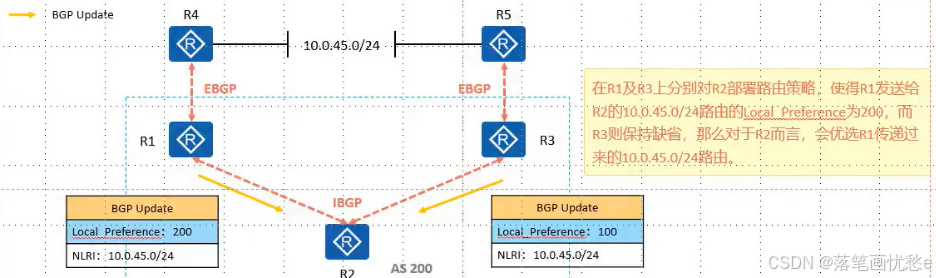
Orgin 起源 公认必遵属性 起源名称标记描述IGPi如果路由是由始发的 BGP 路由器使用 network 命令注入到 BGP 的,那么该 BGP 路由的 origin 属性为 IGPEGPe如果路由是通过 EGP 学习到的,那么该 BGP 路由的 Origin 属性为 EGPIncomplete?如果路由是通过…...

纯个人整理,蓝桥杯使用的算法模板day2(0-1背包问题),手打个人理解注释,超全面,且均已验证成功(附带详细手写“模拟流程图”,全网首个
算法索引 01背包优化前空间优化版(使用一维数组)优化后的模拟流程图为何优化后,j不能使用正序遍历模拟流程图 代码对应实现案例 01背包 优化前 /*** 0-1背包问题解法(与下方代码表格示例对应,已模拟验证)*…...
算法与数据结构线性表之栈和队列
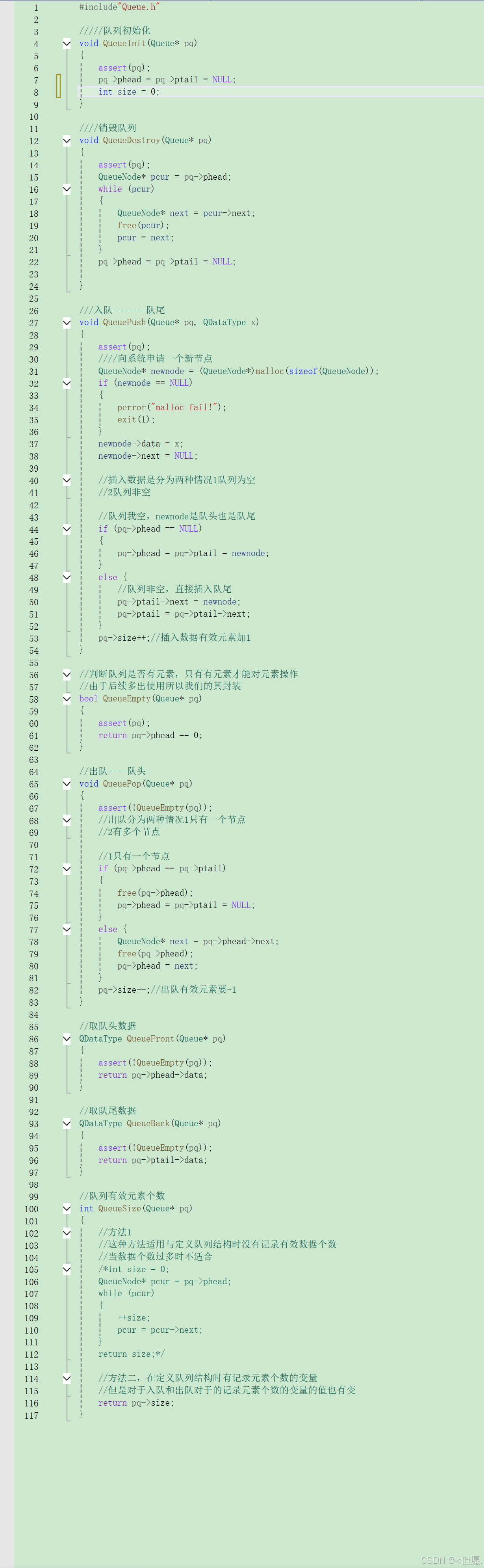
Hello大家好! 很高兴与大家见面! 给生活添点快乐,开始今天的编程之路。 我的博客:<但愿. 我的专栏:C语言、题目精讲、算法与数据结构、C 欢迎点赞,关注 一 栈 1概念:栈是⼀种特殊的线性表,其只允许…...
python应用之使用pdfplumber 解析pdf文件内容
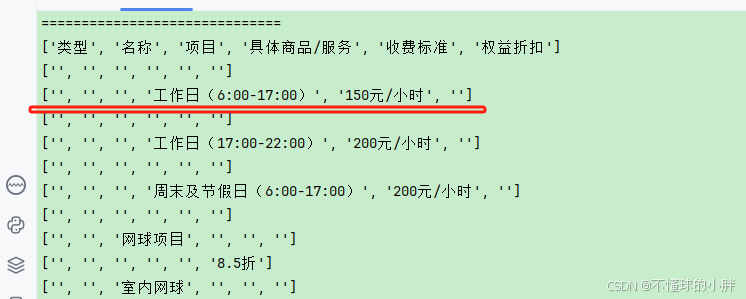
目录标题 一. 通过 pdfplumber.open() 解析复杂PDF:1-2. 报错:V2 : 1-3. v3 使用tk 库,弹框选择文件运行环境准备完整代码保存运行测试步骤方式二:命令行方式(适用于自动化) 测试用例示例常见问…...

laravel update报In PackageManifest.php line 122:Undefined index: name 错误的解决办法
用 composer 更新 laravel依赖包时报错 > Illuminate\Foundation\ComposerScripts::postAutoloadDump > Illuminate\Foundation\ComposerScripts::postAutoloadDump > php artisan package:discover --ansiIn PackageManifest.php line 122:Undefined index: nameScr…...
Vue中使用antd-table组件实现数据选择、禁用、已选择禁用-demo
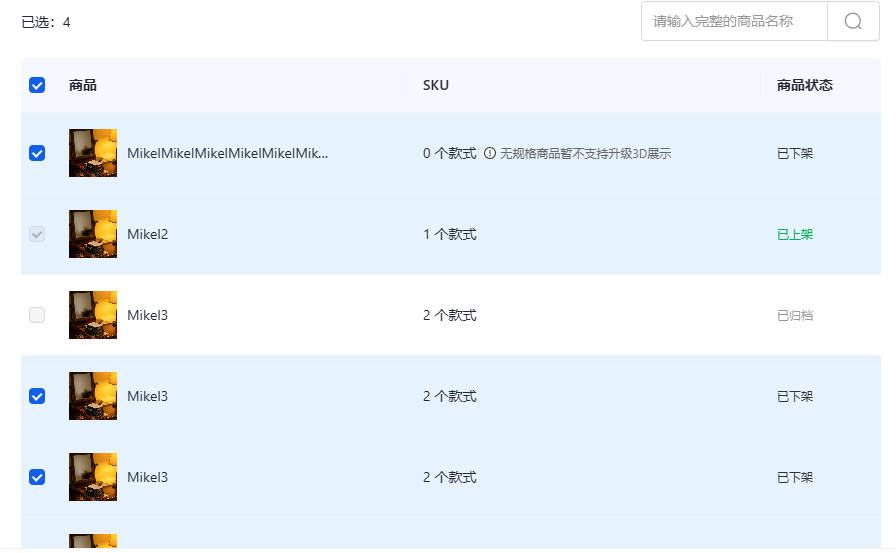
实现案例 实现过程 表格代码 关键代码 :row-selection="rowSelection" <div><div class="flex items-center justify-between pt-[24px] pb-[16px]"><p>已选:{{ keysNum }}</p><a-input-search v-model:value="productN…...
C语言--统计输入字符串中的单词个数
输入 输入:大小写字母以及空格,单词以空格分隔 输出:单词个数 代码 如果不是空格且inWord0说明是进入单词的第一个字母,则单词总数加一。 如果是空格,证明离开单词,inWord 0。 #include <stdio.h&g…...
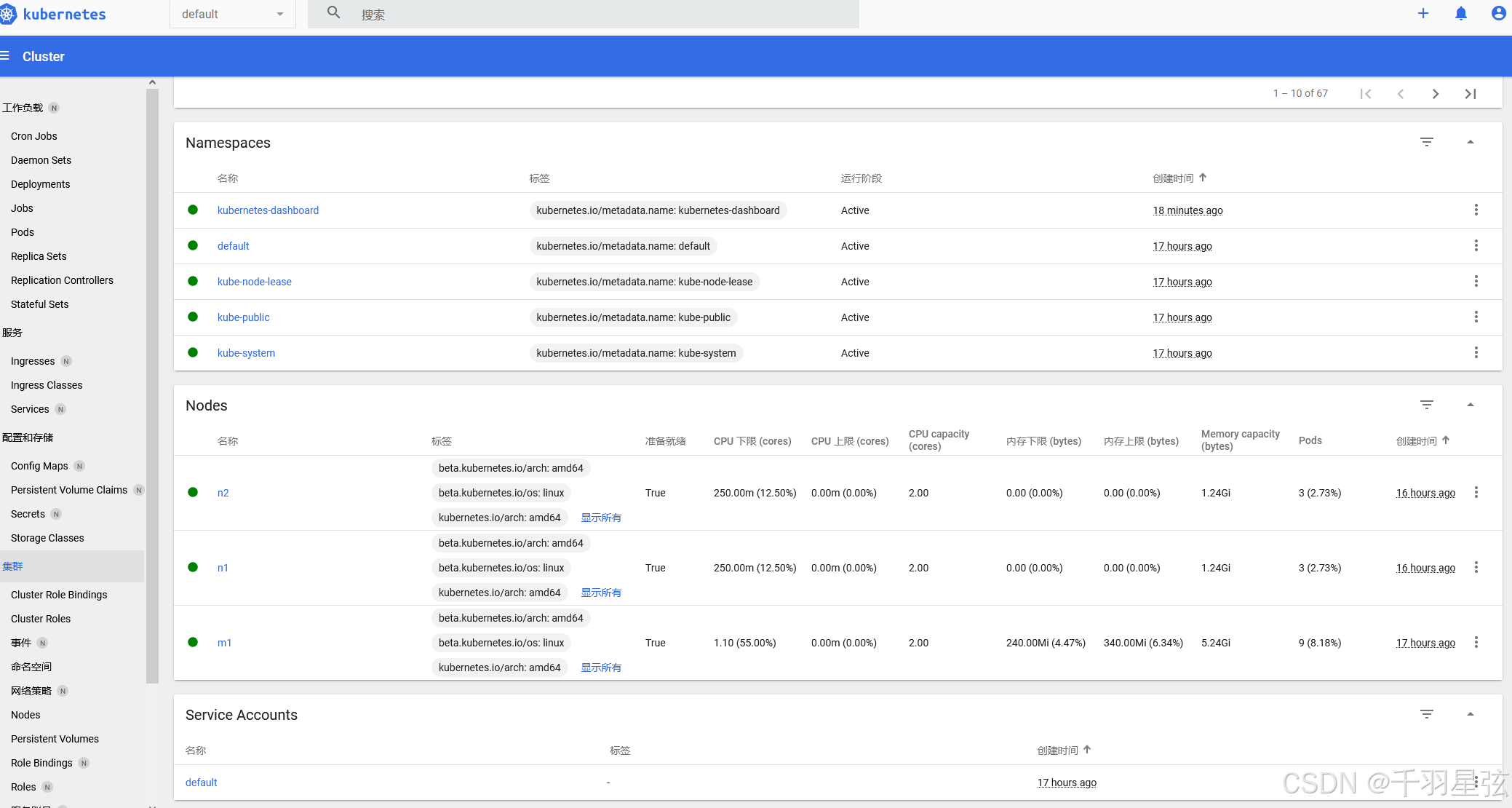
Kubernetes 集群搭建(三):使用dashboard用户界面(需要访问外网获取yaml)
(一)简介 K8s Dashboard是Kubernetes提供的一种基于Web的用户界面工具,用于可视化地管理和监控Kubernetes集群 主要功能: 资源查看与管理: 查看Kubernetes集群中的各种资源,如节点、Pod、服务、部署等。 对…...
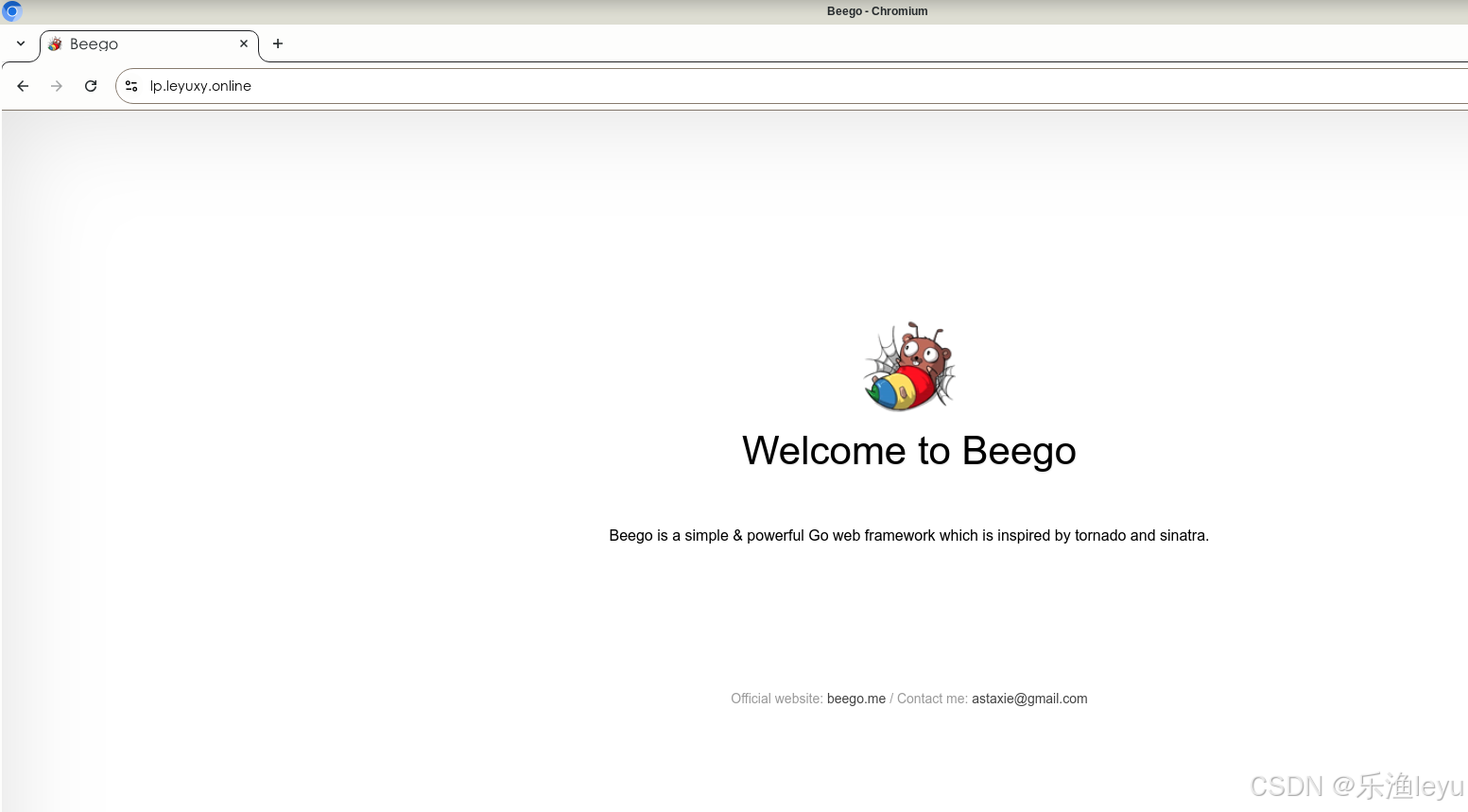
Debian 12 服务器搭建Beego环境
一、Debian 12系统准备 1.更新系统 #apt update && apt upgrade -y 2.安装基础工具 #apt install -y git curl wget make gcc 二、安装Go环境 Go语言的镜像官网:https://golang.google.cn/ 1.下载go最新版 #cd /usr/local/src #wget -o https://golang.go…...

游戏引擎学习第208天
运行游戏并回顾我们的情况 今天,我们将继续完成之前中断的调试输出工作。最近的工作偏离了一些,展示了如何进行元编程的实践,主要涉及了一个小的解析器。尽管这个解析器本身是一个玩具,但它展示了如何完成一个完整的循环…...

【在校课堂笔记】Python 第 7 节课 总结
- 第 85 篇 - Date: 2025 - 04 - 06 Author: 郑龙浩/仟墨 【Python 在校课堂笔记】 南山-第 7 节课 上课时间: 2025-03-27 文章目录 南山-第 7 节课一 99乘法表 –> 三角二 函数1 已接触的函数,部分举例2 自定函数的定义与使用自定义函数:举例 3 带参数的4 阶乘…...

评价区动态加载是怎么实现的?
淘宝商品评价区的动态加载是通过一系列前端技术和后端接口实现的,其核心目的是提升用户体验和页面性能。以下是其实现原理和关键技术的详细解析: 1. 前端实现:AJAX 和 JavaScript 淘宝利用 AJAX(Asynchronous JavaScript and XM…...

【 <二> 丹方改良:Spring 时代的 JavaWeb】之 Spring Boot 中的监控:使用 Actuator 实现健康检查
<前文回顾> 点击此处查看 合集 https://blog.csdn.net/foyodesigner/category_12907601.html?fromshareblogcolumn&sharetypeblogcolumn&sharerId12907601&sharereferPC&sharesourceFoyoDesigner&sharefromfrom_link <今日更新> 一、引子&…...
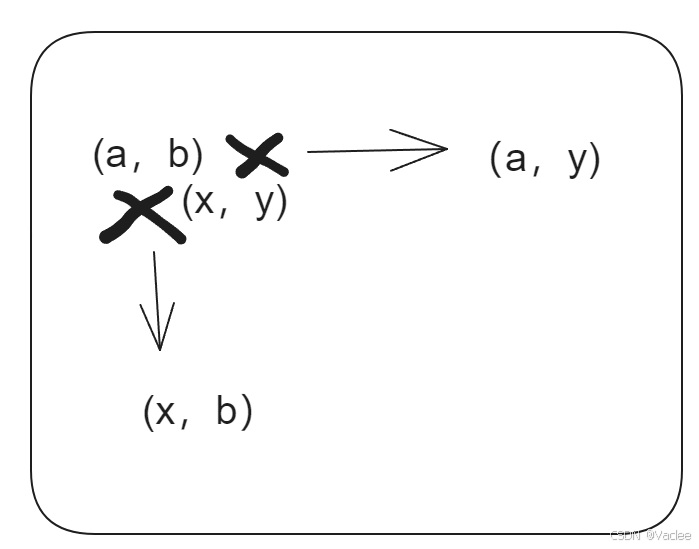
蓝桥杯—数字接龙(dfs+减枝)
一.题目 二.思路 一看就是迷宫问题的变种,从左上角到达右下角,要解决 1.8个方向的方向向量,用dx,dy数组代表方向向量 2.要按照一个规律的数值串进行搜索0,1,2,k-1,0,1…...
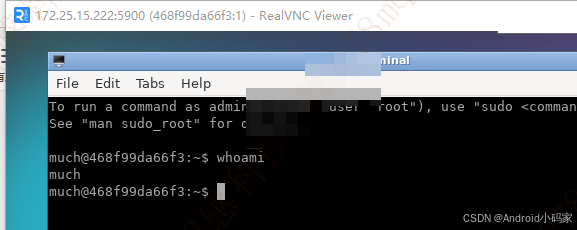
Docker与VNC的使用
https://hub.docker.com/r/dorowu/ubuntu-desktop-lxde-vnc 下载nvc 客户端 https://downloads.realvnc.com/download/file/viewer.files/VNC-Viewer-7.12.0-Windows.exe 服务端 docker pull dorowu/ubuntu-desktop-lxde-vnc#下载成功 docker pull dorowu/ubuntu-desktop-l…...
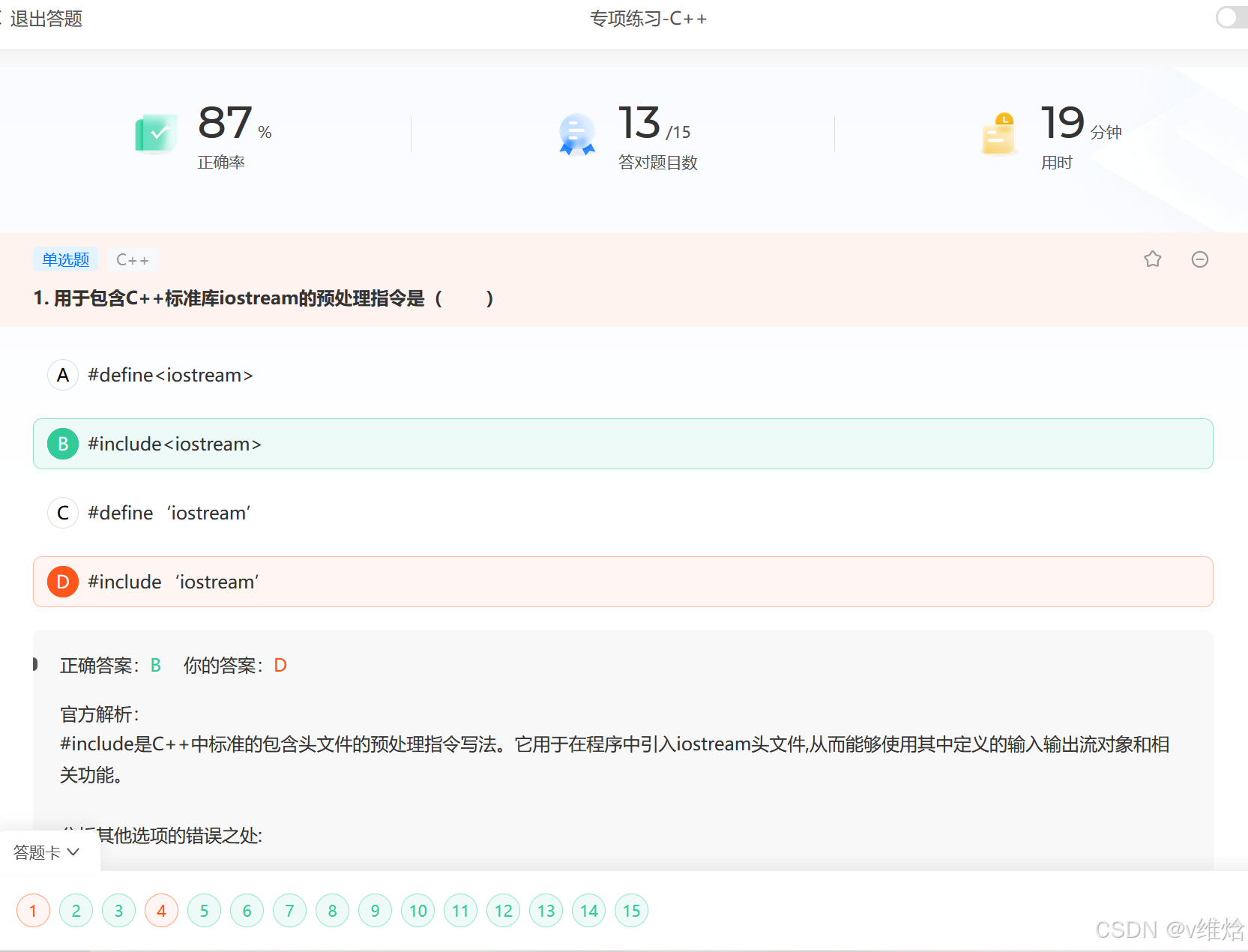
C++——清明
#include <iostream> #include <cstring> #include <cstdlib> #include <unistd.h> #include <sstream> #include <vector> #include <memory> #include <ctime>using namespace std;class Weapon; // 前置声明class Hero{ pr…...

Unity ViewportConstraint
一、组件功能概述 ViewportConstraint是一个基于世界坐标的UI边界约束组件,主要功能包括: 将UI元素限制在父容器范围内支持自定义内边距(padding)可独立控制水平和垂直方向的约束 二、实现原理 1. 边界计算(世界坐…...

Gin、Echo 和 Beego三个 Go 语言 Web 框架的核心区别及各自的优缺点分析,结合其设计目标、功能特性与适用场景
1. Gin 核心特点 高性能:基于 Radix 树路由,无反射设计,性能接近原生 net/http,适合高并发场景。轻量级:仅提供路由、中间件、请求响应处理等基础功能,依赖少。易用性:API 设计简洁直观&#…...

ffmpeg视频转码相关
ffmpeg视频转码相关 简介参数 实战举栗子获取视频时长视频转码mp4文件转为hls m3u8 ts等文件图片转视频抽取视频第一帧获取基本信息 转码日志输出详解转码耗时测试 简介 FFmpeg 是领先的多媒体框架,能够解码、编码、 转码、复用、解复用、流、过滤和播放 几乎所有人…...

手搓多模态-06 数据预处理
前情回顾 我们目前实现了视觉模型的编码器部分,然而,我们所做的是把一张图片编码嵌入成了许多个上下文相关的嵌入向量,然而我们期望的是一张图片用一个向量来表示,从而与文字的向量做点积形成相似度(参考手搓多模态-01…...
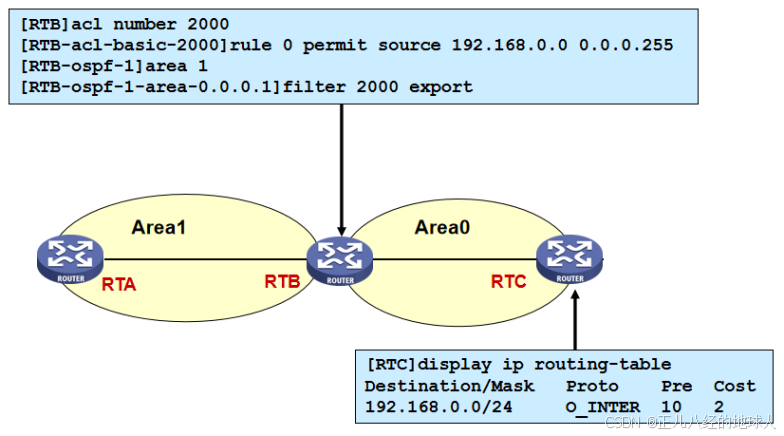
HCIP【路由过滤技术(详解)】
目录 1 简介 2 路由过滤方法 3 路由过滤工具 3.1 静默接口 3.2 ACL 3.3 地址前缀列表 3.4 filter-policy 3.4.1 filter-policy过滤接收路由(以RIP为例) 3.4.2 filter-policy过滤接收路由(以OSPF为例) 1 简介 路由过滤技术…...
)
【Kafka基础】topics命令行操作大全:高级命令解析(2)
1 强制删除主题 /export/home/kafka_zk/kafka_2.13-2.7.1/bin/kafka-topics.sh --delete \--zookeeper 192.168.10.33:2181 \--topic mytopic \--if-exists 参数说明: --zookeeper:直接连接Zookeeper删除(旧版本方式)--if-exists&…...