
零基础开始学习鸿蒙开发-智能家居APP离线版介绍
目录
1.我的小屋
2.查找设备
3.个人主页
前言
好久不发博文了,最近都忙于面试,忙于找工作,这段时间终于找到工作了。我对鸿蒙开发的激情依然没有减退,前几天做了一个鸿蒙的APP,现在给大家分享一下!
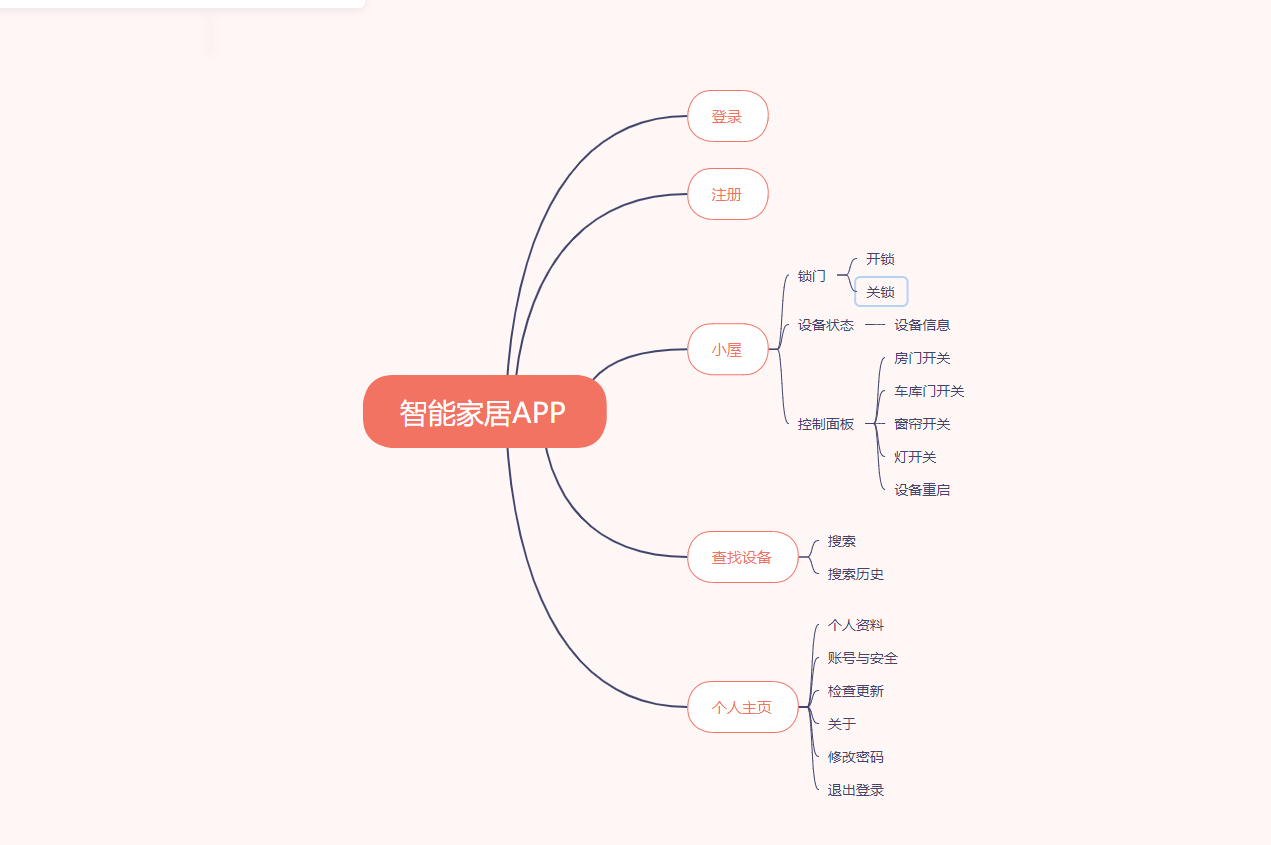
具体功能如下图:
1.我的小屋
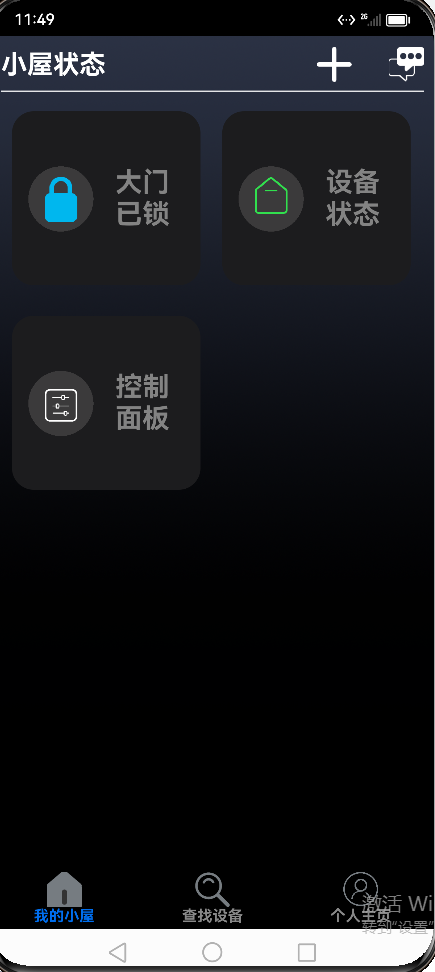
1.1 锁门:对大门开关锁的控制
1.2设备状态:展示了某台设备的详细信息
1.3 控制面板:房门开关、车库门开关、窗帘开关、灯开关
1.4 添加设备:根据设备信息添加设备
我的小屋
锁门

设备状态

2.查找设备
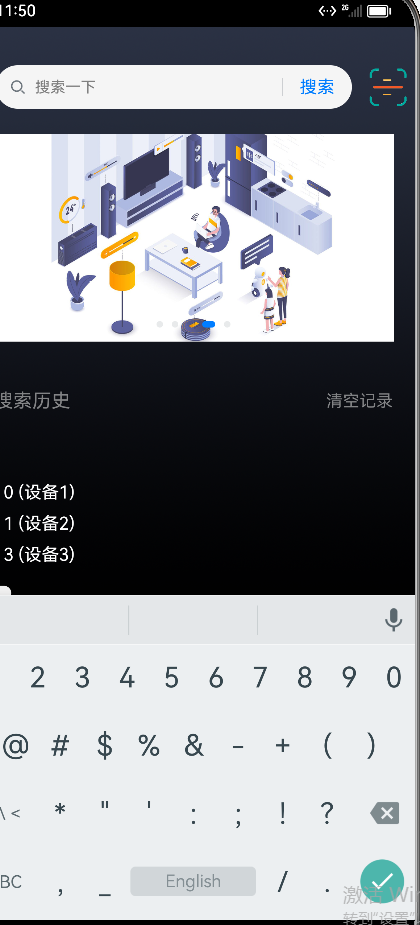
2.1 搜索:对已经添加的设备进行搜索
2.2 搜索历史:可以查看到搜索过的信息
查找设备
3.个人主页
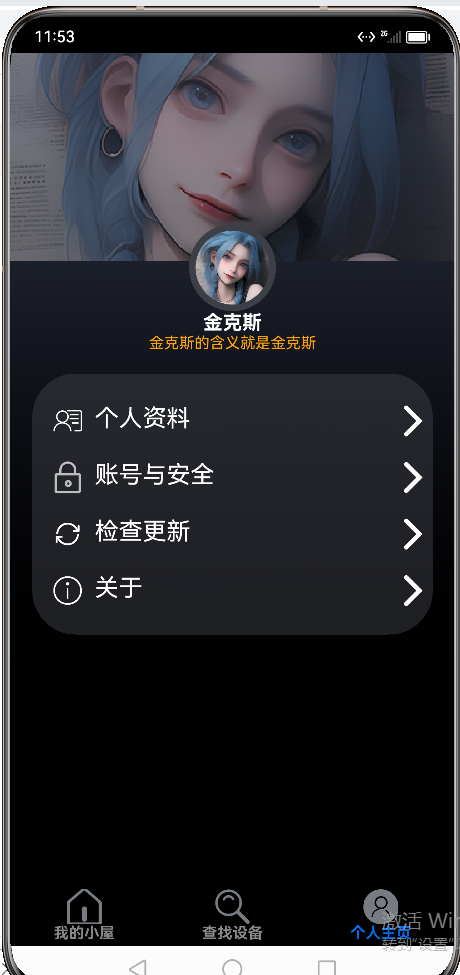
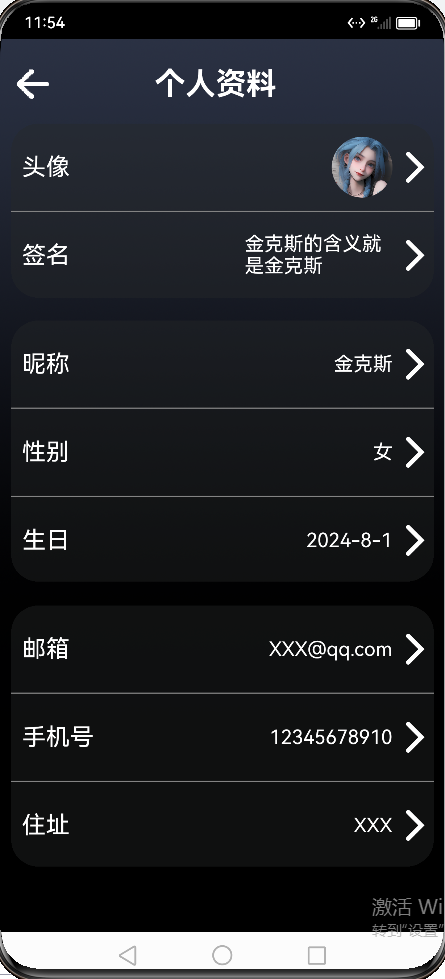
3.1 个人资料:展示个人的资料信息,支持修改
3.2账号与安全:包含修改密码和退出登录
注册页面代码
// 导入必要的模块
import router from '@ohos.router';
import Preferences from '@ohos.data.preferences';
import UserBean from '../common/bean/UserBean';// 注册页面
@Entry
@Component
struct RegisterPage {@State username: string = '';@State password: string = '';@State confirmPwd: string = '';@State errorMsg: string = '';private prefKey: string = 'userData'private context = getContext(this)// 保存用户数据(保持原逻辑)async saveUser() {try {let prefs = await Preferences.getPreferences(this.context, this.prefKey)const newUser: UserBean = {// @ts-ignoreusername: this.username,password: this.password}await prefs.put(this.username, JSON.stringify(newUser))await prefs.flush()router.back()} catch (e) {console.error('注册失败:', e)}}// 注册验证(保持原逻辑)handleRegister() {if (!this.username || !this.password) {this.errorMsg = '用户名和密码不能为空'return}if (this.password !== this.confirmPwd) {this.errorMsg = '两次密码不一致'return}this.saveUser()}build() {Column() {// 用户名输入框TextInput({ placeholder: '用户名' }).width('80%').height(50).margin({ bottom: 20 }).backgroundColor('#FFFFFF')  // 新增白色背景.onChange(v => this.username = v)// 密码输入框// @ts-ignoreTextInput({ placeholder: '密码', type: InputType.Password }).width('80%').height(50).margin({ bottom: 20 }).backgroundColor('#FFFFFF')  // 新增白色背景.onChange(v => this.password = v)// 确认密码输入框// @ts-ignoreTextInput({ placeholder: '确认密码', type: InputType.Password }).width('80%').height(50).margin({ bottom: 20 }).backgroundColor('#FFFFFF')  // 新增白色背景.onChange(v => this.confirmPwd = v)// 错误提示(保持原样)if (this.errorMsg) {Text(this.errorMsg).fontColor('red').margin({ bottom: 10 })}// 注册按钮(保持原样)Button('注册', { type: ButtonType.Capsule }).width('80%').height(50).backgroundColor('#007AFF').onClick(() => this.handleRegister())// 返回按钮(保持原样)Button('返回登录', { type: ButtonType.Capsule }).width('80%').height(40).margin({ top: 20 }).backgroundColor('#34C759').onClick(() => router.back())}.width('100%').height('100%').padding(20).justifyContent(FlexAlign.Center).backgroundColor('#1A1A1A')  // 新增暗黑背景色}
}
登录页面代码
// 导入必要的模块
import router from '@ohos.router';
import Preferences from '@ohos.data.preferences';
import DeviceBean from '../common/bean/DeviceBean';// 用户数据模型
class User {username: string = '';password: string = '';
}// 登录页面
@Entry
@Component
struct LoginPage {@State username: string = '';@State password: string = '';@State errorMsg: string = '';@State deviceList:Array<DeviceBean> =[new DeviceBean(0,'设备1',0,0,0,0,0,0,0,0,0,0,),new DeviceBean(1,'设备2',0,0,0,0,0,0,0,0,0,0,),new DeviceBean(3,'设备3',0,0,0,0,0,0,0,0,0,0,)];private prefKey: string = 'userData'// 获取本地存储上下文private context = getContext(this)// 获取用户数据async getUser(): Promise<User | null> {try {// @ts-ignorereturn userData ? JSON.parse(userData) : null} catch (e) {console.error('读取失败:', e)return null}}// 登录处理async handleLogin(username:string,password:string,) {if (!this.username || !this.password) {this.errorMsg = '用户名和密码不能为空'return}const user = await this.getUser()if ( username == 'admin' && password=='123456') {AppStorage.SetOrCreate("deviceList",this.deviceList);AppStorage.SetOrCreate("signature","金克斯的含义就是金克斯")AppStorage.SetOrCreate("nickName","金克斯")AppStorage.SetOrCreate("nickname","金克斯")AppStorage.SetOrCreate("login_username",this.username)// 登录成功跳转主页router.pushUrl({ url: 'pages/MainPages', params: { username: this.username } })} else {this.errorMsg = '用户名或密码错误'}}build() {Column() {// 新增欢迎语Text('欢迎登录智能家庭app').fontSize(24).margin({ bottom: 40 }).fontColor('#FFFFFF') // 白色文字TextInput({ placeholder: '用户名' }).width('80%').height(50).margin({ bottom: 20 }).onChange(v => this.username = v).fontColor(Color.White).placeholderColor(Color.White)// @ts-ignoreTextInput({ placeholder: '密码', type: InputType.Password}).fontColor(Color.White).placeholderColor(Color.White).width('80%').height(50).margin({ bottom: 20 }).onChange(v => this.password = v)if (this.errorMsg) {Text(this.errorMsg).fontColor('red').margin({ bottom: 10 })}Button('登录', { type: ButtonType.Capsule }).width('80%').height(50).backgroundColor('#007AFF').onClick(() => this.handleLogin(this.username,this.password))Button('注册', { type: ButtonType.Capsule }).width('80%').height(40).margin({ top: 20 }).backgroundColor('#34C759').onClick(() => router.pushUrl({ url: 'pages/RegisterPage' }))}.width('100%').height('100%').padding(20).justifyContent(FlexAlign.Center).backgroundColor('#1A1A1A') // 新增暗黑背景色}
}
主页代码
import prompt from '@ohos.prompt';
import { TabID, TabItemList } from '../model/TabItem'
import { DeviceSearchComponent } from '../view/DeviceSearchComponent';
import HouseStateComponent from '../view/HouseStateComponent';
import { MineComponent } from '../view/MineComponent';
import { NotLogin } from '../view/NotLogin';
@Entry
@Component
struct MainPages {@State pageIndex:number = 0;//页面索引private tabController:TabsController = new TabsController();//tab切换控制器@Builder MyTabBuilder(idx:number){Column(){Image(idx === this.pageIndex ? TabItemList[idx].icon_selected:TabItemList[idx].icon).width(32).height(32)// .margin({top:5})Text(TabItemList[idx].title).fontSize(14).fontWeight(FontWeight.Bold).fontColor(this.pageIndex === idx ? '#006eee':'#888')}}build() {Tabs({barPosition:BarPosition.End}){TabContent(){// Text('小屋状态')HouseStateComponent()}// .tabBar('小屋状态').tabBar(this.MyTabBuilder(TabID.HOUSE)) //调用自定义的TabBarTabContent(){// Text('搜索设备')DeviceSearchComponent()//调用设备搜索组件}// .tabBar('搜索设备').tabBar(this.MyTabBuilder(TabID.SEARCH_DEVICE)) //调用自定义的TabBarTabContent(){// Text('我的')MineComponent();//个人主页// NotLogin()}// .tabBar('我的').tabBar(this.MyTabBuilder(TabID.MINE)) //调用自定义的TabBar}.barWidth('100%').barMode(BarMode.Fixed).width('100%').height('100%').onChange((index)=>{//绑定onChange函数切换页签this.pageIndex = index;}).backgroundColor('#000')}
}
我的小屋代码
import router from '@ohos.router';
import { Action } from '@ohos.multimodalInput.keyEvent';
import DeviceBean from '../common/bean/DeviceBean';
import MainViewModel from '../model/MainViewModel';
import promptAction from '@ohos.promptAction';// 自定义弹窗组件
@CustomDialog
struct SimpleDialog {@State deviceList:Array<DeviceBean> =[new DeviceBean(0,'设备1',0,0,0,0,0,0,0,0,0,0,),new DeviceBean(1,'设备2',0,0,0,0,0,0,0,0,0,0,),new DeviceBean(3,'设备3',0,0,0,0,0,0,0,0,0,0,)];// @ts-ignore@State deviceId: number=1; //设备ID@State name: string=''; //设备名@State temperator: number=25.3; //室内温度@State humidity: number =20; //室内湿度@State lumination: number =10; //光照@State isRain: number =30; //下雨预警 0:正常 1:触发报警@State isSmoke: number =0; //烟雾报警 0:正常 1:触发报警@State isFire: number=0; //火灾报警 0:正常 1:触发报警@State doorStatus: number=0; //门开关状态 0:正常 1:开启@State garageStatus: number=0; //车库门开关 0:正常 1:开启@State curtainStatus: number=0; //窗帘开关 0:正常 1:开启@State lightStatus: number=0; //灯开关 0:正常 1:开启@State  tempDevice: DeviceBean =  new DeviceBean(0,'',0,0,0,0,0,0,0,0,0,0,);tmpMap:Map<string, string> = new Map();controller:CustomDialogController;build() {Column() {// 设备基本信息TextInput({ placeholder: '设备ID(数字)' }).onChange(v => this.tempDevice.deviceId = Number(v))TextInput({ placeholder: '设备名称' }).onChange(v => this.tempDevice.name = v)// 环境参数/*  TextInput({ placeholder: '温度(0-100)' }).onChange(v => this.tempDevice.temperator = Number(v))TextInput({ placeholder: '湿度(0-100)' }).onChange(v => this.tempDevice.humidity = Number(v))TextInput({ placeholder: '光照强度' }).onChange(v => this.tempDevice.lumination = Number(v))*/Button('保存').onClick(()=>{promptAction.showToast({message:'保存成功!',duration:2000,})// 添加新设备到列表//this.deviceList = [...this.deviceList, {...this.tempDevice}];console.log(JSON.stringify(this.tempDevice))this.deviceList.push(this.tempDevice); // 关键步骤:创建新数组AppStorage.SetOrCreate("deviceList",this.deviceList);this.controller.close()})/*   .onClick(() => {this.deviceList = [...this.deviceList, {// @ts-ignoreid: this.id,name: this.name,}]this.controller.close()})*/}.padding(20)}
}@Component
export default struct HouseStateComponent{private exitDialog() {  }@State handlePopup: boolean = false@State devices: DeviceBean[]=[]// 确保控制器正确初始化private dialogController: CustomDialogController = new CustomDialogController({builder: SimpleDialog(),  // 确认组件正确引用cancel: this.exitDialog,  // 关闭回调autoCancel: true          // 允许点击外部关闭})@Builder AddMenu(){Flex({ direction: FlexDirection.Column, justifyContent: FlexAlign.Center, alignItems: ItemAlign.Center }) {Column(){Text('扫一扫').fontSize(20).width('100%').height(30).align(Alignment.Center)Divider().width('80%').color('#ccc')Text('添加设备').fontSize(20).width('100%').height(30).align(Alignment.Center).onClick(()=>{this.dialogController.open()})}.padding(5).height(65)}.width(100)}build(){Column({space:8}){Row() {Text('小屋状态').fontSize(24).fontWeight(FontWeight.Bold).fontColor(Color.White).margin({ top: 10 }).textAlign(TextAlign.Start)Image($r('app.media.jiahao_0')).width(32).height(32).margin({top:10,left:160}).bindMenu(this.AddMenu())Image($r('app.media.news')).fillColor(Color.Black).width(32).height(32).margin({top:10}).onClick(() => {this.handlePopup = !this.handlePopup}).bindPopup(this.handlePopup,{message:'当前暂无未读消息',})// .onClick({//// })}.width('95%').justifyContent(FlexAlign.SpaceBetween)Divider().width('95%').color(Color.White)Flex({ wrap: FlexWrap.Wrap }){Button()Row() {Shape() {Circle({ width: 60, height: 60 }).fill('#494848').margin({left:15,top:'32%'}).opacity(0.7)Image($r('app.media.lock')).width(30).margin({ left: 30 ,top:'42%'})}.height('100%')Column() {Text('大门').fontSize(25).fontColor('#838383').fontWeight(FontWeight.Bold).margin({ left: 20, top: 0 })Text('已锁').fontSize(25).fontColor('#838383').fontWeight(FontWeight.Bold).margin({ left: 20, top: 0 })}}.borderRadius(20).backgroundColor('#1c1c1e')// .backgroundImage($r('app.media.Button_img'))// .backgroundImageSize(ImageSize.Cover)// .border({ width: 1 })// .borderColor('#b9b9b9').width('47%').height(160).onClick(()=>{router.pushUrl({url:"house/HomeGate"})})Button()Row() {Shape() {Circle({ width: 60, height: 60 }).fill('#494848').margin({left:15,top:'32%'}).opacity(0.7)Image($r('app.media.Device_icon')).width(30).margin({ left: 30 ,top:'42%'})}.height('100%')Column() {Text('设备').fontSize(25).fontColor('#838383').fontWeight(FontWeight.Bold).margin({ left: 20, top: 0 })Text('状态').fontSize(25).fontColor('#838383').fontWeight(FontWeight.Bold).margin({ left: 20, top: 0 })}}.onClick(()=>{router.pushUrl({url:"house/DeviceStatus"})}).borderRadius(20).backgroundColor('#1c1c1e').margin({left:20})// .border({ width: 1 })// .borderColor('#b9b9b9').width('47%').height(160)}.width('95%').padding(10)Flex() {Button()Row() {Shape() {Circle({ width: 60, height: 60 }).fill('#494848').margin({ left: 15, top: '32%' }).opacity(0.7)Image($r('app.media.console_1')).width(30).margin({ left: 30, top: '47%' })}.height('100%')Column() {Text('控制').fontSize(25).fontColor('#838383').fontWeight(FontWeight.Bold).margin({ left: 20, top: 0 })Text('面板').fontSize(25).fontColor('#838383').fontWeight(FontWeight.Bold).margin({ left: 20, top: 0 })}}.onClick(() => {router.pushUrl({url: "house/ControlConsole"})}).borderRadius(20).backgroundColor('#1c1c1e')// .border({ width: 1 })// .borderColor('#b9b9b9').width('47%').height(160)}.width('95%').padding(10)}.width('100%').height('100%').backgroundImage($r('app.media.index_background1')).backgroundImageSize(ImageSize.Cover)}
}
设备搜索代码
import DeviceBean from '../common/bean/DeviceBean'
@Component
export struct DeviceSearchComponent {@State submitValue: string = '' //获取历史记录数据@State allDevices:Array<DeviceBean> =[new DeviceBean(0,'设备1',0,0,0,0,0,0,0,0,0,0,),new DeviceBean(1,'设备2',0,0,0,0,0,0,0,0,0,0,)];@State all_devices:Array<DeviceBean> =AppStorage.Get("deviceList");@State filteredDevices:Array<DeviceBean>=[];controller: SearchController = new SearchController()scroll: Scroller = new Scroller()@State historyValueArr: Array<string> = [] //历史记录存放private swiperController: SwiperController = new SwiperController()build() {Column({ space: 8 }) {Row({space:1}){Search({placeholder:'搜索一下',controller: this.controller}).searchButton('搜索').margin(15).width('80%').height(40).backgroundColor('#F5F5F5').placeholderColor(Color.Grey).placeholderFont({ size: 14, weight: 400 }).textFont({ size: 14, weight: 400 }).onSubmit((value: string) => { //绑定 输入内容添加到submit中this.submitValue = valuefor (let i = 0; i < this.historyValueArr.length; i++) {if (this.historyValueArr[i] === this.submitValue) {this.historyValueArr.splice(i, 1);break;}}this.historyValueArr.unshift(this.submitValue) //将输入数据添加到历史数据// 若历史记录超过10条,则移除最后一项if (this.historyValueArr.length > 10) {this.historyValueArr.splice(this.historyValueArr.length - 1);}let devices: Array<DeviceBean> = AppStorage.Get("deviceList") as Array<DeviceBean>JSON.stringify(devices);// 增加过滤逻辑this.filteredDevices = devices.filter(item =>item.name.includes(value))})// 搜索结果列表:ml-citation{ref="7" data="citationList"}//二维码Scroll(this.scroll){Image($r('app.media.saomiao')).width(35).height(35).objectFit(ImageFit.Contain)}}.margin({top:20})// 轮播图Swiper(this.swiperController) {Image($r('app.media.lunbotu1' )).width('100%').height('100%').objectFit(ImageFit.Auto) //让图片自适应大小 刚好沾满// .backgroundImageSize(ImageSize.Cover)Image($r('app.media.lbt2' )).width('100%').height('100%').objectFit(ImageFit.Auto)Image($r('app.media.lbt3' )).width('100%').height('100%').objectFit(ImageFit.Auto)Image($r('app.media.lbt4' )).width('100%').height('100%').objectFit(ImageFit.Auto)Image($r('app.media.tips' )).width('100%').height('100%').objectFit(ImageFit.Auto)}.loop(true).autoPlay(true).interval(5000) //每隔5秒换一张.width('90%').height('25%').borderRadius(20)// 历史记录Row() {// 搜索历史标题Text('搜索历史').fontSize('31lpx').fontColor("#828385")// 清空记录按钮Text('清空记录').fontSize('27lpx').fontColor("#828385")// 清空记录按钮点击事件,清空历史记录数组.onClick(() => {this.historyValueArr.length = 0;})}.margin({top:30})// 设置Row组件的宽度、对齐方式和内外边距.width('100%').justifyContent(FlexAlign.SpaceBetween).padding({left: '37lpx',top: '11lpx',bottom: '11lpx',right: '37lpx'})Row(){// 搜索结果列表:ml-citation{ref="7" data="citationList"}List({ space: 10 }) {if (this.filteredDevices.length===0){ListItem() {Text(`暂时未找到任何设备..`).fontColor(Color.White)}}ForEach(this.filteredDevices, (item: DeviceBean) => {ListItem() {Text(`${item.deviceId} (${item.name})`).fontColor(Color.White)}}, item => item.deviceId)}/* List({ space: 10 }) {ForEach(this.filteredDevices, (item: DeviceBean) => {ListItem() {Text('模拟设备1').fontColor(Color.White)}ListItem() {Text('模拟设备2').fontColor(Color.White)}}, item => item.id)}*/}.margin({top:50,left:30})// 使用Flex布局,包裹搜索历史记录Flex({direction: FlexDirection.Row,wrap: FlexWrap.Wrap,}) {// 遍历历史记录数组,创建Text组件展示每一条历史记录ForEach(this.historyValueArr, (item: string, value: number) => {Text(item).padding({left: '15lpx',right: '15lpx',top: '7lpx',bottom: '7lpx'})// 设置背景颜色、圆角和间距.backgroundColor("#EFEFEF").borderRadius(10)// .margin('11lpx').margin({top:5,left:20})})}// 设置Flex容器的宽度和内外边距.width('100%').padding({top: '11lpx',bottom: '11lpx',right: '26lpx'})}.width('100%').height('100%')// .backgroundColor('#f1f2f3').backgroundImage($r('app.media.index_background1')).backgroundImageSize(ImageSize.Cover)}
}
// }个人主页代码
import router from '@ohos.router';
import promptAction from '@ohos.promptAction';
import UserBean from '../common/bean/UserBean';
import { InfoItem, MineItemList } from '../model/MineItemList';
@Entry
@Component
export struct MineComponent{@State userBean:UserBean = new UserBean()@State nickname:string = this.userBean.getNickName();//昵称@State signature:string = this.userBean.getSignature();//签名build(){Column() {Image($r('app.media.user_avtar1')).width('100%').height('25%').opacity(0.5)Column() {Shape() {Circle({ width: 80, height: 80 }).fill('#3d3f46')Image($r('app.media.user_avtar1')).width(68).height(68).margin({ top: 6, left: 6 }).borderRadius(34)}Text(`${this.nickname}`).fontSize(18).fontWeight(FontWeight.Bold).fontColor(Color.White)Text(`${this.signature}`).fontSize(14).fontColor(Color.Orange)}.width('95%').margin({ top: -34 })//功能列表Shape() {Rect().width('100%').height(240).fill('#3d3f46').radius(40).opacity(0.5)Column() {List() {ForEach(MineItemList, (item: InfoItem) => {ListItem() {// Text(item.title)Row() {Row() {Image(item.icon).width(30).height(30)if (item.title == '个人资料') {Shape() {Rect().width('80%').height(30).opacity(0)Text(item.title).fontSize(22).fontColor(Color.White).margin({ left: 10 })}.onClick(() => {router.pushUrl({url:"myhomepage/PersonalData"})})}else if (item.title == '账号与安全') {Shape() {Rect().width('80%').height(30).opacity(0)Text(item.title).fontSize(22).fontColor(Color.White).margin({ left: 10 })}.onClick(() => {router.pushUrl({url:"myhomepage/AccountSecurity"})})}else if (item.title == '检查更新') {Shape() {Rect().width('80%').height(30).opacity(0)Text(item.title).fontSize(22).fontColor(Color.White).margin({ left: 10 })}.onClick(()=>{promptAction.showToast({message:"当前暂无更新",duration:2000,})})}else if (item.title == '关于') {Shape() {Rect().width('80%').height(30).opacity(0)Text(item.title).fontSize(22).fontColor(Color.White).margin({ left: 10 })}.onClick(()=>{promptAction.showToast({message:"当前版本为1.0.0",duration:2000,})})}else{Text(item.title).fontSize(22).fontColor(Color.White).margin({ left: 10 })}}Image($r('app.media.right')).width(38).height(38)}.width('100%').height(52).justifyContent(FlexAlign.SpaceBetween)}// .border({//   width: { bottom: 1 },//   color: Color.Orange// })}, item => JSON.stringify(item))}.margin(10).border({radius: {topLeft: 24,topRight: 24}})// .backgroundColor('#115f7691').width('95%')// .height('100%').margin({ top: '5%', left: '5%' })}}.margin({ top: 20 }).width('90%')}.width('100%').height('100%').backgroundImage($r('app.media.index_background1')).backgroundImageSize(ImageSize.Cover)}
}
感谢大家的阅读和点赞,你们的支持 是我前进的动力,我会继续保持热爱,贡献自己的微薄码力!
’
相关文章:
零基础开始学习鸿蒙开发-智能家居APP离线版介绍
目录 1.我的小屋 2.查找设备 3.个人主页 前言 好久不发博文了,最近都忙于面试,忙于找工作,这段时间终于找到工作了。我对鸿蒙开发的激情依然没有减退,前几天做了一个鸿蒙的APP,现在给大家分享一下! 具体…...
不再卡顿!如何根据使用需求挑选合适的电脑内存?
电脑运行内存多大合适?在选购或升级电脑时,除了关注处理器的速度、硬盘的容量之外,内存(RAM)的大小也是决定电脑性能的一个重要因素。但究竟电脑运行内存多大才合适呢?这篇文章将帮助你理解不同使用场景下适…...
华为云 云化数据中心 CloudDC | 架构分析与应用场景
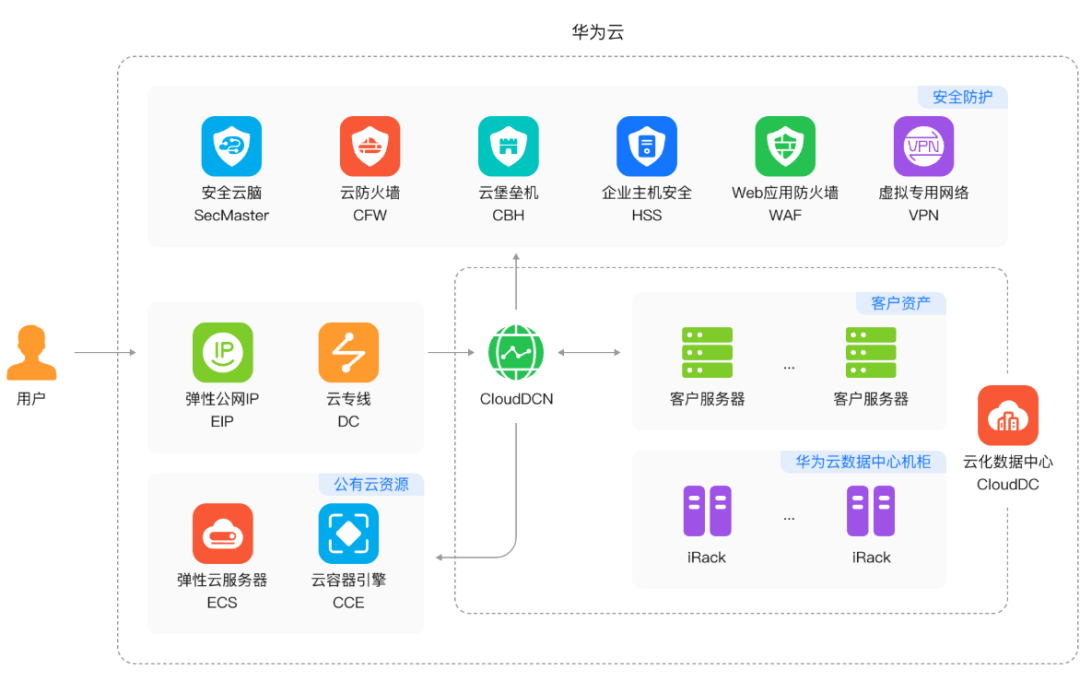
云化数据中心 CloudDC 云化数据中心 (CloudDC)是一种满足传统DC客户云化转型诉求的产品,支持将客户持有服务器设备部署至华为云机房,通过外溢华为云的基础设施管理、云化网络、裸机纳管、确定性运维等能力,帮助客户DC快速云化转型。 云化数据…...

【射频仿真学习笔记】变压器参数的Mathematica计算以及ADS仿真建模
变压器模型理论分析 对于任意的无源电路或者等效电路,当画完原理图后,能否认为已经知道其中的两个节点?vin和vout之间的明确解析解 是否存在一个通用的算法,将这里的所有元素都变成了符号,使得这个算法本身就是一个函…...
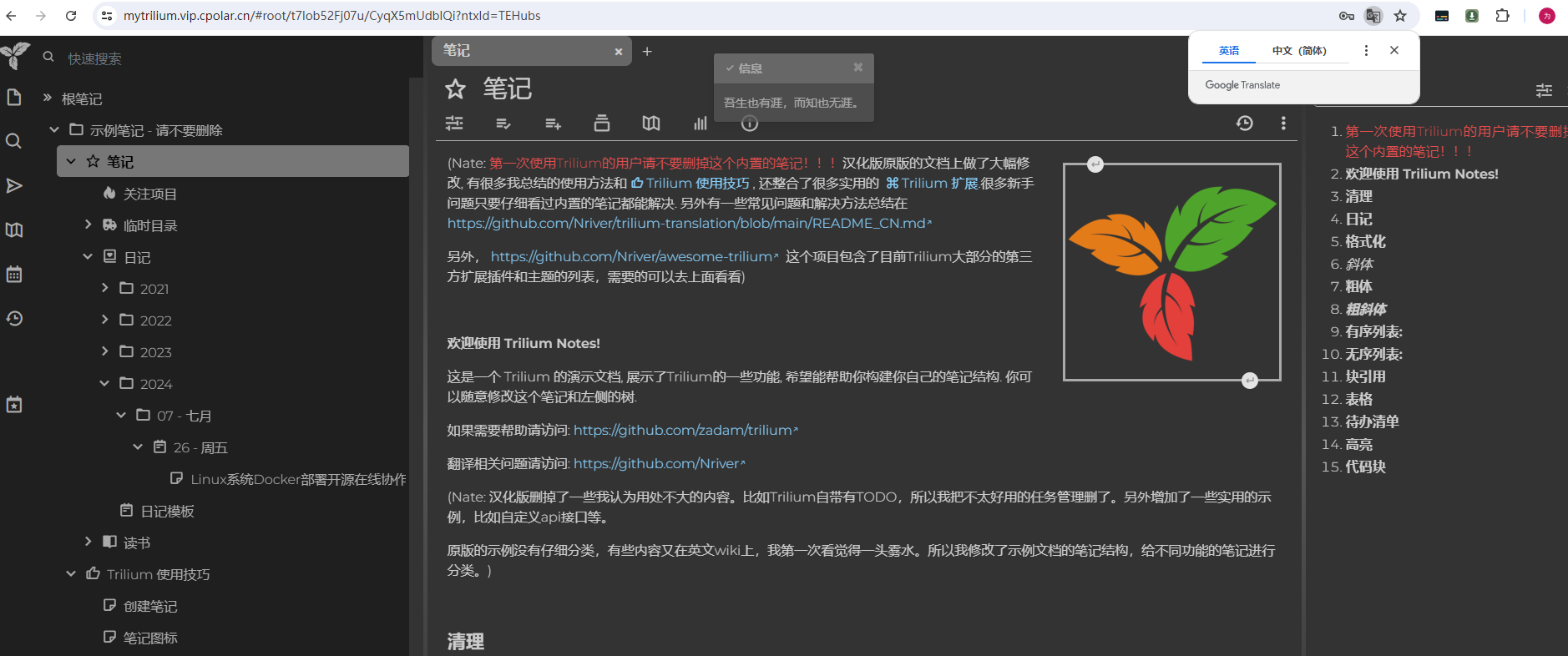
Linux系统Docker部署开源在线协作笔记Trilium Notes与远程访问详细教程
今天和大家分享一款在 G 站获得了 26K的强大的开源在线协作笔记软件,Trilium Notes 的中文版如何在 Linux 环境使用 docker 本地部署,并结合 cpolar 内网穿透工具配置公网地址,轻松实现远程在线协作的详细教程。 Trilium Notes 是…...

C++基础精讲-01
1C概述 1.1初识C 发展历程: C 由本贾尼・斯特劳斯特卢普在 20 世纪 70 年代开发,它在 C 语言的基础上增加了面向对象编程的特性,最初被称为 “C with Classes”,后来逐渐发展成为独立的 C 语言。 语言特点 (1&#x…...
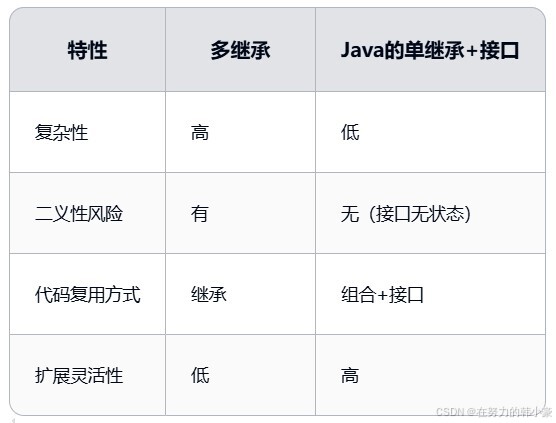
为什么Java不支持多继承?如何实现多继承?
一、前言 Java不支持多继承(一个类继承多个父类)主要出于文中设计考虑;核心目的是简化语言复杂性并避免潜在的歧义性问题。 二、直接原因:菱形继承/钻石继承问题(Diamond Problem) 假设存在如下继承关系&…...

E8流程多行明细行字符串用I分隔,赋值到主表
需求:明细行摘要字段赋值到主表隐藏字段,隐藏摘要字段在标题中显示 代码如下,代码中的获取字段名获取方式,自行转换成jQuery("#fieldid").val()替换。 //1:参数表单id 2:流程字段名 3:0代表主表,1代表明细…...

QML面试笔记--UI设计篇04交互控件
1. QML中常用交互控件 1.1. Button1.2. Slider1.3. ProgressBar1.4. TextField1.5. TextArea1.6. ComboBox1.7. CheckBox1.8. RadioButton1.9. Menu1.10. Dialog 1. QML中常用交互控件 在万物互联的智能时代,QML凭借其声明式语法和跨平台能力,…...

[特殊字符] Spring Boot 日志系统入门博客大纲(适合初学者)
一、前言 📌 为什么日志在项目中如此重要? 在开发和维护一个后端系统时,日志就像程序运行时的“黑匣子”,帮我们记录系统的各种行为和异常。一份良好的日志,不仅能帮助我们快速定位问题,还能在以下场景中…...

【人工智能】AI大模型开发数学基础指南
目录 学习内容**1. 线性代数****2. 概率与统计****3. 微积分****4. 优化理论****5. 信息论****6. 数值计算****7. 离散数学****8. 统计学进阶****如何学习?****总结** 如何学习**1. 明确学习目标****2. 分阶段学习计划****阶段 1:夯实基础****阶段 2&…...
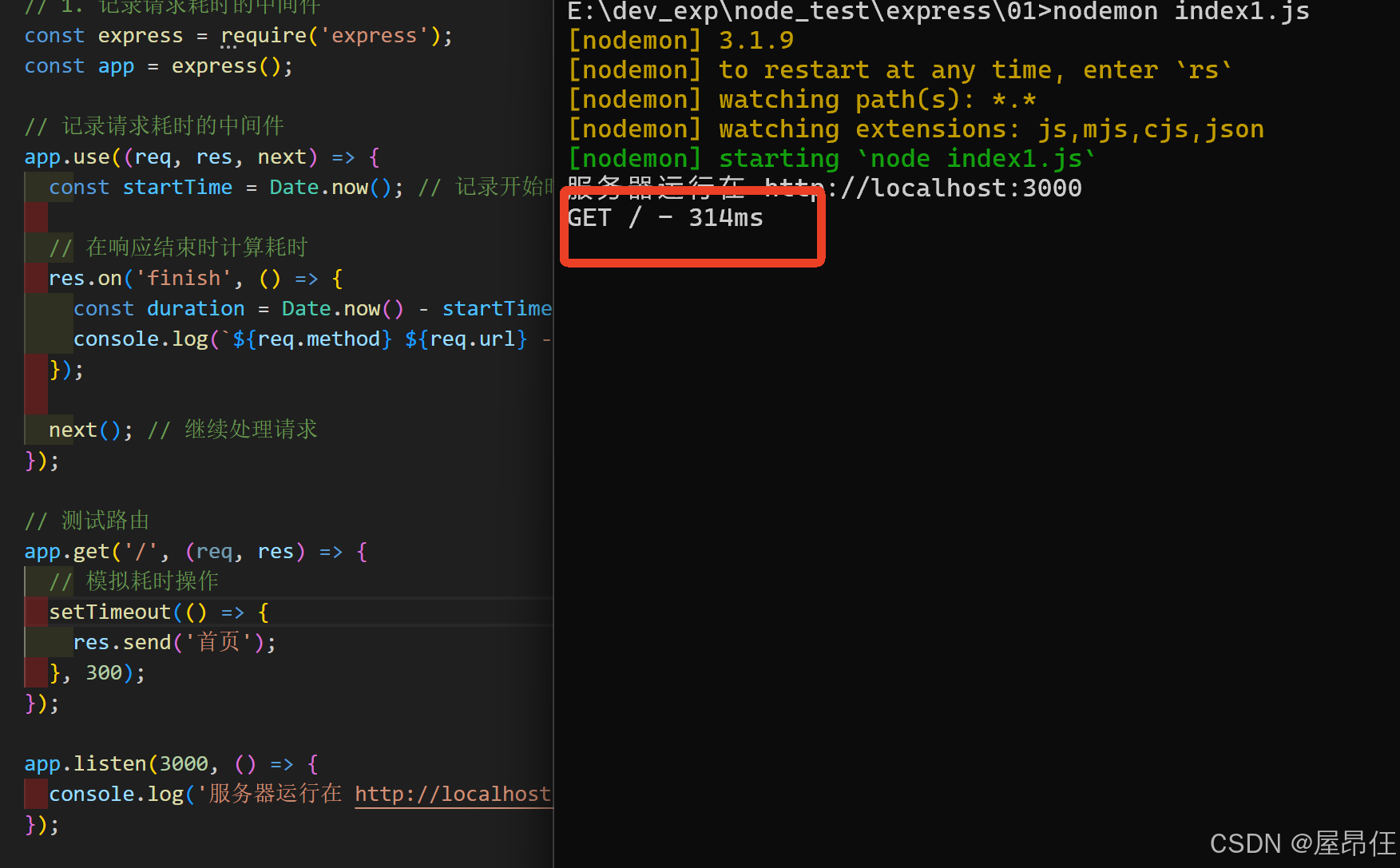
Express中间件(Middleware)详解:从零开始掌握(1)
1. 中间件是什么? 想象中间件就像一个"加工流水线",请求(Request)从进入服务器到返回响应(Response)的过程中,会经过一个个"工作站"进行处理。 简单定义:中间件是能够访问请求对象(req)、响应对象(res)和下…...

STM32单片机中EXTI的工作原理
目录 1. EXTI概述 2. EXTI的组成部分 3. 工作原理 3.1 引脚配置 3.2 中断触发条件 3.3 中断使能 3.4 中断处理 4. 使用示例 5. 注意事项 结论 在STM32单片机中,EXTI(外部中断)是一种用于处理外部事件的机制,能够提高对硬…...
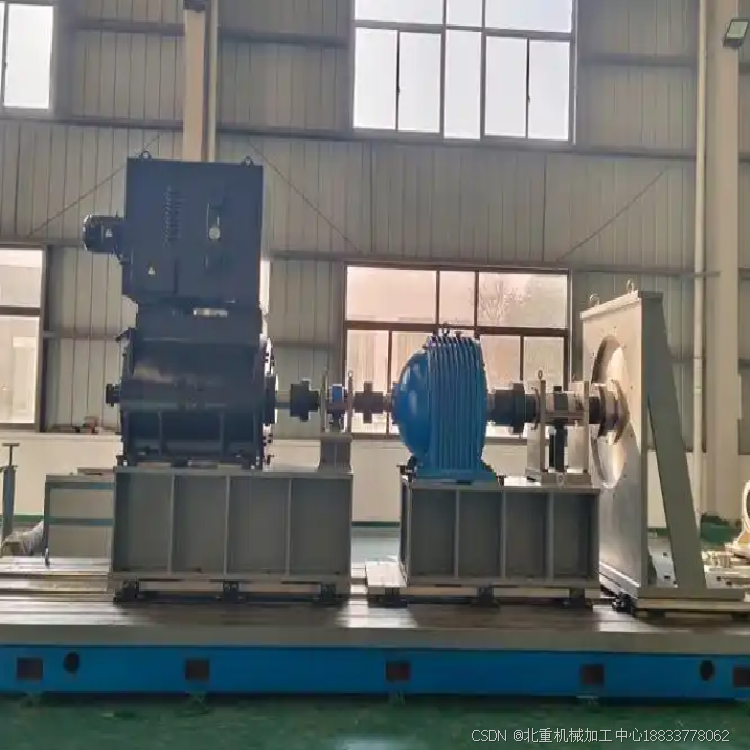
现代工业测试的核心支柱:电机试验工作台?(北重机械厂家)
电机试验工作台是现代工业测试中的核心支柱之一。这种工作台通常用于对各种类型的电机进行性能测试、负载测试和耐久性测试。通过电机试验工作台,工程师可以评估电机的效率、功率输出、转速、扭矩、温度等关键参数,从而确保电机的设计符合要求࿰…...
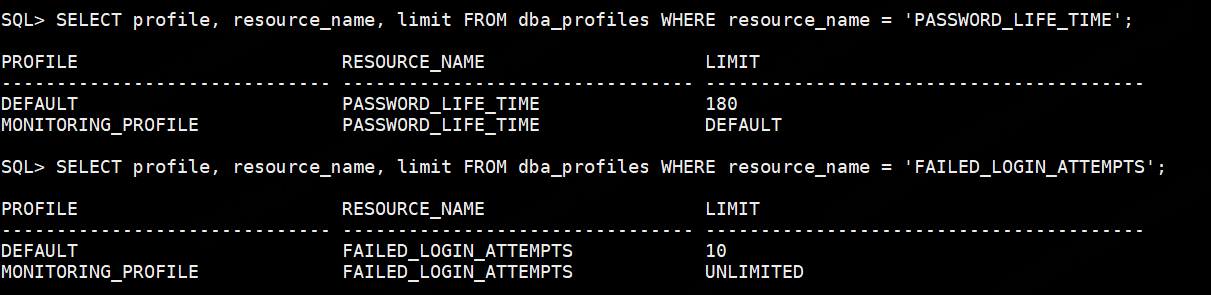
oracle 11g密码长度和复杂度查看与设置
verify_function_11G 的密码复杂性要求: 密码长度至少为 8 个字符。 密码必须包含至少一个数字和一个字母字符。 密码不能与用户名相同或相似。 密码不能是服务器名或其变体。 密码不能是常见的弱密码(如 welcome1、oracle123 等)。 注意事项&…...
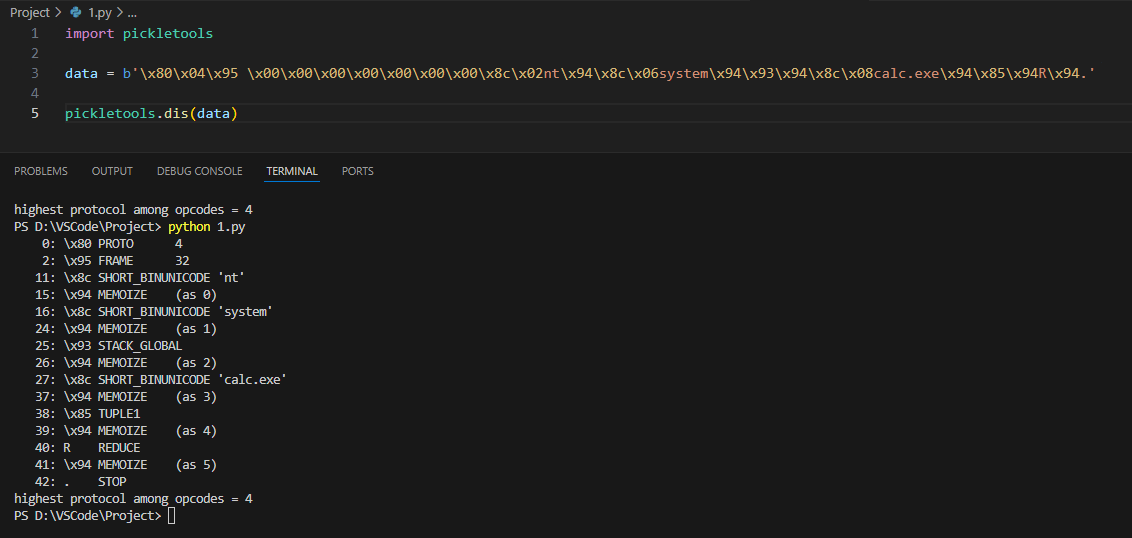
CVE-2025-32375 | Windows下复现 BentoML runner 服务器远程命令执行漏洞
目录 1. 漏洞描述2. 漏洞复现1. 安装 BentoML 1.4.72. 创建模型3. 构建模型4. 托管模型5. 执行exp 3. POC4. 补充学习 参考链接: https://mp.weixin.qq.com/s/IxLZr83RvYqfZ_eXhtNvgg https://github.com/bentoml/BentoML/security/advisories/GHSA-7v4r-c989-xh26 …...

某局jsvmp算法分析(dunshan.js/lzkqow23819/lzkqow39189)
帮朋友看一个税某局的加密算法。 传送门 (需要帐号登陆的 普通人没授权也看不了) 废话不多说直接抓包开干 这里可以看到一个headers中的加密参数 lzkqow23819 以及url路径里面的6eMrZlPH(这个有点像瑞数里面的) 还有就是cookies里面的这几个…...

深入剖析 Kafka 的零拷贝原理:从操作系统到 Java 实践
Kafka 作为一款高性能的分布式消息系统,其卓越的吞吐量和低延迟特性得益于多种优化技术,其中“零拷贝”(Zero-Copy)是核心之一。零拷贝通过减少用户态与内核态之间的数据拷贝,提升了 Kafka 在消息传输中的效率。本文将…...

AlmaLinux9.5 修改为静态IP地址
查看当前需要修改的网卡名称 ip a进入网卡目录 cd /etc/NetworkManager/system-connections找到对应网卡配置文件进行修改 修改配置 主要修改ipv4部分,改成自己的IP配置 [ipv4] methodmanual address1192.168.252.129/24,192.168.252.254 dns8.8.8.8重启网卡 …...

内联函数通常定义在头文件中的原因详解
什么是内联函数? 内联函数(inline function)是C中的一种函数优化机制,通过在函数声明前加上inline关键字,建议编译器将函数调用替换为函数体本身的代码,从而减少函数调用的开销。 为什么内联函数需要定义…...

操作系统 4.4-从生磁盘到文件
文件介绍 操作系统中对磁盘使用的第三层抽象——文件。这一层抽象建立在盘块(block)和文件(file)之间,使得用户可以以更直观和易于理解的方式与磁盘交互,而无需直接处理磁盘的物理细节如扇区(se…...
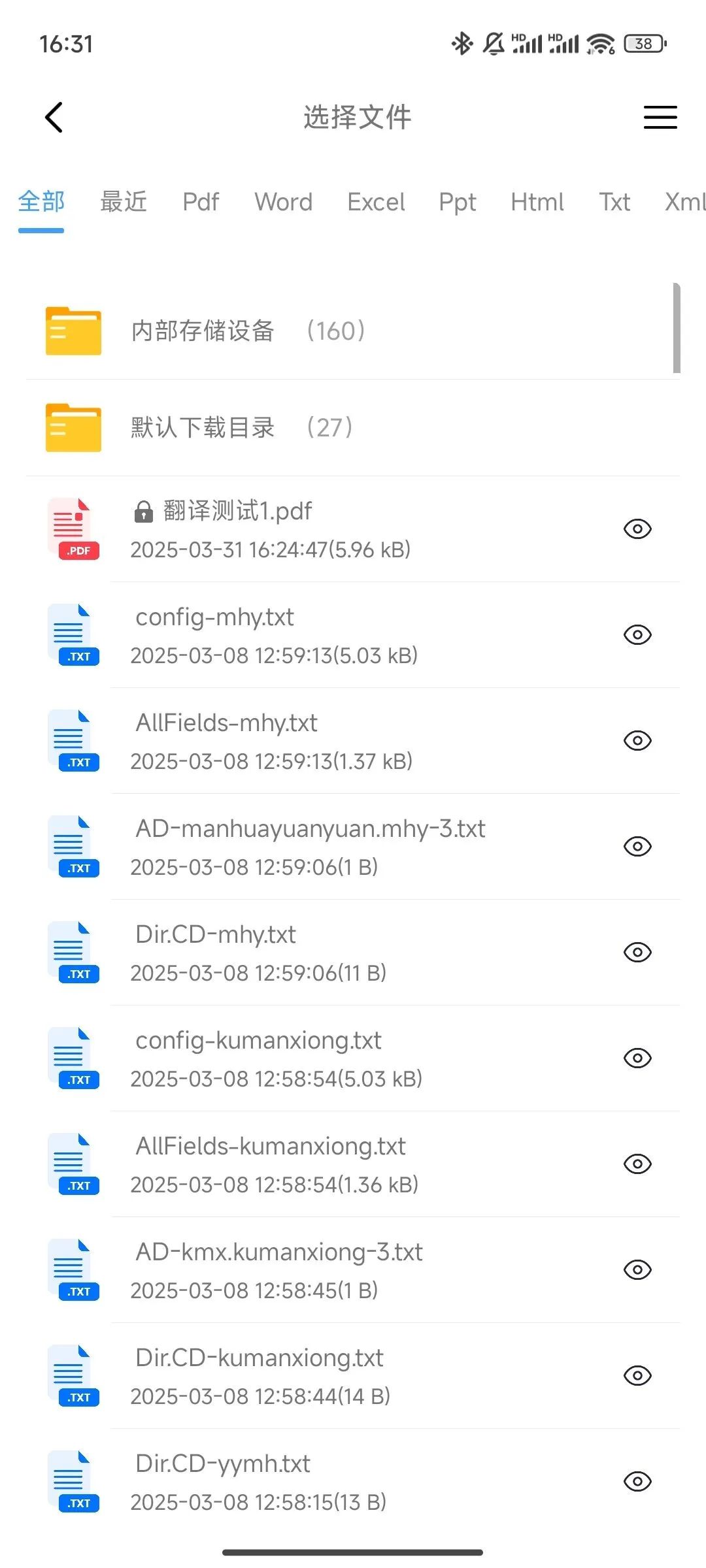
免费多语言文档翻译软件推荐
软件介绍 今天给大家介绍一款文档翻译助手。它能够支持PDF、Word等多种文档格式,涵盖中文、英文、日语等多语言互译。此软件在翻译过程中精选保留文档原貌,每段文字、每个图表的匹配都十分完美,还依托顶尖翻译大模型,让翻译结果符…...
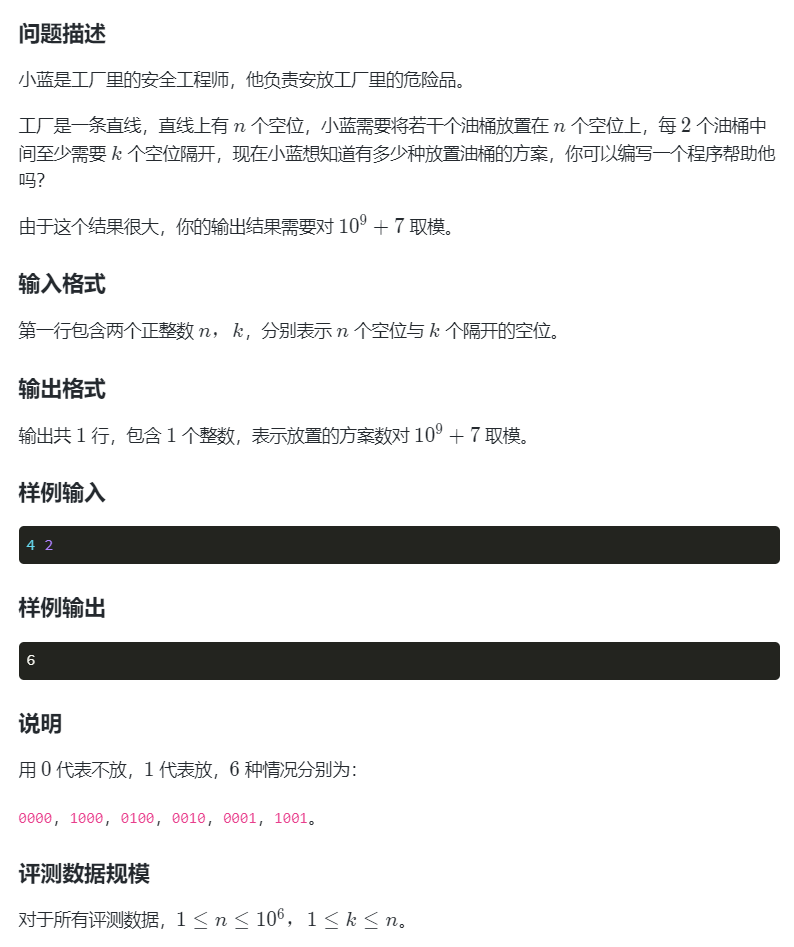
安全序列(DP)
#include <bits/stdc.h> using namespace std; const int MOD1e97; const int N1e65; int f[N]; int main() {int n,k;cin>>n>>k;f[0]1;for(int i1;i<n;i){f[i]f[i-1]; // 不放桶:延续前一位的所有方案if(i-k-1>0){f[i](f[i]f[i-k…...
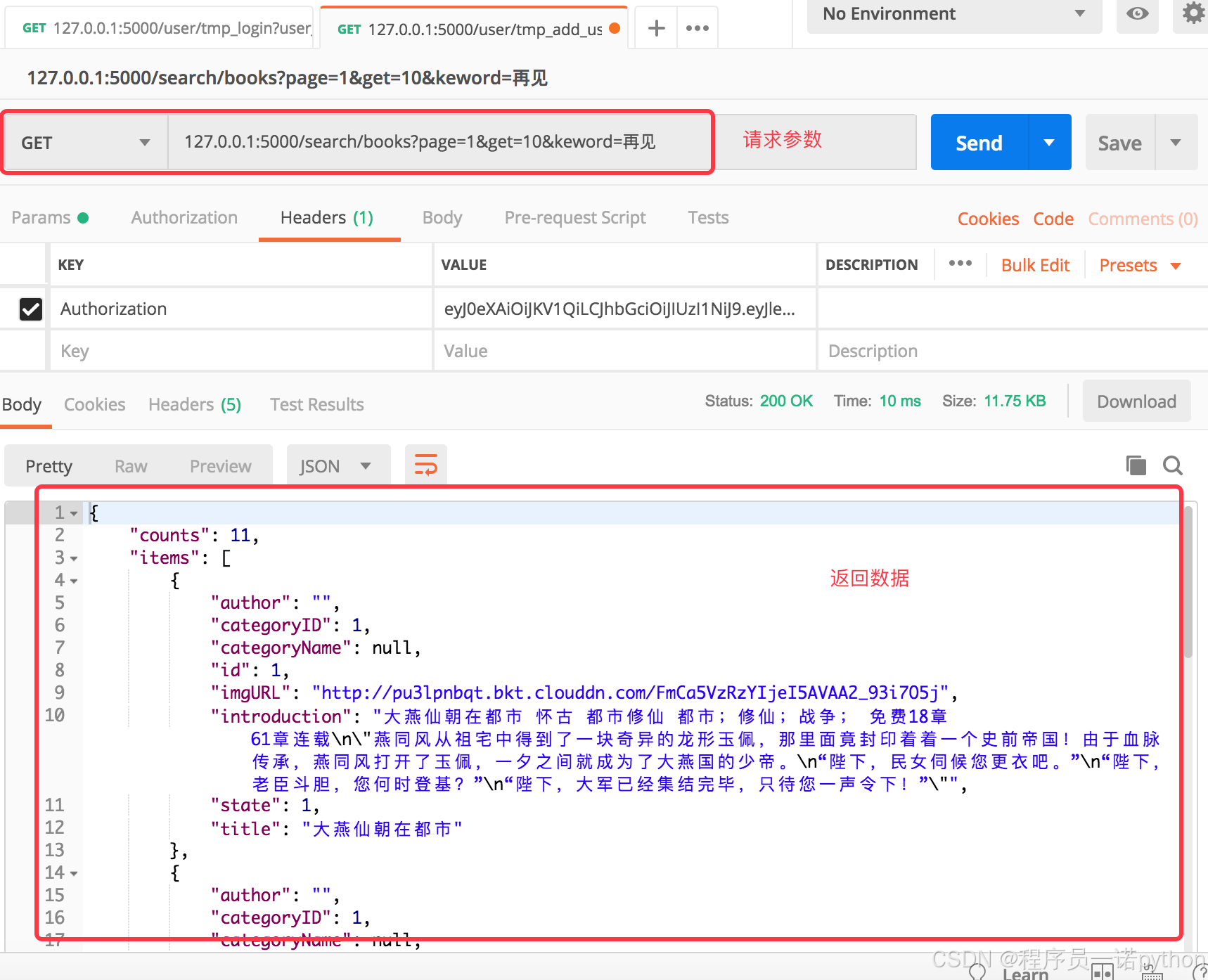
【Flask开发】嘿马文学web完整flask项目第4篇:4.分类,4.分类【附代码文档】
教程总体简介:2. 目标 1.1产品与开发 1.2环境配置 1.3 运行方式 1.4目录说明 1.5数据库设计 2.用户认证 Json Web Token(JWT) 3.书架 4.1分类列表 5.搜索 5.3搜索-精准&高匹配&推荐 6.小说 6.4推荐-同类热门推荐 7.浏览记录 8.1配置-阅读偏好 8.配置 9.1项目…...
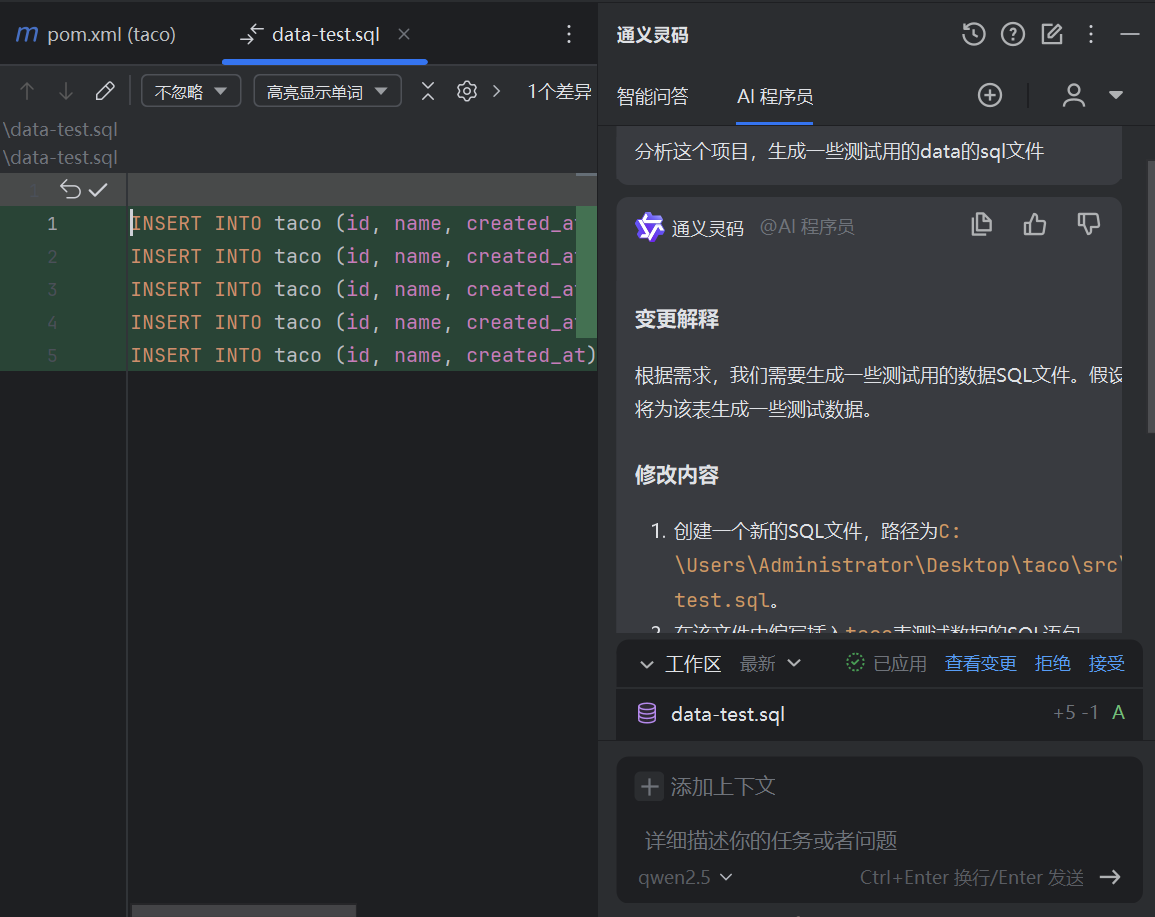
SQL开发的智能助手:通义灵码在IntelliJ IDEA中的应用
SQL 是一种至关重要的数据库操作语言,尽管其语法与通用编程语言有所不同,但因其在众多应用中的广泛使用,大多数程序员都具备一定的 SQL 编写能力。然而,当面对复杂的 SQL 语句或优化需求时,往往需要专业数据库开发工程…...

基于 Q - learning 算法的迷宫导航
这段 Python 代码实现了一个基于 Q - learning 算法的迷宫导航系统。代码通过定义迷宫环境、实现 Q - learning 算法来训练智能体,使其能够在迷宫中找到从起点到终点的最优路径,同时利用训练好的 Q 表来测试智能体的导航能力。 在这个代码实现的迷宫环境…...

解决:AttributeError: module ‘cv2‘ has no attribute ‘COLOR_BGR2RGB‘
opencv AttributeError: module ‘cv2’ has no attribute ‘warpFrame’ 或者 opencv 没有 rgbd 解决上述问题的方法是: 卸载重装。 但是一定要卸载干净,仅仅卸载opencv-python是不行的。无限重复都报这个错。 使用pip list | grep opencv查看相关的…...
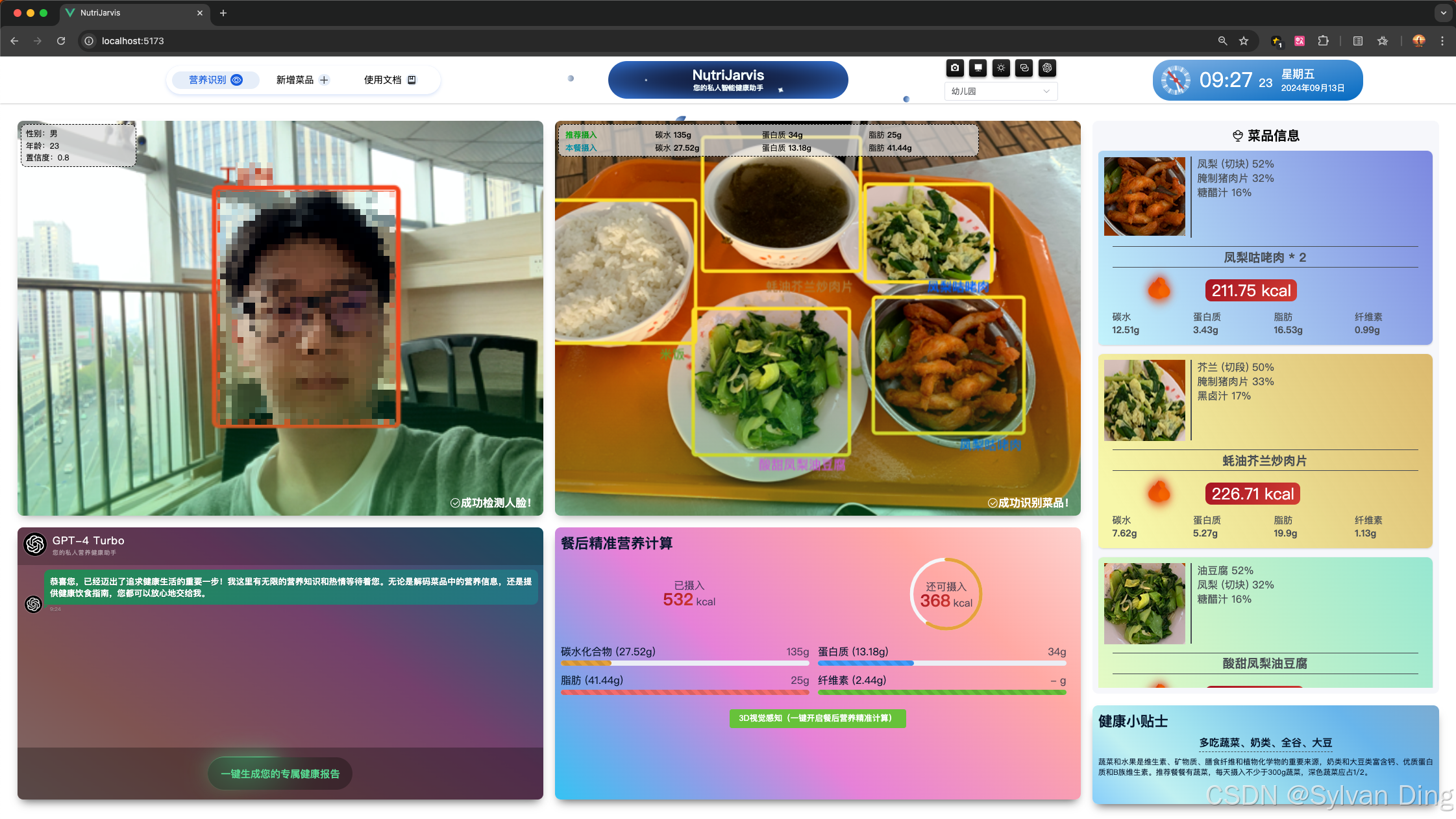
NutriJarvis:AI慧眼识餐,精准营养触手可及!—— 基于深度学习的菜品识别与营养计算系统
NutriJarvis:AI慧眼识餐,精准营养触手可及!—— 基于深度学习的菜品识别与营养计算系统 NutriJarvis 是一个基于深度学习的菜品识别与营养计算系统,旨在通过计算机视觉技术自动识别餐盘中的食物,并估算其营养成分&…...

作为一名java技术博主如何突围
作为一位Java开发和技术博主,想要在抖音上快速提升粉丝数量和视频播放量,可以结合以下策略进行优化: 1. 明确目标受众与技术方向 细分领域:技术领域广泛,可以专注于Java开发、算法、框架解析(如Spring Boo…...
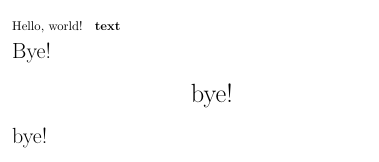
【LaTeX】
基本使用 \documentclass 类型:文章(article)、报告(report)、书(book) 中文的文章是ctexart,中文字体是UTF8 \documentclass[UTF8]{ctexart} []说明可以省略不写的意思…...