
个人博客系统后端 - 注册登录功能实现指南
一、功能概述
个人博客系统的注册登录功能包括:
- 用户注册:新用户可以通过提供用户名、密码、邮箱等信息创建账号
- 用户登录:已注册用户可以通过用户名和密码进行身份验证,获取JWT令牌
- 身份验证:使用JWT令牌访问需要认证的API
二、技术栈
- 后端框架:Spring Boot 3.2.5
- 安全框架:Spring Security
- 数据库:MySQL 8.0
- 认证方式:JWT (JSON Web Token)
- API测试工具:Postman
三、实现步骤
1. 数据库设计
用户表(users)设计:
CREATE TABLE users (id BIGINT AUTO_INCREMENT PRIMARY KEY,username VARCHAR(50) NOT NULL UNIQUE,password VARCHAR(100) NOT NULL,email VARCHAR(100) NOT NULL UNIQUE,nickname VARCHAR(50),role VARCHAR(20) NOT NULL DEFAULT 'USER',status INT NOT NULL DEFAULT 1,created_at DATETIME NOT NULL,updated_at DATETIME NOT NULL
);
2. 实体类设计
User实体类:
@Data
@NoArgsConstructor
@AllArgsConstructor
@Entity
@Table(name = "users")
public class User {@Id@GeneratedValue(strategy = GenerationType.IDENTITY)private Long id;@Column(nullable = false, unique = true, length = 50)private String username;@Column(nullable = false, length = 100)private String password;@Column(nullable = false, unique = true, length = 100)private String email;@Column(length = 50)private String nickname;@Column(nullable = false, length = 20)private String role = "USER"; // 默认角色@Column(nullable = false)private Integer status = 1; // 默认状态(1为激活)@Column(name = "created_at", nullable = false, updatable = false)private LocalDateTime createdAt;@Column(name = "updated_at", nullable = false)private LocalDateTime updatedAt;@PrePersistprotected void onCreate() {createdAt = LocalDateTime.now();updatedAt = LocalDateTime.now();}@PreUpdateprotected void onUpdate() {updatedAt = LocalDateTime.now();}
}
3. DTO设计
注册DTO:
public class RegisterUserDto {@NotBlank(message = "用户名不能为空")@Size(min = 4, max = 50, message = "用户名长度必须在4-50个字符之间")private String username;@NotBlank(message = "密码不能为空")@Size(min = 6, max = 100, message = "密码长度必须在6-100个字符之间")private String password;@NotBlank(message = "邮箱不能为空")@Email(message = "邮箱格式不正确")private String email;private String nickname;// getters and setters
}
登录DTO:
public class LoginUserDto {@NotBlank(message = "用户名不能为空")private String username;@NotBlank(message = "密码不能为空")private String password;// getters and setters
}
4. 数据仓库接口
@Repository
public interface UserRepository extends JpaRepository<User, Long> {Optional<User> findByUsername(String username);Optional<User> findByEmail(String email);boolean existsByUsername(String username);boolean existsByEmail(String email);
}
5. 服务层实现
AuthService接口:
public interface AuthService {User registerUser(RegisterUserDto registerUserDto);Map<String, Object> loginUser(LoginUserDto loginUserDto) throws AuthenticationException;
}
AuthServiceImpl实现类:
@Service
public class AuthServiceImpl implements AuthService {private final UserRepository userRepository;private final PasswordEncoder passwordEncoder;private final AuthenticationManager authenticationManager;private final JwtUtil jwtUtil;@Autowiredpublic AuthServiceImpl(UserRepository userRepository,PasswordEncoder passwordEncoder,AuthenticationManager authenticationManager,JwtUtil jwtUtil) {this.userRepository = userRepository;this.passwordEncoder = passwordEncoder;this.authenticationManager = authenticationManager;this.jwtUtil = jwtUtil;}@Override@Transactionalpublic User registerUser(RegisterUserDto registerUserDto) {// 检查用户名是否已存在if (userRepository.existsByUsername(registerUserDto.getUsername())) {throw new UserAlreadyExistsException("用户名 " + registerUserDto.getUsername() + " 已被注册");}// 检查邮箱是否已存在if (registerUserDto.getEmail() != null && !registerUserDto.getEmail().isEmpty() && userRepository.existsByEmail(registerUserDto.getEmail())) {throw new UserAlreadyExistsException("邮箱 " + registerUserDto.getEmail() + " 已被注册");}// 创建新用户实体User newUser = new User();newUser.setUsername(registerUserDto.getUsername());// 加密密码newUser.setPassword(passwordEncoder.encode(registerUserDto.getPassword()));newUser.setEmail(registerUserDto.getEmail());newUser.setNickname(registerUserDto.getNickname());// 使用默认值(role="USER", status=1)// createdAt 和 updatedAt 由 @PrePersist 自动处理// 保存用户到数据库return userRepository.save(newUser);}@Overridepublic Map<String, Object> loginUser(LoginUserDto loginUserDto) throws AuthenticationException {// 创建认证令牌UsernamePasswordAuthenticationToken authenticationToken =new UsernamePasswordAuthenticationToken(loginUserDto.getUsername(), loginUserDto.getPassword());// 进行认证Authentication authentication = authenticationManager.authenticate(authenticationToken);SecurityContextHolder.getContext().setAuthentication(authentication);// 获取用户详情UserDetails userDetails = (UserDetails) authentication.getPrincipal();// 生成JWT令牌String jwt = jwtUtil.generateToken(userDetails);// 获取用户IDUser user = userRepository.findByUsername(loginUserDto.getUsername()).orElseThrow(() -> new RuntimeException("用户不存在"));// 创建返回结果Map<String, Object> result = new HashMap<>();result.put("token", jwt);result.put("userId", user.getId());result.put("username", user.getUsername());result.put("expiresIn", 604800L); // 默认7天 = 604800秒return result;}
}
6. 控制器实现
@RestController
@RequestMapping("/auth")
public class AuthController {private final AuthService authService;@Autowiredpublic AuthController(AuthService authService) {this.authService = authService;}@PostMapping("/register")public ResponseEntity<?> registerUser(@Valid @RequestBody RegisterUserDto registerUserDto) {User registeredUser = authService.registerUser(registerUserDto);Map<String, Object> response = new HashMap<>();response.put("code", HttpStatus.CREATED.value());response.put("message", "注册成功");return ResponseEntity.status(HttpStatus.CREATED).body(response);}@PostMapping("/login")public ResponseEntity<?> loginUser(@Valid @RequestBody LoginUserDto loginUserDto) {try {Map<String, Object> loginResult = authService.loginUser(loginUserDto);Map<String, Object> response = new HashMap<>();response.put("code", HttpStatus.OK.value());response.put("message", "登录成功");Map<String, Object> data = new HashMap<>();data.put("token", loginResult.get("token"));data.put("userId", loginResult.get("userId"));data.put("username", loginResult.get("username"));data.put("expiresIn", loginResult.get("expiresIn"));response.put("data", data);return ResponseEntity.ok(response);} catch (BadCredentialsException e) {Map<String, Object> response = new HashMap<>();response.put("code", HttpStatus.UNAUTHORIZED.value());response.put("message", "用户名或密码错误");return ResponseEntity.status(HttpStatus.UNAUTHORIZED).body(response);} catch (Exception e) {Map<String, Object> response = new HashMap<>();response.put("code", HttpStatus.INTERNAL_SERVER_ERROR.value());response.put("message", "服务器内部错误: " + e.getMessage());return ResponseEntity.status(HttpStatus.INTERNAL_SERVER_ERROR).body(response);}}@ExceptionHandler(MethodArgumentNotValidException.class)@ResponseStatus(HttpStatus.BAD_REQUEST)public Map<String, Object> handleValidationExceptions(MethodArgumentNotValidException ex) {Map<String, String> errors = ex.getBindingResult().getFieldErrors().stream().collect(Collectors.toMap(FieldError::getField, FieldError::getDefaultMessage));Map<String, Object> response = new HashMap<>();response.put("code", HttpStatus.BAD_REQUEST.value());response.put("message", "请求参数错误");response.put("errors", errors);return response;}@ExceptionHandler(UserAlreadyExistsException.class)@ResponseStatus(HttpStatus.BAD_REQUEST)public Map<String, Object> handleUserAlreadyExistsException(UserAlreadyExistsException ex) {Map<String, Object> response = new HashMap<>();response.put("code", HttpStatus.BAD_REQUEST.value());response.put("message", ex.getMessage());return response;}
}
7. 安全配置
@Configuration
@EnableWebSecurity
@EnableMethodSecurity(prePostEnabled = true)
public class SecurityConfig {@Autowiredprivate UserDetailsServiceImpl userDetailsService;@Beanpublic PasswordEncoder passwordEncoder() {return new BCryptPasswordEncoder();}@Beanpublic AuthenticationManager authenticationManager(AuthenticationConfiguration authenticationConfiguration) throws Exception {return authenticationConfiguration.getAuthenticationManager();}@Beanpublic SecurityFilterChain filterChain(HttpSecurity http) throws Exception {http.csrf(AbstractHttpConfigurer::disable).exceptionHandling(exceptions -> exceptions.authenticationEntryPoint(new HttpStatusEntryPoint(HttpStatus.UNAUTHORIZED)).accessDeniedHandler((request, response, accessDeniedException) -> response.setStatus(HttpStatus.FORBIDDEN.value()))).authorizeHttpRequests(authz -> authz.requestMatchers("/auth/**").permitAll().anyRequest().authenticated()).sessionManagement(session -> session.sessionCreationPolicy(SessionCreationPolicy.STATELESS));return http.build();}
}
8. JWT工具类
@Component
public class JwtUtil {@Value("${jwt.secret}")private String secret;@Value("${jwt.expiration}")private Long expiration;public String generateToken(UserDetails userDetails) {Map<String, Object> claims = new HashMap<>();return createToken(claims, userDetails.getUsername());}private String createToken(Map<String, Object> claims, String subject) {Date now = new Date();Date expiryDate = new Date(now.getTime() + expiration);return Jwts.builder().setClaims(claims).setSubject(subject).setIssuedAt(now).setExpiration(expiryDate).signWith(SignatureAlgorithm.HS512, secret).compact();}// 其他JWT验证方法...
}
四、使用Postman测试注册登录功能
1. 测试用户注册
-
创建POST请求:
- URL:
http://localhost:8080/auth/register - 请求头:
Content-Type: application/json - 请求体:
{"username": "testuser","password": "Password123","email": "testuser@example.com","nickname": "测试用户" } - URL:
-
发送请求并验证响应:
- 成功响应(201 Created):
{"code": 201,"message": "注册成功" }- 失败响应(400 Bad Request):
{"code": 400,"message": "用户名 testuser 已被注册"
}
2. 测试用户登录
-
创建POST请求:
- URL:
http://localhost:8080/auth/login - 请求头:
Content-Type: application/json - 请求体:
{"username": "testuser","password": "Password123" } - URL:
-
发送请求并验证响应:
- 成功响应(200 OK):
{"code": 200,"message": "登录成功","data": {"token": "eyJhbGciOiJIUzI1NiIsInR5cCI6IkpXVCJ9...","userId": 1,"username": "testuser","expiresIn": 604800} }- 失败响应(401 Unauthorized):
{"code": 401,"message": "用户名或密码错误"
}
3. 使用JWT令牌访问受保护的API
-
创建请求(例如获取用户信息):
- URL:
http://localhost:8080/users/1 - 请求头:
Authorization: Bearer {token}(使用登录时获取的token)
- URL:
-
发送请求并验证响应
五、常见问题及解决方案
1. Java 9+中缺少javax.xml.bind问题
问题描述:在Java 9及以上版本中使用JJWT 0.9.1库时,可能会遇到以下错误:
java.lang.ClassNotFoundException: javax.xml.bind.DatatypeConverter
原因:从Java 9开始,Java EE模块(包括javax.xml.bind包)被移除出了JDK核心。
解决方案:在pom.xml中添加JAXB API依赖:
<!-- 添加JAXB API依赖,解决Java 9+中缺少javax.xml.bind问题 -->
<dependency><groupId>javax.xml.bind</groupId><artifactId>jaxb-api</artifactId><version>2.3.1</version>
</dependency>
<dependency><groupId>com.sun.xml.bind</groupId><artifactId>jaxb-impl</artifactId><version>2.3.1</version>
</dependency>
<dependency><groupId>com.sun.xml.bind</groupId><artifactId>jaxb-core</artifactId><version>2.3.0.1</version>
</dependency>
2. API路径不匹配问题
问题描述:README文档中描述的API路径与实际代码中的路径不匹配。
原因:README中描述的基础路径是http://localhost:8080/api/v1,但控制器中只配置了/auth路径。
解决方案:
-
方案一:使用正确的URL:
http://localhost:8080/auth/register和http://localhost:8080/auth/login -
方案二:在application.properties中添加上下文路径配置:
server.servlet.context-path=/api/v1这样就可以使用README中描述的URL:
http://localhost:8080/api/v1/auth/register和http://localhost:8080/api/v1/auth/login
3. 数据库连接问题
问题描述:注册接口返回成功,但数据库中没有保存数据。
可能原因:
- 数据库名称配置错误
- 事务回滚(可能由未捕获的异常引起)
- 数据库连接问题
解决方案:
-
检查application.properties中的数据库配置是否正确:
spring.datasource.url=jdbc:mysql://localhost:3306/weblog?useSSL=false&serverTimezone=UTC&allowPublicKeyRetrieval=true spring.datasource.username=root spring.datasource.password=123456 -
确保数据库存在并且可以连接
-
检查日志中是否有事务回滚的错误信息
4. 请求验证失败
问题描述:注册或登录请求返回400错误,但没有明确的错误信息。
可能原因:请求体中缺少必填字段或格式不正确。
解决方案:
- 确保请求体中包含所有必填字段
- 确保字段格式正确(例如,邮箱格式、密码长度等)
- 检查控制台日志,查看详细的验证错误信息
六、最佳实践
-
密码安全:
- 始终使用BCrypt等安全的密码哈希算法
- 不要在响应中返回密码,即使是加密后的密码
- 设置密码复杂度要求(长度、特殊字符等)
-
JWT安全:
- 使用强密钥(至少256位)
- 设置合理的过期时间
- 考虑实现令牌刷新机制
- 在生产环境中使用HTTPS
-
异常处理:
- 为不同类型的异常提供明确的错误消息
- 不要在生产环境中暴露敏感的技术细节
- 使用统一的响应格式
-
日志记录:
- 记录关键操作(注册、登录、登出)
- 记录异常和错误
- 不要记录敏感信息(密码、令牌等)
相关文章:

个人博客系统后端 - 注册登录功能实现指南
一、功能概述 个人博客系统的注册登录功能包括: 用户注册:新用户可以通过提供用户名、密码、邮箱等信息创建账号用户登录:已注册用户可以通过用户名和密码进行身份验证,获取JWT令牌身份验证:使用JWT令牌访问需要认证…...

Python 基础语法汇总
Python 语法 │ ├── 基本结构 │ ├── 语句(Statements) │ │ ├── 表达式语句(如赋值、算术运算) │ │ ├── 控制流语句(if, for, while) │ │ ├── 定义语句(def…...
Linux上位机开发实践(OpenCV算法硬件加速)
【 声明:版权所有,欢迎转载,请勿用于商业用途。 联系信箱:feixiaoxing 163.com】 图像处理里面,opencv基本是一个标准模块。但是由于图像处理的特点,如果所有的算法都是cpu来做的话,效率会很低。…...
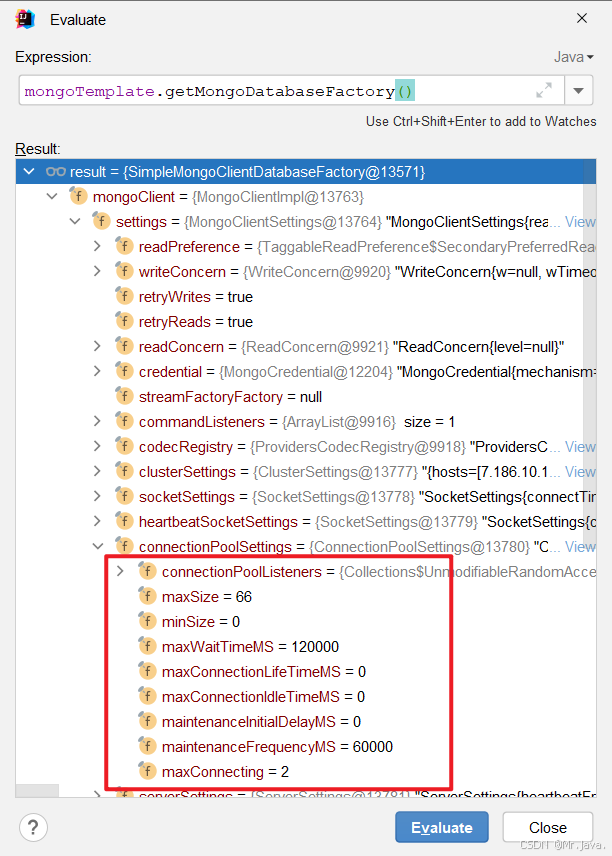
Spring Boot MongoDB自定义连接池配置
手打不易,如果转摘,请注明出处! 注明原文:http://zhangxiaofan.blog.csdn.net/article/details/144341407 一、引言 在 Spring Boot 应用中使用 MongoDB 时,合理配置连接池可以显著提升数据库访问的性能和稳定性。默…...

Redis与Mysql双写一致性如何保证?
我们在面试的时候redis与mysql双写一致性是一个常考的问题,今天我们就一起探讨一下吧 所谓的一致性就是数据的一致性,在分布式系统中,可以理解为多个节点中数据的值是一致的。 强一致性: 这种一致性级别是最符合用户直觉的&…...
面向对象--关联知识点(2)string和Stringbuilder)
C#核心学习(十六)面向对象--关联知识点(2)string和Stringbuilder
引言 在C#开发中,字符串处理是日常编码的基础需求。然而string和StringBuilder的选择常常引发困惑——何时该用不可变的string?什么场景下必须选择可变的StringBuilder?本文将深入剖析两者的核心差异,并通过完整API对比给出实用建…...
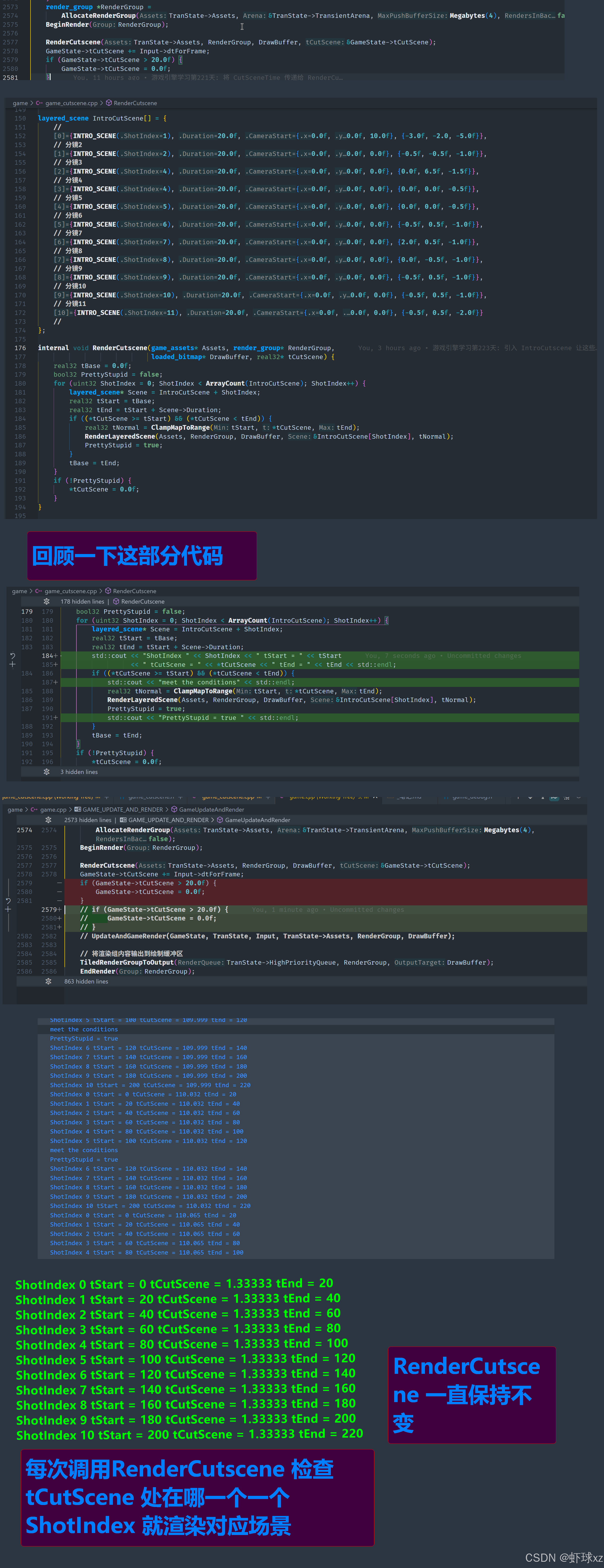
游戏引擎学习第223天
回顾 今天我们正在进行过场动画序列的制作,因此我想深入探讨这个部分。昨天,我们暂时停止了过场动画的制作,距离最终结局还有一些内容没有完成。今天的目标是继续完成这些内容。 我们已经制作了一个过场动画的系列,并把它们集中…...

趣味编程之go与rust的爱恨情仇
声明:此篇文章利用deepseek生成。 第一章:出身之谜 Go(江湖人称"高小戈")是名门之后——谷歌家的三少爷。生来就带着"简单粗暴"的家族基因,口号是**“少写代码多搬砖,并发处理赛神仙”**。它爹Ro…...
DeepSeek 助力 Vue3 开发:打造丝滑的日历(Calendar),日历_基础功能示例(CalendarView01_01)
前言:哈喽,大家好,今天给大家分享一篇文章!并提供具体代码帮助大家深入理解,彻底掌握!创作不易,如果能帮助到大家或者给大家一些灵感和启发,欢迎收藏+关注哦 💕 目录 DeepSeek 助力 Vue3 开发:打造丝滑的日历(Calendar),日历_基础功能示例(CalendarView01_01)📚…...

数据结构第五版【李春葆】
数据结构教程上机实验指导第5版(李春葆主编).pdf 数据结构教程(第5版)(李春葆).pdf 数据结构教程(第五版)课后习题参考答案(李春葆).pdf 数据结构教…...

LabVIEW配电器自动测试系统
随着航天技术的迅猛发展,航天器供配电系统的结构越来越复杂,对配电器的功能完整性、稳定性和可靠性提出了更高要求。传统人工测试方式难以满足高效率、高精度、可重复的测试需求。本项目开发了一套基于LabVIEW平台的宇航配电器自动测试系统,融…...

PhotoShop学习09
1.弯曲钢笔工具 PhotoShop提供了弯曲钢笔工具可以直观地创建路径,只需要对分段推拉就能够进行修改。弯曲港币工具位于工具面板中的钢笔工具里,它的快捷键为P。 在使用前,可以把填充和描边选为空颜色,并打开路径选项,勾…...

【C++】哈希unordered_map和set的使用以及哈希表,哈希桶的概念以及底层实现
📚 博主的专栏 🐧 Linux | 🖥️ C | 📊 数据结构 | 💡C 算法 | 🌐 C 语言 本文章完整代码在下篇文章开头给出 上篇文章:map和set使用红黑树封装的底层实现 下篇文章:封装…...

AOSP14 Launcher3——手势上滑关键类AbsSwipeHandler解析
我们来深入分析 quickstep/src/com/android/quickstep/AbsSwipeUpHandler.java 这个非常核心且复杂的类。 1. 核心作用 (Core Role): AbsSwipeUpHandler 是 Quickstep (Launcher3 的手势导航实现) 中处理从屏幕底部上滑手势的核心逻辑抽象基类。它负责管理从手势开始到结束的…...

设计模式——建造者模式(生成器模式)总结
当我们需要创建一个非常复杂的对象时,可以使用建造者模式,分步骤建造一个对象,最后将完整的对象返回给客户端。 比如,我们要生成一个房子对象,建造一个房子,需要打地基、盖围墙、盖地板、安装门、安装窗户…...
:RedisTemplate的String和Hash类型操作)
Spring Boot(二十一):RedisTemplate的String和Hash类型操作
RedisTemplate和StringRedisTemplate的系列文章详见: Spring Boot(十七):集成和使用Redis Spring Boot(十八):RedisTemplate和StringRedisTemplate Spring Boot(十九)…...
使用Python爬虫的2大原因和6大常用库
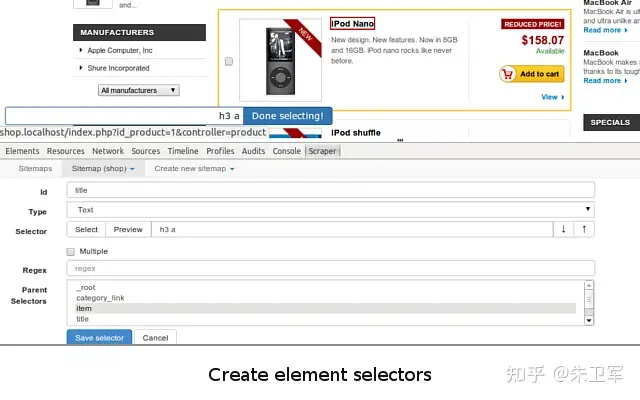
爬虫其实就是请求http、解析网页、存储数据的过程,并非高深的技术,但凡是编程语言都能做,连Excel VBA都可以实现爬虫,但Python爬虫的使用频率最高、场景最广。 这可不仅仅是因为Python有众多爬虫和数据处理库,还有一个…...

Java 架构设计:从单体架构到微服务的转型之路
Java 架构设计:从单体架构到微服务的转型之路 在现代软件开发中,架构设计的选择对系统的可扩展性、可维护性和性能有着深远的影响。随着业务需求的日益复杂和用户规模的不断增长,传统的单体架构逐渐暴露出其局限性,而微服务架构作…...
C# 混淆代码工具--ConfuserEx功能与使用指南
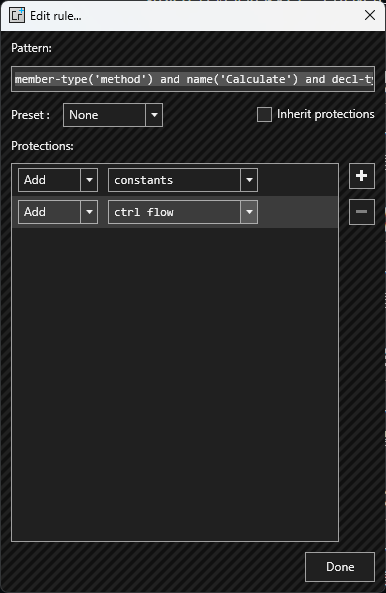
目录 1 前言1.1 可能带来的问题 2 ConfuserEx2.1 简介2.2 功能特点2.3 基本使用方法2.4 集成到MSBuild2.5 深入设置2.5.1 保护机制2.5.1.1 ConfuserEx Protection 2.5.2 精细的代码保护主要特性1. decl-type(string)2.full-name(string)3. is-public()4. match(string)5. match…...
使用PyTorch实现目标检测边界框转换与可视化
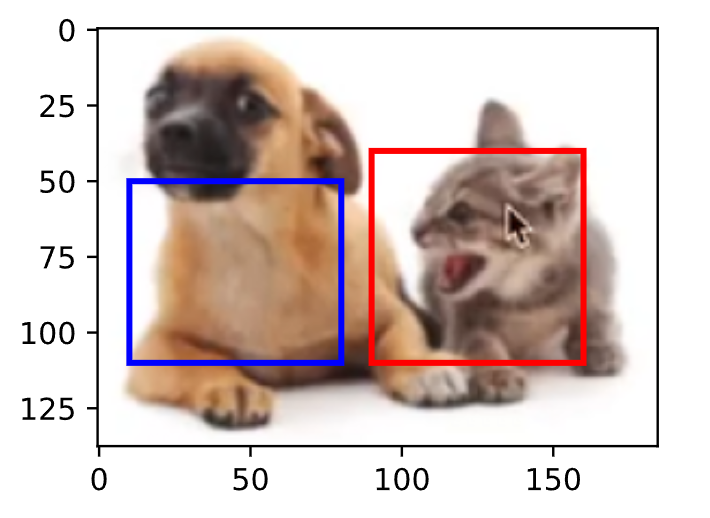
一、引言 在目标检测任务中,边界框(Bounding Box)的坐标表示与转换是核心基础操作。本文将演示如何: 实现边界框的两种表示形式(角点坐标 vs 中心坐标)之间的转换 使用Matplotlib在图像上可视化边界框 验…...
nlp面试重点
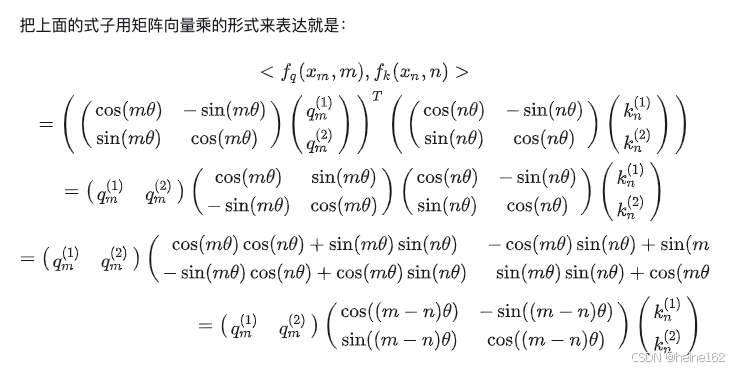
深度学习基本原理:梯度下降公式,将损失函数越来越小,最终预测值和实际值误差比较小。 交叉熵:-p(x)logq(x),p(x)是one-hot形式。如果不使用softmax计算交叉熵,是不行的。损失函数可能会非常大,…...
欢乐力扣:反转链表二
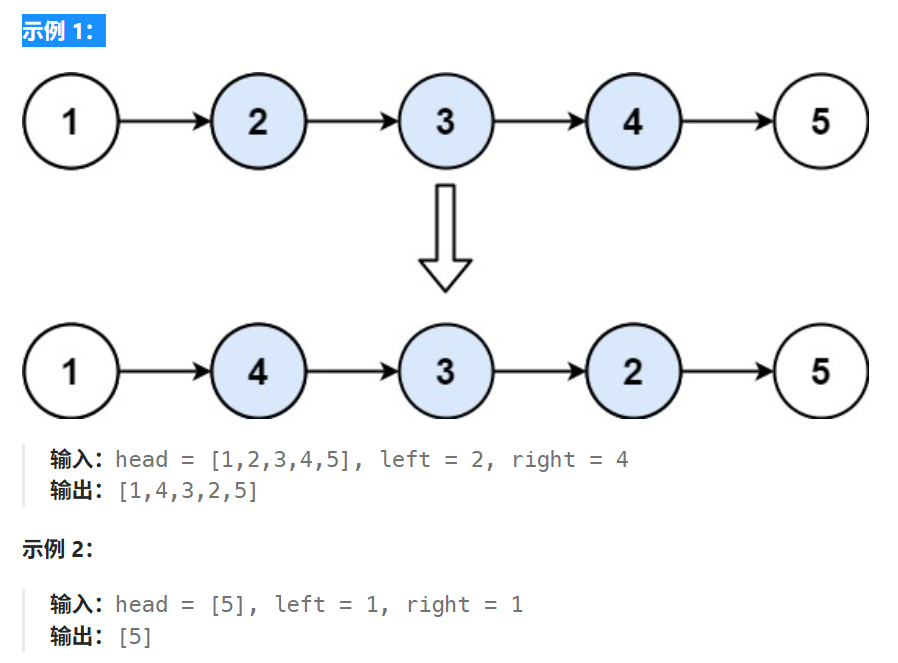
文章目录 1、题目描述2、思路 1、题目描述 反转链表二。 给你单链表的头指针 head 和两个整数 left 和 right ,其中 left < right 。请你反转从位置 left 到位置 right 的链表节点,返回 反转后的链表 。 2、思路 参考官方题解,基本思路…...
(完结))
2025最新系统 Git 教程(七)(完结)
第4章 分布式Git 4.1 分布式 Git - 分布式工作流程 你现在拥有了一个远程 Git 版本库,能为所有开发者共享代码提供服务,在一个本地工作流程下,你也已经熟悉了基本 Git 命令。你现在可以学习如何利用 Git 提供的一些分布式工作流程了。 这一…...
14-大模型微调和训练之-Hugging Face 模型微调训练(基于 BERT 的中文评价情感分析(二分类))
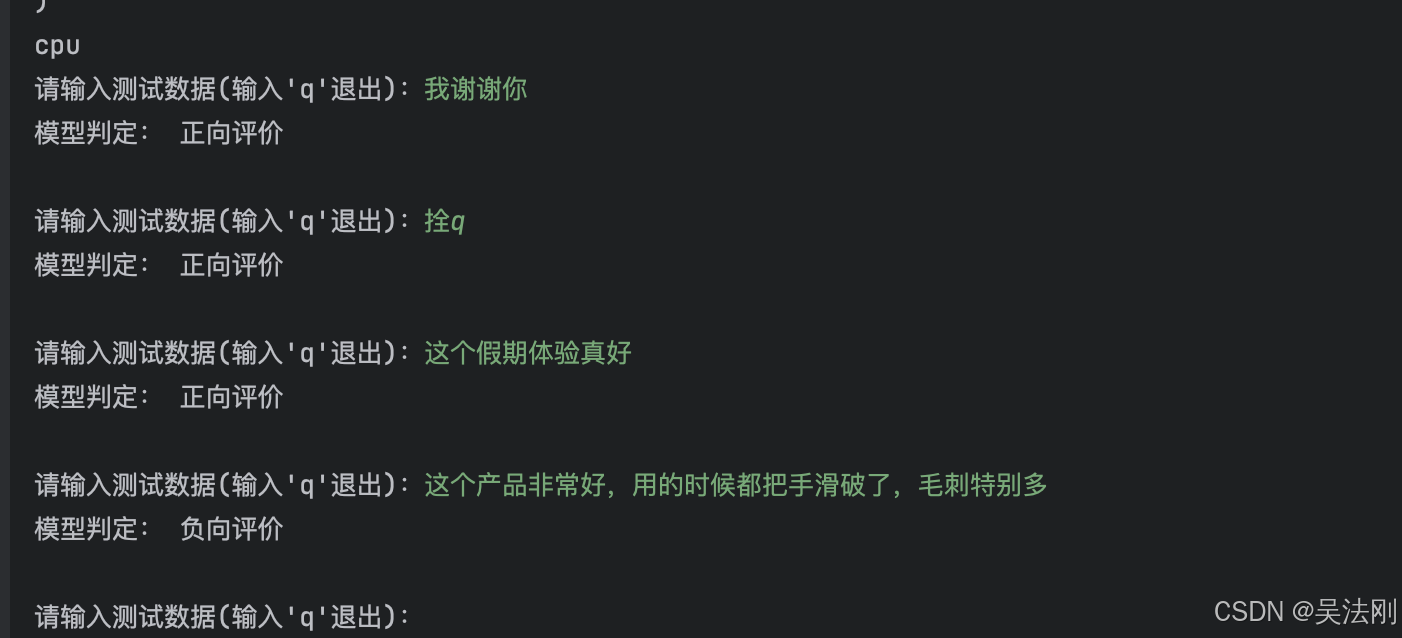
1. datasets 库核心方法 1.1. 列出数据集 使用 datasets 库,你可以轻松列出所有 Hugging Face 平台上的数据集: from datasets import list_datasets # 列出所有数据集 all_datasets list_datasets() print(all_datasets)1.2. 加载数据集 你可以通过…...

聊透多线程编程-线程基础-4.C# Thread 子线程执行完成后通知主线程执行特定动作
在多线程编程中,线程之间的同步和通信是一个常见的需求。例如,我们可能需要一个子线程完成某些任务后通知主线程,并由主线程执行特定的动作。本文将基于一个示例程序,详细讲解如何使用 AutoResetEvent 来实现这种场景。 示例代码…...
论文阅读笔记——Reactive Diffusion Policy
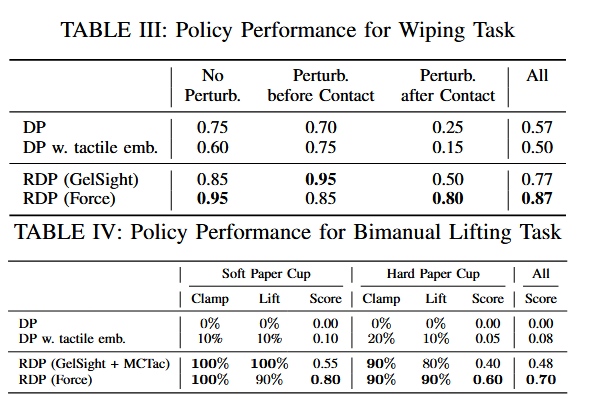
RDP 论文 通过 AR 提供实时触觉/力反馈;慢速扩散策略,用于预测低频潜在空间中的高层动作分块;快速非对称分词器实现闭环反馈控制。 ACT、 π 0 \pi_0 π0 采取了动作分块,在动作分块执行期间处于开环状态,无法及时响…...
ISIS协议(动态路由协议)
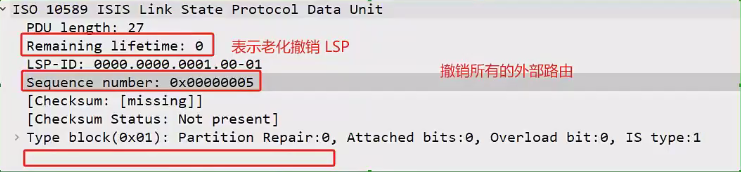
ISIS基础 基本概念 IS-IS(Intermediate System to Intermediate System,中间系统到中间系统)是ISO (International Organization for Standardization,国际标准化组织)为它的CLNP(ConnectionL…...
Kafka实时数据采集与分发的企业级实践:从架构设计到性能调优)
大数据(7.1)Kafka实时数据采集与分发的企业级实践:从架构设计到性能调优
目录 一、实时数据洪流下的技术突围1.1 行业需求演进曲线1.2 传统方案的技术瓶颈 二、Kafka实时架构设计精要2.1 生产者核心参数矩阵2.1.1 分区策略选择指南 2.2 消费者组智能负载均衡 三、实时数据管道实战案例3.1 电商大促实时看板3.2 工业物联网预测性维护 四、生产环境性能…...

UniApp 实现兼容 H5 和小程序的拖拽排序组件
如何使用 UniApp 实现一个兼容 H5 和小程序的 九宫格拖拽排序组件,实现思路和关键步骤。 一、完整效果图示例 H5端 小程序端 git地址 二、实现目标 支持拖动菜单项改变顺序拖拽过程实时预览移动位置拖拽松开后自动吸附回网格兼容 H5 和小程序平台 三、功能…...

C,C++,C#
C、C 和 C# 是三种不同的编程语言,虽然它们名称相似,但在设计目标、语法特性、运行环境和应用场景上有显著区别。以下是它们的核心区别: 1. 设计目标和历史 语言诞生时间设计目标特点C1972(贝尔实验室)面向过程&#…...