
【python】OpenCV—Tracking(10.6)—People Counting

文章目录
- 1、功能描述
- 2、代码实现
- 3、效果展示
- 4、完整代码
- 5、涉及到的库函数
- 6、参考来自
更多有趣的代码示例,可参考【Programming】
1、功能描述
借助 opencv-python,用 SSD 人形检测模型和质心跟踪方法实现对人群的计数
基于质心的跟踪可以参考 【python】OpenCV—Tracking(10.4)—Centroid,本文不过多介绍
2、代码实现
工程目录
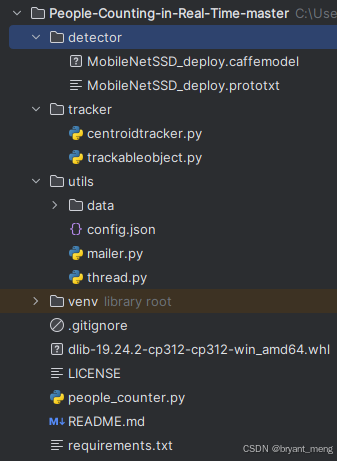
安装依赖库
requirements.txt
schedule==1.1.0
numpy==1.24.3
argparse==1.4.0
imutils==0.5.4
dlib==19.24.1
opencv-python==4.5.5.64
scipy==1.10.1
cmake==3.22.5
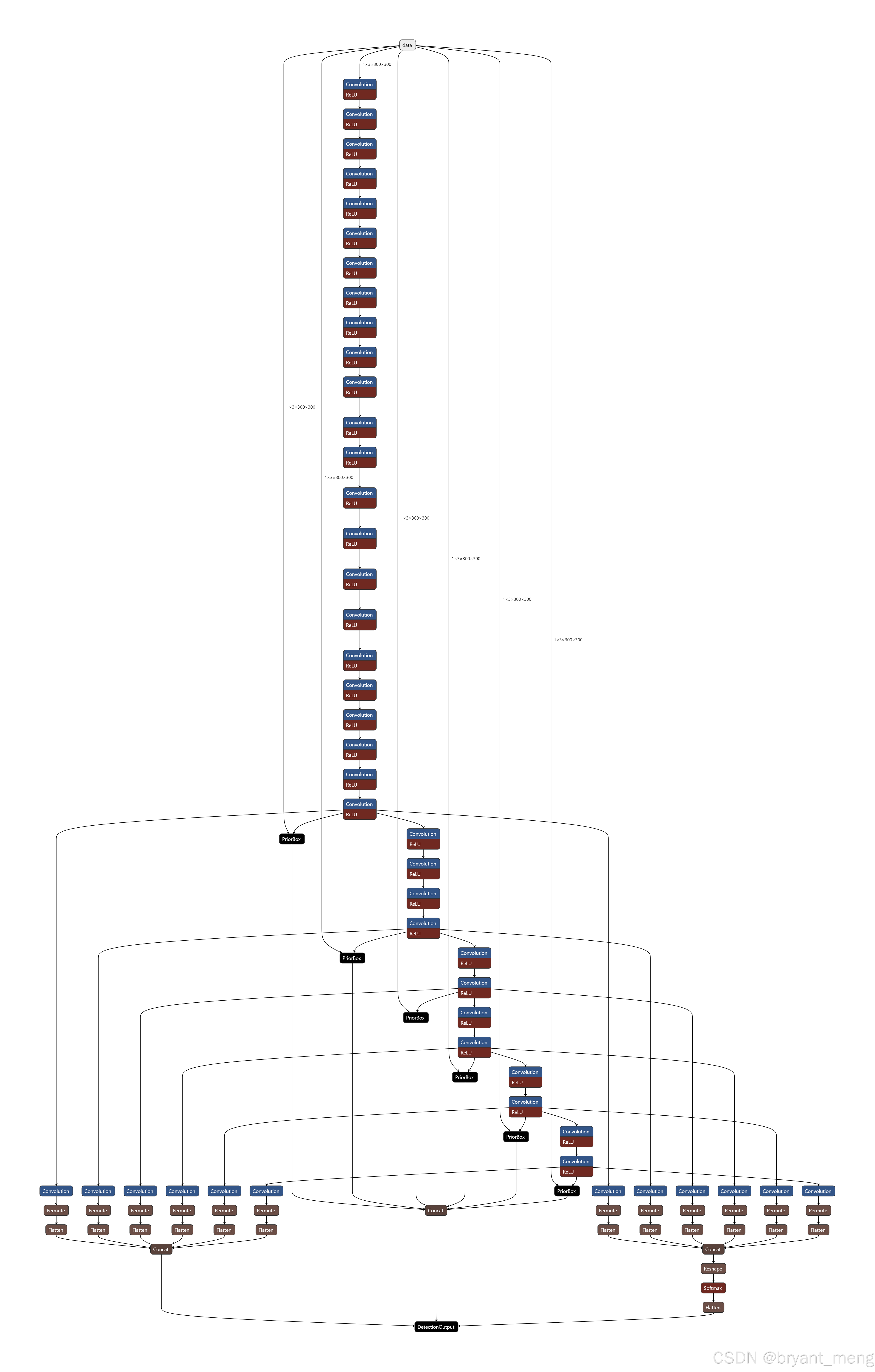
模型文件

网络输入大小 1x3x300x300
trackableobject.py
class TrackableObject:def __init__(self, objectID, centroid):# store the object ID, then initialize a list of centroids# using the current centroidself.objectID = objectIDself.centroids = [centroid]# initialize a boolean used to indicate if the object has# already been counted or notself.counted = False
TrackableObject 构造函数接受 objectID + centroid 并存储它们。
centroids 变量是一个列表,因为它将包含对象的质心位置历史记录。
构造函数还将 counted 初始化为 False ,表示该对象还没有被计数。
people_counter.py
导入必要的库函数
from tracker.centroidtracker import CentroidTracker
from tracker.trackableobject import TrackableObject
from imutils.video import VideoStream
from itertools import zip_longest
from utils.mailer import Mailer
from imutils.video import FPS
from utils import thread
import numpy as np
import threading
import argparse
import datetime
import schedule
import logging
import imutils
import time
import dlib
import json
import csv
import cv2
dlib 库将用于其相关跟踪器实现
记录程序运行的时间,配置 log,初始化相关参数
# execution start time
start_time = time.time()
# setup logger
logging.basicConfig(level = logging.INFO, format = "[INFO] %(message)s")
logger = logging.getLogger(__name__)
# initiate features config.
with open("utils/config.json", "r") as file:config = json.load(file)
config.json 内容如下
{"Email_Send": "","Email_Receive": "","Email_Password": "","url": "","ALERT": false,"Threshold": 10,"Thread": false,"Log": false,"Scheduler": false,"Timer": false
}
参数传递
def parse_arguments():# function to parse the argumentsap = argparse.ArgumentParser()ap.add_argument("-p", "--prototxt", required=False, default="detector/MobileNetSSD_deploy.prototxt",help="path to Caffe 'deploy' prototxt file")ap.add_argument("-m", "--model", required=False, default="detector/MobileNetSSD_deploy.caffemodel",help="path to Caffe pre-trained model")ap.add_argument("-i", "--input", type=str, default="utils/data/tests/test_1.mp4",help="path to optional input video file")ap.add_argument("-o", "--output", type=str,help="path to optional output video file")# confidence default 0.4ap.add_argument("-c", "--confidence", type=float, default=0.4,help="minimum probability to filter weak detections")ap.add_argument("-s", "--skip-frames", type=int, default=30,help="# of skip frames between detections")args = vars(ap.parse_args())return args
- prototxt :Caffe 部署 prototxt 文件的路径。
- model :Caffe 预训练 CNN 模型的路径。
- input : 可选的输入视频文件路径。
- output :可选的输出视频路径。如果未指定路径,则不会录制视频。
- confidence :默认值为 0.4 ,这是有助于过滤掉弱检测的最小概率阈值。
- skip-frames :在跟踪对象上再次运行我们的 DNN 检测器之前要跳过的帧数。请记住,对象检测的计算成本很高,但它确实有助于我们的跟踪器重新评估帧中的对象。默认情况下,我们在使用 OpenCV DNN 模块和我们的 CNN 单次检测器模型检测对象之间跳过 30 帧。
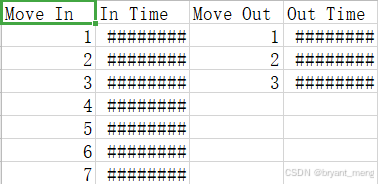
保存 log,如果调用的话,会生成 counting_data.csv
def log_data(move_in, in_time, move_out, out_time):# function to log the counting datadata = [move_in, in_time, move_out, out_time]# transpose the data to align the columns properlyexport_data = zip_longest(*data, fillvalue = '')with open('utils/data/logs/counting_data.csv', 'w', newline = '') as myfile:wr = csv.writer(myfile, quoting = csv.QUOTE_ALL)if myfile.tell() == 0: # check if header rows are already existingwr.writerow(("Move In", "In Time", "Move Out", "Out Time"))wr.writerows(export_data)
eg:
核心函数 people_counter(main function for people_counter.py),下面看看实现
首先定义好 MobileNet SSD 目标检测网络能预测的所有类别
args = parse_arguments()# initialize the list of class labels MobileNet SSD was trained to detectCLASSES = ["background", "aeroplane", "bicycle", "bird", "boat","bottle", "bus", "car", "cat", "chair", "cow", "diningtable","dog", "horse", "motorbike", "person", "pottedplant", "sheep","sofa", "train", "tvmonitor"]
载入 caffe 网络
# load our serialized model from disknet = cv2.dnn.readNetFromCaffe(args["prototxt"], args["model"])
如果没有配置输入视频,则开启网页,网址在 config.json 中配置
# if a video path was not supplied, grab a reference to the ip cameraif not args.get("input", False):logger.info("Starting the live stream..")vs = VideoStream(config["url"]).start()time.sleep(2.0)# otherwise, grab a reference to the video fileelse:logger.info("Starting the video..")vs = cv2.VideoCapture(args["input"])
初始化一些参数配置
# initialize the video writer (we'll instantiate later if need be)writer = None# initialize the frame dimensions (we'll set them as soon as we read# the first frame from the video)W = NoneH = None# instantiate our centroid tracker, then initialize a list to store# each of our dlib correlation trackers, followed by a dictionary to# map each unique object ID to a TrackableObjectct = CentroidTracker(maxDisappeared=40, maxDistance=50)trackers = []trackableObjects = {}# initialize the total number of frames processed thus far, along# with the total number of objects that have moved either up or downtotalFrames = 0totalDown = 0totalUp = 0# initialize empty lists to store the counting datatotal = []move_out = []move_in =[]out_time = []in_time = []# start the frames per second throughput estimatorfps = FPS().start()
- writer:我们的视频写入器。如果我们正在写入视频,我们稍后会实例化这个对象。
- W 和 H:我们的帧尺寸。我们需要将这些插入到 cv2.VideoWriter 中。
- ct:CentroidTracker。
- trackers :存储 dlib 相关跟踪器的列表。
- trackableObjects :将 objectID 映射到 TrackableObject 的字典。
- totalFrames :处理的帧总数。
- totalDown 和 totalUp :向下或向上移动的对象/人的总数。
- fps :我们用于基准测试的每秒帧数估计器。
遍历读取视频流中的每一帧图片
读取失败会退出
如果读取成功,存储好原始图片的长宽,把图片 resize 到宽固定长度为 500
如果要保存输出视频,则配置好 cv2.VideoWriter 中的视频相关参数
# loop over frames from the video streamwhile True:# grab the next frame and handle if we are reading from either# VideoCapture or VideoStreamframe = vs.read()frame = frame[1] if args.get("input", False) else frame# if we are viewing a video and we did not grab a frame then we# have reached the end of the videoif args["input"] is not None and frame is None:break# resize the frame to have a maximum width of 500 pixels (the# less data we have, the faster we can process it), then convert# the frame from BGR to RGB for dlibframe = imutils.resize(frame, width = 500)rgb = cv2.cvtColor(frame, cv2.COLOR_BGR2RGB)# if the frame dimensions are empty, set themif W is None or H is None:(H, W) = frame.shape[:2]# if we are supposed to be writing a video to disk, initialize# the writerif args["output"] is not None and writer is None:fourcc = cv2.VideoWriter_fourcc(*"mp4v")writer = cv2.VideoWriter(args["output"], fourcc, 30,(W, H), True)
例子视频的尺寸为 (300, 402, 3)
第一帧

resize 后, 图片大小为 (373, 500, 3)
将状态初始化为 Waiting。可能的状态包括:
- Waiting:正在等待检测和跟踪人员。
- Detecting:正在使用 MobileNet SSD 检测人员。
- Tracking:人们在帧中被跟踪,正在计算 totalUp 和 totalDown 。
# initialize the current status along with our list of bounding# box rectangles returned by either (1) our object detector or# (2) the correlation trackersstatus = "Waiting"rects = []# check to see if we should run a more computationally expensive# object detection method to aid our trackerif totalFrames % args["skip_frames"] == 0:# set the status and initialize our new set of object trackersstatus = "Detecting"trackers = []# convert the frame to a blob and pass the blob through the# network and obtain the detectionsblob = cv2.dnn.blobFromImage(frame, 0.007843, (W, H), 127.5)net.setInput(blob)detections = net.forward()
检测时隔 skip_frames 帧才进行一次的,因为检测开销会比跟踪开销大,中间帧只用跟踪来进行检测框的更新
配置好输入数据,前向网络
遍历检测到的所有目标
获取其类别得分
得分高于设定的阈值 confidence 检测框才进行后续的处理
如果检测的类别不是 person,也会跳过
# loop over the detectionsfor i in np.arange(0, detections.shape[2]):# extract the confidence (i.e., probability) associated# with the predictionconfidence = detections[0, 0, i, 2]# filter out weak detections by requiring a minimum# confidenceif confidence > args["confidence"]:# extract the index of the class label from the# detections listidx = int(detections[0, 0, i, 1])# if the class label is not a person, ignore itif CLASSES[idx] != "person":continue
第一帧网络预测结果 detections 的 shape 为 (1, 1, 100, 7)
7 的构成
array([ 0. , 15. , 0.99846387, 0.34079546, 0.1428327 ,0.53464395, 0.5692927 ], dtype=float32)
第二个维度是 class,第三维度是 score,后面四个维度是 bbox 坐标
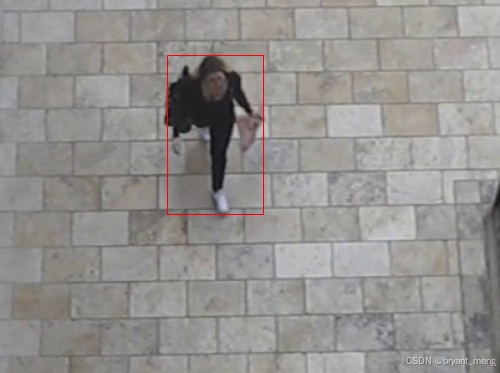
第一次检测到人的 bbox 为 array([170.39772868, 53.27659577, 267.32197404, 212.3461861 ])
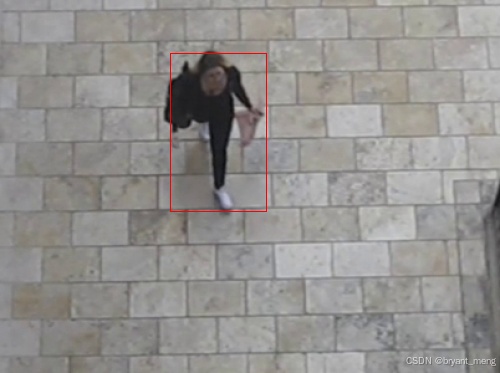
计算 box
实例化 dlib 相关跟踪器,将对象的边界框坐标传递给 dlib.rectangle,将结果存储为 rect。
开始跟踪,并将跟踪器附加到跟踪器列表 trackers 中
这是每 N 个跳帧执行的所有操作的封装
# compute the (x, y)-coordinates of the bounding box# for the objectbox = detections[0, 0, i, 3:7] * np.array([W, H, W, H])(startX, startY, endX, endY) = box.astype("int")# construct a dlib rectangle object from the bounding# box coordinates and then start the dlib correlation# trackertracker = dlib.correlation_tracker()rect = dlib.rectangle(startX, startY, endX, endY)tracker.start_track(rgb, rect)# add the tracker to our list of trackers so we can# utilize it during skip framestrackers.append(tracker)
注意,每 skip_frames 帧才判断一次是否检测到人,所以第一帧没有人的话,要等到 skip_frames 帧后才再次启用人形检测器
中间帧用跟踪器而不是目标检测器来定位矩形框
遍历可用跟踪器。
将状态更新为Tracking并获取对象位置。
提取位置坐标,然后在 rects 列表中填充信息。
# otherwise, we should utilize our object *trackers* rather than# object *detectors* to obtain a higher frame processing throughputelse:# loop over the trackersfor tracker in trackers:# set the status of our system to be 'tracking' rather# than 'waiting' or 'detecting'status = "Tracking"# update the tracker and grab the updated positiontracker.update(rgb)pos = tracker.get_position()# unpack the position objectstartX = int(pos.left())startY = int(pos.top())endX = int(pos.right())endY = int(pos.bottom())# add the bounding box coordinates to the rectangles listrects.append((startX, startY, endX, endY))
第一次跟踪后的 bbox 更新为 [(167, 55, 264, 215)]
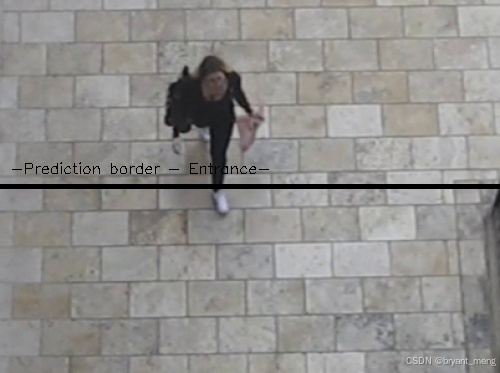
画一条水平可视化线(人们必须穿过它才能被跟踪)
# draw a horizontal line in the center of the frame -- once an# object crosses this line we will determine whether they were# moving 'up' or 'down'cv2.line(frame, (0, H // 2), (W, H // 2), (0, 0, 0), 3)cv2.putText(frame, "-Prediction border - Entrance-", (10, H - ((i * 20) + 200)),cv2.FONT_HERSHEY_SIMPLEX, 0.5, (0, 0, 0), 1)
并使用质心跟踪器来更新我们的对象质心
# use the centroid tracker to associate the (1) old object# centroids with (2) the newly computed object centroidsobjects = ct.update(rects)
此时 rects 为第一次跟踪后的 bbox,[(167, 55, 264, 215)], 质心 objects 的结果为OrderedDict({0: array([215, 135])}),用红色点可视化如下

遍历 ID 和质心
我们尝试为当前的 objectID 获取 TrackableObject。如果 objectID 的 TrackableObject 不存在,我们就创建一个。否则,已经存在一个 TrackableObject ,所以我们需要弄清楚对象(人)是向上还是向下移动。
to.centroids 当前帧和历史帧,同一个 id 的质心,eg 第二帧的时候 [array([215, 135]), array([218, 139])],第三帧的时候 [array([215, 135]), array([218, 139]), array([217, 144])]
获取给定对象之前所有质心位置的 y 坐标值。然后,通过取当前质心位置与之前所有质心位置的平均值之间的差来计算方向。
我们取均值的原因是为了确保我们的方向跟踪更稳定。如果我们只存储这个人之前的质心位置,我们就有可能出现错误的方向计数
通过取均值,我们可以让我们的人计算得更准确。
如果 TrackableObject 还没有被计数,我们需要确定它是否已经准备好被计数,通过:
- 检查 direction 是否为负(表示对象向上移动)并且质心在中心线上方。在这种情况下,我们增加 totalUp。
- 或者检查 direction 是否为正(表示物体正在向下移动)且质心在中心线以下。如果这是真的,我们增加totalDown。
最后,我们将 TrackableObject 存储在 trackableObjects 字典中,这样我们就可以在捕获下一帧时获取并更新它。
# loop over the tracked objectsfor (objectID, centroid) in objects.items():# check to see if a trackable object exists for the current# object IDto = trackableObjects.get(objectID, None)# if there is no existing trackable object, create oneif to is None:to = TrackableObject(objectID, centroid)# otherwise, there is a trackable object so we can utilize it# to determine directionelse:# the difference between the y-coordinate of the *current*# centroid and the mean of *previous* centroids will tell# us in which direction the object is moving (negative for# 'up' and positive for 'down')y = [c[1] for c in to.centroids] # 历史同 id 质心的 y 坐标direction = centroid[1] - np.mean(y) # centroid 是当前帧的to.centroids.append(centroid)# check to see if the object has been counted or notif not to.counted:# if the direction is negative (indicating the object# is moving up) AND the centroid is above the center# line, count the objectif direction < 0 and centroid[1] < H // 2:totalUp += 1date_time = datetime.datetime.now().strftime("%Y-%m-%d %H:%M")move_out.append(totalUp)out_time.append(date_time)to.counted = True# if the direction is positive (indicating the object# is moving down) AND the centroid is below the# center line, count the objectelif direction > 0 and centroid[1] > H // 2:totalDown += 1date_time = datetime.datetime.now().strftime("%Y-%m-%d %H:%M")move_in.append(totalDown)in_time.append(date_time)# if the people limit exceeds over threshold, send an email alertif sum(total) >= config["Threshold"]:cv2.putText(frame, "-ALERT: People limit exceeded-", (10, frame.shape[0] - 80),cv2.FONT_HERSHEY_COMPLEX, 0.5, (0, 0, 255), 2)if config["ALERT"]:logger.info("Sending email alert..")email_thread = threading.Thread(target = send_mail)email_thread.daemon = Trueemail_thread.start()logger.info("Alert sent!")to.counted = True# compute the sum of total people insidetotal = []total.append(len(move_in) - len(move_out))# store the trackable object in our dictionarytrackableObjects[objectID] = to
画出质心,并向帧写入文本
# draw both the ID of the object and the centroid of the# object on the output frametext = "ID {}".format(objectID)cv2.putText(frame, text, (centroid[0] - 10, centroid[1] - 10),cv2.FONT_HERSHEY_SIMPLEX, 0.5, (255, 255, 255), 2)cv2.circle(frame, (centroid[0], centroid[1]), 4, (255, 255, 255), -1)# construct a tuple of information we will be displaying on the frameinfo_status = [("Exit", totalUp),("Enter", totalDown),("Status", status),]info_total = [("Total people inside", ', '.join(map(str, total))),]# display the outputfor (i, (k, v)) in enumerate(info_status):text = "{}: {}".format(k, v)cv2.putText(frame, text, (10, H - ((i * 20) + 20)), cv2.FONT_HERSHEY_SIMPLEX, 0.6, (0, 0, 0), 2)for (i, (k, v)) in enumerate(info_total):text = "{}: {}".format(k, v)cv2.putText(frame, text, (265, H - ((i * 20) + 60)), cv2.FONT_HERSHEY_SIMPLEX, 0.6, (255, 255, 255), 2)
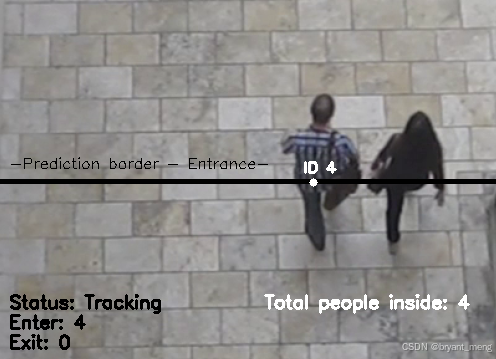
保存 log,可视化跟踪过程,结果写入视频,按键监控,触发 q 就退出
# initiate a simple log to save the counting dataif config["Log"]:log_data(move_in, in_time, move_out, out_time)# check to see if we should write the frame to diskif writer is not None:writer.write(frame)# show the output framecv2.imshow("Real-Time Monitoring/Analysis Window", frame)key = cv2.waitKey(1) & 0xFF# if the `q` key was pressed, break from the loopif key == ord("q"):break# increment the total number of frames processed thus far and# then update the FPS countertotalFrames += 1fps.update()
时间统计,资源释放
# initiate the timerif config["Timer"]:# automatic timer to stop the live stream (set to 8 hours/28800s)end_time = time.time()num_seconds = (end_time - start_time)if num_seconds > 28800:break# stop the timer and display FPS informationfps.stop()logger.info("Elapsed time: {:.2f}".format(fps.elapsed()))logger.info("Approx. FPS: {:.2f}".format(fps.fps()))# release the camera device/resource (issue 15)if config["Thread"]:vs.release()# close any open windowscv2.destroyAllWindows()
3、效果展示
test_out
4、完整代码
-
链接: https://pan.baidu.com/s/14cBLhxVtsn6bNQQ5GqbPEg?pwd=x8md
-
提取码: x8md
核心代码 people_counter.py
from tracker.centroidtracker import CentroidTracker
from tracker.trackableobject import TrackableObject
from imutils.video import VideoStream
from itertools import zip_longest
from utils.mailer import Mailer
from imutils.video import FPS
from utils import thread
import numpy as np
import threading
import argparse
import datetime
import schedule
import logging
import imutils
import time
import dlib
import json
import csv
import cv2# execution start time
start_time = time.time()
# setup logger
logging.basicConfig(level = logging.INFO, format = "[INFO] %(message)s")
logger = logging.getLogger(__name__)
# initiate features config.
with open("utils/config.json", "r") as file:config = json.load(file)def parse_arguments():# function to parse the argumentsap = argparse.ArgumentParser()ap.add_argument("-p", "--prototxt", required=False, default="detector/MobileNetSSD_deploy.prototxt",help="path to Caffe 'deploy' prototxt file")ap.add_argument("-m", "--model", required=False, default="detector/MobileNetSSD_deploy.caffemodel",help="path to Caffe pre-trained model")ap.add_argument("-i", "--input", type=str, default="utils/data/tests/test_1.mp4",help="path to optional input video file")ap.add_argument("-o", "--output", type=str,help="path to optional output video file")# confidence default 0.4ap.add_argument("-c", "--confidence", type=float, default=0.4,help="minimum probability to filter weak detections")ap.add_argument("-s", "--skip-frames", type=int, default=30,help="# of skip frames between detections")args = vars(ap.parse_args())return args"""
python people_counter.py --prototxt detector/MobileNetSSD_deploy.prototxt
--model detector/MobileNetSSD_deploy.caffemodel
--input utils/data/tests/test_1.mp4
"""def send_mail():# function to send the email alertsMailer().send(config["Email_Receive"])def log_data(move_in, in_time, move_out, out_time):# function to log the counting datadata = [move_in, in_time, move_out, out_time]# transpose the data to align the columns properlyexport_data = zip_longest(*data, fillvalue = '')with open('utils/data/logs/counting_data.csv', 'w', newline = '') as myfile:wr = csv.writer(myfile, quoting = csv.QUOTE_ALL)if myfile.tell() == 0: # check if header rows are already existingwr.writerow(("Move In", "In Time", "Move Out", "Out Time"))wr.writerows(export_data)def people_counter():# main function for people_counter.pyargs = parse_arguments()# initialize the list of class labels MobileNet SSD was trained to detectCLASSES = ["background", "aeroplane", "bicycle", "bird", "boat","bottle", "bus", "car", "cat", "chair", "cow", "diningtable","dog", "horse", "motorbike", "person", "pottedplant", "sheep","sofa", "train", "tvmonitor"]# load our serialized model from disknet = cv2.dnn.readNetFromCaffe(args["prototxt"], args["model"])# if a video path was not supplied, grab a reference to the ip cameraif not args.get("input", False):logger.info("Starting the live stream..")vs = VideoStream(config["url"]).start()time.sleep(2.0)# otherwise, grab a reference to the video fileelse:logger.info("Starting the video..")vs = cv2.VideoCapture(args["input"])# initialize the video writer (we'll instantiate later if need be)writer = None# initialize the frame dimensions (we'll set them as soon as we read# the first frame from the video)W = NoneH = None# instantiate our centroid tracker, then initialize a list to store# each of our dlib correlation trackers, followed by a dictionary to# map each unique object ID to a TrackableObjectct = CentroidTracker(maxDisappeared=40, maxDistance=50)trackers = []trackableObjects = {}# initialize the total number of frames processed thus far, along# with the total number of objects that have moved either up or downtotalFrames = 0totalDown = 0totalUp = 0# initialize empty lists to store the counting datatotal = []move_out = []move_in =[]out_time = []in_time = []# start the frames per second throughput estimatorfps = FPS().start()if config["Thread"]:vs = thread.ThreadingClass(config["url"])# loop over frames from the video streamwhile True:# grab the next frame and handle if we are reading from either# VideoCapture or VideoStreamframe = vs.read()frame = frame[1] if args.get("input", False) else frame# if we are viewing a video and we did not grab a frame then we# have reached the end of the videoif args["input"] is not None and frame is None:break# resize the frame to have a maximum width of 500 pixels (the# less data we have, the faster we can process it), then convert# the frame from BGR to RGB for dlibframe = imutils.resize(frame, width=500)rgb = cv2.cvtColor(frame, cv2.COLOR_BGR2RGB)# if the frame dimensions are empty, set themif W is None or H is None:(H, W) = frame.shape[:2]# if we are supposed to be writing a video to disk, initialize# the writerif args["output"] is not None and writer is None:fourcc = cv2.VideoWriter_fourcc(*"mp4v")writer = cv2.VideoWriter(args["output"], fourcc, 30,(W, H), True)# initialize the current status along with our list of bounding# box rectangles returned by either (1) our object detector or# (2) the correlation trackersstatus = "Waiting"rects = []# check to see if we should run a more computationally expensive# object detection method to aid our trackerif totalFrames % args["skip_frames"] == 0:# set the status and initialize our new set of object trackersstatus = "Detecting"trackers = []# convert the frame to a blob and pass the blob through the# network and obtain the detectionsblob = cv2.dnn.blobFromImage(frame, 0.007843, (W, H), 127.5)net.setInput(blob)detections = net.forward()# loop over the detectionsfor i in np.arange(0, detections.shape[2]):# extract the confidence (i.e., probability) associated# with the predictionconfidence = detections[0, 0, i, 2]# filter out weak detections by requiring a minimum# confidenceif confidence > args["confidence"]:# extract the index of the class label from the# detections listidx = int(detections[0, 0, i, 1])# if the class label is not a person, ignore itif CLASSES[idx] != "person":continue# compute the (x, y)-coordinates of the bounding box# for the objectbox = detections[0, 0, i, 3:7] * np.array([W, H, W, H])(startX, startY, endX, endY) = box.astype("int")# construct a dlib rectangle object from the bounding# box coordinates and then start the dlib correlation# trackertracker = dlib.correlation_tracker()rect = dlib.rectangle(startX, startY, endX, endY)tracker.start_track(rgb, rect)# add the tracker to our list of trackers so we can# utilize it during skip framestrackers.append(tracker)# otherwise, we should utilize our object *trackers* rather than# object *detectors* to obtain a higher frame processing throughputelse:# loop over the trackersfor tracker in trackers:# set the status of our system to be 'tracking' rather# than 'waiting' or 'detecting'status = "Tracking"# update the tracker and grab the updated positiontracker.update(rgb)pos = tracker.get_position()# unpack the position objectstartX = int(pos.left())startY = int(pos.top())endX = int(pos.right())endY = int(pos.bottom())# add the bounding box coordinates to the rectangles listrects.append((startX, startY, endX, endY))# draw a horizontal line in the center of the frame -- once an# object crosses this line we will determine whether they were# moving 'up' or 'down'cv2.line(frame, (0, H // 2), (W, H // 2), (0, 0, 0), 3)cv2.putText(frame, "-Prediction border - Entrance-", (10, H - ((i * 20) + 200)),cv2.FONT_HERSHEY_SIMPLEX, 0.5, (0, 0, 0), 1)# use the centroid tracker to associate the (1) old object# centroids with (2) the newly computed object centroidsobjects = ct.update(rects)# loop over the tracked objectsfor (objectID, centroid) in objects.items():# check to see if a trackable object exists for the current# object IDto = trackableObjects.get(objectID, None)# if there is no existing trackable object, create oneif to is None:to = TrackableObject(objectID, centroid)# otherwise, there is a trackable object so we can utilize it# to determine directionelse:# the difference between the y-coordinate of the *current*# centroid and the mean of *previous* centroids will tell# us in which direction the object is moving (negative for# 'up' and positive for 'down')y = [c[1] for c in to.centroids]direction = centroid[1] - np.mean(y)to.centroids.append(centroid)# check to see if the object has been counted or notif not to.counted:# if the direction is negative (indicating the object# is moving up) AND the centroid is above the center# line, count the objectif direction < 0 and centroid[1] < H // 2:totalUp += 1date_time = datetime.datetime.now().strftime("%Y-%m-%d %H:%M")move_out.append(totalUp)out_time.append(date_time)to.counted = True# if the direction is positive (indicating the object# is moving down) AND the centroid is below the# center line, count the objectelif direction > 0 and centroid[1] > H // 2:totalDown += 1date_time = datetime.datetime.now().strftime("%Y-%m-%d %H:%M")move_in.append(totalDown)in_time.append(date_time)# if the people limit exceeds over threshold, send an email alertif sum(total) >= config["Threshold"]:cv2.putText(frame, "-ALERT: People limit exceeded-", (10, frame.shape[0] - 80),cv2.FONT_HERSHEY_COMPLEX, 0.5, (0, 0, 255), 2)if config["ALERT"]:logger.info("Sending email alert..")email_thread = threading.Thread(target = send_mail)email_thread.daemon = Trueemail_thread.start()logger.info("Alert sent!")to.counted = True# compute the sum of total people insidetotal = []total.append(len(move_in) - len(move_out))# store the trackable object in our dictionarytrackableObjects[objectID] = to# draw both the ID of the object and the centroid of the# object on the output frametext = "ID {}".format(objectID)cv2.putText(frame, text, (centroid[0] - 10, centroid[1] - 10),cv2.FONT_HERSHEY_SIMPLEX, 0.5, (255, 255, 255), 2)cv2.circle(frame, (centroid[0], centroid[1]), 4, (255, 255, 255), -1)# construct a tuple of information we will be displaying on the frameinfo_status = [("Exit", totalUp),("Enter", totalDown),("Status", status),]info_total = [("Total people inside", ', '.join(map(str, total))),]# display the outputfor (i, (k, v)) in enumerate(info_status):text = "{}: {}".format(k, v)cv2.putText(frame, text, (10, H - ((i * 20) + 20)), cv2.FONT_HERSHEY_SIMPLEX, 0.6, (0, 0, 0), 2)for (i, (k, v)) in enumerate(info_total):text = "{}: {}".format(k, v)cv2.putText(frame, text, (265, H - ((i * 20) + 60)), cv2.FONT_HERSHEY_SIMPLEX, 0.6, (255, 255, 255), 2)# initiate a simple log to save the counting dataif config["Log"]:log_data(move_in, in_time, move_out, out_time)# check to see if we should write the frame to diskif writer is not None:writer.write(frame)# show the output framecv2.imshow("Real-Time Monitoring/Analysis Window", frame)key = cv2.waitKey(1) & 0xFF# if the `q` key was pressed, break from the loopif key == ord("q"):break# increment the total number of frames processed thus far and# then update the FPS countertotalFrames += 1fps.update()# initiate the timerif config["Timer"]:# automatic timer to stop the live stream (set to 8 hours/28800s)end_time = time.time()num_seconds = (end_time - start_time)if num_seconds > 28800:break# stop the timer and display FPS informationfps.stop()logger.info("Elapsed time: {:.2f}".format(fps.elapsed()))logger.info("Approx. FPS: {:.2f}".format(fps.fps()))# release the camera device/resource (issue 15)if config["Thread"]:vs.release()# close any open windowscv2.destroyAllWindows()# initiate the scheduler
if config["Scheduler"]:# runs at every day (09:00 am)schedule.every().day.at("09:00").do(people_counter)while True:schedule.run_pending()
else:people_counter()
运行命令
python people_counter.py --prototxt detector/MobileNetSSD_deploy.prototxt --model detector/MobileNetSSD_deploy.caffemodel --input utils/data/tests/test_1.mp4
我把很多参数传递都改为默认的了,直接运行也可以
5、涉及到的库函数
- schedule==1.1.0
- numpy==1.24.3
- argparse==1.4.0
- imutils==0.5.4
- dlib==19.24.1
- opencv-python==4.5.5.64
- scipy==1.10.1
- cmake==3.22.5
注意版本的兼容性,dlib 在线编译报错可以离线安装
6、参考来自
- https://github.com/saimj7/People-Counting-in-Real-Time
- 目标跟踪(6)OpenCV 人员计数器
- 【python】OpenCV—Tracking(10.4)—Centroid
- 【python】OpenCV—Tracking(10.5)—dlib
更多有趣的代码示例,可参考【Programming】
相关文章:
【python】OpenCV—Tracking(10.6)—People Counting
文章目录 1、功能描述2、代码实现3、效果展示4、完整代码5、涉及到的库函数6、参考来自 更多有趣的代码示例,可参考【Programming】 1、功能描述 借助 opencv-python,用 SSD 人形检测模型和质心跟踪方法实现对人群的计数 基于质心的跟踪可以参考 【pyt…...
使用KeilAssistant代替keil的UI界面
目录 一、keil Assistant的优势和缺点 二、使用方法 (1)配置keil的路径 (2)导入并使用工程 (3)默认使用keil自带的ARM编译器而非GUN工具链 一、keil Assistant的优势和缺点 在日常学…...

FreeRTOS菜鸟入门(五)·空闲任务与阻塞延时的实现
目录 1. 实现空闲任务 1.1 定义空闲任务的栈 1.2 定义空闲任务的任务控制块 1.3 创建空闲任务 2. 实现阻塞延时 2.1 vTaskDelay()函数 2.2 修改 vTaskSwitchContext()函数 3. SysTick 中断服务函数 4. SysTick 初始化函数 通过之前我们了解知道,任…...

Doris部署生产集群最低要求的部署方案
Doris生产集群最低部署方案(2025年4月版) 一、节点规划与数量 1. FE节点(Frontend) 数量:至少 3个节点(1个Follower 2个 Observer),确保高可用(HA)。角色分…...
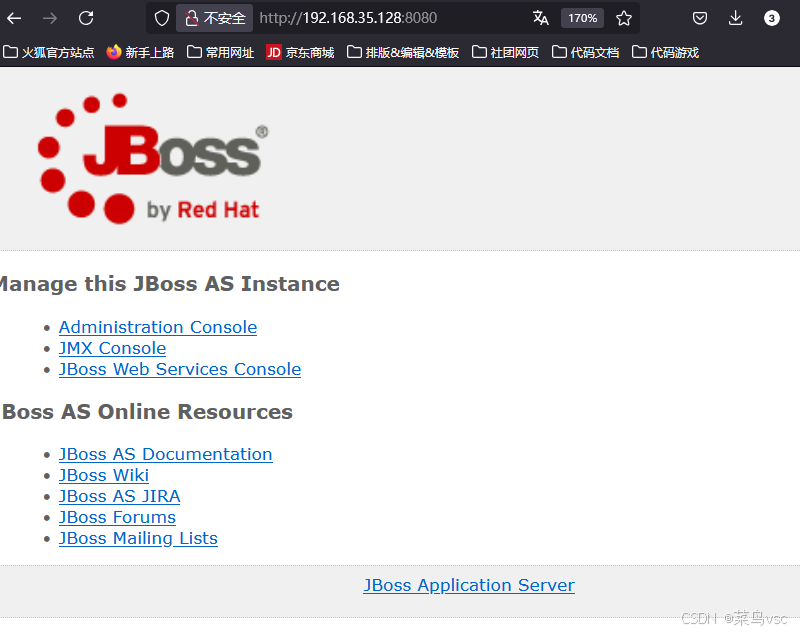
JBOSS反序列化漏洞解析与防范策略CVE-2017-12149
JBOSS反序列化漏洞解析与防范策略 引言 JBOSS是一个流行的开源应用服务器,广泛应用于企业级应用程序的开发和部署。然而,由于其广泛的使用和复杂的架构,JBOSS也成为了黑客攻击的常见目标。近年来,多个JBOSS漏洞被曝光࿰…...

MySQL MVCC工作流程详解
MySQL MVCC工作流程详解 1. 基础概念 MVCC(多版本并发控制)是通过在每行记录后面保存多个版本来实现并发控制的技术,主要用于提供并发事务访问数据库时的读一致性。 2. 核心要素 2.1 事务ID(DB_TRX_ID) 每个事务都…...

Web3技术下数字资产数据保护的实践探索
在这个信息爆炸的时代,数字资产已经成为我们生活中不可或缺的一部分。随着Web3技术的兴起,它以其去中心化、透明性和安全性的特点,为数字资产的管理和保护提供了新的解决方案。本文将探讨Web3技术在数字资产数据保护方面的实践探索࿰…...

从PPT到PNG:Python实现的高效PPT转图工具
从PPT到PNG:Python实现的高效PPT转图工具 在日常工作中,PPT(PowerPoint)文件是我们常用的演示工具。然而,有时候我们需要将PPT的内容提取为图片格式(如PNG)以便于展示或保存。手动将每一页PPT保…...

使用 Java 8 Stream实现List重复数据判断
import java.util.*; import java.util.stream.Collectors;public class DeduplicateStreamExample {static class ArchiveItem {// 字段定义与Getter/Setter省略(需根据实际补充)private String mATNR;private String lIFNR;private String suppSpecMod…...
)
状态模式详解与真实场景案例(Java实现)
模式定义 状态模式(State Pattern) 允许对象在其内部状态改变时改变它的行为,使对象看起来像是修改了它的类。属于行为型设计模式,核心思想是将状态抽象为独立对象,不同状态下行为封装在不同状态类中。 解决的问题 …...

BitMap和RoaringBitmap:极致高效的大数据结构
目录 1、引言 2、BitMap:基础 2.1、核心原理 2.2、BitMap的优势 2.3、BitMap的局限性 3、RoaringBitmap:进化 3.1、分段策略 3.2、三种容器类型 3.2.1. ArrayContainer(数组容器) 3.2.2. BitMapContainer(位图容器) 3.2.3. RunContainer(行程容器) 3.3、行…...

【Java基础】Java集合遍历方式
前言 在Java编程中,集合(Collection)是存储和操作对象的核心工具。遍历集合是开发者最频繁的操作之一,但不同场景下选择合适的遍历方式至关重要。 一、基础遍历方式 1. 基本for循环 适用场景:仅适用于List等有序集…...

Rust-引用借用规则
目录 一、概述 二、借用规则 三、详细解释 3.1 第一条规则 3.2 第二条规则 3.3 第三条规则 四、总结 Welcome to Code Blocks blog 本篇文章主要介绍了 [Rust-引用借用规则] ❤博主广交技术好友,喜欢文章的可以关注一下❤ 一、概述 Rust为确保程序在运行时不…...

如何保障企业数据的安全?软件开发中的数据安全防护措施
引言 随着数字化转型的推进,数据已经成为企业最重要的资产之一。然而,随着数据量的增长,数据泄露、丢失和滥用的风险也不断增加。如何保障企业数据的安全,成为企业在进行软件开发时必须重点关注的问题。本文将介绍软件开发中的一些…...
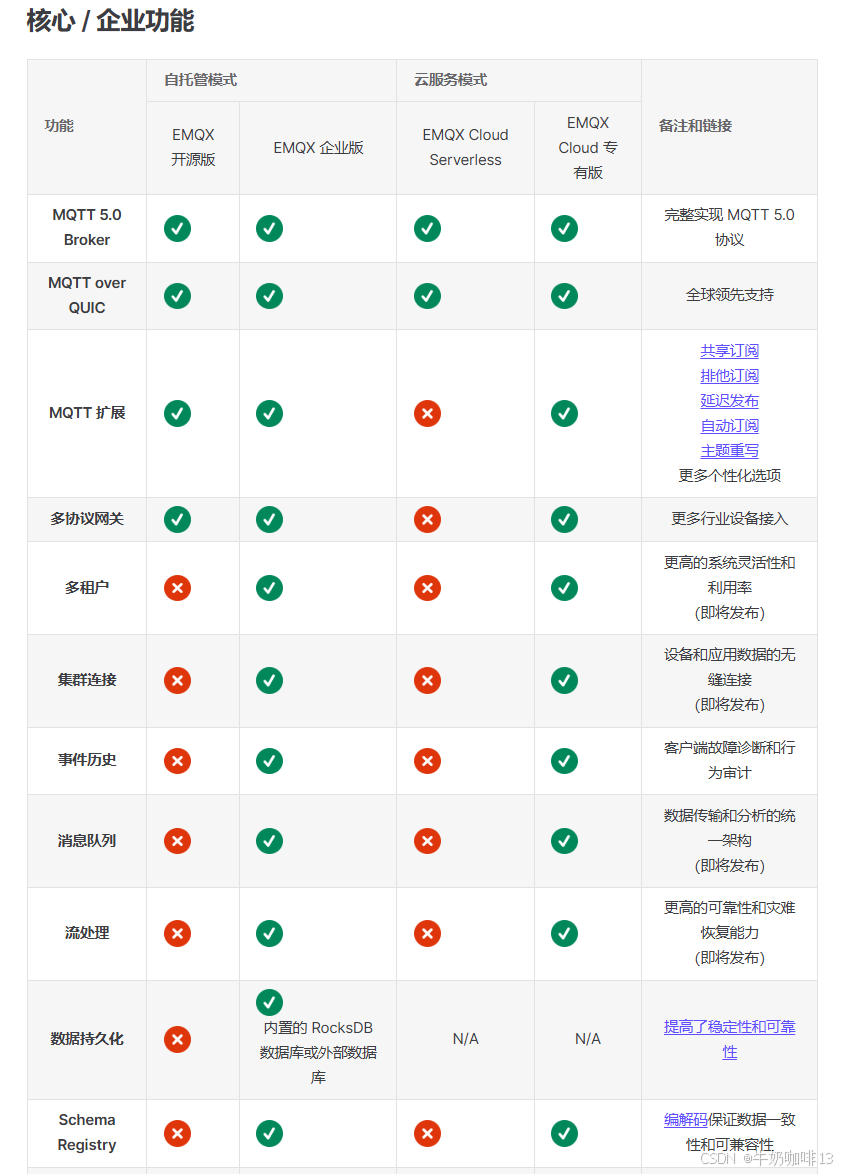
Linux安装开源版MQTT Broker——EMQX服务器环境从零到一的详细搭建教程
零、EMQX各个版本的区别 EMQX各个版本的功能对比详情https://docs.emqx.com/zh/emqx/latest/getting-started/feature-comparison.html...
【软件工程大系】净室软件工程
净室软件工程(Cleanroom Software Engineering)是一种以缺陷预防(正确性验证)为核心的软件开发方法,旨在通过严格的工程规范和数学验证,在开发过程中避免缺陷的产生,而非依赖后期的测试和调试。…...
软考 系统架构设计师系列知识点之杂项集萃(49)
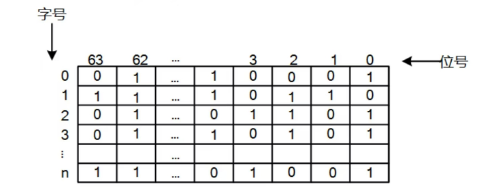
接前一篇文章:软考 系统架构设计师系列知识点之杂项集萃(48) 第76题 某文件管理系统在磁盘上建立了位视图(bitmap),记录磁盘的使用情况。若磁盘上物理块的编号依次为:0、1、2、……;…...
--网络编程)
Day(21)--网络编程
网络编程 在网络通信协议下,不同计算机上运行的程序,进行的数据传输 应用场景:即使通信、网友对战、金融证券等等,不管是什么场景,都是计算机和计算机之间通过网络进行的数据传输 java.net 常见的软件架构 C/S&am…...
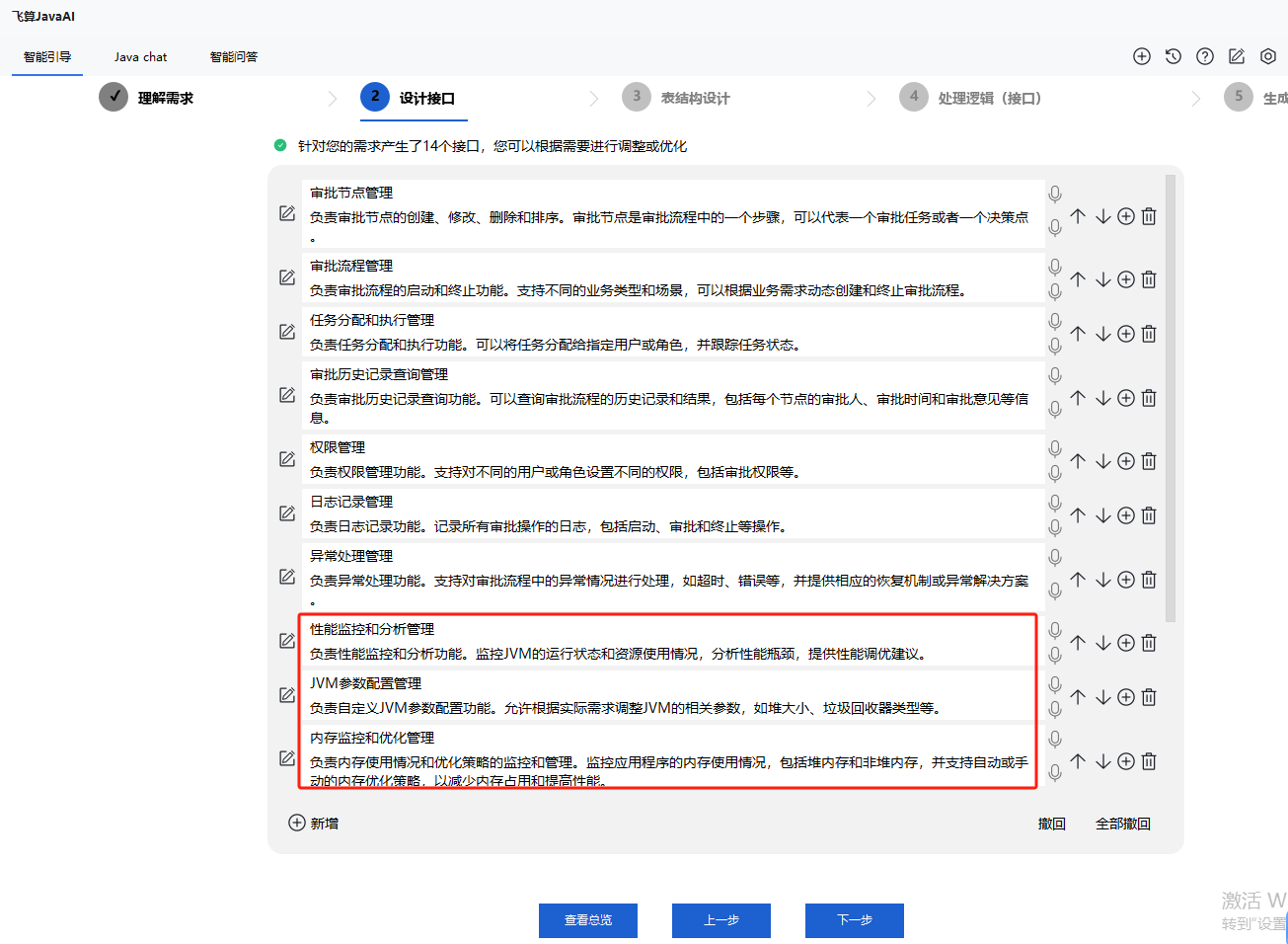
JVM 调优不再难:AI 工具自动生成内存优化方案
在 Java 应用程序的开发与运行过程中,Java 虚拟机(JVM)的性能调优一直是一项极具挑战性的任务,尤其是内存优化方面。不合适的 JVM 内存配置可能会导致应用程序出现性能瓶颈,甚至频繁抛出内存溢出异常,影响业…...

封装Tcp Socket
封装Tcp Socket 0. 前言1. Socket.hpp2. 简单的使用介绍 0. 前言 本文中用到的Log.hpp在笔者的历史文章中都有涉及,这里就不再粘贴源码了,学习地址如下:https://blog.csdn.net/weixin_73870552/article/details/145434855?spm1001.2014.3001…...

5.1 GitHub订阅监控系统实战:FastAPI+SQLAlchemy高效架构设计与核心源码揭秘
GitHub Sentinel Agent 分析报告功能设计与实现 关键词:订阅管理 API 设计、GitHub API 集成、SQLAlchemy ORM、JWT 认证、单元测试框架 1. 订阅管理功能架构设计 订阅管理模块采用分层架构设计,通过 FastAPI 构建 RESTful 接口,结合 SQLAlchemy ORM 实现数据持久化: #me…...

2025年推荐使用的开源大语言模型top20:核心特性、选择指标和开源优势
李升伟 编译 随着人工智能技术的持续发展,开源大型语言模型(LLMs)正变得愈发强大,使最先进的AI能力得以普及。到2025年,开源生态系统中涌现出多个关键模型,它们在各类应用场景中展现出独特优势。 大型语言…...
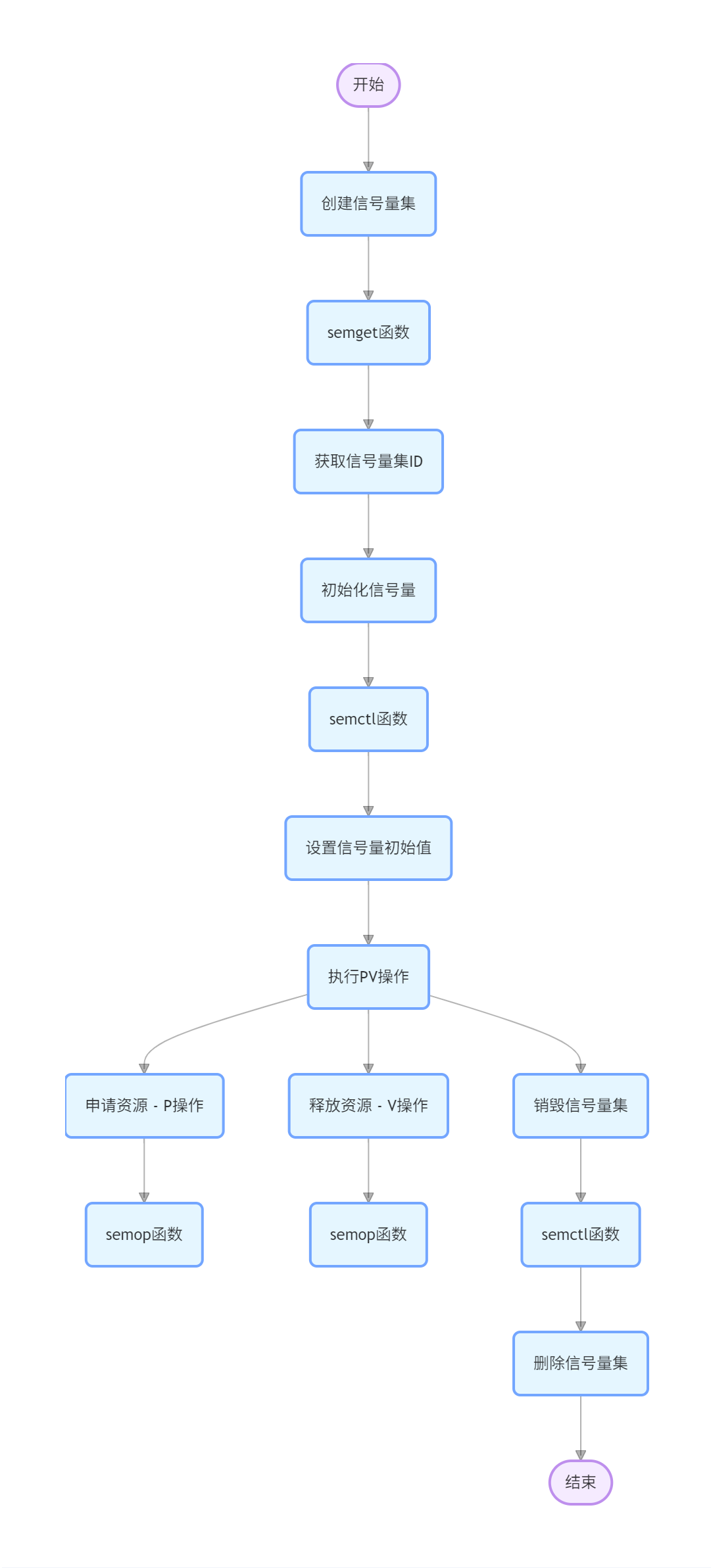
Linux 入门九:Linux 进程间通信
概述 进程间通信(IPC,Inter-Process Communication)是指在不同进程之间传递数据和信息的机制。Linux 提供了多种 IPC 方式,包括管道、信号、信号量、消息队列、共享内存和套接字等。 方式 一、管道(Pipe)…...

Spark-SQL核心编程实战:自定义函数与聚合函数详解
在大数据处理领域,Spark-SQL是极为重要的工具。今天和大家分享一下在Spark-SQL开发中的自定义函数和聚合函数的使用,这些都是基于实际项目开发经验的总结。 在Spark-SQL开发时,第一步是搭建开发环境。在IDEA中创建Spark-SQL子模块,…...

[Mysql][Mybatis][Spring]配置文件未能正确给驱动赋值,.properties文件username值被替换
这是最初的.properties配置文件: drivercom.mysql.cj.jdbc.Driver urljdbc:mysql://localhost:3306/qykf usernameroot password123456 在Mybatis中引入后进行赋值: <environments default"development"><environment id"deve…...

go 指针接收者和值接收者的区别
go 指针接收者和值接收者的区别 指针接收者和值接收者的区别主要有两点: Go 中函数传参是传值,因此指针接收者传递的是接收者的指针拷贝,值接收者传递的是接收者的拷贝---在方法中指针接收者的变量会被修改,而值接收者的成员变量…...

Redis之缓存更新策略
缓存更新策略 文章目录 缓存更新策略一、策略对比二、常见的缓存更新策略三、如何选择策略四、实际应用示例五、使用 Cache-Aside TTL 的方式,实现缓存商铺信息详情1.引入StringRedisTemplate2.将查询商铺信息加入缓存3.更新商铺信息时移除缓存总结 六、注意事项 一…...
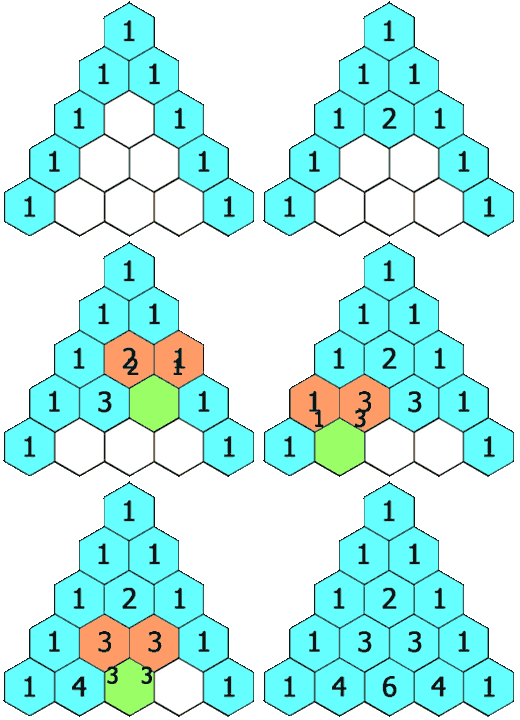
【leetcode100】杨辉三角
1、题目描述 给定一个非负整数 numRows,生成「杨辉三角」的前 numRows 行。 在「杨辉三角」中,每个数是它左上方和右上方的数的和。 示例 1: 输入: numRows 5 输出: [[1],[1,1],[1,2,1],[1,3,3,1],[1,4,6,4,1]]示例 2: 输入: numRows 1 输出: [[1]…...

git reset详解
一、git reset 的核心作用 用于 移动当前分支的 HEAD 指针 到指定的提交,并可选择是否修改工作区和暂存区。 ⚠️ 注意:若提交已被推送到远程仓库,强制重置(--hard)后需谨慎操作,避免影响协作。 二、三种模…...

Selenium2+Python自动化:利用JS解决click失效问题
文章目录 前言一、遇到的问题二、点击父元素问题分析解决办法实现思路 三、使用JS直接点击四、参考代码 前言 在使用Selenium2和Python进行自动化测试时,我们有时会遇到这样的情况:元素明明已经被成功定位,代码运行也没有报错,但…...