
【Bluedroid】蓝牙 HID 设备信息加载与注册机制及配置缓存系统源码解析
本篇解析Android蓝牙子系统加载配对HID设备的核心流程,通过btif_storage_load_bonded_hid_info实现从NVRAM读取设备属性、验证绑定状态、构造描述符并注册到BTA_HH模块。重点剖析基于ConfigCache的三层存储架构(全局配置/持久设备/临时设备),其通过动态持久化判定策略和LRU淘汰机制,在保证数据可靠性的同时实现高效内存管理。系统采用递归锁保障线程安全,支持多层级密钥解密校验,为蓝牙HID设备管理提供标准化解决方案。
-
作用:从NVRAM加载已配对蓝牙HID设备的信息,并将其注册到蓝牙HID主机模块(BTA_HH)
-
触发场景:系统启动时或需要重新加载HID设备信息时调用
btif_storage_load_bonded_hid_info
packages/modules/Bluetooth/system/btif/src/btif_profile_storage.cc
/********************************************************************************* Function         btif_storage_load_bonded_hid_info** Description      BTIF storage API - Loads hid info for all the bonded devices*                  from NVRAM and adds those devices  to the BTA_HH.** Returns          BT_STATUS_SUCCESS if successful, BT_STATUS_FAIL otherwise*******************************************************************************/
bt_status_t btif_storage_load_bonded_hid_info(void) {// 1. 遍历所有已配对设备for (const auto& bd_addr : btif_config_get_paired_devices()) {auto name = bd_addr.ToString();tAclLinkSpec link_spec; // 用于存储设备的连接信息log::verbose("Remote device:{}", ADDRESS_TO_LOGGABLE_CSTR(bd_addr));int value;// 2. 获取 HID 属性掩码if (!btif_config_get_int(name, BTIF_STORAGE_KEY_HID_ATTR_MASK, &value))continue;uint16_t attr_mask = (uint16_t)value;// 3. 检查设备是否已绑定if (btif_in_fetch_bonded_device(name) != BT_STATUS_SUCCESS) {btif_storage_remove_hid_info(bd_addr); // 移除该设备的 HID 信息continue;}// 4. 初始化设备描述信息结构体tBTA_HH_DEV_DSCP_INFO dscp_info;memset(&dscp_info, 0, sizeof(dscp_info));// 5. 获取设备描述信息btif_config_get_int(name, BTIF_STORAGE_KEY_HID_SUB_CLASS, &value);uint8_t sub_class = (uint8_t)value;btif_config_get_int(name, BTIF_STORAGE_KEY_HID_APP_ID, &value);uint8_t app_id = (uint8_t)value;btif_config_get_int(name, BTIF_STORAGE_KEY_HID_VENDOR_ID, &value);dscp_info.vendor_id = (uint16_t)value;btif_config_get_int(name, BTIF_STORAGE_KEY_HID_PRODUCT_ID, &value);dscp_info.product_id = (uint16_t)value;btif_config_get_int(name, BTIF_STORAGE_KEY_HID_VERSION, &value);dscp_info.version = (uint16_t)value;btif_config_get_int(name, BTIF_STORAGE_KEY_HID_COUNTRY_CODE, &value);dscp_info.ctry_code = (uint8_t)value;value = 0;btif_config_get_int(name, BTIF_STORAGE_KEY_HID_SSR_MAX_LATENCY, &value);dscp_info.ssr_max_latency = (uint16_t)value;value = 0;btif_config_get_int(name, BTIF_STORAGE_KEY_HID_SSR_MIN_TIMEOUT, &value);dscp_info.ssr_min_tout = (uint16_t)value;// 6. 获取设备描述符size_t len =btif_config_get_bin_length(name, BTIF_STORAGE_KEY_HID_DESCRIPTOR);if (len > 0) {dscp_info.descriptor.dl_len = (uint16_t)len;dscp_info.descriptor.dsc_list = (uint8_t*)alloca(len);btif_config_get_bin(name, BTIF_STORAGE_KEY_HID_DESCRIPTOR,(uint8_t*)dscp_info.descriptor.dsc_list, &len);}// 7. 添加设备到 BTA_HH 模块// add extracted information to BTA HHlink_spec.addrt.bda = bd_addr;link_spec.addrt.type = BLE_ADDR_PUBLIC;link_spec.transport = BT_TRANSPORT_AUTO;if (btif_hh_add_added_dev(link_spec, attr_mask)) {BTA_HhAddDev(link_spec, attr_mask, sub_class, app_id, dscp_info);}}return BT_STATUS_SUCCESS;
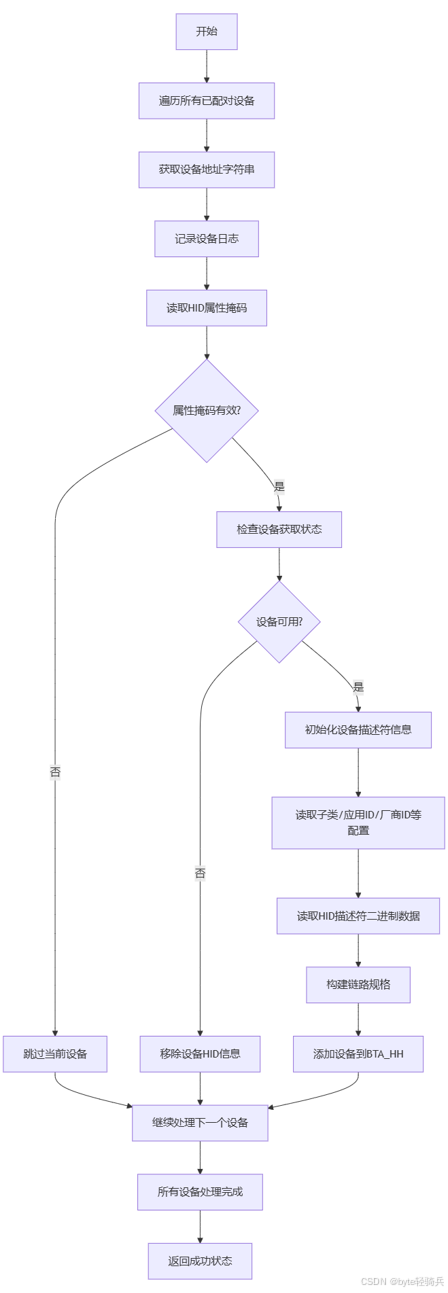
}从非易失性随机访问存储器(NVRAM)里加载所有已配对蓝牙 HID(Human Interface Device,人机接口设备)设备的信息,并且将这些设备添加到 BTA_HH(Bluetooth Application - Human Interface Device Host)模块中。
核心流程:
btif_config_get_paired_devices
/packages/modules/Bluetooth/system/btif/src/btif_config.cc
std::vector<RawAddress> btif_config_get_paired_devices() {std::vector<std::string> names;CHECK(bluetooth::shim::is_gd_stack_started_up());// 获取持久化存储的设备名称names = bluetooth::shim::BtifConfigInterface::GetPersistentDevices();std::vector<RawAddress> result;result.reserve(names.size());// 遍历设备名称并转换为地址for (const auto& name : names) {RawAddress addr = {};// Gather up known devices from configuration section namesif (RawAddress::FromString(name, addr)) {result.emplace_back(addr);}}return result;
}
获取所有已配对蓝牙设备的地址,返回一个包含 RawAddress 对象的向量。借助 bluetooth::shim::BtifConfigInterface 来获取持久化存储的设备名称,然后将这些名称转换为 RawAddress 对象。
GetPersistentDevices
/packages/modules/Bluetooth/system/main/shim/config.cc
std::vector<std::string> BtifConfigInterface::GetPersistentDevices() {return GetStorage()->GetPersistentSections();
}
GetPersistentSections
packages/modules/Bluetooth/system/gd/storage/storage_module.cc
std::vector<std::string> StorageModule::GetPersistentSections() const {std::lock_guard<std::recursive_mutex> lock(mutex_);return pimpl_->cache_.GetPersistentSections();
}
ConfigCache::GetPersistentSections
/packages/modules/Bluetooth/system/gd/storage/config_cache.cc
std::vector<std::string> ConfigCache::GetPersistentSections() const {std::lock_guard<std::recursive_mutex> lock(mutex_);std::vector<std::string> paired_devices;paired_devices.reserve(persistent_devices_.size());// 遍历持久化设备并添加名称到容器中for (const auto& elem : persistent_devices_) {paired_devices.emplace_back(elem.first);}return paired_devices;
}
获取所有持久化设备的名称(可能代表设备的 MAC 地址等标识),并将这些名称存储在一个 std::vector<std::string> 类型的容器中返回。
btif_config_get_int
packages/modules/Bluetooth/system/btif/src/btif_config.cc
bool btif_config_get_int(const std::string& section, const std::string& key,int* value) {CHECK(bluetooth::shim::is_gd_stack_started_up());return bluetooth::shim::BtifConfigInterface::GetInt(section, key, value);
}
BtifConfigInterface::GetInt
packages/modules/Bluetooth/system/main/shim/config.cc
bool BtifConfigInterface::GetInt(const std::string& section,const std::string& property, int* value) {ASSERT(value != nullptr);auto ret = GetStorage()->GetInt(section, property);if (ret) {*value = *ret;}return ret.has_value();
}
从配置存储中获取指定部分(section)下指定属性(property)的整数值,并将该值存储到传入的指针 value 所指向的内存位置。若成功获取到值,则返回 true;若未获取到值,则返回 false。
packages/modules/Bluetooth/system/gd/storage/storage_module.cc
std::optional<int> StorageModule::GetInt(const std::string& section, const std::string& property) const {std::lock_guard<std::recursive_mutex> lock(mutex_);return ConfigCacheHelper::FromConfigCache(pimpl_->cache_).GetInt(section, property);
}
ConfigCacheHelper::GetInt
/packages/modules/Bluetooth/system/gd/storage/config_cache_helper.cc
std::optional<int> ConfigCacheHelper::GetInt(const std::string& section, const std::string& property) const {// 1. 获取属性的字符串值auto value_str = config_cache_.GetProperty(section, property);if (!value_str) {return std::nullopt;}// 2. 获取属性的 int64_t 类型值auto large_value = GetInt64(section, property);if (!large_value) {return std::nullopt;}// 3. 检查值是否在 int 类型的数值范围内if (!common::IsNumberInNumericLimits<int>(*large_value)) {return std::nullopt;}return static_cast<uint32_t>(*large_value);
}
从配置缓存中获取指定部分(section)和属性(property)对应的整数值。如果获取成功且该值在 int 类型的数值范围内,函数将返回该整数值;否则,返回 std::nullopt 表示未获取到有效的 int 类型值。
ConfigCache::GetProperty
/packages/modules/Bluetooth/system/gd/storage/config_cache.cc
std::optional<std::string> ConfigCache::GetProperty(const std::string& section, const std::string& property) const {// 加锁以保证线程安全std::lock_guard<std::recursive_mutex> lock(mutex_);// 1. 在 information_sections_ 中查找属性auto section_iter = information_sections_.find(section);if (section_iter != information_sections_.end()) {auto property_iter = section_iter->second.find(property);if (property_iter != section_iter->second.end()) {return property_iter->second;}}// 2. 在 persistent_devices_ 中查找属性section_iter = persistent_devices_.find(section);if (section_iter != persistent_devices_.end()) {auto property_iter = section_iter->second.find(property);if (property_iter != section_iter->second.end()) {std::string value = property_iter->second;if (os::ParameterProvider::GetBtKeystoreInterface() != nullptr && value == kEncryptedStr) {return os::ParameterProvider::GetBtKeystoreInterface()->get_key(section + "-" + property);}return value;}}// 3. 在 temporary_devices_ 中查找属性section_iter = temporary_devices_.find(section);if (section_iter != temporary_devices_.end()) {auto property_iter = section_iter->second.find(property);if (property_iter != section_iter->second.end()) {return property_iter->second;}}return std::nullopt;
}
从配置缓存里获取指定部分(section)和属性(property)的值。若能找到对应的值,就返回该值;若找不到,则返回 std::nullopt。
get_key
packages/modules/Bluetooth/system/btif/src/btif_keystore.cc
std::string get_key(std::string prefix) override {log::verbose("prefix: {}", prefix);// 检查回调函数指针是否为空if (!callbacks) {log::warn("callback isn't ready. prefix: {}", prefix);return "";}// 用于存储解密后的密钥字符串std::string decryptedString;// 尝试在 key_map 中查找以 prefix 为键的元素std::map<std::string, std::string>::iterator iter = key_map.find(prefix);if (iter == key_map.end()) {// 如果在 key_map 中未找到对应的元素// 调用回调函数从外部获取密钥decryptedString = callbacks->get_key(prefix);// 将获取到的密钥存储到 key_map 中,以便后续使用key_map[prefix] = decryptedString;log::verbose("get key from bluetoothkeystore.");} else {// 如果在 key_map 中找到了对应的元素// 直接从 key_map 中获取解密后的密钥decryptedString = iter->second;}// 返回解密后的密钥字符串return decryptedString;
}
根据给定的前缀 prefix 来获取对应的密钥。先尝试从本地的 key_map 中查找该密钥,如果找不到,会通过回调函数 callbacks->get_key 从外部(如蓝牙密钥存储库)获取密钥,并将其保存到 key_map 中,以便后续使用。
IsNumberInNumericLimits
packages/modules/Bluetooth/system/gd/common/numbers.h
// Check if input is within numeric limits of RawType
template <typename RawType, typename InputType>
bool IsNumberInNumericLimits(InputType input) {// Only arithmetic types are supportedstatic_assert(std::is_arithmetic_v<RawType> && std::is_arithmetic_v<InputType>);// Either both are signed or both are unsignedstatic_assert((std::is_signed_v<RawType> && std::is_signed_v<InputType>) ||(std::is_unsigned_v<RawType> && std::is_unsigned_v<InputType>));// 检查输入类型的最大值是否超过目标类型的最大值if (std::numeric_limits<InputType>::max() > std::numeric_limits<RawType>::max()) {if (input > std::numeric_limits<RawType>::max()) {return false;}}// 检查输入类型的最小值是否低于目标类型的最小值if (std::numeric_limits<InputType>::lowest() < std::numeric_limits<RawType>::lowest()) {if (input < std::numeric_limits<RawType>::lowest()) {return false;}}// 如果输入值在目标类型的数值范围内,返回 truereturn true;
}
IsNumberInNumericLimits 是一个模板函数,其作用是检查输入值 input 是否处于 RawType 类型所规定的数值范围之内。借助 C++ 的类型特性和数值极限工具,保证仅对算术类型(如整数、浮点数)进行操作,并且会对输入类型和目标类型的有符号性进行检查。
btif_config_get_bin_length
packages/modules/Bluetooth/system/btif/src/btif_config.cc
size_t btif_config_get_bin_length(const std::string& section,const std::string& key) {CHECK(bluetooth::shim::is_gd_stack_started_up());return bluetooth::shim::BtifConfigInterface::GetBinLength(section, key);
}
/packages/modules/Bluetooth/system/main/shim/config.cc
size_t BtifConfigInterface::GetBinLength(const std::string& section,const std::string& property) {auto value_vec = GetStorage()->GetBin(section, property);if (!value_vec) {return 0;}return value_vec->size();
}
packages/modules/Bluetooth/system/gd/storage/storage_module.cc
std::optional<int> StorageModule::GetInt(const std::string& section, const std::string& property) const {std::lock_guard<std::recursive_mutex> lock(mutex_);return ConfigCacheHelper::FromConfigCache(pimpl_->cache_).GetInt(section, property);
}
btif_hh_add_added_dev
packages/modules/Bluetooth/system/btif/src/btif_hh.cc
/********************************************************************************  Static variables******************************************************************************/
btif_hh_cb_t btif_hh_cb;/********************************************************************************* Function         btif_hh_add_added_dev** Description      Add a new device to the added device list.** Returns          true if add successfully, otherwise false.******************************************************************************/
bool btif_hh_add_added_dev(const tAclLinkSpec& link_spec,tBTA_HH_ATTR_MASK attr_mask) {int i;// 第一次遍历:检查设备是否已经存在于已添加设备列表中for (i = 0; i < BTIF_HH_MAX_ADDED_DEV; i++) {if (btif_hh_cb.added_devices[i].link_spec.addrt.bda ==link_spec.addrt.bda) {// 如果设备已经存在,返回 falselog::warn("Device {} already added", ADDRESS_TO_LOGGABLE_STR(link_spec));return false;}}// 第二次遍历:寻找列表中的空位来添加新设备for (i = 0; i < BTIF_HH_MAX_ADDED_DEV; i++) {if (btif_hh_cb.added_devices[i].link_spec.addrt.bda.IsEmpty()) {// 找到空位后,记录添加设备的日志log::warn("Added device {}", ADDRESS_TO_LOGGABLE_STR(link_spec));// 将新设备的链接规格信息赋值给该空位btif_hh_cb.added_devices[i].link_spec = link_spec;// 初始化设备句柄为无效句柄btif_hh_cb.added_devices[i].dev_handle = BTA_HH_INVALID_HANDLE;// 赋值设备属性掩码btif_hh_cb.added_devices[i].attr_mask = attr_mask;// 添加成功,返回 truereturn true;}}// 如果列表已满,没有空位,记录错误日志并返回 falselog::warn("Error, out of space to add device");return false;
}
将一个新的设备添加到已添加设备列表中。先检查设备是否已经存在于列表中,如果存在则不添加并返回 false;若不存在,会尝试在列表中找到一个空位来添加该设备,若成功添加则返回 true;如果列表已满,无法添加新设备,也会返回 false。
BTA_HhAddDev
packages/modules/Bluetooth/system/bta/hh/bta_hh_api.cc
/********************************************************************************* Function         BTA_HhAddDev** Description      Add a virtually cabled device into HID-Host device list*                  to manage and assign a device handle for future API call,*                  host applciation call this API at start-up to initialize its*                  virtually cabled devices.** Returns          void*******************************************************************************/
void BTA_HhAddDev(const tAclLinkSpec& link_spec, tBTA_HH_ATTR_MASK attr_mask,uint8_t sub_class, uint8_t app_id,tBTA_HH_DEV_DSCP_INFO dscp_info) {// 1. 计算所需内存大小size_t len = sizeof(tBTA_HH_MAINT_DEV) + dscp_info.descriptor.dl_len;// 2. 分配内存tBTA_HH_MAINT_DEV* p_buf = (tBTA_HH_MAINT_DEV*)osi_calloc(len);// 3. 设置消息头信息p_buf->hdr.event = BTA_HH_API_MAINT_DEV_EVT;p_buf->sub_event = BTA_HH_ADD_DEV_EVT;p_buf->hdr.layer_specific = BTA_HH_INVALID_HANDLE;// 4. 设置设备属性p_buf->attr_mask = (uint16_t)attr_mask;p_buf->sub_class = sub_class;p_buf->app_id = app_id;p_buf->link_spec = link_spec;// 5. 复制描述符信息memcpy(&p_buf->dscp_info, &dscp_info, sizeof(tBTA_HH_DEV_DSCP_INFO));if (dscp_info.descriptor.dl_len != 0 && dscp_info.descriptor.dsc_list) {p_buf->dscp_info.descriptor.dl_len = dscp_info.descriptor.dl_len;p_buf->dscp_info.descriptor.dsc_list = (uint8_t*)(p_buf + 1);memcpy(p_buf->dscp_info.descriptor.dsc_list, dscp_info.descriptor.dsc_list,dscp_info.descriptor.dl_len);} else {p_buf->dscp_info.descriptor.dsc_list = NULL;p_buf->dscp_info.descriptor.dl_len = 0;}// 6. 发送消息bta_sys_sendmsg(p_buf);
}
将一个虚拟有线设备添加到 HID - Host(人机接口设备主机)设备列表中进行管理,并为未来的 API 调用分配一个设备句柄。主机应用程序在启动时会调用此 API 来初始化其虚拟有线设备。
class ConfigCache
namespace bluetooth {
namespace storage {class Mutation;// A memory operated section-key-value structured config
//
// A section can be either persistent or temporary. When a section becomes persistent, all its properties are
// written to disk.
//
// A section becomes persistent when a property that is part of persistent_property_names_ is written to config cache;
// A section becomes temporary when all properties that are part of persistent_property_names_ is removed
//
// The definition of persistent sections is up to the user and is defined through the |persistent_property_names|
// argument. When these properties are link key properties, then persistent sections is equal to bonded devices
//
// This class is thread safe
class ConfigCache {public:ConfigCache(size_t temp_device_capacity, std::unordered_set<std::string_view> persistent_property_names);ConfigCache(const ConfigCache&) = delete;ConfigCache& operator=(const ConfigCache&) = delete;virtual ~ConfigCache() = default;// no copy// can moveConfigCache(ConfigCache&& other) noexcept;ConfigCache& operator=(ConfigCache&& other) noexcept;// comparison operators, callback doesn't countbool operator==(const ConfigCache& rhs) const;bool operator!=(const ConfigCache& rhs) const;// observersvirtual bool HasSection(const std::string& section) const;virtual bool HasProperty(const std::string& section, const std::string& property) const;// Get property, return std::nullopt if section or property does not existvirtual std::optional<std::string> GetProperty(const std::string& section, const std::string& property) const;// Returns a copy of persistent device MAC addressesvirtual std::vector<std::string> GetPersistentSections() const;// Return true if a section is persistentvirtual bool IsPersistentSection(const std::string& section) const;// Return true if a section has one of the properties in |property_names|virtual bool HasAtLeastOneMatchingPropertiesInSection(const std::string& section, const std::unordered_set<std::string_view>& property_names) const;// Return true if a property is part of persistent_property_names_virtual bool IsPersistentProperty(const std::string& property) const;// Serialize to legacy config formatvirtual std::string SerializeToLegacyFormat() const;// Return a copy of pair<section_name, property_value> with propertystruct SectionAndPropertyValue {std::string section;std::string property;bool operator==(const SectionAndPropertyValue& rhs) const {return section == rhs.section && property == rhs.property;}bool operator!=(const SectionAndPropertyValue& rhs) const {return !(*this == rhs);}};virtual std::vector<SectionAndPropertyValue> GetSectionNamesWithProperty(const std::string& property) const;// modifiers// Commit all mutation entries in sequence while holding the config mutexvirtual void Commit(std::queue<MutationEntry>& mutation);virtual void SetProperty(std::string section, std::string property, std::string value);virtual bool RemoveSection(const std::string& section);virtual bool RemoveProperty(const std::string& section, const std::string& property);virtual void ConvertEncryptOrDecryptKeyIfNeeded();// TODO: have a systematic way of doing this instead of specialized methods// Remove sections with |property| setvirtual void RemoveSectionWithProperty(const std::string& property);// remove all content in this config cache, restore it to the state after the explicit constructorvirtual void Clear();// Set a callback to notify interested party that a persistent config change has just happenedvirtual void SetPersistentConfigChangedCallback(std::function<void()> persistent_config_changed_callback);// Device config specific methods// TODO: methods here should be moved to a device specific config cache if this config cache is supposed to be generic// Legacy stack has device type inconsistencies, this method is trying to fix itvirtual bool FixDeviceTypeInconsistencies();// static methods// Check if section is formatted as a MAC addressstatic bool IsDeviceSection(const std::string& section);// constantsstatic const std::string kDefaultSectionName;private:mutable std::recursive_mutex mutex_;// A callback to notify interested party that a persistent config change has just happened, empty by defaultstd::function<void()> persistent_config_changed_callback_;// A set of property names that if set would make a section persistent and if non of these properties are set, a// section would become temporary againstd::unordered_set<std::string_view> persistent_property_names_;// Common section that does not relate to remote device, will be written to diskcommon::ListMap<std::string, common::ListMap<std::string, std::string>> information_sections_;// Information about persistent devices, normally paired, will be written to diskcommon::ListMap<std::string, common::ListMap<std::string, std::string>> persistent_devices_;// Information about temporary devices, normally unpaired, will not be written to disk, will be evicted automatically// if capacity exceeds given value during initializationcommon::LruCache<std::string, common::ListMap<std::string, std::string>> temporary_devices_;// Convenience method to check if the callback is valid before calling itinline void PersistentConfigChangedCallback() const {if (persistent_config_changed_callback_) {persistent_config_changed_callback_();}}
};}  // namespace storage
}  // namespace bluetooth
ConfigCache 类用于管理配置信息,这些信息以部分(section)和键值对的形式存储。部分可以是持久的(persistent)或临时的(temporary)。当写入属于 persistent_property_names_ 集合的属性时,部分会变为持久的;当移除所有属于 persistent_property_names_ 的属性时,部分会变为临时的。
采用分层存储策略的蓝牙配置缓存系统,通过持久化/临时化的二元分类和LRU淘汰机制,在内存效率与数据持久性之间取得平衡。
关键架构设计
①三元存储结构
-
通用配置段 (
information_sections_)-
存储与具体设备无关的全局配置
-
使用
ListMap保证有序存储 -
始终持久化到磁盘
-
-
持久化设备段 (
persistent_devices_)-
存储已配对设备的配置信息
-
当包含
persistent_property_names_定义的属性时自动持久化 -
使用
ListMap维护插入顺序
-
-
临时设备段 (
temporary_devices_)-
存储未配对设备的临时配置
-
采用
LruCache实现,当容量超过初始化阈值时自动淘汰最久未使用的条目 -
不写入磁盘
-
②持久化判定机制
-
通过构造函数传入的
persistent_property_names集合定义持久化属性 -
当设备配置段包含任意持久化属性时:
-
该段升级为持久化状态
-
所有属性(包括非持久化属性)将被写入磁盘
-
-
当所有持久化属性被移除时:
-
该段降级为临时状态
-
可能被LRU机制淘汰
-
③线程安全实现
-
使用
std::recursive_mutex保护所有访问操作 -
支持递归加锁,避免死锁风险
-
所有public方法均通过mutex保护,保证多线程环境下的数据一致性
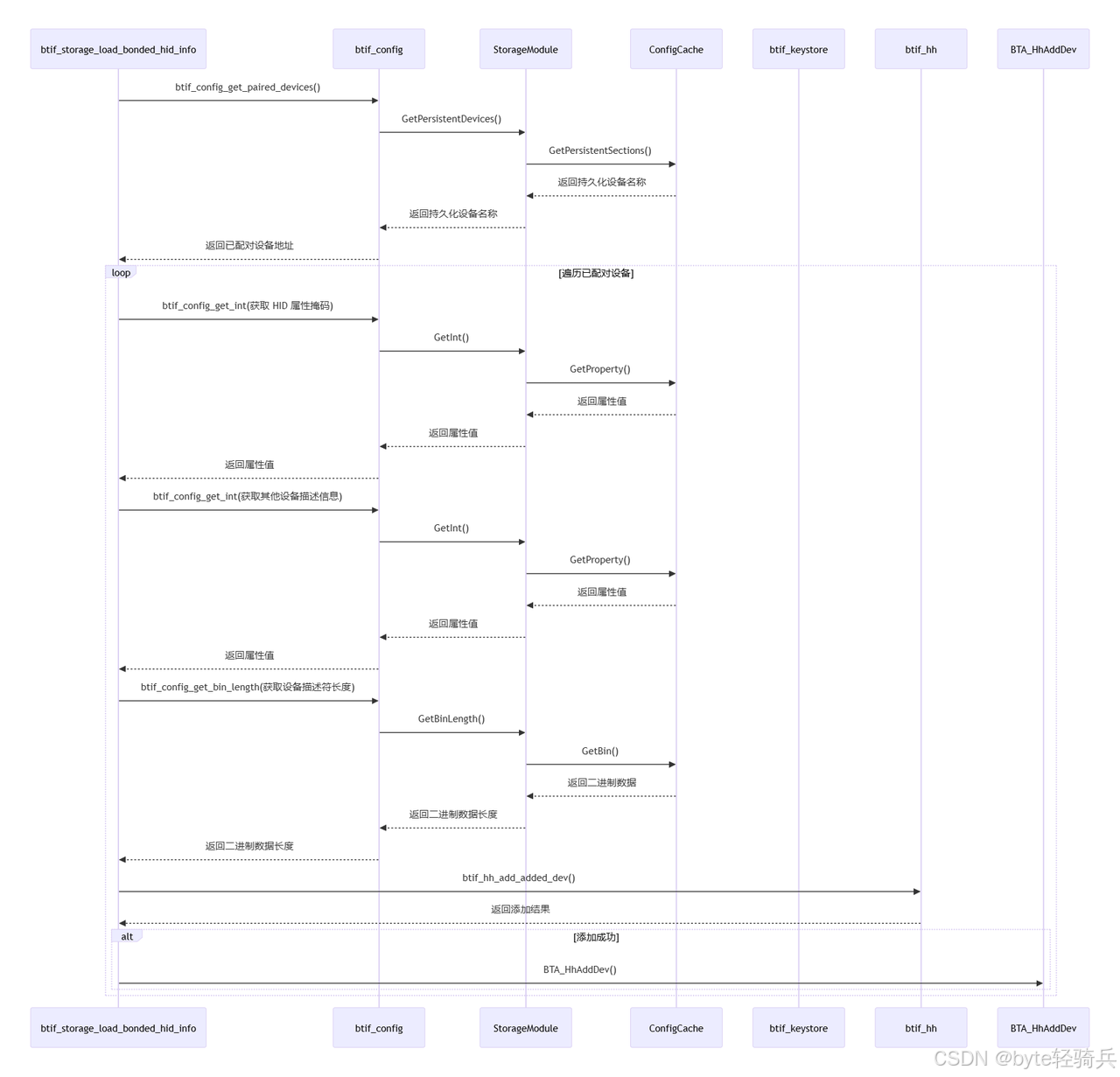
时序图
总结
①核心流程:系统启动时,通过遍历NVRAM中存储的已配对设备信息,提取HID属性(如子类、应用ID、描述符等),校验设备绑定状态后,将有效信息注册到蓝牙HID主机模块(BTA_HH)。采用7步链式处理(设备遍历→属性校验→描述符构建→主机注册),通过btif_config系列接口实现跨模块数据透传,确保HID设备信息的完整性加载
②架构创新:
-
三元存储结构:分离全局配置/持久设备/临时设备数据,采用差异化的ListMap与LruCache容器
-
动态持久化:通过预定义
persistent_property_names自动升级设备段存储等级,支持密钥触发式落盘 -
安全机制:集成数值范围校验模板(
IsNumberInNumericLimits)、加密属性自动解密、双阶段设备查重
③生产级特性:
-
递归锁实现配置操作的原子性
-
设备描述符内存动态分配(
alloca)避免内存泄漏 -
通过
Mutation队列实现批量配置更新的事务性提交
相关文章:
【Bluedroid】蓝牙 HID 设备信息加载与注册机制及配置缓存系统源码解析
本篇解析Android蓝牙子系统加载配对HID设备的核心流程,通过btif_storage_load_bonded_hid_info实现从NVRAM读取设备属性、验证绑定状态、构造描述符并注册到BTA_HH模块。重点剖析基于ConfigCache的三层存储架构(全局配置/持久设备/临时设备)&…...
字节头条golang二面
docker和云服务的区别 首先明确Docker的核心功能是容器化,它通过容器技术将应用程序及其依赖项打包在一起,确保应用在不同环境中能够一致地运行。而云服务则是由第三方提供商通过互联网提供的计算资源,例如计算能力、存储、数据库等。云服务…...
数字化工厂五大核心系统(PLM 、ERP、WMS 、DCS、MOM)详解
该文档聚焦数字化工厂的五大核心系统,适合制造业企业管理者、信息化建设负责人、行业研究人员以及对数字化转型感兴趣的人士阅读。 文档先阐述数字化工厂的定义,广义上指企业运用数字技术实现产品全生命周期数字化,提升经营效益&…...
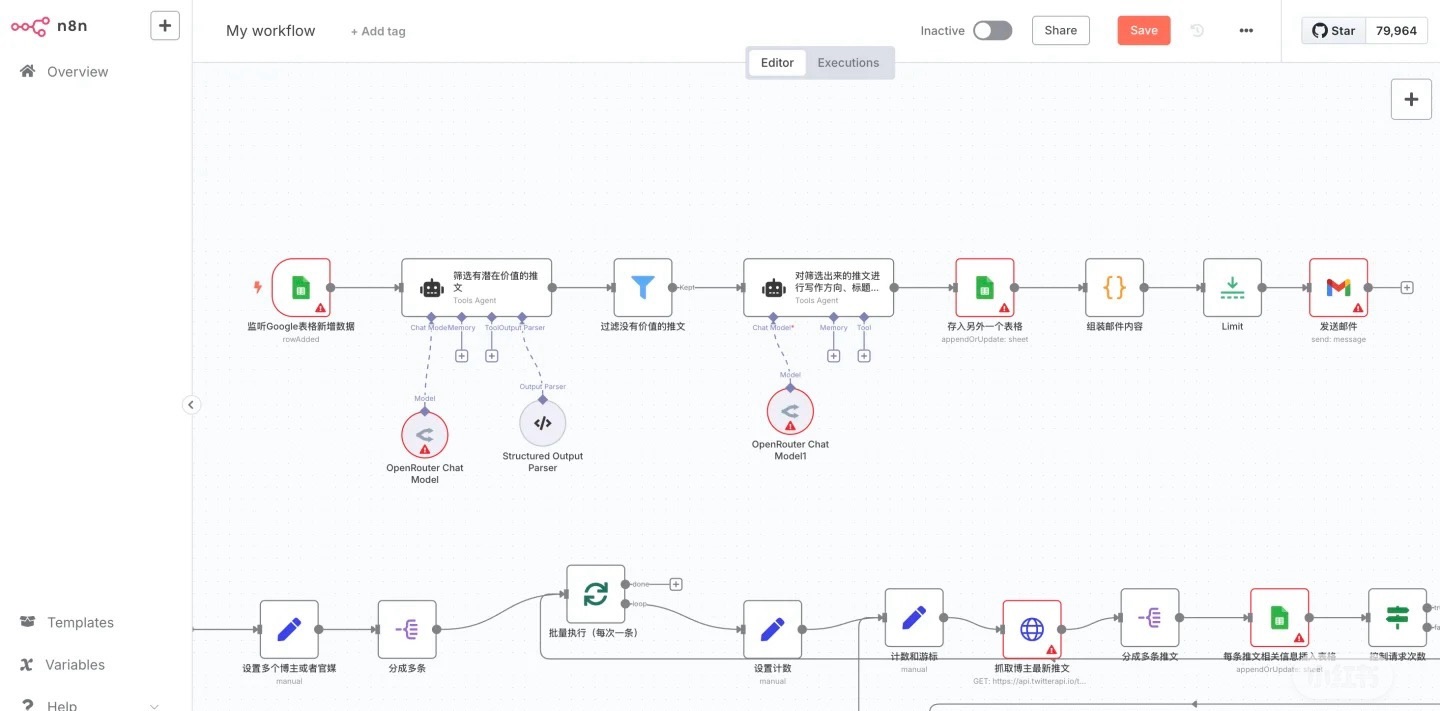
n8n 中文系列教程_02. 自动化平台深度解析:核心优势与场景适配指南
在低代码与AI技术深度融合的今天,n8n作为开源自动化平台正成为开发者提效的新利器。本文深度剖析其四大核心技术优势——极简部署、服务集成、AI工作流与混合开发模式,并基于真实场景测试数据,厘清其在C端高并发、多媒体处理等场景的边界。 一…...

MCP认证难题破解
一、MCP 认证体系现状与核心挑战 微软认证专家(MCP)体系在 2020 年后逐步向基于角色的认证转型,例如 Azure 管理员(AZ-104)、数据分析师(DP-100)等,传统 MCP 考试已被取代。当前备考的核心难题集中在以下方面: 1. 技术栈快速迭代 云原生技术占比提升:Azure 认证中,…...
)
【滑动窗口】串联所有单词的⼦串(hard)
串联所有单词的⼦串(hard) 题⽬描述:解法⼀(暴⼒解法):算法思路:C 算法代码:Java 算法代码: 题⽬链接:30. 串联所有单词的⼦串 题⽬描述: 给定⼀…...

SQL注入之information_schema表
1 information_schema表介绍: information_schema表是一个MySQL的系统数据库,他里面包含了所有数据库的表名 SQL注入中最常见利用的系统数据库,经常利用系统数据库配合union联合查询来获取数据库相关信息,因为系统数据库中所有信…...

高级java每日一道面试题-2025年4月13日-微服务篇[Nacos篇]-Nacos如何处理网络分区情况下的服务可用性问题?
如果有遗漏,评论区告诉我进行补充 面试官: Nacos如何处理网络分区情况下的服务可用性问题? 我回答: 在讨论 Nacos 如何处理网络分区情况下的服务可用性问题时,我们需要深入理解 CAP 理论以及 Nacos 在这方面的设计选择。Nacos 允许用户根据具体的应用…...
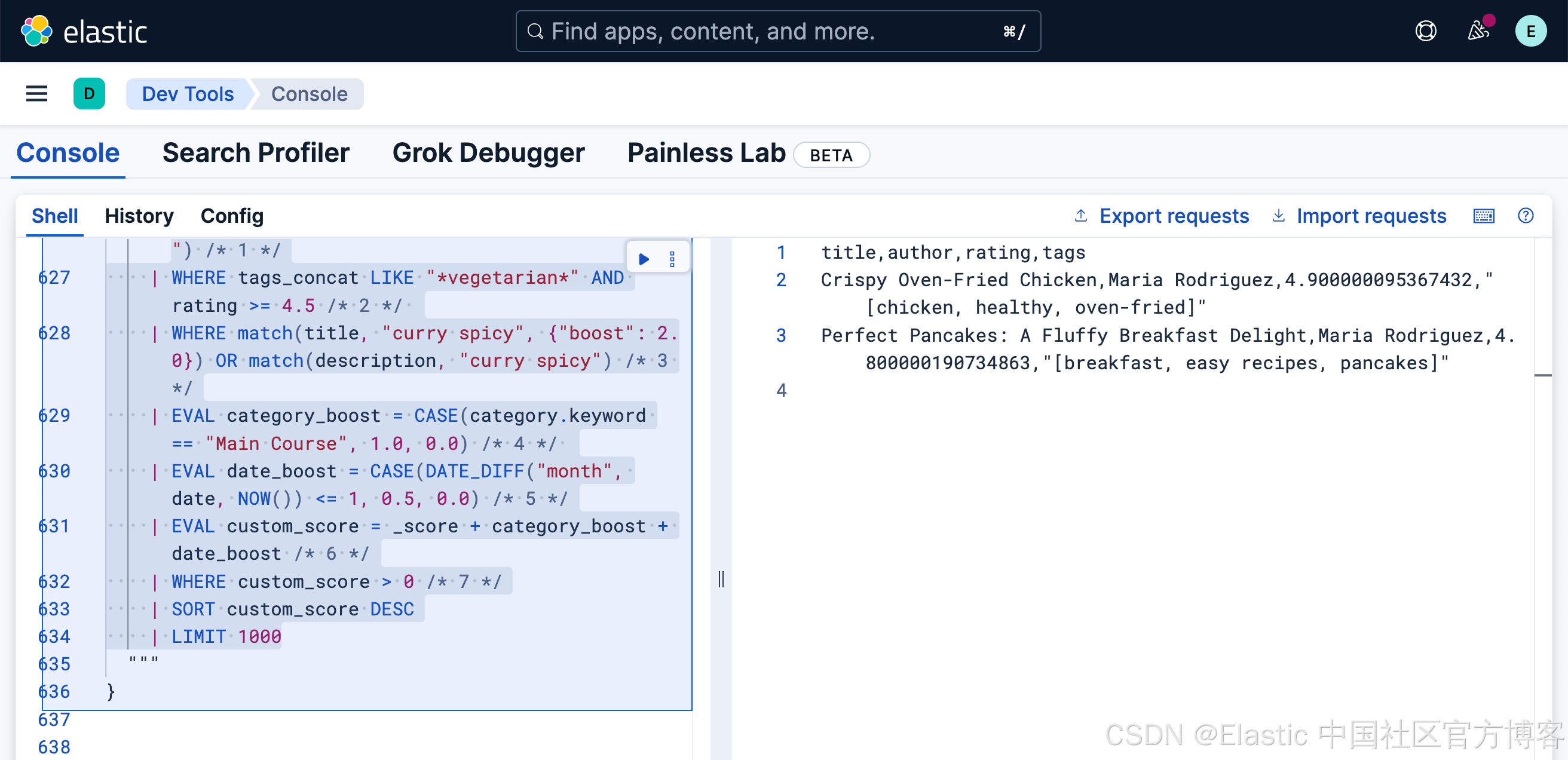
Elasticsearch:使用 ES|QL 进行搜索和过滤
本教程展示了 ES|QL 语法的示例。请参考 Query DSL 版本,以获得等效的 Query DSL 语法示例。 这是一个使用 ES|QL 进行全文搜索和语义搜索基础知识的实践介绍。 有关 ES|QL 中所有搜索功能的概述,请参考《使用 ES|QL 进行搜索》。 在这个场景中&#x…...

R语言之.rdata文件保存及加载
在 R 中,.rdata 文件是通过 save() 函数创建的。 使用 save() 函数可以将一个或多个 R 对象保存到 .rdata 文件中。使用 load() 函数可以将 .rdata 文件中的对象恢复到当前工作环境中。 1.创建并保存对象到.rdata 假设有一个基于 iris 数据集训练的线性回归模型&a…...
)
二进制和docker两种方式部署Apache pulsar(standalone)
#作者:闫乾苓 文章目录 1、二进制安装部署Pulsar(standalone)1.1 安装配置JDK1.2 下载解压pulsar安装包1.3 启动独立模式的Pulsar 集群1.4 创建主题测试1.5 向主题写入消息测试1.6 从主题中读取消息测试 2.docker安装部署Pulsar(standalone)2.1 使用docker 启动Pul…...
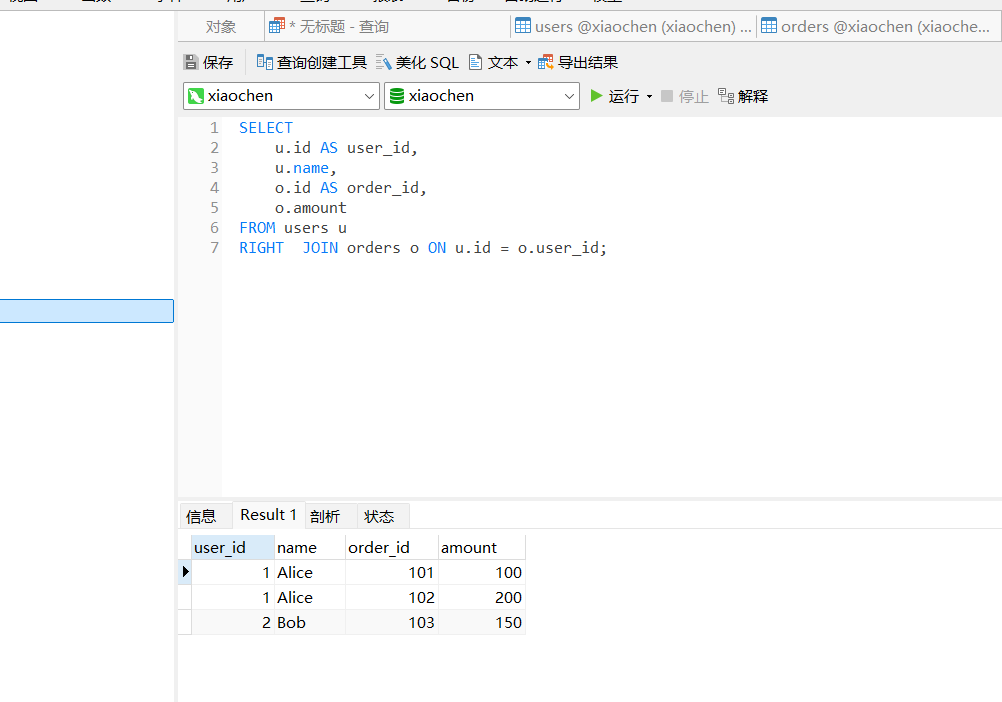
MySQL表与表之间的左连接和内连接
前言: 在上个实习生做的模块之中,在列表接口,涉及到多个表的联表查询的时候总会出现多条不匹配数据的奇怪的bug,我在后期维护的时候发现了,原来是这位实习生对MySQL的左连接和内连接不能正确的区分而导致的这种的情况。 表设置 …...

RAG知识库中引入MCP
MCP(Memory, Context, Planning)是一种增强AI系统认知能力的框架。将MCP引入RAG知识库可以显著提升系统的性能和用户体验。下面我将详细介绍如何实现这一整合。 MCP框架概述 MCP框架包含三个核心组件: Memory(记忆):存储和管理历史交互和知识Context(上下文):理解当…...
)
TDengine 性能监控与调优实战指南(二)
四、TDengine 性能调优实战 4.1 硬件层面优化 硬件是 TDengine 运行的基础,其性能直接影响着 TDengine 的整体表现。在硬件层面进行优化,就如同为高楼大厦打下坚实的地基,能够为 TDengine 的高效运行提供有力支持。 CPU:CPU 作…...

低代码开发平台:企业数字化转型的加速器
一、引言 在数字化时代,企业的转型需求日益迫切。为了在激烈的市场竞争中保持领先地位,企业需要快速响应市场变化、优化业务流程、提升运营效率。然而,传统的软件开发模式往往面临开发周期长、成本高、灵活性差等问题,难以满足企业…...

【AI图像创作变现】02工具推荐与差异化对比
引言 市面上的AI绘图工具层出不穷,但每款工具都有自己的“性格”:有的美学惊艳但无法微调,有的自由度极高却需要动手配置,还有的完全零门槛适合小白直接上手。本节将用统一格式拆解五类主流工具,帮助你根据风格、控制…...
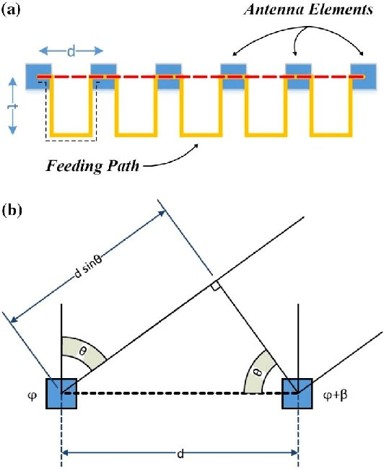
相控阵列天线:原理、优势和类型
本文要点 相控阵列天线 (Phased array antenna) 是一种具有电子转向功能的天线阵列,不需要天线进行任何物理移动,即可改变辐射讯号的方向和形状。 这种电子转向要归功于阵列中每个天线的辐射信号之间的相位差。 相控阵列天线的基…...
【HD-RK3576-PI】Ubuntu桌面多显、旋转以及更新Logo
硬件:HD-RK3576-PI 软件:Linux6.1Ubuntu22.04 在基于HD-RK3576-PI硬件平台运行Ubuntu 22系统的开发过程中,屏幕方向调整是提升人机交互体验的关键环节。然而,由于涉及uboot引导阶段、内核启动界面、桌面环境显示全流程适配&#x…...
树莓派超全系列教程文档--(36)树莓派条件过滤器设置
树莓派条件过滤器设置 条件过滤器[all] 过滤器型号过滤器[none] 过滤器[tryboot] 过滤器[EDID*] 过滤器序列号过滤器GPIO过滤器组合条件过滤器 文章来源: http://raspberry.dns8844.cn/documentation 原文网址 条件过滤器 当将单个 SD 卡(或卡图像&am…...

【Rust 精进之路之第3篇-变量观】`let`, `mut` 与 Shadowing:理解 Rust 的变量绑定哲学
系列: Rust 精进之路:构建可靠、高效软件的底层逻辑 作者: 码觉客 发布日期: 2025-04-20 引言:为数据命名,Rust 的第一道“安全阀” 在上一篇文章中,我们成功搭建了 Rust 开发环境,并用 Cargo 运行了第一个程序,迈出了坚实的一步。现在,是时候深入了解构成程序的基…...

wordpress独立站的产品详情页添加WhatsApp链接按钮
在WordPress外贸独立站的产品展示页添加WhatsApp链接按钮,可以帮助客户更方便地与你联系。以下是实现这一功能的步骤: 方法一:使用HTML代码添加按钮 编辑产品展示页 进入WordPress后台,找到需要添加WhatsApp按钮的产品展示页。…...
jetpack之LiveData的原理解析
前言 在一通研究下,我打算LiveData的解析通过从使用的方法上面切入进行LiveData的工作原理分析😋。感觉这样子更能让大家伙理解明白,LiveData的实现和Lifecycle分不开,并且还得需要知道LiveData的使用会用到什么样的方法。所以&a…...

Viper配置管理笔记
一、什么是 Viper? Viper 是 Go 语言的一个强大工具,就像一个超级管家,专门负责帮你打理程序的各种配置。它能把配置文件(比如 JSON、YAML、TOML 等格式)里的内容读出来,还能监控配置文件的变化࿰…...

go+mysql+cocos实现游戏搭建
盲目的学了一段时间了,刚开始从Box2d开始学习,明白了很多,Box2d是物理模型的基础,是我们在游戏中模拟现实的很重要的一个开源工具。后来在朋友的建议下学习了cocos,也是小程序开发的利器,而golang是一款高效…...
【微知】服务器如何获取服务器的SN序列号信息?(dmidecode -t 1)
文章目录 背景命令dmidecode -t的数字代表的字段 背景 各种场景都需要获取服务器的SN(Serial Number),比如问题定位,文件命名,该部分信息在dmi中是标准信息,不同服务器,不同os都能用相同方式获…...
技术详解)
Android开发中广播(Broadcast)技术详解
在 Android 开发中,广播(Broadcast) 是一种广泛使用的组件通信机制,它允许应用程序在不直接交互的情况下传递消息。本文将详细讲解 Android 广播的基本概念、类型、发送与接收流程、使用场景及注意事项,并结合具体的代…...

MySQL视图高级应用与最佳实践
1. 视图与索引的协同优化 物化视图(模拟实现) MySQL原生不支持物化视图,但可通过“定时刷新”的物理表模拟: -- 1. 创建存储结果的物理表 CREATE TABLE cached_monthly_sales (product_id INT,total_sales DECIMAL(10…...

xss4之cookie操作
一、登录网站情况分析 1. 登录状态与Cookie的关系 已登录状态: 当用户登录网站后,如admin123456,网站会通过某种方式(如Cookie)在客户端保存用户的登录状态。Cookie的作用: Cookie是服务器发送到用户浏览器并保存在本地的一小块…...
51c大模型~合集119
我自己的原文哦~ https://blog.51cto.com/whaosoft/13852062 #264页智能体综述 MetaGPT等20家顶尖机构、47位学者参与 近期,大模型智能体(Agent)的相关话题爆火 —— 不论是 Anthropic 抢先 MCP 范式的快速普及,还是 OpenAI …...
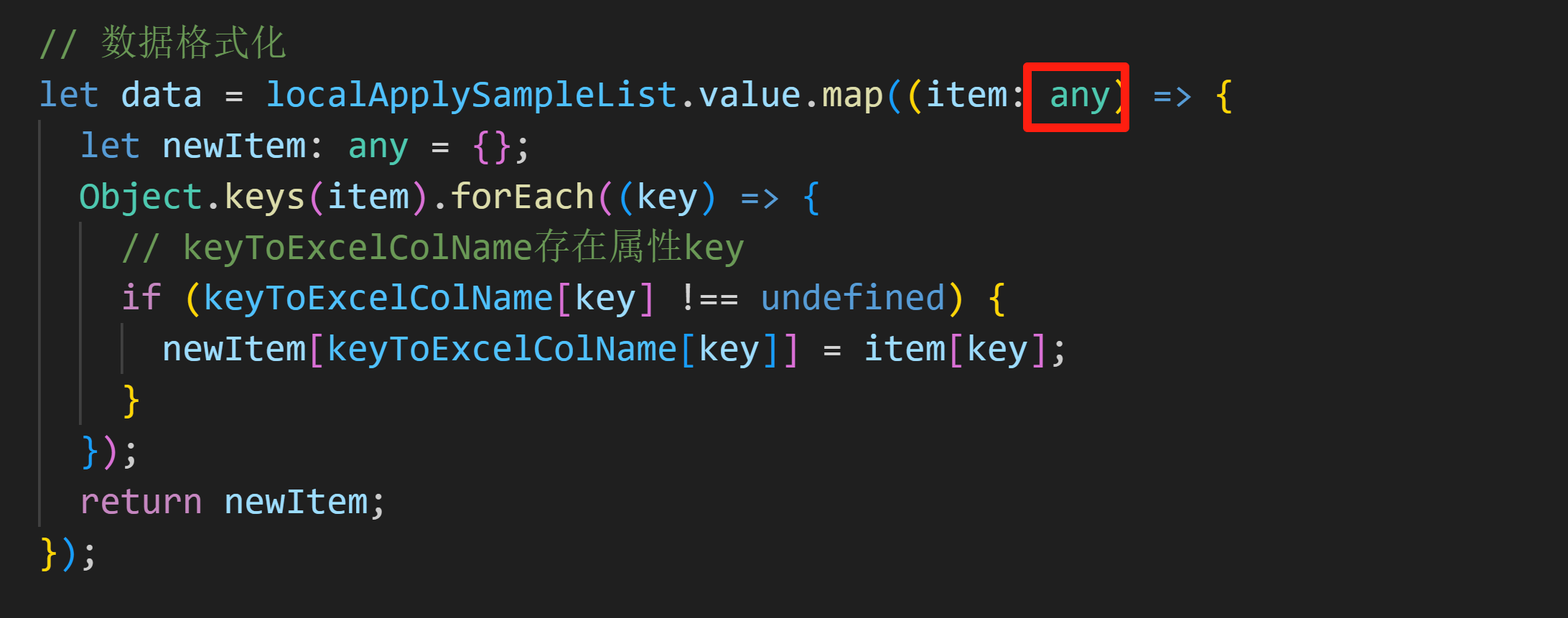
Vue3 + TypeScript,关于item[key]的报错处理方法
处理方法1:// ts-ignore 注释忽略报错 处理方法2:item 设置为 any 类型...