
flutter开发实战-实现首页分类目录入口切换功能

。
在开发中经常遇到首页的分类入口,如美团的美食团购、打车等入口,左右切换还可以分页更多展示。
一、使用flutter_swiper_null_safety
在pubspec.yaml引入
# 轮播图flutter_swiper_null_safety: ^1.0.2
二、实现swiper分页代码
由于我这里按照一页8条展示,两行四列展示格式。
当列表list传入的控件时候,一共的页数为
int getSwiperPageNumber() {int allLength = widget.list.length;int aPageNum = getSwiperOnePageNumber();if (allLength % aPageNum == 0) {return (allLength / aPageNum).toInt();}return (allLength / aPageNum).toInt() + 1;}
通过列表,一页数量计算每一页应该展示多少个按钮。
List getSwiperPagerItems(int pagerIndex) {List pagerItems = [];int allLength = widget.list.length;int aPageNum = getSwiperOnePageNumber();int start = pagerIndex * aPageNum;int end = (pagerIndex + 1) * aPageNum;if (end > allLength) {end = allLength;}pagerItems = widget.list.sublist(start, end);return pagerItems;}
一共pages的列表
int pagerNumber = getSwiperPageNumber();for (int index = 0; index < pagerNumber; index++) {CategorySwiperPagerItem swiperPagerItem = CategorySwiperPagerItem();swiperPagerItem.pagerIndex = index;swiperPagerItem.pagerItems = getSwiperPagerItems(index);swiperPagers.add(swiperPagerItem);}
通过使用flutter_swiper_null_safety来显示
Swiper(// 横向scrollDirection: Axis.horizontal,// 布局构建itemBuilder: (BuildContext context, int index) {CategorySwiperPagerItem swiperPagerItem = swiperPagers[index];return HomeCategoryPager(pagerIndex: swiperPagerItem.pagerIndex,pageItems: swiperPagerItem.pagerItems,width: itemWidth,height: itemHeight,containerHeight: showHeight,containerWidth: width,);},//条目个数itemCount: swiperPagers.length,// 自动翻页autoplay: false,// pagination: _buildSwiperPagination(),// pagination: _buildNumSwiperPagination(),//点击事件// onTap: (index) {// LoggerManager().debug(" 点击 " + index.toString());// },// 相邻子条目视窗比例viewportFraction: 1,// 用户进行操作时停止自动翻页autoplayDisableOnInteraction: true,// 无限轮播loop: false,//当前条目的缩放比例scale: 1,),
实现比较简单,
完整代码如下
import 'package:flutter/material.dart';
import 'package:flutter_screenutil/flutter_screenutil.dart';
import 'package:flutter_swiper_null_safety/flutter_swiper_null_safety.dart';
import 'package:flutter_app_dfaceintl/config/resource_manager.dart';
import 'package:flutter_app_dfaceintl/utils/color_util.dart';
import 'package:flutter_app_dfaceintl/widget/common/show_gesture_container.dart';
import 'package:one_context/one_context.dart';
import 'package:flutter_app_dfaceintl/config/logger_manager.dart';class CategorySwiperPagerItem {int pagerIndex = 0;List pagerItems = [];
}class HomeCategoryWidget extends StatefulWidget {const HomeCategoryWidget({Key? key,required this.rowNumber,required this.numberOfPerRow,required this.list,required this.screenWidth,}) : super(key: key);// 多少行final int rowNumber;// 一行几个final int numberOfPerRow;final List list;final double screenWidth;State<HomeCategoryWidget> createState() => _HomeCategoryWidgetState();
}class _HomeCategoryWidgetState extends State<HomeCategoryWidget> {double showHeight = 0.0;double containVPadding = 5.0;double containHPadding = 10.0;List<CategorySwiperPagerItem> swiperPagers = [];bool showPagination = false;void initState() {// TODO: implement initStatedouble containerHeight = getContainerMaxHeight(widget.screenWidth);showHeight = containerHeight + 2 * containVPadding;int pagerNumber = getSwiperPageNumber();for (int index = 0; index < pagerNumber; index++) {CategorySwiperPagerItem swiperPagerItem = CategorySwiperPagerItem();swiperPagerItem.pagerIndex = index;swiperPagerItem.pagerItems = getSwiperPagerItems(index);swiperPagers.add(swiperPagerItem);}if (swiperPagers.length > 1) {showPagination = true;}super.initState();}void dispose() {// TODO: implement disposesuper.dispose();}Widget build(BuildContext context) {double width = widget.screenWidth;double itemWidth = (width - 2 * containHPadding) / widget.numberOfPerRow;double itemHeight = itemWidth;return Container(width: width,height: showHeight,margin: EdgeInsets.symmetric(vertical: 5.0),padding: EdgeInsets.symmetric(vertical: containVPadding,horizontal: containHPadding,),color: Colors.white,child: Swiper(// 横向scrollDirection: Axis.horizontal,// 布局构建itemBuilder: (BuildContext context, int index) {CategorySwiperPagerItem swiperPagerItem = swiperPagers[index];return HomeCategoryPager(pagerIndex: swiperPagerItem.pagerIndex,pageItems: swiperPagerItem.pagerItems,width: itemWidth,height: itemHeight,containerHeight: showHeight,containerWidth: width,);},//条目个数itemCount: swiperPagers.length,// 自动翻页autoplay: false,// pagination: _buildSwiperPagination(),// pagination: _buildNumSwiperPagination(),//点击事件// onTap: (index) {// LoggerManager().debug(" 点击 " + index.toString());// },// 相邻子条目视窗比例viewportFraction: 1,// 用户进行操作时停止自动翻页autoplayDisableOnInteraction: true,// 无限轮播loop: false,//当前条目的缩放比例scale: 1,),);}int getSwiperOnePageNumber() {return widget.numberOfPerRow * widget.rowNumber;}int getSwiperPageNumber() {int allLength = widget.list.length;int aPageNum = getSwiperOnePageNumber();if (allLength % aPageNum == 0) {return (allLength / aPageNum).toInt();}return (allLength / aPageNum).toInt() + 1;}List getSwiperPagerItems(int pagerIndex) {List pagerItems = [];int allLength = widget.list.length;int aPageNum = getSwiperOnePageNumber();int start = pagerIndex * aPageNum;int end = (pagerIndex + 1) * aPageNum;if (end > allLength) {end = allLength;}pagerItems = widget.list.sublist(start, end);return pagerItems;}double getContainerMaxHeight(double screenWidth) {double width = screenWidth;double itemSize = (width - 2 * containHPadding) / widget.numberOfPerRow;double maxHeight = itemSize * widget.rowNumber;int allLength = widget.list.length;if (allLength <= widget.numberOfPerRow) {maxHeight = itemSize;}return maxHeight;}
}class HomeCategoryPager extends StatelessWidget {const HomeCategoryPager({Key? key,required this.pagerIndex,required this.pageItems,required this.width,required this.height,this.containerWidth,this.containerHeight,}) : super(key: key);final int pagerIndex;final List pageItems;final double width;final double height;final double? containerWidth;final double? containerHeight;Widget build(BuildContext context) {return Container(width: containerWidth,height: containerHeight,child: Wrap(children: pageItems.map((e) => HomeCategoryItem(width: width,height: height,)).toList(),),);}
}class HomeCategoryItem extends StatelessWidget {const HomeCategoryItem({Key? key,required this.width,required this.height,}) : super(key: key);final double width;final double height;Widget build(BuildContext context) {return ShowGestureContainer(padding: EdgeInsets.symmetric(vertical: 5.0, horizontal: 5.0),width: width,height: height,highlightedColor: ColorUtil.hexColor(0xf0f0f0),onPressed: () {LoggerManager().debug("ShowGestureContainer");},child: Column(mainAxisAlignment: MainAxisAlignment.center,crossAxisAlignment: CrossAxisAlignment.center,children: [buildIcon(),Padding(padding: EdgeInsets.only(top: 5.0),child: buildTitle(),),],),);}Widget buildTitle() {return Text("栏目",textAlign: TextAlign.left,maxLines: 2,overflow: TextOverflow.ellipsis,softWrap: true,style: TextStyle(fontSize: 12,fontWeight: FontWeight.w500,fontStyle: FontStyle.normal,color: ColorUtil.hexColor(0x444444),decoration: TextDecoration.none,),);}Widget buildIcon() {return Icon(Icons.access_alarm,size: 32.0,color: Colors.brown,);}
}
三、小结
flutter开发实战-实现首页分类目录入口切换功能。Swiper实现如美团的美食团购、打车等入口,左右切换还可以分页更多展示。
学习记录,每天不停进步。
相关文章:
flutter开发实战-实现首页分类目录入口切换功能
。 在开发中经常遇到首页的分类入口,如美团的美食团购、打车等入口,左右切换还可以分页更多展示。 一、使用flutter_swiper_null_safety 在pubspec.yaml引入 # 轮播图flutter_swiper_null_safety: ^1.0.2二、实现swiper分页代码 由于我这里按照一页8…...

基于粒子群改进BP神经网络的时间序列预测,pso-bp时间序列预测
目录 摘要 BP神经网络的原理 BP神经网络的定义 BP神经网络的基本结构 BP神经网络的神经元 BP神经网络的激活函数, BP神经网络的传递函数 粒子群算法的原理及步骤 基于粒子群算法改进优化BP神经网络的时间序列预测 matlab代码 代写下载链接:https://download.csdn.net/downlo…...

std::string和std::wstring无法前向声明
在.h文件中需要声明返回类型为std::string的函数,这时候需要声明一下std::string,但是发现报错了。 这时候查了一下,发现std::string是typedef的,无法前向声明,这时候只能用include。其主要是考虑到如果为了让string前…...
)
论文阅读-Neighbor Contrastive Learning on Learnable Graph Augmentation(AAAI2023)
人为设计的图增强,可能会破坏原始图的拓扑结构,同时相邻节点被视为负节点,因此被推离锚点很远。然而,这与网络的同质性假设是矛盾的,即连接的节点通常属于同一类,并且应该彼此接近。本文提出了一种端到端的…...
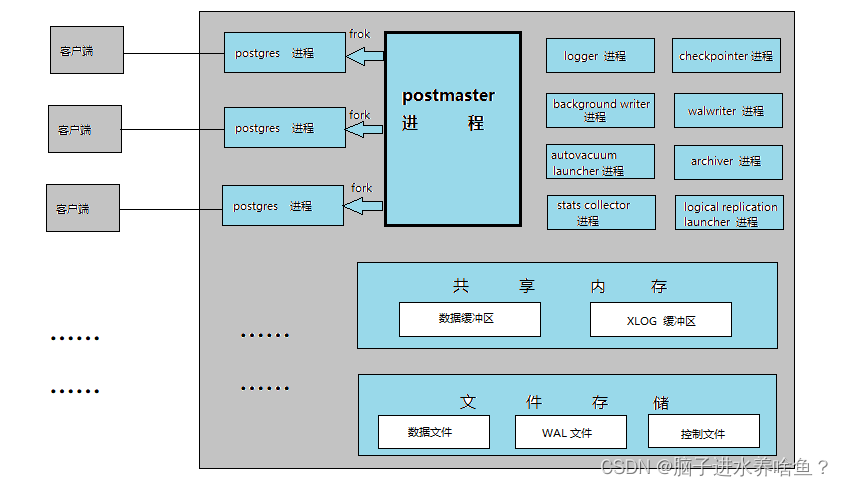
PostgreSql 进程及内存结构
一、进程及内存架构 PostgreSQL 数据库运行时,使用如下命令可查询数据库进程,正对应上述结构图。 [postgreslocalhost ~]$ ps -ef|grep post postgres 8649 1 0 15:05 ? 00:00:00 /app/pg13/bin/postgres -D /data/pg13/data postgres …...

Elasticsearch 常用 HTTP 接口
本文记录工作中常用的关于 Elasticsearch 的 HTTP 接口,以作备用,读者也可以参考,会持续补充更新。开发环境基于 Elasticsearch v5.6.8、v1.7.5、v2.x。 集群状态 集群信息 1 2 3 4 5 6 7http://localhost:9200/_cluster/stats?pretty http…...

games106 homework1实现
games106 homework1 gltf介绍图: 骨骼动画 动画相关属性: 对GLTF的理解参照了这篇文章: glTF格式详解(动画) GLTF文件格式详解 buffer和bufferView对象用于引用动画数据。 buffer对象用来指定原始动画数据, bufferView对象用来引用buff…...
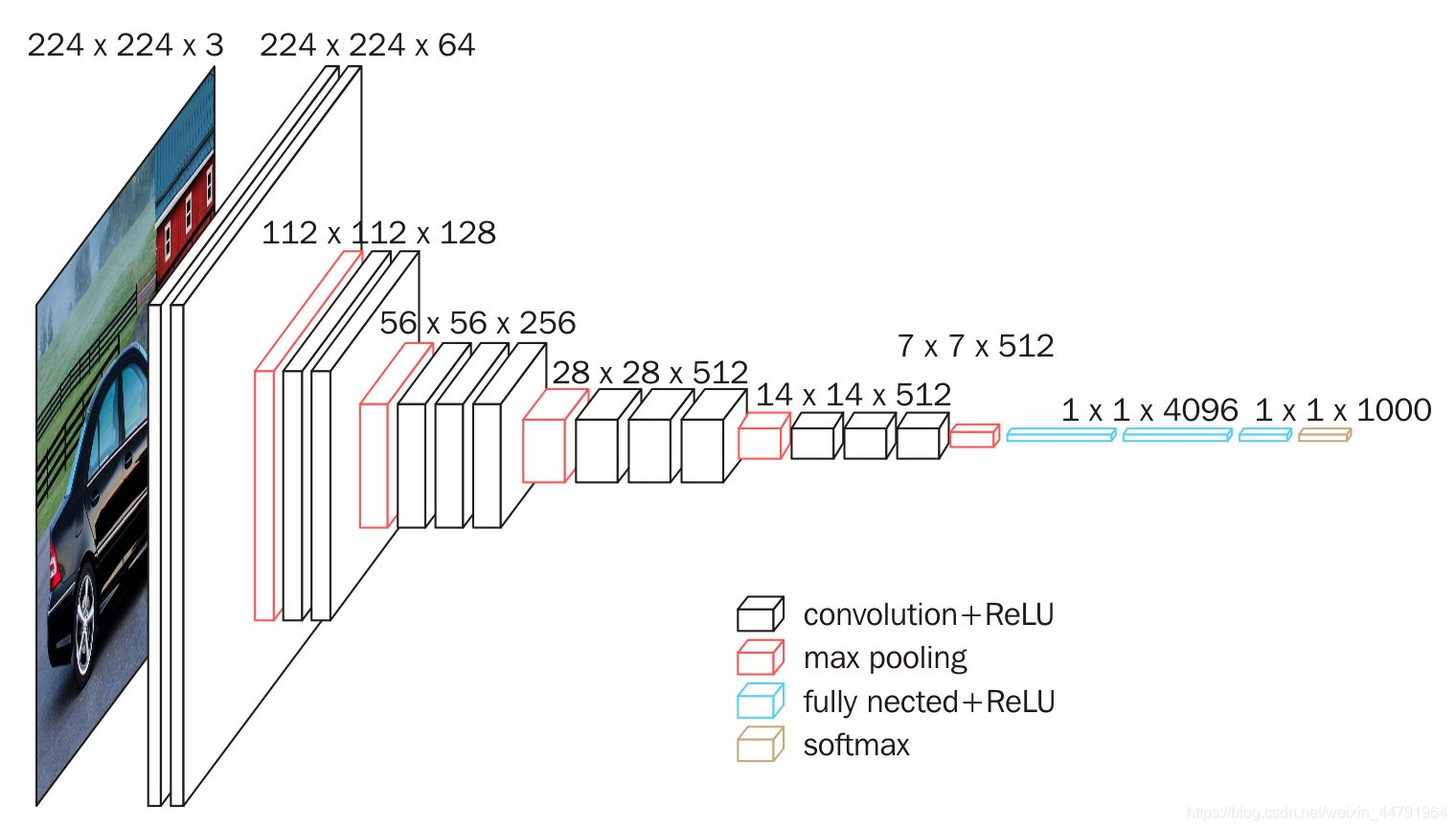
Pytorch使用VGG16模型进行预测猫狗二分类
目录 1. VGG16 1.1 VGG16 介绍 1.1.1 VGG16 网络的整体结构 1.2 Pytorch使用VGG16进行猫狗二分类实战 1.2.1 数据集准备 1.2.2 构建VGG网络 1.2.3 训练和评估模型 1. VGG16 1.1 VGG16 介绍 深度学习已经在计算机视觉领域取得了巨大的成功,特别是在图像分类任…...
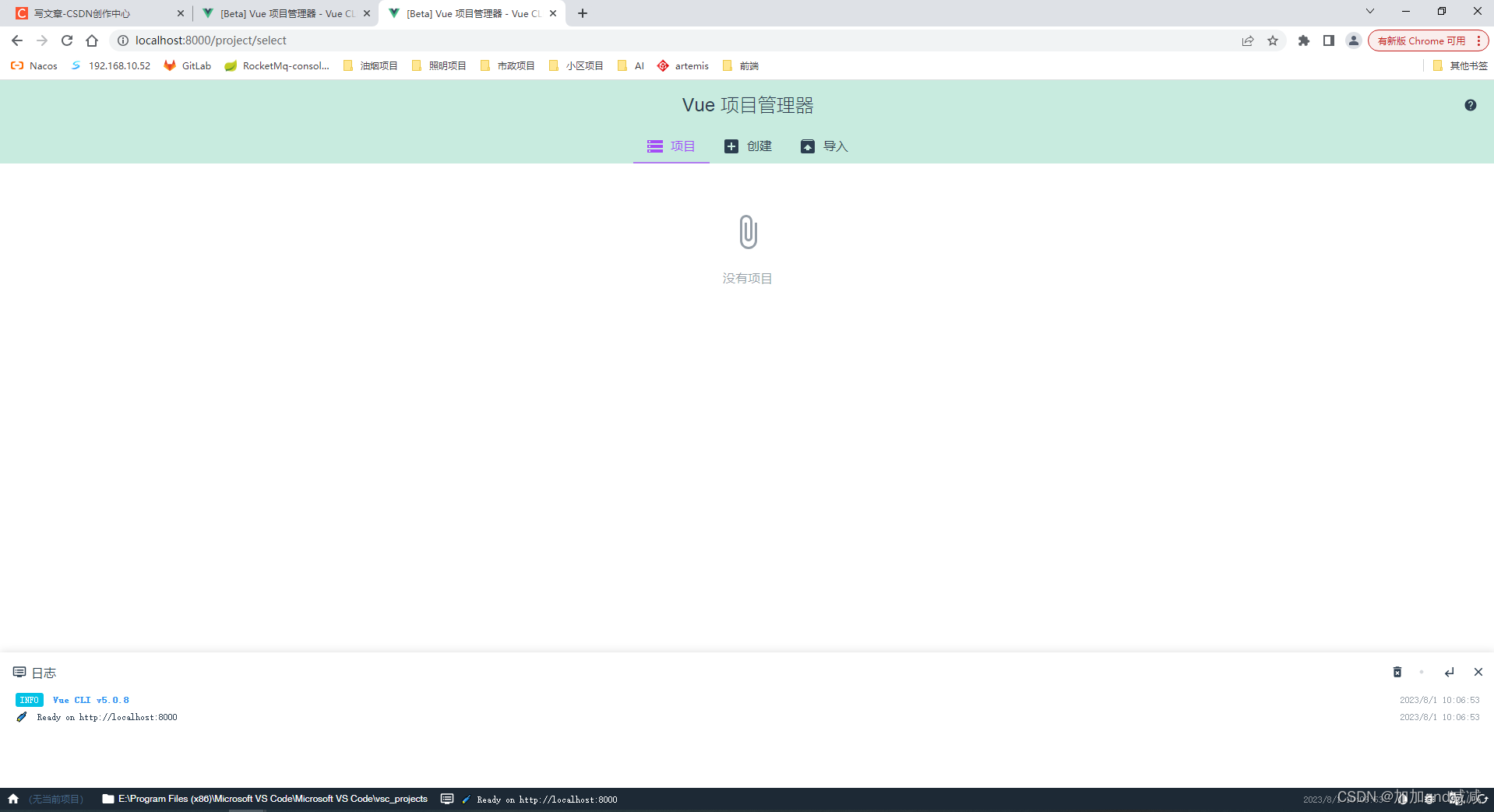
安装nvm使用nvm管理node切换npm镜像后使用vue ui管理构建项目成功
如果安装nvm前已经单独安装过node.js的请先自行卸载原有node和环境变量里面的配置; 亲测成功,有哪些问题可以在评论区发消息或者私聊我 1、安装nvm的步骤如下 下载nvm安装包 在nvm的GitHub仓库,如下是国内镜像仓库: 点击这里跳…...
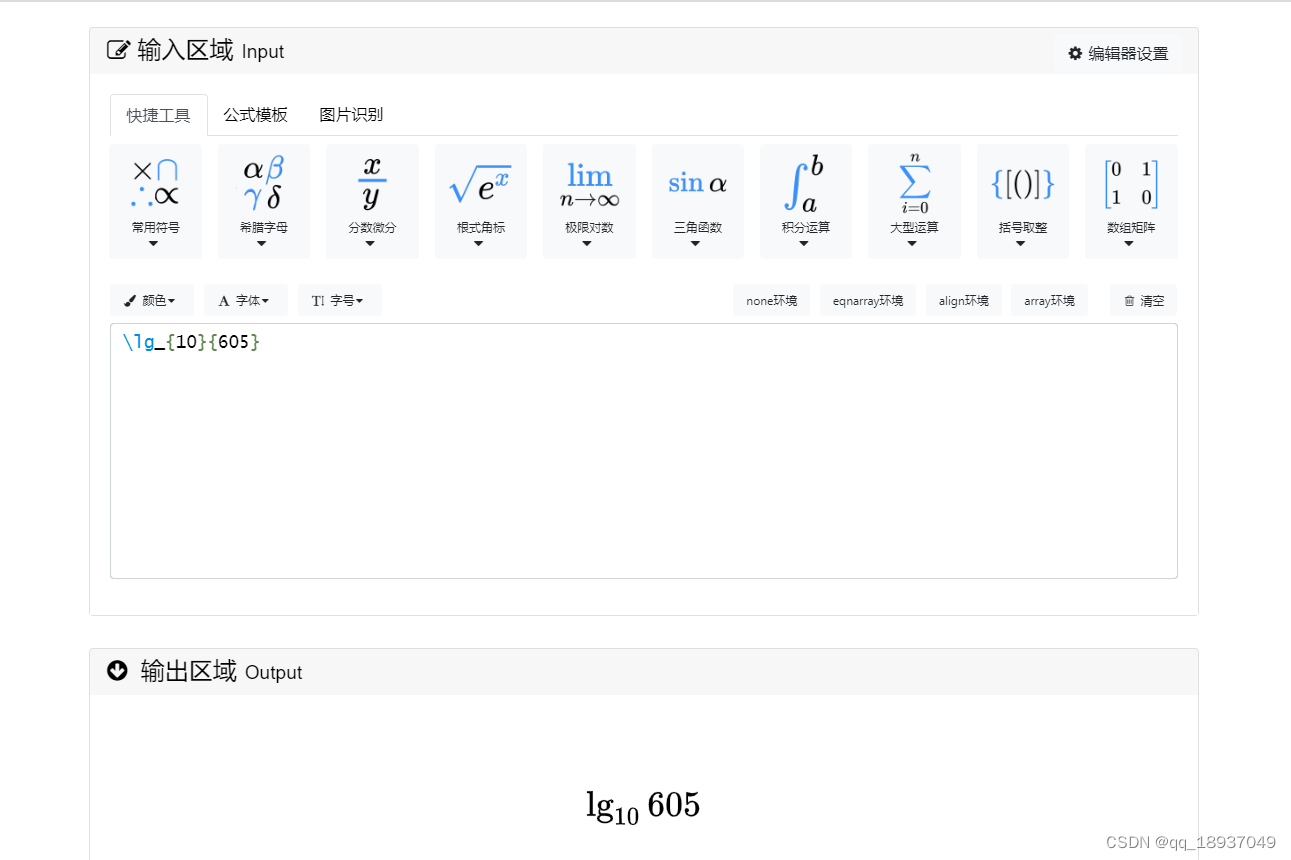
在线LaTeX公式编辑器编辑公式
在线LaTeX公式编辑器编辑公式 在编辑LaTex文档时候,需要输入公式,可以使用在线LaTeX公式编辑器编辑公式,其链接为: 在线LaTeX公式编辑器,https://www.latexlive.com/home 图1 在线LaTeX公式编辑器界面 图2 在线LaTeX公式编辑器…...

【C、C++】学习0
C、C学习路线 C语法:变量、条件、循环、字符串、数组、函数、结构体等指针、内存管理推荐书籍:《C Primer Plus》、《C和指针》、《C专家编程》 CC语言基础C的面向对象(封装、继承与多态)特性泛型模板STL等等推荐书籍(…...

python GUI nicegui初识一(登录界面创建)
最近尝试了python的nicegui库,虽然可能也有一些不足,但个人感觉对于想要开发不过对ui设计感到很麻烦的人来说是很友好的了,毕竟nicegui可以利用TailwindCSS和Quasar进行ui开发,并且也支持定制自己的css样式。 这里记录一下自己利…...
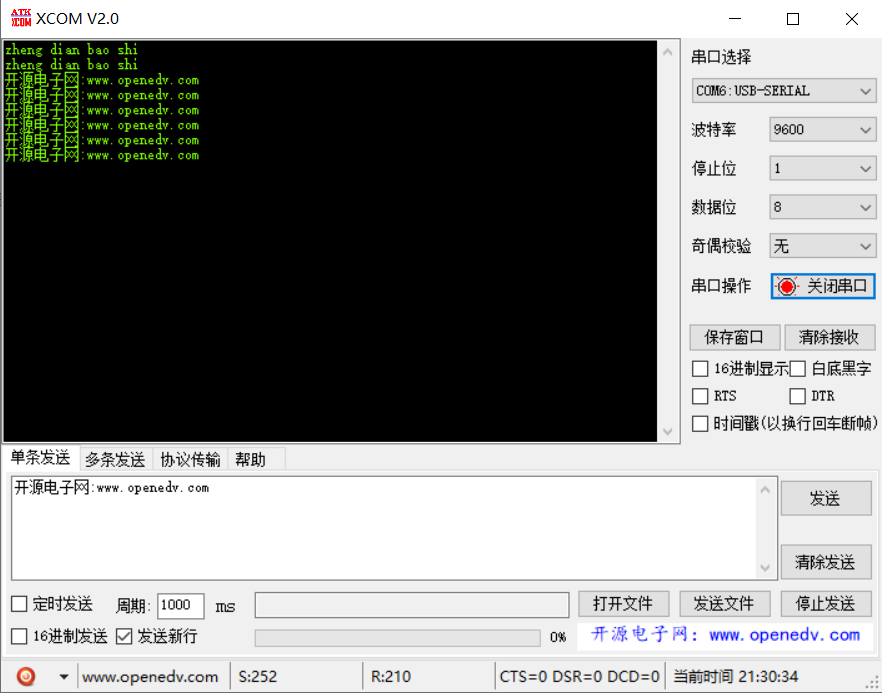
【单片机】51单片机串口的收发实验,串口程序
这段代码是使用C语言编写的用于8051单片机的串口通信程序。它实现了以下功能: 引入必要的头文件,包括reg52.h、intrins.h、string.h、stdio.h和stdlib.h。 定义了常量FSOC和BAUD,分别表示系统时钟频率和波特率。 定义了一个发送数据的函数…...
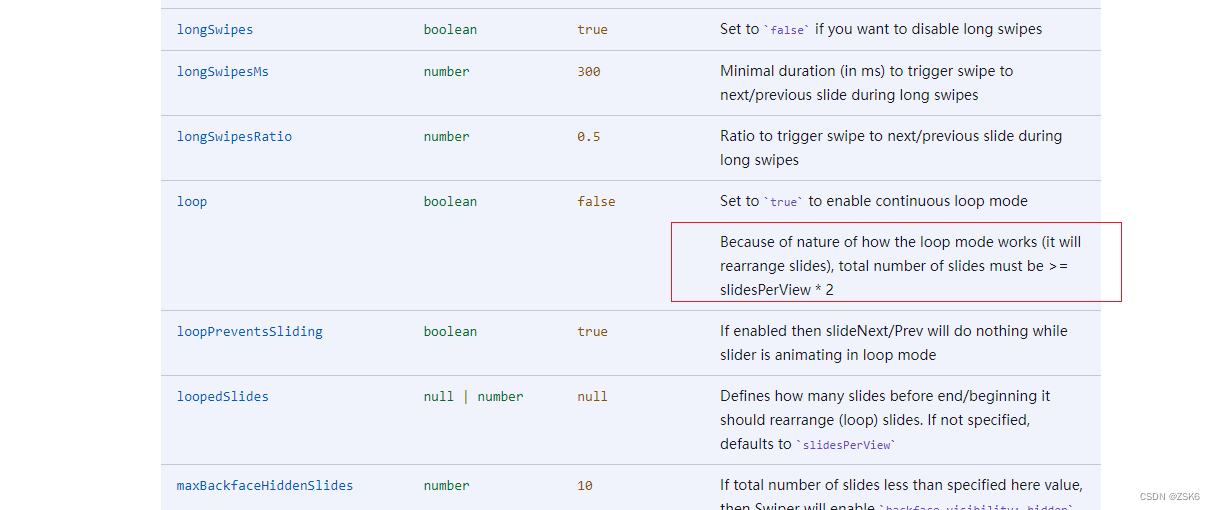
【bug】记录一次使用Swiper插件时loop属性和slidersPerView属性冲突问题
简言 最近在vue3使用swiper时,突然发现loop属性和slides-per-view属性同时存在启用时,loop生效,下一步只能生效一次的bug,上一步却是好的。非常滴奇怪。 解决过程 分析属性是否使用错误。 loop是循环模式,布尔型。 …...
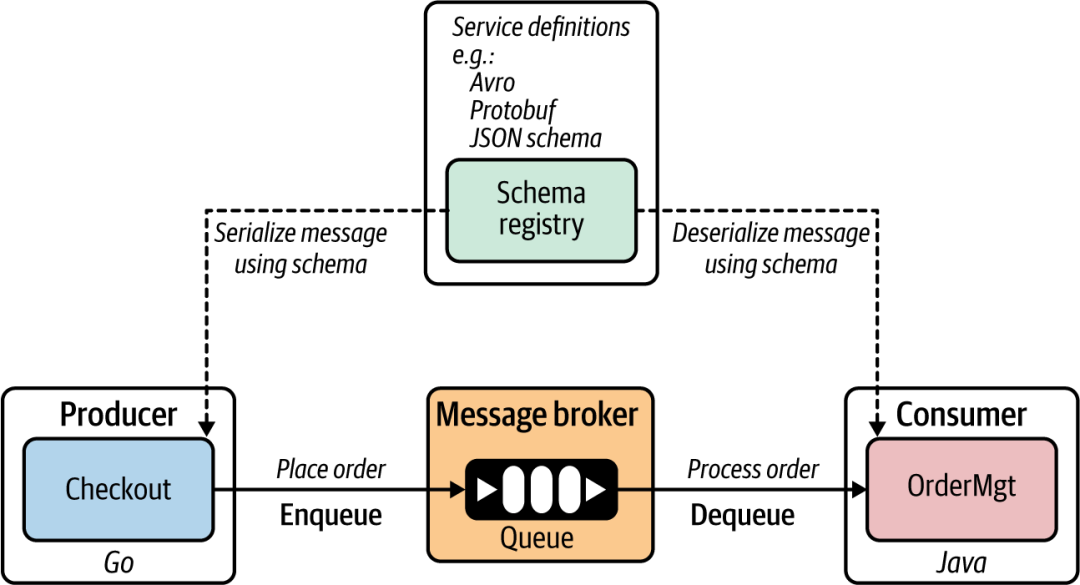
云原生应用里的服务发现
服务定义: 服务定义是声明给定服务如何被消费者/客户端使用的方式。在建立服务之间的同步通信通道之前,它会与消费者共享。 同步通信中的服务定义: 微服务可以将其服务定义发布到服务注册表(或由微服务所有者手动发布)…...

【零基础学Rust | 基础系列 | 基础语法】变量,数据类型,运算符,控制流
文章目录 简介:一,变量1,变量的定义2,变量的可变性3,变量的隐藏 二、数据类型1,标量类型2,复合类型 三,运算符1,算术运算符2,比较运算符3,逻辑运算…...

运输层---概述
目录 运输层主要内容一.概述和传输层服务1.1 概述1.2 传输服务和协议1.3 传输层 vs. 网络层1.4 Internet传输层协议 二. 多路复用与多路分解(解复用)2.1 概述2.2 无连接与面向连接的多路分解(解复用)2.3面向连接的多路复用*2.4 We…...
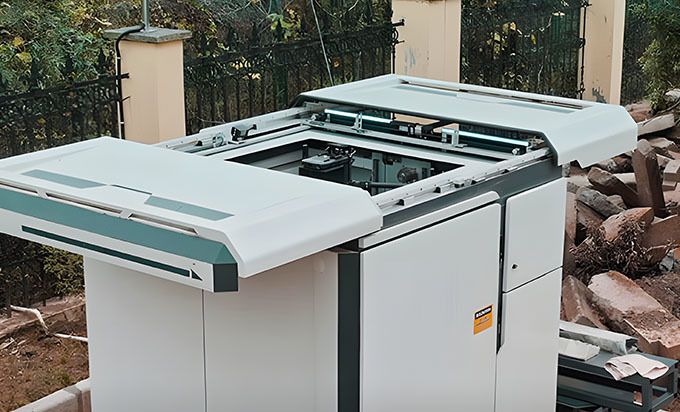
高速公路巡检无人机,为何成为公路巡检的主流工具
随着无人机技术的不断发展,无人机越来越多地应用于各个领域。其中,在高速公路领域,高速公路巡检无人机已成为公路巡检的得力助手。高速公路巡检无人机之所以能够成为公路巡检中的主流工具,主要是因为其具备以下三大特性。 一、高速…...
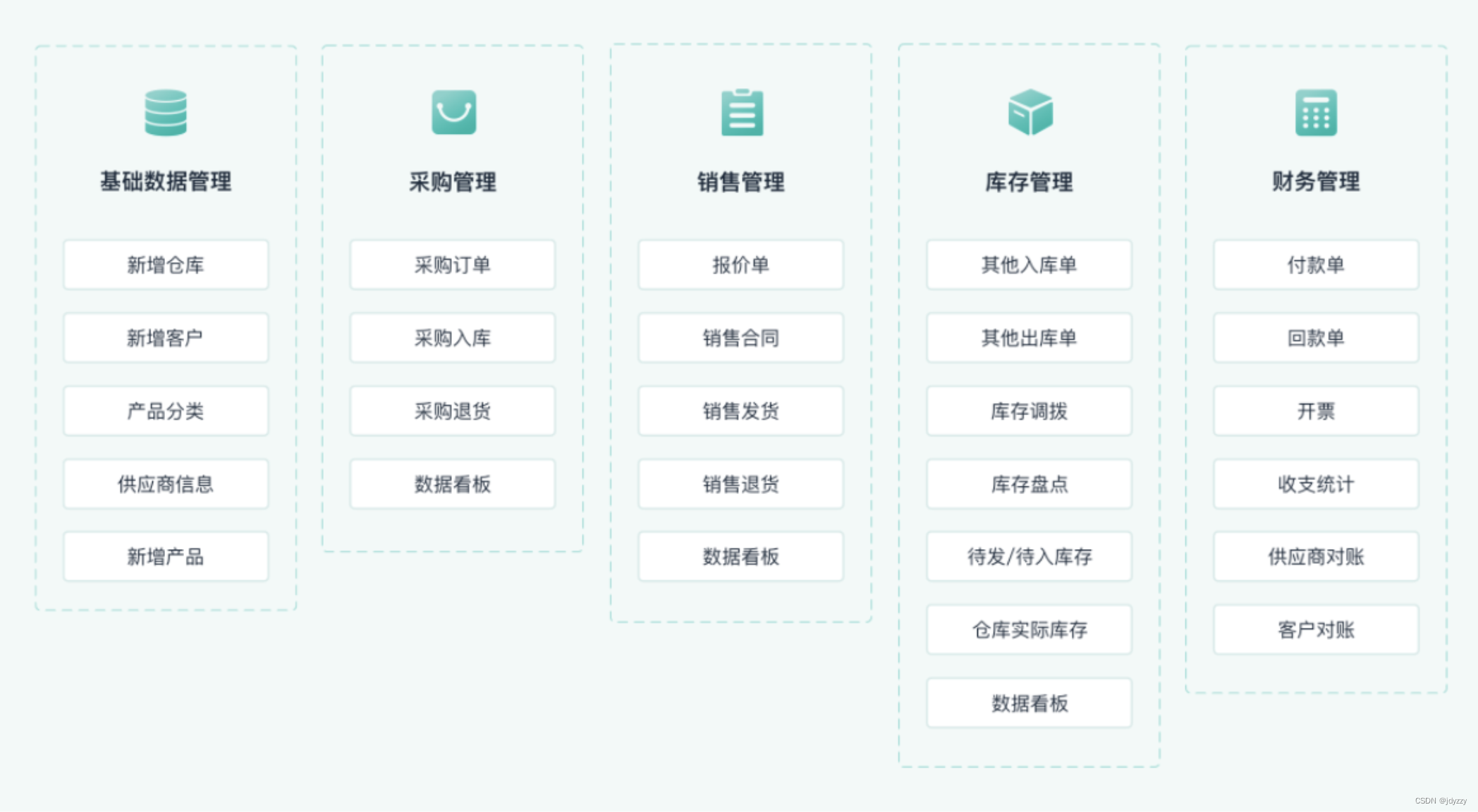
仓库管理系统有哪些功能,如何对仓库进行有效管理
阅读本文,您可以了解:1、仓库管理系统有哪些功能;2、如何对仓库进行有效管理。 仓库是制造业的开端,原材料的领料开始。企业的仓库管理是涉及企业生产、企业资金流和企业的经营风险的关键环节。在众多的工业企业、制造型企业、贸…...

Java 比Automic更高效的累加器
1、 java常见的原子类 类 Atomiclnteger、AtomicIntegerArray、AtomicIntegerFieldUpdater、AtomicLongArray、 AtomicLongFieldUpdater、AtomicReference、AtomicReferenceArray 和 AtomicReference- FieldUpdater 常见的原子类使用方法 使用 AtomicReference 来创建一个原…...
简易流程介绍谖)
大模型智能体 (agent)简易流程介绍谖
引言 在现代软件开发中,性能始终是衡量应用质量的重要指标之一。无论是企业级应用、云服务还是桌面程序,性能优化都能显著提升用户体验、降低基础设施成本并增强系统的可扩展性。对于使用 C# 开发的应用程序而言,性能优化涉及多个层面&#x…...
)
PHP 8.9 JIT调试稀缺资源包首发:含自研jit-trace-analyzer工具链、12个真实微服务JIT崩溃core dump样本(限前500名下载)
第一章:PHP 8.9 JIT调试稀缺资源包发布说明 PHP 社区正式发布首个面向 PHP 8.9(开发代号“Vesuvius”)的 JIT 调试资源包(JIT Debug Resource Pack, JD-RP v0.1.0),专为深度分析 OPCache JIT 编译行为、寄存…...

Ubuntu系统中通过systemd配置自定义Ollama模型存储路径
1. 为什么需要自定义Ollama模型存储路径 在Ubuntu系统上使用Ollama运行大语言模型时,默认的模型存储位置可能会带来几个实际问题。首先,系统分区通常空间有限,而像deepseek-r1这样的8B参数模型动辄需要几十GB存储空间。我就遇到过系统盘爆满…...

OpCore-Simplify:从硬件适配到配置自动化的Hackintosh技术解析
OpCore-Simplify:从硬件适配到配置自动化的Hackintosh技术解析 【免费下载链接】OpCore-Simplify A tool designed to simplify the creation of OpenCore EFI 项目地址: https://gitcode.com/GitHub_Trending/op/OpCore-Simplify 在非苹果硬件上运行macOS的…...

如何快速上手 Plus Jakarta Sans:面向新手的完整实践指南
如何快速上手 Plus Jakarta Sans:面向新手的完整实践指南 【免费下载链接】PlusJakartaSans Jakarta Sans is a open-source fonts. Designed for Jakarta "City of collaboration" program in 2020. 项目地址: https://gitcode.com/gh_mirrors/pl/Plus…...

DankDroneDownloader终极指南:无人机固件逆向工程与版本控制深度解析
DankDroneDownloader终极指南:无人机固件逆向工程与版本控制深度解析 【免费下载链接】DankDroneDownloader A Custom Firmware Download Tool for DJI Drones Written in C# 项目地址: https://gitcode.com/gh_mirrors/da/DankDroneDownloader DankDroneDow…...

AI写PHP代码=埋雷?资深工程师用237个真实项目数据验证:86%的AI生成函数需强制校验,附开源校验器v1.3
第一章:AI写PHP代码埋雷?237项目实证与校验必要性近期对237个真实PHP开源项目(涵盖Laravel、Symfony及原生框架)的自动化代码审计显示:由主流AI工具生成的PHP代码中,18.6%存在未声明变量导致的运行时错误&a…...

Modbus通信调试难题困扰你?这款开源工具让你轻松成为工业自动化专家
Modbus通信调试难题困扰你?这款开源工具让你轻松成为工业自动化专家 【免费下载链接】ModbusTool A modbus master and slave test tool with import and export functionality, supports TCP, UDP and RTU. 项目地址: https://gitcode.com/gh_mirrors/mo/ModbusT…...

零基础部署Clawdbot+Qwen3-32B:一键开启智能对话Web界面
零基础部署ClawdbotQwen3-32B:一键开启智能对话Web界面 1. 为什么选择这个方案 你是否遇到过这样的困境:好不容易在本地部署了大语言模型,却卡在了如何让团队成员方便使用的环节?传统的API调用方式对非技术人员极不友好…...

sguard_limit:优化腾讯游戏ACE-Guard资源占用的实用工具
sguard_limit:优化腾讯游戏ACE-Guard资源占用的实用工具 【免费下载链接】sguard_limit 限制ACE-Guard Client EXE占用系统资源,支持各种腾讯游戏 项目地址: https://gitcode.com/gh_mirrors/sg/sguard_limit 当你激战游戏正酣,突然遭…...