
helm部署vmalert
先决条件
安装以下软件包:git, kubectl, helm, helm-docs,请参阅本教程。
在 CentOS 上启用 snap 并安装 helm
启用 snapd
- 使用以下命令将 EPEL 存储库添加到您的系统中:
sudo yum install epel-release- 按如下方式安装 Snap:
sudo yum install snapd- 安装后,需要启用管理主 snap 通信套接字 的systemd单元:
sudo systemctl enable --now snapd.socket- 创建软链/snap:
sudo ln -s /var/lib/snapd/snap /snap- 注销并重新登录,或重新启动系统,以确保正确更新 snap 的路径。
安装 helm
使用以下命令安装 helm:
sudo snap install helm --classic安装victoria-metrics-alert
- 使用以下命令添加图表 helm 存储库:
helm repo add vm https://victoriametrics.github.io/helm-charts/helm repo update- 列出vm/victoria-metrics-alert可供安装的helm版本:
helm search repo vm/victoria-metrics-alert -l- victoria-metrics-alert将图表的默认值导出到文件values.yaml:
helm show values vm/victoria-metrics-alert > values.yaml根据环境需要更改values.yaml文件中的值。
[root@bastion ~]# cat values.yaml
# Default values for victoria-metrics-alert.
# This is a YAML-formatted file.
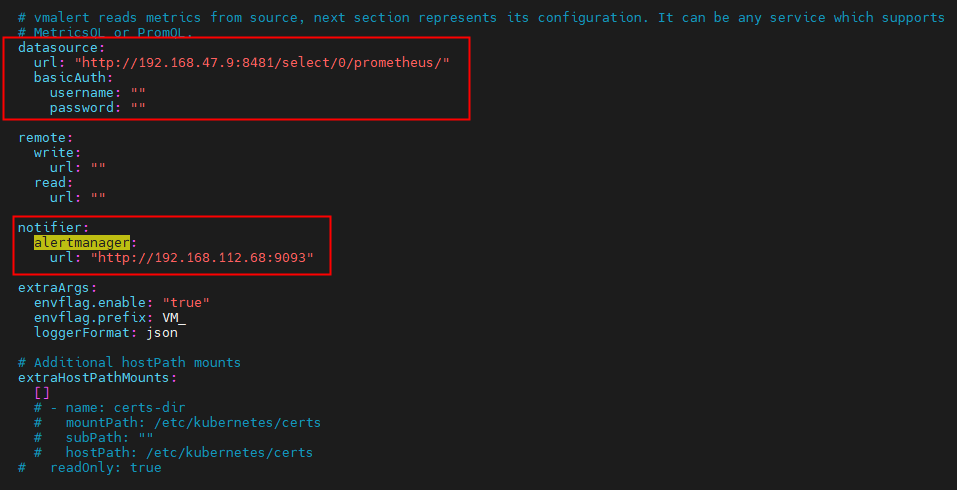
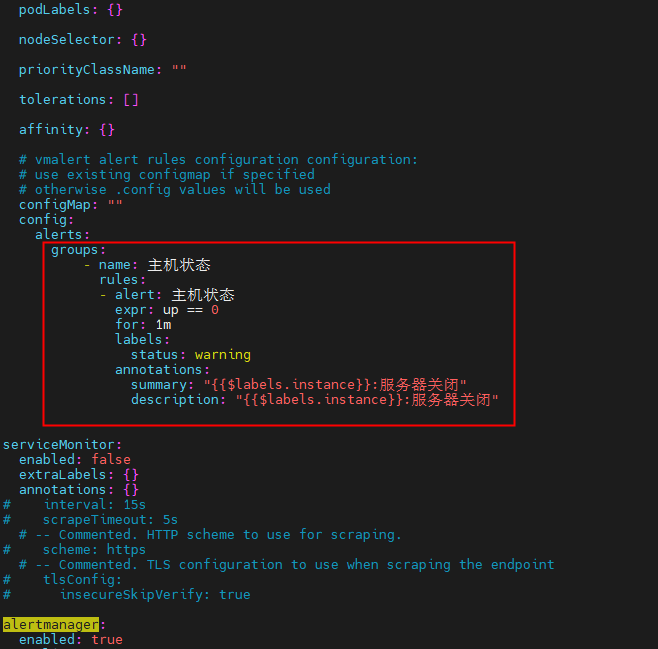
# Declare variables to be passed into your templates.serviceAccount:# Specifies whether a service account should be createdcreate: true# Annotations to add to the service accountannotations: {}# The name of the service account to use.# If not set and create is true, a name is generated using the fullname templatename:# mount API token to pod directlyautomountToken: trueimagePullSecrets: []rbac:create: truepspEnabled: truenamespaced: falseextraLabels: {}annotations: {}server:name: serverenabled: trueimage:repository: victoriametrics/vmalerttag: "" # rewrites Chart.AppVersionpullPolicy: IfNotPresentnameOverride: ""fullnameOverride: ""## See `kubectl explain poddisruptionbudget.spec` for more## ref: https://kubernetes.io/docs/tasks/run-application/configure-pdb/podDisruptionBudget:enabled: false# minAvailable: 1# maxUnavailable: 1labels: {}# -- Additional environment variables (ex.: secret tokens, flags) https://github.com/VictoriaMetrics/VictoriaMetrics#environment-variablesenv:[]# - name: VM_remoteWrite_basicAuth_password#   valueFrom:#     secretKeyRef:#       name: auth_secret#       key: passwordreplicaCount: 1# deployment strategy, set to standard k8s defaultstrategy:type: RollingUpdaterollingUpdate:maxSurge: 25%maxUnavailable: 25%# specifies the minimum number of seconds for which a newly created Pod should be ready without any of its containers crashing/terminating# 0 is the standard k8s defaultminReadySeconds: 0# vmalert reads metrics from source, next section represents its configuration. It can be any service which supports# MetricsQL or PromQL.datasource:url: "http://192.168.47.9:8481/select/0/prometheus/"basicAuth:username: ""password: ""remote:write:url: ""read:url: ""notifier:alertmanager:url: "http://192.168.112.68:9093"extraArgs:envflag.enable: "true"envflag.prefix: VM_loggerFormat: json# Additional hostPath mountsextraHostPathMounts:[]# - name: certs-dir#   mountPath: /etc/kubernetes/certs#   subPath: ""#   hostPath: /etc/kubernetes/certs#   readOnly: true# Extra Volumes for the podextraVolumes:[]#- name: example#  configMap:#    name: example# Extra Volume Mounts for the containerextraVolumeMounts:[]# - name: example#   mountPath: /exampleextraContainers:[]#- name: config-reloader#  image: reloader-imageservice:annotations: {}labels: {}clusterIP: ""## Ref: https://kubernetes.io/docs/user-guide/services/#external-ips##externalIPs: []loadBalancerIP: ""loadBalancerSourceRanges: []servicePort: 8880type: ClusterIP# Ref: https://kubernetes.io/docs/tasks/access-application-cluster/create-external-load-balancer/#preserving-the-client-source-ip# externalTrafficPolicy: "local"# healthCheckNodePort: 0ingress:enabled: falseannotations: {}#   kubernetes.io/ingress.class: nginx#   kubernetes.io/tls-acme: 'true'extraLabels: {}hosts: []#   - name: vmselect.local#     path: /select#     port: httptls: []#   - secretName: vmselect-ingress-tls#     hosts:#       - vmselect.local# For Kubernetes >= 1.18 you should specify the ingress-controller via the field ingressClassName# See https://kubernetes.io/blog/2020/04/02/improvements-to-the-ingress-api-in-kubernetes-1.18/#specifying-the-class-of-an-ingress# ingressClassName: nginx# -- pathType is only for k8s >= 1.1=pathType: PrefixpodSecurityContext: {}# fsGroup: 2000securityContext:{}# capabilities:#   drop:#   - ALL# readOnlyRootFilesystem: true# runAsNonRoot: true# runAsUser: 1000resources:{}# We usually recommend not to specify default resources and to leave this as a conscious# choice for the user. This also increases chances charts run on environments with little# resources, such as Minikube. If you do want to specify resources, uncomment the following# lines, adjust them as necessary, and remove the curly braces after 'resources:'.# limits:#   cpu: 100m#   memory: 128Mi# requests:#   cpu: 100m#   memory: 128Mi# Annotations to be added to the deploymentannotations: {}# labels to be added to the deploymentlabels: {}# Annotations to be added to podpodAnnotations: {}podLabels: {}nodeSelector: {}priorityClassName: ""tolerations: []affinity: {}# vmalert alert rules configuration configuration:# use existing configmap if specified# otherwise .config values will be usedconfigMap: ""config:alerts:groups:- name: 主机状态rules:- alert: 主机状态expr: up == 0for: 1mlabels:status: warningannotations:summary: "{{$labels.instance}}:服务器关闭"description: "{{$labels.instance}}:服务器关闭"serviceMonitor:enabled: falseextraLabels: {}annotations: {}
#    interval: 15s
#    scrapeTimeout: 5s# -- Commented. HTTP scheme to use for scraping.
#    scheme: https# -- Commented. TLS configuration to use when scraping the endpoint
#    tlsConfig:
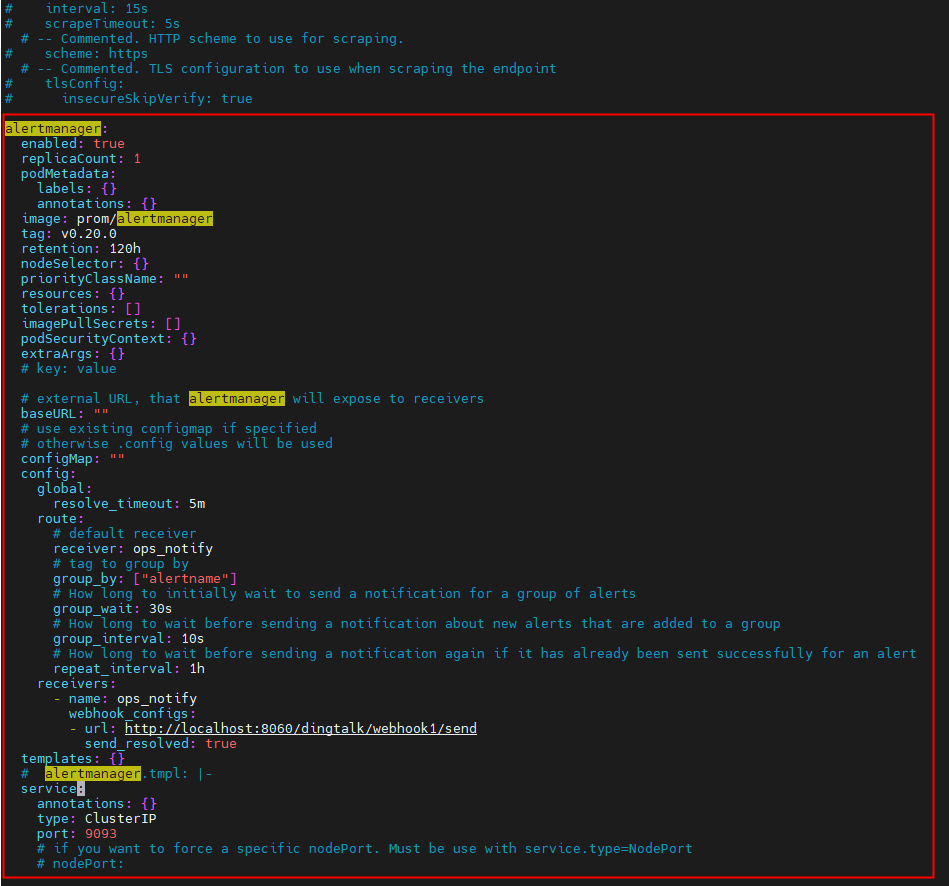
#      insecureSkipVerify: truealertmanager:enabled: truereplicaCount: 1podMetadata:labels: {}annotations: {}image: prom/alertmanagertag: v0.20.0retention: 120hnodeSelector: {}priorityClassName: ""resources: {}tolerations: []imagePullSecrets: []podSecurityContext: {}extraArgs: {}# key: value# external URL, that alertmanager will expose to receiversbaseURL: ""# use existing configmap if specified# otherwise .config values will be usedconfigMap: ""config:global:resolve_timeout: 5mroute:# default receiverreceiver: ops_notify# tag to group bygroup_by: ["alertname"]# How long to initially wait to send a notification for a group of alertsgroup_wait: 30s# How long to wait before sending a notification about new alerts that are added to a groupgroup_interval: 10s# How long to wait before sending a notification again if it has already been sent successfully for an alertrepeat_interval: 1hreceivers:- name: ops_notifywebhook_configs:- url: http://localhost:8060/dingtalk/webhook1/sendsend_resolved: truetemplates: {}#  alertmanager.tmpl: |-service:annotations: {}type: ClusterIPport: 9093# if you want to force a specific nodePort. Must be use with service.type=NodePort# nodePort:ingress:enabled: falseannotations: {}#   kubernetes.io/ingress.class: nginx#   kubernetes.io/tls-acme: 'true'extraLabels: {}hosts: []#   - name: alertmanager.local#     path: /#     port: webtls: []#   - secretName: alertmanager-ingress-tls#     hosts:#       - alertmanager.local# For Kubernetes >= 1.18 you should specify the ingress-controller via the field ingressClassName# See https://kubernetes.io/blog/2020/04/02/improvements-to-the-ingress-api-in-kubernetes-1.18/#specifying-the-class-of-an-ingress# ingressClassName: nginx# -- pathType is only for k8s >= 1.1=pathType: PrefixpersistentVolume:# -- Create/use Persistent Volume Claim for alertmanager component. Empty dir if falseenabled: false# -- Array of access modes. Must match those of existing PV or dynamic provisioner. Ref: [http://kubernetes.io/docs/user-guide/persistent-volumes/](http://kubernetes.io/docs/user-guide/persistent-volumes/)accessModes:- ReadWriteOnce# -- Persistant volume annotationsannotations: {}# -- StorageClass to use for persistent volume. Requires alertmanager.persistentVolume.enabled: true. If defined, PVC created automaticallystorageClass: ""# -- Existing Claim name. If defined, PVC must be created manually before volume will be boundexistingClaim: ""# -- Mount path. Alertmanager data Persistent Volume mount root path.mountPath: /data# -- Mount subpathsubPath: ""# -- Size of the volume. Better to set the same as resource limit memory property.size: 50Mi
- 使用命令测试安装:
helm install vmalert vm/victoria-metrics-alert -f values.yaml -n NAMESPACE --debug --dry-run- 使用以下命令安装
helm install vmalert vm/victoria-metrics-alert -f values.yaml -n NAMESPACE- 通过运行以下命令获取 pod 列表:
kubectl get pods -A | grep 'alert'- 通过运行以下命令获取应用程序:
helm list -f vmalert -n NAMESPACE- 使用命令查看应用程序版本的历史记录vmalert:
helm history vmalert -n NAMESPACE参考文档:https://github.com/VictoriaMetrics/helm-charts/tree/master/charts/victoria-metrics-alert
参考文档:https://snapcraft.io/install/helm/centos#install
相关文章:
helm部署vmalert
先决条件 安装以下软件包:git, kubectl, helm, helm-docs,请参阅本教程。 在 CentOS 上启用 snap 并安装 helm 启用 snapd 使用以下命令将 EPEL 存储库添加到您的系统中: sudo yum install epel-release 按如下方式安装 Snap࿱…...

加工厂数字孪生3D可视化展示系统重塑管理模式
近年来“数字化转型”成立各行业聚焦的发展方向,在工业制造领域,智慧工业数字孪生可视化平台作为一种新型的技术手段,或将成为助力企业跑赢数字化转型最后一公里。 提高生产效率 传统的生产方式往往需要大量的人工干预,不仅耗时耗…...

php从静态资源到动态内容
1、从HTML到PHP demo.php:后缀由html直接改为php,实际上当前页面已经变成了动态的php应用程序脚本 demo.php: 允许通过<?php ... ?>标签,添加php代码到当前脚本中 php标签内部代码由php.exe解释, php标签之外的代码原样输出,仍由web服务器解析 <!DOCTYPE html>…...

JavaScript:模块化【CommonJS与ES6】
在 JavaScript 编程中,随着项目的复杂性增加,代码的组织和管理变得至关重要。模块化是一种强大的编程概念,它允许我们将代码划分为独立的模块,提高了可维护性和可扩展性。本文将详细介绍 CommonJS 和 ES6 模块,帮助你理…...
Redis—持久化
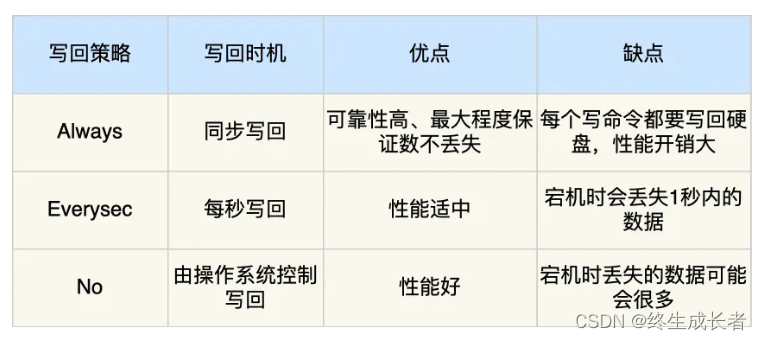
这里写目录标题 AOF三种写回策略写回策略的优缺点AOF 重写机制AOF后台重写AOF优缺点使用命令 RDBRDB 持久化的工作原理执行快照时,数据能被修改吗RDB 持久化的优点RDB 持久化的缺点 混合持久化大key对持久化的影响 AOF 保存写操作命令到日志的持久化方式࿰…...

【设计模式】代理模式
在代理模式(Proxy Pattern)中,一个类代表另一个类的功能。这种类型的设计模式属于结构型模式。 在代理模式中,我们创建具有现有对象的对象,以便向外界提供功能接口。 介绍 意图:为其他对象提供一种代理以…...

mac arm 通过brew搭建 php+nginx+mysql+xdebug
1.安装nginx brew install nginx //安装brew services start nginx //启动2.安装php brew install php7.4 //安装export PATH"/opt/homebrew/opt/php7.4/bin:$PATH" //加入环境变量 export PATH"/opt/homebrew/opt/php7.4/sbin:$PATH"brew serv…...

软信天成:告别手动编码,实现智能自动化云数据管理
数字化转型浪潮之下,各个企业都在大力投资新的基于云的流程、平台和环境,以期获取可扩展性、弹性、敏捷性和成本效益等优势。 这些趋势要求企业IT部门能够帮助组织,在对分析进行现代化改造的过程中达到云就绪或云优先状态。事实上࿰…...
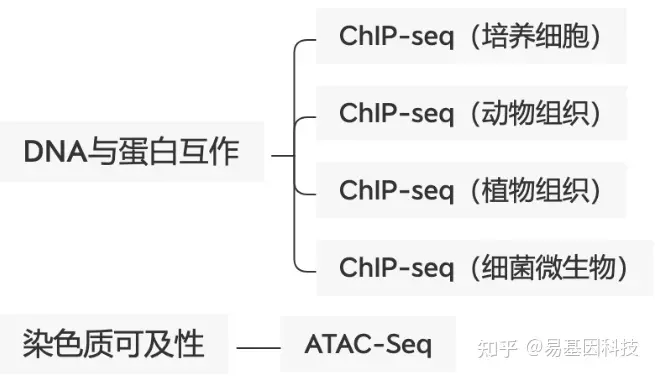
易基因:ChIP-seq等揭示转录因子NRF1调控原始生殖细胞发育、增殖和存活的表观遗传机制|科研进展
大家好,这里是专注表观组学十余年,领跑多组学科研服务的易基因。 原始生殖细胞(Primordial germ cell,PGC)是生殖细胞前体,可以产生卵母细胞和精子,确保生命延续。尽管PGC特化(PGC …...

35岁,体能断崖?你需要健康的生活习惯
大厂裁员,称35岁以后体能下滑,无法继续高效率地完成工作;体重上涨,因为35岁以后新陈代谢开始变慢;甚至坐久了会腰疼、睡眠困扰开始加重,在众多的归因中,35岁的到来,为一切的焦虑埋下…...
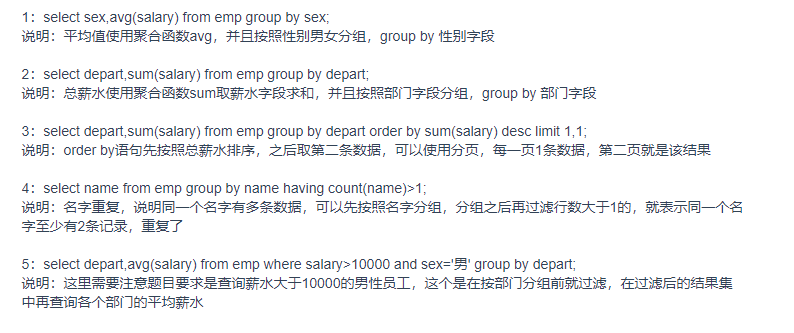
mysql 习题总结
1.select sex,avg(salsry) as 平均薪资 from emp group by sex; 2.select depart,sum(salsry) from emp group by depart; 3.select depart ,sum(salary) from emp group by depart order by sum(salary) desc limit 1,1; 4.select name from emp group by name having count(n…...

IL汇编语言做一个窗体
网上看到一段代码, .assembly extern mscorlib {} .assembly Classes { .ver 1:0:1:0 } .namespace MyForm { .class public TestForm extends [System.Windows.Forms]System.Windows.Forms.Form { .field private class [System]…...
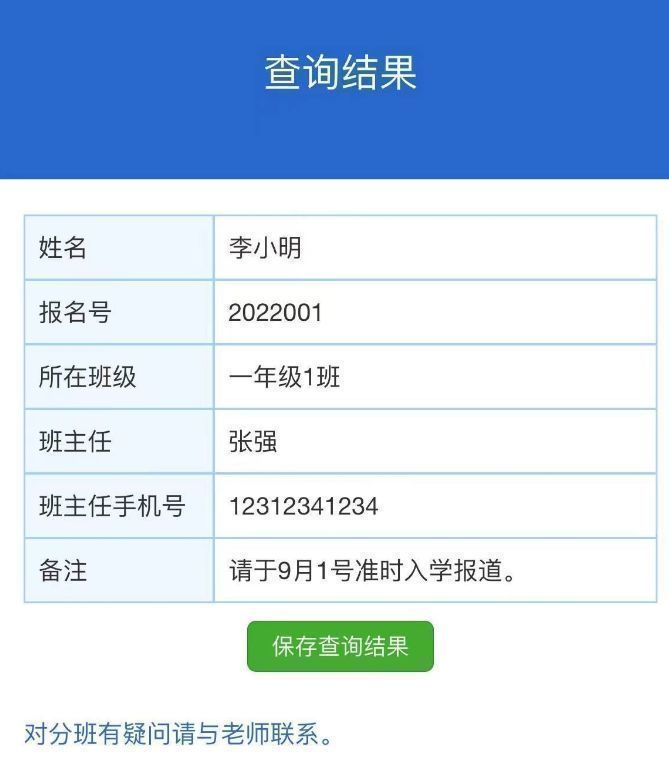
不用技术代码,分班查询系统怎么做?
暑假即将结束,新学期开始将面临分班信息公布的工作!对于分班信息公布,涉及到学生的个人信息,包括姓名、学号、班级等。在发布这些信息时,必须确保数据的保密性,防止未经授权的人员获取到学生的个人信息。因…...
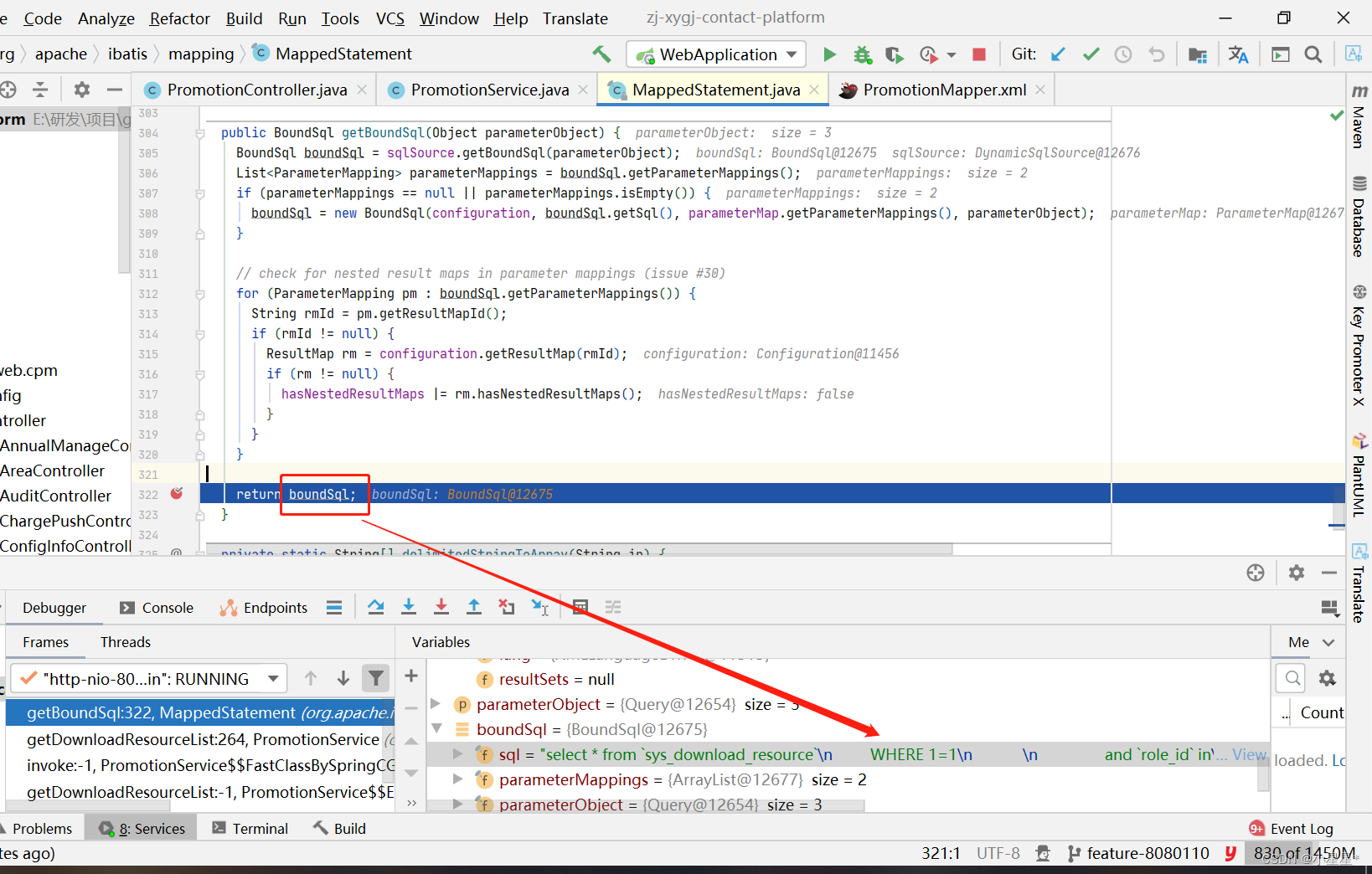
【Mybatis】调试查看执行的 SQL 语句
1. 问题场景: 记录日常开发过程中 Mybatis 调试 SQL 语句,想要查看Mybatis 中执行的 SQL语句,导致定位问题困难 2. 解决方式 双击shift找到mybatis源码中的 MappedStatement的getBoundSql()方法 public BoundSql getBoundSql(Object para…...
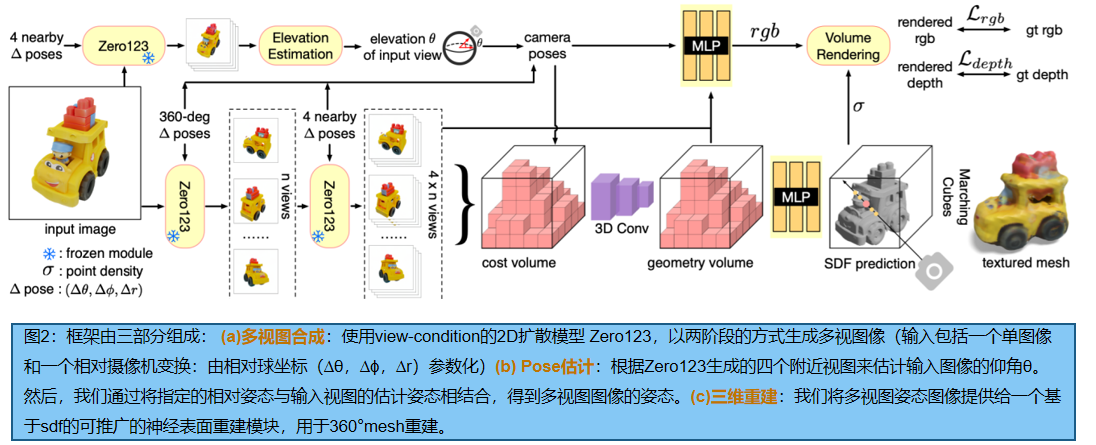
【多视重建】从Zero-123到One-2-3-45:多视角生成
文章目录 摘要一、引言二、相关工作三、Zero-1-to-33.1.学习如何控制照相机的视角3.2.视角作为条件的扩散3.3三维重构3.4 数据集 四、One-2-3-454.1 Zero123: 视角条件的 2D Diffusion4.2 NeRF优化:将多视图预测提升到三维图像4.3 基于不完美多视图的 神经表面重建*…...
Unity开发Vision Pro——参考文档)
(四)Unity开发Vision Pro——参考文档
4.参考文档 4.1 支持的功能和组件 4.1.1 支持的 Unity 功能和组件 大多数 Unity 组件无需修改即可在此平台上运行 - 包括大多数自定义 MonoBehaviours、动画逻辑、物理、输入处理、资产管理、AI 等。然而,需要渲染的组件需要特殊的支持。因此,一些组件…...
【Linux】简单线程池的设计与实现 -- 单例模式
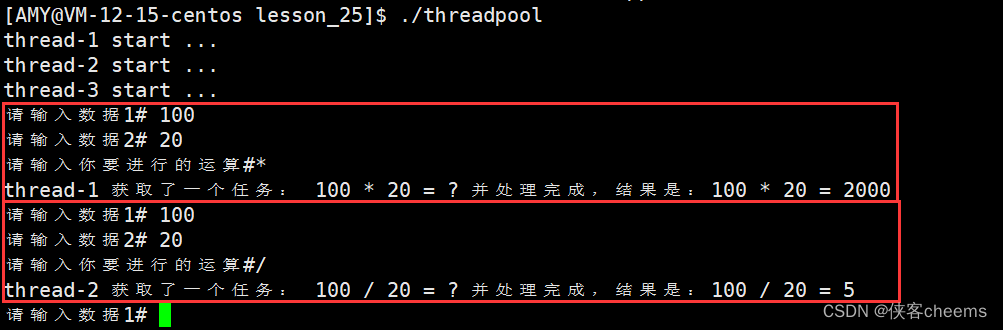
前言对锁的封装整体代码LockGuard - RALLRALLMutex封装 对线程创建的封装整体代码成员函数解释声明 业务处理封装-加减乘除(可有可无)整体代码成员函数解释声明 线程池的设计与实现整体代码成员函数解释声明 展示 前言 线程池: 一种线程使用模式。线程过…...
[RoarCTF 2019Online Proxy]sql巧妙盲注
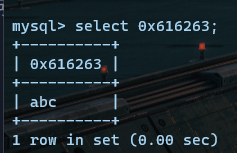
文章目录 [RoarCTF 2019Online Proxy]sql巧妙盲注解题脚本脚本解析 [RoarCTF 2019Online Proxy]sql巧妙盲注 解题 在源代码界面发现:Current Ip 我们会联想到:X-Forwarded-For来修改ip: 结果我们发现,response会讲Last Ip回显出…...
flutter开发实战-just_audio实现播放音频暂停音频设置音量等
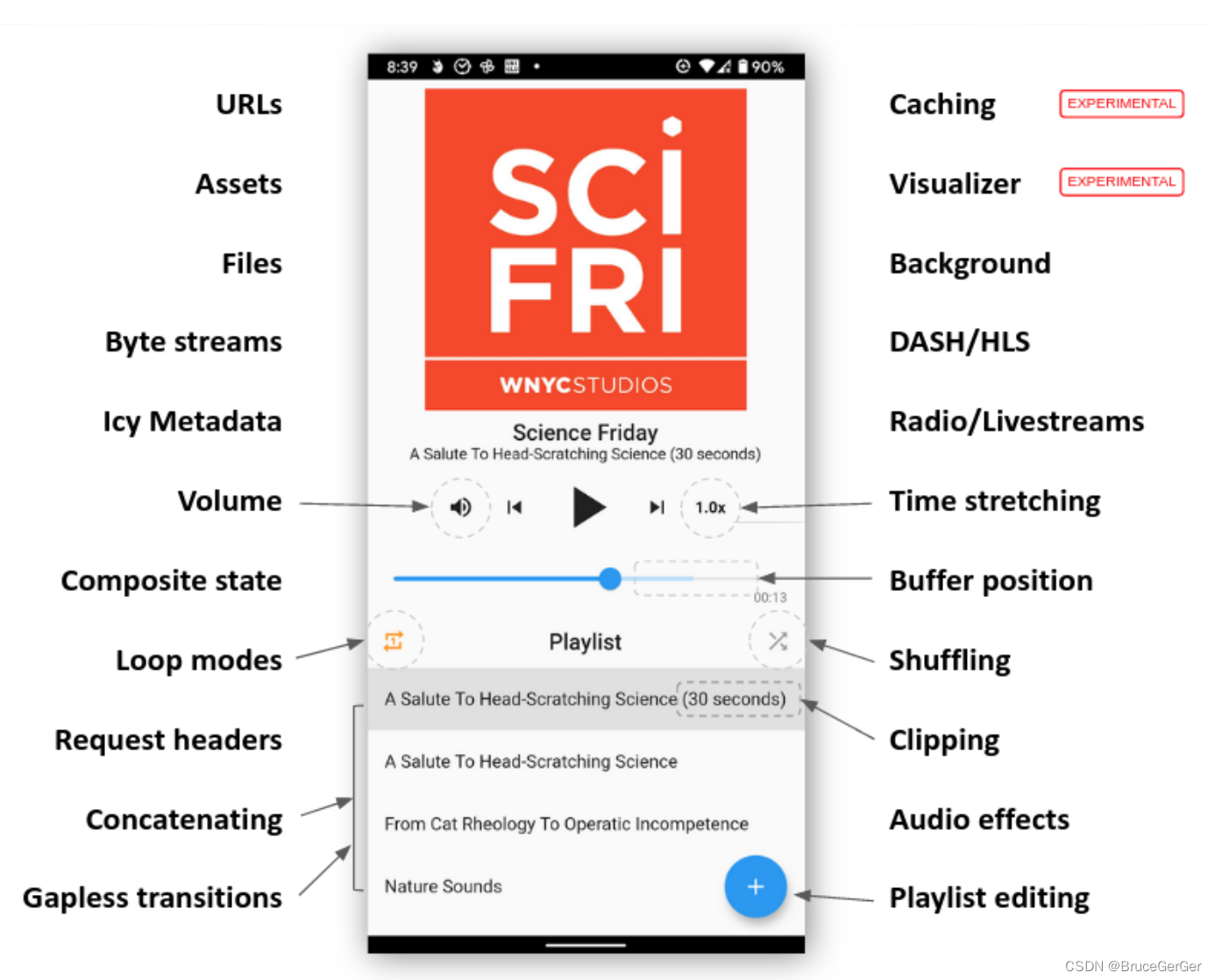
flutter开发实战-just_audio实现播放音频暂停音频设置音量等 最近开发过程中遇到需要播放背景音等音频播放,这里使用just_audio来实现播放音频暂停音频设置音量等 一、引入just_audio 在pubspec.yaml引入just_audio just_audio: ^2.7.0在iOS上,video_p…...
【Bert101】最先进的 NLP 模型解释【01/4】
0 什么是伯特? BERT是来自【Bidirectional Encoder Representations from Transformers】变压器的双向编码器表示的缩写,是用于自然语言处理的机器学习(ML)模型。它由Google AI Language的研究人员于2018年开发,可作为…...

Spring Cloud AWS 实战教程:构建高可用 SQS 消息队列应用 [特殊字符]
Spring Cloud AWS 实战教程:构建高可用 SQS 消息队列应用 🚀 【免费下载链接】spring-cloud-aws The New Home for Spring Cloud AWS 项目地址: https://gitcode.com/gh_mirrors/sp/spring-cloud-aws Spring Cloud AWS 是一个强大的开源框架&…...

孤舟笔记 互联网常用框架篇二 Dubbo服务请求失败怎么处理?集群容错策略你用过几种
文章目录先说结论Failover:换家店试试Failfast:不行就算了Failsafe:忘了这事Failback:回头再说Forking:同时点几家Broadcast:通知所有人怎么选择回答技巧与点评加分回答面试官点评个人网站分布式系统中&…...

人类防伪指南:为什么你越写错字,HR越信你是真人?
前言各位码农、算法侠、CtrlC/V十级学者请注意:你有没有过这样的经历?辛辛苦苦肝了一晚上文档,逻辑严密、语法丝滑、连Markdown都对齐得像军训方阵,结果老板幽幽来一句:“这真是你自己写的?”那一刻&#x…...

终极键盘重映射解决方案:3分钟实现职业级游戏操作精度
终极键盘重映射解决方案:3分钟实现职业级游戏操作精度 【免费下载链接】socd Key remapper for epic gamers 项目地址: https://gitcode.com/gh_mirrors/so/socd 在激烈的游戏对抗中,你是否曾因键盘按键冲突而错失关键操作?当同时按下…...

从NLP到RAG:AI标书生成系统的技术架构与落地路径深度剖析
引言2026年2月,国家发改委等八部门联合印发《关于加快招标投标领域人工智能推广应用的实施意见》,明确到2026年底招标文件检测、智能辅助评标、围串标识别等重点场景在部分省市实现全覆盖。同一时期,《招标投标法》修订草案经国务院常务会议原…...

5分钟免费搞定HS2汉化:Honey Select 2完整中文补丁终极教程
5分钟免费搞定HS2汉化:Honey Select 2完整中文补丁终极教程 【免费下载链接】HS2-HF_Patch Automatically translate, uncensor and update HoneySelect2! 项目地址: https://gitcode.com/gh_mirrors/hs/HS2-HF_Patch 还在为Honey Select 2的日文界面而烦恼吗…...

MPC Video Renderer终极指南:如何在Windows上实现专业级视频渲染体验
MPC Video Renderer终极指南:如何在Windows上实现专业级视频渲染体验 【免费下载链接】VideoRenderer Внешний видео-рендерер 项目地址: https://gitcode.com/gh_mirrors/vi/VideoRenderer MPC Video Renderer是一款专为Windows平台设计…...

5步完美解决Windows 10 PL2303驱动兼容性问题:完整实施方案指南
5步完美解决Windows 10 PL2303驱动兼容性问题:完整实施方案指南 【免费下载链接】pl2303-win10 Windows 10 driver for end-of-life PL-2303 chipsets. 项目地址: https://gitcode.com/gh_mirrors/pl/pl2303-win10 在Windows 10系统中使用PL2303 USB转串口设…...

3分钟快速上手:bilibili-parse视频解析API终极指南
3分钟快速上手:bilibili-parse视频解析API终极指南 【免费下载链接】bilibili-parse bilibili Video API 项目地址: https://gitcode.com/gh_mirrors/bi/bilibili-parse bilibili-parse是一款高效专业的B站视频解析工具,为开发者和内容创作者提供…...

四大桌面云品牌评测:从安全、体验到性价比
桌面云不再是大型企业的专属,它已成为各行各业实现数据安全、混合办公和IT降本增效的“标准配置”。经过对市场主流方案的全面评估,我们认为,深信服(Sangfor)aDesk桌面云因其在安全内生化、传输协议自研化、运维管理智…...