
介绍几种使用工具
FileWatch,观测文件变化,源码地址:https://github.com/ThomasMonkman/filewatch
nlohmann::json,json封装解析,源码地址:https://github.com/nlohmann/json
optionparser,解析选项,源码地址:https://optionparser.sourceforge.net/
以上介绍的这三个工具都是我在学习FastDDS过程中看到的。他们的使用非常简单,都只有一个头文件。下面简单介绍一下如何使用:
FileWatch
#include <functional>
#include "FileWatch.hpp"using FileWatchHandle = std::unique_ptr<filewatch::FileWatch<std::string>>;void watch()
{std::cout << "watch" << std::endl;
}int main()
{std::function<void()> callback = watch;(new filewatch::FileWatch<std::string>("d:\\test.txt",[callback](const std::string& /*path*/, const filewatch::Event change_type){switch (change_type){case filewatch::Event::modified:callback();break;default:// No-opbreak;}}));getchar();return 0;
}
只需要设置一个文件路径和一个回调函数,当这个文件改动时,就会触发回调函数。这个可以做一些热更新配置的功能,当配置文件变动时,无需重启软件,就能读取新的配置。
nlohmann::json
#include "json.hpp"
#include <iostream>using Info = nlohmann::json;int main()
{Info info;std::cout << info.size() << std::endl;info["a"] = "b";std::cout << info["a"] << std::endl;auto iter = info.find("a");if (iter == info.end()) {std::cout << "not found" << std::endl;}else {std::cout << *iter << std::endl;}std::string s = R"({"name" : "nick","credits" : "123","ranking" : 1})";auto j = nlohmann::json::parse(s);std::cout << j["name"] << std::endl;std::string ss = j.dump();std::cout << "ss : " << ss << std::endl;Info j1;Info j2 = nlohmann::json::object();Info j3 = nlohmann::json::array();std::cout << j1.is_object() << std::endl;std::cout << j1.type_name() << std::endl;std::cout << j2.is_object() << std::endl;std::cout << j2.is_array() << std::endl;Info infoo{{"name", "darren"},{"credits", 123},{"ranking", 1}};std::cout << infoo["name"] << std::endl;std::cout << infoo.type_name() << std::endl;//遍历for (auto iter = infoo.begin(); iter != infoo.end(); iter++) {std::cout << iter.key() << " : " << iter.value() << std::endl;//std::cout << iter.value() << std::endl;//std::cout << *iter << std::endl;}system("pause");return 0;
}
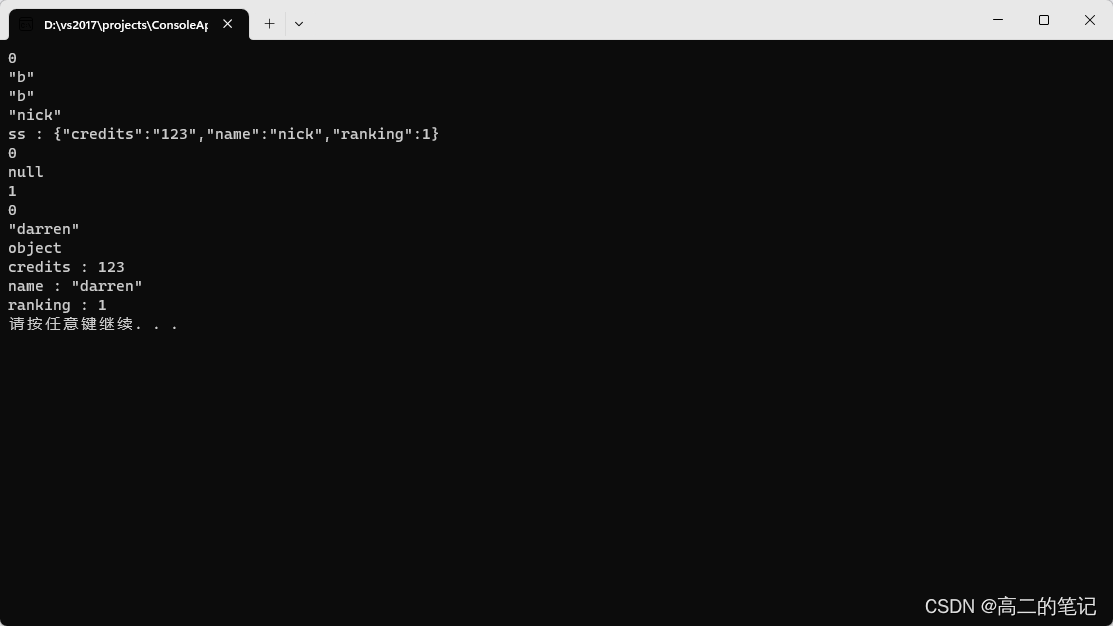
更多内容可以参考csdn:https://blog.csdn.net/gaoyuelon/article/details/131482372?fromshare=blogdetail
optionparser
#include "optionparser.h"struct Arg : public option::Arg
{static void print_error(const char* msg1,const option::Option& opt,const char* msg2){fprintf(stderr, "%s", msg1);fwrite(opt.name, opt.namelen, 1, stderr);fprintf(stderr, "%s", msg2);}static option::ArgStatus Unknown(const option::Option& option,bool msg){if (msg){print_error("Unknown option '", option, "'\n");}return option::ARG_ILLEGAL;}static option::ArgStatus Required(const option::Option& option,bool msg){if (option.arg != 0 && option.arg[0] != 0){return option::ARG_OK;}if (msg){print_error("Option '", option, "' requires an argument\n");}return option::ARG_ILLEGAL;}static option::ArgStatus Numeric(const option::Option& option,bool msg){char* endptr = 0;if (option.arg != nullptr){strtol(option.arg, &endptr, 10);if (endptr != option.arg && *endptr == 0){return option::ARG_OK;}}if (msg){print_error("Option '", option, "' requires a numeric argument\n");}return option::ARG_ILLEGAL;}template<long min = 0, long max = std::numeric_limits<long>::max()>static option::ArgStatus NumericRange(const option::Option& option,bool msg){static_assert(min <= max, "NumericRange: invalid range provided.");char* endptr = 0;if (option.arg != nullptr){long value = strtol(option.arg, &endptr, 10);if (endptr != option.arg && *endptr == 0 &&value >= min && value <= max){return option::ARG_OK;}}if (msg){std::ostringstream os;os << "' requires a numeric argument in range ["<< min << ", " << max << "]" << std::endl;print_error("Option '", option, os.str().c_str());}return option::ARG_ILLEGAL;}static option::ArgStatus String(const option::Option& option,bool msg){if (option.arg != 0){return option::ARG_OK;}if (msg){print_error("Option '", option, "' requires an argument\n");}return option::ARG_ILLEGAL;}};enum  optionIndex
{UNKNOWN_OPT,HELP,SAMPLES,INTERVAL,ENVIRONMENT
};const option::Descriptor usage[] = {{ UNKNOWN_OPT, 0, "", "",                Arg::None,"Usage: HelloWorldExample <publisher|subscriber>\n\nGeneral options:" },{ HELP,    0, "h", "help",               Arg::None,      "  -h \t--help  \tProduce help message." },{ UNKNOWN_OPT, 0, "", "",                Arg::None,      "\nPublisher options:"},{ SAMPLES, 0, "s", "samples",            Arg::NumericRange<>,"  -s <num>, \t--samples=<num>  \tNumber of samples (0, default, infinite)." },{ INTERVAL, 0, "i", "interval",          Arg::NumericRange<>,"  -i <num>, \t--interval=<num>  \tTime between samples in milliseconds (Default: 100)." },{ ENVIRONMENT, 0, "e", "env",            Arg::None,       "  -e \t--env   \tLoad QoS from environment." },{ 0, 0, 0, 0, 0, 0 }
};int main(int argc, char **argv)
{argc -= (argc > 0);argv += (argc > 0); // skip program name argv[0] if presentoption::Stats stats(true, usage, argc, argv);std::vector<option::Option> options(stats.options_max);std::vector<option::Option> buffer(stats.buffer_max);option::Parser parse(true, usage, argc, argv, &options[0], &buffer[0]);try{if (parse.error()){throw 1;}if (options[HELP] || options[UNKNOWN_OPT]){throw 1;}// For backward compatibility count and sleep may be given positionallyif (parse.nonOptionsCount() > 3 || parse.nonOptionsCount() == 0){throw 2;}// Decide between publisher or subscriberconst char* type_name = parse.nonOption(0);// make sure is the first option.// type_name and buffer[0].name reference the original command line char array// type_name must precede any other arguments in the array.// Note buffer[0].arg may be null for non-valued options and is not reliable for// testing purposes.if (parse.optionsCount() && type_name >= buffer[0].name){throw 2;}if (strcmp(type_name, "publisher") == 0){std::cout << "publisher" << std::endl;}else if (strcmp(type_name, "subscriber") == 0){std::cout << "subscriber" << std::endl;}else{throw 2;}}catch (int error){if (error == 2){std::cerr << "ERROR: first argument must be <publisher|subscriber> followed by - or -- options"<< std::endl;}option::printUsage(fwrite, stdout, usage);return error;}getchar();return 0;
}
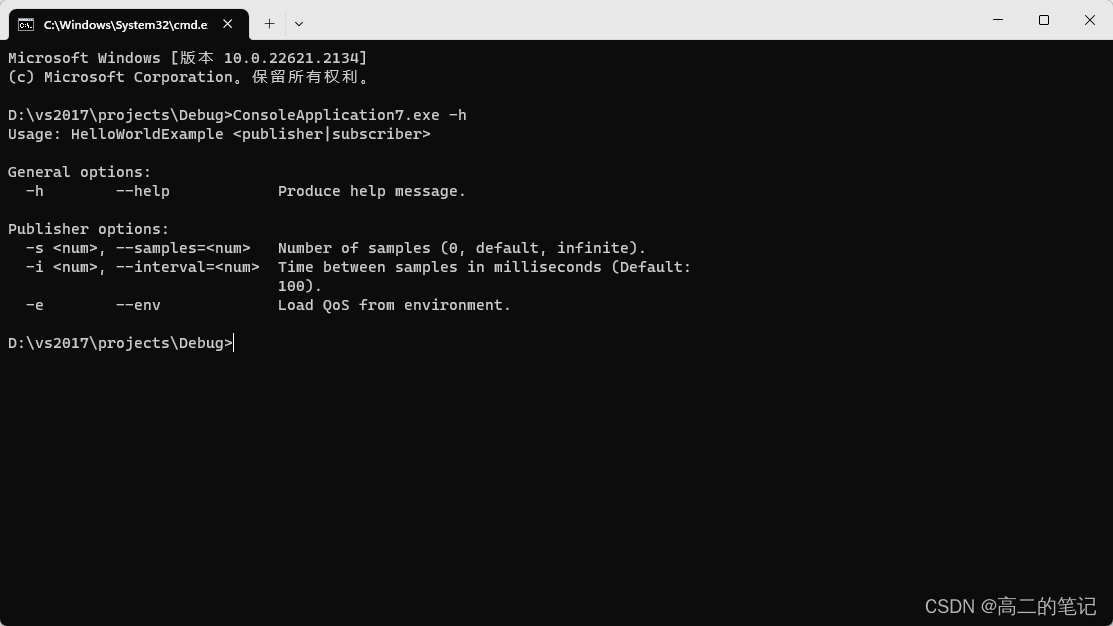
简单好用的工具能给我们工作带来很多便利,希望这些工具对你有用~
相关文章:
介绍几种使用工具
FileWatch,观测文件变化,源码地址:https://github.com/ThomasMonkman/filewatch nlohmann::json,json封装解析,源码地址:https://github.com/nlohmann/json optionparser,解析选项,源…...

Vue:关于声明式导航中的 跳转、高亮、以及两个类名的定制
声明式导航-导航链接 文章目录 声明式导航-导航链接router-link的两大特点(能跳转、能高亮)声明式导航-两个类名定制两个高亮类名 实现导航高亮,实现方式其实,css,JavaScript , Vue ,都可以实现。其实关于路由导航&…...

Sharding-JDBC分库分表-自动配置与分片规则加载原理-3
Sharding JDBC自动配置的原理 与所有starter一样,shardingsphere-jdbc-core-spring-boot-starter也是通过SPI自动配置的原理实现分库分表配置加载,spring.factories文件中的自动配置类shardingsphere-jdbc-core-spring-boot-starter功不可没,…...
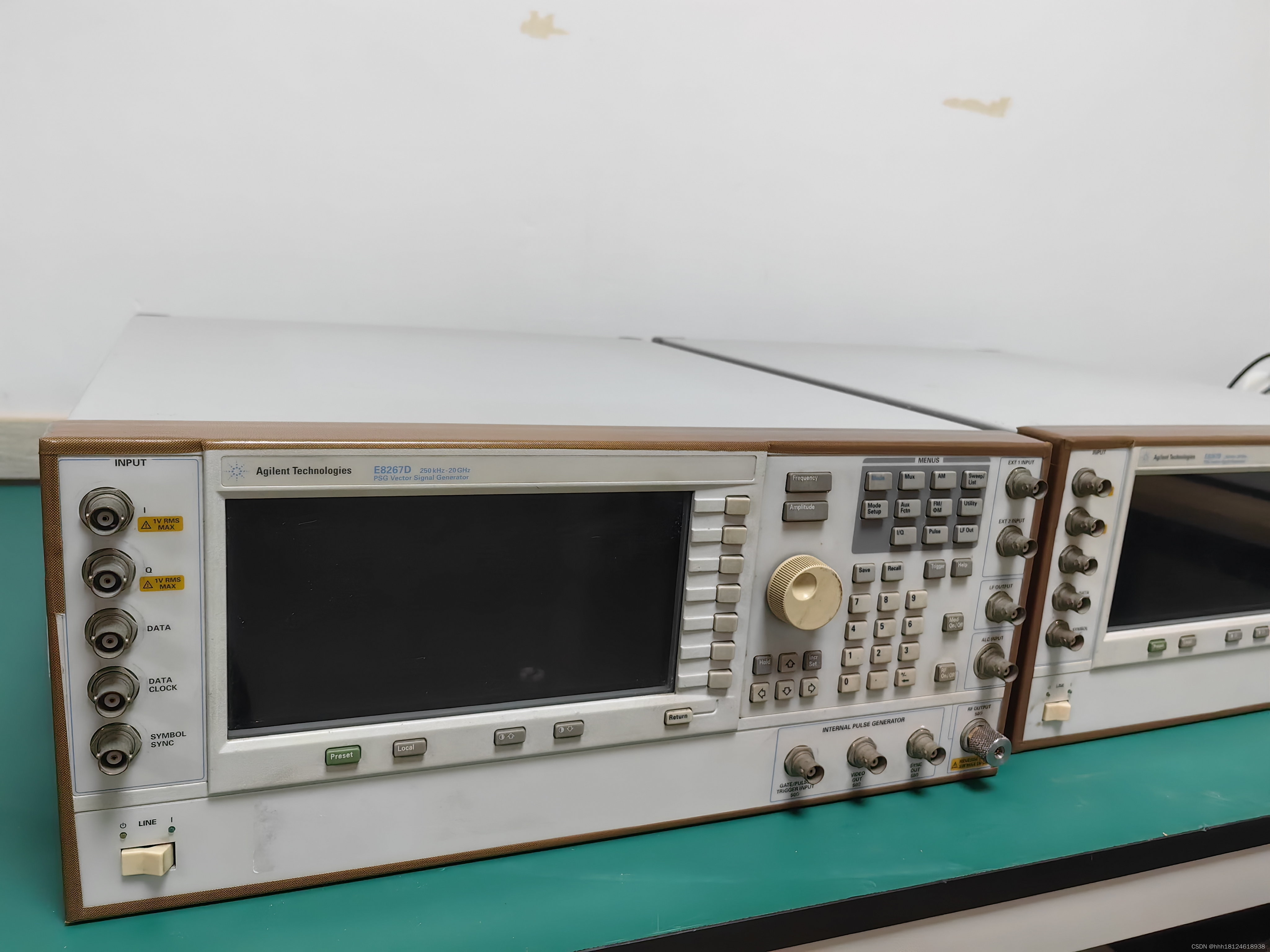
E8267D 是德科技矢量信号发生器
描述 最先进的微波信号发生器 安捷伦E8267D PSG矢量信号发生器是业界首款集成式微波矢量信号发生器,I/Q调制最高可达44 GHz,典型输出功率为23 dBm,最高可达20 GHz,对于10 GHz信号,10 kHz偏移时的相位噪声为-120 dBc/…...

Git git fetch 和 git pull 区别
git pull和git fetch的作用都是用于从远程仓库获取最新代码,但它们之间有一些区别。 git pull会自动执行两个操作:git fetch和git merge。它从远程仓库获取最新代码,并将其合并到当前分支中。 示例:运行git pull origin master会从…...

软件UI工程师工作的岗位职责(合集)
软件UI工程师工作的岗位职责1 职责: 1.负责产品的UI视觉设计(手机软件界面 网站界面 图标设计产品广告及 企业文化的创意设计等); 2.负责公司各种客户端软件客户端的UE/UI界面及相关图标制作; 3.设定产品界面的整体视觉风格; 4.参与产品规划构思和创意过程&…...
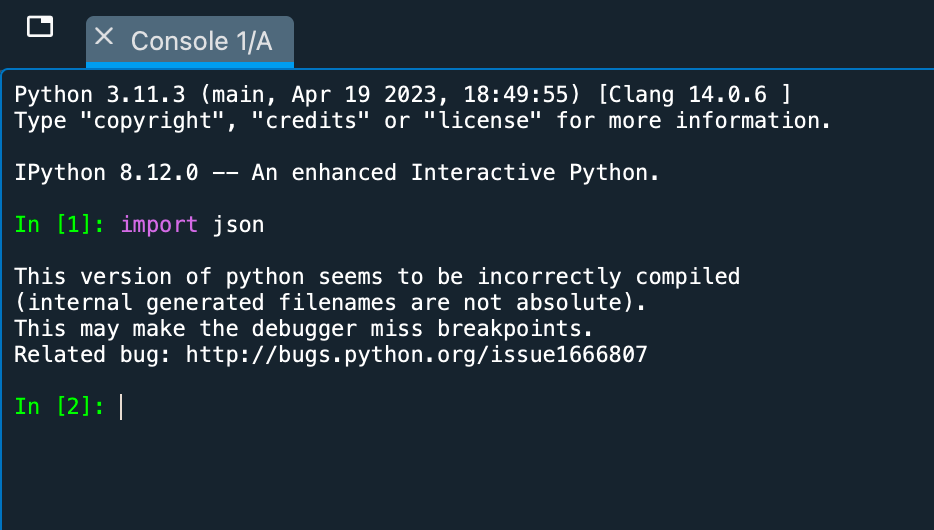
Mac系统Anaconda环境配置Python的json库
本文介绍在Mac电脑的Anaconda环境中,配置Python语言中,用以编码、解码、处理JSON数据的json库的方法;在Windows电脑中配置json库的方法也是类似的,大家可以一并参考。 JSON(JavaScript Object Notation)是一…...

Python数据分析与数据挖掘:解析数据的力量
引言: 随着大数据时代的到来,数据分析和数据挖掘已经成为许多行业中不可或缺的一部分。在这个信息爆炸的时代,如何从大量的数据中提取有价值的信息,成为了企业和个人追求的目标。而Python作为一种强大的编程语言,提供…...
)
我的私人笔记(安装hive)
1.hive下载:Index of /dist/hive/hive-1.2.1 或者上传安装包至/opt/software:rz或winscp上传 2.解压 cd /opt/software tar -xzvf apache-hive-1.2.1-bin.tar.gz -C /opt/servers/ 3.重命名 mv apache-hive-1.2.1-bin hive 4.配置环境变量 vi /etc/…...
【kubernetes】k8s部署APISIX及在KubeSphere使用APISIX
Apache APISIX https://apisix.apache.org/ 功能比nginx-ingress更强 本文采用2.5.0版本 https://apisix.apache.org/zh/docs/apisix/2.15/getting-started/ 概述内容来源于官方,学习于马士兵云原生课程 概述 Apache APISIX 是什么? Apache APISIX 是 …...
串口接收数据-控制LED灯
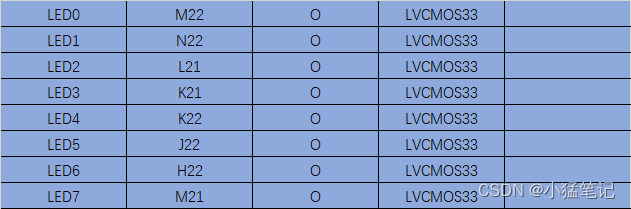
目标 通过串口接收数据,对数据分析,控制8个LED灯按照设定时间闪烁。 8个LED灯可以任意设计,是否闪烁。闪烁时间按ms计算,通过串口发送,可设置1~4,294,967,296ms,也就是4字节数据协议自拟,有数…...
python面试题合集(一)
python技术面试题 1、Python中的幂运算 在python中幂运算是由两个 **星号运算的,实例如下: >>> a 2 ** 2 >>> a 4我们可以看到2的平方输出结果为4。 那么 ^指的是什么呢?我们用代码进行演示: >>>…...

论文浅尝 | 利用对抗攻击策略缓解预训练语言模型中的命名实体情感偏差问题...
笔记整理:田家琛,天津大学博士,研究方向为文本分类 链接:https://ojs.aaai.org/index.php/AAAI/article/view/26599 动机 近年来,随着预训练语言模型(PLMs)在情感分类领域的广泛应用,…...
springboot web开发springmvc自动配置原理
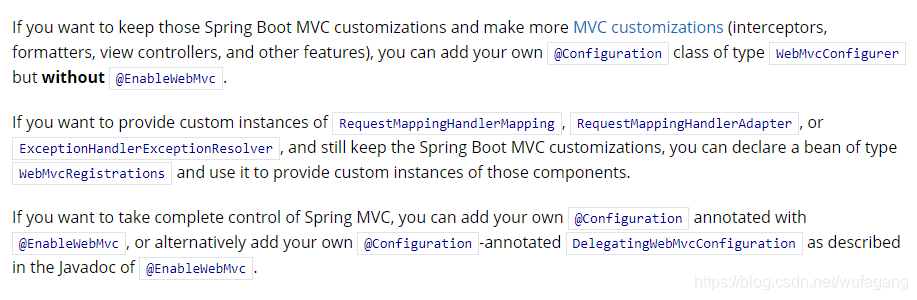
前言 我们也知道springboot启用springmvc基本不用做什么配置可以很方便就使用了但是不了解原理,开发过程中遇到点问题估计就比较头疼,不管了解的深不深入,先巴拉一番再说… 下面我们先看看官网…我的版本是2.3.2版本,发现官网改动也比较大…不同版本自己巴拉下吧,结构虽然变化…...
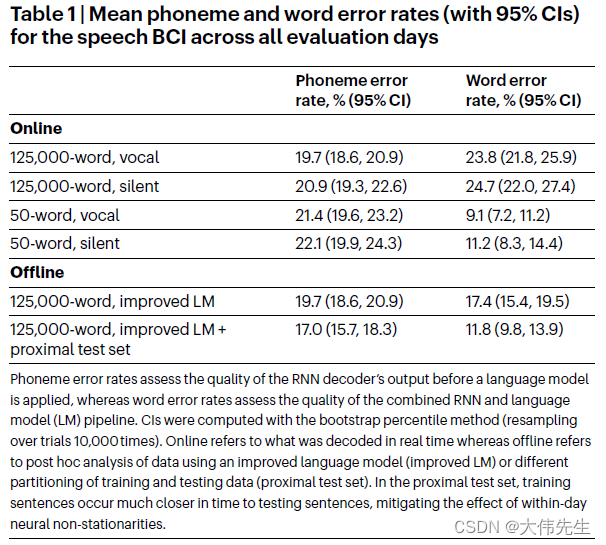
发表于《自然》杂志:语音转文本BCI的新突破实现62字/分钟的速度
语音脑机接口(BCI)是一项创新技术,通过用户的大脑信号在用户和某些设备之间建立通信通道,它们在恢复残疾患者的言语和通信能力方面具有巨大潜力。 早期的研究虽然很有希望,但尚未达到足够高的精度来解码大脑活动&…...
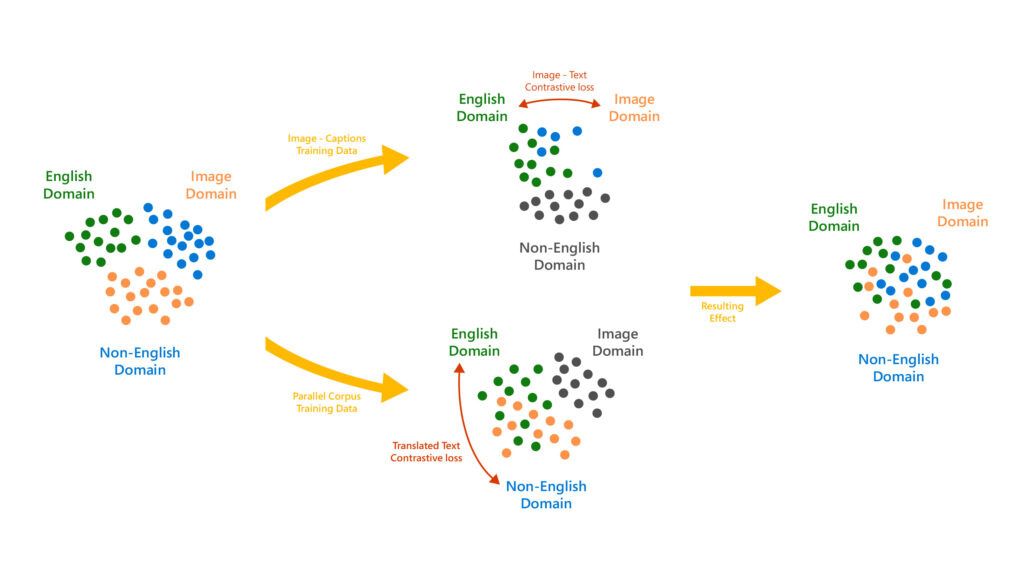
微软 Turing Bletchley v3视觉语言模型更新:必应搜索图片更精准
据微软新闻稿透露,在推出第三代Turing Bletchley视觉语言模型后,微软计划逐步将其整合到Bing等相关产品中,以提供更出色的图像搜索体验。这款模型最初于2021年11月面世,并在2022年秋季开始邀请用户测试。 凭借用户的反馈和建议&am…...

Ubuntu 22.04 x86_64 源码编译 pytorch-v2.0.1 笔记【2】编译成功
20230831继续: 当前状态 (pytorch-build) yeqiangyeqiang-MS-7B23:~/Downloads/src/pytorch$ pwd /home/yeqiang/Downloads/src/pytorch (pytorch-build) yeqiangyeqiang-MS-7B23:~/Downloads/src/pytorch$ python3 -V Python 3.10.6 (pytorch-build) yeqiangyeqi…...
IIR滤波器
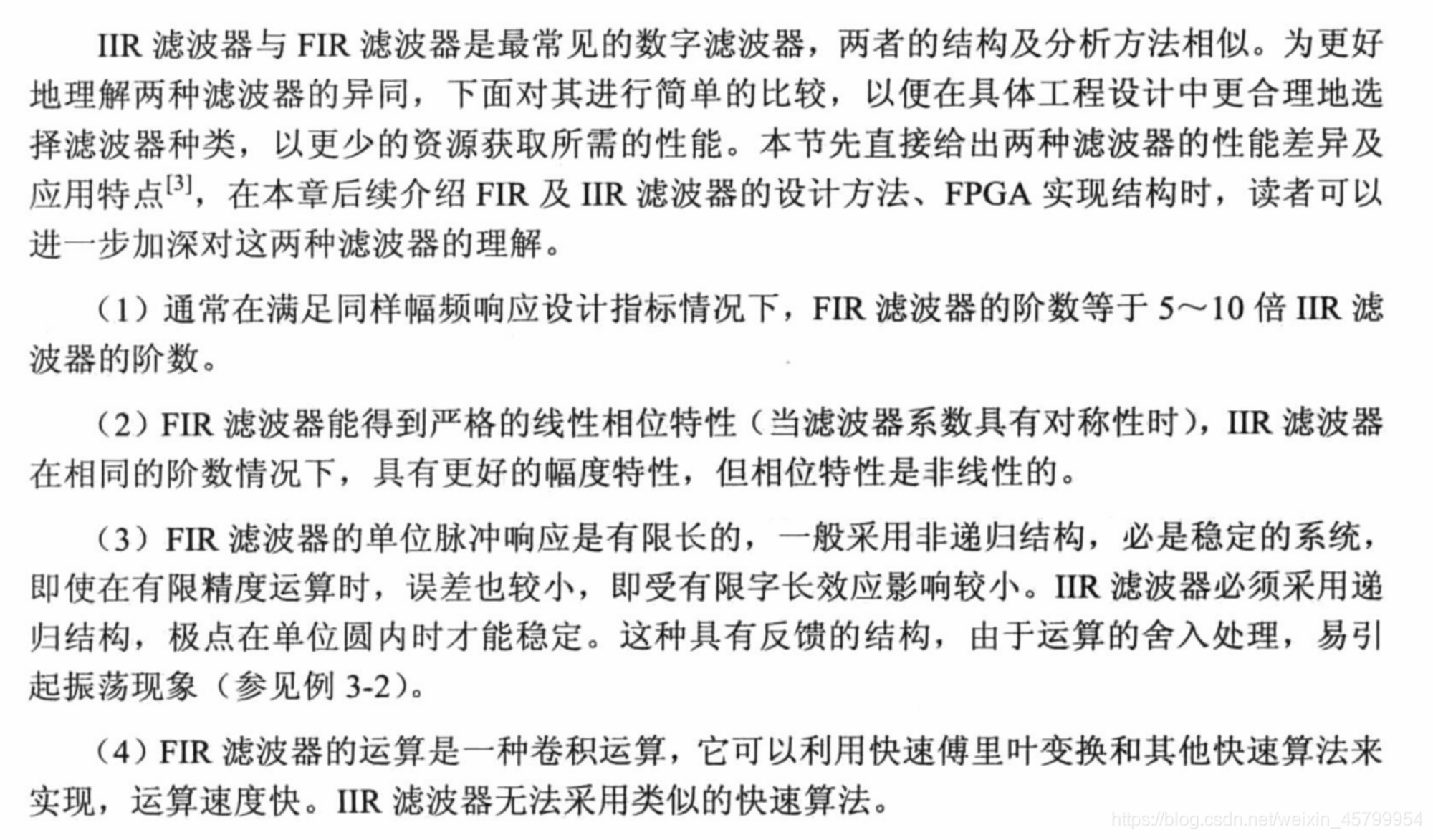
IIR滤波器原理 IIR的特点是:非线性相位、消耗资源少。 IIR滤波器的系统函数与差分方程如下所示: 由差分方程可知IIR滤波器存在反馈,因此在FPGA设计时要考虑到有限字长效应带来的影响。差分方程中包括两个部分:输入信号x(n)的M节…...

【QT】使用qml的QtWebEngine遇到的一些问题总结
在使用qt官方的一些QML的QtWebEngine相关的例程的时候,有时在运行会报如下错误: WebEngineContext used before QtWebEngine::initialize() or OpenGL context creation failed 这个问题在main函数里面最前面加上: QCoreApplication::setAttr…...
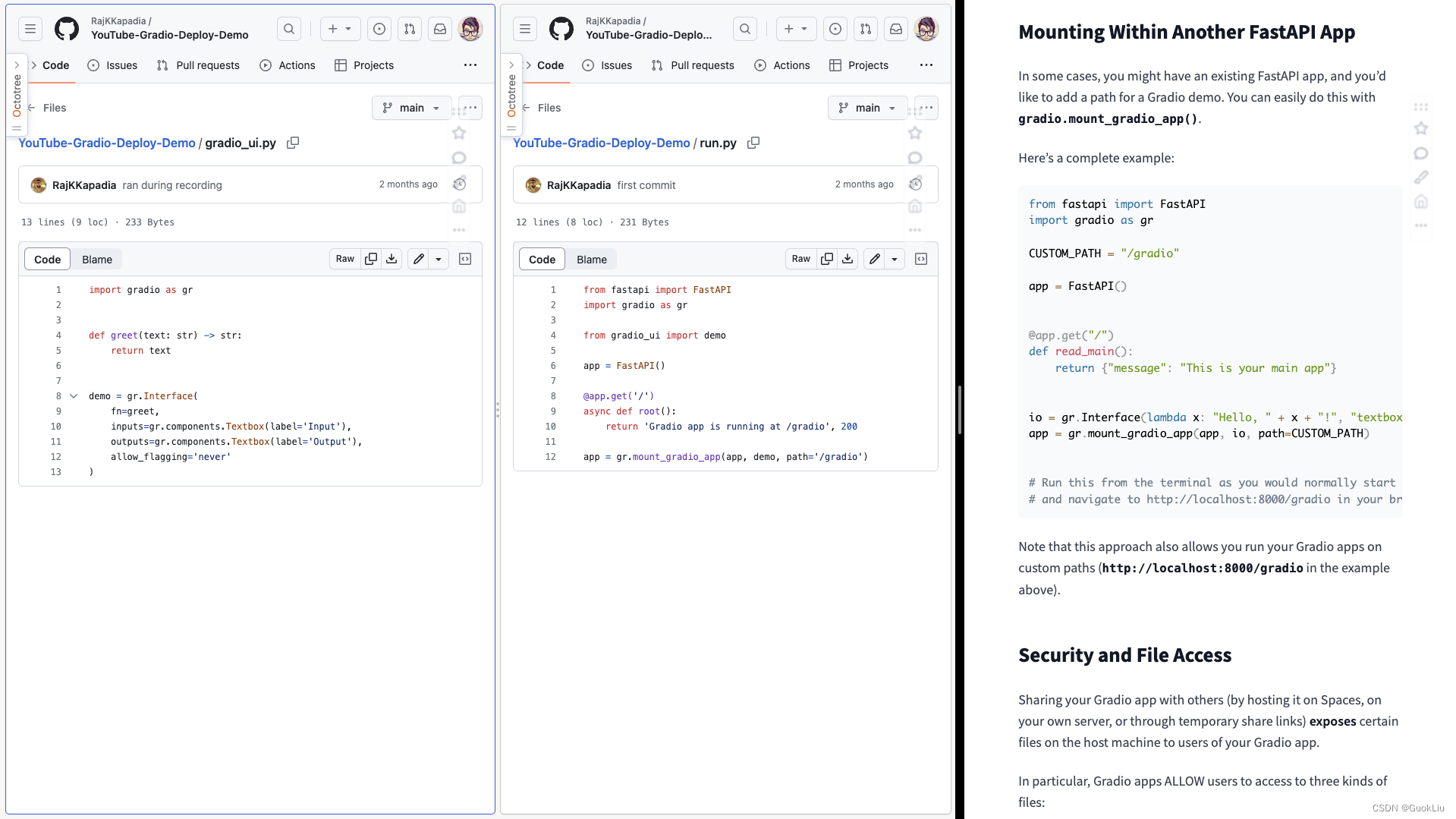
230902-部署Gradio到已有FastAPI及服务器中
1. 官方例子 run.py from fastapi import FastAPI import gradio as grCUSTOM_PATH "/gradio"app FastAPI()app.get("/") def read_main():return {"message": "This is your main app"}io gr.Interface(lambda x: "Hello, …...

解锁ComfyUI扩展潜能:工作流优化实战指南
解锁ComfyUI扩展潜能:工作流优化实战指南 【免费下载链接】ComfyUI-Custom-Scripts Enhancements & experiments for ComfyUI, mostly focusing on UI features 项目地址: https://gitcode.com/gh_mirrors/co/ComfyUI-Custom-Scripts 在AI绘画创作中&…...
)
VSCode配置PyTorch开发环境:从CUDA版本检查到镜像源加速(附常见报错解决方案)
VSCode配置PyTorch开发环境:从CUDA版本检查到镜像源加速(附常见报错解决方案) 在深度学习领域,PyTorch凭借其动态计算图和易用性已成为研究者和开发者的首选框架。然而,配置PyTorch开发环境时,CUDA版本匹配…...

Wan2.2-I2V-A14B文生视频模型落地实践:单卡4090D高效推理部署案例
Wan2.2-I2V-A14B文生视频模型落地实践:单卡4090D高效推理部署案例 1. 项目背景与价值 视频内容创作正成为数字时代的重要需求,但传统视频制作流程复杂、成本高昂。Wan2.2-I2V-A14B作为新一代文生视频模型,能够直接将文本描述转化为高质量视…...

利用快马ai快速构建基于jdk 17的spring boot web应用原型
最近在尝试快速搭建一个基于JDK 17的Spring Boot Web应用原型,发现用传统方式从零开始配置环境、搭建框架特别耗时。特别是JDK版本兼容性问题和依赖配置,经常要折腾半天。后来尝试了InsCode(快马)平台,整个过程变得异常简单,分享下…...

新手福音:基于快马平台生成ubuntu安装openclaw零失败入门指南
作为一个刚接触Ubuntu的新手,第一次安装OpenClaw时简直被各种依赖报错折磨到怀疑人生。后来发现InsCode(快马)平台能直接生成带详细解释的安装指南,终于找到了救星。今天就把这个零失败的安装过程分享给大家。 认识OpenClaw 这个工具是Linux环境下超实用…...

忍者像素绘卷微信小程序集成指南:轻量API调用与像素输出适配
忍者像素绘卷微信小程序集成指南:轻量API调用与像素输出适配 1. 项目概述与核心价值 忍者像素绘卷是一款基于Z-Image-Turbo深度优化的图像生成工具,专为16-Bit复古游戏美学风格设计。它通过轻量级API服务,让开发者能够快速将像素艺术生成能…...

Windows音频路由终极指南:如何免费实现应用程序级音频设备管理
Windows音频路由终极指南:如何免费实现应用程序级音频设备管理 【免费下载链接】audio-router Routes audio from programs to different audio devices. 项目地址: https://gitcode.com/gh_mirrors/au/audio-router 你是否曾遇到过这样的困扰:在…...
)
从‘翻车’到稳定:手把手教你用Matlab极点配置驯服小车倒立摆(附Simulink模型)
用Matlab极点配置实现小车倒立摆的精准控制:从理论到Simulink实战 倒立摆系统作为控制理论中的经典案例,完美展现了动态系统稳定控制的挑战与魅力。想象一下,一根垂直向上的杆子放在移动小车上,任何微小的扰动都会导致杆子倾倒——…...

模拟电路经典设计解析与工程实践
1. 模拟电路设计的艺术:那些令人拍案叫绝的经典设计在模拟电路设计的浩瀚海洋中,总有一些电路设计能让人眼前一亮,它们或简洁优雅,或构思巧妙,或性能卓越。作为一名从业十余年的模拟电路工程师,我想分享几个…...

开源工具Cursor Free VIP:突破开发效率瓶颈的技术突破
开源工具Cursor Free VIP:突破开发效率瓶颈的技术突破 【免费下载链接】cursor-free-vip [Support 0.45](Multi Language 多语言)自动注册 Cursor Ai ,自动重置机器ID , 免费升级使用Pro 功能: Youve reached your tri…...