
15、监测数据采集物联网应用开发步骤(11)
源码将于最后一遍文章给出下载
- 监测数据采集物联网应用开发步骤(10)
程序自动更新开发
前面章节写了部分功能模块开发:
- 日志或文本文件读写开发;
- Sqlite3数据库读写操作开发;
- 定时器插件化开发;
- 串口(COM)通讯开发;
- TCP/IP Client开发;
- TCP/IP Server 开发;
- modbus协议开发;
本章节啰嗦些,该解决方案最终业务成品有些需要部署在不同工控机或设备上,在实际应用过程中随时间推移有些需要升级迭代或修改bug,一旦安装部署设备点位达到一定数量,系统自动更新升级就是一个必要的步骤了。笔者开发的业务应用在相应的设备上安装已近千台设备,鉴于此增加了程序自动更新功能模块。
在com.zxy.common.Com_Para.py中添加如下内容
#自动更新服务端文件夹地址
urlPath = ""
#程序版本号
version = ""新建程序版本自动更新类com.zxy.autoUpdate.GetVersion.py
#! python3
# -*- coding: utf-8 -
'''
Created on 2017年05月10日
@author: zxyong 13738196011
'''import urllib.request,datetime
from com.zxy.adminlog.UsAdmin_Log import UsAdmin_Log
from com.zxy.common import Com_Para
from com.zxy.common.Com_Fun import Com_Fun
from com.zxy.interfaceReflect.A01_A1B2C3 import A01_A1B2C3
from com.zxy.z_debug import z_debug
from urllib.parse import urlparse#监测数据采集物联网应用--程序版本自动更新类
class GetVersion(z_debug):def __init__(self):pass#下载文件def SaveRemoteFile(self,inputFileName,inputLocalFileName):try:temResult = urllib.request.urlretrieve(Com_Para.urlPath+"/"+inputFileName,Com_Para.ApplicationPath+Com_Para.zxyPath+inputLocalFileName)except Exception as e:if str(type(self)) == "<class 'type'>":self.debug_in(self,repr(e)+"=>"+str(e.__traceback__.tb_lineno))#打印异常信息else:self.debug_in(repr(e)+"=>"+str(e.__traceback__.tb_lineno))#打印异常信息return temResult#保存版本号文件def SaveVersionFile(self,version_no,inputLocalFileName):temStrTFileName = Com_Para.ApplicationPath+Com_Para.zxyPath+inputLocalFileNametemFile = Nonetry: temFile = open(temStrTFileName, 'w',encoding=Com_Para.U_CODE)temFile.write(version_no)temFile.close()except Exception as e:if str(type(self)) == "<class 'type'>":self.debug_in(self,repr(e)+"=>"+str(e.__traceback__.tb_lineno))#打印异常信息else:self.debug_in(repr(e)+"=>"+str(e.__traceback__.tb_lineno))#打印异常信息finally:if temFile != None:temFile.close()#检测最新版本def CheckVersion(self):try:print("check new version..."+Com_Fun.GetTimeDef())#读取服务器端version.txt信息temResult = self.GetRequestWeb()if temResult == "":return 0temUL = UsAdmin_Log(Com_Para.ApplicationPath,temResult,0)#文件形式版本号管理temVersion = temUL.ReadFile(Com_Para.ApplicationPath+Com_Para.zxyPath + "version.txt")Com_Para.version = temVersion#数据库形式版本号管理temVersion = Com_Para.versiontemAryTem = []temVersion_No = ""temLastFile = ""#判断文件是否存在if temVersion == "" and temResult != "":print("local version none,downloading new version")temAryTem = temResult.split("\n")for temLine in temAryTem:temLine = temLine.replace("\r","").replace("\n","")temLastFile = temLineif temLine.find("version=") != -1:temVersion_No = temLineelif temLine != "":print("new version file download:"+temLine)self.SaveRemoteFile(temLine,"back/"+temLine)self.CopyFile(temLine)if temVersion_No != "":#文件形式版本管理     self.SaveVersionFile(temVersion_No,"version.txt")#数据库形式版本文件管理#将版本号insert入库 该处代码省略....Com_Para.version = temVersion_No    print("new version updated over:")#如果读到reboot.txt则需要重启设备if temLastFile.strip() == "reboot.txt":self.RebootProgram()return 0if temVersion_No != "":#文件形式版本管理     print("new version updated over:")self.SaveVersionFile(temVersion_No,"version.txt")#数据库形式版本文件管理#将版本号insert入库  该处代码省略....Com_Para.version = temVersion_Noelif temResult != "":#数据库形式版本号管理
#                 localVersion = Com_Para.version#文件形式版本号管理temAryTem = temVersion.split("\n")for temLine in temAryTem:temArySub = temLine.split("=")if len(temArySub) > 1 and temArySub[0] == "version":localVersion = temArySub[1]break bFlag = FalsetemAryTem = temResult.split("\n")for temLine in temAryTem:temLine = temLine.replace("\r","").replace("\n","")temLastFile = temLinetemArySub = temLine.split("=")if len(temArySub) > 1 and temArySub[0] == "version":try:if localVersion.find("=") != -1:iLV = int(localVersion.split("=")[1])else:iLV = int(localVersion)if localVersion != "" and iLV >= int(temArySub[1]):bFlag = Falseelse:temVersion_No = temLinebFlag = Trueexcept:bFlag = Falsebreakelse:if bFlag:self.SaveRemoteFile(temLine,"back/"+temLine)self.CopyFile(temLine)if temVersion_No != "":#文件形式版本管理     self.SaveVersionFile(temVersion_No,"version.txt") #数据库形式版本文件管理  #将版本号insert入库  该处代码省略....Com_Para.version = temVersion_Noprint("new version updated over:"+temVersion_No)if temLastFile.strip() == "reboot.txt":self.RebootProgram()return 0if (bFlag and temVersion_No != ""):#文件形式版本管理     self.SaveVersionFile(temVersion_No,"version.txt")#数据库形式版本文件管理  #将版本号insert入库  该处代码省略....Com_Para.version = temVersion_Noprint("new version updated over:")if bFlag and temLastFile.strip() == "reboot.txt":self.RebootProgram()return 0except Exception as e:if str(type(self)) == "<class 'type'>":self.debug_in(self,repr(e)+"=>"+str(e.__traceback__.tb_lineno))#打印异常信息else:self.debug_in(repr(e)+"=>"+str(e.__traceback__.tb_lineno))#打印异常信息return 1#重启设备def RebootProgram(self):        aa = A01_A1B2C3()if Com_Para.devsys.lower() == "linux": aa.param_value2 = "reboot -f"aa.CmdExecLinux()else:aa.param_value2 = "shutdown -r"aa.CmdExecWin()#文件更新def CopyFile(self,inputWebFile):temAryTem = inputWebFile.split("\n")for temLine in temAryTem:if temLine.find("=") == -1:aa = A01_A1B2C3()temFileName = temLine[0:temLine.find(".")]temFileAtt = temLine[temLine.find("."):len(temLine)].upper()if temFileAtt.upper() == ".ZIP":aa.param_value2 = "unzip -o "+Com_Para.ApplicationPath+Com_Para.zxyPath+"back"+Com_Para.zxyPath+temLine+" -d "+Com_Para.ApplicationPath+Com_Para.zxyPath+"back"+Com_Para.zxyPath+temFileName+Com_Para.zxyPathaa.param_value3 = Com_Para.ApplicationPath+Com_Para.zxyPath+"back"+Com_Para.zxyPath+temLineaa.param_value4 = Com_Para.ApplicationPath+Com_Para.zxyPath+"back"+Com_Para.zxyPath+temFileName+Com_Para.zxyPath#利用命令进行解压缩#aa.CmdExecLinux()#利用python自带解压缩模块aa.unzip_file()                     if Com_Para.devsys.lower() == "linux":                 aa.param_value2 = "cp -rf "+Com_Para.ApplicationPath+Com_Para.zxyPath+"back"+Com_Para.zxyPath+temFileName+Com_Para.zxyPath+"* "+Com_Para.ApplicationPath+Com_Para.zxyPathelse:aa.param_value2 = "xcopy "+Com_Para.ApplicationPath+Com_Para.zxyPath+"back"+Com_Para.zxyPath+temFileName+Com_Para.zxyPath+"*.* "+Com_Para.ApplicationPath+" /E /Y"aa.CmdExecLinux()#执行sql语句elif temFileAtt.upper() == ".SQL":aa.RunSqlFile(Com_Para.ApplicationPath+Com_Para.zxyPath+"back"+Com_Para.zxyPath+temLine)#执行更新数据接口elif temFileAtt.upper() == ".JSON":#JSON业务数据进行数据库结构更改或升级passelse:if Com_Para.devsys.lower() == "linux":                 aa.param_value2 = "cp -rf "+Com_Para.ApplicationPath+Com_Para.zxyPath+"back"+Com_Para.zxyPath+temLine+" "+Com_Para.ApplicationPath+Com_Para.zxyPathelse:aa.param_value2 = "copy "+Com_Para.ApplicationPath+Com_Para.zxyPath+"back"+Com_Para.zxyPath+temLine+" "+Com_Para.ApplicationPath+Com_Para.zxyPath+" /Y"aa.CmdExecLinux()#inputFlag网络链接是否正常def set_dSockList(self,inputFlag):urlp = urlparse(Com_Para.urlPath)if Com_Para.urlPath == "":return None                key = str(urlp.netloc.replace(":","|")) #存在if key not in list(Com_Para.dSockList.keys()):Com_Para.dSockList[key] = [0,datetime.datetime.now()]if inputFlag == False:objAry = Com_Para.dSockList[key]if objAry[0] <= 10:objAry[0] = objAry[0] + 1objAry[1] = datetime.datetime.now()Com_Para.dSockList[key] = objAryelse:Com_Para.dSockList[key] = [0,datetime.datetime.now()]    #判断上次链接时间频率是否合规def judge_dSock(self):urlp = urlparse(Com_Para.urlPath)if Com_Para.urlPath == "":return False                key = str(urlp.netloc.replace(":","|")) if key not in list(Com_Para.dSockList.keys()):Com_Para.dSockList[key] = [0,datetime.datetime.now()]objAry = Com_Para.dSockList[key]starttime = datetime.datetime.now()if objAry[0] <= 3:return Trueelif objAry[0] > 4 and starttime >= objAry[1] + datetime.timedelta(hours=12):return Trueelse:return Falsedef GetRequestWeb(self):temResult = ""try:#判断上次链接时间频率是否合规if not self.judge_dSock():return ""resp = urllib.request.urlopen(Com_Para.urlPath+"/version.txt",timeout=5)temResult = resp.read().decode(Com_Para.U_CODE)        except Exception as e:temLog = ""if str(type(self)) == "<class 'type'>":temLog = self.debug_info(self)+repr(e)else:temLog = self.debug_info()+repr(e)uL = UsAdmin_Log(Com_Para.ApplicationPath, temLog+"=>"+str(e.__traceback__.tb_lineno))uL.WriteLog()temResult = ""self.set_dSockList(False)return temResult
新建操作系统执行指令接口类com.zxy.interfaceReflect.A01_A1B2C3.py
#! python3
# -*- coding: utf-8 -
'''
Created on 2017年05月10日
@author: zxyong 13738196011
'''import os, sys,zipfile,subprocess,tempfile
from urllib.parse import unquote
from com.zxy.common import Com_Para
from com.zxy.common.Com_Fun import Com_Fun
from com.zxy.z_debug import z_debug#监测数据采集物联网应用--操作系统执行指令接口类
class A01_A1B2C3(z_debug):strResult        = ""session_id       = ""param_name       = ""param_value1     = None  #1:同步更新设备时间param_value2     = None  #当前时间param_value3     = Noneparam_value4     = Noneparam_value5     = Noneparam_value6     = Noneparam_value7     = Noneparam_value8     = Noneparam_value9     = Noneparam_value10    = None#是否继续执行 1:继续执行 0:中断执行strContinue      = "0"strCmdValue     = ""def __init__(self):passdef init_start(self):
#         /**************************************************/
#         //示例: 此处写业务逻辑,最后给 param_name,param_value1....重新赋值
#         // param_name += Com_Fun.Get_New_GUID()
#         // param_value1 += Com_Fun.Get_New_GUID()
#         // param_value2 += Com_Fun.Get_New_GUID()
#         // ......#         /**************************************************/
# //示例:若业务逻辑判断失败,不发送数据库接口请求并返回失败信息#strContinue = "0" 表示拦截器判断接口执行结束,不需要入库操作,直接返回信息temValue = ""self.strContinue = "0"if self.param_value1 == "100" and Com_Para.devsys == "linux":temValue = self.CmdExecLinux(self)self.strResult = "命令结果:\r\n"for temR in temValue:self.strResult = self.strResult+temR.decode(Com_Para.U_CODE)+"\r\n"#100执行命令elif self.param_value1 == "100" and Com_Para.devsys == "windows":temValue = self.CmdExecWin(self)self.strResult = "{\""+self.param_name+"\":[{\"s_result\":\"1\",\"error_desc\":\"命令执行成功"+temValue+"\"}]}"#利用python自带解压缩def unzip_file(self):temzipfile = zipfile.ZipFile(self.param_value3, 'r')temzipfile.extractall(self.param_value4) #重启程序def RestartPro(self):python = sys.executableos.execl(python,python,* sys.argv)#执行命令(Linux)def CmdExecLinux(self):out_temp = Nonetry: temCommand = unquote(unquote(self.param_value2,Com_Para.U_CODE))out_temp = tempfile.SpooledTemporaryFile(max_size=10*1000)fileno = out_temp.fileno()obj = subprocess.Popen(temCommand,stdout=fileno,stderr=fileno,shell=True)obj.wait() out_temp.seek(0)temResult = out_temp.readlines() except Exception as e:temResult = repr(e)finally:if out_temp is not None:out_temp.close()return temResult#执行命令(Windows)def CmdExecWin(self):try:temCommand = unquote(unquote(self.param_value2,Com_Para.U_CODE))temResult = os.popen(temCommand).read()except Exception as e:temResult = repr(e)return temResult#更新设备时间(Windows)def ChangeDateWin(self):try:temDate = Com_Fun.GetDateInput('%Y-%m-%d', '%Y-%m-%d %H:%M:%S', unquote(unquote(self.param_value2.replace("+"," "),Com_Para.U_CODE)))temTime = Com_Fun.GetDateInput('%H:%M:%S', '%Y-%m-%d %H:%M:%S', unquote(unquote(self.param_value2.replace("+"," "),Com_Para.U_CODE)))temResult = os.system('date {} && time {}'.format(temDate,temTime))except:temResult = -1return temResult#更新设备时间(Linux)def ChangeDateLinux(self):try: #将硬件时间写入到系统时间:#hwclock -s#将系统时间写入到硬件时间#hwclock -wtemCommand = unquote(unquote("date -s \""+self.param_value2.replace("+"," ").split(" ")[0]+"\"",Com_Para.U_CODE))temCommand = unquote(unquote("date -s \""+self.param_value2.replace("+"," ").split(" ")[1]+"\"",Com_Para.U_CODE))out_temp = tempfile.SpooledTemporaryFile(max_size=10*1000)fileno = out_temp.fileno()obj = subprocess.Popen(temCommand,stdout=fileno,stderr=fileno,shell=True)obj.wait()temCommand = unquote(unquote("hwclock -w",Com_Para.U_CODE))obj = subprocess.Popen(temCommand,stdout=fileno,stderr=fileno,shell=True)obj.wait() out_temp.seek(0)temByt = out_temp.readlines()temResult = temByt[0].decode(Com_Para.U_CODE)if temResult == "" :temResult = "1"except Exception as e:temResult = "-1" finally:if out_temp is not None:out_temp.close()return temResult版本更新测试案例MonitorDataCmd.py主文件中编写:
from com.zxy.autoUpdate.GetVersion import GetVersion在 if __name__ == '__main__':下添加
#版本更新测试Com_Para.urlPath = "http://localhost:8080/testweb/updtest/"gv = GetVersion() gv.CheckVersion()print("=>版本更新完成")程序文件新建 back文件夹临时存放下载更新包的zip文件;
版本更新服务端文件信息
版本更新服务端版本号信息

运行结果设备端更新之后新增文件

更新文件已下载并自动解压缩成功。
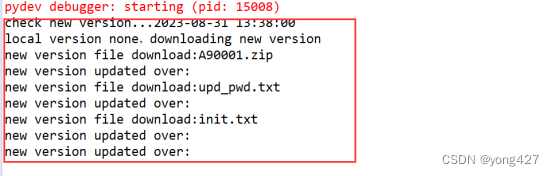
print打印出的内容
相关文章:
15、监测数据采集物联网应用开发步骤(11)
源码将于最后一遍文章给出下载 监测数据采集物联网应用开发步骤(10) 程序自动更新开发 前面章节写了部分功能模块开发: 日志或文本文件读写开发;Sqlite3数据库读写操作开发;定时器插件化开发;串口(COM)通讯开发;TCP/IP Client开发;TCP/IP Server 开发;modbus协议…...

Pygame中Trivia游戏解析6-2
3.1.2 读取保存题目的文件 在Trivia类的__init__()方法中,对各变量初始化完成之后,读取保存题目的文件,代码如下所示。 f open(filename, "r", encodingutf8) trivia_data f.readlines() f.close() 其中,open()函数…...

java 实现命令行模式
命令模式是一种行为设计模式,它允许您将请求封装为对象,以便您可以将其参数化、队列化、记录和撤销。在 Java 中实现命令模式涉及创建一个命令接口,具体命令类,以及一个接收者类,该接收者类执行实际操作。下面是一个简…...
)
A - Orac and Models(最长上升子序列——加强版)
There are nn models in the shop numbered from 11 to nn, with sizes s_1, s_2, \ldots, s_ns1,s2,…,sn. Orac will buy some of the models and will arrange them in the order of increasing numbers (i.e. indices, but not sizes). Orac thinks that the obtai…...
【python手写算法】逻辑回归实现分类(含公式推导)
公式推导: 代码实现: # codingutf-8 import matplotlib.pyplot as plt import numpy as npdef f(w1,x1,w2,x2,b):zw1*x1w2*x2breturn 1/(1np.exp(-z)) if __name__ __main__:X1 [12.46, 0.25, 5.22, 11.3, 6.81, 4.59, 0.66, 14.53, 15.49, 14.43,2.1…...
【2023高教社杯数学建模国赛】ABCD题 问题分析、模型建立、参考文献及实现代码
【2023高教社杯数学建模国赛】ABCD题 问题分析、模型建立、参考文献及实现代码 1 比赛时间 北京时间:2023年9月7日 18:00-2023年9月10日20:00 2 思路内容 可以参考我提供的历史竞赛信息内容,最新更新我会发布在博客和知乎上,请关注我获得最…...

yum安装mysql5.7散记
## 数据源安装 $ yum -y install wget $ wget http://dev.mysql.com/get/mysql57-community-release-el7-8.noarch.rpm $ yum localinstall mysql57-community-release-el7-8.noarch.rpm $ yum repolist enabled | grep "mysql.*-community.*" $ yum install mysql-…...
DNS解析
1.DNS介绍 DNS 表示域名系统。此系统实质上是用于整理和识别各个域名的网络电话簿。电话簿将“Acme Pizza”之类的名称转换为要拨打的正确电话号码,而 DNS 将“www.google.com”之类的网络地址转换为托管该网站的计算机的物理 IP 地址,如“74.125.19.147…...

从jdk8 升级到jdk17的问题总结
目录 1. java.lang.reflect.InaccessibleObjectException: 2. java.lang.UnsatisfiedLinkError in autosys 3. java.lang.NoClassDefFoundError: Could not initialize class net.sf.jasperreports.engine.util.JRStyledTextParser 4. java.lang.UnsatisfiedLinkError: **…...
一百七十二、Flume——Flume采集Kafka数据写入HDFS中(亲测有效、附截图)
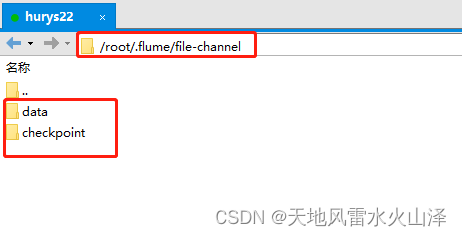
一、目的 作为日志采集工具Flume,它在项目中最常见的就是采集Kafka中的数据然后写入HDFS或者HBase中,这里就是用flume采集Kafka的数据导入HDFS中 二、各工具版本 (一)Kafka kafka_2.13-3.0.0.tgz (二)…...
pnpm 升级
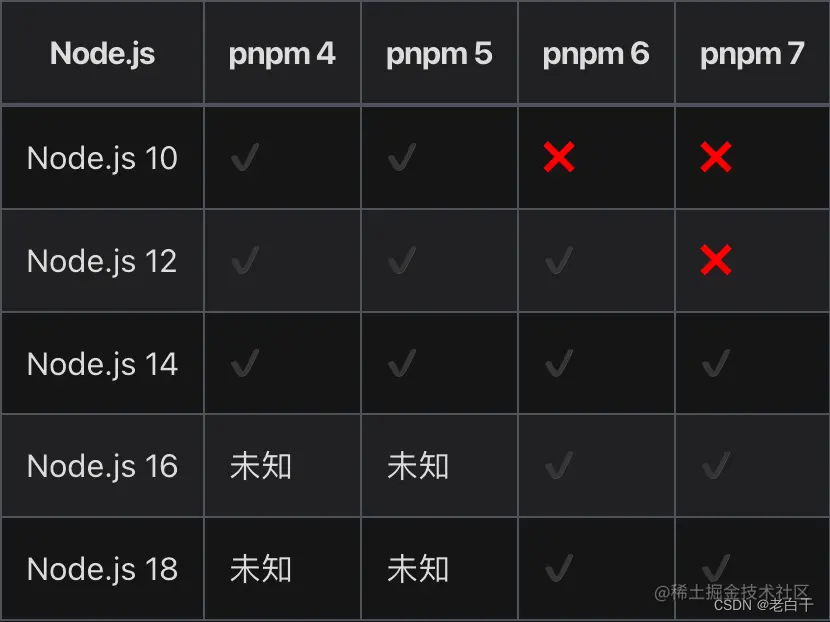
1. 在以下路径下删除pnpm包 2. 执行which pnpm,在结果目录中删除pnpm 3. sudo npm install -g pnpm 重新安装,node默认使用16...

有关使用HttpServletRequest的Cookie的设置和获取
文章目录 小结问题和解决参考 小结 介绍了如何在HttpServletRequest中对Cookie的进行设置和获取。 问题和解决 在服务器端的HttpServletRequest中对Cookie的进行设置后,客户端在接下来的请求中会携带此设置好的Cookie,所以可以在服务器端接收请求时提…...

关于 Nginx 的哪些事
关于 Nginx 的哪些事 1、Nginx 主要功能2、Nginx 的常用命令2.1、启动Nginx2.2、停止 Nginx2.3、重新加载Nginx 配置2.4、检查Nginx配置文件2.5、指定配置文件2.6、检查Nginx版本2.7、显示Nginx帮助信息 3、Nginx 配置文件 nginx.conf3.1、Nginx 配置文件(nginx.con…...

插入排序——希尔排序
1、简述: 希尔排序(Shells Sort)是插入排序的一种又称“缩小增量排序”(Diminishing Increment Sort),是直接插入排序算法的一种更高效的改进版本。希尔排序是非稳定排序算法。该方法因 D.L.Shell 于 1959 年提出而得名。 希尔排…...

C语言之初阶总结篇
目录 NO.1 NO.2 NO.3 NO.4 NO.5 NO.6 NO.7 NO.8 NO.9 NO.10 NO.11 NO.12.概念tips NO.13.求最小公倍数 NO.14.最大公因数 NO.15.输入读取字符串 NO.16.倒置字符串 今天是一些C语言题目,最近天气炎热,多喝水。 NO.1 下面程序执行后&am…...

Android签名查看
查看签名文件信息 第一种方法: 1.打开cmd,执行keytool -list -v -keystore xxx.keystore,效果如下图: 第二种方法: 1.打开cmd,执行 keytool -list -v -keystore xxxx.keystore -storepass 签名文件密码࿰…...

Educational Codeforces Round 3
目录 A. USB Flash Drives B. The Best Gift C. Load Balancing D. Gadgets for dollars and pounds A. USB Flash Drives #include<bits/stdc.h>using namespace std; const int N1e65; typedef long long ll; typedef pair<ll,ll> pll; typedef array<int…...

Docker Compose常用命令
常用命令 1.1 restart, start, stop-- 启动和停止服务 命令必须在 docker-compose.yml文件所在的目录下执行。 # 前台启动, 启动项目中的所有服务。 $. docker-compose up# 后台启动, 启动所有服务并在后台运行。 $. docker-compose up -d# 停止所有服务。 $. docker-compose …...
C++——智能指针
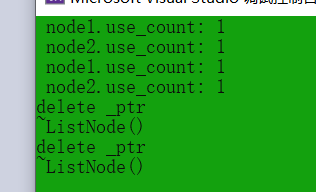
智能指针 文章目录 智能指针内存泄漏智能指针解决内存泄漏问题智能指针的使用及原理RAII智能指针对象的拷贝问题 C中的智能指针auto_ptrunique_ptrshared_ptrweak_ptr定制包装器C11和boost中智能指针的关系 内存泄漏 什么是内存泄漏:内存泄漏指因为疏忽或错误造成程…...
CVE-2023-3836:大华智慧园区综合管理平台任意文件上传漏洞复现
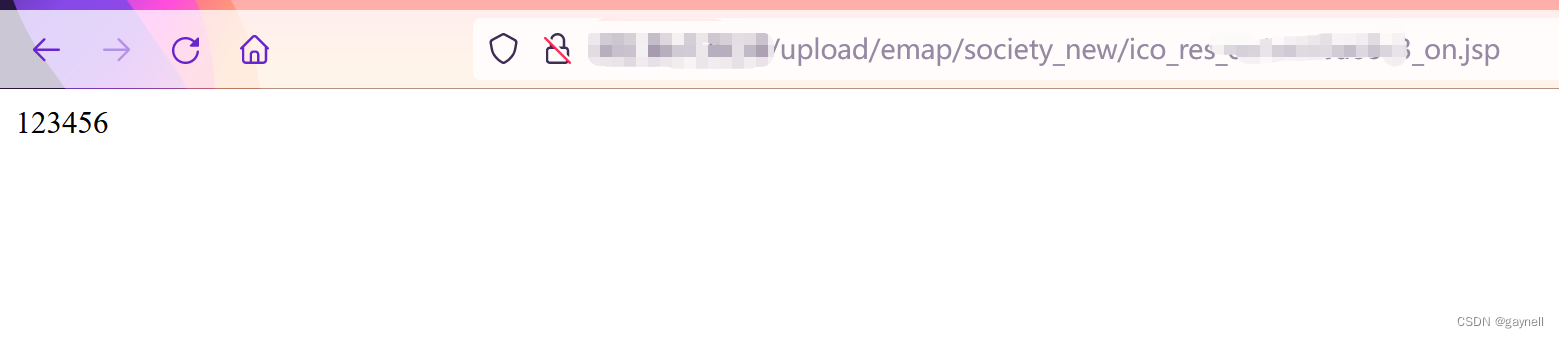
文章目录 CVE-2023-3836:大华智慧园区综合管理平台任意文件上传漏洞复现0x01 前言0x02 漏洞描述0x03 影响范围0x04 漏洞环境0x05 漏洞复现1.访问漏洞环境2.构造POC3.复现 CVE-2023-3836:大华智慧园区综合管理平台任意文件上传漏洞复现 0x01 前言 免责声…...

macOS虚拟打印机:一键文档转PDF的高效解决方案
macOS虚拟打印机:一键文档转PDF的高效解决方案 【免费下载链接】RWTS-PDFwriter An OSX print to pdf-file printer driver 项目地址: https://gitcode.com/gh_mirrors/rw/RWTS-PDFwriter 在数字化办公环境中,将各类文档快速转换为PDF格式是日常工…...

神眸低功耗芯片突破:让摄像头摆脱电线,2045年或迎1000亿只智能视觉终端!推理算力创业机会大
神眸低功耗芯片突破,开启智能视觉终端未来神眸致力于在算力浪潮下游,凭借极致低功耗芯片设计,使摄像头摆脱电线束缚,开启千亿只智能视觉终端的未来。杨作兴带领神眸实现了摄像头功耗降低一个数量级的突破。第一代芯片达到业界三分…...

递归函数详解
递归函数详解——用递归改写谭浩强《C 程序设计》经典例题 📚 基于谭浩强《C 程序设计》经典例题 💡 一套代码看懂递归的本质与应用 🎯 适合 C 语言进阶学习者 📋 目录 1. 递归函数入门基础 2. 递归的三要素 3. 经典例题递归改写 4. 递归进阶应用 [5. 递归 vs 迭代对比…...

跨越平台壁垒:gibMacOS如何让非Mac设备直接获取官方macOS安装文件
跨越平台壁垒:gibMacOS如何让非Mac设备直接获取官方macOS安装文件 【免费下载链接】gibMacOS Py2/py3 script that can download macOS components direct from Apple 项目地址: https://gitcode.com/gh_mirrors/gi/gibMacOS 在当今多平台开发与测试的复杂环…...

Focus-DETR:基于前景特征选择的高效目标检测模型解析
1. 项目概述与核心痛点目标检测,这个计算机视觉领域的经典任务,如今正站在一个十字路口。一方面,以DETR(Detection Transformer)为代表的端到端检测范式,凭借其简洁优雅的架构和强大的性能,正迅…...

构建中文AI的未来:MNBVC超大规模语料库的深度解析与实践指南
构建中文AI的未来:MNBVC超大规模语料库的深度解析与实践指南 【免费下载链接】MNBVC MNBVC(Massive Never-ending BT Vast Chinese corpus)超大规模中文语料集。对标chatGPT训练的40T数据。MNBVC数据集不但包括主流文化,也包括各个小众文化甚至火星文的数…...

跨平台Unity游戏资源编辑利器:UABEA深度解析
跨平台Unity游戏资源编辑利器:UABEA深度解析 【免费下载链接】UABEA c# uabe for newer versions of unity 项目地址: https://gitcode.com/gh_mirrors/ua/UABEA 在游戏开发与模组制作领域,Unity引擎的资源文件编辑一直是个技术门槛较高的任务。传…...

上海交通大学LaTeX学术演示模板:5分钟创建专业幻灯片的完整教程
上海交通大学LaTeX学术演示模板:5分钟创建专业幻灯片的完整教程 【免费下载链接】SJTUBeamermin 上海交通大学 LaTeX Beamer 幻灯片模板 - VI 最小工作集 项目地址: https://gitcode.com/gh_mirrors/sj/SJTUBeamermin 想要快速制作符合上海交通大学视觉规范的…...

SMUDebugTool深度解析:AMD Ryzen处理器硬件调试技术指南
SMUDebugTool深度解析:AMD Ryzen处理器硬件调试技术指南 【免费下载链接】SMUDebugTool A dedicated tool to help write/read various parameters of Ryzen-based systems, such as manual overclock, SMU, PCI, CPUID, MSR and Power Table. 项目地址: https://…...

CANN-ops-transformer和ATB-昇腾NPU上算子和加速库怎么配合
有人问我:ops-transformer 和 ATB 到底是什么关系?我把 FlashAttention 的代码改了,ATB 的推理结果怎么也跟着变了?这两个仓库在昇腾CANN生态里是上下游关系,但它们的边界不是"底层"和"上层"那么简…...