
Hugging Face实战-系列教程3:AutoModelForSequenceClassification文本2分类
🚩🚩🚩Hugging Face 实战系列 总目录
有任何问题欢迎在下面留言
本篇文章的代码运行界面均在notebook中进行
本篇文章配套的代码资源已经上传
下篇内容:
Hugging Face实战-系列教程4:padding与attention_mask
输出我们需要几个输出呢?比如说这个cls分类,我们做一个10分类,可以吗?对每一个词做10分类可以吗?预测下一个词是什么可以吗?是不是也可以!
在我们的NLP任务中,相比图像任务有分类有回归,NLP有回归这一说吗?我们要做的所有任务都是分类,就是把分类做到哪儿而已,不管做什么都是分类。
比如我们刚刚导入的两个英语句子,是对序列做情感分析,就是一个二分类,用序列做分类,你想导什么输出头,你就导入什么东西就可以了,简不简单?好简单是不是,上代码:
from transformers import AutoModelForSequenceClassification
checkpoint = "distilbert-base-uncased-finetuned-sst-2-english"
model = AutoModelForSequenceClassification.from_pretrained(checkpoint)
outputs = model(**inputs)
print(outputs.logits.shape)
导入一个序列分类的包,还是选择checkpoint这个名字,选择分词器,导入模型,将模型打印一下:
DistilBertForSequenceClassification(
(distilbert): DistilBertModel(
(embeddings): Embeddings(
(word_embeddings): Embedding(30522, 768, padding_idx=0)
(position_embeddings): Embedding(512, 768)
(LayerNorm): LayerNorm((768,), eps=1e-12, elementwise_affine=True)
(dropout): Dropout(p=0.1, inplace=False)
)
(transformer): Transformer(
(layer): ModuleList(
(0): TransformerBlock(
(attention): MultiHeadSelfAttention(
(dropout): Dropout(p=0.1, inplace=False)
(q_lin): Linear(in_features=768, out_features=768, bias=True)
(k_lin): Linear(in_features=768, out_features=768, bias=True)
(v_lin): Linear(in_features=768, out_features=768, bias=True)
(out_lin): Linear(in_features=768, out_features=768, bias=True)
)
(sa_layer_norm): LayerNorm((768,), eps=1e-12, elementwise_affine=True)
(ffn): FFN(
(dropout): Dropout(p=0.1, inplace=False)
(lin1): Linear(in_features=768, out_features=3072, bias=True)
(lin2): Linear(in_features=3072, out_features=768, bias=True)
)
(output_layer_norm): LayerNorm((768,), eps=1e-12, elementwise_affine=True)
)
(1): TransformerBlock(
(attention): MultiHeadSelfAttention(
(dropout): Dropout(p=0.1, inplace=False)
(q_lin): Linear(in_features=768, out_features=768, bias=True)
(k_lin): Linear(in_features=768, out_features=768, bias=True)
(v_lin): Linear(in_features=768, out_features=768, bias=True)
(out_lin): Linear(in_features=768, out_features=768, bias=True)
)
(sa_layer_norm): LayerNorm((768,), eps=1e-12, elementwise_affine=True)
(ffn): FFN(
(dropout): Dropout(p=0.1, inplace=False)
(lin1): Linear(in_features=768, out_features=3072, bias=True)
(lin2): Linear(in_features=3072, out_features=768, bias=True)
)
(output_layer_norm): LayerNorm((768,), eps=1e-12, elementwise_affine=True)
)
(2): TransformerBlock(
(attention): MultiHeadSelfAttention(
(dropout): Dropout(p=0.1, inplace=False)
(q_lin): Linear(in_features=768, out_features=768, bias=True)
(k_lin): Linear(in_features=768, out_features=768, bias=True)
(v_lin): Linear(in_features=768, out_features=768, bias=True)
(out_lin): Linear(in_features=768, out_features=768, bias=True)
)
(sa_layer_norm): LayerNorm((768,), eps=1e-12, elementwise_affine=True)
(ffn): FFN(
(dropout): Dropout(p=0.1, inplace=False)
(lin1): Linear(in_features=768, out_features=3072, bias=True)
(lin2): Linear(in_features=3072, out_features=768, bias=True)
)
(output_layer_norm): LayerNorm((768,), eps=1e-12, elementwise_affine=True)
)
(3): TransformerBlock(
(attention): MultiHeadSelfAttention(
(dropout): Dropout(p=0.1, inplace=False)
(q_lin): Linear(in_features=768, out_features=768, bias=True)
(k_lin): Linear(in_features=768, out_features=768, bias=True)
(v_lin): Linear(in_features=768, out_features=768, bias=True)
(out_lin): Linear(in_features=768, out_features=768, bias=True)
)
(sa_layer_norm): LayerNorm((768,), eps=1e-12, elementwise_affine=True)
(ffn): FFN(
(dropout): Dropout(p=0.1, inplace=False)
(lin1): Linear(in_features=768, out_features=3072, bias=True)
(lin2): Linear(in_features=3072, out_features=768, bias=True)
)
(output_layer_norm): LayerNorm((768,), eps=1e-12, elementwise_affine=True)
)
(4): TransformerBlock(
(attention): MultiHeadSelfAttention(
(dropout): Dropout(p=0.1, inplace=False)
(q_lin): Linear(in_features=768, out_features=768, bias=True)
(k_lin): Linear(in_features=768, out_features=768, bias=True)
(v_lin): Linear(in_features=768, out_features=768, bias=True)
(out_lin): Linear(in_features=768, out_features=768, bias=True)
)
(sa_layer_norm): LayerNorm((768,), eps=1e-12, elementwise_affine=True)
(ffn): FFN(
(dropout): Dropout(p=0.1, inplace=False)
(lin1): Linear(in_features=768, out_features=3072, bias=True)
(lin2): Linear(in_features=3072, out_features=768, bias=True)
)
(output_layer_norm): LayerNorm((768,), eps=1e-12, elementwise_affine=True)
)
(5): TransformerBlock(
(attention): MultiHeadSelfAttention(
(dropout): Dropout(p=0.1, inplace=False)
(q_lin): Linear(in_features=768, out_features=768, bias=True)
(k_lin): Linear(in_features=768, out_features=768, bias=True)
(v_lin): Linear(in_features=768, out_features=768, bias=True)
(out_lin): Linear(in_features=768, out_features=768, bias=True)
)
(sa_layer_norm): LayerNorm((768,), eps=1e-12, elementwise_affine=True)
(ffn): FFN(
(dropout): Dropout(p=0.1, inplace=False)
(lin1): Linear(in_features=768, out_features=3072, bias=True)
(lin2): Linear(in_features=3072, out_features=768, bias=True)
)
(output_layer_norm): LayerNorm((768,), eps=1e-12, elementwise_affine=True)
)
)
)
)
(pre_classifier): Linear(in_features=768, out_features=768, bias=True)
(classifier): Linear(in_features=768, out_features=2, bias=True)
(dropout): Dropout(p=0.2, inplace=False)
)
看看多了什么?前面我们说对每一个词生成一个768向量,最后就连了两个全连接层:
(pre_classifier): Linear(in_features=768, out_features=768, bias=True)
(classifier): Linear(in_features=768, out_features=2, bias=True)
(dropout): Dropout(p=0.2, inplace=False)
这个logits就是输出结果了:
print(outputs.logits.shape)
torch.Size([2, 2])
这个2*2表示的就是样本为2(两个英语句子),分类是2分类,但是我们需要得到最后的分类概率,再加上softmax:
import torch
predictions = torch.nn.functional.softmax(outputs.logits, dim=-1)
print(predictions)
dim=-1就是沿着最后一个维度进行计算,最后返回的就是概率值:
tensor([[1.5446e-02, 9.8455e-01], [9.9946e-01, 5.4418e-04]], grad_fn=SoftmaxBackward0)
概率知道了,类别的概率是什么呢?调一个内置的id to label配置:
model.config.id2label
{0: 'NEGATIVE', 1: 'POSITIVE'}
也就是说,第一个句子负面情感的概率为1.54%,正面的概率情感为98.46%
下篇内容:
Hugging Face实战-系列教程4:padding与attention_mask
相关文章:

Hugging Face实战-系列教程3:AutoModelForSequenceClassification文本2分类
🚩🚩🚩Hugging Face 实战系列 总目录 有任何问题欢迎在下面留言 本篇文章的代码运行界面均在notebook中进行 本篇文章配套的代码资源已经上传 下篇内容: Hugging Face实战-系列教程4:padding与attention_mask 输出我…...

《TCP/IP网络编程》阅读笔记--Socket类型及协议设置
目录 1--协议的定义 2--Socket的创建 2-1--协议族(Protocol Family) 2-2--Socket类型(Type) 3--Linux下实现TCP Socket 3-1--服务器端 3-2--客户端 3-3--编译运行 4--Windows下实现 TCP Socket 4-1--TCP服务端 4-2--TC…...

GitHub使用教程
GitHub使用教程 视频教程一:Github 新手够用指南 | 全程演示&个人找项目技巧放送_哔哩哔哩_bilibili 笔记: README.md编写教程:Typora官方免费版与入门教程__阿伟_的博客-CSDN博客 找开源项目的一些途径 • https://github.com/trendin…...
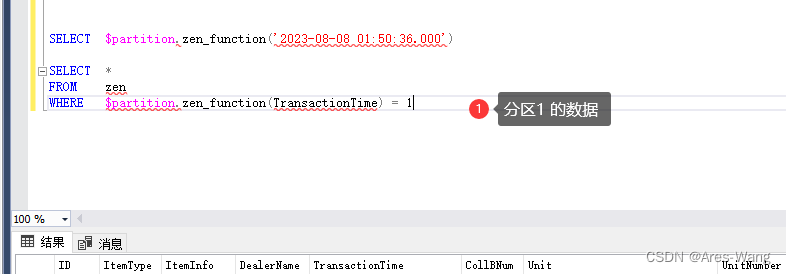
sql server 分区表
分区表 分区表是在SQL Server 2005之后的版本引入的特性,这个特性允许把逻辑上的一个表在物理上分为很多部分。换句话说,分区表从物理上看是将一个大表分成几个小表,但是从逻辑上看,还是一个大表。 步骤 创建分表区的步骤分为…...

开源许可证概述:GNU, BSD, Apache, MPL, 和 MIT
前言 开源许可证是开源软件分发的基础。它们定义了使用者如何使用,修改,分发开源软件。在这篇文章中,我们将探讨五种常见的开源许可证:GNU通用公共许可证 (GNU GPL),BSD许可证,Apache许可证,Mo…...
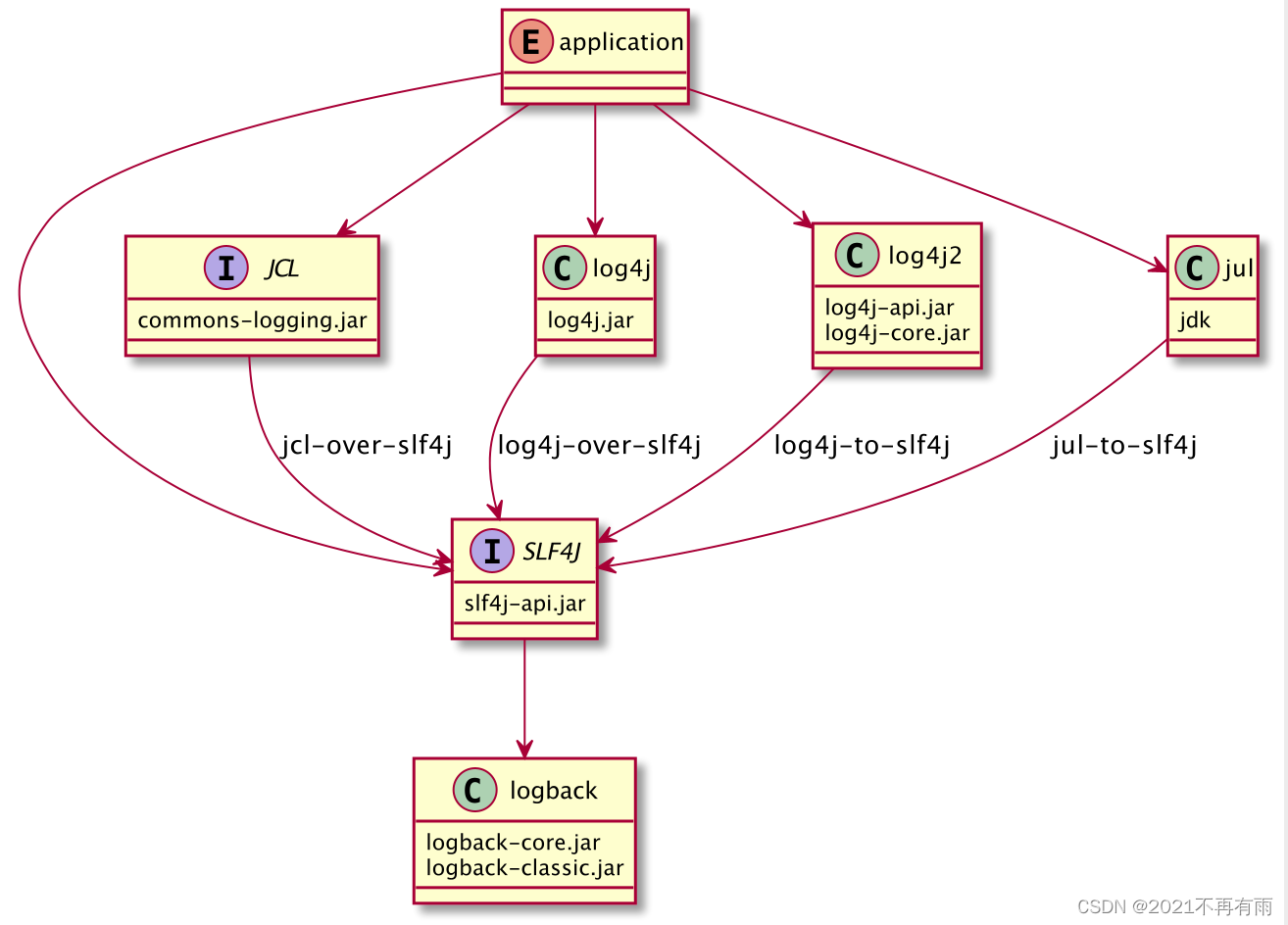
java中log使用总结
目录 一、概述1.1. 核心日志框架1.2 门面日志框架 二、最佳实践2.1 核心日志框架API包2.2 门面日志框架依赖2.3 集成使用2.3.1 集成jcl2.3.2 集成slf4j2.3.2.1 slf4j集成单一框架2.3.2.2 slf4j整合混合框架 三、总结3.1 所有相关包3.1.1 核心日志框架包3.1.2 门面日志框架3.1.3…...
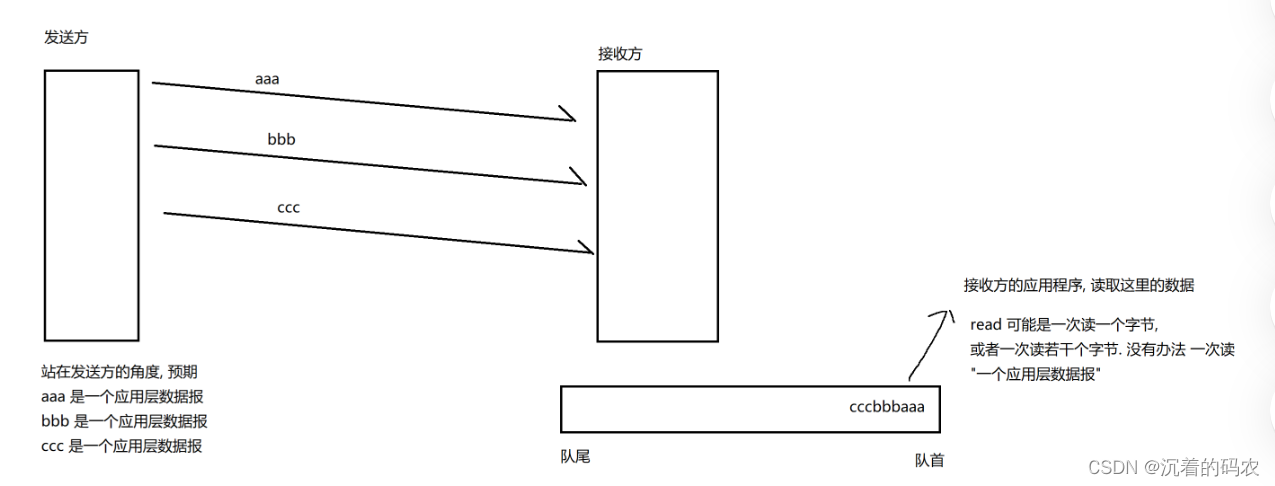
【Java】传输层协议TCP
传输层协议TCP TCP报文格式首部长度保留位32位序列号和32位确认应答号标记ACKSYNFINRSTURGPSH 16位窗口大小16位校验和16位紧急指针选项 TCP特点可靠传输实现机制-确认应答超时重传连接管理机制三次握手四次挥手特殊情况 滑动窗口流量控制拥塞控制延迟应答捎带应答面向字节流粘…...
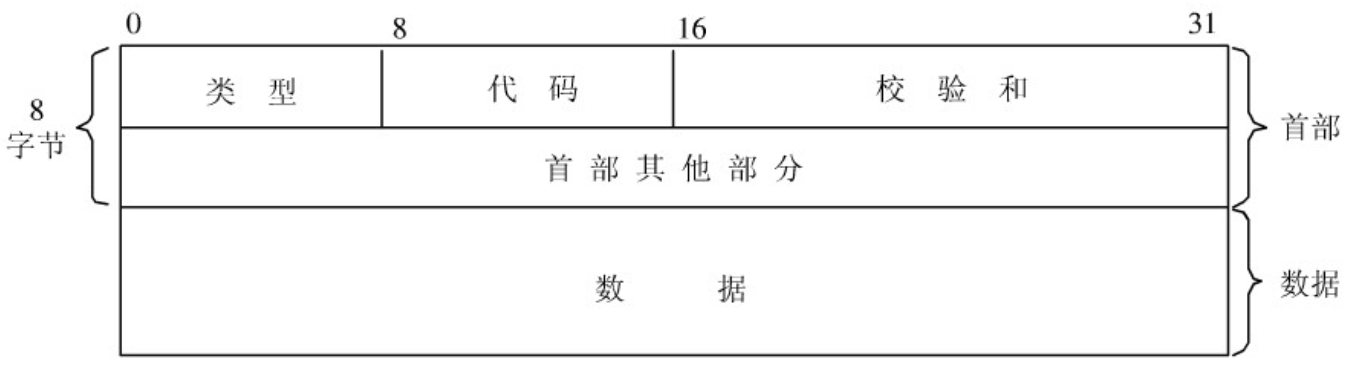
计算机网络基础知识(非常详细)
1. 网络模型 1.1 OSI 七层参考模型 七层模型,亦称 OSI(Open System Interconnection)参考模型,即开放式系统互联,是网络通信的标准模型。一般称为 OSI 参考模型或七层模型。 它是一个七层的、抽象的模型体ÿ…...

如何进行SEO优化数据分析?(掌握正确的数据分析方法,让您的网站更上一层楼!)
在互联网时代,SEO优化已经成为了每一个网站运营者必备的技能。而在SEO优化中,数据分析更是至关重要的一环。在本文中,我们将会详细介绍如何正确的进行SEO优化数据分析,让您的网站更上一层楼! 数据分析的重要性 数据分…...

Golang不同平台编译的思考
GOOS和GOARCH $GOOS可选值如下: darwin dragonfly freebsd linux netbsd openbsd plan9 solaris windows $GOARCH可选值如下 386 amd64 arm 在编译的时候我们可以根据实际需要对这两个参数进行组合。更详细的说明可以进官网看看 ## http://golang.org/cmd/go http…...
SpringSecurity学习
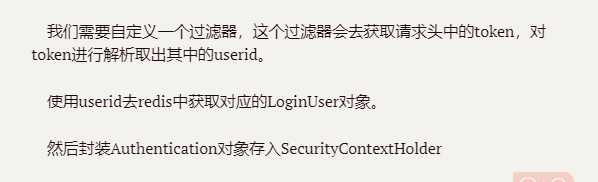
1.认证 密码校验用户 密码加密存储 Configuration public class SecurityConfig extends WebSecurityConfigurerAdapter {Beanpublic PasswordEncoder passwordEncoder(){return new BCryptPasswordEncoder();}} 我们没有这个配置,默认明文存储, {id}password;实现…...
时序预测 | MATLAB实现ICEEMDAN-iMPA-BiLSTM时间序列预测
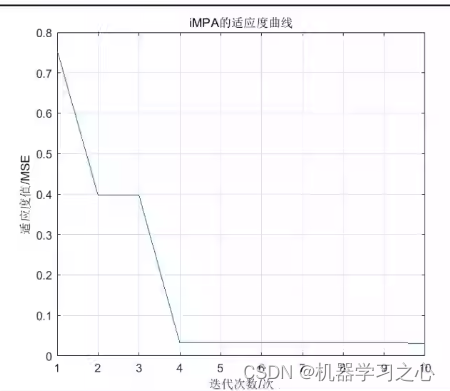
时序预测 | MATLAB实现ICEEMDAN-iMPA-BiLSTM时间序列预测 目录 时序预测 | MATLAB实现ICEEMDAN-iMPA-BiLSTM时间序列预测预测效果基本介绍程序设计参考资料 预测效果 基本介绍 ICEEMDAN-iMPA-BiLSTM功率/风速预测 基于改进的自适应经验模态分解改进海洋捕食者算法双向长短期记忆…...
二叉树(上)
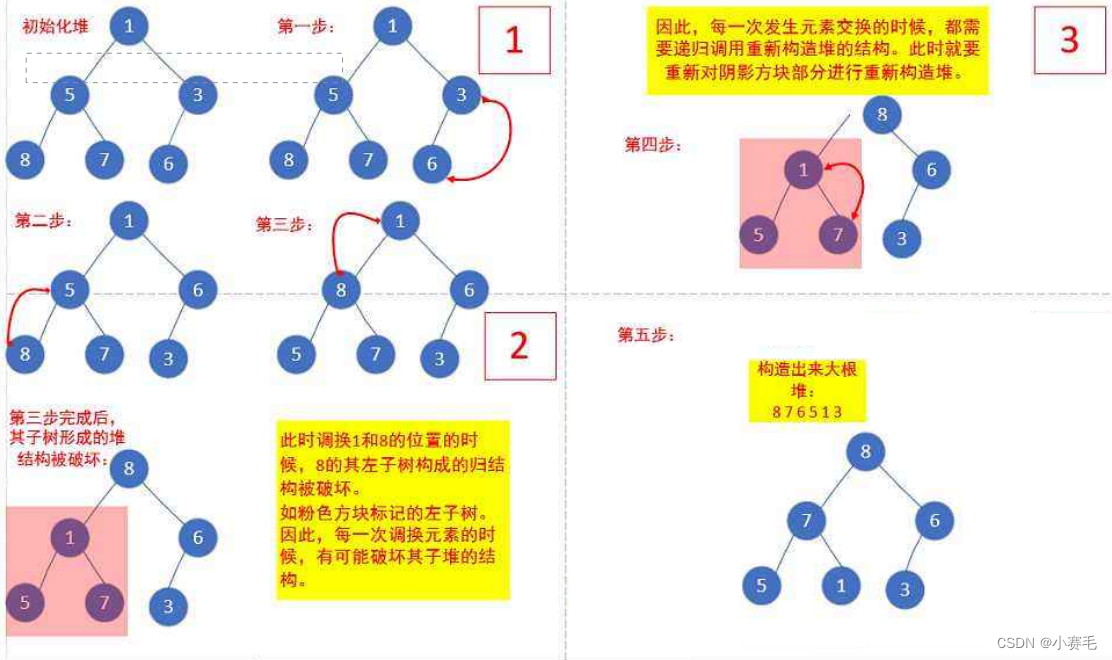
“路虽远,行则将至” ❤️主页:小赛毛 目录 1.树概念及结构 1.1树的概念 1.2 树的相关概念 1.3 树的表示(树的存储) 2.二叉树概念及结构 2.1概念 2.2现实中的二叉树 2.3 特殊的二叉树: 2.4 二叉树的性质 3.二叉树的顺…...
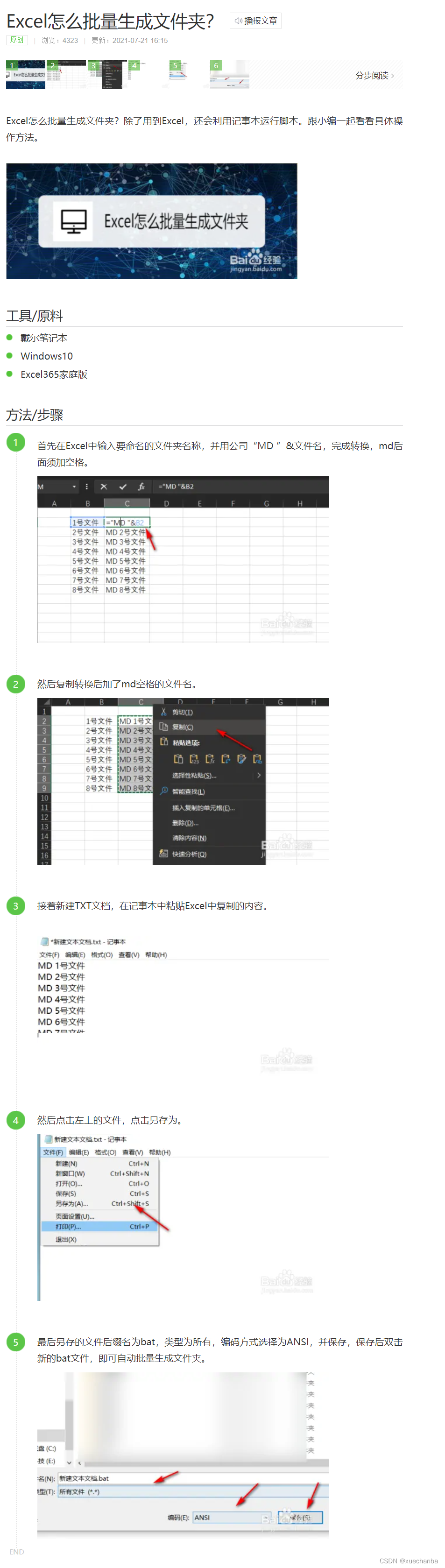
Excel怎么批量生成文件夹
Excel怎么批量生成文件夹的链接: https://jingyan.baidu.com/article/ea24bc398d9dcb9b63b3312f.html...
c++ 学习之 静态成员变量和静态成员函数
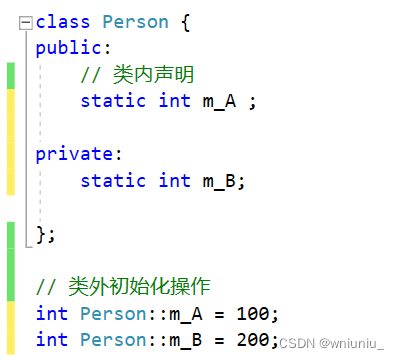
文章目录 前言正文静态成员变量初始化操作如何理解共享一份数据访问权限 静态成员函数访问方式静态成员函数只能访问静态成员变量访问权限 前言 静态成员分为 1)静态成员变量 所有对象共享一份数据在编译阶段分配空间类内声明,类外初始化 2)…...

C程序需要按下回车键才能读取字符
当编写涉及从终端输入字符的C程序时,有时会遇到需要按下回车键才能读取字符的问题。这是因为默认情况下,终端通常处于行缓冲模式,需要等待用户按下回车键才会将输入的字符发送给正在运行的程序。这可能会导致一些不便,尤其是当程序…...

x86体系结构(WinDbg学习笔记)
寄存器 eaxAccumulator累加器ebxBase register基寄存器ecxCounter register计数器寄存器edxData register - can be used for I/O port access and arithmetic functions数据寄存器-可用于I/O端口访问和算术函数esiSource index register源索引寄存器ediDestination index reg…...
Hadoop的第二个核心组件:MapReduce框架第四节
Hadoop的第二个核心组件:MapReduce框架 十、MapReduce的特殊应用场景1、使用MapReduce进行join操作2、使用MapReduce的计数器3、MapReduce做数据清洗 十一、MapReduce的工作流程:详细的工作流程第一步:提交MR作业资源第二步:运行M…...

算法通关村第十九关——最少硬币数
LeetCode322.给你一个整数数组 coins,表示不同面额的硬币,以及一个整数 amount,表示总金额。计算并返回可以凑成总金额所需的最少的硬币个数。如果没有任何一种硬币组合能组成总金额,返回-1。你可以认为每种硬币的数量是无限的。 示例1&…...
Linux ifconfig只显示 lo 网卡,没有ens网卡解决方案
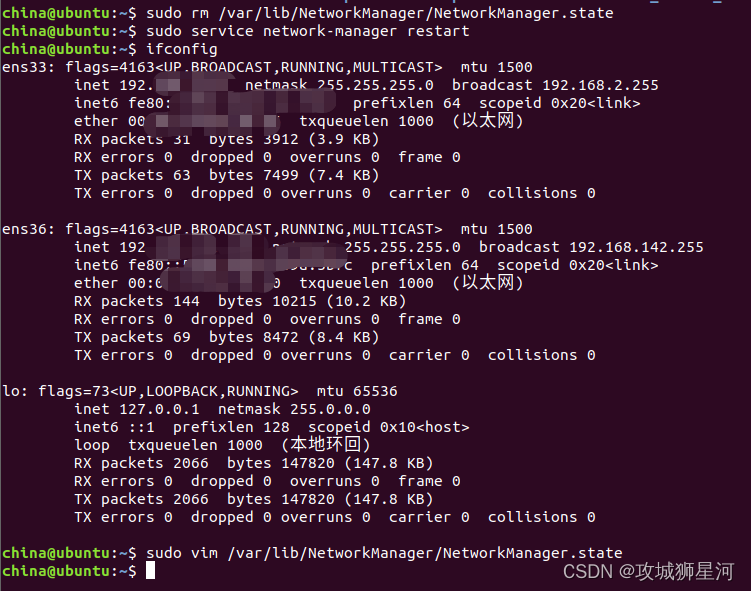
项目场景: 虚拟机中linux无网络问题 问题描述 之前在调试linux的时候,由于一些不太清楚的误操作,导致ubuntu linux出现无网络问题,现象如下 ifconfig 只显示了 lo 网卡 lo 网卡:它是本地环回接口。 这意味着您的虚…...

如何用GHelper解决华硕笔记本性能管理难题:轻量级开源工具的完整指南
如何用GHelper解决华硕笔记本性能管理难题:轻量级开源工具的完整指南 【免费下载链接】g-helper Lightweight Armoury Crate alternative for Asus laptops with nearly the same functionality. Works with ROG Zephyrus, Flow, TUF, Strix, Scar, ProArt, Vivoboo…...

NodeMCU PyFlasher:让物联网开发变得简单的固件烧录神器
NodeMCU PyFlasher:让物联网开发变得简单的固件烧录神器 【免费下载链接】nodemcu-pyflasher Self-contained NodeMCU flasher with GUI based on esptool.py and wxPython. 项目地址: https://gitcode.com/gh_mirrors/no/nodemcu-pyflasher 还在为NodeMCU开…...

轻量级代码同步工具codesyncer:P2P架构实现跨设备实时同步
1. 项目概述:一个被低估的代码同步利器如果你和我一样,经常需要在多台开发机、服务器甚至不同的云环境之间同步代码片段、配置文件或者小型项目,那你一定对那种“这台机器上有,那台机器上没有”的混乱感同身受。手动复制粘贴&…...

免费图片转3D模型完整指南:5分钟学会ImageToSTL将照片变成立体浮雕
免费图片转3D模型完整指南:5分钟学会ImageToSTL将照片变成立体浮雕 【免费下载链接】ImageToSTL This tool allows you to easily convert any image into a 3D print-ready STL model. The surface of the model will display the image when illuminated from the…...

OpenFOAM实战:在interFoam中植入多孔介质源项模拟复杂固壁
1. 多孔介质模拟的工程需求与原理 在流体力学仿真中,我们经常遇到需要处理复杂几何边界的情况。传统方法是通过精细的网格划分来精确描述固体边界,但这会带来两个主要问题:一是计算成本急剧上升,二是对于动态变化的边界࿰…...

63岁黄仁勋再添博士头衔、英特尔CEO为其披袍,最新演讲刷屏:人类编写软件、计算机执行指令的范式已终结!
整理 | 苏宓 出品 | CSDN(ID:CSDNnews) 日前,在卡内基梅隆大学(CMU)的 2026 届毕业典礼上,英伟达 CEO 黄仁勋的头衔再加一,最新获得 CMU 科学与技术荣誉博士学位,而这也是…...

3个步骤,用PCL2启动器彻底告别Minecraft配置烦恼
3个步骤,用PCL2启动器彻底告别Minecraft配置烦恼 【免费下载链接】PCL Minecraft 启动器 Plain Craft Launcher(PCL)。 项目地址: https://gitcode.com/gh_mirrors/pc/PCL 你是否遇到过这样的场景:好不容易下载了心仪的模组…...

北京AGG专用配件哪家性价比高
在选择AGG聚砂吸声系统的专用配件时,不少工程方和设计师都会问“北京哪家性价比高”。我的建议是:别只看标价,要看配件与系统的适配度、长期使用的稳定性,以及能否提供及时的技术支持。AGG系统本身是一个完整的声学解决方案&#…...

终极指南:快速掌握碧蓝航线Live2D资源提取技术
终极指南:快速掌握碧蓝航线Live2D资源提取技术 【免费下载链接】AzurLaneLive2DExtract OBSOLETE - see readme / 碧蓝航线Live2D提取 项目地址: https://gitcode.com/gh_mirrors/az/AzurLaneLive2DExtract 在数字内容创作和游戏开发领域,Live2D动…...

AI编程助手高效协作:Cursor与Claude Code开发者工具箱实战指南
1. 项目概述:一个为AI编程时代量身定制的开发者工具箱如果你和我一样,日常开发已经从传统的IDE搜索引擎模式,逐渐转向与Cursor、Claude Code等AI编程助手深度协作,那你一定遇到过类似的痛点:每次开启一个新项目&#x…...