
关于 ogbg-molhi数据集的个人解析
cs224w_colab2.py这个图属性预测到底咋预测的
dataset.meta_info.T
Out[2]:
num tasks                                                                1
eval metric                                                         rocauc
download_name                                                          hiv
version                                                                  1
url                      http://snap.stanford.edu/ogb/data/graphproppre...
add_inverse_edge                                                      True
data type                                                              mol
has_node_attr                                                         True
has_edge_attr                                                         True
task type                                            binary classification
num classes                                                              2
split                                                             scaffold
additional node files                                                 None
additional edge files                                                 None
binary                                                               False
Name: ogbg-molhiv, dtype: object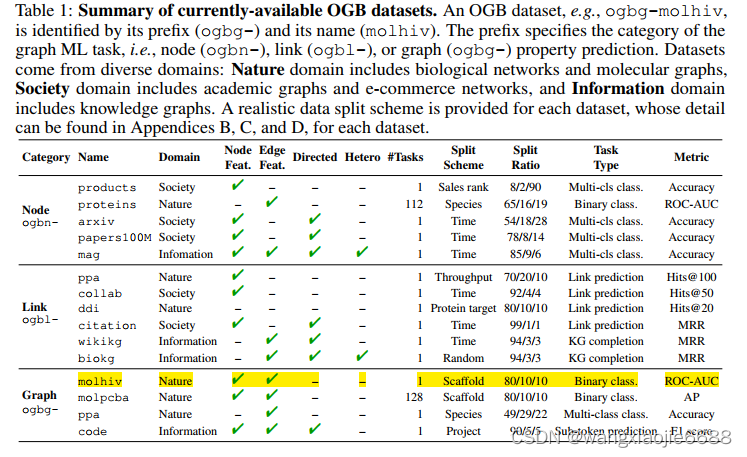
 参照上面 这里的num tasks 仅适用于图属性预测? num tasks = 1
model = GCN_Graph(args['hidden_dim'],dataset.num_tasks, args['num_layers'],args['dropout']).to(device)train_loader.dataset.data.edge_index.shape
Out[10]: torch.Size([2, 2259376])train_loader.dataset.data.edge_attr.shape
Out[12]: torch.Size([2259376, 3])type(train_loader.dataset.data.node_stores)
Out[26]: listtrain_loader.dataset.data.node_stores[0]['y'].shape
Out[46]: torch.Size([41127, 1])
train_loader.dataset.data.node_stores[0]['y'].sum()
Out[47]: tensor(1443) y 中的数值求和值torch.unique(train_loader.dataset.data.node_stores[0]['y'],return_counts=True)
Out[58]: (tensor([0, 1]), tensor([39684,  1443]))  仅0,1两类self.node_encoder.atom_embedding_list
Out[62]:
ModuleList((0): Embedding(119, 256)(1): Embedding(5, 256)(2): Embedding(12, 256)(3): Embedding(12, 256)(4): Embedding(10, 256)(5): Embedding(6, 256)(6): Embedding(6, 256)(7): Embedding(2, 256)(8): Embedding(2, 256)
)list(enumerate(data_loader))
Out[82]:
[(0,DataBatch(edge_index=[2, 1734], edge_attr=[1734, 3], x=[807, 9], y=[32, 1], num_nodes=807, batch=[807], ptr=[33])),若干组 很多
x, edge_index, batch = batched_data.x, batched_data.edge_index, batched_data.batchembed = self.node_encoder(x) #使用编码器 将原先9维的编码为256维 self.node_encoder = AtomEncoder(hidden_dim)out = self.gnn_node(embed, edge_index) #使用gcn得到节点嵌入 embed=X edge_index 连边/节点对 out = self.pool(out, batch)batch.unique(return_counts = True)
Out[94]:
(tensor([ 0, 1, 2, 3, 4, 5, 6, 7, 8, 9, 10, 11, 12, 13, 14, 15, 16, 17,18, 19, 20, 21, 22, 23, 24, 25, 26, 27, 28, 29, 30, 31],device='cuda:0'), 这里说明有31个待训练子图(化学分子) 下图api说明了聚合过程tensor([30, 18, 21, 26, 12, 20, 17, 18, 36, 11, 31, 22, 21, 26, 22, 21, 21, 63,15, 18, 18, 29, 18, 40, 41, 19, 19, 30, 12, 21, 19, 23], 每个分子中所含有的节点(原子)数量device='cuda:0'))
batch.shape
Out[95]: torch.Size([758])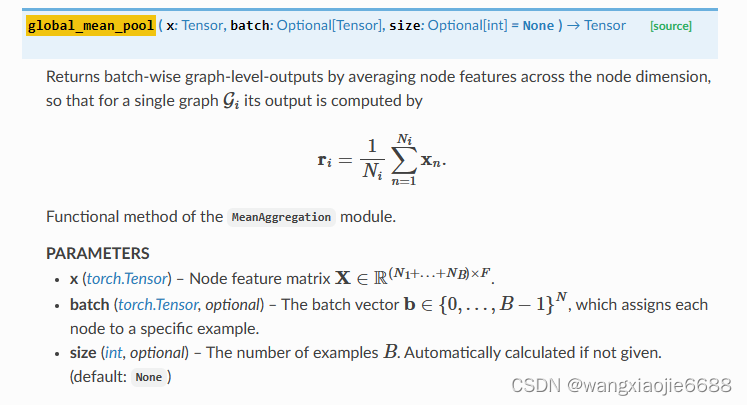
def global_mean_pool(x: Tensor, batch: Optional[Tensor],size: Optional[int] = None) -> Tensor:dim = -1 if x.dim() == 1 else -2 #这里的x.dim() = 2
# dim() → int Returns the number of dimensions of self tensor.if batch is None:return x.mean(dim=dim, keepdim=x.dim() <= 2) #keepdim=x.dim() <= 2 ??啥玩意<=size = int(batch.max().item() + 1) if size is None else sizereturn scatter(x, batch, dim=dim, dim_size=size, reduce='mean')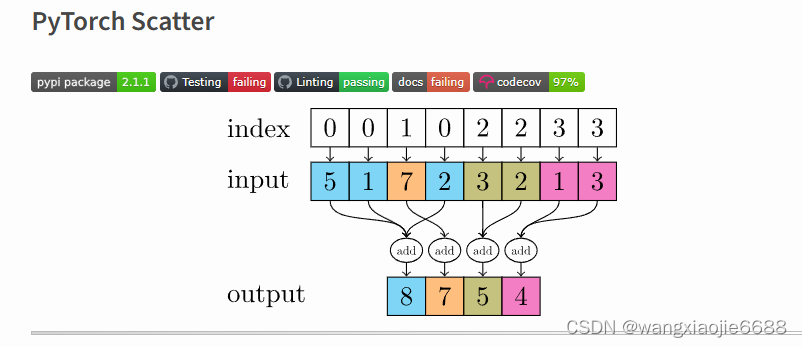
This package consists of a small extension library of highly optimized sparse update (scatter and segment) operations for the use in PyTorch, which are missing in the main package. Scatter and segment operations can be roughly described as reduce operations based on a given "group-index" tensor. Segment operations require the "group-index" tensor to be sorted, whereas scatter operations are not subject to these requirements.该包由一个小型扩展库组成,该库包含用于PyTorch的高度优化的稀疏更新(分散和分段)操作,这些操作在主包中丢失。散射和分段运算可以粗略地描述为基于给定“群索引”张量的归约运算。分段运算需要对“组索引”张量进行排序,而分散运算则不受这些要求的约束。
由此(scatter)由多个节点的嵌入值最终得到这部分节点所在的子图嵌入(化学分子)。
    def forward(self, batched_data):# TODO: Implement a function that takes as input a# mini-batch of graphs (torch_geometric.data.Batch) and# returns the predicted graph property for each graph.## NOTE: Since we are predicting graph level properties,# your output will be a tensor with dimension equaling# the number of graphs in the mini-batchx, edge_index, batch = batched_data.x, batched_data.edge_index, batched_data.batchembed = self.node_encoder(x)  #使用编码器 将原先9维的编码为256维 self.node_encoder = AtomEncoder(hidden_dim)out = self.gnn_node(embed, edge_index) #使用gcn得到节点嵌入 embed=X edge_index 连边/节点对out = self.pool(out, batch)out = self.linear(out)############# Your code here ############## Note:## 1. Construct node embeddings using existing GCN model## 2. Use the global pooling layer to aggregate features for each individual graph## For more information please refer to the documentation:## https://pytorch-geometric.readthedocs.io/en/latest/modules/nn.html#global-pooling-layers## 3. Use a linear layer to predict each graph's property## (~3 lines of code)#########################################return outout.shape
Out[122]: torch.Size([32, 1])
out
Out[121]:
tensor([[-0.4690],[-1.0285],[-0.4614],
最后经过线性层 返回得到所属类别概率 运行到如下部分结束反向传播forward() (op = model(batch)# 先进入model函数 然后运行 反向传播)def train(model, device, data_loader, optimizer, loss_fn):# TODO: Implement a function that trains your model by# using the given optimizer and loss_fn.model.train()  #Sets the module in training mode. data_loader.dataset.data Data(num_nodes=1049163, edge_index=[2, 2259376], edge_attr=[2259376, 3], x=[1049163, 9], y=[41127, 1])loss = 0for step, batch in enumerate(tqdm(data_loader, desc="Iteration")): #,total= data_loader.batch_sampler# for step, batch in tqdm(enumerate(data_loader), desc="Iteration"): #,total= data_loader.batch_samplerbatch = batch.to(device)if batch.x.shape[0] == 1 or batch.batch[-1] == 0:passelse:## ignore nan targets (unlabeled) when computing training loss.is_labeled = batch.y == batch.y # 0/1转化为Ture/False############# Your code here ############## Note:## 1. Zero grad the optimizer## 2. Feed the data into the model## 3. Use `is_labeled` mask to filter output and labels## 4. You may need to change the type of label to torch.float32## 5. Feed the output and label to the loss_fn## (~3 lines of code)optimizer.zero_grad()# print('optimizer.zero_grad()')op = model(batch)# 先进入model函数 然后运行 反向传播。。。。。。。。。。。。。。。后面计算损失 更新梯度等等
存在错误等欢迎指正! 附件为整个作业的.py文件
相关文章:
关于 ogbg-molhi数据集的个人解析
cs224w_colab2.py这个图属性预测到底咋预测的 dataset.meta_info.T Out[2]: num tasks 1 eval metric rocauc download_name …...
RabbitMQ:hello结构
1.在Linux环境上面装入rabbitMQ doker-compose.yml version: "3.1" services:rabbitmq:image: daocloud.io/library/rabbitmq:managementrestart: alwayscontainer_name: rabbitmqports:- 6786:5672- 16786:15672volumes:- ./data:/var/lib/rabbitmq doker-compos…...

SpringBoot整合Redis 并 展示使用方法
步骤 引入依赖配置数据库参数编写配置类构造RedisTemplate创建测试类测试 1.引入依赖 不写版本号,也是可以的 在pom中引入 <!--redis配置--> <dependency><groupId>org.springframework.boot</groupId><artifactId>spring-boot-…...

js中如何实现字符串去重?
聚沙成塔每天进步一点点 ⭐ 专栏简介⭐ 使用 Set 数据结构⭐ 使用循环遍历⭐ 写在最后 ⭐ 专栏简介 前端入门之旅:探索Web开发的奇妙世界 记得点击上方或者右侧链接订阅本专栏哦 几何带你启航前端之旅 欢迎来到前端入门之旅!这个专栏是为那些对Web开发感…...

Axure RP仿QQ音乐app高保真原型图交互模板源文件
Axure RP仿QQ音乐app高保真原型图交互模板源文件。本套素材模板的机型选择华为的mate30,在尺寸和风格方面,采用标准化制作方案,这样做出来的原型图模板显示效果非常优秀。 原型中使用大量的动态面板、中继器、母版,涵盖Axure中技…...
)
2023牛客暑假多校第四场(补题向题解:J)
终于有时间来慢慢补补题了 J Qu’est-ce Que C’est? 作为队内的dp手,赛时想了好久,等学弟学妹都出了还是不会,羞愧,还好最终队友做出来了。 链接J Qu’est-ce Que C’est? 题意 长度为 n n n 的数组 a a a,每…...
第 362 场 LeetCode 周赛题解
A 与车相交的点 数据范围小直接暴力枚举 class Solution { public:int numberOfPoints(vector <vector<int>> &nums) {unordered_set<int> vis;for (auto &p: nums)for (int i p[0]; i < p[1]; i)vis.insert(i);return vis.size();} };B 判断能否…...
C++ if 语句
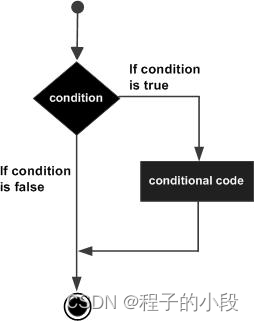
一个 if 语句 由一个布尔表达式后跟一个或多个语句组成。 语法 C 中 if 语句的语法: if(boolean_expression) {// 如果布尔表达式为真将执行的语句 }如果布尔表达式为 true,则 if 语句内的代码块将被执行。如果布尔表达式为 false,则 if 语…...
业务安全及实战案例
业务安全 关于漏洞: 注入业务逻辑信息泄露 A04:2021 – Insecure Design 在线靶场PortSwigger 1. 概述 1.1 业务安全现状 1.1.1 业务逻辑漏洞 近年来,随着信息化技术的迅速发展和全球一体化进程的不断加快,计算机和网络已经成为与…...
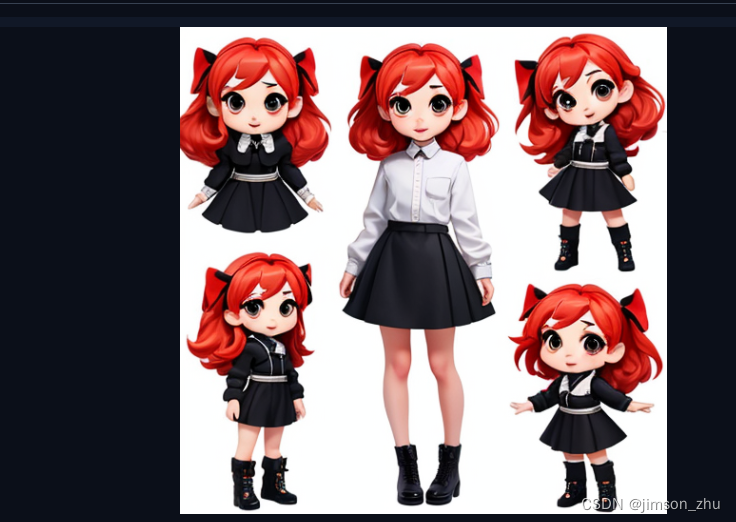
十一)Stable Diffussion使用教程:人物三视图
现在我们通过一个个具体的案例,去进阶SD的使用。 本篇案例:绘制Q版人物三视图 1)我们先选择一个偏3D的模型,选择文生图,输入魔法; 2)然后选择触发三视图的Lora:<lora:charturnerbetaLora_charturnbetalora:0.6>,注意这里的名称都是本地重新命名的,非原来C站下…...

超级等级福利礼包
文章目录 一、 介绍二、 设计等级礼包的目的1. 提升游戏玩家活跃度2. 提升游戏用户吸引力3. 提高游戏用户留存率4. 实现间接收入5. 持续营收 三、 玩家心理总结四、总结该模式的赢利点五、 该模式的应用场景举例 一、 介绍 超级等级福利礼包,玩家每升级5级即可获得…...
如何用Jmeter提取和引用Token
1.执行获取token接口 在结果树这里,使用$符号提取token值。 $根节点,$.data.token表示提取根节点下的data节点下的token节点的值。 2.使用json提取器,提取token 变量路径就是把在结果树提取的路径写上。 3.使用BeanShell取样器或者BeanShell后…...

C#文件拷贝工具
目录 工具介绍 工具背景 4个文件介绍 CopyTheSpecifiedSuffixFiles.exe.config DataSave.txt 拷贝的存储方式 文件夹介绍 源文件夹 目标文件夹 结果 使用 *.mp4 使用 *.* 重名时坚持拷贝 可能的报错 C#代码如下 Form1.cs Form1.cs设计 APP.config Program.c…...

Redis——Java中的客户端和API
Java客户端 在大多数的业务实现中,我们还是使用编码去操作Redis,对于命令的学习只是知道这些数据库可以做什么操作,以及在后面学习到了Java的API之后知道什么方法对应什么命令即可。 官方推荐的Java的客户端网页链接如下: 爪哇…...
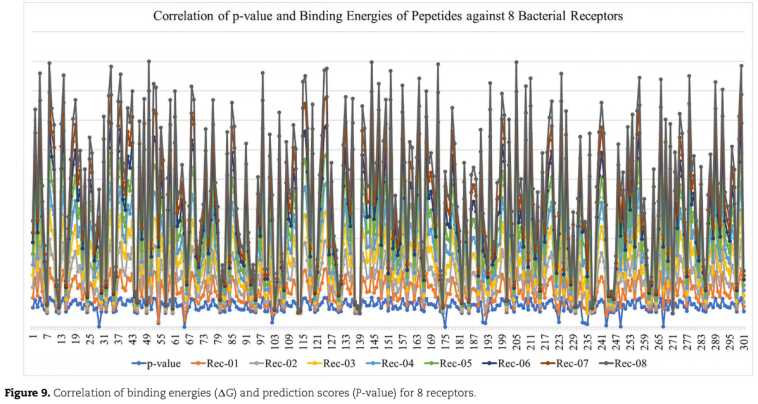
Brief. Bioinformatics2021 | sAMP-PFPDeep+:利用三种不同的序列编码和深度神经网络预测短抗菌肽
文章标题:sAMP-PFPDeep: Improving accuracy of short antimicrobial peptides prediction using three different sequence encodings and deep neural networks 代码:https://github.com/WaqarHusain/sAMP-PFPDeep 一、问题 短抗菌肽(sAMPs)&#x…...

问道管理:华为产业链股再度拉升,捷荣技术6连板,华力创通3日大涨近70%
华为产业链股6日盘中再度拉升,到发稿,捷荣技能涨停斩获6连板,华映科技亦涨停收成3连板,华力创通大涨超19%,蓝箭电子涨约11%,力源信息涨超4%。 捷荣技能盘中再度涨停,近7日已累计大涨超90%。公司…...
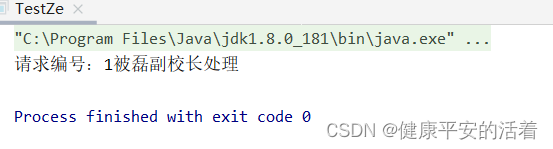
面试设计模式-责任链模式
一 责任链模式 1.1 概述 在进行请假申请,财务报销申请,需要走部门领导审批,技术总监审批,大领导审批等判断环节。存在请求方和接收方耦合性太强,代码会比较臃肿,不利于扩展和维护。 1.2 责任链模式 针对…...
Qt 开发 CMake工程
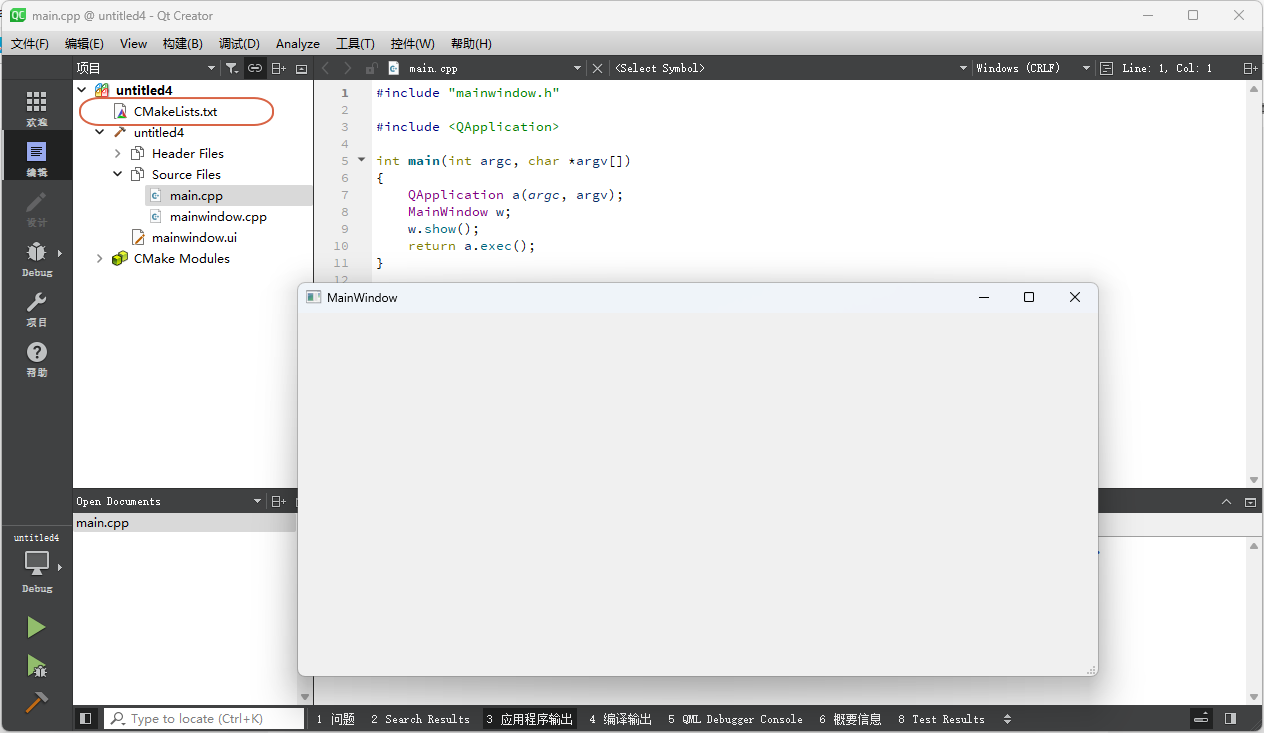
Qt 入门实战教程(目录) 为何要写这篇文章 目前CMake作为C/C工程的构建方式在开源社区已经成为主流。 企业中也是能用CMake的尽量在用。 Windows 环境下的VC工程都是能不用就不用。 但是,这个过程是非常缓慢的,所以࿰…...
2.k8s账号密码登录设置
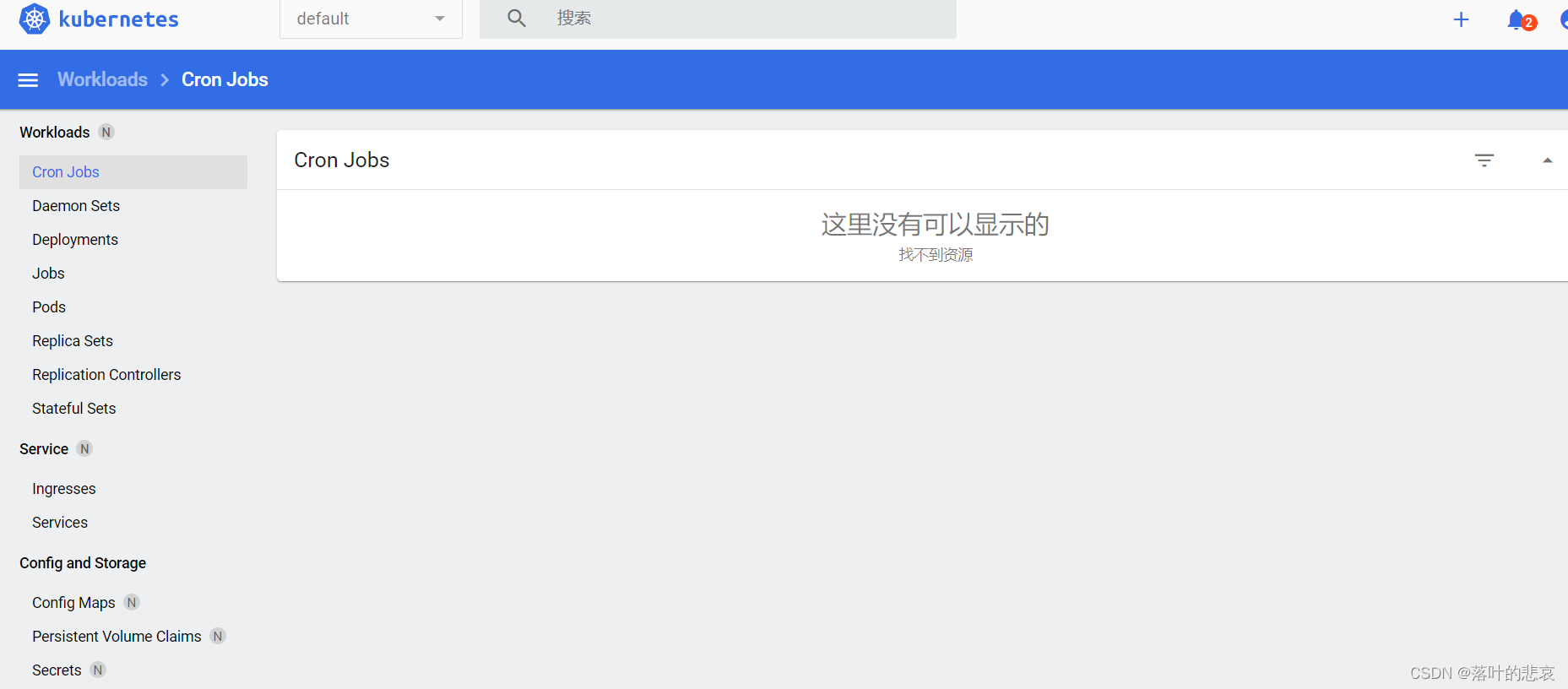
文章目录 前言一、启动脚本二、配置账号密码登录2.1.在hadoop1,也就是集群主节点2.2.在master的apiserver启动文件添加一行配置2.3 绑定admin2.4 修改recommended.yaml2.5 重启dashboard2.6 登录dashboard 总结 前言 前面已经搭建好了k8s集群,现在设置下…...

【代表团坐车】Python 实现-附ChatGPT解析
1.题目 某组织举行会议,来了多个代表团同时到达,接待处只有一辆汽车,可以同时接待多个代表团,为了提高车辆利用率,请帮接待员计算可以坐满车的接待方案,输出方案数量。 约束: 1.一个团只能上一辆车,并且代表团人数(代表团数量小于30,每人代表团人数小于30)小于汽车容量…...

PyTorch实战:手写Sobel与Laplace算子实现图像边缘检测
1. 图像边缘检测与卷积算子基础 第一次接触图像处理时,我对"边缘检测"这个概念特别好奇。简单来说,边缘就是图像中物体轮廓或纹理变化明显的区域。想象一下用铅笔描边一幅画的过程,边缘检测就是让计算机自动完成这个工作。 为什么边…...

RK3568网关实战:如何用1TOPS NPU在智慧农业里做实时虫情监测?
RK3568网关实战:如何用1TOPS NPU在智慧农业里做实时虫情监测? 在智慧农业的浪潮中,虫害监测一直是困扰农户的核心问题。传统依赖人工巡查的方式不仅效率低下,还容易错过最佳防治时机。而基于RK3568边缘计算网关的实时虫情监测方案…...

Diablo Edit2:终极暗黑破坏神2存档编辑器完全指南
Diablo Edit2:终极暗黑破坏神2存档编辑器完全指南 【免费下载链接】diablo_edit Diablo II Character editor. 项目地址: https://gitcode.com/gh_mirrors/di/diablo_edit 你是否厌倦了在暗黑破坏神2中反复刷装备的枯燥过程?是否因为技能点分配失…...

Sunshine自托管游戏串流服务器:构建高性能私人云游戏平台的完整指南
Sunshine自托管游戏串流服务器:构建高性能私人云游戏平台的完整指南 【免费下载链接】Sunshine Self-hosted game stream host for Moonlight. 项目地址: https://gitcode.com/GitHub_Trending/su/Sunshine Sunshine是一款功能强大的自托管游戏串流服务器&am…...
)
告别手动抢红包!用Kotlin写一个Android微信红包监听助手(附完整代码)
用Kotlin构建Android微信红包自动化工具:从原理到避坑指南 春节聚会时,你是否曾因低头抢红包错过亲友的精彩对话?工作群里的手气红包总在分神时一闪而过?作为一名Android开发者,其实可以用技术优雅解决这些烦恼。本文…...

连接池失效——高并发下的隐形杀手
连接池失效——高并发下的隐形杀手 系统挂了 现象:用户打开页面,一直转圈。5分钟后,页面报错。 错误日志: org.apache.tomcat.jdbc.pool.PoolExhaustedException: [http-nio-8080-exec-72] Timeout: Pool empty. Unable to fetch …...

提供充电桩运维托管的服务商:选择标准与服务内容解析
一、引言据中国电动汽车充电基础设施促进联盟(EVCIPA)数据显示,截截至2026年2月底,我国电动汽车充电基础设施(枪)总数达到2101.0万个,同比增长47.8%。其中,公共充电设施(…...
)
别再手动输数据了!手把手教你用Fluent的Profile功能导入实验数据(附CSV文件模板)
别再手动输数据了!手把手教你用Fluent的Profile功能导入实验数据(附CSV文件模板) 在计算流体力学(CFD)分析中,准确导入实验数据或第三方软件的计算结果作为边界条件,往往是确保仿真可靠性的关键…...

抓到涨停后的“财富密码”:次日去留的5条离场铁律
引言:涨停之后的焦虑与狂欢在股市里,最让散户热血沸腾也最揪心的时刻,莫过于抓到一个涨停板。那种追涨进去、刚吃两三个点就封死涨停的兴奋感,往往转瞬就会被对次日的恐惧所取代。很多投资者在涨停次日常常陷入纠结:走…...

Agent = Model + Harness
Agent Model Harness从通用视角拆解 Agent 的完整工程链路。本文不做框架对比,只回答一个问题:Agent 真正的工程在哪里? 读完应当能在自己的 Agent 实现里识别出对应的层次,并判断哪一段最值得优化。图 0 全链路总览࿱…...