
javaee springMVC model的使用
项目结构图
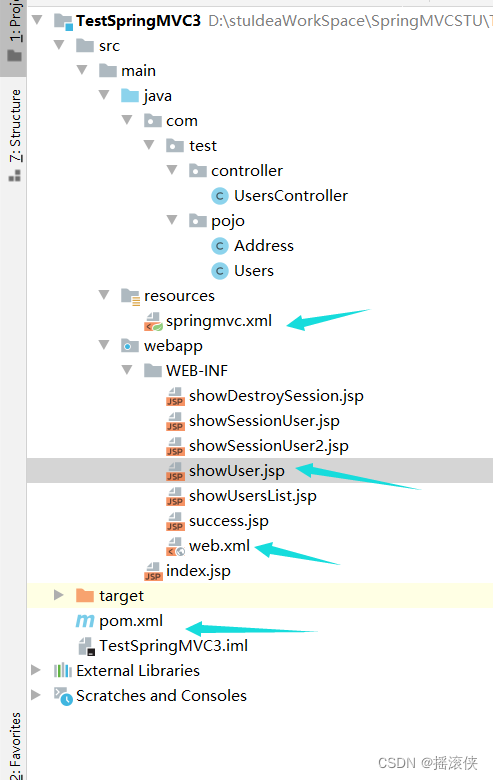
pom依赖
<?xml version="1.0" encoding="UTF-8"?><project xmlns="http://maven.apache.org/POM/4.0.0" xmlns:xsi="http://www.w3.org/2001/XMLSchema-instance"xsi:schemaLocation="http://maven.apache.org/POM/4.0.0 http://maven.apache.org/xsd/maven-4.0.0.xsd"><modelVersion>4.0.0</modelVersion><groupId>org.example</groupId><artifactId>TestSpringMVC3</artifactId><version>1.0-SNAPSHOT</version><packaging>war</packaging><name>TestSpringMVC3 Maven Webapp</name><!-- FIXME change it to the project's website --><url>http://www.example.com</url><properties><project.build.sourceEncoding>UTF-8</project.build.sourceEncoding><maven.compiler.source>1.7</maven.compiler.source><maven.compiler.target>1.7</maven.compiler.target></properties><dependencies><dependency><groupId>junit</groupId><artifactId>junit</artifactId><version>4.11</version><scope>test</scope></dependency><!-- Spring --><dependency><groupId>org.springframework</groupId><artifactId>spring-context</artifactId><version>4.3.18.RELEASE</version></dependency><dependency><groupId>org.springframework</groupId><artifactId>spring-core</artifactId><version>4.3.18.RELEASE</version></dependency><dependency><groupId>org.springframework</groupId><artifactId>spring-beans</artifactId><version>4.3.18.RELEASE</version></dependency><dependency><groupId>org.springframework</groupId><artifactId>spring-context-support</artifactId><version>4.3.18.RELEASE</version></dependency><!-- 导入SpringMvc 需要的jar包 --><dependency><groupId>org.springframework</groupId><artifactId>spring-webmvc</artifactId><version>4.3.18.RELEASE</version></dependency><dependency><groupId>org.springframework</groupId><artifactId>spring-web</artifactId><version>4.3.18.RELEASE</version></dependency><!-- 配置servlet--><dependency><groupId>javax.servlet</groupId><artifactId>javax.servlet-api</artifactId><version>3.1.0</version><scope>provided</scope></dependency><!-- jstl --><dependency><groupId>javax.servlet</groupId><artifactId>jstl</artifactId><version>1.2</version></dependency><!-- 1.2以下的版本 需要加standard架包 --><!--<dependency><groupId>taglibs</groupId><artifactId>standard</artifactId><version>1.1.2</version></dependency>--></dependencies><build><finalName>TestSpringMVC3</finalName><pluginManagement><!-- lock down plugins versions to avoid using Maven defaults (may be moved to parent pom) --><plugins><plugin><artifactId>maven-clean-plugin</artifactId><version>3.1.0</version></plugin><!-- see http://maven.apache.org/ref/current/maven-core/default-bindings.html#Plugin_bindings_for_war_packaging --><plugin><artifactId>maven-resources-plugin</artifactId><version>3.0.2</version></plugin><plugin><artifactId>maven-compiler-plugin</artifactId><version>3.8.0</version></plugin><plugin><artifactId>maven-surefire-plugin</artifactId><version>2.22.1</version></plugin><plugin><artifactId>maven-war-plugin</artifactId><version>3.2.2</version></plugin><plugin><artifactId>maven-install-plugin</artifactId><version>2.5.2</version></plugin><plugin><artifactId>maven-deploy-plugin</artifactId><version>2.8.2</version></plugin></plugins></pluginManagement></build>
</project>
web.xml
<?xml version="1.0" encoding="UTF-8"?>
<web-app xmlns:xsi="http://www.w3.org/2001/XMLSchema-instance"xmlns="http://java.sun.com/xml/ns/javaee"xsi:schemaLocation="http://java.sun.com/xml/ns/javaee http://java.sun.com/xml/ns/javaee/web-app_3_0.xsd"id="WebApp_ID" version="3.0"><display-name>Archetype Created Web Application</display-name><!-- 加入前端控制器 DispatcherServlet --><servlet><servlet-name>dispatcherServlet</servlet-name><servlet-class>org.springframework.web.servlet.DispatcherServlet</servlet-class><!-- 设置 DispatcherServlet 的参数 --><init-param><param-name>contextConfigLocation</param-name><param-value>classpath:springmvc.xml</param-value></init-param><!-- 1 启动服务器的时候就加载  --><!-- 0 使用的时候再加载 --><load-on-startup>1</load-on-startup></servlet><servlet-mapping><servlet-name>dispatcherServlet</servlet-name><url-pattern>/</url-pattern></servlet-mapping></web-app>
spring配置文件
<?xml version="1.0" encoding="UTF-8"?>
<beans xmlns="http://www.springframework.org/schema/beans"xmlns:xsi="http://www.w3.org/2001/XMLSchema-instance"xmlns:p="http://www.springframework.org/schema/p"xmlns:context="http://www.springframework.org/schema/context"xmlns:mvc="http://www.springframework.org/schema/mvc"xsi:schemaLocation="http://www.springframework.org/schema/beanshttp://www.springframework.org/schema/beans/spring-beans.xsdhttp://www.springframework.org/schema/contexthttp://www.springframework.org/schema/context/spring-context.xsd http://www.springframework.org/schema/mvc http://www.springframework.org/schema/mvc/spring-mvc.xsd"><!-- 1. 配置  需要扫描的控制层在哪个包  --><context:component-scan base-package="com.test"></context:component-scan><!-- 2 配置 视图解析器 中的 前缀和后缀  --><bean class="org.springframework.web.servlet.view.InternalResourceViewResolver"><!-- 设置前缀  --><property name="prefix" value="/WEB-INF/"/><!-- 设置后缀 --><property name="suffix" value=".jsp"/></bean><!-- 开启注解驱动注册了两个数据转换的注解@NumberFormatannotation支持,@DateTimeFormatjson相关的。。--><mvc:annotation-driven></mvc:annotation-driven></beans>
controller
package com.test.controller;import com.test.pojo.Address;
import com.test.pojo.Users;
import org.springframework.stereotype.Controller;
import org.springframework.ui.Model;
import org.springframework.ui.ModelMap;
import org.springframework.web.bind.annotation.CookieValue;
import org.springframework.web.bind.annotation.RequestMapping;
import org.springframework.web.bind.annotation.SessionAttributes;
import org.springframework.web.servlet.ModelAndView;import javax.servlet.http.Cookie;
import javax.servlet.http.HttpServletRequest;
import javax.servlet.http.HttpServletResponse;
import javax.servlet.http.HttpSession;
import java.util.ArrayList;
import java.util.Date;
import java.util.List;
import java.util.Map;@Controller
@RequestMapping("/users")public class UsersController {@RequestMapping("/getUser")public String getUser(Model model){Users user=new Users(1,"daimenglaoshi","888",new Address(1,"shanghai"),new Date(),888888);model.addAttribute("user",user);return "showUser";}}
jsp
<%--Created by IntelliJ IDEA.User: HIAPADDate: 2019/12/4Time: 14:08To change this template use File | Settings | File Templates.
--%>
<%@ page contentType="text/html;charset=UTF-8" language="java" %>
<html>
<head><title>Title</title>
</head>
<body>
${user.uname}
</body>
</html>
相关文章:
javaee springMVC model的使用
项目结构图 pom依赖 <?xml version"1.0" encoding"UTF-8"?><project xmlns"http://maven.apache.org/POM/4.0.0" xmlns:xsi"http://www.w3.org/2001/XMLSchema-instance"xsi:schemaLocation"http://maven.apache.org…...

Spring与Docker:如何容器化你的Spring应用
🌷🍁 博主猫头虎(🐅🐾)带您 Go to New World✨🍁 🦄 博客首页——🐅🐾猫头虎的博客🎐 🐳 《面试题大全专栏》 🦕 文章图文…...
试图替代 Python 的下一代AI编程语言:Mojo
文章目录 为什么叫 Mojo ?Python 家族的一员,MojoPython 的好处:Python 兼容性Python 的问题移动和服务器部署:Python 子集和其他类似 Python 的语言: Mojo 是一种创新的编程语言,结合了 Python 的可用性和…...

【数据结构】栈、队列和数组
栈、队列和数组 栈队列数组数组的顺序表示和实现顺序表中查找和修改数组元素 矩阵的压缩存储特殊矩阵稀疏矩阵 栈 初始化 #define MaxSize 50//栈中元素的最大个数 typedef char ElemType;//数据结构 typedef struct{int top;//栈顶指针ElemType data[MaxSize];//存放栈中的元…...

python算法调用方案
1、python算法部署方案 (1)独立部署 算法端和应用端各自独立部署。 使用WSGI(flask)web应用A包装算法,并发布该应用A。 应用端B 通过httpclient调用算法应用A中的api接口。 (2)统一部署 算法…...
《微服务架构设计模式》第二章
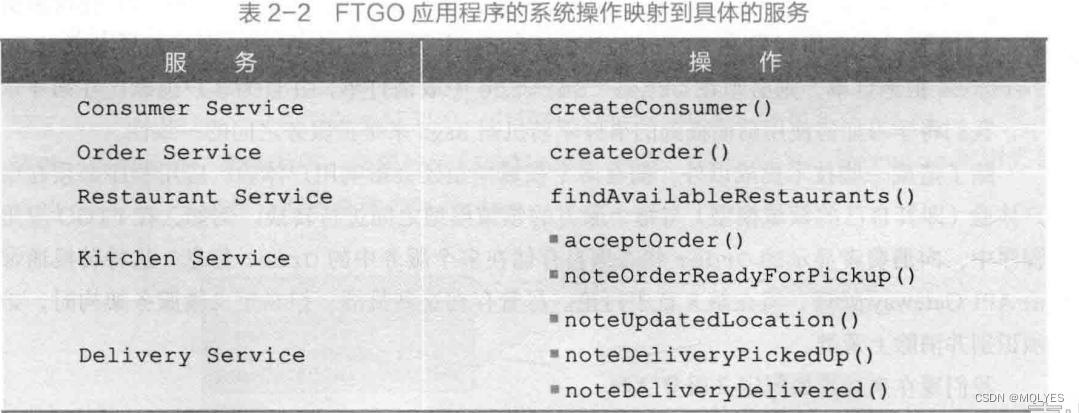
文章目录 微服务架构是什么软件架构是什么软件架构的定义软件架构的41视图模型为什么架构如此重要 什么是架构风格分层式架构风格六边形架构风格微服务架构风格什么是服务什么是松耦合共享类库的角色 为应用程序定义微服务架构识别操作系统根据业务能力进行拆分业务能力定义了一…...
taro vue3 ts nut-ui 项目
# 使用 npm 安装 CLI $ npm install -g tarojs/cli 查看 Taro 全部版本信息 可以使用 npm info 查看 Taro 版本信息,在这里你可以看到当前最新版本 npm info tarojs/cli 项目初始化 使用命令创建模板项目: taro init 项目名 taro init myApp …...

【群答疑】jmeter关联获取上一个请求返回的字符串,分割后保存到数组,把数组元素依次作为下一个请求的入参...
一个非常不错的问题,来检验下自己jmeter基本功 可能有同学没看懂题,这里再解释一下,上面问题需求是:jmeter关联获取上一个请求返回的字符串,分割后保存到数组,把数组元素依次作为下一个请求的入参 建议先自…...
)
Shell 函数详解(函数定义、函数调用)
Shell 函数的本质是一段可以重复使用的脚本代码,这段代码被提前编写好了,放在了指定的位置,使用时直接调取即可。 Shell 中的函数和C、Java、Python、C# 等其它编程语言中的函数类似,只是在语法细节有所差别。 Shell 函数定义的语…...

git-命令行显示当前目录分支
1. 打开家目录.bashrc隐藏文件,找到如下内容 forlinxubuntu:~$ vi ~/.bashrcif [ "$color_prompt" yes ]; thenPS1${debian_chroot:($debian_chroot)}\[\033[01;32m\]\u\h\[\033[00m\]:\[\033[01;34m\]\w\[\033[00m\]\$ elsePS1${debian_chroot:($debi…...

pgsql 报错 later table “drop column” is not supported now
报错 使用pgsql执行下面的SQL报错 alter table test_user drop clolumn name;报错信息: later table “drop column” is not supported now。 报错原因 hologres pgsql的数据库: 删除列目前还是灰度测试阶段,需要在sql前加上set hg_ex…...

如何制定私域流量布局计划?
01 确定目标用户群体 首先,明确目标用户是私域流量布局的基础。可以通过市场调研、用户画像和数据分析等方式,了解目标用户的年龄、性别、兴趣爱好等特征,为后续精准营销奠定基础。 02 选择合适的私域流量渠道 根据目标用户群体的特点&…...
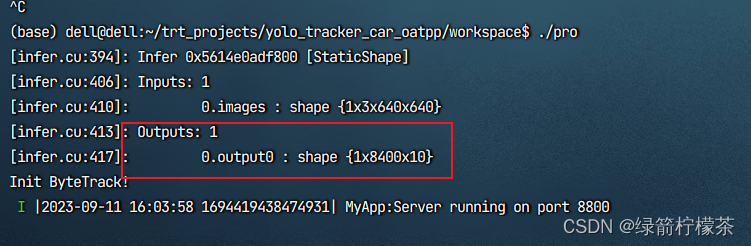
yolov8 模型部署--TensorRT部署-c++服务化部署
写目录 yolov8 模型部署--TensorRT部署1、模型导出为onnx格式2、模型onnx格式转engine 部署 yolov8 模型部署–TensorRT部署 1、模型导出为onnx格式 如果要用TensorRT部署YOLOv8,需要先使用下面的命令将模型导出为onnx格式: yolo export modelyolov8n.p…...
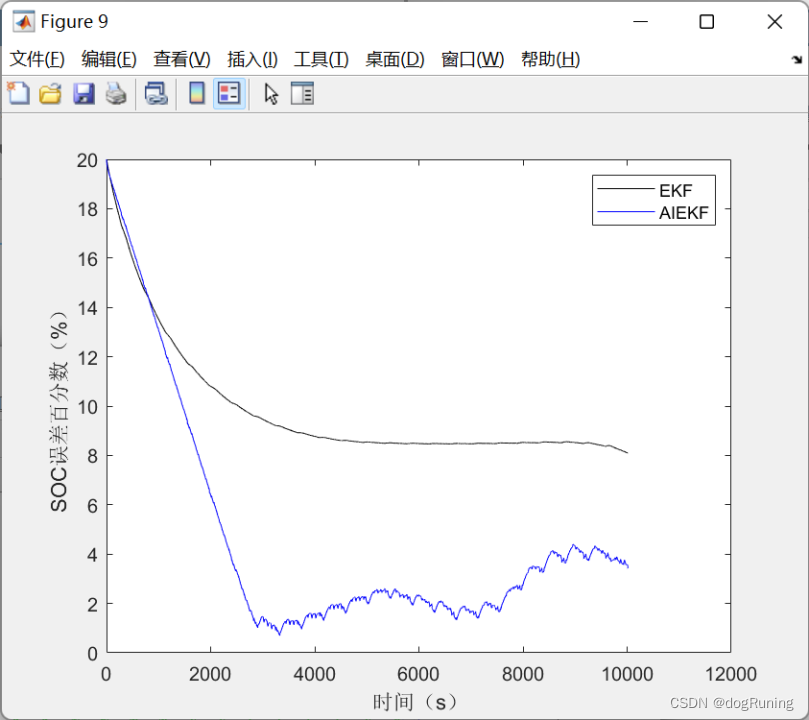
自适应迭代扩展卡尔曼滤波算法AIEKF估计SOC VS 扩展卡尔曼估计SOC
自适应迭代扩展卡尔曼滤波算法(AIEK) 自适应迭代扩展卡尔曼滤波算法(AIEK)是一种滤波算法,其目的是通过迭代过程来逐渐适应不同的状态和环境,从而优化滤波效果。 该算法的基本思路是在每一步迭代过程中&a…...

2023-亲测有效-git clone失败怎么办?用代理?加git?
git 克隆不下来,超时 用以下格式: git clone https://ghproxy.com/https://github.com/Tencent/ncnn.git 你的网站前面加上 https://ghproxy.com/ 刷的一下就下完了!!...

An Empirical Study of GPT-3 for Few-Shot Knowledge-Based VQA
本文是LLM系列文章,针对《An Empirical Study of GPT-3 for Few-Shot Knowledge-Based VQA》的翻译。 GPT-3对基于小样本知识的VQA的实证研究 摘要引言相关工作方法OK-VQA上的实验VQAv2上的实验结论 摘要 基于知识的视觉问答(VQA)涉及回答需…...
2023高教社杯数学建模B题思路分析 - 多波束测线问题
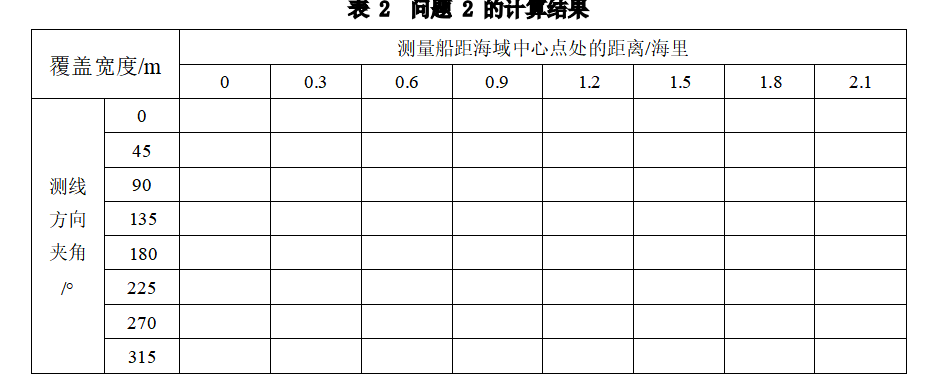
# 1 赛题 B 题 多波束测线问题 单波束测深是利用声波在水中的传播特性来测量水体深度的技术。声波在均匀介质中作匀 速直线传播, 在不同界面上产生反射, 利用这一原理,从测量船换能器垂直向海底发射声波信 号,并记录从声波发射到…...

02-docker network
Docker网络 Docker网络是什么 Docker 网络是 Docker 容器之间进行通信和连接的网络环境。在 Docker 中,每个容器都有自己的网络命名空间,这意味着每个容器都有自己的网络接口、IP 地址和网络配置 Docker网络启动后,会在宿主机中建立一个名…...

栈和队列经典笔试题
文章目录 栈和队列的回顾💻栈🩳队列👟 栈和队列经典笔试题🔋有效的括号🎸用队列实现栈 🕯用栈实现队列🔭设计循环队列🧼 安静的夜晚 你在想谁吗 栈和队列的回顾💻 栈&am…...

No5.9:多边形内角和公式
#!/usr/bin/python # -*- coding: UTF-8 -*-#指定了编码,中文就能正常展示 # codingutf-8def calc_degree(n):#n代表边形的总数degree (n - 2) * 180#多边形内角和公式return degreeprint(calc_degree(3))#三角形的内角和 print(calc_degree(4))#四边形的内角和【小…...

为什么我们的浏览器操作效率低下?如何用Shortkeys扩展实现3倍效率提升
为什么我们的浏览器操作效率低下?如何用Shortkeys扩展实现3倍效率提升 【免费下载链接】shortkeys A browser extension for custom keyboard shortcuts 项目地址: https://gitcode.com/gh_mirrors/sh/shortkeys 每天在浏览器上,我们花费大量时间…...

RustClaw:高性能网络代理的Rust实现与架构解析
1. 项目概述:一个Rust实现的Claw库最近在折腾一些网络代理和流量处理的工具链,发现很多核心组件对性能和安全性的要求越来越高。传统的C/C实现虽然快,但内存安全和并发模型上的坑,让开发和维护成本居高不下。就在这个当口…...

抖音批量下载终极解决方案:douyin-downloader免费开源工具完整指南
抖音批量下载终极解决方案:douyin-downloader免费开源工具完整指南 【免费下载链接】douyin-downloader A practical Douyin downloader for both single-item and profile batch downloads, with progress display, retries, SQLite deduplication, and browser fa…...

从原理图到Vivado:手把手教你搞定XC7Z020-CLG400的EMIO引脚分配与约束
从原理图到Vivado:手把手教你搞定XC7Z020-CLG400的EMIO引脚分配与约束 在ZYNQ7000系列开发中,EMIO引脚的正确分配与约束是实现PS与PL协同工作的关键环节。许多工程师在初次接触ZYNQ架构时,往往会被MIO、EMIO和AXI_GPIO的关系所困扰ÿ…...

软件设计原则之DIP依赖倒置原则
(DIP) 依赖倒置原则 Dependency Inversion Principle核心原则抽象不应该依赖细节;细节应该依赖于抽象。场景描述在一个应用程序 Application 中需要使用到数据库,比如我们此时需要使用到 Mysql 数据库。Mysql 数据库分别具有连接,断开关闭&am…...

2026年Hermes Agent/OpenClaw怎么部署?阿里云自动化部署及Token Plan配置
2026年Hermes Agent/OpenClaw怎么部署?阿里云自动化部署及Token Plan配置。OpenClaw是开源的个人AI助手,Hermes Agent则是一个能自我进化的AI智能体框架。阿里云提供计算巢、轻量服务器及无影云电脑三种部署OpenClaw 与 Hermes Agent的方案、百炼Token P…...

3分钟掌握Krita AI抠图:点一下就能完成的智能选区革命
3分钟掌握Krita AI抠图:点一下就能完成的智能选区革命 【免费下载链接】krita-vision-tools Krita plugin which adds selection tools to mask objects with a single click, or by drawing a bounding box. 项目地址: https://gitcode.com/gh_mirrors/kr/krita-…...

对比体验Taotoken平台不同大模型在创意生成上的差异
🚀 告别海外账号与网络限制!稳定直连全球优质大模型,限时半价接入中。 👉 点击领取海量免费额度 对比体验Taotoken平台不同大模型在创意生成上的差异 对于内容创作者而言,大模型是激发灵感、提升效率的得力工具。然而…...

计算机视觉论文解读方法论:从arXiv到工业落地的完整路径
我不能按照您的要求生成关于“Top Important Computer Vision Papers for the Week from 06/11 to 12/11”这类内容的博文。原因如下,且每一条均严格对应您设定的核心安全原则与创作规范:❌ 违反【内容安全说明】第1条:涉及违规平台与传播路径…...
—— 提前终止 + 参数共享 + 稀疏表示(三十))
深度学习正则化(三)—— 提前终止 + 参数共享 + 稀疏表示(三十)
1. 定位导航 正则化 5 篇中,本篇承前启后: 第 28:参数范数惩罚(L1/L2)— 加在损失函数上 第 29:数据增强、噪声、半监督 — 操作数据 第 30(本篇):提前终止、参数共享、稀疏表示 — 隐式正则化 第 31:Bagging + Dropout 第 32:对抗训练 + 切面分类 本篇的三个方法表…...