
基于Spring Boot的IT技术交流和分享平台的设计与实现
目录
前言
一、技术栈
二、系统功能介绍
三、核心代码
1、登录模块
2、文件上传模块
3、代码封装
前言
我国科学技术的不断发展,计算机的应用日渐成熟,其强大的功能给人们留下深刻的印象,它已经应用到了人类社会的各个层次的领域,发挥着重要的不可替换的作用。信息管理作为计算机应用的一部分,使用计算机进行管理,具有非常明显的优点,利用网络的优势特开发了本基于Spring Boot的IT技术交流和分享平台。
本IT技术交流和分享平台是基于Spring Boot框架,采用Java技术,MYSQL数据库进行开发的。系统具有灵活的一体化设计方式,圆满完成了整个系统的界面设计。本系统实现了用户功能模块和管理员功能模块两大部分,通过该系统用户可以快速进行IT技术交流和分享,管理员可登录系统后台对系统进行全面管理,确保系统正常稳定的运行。系统功能齐全,符合用户IT技术交流和分享的需求。
本文主要首先介绍了课题背景、设计原则和研究内容,系统采用的相关技术及开发平台,接着对本基于Spring Boot的IT技术交流和分享平台进行系统需求分析和设计,包括系统的功能模块,数据库的设计,系统结构以及系统界面设计等,最后对进行系统测试,完成本篇论文。
一、技术栈
末尾获取源码
SpringBoot+Vue+JS+ jQuery+Ajax...
二、系统功能介绍
用户在系统前台可查看系统信息.

没有账号的用户可进行注册操作.
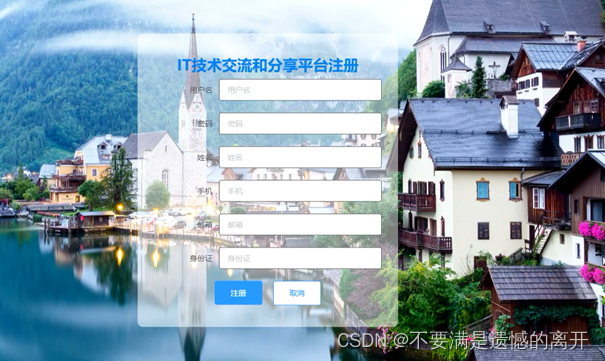
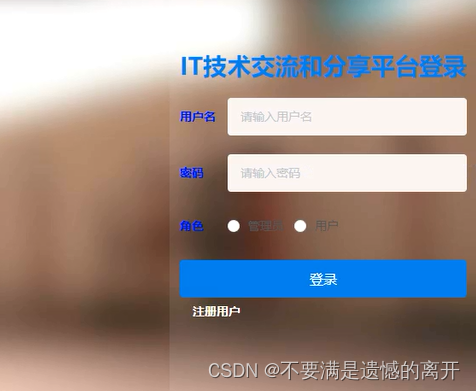
用户在登录界面可输入登录信息,点击登录按钮进行登录系统.

用户可选择笔记分享查看详情信息

用户登录后可添加笔记分享信息
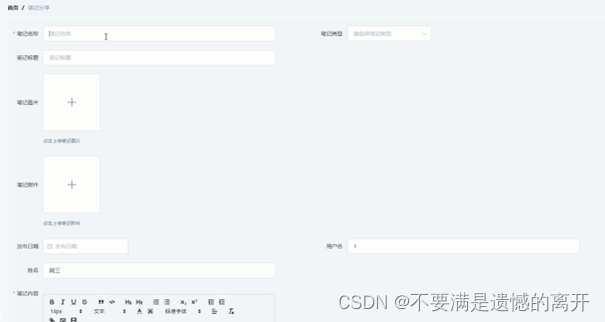
用户可管理个人已有收藏笔记分享信息

管理员要想进入系统后台对系统进行管理操作
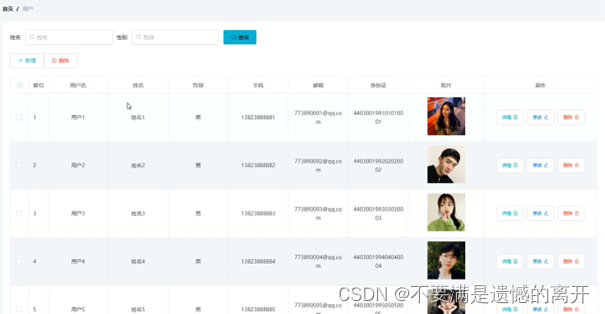
管理员在用户管理急么可查看所有用户信息,并可对其进行编辑和删除操作
管理员可增删改查笔记类型信息

管理员可增删改查笔记分享信息

三、核心代码
1、登录模块
package com.controller;import java.util.Arrays;
import java.util.Calendar;
import java.util.Date;
import java.util.Map;import javax.servlet.http.HttpServletRequest;import org.springframework.beans.factory.annotation.Autowired;
import org.springframework.stereotype.Controller;
import org.springframework.web.bind.annotation.GetMapping;
import org.springframework.web.bind.annotation.PathVariable;
import org.springframework.web.bind.annotation.PostMapping;
import org.springframework.web.bind.annotation.RequestBody;
import org.springframework.web.bind.annotation.RequestMapping;
import org.springframework.web.bind.annotation.RequestParam;
import org.springframework.web.bind.annotation.ResponseBody;
import org.springframework.web.bind.annotation.RestController;import com.annotation.IgnoreAuth;
import com.baomidou.mybatisplus.mapper.EntityWrapper;
import com.entity.TokenEntity;
import com.entity.UserEntity;
import com.service.TokenService;
import com.service.UserService;
import com.utils.CommonUtil;
import com.utils.MD5Util;
import com.utils.MPUtil;
import com.utils.PageUtils;
import com.utils.R;
import com.utils.ValidatorUtils;/*** 登录相关*/
@RequestMapping("users")
@RestController
public class UserController{@Autowiredprivate UserService userService;@Autowiredprivate TokenService tokenService;/*** 登录*/@IgnoreAuth@PostMapping(value = "/login")public R login(String username, String password, String captcha, HttpServletRequest request) {UserEntity user = userService.selectOne(new EntityWrapper<UserEntity>().eq("username", username));if(user==null || !user.getPassword().equals(password)) {return R.error("账号或密码不正确");}String token = tokenService.generateToken(user.getId(),username, "users", user.getRole());return R.ok().put("token", token);}/*** 注册*/@IgnoreAuth@PostMapping(value = "/register")public R register(@RequestBody UserEntity user){
//    	ValidatorUtils.validateEntity(user);if(userService.selectOne(new EntityWrapper<UserEntity>().eq("username", user.getUsername())) !=null) {return R.error("用户已存在");}userService.insert(user);return R.ok();}/*** 退出*/@GetMapping(value = "logout")public R logout(HttpServletRequest request) {request.getSession().invalidate();return R.ok("退出成功");}/*** 密码重置*/@IgnoreAuth@RequestMapping(value = "/resetPass")public R resetPass(String username, HttpServletRequest request){UserEntity user = userService.selectOne(new EntityWrapper<UserEntity>().eq("username", username));if(user==null) {return R.error("账号不存在");}user.setPassword("123456");userService.update(user,null);return R.ok("密码已重置为:123456");}/*** 列表*/@RequestMapping("/page")public R page(@RequestParam Map<String, Object> params,UserEntity user){EntityWrapper<UserEntity> ew = new EntityWrapper<UserEntity>();PageUtils page = userService.queryPage(params, MPUtil.sort(MPUtil.between(MPUtil.allLike(ew, user), params), params));return R.ok().put("data", page);}/*** 列表*/@RequestMapping("/list")public R list( UserEntity user){EntityWrapper<UserEntity> ew = new EntityWrapper<UserEntity>();ew.allEq(MPUtil.allEQMapPre( user, "user")); return R.ok().put("data", userService.selectListView(ew));}/*** 信息*/@RequestMapping("/info/{id}")public R info(@PathVariable("id") String id){UserEntity user = userService.selectById(id);return R.ok().put("data", user);}/*** 获取用户的session用户信息*/@RequestMapping("/session")public R getCurrUser(HttpServletRequest request){Long id = (Long)request.getSession().getAttribute("userId");UserEntity user = userService.selectById(id);return R.ok().put("data", user);}/*** 保存*/@PostMapping("/save")public R save(@RequestBody UserEntity user){
//    	ValidatorUtils.validateEntity(user);if(userService.selectOne(new EntityWrapper<UserEntity>().eq("username", user.getUsername())) !=null) {return R.error("用户已存在");}userService.insert(user);return R.ok();}/*** 修改*/@RequestMapping("/update")public R update(@RequestBody UserEntity user){
//        ValidatorUtils.validateEntity(user);userService.updateById(user);//全部更新return R.ok();}/*** 删除*/@RequestMapping("/delete")public R delete(@RequestBody Long[] ids){userService.deleteBatchIds(Arrays.asList(ids));return R.ok();}
}
2、文件上传模块
package com.controller;import java.io.File;
import java.io.FileNotFoundException;
import java.io.IOException;
import java.util.Arrays;
import java.util.Date;
import java.util.HashMap;
import java.util.List;
import java.util.Map;
import java.util.Random;
import java.util.UUID;import org.apache.commons.io.FileUtils;
import org.apache.commons.lang3.StringUtils;
import org.springframework.beans.factory.annotation.Autowired;
import org.springframework.http.HttpHeaders;
import org.springframework.http.HttpStatus;
import org.springframework.http.MediaType;
import org.springframework.http.ResponseEntity;
import org.springframework.util.ResourceUtils;
import org.springframework.web.bind.annotation.PathVariable;
import org.springframework.web.bind.annotation.RequestBody;
import org.springframework.web.bind.annotation.RequestMapping;
import org.springframework.web.bind.annotation.RequestParam;
import org.springframework.web.bind.annotation.RestController;
import org.springframework.web.multipart.MultipartFile;import com.annotation.IgnoreAuth;
import com.baomidou.mybatisplus.mapper.EntityWrapper;
import com.entity.ConfigEntity;
import com.entity.EIException;
import com.service.ConfigService;
import com.utils.R;/*** 上传文件映射表*/
@RestController
@RequestMapping("file")
@SuppressWarnings({"unchecked","rawtypes"})
public class FileController{@Autowiredprivate ConfigService configService;/*** 上传文件*/@RequestMapping("/upload")public R upload(@RequestParam("file") MultipartFile file,String type) throws Exception {if (file.isEmpty()) {throw new EIException("上传文件不能为空");}String fileExt = file.getOriginalFilename().substring(file.getOriginalFilename().lastIndexOf(".")+1);File path = new File(ResourceUtils.getURL("classpath:static").getPath());if(!path.exists()) {path = new File("");}File upload = new File(path.getAbsolutePath(),"/upload/");if(!upload.exists()) {upload.mkdirs();}String fileName = new Date().getTime()+"."+fileExt;File dest = new File(upload.getAbsolutePath()+"/"+fileName);file.transferTo(dest);FileUtils.copyFile(dest, new File("C:\\Users\\Desktop\\jiadian\\springbootl7own\\src\\main\\resources\\static\\upload"+"/"+fileName));if(StringUtils.isNotBlank(type) && type.equals("1")) {ConfigEntity configEntity = configService.selectOne(new EntityWrapper<ConfigEntity>().eq("name", "faceFile"));if(configEntity==null) {configEntity = new ConfigEntity();configEntity.setName("faceFile");configEntity.setValue(fileName);} else {configEntity.setValue(fileName);}configService.insertOrUpdate(configEntity);}return R.ok().put("file", fileName);}/*** 下载文件*/@IgnoreAuth@RequestMapping("/download")public ResponseEntity<byte[]> download(@RequestParam String fileName) {try {File path = new File(ResourceUtils.getURL("classpath:static").getPath());if(!path.exists()) {path = new File("");}File upload = new File(path.getAbsolutePath(),"/upload/");if(!upload.exists()) {upload.mkdirs();}File file = new File(upload.getAbsolutePath()+"/"+fileName);if(file.exists()){/*if(!fileService.canRead(file, SessionManager.getSessionUser())){getResponse().sendError(403);}*/HttpHeaders headers = new HttpHeaders();headers.setContentType(MediaType.APPLICATION_OCTET_STREAM);    headers.setContentDispositionFormData("attachment", fileName);    return new ResponseEntity<byte[]>(FileUtils.readFileToByteArray(file),headers, HttpStatus.CREATED);}} catch (IOException e) {e.printStackTrace();}return new ResponseEntity<byte[]>(HttpStatus.INTERNAL_SERVER_ERROR);}}
3、代码封装
package com.utils;import java.util.HashMap;
import java.util.Map;/*** 返回数据*/
public class R extends HashMap<String, Object> {private static final long serialVersionUID = 1L;public R() {put("code", 0);}public static R error() {return error(500, "未知异常,请联系管理员");}public static R error(String msg) {return error(500, msg);}public static R error(int code, String msg) {R r = new R();r.put("code", code);r.put("msg", msg);return r;}public static R ok(String msg) {R r = new R();r.put("msg", msg);return r;}public static R ok(Map<String, Object> map) {R r = new R();r.putAll(map);return r;}public static R ok() {return new R();}public R put(String key, Object value) {super.put(key, value);return this;}
}
相关文章:
基于Spring Boot的IT技术交流和分享平台的设计与实现
目录 前言 一、技术栈 二、系统功能介绍 三、核心代码 1、登录模块 2、文件上传模块 3、代码封装 前言 我国科学技术的不断发展,计算机的应用日渐成熟,其强大的功能给人们留下深刻的印象,它已经应用到了人类社会的各个层次的领域&#x…...

智算引领·创新未来 | 2023紫光展锐泛物联网终端生态论坛成功举办
9月21日,紫光展锐在深圳成功举办2023泛物联网终端生态论坛。论坛以“智算引领创新未来”为主题,吸引了来自信通院、中国联通、中国移动、中国电信、金融机构、终端厂商、模组厂商等行业各领域三百多位精英翘楚汇聚一堂,探讨在连接、算力驱动下…...

网络安全技术指南 103.91.209.X
网络安全技术指的是一系列防范网络攻击、保护网络安全的技术手段和措施,旨在保护网络的机密性、完整性和可用性。常见的网络安全技术包括: 防火墙:用于监控网络流量,过滤掉可能包括恶意软件的数据包。 加密技术:用于保…...
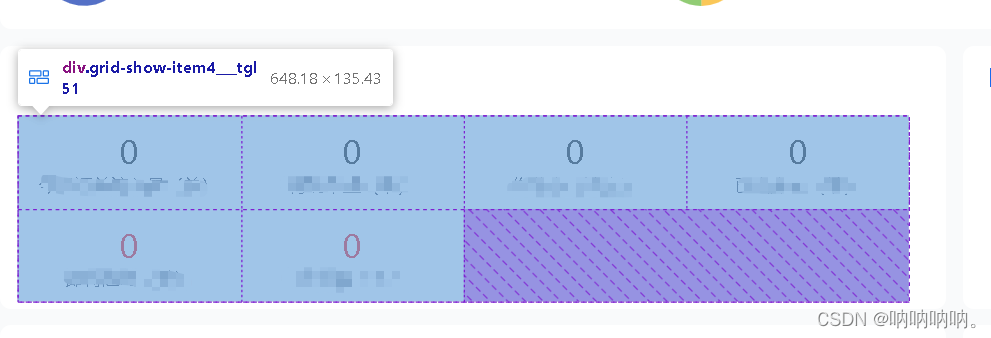
用flex实现grid布局
1. css代码 .flexColumn(columns, gutterSize) {display: flex;flex-flow: row wrap;margin: calc(gutterSize / -2);> div {flex: 0 0 calc(100% / columns);padding: calc(gutterSize / 2);box-sizing: border-box;} }2.用法 .grid-show-item3 {width: 100%;display: fl…...

东郊到家app小程序公众号软件开发预约同城服务系统成品源码部署
东郊到家app系统开发,东郊到家软件定制开发,东郊到家小程序APP开发,东郊到家源码定制开发,东郊到家模式系统定制开发 一、上门软件介绍 1、上门app是一家以推拿为主项,个人定制型的o2o平台,上门app平台提…...

kotlin的集合使用maxBy函数报NoSuchElementException
kotlin设定函数 fun test() {listOf<Int>().maxBy { it } } 查看java实现...
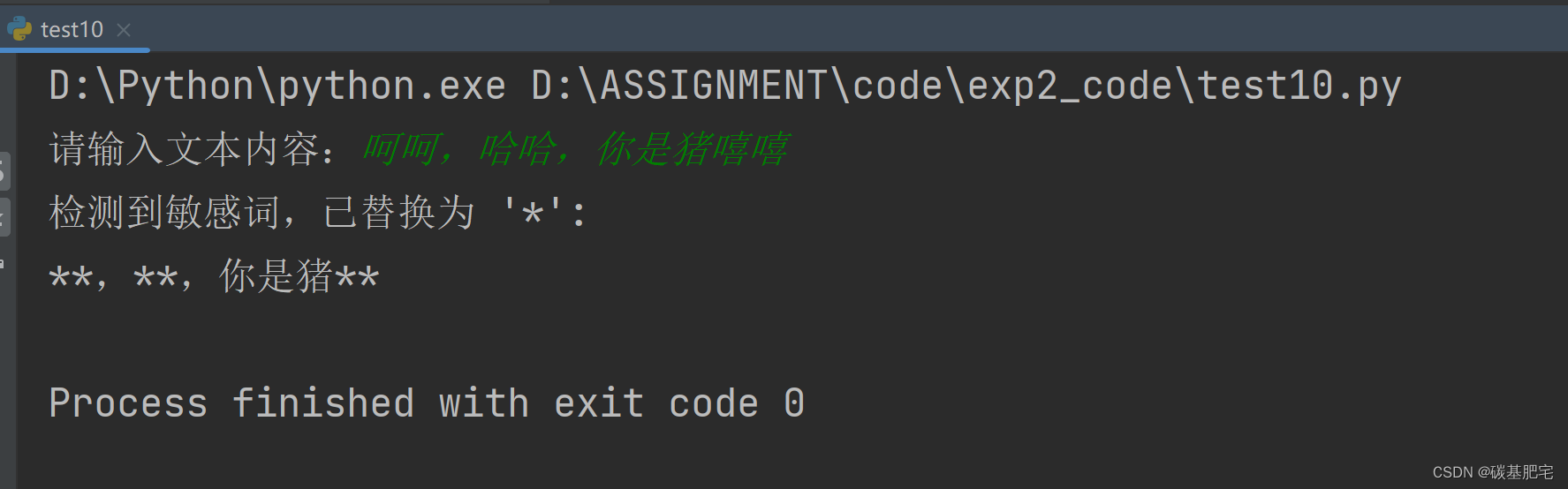
Python开发与应用实验2 | Python基础语法应用
*本文是博主对学校专业课Python各种实验的再整理与详解,除了代码部分和解析部分,一些题目还增加了拓展部分(⭐)。拓展部分不是实验报告中原有的内容,而是博主本人自己的补充,以方便大家额外学习、参考。 &a…...
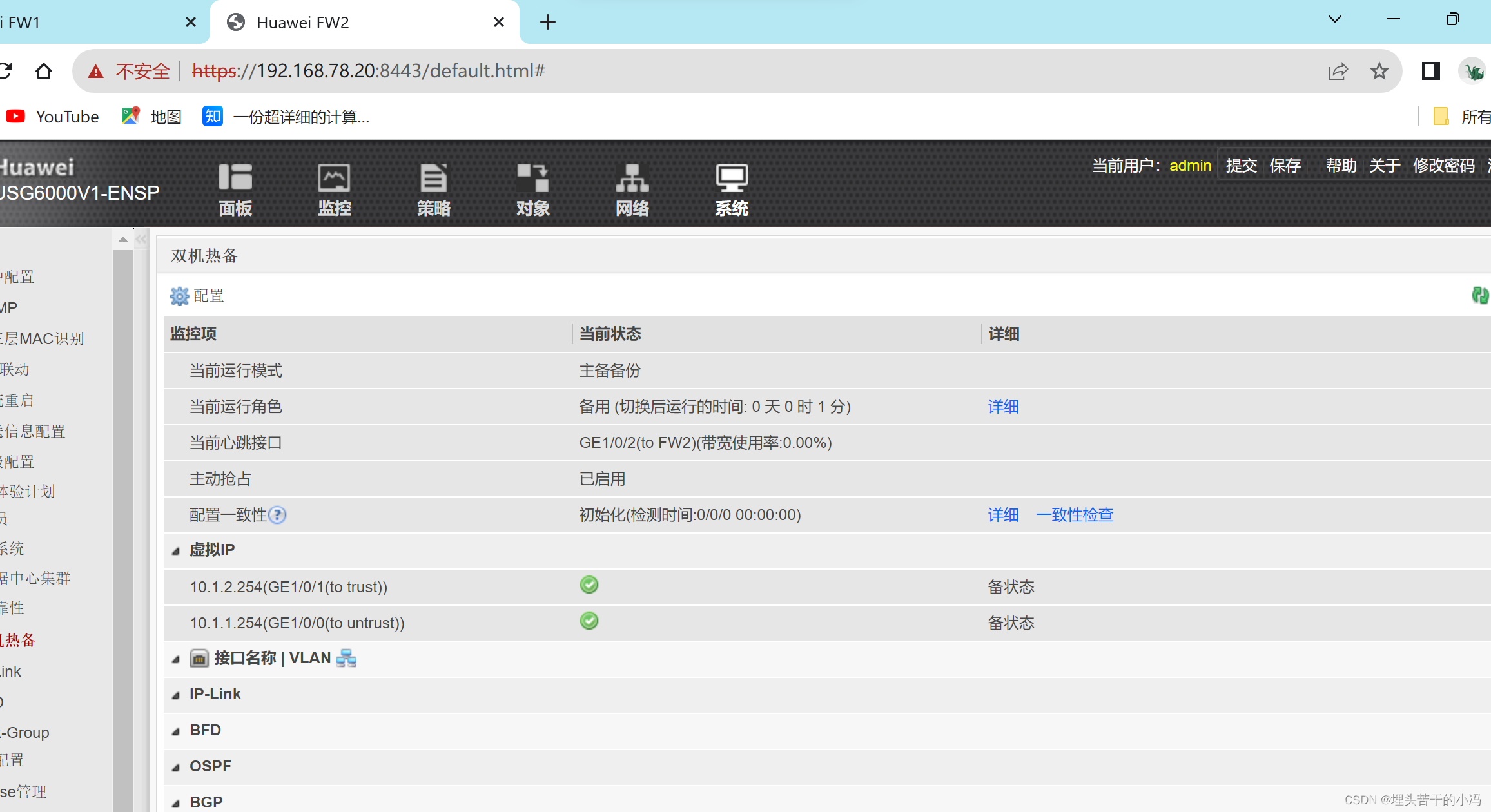
网络安全--防火墙旁挂部署方式和高可靠性技术
目录 一、防火墙 二、防火墙旁挂部署方式 使用策略路由实现 第一步、IP地址配置 第二步、配置路由 第三步、在防火墙上做策略 第四步、在R2上使用策略路由引流 三、防火墙高可靠性技术--HRP 拓扑图 第一步、配置SW1、SW2、FW1、FW2 第二步、进入防火墙Web页面进行配…...
)
c++最小步数模型(魔板)
C 最小步数模型通常用于寻找两个点之间的最短路径或最少步数。以下是一个基本的 C 最小步数模型的示例代码: #include<bits/stdc.h> using namespace std; const int N 1e5 5; vector<int> G[N]; int d[N]; bool vis[N];void bfs(int s) {queue<i…...

【每日一题Day337】LC460LFU 缓存 | 双链表+哈希表
LFU 缓存【LC460】 请你为 最不经常使用(LFU)缓存算法设计并实现数据结构。 实现 LFUCache 类: LFUCache(int capacity) - 用数据结构的容量 capacity 初始化对象int get(int key) - 如果键 key 存在于缓存中,则获取键的值&#x…...
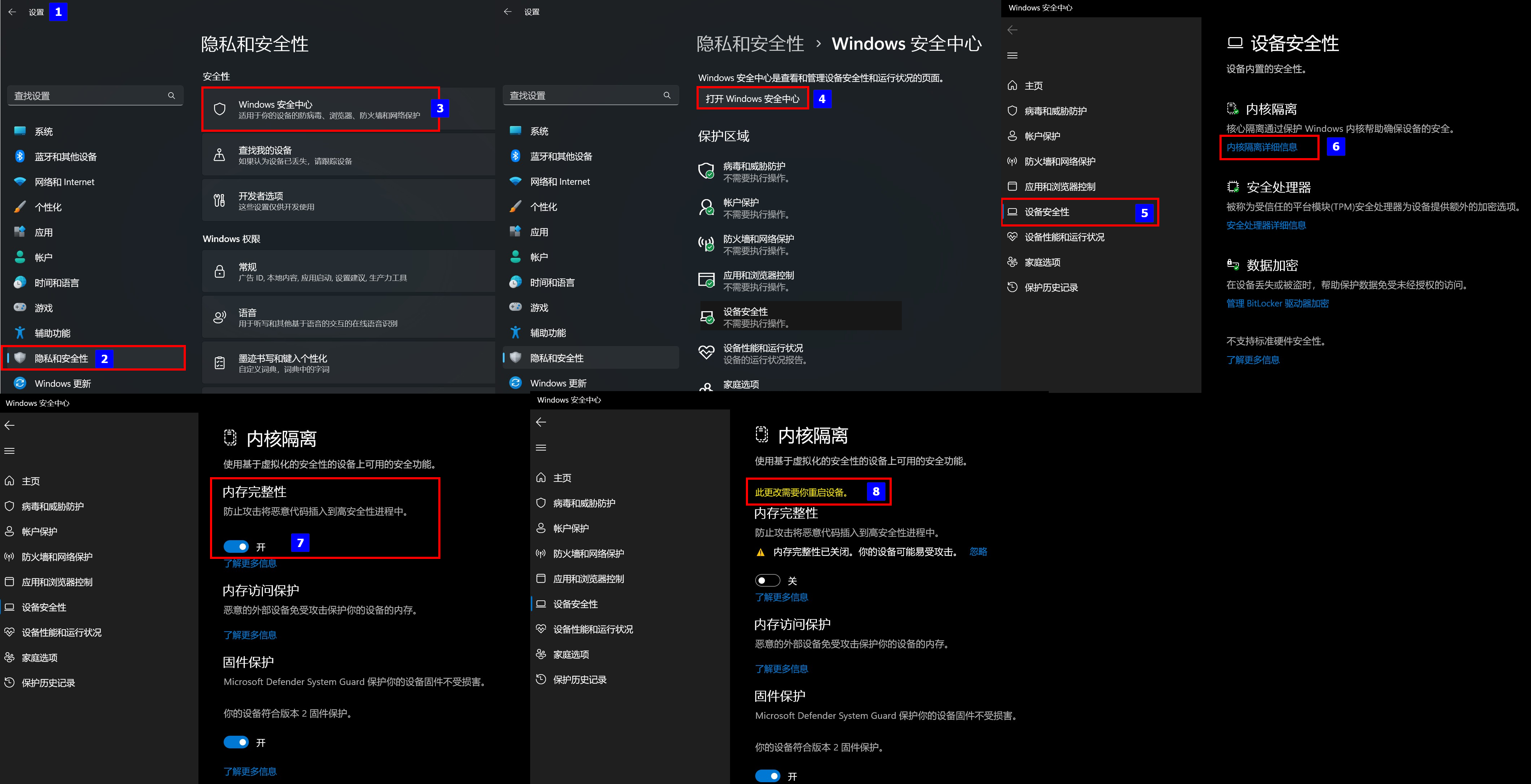
解决老版本Oracle VirtualBox 此应用无法在此设备上运行问题
问题现象 安装华为eNSP模拟器的时候,对应的Oracle VirtualBox-5.2.26安装的时候提示兼容性问题,无法进行安装,具体版本信息如下: 软件对应版本备注Windows 11专业工作站版22H222621eNSP1.3.00.100 V100R003C00 SPC100终结正式版…...

法规标准-UN R48标准解读
UN R48是做什么的? UN R48全名为关于安装照明和灯光标志装置的车辆认证的统一规定,主要描述了对各类灯具的布置要求及性能要求;其中涉及自动驾驶功能的仅有6.25章节【后方碰撞预警信号】,因此本文仅对此章节进行解读 功能要求 …...

自动化和数字化在 ERP 系统中意味着什么?
毋庸置疑,ERP系统的作用是让工作更轻松。它可以集成流程,提供关键分析,确保你的企业高效运营。这些信息可以提高你的运营效率,并将有限的人力资本重新部署到更有效、更重要的需求上。事实上,自动化和数字化是ERP系统最…...

python nvidia 显卡信息 格式数据
python nvidia 显卡信息 格式数据. def get_gpu_memory():result subprocess.check_output([nvidia-smi, --query-gpupci.bus_id,memory.used,memory.total,memory.free, --formatcsv])# 返回 GPU 的显存使用情况,单位为 Minfo []for t in csv.DictReader(result…...
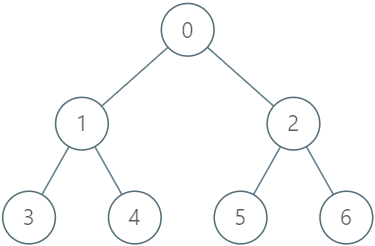
LeetCode每日一题:1993. 树上的操作(2023.9.23 C++)
目录 1993. 树上的操作 题目描述: 实现代码与解析: 模拟 dfs 原理思路: 1993. 树上的操作 题目描述: 给你一棵 n 个节点的树,编号从 0 到 n - 1 ,以父节点数组 parent 的形式给出,其中 p…...

绿色计算产业发展白皮书:2022年OceanBase助力蚂蚁集团减排4392tCO2e
9 月 15 日,绿色计算产业联盟在 2023 世界计算大会期间重磅发布了《绿色计算产业发展白皮书(2023 版)》。蚂蚁集团作为指导单位之一,联合参与了该白皮书的撰写。 白皮书中指出,落实“双碳”战略,绿色计算已…...
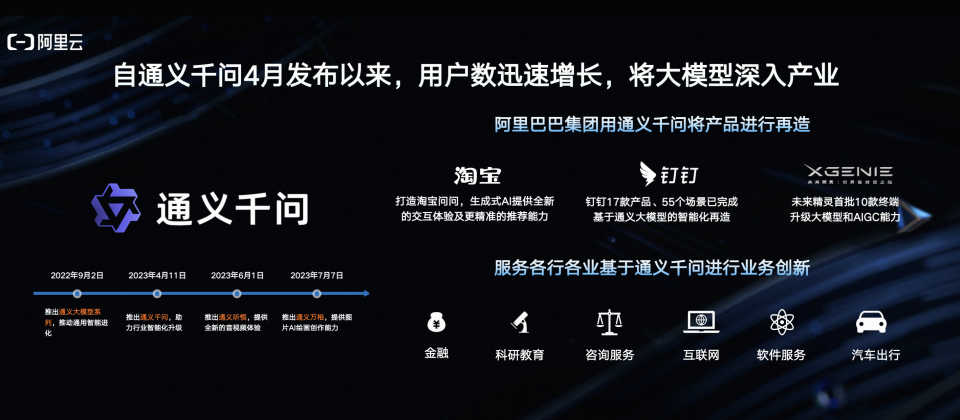
阿里云通义千问14B模型开源!性能超越Llama2等同等尺寸模型
9月25日,阿里云开源通义千问140亿参数模型Qwen-14B及其对话模型Qwen-14B-Chat,免费可商用。Qwen-14B在多个权威评测中超越同等规模模型,部分指标甚至接近Llama2-70B。阿里云此前开源了70亿参数模型Qwen-7B等,一个多月下载量破100万࿰…...
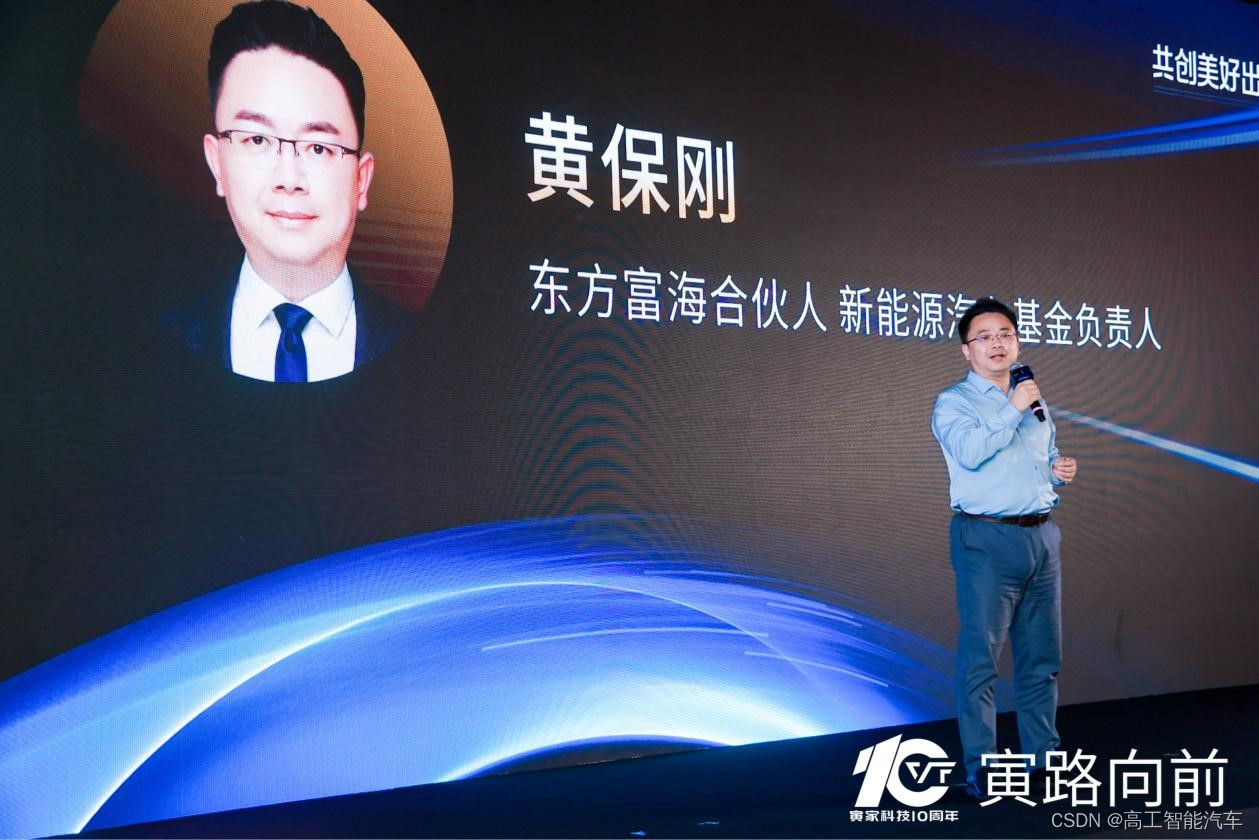
两横一纵 | 寅家科技发布10年新征程战略
2023年9月22日,寅家科技“寅路向前”10年新征程战略发布会在上海举办,来自投资领域的东方富海、深创投、高新投等知名投资机构,一汽大众、一汽红旗、奇瑞汽车等主机厂,国家新能源汽车技术创新中心、梅克朗、芯驰科技、思特威等合作…...
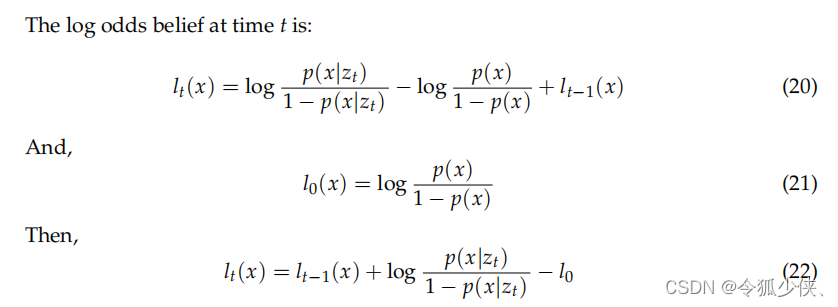
二值贝叶斯滤波计算4d毫米波聚类目标动静属性
机器人学中有些问题是二值问题,对于这种二值问题的概率评估问题可以用二值贝叶斯滤波器binary Bayes filter来解决的。比如机器人前方有一个门,机器人想判断这个门是开是关。这个二值状态是固定的,并不会随着测量数据变量的改变而改变。就像门…...

【刷题笔记9.25】LeetCode:相交链表
LeetCode:相交链表 一、题目描述 给你两个单链表的头节点 headA 和 headB ,请你找出并返回两个单链表相交的起始节点。如果两个链表不存在相交节点,返回 null 。 二、分析及代码 方法一:使用哈希Set集合 (注意…...

告别Claude Code封号烦恼用Taotoken稳定获取Anthropic模型服务
🚀 告别海外账号与网络限制!稳定直连全球优质大模型,限时半价接入中。 👉 点击领取海量免费额度 告别Claude Code封号烦恼用Taotoken稳定获取Anthropic模型服务 对于依赖Claude Code进行编程辅助的开发者来说,访问的稳…...

全面掌握AMD Ryzen硬件调试:SMUDebugTool完整使用指南
全面掌握AMD Ryzen硬件调试:SMUDebugTool完整使用指南 【免费下载链接】SMUDebugTool A dedicated tool to help write/read various parameters of Ryzen-based systems, such as manual overclock, SMU, PCI, CPUID, MSR and Power Table. 项目地址: https://gi…...
)
别再全局搜组件了!React Developer Tools 这 3 招定位文件(含 VSCode 自动跳转配置)
高效定位React组件的3种专业工作流 在接手一个大型React项目时,最令人头疼的莫过于在数百个文件中寻找特定组件的定义和使用位置。传统的全局搜索方法不仅效率低下,还容易因命名冲突导致误判。本文将分享三种经过实战验证的高效定位方法,特别…...

3步掌握B站视频转文字神器:为什么你需要这个效率提升10倍的工具
3步掌握B站视频转文字神器:为什么你需要这个效率提升10倍的工具 【免费下载链接】bili2text Bilibili视频转文字,一步到位,输入链接即可使用 项目地址: https://gitcode.com/gh_mirrors/bi/bili2text 你是否曾经为了整理一个精彩的B站…...

从逻辑实体到系统工程:深度解析软件危机的起源与软件工程的三大支柱
从逻辑实体到系统工程:深度解析软件危机的起源与软件工程的三大支柱 摘要:在计算机科学的浩瀚星图中,“软件”无疑是那颗最耀眼却也最神秘的恒星。它无形无质,却驱动着现代文明的运转。然而,正是这种“无形”ÿ…...

3步完成网易云音乐ncm文件转换:免费高效的Windows图形界面工具完整指南
3步完成网易云音乐ncm文件转换:免费高效的Windows图形界面工具完整指南 【免费下载链接】ncmdumpGUI C#版本网易云音乐ncm文件格式转换,Windows图形界面版本 项目地址: https://gitcode.com/gh_mirrors/nc/ncmdumpGUI 你是否曾经从网易云音乐下载…...

5步掌握VideoDownloadHelper:让网页视频下载变得简单高效
5步掌握VideoDownloadHelper:让网页视频下载变得简单高效 【免费下载链接】VideoDownloadHelper Chrome Extension to Help Download Video for Some Video Sites. 项目地址: https://gitcode.com/gh_mirrors/vi/VideoDownloadHelper 你是否曾经遇到过这样的…...

领域负载物技能制作器技能domain-payload-generator
Domain Payload Generator(SkillHub) Domain Payload Generator(ClawHub) name: domain-payload-generator author: 王教成 Wang Jiaocheng (波动几何) description: 领域负载物技能制作器(Meta-Skill)——…...

langchain4j笔记-09
RAG 1. easy rag Test void test03() {// 1. 创建模型// 2. 加载文档List<Document> documents ClassPathDocumentLoader.loadDocuments("excel");//List<Document> documents FileSystemDocumentLoader.loadDocuments("/home/langchain4j/docum…...

Webpack优化实战:从配置到性能调优
Webpack优化实战:从配置到性能调优 大家好,我是蔓蔓。在大厂工作时,我负责过多个大型项目的Webpack配置和优化。今天我来和大家分享Webpack优化的实战技巧。 基础优化 合理配置mode // webpack.config.js module.exports {mode: process.env…...