
flutter dio 请求封装(空安全)
一、添加依赖
dio: ^5.3.2
二、请求封装
class HttpHelper {static Dio? mDio;static BaseOptions? options;static HttpHelper? httpHelper;CancelToken cancelToken = CancelToken();static const String GET = 'get';static const String POST = 'post';static const String PUT = 'put';static const String PATCH = 'patch';static const String DELETE = 'delete';static HttpHelper? get instance => getInstance();static Dio? get dio => getDio();static HttpHelper? getInstance() {httpHelper ??= HttpHelper();return httpHelper;}static Dio? getDio() {final token = GetStorage().read('token');final Map<String, dynamic> headerMap = {};if (token != null) {headerMap.putIfAbsent("Authorization", () => "Bearer $token");}options = BaseOptions(//请求基地址,可以包含子路径baseUrl: Api.BASE_URL,//连接服务器超时时间,单位是毫秒.connectTimeout: const Duration(seconds: 10),//2.x中为接收数据的最长时限receiveTimeout: const Duration(seconds: 5),//Http请求头.headers: headerMap,// 请求的Content-Type,默认值是"application/json; charset=utf-8".//   /// 如果您想以"application/x-www-form-urlencoded"格式编码请求数据,//   /// 可以设置此选项为 `Headers.formUrlEncodedContentType`,  这样[Dio]//   /// 就会自动编码请求体.contentType: Headers.jsonContentType,/// [responseType] 表示期望以那种格式(方式)接受响应数据。/// 目前 [ResponseType] 接受三种类型 `JSON`, `STREAM`, `PLAIN`.////// 默认值是 `JSON`, 当响应头中content-type为"application/json"时,dio 会自动将响应内容转化为json对象。/// 如果想以二进制方式接受响应数据,如下载一个二进制文件,那么可以使用 `STREAM`.////// 如果想以文本(字符串)格式接收响应数据,请使用 `PLAIN`.responseType: ResponseType.json,);mDio = Dio(options);mDio?.interceptors.add(interceptorsWrapper());mDio?.httpClientAdapter = IOHttpClientAdapter(createHttpClient: () {final client = HttpClient();// Config the client.client.findProxy = (uri) {// Forward all request to proxy "localhost:8888".// Be aware, the proxy should went through you running device,// not the host platform.return 'PROXY 192.168.0.191:8089';};// You can also create a new HttpClient for Dio instead of returning,// but a client must being returned here.return client;},);return mDio;}static InterceptorsWrapper interceptorsWrapper() {return InterceptorsWrapper(onRequest: (options, handler) {// Do something before request is sentreturn handler.next(options); //continue// 如果你想完成请求并返回一些自定义数据,你可以resolve一个Response对象 `handler.resolve(response)`。// 这样请求将会被终止,上层then会被调用,then中返回的数据将是你的自定义response.//// 如果你想终止请求并触发一个错误,你可以返回一个`DioError`对象,如`handler.reject(error)`,// 这样请求将被中止并触发异常,上层catchError会被调用。}, onResponse: (response, handler) {// Do something with response datareturn handler.next(response); // continue// 如果你想终止请求并触发一个错误,你可以 reject 一个`DioError`对象,如`handler.reject(error)`,// 这样请求将被中止并触发异常,上层catchError会被调用。}, onError: (DioError e, handler) {// Do something with response errorif (e.response != null) {if (e.response?.statusCode == 401) {ToastMsg.show("当前登录已过期,请重新登录!");Future.delayed(const Duration(milliseconds: 1000), () {Get.offAllNamed(AppRoutes.LOGIN);});} else if (e.response?.statusCode == 403) {ToastMsg.show("暂无权限访问,请联系管理员!");} else {ToastMsg.show("系统内部异常!");}}return handler.next(e); //continue// 如果你想完成请求并返回一些自定义数据,可以resolve 一个`Response`,如`handler.resolve(response)`。// 这样请求将会被终止,上层then会被调用,then中返回的数据将是你的自定义response.});}///Get请求Future<BaseRes<T>> getHttp<T>(String url, parameters,{loading = true}) async {return await getResponse<T>(url, method: GET, parameters: parameters,loading:loading);}Future<BaseRes<T>> postHttp<T>(String url, parameters,{loading = true}) async {///定义请求参数parameters = parameters ?? <String, dynamic>{};return await getResponse<T>(url, method: POST, parameters: parameters,loading:loading);}Future<BaseRes<T>> putHttp<T>(String url, parameters,{loading = true}) async {///定义请求参数parameters = parameters ?? <String, dynamic>{};return await getResponse<T>(url, method: PUT, parameters: parameters,loading:loading);}Future<BaseRes<T>> deleteHttp<T>(String url, parameters,{loading = true}) async {///定义请求参数parameters = parameters ?? <String, dynamic>{};return await getResponse<T>(url, method: DELETE, parameters: parameters,loading:loading);}/** 下载文件*/downloadFile(urlPath, savePath, onReceiveProgress) async {Response? response;try {response = await dio?.download(urlPath, savePath,onReceiveProgress: onReceiveProgress);} on DioError catch (e) {formatError(e);}return response?.data;}Future<BaseRes<T>> getResponse<T>(String url, {required String method,parameters,loading,}) async {//这里指定response自动转成map,不指定的话有可能是String类型Response<Map<String, dynamic>>? response;if(loading) {ToastMsg.showLoading();}switch (method) {case GET:response = await dio?.get(url,queryParameters: parameters ?? <String, dynamic>{});break;case PUT:response = await dio?.put(url,queryParameters: parameters ?? <String, dynamic>{});break;case DELETE:response = await dio?.delete(url,queryParameters: parameters ?? <String, dynamic>{});break;default:response =await dio?.post(url, data: parameters ?? <String, dynamic>{});break;}if(loading) {ToastMsg.cancelLoading();}//200代表网络请求成功if (response?.statusCode == 200) {/// 将后台的data字段转成自己想要的数据/数据集,code根据后端实际返回进行判断访问结果BaseRes<T> bean = BaseRes.fromJson(response?.data);return bean;} else if (response?.statusCode == 401) {ToastMsg.show("当前登录已过期,请重新登录!");Future.delayed(const Duration(milliseconds: 1000), () {Get.offAllNamed(AppRoutes.LOGIN);});} else if (response?.statusCode == 403) {ToastMsg.show("暂无权限访问,请联系管理员!");} else {ToastMsg.show("系统内部异常!");}throw Exception('${response?.statusCode}+${response?.statusMessage}');}void formatError(DioError e) {print(e.message);}/** 取消请求* 同一个cancel token 可以用于多个请求,当一个cancel token取消时,所有使用该cancel token的请求都会被取消。*/void cancelRequests(CancelToken token) {token.cancel("cancelled");}
}
三、封装统一返回类
()
class BaseRes<T>{BaseRes(this.msg, this.code, this.data);late String msg;late int code;late T data;BaseRes.fromJson(Map<String, dynamic>? json) {if (json?['data'] != null && json?['data'] != 'null') {data = JsonConvert.fromJsonAsT<T>(json?['data']) as T;}msg = json?['msg'];code = json?['code'];}Map<String, dynamic> toJson() {final Map<String, dynamic> data = <String, dynamic>{};if (this.data != null) {data['data'] = this.data;}data['code'] = this.code;data['msg'] = this.msg;return data;}
}
四、使用
// Entity类使用的是JsonToDartBeanAction生成BaseRes<UserInfoEntity>? res = await HttpHelper.instance?.getHttp(Api.GET_USER_INGO,null,loading: false);if(res?.code == 200 && res?.data != null) {state.userInfo = res!.data.obs;}
相关文章:
)
flutter dio 请求封装(空安全)
一、添加依赖 dio: ^5.3.2二、请求封装 class HttpHelper {static Dio? mDio;static BaseOptions? options;static HttpHelper? httpHelper;CancelToken cancelToken CancelToken();static const String GET get;static const String POST post;static const String PU…...

chatgpt GPT-4V是如何实现语音对话的
直接上代码 https://chat.openai.com/voice/get_token 1. 请求内容 Request:GET /voice/get_token HTTP/1.1 Host: ios.chat.openai.com Content-Type: application/json Cookie: _puiduser***Fc9T:16962276****Nph%2Fb**SU%3D; _uasid"Z0FBQUF***nPT0"; __cf_bmBUg…...

C++项目-求水仙花数
求水仙花数 #include <iostream> using namespace std;int main() {int n 100;do {int a 0;int b 0;int c 0;a n % 10; //个位b n / 10 % 10; //十位c n / 100 % 10; //百位if (a * a * a b * b * b c * c * c n) {cout << n << endl;}…...

从零开始基于LLM构建智能问答系统的方案
本文首发于博客 LLM应用开发实践 一个完整的基于 LLM 的端到端问答系统,应该包括用户输入检验、问题分流、模型响应、回答质量评估、Prompt 迭代、回归测试,随着规模增大,围绕 Prompt 的版本管理、自动化测试和安全防护也是重要的话题&#x…...
Android---Synchronized 和 ReentrantLock
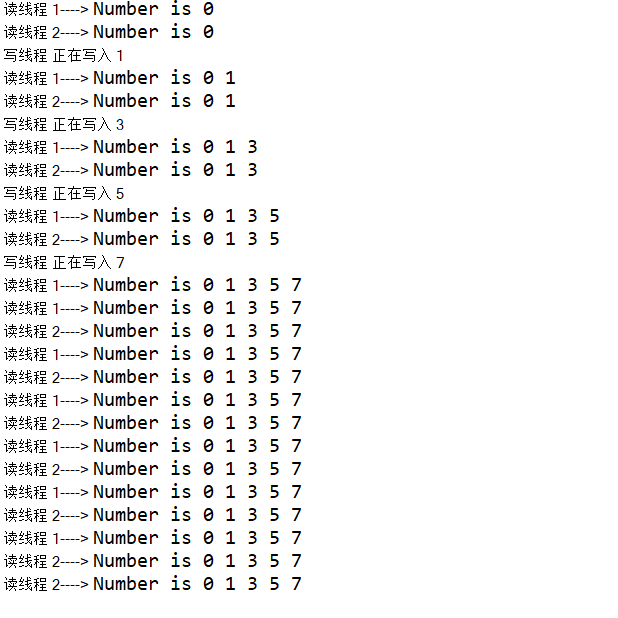
Synchronized 基本使用 1. 修饰实例方法 public class SynchronizedMethods{private int sum 0;public synchronized void calculate(){sum sum 1;} } 这种情况下的锁对象是当前实例对象,因此只有同一个实例对象调用此方法才会产生互斥效果;不同的…...

【解题报告】牛客挑战赛70 maimai
题目链接 这个挑战赛的 F F F是我出的,最后 zhoukangyang 爆标了。。。orzorz 记所有有颜色的边的属性集合 S S S 。 首先在外层容斥,枚举 S ∈ [ 0 , 2 w ) S\in [0,2^w) S∈[0,2w),计算被覆盖的的边中不包含 S S S 中属性,…...

算启新程 智享未来 | 紫光展锐携手中国移动共创数智未来
10月11日-13日,2023年中国移动全球合作伙伴大会在广州举行,此次大会以“算启新程 智享未来”为主题,与合作伙伴一起共商融合创新,共创数智未来。作为中国移动每年规模最大、最具影响力的盛会,吸引了数百家世界500强企业…...
thinkphp5.1 获取缓存cache(‘cache_name‘)特别慢,php 7.0 unserialize 特别慢
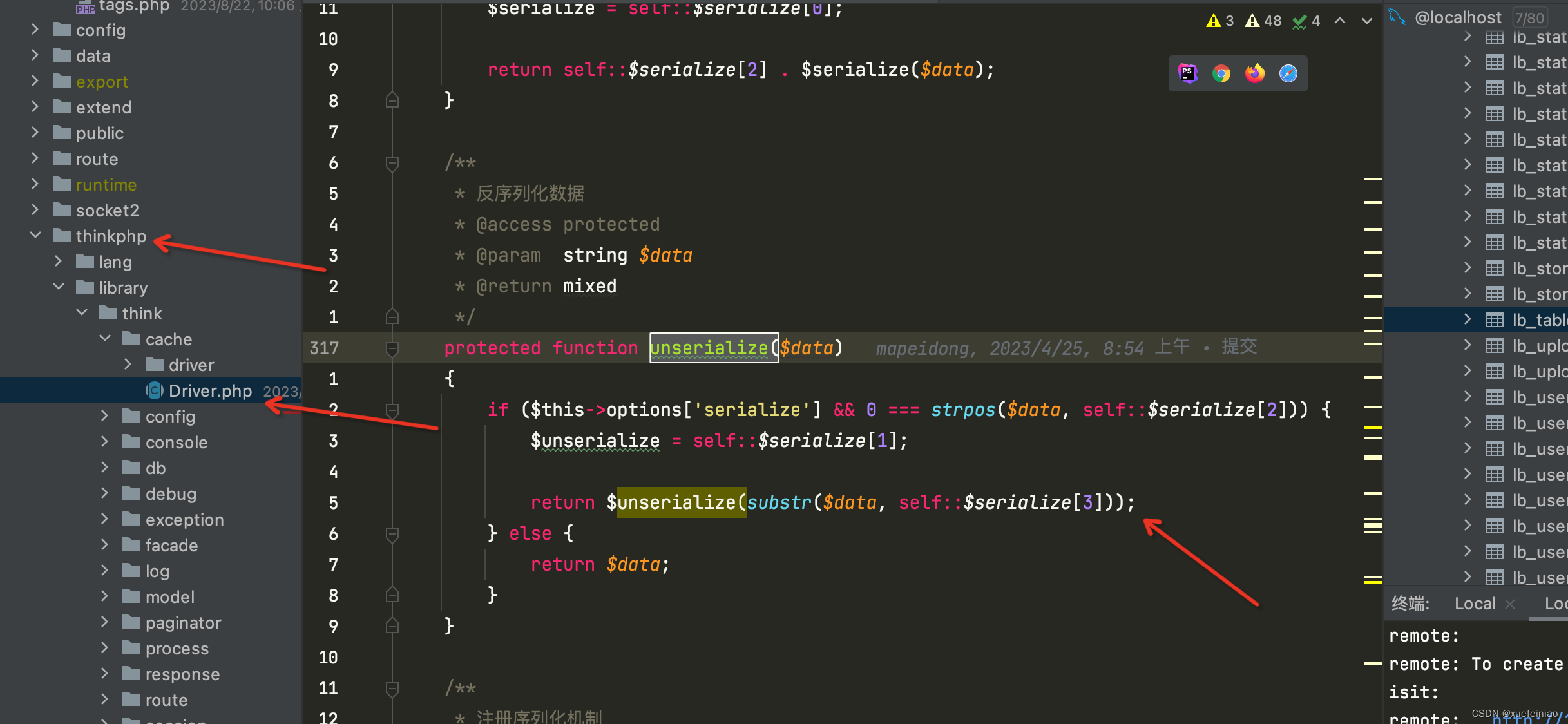
thinkphp5.1 获取缓存cache(‘cache_name’)特别慢,php 7.0 unserialize 特别慢 场景: 项目中大量使用了缓存,本地运行非常快,二三百毫秒,部署到服务器后 一个表格请求就七八秒,最初猜想是数据库查询慢&am…...

【Linux】UNIX 术语中,换页与交换的区别和Linux 术语中,换页与交换的区别?
UNIX换页和交换的区别 在UNIX中,换页(Paging)是一种内存管理技术,用于在程序运行时动态地将其代码和数据从磁盘加载到内存中。当程序需要访问的页面不在内存中时,就会发生页错误(page error)&a…...

零基础学python之集合
文章目录 集合1、创建集合2、集合常见操作方法2、1 增加数据2、2 删除数据2、3 查找数据 3、总结 集合 目标 创建集合集合数据的特点集合的常见操作 1、创建集合 创建集合使用{}或set(), 但是如果要创建空集合只能使用set(),因为{}用来创建空字典。 …...

PromptScript:轻量级 DSL 脚本,加速多样化的 LLM 测试与验证
TL;DR 版本 PromptScript 是一个轻量级的 Prompt 调试用的 DSL (Yaml)脚本,以用于快速使用、构建 Prompt。 PromptScript 文档:https://framework.unitmesh.cc/prompt-script Why PromptScript ? 几个月前&…...
强化学习(Reinforcement Learning)与策略梯度(Policy Gradient)
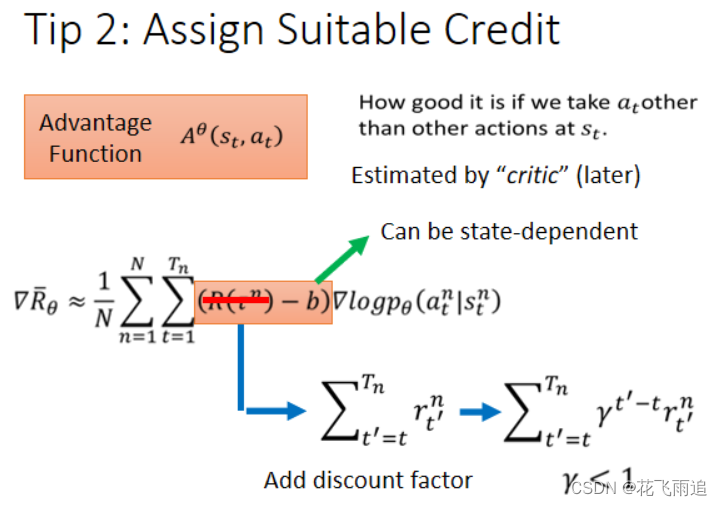
写在前面:本篇博文的内容来自李宏毅机器学习课程与自己的理解,同时还参考了一些其他博客(懒得放链接)。博文的内容主要用于自己学习与记录。 1 强化学习的基本框架 强化学习(Reinforcement Learning, RL)主要由智能体(Agent/Actor)、环境(Environment)、…...

JUC之ForkJoin并行处理框架
ForkJoin并行处理框架 Fork/Join 它可以将一个大的任务拆分成多个子任务进行并行处理,最后将子任务结果合并成最后的计算结果,并进行输出。 类似于mapreduce 其实,在Java 8中引入的并行流计算,内部就是采用的ForkJoinPool来实现…...

【牛客面试必刷TOP101】Day8.BM33 二叉树的镜像和BM36 判断是不是平衡二叉树
作者简介:大家好,我是未央; 博客首页:未央.303 系列专栏:牛客面试必刷TOP101 每日一句:人的一生,可以有所作为的时机只有一次,那就是现在!!!&…...
CSS padding(填充)
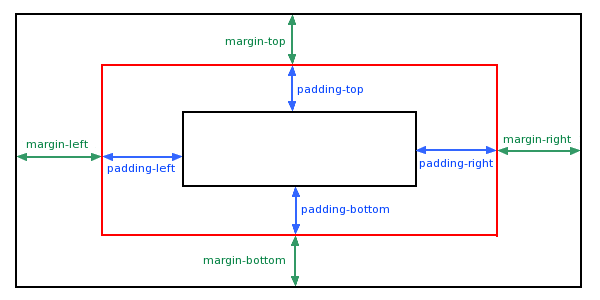
CSS padding(填充)是一个简写属性,定义元素边框与元素内容之间的空间,即上下左右的内边距。 padding(填充) 当元素的 padding(填充)内边距被清除时,所释放的区域将会受到…...
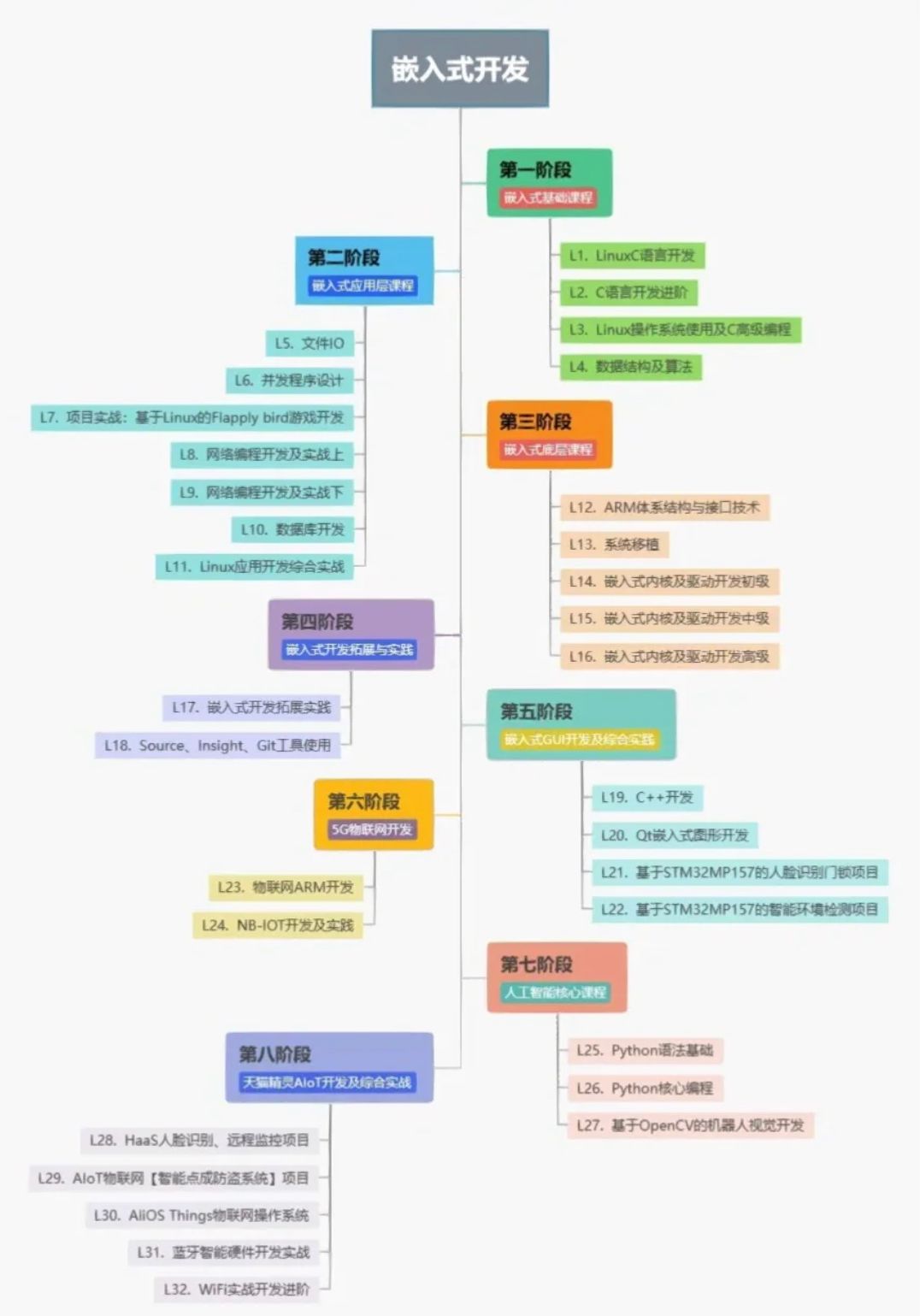
C语言达到什么水平才能从事单片机工作
C语言达到什么水平才能从事单片机工作 从事单片机工作需要具备一定的C语言编程水平。以下是几个关键要点:基本C语言知识: 掌握C语言的基本语法、数据类型、运算符、流控制语句和函数等基本概念。最近很多小伙伴找我,说想要一些C语言学习资料&…...

Java架构师理解SAAS和多租户
目录 1 云服务的三种模式1.1 IaaS(基础设施即服务)1.2 PaaS(平台即服务)1.3 SaaS(软件即服务)1.4 区别与联系2 SaaS的概述2.1 Saas详解2.2 应用领域与行业前景2.3 Saas与传统软件对比3 多租户SaaS平台的数据库方案3.1 多租户是什么3.2 需求分析3.3 多租户的数据库方案分析…...
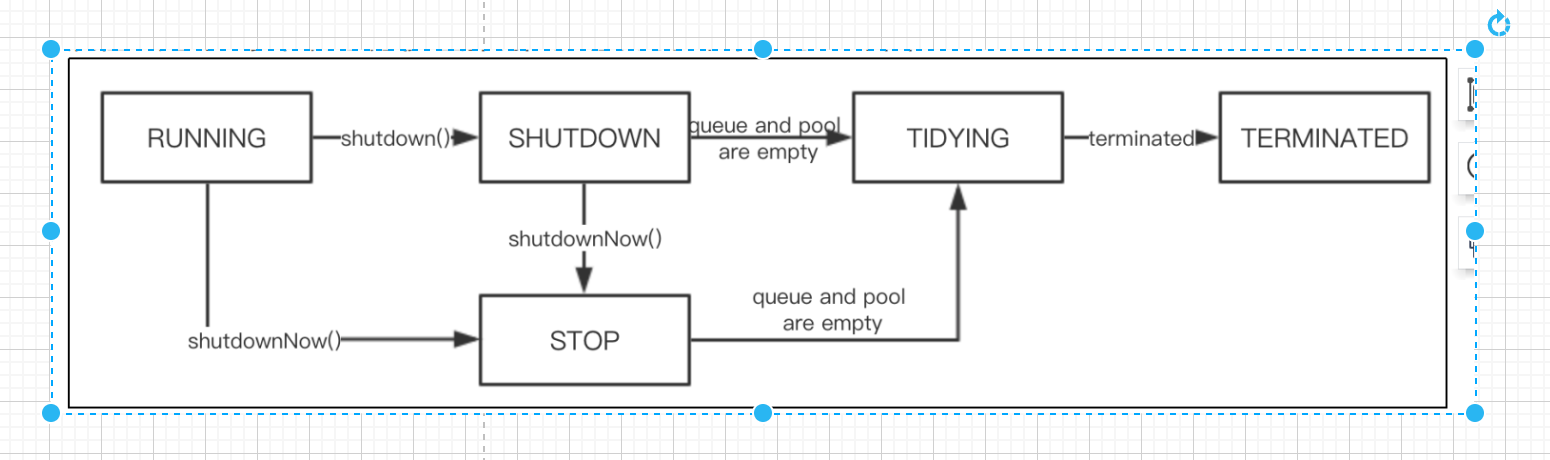
关于Java线程池相关面试题
【更多面试资料请加微信号:suns45】 https://flowus.cn/share/f6cd2cbe-627a-435f-a6e5-1395333f92e8 【FlowUs 息流】📣suns-Java资料 访问密码:【请加微信号:suns45】 ————线程相关的面试题———— 0:创建线…...

ExcelBDD Python指南
在Python里面支持BDD Excel BDD Tool Specification By ExcelBDD Method This tool is to get BDD test data from an excel file, its requirement specification is below The Essential of this approach is obtaining multiple sets of test data, so when combined with…...

基于深度学习的驾驶员疲劳监测系统的设计与实现
点击以下链接获取源码: https://download.csdn.net/download/qq_64505944/88421622?spm1001.2014.3001.5503 基于深度学习的驾驶员疲劳监测系统的设计与实现 1 绪论 在21世纪,各国的经济飞速发展,人民越来越富裕,道路上的汽车也逐…...

别再死记硬背了!用这5个真实项目案例,彻底搞懂Python函数参数与返回值
别再死记硬背了!用这5个真实项目案例,彻底搞懂Python函数参数与返回值 函数是Python编程的基石,但很多初学者在学完基础语法后,面对实际项目依然无从下手。本文将通过5个真实开发场景,带你从"会用"到"懂…...

Codesys ST语言PID调参避坑指南:从仿真到实战,手把手教你搞定温控/电机项目
Codesys ST语言PID调参避坑指南:从仿真到实战的工程化解决方案 在工业自动化领域,PID控制算法占据着核心地位。无论是恒温控制、电机调速还是压力调节,一个精心调校的PID控制器往往能决定整个系统的性能表现。然而,许多工程师在掌…...

3分钟掌握:163MusicLyrics终极免费歌词解决方案全攻略
3分钟掌握:163MusicLyrics终极免费歌词解决方案全攻略 【免费下载链接】163MusicLyrics 云音乐歌词获取处理工具【网易云、QQ音乐】 项目地址: https://gitcode.com/GitHub_Trending/16/163MusicLyrics 想要快速获取网易云音乐和QQ音乐的歌词吗?1…...

从零到一:在个人PC上部署并集成ChatGLM-6B到Unity应用
1. 环境准备与模型下载 在个人PC上部署ChatGLM-6B需要先搞定三件事:硬件检查、软件环境搭建和模型文件获取。我的老款游戏本(i7-9750H RTX2060 6GB显存)实测可以流畅运行,关键在于正确的量化配置。 硬件检查要点: 显存…...

STM32F407通过SPI接口高效读写SD卡:CubeMX配置与底层驱动实战
1. SD卡基础与SPI通信原理 SD卡作为嵌入式系统中最常用的存储介质之一,其SPI模式因其接线简单、协议清晰而广受欢迎。先说说我实际项目中遇到的坑:曾经因为没理解清楚SPI模式下SD卡的初始化时序,导致整整两天卡在设备无法识别的困境里。 SD卡…...

如何3秒破解百度网盘提取码难题:开源工具baidupankey的技术解析与实战指南
如何3秒破解百度网盘提取码难题:开源工具baidupankey的技术解析与实战指南 【免费下载链接】baidupankey 项目地址: https://gitcode.com/gh_mirrors/ba/baidupankey 你是否曾在寻找百度网盘资源时,被一个小小的提取码卡住,不得不花费…...

期权交易基础框架:模块化设计与Python实现指南
1. 项目概述:一个为期权交易者打造的“乐高积木”底座如果你在量化交易或者期权策略开发领域摸爬滚打过一段时间,大概率会遇到一个共同的痛点:策略想法很多,但把它们变成可回测、可实盘、可管理的代码,却要耗费大量的“…...

Ruby专属LLM应用框架ruby_llm:从基础集成到生产部署实战
1. 项目概述:一个为Ruby语言量身打造的LLM应用框架如果你是一名Ruby开发者,最近被各种大语言模型(LLM)的应用搞得心痒痒,但看着满世界的Python库和框架感到无从下手,那么crmne/ruby_llm这个项目可能就是你在…...

基于LLM与视觉模型融合的智能体框架:从原理到工业质检实践
1. 项目概述:当AI学会“看”与“想”最近在探索AI与视觉结合的落地场景时,我深度体验了landing-ai/vision-agent这个项目。它不是一个简单的图像识别工具,而是一个试图让AI具备“视觉推理”能力的智能体框架。简单来说,它让AI不仅…...

Docker Compose编排微服务
Docker Compose编排微服务 引言 Docker Compose是Docker官方提供的容器编排工具,用于定义和运行多容器Docker应用。通过Compose,可以使用YAML文件定义服务、网络、数据卷等资源,然后通过简单的命令启动和停止整个应用。Docker Compose特别适合…...