
openEuler 服务器安装 JumpServer (all-in-one 模式)
openEuler 服务器安装 JumpServer
- JumpServer 简介
- 什么是 JumpServer ?
- JumpServer 的各种类型资产
- JumpServer 产品特色或优势
- JumpServer 符合 4A 规范
- JumpServer 系统架构
- 应用架构
- 组件说明
- JumpServer 安装部署
- 环境要求
- 网络端口
- 网络端口列表
- 防火墙常用命令
- 在线脚本安装
- 验证安装
JumpServer 简介

什么是 JumpServer ?
JumpServer 是广受欢迎的 开源堡垒机,是符合 4A 规范 的专业运维安全审计系统。JumpServer 帮助企业以更安全的方式管控和登录所有类型的资产,实现 事前授权、事中监察、事后审计,满足等保合规 要求。
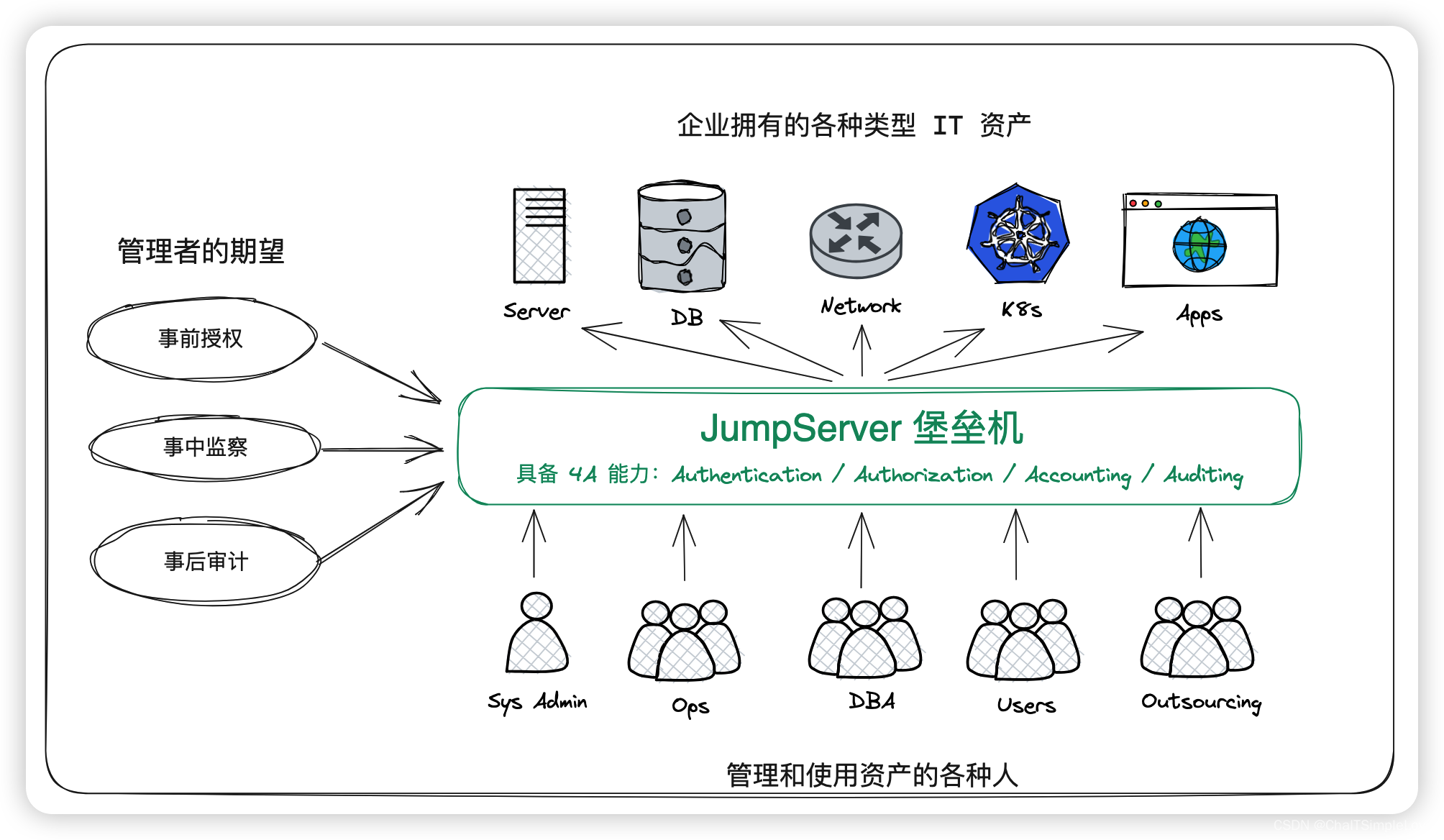
JumpServer 的各种类型资产
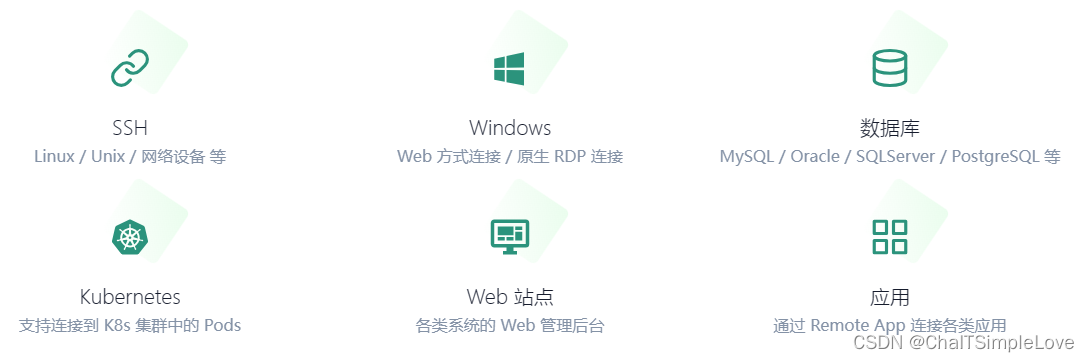
JumpServer 堡垒机支持的资产类型包括:
SSH(Linux / Unix/ 网络设备 等);Windows(Web方式连接 / 原生RDP连接);- 数据库 (
MySQL / MariaDB / Oracle / SQLServer / PostgreSQL / ClickHouse等); NoSQL(Redis / MongoDB等);GPT(ChatGPT等);- 云服务 (
Kubernetes / VMware vSphere等); Web站点 (各类系统的Web管理后台);- 应用 (通过
Remote App连接各类应用);
JumpServer 产品特色或优势
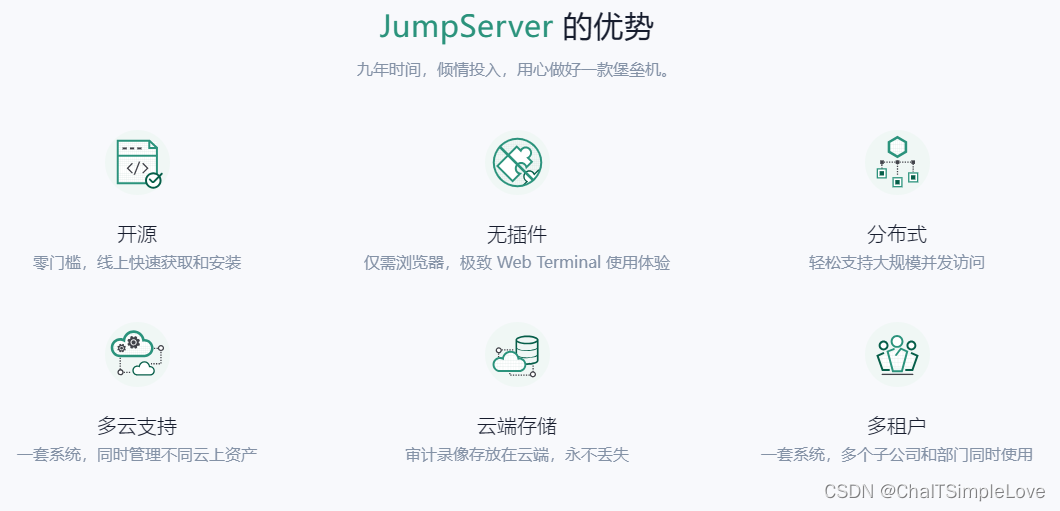
JumpServer 的产品特色包括:
- 开源:零门槛,线上快速获取和安装;
- 分布式:轻松支持大规模并发访问;
- 无插件:仅需浏览器,极致的
Web Terminal使用体验; - 多云支持:一套系统,同时管理不同云上面的资产;
- 云端存储:审计录像云端存储,永不丢失;
- 多租户:一套系统,多个子公司和部门同时使用;
- 多应用支持:数据库,
Windows远程应用,Kubernetes。
JumpServer 符合 4A 规范
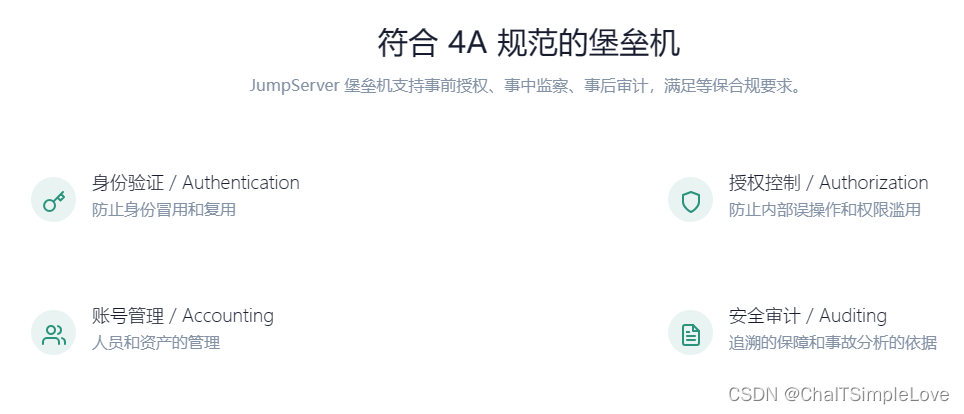
JumpServer 是符合 4A 规范 的堡垒机:
Authentication:身份认证,防止身份冒用和复用;Authorization:授权控制 ,防止内部误操作和权限滥用;Accounting:账号管理,人员和资产的管理;Auditing:安全审计,追溯的保障和事故分析的依据;
JumpServer 堡垒机支持 事前授权、事中监察、事后审计,满足等保合规 要求。
JumpServer 系统架构
应用架构
JumpServer采用分层架构,分别是负载层、接入层、核心层、数据层、存储层。JumpServer应用架构图如下:
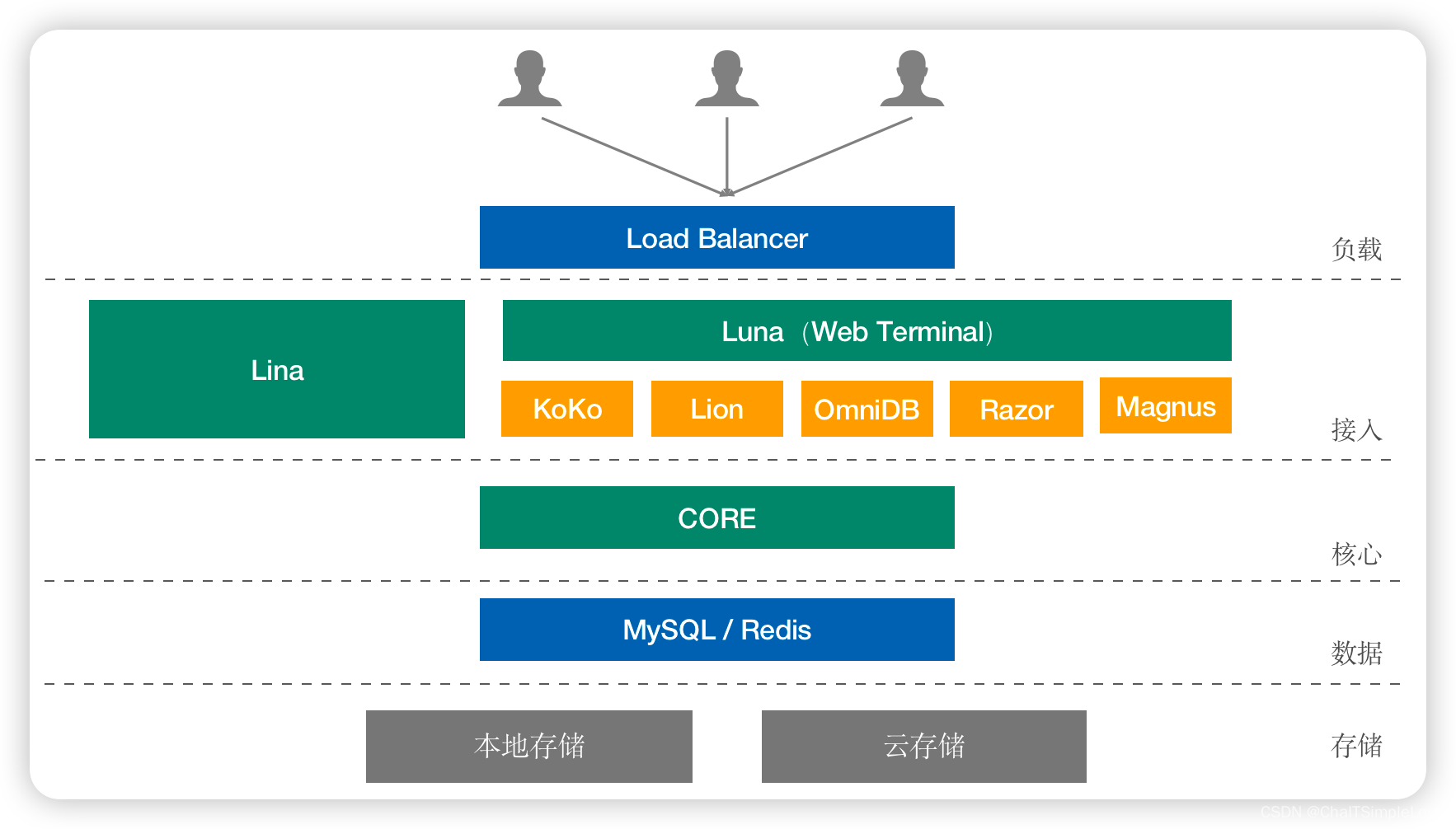
组件说明
Core组件是JumpServer的核心组件,其他组件依赖此组件启动。Koko是服务于类Unix资产平台的组件,通过SSH、Telnet协议提供字符型连接。Lion是服务于Windows资产平台的组件,用于Web端访问Windows资产。Omnidb是服务于数据库的组件,用于可视化界面纳管数据库。Razor是服务于RDP协议组件,该组件主要功能是通过JumpServer Client方式访问Windows资产。Magnus是服务于数据库的组件,用于通过客户端代理访问数据库。Celery是处理异步任务的组件,用于执行JumpServer相关的自动化任务。
更多信息请查看,https://docs.jumpserver.org/zh/v3/architecture/
JumpServer 安装部署
JumpServer 支持 在线安装(标准安装) 和 离线安装 两种模式,安装过程可参考文档https://docs.jumpserver.org/zh/master/install/setup_by_fast/
环境要求
- 操作系统环境:
| OS/Arch | Architecture | Linux Kernel | Soft Requirement | Minimize Hardware |
|---|---|---|---|---|
| linux/amd64 | x86_64 | >= 4.0 | wget curl tar gettext iptables python | 2Core/8GB RAM/60G HDD |
| linux/arm64 | aarch64 | >= 4.0 | wget curl tar gettext iptables python | 2Core/8GB RAM/60G HDD |
| linux/loong64 | loongarch64 | == 4.19 | wget curl tar gettext iptables python | 2Core/8GB RAM/60G HDD |
- 数据库系统环境:
JumpServer 需要使用 MySQL 或 MariaDB 存储数据,使用 Redis 缓存数据。
此处用户可以使用自建数据库或云数据库,请参考此处的要求:
| Name | Version | Default Charset | Default collation | TLS/SSL |
|---|---|---|---|---|
| MySQL | >= 5.7 | utf8mb4 | utf8mb4_general_ci | ✔ |
| MariaDB | >= 10.2 | utf8mb4 | utf8mb4_general_ci | ✔ |
| Name | Version | Sentinel | Cluster | TLS/SSL |
|---|---|---|---|---|
| Redis | >= 5.0 | ✔ | ✖ | ✔ |
此处我们采用单机在线安装模式,要求宿主机网络可以访问外网。
本案例我们采用如下配置规格进行 JumpServer 的安装部署:
OS系统信息:
| OS/Arch | Architecture | Linux Kernel | Soft Requirement | Minimize Hardware |
|---|---|---|---|---|
| openEuler-22.03-LTS-x86_64-dvd.iso | x86_64 | 5.10.0-60.18.0.50.oe2203.x86_64 | wget curl tar gettext iptables python | 4Core/8GB RAM/60G HDD |
预安装软件,执行如下命令:
yum update && install -y wget curl tar gettext iptables
Redis版本信息:
| Name | Version | Sentinel | Cluster | TLS/SSL |
|---|---|---|---|---|
| Redis | 6.2 | ✔ | ✖ | ✔ |
DB版本信息:
| Name | Version | Default Charset | Default collation | TLS/SSL |
|---|---|---|---|---|
| MariaDB | 10.6 | utf8mb4 | utf8mb4_general_ci | ✔ |
网络端口
JumpServer 作为符合 4A 规范 的专业运维安全审计系统,其正常运行需要开放如下网络端口,管理员可根据实际环境中 JumpServer 组件部署的方案,在网络和主机侧开放相关端口。
网络端口列表
| 端口 | 作用 | 说明 |
|---|---|---|
| 22 | SSH | 安装、升级及管理使用 |
| 80 | Web HTTP 服务 | 通过 HTTP 协议访问 JumpServer 前端页面 |
| 443 | Web HTTPS 服务 | 通过 HTTPS 协议访问 JumpServer 前端页面 |
| 1521 | 数据库服务 | Oracle 服务使用 |
| 1433 | 数据库服务 | MS SQLServer 服务使用 |
| 3306 | 数据库服务 | MySQL/MariaDB 服务使用 |
| 5432 | 数据库服务 | PostgreSQL 服务使用 |
| 6379 | 数据库服务 | Redis 服务使用 |
| 27017 | 数据库服务 | MongoDB 服务使用 |
| 3389 | Razor 服务端口 | RDP Client 方式连接 Windows 资产 |
| 2222 | SSH Client | SSH Client 方式使用终端工具连接 JumpServer,比如 Xshell、PuTTY、MobaXterm、WindTerm 等终端工具 |
| 33061 | Magnus MySQL 服务端口 | DB Client 方式连接 MySQL 数据库资产 |
| 33062 | Magnus MariaDB 服务端口 | DB Client 方式连接 MariaDB 数据库资产 |
| 54320 | Magnus PostgreSQL 服务端口 | DB Client 方式连接 PostgreSQL 数据库资产 |
| 63790 | Magnus Redis 服务端口 | DB Client 方式连接 Redis 数据库资产 |
| 30000-30100 | Magnus Oracle 服务端口 | DB Client 方式连接 Oracle 数据库资产,该端口范围可自定义 |
防火墙常用命令
- 确认
firewall的状态为running
firewall-cmd --state
running
- 临时开放端口(规则立即生效,重启失效)
firewall-cmd --zone=public --add-port=80/tcp
firewall-cmd --zone=public --add-port=2222/tcp
firewall-cmd --add-rich-rule="rule family="ipv4" source address="172.17.0.1/16" port protocol="tcp" port="8080" accept"
- 临时删除端口(规则立即生效,重启失效)
firewall-cmd --zone=public --remove-port=80/tcp
firewall-cmd --zone=public --remove-port=2222/tcp
firewall-cmd --remove-rich-rule="rule family="ipv4" source address="172.17.0.1/16" port protocol="tcp" port="8080" accept"
- 临时删除端口(规则立即生效,重启失效)
firewall-cmd --zone=public --remove-port=80/tcp
firewall-cmd --zone=public --remove-port=2222/tcp
firewall-cmd --remove-rich-rule="rule family="ipv4" source address="172.17.0.1/16" port protocol="tcp" port="8080" accept"
- 永久放行端口(需要
reload才能生效)
firewall-cmd --zone=public --add-port=80/tcp --permanent
firewall-cmd --zone=public --add-port=2222/tcp --permanent
firewall-cmd --add-rich-rule="rule family="ipv4" source address="172.17.0.1/16" port protocol="tcp" port="8080" accept" --permanent
firewall-cmd --reload
- 永久删除端口(需要
reload才能生效)
firewall-cmd --zone=public --remove-port=80/tcp --permanent
firewall-cmd --zone=public --remove-port=2222/tcp --permanent
firewall-cmd --remove-rich-rule="rule family="ipv4" source address="172.17.0.1/16" port protocol="tcp" port="8080" accept" --permanent
firewall-cmd --reload
- 查看端口生效规则
firewall-cmd --list-all
...
public (active)target: defaulticmp-block-inversion: nointerfaces: ens32sources:services: dhcpv6-client sshports: 80/tcp 2222/tcpprotocols:masquerade: noforward-ports:source-ports:icmp-blocks:rich rules:rule family="ipv4" source address="172.17.0.1/16" port port="8080" protocol="tcp" accept
在线脚本安装
参考,https://github.com/jumpserver/jumpserver/releases/tag/v3.8.0
- 国内用户
curl -sSL https://resource.fit2cloud.com/jumpserver/jumpserver/releases/latest/download/quick_start.sh | bash
- 海外用户
curl -sSL https://github.com/jumpserver/jumpserver/releases/latest/download/quick_start.sh | bash
此处我们安装 JumpServer 版本是 v3.8 ,下载的 quick_start.sh 文件内容如下:
#!/usr/bin/env bashVERSION=v3.8.0
DOWNLOAD_URL=https://github.comfunction install_soft() {if command -v dnf > /dev/null; thendnf -q -y install "$1"elif command -v yum > /dev/null; thenyum -q -y install "$1"elif command -v apt > /dev/null; thenapt-get -qqy install "$1"elif command -v zypper > /dev/null; thenzypper -q -n install "$1"elif command -v apk > /dev/null; thenapk add -q "$1"command -v gettext >/dev/null || {apk add -q gettext-dev python3}elseecho -e "[\033[31m ERROR \033[0m] $1 command not found, Please install it first"exit 1fi
}function prepare_install() {for i in curl wget tar iptables; docommand -v $i &>/dev/null || install_soft $idone
}function get_installer() {echo "download install script to /opt/jumpserver-installer-${VERSION}"cd /opt || exit 1if [ ! -d "/opt/jumpserver-installer-${VERSION}" ]; thentimeout 60 wget -qO jumpserver-installer-${VERSION}.tar.gz ${DOWNLOAD_URL}/jumpserver/installer/releases/download/${VERSION}/jumpserver-installer-${VERSION}.tar.gz || {rm -f /opt/jumpserver-installer-${VERSION}.tar.gzecho -e "[\033[31m ERROR \033[0m] Failed to download jumpserver-installer-${VERSION}"exit 1}tar -xf /opt/jumpserver-installer-${VERSION}.tar.gz -C /opt || {rm -rf /opt/jumpserver-installer-${VERSION}echo -e "[\033[31m ERROR \033[0m] Failed to unzip jumpserver-installer-${VERSION}"exit 1}rm -f /opt/jumpserver-installer-${VERSION}.tar.gzfi
}function config_installer() {cd /opt/jumpserver-installer-${VERSION} || exit 1sed -i "s/VERSION=.*/VERSION=${VERSION}/g" /opt/jumpserver-installer-${VERSION}/static.env./jmsctl.sh install./jmsctl.sh start
}function main(){if [[ "${OS}" == 'Darwin' ]]; thenechoecho "Unsupported Operating System Error"exit 1fiprepare_installget_installerconfig_installer
}main
或者下载 quick_start.sh 文件后,直接执行如下命令:
bash quick_start.sh
输出如下类似信息:
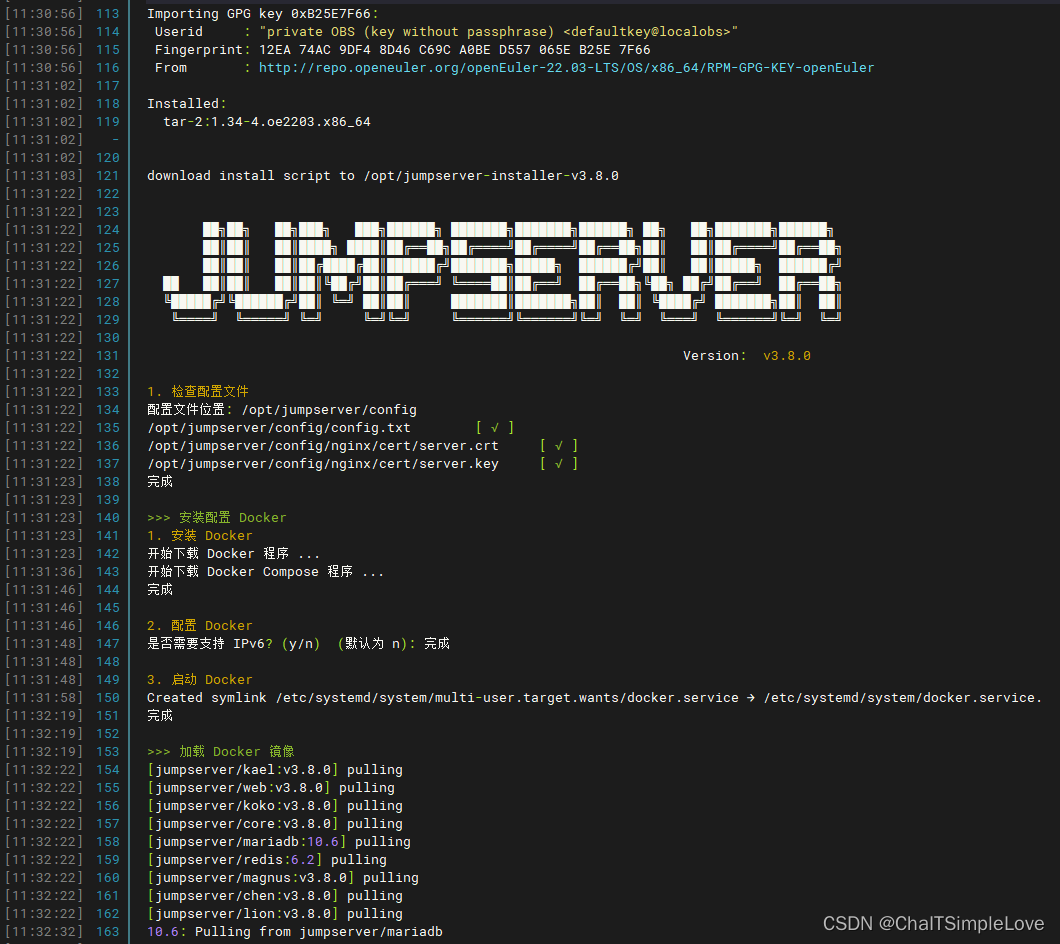
完整信息如下:
Importing GPG key 0xB25E7F66:Userid     : "private OBS (key without passphrase) <defaultkey@localobs>"Fingerprint: 12EA 74AC 9DF4 8D46 C69C A0BE D557 065E B25E 7F66From       : http://repo.openeuler.org/openEuler-22.03-LTS/OS/x86_64/RPM-GPG-KEY-openEulerInstalled:tar-2:1.34-4.oe2203.x86_64                                                                                               download install script to /opt/jumpserver-installer-v3.8.0██╗██╗   ██╗███╗   ███╗██████╗ ███████╗███████╗██████╗ ██╗   ██╗███████╗██████╗██║██║   ██║████╗ ████║██╔══██╗██╔════╝██╔════╝██╔══██╗██║   ██║██╔════╝██╔══██╗██║██║   ██║██╔████╔██║██████╔╝███████╗█████╗  ██████╔╝██║   ██║█████╗  ██████╔╝██   ██║██║   ██║██║╚██╔╝██║██╔═══╝ ╚════██║██╔══╝  ██╔══██╗╚██╗ ██╔╝██╔══╝  ██╔══██╗╚█████╔╝╚██████╔╝██║ ╚═╝ ██║██║     ███████║███████╗██║  ██║ ╚████╔╝ ███████╗██║  ██║╚════╝  ╚═════╝ ╚═╝     ╚═╝╚═╝     ╚══════╝╚══════╝╚═╝  ╚═╝  ╚═══╝  ╚══════╝╚═╝  ╚═╝Version:  v3.8.0  1. 检查配置文件
配置文件位置: /opt/jumpserver/config
/opt/jumpserver/config/config.txt        [ √ ]
/opt/jumpserver/config/nginx/cert/server.crt     [ √ ]
/opt/jumpserver/config/nginx/cert/server.key     [ √ ]
完成>>> 安装配置 Docker
1. 安装 Docker
开始下载 Docker 程序 ...
开始下载 Docker Compose 程序 ...
完成2. 配置 Docker
是否需要支持 IPv6? (y/n)  (默认为 n): 完成3. 启动 Docker
Created symlink /etc/systemd/system/multi-user.target.wants/docker.service → /etc/systemd/system/docker.service.
完成>>> 加载 Docker 镜像
[jumpserver/kael:v3.8.0] pulling
[jumpserver/web:v3.8.0] pulling
[jumpserver/koko:v3.8.0] pulling
[jumpserver/core:v3.8.0] pulling
[jumpserver/mariadb:10.6] pulling
[jumpserver/redis:6.2] pulling
[jumpserver/magnus:v3.8.0] pulling
[jumpserver/chen:v3.8.0] pulling
[jumpserver/lion:v3.8.0] pulling
10.6: Pulling from jumpserver/mariadb
eaead16dc43b: Pulling fs layer
4f6f4832182b: Pulling fs layer
6eed3156c415: Pulling fs layer
d1adc5c9f5ec: Waiting
4f5e88c034ff: Waiting
e09b3c602366: Waiting
9896f95913b8: Waiting
522ebe12904a: Waiting
v3.8.0: Pulling from jumpserver/lion
99bf4787315b: Waiting
eaacdd61c025: Waiting
26d1da19b429: Waiting
aa4a93627716: Waiting
e42c672e047b: Waiting
bcbcd1fe9fe0: Waiting
3a7da7bf8a7c: Waiting
b3634a6d92f0: Waiting
bba4daab2e00: Waiting
ed3d33e2d240: Waiting
d534346c5f7b: Waiting
e61d813b6ad0: Waiting
v3.8.0: Pulling from jumpserver/kael
eaead16dc43b: Downloading [==========>                                        ]   5.88MB/28.58MB
eaead16dc43b: Downloading [============================>                      ]  16.14MB/28.58MB
eaead16dc43b: Downloading [==========================================>        ]   24.4MB/28.58MB
c40342aa95c2: Waiting
5b1e577d1705: Waiting
d1adc5c9f5ec: Download complete
9b8a874e1e2d: Waiting
4f4fb700ef54: Waiting
v3.8.0: Pulling from jumpserver/chen
v3.8.0: Pulling from jumpserver/koko
3240fe174df9: Waiting
ea2f9ac2eb39: Waiting
eaead16dc43b: Extracting [>                                                  ]  294.9kB/28.58MB
d9e18c4120e1: Waiting
6aedef56f24f: Waiting
1f1a5cf5a065: Waiting
7f41607db671: Waiting
7689328b48f7: Waiting
9896f95913b8: Download complete
04f575d6fad5: Waiting
e67fdae35593: Waiting
eaead16dc43b: Extracting [==================================================>]  28.58MB/28.58MB
dfefa43f7ef9: Waiting
eaead16dc43b: Pull complete
4f6f4832182b: Extracting [==================================================>]  1.747kB/1.747kB
98153782a42c: Waiting
4f6f4832182b: Pull complete
6eed3156c415: Pull complete
8127cd7d3437: Waiting
v3.8.0: Pulling from jumpserver/magnus
v3.8.0: Pulling from jumpserver/core
6.2: Pulling from jumpserver/redis
v3.8.0: Pulling from jumpserver/web
e67fdae35593: Waiting
321c8788e932: Waiting
d1adc5c9f5ec: Extracting [==================================================>]     149B/149B
b573062c6e54: Waiting
99bf4787315b: Extracting [=============================>                     ]  16.22MB/27.14MB
eaacdd61c025: Download complete
e67fdae35593: e67fdae35593: e67fdae35593: e67fdae35593: Downloading [====================>                              ]  Downloading [====================>                              ]  12.72MB/31.42MB12.4MB/31.42MB
Downloading [====>                                              ]  2.949MB/31.42MB
e855c2f1475c: Waiting
0668e0cb7eeb: Waiting
99bf4787315b: Extracting [==================================================>]  27.14MB/27.14MB
4f5e88c034ff: Pull complete
Downloading [=======================================>           ]  24.83MB/31.42MB4.83MB/31.42MB
e67fdae35593: Downloading [===========================>                       ]  16.98MB/31.42MB
Pull complete e67fdae35593: e67fdae35593: Pull complete
Downloading [==========================================>        ]  26.47MB/31.42MB
981eb4eb4e29: Waiting
0c8e33d32ad2: Waiting
b23242c39ad3: Waiting
e09b3c602366: Downloading [==================================>                ]  61.26MB/88.87MB
4f4fb700ef54: Waiting
Extracting [==================================================>]  31.42MB/31.42MB=========>]  31.42MB/31.42MB
Extracting [=============>                                     ]  8.192MB/31.42MB          ]  8.192MB/31.42MB
e67fdae35593: Extracting [========================>                          ]   15.4MB/31.42MB
5dc251960c03: Waiting
37ad762d263f: Waiting
2056f85116ef: Waiting
99bf4787315b: Pull complete
eaacdd61c025: Pull complete
26d1da19b429: Downloading [===============================================>   ]  27.65MB/29.4MB
Pull complete e67fdae35593: Pull complete Extracting [>                                                  ]  327.7kB/31.42MB27.7kB/31.42MB
26d1da19b429: Pull complete
aa4a93627716: Pull complete
e42c672e047b: Pull complete
bcbcd1fe9fe0: Pull complete
3a7da7bf8a7c: Pull complete
ea2f9ac2eb39: Download complete
e67fdae35593: Extracting [==================================================>]  31.42MB/31.42MB
d9e18c4120e1: Download complete
3240fe174df9: Pull complete
ea2f9ac2eb39: Pull complete
72e611ef6cbd: Pull complete
d9e18c4120e1: Pull complete
b35f34aa20f0: Download complete
1f1a5cf5a065: Pull complete
076f765c5c0b: Pull complete
dfefa43f7ef9: Pull complete
321c8788e932: Pull complete
1b50c537067e: Downloading [============================>                      ]  4.996MB/8.729MB
d409c959e473: Pull complete
5dc251960c03: Pull complete
37ad762d263f: Pull complete
2056f85116ef: Pull complete
65ee1d2786fa: Extracting [==================================================>]  1.405kB/1.405kB
272d660811bd: Download complete
65ee1d2786fa: Pull complete
cfd4a22d5220: Downloading [======>                                            ]  150.2MB/1.23GB
cfd4a22d5220: Downloading [======>                                            ]  156.1MB/1.23GB
272d660811bd: Pull complete
4f4fb700ef54: Pull complete
cfd4a22d5220: Pull complete
4df962483fe2: Pull complete
105d66cef279: Pull complete
a0fc03463301: Pull complete
222e61094282: Pull complete
2fcb7dbc00dd: Pull complete
92e2dfaefa5f: Pull complete
b8b8d4e4ee39: Pull complete
153510901956: Pull complete
Digest: sha256:75204461f39f8d691e40768625c965d77969ea5cfeb48bf31bf0033bcb38636b
Status: Downloaded newer image for jumpserver/web:v3.8.0
docker.io/jumpserver/web:v3.8.0完成>>> 安装配置 JumpServer
1. 配置加密密钥
SECRETE_KEY:     ZmQ5NzQ1NzMtYTlmNS00YzA4LWIxNDQtN2EzMjZlMTc4Yzdk
BOOTSTRAP_TOKEN: ZmQ5NzQ1NzMtYTlmNS00YzA4
完成2. 配置持久化目录
是否需要自定义持久化存储, 默认将使用目录 /data/jumpserver? (y/n)  (默认为 n): 完成3. 配置 MySQL
是否使用外部 MySQL? (y/n)  (默认为 n): 完成4. 配置 Redis
是否使用外部 Redis? (y/n)  (默认为 n): 完成5. 配置外部访问
是否需要配置 JumpServer 对外访问端口? (y/n)  (默认为 n): n
完成6. 初始化数据库
[+] Running 4/4✔ Network jms_net      Created                                                                                      10.1s ✔ Container jms_mysql  Started                                                                                       2.6s ✔ Container jms_redis  Started                                                                                       2.4s ✔ Container jms_core   Started                                                                                       3.0s
2023-10-20 11:48:29 Collect static files
ALLOWED_HOSTS: - localhost- core80- 127.0.0.1- 127.0.0.1:8080- 127.0.0.1:80- localhost:8080- localhost:80- core:8080- core:80
ALLOWED_HOSTS: - localhost- core80- 127.0.0.1- 127.0.0.1:8080- 127.0.0.1:80- localhost:8080- localhost:80- core:8080- core:80
2023-10-20 11:48:31 Collect static files done
2023-10-20 11:48:31 Check database structure change ...
2023-10-20 11:48:31 Migrate model change to database ...
Operations to perform:Apply all migrations: accounts, acls, admin, applications, assets, audits, auth, authentication, captcha, common, contenttypes, django_cas_ng, django_celery_beat, notifications, ops, orgs, perms, rbac, sessions, settings, terminal, tickets, users
Running migrations:Applying contenttypes.0001_initial... OKApplying contenttypes.0002_remove_content_type_name... OKApplying auth.0001_initial... OKApplying auth.0002_alter_permission_name_max_length... OKApplying auth.0003_alter_user_email_max_length... OKApplying auth.0004_alter_user_username_opts... OKApplying auth.0005_alter_user_last_login_null... OKApplying auth.0006_require_contenttypes_0002... OKApplying auth.0007_alter_validators_add_error_messages... OKApplying auth.0008_alter_user_username_max_length... OKApplying users.0001_initial... OKApplying tickets.0001_initial... OKApplying tickets.0002_auto_20200728_1146... OKApplying tickets.0003_auto_20200804_1551... OKApplying tickets.0004_ticket_comment... OKApplying tickets.0005_ticket_meta_confirmed_system_users... OKApplying tickets.0006_auto_20201023_1628... OKApplying tickets.0007_auto_20201224_1821... OKApplying tickets.0008_auto_20210311_1113... OKApplying tickets.0009_auto_20210426_1720... OKApplying tickets.0010_auto_20210812_1618... OKApplying tickets.0011_remove_approvalrule_assignees_display... OKApplying terminal.0001_initial... OKApplying terminal.0002_auto_20171228_0025... OKApplying terminal.0003_auto_20171230_0308... OKApplying terminal.0004_session_remote_addr... OKApplying terminal.0005_auto_20180122_1154... OKApplying terminal.0006_auto_20180123_1037... OKApplying terminal.0007_session_date_last_active... OKApplying terminal.0008_auto_20180307_1603... OKApplying terminal.0009_auto_20180326_0957... OKApplying terminal.0010_auto_20180423_1140... OKApplying terminal.0011_auto_20180807_1116... OKApplying terminal.0012_auto_20180816_1652... OKApplying terminal.0013_auto_20181123_1113... OKApplying terminal.0014_auto_20181226_1441... OKApplying terminal.0015_auto_20190923_1529... OKApplying terminal.0016_commandstorage_replaystorage... OKApplying common.0001_initial... OKApplying common.0002_auto_20180111_1407... OKApplying common.0003_setting_category... OKApplying common.0004_setting_encrypted... OKApplying common.0005_auto_20190221_1902... OKApplying common.0006_auto_20190304_1515... OKApplying settings.0001_initial... OKApplying terminal.0017_auto_20191125_0931... OKApplying terminal.0018_auto_20191202_1010... OKApplying terminal.0019_auto_20191206_1000... OKApplying terminal.0020_auto_20191218_1721... OKApplying terminal.0021_auto_20200213_1316... OKApplying terminal.0022_session_is_success... OKApplying terminal.0023_command_risk_level... OKApplying terminal.0024_auto_20200715_1713... OKApplying terminal.0025_auto_20200810_1735... OKApplying terminal.0026_auto_20201027_1905... OKApplying terminal.0027_auto_20201102_1651... OKApplying terminal.0028_auto_20201110_1918... OKApplying terminal.0029_auto_20201116_1757... OKApplying terminal.0030_terminal_type... OKApplying terminal.0031_auto_20210113_1356... OKApplying terminal.0032_auto_20210302_1853... OKApplying terminal.0033_auto_20210324_1008... OKApplying terminal.0034_auto_20210406_1434... OKApplying terminal.0035_auto_20210517_1448... OKApplying terminal.0036_auto_20210604_1124... OKApplying terminal.0037_auto_20210623_1748... OKApplying terminal.0038_task_kwargs... OKApplying terminal.0039_auto_20210805_1552... OKApplying terminal.0040_sessionjoinrecord_sessionsharing... OKApplying terminal.0041_auto_20211105_1605... OKApplying terminal.0042_auto_20211229_1619... OKApplying tickets.0012_ticketsession... OKApplying tickets.0013_ticket_serial_num...Fill ticket serial number ... OKApplying tickets.0014_auto_20220217_2135... OKApplying tickets.0015_superticket... OKApplying terminal.0043_auto_20220217_2135... OKApplying terminal.0044_auto_20220223_1539... OKApplying terminal.0045_auto_20220228_1144... OKApplying terminal.0046_auto_20220228_1744... OKApplying terminal.0047_auto_20220302_1951... OKApplying terminal.0048_endpoint_endpointrule... OKApplying terminal.0049_endpoint_redis_port... OKApplying users.0002_auto_20171225_1157_squashed_0019_auto_20190304_1459... OKApplying users.0020_auto_20190612_1825... OKApplying users.0021_auto_20190625_1104... OKApplying users.0022_auto_20190625_1105... OKApplying users.0023_auto_20190724_1525... OKApplying users.0024_auto_20191118_1612... OKApplying users.0025_auto_20200206_1216... OKApplying users.0026_auto_20200508_2105... OKApplying users.0027_auto_20200616_1503... OKApplying users.0028_auto_20200728_1805... OKApplying users.0029_auto_20200814_1650... OKApplying users.0030_auto_20200819_2041... OKApplying users.0031_auto_20201118_1801... OKApplying assets.0001_initial... OKApplying perms.0001_initial... OKApplying assets.0002_auto_20180105_1807_squashed_0009_auto_20180307_1212... OKApplying assets.0010_auto_20180307_1749_squashed_0019_auto_20180816_1320... OKApplying perms.0002_auto_20171228_0025_squashed_0009_auto_20180903_1132... OKApplying perms.0003_action... OKApplying perms.0004_assetpermission_actions... OKApplying assets.0020_auto_20180816_1652... OKApplying assets.0021_auto_20180903_1132... OKApplying assets.0022_auto_20181012_1717... OKApplying assets.0023_auto_20181016_1650... OKApplying assets.0024_auto_20181219_1614... OKApplying assets.0025_auto_20190221_1902... OKApplying assets.0026_auto_20190325_2035... OKApplying applications.0001_initial... OKApplying perms.0005_auto_20190521_1619... OKApplying perms.0006_auto_20190628_1921... OKApplying perms.0007_remove_assetpermission_actions... OKApplying perms.0008_auto_20190911_1907... OKApplying assets.0027_auto_20190521_1703... OKApplying assets.0028_protocol... OKApplying assets.0029_auto_20190522_1114... OKApplying assets.0030_auto_20190619_1135... OKApplying assets.0031_auto_20190621_1332... OKApplying assets.0032_auto_20190624_2108... OKApplying assets.0033_auto_20190624_2108... OKApplying assets.0034_auto_20190705_1348... OKApplying assets.0035_auto_20190711_2018... OKApplying assets.0036_auto_20190716_1535... OKApplying assets.0037_auto_20190724_2002... OKApplying assets.0038_auto_20190911_1634... OKApplying perms.0009_remoteapppermission_system_users... OKApplying assets.0039_authbook_is_active... OKApplying assets.0040_auto_20190917_2056... OKApplying assets.0041_gathereduser... OKApplying assets.0042_favoriteasset...OKApplying assets.0043_auto_20191114_1111... OKApplying assets.0044_platform... OKApplying assets.0045_auto_20191206_1607... OKApplying assets.0046_auto_20191218_1705... OKApplying applications.0002_remove_remoteapp_system_user... OKApplying applications.0003_auto_20191210_1659... OKApplying applications.0004_auto_20191218_1705... OKApplying perms.0010_auto_20191218_1705... OKApplying perms.0011_auto_20200721_1739... OKApplying assets.0047_assetuser... OKApplying assets.0048_auto_20191230_1512... OKApplying assets.0049_systemuser_sftp_root... OKApplying assets.0050_auto_20200711_1740... OKApplying assets.0051_auto_20200713_1143... OKApplying assets.0052_auto_20200715_1535... OKApplying assets.0053_auto_20200723_1232... OKApplying assets.0054_auto_20200807_1032... OKApplying applications.0005_k8sapp... OKApplying perms.0012_k8sapppermission... OKApplying assets.0055_auto_20200811_1845... OKApplying assets.0056_auto_20200904_1751... OKApplying assets.0057_fill_node_value_assets_amount_and_parent_key.................................................................... OKApplying perms.0013_rebuildusertreetask_usergrantedmappingnode... OKApplying perms.0014_build_users_perm_tree... OKApplying perms.0015_auto_20200929_1728... OKApplying assets.0058_auto_20201023_1115... OKApplying assets.0059_auto_20201027_1905... OKApplying applications.0006_application... OKApplying perms.0016_applicationpermission... OKApplying perms.0017_auto_20210104_0435... OKApplying assets.0060_node_full_value...- Start migrate node value if has /- Start migrate node full valueOKApplying assets.0061_auto_20201116_1757... OKApplying assets.0062_auto_20201117_1938... OKApplying assets.0063_migrate_default_node_key...
Check old default node `key=0 value=Default` not existsOKApplying assets.0064_auto_20201203_1100... OKApplying assets.0065_auto_20210121_1549... OKApplying perms.0018_auto_20210208_1515... OKApplying orgs.0001_initial... OKApplying orgs.0002_auto_20180903_1132... OKApplying orgs.0003_auto_20190916_1057... OKApplying orgs.0004_organizationmember... OKApplying orgs.0005_auto_20200721_1937... OKApplying orgs.0006_auto_20200721_1937... OKApplying orgs.0007_auto_20200728_1805... OKApplying orgs.0008_auto_20200819_2041... OKApplying orgs.0009_auto_20201023_1628... OKApplying ops.0001_initial... OKApplying ops.0002_celerytask... OKApplying ops.0003_auto_20181207_1744... OKApplying ops.0004_adhoc_run_as... OKApplying ops.0005_auto_20181219_1807... OKApplying ops.0006_auto_20190318_1023... OKApplying ops.0007_auto_20190724_2002... OKApplying ops.0008_auto_20190919_2100... OKApplying ops.0009_auto_20191217_1713... OKApplying ops.0010_auto_20191217_1758... OKApplying ops.0011_auto_20200106_1534... OKApplying ops.0012_auto_20200108_1659... OKApplying ops.0013_auto_20200108_1706... OKApplying ops.0014_auto_20200108_1749... OKApplying ops.0015_auto_20200108_1809... OKApplying ops.0016_commandexecution_org_id... OKApplying ops.0017_auto_20200306_1747... OKApplying ops.0018_auto_20200509_1434... OKApplying ops.0019_adhocexecution_celery_task_id... OKApplying audits.0001_initial... OKApplying audits.0002_ftplog_org_id... OKApplying audits.0003_auto_20180816_1652... OKApplying audits.0004_operatelog_passwordchangelog_userloginlog... OKApplying audits.0005_auto_20190228_1715... OKApplying audits.0006_auto_20190726_1753... OKApplying audits.0007_auto_20191202_1010... OKApplying audits.0008_auto_20200508_2105... OKApplying audits.0009_auto_20200624_1654... OKApplying audits.0010_auto_20200811_1122... OKApplying audits.0011_userloginlog_backend... OKApplying assets.0066_auto_20210208_1802... OKApplying applications.0007_auto_20201119_1110... OKApplying applications.0008_auto_20210104_0435... OKApplying orgs.0010_auto_20210219_1241...Migrate model org id: Application       done, use 0.98 msMigrate model org id: AdminUser done, use 0.75 msMigrate model org id: Asset     done, use 0.64 msMigrate model org id: AuthBook  done, use 0.72 msMigrate model org id: CommandFilter     done, use 0.5 msMigrate model org id: CommandFilterRule done, use 0.56 msMigrate model org id: Domain    done, use 1.02 msMigrate model org id: Gateway   done, use 0.74 msMigrate model org id: GatheredUser      done, use 0.69 msMigrate model org id: Label     done, use 0.48 msMigrate model org id: Node      done, use 0.47 msMigrate model org id: SystemUser        done, use 0.55 msMigrate model org id: FTPLog    done, use 0.74 msMigrate model org id: OperateLog        done, use 0.54 msMigrate model org id: AdHoc     done, use 0.4 msMigrate model org id: AdHocExecution    done, use 0.52 msMigrate model org id: CommandExecution  done, use 0.46 msMigrate model org id: Task      done, use 37.51 msMigrate model org id: ApplicationPermission     done, use 0.88 msMigrate model org id: AssetPermission   done, use 0.55 msMigrate model org id: UserAssetGrantedTreeNodeRelation  done, use 0.53 msMigrate model org id: Session   done, use 0.5 msMigrate model org id: Command   done, use 0.51 msMigrate model org id: Ticket    done, use 0.43 msMigrate model org id: UserGroup done, use 0.51 msWill add users to default org: 1Add users to default org: 1-1done, use 2.39 msOKApplying assets.0067_auto_20210311_1113... OKApplying assets.0068_auto_20210312_1455... OKApplying assets.0069_change_node_key0_to_key1...
--> Not exist key=0 nodes, do nothing.OKApplying assets.0070_auto_20210426_1515... OKApplying assets.0071_systemuser_type...OKApplying assets.0072_historicalauthbook...OKApplying assets.0073_auto_20210606_1142...OKApplying assets.0074_remove_systemuser_assets... OKApplying assets.0075_auto_20210705_1759... OKApplying assets.0076_delete_assetuser... OKApplying assets.0077_auto_20211012_1642... OKApplying assets.0078_auto_20211014_2209... OKApplying assets.0079_auto_20211102_1922... OKApplying assets.0080_auto_20211104_1347... OKApplying assets.0081_auto_20211105_1605... OKApplying applications.0009_applicationuser... OKApplying applications.0010_appaccount_historicalappaccount... OKApplying applications.0011_auto_20210826_1759... OKApplying applications.0012_auto_20211014_2209... OKApplying applications.0013_auto_20211026_1711... OKApplying applications.0014_auto_20211105_1605... OKApplying assets.0082_auto_20211209_1440... OKApplying assets.0083_auto_20211215_1436... OKApplying assets.0084_auto_20220112_1959... OKApplying assets.0085_commandfilterrule_ignore_case... OKApplying assets.0086_auto_20220217_2135... OKApplying assets.0087_auto_20220223_1539... OKApplying assets.0088_auto_20220303_1612... OKApplying assets.0089_auto_20220310_0616... OKApplying assets.0090_auto_20220412_1145... OKApplying applications.0015_auto_20220112_2035... OKApplying applications.0016_auto_20220118_1455... OKApplying applications.0017_auto_20220217_2135... OKApplying applications.0018_auto_20220223_1539... OKApplying applications.0019_auto_20220310_1853... OKApplying applications.0020_auto_20220316_2028... OKApplying tickets.0016_auto_20220609_1758... OKApplying tickets.0017_auto_20220623_1027... OKApplying tickets.0018_applyapplicationticket_apply_actions... OKApplying tickets.0019_delete_applyapplicationticket... OKApplying tickets.0020_auto_20220817_1346...Start migrate system user to account- migrate 'ApplyAssetTicket'- migrate 'ApplyCommandTicket'- migrate 'ApplyLoginAssetTicket'OKApplying tickets.0021_auto_20220921_1814... OKApplying tickets.0022_alter_applyassetticket_apply_actions... OKApplying tickets.0023_alter_applyassetticket_apply_actions... OKApplying tickets.0024_auto_20221121_1800... OKApplying authentication.0001_initial... OKApplying authentication.0002_auto_20190729_1423... OKApplying authentication.0003_loginconfirmsetting... OKApplying authentication.0004_ssotoken... OKApplying acls.0001_initial... OKApplying acls.0002_auto_20210926_1047... OKApplying acls.0003_auto_20211130_1037... OKApplying acls.0004_auto_20220831_1658... OKApplying acls.0005_auto_20221201_1846... OKApplying acls.0006_commandfilteracl_commandgroup... OKApplying acls.0007_auto_20221202_1048... OKApplying acls.0008_commandgroup_comment... OKApplying tickets.0025_auto_20221206_1820... OKApplying assets.0091_auto_20220629_1826... OKApplying assets.0092_commandfilter_nodes... OKApplying assets.0093_auto_20220403_1627... OKApplying assets.0094_auto_20220402_1736... OKApplying assets.0095_auto_20220407_1726... OKApplying assets.0096_auto_20220426_1550... OKApplying assets.0097_auto_20220426_1558...    - Update platform: Windows2016- Update platform: OtherOKApplying assets.0098_auto_20220430_2126...- Migrate ori host to device:  0OKApplying assets.0099_auto_20220711_1409...Start migrate asset protocolsOKApplying accounts.0001_initial... OKApplying assets.0100_auto_20220711_1413...Start migrate asset accountsStart migrate app accountsOKApplying assets.0101_auto_20220811_1511... OKApplying assets.0102_auto_20220816_1022...Start migrate command filters to assetsOKApplying assets.0103_auto_20220902_1021...>>> migrate gateway to asset
>>> migrate gateway to accountOKApplying assets.0104_auto_20220817_1544... OKApplying assets.0105_auto_20221220_1956... OKApplying assets.0106_auto_20221228_1838... OKApplying assets.0107_automation... OKApplying assets.0108_alter_platform_charset... OKApplying assets.0109_alter_asset_options... OKApplying assets.0110_auto_20230315_1741... OKApplying assets.0111_auto_20230321_1633... OKApplying assets.0112_auto_20230404_1631... OKApplying assets.0113_auto_20230411_1917...
Migrate platform su method: Cisco
Migrate platform su method: H3C
Migrate platform su method: HuaweiOKApplying assets.0114_baseautomation_params... OKApplying assets.0115_auto_20230417_1425... OKApplying assets.0116_auto_20230418_1726... OKApplying assets.0117_alter_baseautomation_params... OKApplying assets.0118_auto_20230524_1647... OKApplying assets.0119_assets_add_default_node... OKApplying assets.0120_auto_20230630_1613... OKApplying assets.0121_auto_20230725_1458...
Platform add sftp protocol: - Linux- GatewayAsset add sftp protocol:
Not found telnet regex setting, skipOKApplying assets.0122_auto_20230803_1553... OKApplying accounts.0002_auto_20220616_0021... OKApplying accounts.0003_automation... OKApplying accounts.0004_auto_20230106_1507... OKApplying accounts.0005_alter_changesecretrecord_options... OKApplying accounts.0006_gatheredaccount... OKApplying accounts.0007_alter_account_options... OKApplying accounts.0008_alter_gatheredaccount_options... OKApplying accounts.0009_account_usernames_to_ids... OKApplying accounts.0010_gatheraccountsautomation_is_sync_account... OKApplying accounts.0011_auto_20230506_1443... OKApplying accounts.0012_auto_20230621_1456... OKApplying accounts.0013_account_backup_recipients... OKApplying accounts.0014_virtualaccount... OKApplying accounts.0015_auto_20230825_1120... OKApplying accounts.0016_accounttemplate_password_rules... OKApplying acls.0009_auto_20221220_1956... OKApplying acls.0010_alter_commandfilteracl_command_groups... OKApplying acls.0011_auto_20230425_1704... OKApplying acls.0012_auto_20230426_1111... OKApplying acls.0013_auto_20230426_1759... OKApplying acls.0014_loginassetacl_rules... OKApplying acls.0015_connectmethodacl... OKApplying acls.0016_auto_20230606_1857... OKApplying acls.0017_alter_connectmethodacl_options... OKApplying acls.0018_alter_commandfilteracl_command_groups... OKApplying admin.0001_initial... OKApplying admin.0002_logentry_remove_auto_add... OKApplying admin.0003_logentry_add_action_flag_choices... OKApplying perms.0019_auto_20210906_1044... OKApplying perms.0020_auto_20210910_1103... OKApplying perms.0021_auto_20211105_1605... OKApplying perms.0022_applicationpermission_actions... OKApplying perms.0023_auto_20220112_2035... OKApplying perms.0024_auto_20220217_2135... OKApplying perms.0025_auto_20220223_1539... OKApplying perms.0026_auto_20220307_1500... OKApplying perms.0027_auto_20220310_1802... OKApplying perms.0028_auto_20220316_2028... OKApplying perms.0029_auto_20220728_1728... OKApplying perms.0030_auto_20220816_1132... OKApplying perms.0031_auto_20220816_1600... OKApplying ops.0020_adhoc_run_system_user... OKApplying ops.0021_auto_20211130_1037... OKApplying ops.0022_auto_20220817_1346... OKApplying applications.0021_auto_20220629_1826... OKApplying applications.0022_auto_20220714_1046... OKApplying applications.0023_auto_20220715_1556... OKApplying applications.0024_alter_application_type... OKApplying applications.0025_auto_20220817_1346... OKApplying applications.0026_auto_20220817_1716... OKApplying applications.0027_auto_20221220_1956... OKApplying assets.0123_device_automation_ansible_enabled... OKApplying assets.0124_auto_20231007_1437... OKApplying assets.0125_auto_20231011_1053... OKApplying ops.0023_auto_20220912_0021... OKApplying audits.0012_auto_20210414_1443... OKApplying audits.0013_auto_20211130_1037... OKApplying audits.0014_auto_20220505_1902... OKApplying audits.0015_auto_20221011_1745... OKApplying audits.0016_auto_20221111_1919... OKApplying audits.0017_auto_20221220_1757... OKApplying audits.0018_operatelog_resource_id... OKApplying audits.0019_alter_operatelog_options... OKApplying audits.0020_auto_20230117_1004... OKApplying audits.0021_auto_20230207_0857... OKApplying audits.0022_auto_20230605_1555... OKApplying audits.0023_auto_20230906_1322... OKApplying audits.0024_usersession... OKApplying audits.0025_remove_usersession_date_expired... OKApplying auth.0009_alter_user_last_name_max_length... OKApplying auth.0010_alter_group_name_max_length... OKApplying auth.0011_update_proxy_permissions... OKApplying auth.0012_alter_user_first_name_max_length... OKApplying tickets.0026_auto_20221220_1956... OKApplying tickets.0027_alter_applycommandticket_apply_run_account... OKApplying tickets.0028_remove_app_tickets... OKApplying authentication.0005_delete_loginconfirmsetting... OKApplying authentication.0006_auto_20211227_1059... OKApplying authentication.0007_connectiontoken... OKApplying authentication.0008_superconnectiontoken... OKApplying authentication.0009_auto_20220310_0616... OKApplying authentication.0010_temptoken... OKApplying authentication.0011_auto_20220705_1940... OKApplying authentication.0012_auto_20220816_1629... OKApplying authentication.0013_connectiontoken_protocol... OKApplying authentication.0014_auto_20221122_2152... OKApplying authentication.0015_auto_20221205_1136... OKApplying authentication.0016_auto_20221220_1956... OKApplying authentication.0017_auto_20230105_1743...OKApplying authentication.0018_alter_connectiontoken_input_secret... OKApplying authentication.0019_connectiontoken_is_reusable... OKApplying authentication.0020_connectiontoken_connect_options... OKApplying authentication.0021_auto_20230713_1459... OKApplying authentication.0022_passkey... OKApplying authentication.0023_auto_20231010_1101... OKApplying captcha.0001_initial... OKApplying captcha.0002_alter_captchastore_id... OKApplying django_cas_ng.0001_initial... OKApplying django_cas_ng.0002_auto_20201023_1400... OKApplying django_cas_ng.0003_auto_20210813_1226... OKApplying django_celery_beat.0001_initial... OKApplying django_celery_beat.0002_auto_20161118_0346... OKApplying django_celery_beat.0003_auto_20161209_0049... OKApplying django_celery_beat.0004_auto_20170221_0000... OKApplying django_celery_beat.0005_add_solarschedule_events_choices... OKApplying django_celery_beat.0006_auto_20180322_0932... OKApplying django_celery_beat.0007_auto_20180521_0826... OKApplying django_celery_beat.0008_auto_20180914_1922... OKApplying django_celery_beat.0006_auto_20180210_1226... OKApplying django_celery_beat.0006_periodictask_priority... OKApplying django_celery_beat.0009_periodictask_headers... OKApplying django_celery_beat.0010_auto_20190429_0326... OKApplying django_celery_beat.0011_auto_20190508_0153... OKApplying django_celery_beat.0012_periodictask_expire_seconds... OKApplying django_celery_beat.0013_auto_20200609_0727... OKApplying django_celery_beat.0014_remove_clockedschedule_enabled... OKApplying django_celery_beat.0015_edit_solarschedule_events_choices... OKApplying django_celery_beat.0016_alter_crontabschedule_timezone... OKApplying django_celery_beat.0017_alter_crontabschedule_month_of_year... OKApplying django_celery_beat.0018_improve_crontab_helptext... OKApplying users.0032_userpasswordhistory... OKApplying users.0033_user_need_update_password... OKApplying users.0034_auto_20210506_1448... OKApplying users.0035_auto_20210526_1100... OKApplying users.0036_user_feishu_id... OKApplying users.0037_user_secret_key... OKApplying users.0038_auto_20211209_1140... OKApplying users.0039_auto_20211229_1852... OKApplying users.0040_alter_user_source... OKApplying users.0041_auto_20221220_1956... OKApplying notifications.0001_initial... OKApplying notifications.0002_auto_20210909_1946...Init user message subscription: 1OKApplying notifications.0003_auto_20221220_1956... OKApplying notifications.0004_auto_20230201_1614... OKApplying ops.0024_alter_celerytask_date_last_publish... OKApplying ops.0025_auto_20230413_1531... OKApplying ops.0026_auto_20230810_1039... OKApplying ops.0027_alter_celerytaskexecution_options... OKApplying rbac.0001_initial... OKApplying rbac.0002_auto_20210929_1409... OKApplying rbac.0003_auto_20211130_1037...  - Update builtin roles- Update: SystemAdmin - True- Update: SystemAuditor - True- Update: SystemComponent - True- Update: User - True- Update: OrgAdmin - True- Update: OrgAuditor - True- Update: OrgUser - TrueOKApplying rbac.0004_auto_20211201_1901...Create role binding: 0-1 using: 0.58sCreate role binding: 0-1 using: 0.00sOKApplying orgs.0011_auto_20211223_1913... OKApplying orgs.0012_auto_20220118_1054... OKApplying orgs.0013_alter_organization_options... OKApplying orgs.0014_organization_builtin... OKApplying orgs.0015_auto_20221220_1956... OKApplying perms.0032_auto_20221111_1919... OKApplying perms.0033_auto_20221220_1956... OKApplying perms.0034_auto_20230525_1734... OKApplying rbac.0005_auto_20220307_1524... OKApplying rbac.0006_auto_20220310_0616... OKApplying rbac.0007_auto_20220314_1525... OKApplying rbac.0008_auto_20220411_1709... OKApplying rbac.0009_auto_20220411_1724... OKApplying rbac.0010_auto_20221220_1956... OKApplying rbac.0011_remove_redundant_permission... OKApplying sessions.0001_initial... OKApplying settings.0002_auto_20210729_1546... OKApplying settings.0003_auto_20210901_1035... OKApplying settings.0004_auto_20220211_1401... OKApplying settings.0005_auto_20220310_0616... OKApplying settings.0006_remove_setting_enabled... OKApplying settings.0007_migrate_ldap_sync_org_ids... OKApplying settings.0008_alter_setting_options... OKApplying settings.0009_alter_cas_username_attribute... OKApplying settings.0010_alter_setting_options... OKApplying terminal.0050_auto_20220606_1745... OKApplying terminal.0051_sessionsharing_users... OKApplying terminal.0052_auto_20220713_1417... OKApplying terminal.0053_auto_20221009_1755... OKApplying terminal.0054_auto_20221027_1125... OKApplying terminal.0055_auto_20221228_1804... OKApplying terminal.0056_auto_20221228_1808... OKApplying terminal.0057_auto_20230109_1447... OKApplying terminal.0058_auto_20230110_1445... OKApplying terminal.0059_session_account_id... OKApplying terminal.0060_sessionsharing_action_permission... OKApplying terminal.0061_applet_can_concurrent... OKApplying terminal.0062_applet_edition... OKApplying terminal.0063_auto_20230621_1133... OKApplying terminal.0064_auto_20230728_1001... OKApplying terminal.0065_session_error_reason... OKApplying tickets.0029_auto_20230110_1445... OKApplying users.0042_auto_20230203_1201... OKApplying users.0043_remove_user_secret_key_preference... OKApplying users.0044_usersession... OKApplying users.0045_delete_usersession... OKApplying users.0046_auto_20230927_1456... OKApplying users.0047_user_date_api_key_last_used... OKApplying users.0048_wechat_phone_encrypt... OKAfter migration, update builtin role permissions- Update builtin roles
完成>>> 安装完成了
1. 可以使用如下命令启动, 然后访问
cd /opt/jumpserver-installer-v3.8.0
./jmsctl.sh start2. 其它一些管理命令
./jmsctl.sh stop
./jmsctl.sh restart
./jmsctl.sh backup
./jmsctl.sh upgrade
更多还有一些命令, 你可以 ./jmsctl.sh --help 来了解3. Web 访问
http://172.25.41.89:80
默认用户: admin  默认密码: admin4. SSH/SFTP 访问
ssh -p2222 admin@172.25.41.89
sftp -P2222 admin@172.25.41.895. 更多信息
我们的官网: https://www.jumpserver.org/
我们的文档: https://docs.jumpserver.org/[+] Running 10/10✔ Container jms_lion    Started                                                                                      5.2s ✔ Container jms_koko    Started                                                                                      4.1s ✔ Container jms_chen    Started                                                                                      5.2s ✔ Container jms_kael    Started                                                                                      3.7s ✔ Container jms_web     Started                                                                                      3.6s ✔ Container jms_magnus  Started                                                                                      3.7s ✔ Container jms_celery  Started                                                                                      2.6s ✔ Container jms_redis   Running                                                                                      0.0s ✔ Container jms_mysql   Running                                                                                      0.0s ✔ Container jms_core    Started                                                                                      6.0s
通过上面的安装信息,我们了解到此时 Linux 环境已经安装 Docker 容器,并使用该容器成功运行了 JumpServer 堡垒机。
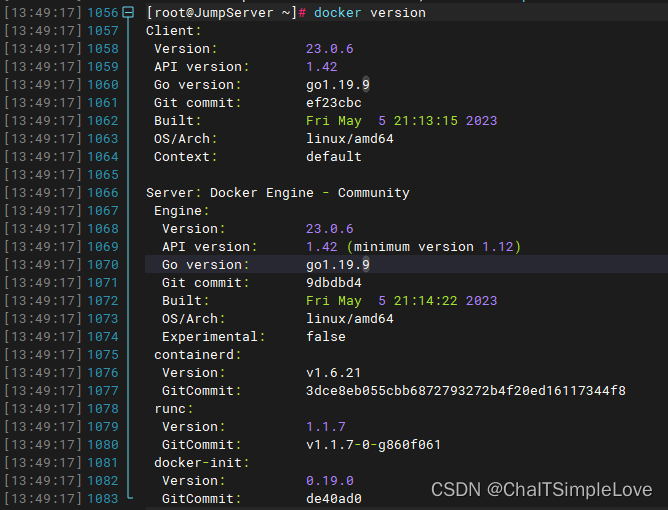
查看 Docker 版本信息:
docker version
此处我们查看 JumpServer 相关的 images 镜像列表:
[root@JumpServer ~]# docker image ls
REPOSITORY           TAG       IMAGE ID       CREATED         SIZE
jumpserver/redis     6.2       6408abc40b2a   14 hours ago    106MB
jumpserver/web       v3.8.0    7bc18906aaee   18 hours ago    1.49GB
jumpserver/chen      v3.8.0    2e56502c628f   18 hours ago    576MB
jumpserver/koko      v3.8.0    8f0ae6fc7123   18 hours ago    1.06GB
jumpserver/kael      v3.8.0    a09b75b98f60   18 hours ago    278MB
jumpserver/lion      v3.8.0    f56740becf33   18 hours ago    237MB
jumpserver/core      v3.8.0    78d73be6070f   18 hours ago    1.57GB
jumpserver/magnus    v3.8.0    dbc25d9904b8   18 hours ago    157MB
jumpserver/mariadb   10.6      aac2cf878de9   10 months ago   405MB
验证安装
访问部署的 JumpServer 堡垒机:
>>> 安装完成了
1. 可以使用如下命令启动, 然后访问
cd /opt/jumpserver-installer-v3.8.0
./jmsctl.sh start2. 其它一些管理命令
./jmsctl.sh stop
./jmsctl.sh restart
./jmsctl.sh backup
./jmsctl.sh upgrade
更多还有一些命令, 你可以 ./jmsctl.sh --help 来了解3. Web 访问
http://172.25.41.89:80
默认用户: admin  默认密码: admin4. SSH/SFTP 访问
ssh -p2222 admin@172.25.41.89
sftp -P2222 admin@172.25.41.895. 更多信息
我们的官网: https://www.jumpserver.org/
我们的文档: https://docs.jumpserver.org/
浏览器输入地址 http://172.25.41.89:80,显示页面如下:
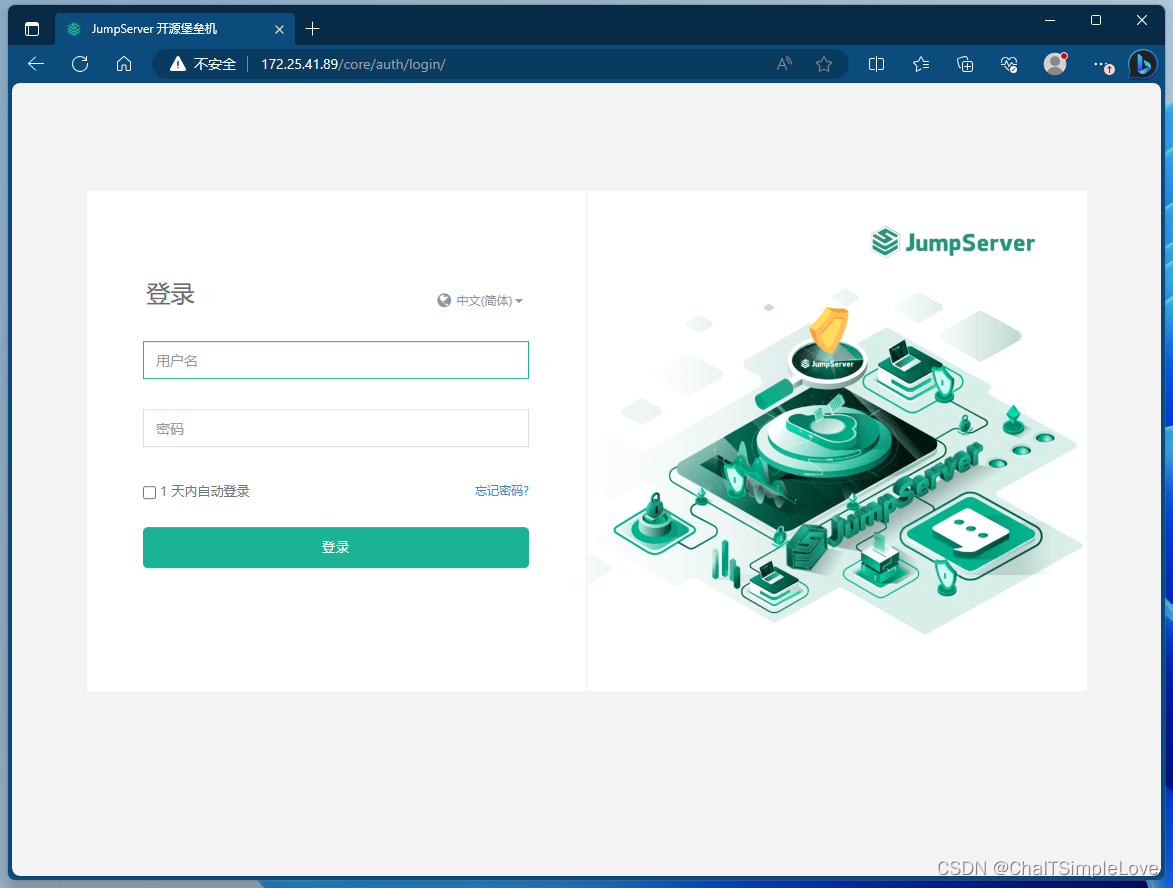
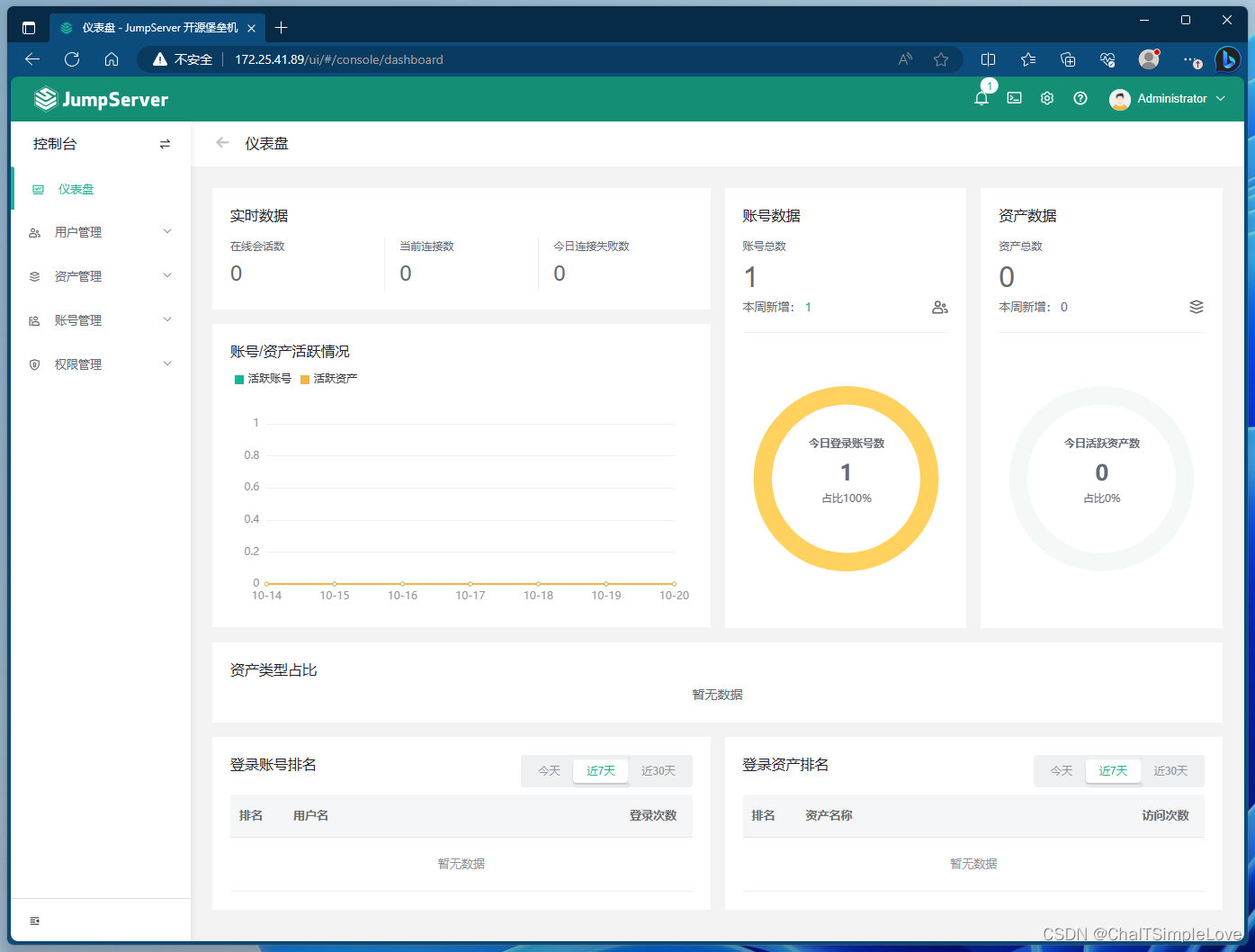
首次登录进入后,会要求修改初始密码,修改后继续登录,进入页面显示如下:
相关文章:
openEuler 服务器安装 JumpServer (all-in-one 模式)
openEuler 服务器安装 JumpServer JumpServer 简介什么是 JumpServer ?JumpServer 的各种类型资产JumpServer 产品特色或优势JumpServer 符合 4A 规范 JumpServer 系统架构应用架构组件说明 JumpServer 安装部署环境要求网络端口网络端口列表防火墙常用命令 在线脚本…...

vue3后台管理系统之路由守卫
下载进度条 pnpm install nprogress //路由鉴权:鉴权,项目当中路由能不能被的权限的设置(某一个路由什么条件下可以访问、什么条件下不可以访问) import router from /router import setting from ./setting // eslint-disable-next-line typescript-eslint/ban-ts-comment /…...

微信小程序连接数据库与WXS的使用
🎉🎉欢迎来到我的CSDN主页!🎉🎉 🏅我是Java方文山,一个在CSDN分享笔记的博主。📚📚 🌟推荐给大家我的专栏《微信小程序开发实战》。🎯Ἲ…...

django 项目基本配置
项目工程初始化 安装框架 pip install django使用命令创建项目 django-admin startproject 项目名称效果 根目录创建apps用以放置所有包 切换至apps目录创建子应用 python ../manage.py startapp usermuxi_shop_back/settings.py # Build paths inside the project lik…...
JAVA基础(JAVA SE)学习笔记(六)面向对象编程(基础)
前言 1. 学习视频: 尚硅谷Java零基础全套视频教程(宋红康2023版,java入门自学必备)_哔哩哔哩_bilibili 2023最新Java学习路线 - 哔哩哔哩 第二阶段:Java面向对象编程 6.面向对象编程(基础) 7.面向对象编程&…...

吉利高端品牌领克汽车携手体验家,重塑智能创新的汽车服务体验
浙江吉利控股集团(以下简称“吉利集团”)始建于1986年,1997年进入汽车行业,一直专注实业,专注技术创新和人才培养,坚定不移地推动企业转型升级和可持续发展。现资产总值超5100亿元,员工总数超过…...
短视频矩阵系统源码(搭建)
短视频矩阵源码的开发路径分享如下: 1、首先,确定项目需求和功能,包括用户上传、编辑、播放等。 2、其次,搭建开发环境,选择合适的开发工具和框架。 3、然后,进行项目架构设计和数据库设计,确…...

k8s 实战 常见异常事件 event 及解决方案分享
k8s 实战 常见异常事件 event 及解决方案分享 集群相关 Coredns容器或local-dns容器 重启集群中的coredns组件发生重启(重新创建),一般是由于coredns组件压力较大导致oom,请检查业务是否异常,是否存在应用容器无法解析域名的异常。如果是l…...

【Python机器学习】sklearn.datasets回归任务数据集
为什么回归分析在数据科学中如此重要,而sklearn.datasets如何助力这一过程? 回归分析是数据科学中不可或缺的一部分,用于预测或解释数值型目标变量(因变量)和一个或多个预测变量(自变量)之间的关系。sklearn.datasets模块提供了多种用于回归分析的数据集,这些数据集常…...
)
Springboot写电商系统(2)
Springboot写电商系统(2) 1.新增收货地址1.创建t_addresss数据库表2.创建Address实体类3.数据库操作的持久层1.接口写抽象方法2.xml写方法映射sql3.测试 4.前后数据交互的业务层1.sql操作的异常抛出2.交互方法的接口定义3.接口的方法实现4.测试 5.与前端…...

SpringBoot中过滤器与拦截器的区别
SpringBoot中过滤器与拦截器的区别 过滤器和拦截器的区别: ①拦截器是基于java的反射机制的,而过滤器是基于函数回调。 ②拦截器不依赖与servlet容器,过滤器依赖与servlet容器。 ③拦截器只能对action请求起作用,而过滤器则可以对…...

SystemVerilog(2)——数据类型
一、概述 和Verilog相比,SV提供了很多改进的数据结构。它们具有如下的优点: 双状态数据类型:更好的性能,更低的内存消耗队列、动态和关联数组:减少内存消耗,自带搜索和分类功能类和结构:支持抽…...

记一次Postgresql从堆叠注入到RCE
本次研究过程来自一次某cms的代码审计实战,整个环境部署的相对较好,postgresql、web权限都有单独的用户管理,web目录不可写、服务器不能出网等限制。不过比较幸运的是所有的数据操作都是用同一个superuser权限的postgresql用户来执行的。 限…...
通用FIFO设计深度8宽度64,verilog仿真,源码和视频
名称:通用FIFO设计深度8宽度64,verilog仿真 软件:Quartus 语言:verilog 本代码为FIFO通用代码,其他深度和位宽可简单修改以下参数得到 reg [63:0] ram [7:0];//RAM。深度8,宽度64 代码功能:…...

尝试进行表格处理
꧂ input输入多行文本,3个回车结束꧁ 用input输入如果你想要使用 input 输入多行文本,可以在输入时按照以下方式来终止输入: text while True:line input("请输入文本(按回车继续,按3个回车结束)…...
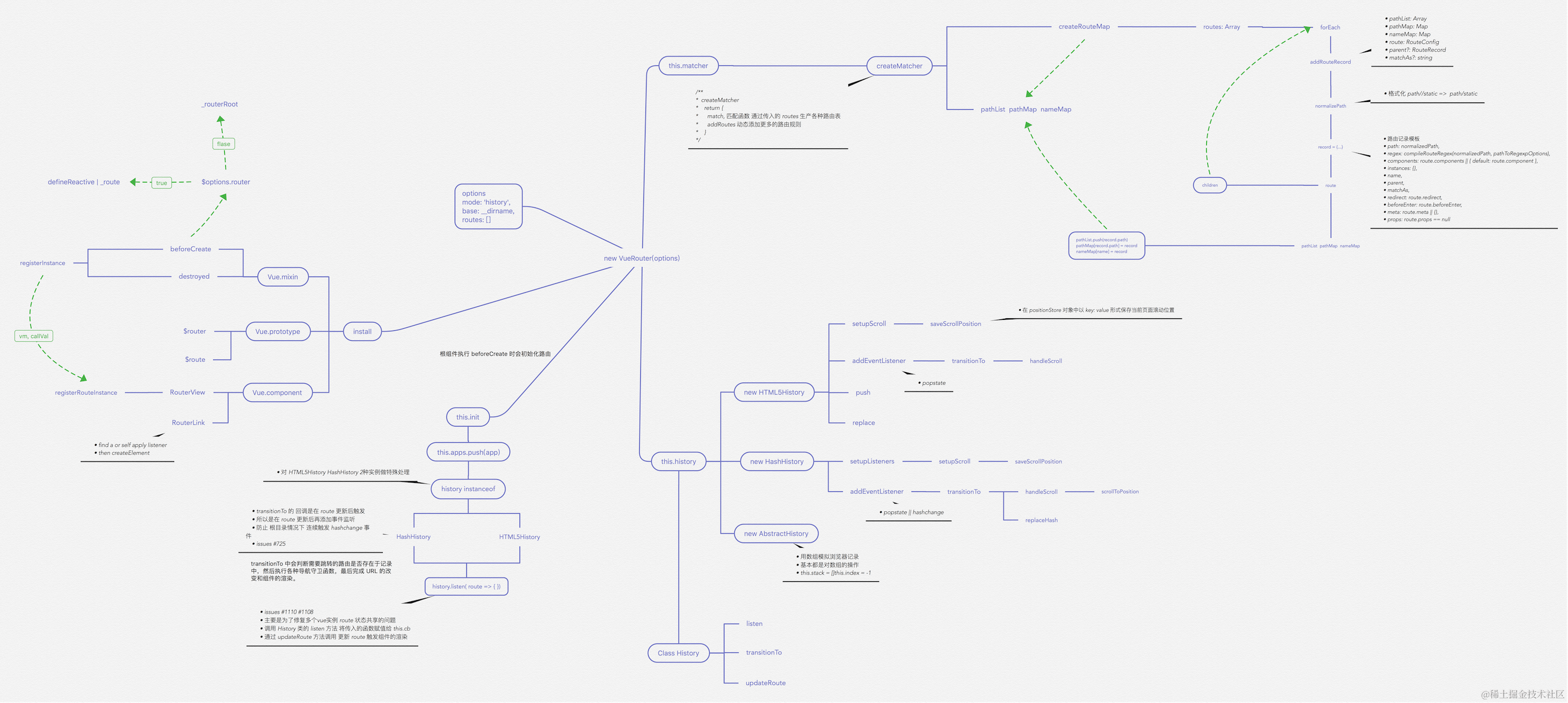
VueRouter 源码解析
重要函数思维导图 路由注册 在开始之前,推荐大家 clone 一份源码对照着看。因为篇幅较长,函数间的跳转也很多。 使用路由之前,需要调用 Vue.use(VueRouter),这是因为让插件可以使用 Vue export function initUse(Vue: GlobalAP…...

云原生之Docker
docker 初识Docker什么是DockerDocker与虚拟机Docker相关术语及架构镜像和容器DockerHubDocker架构 Docker命令镜像操作命令容器操作命令数据卷命令 自定义镜像镜像结构Dockerfile DockerCompose安装常用命令 初识Docker 什么是Docker docker是一个快速交付应用,运…...

List简介
概念: 数据结构列表(List)是Java中的一种线性数据结构,用于存储有序的元素集合。它允许重复元素,并且每个元素都有一个对应的索引来访问和操作。列表可以动态增长或缩小,并且支持添加、删除和修改操作。 …...
:PPT文件操作方法汇总)
【ArcGIS Pro二次开发】(71):PPT文件操作方法汇总
以下操作都要用到【Microsoft.Office.Interop.PowerPoint】,确保安装并引用。 1、打开PPT文件 // 打开PPT Microsoft.Office.Interop.PowerPoint.Application pptApp new Microsoft.Office.Interop.PowerPoint.Application();Presentation ppt pptApp.Presentati…...
——法线空间采样)
CloudCompare 二次开发(18)——法线空间采样
目录 一、概述二、代码集成三、结果展示一、概述 使用CloudCompare与PCL的混合编程实现点云法线空间采样。法线空间采样的具体计算原理见:PCL 法线空间采样。 二、代码集成 1、mainwindow.h文件public中添加: void doActionNormalSpaceSample(); // 法线空间采样2、mainwi…...

深度学习训练中学习率设置与优化策略详解
1. 学习率在深度学习中的核心作用 第一次接触神经网络训练时,我犯过所有新手都会犯的错误——把学习率设成0.1然后眼睁睁看着损失值爆炸。这个看似简单的超参数实际上是模型训练中最关键的调控旋钮,它决定了每次参数更新的步长幅度。就像用显微镜调焦时&…...
破局)
大话适航(九)破局
1. 适航学习的困境与挑战 适航领域就像一座巨大的迷宫,我刚入行时经常在错综复杂的知识网络中迷失方向。最让人头疼的是那些层层嵌套的专业术语——你查到一个词的定义,结果发现里面又冒出三个需要解释的新词。记得有一次为了搞懂"失效概率1E-9&quo…...
)
告别5300网卡!用ESP32-C3/S3低成本玩转Wi-Fi感知:手把手解析CSI数据结构(附避坑指南)
用ESP32-C3/S3解锁Wi-Fi感知:从CSI数据结构到人体检测实战 在智能家居和物联网应用中,Wi-Fi感知技术正悄然改变着人机交互的方式。想象一下,当你走进房间,灯光自动亮起;当你做出手势,音响自动调节音量——这…...

AudioSep音频分离终极指南:用自然语言描述分离任何声音
AudioSep音频分离终极指南:用自然语言描述分离任何声音 【免费下载链接】AudioSep Official implementation of "Separate Anything You Describe" 项目地址: https://gitcode.com/gh_mirrors/au/AudioSep 你是否曾为从嘈杂录音中提取清晰人声而烦…...

KrkrzExtract完整指南:新一代krkrz游戏资源解包工具
KrkrzExtract完整指南:新一代krkrz游戏资源解包工具 【免费下载链接】KrkrzExtract The next generation of KrkrExtract 项目地址: https://gitcode.com/gh_mirrors/kr/KrkrzExtract KrkrzExtract是专门为krkrz游戏引擎设计的下一代资源处理工具,…...

Go-arg最佳实践:10个技巧提升你的CLI应用质量
Go-arg最佳实践:10个技巧提升你的CLI应用质量 【免费下载链接】go-arg Struct-based argument parsing in Go 项目地址: https://gitcode.com/gh_mirrors/go/go-arg Go-arg是一个基于结构体的Go语言命令行参数解析库,它能帮助开发者快速构建功能完…...

【MCP 2026工业落地实战白皮书】:覆盖钢铁、能源、制造三大高危场景的7类适配陷阱与零故障部署清单
更多请点击: https://intelliparadigm.com 第一章:MCP 2026工业落地实战白皮书核心定位与价值全景 MCP(Manufacturing Control Protocol)2026 是面向下一代智能工厂设计的轻量级、可验证、跨厂商协同控制协议,其核心定…...

别急着删中文注释!Spring Boot日志配置报错‘1字节UTF-8序列无效’的完整修复指南
从编码乱码到构建可靠:Spring Boot日志配置报错的根治方案 当你在一个风和日丽的早晨打开IDE准备继续昨天的开发工作时,突然发现原本运行良好的Spring Boot项目抛出了一个令人困惑的错误:"Could not initialize Logback logging from cl…...

别再手动翻了!用Notepad++正则表达式,5分钟搞定同时包含两个关键词的日志行
高效日志分析:Notepad正则表达式双关键词精准匹配实战 日志文件是系统运行状态的忠实记录者,但面对动辄几个GB的日志文件,如何快速定位关键信息成为每个开发运维人员的必修课。上周排查一个线上故障时,我需要在3GB的Nginx日志中找…...
)
软考-数据库系统工程师-编译六道工序与表达式转换通关(下篇)
一、引言编译程序是将高级语言源代码转换为计算机可执行目标代码的核心工具,其工作原理是软考数据系统工程师考试中程序语言基础知识模块的高频考点,同时也是理解数据库 SQL 优化器、查询执行计划生成、存储过程编译等核心技术的底层基础。编译技术的发展…...