
点云cloudpoint生成octomap的OcTree的两种方法以及rviz可视化
第一种:在自己的项目中将点云通过ros的topic发布,用octomap_server订阅点云消息,在octomap_server中生成ocTree
再用rviz进行可视化。
创建工作空间,记得source
mkdir temp_ocotmap_test/src
cd temp_ocotmap_test
catkin_make
source devel/setup.bash
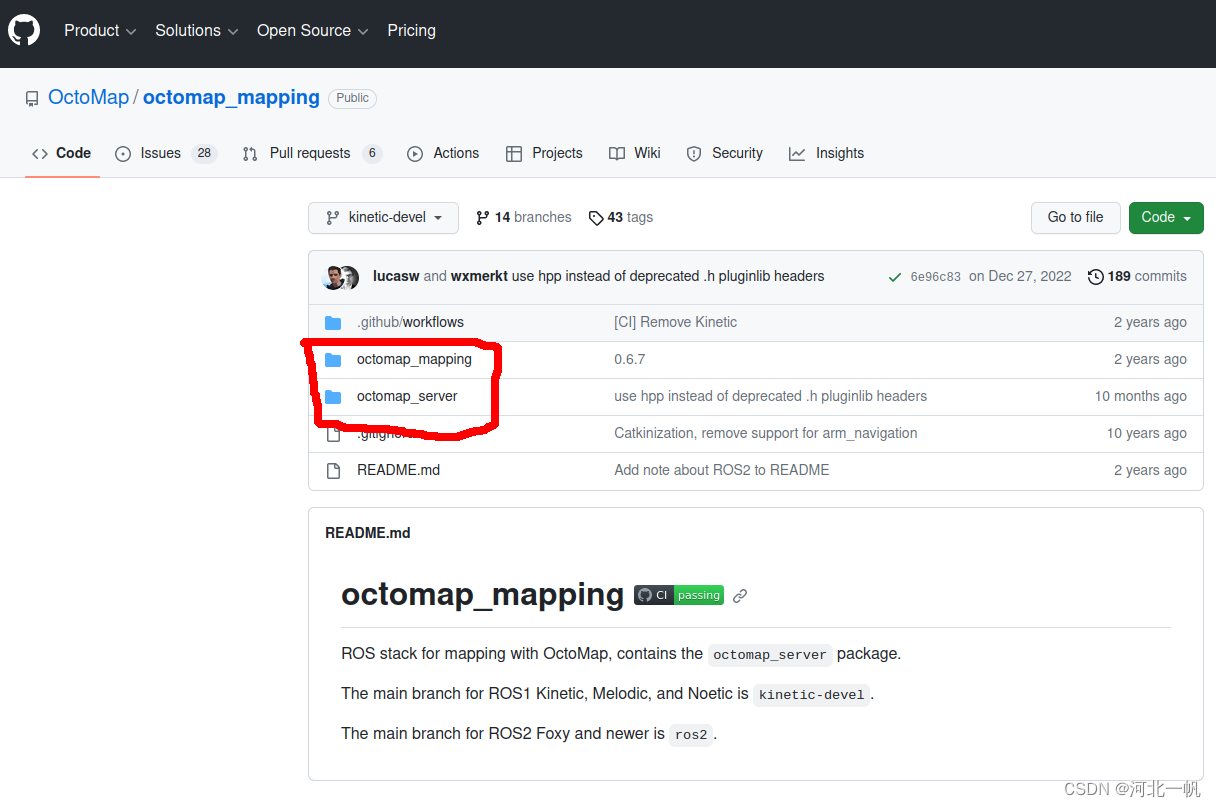
将这两个功能包下载放进自己的ros项目
再创建一个用于发布点云的功能包
cd src
catkin_create_pkg my_pkg std_msgs roscpp
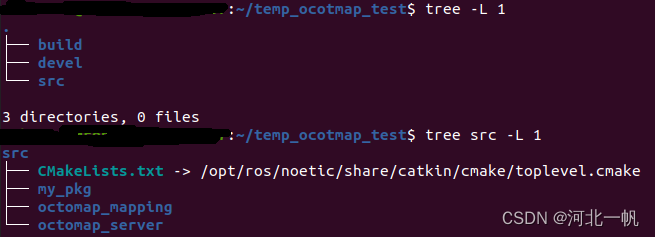
形成这样的目录结构
这里使用:Octomap 在ROS环境下实时显示_ros octomap-CSDN博客
的点云数据进行说明。
进入自己的功能包,创建一个data文件,将那位博主的点云文件test.pcd放进data文件夹
cd my_pkg
mkdir data
接下来写自己节点的cpp文件和自己功能包的CMakeLists.txt
cd my_pkg/src
vim my_pkg.cpp
my_pkg.cpp写入如下内容
#include<iostream>
#include<string>
#include <stdlib.h>
#include <stdio.h>
#include <sstream>
#include <vector>#include<ros/ros.h>
#include<pcl/point_cloud.h>
#include<pcl_conversions/pcl_conversions.h>
#include<sensor_msgs/PointCloud2.h>
#include<pcl/io/pcd_io.h>#include <octomap_msgs/OctomapWithPose.h>
#include <octomap_msgs/Octomap.h>
#include <geometry_msgs/Pose.h>#include <octomap/octomap.h>
#include <octomap_msgs/Octomap.h>
#include <octomap_msgs/conversions.h>#include <geometry_msgs/TransformStamped.h>#define TESTCLOUDPOINTS 1
#define TESTOCTOTREE 0int main (int argc, char **argv)
{  std::string topic,path,frame_id;int hz=5;ros::init (argc, argv, "publish_pointcloud");  ros::NodeHandle nh;  nh.param<std::string>("path", path, "/home/username/Downloads/temp_for_run_octomap_server/src/publish_pointcloud/data/test.pcd");nh.param<std::string>("frame_id", frame_id, "your_frame_id");nh.param<std::string>("topic", topic, "your_pointcloud_topic");nh.param<int>("hz", hz, 5);// load cloudpointpcl::PointCloud<pcl::PointXYZ> pcl_cloud; pcl::io::loadPCDFile (path, pcl_cloud); #if TESTCLOUDPOINTSros::Publisher pcl_pub = nh.advertise<sensor_msgs::PointCloud2> (topic, 10);  // 转换成ROS下的数据类型 通过topic发布sensor_msgs::PointCloud2 output;  pcl::toROSMsg(pcl_cloud, output);output.header.stamp=ros::Time::now();output.header.frame_id  =frame_id;std::cout<<"path = "<<path<<std::endl;std::cout<<"frame_id = "<<frame_id<<std::endl;std::cout<<"topic = "<<topic<<std::endl;std::cout<<"hz = "<<hz<<std::endl;ros::Rate loop_rate(hz);  while (ros::ok())  {  pcl_pub.publish(output);  ros::spinOnce();  loop_rate.sleep();  }#endif#if TESTOCTOTREEros::Publisher octomap_pub = nh.advertise<octomap_msgs::Octomap>(topic, 1);octomap::OcTree tree(0.1);  // You can adjust the resolution as neededfor (const auto& point : pcl_cloud.points) {tree.updateNode(point.x, point.y, point.z, true);}// Publish the octree as an OctoMap messageoctomap_msgs::Octomap octomap_msg;octomap_msgs::fullMapToMsg(tree, octomap_msg);// Assuming you have a publisher for the octomapoctomap_msg.header.stamp=ros::Time::now();octomap_msg.header.frame_id  =frame_id;std::cout<<"path = "<<path<<std::endl;std::cout<<"frame_id = "<<frame_id<<std::endl;std::cout<<"topic = "<<topic<<std::endl;std::cout<<"hz = "<<hz<<std::endl;ros::Rate loop_rate(hz);  while (ros::ok())  {  octomap_pub.publish(octomap_msg);  ros::spinOnce();  loop_rate.sleep();  }#endifreturn 0;
}
CMakeLists.txt这样写
cmake_minimum_required(VERSION 3.0.2)
project(my_pkg)## Compile as C++11, supported in ROS Kinetic and newer
# add_compile_options(-std=c++11)## Find catkin macros and libraries
## if COMPONENTS list like find_package(catkin REQUIRED COMPONENTS xyz)
## is used, also find other catkin packages
find_package(catkin REQUIRED COMPONENTSroscppstd_msgssensor_msgsoctomap_msgsgeometry_msgs
)
find_package(PCL REQUIRED)
find_package(octomap REQUIRED)## System dependencies are found with CMake's conventions
# find_package(Boost REQUIRED COMPONENTS system)## Uncomment this if the package has a setup.py. This macro ensures
## modules and global scripts declared therein get installed
## See http://ros.org/doc/api/catkin/html/user_guide/setup_dot_py.html
# catkin_python_setup()################################################
## Declare ROS messages, services and actions ##
################################################## To declare and build messages, services or actions from within this
## package, follow these steps:
## * Let MSG_DEP_SET be the set of packages whose message types you use in
##   your messages/services/actions (e.g. std_msgs, actionlib_msgs, ...).
## * In the file package.xml:
##   * add a build_depend tag for "message_generation"
##   * add a build_depend and a exec_depend tag for each package in MSG_DEP_SET
##   * If MSG_DEP_SET isn't empty the following dependency has been pulled in
##     but can be declared for certainty nonetheless:
##     * add a exec_depend tag for "message_runtime"
## * In this file (CMakeLists.txt):
##   * add "message_generation" and every package in MSG_DEP_SET to
##     find_package(catkin REQUIRED COMPONENTS ...)
##   * add "message_runtime" and every package in MSG_DEP_SET to
##     catkin_package(CATKIN_DEPENDS ...)
##   * uncomment the add_*_files sections below as needed
##     and list every .msg/.srv/.action file to be processed
##   * uncomment the generate_messages entry below
##   * add every package in MSG_DEP_SET to generate_messages(DEPENDENCIES ...)## Generate messages in the 'msg' folder
# add_message_files(
#   FILES
#   Message1.msg
#   Message2.msg
# )## Generate services in the 'srv' folder
# add_service_files(
#   FILES
#   Service1.srv
#   Service2.srv
# )## Generate actions in the 'action' folder
# add_action_files(
#   FILES
#   Action1.action
#   Action2.action
# )## Generate added messages and services with any dependencies listed here
# generate_messages(
#   DEPENDENCIES
#   std_msgs
# )################################################
## Declare ROS dynamic reconfigure parameters ##
################################################## To declare and build dynamic reconfigure parameters within this
## package, follow these steps:
## * In the file package.xml:
##   * add a build_depend and a exec_depend tag for "dynamic_reconfigure"
## * In this file (CMakeLists.txt):
##   * add "dynamic_reconfigure" to
##     find_package(catkin REQUIRED COMPONENTS ...)
##   * uncomment the "generate_dynamic_reconfigure_options" section below
##     and list every .cfg file to be processed## Generate dynamic reconfigure parameters in the 'cfg' folder
# generate_dynamic_reconfigure_options(
#   cfg/DynReconf1.cfg
#   cfg/DynReconf2.cfg
# )###################################
## catkin specific configuration ##
###################################
## The catkin_package macro generates cmake config files for your package
## Declare things to be passed to dependent projects
## INCLUDE_DIRS: uncomment this if your package contains header files
## LIBRARIES: libraries you create in this project that dependent projects also need
## CATKIN_DEPENDS: catkin_packages dependent projects also need
## DEPENDS: system dependencies of this project that dependent projects also need
catkin_package(
#  INCLUDE_DIRS include
#  LIBRARIES my_pkg
#  CATKIN_DEPENDS roscpp std_msgs
#  DEPENDS system_lib
)###########
## Build ##
############# Specify additional locations of header files
## Your package locations should be listed before other locations
include_directories(
# include${catkin_INCLUDE_DIRS}${PCL_INCLUDE_DIRS}${OCTOMAP_INCLUDE_DIRS}
)## Declare a C++ library
# add_library(${PROJECT_NAME}
#   src/${PROJECT_NAME}/my_pkg.cpp
# )## Add cmake target dependencies of the library
## as an example, code may need to be generated before libraries
## either from message generation or dynamic reconfigure
# add_dependencies(${PROJECT_NAME} ${${PROJECT_NAME}_EXPORTED_TARGETS} ${catkin_EXPORTED_TARGETS})## Declare a C++ executable
## With catkin_make all packages are built within a single CMake context
## The recommended prefix ensures that target names across packages don't collide
add_executable(publish_pointcloud src/my_pkg.cpp)## Rename C++ executable without prefix
## The above recommended prefix causes long target names, the following renames the
## target back to the shorter version for ease of user use
## e.g. "rosrun someones_pkg node" instead of "rosrun someones_pkg someones_pkg_node"
# set_target_properties(${PROJECT_NAME}_node PROPERTIES OUTPUT_NAME node PREFIX "")## Add cmake target dependencies of the executable
## same as for the library above
# add_dependencies(${PROJECT_NAME}_node ${${PROJECT_NAME}_EXPORTED_TARGETS} ${catkin_EXPORTED_TARGETS})## Specify libraries to link a library or executable target against
target_link_libraries(publish_pointcloud${catkin_LIBRARIES}${PCL_LIBRARIES}${OCTOMAP_LIBRARIES}
)#############
## Install ##
############## all install targets should use catkin DESTINATION variables
# See http://ros.org/doc/api/catkin/html/adv_user_guide/variables.html## Mark executable scripts (Python etc.) for installation
## in contrast to setup.py, you can choose the destination
# catkin_install_python(PROGRAMS
#   scripts/my_python_script
#   DESTINATION ${CATKIN_PACKAGE_BIN_DESTINATION}
# )## Mark executables for installation
## See http://docs.ros.org/melodic/api/catkin/html/howto/format1/building_executables.html
# install(TARGETS ${PROJECT_NAME}_node
#   RUNTIME DESTINATION ${CATKIN_PACKAGE_BIN_DESTINATION}
# )## Mark libraries for installation
## See http://docs.ros.org/melodic/api/catkin/html/howto/format1/building_libraries.html
# install(TARGETS ${PROJECT_NAME}
#   ARCHIVE DESTINATION ${CATKIN_PACKAGE_LIB_DESTINATION}
#   LIBRARY DESTINATION ${CATKIN_PACKAGE_LIB_DESTINATION}
#   RUNTIME DESTINATION ${CATKIN_GLOBAL_BIN_DESTINATION}
# )## Mark cpp header files for installation
# install(DIRECTORY include/${PROJECT_NAME}/
#   DESTINATION ${CATKIN_PACKAGE_INCLUDE_DESTINATION}
#   FILES_MATCHING PATTERN "*.h"
#   PATTERN ".svn" EXCLUDE
# )## Mark other files for installation (e.g. launch and bag files, etc.)
# install(FILES
#   # myfile1
#   # myfile2
#   DESTINATION ${CATKIN_PACKAGE_SHARE_DESTINATION}
# )#############
## Testing ##
############### Add gtest based cpp test target and link libraries
# catkin_add_gtest(${PROJECT_NAME}-test test/test_my_pkg.cpp)
# if(TARGET ${PROJECT_NAME}-test)
#   target_link_libraries(${PROJECT_NAME}-test ${PROJECT_NAME})
# endif()## Add folders to be run by python nosetests
# catkin_add_nosetests(test)
my_pkg.cpp中,先使用 宏TESTCLOUDPOINTS,发布点云数据
#define TESTCLOUDPOINTS 1
#define TESTOCTOTREE 0定义好frame_id 和topic
nh.param<std::string>("path", path, "/home/.../test.pcd");
nh.param<std::string>("frame_id", frame_id, "your_frame_id");
nh.param<std::string>("topic", topic, "your_pointcloud_topic");
nh.param<int>("hz", hz, 5);
回到工作空间,编译
cd temp_ocotmap_test
caikin_make
在工作空间中运行节点
rosrun my_pkg publish_pointcloud打开一个terminal,进入工作空间,新打开terminal要source一下
source devel/setup.bash接下来要运行octomap_server,通过octomap_server中的launch文件运行,launch文件在octomap_server/launch,运行之前,要修改其中的frame_id 和topic为你自己定义的frame_id和topic
<launch><node pkg="octomap_server" type="octomap_server_node" name="octomap_server"><!-- resolution in meters per pixel --><param name="resolution" value="0.05" /><!-- name of the fixed frame, needs to be "/map" for SLAM --><param name="frame_id" type="string" value="your_frame_id" /><!-- max range / depth resolution of the kinect in meter --><param name="sensor_model/max_range" value="100.0" /><param name="latch" value="true" /><!-- max/min height for occupancy map, should be in meters --><param name="pointcloud_max_z" value="1000" /><param name="pointcloud_min_z" value="0" /><!-- topic from where pointcloud2 messages are subscribed --><remap from="/cloud_in" to="your_pointcloud_topic" /></node>
</launch>
在工作空间中运行octomap_server
roslaunch octomap_server octomap_mapping.launch这时会出现

不用担心,其实octree已经生成,不知道为什么会显示这个,因为这个问题困扰了好久
再打开一个terminal,运行rviz,记得提前要安装rviz的octomap 插件
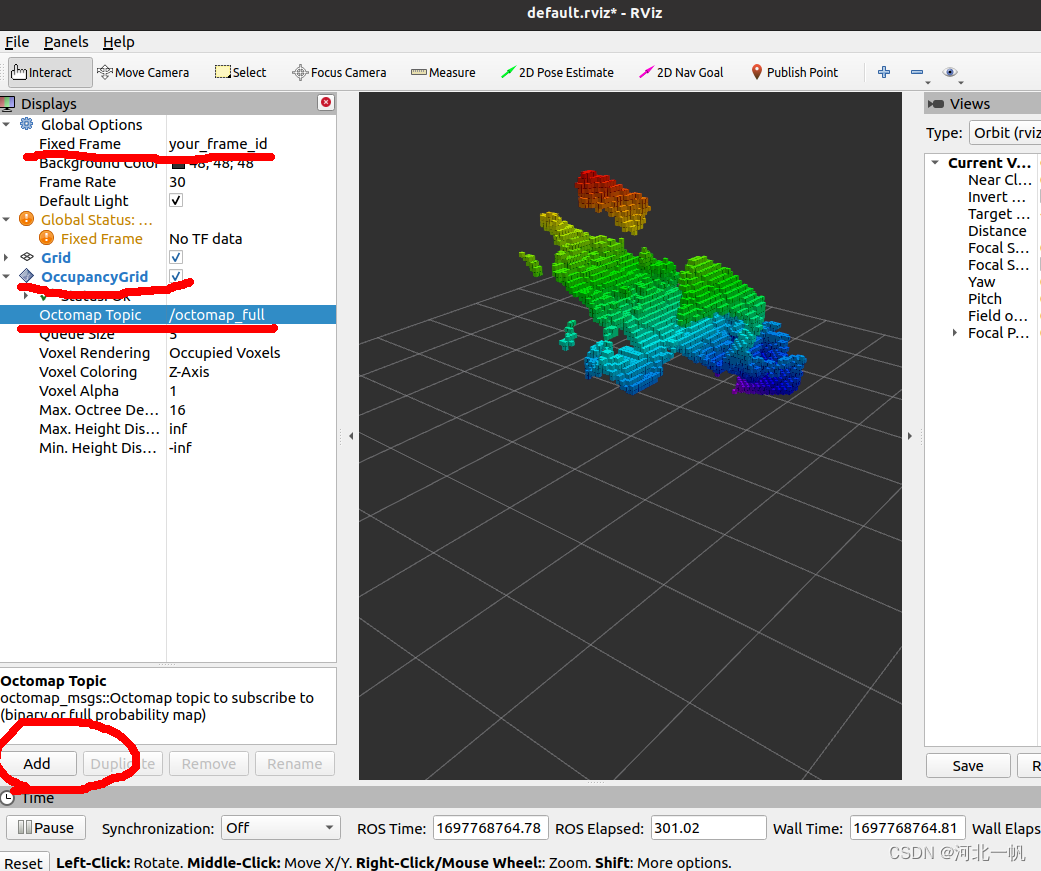
rosrun rviz rviz修改Fixed Frame,Add一个OccupancyGrid,订阅/ocotmap_full这个topic,就可以看到生成的octree了
第二种:不使用octomap_server,在自己项目中引用octomap包,生成octree,直接发布octree的topic,rviz订阅topic进行可视化
将上面my_pkg.cpp中的宏改为
#define TESTCLOUDPOINTS 0
#define TESTOCTOTREE 1
这样就运行了直接生成octree并发布的那段代码,回到工作空间,编译,运行节点
cd temp_ocotmap_test
catkin_make
rosrun my_pkg publish_pointcloud
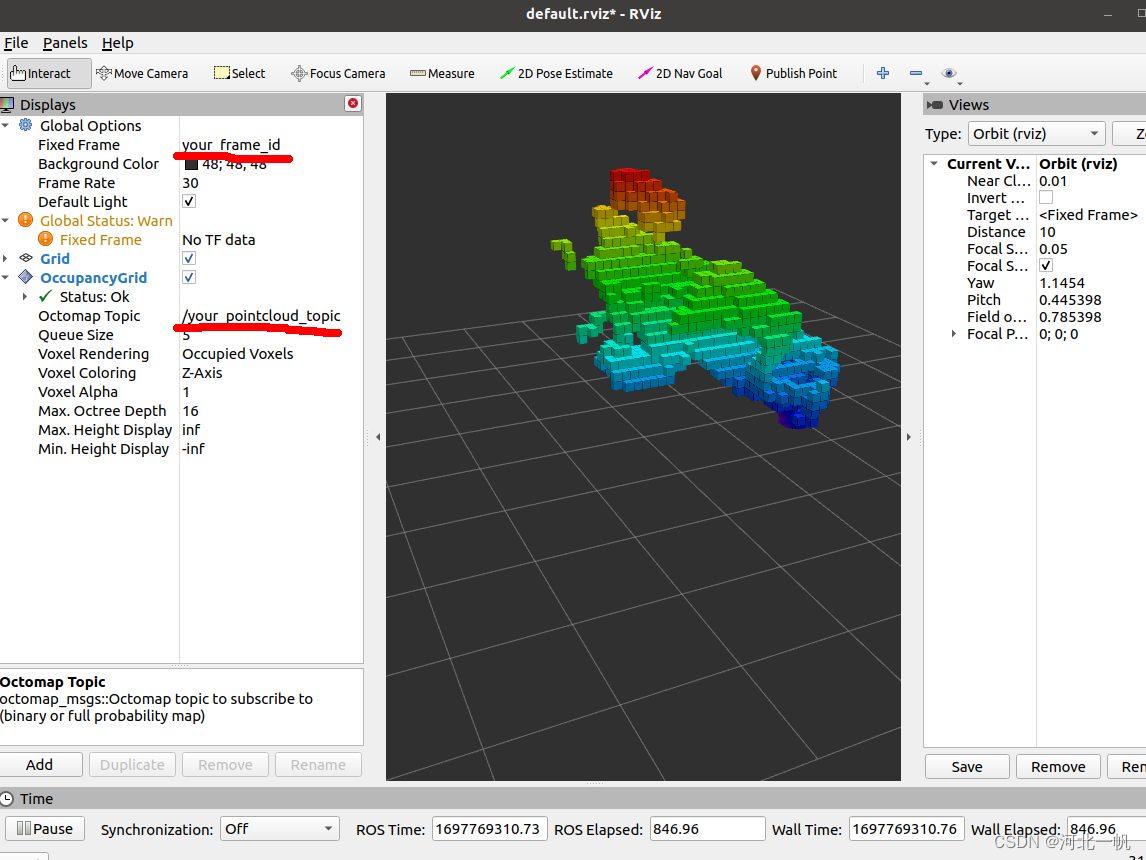
在rviz中修改topic和frame_id,便可以看到octree
以上!
相关文章:
点云cloudpoint生成octomap的OcTree的两种方法以及rviz可视化
第一种:在自己的项目中将点云通过ros的topic发布,用octomap_server订阅点云消息,在octomap_server中生成ocTree 再用rviz进行可视化。 创建工作空间,记得source mkdir temp_ocotmap_test/src cd temp_ocotmap_test catkin_make…...
Python---死循环概念---while True
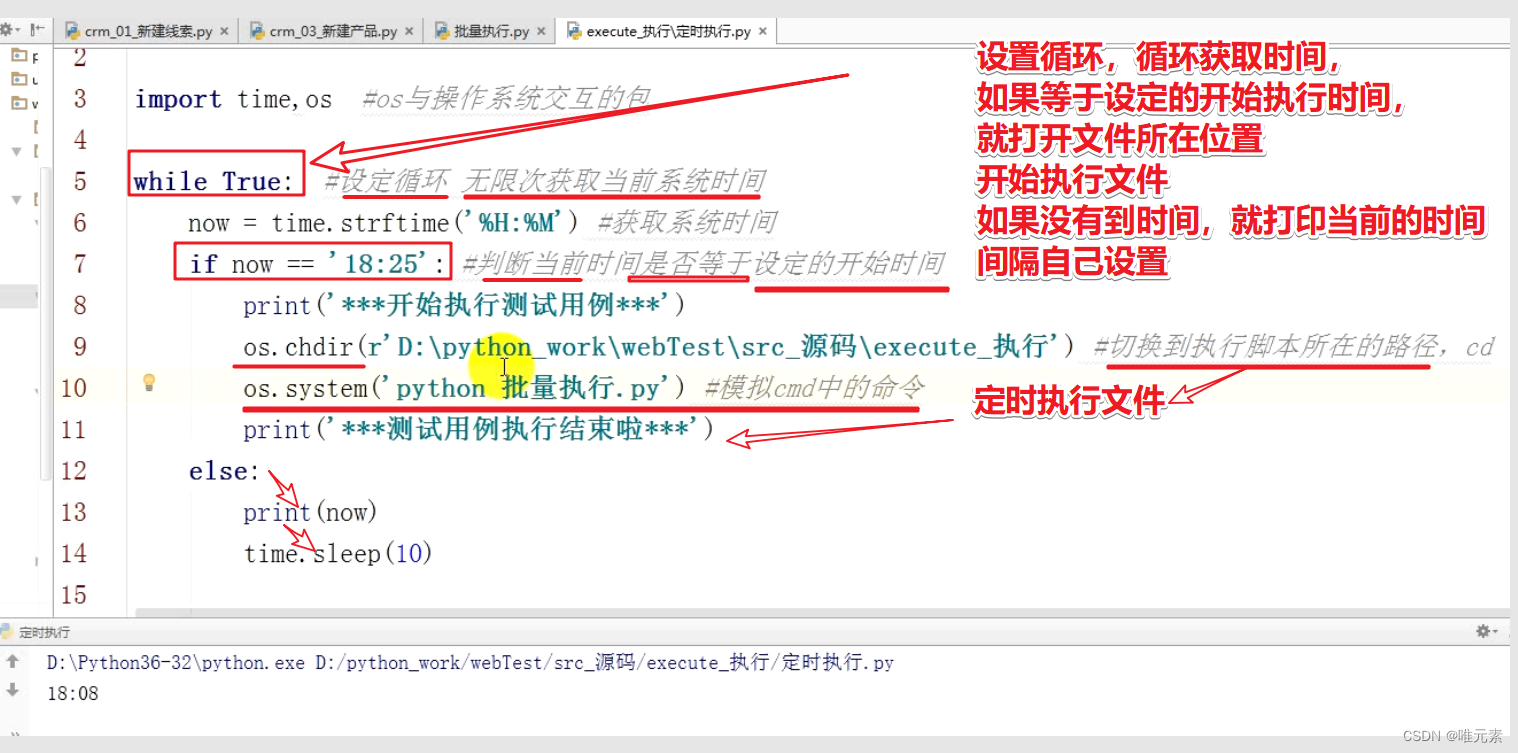
在编程中一个靠自身控制无法终止的程序称为“死循环”。 在Python中,我们也可以使用while True来模拟死循环: 代码: while True: print(每天进步一点点) 图示 应用: 比如,在测试里面,自动化测试用例…...
)
ElasticSearch容器化从0到1实践(问题汇总)
文章目录 ik插件如何安装?6.8.0版本JVM参数调整 ik插件如何安装? ik插件(中文分词插件)无法直接通过install指定插件名称的方式进行安装,可以通过指定zip包的方式对插件进行安装,需要注意的是通过zip包方式…...
01、Python 安装 ,Pycharm 安装
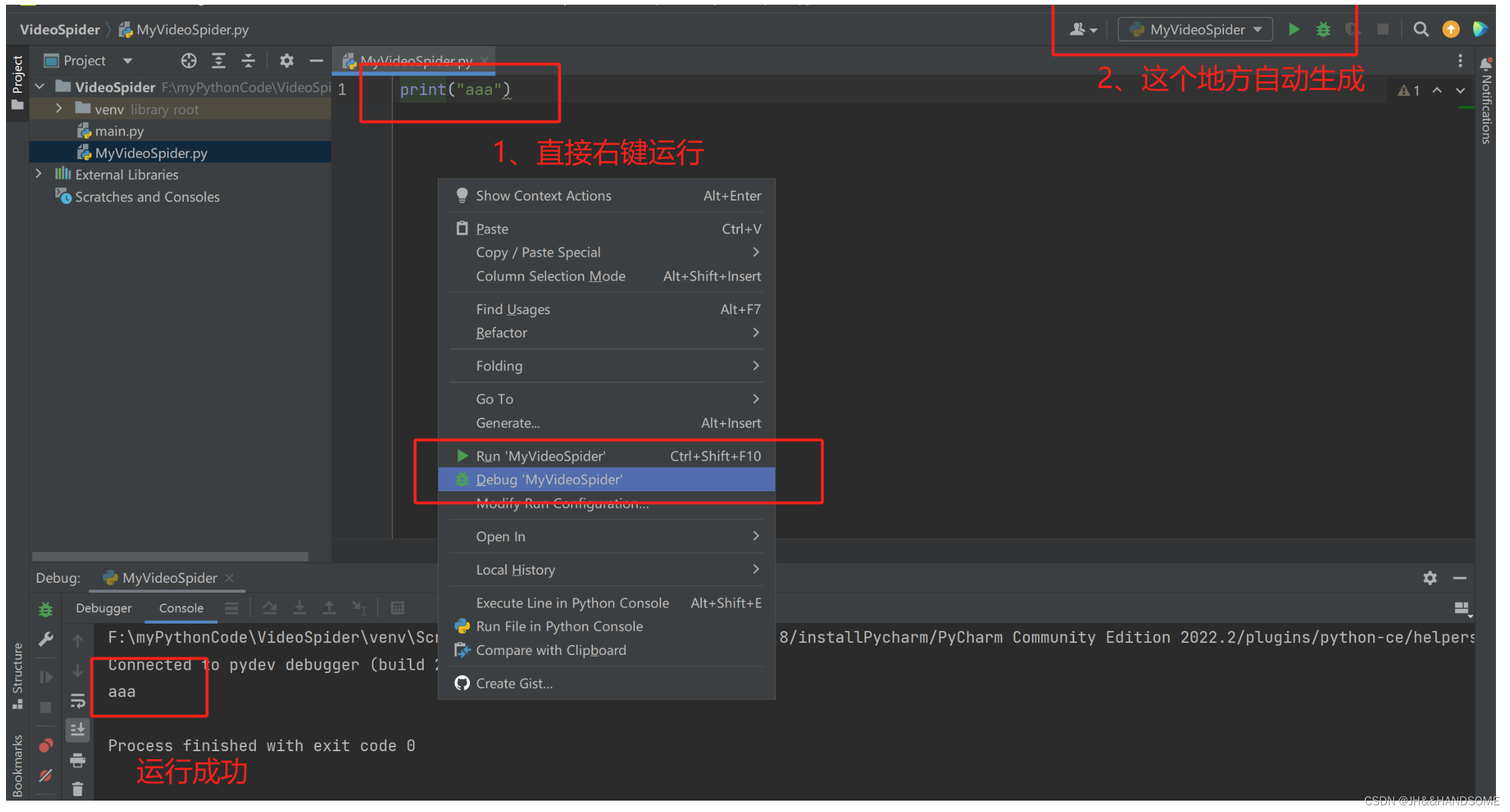
目录 安装安装 Python安装 Pycharm 创建项目简单添加文件运行 简单爬取下载小视频 安装 python-3.8.10-amd64.exe – 先安装这个 pycharm-community-2022.2.exe 再安装这个 安装 Python python-3.8.10-amd64.exe 安装(这个是其他版本的安装,步骤一样…...
从输入URL到展示出页面
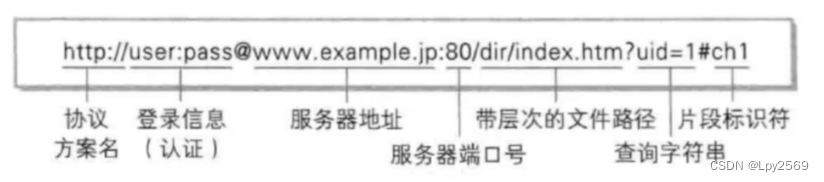
目录 了解URL 1. 输入URL 2. 域名解析 3. 建立连接 4. 服务器处理请求: 5. 返回响应: 6. 浏览器解析HTML: 7. 加载资源: 8. 渲染页面: 9. 执行JavaScript: 10. 页面展示: 从输入URL到…...
【C++】哈希的应用 -- 位图
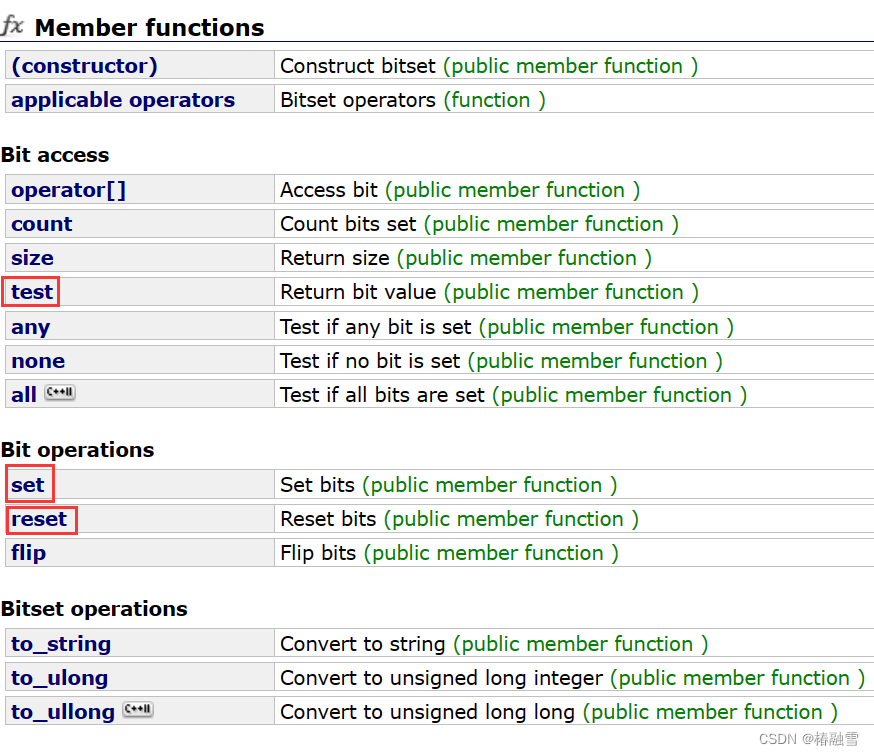
文章目录 一、位图的概念二、位图的实现三、库中的 bitset四、位图的应用五、哈希切割 一、位图的概念 我们以一道面试题来引入位图的概念: 给40亿个不重复的无符号整数,没排过序。给一个无符号整数,如何快速判断一个数是否在这40亿个数中 我…...
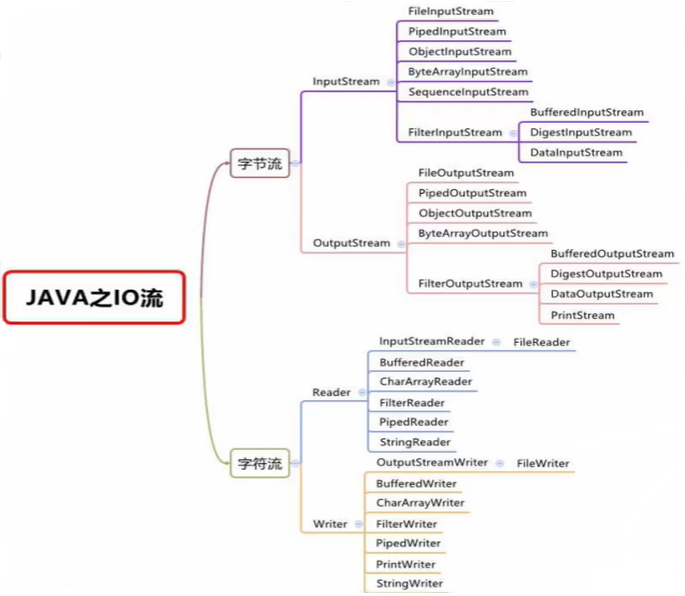
系列二、IO流原理及流的分类
一、概述 IO是Input、Output的缩写,IO流技术是非常实用的技术,用于处理数据传输,例如读写文件,网络通讯等。在Java程序中,对于数据的输入/输出操作以"流(stream)"的方式进行ÿ…...

【算法教程】排列与组合的实现
数据准备 在讲排列与组合之前,我们先定义数据元素类型Fruit class Fruit{constructor(name,price){this.name namethis.price price} }排列 对N个不同元素进行排序,总共有多少不同的排列方式? Step1: 从N个元素中取1个,共N种…...
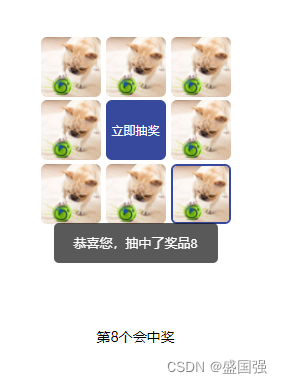
uniapp实现简单的九宫格抽奖(附源码)
效果展示 uniapp实现大转盘抽奖 实现步骤: 1.该页面可设置8个奖品,每个奖品可设置中奖机会的权重,如下chance越大,中奖概率越高(大于0) // 示例代码 prizeList: [{id: 1,image: "https://img.alicdn…...
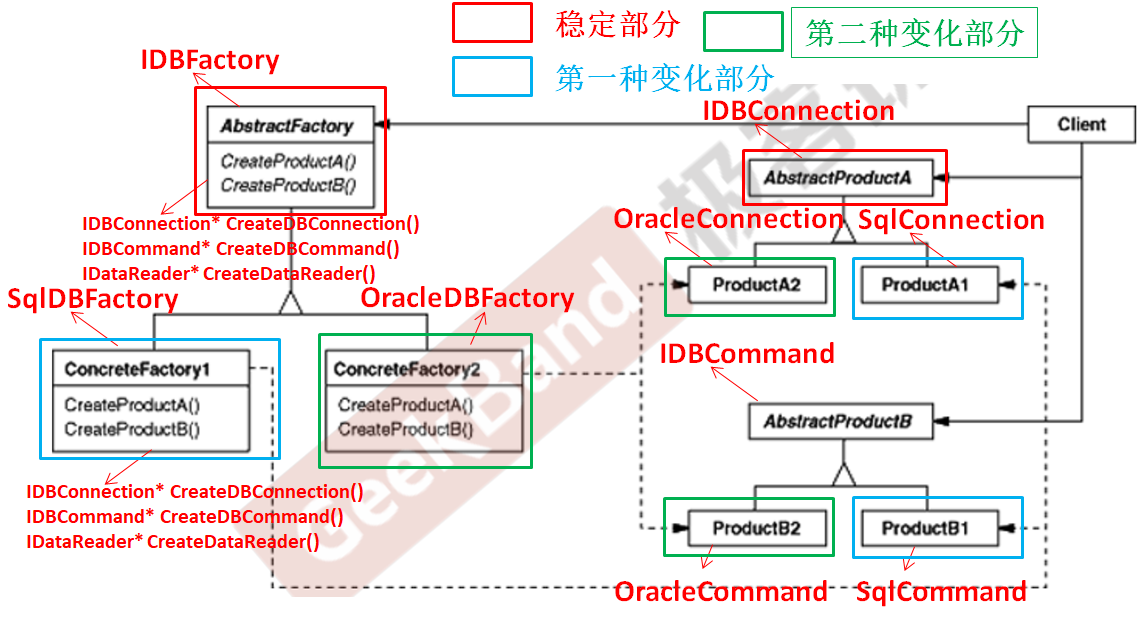
C++设计模式_09_Abstract Factory 抽象工厂
与上篇介绍的Factory Method工厂方法模式一样,Abstract Factory 抽象工厂模式也属于典型的“对象创建模式”模式,解决的问题也极其相似,在理解了Factory Method工厂方法模式的基础上再去理解Abstract Factory 抽象工厂模式就会变得更加容易。…...
一些前端面试思考
回流和重绘 先牢记这句话,回流必将引起重绘,而重绘不一定会引起回流。回流的代价要远大于重绘。 当你给一个元素更换颜色,这样的行为是不会影响页面布局的,DOM树不会变化,但颜色变了,渲染树得重新渲染页面&…...
)
Spring MVC(上)
1、Spring MVC简介: MVC是一种软件架构的思想,将软件按照模型、视图、控制器来划分 M:Model,模型层,指工程中的JavaBean,作用是处理数据 JavaBean分为两类: 一类称为实体类Bean:专…...
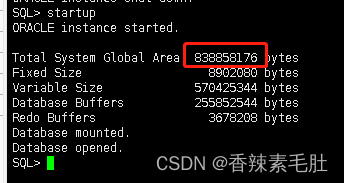
ORACLE内存结构
内存体系结构 目录 内存体系结构 2.1自动内存管理 2.2自动SGA内存管理 2.3手动SGA内存管理 2.3.1数据库缓冲区 2.3.1.1保留池 2.3.1.2回收池 2.3.2共享池 2.3.2.1SQL查询结果和函数查询结果 2.3.2.2库缓存 2.3.2.3数据字典缓存 2.3.3大池 2.3.4 …...
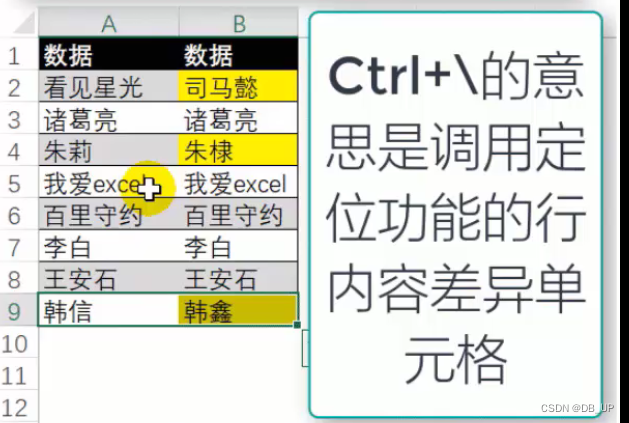
excel常用的几个函数
1、MID函数 通常用来返回返回指定字符串中的子串。 函数公式: MID(string, starting_at, extract_length) String(必填):包含要提取字符的文本字符串 starting_at(必填):文本中要提取的第一个字…...
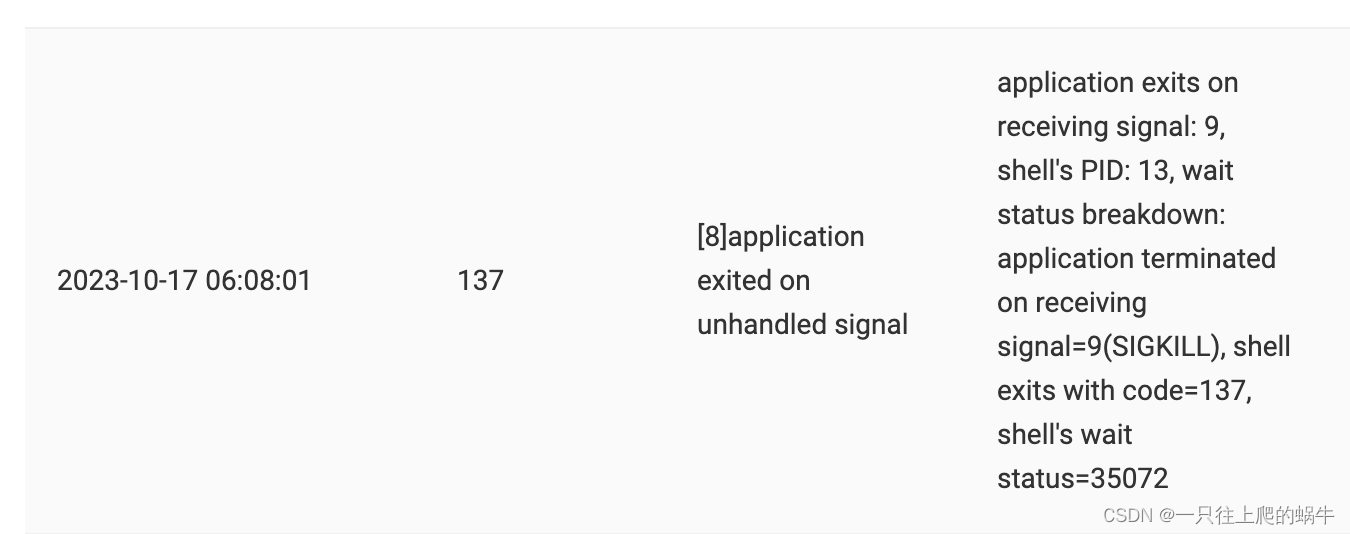
【Bug】【内存相关】偶然发现一个内存溢出Bug复盘
一、问题 跑自动化用例的时候,uat-sg环境,发现SGW经常会返回 502 Bad Gateway响应 二、原因 经过SRE和BE Dev共同排查,502 是从ALB-- > 后端服务 后端服务无法响应导致,ALB会直接给客户端返回502。 服务端:由于c…...

python读写.pptx文件
1、读取PPT import pptx pptpptx.Presentation(rC:\Users\user\Documents\\2.pptx) # ppt.save(rC:\Users\user\Documents\\1.pptx) # slideppt.slides.add_slide(ppt.slide_layouts[1])# 读取所有幻灯片上的文字 for slide in ppt.slides:for shape in slide.shapes:if shape…...
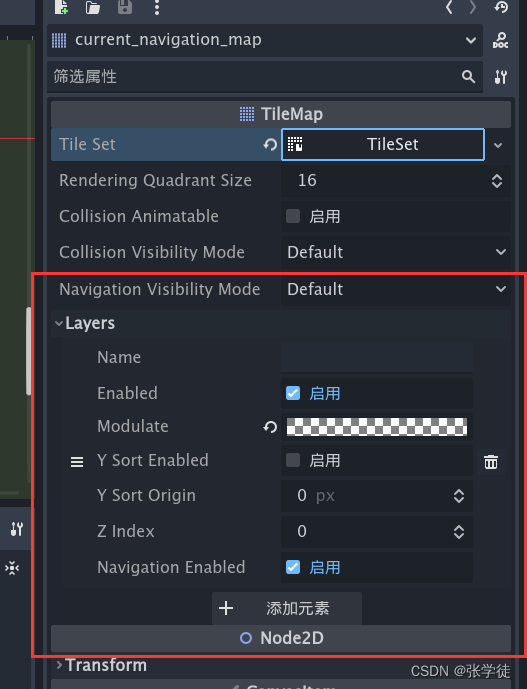
【Godot】【BUG】4.x NavigationAgent 导航不生效
4.2.beta2 试了半天才发现原来默认只对第一个有导航的 TileMap 的第 1 层 生效,而我设置的导航层不是第一层,然后我新建了一个 TileMap 将导航的瓦片设置到这个 TileMap 上了,如图 这样就解决了问题,不用再修改默认设置的东西了&a…...
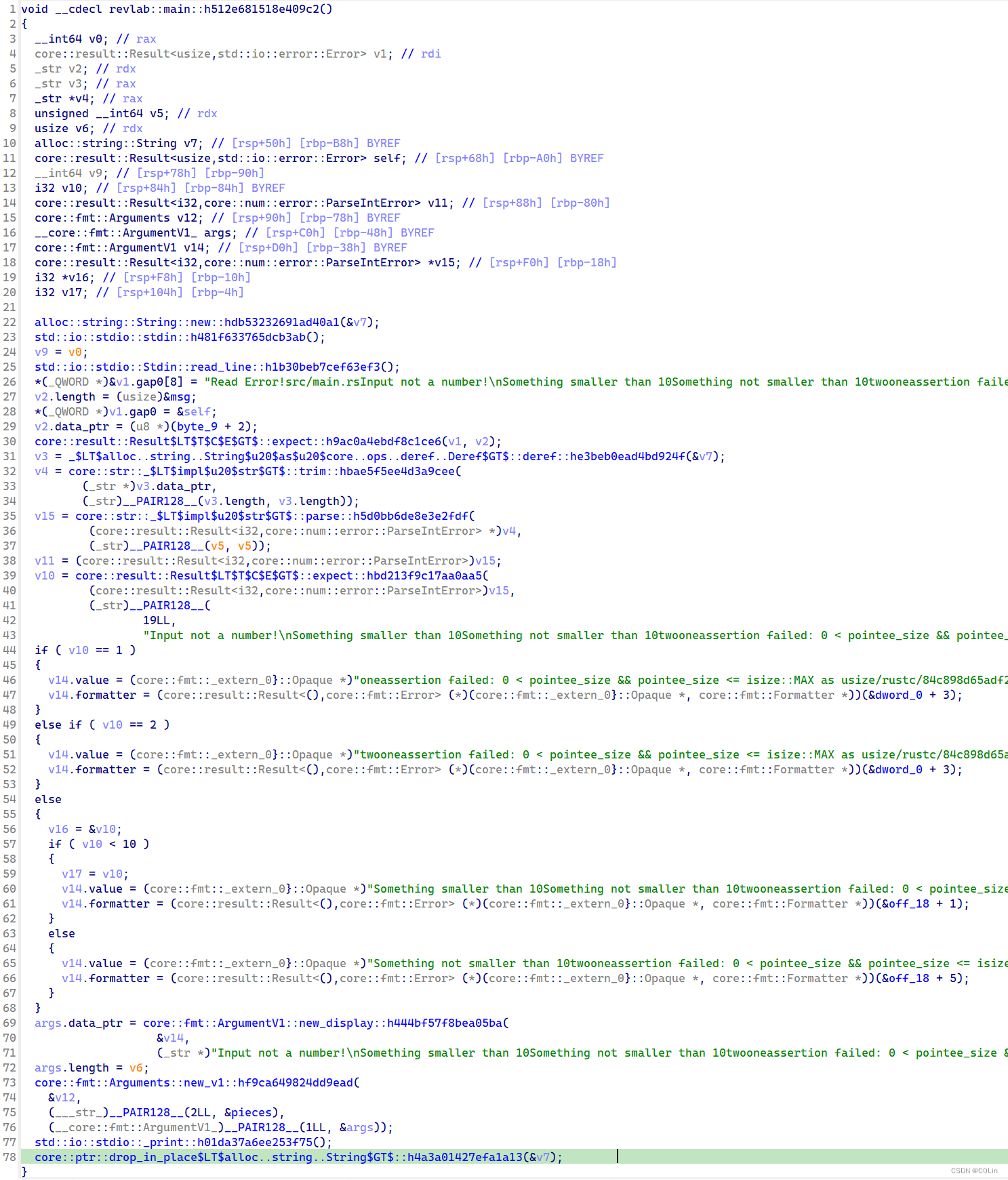
Rust逆向学习 (1)
文章目录 Hello, Rust Reverse0x01. main函数定位0x02. main函数分析line 1line 2line 3line 4~9 0x03. IDA反汇编0x04. 总结 近年来,Rust语言的热度越来越高,很多人都对Rust优雅的代码和优秀的安全性赞不绝口。对于开发是如此,对于CTF也是如…...

【Golang | reflect】利用反射实现方法的调用
引言 go语言中,如果某个数据类型实现了一系列的方法,如何批量去执行呢,这时候就可以利用反射里的func (v Value) Call(in []Value) []Value 方法。 // Call calls the function v with the input arguments in. // For example, if len(in)…...

Teleport
从官网中获取到的代码如下 App.vue <template><div class"outer"><h3>Tooltips with Vue 3 Teleport</h3><div><MyModal /></div></div> </template> <script setup> import MyModal from "./My…...

不只为质押:聊聊在AWS/Ali云服务器上搭建ETH全节点的几种实际用途与成本考量
在AWS/Ali云服务器上搭建ETH全节点的非质押应用场景与成本效益分析 当开发者考虑运行一个以太坊全节点时,第一反应往往是"这需要质押32个ETH吗?"——实际上,非质押的全节点同样能带来丰富的实际价值。本文将跳出技术搭建细节&#…...

10、Docker容器故障排查
Docker 容器故障排查详细步骤 一、基础检查流程 1. 服务状态检查 # 检查Docker服务运行状态 systemctl status docker service docker status # 适用于旧版本系统# 检查Docker守护进程健康状态 docker info # 若正常会返回系统信息,异常则显示错误# 查看容器状态摘…...

机器学习降维技术:原理、实践与优化指南
1. 降维技术概述:为什么我们需要压缩数据? 在机器学习项目中,我们常常会遇到成百上千个特征的数据集。想象你正在整理一个塞满各种工具的工具箱——螺丝刀、扳手、锤子散落各处,每次找工具都要翻遍整个箱子。降维技术就像是给这个…...

Docker容器在产线崩溃的7种隐性原因:从cgroup泄漏到时钟漂移,一文定位真凶
第一章:Docker容器在产线崩溃的7种隐性原因:从cgroup泄漏到时钟漂移,一文定位真凶生产环境中,Docker容器看似“一键启停”,实则深藏七类不易察觉的崩溃诱因。它们不触发明显错误日志,却在高负载、长周期运行…...

开发环境搭建:Python虚拟环境与依赖管理
002、开发环境搭建:Python虚拟环境与依赖管理 昨天调试同事的FastAPI项目时,又遇到了经典的依赖冲突问题——他的本地环境能跑,我的机器上死活起不来。uvicorn启动直接报ImportError,一查发现是pydantic版本不匹配。这种问题在团队协作中太常见了,根源往往在于环境隔离没…...

别再为ChatGPT API调用发愁了!5分钟在Cloudflare上搭个免费中转站,稳定又省心
5分钟构建ChatGPT API全球加速通道:Cloudflare Workers实战指南 ChatGPT API的开发者们经常面临网络延迟、地域限制和连接不稳定等问题。想象一下,当你精心设计的AI应用因为API调用失败而崩溃,或者用户因为响应缓慢而流失——这些痛点直接影响…...

GPU云服务特征定价原理与LLM推理优化实践
1. GPU云服务特征定价的核心原理在传统云计算定价模型中,时间计费(Time-based Pricing)一直是主流方案。这种模式下,用户为GPU实例支付固定的小时费用,而无论实际使用了多少计算资源。随着大语言模型(LLM&a…...

从MobileNet V1到V3:谷歌轻量化CNN的演进史,如何影响了今天的端侧AI部署?
MobileNet进化史:轻量化CNN如何重塑边缘计算生态 当2016年AlphaGo击败李世石时,很少有人注意到支撑这场胜利的GPU集群功耗高达200千瓦——这相当于200台家用空调同时运转的能耗。而今天,我们口袋里的智能手机却能实时运行人脸识别、AR滤镜等A…...

生产环境mysql如何实现高可用_配置主从复制与自动故障切换
主从复制SHOW SLAVE STATUS显示Connecting的常见原因是网络通但权限或配置未对齐:主库需开启binlog且server_id全局唯一;从库CHANGE MASTER TO中MASTER_HOST不能为localhost或127.0.0.1,须填真实IP或域名。主从复制配不起来,SHOW …...

晶体管工作原理与半导体技术解析
1. 晶体管工作原理与半导体技术解析1947年圣诞节前夕,贝尔实验室的两位物理学家约翰巴丁和沃尔特布拉顿在锗晶体表面放置了两个相距仅0.05毫米的金属触点,意外发现这个简单装置能够放大电信号。这个被称为"点接触晶体管"的发明,彻底…...