
npm install报错,解决记录
第一步:检查和安装
我这里建议检查
1.node.js版本是否和前使用版本一致
2.npm版本是否和前使用版本一致
3.vue版本是否和前使用版本一致
4.vue脚手架是否和前使用版本一致
5.npm镜像是否和前使用版本一致
1.检查版本
【node版本】
命令:node -v
结果:v16.13.0 (我目前使用的版本)【npm版本】
命令:npm -v
结果:8.1.0【cnpm版本】
命令:cnpm -v
结果:cnpm@6.1.1【npm映射网址(镜像网址)】
命令:npm config get registry
结果:https://registry.npmjs.org/ (我这里是官方默认镜像)【vue脚手架版本】命令:vue -V
结果:
@vue/cli 4.5.6
"vue": "^2.5.2",
2.安装版本
【安装指定版本的vue,需要卸载最新版本的vue】
npm uninstall -g @vue/cli【安装指定的vue版本脚手架】
npm install -g @vue/cli@4.5.6【安装指定的vue版本】
npm install vue@2.x.x
第二步:查看镜像源配置
1.查看当前使用的镜像地址:
npm config get registry2.官方默认全局镜像
https://registry.npmjs.org3.设置镜像源:
npm config set registry https://registry.npm.taobao.org4.官方默认全局镜像
https://registry.npmjs.org5.给项目单独配置npm镜像源
项目根目录的 .npmrc 的配置,优先级最高,且随着项目一起,可以免去因不同开发者的电脑的环境配置不同而导致的依赖下载异常的问题;实际开发中也推荐在根目录下配置一份,可以给每个项目配置不同的镜像,项目之间的配置互不影响。
.npmrc文件中写如下内容:
# 配置 npm 的默认镜像源为淘宝镜像源
registry = "https://registry.npm.taobao.org"
6.常用镜像源
# 淘宝镜像源
https://registry.npmmirror.com
https://registry.npm.taobao.org# 腾讯云镜像源
http://mirrors.cloud.tencent.com/npm/# 华为云镜像源
https://mirrors.huaweicloud.com/repository/npm/# 官方默认全局镜像
https://registry.npmjs.org
第三步:初始化项目
npm install1.初始化报错
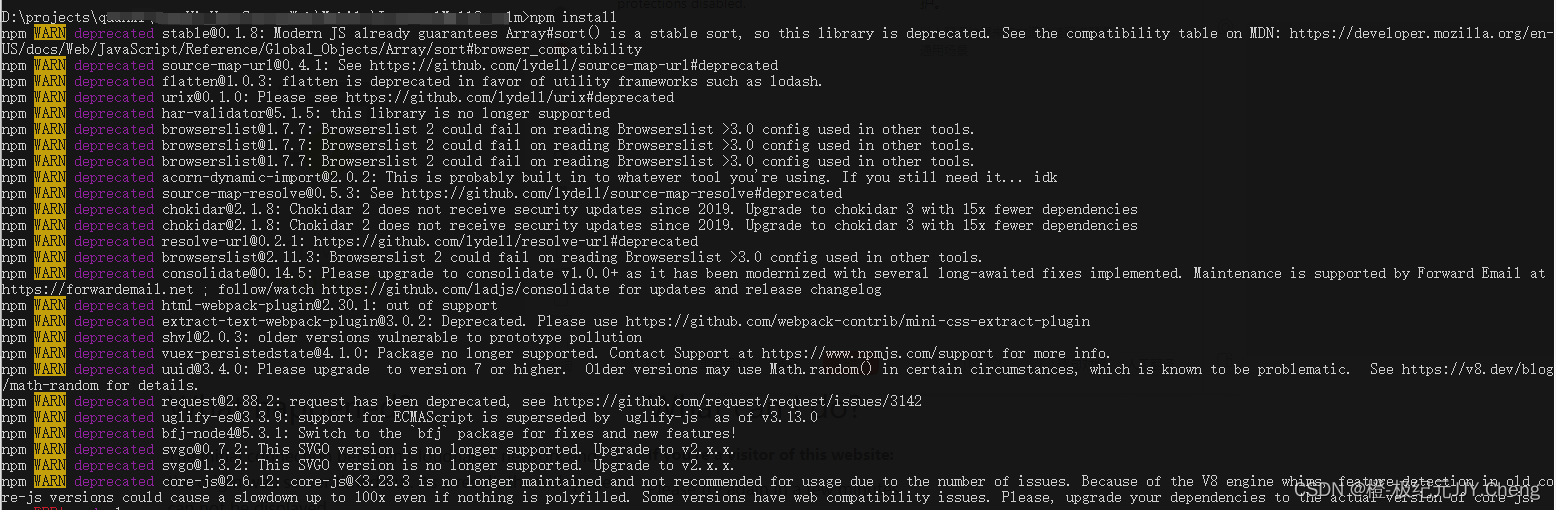


D:\projects\项目目录>npm install
npm WARN deprecated stable@0.1.8: Modern JS already guarantees Array#sort() is a stable sort, so this library is deprecated. See the compatibility table on MDN: https://developer.mozilla.org/en-US/docs/Web/JavaScript/Reference/Global_Objects/Array/sort#browser_compatibility
npm WARN deprecated source-map-url@0.4.1: See https://github.com/lydell/source-map-url#deprecated
npm WARN deprecated flatten@1.0.3: flatten is deprecated in favor of utility frameworks such as lodash.
npm WARN deprecated urix@0.1.0: Please see https://github.com/lydell/urix#deprecated
npm WARN deprecated har-validator@5.1.5: this library is no longer supported
npm WARN deprecated browserslist@1.7.7: Browserslist 2 could fail on reading Browserslist >3.0 config used in other tools.
npm WARN deprecated browserslist@1.7.7: Browserslist 2 could fail on reading Browserslist >3.0 config used in other tools.
npm WARN deprecated browserslist@1.7.7: Browserslist 2 could fail on reading Browserslist >3.0 config used in other tools.
npm WARN deprecated acorn-dynamic-import@2.0.2: This is probably built in to whatever tool you're using. If you still need it... idk
npm WARN deprecated source-map-resolve@0.5.3: See https://github.com/lydell/source-map-resolve#deprecated
npm WARN deprecated chokidar@2.1.8: Chokidar 2 does not receive security updates since 2019. Upgrade to chokidar 3 with 15x fewer dependencies
npm WARN deprecated chokidar@2.1.8: Chokidar 2 does not receive security updates since 2019. Upgrade to chokidar 3 with 15x fewer dependencies
npm WARN deprecated resolve-url@0.2.1: https://github.com/lydell/resolve-url#deprecated
npm WARN deprecated browserslist@2.11.3: Browserslist 2 could fail on reading Browserslist >3.0 config used in other tools.
npm WARN deprecated consolidate@0.14.5: Please upgrade to consolidate v1.0.0+ as it has been modernized with several long-awaited fixes implemented. Maintenance is supported by Forward Email at https://forwardemail.net ; follow/watch https://github.com/ladjs/consolidate for updates and release changelog
npm WARN deprecated html-webpack-plugin@2.30.1: out of support
npm WARN deprecated extract-text-webpack-plugin@3.0.2: Deprecated. Please use https://github.com/webpack-contrib/mini-css-extract-plugin
npm WARN deprecated shvl@2.0.3: older versions vulnerable to prototype pollution
npm WARN deprecated vuex-persistedstate@4.1.0: Package no longer supported. Contact Support at https://www.npmjs.com/support for more info.
npm WARN deprecated uuid@3.4.0: Please upgrade  to version 7 or higher.  Older versions may use Math.random() in certain circumstances, which is known to be problematic.  See https://v8.dev/blog/math-random for details.
npm WARN deprecated request@2.88.2: request has been deprecated, see https://github.com/request/request/issues/3142
npm WARN deprecated uglify-es@3.3.9: support for ECMAScript is superseded by `uglify-js` as of v3.13.0
npm WARN deprecated bfj-node4@5.3.1: Switch to the `bfj` package for fixes and new features!
npm WARN deprecated svgo@0.7.2: This SVGO version is no longer supported. Upgrade to v2.x.x.
npm WARN deprecated svgo@1.3.2: This SVGO version is no longer supported. Upgrade to v2.x.x.
npm WARN deprecated core-js@2.6.12: core-js@<3.23.3 is no longer maintained and not recommended for usage due to the number of issues. Because of the V8 engine whims, feature detection in old core-js versions could cause a slowdown up to 100x even if nothing is polyfilled. Some versions have web compatibility issues. Please, upgrade your dependencies to the actual version of core-js.
npm ERR! code 1
npm ERR! path D:\projects\项目目录\node_modules\node-sass
npm ERR! command failed
npm ERR! command C:\Windows\system32\cmd.exe /d /s /c node scripts/build.js
npm ERR! Building: C:\Program Files\nodejs\node.exe D:\projects\项目目录\node_modules\node-gyp\bin\node-gyp.js rebuild --verbose --libsass_ext= --libsass_cflags= --libsass_ldflags= --libsass_library=
npm ERR! gyp info it worked if it ends with ok
npm ERR! gyp verb cli [
npm ERR! gyp verb cli   'C:\\Program Files\\nodejs\\node.exe',
npm ERR! gyp verb cli   'D:项目目录node_modules\\node-gyp\\bin\\node-gyp.js',
npm ERR! gyp verb cli   'rebuild',
npm ERR! gyp verb cli   '--verbose',
npm ERR! gyp verb cli   '--libsass_ext=',
npm ERR! gyp verb cli   '--libsass_cflags=',
npm ERR! gyp verb cli   '--libsass_ldflags=',
npm ERR! gyp verb cli   '--libsass_library='
npm ERR! gyp verb cli ]
npm ERR! gyp info using node-gyp@7.1.2
npm ERR! gyp info using node@16.13.0 | win32 | x64
npm ERR! gyp verb command rebuild []
npm ERR! gyp verb command clean []
npm ERR! gyp verb clean removing "build" directory
npm ERR! gyp verb command configure []
npm ERR! gyp verb find Python Python is not set from command line or npm configuration
npm ERR! gyp verb find Python Python is not set from environment variable PYTHON
npm ERR! gyp verb find Python checking if "python3" can be used
npm ERR! gyp verb find Python - executing "python3" to get executable path
npm ERR! gyp verb find Python - "python3" is not in PATH or produced an error
npm ERR! gyp verb find Python checking if "python" can be used
npm ERR! gyp verb find Python - executing "python" to get executable path
npm ERR! gyp verb find Python - executable path is "C:\Users\cpeng\AppData\Local\Programs\Python\Python38-32\python.exe"
npm ERR! gyp verb find Python - executing "C:\Users\cpeng\AppData\Local\Programs\Python\Python38-32\python.exe" to get version
npm ERR! gyp verb find Python - version is "3.8.5"
npm ERR! gyp info find Python using Python version 3.8.5 found at "C:\Users\cpeng\AppData\Local\Programs\Python\Python38-32\python.exe"
npm ERR! gyp verb get node dir no --target version specified, falling back to host node version: 16.13.0
npm ERR! gyp verb command install [ '16.13.0' ]
npm ERR! gyp verb install input version string "16.13.0"
npm ERR! gyp verb install installing version: 16.13.0
npm ERR! gyp verb install --ensure was passed, so won't reinstall if already installed
npm ERR! gyp verb install version is already installed, need to check "installVersion"
npm ERR! gyp verb got "installVersion" 9
npm ERR! gyp verb needs "installVersion" 9
npm ERR! gyp verb install version is good
npm ERR! gyp verb get node dir target node version installed: 16.13.0
npm ERR! gyp verb build dir attempting to create "build" dir: D:\projects\项目目录\node_modules\node-sass\build
npm ERR! gyp verb build dir "build" dir needed to be created? D:\projects\项目目录\node_modules\node-sass\build
npm ERR! gyp verb find VS msvs_version not set from command line or npm config
npm ERR! gyp verb find VS VCINSTALLDIR not set, not running in VS Command Prompt
npm ERR! gyp verb find VS checking VS2017 (15.9.28307.1216) found at:
npm ERR! gyp verb find VS "C:\Program Files (x86)\Microsoft Visual Studio\2017\Enterprise"
npm ERR! gyp verb find VS - found "Visual Studio C++ core features"
npm ERR! gyp verb find VS - missing any VC++ toolset
npm ERR! gyp verb find VS could not find a version of Visual Studio 2017 or newer to use
npm ERR! gyp verb find VS looking for Visual Studio 2015
npm ERR! gyp verb find VS - not found
npm ERR! gyp verb find VS not looking for VS2013 as it is only supported up to Node.js 8
npm ERR! gyp ERR! find VS
npm ERR! gyp ERR! find VS msvs_version not set from command line or npm config
npm ERR! gyp ERR! find VS VCINSTALLDIR not set, not running in VS Command Prompt
npm ERR! gyp ERR! find VS checking VS2017 (15.9.28307.1216) found at:
npm ERR! gyp ERR! find VS "C:\Program Files (x86)\Microsoft Visual Studio\2017\Enterprise"
npm ERR! gyp ERR! find VS - found "Visual Studio C++ core features"
npm ERR! gyp ERR! find VS - missing any VC++ toolset
npm ERR! gyp ERR! find VS could not find a version of Visual Studio 2017 or newer to use
npm ERR! gyp ERR! find VS looking for Visual Studio 2015
npm ERR! gyp ERR! find VS - not found
npm ERR! gyp ERR! find VS not looking for VS2013 as it is only supported up to Node.js 8
npm ERR! gyp ERR! find VS
npm ERR! gyp ERR! find VS **************************************************************
npm ERR! gyp ERR! find VS You need to install the latest version of Visual Studio
npm ERR! gyp ERR! find VS including the "Desktop development with C++" workload.
npm ERR! gyp ERR! find VS For more information consult the documentation at:
npm ERR! gyp ERR! find VS https://github.com/nodejs/node-gyp#on-windows
npm ERR! gyp ERR! find VS **************************************************************
npm ERR! gyp ERR! find VS
npm ERR! gyp ERR! configure error
npm ERR! gyp ERR! stack Error: Could not find any Visual Studio installation to use
npm ERR! gyp ERR! stack     at VisualStudioFinder.fail (D:\projects\项目目录\node_modules\node-gyp\lib\find-visualstudio.js:121:47)
npm ERR! gyp ERR! stack     at D:\projects\项目目录\node_modules\node-gyp\lib\find-visualstudio.js:74:16
npm ERR! gyp ERR! stack     at VisualStudioFinder.findVisualStudio2013 (D:\projects\项目目录\node_modules\node-gyp\lib\find-visualstudio.js:351:14)
npm ERR! gyp ERR! stack     at D:\projects\项目目录\node_modules\node-gyp\lib\find-visualstudio.js:70:14
npm ERR! gyp ERR! stack     at D:\projects\项目目录\node_modules\node-gyp\lib\find-visualstudio.js:372:16
npm ERR! gyp ERR! stack     at D:\projects\项目目录\node_modules\node-gyp\lib\util.js:54:7
npm ERR! gyp ERR! stack     at D:\projects\项目目录\node_modules\node-gyp\lib\util.js:33:16
npm ERR! gyp ERR! stack     at ChildProcess.exithandler (node:child_process:404:5)
npm ERR! gyp ERR! stack     at ChildProcess.emit (node:events:390:28)
npm ERR! gyp ERR! stack     at maybeClose (node:internal/child_process:1064:16)
npm ERR! gyp ERR! System Windows_NT 10.0.18362
npm ERR! gyp ERR! command "C:\\Program Files\\nodejs\\node.exe" "D:项目目录node_modules\\node-gyp\\bin\\node-gyp.js" "rebuild" "--verbose" "--libsass_ext=" "--libsass_cflags=" "--libsass_ldflags=" "--libsass_library="
npm ERR! gyp ERR! cwd D:\projects\项目目录\node_modules\node-sass
npm ERR! gyp ERR! node -v v16.13.0
npm ERR! gyp ERR! node-gyp -v v7.1.2
npm ERR! gyp ERR! not ok
npm ERR! Build failed with error code: 1npm ERR! A complete log of this run can be found in:
npm ERR!     C:\Users\cpeng\AppData\Local\npm-cache\_logs\2023-10-28T06_05_05_750Z-debug.logD:\projects\项目目录>
2.清理缓存
npm cache clean --force运行后提示

npm WARN using --force Recommended protections disabled.意思是
npm WARN using——force禁用推荐保护。继续执行下面命令
npm cache verify
删除 “node_modules”文件夹,重新安装,运行
npm install此时我的安装还是报错 ,错误和上面一致。
原本我想着他总是说 【node-sass】的问题
npm ERR! path D:\projects\项目目录\node_modules\node-sass我根据【package.json】文件里的
"node-sass": "^6.0.1",想着单独安装下“node-sass”,下面命令的意思是,安装“node-sass”版本号是6.0.1
npm i node-sass@6.0.1结果安装后还是报错,和上面的错误一致
3.我开始怀疑是下面的这个错误引起的
npm ERR! gyp verb find Python Python is not set from command line or npm configuration
npm ERR! gyp verb find Python Python is not set from environment variable PYTHON
npm ERR! gyp verb find Python checking if "python3" can be used
npm ERR! gyp verb find Python - executing "python3" to get executable path
npm ERR! gyp verb find Python - "python3" is not in PATH or produced an error
npm ERR! gyp verb find Python checking if "python" can be used
npm ERR! gyp verb find Python - executing "python" to get executable path
npm ERR! gyp verb find Python - executable path is "C:\Users\cpeng\AppData\Local\Programs\Python\Python38-32\python.exe"
npm ERR! gyp verb find Python - executing "C:\Users\cpeng\AppData\Local\Programs\Python\Python38-32\python.exe" to get version
npm ERR! gyp verb find Python - version is "3.8.5"
npm ERR! gyp info find Python using Python version 3.8.5 found at "C:\Users\cpeng\AppData\Local\Programs\Python\Python38-32\python.exe"
npm ERR! gyp verb get node dir no --target version specified, falling back to host node version: 16.13.0
译文
npm ERR!gyp谓词find Python Python不是从命令行或npm配置中设置的npm ERR!gyp动词find Python Python不是从环境变量Python中设置的npm ERR!gyp动词find Python检查是否可以使用“python3”npm ERR!gyp动词find Python-执行“python3”以获取可执行路径npm ERR!gyp动词find Python-“python3”不在PATH中或产生错误npm ERR!gyp动词find Python检查是否可以使用“Python”npm ERR!gyp动词find Python-执行“Python”以获取可执行路径npm ERR!gyp动词find Python-可执行路径为“C:\Users\cpeng\AppData\Local\Programs\Python\Python38-32\Python.exe”npm ERR!gyp动词查找Python-执行“C:\Users\cpeng\AppData\Local\Programs\Python\Python38-32\Python.exe”以获取版本npm ERR!gyp动词find Python-版本为“3.8.5”npm ERR!gyp info使用Python版本3.8.5查找Python,位于“C:\Users\cpeng\AppData\Local\Programs\Python\Python38-32\Python.exe”npm ERR!gyp谓词get node dir no--target因为我系统之前装了python
下面命令的意思是 修改 npm的python命令指向,我安装的python
npm config set python C:\Users\cpeng\AppData\Local\Programs\Python\Python38-32\python.exe查看 python路径
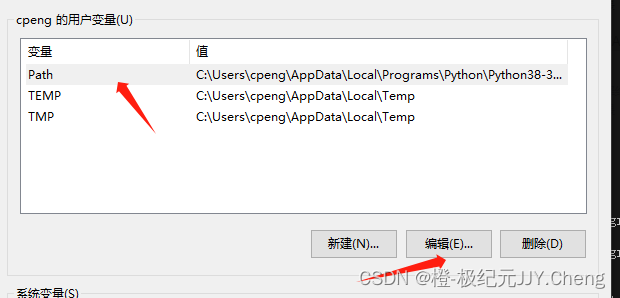
我的电脑》属性》高级系统设置》高级》环境变量
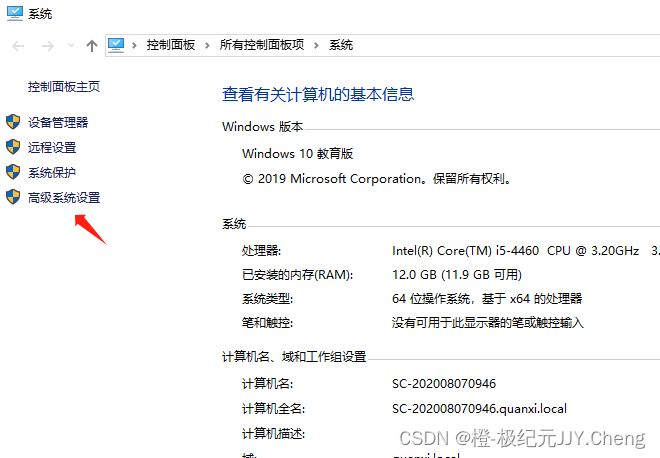

用户变量》Path(选定这个)》点击“编辑”》就可以看到Python的安装地址了

第四步:怎么删除node_modules
1、安装npm包–rimraf,很小的一个工具包
npm install rimraf -g2、在cmd指令下,进入所需删除的node_modules文件夹的位置(路径)
或
在VScode等开发工具的终端进入到对应位置(路径)
3、输入以下指令进行删除
rimraf node_modules这样就可以快捷且方便地删除到node_modules啦!
最后:说说是怎么解决的
1.我卸载了我电脑的python ,然后重启的电脑
2.清理缓存
使用【第三步】的2清理缓存
3.检查了npm的镜像
请看【第二步】
4.设置成淘宝镜像源
请看【第二步】
5.删除node_modules
快速删除,请看【第四步】
6.执行安装命令
npm install --save7.执行运行命令
npm run dev就成功启动项目了
老师的解惑
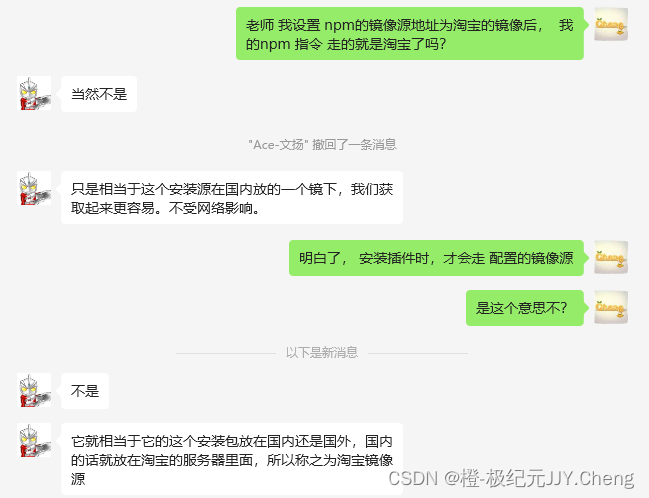

老师博客地址:全栈ACE的个人空间-全栈ACE个人主页-哔哩哔哩视频
我:
老师 我设置 npm的镜像源地址为淘宝的镜像后, 我的npm 指令 走的就是淘宝了吗?
ACE老师:
不是
它就相当于它的这个安装包放在国内还是国外,国内的话就放在淘宝的服务器里面,所以称之为淘宝镜像源
安装插件的时候,它的地址都是在淘宝的服务器里。所以我们安装的速度就很快。
如果不配置镜像源,他是在国外那么下载起来就很慢。
我:
我一直以为,淘宝镜像https://registry.npm.taobao.org是镜像https://registry.npmjs.org的内容;类似于cdn加速一样
我理解错了
谢谢 老师解惑
以上截图内容,都是ace老师视频,且视频都是免费观看;
ace老师这个人很“极客”,
作者希望,感兴趣的有缘人,有空可以去看看,来增加自己的知识储备量。
另外,感恩ACE老师无偿分享
地址:全栈ACE的个人空间-全栈ACE个人主页-哔哩哔哩视频
相关文章:
npm install报错,解决记录
第一步:检查和安装 我这里建议检查 1.node.js版本是否和前使用版本一致 2.npm版本是否和前使用版本一致 3.vue版本是否和前使用版本一致 4.vue脚手架是否和前使用版本一致 5.npm镜像是否和前使用版本一致 1.检查版本 【node版本】 命令:node -v 结果&a…...
LSM树原理详解
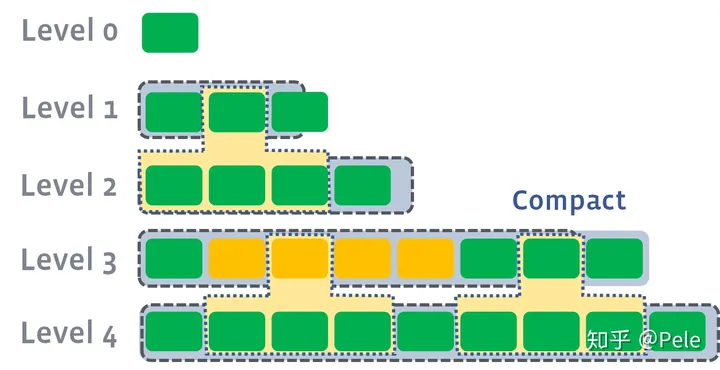
LSM树(Log-Structured-Merge-Tree)的名字往往会给初识者一个错误的印象,事实上,LSM树并不像B树、红黑树一样是一颗严格的树状数据结构,它其实是一种存储结构,目前HBase,LevelDB,RocksDB这些NoSQL存储都是采用的LSM树。 LSM树的核…...

Linux系统编程_网络编程:字节序、socket、serverclient、ftp 云盘
1. 网络编程概述(444.1) TCP/UDP对比 TCP 面向连接(如打电话要先拨号建立连接);UDP 是无连接的,即发送数据之前不需要建立连接TCP 提供可靠的服务。也就是说,通过 TCP 连接传送的数据…...
队列(8.6)
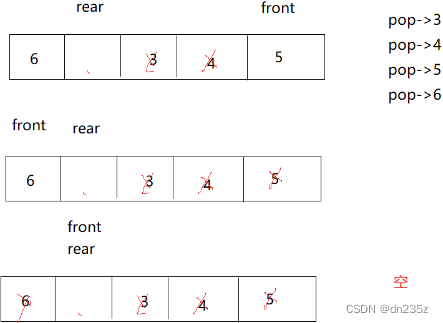
目录 2.队列 2.1队列的概念及结构 2.2队列的实现 2.2.1初始化队列 2.2.2队尾入队列 2.2.3队头出队列 2.2.4获取队列头部元素 2.2.5 销毁队列 3.栈和队列面试题 225. 用队列实现栈 - 力扣(LeetCode) 232. 用栈实现队列 - 力扣(LeetC…...
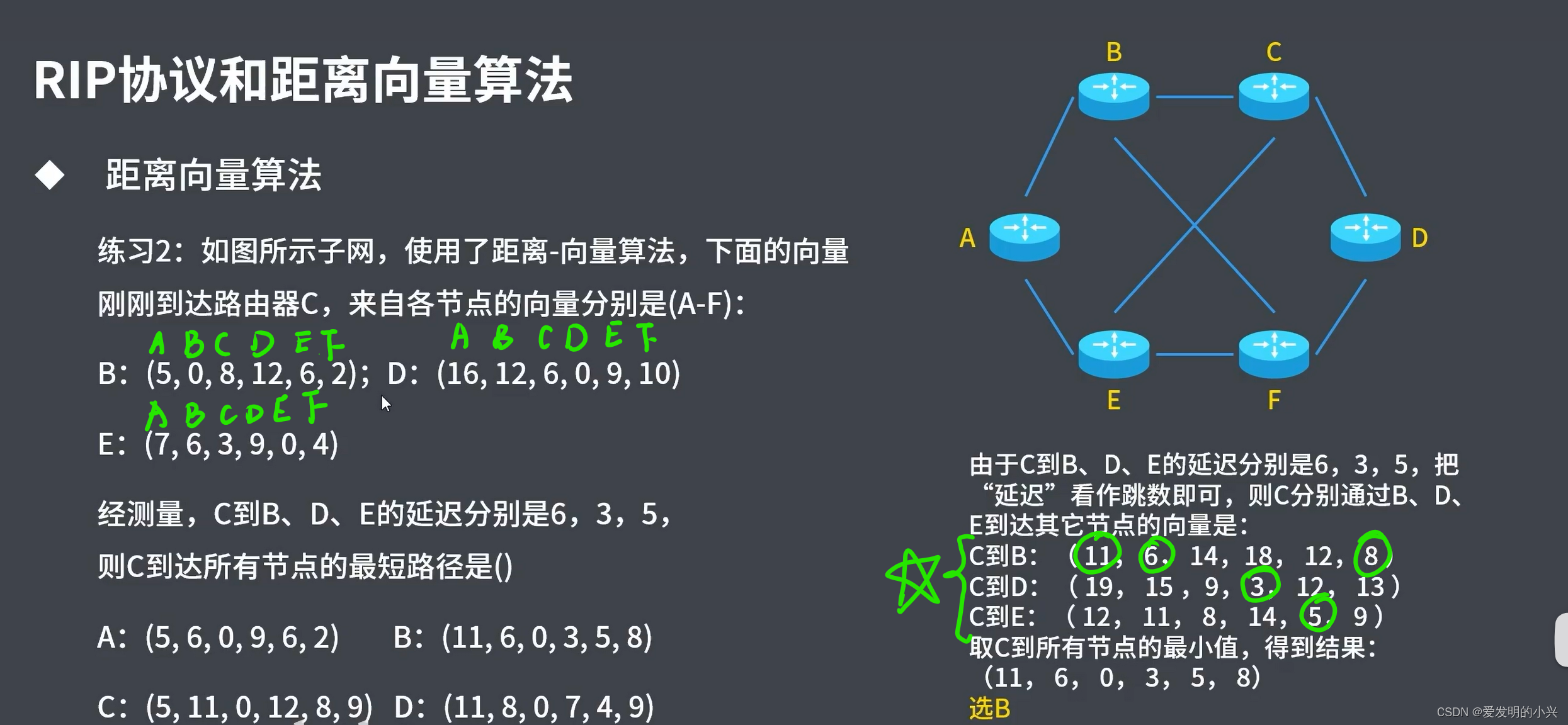
计算机网络 第四章网络层
文章目录 1 网络层的功能2 数据交换方式:电路交换3 数据交换方式:报文交换4 数据交换方式:分组交换5 数据交换方式:数据报方式6 数据交换方式:虚电路方式及各种方式对比7 路由算法及路由协议8 IP数据报的概念和格式9 I…...
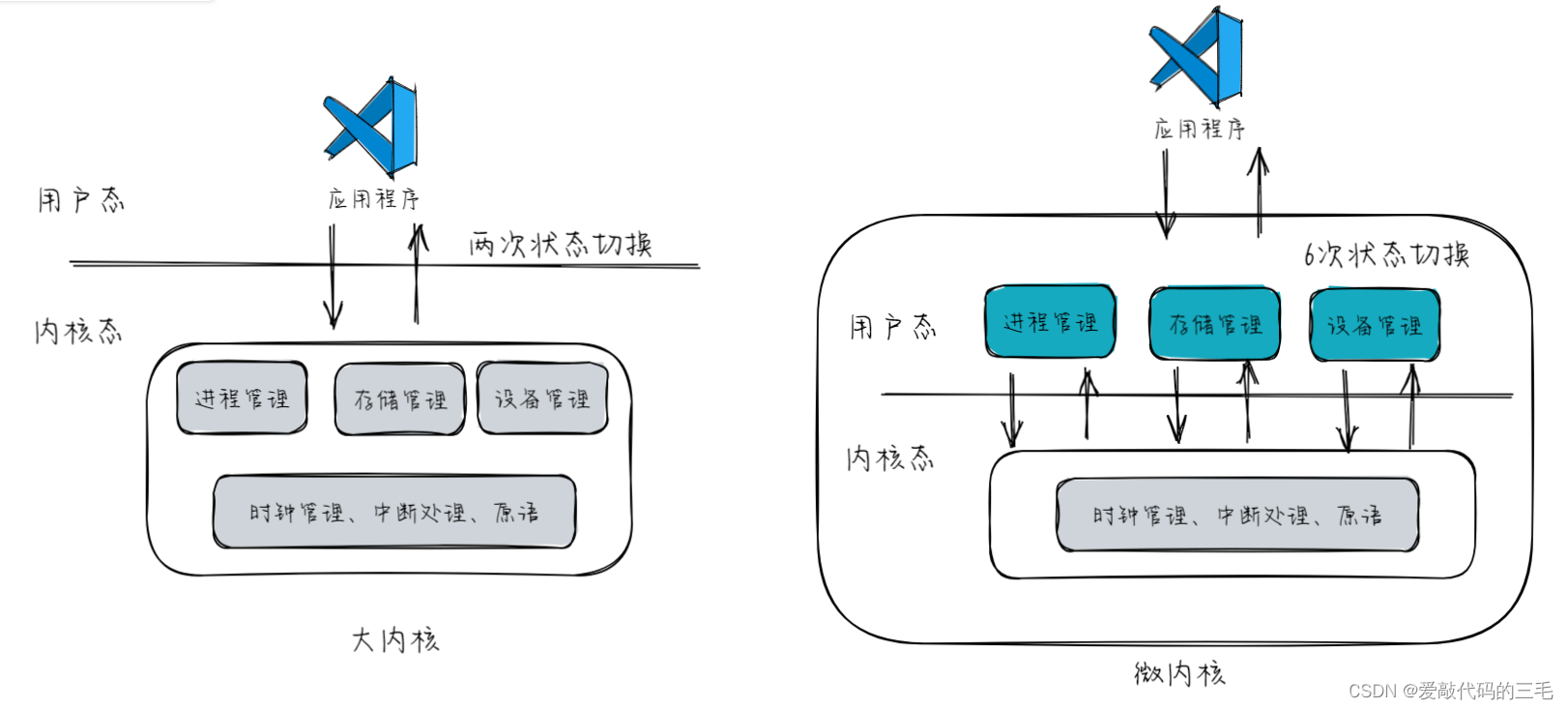
操作系统运行机制
文章目录 操作系统运行机制特权指令VS非特权指令内核态VS用户态中断和异常内中断(异常)外中断中断机制基本原理中断处理过程 系统调用系统调用和库函数的区别为什系统调用时必须的?什么功能需要用到系统调用系统调用的过程小结 操作系统内核 操作系统运行机制 特权…...
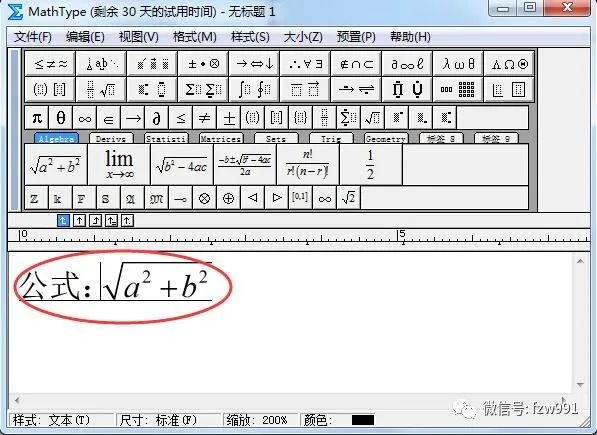
mathtype7.4破解永久激活码
MathType(数学公式编辑器)是由Design Science公司研发的一款专业的数学公式编辑工具。MathType功能非常强大,尤其适用于专门研究数学领域的人群使用。使用MathType让你在输入数学公式的时候能够更加的得心应手,各种复杂的运算符号也不在话下。 MathType最…...
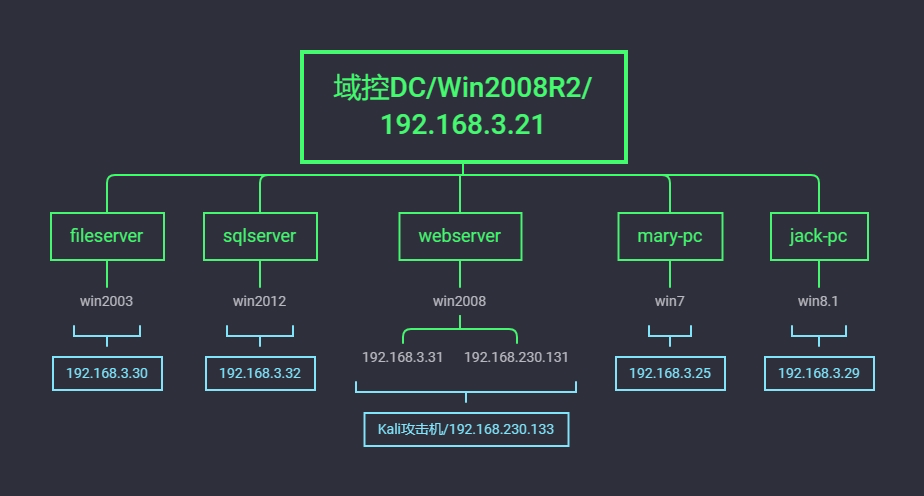
66 内网安全-域横向批量atschtasksimpacket
目录 演示案例:横向渗透明文传递at&schtasks 案例2-横向渗透明文HASH传递atexec-impacket案例3-横向渗透明文HASH传递批量利用-综合案例5-探针主机域控架构服务操作演示 传递攻击是建立在明文和hash值的一个获取基础上的攻击,也是在内网里面常见协议的攻击&…...

PCI9054入门1:硬件引脚定义、时序、FPGA端驱动源码
文章目录 1:PCI9054的FPGA侧(local侧引脚定义)2:PCI9054的C模式下的读写时序3:FPGA代码部分具体代码: 1:PCI9054的FPGA侧(local侧引脚定义) 而PCI9054的本地总线端的主要…...
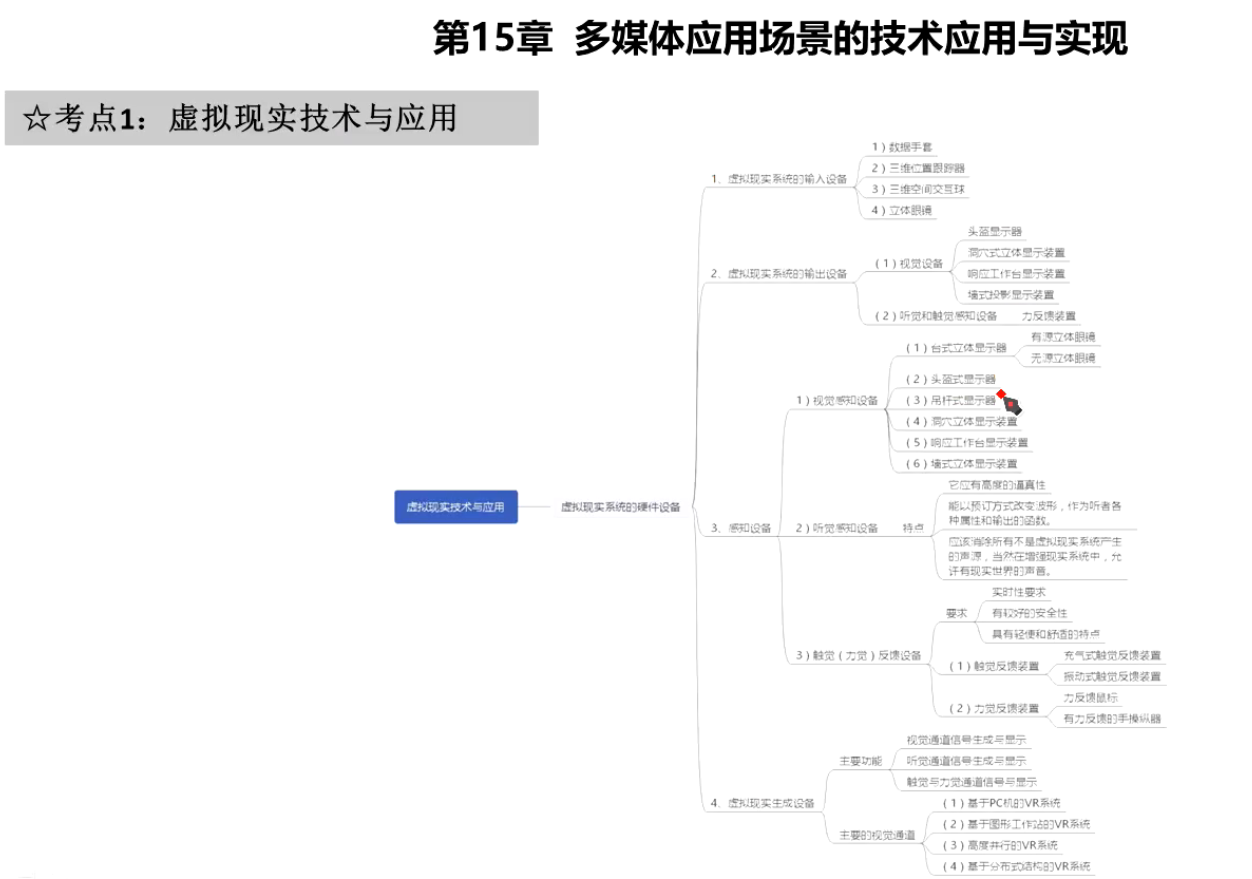
多媒体应用设计师 第17章 多媒体应用场景的技术应用和实现示例
口诀 思维导图 2020...

react151618刷新几次的问题
结论: 16 hooks版本 默认render1次 同步中,无论多少种类还是次数,都render 1次。 异步中,无论多少种类还是次数,1个种类执行1次,多次的话,用n*2。 18 hooks版本 默认render2次, 同步…...
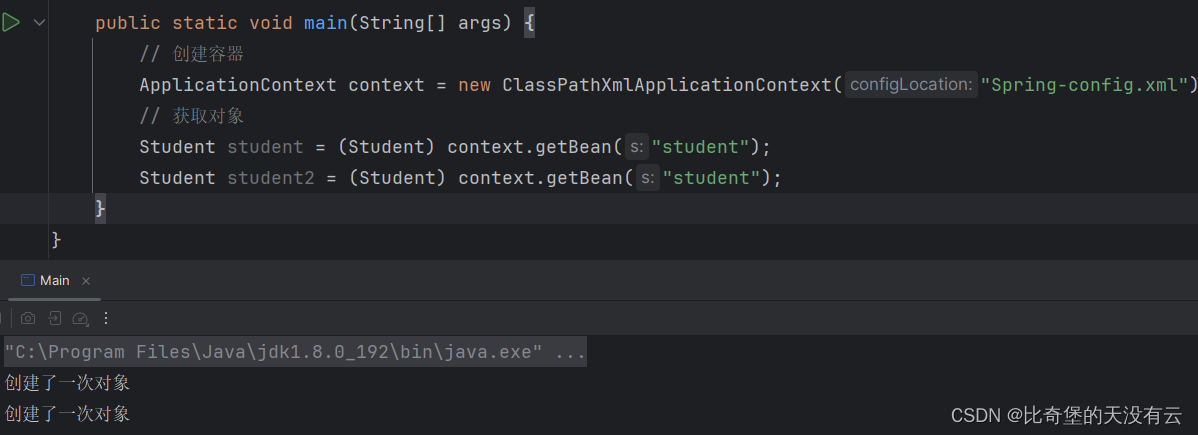
【Spring】IOC容器与Bean的常用属性配置
文章目录 1.前言2.IOC容器2.1 BeanFactory 容器2.2 ApplicationContext 容器 3.Bean的常用属性配置4. 总结 1.前言 在之前的文章-IOC的快速入门中讲过Bean这个概念. 本来就来介绍容器与Bean的常用属性配置 在Spring框架中,Bean指的是被Spring加载生成出来的对象。 …...
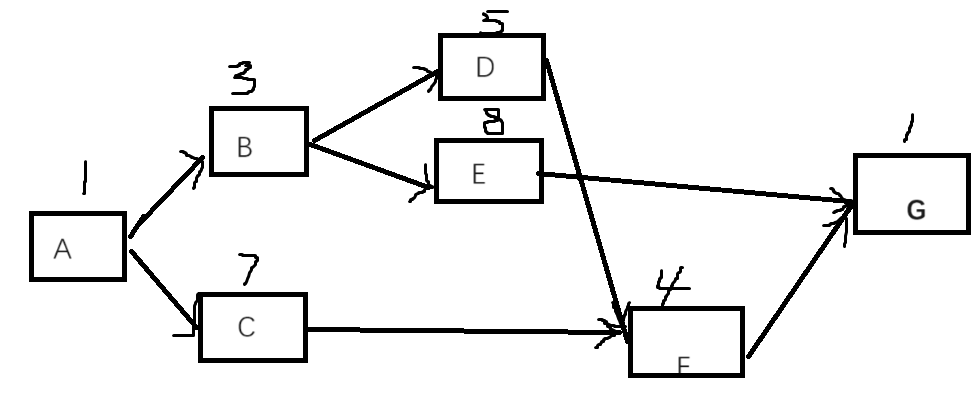
2023年下半年 系统集成项目管理工程师 真题考点(一二三四批次)(10月28、29)(网友回忆版)
文章目录 第一批部分考点整体管理采购管理风险管理二:EAC 第二批部分考点如下: 第三批部分考点如下: 第一批 部分考点 1、案例考了关键路径和工期,风险管理、采购、风险、招投标,整体管理。 2、计算题有关键路径和挣…...

读韩都衣舍,谈权力转移的激励制度
这是一个很久之前的商业案例。 在大公司,管理过于复杂,成了现在公司管理的大问题。大公司的流程长,市场的突击速度慢,以及员工的积极性差,成为大公司的一个潜在的弊病。而最近,从韩都衣舍的创始人赵迎光的…...
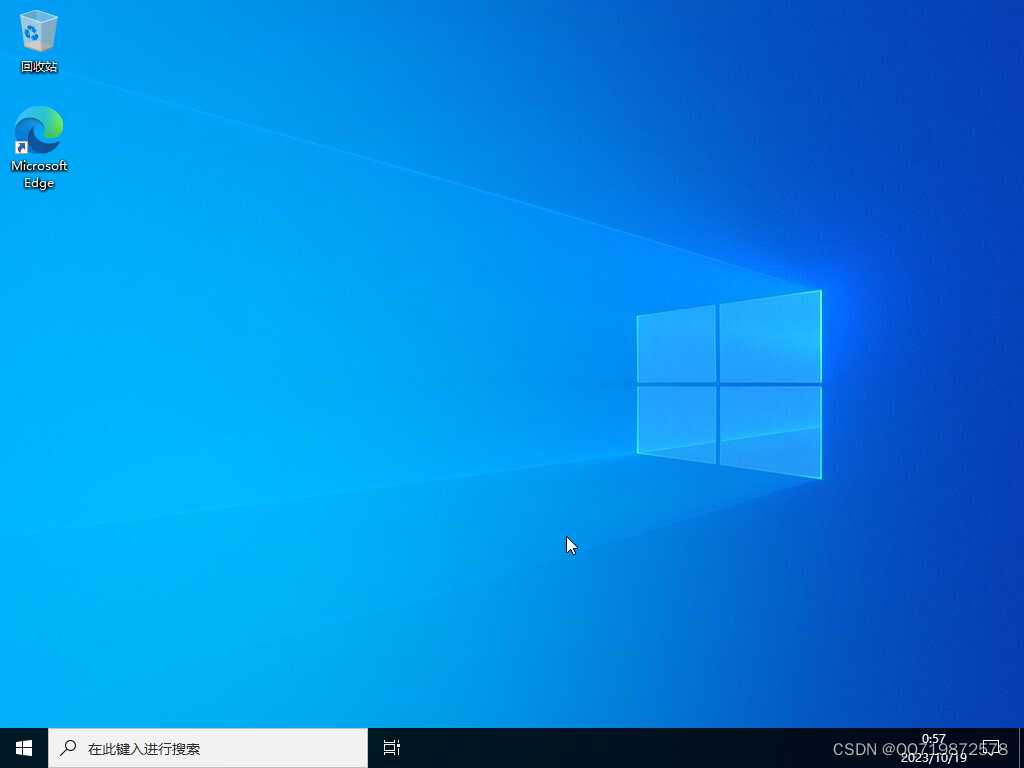
私有云:【10】VCenter安装win10
私有云:【10】VCenter安装win10 1、ESXI挂载win10镜像2、VCenter安装win102.1、创建虚拟机2.2、启动虚拟机 此WIN10用来作为以后的远程桌面 1、ESXI挂载win10镜像 2、VCenter安装win10 2.1、创建虚拟机 创建虚拟机 设置名称下一步 选择计算机资源 选择NFS存储 设置…...
[Java/力扣100]判断两棵二叉树是否相同
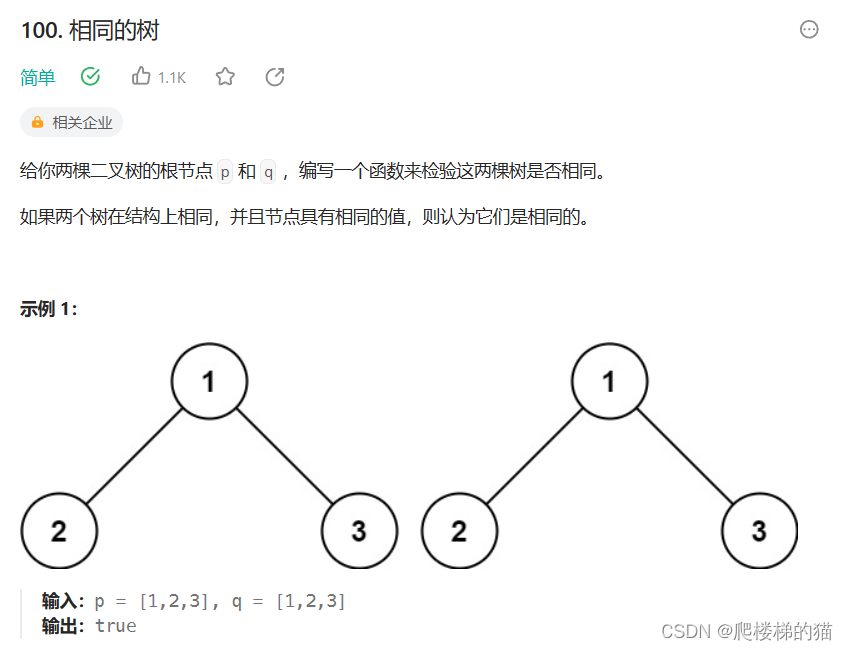
我希望通过这道题,能进一步了解递归思想和“树是递归定义的”这句话 分析 我们的目的是写一个方法来检验两棵树是否相同 什么叫“两棵树相同”?——相同的位置存在相同的结点 有三种情况:1、两棵树一颗为空一颗不为空——不相同ÿ…...

BEC商务英语主题 定价策略|柯桥学商务英语口语
Factors in Pricing Decisions 影响价格制定的因素 A firm cannot determine a product’s price without considering several factors that affect price. 在制定产品价格时,公司如果不考虑影响价格的各种因素是无法制定的。 Managers must take into account t…...

第七章 ObjectScript 一般系统限制
文章目录 第七章 ObjectScript 一般系统限制 字符串长度限制下标限制Global的最大长度 第七章 ObjectScript 一般系统限制 字符串长度限制 字符串的长度有限制:3,641,144 个字符。 重要的是要认识到字符串不仅仅是从输入/输出设备读取的结果。它们可以显示在其他上…...
【Python百练——第1练】使用Python求100以内的所有偶数
作者:Insist-- 个人主页:insist--个人主页 作者简介:梦想从未散场,传奇永不落幕,持续更新优质网络知识、Python知识、Linux知识以及各种小技巧,愿你我共同在CSDN进步 欢迎点赞👍收藏Ὄ…...
springboot心理咨询管理系统
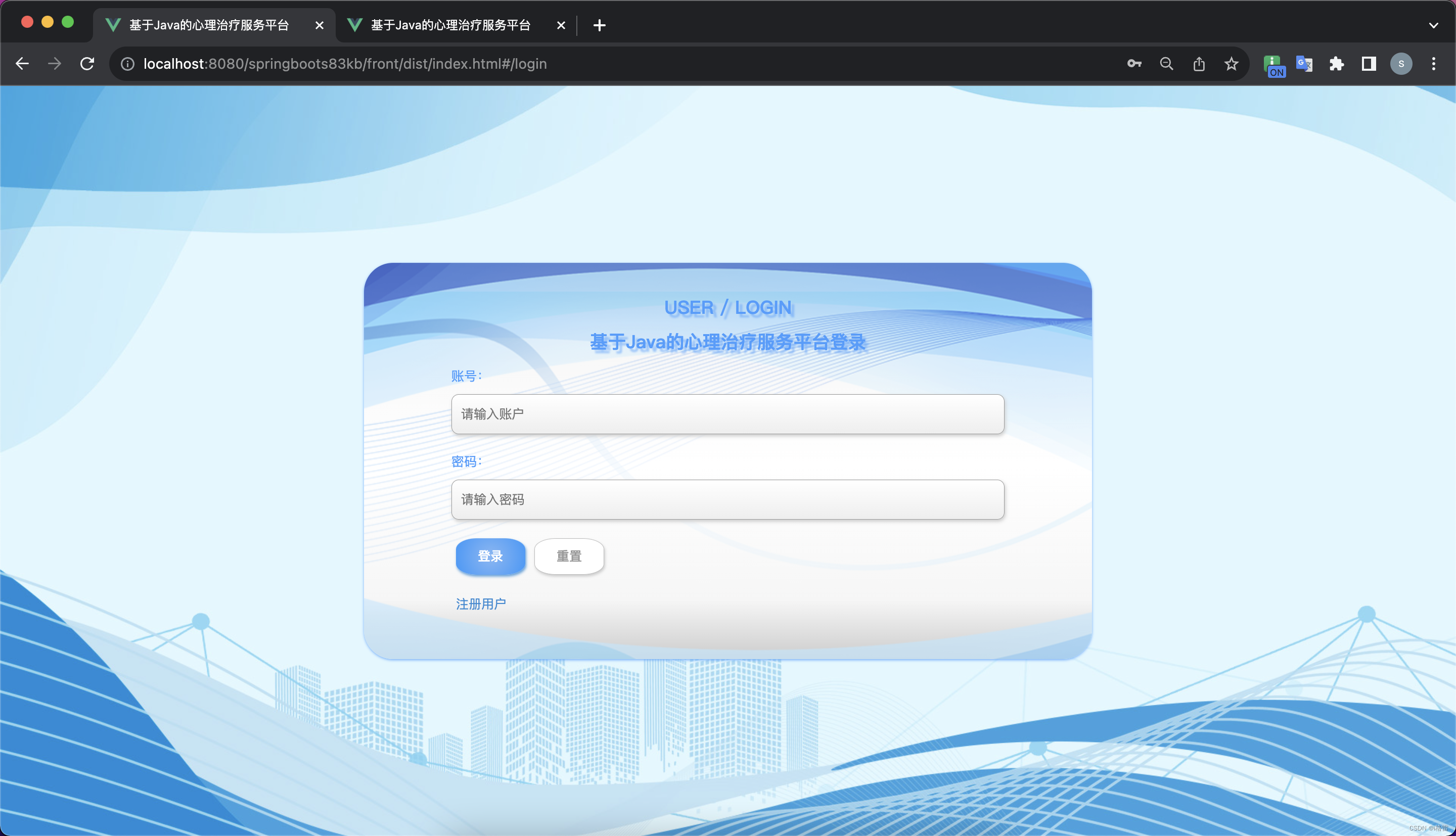
springboot心理咨询管理系统,java心理咨询管理系统,心理咨询管理系统 运行环境: JAVA版本:JDK1.8 IDE类型:IDEA、Eclipse都可运行 数据库类型:MySql(8.x版本都可) 硬件环境…...

vscode+stm32+embedded ide+cortex debug+gcc
用stm32cubemx生成项目。下载三个软件,设置环境变量 openocd是仿真用,gcc-arm-none-eabi-10.3是编译用,w64evkit只用其中的make.exe根据生成的makefile文件,添加c源文件,包含目录,startup文件&#…...

HAMi:面向云原生AI基础设施的异构计算统一管理平台
HAMi:面向云原生AI基础设施的异构计算统一管理平台 【免费下载链接】HAMi Heterogeneous GPU Sharing on Kubernetes 项目地址: https://gitcode.com/GitHub_Trending/ha/HAMi 随着AI工作负载在Kubernetes集群中的大规模部署,异构计算资源管理已成…...

从账单明细看Taotoken按Token计费模式如何帮助用户精确定位高消耗场景
🚀 告别海外账号与网络限制!稳定直连全球优质大模型,限时半价接入中。 👉 点击领取海量免费额度 从账单明细看Taotoken按Token计费模式如何帮助用户精确定位高消耗场景 在构建基于大模型的应用时,成本控制是一个持续性…...

清华PPT模板:如何在5分钟内打造专业学术演示文稿
清华PPT模板:如何在5分钟内打造专业学术演示文稿 【免费下载链接】THU-PPT-Theme 清华主题PPT模板 项目地址: https://gitcode.com/gh_mirrors/th/THU-PPT-Theme 还在为学术汇报PPT设计而烦恼吗?面对即将到来的答辩、会议或课堂展示,你…...

观察Taotoken在多模型聚合调用下的月度账单明细
🚀 告别海外账号与网络限制!稳定直连全球优质大模型,限时半价接入中。 👉 点击领取海量免费额度 观察Taotoken在多模型聚合调用下的月度账单明细 对于个人开发者或项目组而言,在项目中集成多个大语言模型(…...

企业级应用如何利用 Taotoken 实现多模型智能路由与成本控制
🚀 告别海外账号与网络限制!稳定直连全球优质大模型,限时半价接入中。 👉 点击领取海量免费额度 企业级应用如何利用 Taotoken 实现多模型智能路由与成本控制 对于需要稳定、高效调用大模型的企业开发团队而言,直接对…...

DownKyi深度解析:重新定义B站视频内容管理的新范式
DownKyi深度解析:重新定义B站视频内容管理的新范式 【免费下载链接】downkyi 哔哩下载姬downkyi,哔哩哔哩网站视频下载工具,支持批量下载,支持8K、HDR、杜比视界,提供工具箱(音视频提取、去水印等ÿ…...

知识产权管理中的流程自动化:从人工操作到系统智能
企业知识产权部门日常工作中,最耗费时间的往往不是策略制定,而是重复性的事务处理:收到官方来文后手动解压、分类、重命名、上传到对应案件;收到审查意见后人工计算答复期限并设置提醒;案件状态变化后逐个更新Excel记录…...

抖音内容保存技术方案:开源下载工具深度解析与应用实践
抖音内容保存技术方案:开源下载工具深度解析与应用实践 【免费下载链接】douyin-downloader A practical Douyin downloader for both single-item and profile batch downloads, with progress display, retries, SQLite deduplication, and browser fallback supp…...

Fusion360新手必看:这10个隐藏快捷键和技巧,让你建模效率翻倍
Fusion360效率革命:10个被低估的实战技巧与深度应用 第一次打开Fusion360时,我被它复杂的界面吓到了——工具栏密密麻麻的图标,嵌套多层的右键菜单,还有那些隐藏在角落里的功能选项。直到一位资深用户向我演示了如何用长按左键快…...