
SpringBoot--中间件技术-3:整合mongodb,整合ElasticSearch,附案例含代码(简单易懂)
SpringBoot整合mongodb
实现步骤:
-
pom文件导坐标
<!--mongo--> <dependency><groupId>org.springframework.boot</groupId><artifactId>spring-boot-starter-data-mongodb</artifactId> </dependency> <dependency><groupId>org.projectlombok</groupId><artifactId>lombok</artifactId> </dependency> <dependency><groupId>org.springframework.boot</groupId><artifactId>spring-boot-starter-web</artifactId> </dependency> <dependency><groupId>org.springframework.boot</groupId><artifactId>spring-boot-starter-test</artifactId><scope>test</scope> </dependency> -
yaml配置文件配置mongodb:
spring:data:mongodb:uri: mongodb://localhost/spring -
随便建一个pojo
@Data @NoArgsConstructor @AllArgsConstructor public class Book {private int id;private String name;private String type;private String description; } -
测试:
@SpringBootTest
class SpringbootMongodb01ApplicationTests {@Autowired(required = false)private MongoTemplate mongoTemplate;@Testvoid contextLoads() {Book book = new Book();book.setId(4);book.setName("董健翔");book.setType("牛逼");book.setDescription("真牛逼");mongoTemplate.save(book);}@Testvoid find(){List<Book> all = mongoTemplate.findAll(Book.class);System.out.println(all);}
}
装配MongoTemplate模板类,调用方法
整合MongoDB总结:
- 导坐标
- 写配置文件
- 核心类MongoTemplate调用
SpringBoot整合ElasticSearch
前提准备:数据库+ES
数据库建表语句:
DROP TABLE IF EXISTS `tb_hotel`;
CREATE TABLE `tb_hotel`  (`id` bigint(20) NOT NULL COMMENT '酒店id',`name` varchar(255) CHARACTER SET utf8mb4 COLLATE utf8mb4_general_ci NOT NULL COMMENT '酒店名称',`address` varchar(255) CHARACTER SET utf8mb4 COLLATE utf8mb4_general_ci NOT NULL COMMENT '酒店地址',`price` int(10) NOT NULL COMMENT '酒店价格',`score` int(2) NOT NULL COMMENT '酒店评分',`brand` varchar(32) CHARACTER SET utf8mb4 COLLATE utf8mb4_general_ci NOT NULL COMMENT '酒店品牌',`city` varchar(32) CHARACTER SET utf8mb4 COLLATE utf8mb4_general_ci NOT NULL COMMENT '所在城市',`star_name` varchar(16) CHARACTER SET utf8mb4 COLLATE utf8mb4_general_ci NULL DEFAULT NULL COMMENT '酒店星级,1星到5星,1钻到5钻',`business` varchar(255) CHARACTER SET utf8mb4 COLLATE utf8mb4_general_ci NULL DEFAULT NULL COMMENT '商圈',`latitude` varchar(32) CHARACTER SET utf8mb4 COLLATE utf8mb4_general_ci NOT NULL COMMENT '纬度',`longitude` varchar(32) CHARACTER SET utf8mb4 COLLATE utf8mb4_general_ci NOT NULL COMMENT '经度',`pic` varchar(255) CHARACTER SET utf8mb4 COLLATE utf8mb4_general_ci NULL DEFAULT NULL COMMENT '酒店图片',PRIMARY KEY (`id`) USING BTREE
) ENGINE = InnoDB CHARACTER SET = utf8mb4 COLLATE = utf8mb4_general_ci ROW_FORMAT = Compact;
实现步骤:
-
pom文件到坐标
<properties><!--锁定jdk版本--><java.version>1.8</java.version><!--锁定es版本--><elasticsearch.version>7.12.0</elasticsearch.version> </properties><dependencies><dependency><groupId>org.springframework.boot</groupId><artifactId>spring-boot-starter-web</artifactId></dependency><dependency><groupId>org.springframework.boot</groupId><artifactId>spring-boot-starter-test</artifactId><scope>test</scope></dependency><dependency><groupId>org.elasticsearch.client</groupId><artifactId>elasticsearch-rest-high-level-client</artifactId></dependency><dependency><groupId>org.springframework.boot</groupId><artifactId>spring-boot-starter-web</artifactId></dependency><dependency><groupId>com.baomidou</groupId><artifactId>mybatis-plus-boot-starter</artifactId><version>3.4.2</version></dependency><dependency><groupId>mysql</groupId><artifactId>mysql-connector-java</artifactId><version>8.0.29</version></dependency><dependency><groupId>org.projectlombok</groupId><artifactId>lombok</artifactId><optional>true</optional></dependency><dependency><groupId>org.springframework.boot</groupId><artifactId>spring-boot-starter-test</artifactId></dependency><!--FastJson--><dependency><groupId>com.alibaba</groupId><artifactId>fastjson</artifactId><version>1.2.71</version></dependency> </dependencies> -
yaml配置文件
spring:datasource:driver-class-name: com.mysql.cj.jdbc.Driverurl: jdbc:mysql://localhost:3306/spring?serverTimezone=GMTusername: rootpassword: 123456 logging:level:com.dong: debug mybatis-plus:configuration:map-underscore-to-camel-case: truetype-aliases-package: com.dong.pojo -
创建实体类:
对应数据库表的实体类
@NoArgsConstructor
@AllArgsConstructor
@Data
@TableName("tb_hotel")
public class Hotel {@TableId(type = IdType.INPUT)private Long id;private String name;private String address;private Integer price;private Integer score;private String brand;private String city;private String starName;private String business;private String longitude;//经度private String latitude;//纬度private String pic;
}
对应ES的实体类
@Data @NoArgsConstructor public class HotelDoc {private Long id;private String name;private String address;private Integer price;private Integer score;private String brand;private String city;private String starName;private String business;private String location;private String pic; // 构造方法用于类型转换 将数据库中的经、纬度用坐标location代替,所以HotelDoc稍有不同public HotelDoc(Hotel hotel){ this.id = hotel.getId();this.name = hotel.getName();this.address = hotel.getAddress();this.price = hotel.getPrice();this.score = hotel.getScore();this.brand = hotel.getBrand();this.city = hotel.getCity();this.starName = hotel.getStarName();this.business = hotel.getBusiness();this.location = hotel.getLatitude() + ", "+ hotel.getLongitude();this.pic = hotel.getPic();} } -
mapper层:
@Mapper public interface HotelMapper extends BaseMapper<Hotel> { } -
service层:
接口:
public interface IHotelService extends IService<Hotel> {
}
实现类:
@Service public class HotelServiceImp extends ServiceImpl<HotelMapper, Hotel> implements IHotelService { } -
演示在juint中进行,演示对索引库和文档的操作
索引库的操作
- 判断索引库是否存在(其实就是查询)
- 创建索引库
- 删除索引库
@SpringBootTest
class SpringbootEs01ApplicationTests {// 操作es的核心对象private RestHighLevelClient client;// 单元测试之前都执行的,告诉核心对象es的端口号  固定语法@BeforeEachvoid setUp(){this.client = new RestHighLevelClient(RestClient.builder(HttpHost.create("http://localhost:9200")));}// 单元测试之后都执行的@AfterEachvoid tearDown() throws Exception{this.client.close();}// 判断索引库是否存在@Testvoid testExistsHotelIndex() throws Exception {GetIndexRequest request = new GetIndexRequest("hotels");boolean exists = client.indices().exists(request, RequestOptions.DEFAULT);System.err.println(exists ? "索引库已经存在":"索引库不存在");}// 创建索引库@Testvoid createHotelIndex() throws Exception{// 创建Request对象CreateIndexRequest request = new CreateIndexRequest("hotels");// 准备请求的参数:DSL语句request.source(HotelConstants.MAPPING_TEMPLATE, XContentType.JSON);// 发送请求client.indices().create(request,RequestOptions.DEFAULT);}// 删除索引库@Testvoid delteHotelIndex() throws Exception{// 创建Request对象DeleteIndexRequest request = new DeleteIndexRequest("hotels");// 发送请求client.indices().delete(request,RequestOptions.DEFAULT);}
}
创建索引库的时候需要映射,映射往往是一个复杂且长的JSON,所以单独写个类,上面创建索引库的映射如下
可以在postman中写好粘贴过来
public class HotelConstants {public static final String MAPPING_TEMPLATE = "{\n" +"  \"mappings\": {\n" +"    \"properties\": {\n" +"      \"id\": {\n" +"        \"type\": \"keyword\"\n" +"      },\n" +"      \"name\":{\n" +"        \"type\": \"text\",\n" +"        \"analyzer\": \"ik_max_word\",\n" +"        \"copy_to\": \"all\"\n" +"      },\n" +"      \"address\":{\n" +"        \"type\": \"keyword\",\n" +"        \"index\": false\n" +"      },\n" +"      \"price\":{\n" +"        \"type\": \"integer\"\n" +"      },\n" +"      \"score\":{\n" +"        \"type\": \"integer\"\n" +"      },\n" +"      \"brand\":{\n" +"        \"type\": \"keyword\",\n" +"        \"copy_to\": \"all\"\n" +"      },\n" +"      \"city\":{\n" +"        \"type\": \"keyword\",\n" +"        \"copy_to\": \"all\"\n" +"      },\n" +"      \"starName\":{\n" +"        \"type\": \"keyword\"\n" +"      },\n" +"      \"business\":{\n" +"        \"type\": \"keyword\"\n" +"      },\n" +"      \"location\":{\n" +"        \"type\": \"geo_point\"\n" +"      },\n" +"      \"pic\":{\n" +"        \"type\": \"keyword\",\n" +"        \"index\": false\n" +"      },\n" +"      \"all\":{\n" +"        \"type\": \"text\",\n" +"        \"analyzer\": \"ik_max_word\"\n" +"      }\n" +"    }\n" +"  }\n" +"}";
}
文档的操作
@SpringBootTest
public class HotelDocumentTests {// 核心对象private RestHighLevelClient client;// 需要从数据库中查数据存入es,装配业务@Autowired(required = false)private IHotelService service;@BeforeEachvoid setUp(){this.client = new RestHighLevelClient(RestClient.builder(HttpHost.create("http://localhost:9200")));}@AfterEachvoid tearDown() throws  Exception{this.client.close();}// 从数据库新增一条数据到es@Testvoid addDocument() throws Exception{// 从数据库查询一条数据Hotel hotel = service.getById(395434);System.out.println(hotel);// 转换为文档类型HotelDoc hotelDoc = new HotelDoc(hotel);// 将文档类型转为JSON格式String json = JSON.toJSONString(hotelDoc);// 准备request请求对象IndexRequest request = new IndexRequest("hotels").id(hotelDoc.getId().toString());// 准备JSON文档request.source(json, XContentType.JSON);// 发送请求client.index(request, RequestOptions.DEFAULT);}// 从es中删除一条数据@Testvoid deleteDocument() throws Exception{// 准备删除请求RequestDeleteRequest request = new DeleteRequest("hotels", "395434");// 发送请求client.delete(request,RequestOptions.DEFAULT);}// 修改es中的数据@Testvoid updateDocument() throws  Exception{// 准备修改请求UpdateRequestUpdateRequest request = new UpdateRequest("hotels", "395434");// 准备请求参数(要修改的数据内容)request.doc("name","W酒店","city","西安","price","2000","starName","五星级");// 发送请求client.update(request, RequestOptions.DEFAULT);}// 从es中查询一条数据@Testvoid getDocumentById() throws  Exception{// 准备查询请求GetRequestGetRequest getRequest = new GetRequest("hotels", "395434");// 发送请求,得到响应GetResponse response = client.get(getRequest, RequestOptions.DEFAULT);// 解析响应结果String json = response.getSourceAsString();HotelDoc hotelDoc = JSON.parseObject(json,HotelDoc.class);System.out.println(hotelDoc);}// 批量新增数据到es@Testvoid addAllDocument() throws  Exception{// 数据库全查List<Hotel> hotels = service.list();// 准备请求BulkRequest bulkRequest = new BulkRequest();// 准备参数for(Hotel hotel : hotels){// 类型转化HotelDoc hotelDoc = new HotelDoc(hotel);// 请求添加数据bulkRequest.add(new IndexRequest("hotels").id(hotelDoc.getId().toString()).source(JSON.toJSONString(hotelDoc),XContentType.JSON));}// 发送请求client.bulk(bulkRequest,RequestOptions.DEFAULT);}// 解析对象方法public void show(SearchResponse response){// 解析响应SearchHits searchHits = response.getHits();long total = searchHits.getTotalHits().value;System.out.println("总计查询数据:"+total+"条");SearchHit[] hits = searchHits.getHits();for(SearchHit hit :hits){/// 获取文档sourceString json = hit.getSourceAsString();// 反序列化HotelDoc hotelDoc = JSON.parseObject(json, HotelDoc.class);System.out.println("hotelDoc="+hotelDoc);}}/*---------- 全查 ------------*/// 全查@Testvoid findAllDocument() throws IOException{// 准备requestSearchRequest request = new SearchRequest("hotels");// 2.准备DSL,QueryBuilders构造查询条件request.source().query(QueryBuilders.matchAllQuery());// 3.发送请求SearchResponse response = client.search(request, RequestOptions.DEFAULT);show(response);}/*-------------- 全文检索 ---------------*/// 查询all字段内容中含有如家的@Testvoid testMacth() throws IOException{// 准备请求SearchRequest request = new SearchRequest("hotels");// 准备DSLrequest.source().query(QueryBuilders.matchQuery("all","如家"));// 发送请求SearchResponse response = client.search(request, RequestOptions.DEFAULT);show(response);}// 查询字段name、city中有上海的@Testvoid testMultiMatchQuery()throws IOException {// 准备请求SearchRequest request = new SearchRequest("hotels");// 准备DSLrequest.source().query(QueryBuilders.multiMatchQuery("上海","name","city"));// 发送请求SearchResponse response = client.search(request, RequestOptions.DEFAULT);show(response);}/*------------ 精确查询 ------------------*/// term:根据词条精准查询(字段等值查询)@Testvoid testTerm() throws  IOException{// 准备请求SearchRequest request = new SearchRequest("hotels");// 准备DSLrequest.source().query(QueryBuilders.termQuery("brand","希尔顿"));// 发送请求SearchResponse response = client.search(request, RequestOptions.DEFAULT);show(response);}// range范围查询@Testvoid  testRange() throws IOException {// 准备请求SearchRequest request = new SearchRequest("hotels");// 准备DSLrequest.source().query(QueryBuilders.rangeQuery("price").gte(200).lte(300));// 发送请求SearchResponse response = client.search(request, RequestOptions.DEFAULT);show(response);}// ids查询@Testvoid testIds() throws IOException  {// 准备请求SearchRequest request = new SearchRequest("hotels");// 准备DSLrequest.source().query(QueryBuilders.idsQuery().addIds("395434","3532"));// 发送请求SearchResponse response = client.search(request, RequestOptions.DEFAULT);show(response);}/*------------- 复合查询 --------------------*/// bool复合查询@Testvoid testBool() throws IOException{// 准备请求SearchRequest request = new SearchRequest("hotels");// 准备条件/*-- 方式1  ----*///        BoolQueryBuilder boolQueryBuilder = QueryBuilders.boolQuery();//        boolQueryBuilder.must(QueryBuilders.termQuery("city","北京"));//        boolQueryBuilder.filter(QueryBuilders.rangeQuery("price").lte(500));//        // 准备DSL//        request.source().query(boolQueryBuilder);/*---- 方式2 ----*/request.source().query(QueryBuilders.boolQuery().must(QueryBuilders.termQuery("city","北京")).filter(QueryBuilders.rangeQuery("price").lte(500)));// 发送请求SearchResponse response = client.search(request, RequestOptions.DEFAULT);show(response);}// 自定义分页方式@Testvoid testPageAndSort() throws IOException{int page = 1;   //页码int size = 5;   //步长String searchName="希尔顿"; // 查询条件// 准备请求SearchRequest request = new SearchRequest("hotels");if (searchName == null){request.source().query(QueryBuilders.matchAllQuery());}else {request.source().query(QueryBuilders.matchQuery("brand",searchName));}// 自定义分页request.source().from((page-1)*size).size(size);// 自定义排序request.source().sort("price", SortOrder.DESC);// 发送请求SearchResponse response = client.search(request, RequestOptions.DEFAULT);// 解析结果show(response);}
}
小结:
文档的查询操作实现步骤大致都相同:
- 准备请求
- 准备DSL
- 发送请求
相关文章:
)
SpringBoot--中间件技术-3:整合mongodb,整合ElasticSearch,附案例含代码(简单易懂)
SpringBoot整合mongodb 实现步骤: pom文件导坐标 <!--mongo--> <dependency><groupId>org.springframework.boot</groupId><artifactId>spring-boot-starter-data-mongodb</artifactId> </dependency> <dependency&g…...
matlab 二自由度操纵稳定性汽车模型
1、内容简介 略 19-可以交流、咨询、答疑 二自由度操纵稳定性汽车模型 二自由度、操纵稳定性、操纵动力学 2、内容说明 1 模型假设 忽略转向系的影响,以前、后轮转角作为输入;汽车只进行平行于地面的平面运动,而忽略悬架的作用…...
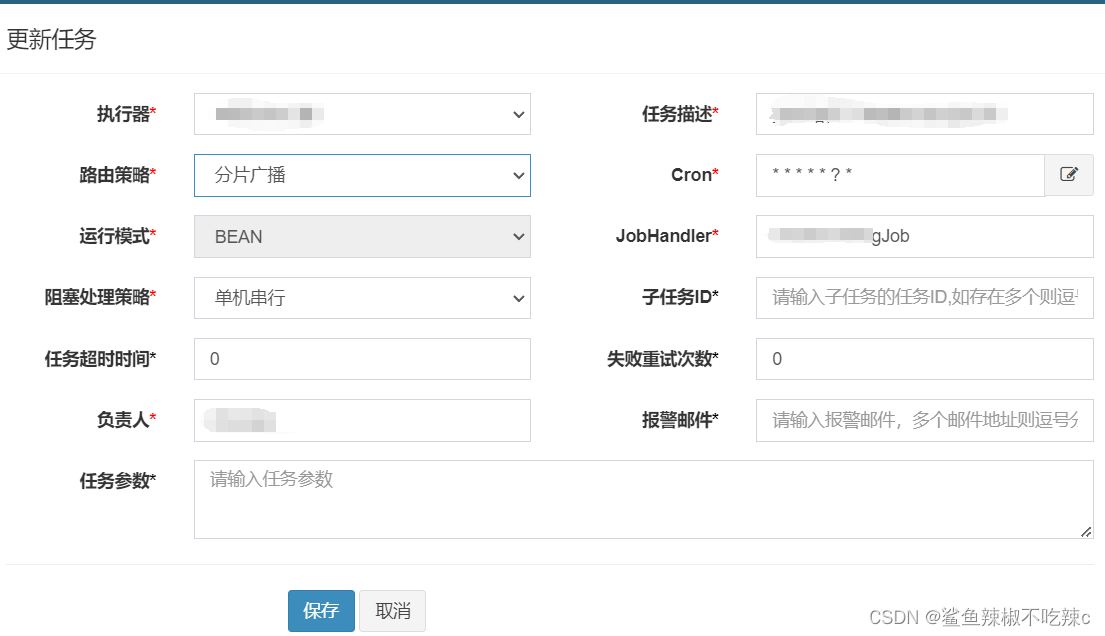
超越任务调度的极致:初探分布式定时任务 XXL-JOB 分片广播
XXL-JOB 是一个分布式任务调度平台,支持分片任务执行。 1. 依赖引入 在项目中引入 XXL-JOB 的相关依赖。通常,你需要在项目的 pom.xml 文件中添加如下依赖: <dependency><groupId>com.xuxueli</groupId><artifactId&…...
)
设计模式-备忘录模式(Memento)
设计模式-备忘录模式(Memento) 一、备忘录模式概述1.1 什么是备忘录模式1.2 简单实现备忘录模式1.3 使用备忘录模式的注意事项 二、备忘录模式的用途三、备忘录模式实现方式3.1 基于数组的备忘录实现方式3.2 基于集合的备忘录实现方式3.3 基于HashMap的备…...
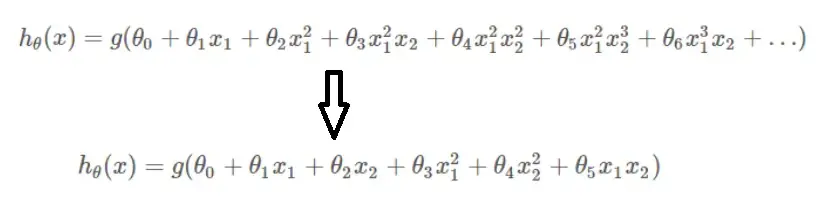
【机器学习】正则化到底是什么?
先说结论:机器学习中的正则化主要解决模型过拟合问题。 如果模型出现了过拟合,一般会从两个方面去改善,一方面是训练数据,比如说增加训练数据量,另一方面则是从模型角度入手,比如,降低模型复杂…...

Rust5.2 Generic Types, Traits, and Lifetimes
Rust学习笔记 Rust编程语言入门教程课程笔记 参考教材: The Rust Programming Language (by Steve Klabnik and Carol Nichols, with contributions from the Rust Community) Lecture 10: Generic Types, Traits, and Lifetimes lib.rs use std::fmt::Display;//Traits: …...
)
c 实用化的摄像头生成avi视频程序(加入精确的时间控制)
I时间控制是指:生成了n张图片帧用了多少时间m。帧率等于n/m。对应于头文件,m等于scale, n等于rate.为了精确,采用微秒计时。 I此程序生成的视频远好于ffmpeg,可能是此程序没有压缩数据原因吧。 现在的帧率不高,是因…...
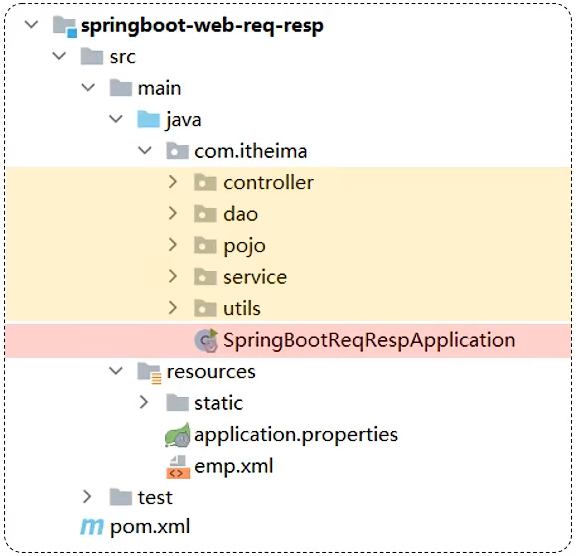
Web后端开发_01
Web后端开发 请求响应 SpringBoot提供了一个非常核心的Servlet 》DispatcherServlet,DispatcherServlet实现了servlet中规范的接口 请求响应: 请求(HttpServletRequest):获取请求数据响应(HttpServletRe…...
二十、泛型(6)
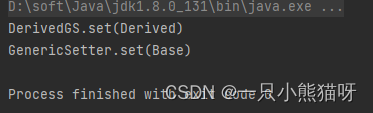
本章概要 问题 任何基本类型都不能作为类型参数实现参数化接口转型和警告重载基类劫持接口 自限定的类型 古怪的循环泛型自限定参数协变 问题 本节将阐述在使用 Java 泛型时会出现的各类问题。 任何基本类型都不能作为类型参数 正如本章早先提到的,Java 泛型的…...

Java18新增特性
前言 前面的文章,我们对Java9、Java10、Java11、Java12 、Java13、Java14、Java15、Java16、Java17 的特性进行了介绍,对应的文章如下 Java9新增特性 Java10新增特性 Java11新增特性 Java12新增特性 Java13新增特性 Java14新增特性 Java15新增特性 Java…...

springboot容器
1.主要指的是servlet容器 servlet组件由sevlet Filter Listener等 2.自动配置原理 通过ServletWebServerFactoryAutoConfiguration 配置这些内容 (自动配置类开始分析功能) conditionalOnclass开启条件 ServletRequest类 import导入嵌入式的tomcat Jetty等 这些是配置类&…...

Windows 10 下使用Visual Studio 2017 编译CEF SDK
1.下载CEF SDK 由于需要跑在32位的机器,所以选择下载32位的SDKCEF Automated Builds 选择 Current Stable Build (Preferred) ,这是当前稳定版本,CEF版本118 下载成功解压 2.下载编译工具 CMake 下载地址:CMake 配置CMake指向…...

数字货币swap交易所逻辑系统开发分析方案
随着数字货币市场的快速发展, Swap交易所已成为一种重要的交易方式。本文将对数字货币Swap交易所逻辑系统开发进行分析,并探讨其优势、开发难点和解决方案。 一、数字货币Swap交易所逻辑系统开发的优势 数字货币Swap交易所是一种点对点的交易方式&#x…...
spring boot中使用Bean Validation做优雅的参数校验
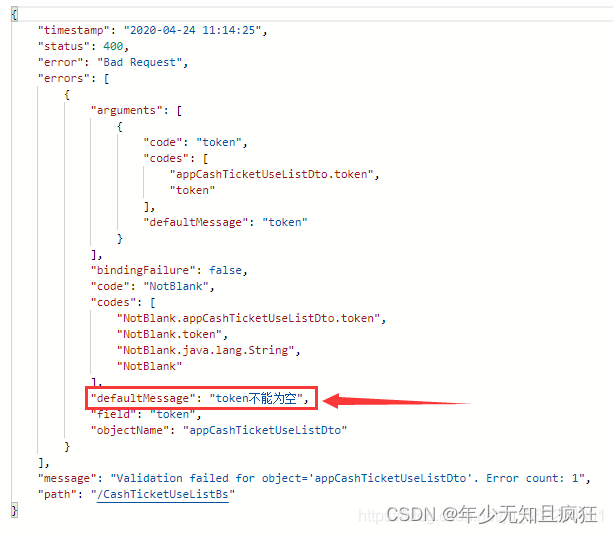
一、Bean Validation简介 Bean Validation是Java定义的一套基于注解的数据校验规范,目前已经从JSR 303的1.0版本升级到JSR 349的1.1版本,再到JSR 380的2.0版本(2.0完成于2017.08),目前最新稳定版2.0.2(201…...

搜索引擎项目
认识搜索引擎 1、有一个主页、有搜索框。在搜索框中输入的内容 称为“查询词” 2、还有搜索结果页,包含了若干条搜索结果 3、针对每一个搜索结果,都会包含查询词或者查询词的一部分或者和查询词具有一定的相关性 4、每个搜索结果包含好几个部分&…...
7.外部存储器,Cache,虚拟存储器
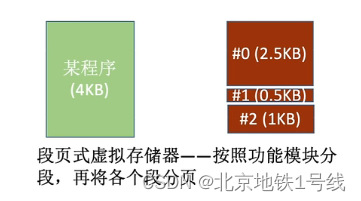
目录 一. 外部存储器 (1)磁盘存储器 1.磁盘的组成 2.磁盘的性能指标 3.磁盘地址 4.硬盘的工作过程 5.磁盘阵列 (2)固态硬盘(SSD) 二. Cache基本概念与原理 三. Cache和主存的映射方式 ÿ…...
UITableView的style是UITableViewStyleGrouped
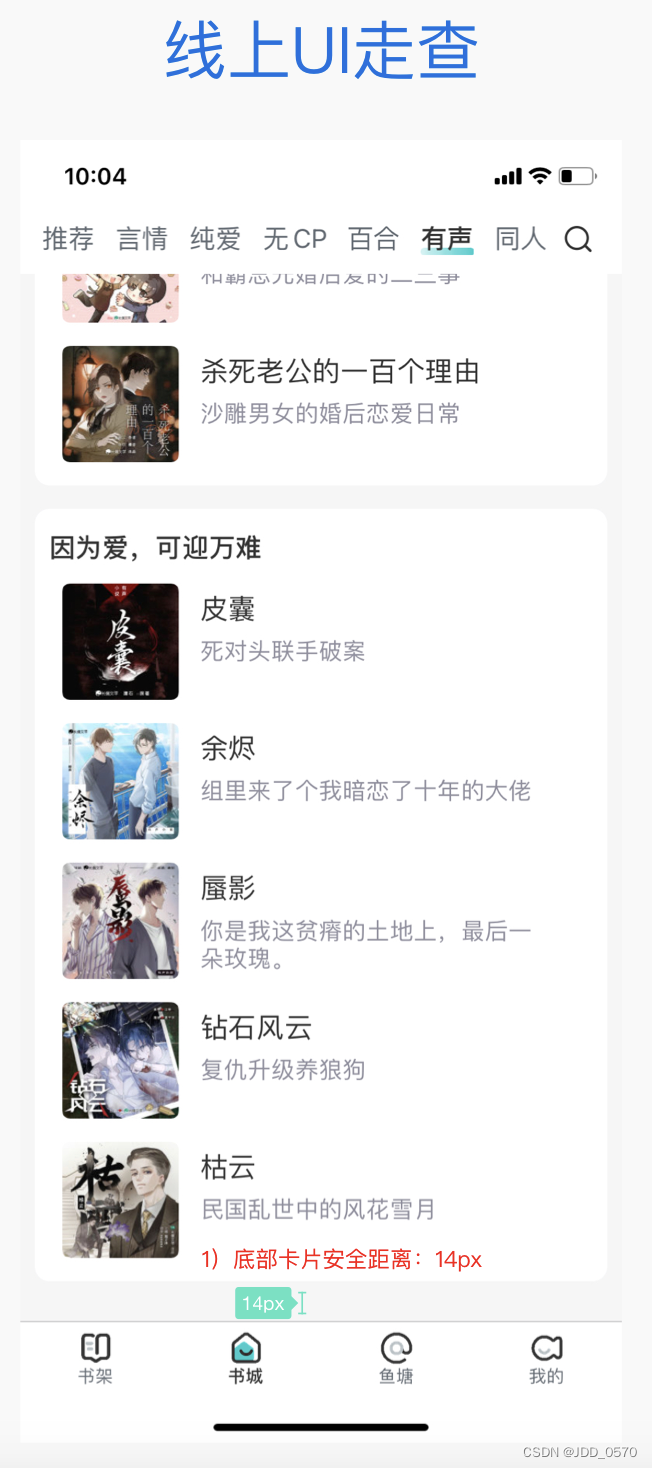
一般情况下,UITableViewStylePlain和UITableViewStyleGrouped是UITableView常用到的style, 之前都是用到的时候,遇到问题直接用度娘,差不多就够用了,今天在修复UI提出的间隙问题,来回改,总觉得…...

Java17新增特性
前言 前面的文章,我们对Java9、Java10、Java11、Java12 、Java13、Java14、Java15、Java16 的特性进行了介绍,对应的文章如下 Java9新增特性 Java10新增特性 Java11新增特性 Java12新增特性 Java13新增特性 Java14新增特性 Java15新增特性 Java16新增特…...
VR全景技术在城市园区发展中有哪些应用与帮助
引言: 在数字化时代的浪潮中,虚拟现实(VR)全景技术逐渐融入各个领域,也为城市园区展示带来了全新的可能性。 一.VR全景技术简介 虚拟现实全景技术是一种通过全景图像和视频模拟真实环境的技术。通过相关设…...
在 SQL 中,当复合主键成为外键时应该如何被其它表引用
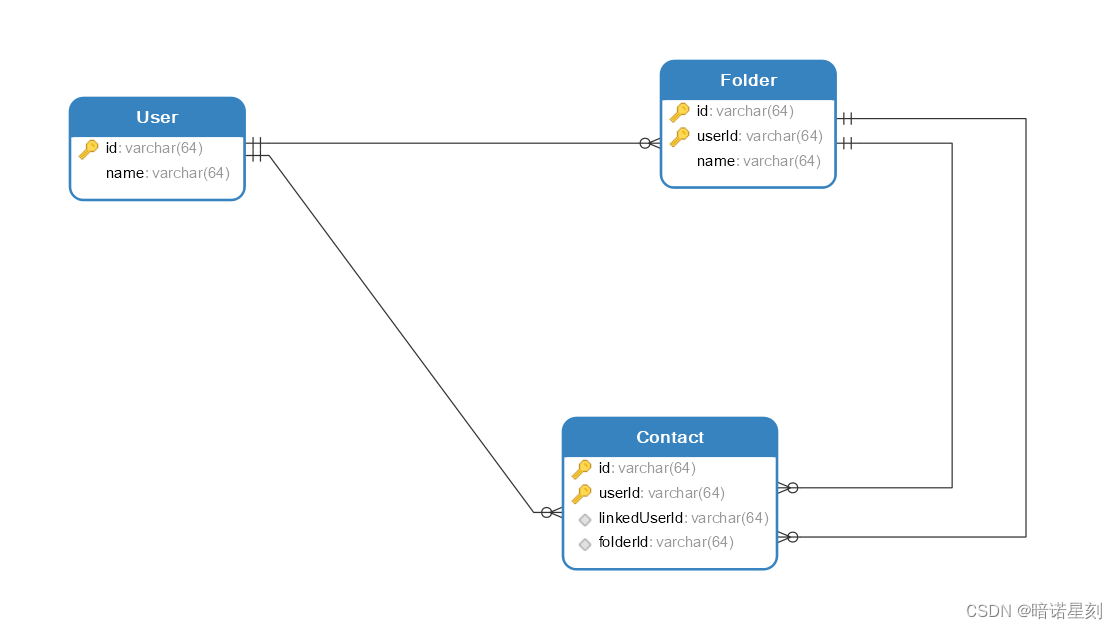
文章目录 当研究一个问题慢慢深入时,一个看起来简单的问题也暗藏玄机。在 SQL 中,主键成为外键这是一个很平常的问题,乍一看没啥值得注意的。但如果这个主键是一种复合主键,而另一个表又引用这个键作为它的复合主键,问…...

AlphaFold 3终极指南:掌握Jackhmmer与HMMER提升蛋白质结构预测精度
AlphaFold 3终极指南:掌握Jackhmmer与HMMER提升蛋白质结构预测精度 【免费下载链接】alphafold3 AlphaFold 3 inference pipeline. 项目地址: https://gitcode.com/gh_mirrors/alp/alphafold3 你是否在蛋白质结构预测项目中遇到MSA生成效率低下的瓶颈&#x…...

2026在线测评系统十大量表对比:信效度与场景全解析
【30s 核心摘要】2026 年在线测评成人才管理刚需,信效度与场景适配成选型核心。本文聚焦十大量表,从信度、效度、适配场景等维度深度对比,重点解析问卷星、北森、金数据等主流平台的量表能力与落地效果,为企业、高校及机构提供科学…...

Hitboxer:开源SOCD清理工具,3分钟提升游戏操作精准度
Hitboxer:开源SOCD清理工具,3分钟提升游戏操作精准度 【免费下载链接】socd Key remapper for epic gamers 项目地址: https://gitcode.com/gh_mirrors/so/socd 你是否在激烈的游戏对抗中经历过这样的挫败:同时按下左右方向键时角色卡…...

MAX78000移植Zephyr RTOS实战:从BSP创建到AI边缘设备开发
1. 项目概述与动机作为一名长期在嵌入式边缘AI和机器人领域摸爬滚打的开发者,我最近把目光投向了一块相当有潜力的板子:Maxim Integrated(现为ADI一部分)的MAX78000FTHR开发套件。这块板子的核心——MAX78000微控制器,…...

腾讯 Marvis 初级使用教程——从安装到上手
腾讯最新系统级AI助手Marvis(2026年5月20日发布),官网 https://marvis.qq.com,主打“一句话操作电脑”、跨端协同、GUI Agent执行。虽然是个【小龙虾】,但上手其实不难。这篇就简单写写 Marvis 的安装和基础使用&#…...

Unity UI交互进阶:手把手教你打造一个支持单击、双击、长按的万能按钮组件
Unity UI交互进阶:手把手教你打造一个支持单击、双击、长按的万能按钮组件在游戏开发中,UI交互的流畅性和多样性直接影响玩家的游戏体验。想象一下,当你在开发一个RPG游戏的背包系统时,需要实现道具的单击查看详情、双击快速使用、…...

在多轮对话应用中观察Taotoken计费对成本的影响
🚀 告别海外账号与网络限制!稳定直连全球优质大模型,限时半价接入中。 👉 点击领取海量免费额度 在多轮对话应用中观察Taotoken计费对成本的影响 效果展示类,结合一个需要维护长上下文的多轮对话应用案例,…...

独立开发者如何利用Taotoken Token Plan,以更低成本启动AI项目
🚀 告别海外账号与网络限制!稳定直连全球优质大模型,限时半价接入中。 👉 点击领取海量免费额度 独立开发者如何利用Taotoken Token Plan,以更低成本启动AI项目 对于独立开发者或小型团队而言,启动一个集成…...

我们公司全员把 Cursor 换成了自研的 全开源AtomCode
【引子】这是一篇实录——一位 CTO 用 28 天,用 Claude GLM 双模型调度,造出了一个让全公司放弃 Cursor 的工具。然后我意识到我们正在经历的事情,比"换工具"大得多。【读者承诺】接下来 15 分钟,你会拿到三件东西:一个真实案例(28 天 1,146 commits 是怎么做出来的…...

UE4SS终极指南:从零开始掌握虚幻引擎脚本系统
UE4SS终极指南:从零开始掌握虚幻引擎脚本系统 【免费下载链接】RE-UE4SS Injectable LUA scripting system, SDK generator, live property editor and other dumping utilities for UE4/5 games 项目地址: https://gitcode.com/gh_mirrors/re/RE-UE4SS UE4S…...