
使用netty实现WebSocket协议通信
服务器与浏览器之间实现通信,一般都是由浏览器发起http请求,服务端对http请求进行响应,要实现服务端主动向浏览器推送数据,一般采用的方案都是websocket主动推送,或者前端实现轮询方式拉取数据,轮询方式多少有点浪费资源,并且消息推送也不够及时。目前很多系统都是采用websocket协议进行主动推送数据给前端。在springboot中是支持websocket协议的,但是这里想讲的是通过netty实现websocket通信。
首先需要引入netty的依赖包
<dependency><groupId>io.netty</groupId><artifactId>netty-all</artifactId><version>4.1.90.Final</version>
</dependency>
这里面已经包含了websocket协议相关的编解码。下面介绍两种方案使用websocket协议,一种是内置的处理ws消息,另外一种是自己实现相关消息的解析和处理。
首先介绍第一种使用,这种方案只需要用户自己定义一个handler实现消息的接收和业务处理,把处理结果返回给浏览器就可以了,大致代码逻辑如下:
- 定义handler用于处理ws消息:
import io.netty.channel.ChannelHandlerContext;
import io.netty.channel.SimpleChannelInboundHandler;
import io.netty.handler.codec.http.websocketx.TextWebSocketFrame;/*** 用户自定义websocket消息处理handler** @Author xingo* @Date 2023/11/21*/
public class UserWebsocketInHandler extends SimpleChannelInboundHandler<TextWebSocketFrame> {@Overrideprotected void channelRead0(ChannelHandlerContext ctx, TextWebSocketFrame frame) throws Exception {String text = frame.text();System.out.println(Thread.currentThread().getName() + "|" + text);ctx.writeAndFlush(new TextWebSocketFrame("server send message : " + text));}
}
- 服务端引入websocket相关handler和自定义handler
import io.netty.bootstrap.ServerBootstrap;
import io.netty.channel.*;
import io.netty.channel.nio.NioEventLoopGroup;
import io.netty.channel.socket.nio.NioServerSocketChannel;
import io.netty.channel.socket.nio.NioSocketChannel;
import io.netty.handler.codec.http.HttpObjectAggregator;
import io.netty.handler.codec.http.HttpServerCodec;
import io.netty.handler.codec.http.websocketx.WebSocketServerProtocolHandler;
import io.netty.handler.logging.LoggingHandler;
import io.netty.handler.stream.ChunkedWriteHandler;
import io.netty.handler.timeout.IdleStateEvent;
import io.netty.handler.timeout.IdleStateHandler;import java.util.concurrent.ThreadFactory;
import java.util.concurrent.TimeUnit;
import java.util.concurrent.atomic.AtomicInteger;/*** websocket服务端** @Author xingo* @Date 2023/11/21*/
public class NettyWebsocketServer implements Runnable {/*** 服务端IP地址*/private String ip;/*** 服务端端口号*/private int port;public NettyWebsocketServer(String ip, int port) {this.ip = ip;this.port = port;}@Overridepublic void run() {// 指定boss线程数:主要负责接收连接请求,一般设置为1就可以final EventLoopGroup boss = new NioEventLoopGroup(1, new ThreadFactory() {private AtomicInteger index = new AtomicInteger(0);@Overridepublic Thread newThread(Runnable r) {return new Thread(r, String.format("NioBoss_%d", this.index.incrementAndGet()));}});// 指定worker线程数:主要负责处理连接就绪的连接,一般设置为CPU的核心数final int totalThread = 12;final EventLoopGroup worker = new NioEventLoopGroup(totalThread, new ThreadFactory() {private AtomicInteger index = new AtomicInteger(0);@Overridepublic Thread newThread(Runnable r) {return new Thread(r, String.format("NioSelector_%d_%d", totalThread, this.index.incrementAndGet()));}});// 指定任务处理线程数:主要负责读取数据和处理响应,一般该值设置的比较大,与业务相对应final int jobThreads = 1024;final EventLoopGroup job = new DefaultEventLoopGroup(jobThreads, new ThreadFactory() {private AtomicInteger index = new AtomicInteger(0);@Overridepublic Thread newThread(Runnable r) {return new Thread(r, String.format("NioJob_%d_%d", jobThreads, this.index.incrementAndGet()));}});// 日志处理handler:类定义上面有Sharable表示线程安全,可以将对象定义在外面使用final LoggingHandler LOGGING_HANDLER = new LoggingHandler();// 指定服务端bootstrapServerBootstrap server = new ServerBootstrap();server.group(boss, worker)// 指定通道类型.channel(NioServerSocketChannel.class)// 指定全连接队列大小:windows下默认是200,linux/mac下默认是128.option(ChannelOption.SO_BACKLOG, 2048)// 维持链接的活跃,清除死链接.childOption(ChannelOption.SO_KEEPALIVE, true)// 关闭延迟发送.childOption(ChannelOption.TCP_NODELAY, true)// 添加handler处理链.childHandler(new ChannelInitializer<NioSocketChannel>() {@Overrideprotected void initChannel(NioSocketChannel channel) throws Exception {ChannelPipeline pipeline = channel.pipeline();// 日志处理pipeline.addLast(LOGGING_HANDLER);// 心跳检测:读超时时间、写超时时间、全部超时时间(单位是秒,0表示不处理)pipeline.addLast(new IdleStateHandler(30,0,0, TimeUnit.SECONDS));pipeline.addLast(new ChannelDuplexHandler() {@Overridepublic void userEventTriggered(ChannelHandlerContext ctx, Object evt) throws Exception {IdleStateEvent event = (IdleStateEvent) evt;System.out.println("心跳事件 : " + event.state());super.userEventTriggered(ctx, evt);}});// 处理http请求的编解码器pipeline.addLast(job, "httpServerCodec", new HttpServerCodec());pipeline.addLast(job, "chunkedWriteHandler", new ChunkedWriteHandler());pipeline.addLast(job, "httpObjectAggregator", new HttpObjectAggregator(65536));// 处理websocket的编解码器pipeline.addLast(job, "webSocketServerProtocolHandler", new WebSocketServerProtocolHandler("/", "WebSocket", true, 655360));// 自定义处理器pipeline.addLast(job, "userInHandler", new UserWebsocketInHandler());}});try {// 服务端绑定对外服务地址ChannelFuture future = server.bind(ip, port).sync();System.out.println("netty server start ok.");// 等待服务关闭,关闭后释放相关资源future.channel().closeFuture().sync();} catch (InterruptedException e) {e.printStackTrace();} finally {boss.shutdownGracefully();worker.shutdownGracefully();job.shutdownGracefully();}}public static void main(String[] args) {new Thread(new NettyWebsocketServer("127.0.0.1", 8899)).start();}
}
以上就实现了websocket服务端,客户端连接到服务端实现双向通信。
另外一种实现方式是自己定义一个handler用于ws协议数据的解析和处理,这样协议的整个处理过程对于用户来说很清楚明白,下面是实现的逻辑代码:
- 首先定义一个handler用于ws协议解析和处理:
import io.netty.buffer.ByteBuf;
import io.netty.buffer.Unpooled;
import io.netty.channel.ChannelFuture;
import io.netty.channel.ChannelFutureListener;
import io.netty.channel.ChannelHandlerContext;
import io.netty.channel.SimpleChannelInboundHandler;
import io.netty.handler.codec.http.*;
import io.netty.handler.codec.http.websocketx.*;
import io.netty.util.AttributeKey;
import io.netty.util.CharsetUtil;
import lombok.extern.slf4j.Slf4j;/***** @Author xingo* @Date 2023/11/21*/
@Slf4j
public class WebsocketServerHandler extends SimpleChannelInboundHandler<Object> {private WebSocketServerHandshaker handshaker;public WebsocketServerHandler() {}private void handleWebSocketFrame(ChannelHandlerContext ctx, WebSocketFrame msg) {if (msg instanceof CloseWebSocketFrame) {handshaker.close(ctx.channel(), (CloseWebSocketFrame) msg.retain());return;}if (msg instanceof PingWebSocketFrame) {log.info("websocket ping message");ctx.channel().write(new PingWebSocketFrame(msg.content().retain()));} else if (msg instanceof TextWebSocketFrame) {// websocket消息解压成字符串让下一个handler处理String text = ((TextWebSocketFrame) msg).text();log.info("请求数据|{}", text);// 如果不调用这个方法后面的handler就获取不到数据ctx.fireChannelRead(text);} else {log.error("不支持的消息格式");throw new UnsupportedOperationException("不支持的消息格式");}}private void handleHttpRequest(ChannelHandlerContext ctx, FullHttpRequest msg) {if (!msg.decoderResult().isSuccess()|| (!"websocket".equalsIgnoreCase(msg.headers().get(HttpHeaderNames.UPGRADE)))) {sendHttpResponse(ctx, msg, new DefaultFullHttpResponse(HttpVersion.HTTP_1_1, HttpResponseStatus.BAD_REQUEST));return;}WebSocketServerHandshakerFactory wsShakerFactory = new WebSocketServerHandshakerFactory("ws://" + msg.headers().get(HttpHeaderNames.HOST), null, false);handshaker = wsShakerFactory.newHandshaker(msg);if (handshaker == null) {WebSocketServerHandshakerFactory.sendUnsupportedVersionResponse(ctx.channel());} else {// 建立websocket连接握手handshaker.handshake(ctx.channel(), msg);ctx.channel().attr(AttributeKey.valueOf("add")).set(Boolean.TRUE);}}private void sendHttpResponse(ChannelHandlerContext ctx, FullHttpRequest msg, DefaultFullHttpResponse response) {if (response.status().code() != HttpResponseStatus.OK.code()) {ByteBuf buf = Unpooled.copiedBuffer(response.status().toString(), CharsetUtil.UTF_8);response.content().writeBytes(buf);buf.release();}ChannelFuture cf = ctx.channel().writeAndFlush(response);if (!HttpUtil.isKeepAlive(msg) || response.status().code() != HttpResponseStatus.OK.code()) {cf.addListener(ChannelFutureListener.CLOSE);}}@Overridepublic void channelReadComplete(ChannelHandlerContext ctx) throws Exception {ctx.flush();}@Overridepublic void exceptionCaught(ChannelHandlerContext ctx, Throwable cause) throws Exception {ctx.channel().attr(AttributeKey.valueOf("add")).set(Boolean.FALSE);ctx.close();}@Overridepublic void channelInactive(ChannelHandlerContext ctx) throws Exception {ctx.channel().attr(AttributeKey.valueOf("add")).set(Boolean.FALSE);ctx.close();}@Overrideprotected void channelRead0(ChannelHandlerContext ctx, Object msg) throws Exception {if (msg instanceof FullHttpRequest) {handleHttpRequest(ctx, (FullHttpRequest) msg);} else if (msg instanceof WebSocketFrame) {handleWebSocketFrame(ctx, (WebSocketFrame) msg);}}
}
上面对ws协议进行了处理,处理后的数据直接解析成字符串给后续的handler。
- 定义两个handler用于数据处理和封装:
import io.netty.channel.ChannelHandlerContext;
import io.netty.channel.SimpleChannelInboundHandler;
import io.netty.handler.codec.http.websocketx.TextWebSocketFrame;/*** 入站处理器:获取请求数据,完成业务处理,推送消息给浏览器* * @Author xingo* @Date 2023/11/21*/
public class UserWebsocketInHandler extends SimpleChannelInboundHandler<String> {@Overrideprotected void channelRead0(ChannelHandlerContext ctx, String msg) throws Exception {System.out.println(Thread.currentThread().getName() + "|" + msg);//        ctx.writeAndFlush(new TextWebSocketFrame("server send message : " + msg));ctx.writeAndFlush("server send message : " + msg);}
}
import io.netty.channel.*;
import io.netty.handler.codec.http.websocketx.TextWebSocketFrame;/*** 出站处理器:判断数据是否需要进行封装* * @Author xingo* @Date 2023/11/21*/
public class UserWebsocketOutHandler extends ChannelOutboundHandlerAdapter {@Overridepublic void write(ChannelHandlerContext ctx, Object msg, ChannelPromise promise) throws Exception {if(msg instanceof String) {ctx.write(new TextWebSocketFrame((String) msg), promise);} else {super.write(ctx, msg, promise);}}
}
- websocket服务端代码
import io.netty.bootstrap.ServerBootstrap;
import io.netty.channel.*;
import io.netty.channel.nio.NioEventLoopGroup;
import io.netty.channel.socket.nio.NioServerSocketChannel;
import io.netty.channel.socket.nio.NioSocketChannel;
import io.netty.handler.codec.http.HttpObjectAggregator;
import io.netty.handler.codec.http.HttpServerCodec;
import io.netty.handler.logging.LoggingHandler;
import io.netty.handler.stream.ChunkedWriteHandler;
import io.netty.handler.timeout.IdleStateEvent;
import io.netty.handler.timeout.IdleStateHandler;import java.util.concurrent.ThreadFactory;
import java.util.concurrent.TimeUnit;
import java.util.concurrent.atomic.AtomicInteger;/*** websocket服务端** @Author xingo* @Date 2023/11/21*/
public class NettyWebsocketServer implements Runnable {/*** 服务端IP地址*/private String ip;/*** 服务端端口号*/private int port;public NettyWebsocketServer(String ip, int port) {this.ip = ip;this.port = port;}@Overridepublic void run() {// 指定boss线程数:主要负责接收连接请求,一般设置为1就可以final EventLoopGroup boss = new NioEventLoopGroup(1, new ThreadFactory() {private AtomicInteger index = new AtomicInteger(0);@Overridepublic Thread newThread(Runnable r) {return new Thread(r, String.format("NioBoss_%d", this.index.incrementAndGet()));}});// 指定worker线程数:主要负责处理连接就绪的连接,一般设置为CPU的核心数final int totalThread = 12;final EventLoopGroup worker = new NioEventLoopGroup(totalThread, new ThreadFactory() {private AtomicInteger index = new AtomicInteger(0);@Overridepublic Thread newThread(Runnable r) {return new Thread(r, String.format("NioSelector_%d_%d", totalThread, this.index.incrementAndGet()));}});// 指定任务处理线程数:主要负责读取数据和处理响应,一般该值设置的比较大,与业务相对应final int jobThreads = 1024;final EventLoopGroup job = new DefaultEventLoopGroup(jobThreads, new ThreadFactory() {private AtomicInteger index = new AtomicInteger(0);@Overridepublic Thread newThread(Runnable r) {return new Thread(r, String.format("NioJob_%d_%d", jobThreads, this.index.incrementAndGet()));}});// 日志处理handler:类定义上面有Sharable表示线程安全,可以将对象定义在外面使用final LoggingHandler LOGGING_HANDLER = new LoggingHandler();// 指定服务端bootstrapServerBootstrap server = new ServerBootstrap();server.group(boss, worker)// 指定通道类型.channel(NioServerSocketChannel.class)// 指定全连接队列大小:windows下默认是200,linux/mac下默认是128.option(ChannelOption.SO_BACKLOG, 2048)// 维持链接的活跃,清除死链接.childOption(ChannelOption.SO_KEEPALIVE, true)// 关闭延迟发送.childOption(ChannelOption.TCP_NODELAY, true)// 添加handler处理链.childHandler(new ChannelInitializer<NioSocketChannel>() {@Overrideprotected void initChannel(NioSocketChannel channel) throws Exception {ChannelPipeline pipeline = channel.pipeline();// 日志处理pipeline.addLast(LOGGING_HANDLER);// 心跳检测:读超时时间、写超时时间、全部超时时间(单位是秒,0表示不处理)pipeline.addLast(new IdleStateHandler(30,0,0, TimeUnit.SECONDS));pipeline.addLast(new ChannelDuplexHandler() {@Overridepublic void userEventTriggered(ChannelHandlerContext ctx, Object evt) throws Exception {IdleStateEvent event = (IdleStateEvent) evt;System.out.println("心跳事件 : " + event.state());super.userEventTriggered(ctx, evt);}});// 处理http请求的编解码器pipeline.addLast(job, "httpServerCodec", new HttpServerCodec());pipeline.addLast(job, "chunkedWriteHandler", new ChunkedWriteHandler());pipeline.addLast(job, "httpObjectAggregator", new HttpObjectAggregator(65536));// 处理websocket的编解码器pipeline.addLast(job, "websocketHandler", new WebsocketServerHandler());// 自定义处理器pipeline.addLast(job, "userOutHandler", new UserWebsocketOutHandler());pipeline.addLast(job, "userInHandler", new UserWebsocketInHandler());}});try {// 服务端绑定对外服务地址ChannelFuture future = server.bind(ip, port).sync();System.out.println("netty server start ok.");// 等待服务关闭,关闭后释放相关资源future.channel().closeFuture().sync();} catch (InterruptedException e) {e.printStackTrace();} finally {boss.shutdownGracefully();worker.shutdownGracefully();job.shutdownGracefully();}}public static void main(String[] args) {new Thread(new NettyWebsocketServer("127.0.0.1", 8899)).start();}
}
上面这种方式同样实现了websocket通信,并且可以清楚的知道连接创建和数据交互的整个过程。
相关文章:

使用netty实现WebSocket协议通信
服务器与浏览器之间实现通信,一般都是由浏览器发起http请求,服务端对http请求进行响应,要实现服务端主动向浏览器推送数据,一般采用的方案都是websocket主动推送,或者前端实现轮询方式拉取数据,轮询方式多少…...

uniapp开发小程序,包过大解决方案
1、首先和大家说一下 微信小程序 主包限制不能超过2M 分包一共不能超过8M 然后具体解决优化步骤如下, 将主包进行分包 在pages.json 下subPackages里面进行配置分包 分包配置完 配置过的文件都需要进行修改对应的路径 2 、 在运行的时候 一定要勾选 压缩代码 有…...

Go语言中string与byte转换
简介 string与byte的转换是最常见的一种,通常我们会使用强转方式,但其实还有另一种更加高效的方式,本文会演示两种转换方式。 普通转换 func main() {fmt.Println([]byte("abcd"))fmt.Println(string([]byte{1, 2, 3})) }输出 […...
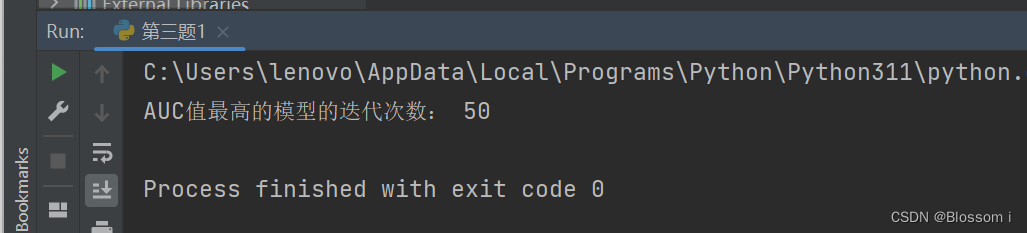
机器学习8:在病马数据集上进行算法比较(ROC曲线与AUC)
ROC曲线与AUC。使用不同的迭代次数(基模型数量)进行 Adaboost 模型训练,并记录每个模型的真阳性率和假阳性率,并绘制每个模型对应的 ROC 曲线,比较模型性能,输出 AUC 值最高的模型的迭代次数和 ROC 曲线。 …...

70. 爬楼梯 --力扣 --JAVA
题目 假设你正在爬楼梯。需要 n 阶你才能到达楼顶。 每次你可以爬 1 或 2 个台阶。你有多少种不同的方法可以爬到楼顶呢? 解题思路 通过对爬楼梯进行分解,爬到当前台阶的方式分为两种,即由上一个台阶通过爬1和上两个台阶爬2,同公…...

体感互动游戏VR游戏AR体感游戏软件开发
随着科技的不断发展,体感互动游戏正逐渐成为游戏行业的一个重要趋势。这类游戏通过利用传感器、摄像头和运动控制器等技术,使玩家能够通过身体动作与游戏进行实时互动,极大地提升了娱乐体验。 1. 游戏设计与互动元素 体感互动游戏的核心在于…...

计算3个点的6种分布在平面上的占比
假设平面的尺寸是6*6,用11的方式构造2,在用21的方式构造3 2 2 2 1 2 2 2 2 2 1 2 2 2 2 2 1 2 2 3 3 3 x 3 3 2 2 2 1 2 2 2 2 2 1 2 2 在平面上有一个点x,11的操作吧平面分成了3部分2a1,2a…...
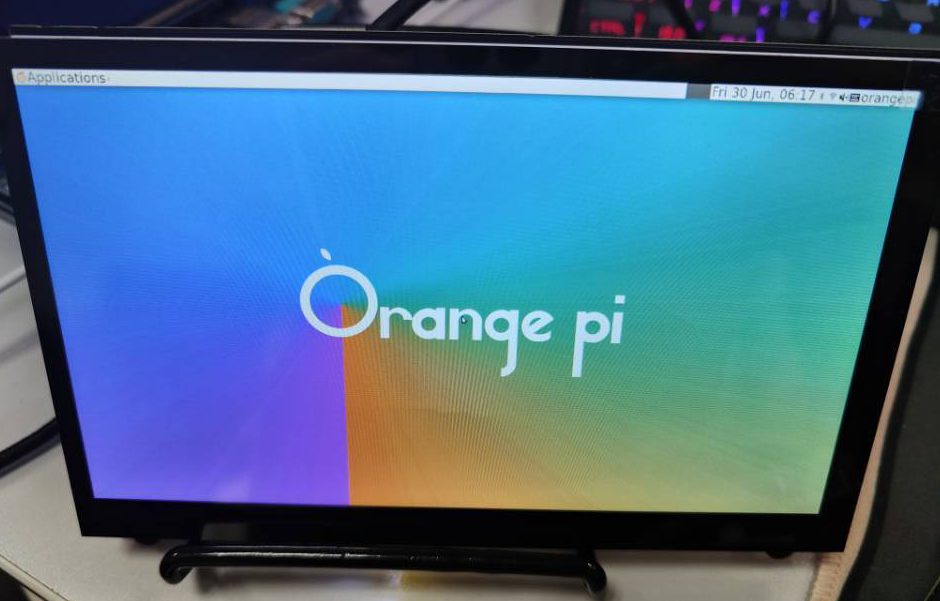
【香橙派】实战记录1——简介及烧录 Linux 镜像
文章目录 一、简介1、参数2、结构3、其他配件4、下载资料 二、基于 Windows PC 将 Linux 镜像烧写到 TF 卡的方法1、使用 balenaEtcher 烧录 Linux 镜像的方法2、效果 一、简介 Orange Pi Zero 3 香橙派是一款开源的单板卡片电脑, 新一代的arm64开发板,…...

redis之高可用
(一)redis之高可用 1、在集群当中有一个非常重要的指标,提供正常服务的时间的百分比(365天)99.9% 2、redis的高可用的含义更加广泛,正常服务是指标之一,数据容量的扩展、数据的安全性 3、在r…...

使用 Core Tools 在本地开发 Azure Functions
学习模块 使用 Core Tools 在本地创建和运行 Azure Functions - Training | Microsoft Learn 文档 使用 Core Tools 在本地开发 Azure Functions | Microsoft Learn GitHub - Azure/azure-functions-core-tools: Command line tools for Azure Functions 其它 安装适用于 A…...
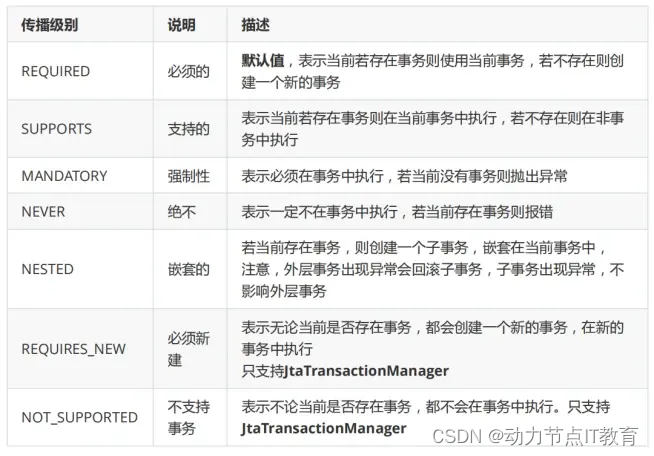
Java零基础——Spring篇
1.Spring框架的介绍 1.1 传统的项目的架构 在传统的项目中,一般遵循MVC开发模型。 (1) view层与用户进行交互,显示数据或者将数据传输给view层。 (2) 在controller层创建service层对象,调用service层中业务方法。 (3) 在service层创建dao…...
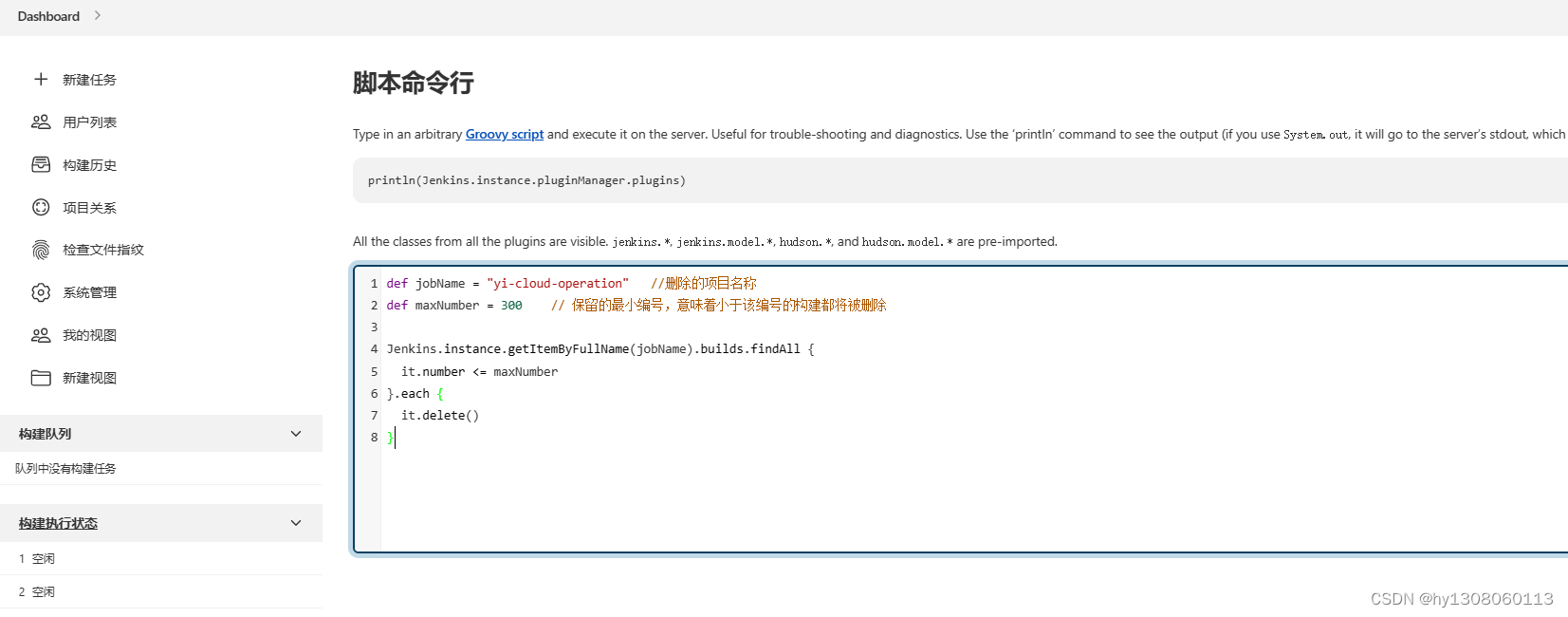
jenkins清理缓存命令
def jobName "yi-cloud-operation" //删除的项目名称 def maxNumber 300 // 保留的最小编号,意味着小于该编号的构建都将被删除 Jenkins.instance.getItemByFullName(jobName).builds.findAll { it.number < maxNumber }.each { it.delet…...
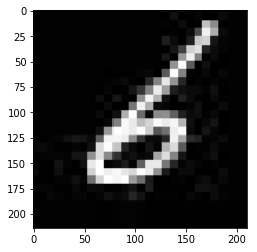
什么是深度学习
一、深度学习的发展历程 1.1 Turing Testing (图灵测试) 图灵测试是人工智能是否真正能够成功的一个标准,“计算机科学之父”、“人工智能之父”英国数学家图灵在1950年的论文《机器会思考吗》中提出了图灵测试的概念。即把一个人和一台计算机分别放在两个隔离的房…...

数字IC基础:有符号数和无符号数加、减法的Verilog设计
相关阅读 数字IC基础https://blog.csdn.net/weixin_45791458/category_12365795.html?spm1001.2014.3001.5482 本文是对数字IC基础:有符号数和无符号数的加减运算一文中的谈到的有符号数加减法的算法进行Verilog实现,有关算法细节请阅读原文࿰…...

2023年11月25日(星期六)骑行三家村
2023年11月25日 (星期六) 骑行三家村(赏红杉林),早8:30到9:00, 大观公园门囗集合,9:30准时出发 【因迟到者,骑行速度快者,可自行追赶偶遇。】 偶遇地点:大观公园门口集合 ,家住东,南…...
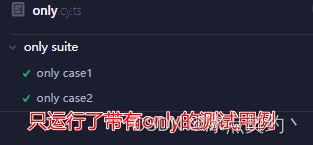
.skip() 和 .only() 的使用
.skip() 和 .only() 的使用 说明 在做自动化测试中,跳过执行某些测试用例,或只运行某些指定的测试用例,这种情况是很常见的Cypress中也提供了这种功能 如何跳过测试用例 通过describe.skip() 或者 context.skip() 来跳过不需要执行的测试…...

如何证明特征值的几何重数不超过代数重数
设 λ 0 \lambda_0 λ0 是 A A A 的特征值,则 λ 0 \lambda_0 λ0 的代数重数 ≥ \geq ≥ 几何重数 证明 假设 A A A 的特征值 λ 0 \lambda_0 λ0 对应的特征向量有 q 维,记为 α 1 , . . . , α q \alpha_1, ... , \alpha_q α1,...,…...

Android修行手册-POI操作Excel文档
Unity3D特效百例案例项目实战源码Android-Unity实战问题汇总游戏脚本-辅助自动化Android控件全解手册再战Android系列Scratch编程案例软考全系列Unity3D学习专栏蓝桥系列ChatGPT和AIGC 👉关于作者 专注于Android/Unity和各种游戏开发技巧,以及各种资源分…...
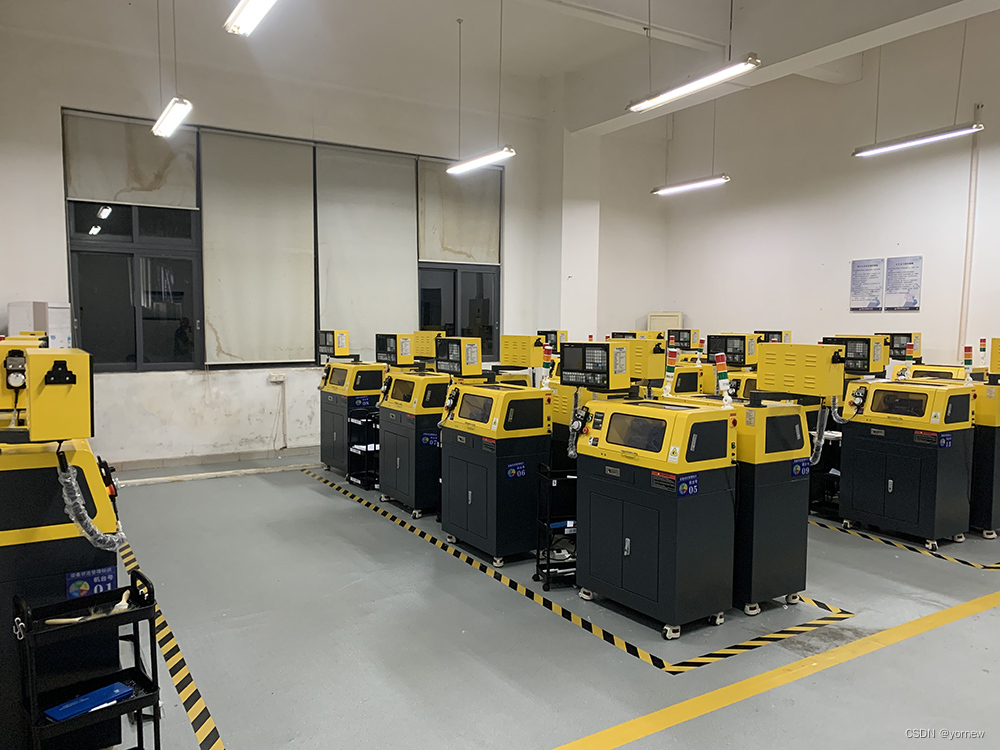
浅析教学型数控车床使用案例
教学型数控车床是一种专为教学和培训设计的机床,它具有小型化、高精度和灵活性的特点,可以作为学校和技术学院的培训机器。下面是一个使用案例,以展示教学型数控车床在教学实训中的应用。 案例背景: 某职业技术学院的机械工程专业…...

图论 2023.11.20
次短路 P2829 大逃离 题意:给定一个无向图,入口1,出口n,求第二短路的值 一个节点所直接连接的地方小于k个(起点和终点除外),那么他就不敢进去。 n<5000,m<100000 思路:次短路…...

Obsidian Tasks 终极指南:6个优先级符号让任务管理效率提升300%
Obsidian Tasks 终极指南:6个优先级符号让任务管理效率提升300% 【免费下载链接】obsidian-tasks Task management for the Obsidian knowledge base. 项目地址: https://gitcode.com/gh_mirrors/ob/obsidian-tasks Obsidian Tasks 是 Obsidian 知识库中功能…...
)
【C++】 vector(代码实现+坑点讲解)
作为C标准模板库(STL)中最基础、最常用的容器之一,vector提供了动态数组的功能。今天我们将深入探讨如何从零实现一个完整的vector容器,理解其内部工作原理和设计思想。 代码解释:C Vector模板类实现 代码整体功能和…...

SDGs进展总滞后?AISMM模型首次公开8类行业适配模板,含制造业/金融业/教育业专属路径
更多请点击: https://intelliparadigm.com 第一章:AISMM模型与可持续发展目标的耦合逻辑 AISMM(Artificial Intelligence for Sustainable Management Model)是一种面向系统性治理的人工智能建模范式,其核心设计目标是…...

终极音乐解锁指南:在浏览器中解放你的加密音频文件
终极音乐解锁指南:在浏览器中解放你的加密音频文件 【免费下载链接】unlock-music 在浏览器中解锁加密的音乐文件。原仓库: 1. https://github.com/unlock-music/unlock-music ;2. https://git.unlock-music.dev/um/web 项目地址: https://…...
—东方仙盟)
科新永安电子锁-酒店门锁-幽冥大陆(一百19)—东方仙盟
门锁转换门锁常见故障自助解决2声---正确提示,表示是设置卡 3声---门锁已反锁,解决方法:用能开反锁的卡或解除反锁 6声---房号不对,解决方法:设置门锁的房号 7声---卡已过期,解决方法:设置门锁的…...

终极免费桌面分区神器:NoFences让你的Windows桌面焕然一新
终极免费桌面分区神器:NoFences让你的Windows桌面焕然一新 【免费下载链接】NoFences 🚧 Open Source Stardock Fences alternative 项目地址: https://gitcode.com/gh_mirrors/no/NoFences 还在为杂乱的Windows桌面图标而烦恼吗?想要…...

告别低效重复:ChatGPT 5.5 + GPT Image 2 重塑开发者工作流
摘要: 在 2026 年的今天,开发者的工作流正在经历一场静默的革命。本文将通过实测案例,展示如何利用 ChatGPT 5.5 的代码理解能力与 GPT Image 2 的视觉生成能力,结合 VS Code 插件与 API 调用,实现从架构设计、代码生成…...

Android无线技术深度解析:蓝牙、WiFi与NFC开发实践与面试指南
在移动互联网时代,蓝牙、WiFi和NFC作为核心无线技术,已成为Android系统开发的关键领域。本文基于Android开发工程师(无线技术方向)的职责要求,深入探讨这些技术的实现原理、开发挑战、优化方法,并附有面试常见问题与答案。文章旨在帮助开发者提升实战能力,内容涵盖源码级…...

【独家首发】VSCode 2026 Agent协作协议v2.3未公开文档泄露:含本地沙箱隔离机制、跨Agent记忆同步算法及IDE内核级Hook点清单
更多请点击: https://intelliparadigm.com 第一章:VSCode 2026多智能体协同编程方法论全景概览 VSCode 2026 引入了原生多智能体协同编程(Multi-Agent Collaborative Programming, MACP)架构,将编辑器从单用户工具升…...

Windows下Claude Code输入`claude`卡住无响应?问题根源在于代理环境变量
原创文章,遵循 CC 4.0 BY-SA 版权协议引言 最近在 Windows 上折腾 Claude Code 时,遇到了一个非常迷惑的问题: claude --version 能正常输出 2.1.78,说明命令已安装成功、PATH 配置正确但只要输入 claude 或 claude "hello&q…...