
基于Qt的UDP通信、TCP文件传输程序的设计与实现——QQ聊天群聊
🙌秋名山码民的主页
😂oi退役选手,Java、大数据、单片机、IoT均有所涉猎,热爱技术,技术无罪
🎉欢迎关注🔎点赞👍收藏⭐️留言📝
获取源码,添加WX
目录
- 前言
- 一、主界面和聊天窗口
- 二、UDP聊天
- 三、TCP文件传输
- server类
- Clint类
- 最后
前言
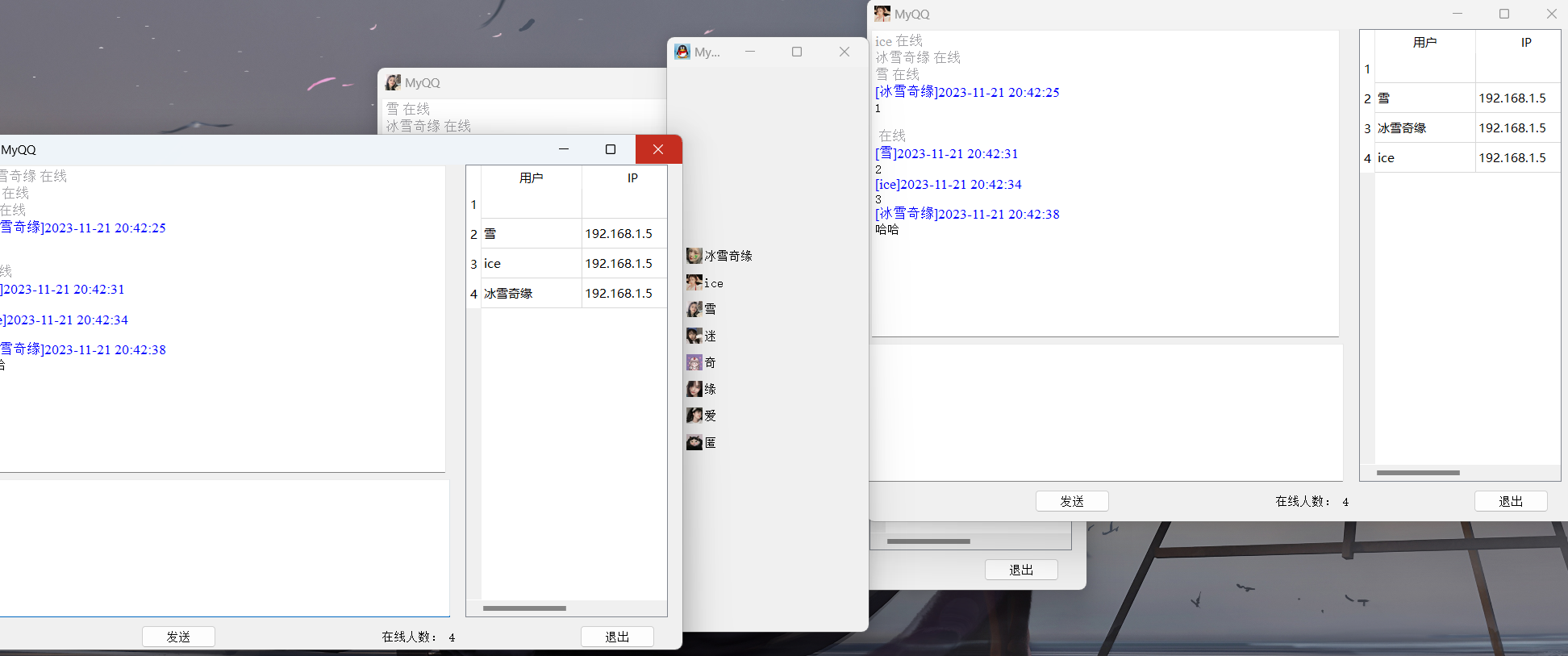
QQ是一款优秀的聊天软件,本文将提供主要代码和思路来实现一个类似于QQ群聊的网络聊天软件,大致有以下俩个功能:
采用qt5编写,实现基于UDP的文本聊天功能,和基于TCP的文件传输功能
基本聊天会话功能
通过获取每一个用户运行该程序的时候,发送广播来实现,不仅用户登录的时候进行广播,退出、发送信息的时候都使用UDP广播来告知用户,每个用户的聊天窗口为一个端点
文件传输功能实现
文件的传输采用TCP来实现,用C/S架构
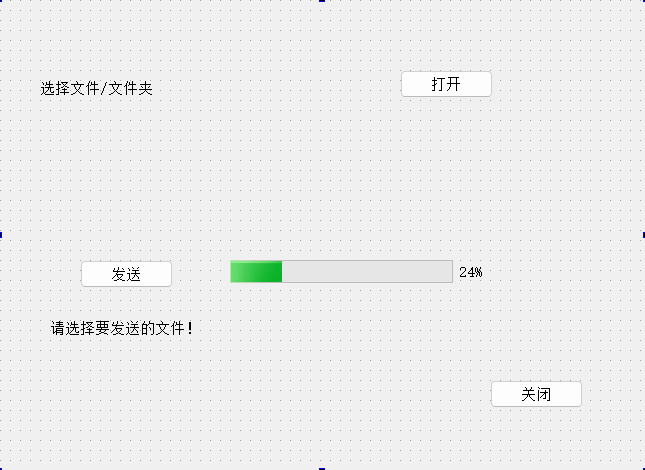
- 主界面选中要发送的文件,单击传输,打开发送文件对话框
- 当用户单击发送的时候,程序通过UDP广播给接收端,接收端在收到文件的UDP消息后,弹出提示框,是否接收
- 如果接收,先创建一个TCP通信客户端,双方进行TCP通信,如果拒绝,再通过UDP广播告知发送端
一、主界面和聊天窗口
#ifndef DRAWER_H
#define DRAWER_H#include <QToolBox>
#include <QToolButton>
#include <QWidget>
#include "myqq.h"class Drawer : public QToolBox
{
public:Drawer();
private:QToolButton *toolBtn1;//聊天对象窗口指针QWidget *chatWidget1;private slots:// 显示聊天对象窗口void showChatWidget1();MyQQ *myqq;};#endif // DRAWER_H
setWindowTitle(tr("My QQ v01"));setWindowIcon(QPixmap(":/images/R-C.jpg"));toolBtn1 = new QToolButton;toolBtn1->setText(tr("冰雪奇缘"));toolBtn1->setIcon(QPixmap(":/images/girl1.jpg"));toolBtn1->setAutoRaise(true); //设置toolBtn1在显示时自动提升,使得按钮外观更加立体感。toolBtn1->setToolButtonStyle(Qt::ToolButtonTextBesideIcon); //设置toolBtn1的按钮样式为图标在文本旁边的形式。// 将显示函数与抽屉盒中相对应的用户按钮进行绑定//connect(toolBtn1,SIGNAL(clicked()),this,SLOT(showChatWidget1()));//connect(toolBtn1, &QToolButton::clicked, this, &QToolBox::showChatWidget1);connect(toolBtn1, &QToolButton::clicked, this, &Drawer::showChatWidget1);
二、UDP聊天
原理:如果要进行聊天,则首先要获取所有登录用户的信息,这个功能是通过在每一个用户运行该程序时发送广播实现的,不仅用户登录时要进行广播,而且在用户退出、发送消息时都使用UDP广播来告知所有用户。
#ifndef SERVER_H
#define SERVER_H#include <QDialog>
#include <QFile>
#include <QTcpServer>
#include <QTime>namespace Ui {
class Server;
}class Server : public QDialog
{Q_OBJECTpublic:explicit Server(QWidget *parent = nullptr);~Server();void initSrv(); // 初始化服务器void refused(); // 关闭服务器protected:void closeEvent(QCloseEvent *);void updClntProgress(qint64 numBytes);private slots:void on_Server_accepted();void sendMsg(); //发送数据void updclntProgress(qint64 numBytes); // 更新进度条void on_sOpenBtn_clicked();void on_sSendBtn_clicked();void on_sCloseBtn_clicked();private:Ui::Server *ui;qint16 tPort;QTcpServer *tSrv;QString fileName;QString theFileName;QFile *locFile; //待发送的文件qint64 totalBytes; //总共要发送的qint64 bytesWritten; //已发送的qint64 bytesTobeWrite; //待发送的qint64 payloadSize;  //被初始化为一个常量QByteArray outBlock; // 缓存一次的QTcpSocket *clntConn;QTime time;signals:void sendFileName(QString fileName);
};#endif // SERVER_H#include "server.h"
#include "ui_server.h"#include <QFile>
#include<QTcpServer>
#include<QTcpSocket>
#include<QMessageBox>
#include <QFileDialog>
#include<QDebug>Server::Server(QWidget *parent) :QDialog(parent),ui(new Ui::Server)
{ui->setupUi(this);setFixedSize(400,207);tPort = 5555;tSrv = new QTcpServer(this);connect(tSrv,&QTcpServer::newConnection,this,&Server::sendMsg);initSrv();
}void Server::initSrv()
{payloadSize = 64*1024;totalBytes = 0;bytesWritten = 0;ui->sOpenBtn->setEnabled(true);ui->sSendBtn->setEnabled(false);tSrv->close();
}// 发送数据
void Server::sendMsg()
{ui->sSendBtn->setEnabled(false);clntConn = tSrv->nextPendingConnection();connect(clntConn,SIGNAL(bytesWritten(gint64)),this,SLOT(updCIntProgress(qint64)));ui->sStatusLabel->setText(tr("开始传送文件 号1 !").arg(theFileName));locFile = new QFile(fileName);if(!locFile->open((QFile::ReadOnly))){QMessageBox::warning(this,tr("应用程序"), tr("无法读取文件号1: n各2").arg(fileName).arg(locFile->errorString()));return;}totalBytes = locFile->size();QDataStream sendOut(&outBlock, QIODevice::WriteOnly);sendOut.setVersion(QDataStream::Qt_4_7);time.start();QString curFile = fileName.right(fileName.size() - fileName.lastIndexOf('/') - 1);sendOut << qint64(0) << qint64((outBlock.size() - sizeof(qint64)*2));bytesTobeWrite = totalBytes - clntConn->write(outBlock);outBlock.reserve(0);
}// 更新进度条
void Server::updClntProgress(qint64 numBytes)
{// 防止传输大文件产生冻结qApp->processEvents();bytesWritten += (int)numBytes;if(bytesTobeWrite > 0){outBlock = locFile->read(qMin(bytesTobeWrite,payloadSize));bytesTobeWrite -= (int)clntConn->write(outBlock);outBlock.resize(0);} else{locFile->close();}ui->progressBar->setMaximum(totalBytes);ui->progressBar->setValue(bytesWritten);float useTime = time.elapsed();double speed = bytesWritten / useTime;ui->sStatusLabel->setText(tr("已发送 %1MB (%2MB/s)\n 共%3MB 已用时:%4s\n 估计剩余时间:%5秒").arg(bytesWritten/(1024*1024)).arg(bytesWritten / (1024*1024)).arg(speed*1000 / (1024*1024),0,'f',0).arg(totalBytes / (1024 * 1024)).arg(useTime/1000,0,'f',0).arg(totalBytes/speed/1000 - useTime/1000,0,'f',0));if(bytesWritten == totalBytes){locFile->close();tSrv->close();ui->sStatusLabel->setText(tr("传送文件 %1 成功").arg(theFileName));}}
Server::~Server()
{delete ui;
}void Server::on_sOpenBtn_clicked()
{fileName = QFileDialog::getOpenFileName(this);if(!fileName.isEmpty()){theFileName = fileName.right(fileName.size() - fileName.lastIndexOf('/')-1);ui->sStatusLabel->setText(tr("要发送的文件为:%1").arg(theFileName));ui->sOpenBtn->setEnabled(false);ui->sSendBtn->setEnabled(true);}
}void Server::on_sSendBtn_clicked()
{if(!tSrv->listen(QHostAddress::Any,tPort)){qDebug() << tSrv ->errorString();close();return;}ui->sStatusLabel->setText("等待……");emit sendFileName(theFileName);
}void Server::on_sCloseBtn_clicked()
{if(tSrv->isListening()){tSrv->close();if(locFile->isOpen())locFile->close();clntConn->abort();}close();
}void Server::closeEvent(QCloseEvent *)
{on_sCloseBtn_clicked();
}void Server::refused()
{tSrv->close();ui->sStatusLabel->setText(tr("对方拒绝!"));
}
三、TCP文件传输
文件的传输采用TCP来实现,用C/S(客户端/服务器)方式,创建俩个新类,client和server类
server类
#ifndef SERVER_H
#define SERVER_H#include <QDialog>
#include <QFile>
#include <QTcpServer>
#include <QTime>namespace Ui {
class Server;
}class Server : public QDialog
{Q_OBJECTpublic:explicit Server(QWidget *parent = nullptr);~Server();void initSrv(); // 初始化服务器void refused(); // 关闭服务器protected:void closeEvent(QCloseEvent *);void updClntProgress(qint64 numBytes);private slots:void on_Server_accepted();void sendMsg(); //发送数据void updclntProgress(qint64 numBytes); // 更新进度条void on_sOpenBtn_clicked();void on_sSendBtn_clicked();void on_sCloseBtn_clicked();private:Ui::Server *ui;qint16 tPort;QTcpServer *tSrv;QString fileName;QString theFileName;QFile *locFile; //待发送的文件qint64 totalBytes; //总共要发送的qint64 bytesWritten; //已发送的qint64 bytesTobeWrite; //待发送的qint64 payloadSize;  //被初始化为一个常量QByteArray outBlock; // 缓存一次的QTcpSocket *clntConn;QTime time;signals:void sendFileName(QString fileName);
};#endif // SERVER_H#include "server.h"
#include "ui_server.h"#include <QFile>
#include<QTcpServer>
#include<QTcpSocket>
#include<QMessageBox>
#include <QFileDialog>
#include<QDebug>Server::Server(QWidget *parent) :QDialog(parent),ui(new Ui::Server)
{ui->setupUi(this);setFixedSize(400,207);tPort = 5555;tSrv = new QTcpServer(this);connect(tSrv,&QTcpServer::newConnection,this,&Server::sendMsg);initSrv();
}void Server::initSrv()
{payloadSize = 64*1024;totalBytes = 0;bytesWritten = 0;ui->sOpenBtn->setEnabled(true);ui->sSendBtn->setEnabled(false);tSrv->close();
}// 发送数据
void Server::sendMsg()
{ui->sSendBtn->setEnabled(false);clntConn = tSrv->nextPendingConnection();connect(clntConn,SIGNAL(bytesWritten(gint64)),this,SLOT(updCIntProgress(qint64)));ui->sStatusLabel->setText(tr("开始传送文件 号1 !").arg(theFileName));locFile = new QFile(fileName);if(!locFile->open((QFile::ReadOnly))){QMessageBox::warning(this,tr("应用程序"), tr("无法读取文件号1: n各2").arg(fileName).arg(locFile->errorString()));return;}totalBytes = locFile->size();QDataStream sendOut(&outBlock, QIODevice::WriteOnly);sendOut.setVersion(QDataStream::Qt_4_7);time.start();QString curFile = fileName.right(fileName.size() - fileName.lastIndexOf('/') - 1);sendOut << qint64(0) << qint64((outBlock.size() - sizeof(qint64)*2));bytesTobeWrite = totalBytes - clntConn->write(outBlock);outBlock.reserve(0);
}// 更新进度条
void Server::updClntProgress(qint64 numBytes)
{// 防止传输大文件产生冻结qApp->processEvents();bytesWritten += (int)numBytes;if(bytesTobeWrite > 0){outBlock = locFile->read(qMin(bytesTobeWrite,payloadSize));bytesTobeWrite -= (int)clntConn->write(outBlock);outBlock.resize(0);} else{locFile->close();}ui->progressBar->setMaximum(totalBytes);ui->progressBar->setValue(bytesWritten);float useTime = time.elapsed();double speed = bytesWritten / useTime;ui->sStatusLabel->setText(tr("已发送 %1MB (%2MB/s)\n 共%3MB 已用时:%4s\n 估计剩余时间:%5秒").arg(bytesWritten/(1024*1024)).arg(bytesWritten / (1024*1024)).arg(speed*1000 / (1024*1024),0,'f',0).arg(totalBytes / (1024 * 1024)).arg(useTime/1000,0,'f',0).arg(totalBytes/speed/1000 - useTime/1000,0,'f',0));if(bytesWritten == totalBytes){locFile->close();tSrv->close();ui->sStatusLabel->setText(tr("传送文件 %1 成功").arg(theFileName));}}
Server::~Server()
{delete ui;
}void Server::on_sOpenBtn_clicked()
{fileName = QFileDialog::getOpenFileName(this);if(!fileName.isEmpty()){theFileName = fileName.right(fileName.size() - fileName.lastIndexOf('/')-1);ui->sStatusLabel->setText(tr("要发送的文件为:%1").arg(theFileName));ui->sOpenBtn->setEnabled(false);ui->sSendBtn->setEnabled(true);}
}void Server::on_sSendBtn_clicked()
{if(!tSrv->listen(QHostAddress::Any,tPort)){qDebug() << tSrv ->errorString();close();return;}ui->sStatusLabel->setText("等待……");emit sendFileName(theFileName);
}void Server::on_sCloseBtn_clicked()
{if(tSrv->isListening()){tSrv->close();if(locFile->isOpen())locFile->close();clntConn->abort();}close();
}void Server::closeEvent(QCloseEvent *)
{on_sCloseBtn_clicked();
}void Server::refused()
{tSrv->close();ui->sStatusLabel->setText(tr("对方拒绝!"));
}Clint类
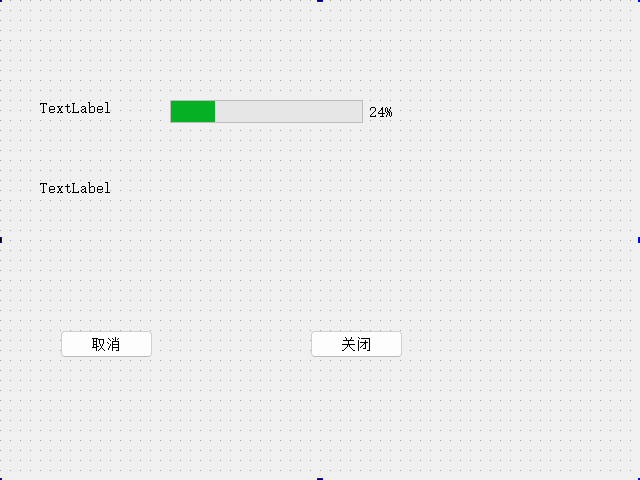
TCP客户端类,用于接收文件。
#ifndef CLIENT_H
#define CLIENT_H#include <QDialog>
#include <QHostAddress>
#include <QFile>
#include <QTime>
#include <QTcpSocket>namespace Ui {
class client;
}class client : public QDialog
{Q_OBJECTpublic:explicit client(QWidget *parent = nullptr);~client();void setHostAddr(QHostAddress addr);void setFileName(QString name);protected:void closeEvent(QCloseEvent *);private:Ui::client *ui;QTcpSocket *tClnt;quint16 blockSize;QHostAddress hostAddr;qint16 tPort;qint64 totalBytes;qint64 bytesReceived;qint64 fileNameSize;QString fileName;QFile *locFile;QByteArray inBlock;QTime time;private slots:void newConn(); // 连接到服务器void readMsg(); // 读取文件数据
//    void displayErr(QAbstractSocket::SocketError); // 显示错误信息void on_cCancleBtn_clicked();void on_cCloseBtn_clicked();
};#endif // CLIENT_H#include "client.h"
#include "ui_client.h"
#include <QDebug>
#include <QMessageBox>
#include <QTime>client::client(QWidget *parent) :QDialog(parent),ui(new Ui::client)
{ui->setupUi(this);setFixedSize(400,190);totalBytes = 0;bytesReceived = 0;fileNameSize = 0;tClnt = new QTcpSocket(this);tPort = 5555;connect(tClnt, &QTcpSocket::readyRead, this, &client::readMsg);}// 连接服务器
void client::newConn()
{blockSize = 0;tClnt->abort();tClnt->connectToHost(hostAddr,tPort);time.start();
}// 发送文件
void client::readMsg()
{QDataStream in(tClnt);in.setVersion(QDataStream::Qt_4_7);float useTime = time.elapsed();if (bytesReceived <= sizeof(qint64)*2){if ((tClnt->bytesAvailable() >= sizeof(qint64)*2) && (fileNameSize == 0)){in>>totalBytes>>fileNameSize;bytesReceived += sizeof(qint64)*2;}if((tClnt->bytesAvailable() >= fileNameSize) && (fileNameSize != 0)){in>>fileName;bytesReceived +=fileNameSize;if(!locFile->open(QFile::WriteOnly)){QMessageBox::warning(this,tr("应用程序"),tr("无法读取文件%1:\n%2.").arg(fileName).arg(locFile->errorString()));}return;}else{return;}}if (bytesReceived < totalBytes){bytesReceived += tClnt->bytesAvailable();inBlock = tClnt->readAll();locFile->write(inBlock);inBlock.resize(0);}ui->progressBar->setMaximum(totalBytes);ui->progressBar->setValue(bytesReceived);double speed = bytesReceived / useTime;ui->label_2->setText(tr("已接收 %1MB (%2MB/s)\n 共%3MB 已用时:%4s\n 估计剩余时间:%5秒").arg(bytesReceived/(1024*1024)).arg(speed*1000 / (1024*1024),0,'f',0).arg(totalBytes / (1024 * 1024)).arg(useTime/1000,0,'f',0).arg(totalBytes/speed/1000 - useTime/1000,0,'f',0));if(bytesReceived == totalBytes){locFile->close();tClnt->close();ui->label->setText(tr("接收文件 %1 成功").arg(fileName));}
}
client::~client()
{delete ui;
}void client::on_cCancleBtn_clicked()
{tClnt->abort();if(locFile->isOpen())locFile->close();}void client::on_cCloseBtn_clicked()
{tClnt->abort();if(locFile->isOpen())locFile->close();close();
}void client::closeEvent(QCloseEvent *)
{on_cCloseBtn_clicked();
}最后
至此已完成,读者还可根据自己所需来添加一些拓展功能,更改字体、字号和颜色等等……如果本文对你有所帮助,还请三连支持一下博主!
相关文章:
基于Qt的UDP通信、TCP文件传输程序的设计与实现——QQ聊天群聊
🙌秋名山码民的主页 😂oi退役选手,Java、大数据、单片机、IoT均有所涉猎,热爱技术,技术无罪 🎉欢迎关注🔎点赞👍收藏⭐️留言📝 获取源码,添加WX 目录 前言一…...

【C++】:STL中的string类的增删查改的底层模拟实现
本篇博客仅仅实现存储字符(串)的string 同时由于Cstring库设计的不合理,我仅实现一些最常见的增删查改接口 接下来给出的接口都是基于以下框架: private:char* _str;//思考如何不用constsize_t _size;size_t _capacity;//这样写可以const static size_t…...
【论文阅读笔记】Supervised Contrastive Learning
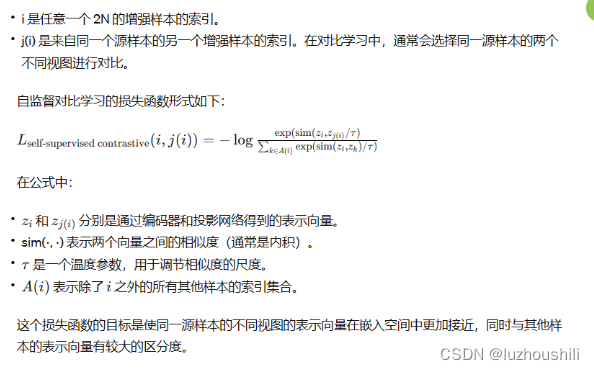
【论文阅读笔记】Supervised Contrastive Learning 摘要 自监督批次对比方法扩展到完全监督的环境中,以有效利用标签信息提出两种监督对比损失的可能版本 介绍 交叉熵损失函数的不足之处,对噪声标签的不鲁棒性和可能导致交叉的边际,降低了…...
数据库管理工具,你可以用Navicat,但我选DBeaver!
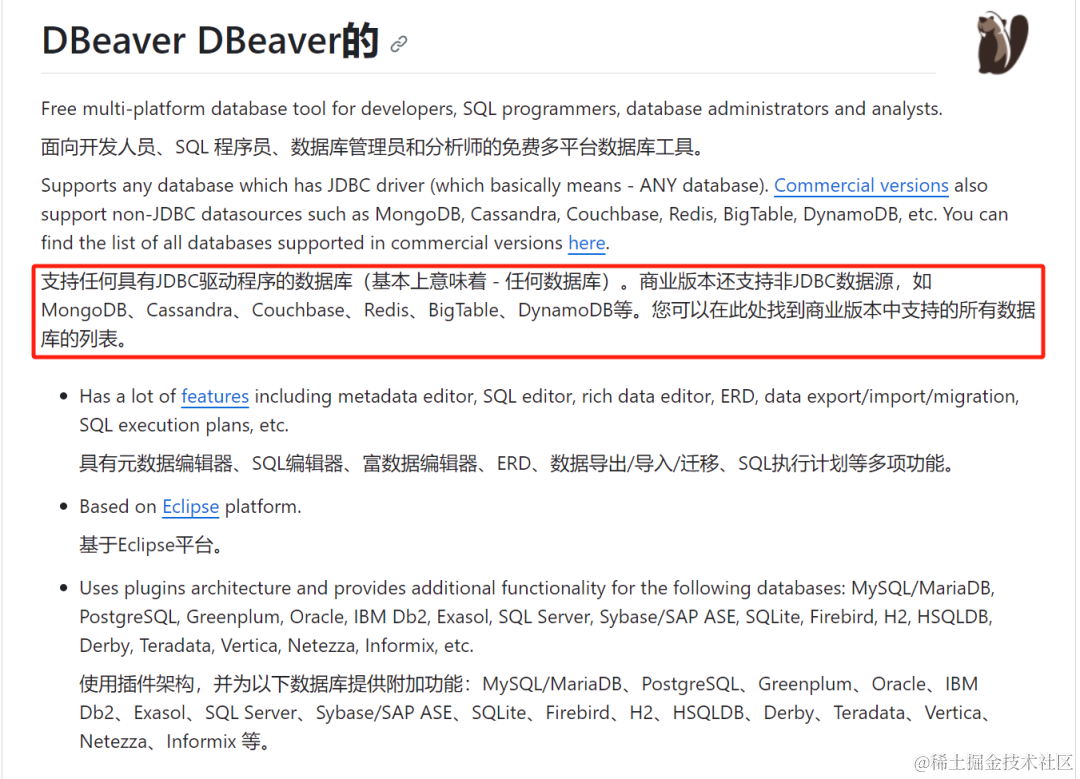
大家好,我是豆小匠。数据库GUI工具哪家强,众人遥指Navicat。 可是Navicat老贵了。 如果公司有正版授权的还好,如果没有正版授权,还不给你用盗版,那才叫绝绝子。 好了,主角登场,DBeaver&#x…...

数据库的三范式(Normalization)
数据库的三范式(Normalization)是关系数据库设计中的基本理论原则,旨在减少数据冗余和提高数据库的数据组织结构。三范式通过将数据分解为更小的表,并通过关系建立连接,使得数据库设计更加灵活、规范和容易维护。在这篇…...
【代码随想录】刷题笔记Day32
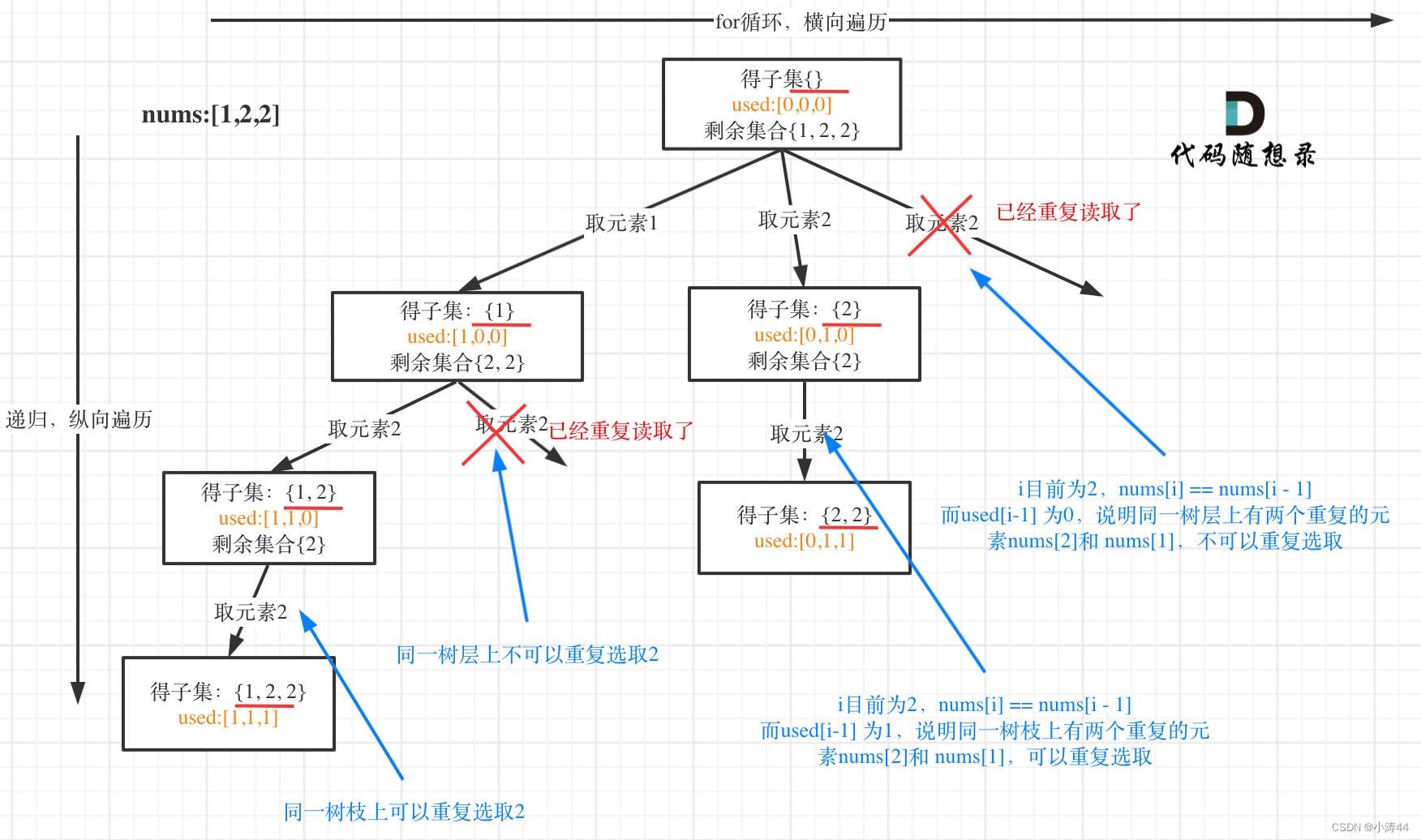
前言 实在不想做项目,周末和npy聊了就业的焦虑,今天多花点时间刷题!刷刷刷刷! 93. 复原 IP 地址 - 力扣(LeetCode) 分割startindex类似上一题,难点在于:判断子串合法性(0~255)、&…...
|LeetCode416. 分割等和子集)
LeetCode算法题解(动态规划,背包问题)|LeetCode416. 分割等和子集
LeetCode416. 分割等和子集 题目链接:416. 分割等和子集 题目描述: 给你一个 只包含正整数 的 非空 数组 nums 。请你判断是否可以将这个数组分割成两个子集,使得两个子集的元素和相等。 示例 1: 输入:nums [1,5,…...
Java Class 类文件格式看这一篇就够了
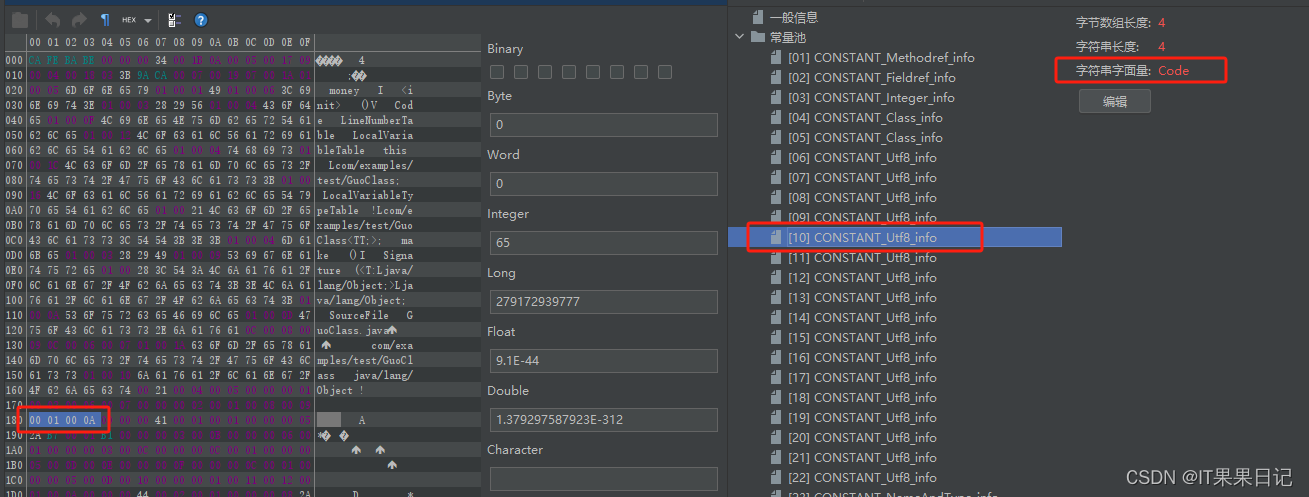
本文将揭开Java Class文件的神秘面纱,带你了解Class文件的内部结构,并从Class文件结构的视角告诉你: 为什么Java Class字节码文件可以“写一次,遍地跑”?为什么常量池的计数从1开始,而不是和java等绝大多数…...

『亚马逊云科技产品测评』活动征文|构建生态农场家禽系统
『亚马逊云科技产品测评』活动征文|构建生态农场家禽系统 授权声明:本篇文章授权活动官方亚马逊云科技文章转发、改写权,包括不限于在 Developer Centre, 知乎,自媒体平台,第三方开发者媒体等亚马逊云科技官方渠道 前…...

[github配置] 远程访问仓库以及问题解决
作者:20岁爱吃必胜客(坤制作人),近十年开发经验, 跨域学习者,目前于新西兰奥克兰大学攻读IT硕士学位。荣誉:阿里云博客专家认证、腾讯开发者社区优质创作者,在CTF省赛校赛多次取得好成绩。跨领域…...

mysql5.6 删除用户/ drop user
目录 前言查看用户删除用户删除没有用户名的用户 前言 CentOS5.6.51 MySQL Community Server (GPL)查看MySQL的版本 查看用户 mysql> select Host,User from user; ----------------------- | Host | User | ----------------------- | 10.0.101.112 | root …...
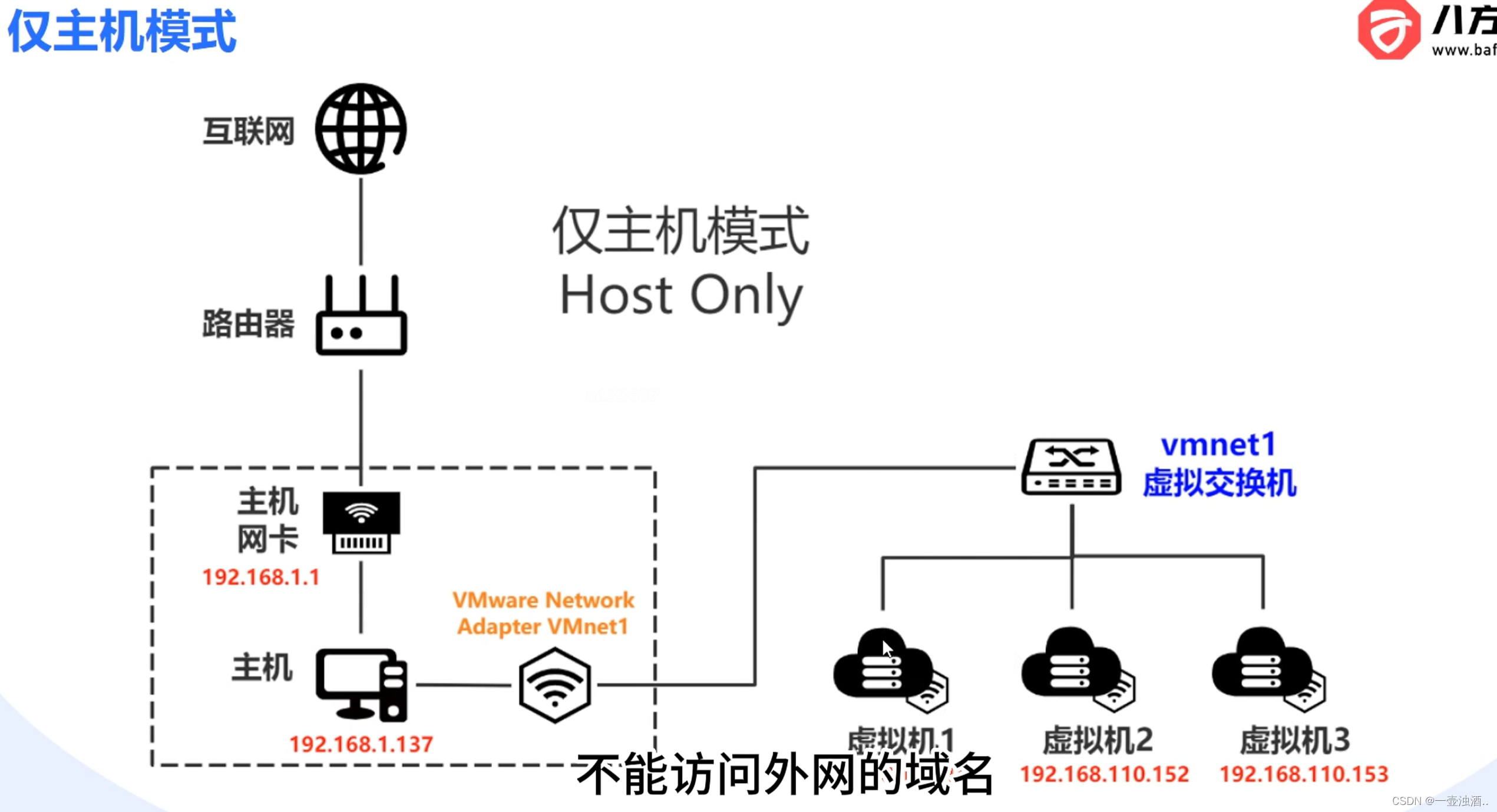
VMware三种网络模式
桥接模式 NAT(网络地址转换模式) Host-Only(仅主机模式) 参考: vmware虚拟机三种网络模式 - 知乎 (zhihu.com)...
的调优技巧和实战2)
Java虚拟机(JVM)的调优技巧和实战2
JVM是Java应用程序的运行环境,它负责管理Java应用程序的内存分配、垃圾收集等重要任务。在JVM的默认设置下,可能存在一些性能问题,因此需要进行调优。在本次分享中,作者将介绍一些实用的JVM实战调优技巧,以提高Java应用…...

2020年下半年试题一:论信息系统项目的成本管理
论文题目 1.概要叙述你参与过的信息系统项目(项目的背景、项目规模、发起单位、目的、项目内容、组织结构、项目周期、交付的成果等),并说明你在其中承担的工作(项目背景要求本人真实经历,不得抄袭及杜撰)。…...

9. 回文数 --力扣 --JAVA
题目 给你一个整数 x ,如果 x 是一个回文整数,返回 true ;否则,返回 false 。 回文数是指正序(从左向右)和倒序(从右向左)读都是一样的整数。 例如,121 是回文࿰…...
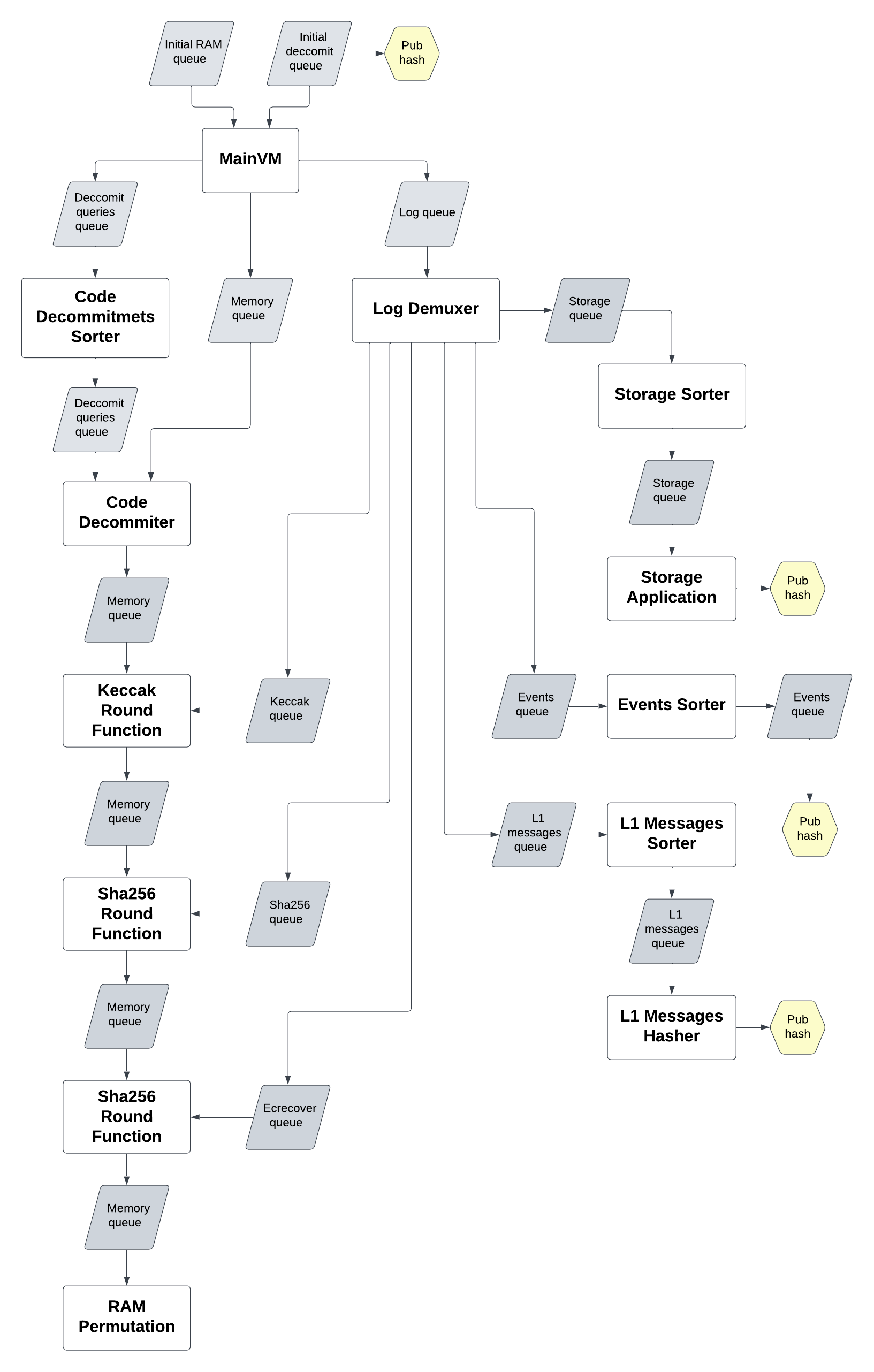
ChainLight zkSync Era漏洞揭秘
1. 引言 ChainLight研究人员于2023年9月15日,发现了zkSync Era主网的ZK电路的一个soundness bug,并于2023年9月17日,向Matter Labs团队报告了该问题。Matter Labs团队修复了该问题,并奖励了ChainLight团队5万USDC——为首个zkSync…...
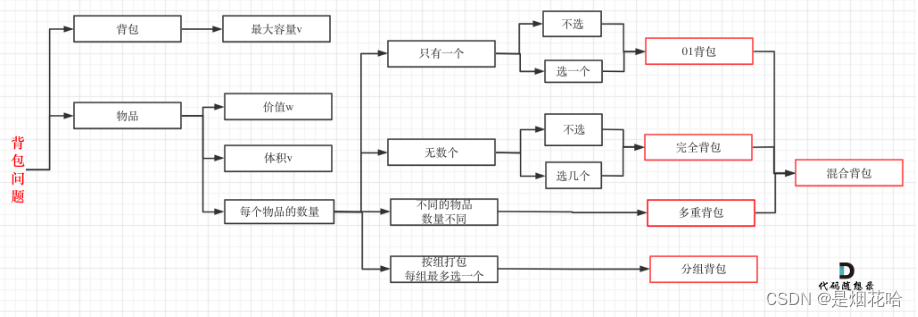
01背包与完全背包学习总结
背包问题分类见下图 参考学习点击:代码随想录01背包讲解 01背包问题: 核心思路: 1、先遍历物品个数,再遍历背包容量。因为容量最先是最大的,往背包里放物品,所以背包容量在慢慢减少,但背包容量…...
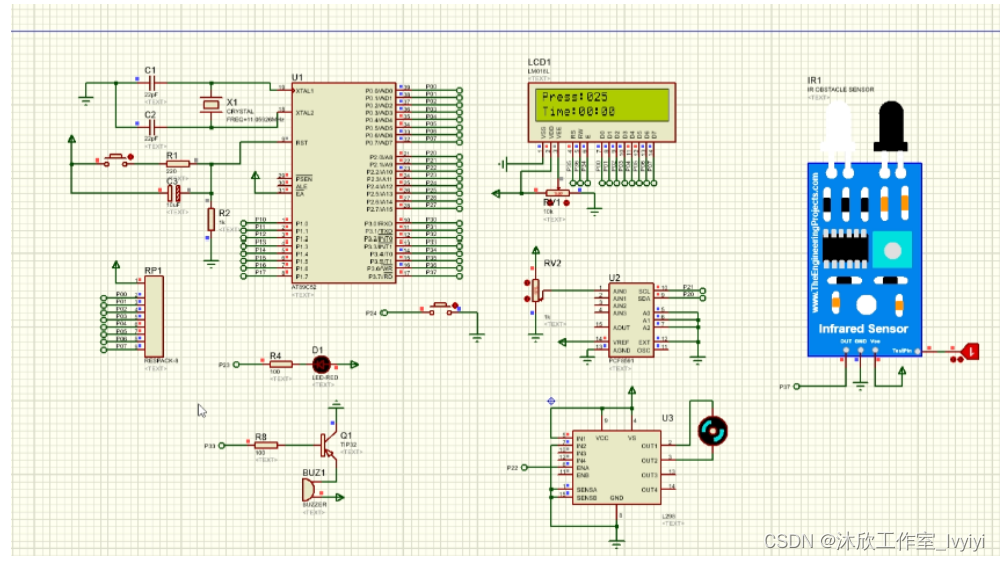
基于单片机的公共场所马桶设计(论文+源码)
1.系统设计 本课题为公共场所的马桶设计,其整个系统架构如图2.1所示,其采用STC89C52单片机为核心控制器,结合HC-SR04人体检测模块,压力传感器,LCD1602液晶,蜂鸣器,L298驱动电路等构成整个系统&…...

注解案例:山寨Junit与山寨JPA
作者简介:大家好,我是smart哥,前中兴通讯、美团架构师,现某互联网公司CTO 联系qq:184480602,加我进群,大家一起学习,一起进步,一起对抗互联网寒冬 上篇讲了什么是注解&am…...
(D前缀和+贪心加血量))
Codeforces Round 822 (Div. 2)(D前缀和+贪心加血量)
A.选三条相邻的边遍历一次求最小值 #include<bits/stdc.h> using namespace std; const int N 1e610,mod1e97; #define int long long int n,m; vector<int> g[N]; int a[N]; void solve() {cin>>n;int res2e18;for(int i1;i<n;i) cin>>a[i];sort…...

量子计算如何革新数据库查询优化
1. 量子计算与数据库优化的跨界碰撞当我在2019年第一次看到量子计算机在数据库查询优化上的实验数据时,手里的咖啡杯差点没拿稳——一个百万级数据表的复杂查询,传统优化器需要47分钟,而量子算法仅用28秒就给出了最优执行方案。这种数量级的性…...

ncmdumpGUI终极指南:3分钟解锁你的网易云音乐NCM文件加密
ncmdumpGUI终极指南:3分钟解锁你的网易云音乐NCM文件加密 【免费下载链接】ncmdumpGUI C#版本网易云音乐ncm文件格式转换,Windows图形界面版本 项目地址: https://gitcode.com/gh_mirrors/nc/ncmdumpGUI 你是否曾经在网易云音乐下载了心爱的歌曲…...

终极指南:5个可复用转录UI组件,快速构建实时语音识别界面
终极指南:5个可复用转录UI组件,快速构建实时语音识别界面 【免费下载链接】WhisperLiveKit Simultaneous speech-to-text models 项目地址: https://gitcode.com/GitHub_Trending/wh/WhisperLiveKit WhisperLiveKit是一个强大的实时语音转文本项目…...
)
PyTorch多卡训练:除了DataParallel,你的单机还有DistributedDataParallel和accelerate可选(附性能对比)
PyTorch多卡训练实战:从DataParallel到DistributedDataParallel的进阶指南 在深度学习模型规模不断膨胀的今天,单卡训练已经难以满足实际需求。PyTorch作为主流深度学习框架,提供了多种单机多卡训练方案。本文将深入剖析三种主流方案…...

大模型时代,普通人最该掌握的3项核心能力
大模型时代,普通人最该掌握的3项核心能力引言:大模型浪潮下的生存法则当ChatGPT掀起全球AI热潮,当文心一言、通义千问等国产大模型走进千行百业,我们正经历着人类历史上最深刻的认知革命。这场革命不仅重塑着产业格局,…...

从电赛C题到毕业设计:如何用MSP432P401R和逐飞模块复现一辆智能跟随小车
从电赛到毕业设计:基于MSP432的智能跟随小车全流程实战指南 在电子设计竞赛中脱颖而出的智能小车项目,往往蕴含着值得深入挖掘的技术价值。许多参赛选手在赛后都有这样的困惑:如何将比赛作品转化为具有教学意义的毕业设计?本文将围…...

WebPlotDigitizer完整指南:如何从图表图像中高效提取数据
WebPlotDigitizer完整指南:如何从图表图像中高效提取数据 【免费下载链接】WebPlotDigitizer Computer vision assisted tool to extract numerical data from plot images. 项目地址: https://gitcode.com/gh_mirrors/we/WebPlotDigitizer 在科研和数据分析…...

终极Kirimase社区贡献指南:如何快速为这个开源项目做出贡献
终极Kirimase社区贡献指南:如何快速为这个开源项目做出贡献 【免费下载链接】kirimase Build full-stack Next.js apps, incredibly fast 项目地址: https://gitcode.com/gh_mirrors/ki/kirimase Kirimase是一个命令行工具,用于快速构建全栈Next.…...

鸿蒙 HarmonyOS 6 | TextInput组件 ONE_TIME_CODE 验证码输入实战
前言 验证码输入是登录、注册、密码找回、支付确认里最常见的一类交互。这个场景看起来简单,真正做起来,体验差距却很明显。输入框类型选得不对,系统就不会把它识别成验证码场景,输入法优化、自动填充、无障碍提示这些能力都很难接…...

Cursor Free VIP终极指南:三步解锁AI编程助手完整功能
Cursor Free VIP终极指南:三步解锁AI编程助手完整功能 【免费下载链接】cursor-free-vip [Support 0.45](Multi Language 多语言)自动注册 Cursor Ai ,自动重置机器ID , 免费升级使用Pro 功能: Youve reached your tri…...