
自定义label组件
自定义label组件
支持边框绘制
支持shape背景(按指定圆角裁剪,矩形,圆角矩,圆形),支持指定角圆角
支持自定义阴影(颜色,偏移,深度)
边框颜色支持状态选择器
预览
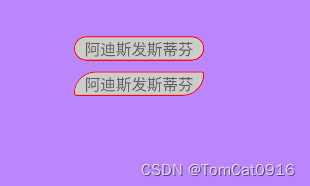
核心绘制辅助类
public class LabelHelper {private final Paint paint;private Paint shadowPaint;private final float[] radiusList = new float[8];// 矩阵四角圆角 两个一组分别为一角的x轴半径y轴半径  四组分别为 上左 上右  下右  下左private final Rect rect;private final Path path;private final RectF rectF;private float strokeWidth;private ColorStateList strokeColor;private boolean hasRadius;//是否有圆角private int shadowColor;//是否有阴影private float shadowRadius;private float shadowDx;private float shadowDy;private Float contentInsetLeft = null;private Float contentInsetRight = null;private int defStrokeColor;LabelHelper(View view, Context context, AttributeSet attrs) {this(view, context, attrs, Color.TRANSPARENT);}LabelHelper(View view, Context context, AttributeSet attrs, @ColorInt int defStrokeColor) {this.defStrokeColor = defStrokeColor;TypedArray array = context.obtainStyledAttributes(attrs, R.styleable.LabelView);// 圆角float radius = array.getDimension(R.styleable.LabelView_android_radius, 0);float topLeftRadius = array.getDimension(R.styleable.LabelView_android_topLeftRadius, radius);float topRightRadius = array.getDimension(R.styleable.LabelView_android_topRightRadius, radius);float bottomLeftRadius = array.getDimension(R.styleable.LabelView_android_bottomLeftRadius, radius);float bottomRightRadius = array.getDimension(R.styleable.LabelView_android_bottomRightRadius, radius);// 阴影int shadowColor = array.getColor(R.styleable.LabelView_android_shadowColor, Color.TRANSPARENT);float shadowRadius = array.getFloat(R.styleable.LabelView_android_shadowRadius, 0.0f);float shadowDx = array.getFloat(R.styleable.LabelView_android_shadowDx, 0.0f);float shadowDy = array.getFloat(R.styleable.LabelView_android_shadowDy, 0.0f);if (array.hasValue(R.styleable.LabelView_android_contentInsetLeft)) {contentInsetLeft = array.getDimension(R.styleable.LabelView_android_contentInsetLeft, 0);}if (array.hasValue(R.styleable.LabelView_android_contentInsetRight)) {contentInsetRight = array.getDimension(R.styleable.LabelView_android_contentInsetRight, 0);}int anInt = array.getInt(R.styleable.LabelView_fillType, 1);// 边框strokeWidth = array.getDimension(R.styleable.LabelView_borderWidth, 0);try {strokeColor = array.getColorStateList(R.styleable.LabelView_borderColor);} catch (Exception e) {e.printStackTrace();}if (strokeColor == null) {strokeColor = ColorStateList.valueOf(array.getColor(R.styleable.LabelView_borderColor, this.defStrokeColor));}view.setSelected(array.getBoolean(R.styleable.LabelView_selected, false));array.recycle();paint = new Paint();paint.setAntiAlias(true);paint.setStyle(getPaintStyle(anInt));paint.setStrokeWidth(strokeWidth);rectF = new RectF();rect = new Rect();path = new Path();setRadiusPx(view, topLeftRadius, topRightRadius, bottomRightRadius, bottomLeftRadius);view.setLayerType(LAYER_TYPE_HARDWARE, null);setShadow(shadowColor, shadowRadius, shadowDx, shadowDy);}// 设置阴影画笔private void setShadow(int shadowColor, float shadowRadius, float shadowDx, float shadowDy) {if (shadowPaint == null) {shadowPaint = new Paint();shadowPaint.setAntiAlias(true);shadowPaint.setStyle(Paint.Style.FILL);}this.shadowRadius = Math.max(shadowRadius, 0);this.shadowDx = shadowDx;this.shadowDy = shadowDy;this.shadowColor = shadowColor;shadowPaint.setColor(shadowColor);shadowPaint.setShadowLayer(this.shadowRadius, this.shadowDx, this.shadowDy, shadowColor);}private Paint.Style getPaintStyle(int type) {return switch (type) {case 0 -> Paint.Style.FILL;case 2 -> Paint.Style.FILL_AND_STROKE;default -> Paint.Style.STROKE;};}void setStrokeWidth(int dp) {strokeWidth = SizeUtils.dp2px(dp);paint.setStrokeWidth(strokeWidth);}void setStrokeColor(@ColorInt int boundColor) {this.strokeColor = ColorStateList.valueOf(boundColor);}void setFillType(Paint.Style style) {paint.setStyle(style);}void setRadiusPx(View view, float topLeft, float topRight, float bottomRight, float bottomLeft) {radiusList[0] = topLeft;radiusList[1] = topLeft;radiusList[2] = topRight;radiusList[3] = topRight;radiusList[4] = bottomRight;radiusList[5] = bottomRight;radiusList[6] = bottomLeft;radiusList[7] = bottomLeft;hasRadius = topLeft > 0 || topRight > 0 || bottomRight > 0 || bottomLeft > 0;float offsetPaddingL = 0;float offsetPaddingR = 0;float offsetPaddingT = 0;float offsetPaddingB = 0;boolean autoInsetLeft = contentInsetLeft == null;boolean autoInsetRight = contentInsetRight == null;if (hasRadius) {if (autoInsetLeft) {offsetPaddingL = Math.max(topLeft, bottomLeft) / 2f;} else if (contentInsetLeft != 0) {offsetPaddingL = contentInsetLeft;}if (autoInsetRight) {offsetPaddingR = Math.max(topRight, bottomRight) / 2f;} else if (contentInsetRight != 0) {offsetPaddingR = contentInsetRight;}}if (isDrawBorder(view)) {offsetPaddingL = Math.max(offsetPaddingL, strokeWidth);offsetPaddingR = Math.max(offsetPaddingL, strokeWidth);offsetPaddingT = strokeWidth;offsetPaddingB = strokeWidth;}view.setPadding((int) Math.max(view.getPaddingLeft(), offsetPaddingL),(int) Math.max(view.getPaddingTop(), offsetPaddingT),(int) Math.max(view.getPaddingRight(), offsetPaddingR),(int) Math.max(view.getPaddingBottom(), offsetPaddingB));setStroke();view.invalidate();}private void setStroke() {if (hasRadius) {paint.setStrokeCap(Paint.Cap.ROUND);paint.setStrokeJoin(Paint.Join.ROUND);} else {paint.setStrokeCap(Paint.Cap.BUTT);paint.setStrokeJoin(Paint.Join.MITER);}}void draw(Canvas canvas, View view) {boolean drawBorder = isDrawBorder(view);boolean isDrawShadow = isDrawShadow();if (hasRadius || drawBorder || isDrawShadow) {view.getDrawingRect(rect);path.reset();rectF.set(rect);path.addRoundRect(rectF, radiusList, Path.Direction.CW);path.close();if (isDrawShadow) {// 绘制阴影canvas.drawPath(path, shadowPaint);path.reset();rectF.left += Math.max(shadowRadius - shadowDx, 0);rectF.right -= Math.max(shadowRadius + shadowDx, 0);rectF.top += Math.max(shadowRadius - shadowDy, 0);rectF.bottom -= Math.max(shadowRadius + shadowDy, 0);path.addRoundRect(rectF, radiusList, Path.Direction.CW);path.close();}if (hasRadius && !(drawBorder && paint.getStyle() != Paint.Style.STROKE)) {// 形状裁剪canvas.clipPath(path);}}}void onDraw(Canvas canvas, View view) {if (isDrawBorder(view)) {Paint.Style style = paint.getStyle();if (style != Paint.Style.STROKE) {canvas.drawColor(Color.TRANSPARENT, PorterDuff.Mode.CLEAR);}paint.setColor(getBoundColor(view));canvas.save();if (style != Paint.Style.FILL) {path.reset();rectF.left += (strokeWidth / 2f - 0.5f);rectF.top += (strokeWidth / 2f - 0.5f);rectF.right -= strokeWidth / 2f;rectF.bottom -= strokeWidth / 2f;path.addRoundRect(rectF, radiusList, Path.Direction.CW);path.close();}// 边框绘制canvas.drawPath(path, paint);canvas.restore();}}Paint getPaint() {return paint;}public Rect getRect() {return rect;}public Path getPath() {return path;}public RectF getRectF() {return rectF;}public float getStrokeWidth() {return strokeWidth;}public boolean isHasRadius() {return hasRadius;}private int getBoundColor(View view) {int color = this.defStrokeColor;if (strokeColor != null) {if (strokeColor.isStateful()) {color = strokeColor.getColorForState(view.getDrawableState(), strokeColor.getDefaultColor());} else {color = strokeColor.getDefaultColor();}}return color;}private boolean isDrawBorder(View view) {return strokeWidth > 0 && getBoundColor(view) != Color.TRANSPARENT;}private boolean isDrawShadow() {return shadowPaint != null && shadowColor != Color.TRANSPARENT && shadowRadius > 0;}
}
自定义控件示例
public class LabelFrameLayout extends FrameLayout {private LabelHelper helper;public LabelFrameLayout(Context context) {this(context, null);}public LabelFrameLayout(Context context, AttributeSet attrs) {this(context, attrs, 0);}public LabelFrameLayout(Context context, AttributeSet attrs, int defStyleAttr) {super(context, attrs, defStyleAttr);setWillNotDraw(false);helper = new LabelHelper(this, context, attrs);}public void setFillType(Paint.Style style) {if (helper != null && helper.getPaint() != null) {helper.setFillType(style);invalidate();}}public void setStrokeColor(@ColorInt int boundColor) {if (helper != null) {helper.setStrokeColor(boundColor);invalidate();}}public void setStrokeColorRes(@ColorRes int colorRes) {if (helper != null) {helper.setStrokeColor(getResources().getColor(colorRes));invalidate();}}public void setStrokeWidth(int dp) {if (helper != null && helper.getPaint() != null) {helper.setStrokeWidth(dp);invalidate();}}public void setRadius(int radiusDp) {setRadiusPx(SizeUtils.dp2px(radiusDp));}public void setRadiusPx(float radius) {setRadiusPx(radius, radius, radius, radius);}public void setRadius(float topLeft, float topRight, float bottomRight, float bottomLeft) {setRadiusPx(SizeUtils.dp2px(topLeft), SizeUtils.dp2px(topRight), SizeUtils.dp2px(bottomRight), SizeUtils.dp2px(bottomLeft));}public void setRadiusPx(float topLeft, float topRight, float bottomRight, float bottomLeft) {if (helper != null) {helper.setRadiusPx(this, topLeft, topRight, bottomRight, bottomLeft);}}@Overridepublic void invalidate() {if (isLaidOut()) {super.invalidate();}}@Overridepublic void draw(Canvas canvas) {if (helper != null) {helper.draw(canvas, this);}super.draw(canvas);}@Overrideprotected void onDraw(Canvas canvas) {if (helper != null) {helper.onDraw(canvas, this);}super.onDraw(canvas);}
}
xml使用示例
<包名.LabelFrameLayoutandroid:layout_width="wrap_content"android:layout_height="wrap_content"android:layout_marginLeft="100dp"android:layout_marginBottom="10dp"android:background="@color/subColorGray"app:borderColor="@color/red"app:borderWidth="1dp"android:radius="20dp"><TextViewandroid:layout_width="wrap_content"android:layout_height="wrap_content"android:text="阿迪斯发斯蒂芬" /></包名.LabelFrameLayout>
相关文章:
自定义label组件
自定义label组件 支持边框绘制 支持shape背景(按指定圆角裁剪,矩形,圆角矩,圆形),支持指定角圆角 支持自定义阴影(颜色,偏移,深度) 边框颜色支持状态选择器 预览 核心绘制辅助类 public class LabelHelper {private final Paint paint;private Paint shadowPaint;private fina…...

【Linux】使用Makefile自动化编译项目:简化开发流程、提高效率
文章目录 示例一:编译一个进度条程序示例二:编译一个简单的程序gcc的几个选项结论 当你开始一个新的软件项目时,编写一个好的Makefile是非常重要的。Makefile是一个文本文件,用于指定如何构建和编译项目。它定义了目标文件、依赖关…...

浅谈开源和闭源的认知
目录 在大型模型的发展中,开源和闭源两种截然不同的开发模式扮演着关键的角色。开源模式通过促进技术共享,吸引了大量优秀人才的加入,从而推动了大模型领域的不断创新。与此相反,闭源模式则着重于保护商业利益和技术优势ÿ…...

你了解Postman 变量吗?
变量是在Postman工具中使用的一种特殊功能,用于存储和管理动态数据。它们可以用于在请求的不同部分、环境或集合之间共享和重复使用值。 Postman变量有以下几种类型: 1、环境变量(Environment Variables): 环境变量是在Postman…...
ArmSoM-RK3588编解码之mpp编码demo解析:mpi_enc_test
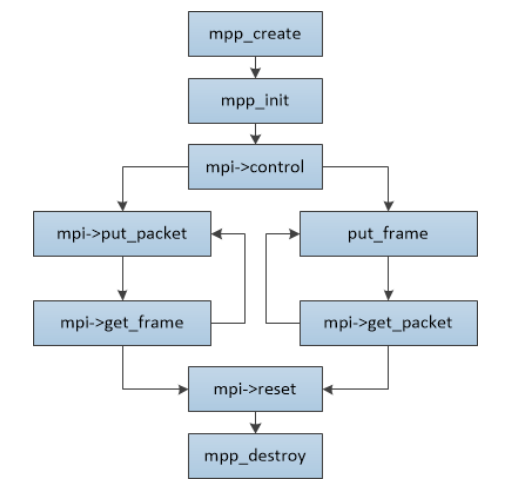
一. 简介 [RK3588从入门到精通] 专栏总目录mpi_enc_test 是rockchip官方编码 demo本篇文章进行mpi_enc_test 的代码解析,编码流程解析 二. 环境介绍 硬件环境: ArmSoM-W3 RK3588开发板 软件版本: OS:ArmSoM-W3 Debian11 三. …...

【ES6.0】-详细模块化、export与Import详解
【ES6.0】-详细模块化、export与Import详解 文章目录 【ES6.0】-详细模块化、export与Import详解一、模块化概述二、ES6模块化的语法规范三、export导出模块3.1 单变量导出3.2 导出多个变量3.3 导出函数3.4 导出对象第一种第二种: 3.5 类的导出第一种第二种 四、imp…...

网工内推 | Base北京,国企网工运维,最高30k*14薪,IE认证优先
01 万方数据股份有限公司 招聘岗位:网络工程师 职责描述: 1.负责完成基础网络组网工作; 2.负责网络对象的访问控制及安全策略,配置VLan,黑白名单、地址转换、故障排查及网络安全监控工作; 3.负责对操作系…...

SQL LIKE 运算符:用法、示例和通配符解释
SQL中的LIKE运算符用于在WHERE子句中搜索列中的指定模式。通常与LIKE运算符一起使用的有两个通配符: 百分号 % 代表零个、一个或多个字符。下划线 _ 代表一个单个字符。 以下是LIKE运算符的用法和示例: 示例 选择所有以字母 “a” 开头的客户&#x…...

编译原理Lab1-用FLEX构造C-Minus-f词法分析器
HNU编译原理lab1实验–根据cminux-f的词法补全lexical_analyer.l文件,完成词法分析器。 本文没有添加任何图片,但是以复制输出的形式展现出来了实验结果。 实验要求: 根据cminux-f的此法补全lexical_analyer.l文件,完成词法分析…...
网络安全之渗透测试入门准备
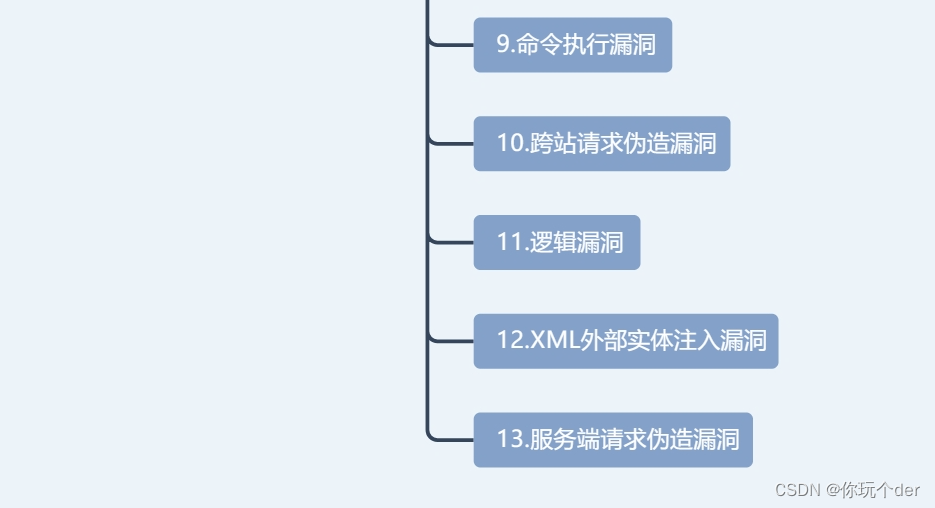
渗透测试入门所需知识 操作系统基础:Windows,Linux 网络基础:基础协议与简单原理 编程语言:PHP,python web安全基础 渗透测试入门 渗透测试学习: 1.工具环境准备:①VMware安装及使用;…...
【MySQL】宝塔面板结合内网穿透实现公网远程访问
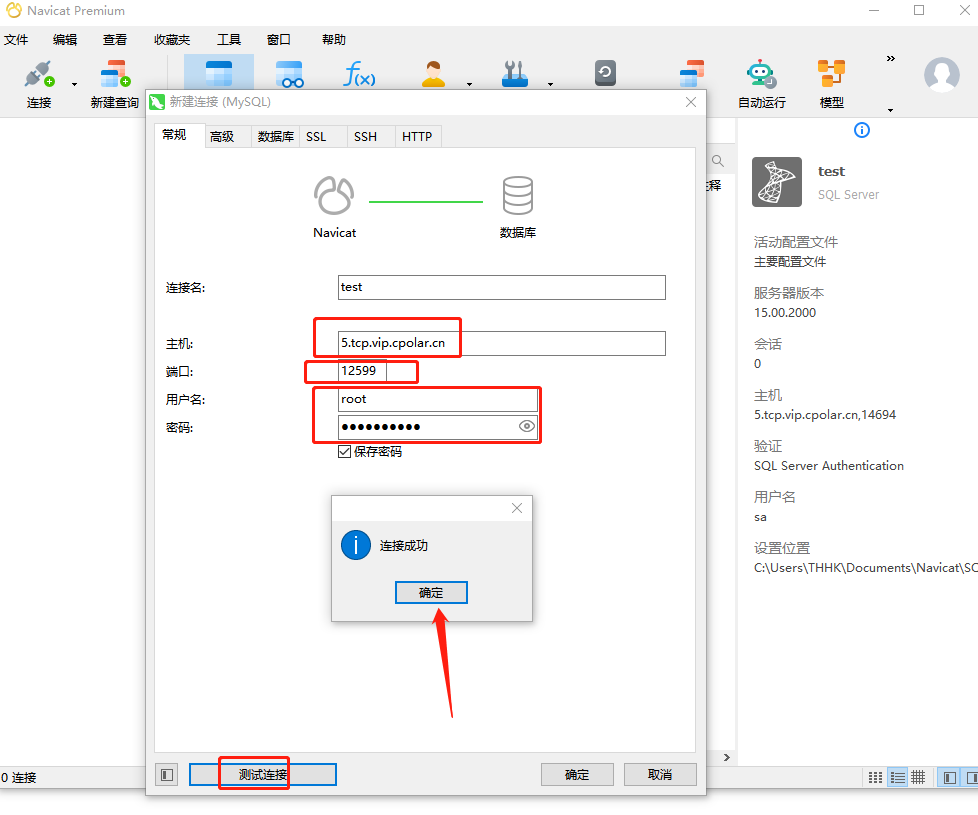
文章目录 前言1.Mysql服务安装2.创建数据库3.安装cpolar3.2 创建HTTP隧道4.远程连接5.固定TCP地址5.1 保留一个固定的公网TCP端口地址5.2 配置固定公网TCP端口地址 前言 宝塔面板的简易操作性,使得运维难度降低,简化了Linux命令行进行繁琐的配置,下面简单几步,通过宝塔面板cpo…...
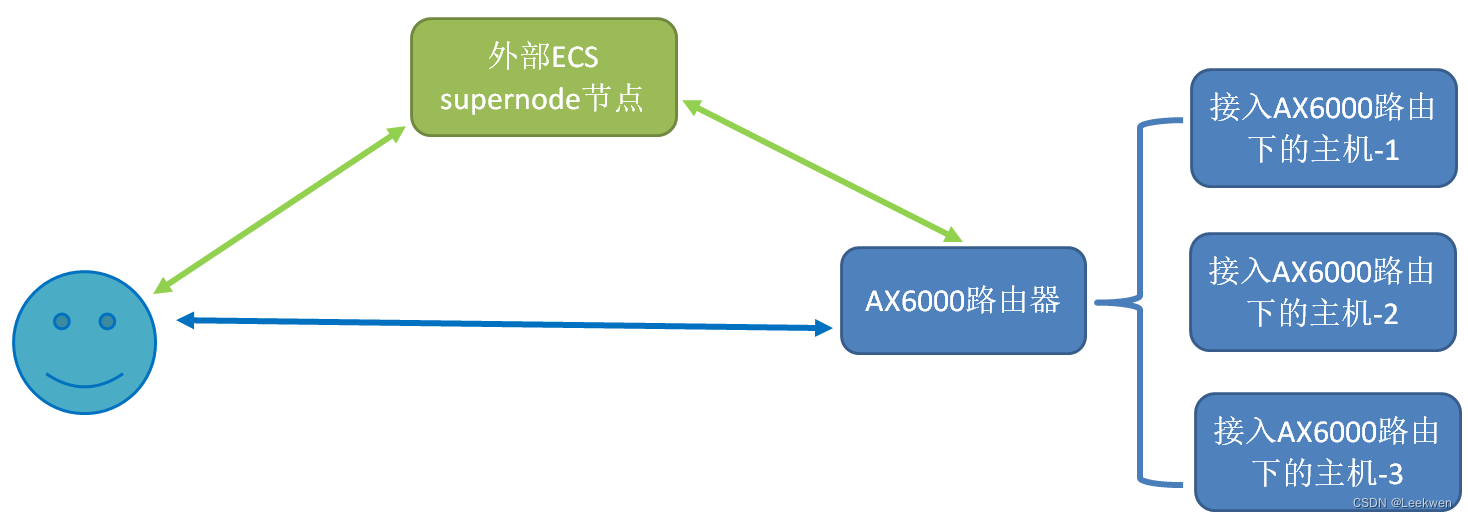
通过AX6000路由器,实现外部访问内网的任意主机
概述 这里遇到一个场景,就是需要外部的人员,访问我内网的一台设备,进行内外部的设备联调。 这也是实际环境中,很常见的一种场景。 之前的做法是子设备上运行edge节点,可以直接访问。 但有的设备无法运行edge节点,那么可以参考一下这个方案来实现。 此方案可以摒弃了…...

如何应用ChatGPT撰写、修改论文及工作报告,提供写作能力及优化工作??
如果我想让gpt从pdf文档中提取相关关键词的内容,可以怎么做呢??我们评论区讨论 ChatGPT 在论文写作与编程方面也具备强大的能力。无论是进行代码生成、错误调试还是解决编程难题,ChatGPT都能为您提供实用且高质量的建议和指导&am…...
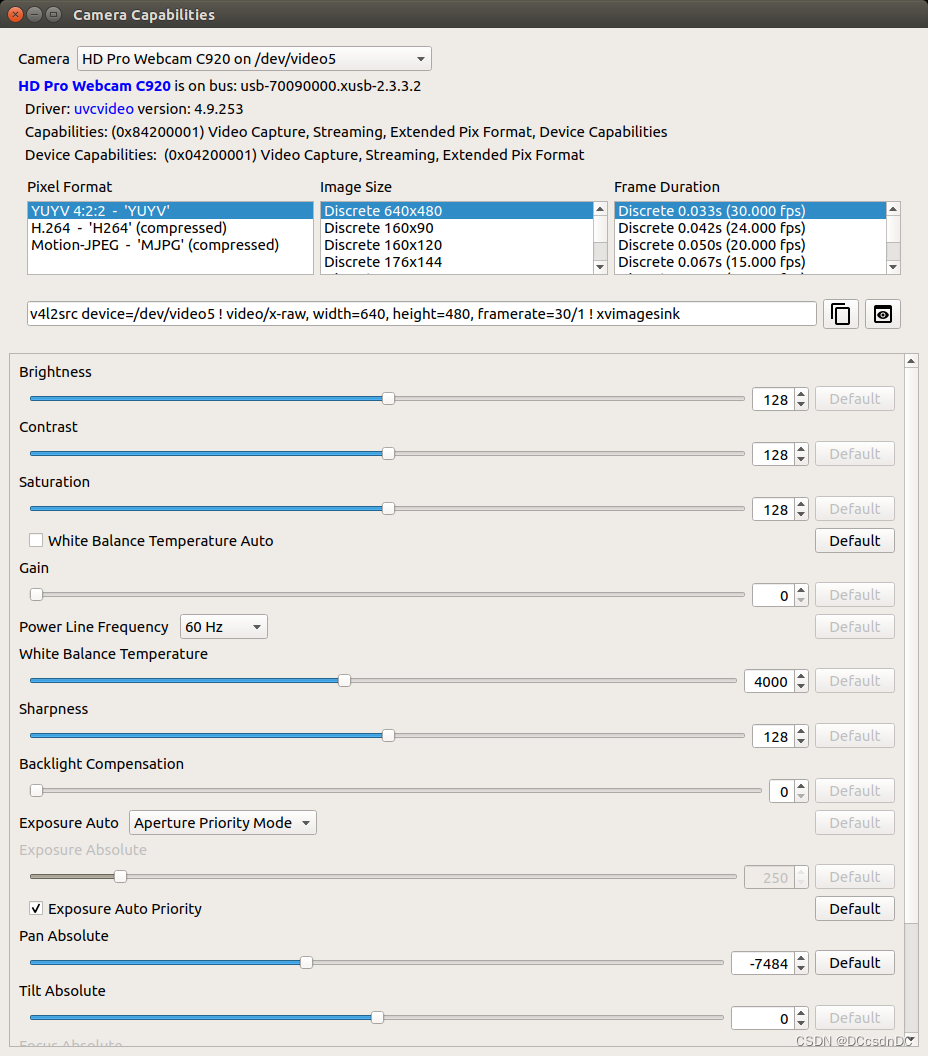
camera-caps:Jetson设备上的一种实用的V4L2可视化界面
camera-caps:Jetson设备上的一种实用的V4L2可视化界面 github地址是: https://github.com/jetsonhacks/camera-caps 注意:Jetpack5.x需要选择tag 5.x版本...
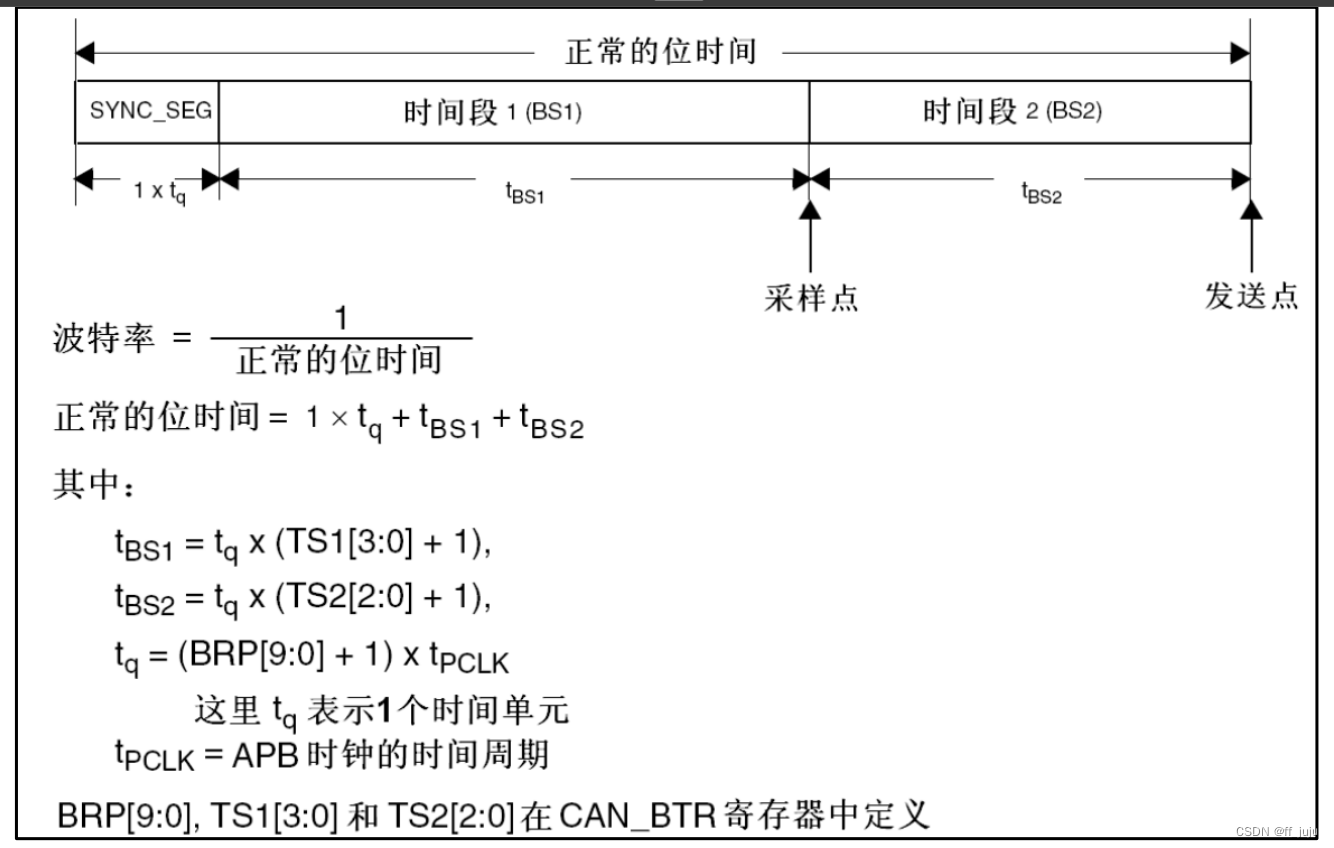
CAN基础知识
CAN 简介 CAN 是 Controller Area Network 的缩写(以下称为 CAN),是 ISO 国际标准化的串行通信 协议。在当前的汽车产业中,出于对安全性、舒适性、方便性、低公害、低成本的要求,各种 各样的电子控制系统被开发了出来…...

vue3跨域怎么解决?
其实很简单 假设一个接口; http://101.42.170.68:10000/open/mockData/test1 首先,看自己项目中有没有vue.config.js文件,如果没有自己创建一个,如果有那吗在其中写。 vue.config.js: //固定格式,修改一部分就行了 const { def…...

强化学习小笔记 —— 如何选择合适的更新步长
在强化学习中,动作价值函数的更新可以使用增量法,如下所示: Q k 1 k ∑ i 1 k r i 1 k ( r k ∑ i 1 k − 1 r i ) 1 k ( r k ( k − 1 ) Q k − 1 ) 1 k ( r k k Q k − 1 − Q k − 1 ) Q k − 1 1 k [ r k − Q k − 1 ] \beg…...

容斥 C. Strange Function改编题
补题: 题目详情 - 9.段坤爱取模%%% - SUSTOJ 本题或许是参考 Problem - C - Codeforces 根据题意,f(i)就是不能被整除的最小的一个质因子。 打表发现,当15个质因子相乘后,长度就大于18。 因此可以知道小于等于1e16内的正整数x…...

C++笔记
文章目录 类模板类函数什么是友元函数?什么是内联函数?VECTOR哈希表栈队列映射与解除映射mmap()munmap可变参数 va_start()-va_send()vsnprintf()C/C++异常处理list红黑树类 基类、父类、顶层类、抽象类 子类、派生类 模板类 在C++中,模板类(Template Class)是一种通用…...
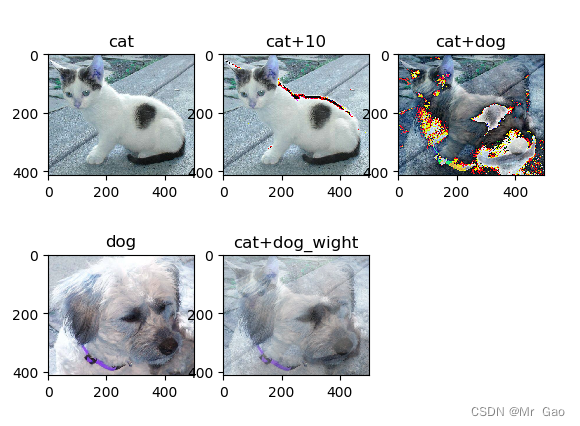
python-opencv 培训课程笔记(1)
python-opencv 培训课程笔记(1) 博主参加了一次opencv库的培训课程,把课程所学整理成笔记,供大家学习,第一次课程包括如下内容: 1.读取图像 2.保存图像 3.使用opencv库显示图像 4.读取图像为灰度图像 …...

idea控制台如何实时grep搜索?
安装Grep Console 插件即可,运行时右键即可配合ctrl f 实现实时过滤,高亮显示 ;...

笔记本CPU温度多少正常?一文看懂正常范围+实时查看方法
笔记本电脑玩大型游戏、进行视频剪辑或长时间高负载运行时,CPU温度可能会明显升高。如果温度过高,不仅会影响性能,还可能缩短硬件寿命。那么,笔记本CPU温度多少算正常?如何查看CPU的实时温度?本文将为你详细…...

2026年张掖美食本地人推荐
张掖,这座充满历史韵味与独特风情的城市,不仅有壮丽的自然风光,更有令人垂涎欲滴的美食。在众多餐厅中,张丹霞鱼庄凭借其地道的美食、优质的服务和独特的环境,成为了张掖美食本地人推荐的热门之选。接下来,…...

ARM架构BRBSRC_EL1寄存器:分支记录与性能分析
1. ARM架构中的BRBSRC_EL1寄存器深度解析在ARMv8/v9架构中,系统寄存器扮演着处理器与操作系统间关键桥梁的角色。作为性能监控与调试基础设施的重要组成部分,BRBSRC_EL1(Branch Record Buffer Source Address Register)寄存器在分…...

5分钟掌握Unity游戏去马赛克:免费插件完整使用指南
5分钟掌握Unity游戏去马赛克:免费插件完整使用指南 【免费下载链接】UniversalUnityDemosaics A collection of universal demosaic BepInEx plugins for games made in Unity3D engine 项目地址: https://gitcode.com/gh_mirrors/un/UniversalUnityDemosaics …...

3步开启OBS RTSP直播:免费将OBS视频流转换为监控协议
3步开启OBS RTSP直播:免费将OBS视频流转换为监控协议 【免费下载链接】obs-rtspserver RTSP server plugin for obs-studio 项目地址: https://gitcode.com/gh_mirrors/ob/obs-rtspserver 想要将你的OBS直播内容无缝推送到监控系统、智能电视或局域网内的其他…...

终极指南:5分钟在Windows上安装Dlib预编译包,告别编译噩梦![特殊字符]
终极指南:5分钟在Windows上安装Dlib预编译包,告别编译噩梦!🚀 【免费下载链接】Dlib_Windows_Python3.x Dlib compiled binaries (.whl) for Python 3.7-3.14 and Windows x64 项目地址: https://gitcode.com/gh_mirrors/dl/Dli…...

WindowsCleaner终极指南:告别C盘爆红,3步实现系统加速
WindowsCleaner终极指南:告别C盘爆红,3步实现系统加速 【免费下载链接】WindowsCleaner Windows Cleaner——专治C盘爆红及各种不服! 项目地址: https://gitcode.com/gh_mirrors/wi/WindowsCleaner 你是否曾经因为C盘爆红而焦虑不已&a…...
)
从MCU的PWM寄存器到电机转动:手把手配置STM32的SVPWM(附代码避坑指南)
STM32高级定时器实现SVPWM全流程:从寄存器配置到电机转动实战 引言:为什么工程师需要掌握SVPWM的MCU级实现? 当你已经理解SVPWM的数学原理和矢量合成概念后,最迫切的问题往往是如何在真实的STM32芯片上实现它。不同于理论推导&…...

NSC_BUILDER:3个维度解析Switch游戏文件管理工具的架构哲学与效率革命
NSC_BUILDER:3个维度解析Switch游戏文件管理工具的架构哲学与效率革命 【免费下载链接】NSC_BUILDER Nintendo Switch Cleaner and Builder. A batchfile, python and html script based in hacbuild and Nuts python libraries. Designed initially to erase title…...