
Nginx模块开发之http handler实现流量统计(2)
文章目录
- 一、概述
- 二、Nginx handler模块开发
- 2.1、代码实现
- 2.2、编写config文件
- 2.3、编译模块到Nginx源码中
- 2.4、修改conf文件
- 2.5、执行效果
- 总结
一、概述
上一篇【Nginx模块开发之http handler实现流量统计(1)】使用数组在单进程实现了IP的流量统计,这一篇将进行优化,使用红黑树的数据结构以及共享内存的方式实现进程间通信。
进程间通信的方式:
(1)进程在不同的机器中,使用网络进行通信。
(2)进程在同一个机器,并且进程间的关系是父子进程关系,可以使用共享内存。
(3)使用unix_sock,比如文件soket。在MySQL使用的就是这种进程通信方式。
(4)pipe,管道。
二、Nginx handler模块开发
2.1、代码实现
在重点地方添加了注释,主要是红黑树的添加和使用,以及共享内存的使用。
核心:
1.nginx获取请求。ngx_command_t中设置ngx_http_pagecount_set。
2.conf文件解析到模块的cmd时,初始化共享内存以及互斥锁。
3.红黑树的初始化。
4.组织网页时,需要遍历红黑树找到IP并做流量统计。
#include <ngx_http.h>
#include <ngx_config.h>
#include <ngx_core.h>#define ENABLE_RBTREE	1static char *ngx_http_pagecount_set(ngx_conf_t *cf, ngx_command_t *cmd, void *conf);
static ngx_int_t ngx_http_pagecount_handler(ngx_http_request_t *r);
static ngx_int_t ngx_http_pagecount_init(ngx_conf_t *cf);
static void  *ngx_http_pagecount_create_location_conf(ngx_conf_t *cf);
static ngx_int_t ngx_http_pagecount_shm_init (ngx_shm_zone_t *zone, void *data);
static void ngx_http_pagecount_rbtree_insert_value(ngx_rbtree_node_t *temp,ngx_rbtree_node_t *node, ngx_rbtree_node_t *sentinel);// 命令解析
static ngx_command_t count_commands[] = {{ngx_string("count"),NGX_HTTP_LOC_CONF | NGX_CONF_NOARGS,ngx_http_pagecount_set,//遇到模块命令时调用NGX_HTTP_LOC_CONF_OFFSET,0, NULL},ngx_null_command
};static ngx_http_module_t count_ctx = {NULL,ngx_http_pagecount_init,//初始化NULL,NULL,NULL,NULL,// conf文件解析到location时调用ngx_http_pagecount_create_location_conf,NULL,
};//ngx_http_count_module
ngx_module_t ngx_http_pagecount_module = {NGX_MODULE_V1,&count_ctx,count_commands,NGX_HTTP_MODULE,NULL,NULL,NULL,NULL,NULL,NULL,NULL,NGX_MODULE_V1_PADDING
};typedef struct {int count; //count
} ngx_http_pagecount_node_t;typedef struct {ngx_rbtree_t rbtree;ngx_rbtree_node_t sentinel;} ngx_http_pagecount_shm_t;// 共享内存结构体
typedef struct
{ssize_t shmsize;ngx_slab_pool_t *shpool;// 互斥锁ngx_http_pagecount_shm_t *sh;
} ngx_http_pagecount_conf_t;// 共享内存初始化
ngx_int_t ngx_http_pagecount_shm_init (ngx_shm_zone_t *zone, void *data) {ngx_http_pagecount_conf_t *conf;ngx_http_pagecount_conf_t *oconf = data;conf = (ngx_http_pagecount_conf_t*)zone->data;if (oconf) {conf->sh = oconf->sh;conf->shpool = oconf->shpool;return NGX_OK;}//printf("ngx_http_pagecount_shm_init 0000\n");// 初始化锁conf->shpool = (ngx_slab_pool_t*)zone->shm.addr;conf->sh = ngx_slab_alloc(conf->shpool, sizeof(ngx_http_pagecount_shm_t));if (conf->sh == NULL) {return NGX_ERROR;}conf->shpool->data = conf->sh;//printf("ngx_http_pagecount_shm_init 1111\n");// 共享内存创建完之后初始化红黑树,// 要提供插入函数ngx_rbtree_init(&conf->sh->rbtree, &conf->sh->sentinel, ngx_http_pagecount_rbtree_insert_value);return NGX_OK;}static char *ngx_http_pagecount_set(ngx_conf_t *cf, ngx_command_t *cmd, void *conf) {ngx_shm_zone_t *shm_zone;ngx_str_t name = ngx_string("pagecount_slab_shm");ngx_http_pagecount_conf_t *mconf = (ngx_http_pagecount_conf_t*)conf;ngx_http_core_loc_conf_t *corecf;//ngx_log_error(NGX_LOG_EMERG, cf->log, ngx_errno, "ngx_http_pagecount_set000");// 设置共享内存的大小mconf->shmsize = 1024*1024;shm_zone = ngx_shared_memory_add(cf, &name, mconf->shmsize, &ngx_http_pagecount_module);if (NULL == shm_zone) {return NGX_CONF_ERROR;}shm_zone->init = ngx_http_pagecount_shm_init;shm_zone->data = mconf;corecf = ngx_http_conf_get_module_loc_conf(cf, ngx_http_core_module);// 计数统计主函数corecf->handler = ngx_http_pagecount_handler;return NGX_CONF_OK;
}ngx_int_t   ngx_http_pagecount_init(ngx_conf_t *cf) {return NGX_OK;
}// conf文件解析到location时进入此函数。
// 此函数为模块创建所需要的结构体, 后面会使用。
void  *ngx_http_pagecount_create_location_conf(ngx_conf_t *cf) {ngx_http_pagecount_conf_t *conf;// 共享内存的结构体conf = ngx_palloc(cf->pool, sizeof(ngx_http_pagecount_conf_t));if (NULL == conf) {return NULL;}// 初始化共享内存的大小conf->shmsize = 0;//ngx_log_error(NGX_LOG_EMERG, cf->log, ngx_errno, "ngx_http_pagecount_create_location_conf");// init conf data// ... return conf;}// 红黑树的插入函数
static void
ngx_http_pagecount_rbtree_insert_value(ngx_rbtree_node_t *temp,ngx_rbtree_node_t *node, ngx_rbtree_node_t *sentinel)
{ngx_rbtree_node_t **p;//ngx_http_testslab_node_t *lrn, *lrnt;for (;;){if (node->key < temp->key){p = &temp->left;}else if (node->key > temp->key) {p = &temp->right;}else{return ;}// 没有找到,直接返回if (*p == sentinel){break;}temp = *p;}*p = node;node->parent = temp;node->left = sentinel;node->right = sentinel;ngx_rbt_red(node);
}// 查找IP和访问计数统计
static ngx_int_t ngx_http_pagecount_lookup(ngx_http_request_t *r, ngx_http_pagecount_conf_t *conf, ngx_uint_t key) {ngx_rbtree_node_t *node, *sentinel;node = conf->sh->rbtree.root;sentinel = conf->sh->rbtree.sentinel;ngx_log_error(NGX_LOG_EMERG, r->connection->log, ngx_errno, " ngx_http_pagecount_lookup 111 --> %x\n", key);while (node != sentinel) {if (key < node->key) {node = node->left;continue;} else if (key > node->key) {node = node->right;continue;} else { // key == nodenode->data ++;return NGX_OK;}}ngx_log_error(NGX_LOG_EMERG, r->connection->log, ngx_errno, " ngx_http_pagecount_lookup 222 --> %x\n", key);// insert rbtreenode = ngx_slab_alloc_locked(conf->shpool, sizeof(ngx_rbtree_node_t));if (NULL == node) {return NGX_ERROR;}node->key = key;node->data = 1;ngx_rbtree_insert(&conf->sh->rbtree, node);ngx_log_error(NGX_LOG_EMERG, r->connection->log, ngx_errno, " insert success\n");return NGX_OK;
}static int ngx_encode_http_page_rb(ngx_http_pagecount_conf_t *conf, char *html) {sprintf(html, "<h1>Source Insight </h1>");strcat(html, "<h2>");//ngx_rbtree_traversal(&ngx_pv_tree, ngx_pv_tree.root, ngx_http_count_rbtree_iterator, html);ngx_rbtree_node_t *node = ngx_rbtree_min(conf->sh->rbtree.root, conf->sh->rbtree.sentinel);do {char str[INET_ADDRSTRLEN] = {0};char buffer[128] = {0};sprintf(buffer, "req from : %s, count: %d <br/>",inet_ntop(AF_INET, &node->key, str, sizeof(str)), node->data);strcat(html, buffer);node = ngx_rbtree_next(&conf->sh->rbtree, node);} while (node);strcat(html, "</h2>");return NGX_OK;
}static ngx_int_t ngx_http_pagecount_handler(ngx_http_request_t *r) {u_char html[1024] = {0};int len = sizeof(html);ngx_rbtree_key_t key = 0;struct sockaddr_in *client_addr =  (struct sockaddr_in*)r->connection->sockaddr;ngx_http_pagecount_conf_t *conf = ngx_http_get_module_loc_conf(r, ngx_http_pagecount_module);key = (ngx_rbtree_key_t)client_addr->sin_addr.s_addr;ngx_log_error(NGX_LOG_EMERG, r->connection->log, ngx_errno, " ngx_http_pagecount_handler --> %x\n", key);ngx_shmtx_lock(&conf->shpool->mutex);ngx_http_pagecount_lookup(r, conf, key);	ngx_shmtx_unlock(&conf->shpool->mutex);ngx_encode_http_page_rb(conf, (char*)html);//headerr->headers_out.status = 200;ngx_str_set(&r->headers_out.content_type, "text/html");ngx_http_send_header(r);//bodyngx_buf_t *b = ngx_pcalloc(r->pool,  sizeof(ngx_buf_t));ngx_chain_t out;out.buf = b;out.next = NULL;b->pos = html;b->last = html+len;b->memory = 1;b->last_buf = 1;return ngx_http_output_filter(r, &out);}
2.2、编写config文件
创建:
touch config
内容:
ngx_addon_name=ngx_http_pagecount_module
HTTP_MODULES="$HTTP_MODULES ngx_http_pagecount_module"
NGX_ADDON_SRCS="$NGX_ADDON_SRCS $ngx_addon_dir/ngx_http_pagecount_module.c"
注意,config文件要和模块的代码在相同目录。
2.3、编译模块到Nginx源码中
(1)配置中添加模块:
./configure --prefix=/usr/local/nginx --with-http_realip_module --with-http_addition_module
--with-http_gzip_static_module --with-http_secure_link_module --with-http_stub_status_module
--with-stream --with-pcre=/home/fly/workspace/pcre-8.41 --with-zlib=/home/fly/workspace/zlib-1.2.11
--with-openssl=/home/fly/workspace/openssl-1.1.0g
--add-module=/mnt/hgfs/sourcecode_learning/nginx-module/ngx_http_pagecount_module
注意模块路径要正确。出现如下表示成功:
configuring additional modules
adding module in /mnt/hgfs/sourcecode_learning/nginx-module/ngx_http_pagecount_module+ ngx_http_pagecount_module was configured
creating objs/Makefile
(2)编译安装:
make && sudo make install
2.4、修改conf文件
编译安装完成后,conf文件添加count;
worker_processes 4;events {worker_connections 1024;
}http {upstream backend {server 192.168.7.146:8889;server 192.168.7.146:8890;}server {listen 8888;location / {proxy_pass http://backend;}}server {listen 8889;location / {count;}}server {listen 8890;}server {listen 8891;}}
2.5、执行效果
关闭已启动的nginx:
sudo /usr/local/nginx/sbin/nginx -s stop
启动nginx:
sudo /usr/local/nginx/sbin/nginx -c /usr/local/nginx/conf/fly.conf
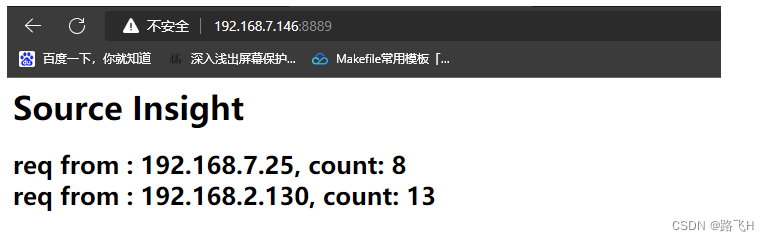
在网页输入IP和端口,执行效果如下:
总结
- 实现一个基于Nginx的IP统计或访问流量统计,可以借鉴以上代码;只要做一些业务上的修改就可以直接使用。可能需改动的地方就是红黑树的key、value的数据结构,以及ngx_encode_http_page_rb函数的业务代码,其他可以基本不用改动就可以二次开发。
- Nginx需要熟悉的数据结构:内存池、queue、list、array、shmem等。同时需要清楚Nginx的11个状态。
- 在实际应用中,需要掌握Nginx的conf文件配置(https的配置、负载均衡的配置、反向代理、CPU亲缘性配置等)以及模块开发(filter、handler等)。
相关文章:
Nginx模块开发之http handler实现流量统计(2)
文章目录 一、概述二、Nginx handler模块开发2.1、代码实现2.2、编写config文件2.3、编译模块到Nginx源码中2.4、修改conf文件2.5、执行效果 总结 一、概述 上一篇【Nginx模块开发之http handler实现流量统计(1)】使用数组在单进程实现了IP的流量统计&a…...

案例012:Java+SSM+uniapp基于微信小程序的科创微应用平台设计与实现
文末获取源码 开发语言:Java 框架:SSM JDK版本:JDK1.8 数据库:mysql 5.7 开发软件:eclipse/myeclipse/idea Maven包:Maven3.5.4 小程序框架:uniapp 小程序开发软件:HBuilder X 小程序…...

vue3+elementPlus登录向后端服务器发起数据请求Ajax
后端的url登录接口 先修改main.js文件 // 导入Ajax 前后端数据传输 import axios from "axios"; const app createApp(App) //vue3.0使用app.config.globalProperties.$http app.config.globalProperties.$http axios app.mount(#app); login.vue 页面显示部分…...

存储区域
将应用程序加载到内存空间执行时,操作系统负责代码段、数据段和BSS段的加载,并在内存中为这些段分配空间。 栈段亦由操作系统分配和管理,而不需要程序员显示地管理;堆段由程序员自己管理,即显示地申请和释放空间。 进…...
C#串口通信从入门到精通(27)——高速通信下解决数据处理慢的问题(20ms以内)
前言 我们在开发串口通信程序时,有时候会遇到比如单片机或者传感器发送的数据速度特别快,比如10ms、20ms发送一次,并且每次发送的数据量还比较大,如果按照常规的写法,我们会发现接收的数据还没处理完,新的数据又发送过来了,这就会导致处理数据滞后,软件始终处理的不是…...

Redis-Redis高可用集群之水平扩展
Redis3.0以后的版本虽然有了集群功能,提供了比之前版本的哨兵模式更高的性能与可用性,但是集群的水平扩展却比较麻烦,今天就来带大家看看redis高可用集群如何做水平扩展,原始集群(见下图)由6个节点组成,6个节点分布在三…...

2023全球数字贸易创新大赛-人工智能元宇宙-4-10
目录 竞赛感悟: 创业的话 好的项目 数字工厂,智慧制造:集群控制的安全问题...

go defer用法_类似与python_java_finially
defer 执行 时间 defer 一般 定义在 函数 开头, 但是 他会 最后 被执行 A defer statement defers the execution of a function until the surrounding function returns. 如果说 为什么 不在 末尾 定义 defer 呢, 因为 当 错误 发生时, 程序 执行 不到 末尾 就会 崩溃. d…...

Log4j2.xml不生效:WARN StatusLogger Multiple logging implementations found:
背景 将 -Dlog4j.debug 添加到IDEA的类的启动配置中 运行上图代码,这里log4j2.xml控制的日志级别是info,很明显是没生效。 DEBUG StatusLogger org.slf4j.helpers.Log4jLoggerFactory is not on classpath. Good! DEBUG StatusLogger Using Shutdow…...
【LeetCode】挑战100天 Day14(热题+面试经典150题)
【LeetCode】挑战100天 Day14(热题面试经典150题) 一、LeetCode介绍二、LeetCode 热题 HOT 100-162.1 题目2.2 题解 三、面试经典 150 题-163.1 题目3.2 题解 一、LeetCode介绍 LeetCode是一个在线编程网站,提供各种算法和数据结构的题目&…...
VMware安装windows操作系统
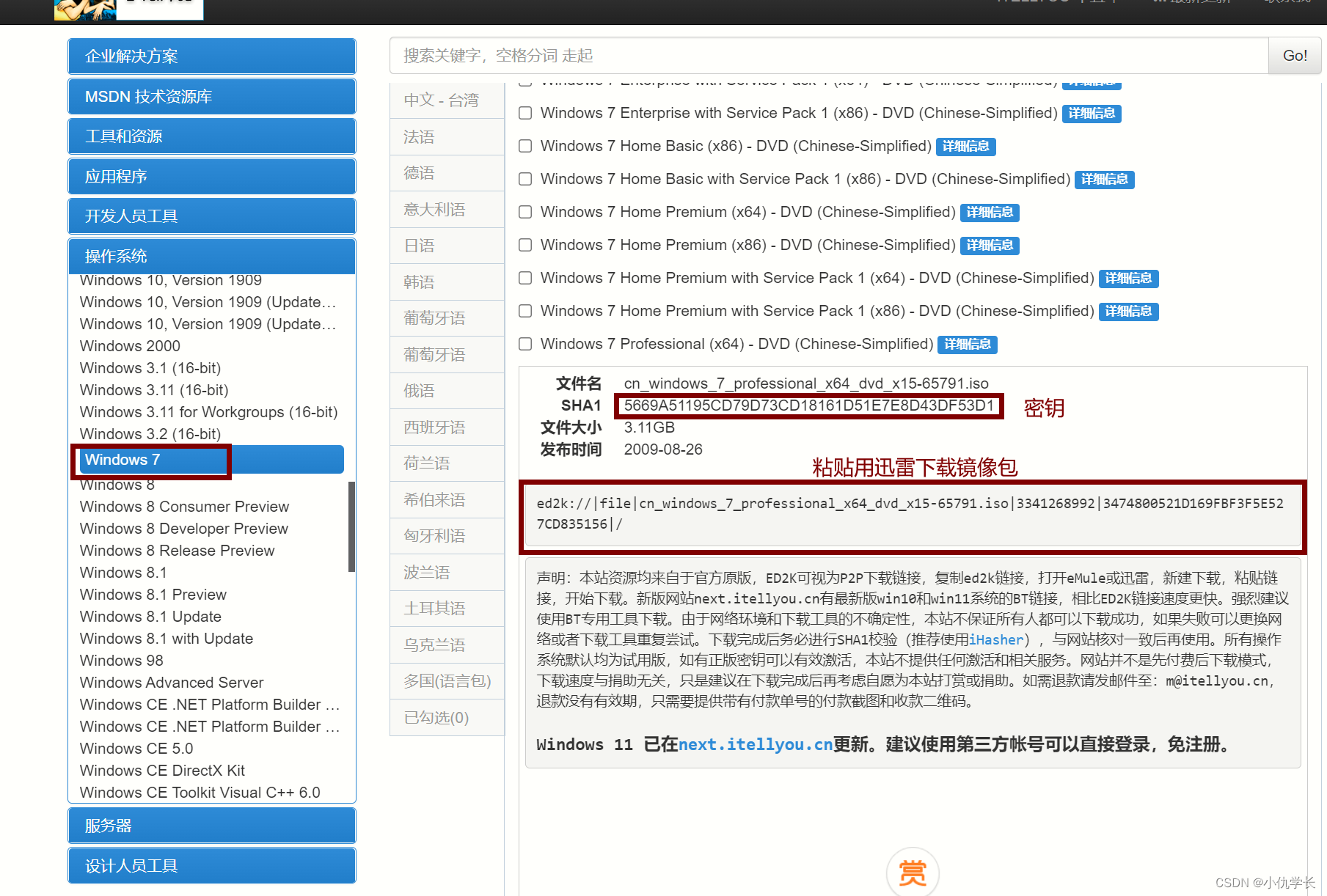
一、下载镜像包 地址:镜像包地址。 找到需要的版本下载镜像包。 二、安装 打开VMware新建虚拟机,选择用镜像文件。将下载的镜像包加载进去即可。...

历时半年,我发布了一款习惯打卡小程序
半年多前,我一直困扰于如何记录习惯打卡情况,在参考了市面上绝大多数的习惯培养程序后,终于创建并发布了这款习惯打卡小程序。 “我的小日常打卡”小程序主要提供习惯打卡和专注训练功能。致力于培养用户养成一个个好的习惯,改掉…...

被DDOS了怎么办 要如何应对
DDoS攻击的特点和类型 1. 特点 DDoS攻击的特点是通过大量合法的请求或者无效的请求,消耗目标服务器的网络带宽和系统资源,使其无法正常运行。攻击者通常使用多个主机发起攻击,以达到更高的攻击效果。 2. 常见类型 (1)S…...

时间序列预测实战(十七)PyTorch实现LSTM-GRU模型长期预测并可视化结果(附代码+数据集+详细讲解)
一、本文介绍 本文给大家带来的实战内容是利用PyTorch实现LSTM-GRU模型,LSTM和GRU都分别是RNN中最常用Cell之一,也都是时间序列预测中最常见的结构单元之一,本文的内容将会从实战的角度带你分析LSTM和GRU的机制和效果,同时如果你…...

【免费使用】基于PaddleSeg开源项目开发的人像抠图Web API接口
基于PaddleSeg开源项目开发的人像抠图API接口,服务器不存储照片大家可放心使用。 1、请求接口 请求地址:http://apiseg.hysys.cn/predict_img 请求方式:POST 请求参数:{"image":"/9j/4AAQ..."} 参数是jso…...

Centos7 Python环境和yum修复
1、删除现有残余包 [rootlocalhost ]# rpm -qa|grep python|xargs rpm -ev --allmatches --nodeps[rootlocalhost ]# rpm -qa|grep yum|xargs rpm -ev --allmatches --nodeps[rootlocalhost ]# whereis python |xargs rm -frv[rootlocalhost ]# whereis python ##验证清除&…...
Ubuntu下使用protoBuf
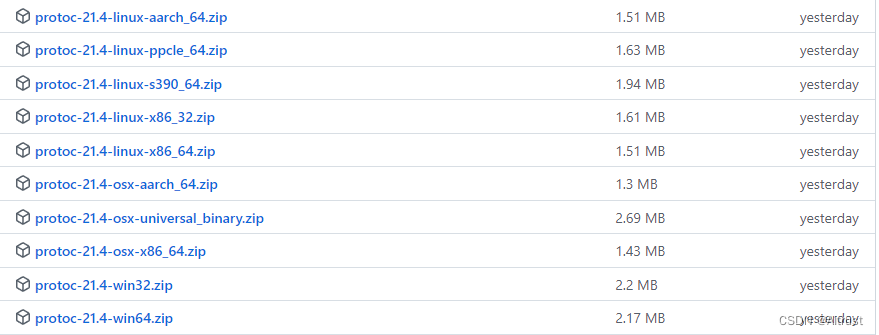
一、protobuf简介: 1.1 protobuf的定义: protobuf是用来干嘛的? protobuf是一种用于 对结构数据进行序列化的工具,从而实现 数据存储和交换。 (主要用于网络通信中 收发两端进行消息交互。所谓的“结构数据”是指类…...
AT89S52单片机
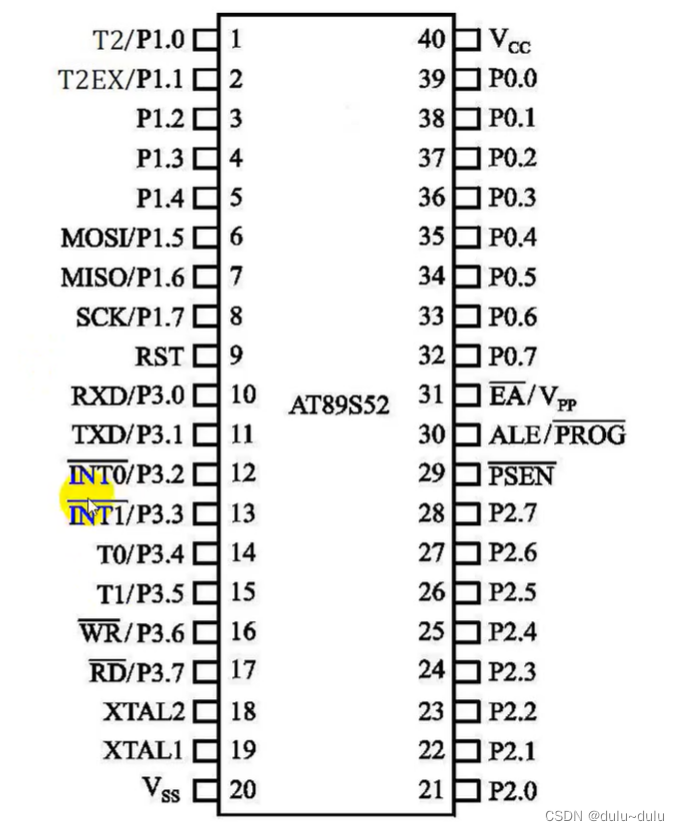
目录 一.AT89S52单片机的硬件组成 1.CPU(微处理器) (1)运算器 (2)控制器 2.数据存储器 (RAM) (1)片内数据存储器 (2)片外数据存储器 3.程序存储器(Flash ROM) 4.定时器/计数器 5.中断系统 6.串行口 7.P0口、P1口、P2口和P3口 8.特殊功能寄存器 (SFR) 常用的特殊功…...

数字孪生智慧校园 Web 3D 可视化监测
当今,智慧校园发展阶段亟需推动信息可视化建设与发展,将大数据、云计算、可视化等高新技术相融合,为校园师生创造科学智能的学习环境,并实现教学资源最大化和信息服务智能化。帮助学校更好地应用校园可视化技术,提升校…...
Python Web框架的三强之争:Flask、Django和FastAPI
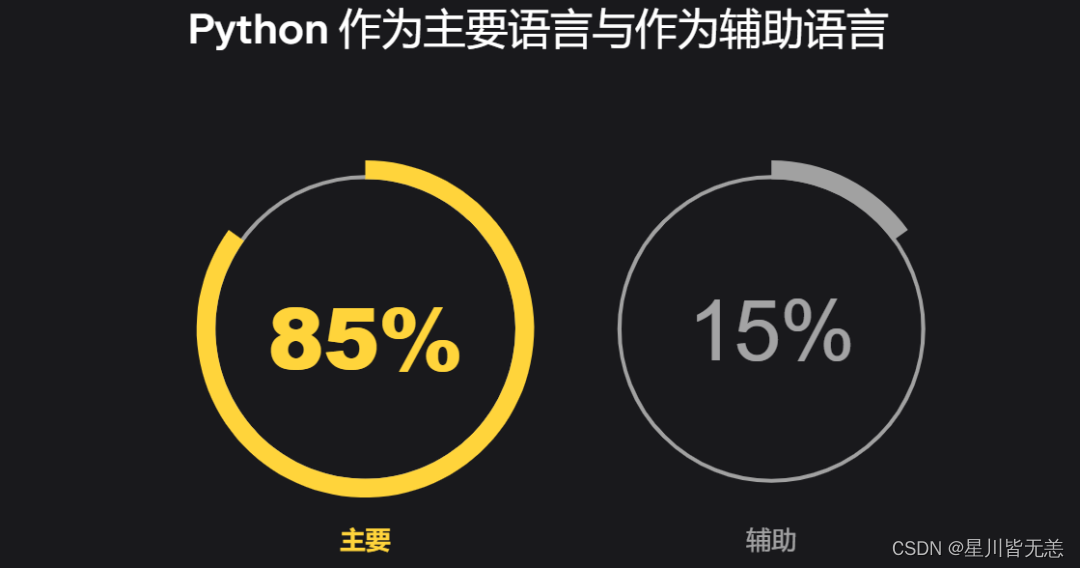
JetBrains 公布 2022 Python 开发者调查结果。 完整报告地址:https://lp.jetbrains.com/zh-cn/python-developers-survey-2022/ 这是由 Python 软件基金会 (PSF) 和 JetBrains 共同开展的第六次官方年度 Python 开发者调查,回复于 2022 年 10 月至 12 …...

告别混乱调度:用DolphinScheduler + Docker Compose快速搭建个人数据工作流测试环境
告别混乱调度:用DolphinScheduler Docker Compose快速搭建个人数据工作流测试环境 在数据工程领域,工作流调度系统如同交响乐团的指挥,协调着各个数据处理任务的执行节奏。传统部署方式往往需要耗费大量时间在环境配置和依赖管理上ÿ…...

终极指南:解决AeroSpace多显示器分辨率闪烁问题的完整方案
终极指南:解决AeroSpace多显示器分辨率闪烁问题的完整方案 【免费下载链接】AeroSpace AeroSpace is an i3-like tiling window manager for macOS 项目地址: https://gitcode.com/GitHub_Trending/ae/AeroSpace AeroSpace作为一款类i3的macOS窗口管理器&…...

别再只用原始IoU了!手把手教你用GIOU、DIOU、CIOU优化YOLOv5/v8的检测框回归
目标检测进阶:用GIOU、DIOU、CIOU优化YOLO检测框的实战指南 在目标检测任务中,边界框回归的精度直接影响模型性能。许多工程师发现,即使使用YOLOv5/v8这样的先进框架,在自定义数据集上仍会遇到检测框定位不准、收敛速度慢的问题。…...
落地硬件设备及价格参考)
Harness Engineering(驾驭工程)落地硬件设备及价格参考
Harness Engineering(驾驭工程) 是一套AI智能体(Agent)的软件管控体系,核心是沙箱、监控、测试与反馈循环的软件层设计,本身不依赖专用硬件。但要在企业级场景落地,需要充足的通用算力、存储、网…...
 31服务:从协议解析到工程实践)
UDS诊断(ISO14229-1) 31服务:从协议解析到工程实践
1. 深入理解UDS诊断31服务 第一次接触UDS诊断协议时,31服务(RoutineControl)给我的感觉就像是一个"万能遥控器"。它不像其他诊断服务那样功能单一,而是可以根据不同的Routine ID实现各种复杂控制逻辑。在实际项目中&…...
,搞定Rastrigin函数优化)
用Python手把手教你实现人工蜂群算法(ABC),搞定Rastrigin函数优化
用Python手把手教你实现人工蜂群算法(ABC),搞定Rastrigin函数优化 在优化算法的世界里,蜜蜂的觅食行为给了科学家们极大的启发。想象一下,一群蜜蜂如何在广袤的花丛中高效地找到最佳蜜源——这正是人工蜂群算法&#x…...

ROFL播放器:英雄联盟回放分析终极指南,轻松查看比赛数据
ROFL播放器:英雄联盟回放分析终极指南,轻松查看比赛数据 【免费下载链接】ROFL-Player (No longer supported) One stop shop utility for viewing League of Legends replays! 项目地址: https://gitcode.com/gh_mirrors/ro/ROFL-Player 还在为英…...

ROS与ABB机器人联调避坑实录:从RoboStudio仿真到MoveIt运动规划,我踩过的那些“信号”与“连接”的坑
ROS与ABB机器人联调避坑实录:从RoboStudio仿真到MoveIt运动规划实战指南 当仿真环境中的IRB 1600机械臂突然停止响应MoveIt的运动规划指令时,示教器上闪烁的"Execution Error"信号让我意识到——工业机器人与ROS的深度集成远不止配置文件修改…...

5分钟搞定游戏画质升级:DLSS Swapper免费工具完全指南
5分钟搞定游戏画质升级:DLSS Swapper免费工具完全指南 【免费下载链接】dlss-swapper 项目地址: https://gitcode.com/GitHub_Trending/dl/dlss-swapper 还在为游戏画面模糊、帧率不稳而烦恼吗?你是否知道,许多游戏内置的DLSS版本可能…...

TorrServer API完全手册:从基础调用到高级集成
TorrServer API完全手册:从基础调用到高级集成 【免费下载链接】TorrServer Torrent stream server 项目地址: https://gitcode.com/gh_mirrors/to/TorrServer TorrServer是一款功能强大的Torrent流服务器,通过其丰富的API接口,开发者…...