
css实现图片绕中心旋转,鼠标悬浮按钮炫酷展示
vue模板中代码
<div class="contentBox clearfix home"><div class="circle"><img class="in-circle" src="../../assets/img/in-circle.png" alt=""><img class="out-circle" src="../../assets/img/out-circle.png" alt=""><div><img src="../../assets/img/hbsztda.png" alt=""></div></div><div class="leftAndRight left-wing"><div class="left-1"  @click="goPath(ztList[0])" style="color: #fff">{{ ztList[0].name }}</div><div class="left-2"  @click="goPath(ztList[1])">{{ ztList[1].name }}</div><div class="left-3"  @click="goPath(ztList[2])">{{ ztList[2].name }}</div><div class="left-4"  @click="goPath(ztList[3])">{{ ztList[3].name }}</div><div class="left-5"  @click="goPath(ztList[4])">{{ ztList[4].name }}</div></div><div class="leftAndRight right-wing"><div class="right-1"  @click="goPath(ztList[5])">{{ ztList[5].name }}</div><div class="right-2"  @click="goPath(ztList[6])">{{ ztList[6].name }}</div><div class="right-3"  @click="goPath(ztList[7])">{{ ztList[7].name }}</div><div class="right-4"  @click="goPath(ztList[8])">{{ ztList[8].name }}</div><div class="right-5"  @click="goPath(ztList[9])">{{ ztList[9].name }}</div></div>
</div>
css代码
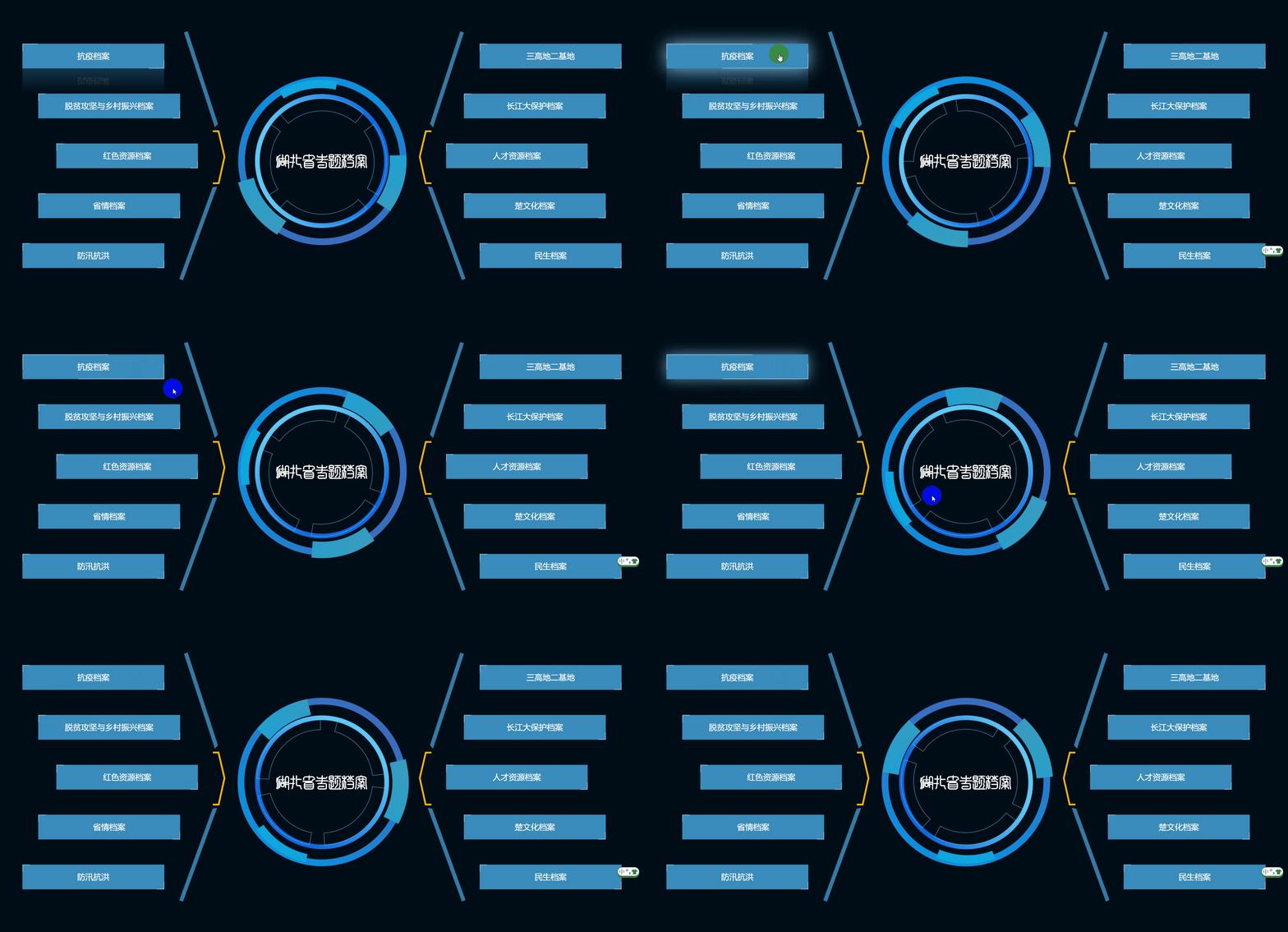
.home {width: 100vw;height: 100%;background: #000F17;position: relative;display: flex;justify-content: center;align-items: center;.circle {width: 505px;height: 505px;max-width: 100%;max-height: 100%;text-align: center;background-size: 100% 100%;color: #FFFFFF;font-size: 40px;font-family: Microsoft YaHei UI, Microsoft YaHei UI;font-weight: 400;position: relative;display: grid;place-items: center;.in-circle {width: 400px;height: 400px;position: absolute;transition: 0.5s;transform-origin: center center; animation: rotation 10s linear infinite;}@-webkit-keyframes rotation{from {-webkit-transform: rotate(0deg);}to {-webkit-transform: rotate(360deg);}}.out-circle {width: 100%;height: 100%;position: absolute;transition: 0.5s;transform-origin: center center; animation: rotateImg 10s linear infinite;}@-webkit-keyframes rotateImg{from {-webkit-transform: rotate(0deg);}to {-webkit-transform: rotate(-360deg);}}div {margin: auto;}}.leftAndRight {width: 35vw;height: 80vh;position: absolute;top: 50%;transform: translateY(-50%);font-size: 24px;color: #FFFFFF;display: flex;flex-direction: column;justify-content: space-around;}.left-wing {left: 0;background: url('../../assets/img/left.png') no-repeat;background-position: right;background-size: auto 100%;text-align: right;}.right-wing {right: 0;background: url('../../assets/img/right.png') no-repeat;background-size: auto 100%;align-items: flex-end;}.left-1,.left-2, .left-3,.left-4,.left-5 {width: 22vw;height: 8vh;line-height: 8vh;text-align: center;box-sizing: border-box;border: 0.5px solid #D8D8D8;cursor: pointer;color: #fff;background-color: plum;background-color:#bb65c3;border: none;transition: all 0.3s ease-in-out;filter: hue-rotate(calc(4.6 * 137deg));}.left-1 {margin-left: 10%;}.left-2 {margin-left: 17%;}.left-3 {margin-left: 25%;}.left-4 {margin-left: 17%;}.left-5 {margin-left: 10%;}.left-1::before,.left-1::after,.left-2::before,.left-2::after,.left-3::before,.left-3::after,.left-4::before,.left-4::after,.left-5::before,.left-5::after,.right-1::before,.right-1::after,.right-2::before,.right-2::after,.right-3::before,.right-3::after,.right-4::before,.right-4::after,.right-5::before,.right-5::after {/* 将两个伪元素的相同部分写在一起 */content: "";position: absolute;width: 20px;height: 20px;border: 2px solid plum;/* 动画过渡 最后的0.3s是延迟时间 */transition: all 0.3s ease-in-out 0.3s;}.left-1::before,.left-2::before,.left-3::before,.left-4::before,.left-5::before,.right-1::before,.right-2::before,.right-3::before,.right-4::before,.right-5::before {top: 0;left: 0;/* 删除左边元素的右、下边框 */border-right: 0;border-bottom: 0;}.left-1::after,.left-2::after,.left-3::after,.left-4::after,.left-5::after,.right-1::after,.right-2::after,.right-3::after,.right-4::after,.right-5::after {bottom: 0;right: 0;/* 删除右边元素的左、上边框 */border-top: 0;border-left: 0;}.left-1:hover,.left-2:hover,.left-3:hover,.left-4:hover,.left-5:hover,.right-1:hover,.right-2:hover,.right-3:hover,.right-4:hover,.right-5:hover {background-color: plum;// color: #000;/* 发光效果和倒影 */box-shadow: 0 0 50px plum;/* below是下倒影 1px是倒影的元素相隔的距离 最后是个渐变颜色 */-webkit-box-reflect: below 1px linear-gradient(transparent,rgba(0,0,0,0.3));/* 设置以上属性的延迟时间 */// transition-delay: 0.4s;background-color:#bb65c3;border: none;}.left-1:hover::before,.left-1:hover::after,.left-2:hover::before,.left-2:hover::after,.left-3:hover::before,.left-3:hover::after,.left-4:hover::before,.left-4:hover::after,.left-5:hover::before,.left-5:hover::after,.right-1:hover::before,.right-1:hover::after,.right-2:hover::before,.right-2:hover::after,.right-3:hover::before,.right-3:hover::after,.right-4:hover::before,.right-4:hover::after,.right-5:hover::before,.right-5:hover::after {width: 60%;height: 60%;transition-delay: 0s;}.right-1,.right-2, .right-3,.right-4,.right-5 {width: 22vw;height: 8vh;line-height: 8vh;text-align: center;box-sizing: border-box;cursor: pointer;color: #fff;background-color: plum;background-color:#bb65c3;border: none;transition: all 0.3s ease-in-out;filter: hue-rotate(calc(4.6 * 137deg));}.right-1 {margin-right: 10%;}.right-2 {margin-right: 17%;}.right-3 {margin-right: 25%;}.right-4 {margin-right: 17%;}.right-5 {margin-right: 10%;}}@media screen and (max-width:1600px){.home .circle{font-size: 28px;width: 385px;height: 385px;line-height: 385px;.in-circle {width: 300px;height: 300px;}}.home .leftAndRight {font-size: 22px;}}@media screen and (max-width:1366px){.home .circle{width: 205px;height: 205px;line-height: 205px;font-size: 26px;.in-circle {width: 200px;height: 200px;}}.home .leftAndRight {font-size: 20px;}}运行效果
相关文章:
css实现图片绕中心旋转,鼠标悬浮按钮炫酷展示
vue模板中代码 <div class"contentBox clearfix home"><div class"circle"><img class"in-circle" src"../../assets/img/in-circle.png" alt""><img class"out-circle" src"../../as…...

C++11的线程
线程的创建 用std::thread创建线程非常简单,只需要提供线程函数或者线程对象即可,并可以同时指定线程函数的参数。下面是创建线程的示例: #include <thread> #include <iostream> using namespace std;void func() {cout <<…...

Deepmind开发音频模型Lyria 用于生成高品质音乐;创建亚马逊新产品评论摘要
🦉 AI新闻 🚀 Deepmind开发音频模型Lyria 用于生成高品质音乐 摘要:Deepmind推出名为Lyria的音频模型,可生成带有乐器和人声的高品质音乐。Lyria模型针对音乐生成的挑战,解决了音乐信息密度高、音乐序列中的连续性维…...
Liunx系统使用超详细(一)
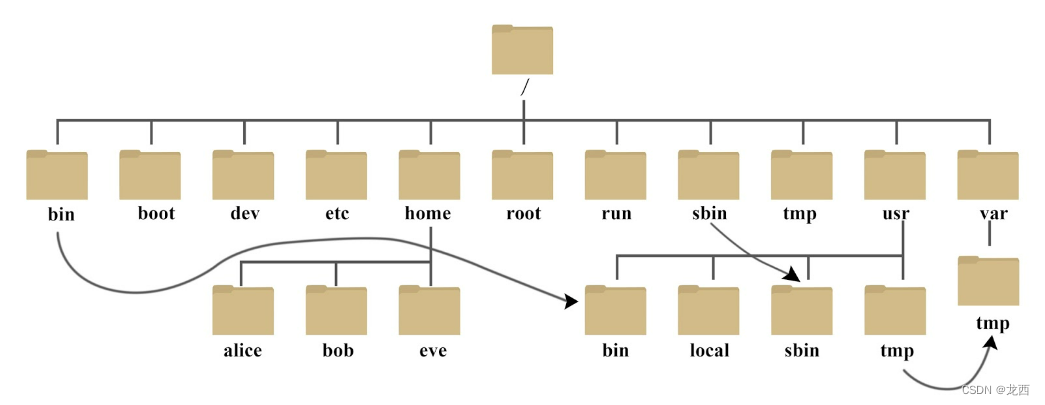
目录 一、Liunx系统的认识 二、Liunx和Windows区别 三、Liunx命令提示符介绍 四、Liunx目录结构 一、Liunx系统的认识 Linux系统是一种开源的、类Unix操作系统内核的实现,它基于Unix的设计原理和思想,并在全球范围内广泛应用。以下是对Linux系统的详…...
C语言标准
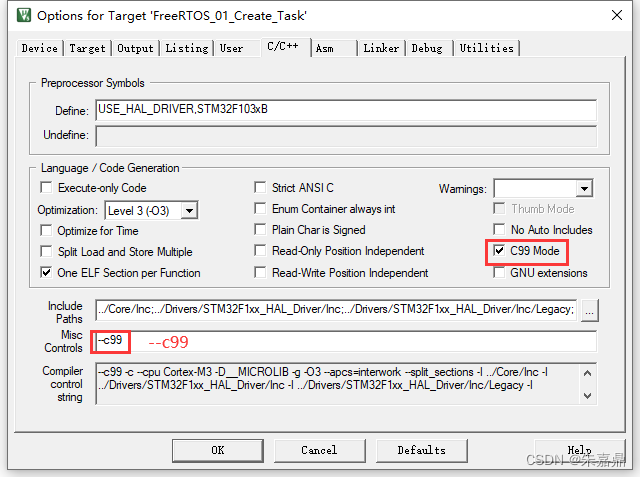
1、概述 C语言标准是由ANSI(美国国家标准协会)和ISO(国际标准化组织)共同制定的一种语言规范。标准经历过如下更新: C89/C90标准C99标准C11标准C17标准 2、C89/C90标准 (1)这是1989年正式发布的C语言标准࿰…...
TI 毫米波雷达开发系列之mmWave Studio 和 Visuiallizer 的异同点雷达影响因素分析
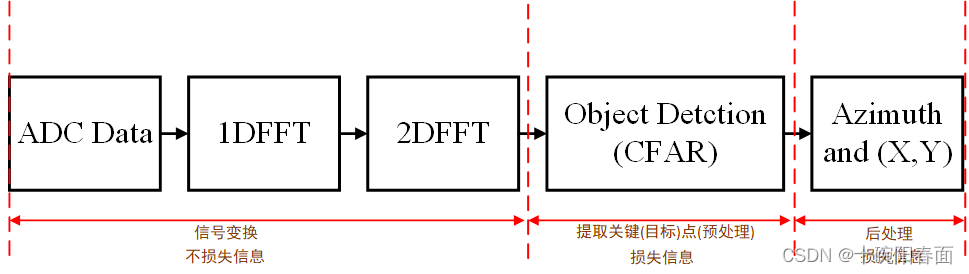
TI 毫米波雷达开发之mmWave Studio 和 Visuiallizer 的异同点 引入整个雷达系统研究的目标分析影响这个目标的因素硬件影响因素 —— 雷达系统的硬件结构(主要是雷达收发机)AWR1642芯片硬件系统组成MSS 和 DSS 概述MSS 和 DSS 分工BSS的分工AWR1642 组成…...
SpringBoot事务处理
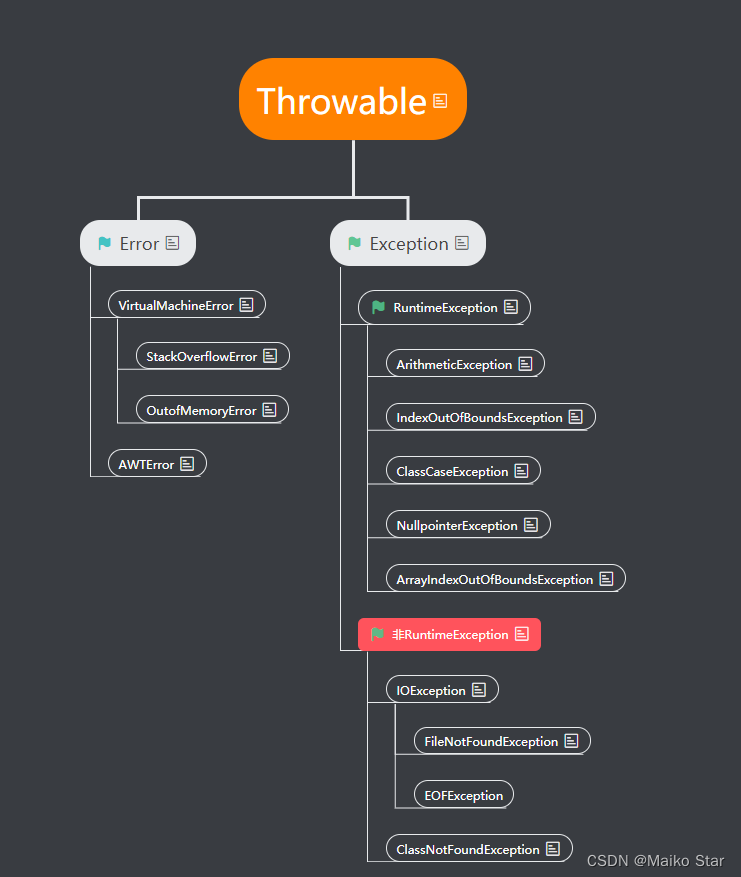
一、事务回顾 回顾地址: 深入理解数据库事务(超详细)_数据库事务操作_Maiko Star的博客-CSDN博客 事务: 是一组操作的集合,是一个不可分割的工作单位,这些操作要么同时成功,要么同时失败 事…...
网络安全—自学
1.网络安全是什么 网络安全可以基于攻击和防御视角来分类,我们经常听到的 “红队”、“渗透测试” 等就是研究攻击技术,而“蓝队”、“安全运营”、“安全运维”则研究防御技术。 2.网络安全市场 一、是市场需求量高; 二、则是发展相对成熟…...
)
首页以卡片形式来展示区块链列表数据(Web3项目一实战之五)
我们已然在 Web3 分布式存储 IPFS(Web3项目一实战之四) 介绍了什么是IPFS,以及在本地电脑如何安装它。虽然在上一篇讲解了该怎么安装IPFS,也做了相应的配置,但在本地开发阶段,前端总是无法避免跨域这个远程请求api的”家常便饭的通病“。 很显然,对于出现跨域这类常见问…...
)
opencv使用pyinstaller打包错误:‘can‘t find starting number (in the name of file)
使用Python语言和opencv模块在pycharm中编辑的代码运行没问题,但是在使用pyinstaller打包后出现错误can‘t find starting number (in the name of file) [ERROR:0] global C:\Users\runneradmin\AppData\Local\Temp\pip-req-build-q3d_8t8e\opencv\modules\videoi…...

4.一维数组——用数组处理求Fibonacci数列前20项
文章目录 前言一、题目描述 二、题目分析 三、解题 程序运行代码 四、结果显示 前言 本系列为一维数组编程题,点滴成长,一起逆袭。 一、题目描述 用数组处理求Fibonacci数列前20项 二、题目分析 前两项:f[20]{1,1} 后18项:for(…...
讯飞星火知识库文档问答Web API的使用(二)
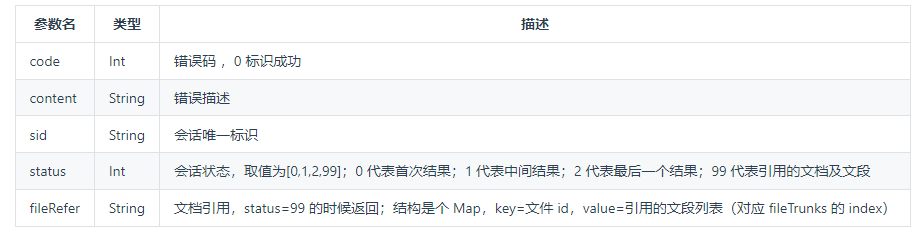
上一篇提到过星火spark大模型,现在有更新到3.0: 给ChuanhuChatGPT 配上讯飞星火spark大模型V2.0(一) 同时又看到有知识库问答的web api,于是就测试了一下。 下一篇是在ChuanhuChatGPT 中单独写一个基于星火知识库的内容…...
第十三章 深度解读预训练与微调迁移,模型冻结与解冻(工具)
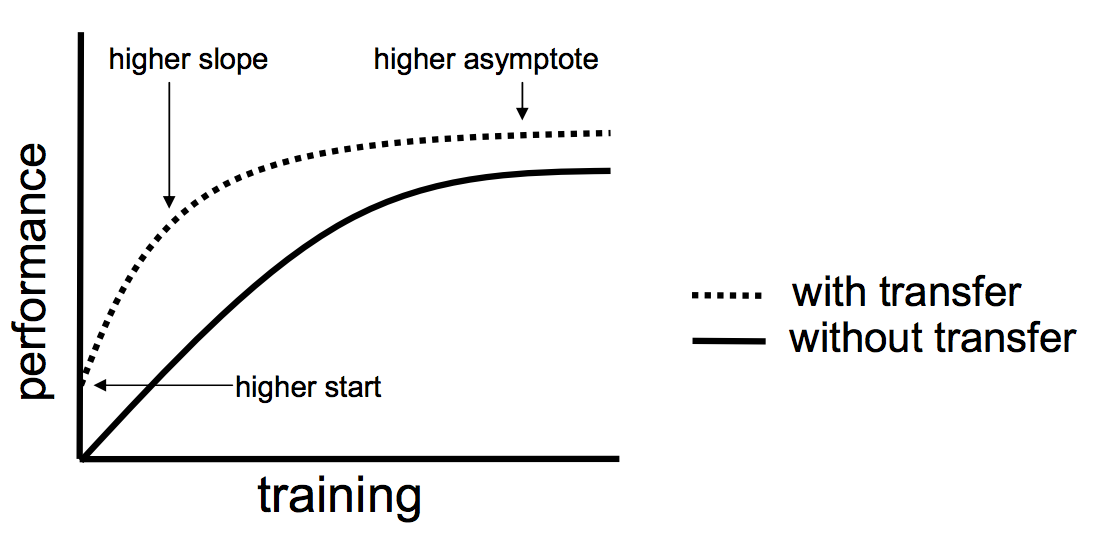
一个完整的代码 pythonCopy codeimport torch import torchvision import torchvision.transforms as transforms import torch.nn as nn import torch.optim as optim # 设置设备(CPU或GPU) device torch.device("cuda" if torch.cuda.is_a…...
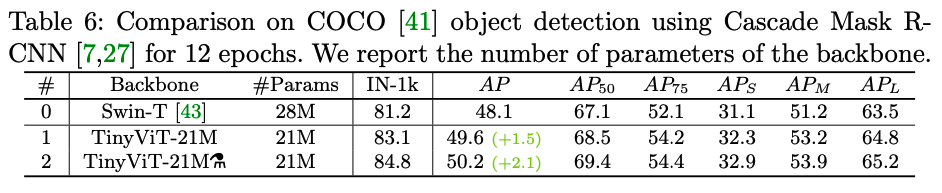
tinyViT论文笔记
论文:https://arxiv.org/abs/2207.10666 GitHub:https://github.com/microsoft/Cream/tree/main/TinyViT 摘要 在计算机视觉任务中,视觉ViT由于其优秀的模型能力已经引起了极大关注。但是,由于大多数ViT模型的参数量巨大&#x…...

解决ssh -T git@github.com报错connection closed问题
解决ssh -T gitgithub.com报错connection closed问题 问题解决 问题 $ ssh -T gitgithub.com kex_exchange_identification: Connection closed by remote host Connection closed by 20.205.243.166 port 22解决 参考链接 $ ssh -T -p 443 gitssh.github.com...

新手如何购买保险,保险投资基础入门
一、教程描述 本套保险教程,大小2.63G,共有11个文件。 二、教程目录 第01课 保险到底有什么用.mp4 第02课 已有社保还需要商业保险吗.mp4 第03课 你必须要懂的保险基础知识.mp4 第04课 关于重疾你必须要知道的几件事情.mp4 第05课 家庭重疾险如何…...
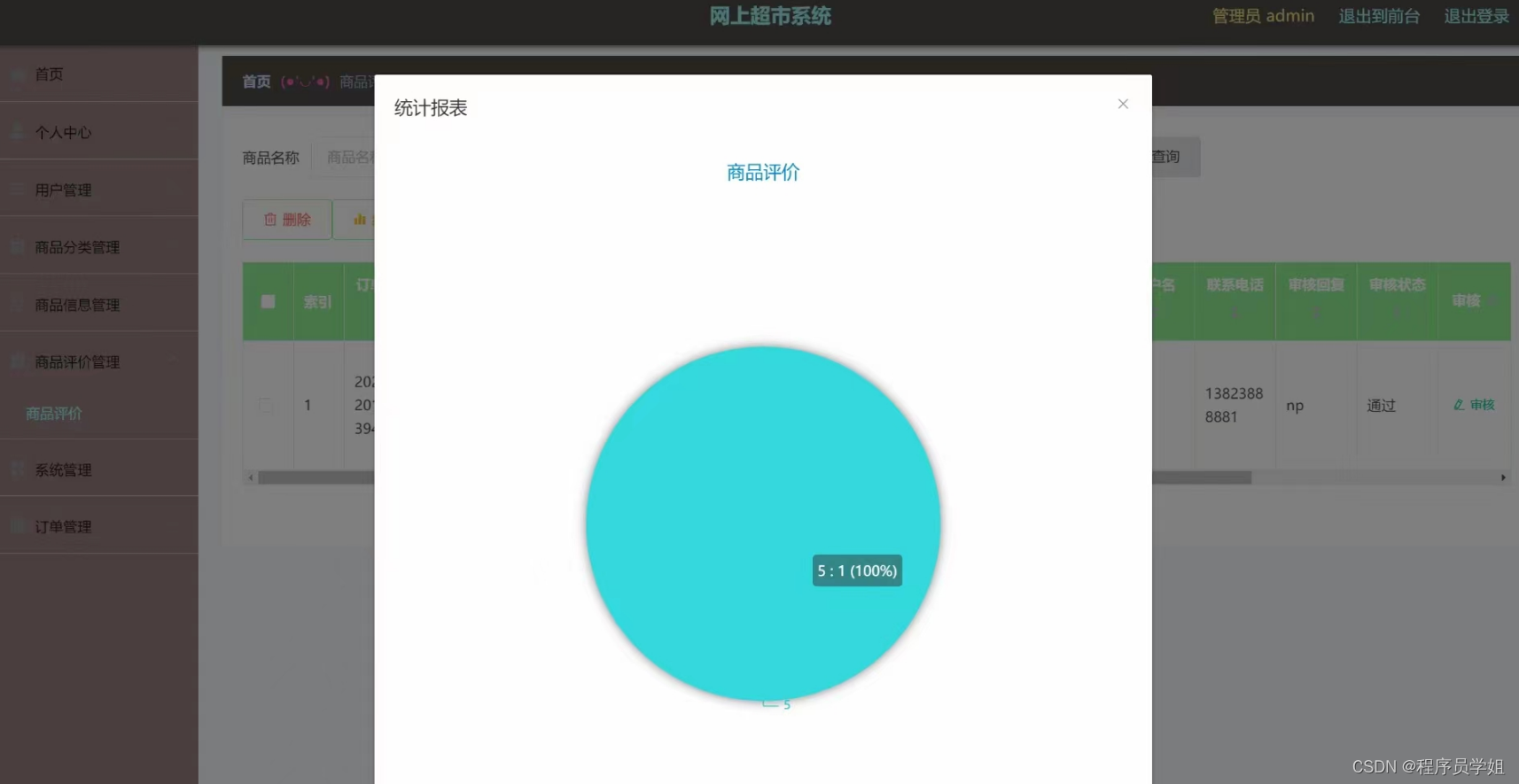
基于springboot网上超市管理系统
基于springboot网上超市管理系统 摘要 随着互联网的快速发展,电子商务行业迎来了蓬勃的发展,网上超市作为电子商务的一种形式,为消费者提供了便利的购物体验。本文基于Spring Boot框架,设计和实现了一个网上超市管理系统ÿ…...

FlagEmbedding目前最好的sentence编码工具
FlagEmbedding专注于检索增强llm领域,目前包括以下项目: Fine-tuning of LM : LM-Cocktail Dense Retrieval: LLM Embedder, BGE Embedding, C-MTEB Reranker Model: BGE Reranker 更新 11/23/2023: Release LM-Cocktail, 一种通过模型融合在微调时保持原有模型通用…...

rabbitMQ发布确认-交换机不存在或者无法抵达队列的缓存处理
rabbitMQ在发送消息时,会出现交换机不存在(交换机名字写错等消息),这种情况如何会退给生产者重新处理?【交换机层】 生产者发送消息时,消息未送达到指定的队列,如何消息回退? 核心&…...
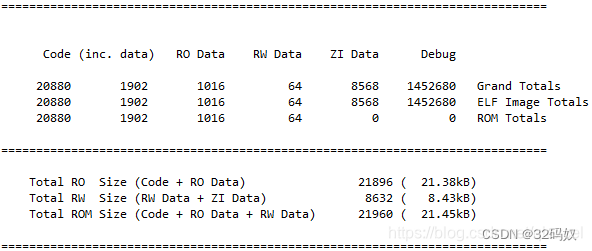
STM32 MAP文件
文章目录 1 生成Map2 map中概念3 文件分析流程3.1 Section Cross References3.2 Removing Unused input sections from the image(移除未使用的段)3.3 Image Symbol Table 映像符号表3.4 Memory Map of the image(映像的内存分布)…...

前端使用AI试水报告蒲
1 实用案例 1.1 表格样式生成 本示例用于生成包含富文本样式与单元格背景色的Word表格文档。 模板内容: 渲染代码: # python-docx-template/blob/master/tests/comments.py from docxtpl import DocxTemplate, RichText # data: python-docx-temp…...

ESP32实战-打造智能红外遥控中枢
1. ESP32红外遥控中枢的硬件准备 第一次接触ESP32红外遥控功能时,我对着淘宝买来的红外接收头和LED发了半天呆。这些看似简单的小元件,要稳定工作其实有不少门道。先说接收端,市面上最常见的VS1838B红外接收模块,虽然标称工作电压…...

Cadence 17.4 原理图分页符实战:解决‘1 of 1’报错,搞定多页连接
Cadence 17.4 原理图分页符深度解析:从报错诊断到高效设计实践 在复杂电路设计领域,Cadence 17.4作为行业标杆工具,其原理图设计功能直接影响着工程师的工作效率和设计质量。而多页原理图连接问题,尤其是分页符(off-page)配置不当…...

Photon-GAMS光影包:让Minecraft方块世界拥有电影级光影效果的终极指南
Photon-GAMS光影包:让Minecraft方块世界拥有电影级光影效果的终极指南 【免费下载链接】Photon-GAMS Personal fork of Photon shaders 项目地址: https://gitcode.com/gh_mirrors/ph/Photon-GAMS 还在为Minecraft的单调画面感到乏味吗?想要一键将…...
)
从零备份到量产部署:RK3588文件系统迁移全流程指南(含Ubuntu/Debian/麒麟系统适配)
从零备份到量产部署:RK3588文件系统迁移全流程指南(含Ubuntu/Debian/麒麟系统适配) 1. 企业级文件系统迁移的核心挑战 在RK3588芯片组的量产部署中,文件系统迁移往往成为最耗时的环节。我曾亲历一个汽车电子项目,团队花…...
)
LLM服务可用性监控阈值设定实战指南(附NASA级P99波动归因模型)
第一章:LLM服务可用性监控阈值设定实战指南(附NASA级P99波动归因模型) 2026奇点智能技术大会(https://ml-summit.org) 为什么传统SLO阈值在LLM服务中失效 LLM推理延迟具有强非线性、长尾分布与上下文敏感特性,导致基于固定百分位…...

丹青识画常见问题解决:识别不准、风格不对怎么办?
丹青识画常见问题解决:识别不准、风格不对怎么办? 1. 理解丹青识画的工作原理 1.1 多模态AI如何"看"图片 丹青识画系统基于OFA多模态理解引擎,其识别过程分为三个关键阶段: 视觉特征提取:系统会分析图片…...

ESP32 IDF环境下LVGL显示GIF的避坑指南:内存配置与性能优化
ESP32 IDF环境下LVGL显示GIF的避坑指南:内存配置与性能优化 在嵌入式设备上实现流畅的GIF动画显示一直是开发者面临的挑战,尤其是资源受限的ESP32平台。本文将深入探讨ESP32 IDF环境下使用LVGL显示GIF时可能遇到的内存和性能问题,并提供一系列…...

突破下载瓶颈:XDM浏览器扩展的架构深度解析与技术实践
突破下载瓶颈:XDM浏览器扩展的架构深度解析与技术实践 【免费下载链接】xdm Powerfull download accelerator and video downloader 项目地址: https://gitcode.com/gh_mirrors/xd/xdm 在当今网络环境中,下载速度瓶颈和视频资源捕获已成为技术用户…...

Pyfa:EVE Online舰船配置助手,让你的星际舰队规划更高效
Pyfa:EVE Online舰船配置助手,让你的星际舰队规划更高效 【免费下载链接】Pyfa Python fitting assistant, cross-platform fitting tool for EVE Online 项目地址: https://gitcode.com/gh_mirrors/py/Pyfa Pyfa(Python Fitting Assi…...