
MySQL在Centos7环境安装
1. 卸载不要的环境
[root@hcss-ecs-1036 ~]# ps ajx |grep mariadb # 先检查是否有mariadb存在
13134 14844 14843 13134 pts/0 14843 S+ 1005 0:00 grep --color=auto
mariadb
19010 19187 19010 19010 ? -1 Sl 27 16:55 /usr/libexec/mysqld --
basedir=/usr --datadir=/var/lib/mysql --plugin-dir=/usr/lib64/mysql/plugin --
log-error=/var/log/mariadb/mariadb.log --pid-file=/var/run/mariadb/mariadb.pid
--socket=/var/lib/mysql/mysql.sock
[root@hcss-ecs-1036 ~]# systemctl stop mariadb.service # 停⽌mariadb 服务
==== AUTHENTICATING FOR org.freedesktop.systemd1.manage-units ===
Authentication is required to manage system services or units.
Authenticating as: root
Password:
==== AUTHENTICATION COMPLETE ===
[root@hcss-ecs-1036 ~]# ps axj |grep mariadb # 停⽌完成
13134 14976 14975 13134 pts/0 14975 S+ 1005 0:00 grep --color=auto
mariadb
2. 检查系统安装包
[root@hcss-ecs-1036 MySQL]# rpm -qa | grep mariadbor
[root@hcss-ecs-1036 MySQL]# rpm -qa | grep mysql
# 下⾯是打印出来的mysql的样例:
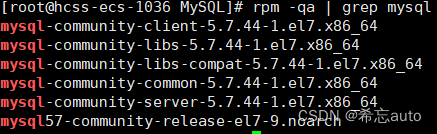
3. 卸载这些默认安装包
# 卸载显⽰出来的 mariadb/mysql 安装包[root@hcss-ecs-1036 ~]# sudo yum remove mariadb # 还是试着将上⾯的包都⼀个⼀个卸载吧备份 /etc/my.cnf, 备份 /var/lib/mysql 数据
4. 获取mysql官⽅yum源
# 1. 获取 mysql 官⽅ yum 源 http://repo.mysql.com/# ⼀定要看下⾯的⽂字!如果后⾯⾃⼰安装不成功,就看看这个# 注意:最好安装和⾃⼰系统⼀致的 mysql 版本,否则可能会存在软件兼容性问题# 查看⾃⼰的系统版本# [root@VM-0-2-centos ~] # cat /etc/redhat-release# CentOS Linux release 7.8.2003 (Core)# 可以进⼊ http://repo.mysql.com/ , 找⼀下和⾃⼰版本⼀致的资源# 下载到你的本地,然后上传到你的 Linux 服务器
5. 安装mysql yum 源,对⽐前后yum源
# 安装前[root@hcss-ecs-1036 ~]# lsmysql57-community-release-el7-10.noarch.rpm
查看你本地的yum源 [我的和你的肯定不同,但是没有mysql相关的yum源]
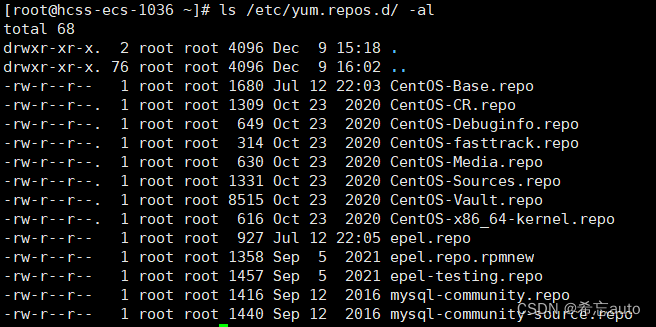
安装中
[root@hcss-ecs-1036 ~]# rpm -Uvh mysql57-community-release-el7-10.noarch.rpm
warning: mysql57-community-release-el7-10.noarch.rpm: Header V3 DSA/SHA1
Signature, key ID 5072e1f5: NOKEY
error: can't create transaction lock on /var/lib/rpm/.rpm.lock (Permission
denied)
# 如果上⾯出错了
[root@hcss-ecs-1036 ~]# sudo rpm -Uvh mysql57-community-release-el7-
10.noarch.rpm
[sudo] password for wmh:
warning: mysql57-community-release-el7-10.noarch.rpm: Header V3 DSA/SHA1
Signature, key ID 5072e1f5: NOKEY
Preparing... ################################# [100%]
Updating / installing...
1:mysql57-community-release-el7-10 ################################# [100%]
# 安装后
[root@hcss-ecs-1036 ~]# ls /etc/yum.repos.d/ -al
total 96
drwxr-xr-x. 2 root root 4096 Apr 12 11:04 .
drwxr-xr-x. 106 root root 12288 Apr 12 10:50 ..
-rw-r--r-- 1 root root 2523 Dec 26 19:31 Centos-Base.repo
-rw-r--r-- 1 root root 614 Nov 10 18:42 CentOS-Base.repo_bak
-rw-r--r-- 1 root root 2523 Jun 16 2018 CentOS-Base.repo.bak
-rw-r--r-- 1 root root 1309 Apr 8 2020 CentOS-CR.repo
-rw-r--r-- 1 root root 649 Apr 8 2020 CentOS-Debuginfo.repo
-rw-r--r-- 1 root root 230 Nov 10 18:42 CentOS-Epel.repo
-rw-r--r-- 1 root root 314 Apr 8 2020 CentOS-fasttrack.repo
-rw-r--r-- 1 root root 630 Apr 8 2020 CentOS-Media.repo
-rw-r--r-- 1 root root 998 Dec 11 2018 CentOS-SCLo-scl.repo
-rw-r--r-- 1 root root 971 Oct 29 2018 CentOS-SCLo-scl-rh.repo
-rw-r--r-- 1 root root 1331 Apr 8 2020 CentOS-Sources.repo
-rw-r--r-- 1 root root 7577 Apr 8 2020 CentOS-Vault.repo
-rw-r--r-- 1 root root 616 Apr 8 2020 CentOS-x86_64-kernel.repo
-rw-r--r-- 1 root root 1919 Apr 8 23:57 docker-ce.repo
-rw-r--r-- 1 root root 1050 Nov 1 04:33 epel.repo
-rw-r--r-- 1 root root 1149 Nov 1 04:33 epel-testing.repo
-rw-r--r-- 1 root root 173 Dec 9 16:08 google-chrome.repo
-rw-r--r-- 1 root root 1627 Apr 5 2017 mysql-community.repo #安装了
mysql yum源
-rw-r--r-- 1 root root 1663 Apr 5 2017 mysql-community-source.repo
6. 看看能不能正常⼯作
#在看看能不能正常⼯作
[root@hcss-ecs-1036 ~]# yum list |grep mysql
Repository epel is listed more than once in the configuration
mysql57-community-release.noarch el7-10 installed
akonadi-mysql.x86_64 1.9.2-4.el7 base
anope-mysql.x86_64 2.0.9-3.el7 epel
apr-util-mysql.x86_64 1.5.2-6.el7 base
calligra-kexi-driver-mysql.x86_64 2.9.10-2.el7 epel
collectd-mysql.x86_64 5.8.1-1.el7 epel
dmlite-plugins-mysql.x86_64 1.14.2-1.el7 epel
dovecot-mysql.x86_64 1:2.2.36-8.el7 base
7. 安装mysql服务
[root@hcss-ecs-1036 ~]# sudo yum install -y mysql-community-server
[sudo] password for wmh:
Loaded plugins: aliases, auto-update-debuginfo, fastestmirror, protectbase
Repository epel is listed more than once in the configuration
...
Installing : mysql-community-common-5.7.33-1.el7.x86_64 #公共模块
Installing : mysql-community-libs-5.7.33-1.el7.x86_64 #库
Installing : mysql-community-client-5.7.33-1.el7.x86_64 #客⼾端
Installing : mysql-community-server-5.7.33-1.el7.x86_64 #服务器
... #安装了服务和客⼾端
8. 查看配置⽂件和数据存储位置

9. 启动服务
[root@hcss-ecs-1036 ~]# systemctl start mysqld.service
==== AUTHENTICATING FOR org.freedesktop.systemd1.manage-units ===
Authentication is required to manage system services or units.
Authenticating as: root
Password:
==== AUTHENTICATION COMPLETE ===
10. 查看启动服务

11. 登陆⽅法⼀【不⾏就下⼀个】
#获取临时root密码
[wmh@hcss-ecs-1036 ~]$ sudo grep 'temporary password' /var/log/mysqld.log
2021-04-12T03:23:46.153263Z 1 [Note] A temporary password is generated for
root@localhost: yLMalT:v+5l*
#使⽤临时密码登录
[wmh@hcss-ecs-1036 ~]$ mysql -uroot -p
Enter password:
#判断修改密码时候新密码是否符合当前的策略,不满⾜报错,不让修改,关闭它
#安全强度,默认为中,即1,要求必须包含 数字、符号、⼤⼩写字⺟,⻓度⾄少为8位
mysql> set global validate_password_policy=0;
Query OK, 0 rows affected (0.00 sec)
#密码最⼩⻓度
mysql> set global validate_password_length=1;
Query OK, 0 rows affected (0.00 sec)
#修改本地登录密码,暂不授权远程登录
mysql> ALTER USER 'root'@'localhost' IDENTIFIED BY 'qwer@wu.888';
Query OK, 0 rows affected (0.00 sec)
mysql> FLUSH PRIVILEGES;
Query OK, 0 rows affected (0.00 sec)
#如果你安装的最新的mysql,没有所谓的临时密码,root默认没有密码
12. 登陆⽅法⼆【不⾏就下⼀个】
# 如果你安装的最新的 mysql ,没有所谓的临时密码, root 默认没有密码# 试着直接 client 登陆⼀下
13. 登陆⽅式三【应该⾏了吧】
[root@bite-alicloud mysql]# vim /etc/my.cnf # 打开mysql配置⽂件
在[mysqld]最后⼀栏配置(不知道是什么,就放在配置⽂件最后) 加⼊: skip-grant-tables 选项,
并保存退出
[root@bite-alicloud mysql]# systemctl restart mysqld # 重启mysql服务
# 登陆成功
[root@bite-alicloud mysql]# mysql -uroot
Welcome to the MySQL monitor. Commands end with ; or \g.
Your MySQL connection id is 2
Server version: 5.7.41 MySQL Community Server (GPL)
Copyright (c) 2000, 2023, Oracle and/or its affiliates.
Oracle is a registered trademark of Oracle Corporation and/or its
affiliates. Other names may be trademarks of their respective
owners.
Type 'help;' or '\h' for help. Type '\c' to clear the current input statement.
mysql>
14. 设置开机启动[可以不设]
# 开启开机⾃启动systemctl enable mysqldsystemctl daemon-reload
15. 配置my.cnf
#配置⼀下my.conf,主要是数据库客⼾端和服务器的编码格式
[root@hcss-ecs-1036 ~]# cat /etc/my.cnf
# For advice on how to change settings please see
# http://dev.mysql.com/doc/refman/5.7/en/server-configuration-defaults.html
[mysql]
#default-character-set=utf8 ,暂不设置,mysql有bug,汉字不回显
[mysqld]
#
# Remove leading # and set to the amount of RAM for the most important data
# cache in MySQL. Start at 70% of total RAM for dedicated server, else 10%.
# innodb_buffer_pool_size = 128M
#
# Remove leading # to turn on a very important data integrity option: logging
# changes to the binary log between backups.
# log_bin
#
# Remove leading # to set options mainly useful for reporting servers.
# The server defaults are faster for transactions and fast SELECTs.
# Adjust sizes as needed, experiment to find the optimal values.
# join_buffer_size = 128M
# sort_buffer_size = 2M
# read_rnd_buffer_size = 2M
port=3306
datadir=/var/lib/mysql
socket=/var/lib/mysql/mysql.sock
# Disabling symbolic-links is recommended to prevent assorted security risks
symbolic-links=0
log-error=/var/log/mysqld.log
pid-file=/var/run/mysqld/mysqld.pid
character-set-server=utf8
default-storage-engine=innodb
# 配置完毕,重启mysql即可
16. 常⻅问题:
mysql 已经配置了客⼾端服务器utf8编码,但是⽆法输⼊中⽂
确保您在终端命令⾏中可以输⼊中⽂
[root@hcss-ecs-1036 ~]# env |grep LANG
LANG=en_US.utf8
安装遇到秘钥过期的问题:
Failing package is: mysql-community-client-5.7.39-1.el7.x86_64
GPG Keys are configured as: file:///etc/pki/rpm-gpg/RPM-GPG-KEY-mysql
解决⽅案:
rpm --import https://repo.mysql.com/RPM-GPG-KEY-mysql-2022
相关文章:
MySQL在Centos7环境安装
说明: • 安装与卸载中,⽤⼾全部切换成为root,⼀旦 安装,普通⽤⼾能使⽤的 1. 卸载不要的环境 [roothcss-ecs-1036 ~]# ps ajx |grep mariadb # 先检查是否有mariadb存在 13134 14844 14843 13134 pts/0 14843 S 1005 0:00 gr…...

halcon视觉缺陷检测常用的6种方法
一、缺陷检测综述 缺陷检测是视觉需求中难度最大一类需求,主要是其稳定性和精度的保证。首先常见缺陷:凹凸、污点瑕疵、划痕、裂缝、探伤等。常用的手法有六大金刚(在halcon中的ocv和印刷检测是针对印刷行业的检测,有对应算子封装): 1.blob+特征 2.blob+差分+特征 3.光度…...

openGauss学习笔记-151 openGauss 数据库运维-备份与恢复-物理备份与恢复之gs_basebackup
文章目录 openGauss学习笔记-151 openGauss 数据库运维-备份与恢复-物理备份与恢复之gs_basebackup151.1 背景信息151.2 前提条件151.3 语法151.4 示例151.5 从备份文件恢复数据 openGauss学习笔记-151 openGauss 数据库运维-备份与恢复-物理备份与恢复之gs_basebackup 151.1 …...

报错:Uncaught ReferenceError: Cannot access ‘l‘ before initialization
在文件 .babelrc 或 babel.config.js ,webpack.config.js 下配置 .babel 或 babel.config.js "plugins": ["babel/plugin-transform-runtime" ] webpack.config.js,详见 Webpack target module.exports {target: [web, es5], }...

计算机视觉-机器学习-人工智能顶会 会议地址
计算机视觉-机器学习-人工智能顶会 会议地址 最近应该要整理中文资料的参考文献,很多会议文献都需要补全会议地点(新国标要求)。四处百度感觉也挺麻烦的,而且没有比较齐全的网站可以搜索。因此自己整理了一下计算机视觉-机器学习…...
784. 字母大小写全排列
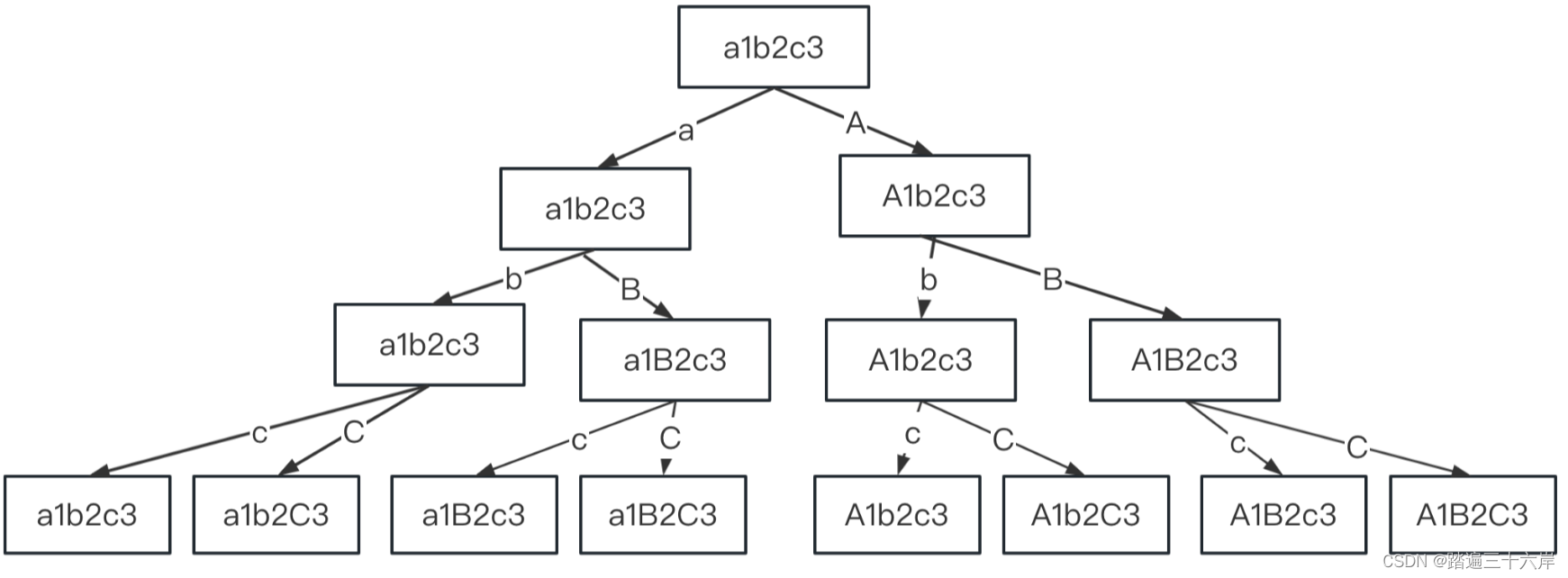
字母大小写全排列 描述 : 给定一个字符串 s ,通过将字符串 s 中的每个字母转变大小写,我们可以获得一个新的字符串。 返回 所有可能得到的字符串集合 。以 任意顺序 返回输出。 题目 : LeetCode 784.字母大小写全排列 : 784. 字母大小写全排列 分析…...
HarmonyOS鸿蒙应用开发——HTTP网络访问与封装
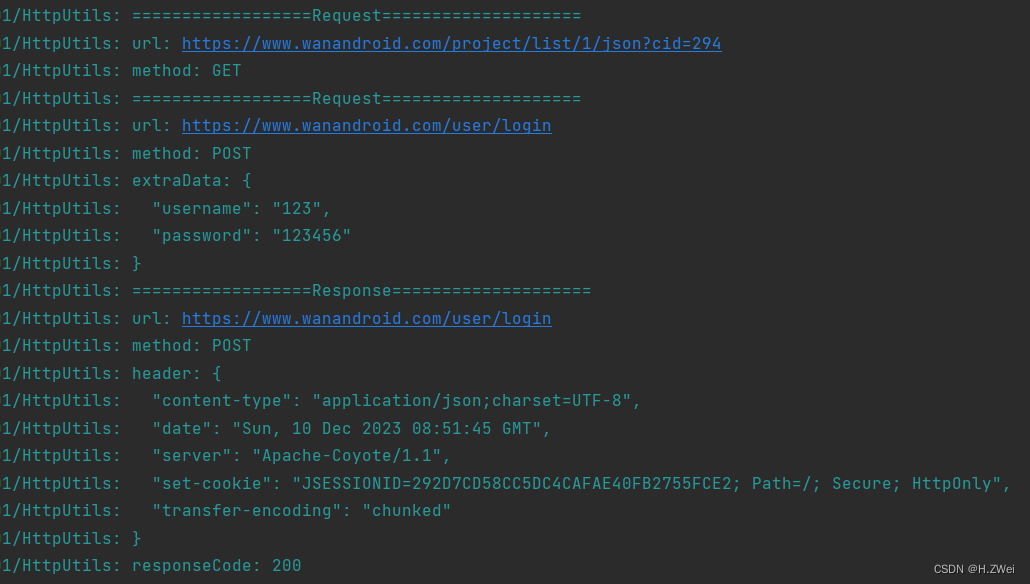
文章目录 基本使用封装参考 基本使用 鸿蒙应用发起HTTP请求的基本使用,如下: 导入http模块创建httpRequest对象发起http请求,并处理响应结果 第一、导入http模块: import http from ohos.net.http第二、创建httpRequest对象&a…...

vscode 编写爬虫爬取王者荣耀壁纸
网上关于爬虫大部分教程和编辑器用的都不是vscode ,此教程用到了vscode、Python、bs4、requests。 vscode配置Python安装环境可以看看这个大佬的教程 03-vscode安装和配置_哔哩哔哩_bilibili vscode配置爬虫环境可以参考这个大佬的教程【用Vscode实现简单的python…...

spring boot + uniapp 微信公众号 jsapi 支付
后端支付类 package com.ruoyi.coupon.payment;import com.google.gson.Gson; import com.ruoyi.coupon.payment.dto.PayParamJsapiDto; import com.ruoyi.coupon.payment.dto.RefundParam; import com.ruoyi.coupon.service.ICouponConfigService; import com.wechat.pay.jav…...
【数学建模】《实战数学建模:例题与讲解》第九讲-时间序列分析(含Matlab代码)
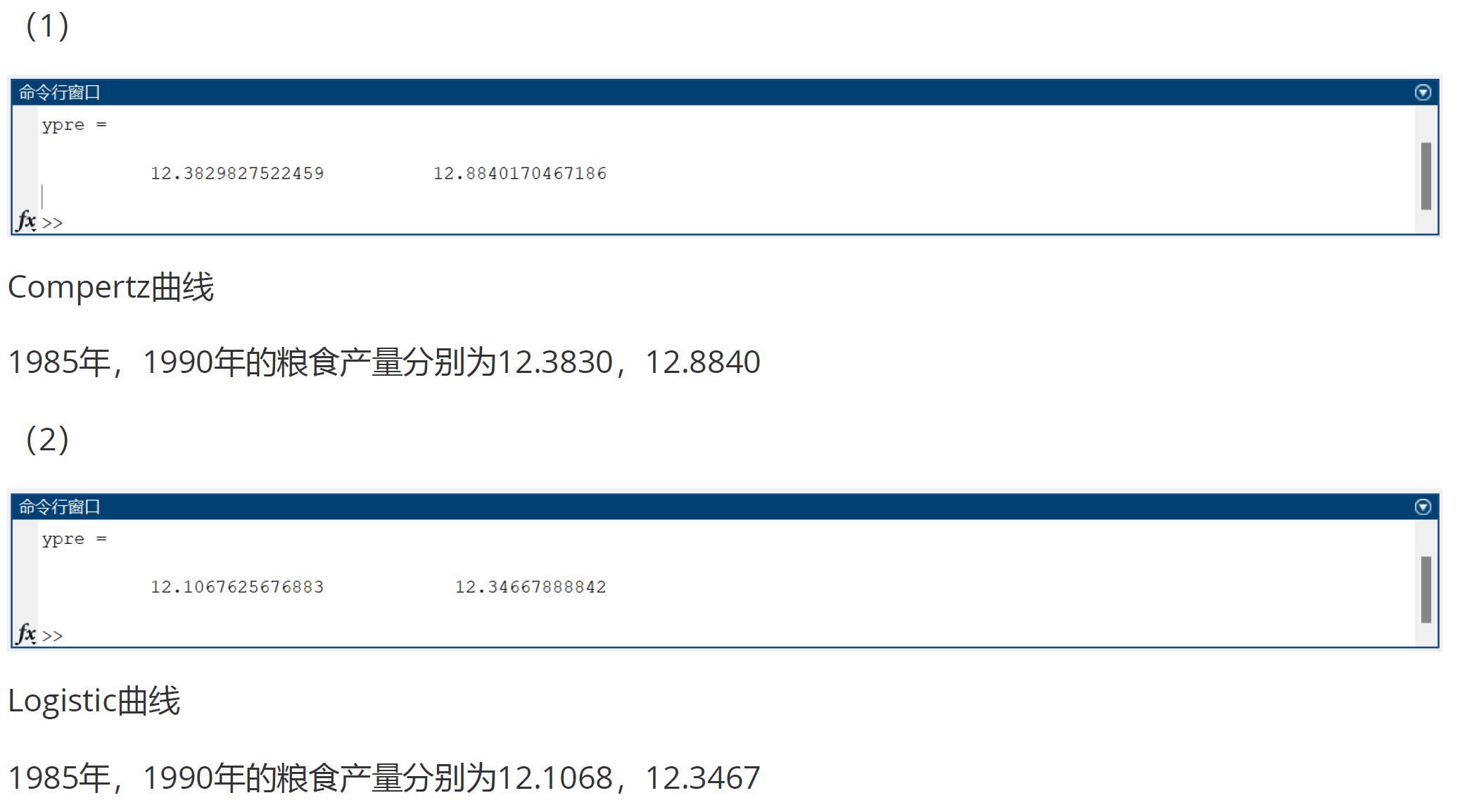
【数学建模】《实战数学建模:例题与讲解》第九讲-时间序列分析(含Matlab代码) 基本概念确定性时间序列分析方法平稳时间序列模型ARIMA模型季节性序列 习题8.11. 题目要求2.解题过程3.程序4.结果 习题8.21. 题目要求2.解题过程3.程序4.结果 习…...
大话数据结构-查找-有序表查找
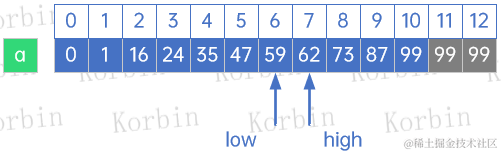
注:本文同步发布于稀土掘金。 3 有序表查找 3.1 折半查找 折半查找(Binary Search)技术,又称为二分查找,它的前提是线性表中的记录必须是关键码有序(通常从小到大有序),线性表必须…...

Qt实现二维码生成和识别
一、简介 QZxing开源库: 生成和识别条码和二维码 下载地址:https://gitcode.com/mirrors/ftylitak/qzxing/tree/master 二、编译与使用 1.下载并解压,解压之后如图所示 2.编译 打开src目录下的QZXing.pro,选择合适的编译器进行编译 最后生…...
MyBatisX插件
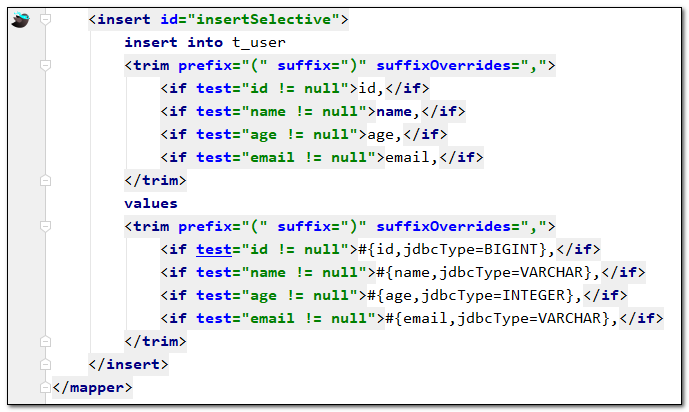
MyBatisX插件 MyBatis-Plus为我们提供了强大的mapper和service模板,能够大大的提高开发效率。 但是在真正开发过程中,MyBatis-Plus并不能为我们解决所有问题,例如一些复杂的SQL,多表联查,我们就需要自己去编写代码和SQ…...

《C++20设计模式》学习笔记---原型模式
C20设计模式 第 4 章 原型模式4.1 对象构建4.2 普通拷贝4.3 通过拷贝构造函数进行拷贝4.4 “虚”构造函数4.5 序列化4.6 原型工厂4.7 总结4.8 代码 第 4 章 原型模式 考虑一下我们日常使用的东西,比如汽车或手机。它们并不是从零开始设计的,相反&#x…...

SpringBootAdmin设置邮件通知
如果你想要在Spring Boot Admin中配置邮件通知,可以按照以下步骤进行操作: 添加邮件通知的依赖 <dependency><groupId>org.springframework.boot</groupId><artifactId>spring-boot-starter-mail</artifactId> </dep…...
深度解析IP应用场景API:提升风险控制与反欺诈能力
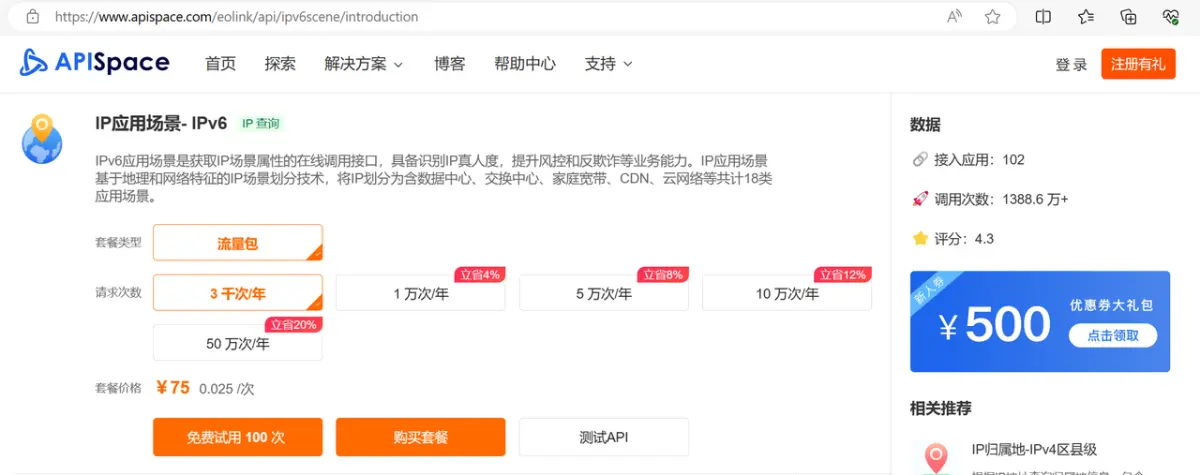
前言 在当今数字化时代,网络安全和用户数据保护成为企业日益关注的焦点。IP应用场景API作为一种强大的工具,不仅能够在线调用接口获取IP场景属性,而且具备识别IP真人度的能力,为企业提供了卓越的风险控制和反欺诈业务能力。本文将…...
Java连接数据库增删改查-MyBatis
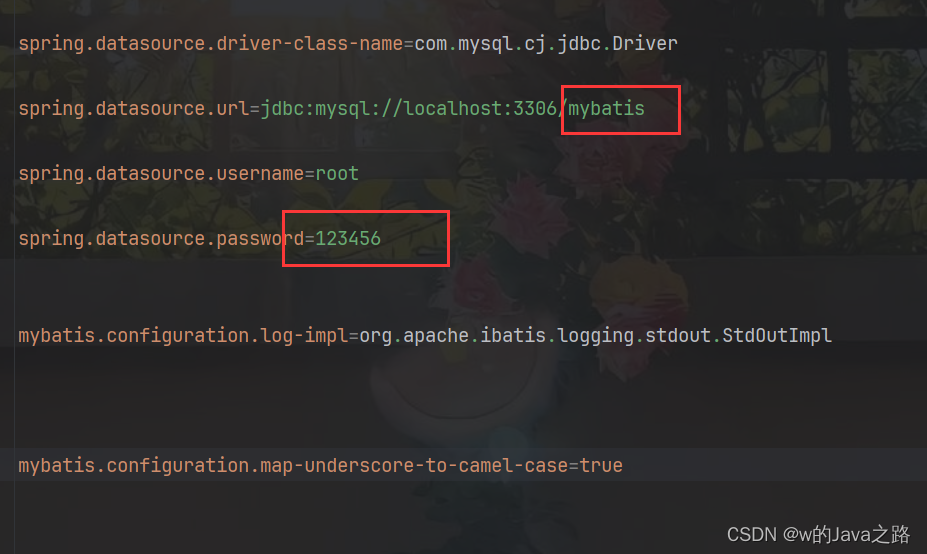
准备工作: 1.创建一个springboot项目,并添加四个依赖 分别是,MyBatis的启动依赖和安装依赖,SQL的依赖,测试依赖,如下: 2.然后创建一张至少两条数据的表 (表可以用各种图形化工具创…...

在国内,现在月薪1万是什么水平?
看到网友发帖问:现在月薪1W是什么水平? 在现如今的情况下,似乎月薪过万这个标准已经成为衡量个人能力的一个标准了,尤其是现在互联网横行的时代,好像年入百万,年入千万就应该是属于大众的平均水平。 我不是…...
【Python网络爬虫入门教程1】成为“Spider Man”的第一课:HTML、Request库、Beautiful Soup库
Python 网络爬虫入门:Spider man的第一课 写在最前面背景知识介绍蛛丝发射器——Request库智能眼镜——Beautiful Soup库 第一课总结 写在最前面 有位粉丝希望学习网络爬虫的实战技巧,想尝试搭建自己的爬虫环境,从网上抓取数据。 前面有写一…...
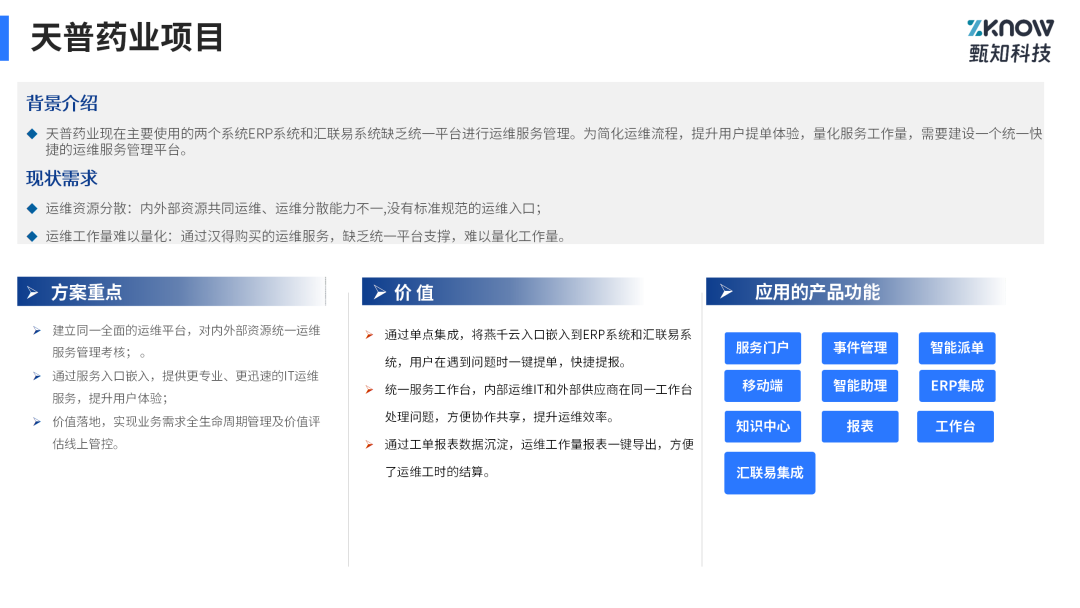
燕千云汇联易联袂出击:护航医企合规,丝滑内外协作
👉 如想详细了解燕千云医药行业快速实施包(ITFA),可继续阅读详细内容: 文/玉娇龙 一. 医药行业数字化挑战 医药研发从基础研究到最终注册上市的整个生命周期长则需要10多年,短则需要6-7年,在漫长…...

Joy-Con Toolkit:3大核心功能让你的Switch手柄重获新生
Joy-Con Toolkit:3大核心功能让你的Switch手柄重获新生 【免费下载链接】jc_toolkit Joy-Con Toolkit 项目地址: https://gitcode.com/gh_mirrors/jc/jc_toolkit 你是否曾为Switch手柄的摇杆漂移而烦恼?是否想过让千篇一律的手柄颜色变得与众不同…...

手写LoRA:从矩阵低秩分解到PyTorch参数化实现
1. 项目概述:为什么今天你必须真正搞懂 LoRA,而不是只看个热闹我带过三届校招算法工程师,也帮五家中小企业的技术团队落地过大模型应用。每次聊到模型微调,总有人一上来就问:“老师,我这台3090能不能跑Llam…...

探索OneMore:解锁OneNote高效笔记的完整指南
探索OneMore:解锁OneNote高效笔记的完整指南 【免费下载链接】OneMore A OneNote add-in with simple, yet powerful and useful features 项目地址: https://gitcode.com/gh_mirrors/on/OneMore OneMore是一款专为OneNote设计的强大插件,通过160…...

PyCharm无法引用本地扩展包问题的结解决方法
一、问题:PyCharm无法引用pygame等本地扩展包。二、原因分析PyCharm使用了自带的Python解释器,而扩展包在自己的Python里。三、解决方法:1、换成自己的解释器,也就是把pygame所在的Python解释器引进来。2、具体步骤:汉…...

告别杂乱窗口:QTTabBar如何用标签页重塑Windows文件管理体验
告别杂乱窗口:QTTabBar如何用标签页重塑Windows文件管理体验 【免费下载链接】qttabbar QTTabBar is a small tool that allows you to use tab multi label function in Windows Explorer. https://www.yuque.com/indiff/qttabbar 项目地址: https://gitcode.com…...

机械/土木 专业是否可以转嵌入式?
机械专业是否可以转嵌入式?总有人担心 “我学机械的能转嵌入式吗?”答案是:完全可以!连学土木工程的,我都带出了好几个成功转行嵌入式的! 干机械的甚至比纯 电子 / 计算机的 更有优势 !📌 为什么机械转嵌入…...

python的pyd本质:就是Windows平台下的DLL动态链接库
一、 拆解:Python 库的真实生态与 .pyd / .so 的底层逻辑1. Python 真的有百万个第三方 PIP 库吗?不准确。 截至2026年,PyPI(Python Package Index)官方注册的开源项目总量大约在 50万到60万个 之间。虽然达不到“百万…...

DECO项目架构解析:从源码理解装饰器并发模型的设计哲学
DECO项目架构解析:从源码理解装饰器并发模型的设计哲学 【免费下载链接】deco 项目地址: https://gitcode.com/gh_mirrors/de/deco DECO(Decorated Concurrency)是一个革命性的Python并行计算框架,它通过装饰器实现了简洁…...

2026 国内 ChatGPT 镜像站推荐
📖 国内直接访问,支持 GPTs、绘图、文件分析,对话数据隔离 ✅ 写方案/周报,描述需求直接生成,5分钟搞定 ✅ 代码报错,粘贴进去秒出解决方案 ✅ 读文件/PDF,上传即可提问,不用逐字看…...

OpsKat v1.3.0 - SSH、数据库集中管理工具
平时操作服务器环境,经常要打开好几个工具来回切换,想着能不能直接跟 AI 说一句话就搞定,于是做了 OpsKat ,就算你不使用 AI 功能,常用的资产操作都集成在一起,也不用再在好几个工具之间跳了。举几个实际使…...