
EASYEXCEL导出表格(有标题、单元格合并)
EASYEXCEL导出表格(有标题、单元格合并)
xlsx格式报表的导出,导出的数据存在父子关系,即相当于树形数据,有单元格合并和标题形式的要求,查阅了一些资料,总算是弄出来了,这里另写一个小样简单分享一下关于easyExcel导出具有合并单元格和标题的小结 代码,也算记录一下自己的工作学习。
public class BizMergeStrategy extends AbstractMergeStrategy {private Map<String, List<RowRangeDto>> strategyMap;private Sheet sheet;public BizMergeStrategy(Map<String, List<RowRangeDto>> strategyMap) {this.strategyMap = strategyMap;}@Overrideprotected void merge(Sheet sheet, Cell cell, Head head, Integer integer) {this.sheet = sheet;//如果没有标题,只有表头的话,这里的 cell.getRowIndex() == 1if (cell.getRowIndex() == 2 && cell.getColumnIndex() == 0) {/*** 保证每个cell被合并一次,如果不加上面的判断,因为是一个cell一个cell操作的,* 例如合并A2:A3,当cell为A2时,合并A2,A3,但是当cell为A3时,又是合并A2,A3,* 但此时A2,A3已经是合并的单元格了*/for (Map.Entry<String, List<RowRangeDto>> entry : strategyMap.entrySet()) {Integer columnIndex = Integer.valueOf(entry.getKey());entry.getValue().forEach(rowRange -> {//添加一个合并请求sheet.addMergedRegionUnsafe(new CellRangeAddress(rowRange.getStart(),rowRange.getEnd(), columnIndex, columnIndex));});}}}public static Map<String, List<RowRangeDto>> addAnnualMerStrategy(List<ContrastIndicatorDeptExcel> projectDtoList) {Map<String, List<RowRangeDto>> strategyMap = new HashMap<>();ContrastIndicatorDeptExcel preUser = null;for (int i = 0; i < projectDtoList.size(); i++) {ContrastIndicatorDeptExcel curUser = projectDtoList.get(i);//如果名字一样,将名字合并(真正开发中一般不会通过名字这样字段,而是通过一些关联的唯一值,比如父id)if (preUser != null) {if (curUser.getIndicatorName() == preUser.getIndicatorName()){    // 名字相同则合并第一列
//                    BizMergeStrategy.fillStrategyMap(strategyMap, "0", i+1);//如果没有标题,只有表头的话,这里为 BizMergeStrategy.fillStrategyMap(strategyMap, "1", i);BizMergeStrategy.fillStrategyMap(strategyMap, "1", i+1);}}preUser = curUser;}return strategyMap;}/*** @description: 新增或修改合并策略map* @param strategyMap* @param key* @param index* @return*/private static void fillStrategyMap(Map<String, List<RowRangeDto>> strategyMap, String key, int index){List<RowRangeDto> rowRangeDtoList = strategyMap.get(key) == null ? new ArrayList<>() : strategyMap.get(key);boolean flag = false;for (RowRangeDto dto : rowRangeDtoList) {//分段list中是否有end索引是上一行索引的,如果有,则索引+1if (dto.getEnd() == index) {dto.setEnd(index + 1);flag = true;}}//如果没有,则新增分段if (!flag) {rowRangeDtoList.add(new RowRangeDto(index, index + 1));}strategyMap.put(key, rowRangeDtoList);}/*** @description: 表格样式* @return*/public static HorizontalCellStyleStrategy CellStyleStrategy(){WriteCellStyle headWriteCellStyle = new WriteCellStyle();//设置背景颜色headWriteCellStyle.setFillForegroundColor(IndexedColors.WHITE.getIndex());//设置头字体WriteFont headWriteFont = new WriteFont();headWriteFont.setFontHeightInPoints((short)13);headWriteFont.setBold(true);headWriteCellStyle.setWriteFont(headWriteFont);//设置头居中headWriteCellStyle.setHorizontalAlignment(HorizontalAlignment.CENTER);//内容策略WriteCellStyle contentWriteCellStyle = new WriteCellStyle();//设置 水平居中contentWriteCellStyle.setHorizontalAlignment(HorizontalAlignment.CENTER);contentWriteCellStyle.setVerticalAlignment(VerticalAlignment.CENTER);HorizontalCellStyleStrategy horizontalCellStyleStrategy = new HorizontalCellStyleStrategy(headWriteCellStyle, contentWriteCellStyle);return horizontalCellStyleStrategy;}
}
import cn.exrick.xboot.jwaq.entity.contrast.ContrastIndicatorDeptExcel;
import cn.exrick.xboot.jwaq.tool.TitleSheetWriteHandler;
import com.alibaba.excel.EasyExcel;
import com.alibaba.excel.support.ExcelTypeEnum;
import org.springframework.web.bind.annotation.GetMapping;
import org.springframework.web.bind.annotation.RequestMapping;
import org.springframework.web.bind.annotation.RestController;import javax.servlet.http.HttpServletResponse;
import java.io.IOException;
import java.net.URLEncoder;
import java.util.ArrayList;
import java.util.List;
import java.util.Map;@RestController
@RequestMapping("/easyExcelController/ContrastIndicatorDeptExcel")
public class EasyExcelController {@GetMapping("/excel")public void excel(HttpServletResponse response) throws IOException {Map<String, List<RowRangeDto>> strategyMap = BizMergeStrategy.addAnnualMerStrategy(data());try {response.setContentType("application/vnd.ms-excel");response.setCharacterEncoding("utf-8");// 这里URLEncoder.encode可以防止中文乱码 当然和easyexcel没有关系String filename = URLEncoder.encode("用户表测试", "UTF-8").replaceAll("\\+", "%20");response.setHeader("Content-disposition", "attachment;filename=" + filename + ".xlsx");EasyExcel.write(response.getOutputStream(), ContrastIndicatorDeptExcel.class).excelType(ExcelTypeEnum.XLSX).head(ContrastIndicatorDeptExcel.class).registerWriteHandler(new TitleSheetWriteHandler("我是一个小标题",13))// 标题及样式,lastCol为标题第0列到底lastCol列的宽度//设置默认样式及写入头信息开始的行数.relativeHeadRowIndex(1).registerWriteHandler(new BizMergeStrategy(strategyMap))// 注册合并策略.registerWriteHandler(BizMergeStrategy.CellStyleStrategy())// 设置样式.sheet("测试").doWrite(data());}catch (Exception e) {e.printStackTrace();response.reset();response.setCharacterEncoding("utf-8");response.setContentType("application/json");response.getWriter().println("打印失败");}}private List<ContrastIndicatorDeptExcel> data(){List<ContrastIndicatorDeptExcel>   list = new ArrayList<>();ContrastIndicatorDeptExcel ontrastIndicatorDeptExcel = new ContrastIndicatorDeptExcel();ontrastIndicatorDeptExcel.setUnit("1");ontrastIndicatorDeptExcel.setIndicatorName("2");ontrastIndicatorDeptExcel.setBigType("3");ContrastIndicatorDeptExcel ontrastIndicatorDeptExcel1 = new ContrastIndicatorDeptExcel();ontrastIndicatorDeptExcel1.setUnit("1");ontrastIndicatorDeptExcel1.setIndicatorName("2");ontrastIndicatorDeptExcel1.setBigType("3");ContrastIndicatorDeptExcel ontrastIndicatorDeptExcel2 = new ContrastIndicatorDeptExcel();ontrastIndicatorDeptExcel2.setUnit("1");ontrastIndicatorDeptExcel2.setIndicatorName("2");ontrastIndicatorDeptExcel2.setBigType("3");ContrastIndicatorDeptExcel ontrastIndicatorDeptExcel3 = new ContrastIndicatorDeptExcel();ontrastIndicatorDeptExcel3.setUnit("1");ontrastIndicatorDeptExcel3.setIndicatorName("2");ontrastIndicatorDeptExcel3.setBigType("3");list.add(ontrastIndicatorDeptExcel);list.add(ontrastIndicatorDeptExcel1);list.add(ontrastIndicatorDeptExcel2);list.add(ontrastIndicatorDeptExcel3);return list;}
}
public class RowRangeDto {private int start;private int end;public RowRangeDto(int start,int end){this.start = start;this.end = end;}public int getStart() {return start;}public void setStart(int start) {this.start = start;}public int getEnd() {return end;}public void setEnd(int end) {this.end = end;}
}
package cn.exrick.xboot.jwaq.tool;import com.alibaba.excel.write.handler.SheetWriteHandler;
import com.alibaba.excel.write.metadata.holder.WriteSheetHolder;
import com.alibaba.excel.write.metadata.holder.WriteWorkbookHolder;
import org.apache.poi.ss.usermodel.*;
import org.apache.poi.ss.util.CellRangeAddress;public class TitleSheetWriteHandler implements SheetWriteHandler {private String title;private int lastCol;public TitleSheetWriteHandler(String title,int lastCol){this.title = title;this.lastCol = lastCol;}@Overridepublic void beforeSheetCreate(WriteWorkbookHolder writeWorkbookHolder, WriteSheetHolder writeSheetHolder) {}@Overridepublic void afterSheetCreate(WriteWorkbookHolder writeWorkbookHolder, WriteSheetHolder writeSheetHolder) {Workbook workbook = writeWorkbookHolder.getWorkbook();Sheet sheet = workbook.getSheetAt(0);//设置标题Row row = sheet.createRow(0);row.setHeight((short) 800);Cell cell = row.createCell(0);cell.setCellValue(title);CellStyle cellStyle = workbook.createCellStyle();cellStyle.setVerticalAlignment(VerticalAlignment.CENTER);cellStyle.setAlignment(HorizontalAlignment.CENTER);Font font = workbook.createFont();font.setBold(true);font.setFontHeight((short) 400);cellStyle.setFont(font);cell.setCellStyle(cellStyle);sheet.addMergedRegionUnsafe(new CellRangeAddress(0, 0, 0, lastCol));}
}
相关文章:
)
EASYEXCEL导出表格(有标题、单元格合并)
EASYEXCEL导出表格(有标题、单元格合并) xlsx格式报表的导出,导出的数据存在父子关系,即相当于树形数据,有单元格合并和标题形式的要求,查阅了一些资料,总算是弄出来了,这里另写一个…...

pytest 断言异常
一、前置说明 在 pytest 中,断言异常是通过 pytest 内置的 pytest.raises 上下文管理器来实现的。通过使用 pytest.raises,可以捕获并断言代码中引发的异常。 二、操作步骤 1. 编写测试代码 atme/demos/demo_pytest_tutorials/test_pytest_raises.py import pytest# 示例…...

听GPT 讲Rust源代码--src/tools(22)
File: rust/src/tools/tidy/src/lib.rs rust/src/tools/tidy/src/lib.rs是Rust编译器源代码中tidy工具的实现文件之一。tidy工具是Rust项目中的一项静态检查工具,用于确保代码质量和一致性。 tidy工具主要有以下几个作用: 格式化代码:tidy工具…...

OD Linux发行版本
题目描述: Linux操作系统有多个发行版,distrowatch.com提供了各个发行版的资料。这些发行版互相存在关联,例如Ubuntu基于Debian开发,而Mint又基于Ubuntu开发,那么我们认为Mint同Debian也存在关联。 发行版集是一个或多…...
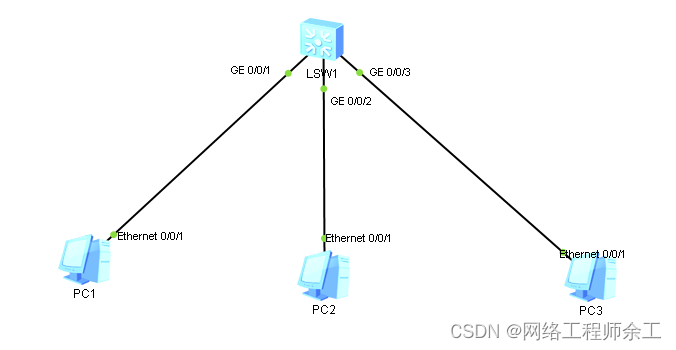
华为端口隔离简单使用方法同vlan下控制个别电脑不给互通
必须得用access接口,hybrid口不行 dhcp enable interface Vlanif1 ip address 192.168.1.1 255.255.255.0 dhcp select interface interface MEth0/0/1 interface GigabitEthernet0/0/1 port link-type access port-isolate enable group 1 interface GigabitEther…...

DaVinci各版本安装指南
链接: https://pan.baidu.com/s/1g1kaXZxcw-etsJENiW2IUQ?pwd0531 #2024版 1.鼠标右击【DaVinci_Resolve_Studio_18.5(64bit)】压缩包(win11及以上系统需先点击“显示更多选项”)【解压到 DaVinci_Resolve_Studio_18.5(64bit)】。 2.打开解压后的文…...
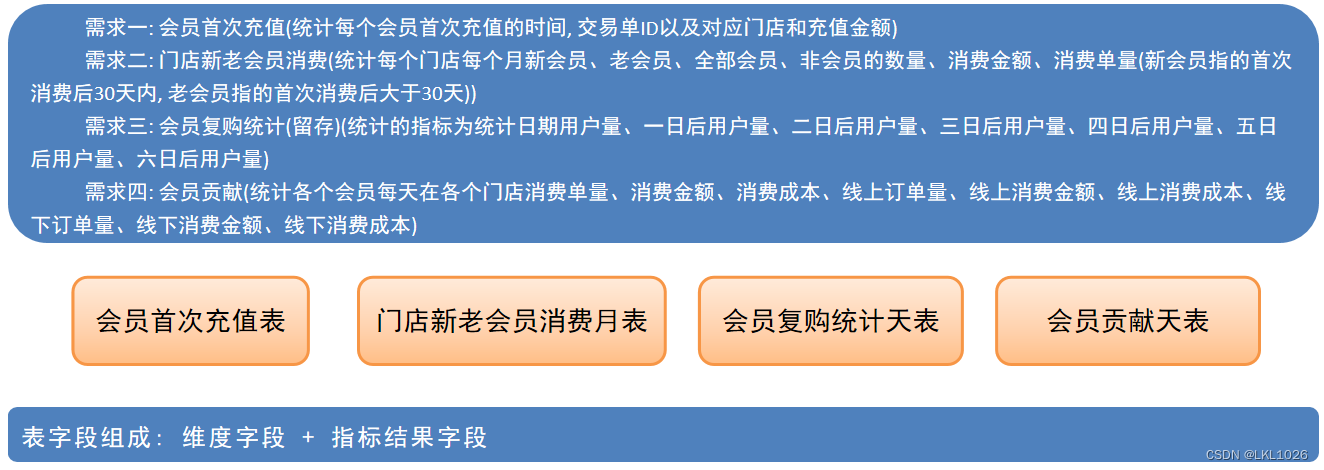
【黑马甄选离线数仓day10_会员主题域开发_DWS和ADS层】
day10_会员主题域开发 会员主题_DWS和ADS层 DWS层开发 门店会员分类天表: 维度指标: 指标:新增注册会员数、累计注册会员数、新增消费会员数、累计消费会员数、新增复购会员数、累计复购会员数、活跃会员数、沉睡会员数、会员消费金额 维度: 时间维度(…...

OD 完美走位
题目描述: 在第一人称射击游戏中,玩家通过键盘的A、S、D、W四个按键控制游戏人物分别向左、向后、向右、向前进行移动,从而完成走位。假设玩家每按动一次键盘,游戏人物会向某个方向移动一步,如果玩家在操作一定次数的键…...

SpringSecurity6 | 失败后的跳转
✅作者简介:大家好,我是Leo,热爱Java后端开发者,一个想要与大家共同进步的男人😉😉 🍎个人主页:Leo的博客 💞当前专栏: Java从入门到精通 ✨特色专栏: MySQL学习 🥭本文内容: SpringSecurity6 | 失败后的跳转 📚个人知识库: Leo知识库,欢迎大家访问 学习…...
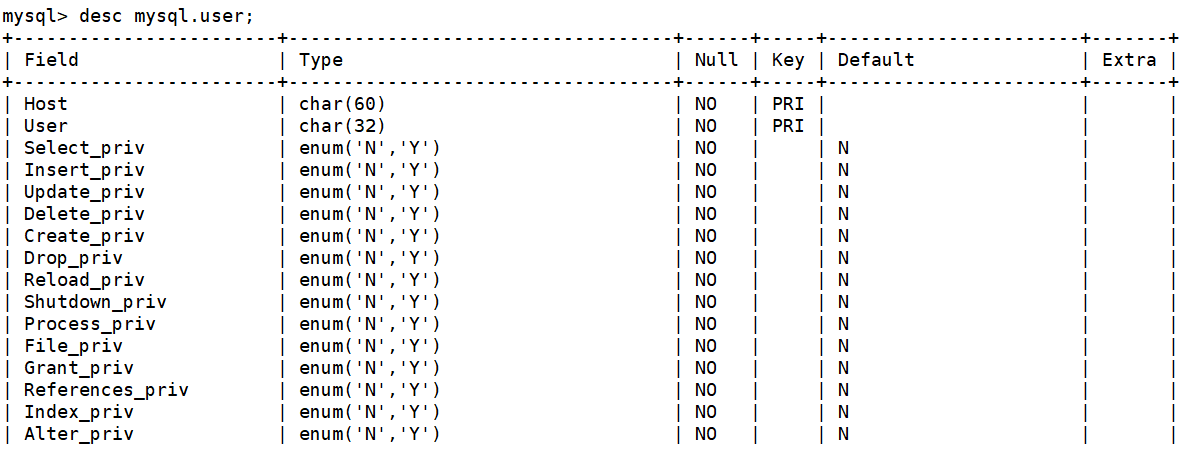
MySQL数据库增删改查
常用的数据类型: int:整数类型,无符号的范围【0,2^32-1】,有符号【-2^31,2^31-1】 float:单精度浮点,4字节64位 double:双精度浮点,8字节64位 char:固定长…...
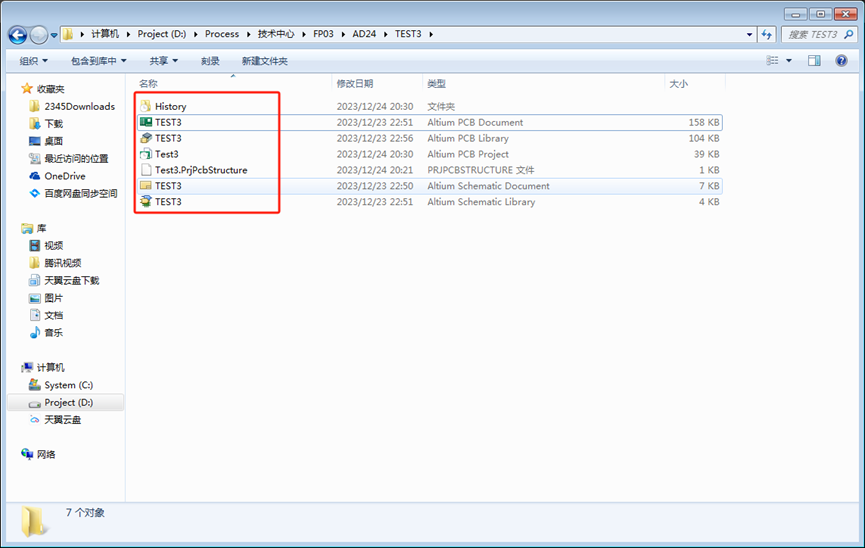
Altium Designer(AD24)新工程复用设计文件图文教程及视频演示
🏡《专栏目录》 目录 1,概述2,复用方法一视频演示2.1,创建工程2.2,复用设计文件 3,复用方法二视频演示4,总结 欢迎点击浏览更多高清视频演示 1,概述 本文简述使用AD软件复用设计文件…...
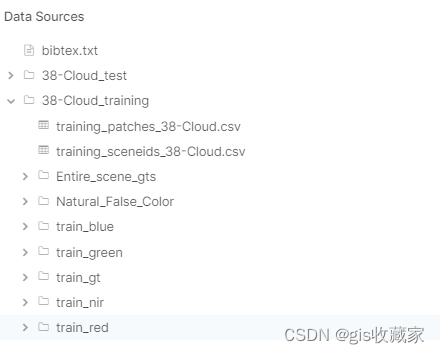
Python遥感影像深度学习指南(1)-使用卷积神经网络(CNN、U-Net)和 FastAI进行简单云层检测
【遥感影像深度学习】系列的第一章,Python遥感影像深度学习的入门课程,介绍如何使用卷积神经网络(CNN)从卫星图像中分割云层 1、数据集 在本项目中,我们将使用 Kaggle 提供的 38-Cloud Segmentation in Satellite Images数据集。 该数据集由裁剪成 384x384 (适用…...
)
Hive-DML详解(超详细)
文章目录 前言HiveQL的数据操作语言(DML)1. 插入数据1.1 直接插入固定值1.2 插入查询结果 2. 更新数据3. 删除数据3.1 删除整个分区 4. 查询数据4.1 基本查询4.2 条件筛选4.3 聚合函数 总结 前言 本文将介绍HiveQL的数据操作语言(DML&#x…...

PHP实现可示化代码
PHP是一种服务器端脚本语言,它主要用于开发Web应用程序。虽然PHP本身不提供可视化代码的功能,但你可以使用一些第三方库和工具来实现可视化代码。 以下是一些常用的PHP可视化代码的工具和库: 1. Graphviz:Graphviz是一个开源的可…...

useState语法讲解
useState语法讲解 语法定义 const [state, dispatch] useState(initData)state:定义的数据源,可视作一个函数组件内部的变量,但只在首次渲染被创造。dispatch:改变state的函数,推动函数渲染的渲染函数。dispatch有两…...
堆与二叉树(下)
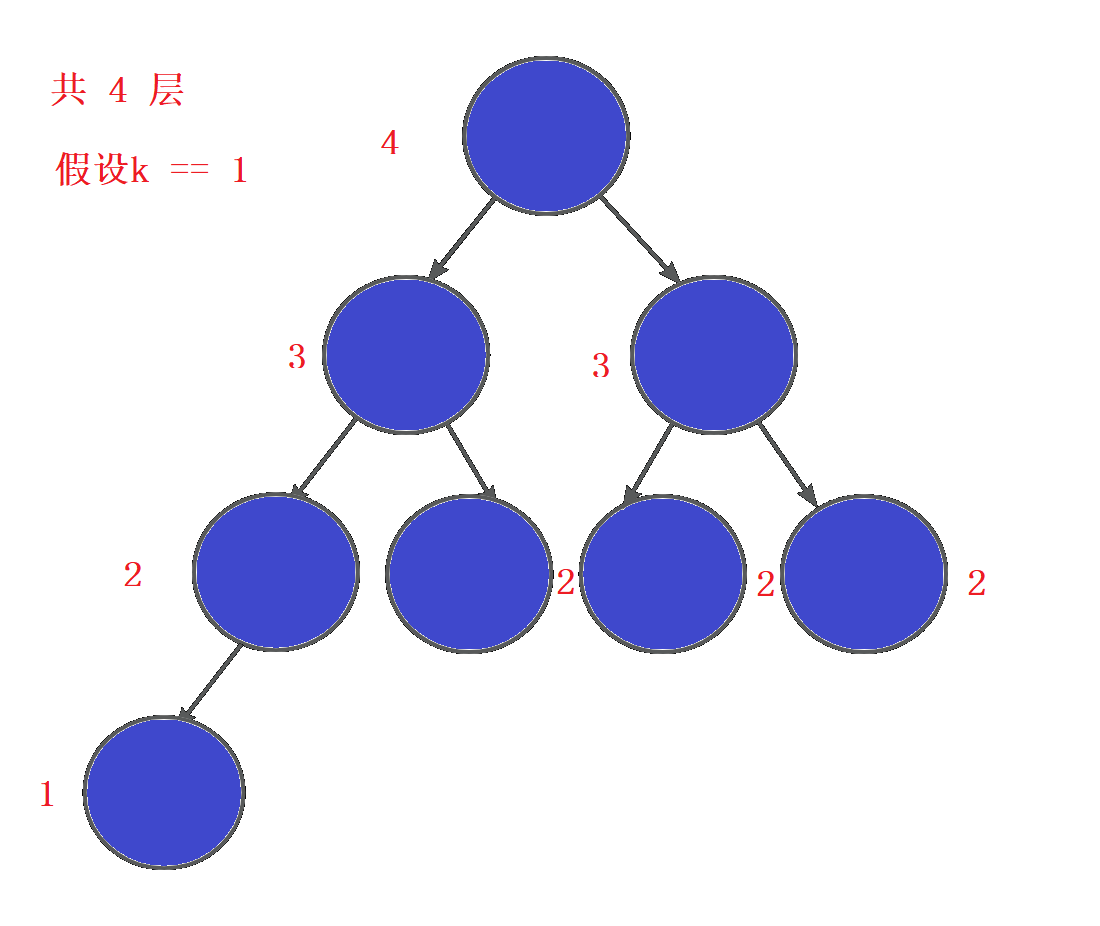
接着上次的,这里主要介绍的是堆排序,二叉树的遍历,以及之前讲题时答应过的简单二叉树问题求解 堆排序 给一组数据,升序(降序)排列 思路 思考:如果排列升序,我们应该建什么堆&#x…...

讲诉JVM
jvm是Java代码运行的环境,他将java程序翻译成为机器可以可以识别的机器码,可以跨平台运行如linuc或者windos 简单说一下我对jvm运行的理解, 首先我们运行程序的时候,类加载器会将类按需加载到元空间/方法区里面 …...
8、SpringCloud高频面试题-版本1
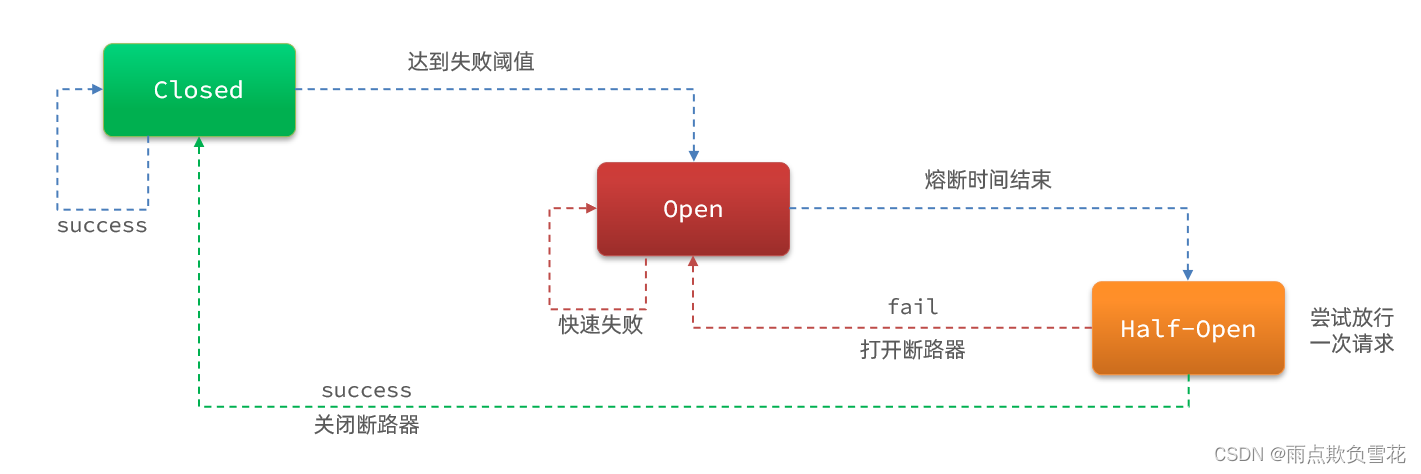
1、SpringCloud组件有哪些 SpringCloud 是一系列框架的有序集合。它利用 SpringBoot 的开发便利性巧妙地简化了分布式系统基础设施的开发,如服务发现注册、配置中心、消息总线、负载均衡、断路器、数据监控等,都可以用 SpringBoot 的开发风格做到一键启…...
PHP案例代码:PHP如何提供下载功能?
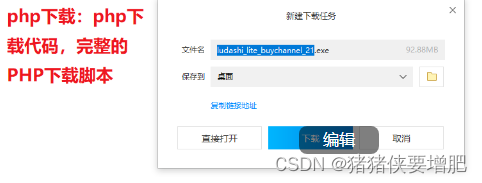
对Web开发人员来说,“下载”功能是一个非常常见的需求。在网站中提供文件下载,通常用于提供用户手册、软件升级、音乐、视频等各种资源文件。本教程将向您介绍如何实现一个PHP下载功能,同时告诉浏览器文件名称、文件大小、文件类型,并统计下载次数。 首先,我们需要了解一些…...
The Cherno C++笔记 03
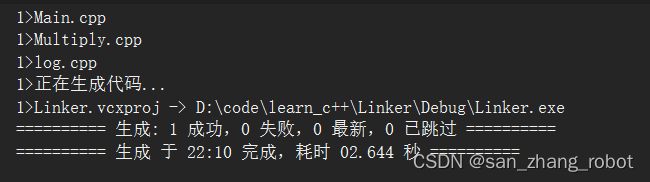
目录 Part 07 How the C Linker Works 1.链接 2.编译链接过程中出现的错误 2.1 缺少入口函数 注意:如何区分编译错误还是链接错误 注意:入口点可以自己设置 2.2 找不到自定义函数 2.2.1缺少声明 2.2.2自定义函数与引用函数不一致 2.3 在头文件中放入定义 …...
)
Java后端工程师必备:系统学习大模型应用开发(收藏版)
本文深入探讨了Java后端工程师如何系统性地学习AI应用开发,从基础的CRUD操作到大模型的集成,包括RAG、Tool Calling、MCP、Agent等关键技术。文章强调了AI应用开发不仅是调用大模型接口,而是将大模型能力融入真实业务系统,实现理解…...

Vue2项目里,如何用DHTMLX Gantt实现任务搜索、今日线定位和视图切换?这些实用功能我帮你搞定了
Vue2项目中DHTMLX Gantt三大进阶功能实战:搜索、今日线与视图切换 在项目管理工具的开发中,甘特图作为核心可视化组件,其交互体验直接决定了用户的使用效率。本文将聚焦三个高频需求场景,手把手教你如何在已有DHTMLX Gantt集成的V…...

OpenClaw 用户迁移至 Taotoken 平台享受更优 Token 价格
🚀 告别海外账号与网络限制!稳定直连全球优质大模型,限时半价接入中。 👉 点击领取海量免费额度 OpenClaw 用户迁移至 Taotoken 平台享受更优 Token 价格 对于正在使用 OpenClaw 这类兼容 OpenAI 协议客户端的开发者或团队而言&a…...
)
告别手动填坑:用SSC工具+Excel快速搞定LAN9252 EtherCAT从站XML配置(附64点IO实例)
高效配置LAN9252 EtherCAT从站的自动化工具链实践 在嵌入式工业通信领域,EtherCAT因其卓越的实时性能被广泛采用,而LAN9252作为高性价比的从站控制器芯片,配合SPI接口成为许多开发者的首选方案。然而传统XML配置流程的复杂性往往成为项目瓶颈…...

为什么你的DeepSeek JSON总是parse error?资深架构师用AST语法树对比揭示4种LLM输出结构幻觉根源
更多请点击: https://intelliparadigm.com 第一章:JSON解析失败的表象与系统性归因 JSON解析失败在现代Web服务、微服务通信及前端数据消费中极为常见,其表象往往表现为程序崩溃、空值传播、或静默丢弃数据,而非明确的错误提示。…...

SQL 中 OR 与 UNION ALL选择指南
一句话总结普通小表、无索引场景:用 OR 更简单、代码更短大表、有索引场景:用 UNION ALL 性能远优于 OR需要去重:必须用 UNION(性能比 UNION ALL 差)核心区别只扫描一次表 / 索引数据库需要同时判断两个条件致命问题&a…...
管理)
表空间(Tablespace)管理
1.1、表空间类型类型用途说明永久表空间存储用户数据SYSTEM, SYSAUX, USERS, 自定义UNDO表空间事务回滚和读一致性自动管理,12c支持多UNDO临时表空间排序、哈希等临时操作TEMP,不产生redo大文件表空间单个数据文件可达128TBBigfile Tablespace加密表空间…...

WinRAR隐藏技能:除了.rar和.zip,批处理还能压成啥?附参数避坑指南
WinRAR命令行进阶指南:解锁隐藏压缩格式与参数避坑实战 在大多数用户的认知里,WinRAR只是个能处理.rar和.zip文件的图形化工具。但它的命令行版本却隐藏着一个完全不同的世界——支持超过20种压缩格式转换、批量自动化处理、甚至能实现文件系统级操作。本…...

叶绿体注释翻车实录:Geseq vs. NCBI格式差异与特殊基因处理实战
叶绿体注释翻车实录:Geseq vs. NCBI格式差异与特殊基因处理实战 当两个权威工具对同一段叶绿体DNA给出不同注释时,该相信谁?这个问题困扰过每一位从事基因组注释的研究者。去年在完成水稻叶绿体项目时,我同时用Geseq和NCBI标准流程…...

书匠策AI实测科普:一篇毕业论文从“零“到“交稿“,AI到底在背后替你跑了哪几圈?
🔬 本文不吹不黑,用最朴素的语言,把书匠策AI的毕业论文功能给你"拆成零件"看一遍。微信公众号搜一搜书匠策AI,官网 官网直达:www.shujiangce.com,先收藏再说。 各位还在和毕业论文"肉搏&quo…...