
谷粒商城-商品服务-新增商品功能开发(商品图片无法展示问题没有解决)
在网关配置路由
- id: member_routeuri: lb://gulimemberpredicates:- Path=/api/gulimember/**filters:- RewritePath=/api/(?<segment>.*),/$\{segment}
并将所有逆向生成的工程调式出来
获取分类关联的品牌
例如:手机(分类)-> 品牌(华为)
CategoryBrandRelationController.java
@GetMapping("/brands/list")public R relationBrandsList(@RequestParam(value = "catId",required = true)Long catId){List<BrandEntity> vos = categoryBrandRelationService.getBrandsByCatId(catId);List<BrandVo> collect = vos.stream().map(item -> {BrandVo brandVo = new BrandVo();brandVo.setBrandId(item.getBrandId());brandVo.setBrandName(item.getName());return brandVo;}).collect(Collectors.toList());return R.ok().put("data",collect);}
返回信息只需品牌id和品牌名 所以编写一个只包含品牌id和品牌名的Vo
BrandVo
import lombok.Data;@Data
public class BrandVo {/*** "brandId": 0,* "brandName": "string",*/private Long brandId;private String  brandName;
}
CategoryBrandRelationServiceImpl.java
/*** 查询指定品牌的分类信息* @param catId* @return*/@Overridepublic List<BrandEntity> getBrandsByCatId(Long catId) {List<CategoryBrandRelationEntity> catelogId = relationDao.selectList(new QueryWrapper<CategoryBrandRelationEntity>().eq("catelog_id", catId));List<BrandEntity> collect = catelogId.stream().map(item -> {Long brandId = item.getBrandId();BrandEntity byId = brandService.getById(brandId);return byId;}).collect(Collectors.toList());return collect;}
P75没完成
P86需要再排查
获取分类下所有分组以及属性
创建 AttrGroupWithAttrsVo.java 整合该类型的结果并返回
@Data
public class AttrGroupWithAttrsVo {/*** 分组id*/private Long attrGroupId;/*** 组名*/private String attrGroupName;/*** 排序*/private Integer sort;/*** 描述*/private String descript;/*** 组图标*/private String icon;/*** 所属分类id*/private Long catelogId;private List<AttrEntity> attrs;
}
AttrGroupServiceImpl.java
/*** 根据分类id查出所有分组以及组里的属性* @param catelogId* @return*/@Overridepublic List<AttrGroupWithAttrsVo> getAttrGroupWithAttrsByCatelogId(Long catelogId) {//1、查询分组信息List<AttrGroupEntity> attrGroupEntities = this.list(new QueryWrapper<AttrGroupEntity>().eq("catelog_id", catelogId));//2、查询所有属性List<AttrGroupWithAttrsVo> collect = attrGroupEntities.stream().map(group -> {AttrGroupWithAttrsVo attrsVo = new AttrGroupWithAttrsVo();BeanUtils.copyProperties(group,attrsVo);//查询属性List<AttrEntity> attrs = attrService.getRelationAttr(attrsVo.getAttrGroupId());attrsVo.setAttrs(attrs);return attrsVo;}).collect(Collectors.toList());return collect;}
商品新增业务流程分析
保存商品vo
SpuInfoController.java
@RequestMapping("/save")public R save(@RequestBody SpuSaveVo vo){spuInfoService.saveSpuInfo(vo);return R.ok();}
SkuInfoServiceImpl.java
//主要保存商品基本的spu和sku信息
public void saveSpuInfo(SpuSaveVo vo) {//1.保存商品基本信息 pms_spu_infoSpuInfoEntity infoEntity=new SpuInfoEntity();BeanUtils.copyProperties(vo,infoEntity);infoEntity.setCreateTime(new Date());infoEntity.setUpdateTime(new Date());this.saveBaseSpuInfo(infoEntity);//2.保存描述 pms_spu_info_descList<String> decript = vo.getDecript();SpuInfoDescEntity descEntity = new SpuInfoDescEntity();descEntity.setSpuId(infoEntity.getId());descEntity.setDecript(String.join(",",decript));spuInfoDescService.saveSpuInfoDesc(descEntity);//3.保存图片集pms_spu_imagesList<String> images=vo.getImages();spuImagesService.saveImages(infoEntity.getId(),images);//4.保存spu规格参数 pms_product_attr_valueList<BaseAttrs> baseAttrs=vo.getBaseAttrs();List<ProductAttrValueEntity> collect=baseAttrs.stream().map(attr->{ProductAttrValueEntity valueEntity=new ProductAttrValueEntity();valueEntity.setAttrId(attr.getAttrId());AttrEntity attrEntity=attrService.getById(attr.getAttrId());valueEntity.setAttrName(attrEntity.getAttrName());valueEntity.setAttrValue(attr.getAttrValues());valueEntity.setQuickShow(attr.getShowDesc());valueEntity.setSpuId(infoEntity.getId());return valueEntity;}).collect(Collectors.toList());productAttrValueService.saveProdutAttr(collect);//5.保存spu的积分信息:gulimall_sms->sms_spu_bounds//5.保存当前spu对应的所有sku信息//5.1 sku基本信息 pms_sku_infoList<Skus> skus = vo.getSkus();if(skus!=null&&skus.size()>0){skus.forEach(item->{//存储默认图片String defaultImg="";for(Images image:item.getImages()){if(image.getDefaultImg()==1){defaultImg=image.getImgUrl();}}SkuInfoEntity skuInfoEntity=new SkuInfoEntity();BeanUtils.copyProperties(item,skuInfoEntity);skuInfoEntity.setBrandId(infoEntity.getBrandId());skuInfoEntity.setCatalogId(infoEntity.getCatalogId());skuInfoEntity.setSaleCount(0L);skuInfoEntity.setSpuId(infoEntity.getId());skuInfoEntity.setSkuDefaultImg(defaultImg);skuInfoService.saveSkuInfo(skuInfoEntity);Long skuId=skuInfoEntity.getSkuId();List<SkuImagesEntity> imagesEntities=item.getImages().stream().map(img->{SkuImagesEntity skuImagesEntity = new SkuImagesEntity();skuImagesEntity.setSkuId(skuId);skuImagesEntity.setImgUrl(img.getImgUrl());skuImagesEntity.setDefaultImg(img.getDefaultImg());return skuImagesEntity;}).collect(Collectors.toList());//5.2 sku图片信息 pms_sku_imagesskuImagesService.saveBatch(imagesEntities);List<Attr> attr= item.getAttr();List<SkuSaleAttrValueEntity> skuSaleAttrValueEntities=attr.stream().map(a->{SkuSaleAttrValueEntity attrValueEntity = new SkuSaleAttrValueEntity();BeanUtils.copyProperties(a,attrValueEntity);attrValueEntity.setSkuId(skuId);return attrValueEntity;}).collect(Collectors.toList());//5.3 sku销售属性信息 pms_sku_sale_attr_valueskuSaleAttrValueService.saveBatch(skuSaleAttrValueEntities);});}//5.4 sku优惠、满减信息:gulimall_sms->sms_sku_ladder\sms_sku_full_reduction\sms_member_price}
调用远程服务保存优惠券信息
使用远程服务
可以调用coupon中对应的服务
CouponFeignService.java
@FeignClient("gulicoupon")
public interface CouponFeignService {/*** 1、CouponFeignService.saveSpuBounds(spuBoundTo);*      1)、@RequestBody将这个对象转为json。*      2)、找到gulimall-coupon服务,给/coupon/spubounds/save发送请求。*          将上一步转的json放在请求体位置,发送请求;*      3)、对方服务收到请求。请求体里有json数据。*          (@RequestBody SpuBoundsEntity spuBounds);将请求体的json转为SpuBoundsEntity;* 只要json数据模型是兼容的。双方服务无需使用同一个to* @return*/@PostMapping("/gulicoupon/spubounds/save")R saveSpuBounds(@RequestBody SpuBoundTo spuBoundTo);@PostMapping("/gulicoupon/skufullreduction/saveinfo")R saveSkuReduction(@RequestBody SkuReductionTo skuReductionTo);
}
SPU检索

SpuInfoController.java
@RequestMapping("/list")public R list(@RequestParam Map<String, Object> params){PageUtils page = spuInfoService.queryPageByCondition(params);return R.ok().put("page", page);}
SpuInfoServiceImpl.java
@Overridepublic PageUtils queryPageByCondition(Map<String, Object> params) {QueryWrapper<SpuInfoEntity> wrapper = new QueryWrapper<>();String key = (String) params.get("key");if(!StringUtils.isEmpty(key)){wrapper.and((w)->{w.eq("id",key).or().like("spu_name",key);});}// status=1 and (id=1 or spu_name like xxx)String status = (String) params.get("status");if(!StringUtils.isEmpty(status)){wrapper.eq("publish_status",status);}String brandId = (String) params.get("brandId");if(!StringUtils.isEmpty(brandId)&&!"0".equalsIgnoreCase(brandId)){wrapper.eq("brand_id",brandId);}String catelogId = (String) params.get("catelogId");if(!StringUtils.isEmpty(catelogId)&&!"0".equalsIgnoreCase(catelogId)){wrapper.eq("catalog_id",catelogId);}/*** status: 2* key:* brandId: 9* catelogId: 225*/IPage<SpuInfoEntity> page = this.page(new Query<SpuInfoEntity>().getPage(params),wrapper);return new PageUtils(page);}
SKU检索
SkuInfoController.java
@RequestMapping("/list")public R list(@RequestParam Map<String, Object> params){PageUtils page = skuInfoService.queryPageByCondition(params);return R.ok().put("page", page);}
SkuInfoServiceImpl.java
@Overridepublic PageUtils queryPageByCondition(Map<String, Object> params) {QueryWrapper<SkuInfoEntity> queryWrapper = new QueryWrapper<>();/*** key:* catelogId: 0* brandId: 0* 价格区间* min: 0* max: 0*/String key = (String) params.get("key");if(!StringUtils.isEmpty(key)){queryWrapper.and((wrapper)->{wrapper.eq("sku_id",key).or().like("sku_name",key);});}String catelogId = (String) params.get("catelogId");if(!StringUtils.isEmpty(catelogId)&&!"0".equalsIgnoreCase(catelogId)){queryWrapper.eq("catalog_id",catelogId);}String brandId = (String) params.get("brandId");if(!StringUtils.isEmpty(brandId)&&!"0".equalsIgnoreCase(catelogId)){queryWrapper.eq("brand_id",brandId);}String min = (String) params.get("min");if(!StringUtils.isEmpty(min)){queryWrapper.ge("price",min);}String max = (String) params.get("max");if(!StringUtils.isEmpty(max) ){try{BigDecimal bigDecimal = new BigDecimal(max);if(bigDecimal.compareTo(new BigDecimal("0"))==1){queryWrapper.le("price",max);}}catch (Exception e){}}IPage<SkuInfoEntity> page = this.page(new Query<SkuInfoEntity>().getPage(params),queryWrapper);return new PageUtils(page);}
商品管理-SPU规格维护(暂未解决)
相关文章:
谷粒商城-商品服务-新增商品功能开发(商品图片无法展示问题没有解决)
在网关配置路由 - id: member_routeuri: lb://gulimemberpredicates:- Path/api/gulimember/**filters:- RewritePath/api/(?<segment>.*),/$\{segment}并将所有逆向生成的工程调式出来 获取分类关联的品牌 例如:手机(分类)-> 品…...
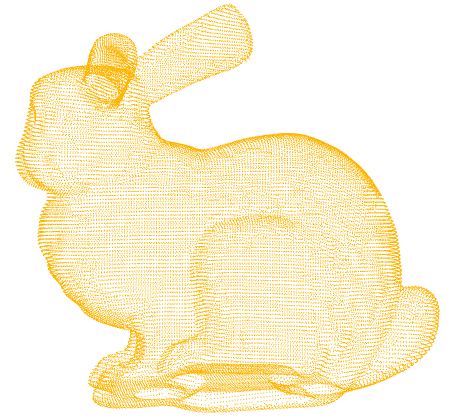
Open3D 点云数据处理基础(Python版)
Open3D 点云数据处理基础(Python版) 文章目录 1 概述 2 安装 2.1 PyCharm 与 Python 安装 2.3 Anaconda 安装 2.4 Open3D 0.13.0 安装 2.5 新建一个 Python 项目 3 点云读写 4 点云可视化 2.1 可视化单个点云 2.2 同一窗口可视化多个点云 2.3…...
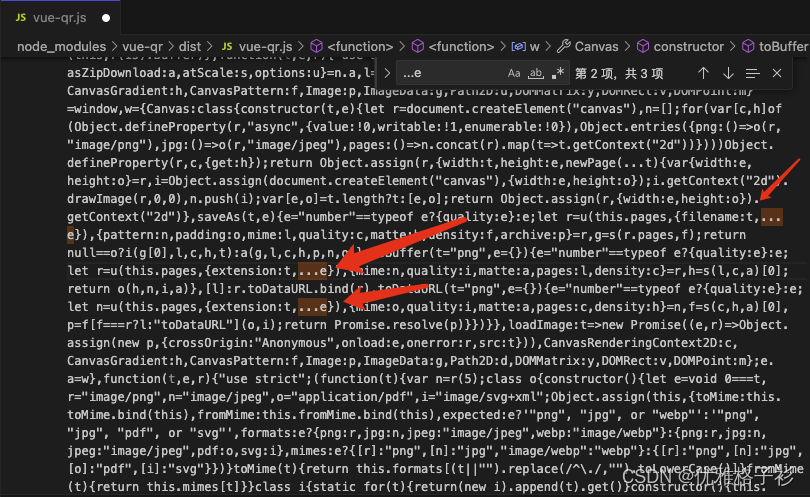
使用vue-qr,报错in ./node_modules/vue-qr/dist/vue-qr.js
找到node_modules—>vue-qr/dist/vue-qr.js文件,搜…e,将…去掉,然后重新运行项目。...

百川2大模型微调问题解决
之前用https://github.com/FlagAlpha/Llama2-Chinese微调过几个模型,总体来说llama2的生态还是比较好的,过程很顺利。微调百川2就没那么顺利了,所以简单做个记录 1. 数据准备,我的数据是单轮对话,之前微调llama2已经按…...
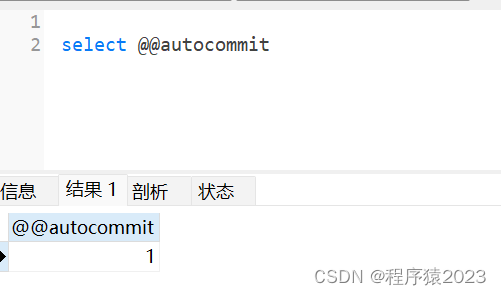
MySQL的事务-原子性
MySQL的事务处理具有ACID的特性,即原子性(Atomicity)、一致性(Consistency)、隔离性(Isolation)和持久性(Durability)。 1. 原子性指的是事务中所有操作都是原子性的,要…...
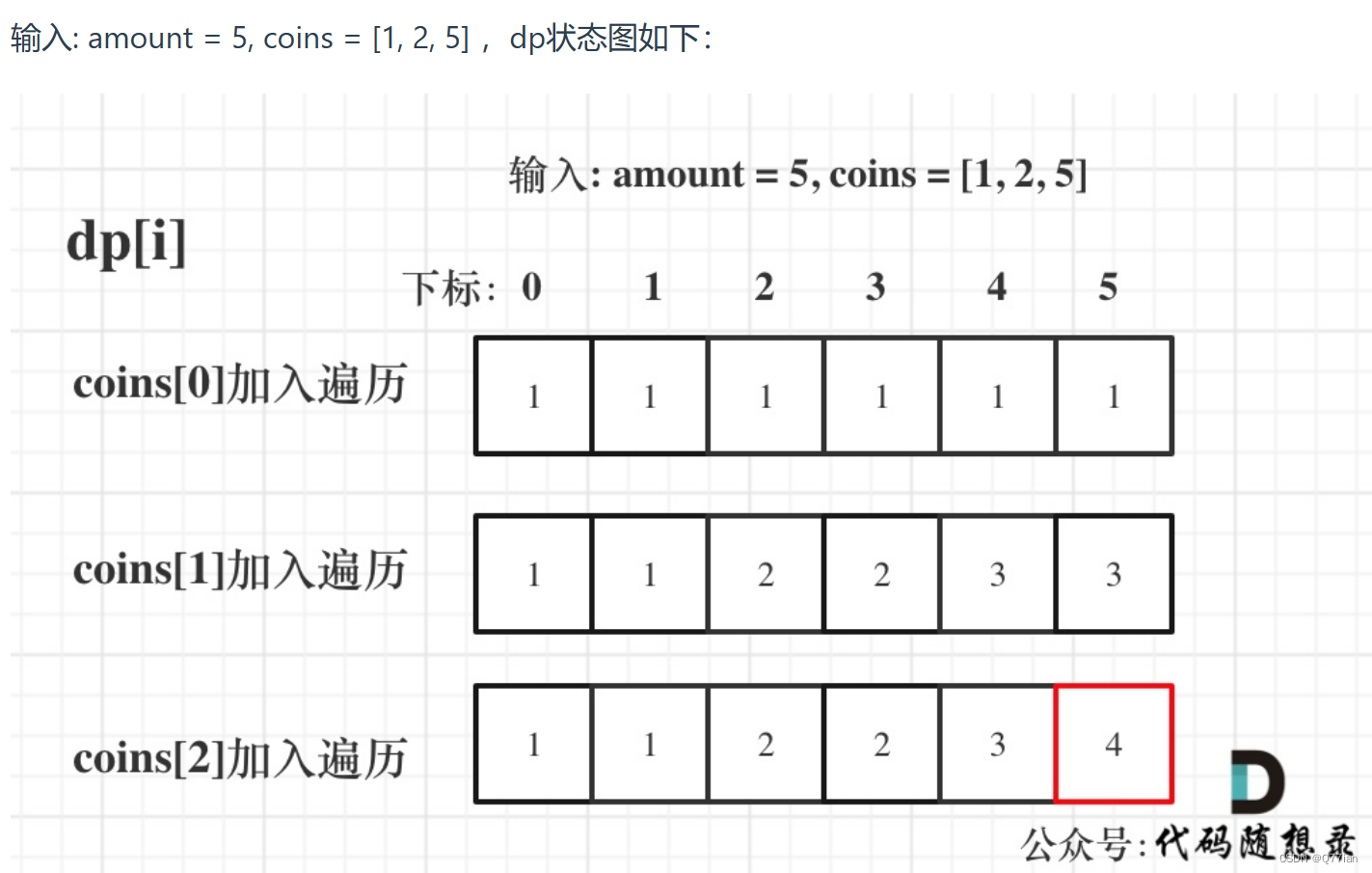
D3839|完全背包
完全背包: 首先01背包的滚动数组中的解法是内嵌的循环是从大到小遍历,为了保证每个物品仅被添加一次。 for(int i 0; i < weight.size(); i) { // 遍历物品for(int j bagWeight; j > weight[i]; j--) { // 遍历背包容量dp[j] max(dp[j], dp[j…...
Java之Synchronized与锁升级
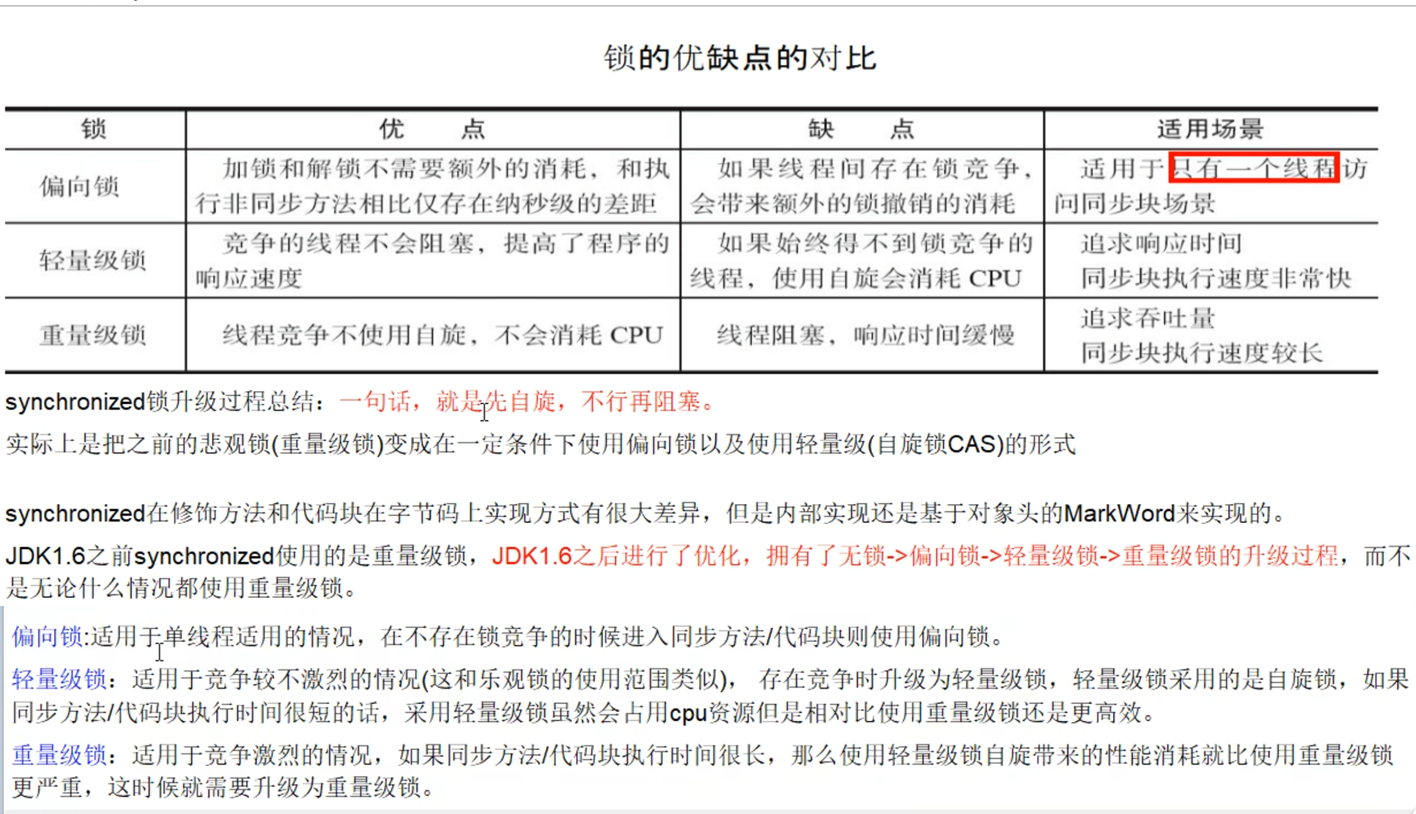
Synchronized与锁升级 一、概述 在多线程并发编程中 synchronized 一直是元老级角色,很多人都会称呼它为重量级锁。但是,随着 Java SE 1.6 对 synchronized 进行了各种优化之后,有些情况下它就并不那么重了。 本文详细介绍 Java SE 1.6 中为…...

kitex出现:open conf/test/conf.yaml: no such file or directory
open conf/test/conf.yaml: no such file or directory https://github.com/cloudwego/cwgo/issues/120 https://github.com/cloudwego/cwgo/issues/29 在使用Kitex生成的代码中,单元测试时回报错,如标题所示。出现该错的原因是,biz/servic…...

sql server多表查询
查询目标 现在有学生表和学生选课信息表,stu和stuSelect,stu中包含学生用户名、名字,stuSelect表中包含学生用户名,所选课程名 学生表: nameusername李明Li Ming李华Li Hua 学生选课表: usernameCourse…...
如何利用PPT绘图并导出清晰图片
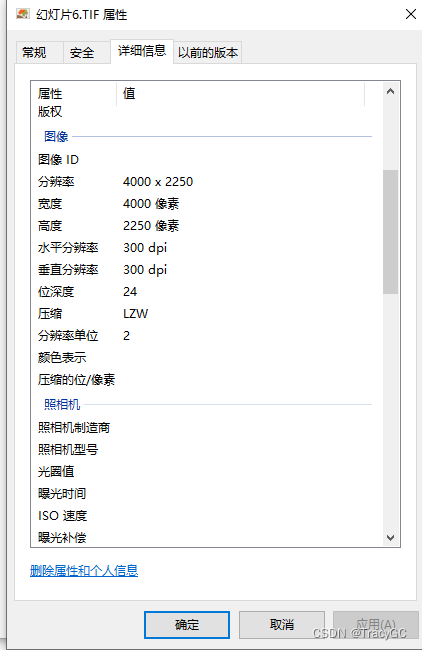
在写论文的过程中,免不了需要绘图,但是visio等软件绘图没有在ppt上绘图比较熟练,尤其流程图结构图. 但是ppt导出的图片也不够清晰,默认分辨率是96dpi,而杂志投稿一般要求至300dpi。解决办法如下: 1.打开注…...
1.倒排索引 2.逻辑斯提回归算法
1.倒排索引 https://help.aliyun.com/zh/open-search/retrieval-engine-edition/introduction-to-inverted-indexes 倒排索引(Inverted Index)是一种数据结构,用于快速查找包含某个特定词或词语的文档。它主要用于全文搜索引擎等应用&#…...

Kafka消费者组
消费者总体工作流程 Consumer Group(CG):消费者组,由多个consumer组成。形成一个消费者组的条件,是所有消费者的groupid相同。 • 消费者组内每个消费者负责消费不同分区的数据,一个分区只能由一个组内消费…...
四. 基于环视Camera的BEV感知算法-BEVDepth
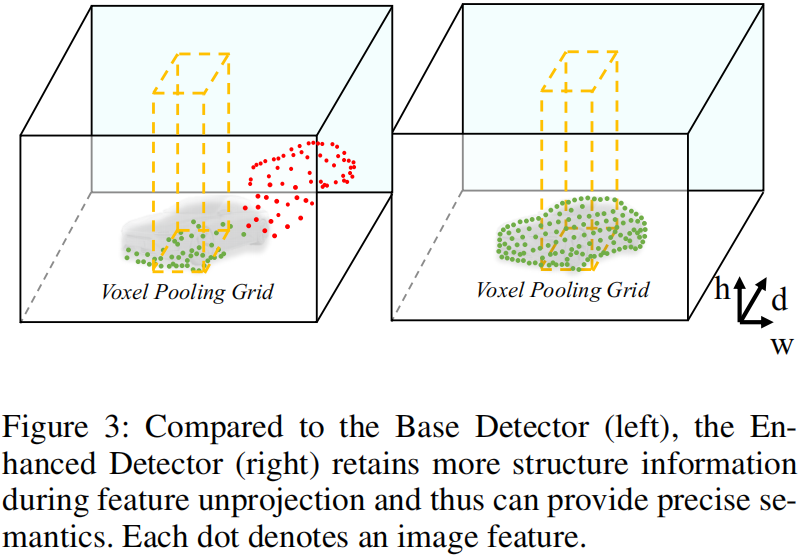
目录 前言0. 简述1. 算法动机&开创性思路2. 主体结构3. 损失函数4. 性能对比总结下载链接参考 前言 自动驾驶之心推出的《国内首个BVE感知全栈系列学习教程》,链接。记录下个人学习笔记,仅供自己参考 本次课程我们来学习下课程第四章——基于环视Cam…...
——使用docker compose安装mysql)
CentOS系统环境搭建(二十五)——使用docker compose安装mysql
centos系统环境搭建专栏🔗点击跳转 文章目录 使用docker compose安装mysqlMySQL81.新建文件夹2.创建docker-compose.yaml3.创建my.cnf4.mysql容器的启动和关闭 MySQL5.71.新建文件夹2.创建docker-compose.yaml3.创建my.cnf4.mysql容器的启动和关闭 使用docker comp…...

协作机器人(Collaborative-Robot)安全碰撞的速度与接触力
协作机器人(Collaborative-Robot)的安全碰撞速度和接触力是一个非常重要的安全指标。在设计和使用协作机器人时,必须确保其与人类或其他物体的碰撞不会对人员造成伤害。 对于协作机器人的安全碰撞速度,一般会设定一个上限值&…...

第11章 GUI Page400~402 步骤二 画直线
运行效果: 源代码: /**************************************************************** Name: wxMyPainterApp.h* Purpose: Defines Application Class* Author: yanzhenxi (3065598272qq.com)* Created: 2023-12-21* Copyright: yanzhen…...
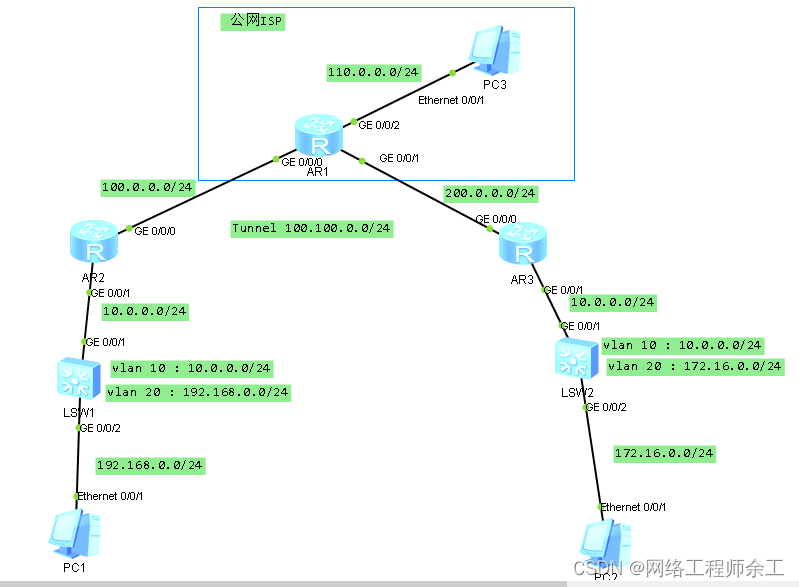
华为gre隧道全部跑静态路由
最终实现: 1、pc1能用nat上网ping能pc3 2、pc1能通过gre访问pc2 3、全部用静态路由做,没有用ospf,如果要用ospf,那么两边除了路由器上跑ospf,核心交换机也得用ospf r2配置: acl number 3000 rule 5 deny…...

【c++】入门1
c关键字 命名空间 在C/C中,变量、函数和后面要学到的类都是大量存在的,这些变量、函数和类的名称将都存在于全局作用域中,可能会导致很多冲突。使用命名空间的目的是对标识符的名称进行本地化,以避免命名冲突或名字污染ÿ…...
Python之Django项目的功能配置
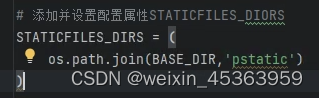
1.创建Django项目 进入项目管理目录,比如:D盘 执行命令:diango-admin startproject demo1 创建项目 如果提示diango命令不存在,搜索diango-admin程序的位置,然后加入到环境变量path中。 进入项目,cd demo…...
P4 音频知识点——PCM音频原始数据
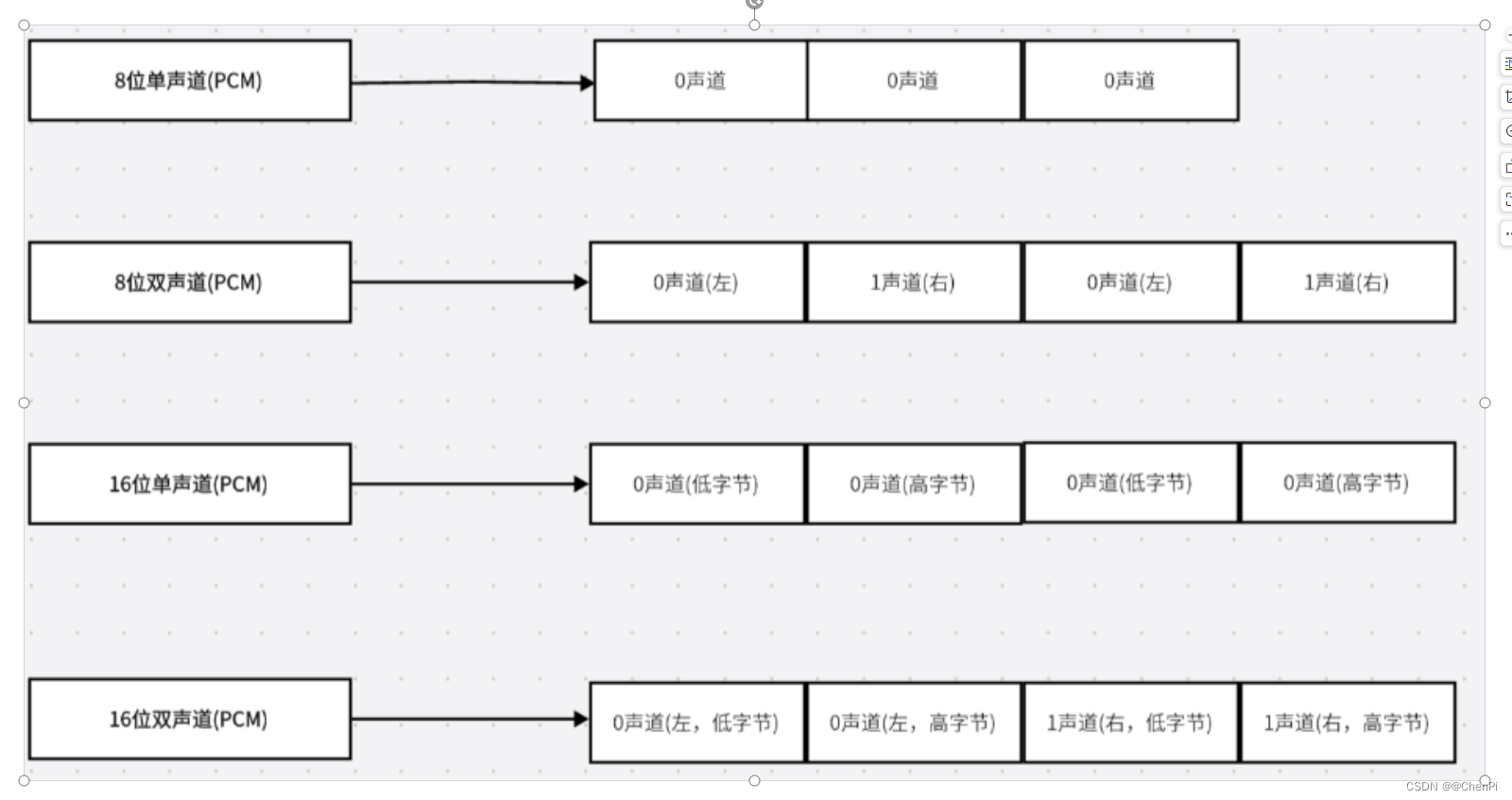
目录 前言 01 PCM音频原始数据 1.1 频率 1.2 振幅: 1.3 比特率 1.4 采样 1.5 量化 1.6 编码 02. PCM数据有以下重要的参数: 采样率: 采集深度 通道数 PCM比特率 PCM文件大小计算: …...

Docker容器MCP服务镜像:AI安全运维与自动化实践
1. 项目概述:一个为Docker容器提供MCP服务的镜像最近在折腾一些自动化工作流,发现很多工具都开始支持一种叫做MCP(Model Context Protocol)的协议。简单来说,MCP就像是一个标准化的“插座”,让各种AI模型&a…...

ARM Debug Interface v5.1架构解析与调试实践
1. ARM Debug Interface v5.1架构深度解析1.1 调试接口技术演进与核心价值ARM调试接口(ADI)技术历经多次迭代,v5.1版本作为当前主流标准,在嵌入式系统调试领域确立了关键地位。调试接口本质上是处理器核与外部调试工具之间的标准化通信桥梁,其…...

如何让Photoshop图层批量导出速度提升3倍?这个开源脚本做到了!
如何让Photoshop图层批量导出速度提升3倍?这个开源脚本做到了! 【免费下载链接】Photoshop-Export-Layers-to-Files-Fast This script allows you to export your layers as individual files at a speed much faster than the built-in script from Ado…...

微服务架构实战:从DDD设计到K8s部署的完整指南
1. 项目概述与核心价值最近几年,微服务架构的热度一直居高不下,从互联网大厂到初创团队,几乎人人都在谈微服务。但说实话,真正能把微服务玩转、落地,并且能稳定支撑业务发展的团队,其实并不多。很多项目要么…...

SuperDuper框架:AI应用开发的组件化与数据库原生集成实践
1. 项目概述:一个颠覆传统AI应用构建的“超级”框架如果你正在为构建一个集成了多种AI模型、数据库和前后端逻辑的复杂应用而感到头疼,那么superduper-io/superduper这个项目,很可能就是你一直在寻找的“瑞士军刀”。简单来说,它不…...
)
紧急更新!Midjourney刚推送的--stylize 1000级调优补丁,已实测提升立体主义结构清晰度达4.8倍(附对比数据集下载)
更多请点击: https://intelliparadigm.com 第一章:Midjourney立体主义风格的本质解构 立体主义并非简单地将物体“打碎再拼合”,而是一种对多维时空感知的视觉转译——Midjourney 通过其隐式扩散先验,以概率化方式重构了布拉克与…...

GoLang简便模板缓存实现
在GoLang开发中,当项目运行时,go的html/template默认行为是每次请求都得重新解析模板文件,当高并发,频繁的磁盘读取会造成非常大的负担,成为明显瓶颈,所以,为了避免重复解析模板文件,…...

PPO 原理与应用
1. PPO 在 RLHF 里到底是干什么的? 在 RLHF 里,我们通常已经有了一个经过 SFT 的模型。这个模型已经比较会回答问题了,但还不一定最符合人类偏好。 于是我们再训练一个 奖励模型 Reward Model,让它模仿人类判断: 这个回…...

从零实现神经网络:前向传播、反向传播与梯度下降原理详解
1. 项目概述:从“黑箱”到“白箱”的探索之旅“人工神经网络”这个词,听起来总带着点科幻和神秘色彩,仿佛一个能自己思考的“黑箱”。很多刚接触的朋友,包括几年前的我,都曾被它吓住——又是矩阵运算,又是梯…...

Go语言设计模式:创建型模式
Go语言设计模式:创建型模式 一、设计模式概述 设计模式是软件设计中反复出现问题的解决方案。Go语言作为一种现代化的编程语言,同样可以应用经典的设计模式。 Go语言中的设计模式特点 接口优先:通过接口实现解耦组合优于继承:Go不…...