
SpringBoot+modbus4j实现ModebusTCP通讯读取数据
场景
Windows上ModbusTCP模拟Master与Slave工具的使用:
Windows上ModbusTCP模拟Master与Slave工具的使用-CSDN博客
Modebus TCP
Modbus由MODICON公司于1979年开发,是一种工业现场总线协议标准。
1996年施耐德公司推出基于以太网TCP/IP的Modbus协议:ModbusTCP。
Modbus协议是一项应用层报文传输协议,包括ASCII、RTU、TCP三种报文类型。
标准的Modbus协议物理层接口有RS232、RS422、RS485和以太网接口,采用master/slave方式通信。
Modbus的操作对象有四种:
线圈、离散输入、保持寄存器、输入寄存器。
Modbus功能码:

关于Java的开源库:
Jamod:
Java Modbus实现:Java Modbus库。该库由Dieter Wimberger实施。
ModbusPal:
ModbusPal是一个正在进行的Java项目,用于创建逼真的Modbus从站模拟器。
下面介绍基于Modebus4j实现读线圈状态数据。
由于预定义的数学函数和/或Python脚本,寄存器值是动态生成的。
ModbusPal依赖于RxTx进行串行通信,而Jython则依赖于脚本支持。
Modbus4J:
Serotonin Software用Java编写的Modbus协议的高性能且易于使用的实现。
支持ASCII,RTU,TCP和UDP传输作为从站或主站,自动请求分区,响应数据类型解析和节点扫描。
JLibModbus:
JLibModbus是java语言中Modbus协议的一种实现。jSSC和RXTX用于通过串行端口进行通信。
该库是一个经过积极测试和改进的项目。
注:
博客:
霸道流氓气质_C#,架构之路,SpringBoot-CSDN博客
实现
1、基于modbus4j实现线圈状态数据的读取。
modbus4j
GitHub - MangoAutomation/modbus4j: A high-performance and ease-of-use implementation of the Modbus protocol written in Java. Supports ASCII, RTU, TCP, and UDP transports as slave or master, automatic request partitioning and response data type parsing.
按照官网介绍,需要在pom文件中添加repository的配置
<repositories><repository><releases><enabled>false</enabled></releases><snapshots><enabled>true</enabled></snapshots><id>ias-snapshots</id><name>Infinite Automation Snapshot Repository</name><url>https://maven.mangoautomation.net/repository/ias-snapshot/</url></repository><repository><releases><enabled>true</enabled></releases><snapshots><enabled>false</enabled></snapshots><id>ias-releases</id><name>Infinite Automation Release Repository</name><url>https://maven.mangoautomation.net/repository/ias-release/</url></repository></repositories>添加位置
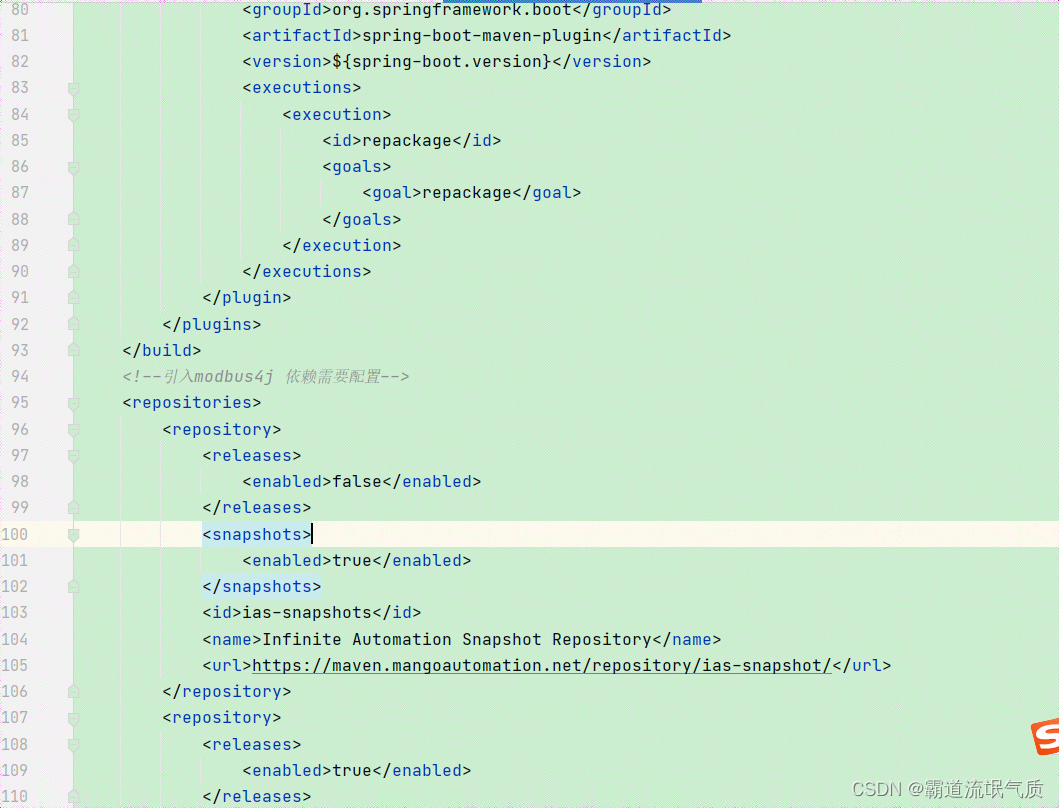
然后添加依赖
<dependency><groupId>com.infiniteautomation</groupId><artifactId>modbus4j</artifactId><version>3.0.3</version></dependency>2、新建modbus4j工具类
package com.badao.demo.utils;import com.serotonin.modbus4j.BatchRead;
import com.serotonin.modbus4j.BatchResults;
import com.serotonin.modbus4j.ModbusFactory;
import com.serotonin.modbus4j.ModbusMaster;
import com.serotonin.modbus4j.exception.ErrorResponseException;
import com.serotonin.modbus4j.exception.ModbusInitException;
import com.serotonin.modbus4j.exception.ModbusTransportException;
import com.serotonin.modbus4j.ip.IpParameters;
import com.serotonin.modbus4j.locator.BaseLocator;public class Modbus4jUtils {/*** 工厂。*/static ModbusFactory modbusFactory;static {if (modbusFactory == null) {modbusFactory = new ModbusFactory();}}/*** 获取master** @return* @throws ModbusInitException*/public static ModbusMaster getMaster(String ip,int port) throws ModbusInitException {IpParameters params = new IpParameters();params.setHost(ip);params.setPort(port);// modbusFactory.createRtuMaster(wapper); //RTU 协议// modbusFactory.createUdpMaster(params);//UDP 协议// modbusFactory.createAsciiMaster(wrapper);//ASCII 协议ModbusMaster master = modbusFactory.createTcpMaster(params, false);// TCP 协议master.init();return master;}/*** 读取[01 Coil Status 0x]类型 开关数据** @param slaveId*            slaveId* @param offset*            位置* @return 读取值* @throws ModbusTransportException*             异常* @throws ErrorResponseException*             异常*/public static Boolean readCoilStatus(ModbusMaster master,int slaveId, int offset)throws ModbusTransportException, ErrorResponseException {// 01 Coil StatusBaseLocator<Boolean> loc = BaseLocator.coilStatus(slaveId, offset);Boolean value = master.getValue(loc);return value;}/*** 读取[02 Input Status 1x]类型 开关数据** @param slaveId* @param offset* @return* @throws ModbusTransportException* @throws ErrorResponseException*/public static Boolean readInputStatus(ModbusMaster master,int slaveId, int offset)throws ModbusTransportException, ErrorResponseException {// 02 Input StatusBaseLocator<Boolean> loc = BaseLocator.inputStatus(slaveId, offset);Boolean value = master.getValue(loc);return value;}/*** 读取[03 Holding Register类型 2x]模拟量数据** @param slaveId*            slave Id* @param offset*            位置* @param dataType*            数据类型,来自com.serotonin.modbus4j.code.DataType* @return* @throws ModbusTransportException*             异常* @throws ErrorResponseException*             异常*/public static Number readHoldingRegister(ModbusMaster master,int slaveId, int offset, int dataType)throws ModbusTransportException, ErrorResponseException {// 03 Holding Register类型数据读取BaseLocator<Number> loc = BaseLocator.holdingRegister(slaveId, offset, dataType);Number value = master.getValue(loc);return value;}/*** 读取[04 Input Registers 3x]类型 模拟量数据** @param slaveId*            slaveId* @param offset*            位置* @param dataType*            数据类型,来自com.serotonin.modbus4j.code.DataType* @return 返回结果* @throws ModbusTransportException*             异常* @throws ErrorResponseException*             异常*/public static Number readInputRegisters(ModbusMaster master,int slaveId, int offset, int dataType)throws ModbusTransportException, ErrorResponseException {// 04 Input Registers类型数据读取BaseLocator<Number> loc = BaseLocator.inputRegister(slaveId, offset, dataType);Number value = master.getValue(loc);return value;}/*** 批量读取使用方法** @throws ModbusTransportException* @throws ErrorResponseException* @throws ModbusInitException* @return*/public static BatchResults<Integer> batchRead(ModbusMaster master,BatchRead<Integer> batchRead) throws ModbusTransportException, ErrorResponseException, ModbusInitException {// 是否连续请求batchRead.setContiguousRequests(false);BatchResults<Integer> results = master.send(batchRead);return results;}
}
3、使用方式
新建master
ModbusMaster master = Modbus4jUtils.getMaster(modebustcpIp, port);这里的ip和端口来自配置文件
单个读取数据
Boolean aBoolean = Modbus4jUtils.readCoilStatus(master, 1, 0);这里1代表slaveId,0代表offset
批量读取数据
BatchRead<Integer> batch = new BatchRead<>();List<Locator> locatorList = locatorConfig.getLocatorList();locatorList.forEach(locator -> batch.addLocator(locator.getId(), BaseLocator.coilStatus(locator.getSlaveId(),locator.getOffset())));BatchResults<Integer> batchResults = Modbus4jUtils.batchRead(master, batch);Boolean valueOne = (Boolean) batchResults.getValue(0);Boolean valueTwo = (Boolean) batchResults.getValue(1);Boolean valueThree = (Boolean) batchResults.getValue(2);这里批量读取的配置来自配置文件
4、业务示例
在定时任务中批量读取指定slaveId和offset的线圈状态数据
import com.badao.demo.config.LocatorConfig;
import com.badao.demo.entity.Locator;
import com.badao.demo.utils.Modbus4jUtils;
import com.serotonin.modbus4j.BatchRead;
import com.serotonin.modbus4j.BatchResults;
import com.serotonin.modbus4j.ModbusMaster;
import com.serotonin.modbus4j.exception.ErrorResponseException;
import com.serotonin.modbus4j.exception.ModbusInitException;
import com.serotonin.modbus4j.exception.ModbusTransportException;
import com.serotonin.modbus4j.locator.BaseLocator;
import org.springframework.beans.factory.annotation.Autowired;
import org.springframework.beans.factory.annotation.Value;
import org.springframework.context.annotation.Configuration;
import org.springframework.scheduling.annotation.EnableScheduling;
import org.springframework.scheduling.annotation.Scheduled;
import java.time.LocalDateTime;
import java.util.List;@Configuration
@EnableScheduling
public class GetModbusTCPDataTask {@Value("${modebustcp.ip}")private String modebustcpIp;@Value("${modebustcp.port}")private Integer port;@Autowiredprivate LocatorConfig locatorConfig;@Scheduled(fixedRateString = "2000")public void  getData() throws ModbusInitException {ModbusMaster master = Modbus4jUtils.getMaster(modebustcpIp, port);BatchRead<Integer> batch = new BatchRead<>();List<Locator> locatorList = locatorConfig.getLocatorList();locatorList.forEach(locator -> batch.addLocator(locator.getId(), BaseLocator.coilStatus(locator.getSlaveId(),locator.getOffset())));try {//单个读取//Boolean aBoolean = Modbus4jUtils.readCoilStatus(master, 1, 0);//批量读取BatchResults<Integer> batchResults = Modbus4jUtils.batchRead(master, batch);Boolean valueOne = (Boolean) batchResults.getValue(0);Boolean valueTwo = (Boolean) batchResults.getValue(1);Boolean valueThree = (Boolean) batchResults.getValue(2);System.out.println(LocalDateTime.now());System.out.println("valueOne:"+valueOne);System.out.println("valueTwo:"+valueTwo);System.out.println("valueThree:"+valueThree);} catch (ModbusTransportException e) {e.printStackTrace();} catch (ErrorResponseException e) {e.printStackTrace();} catch (ModbusInitException e) {e.printStackTrace();}}
}
5、本地测试效果

6、线上测试效果
线上使用RS485转以太网模块,会将其转换成MODBUS TCP服务端,端口为默认502,slaveid为2

通讯测试效果
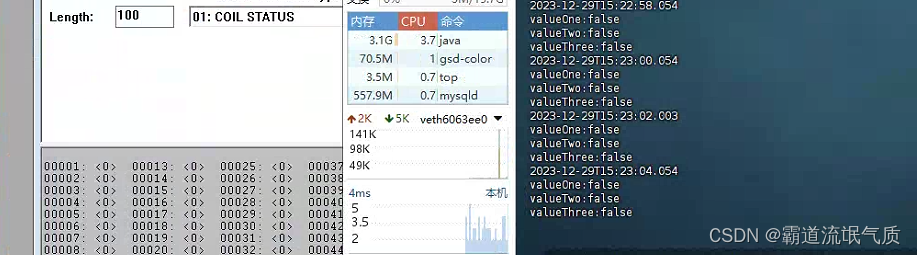
7、SpringBoot中进行ModbusTCP通讯时提示:
com.serotonin.modbus4j.exception.ErrorResponseException:Illegal function

这是因为功能码不对应,使用Modbus Slave Definition定义的功能码为03 Holding Register(4x),而在代码中连接后执行的是读取线圈状态的功能码

所以将功能码修改对应即可
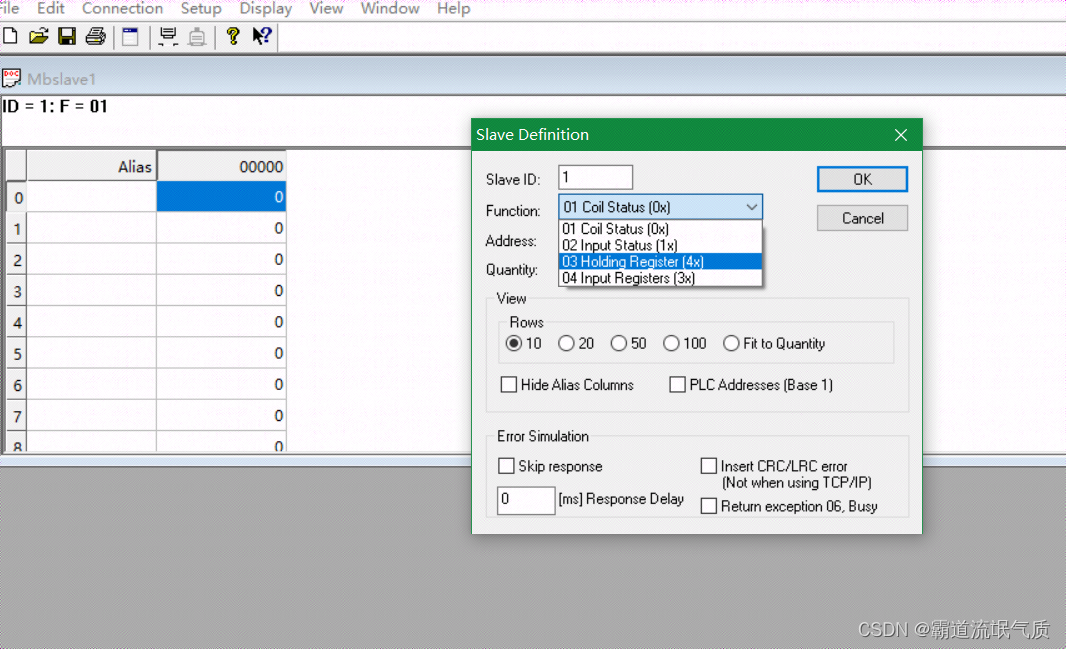
相关文章:
SpringBoot+modbus4j实现ModebusTCP通讯读取数据
场景 Windows上ModbusTCP模拟Master与Slave工具的使用: Windows上ModbusTCP模拟Master与Slave工具的使用-CSDN博客 Modebus TCP Modbus由MODICON公司于1979年开发,是一种工业现场总线协议标准。 1996年施耐德公司推出基于以太网TCP/IP的Modbus协议&…...

Linux性能优化全景指南
Part1 Linux性能优化 1、性能优化性能指标 高并发和响应快对应着性能优化的两个核心指标:吞吐和延时 应用负载角度:直接影响了产品终端的用户体验系统资源角度:资源使用率、饱和度等 性能问题的本质就是系统资源已经到达瓶颈,但…...
树莓派 ubuntu20.04下 python调讯飞的语音API,语音识别和语音合成
目录 1.环境搭建2.去讯飞官网申请密钥3.语音识别(sst)4.语音合成(tts)5.USB声卡可能报错 1.环境搭建 #环境说明:(尽量在ubuntu下使用, 本次代码均在该环境下实现) sudo apt-get install sox # 安装语音播放软件 pip …...
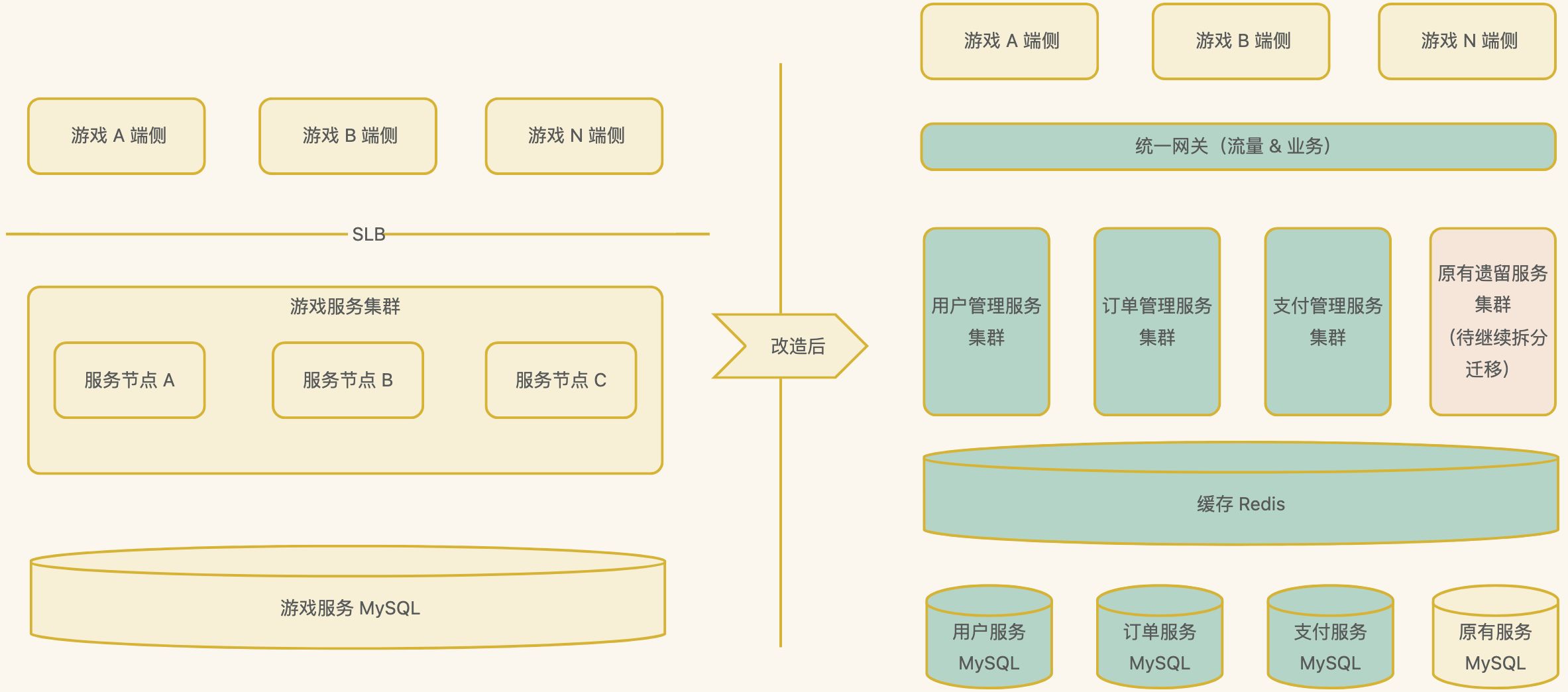
分布式系统架构设计之分布式系统实践案例和未来展望
分布式系统在过去的几十年里经历了长足的发展,从最初的简单分布式架构到今天的微服务、云原生等先进架构,取得了丰硕的成果。本文将通过实际案例分享分布式系统的架构实践,并展望未来可能的发展方向。 一、实践案例 1、微服务化实践 背景 …...

【办公软件】Excel双坐标轴图表
在工作中整理测试数据,往往需要一个图表展示两个差异较大的指标。比如共有三个数据,其中两个是要进行对比的温度值,另一个指标是两个温度的差值,这个差值可能很小。 举个实际的例子:数据如下所示,NTC检测温…...

彻底理解前端安全面试题(1)—— XSS 攻击,3种XSS攻击详解,建议收藏(含源码)
前言 前端关于网络安全看似高深莫测,其实来来回回就那么点东西,我总结一下就是 3 1 4,3个用字母描述的【分别是 XSS、CSRF、CORS】 一个中间人攻击。当然 CORS 同源策略是为了防止攻击的安全策略,其他的都是网络攻击。除了这…...

UE5.1_AI随机漫游
UE5.1_AI随机漫游 目录 UE5.1_AI随机漫游 AI随机漫游方法 方法1:AI角色蓝图直接写方法...
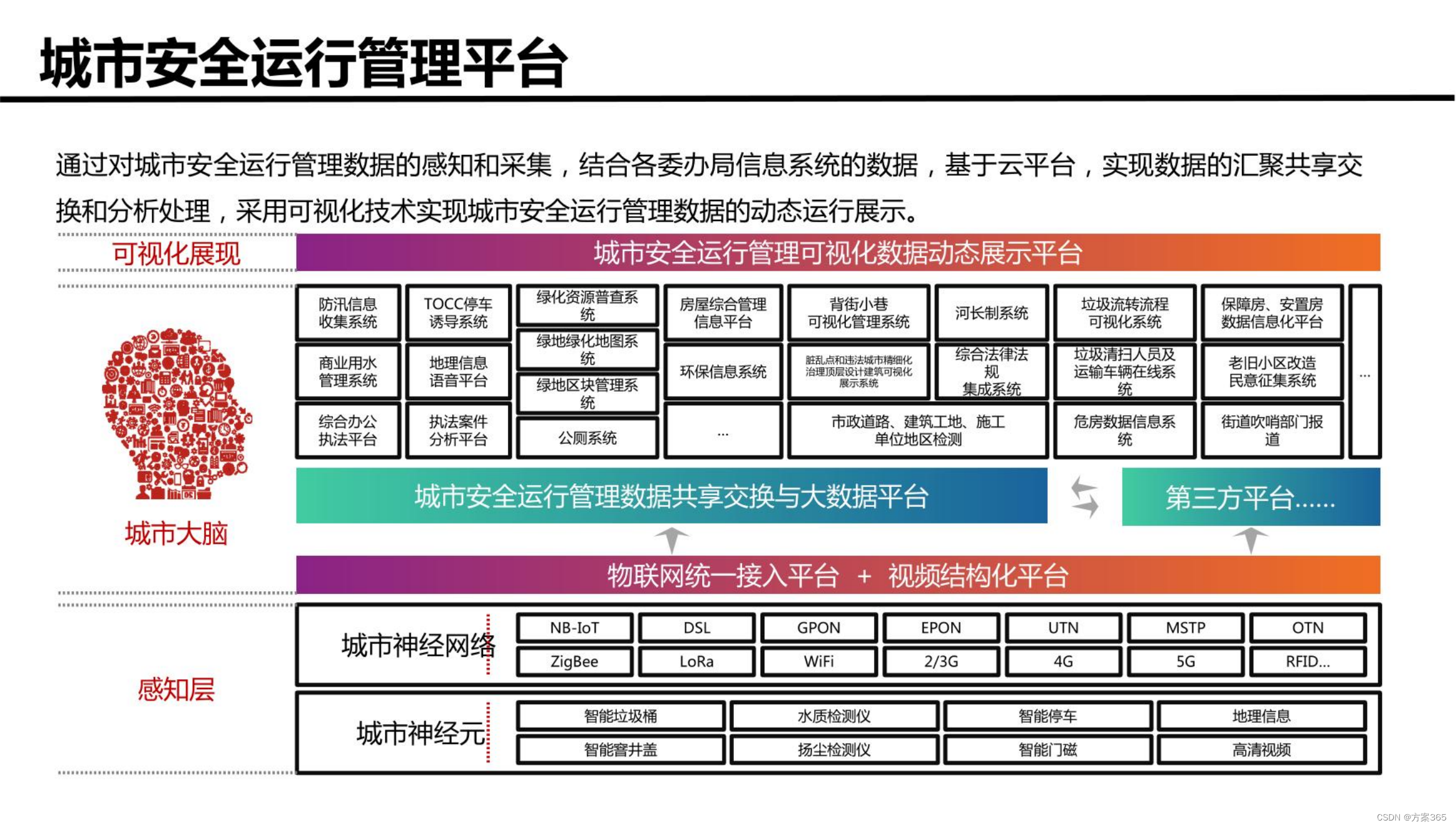
智慧城市新型基础设施建设综合方案:文件全文52页,附下载
关键词:智慧城市建设方案,智慧城市发展的前景和趋势,智慧城市项目方案,智慧城市管理平台,数字化城市,城市数字化转型 一、智慧城市新基建建设背景 1、城市化进程加速:随着城市化进程的加速&am…...
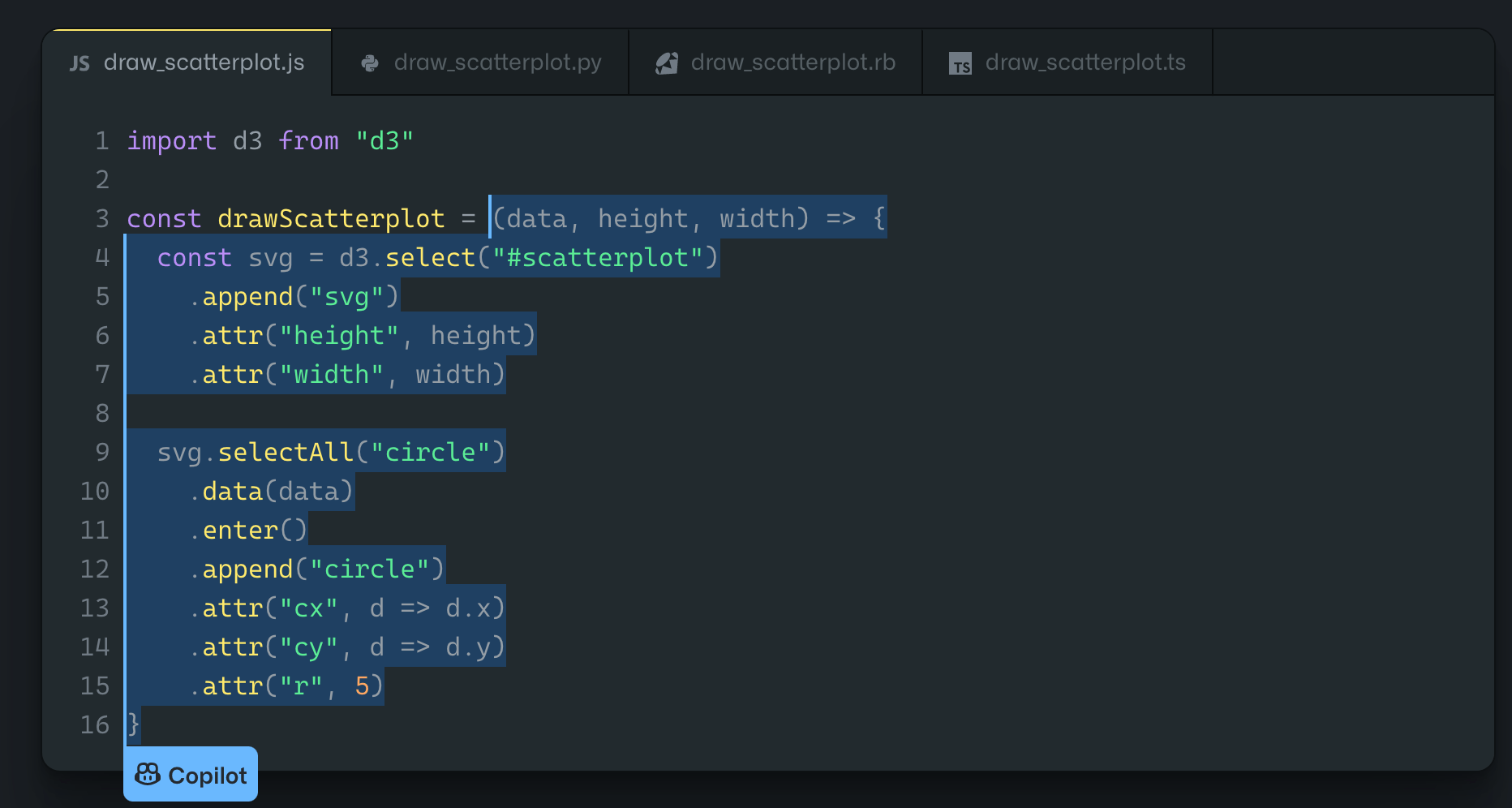
GitHub Copilot 终极详细介绍
编写代码通常是一项乏味且耗时的任务。现代开发人员一直在寻找新的方法来提高编程的生产力、准确性和效率。 像 GitHub Copilot 这样的自动代码生成工具可以使这成为可能。 GitHub Copilot 到底是什么? GitHub Copilot 于 2021 年 10 月推出,是 GitHub 的…...

LeetCode第63题 - 不同路径 II
题目 解答 class Solution {public int uniquePathsWithObstacles(int[][] obstacleGrid) {int m obstacleGrid.length;int n obstacleGrid[0].length;if (obstacleGrid[0][0] 1) {return 0;}if (obstacleGrid[m - 1][n - 1] 1) {return 0;}int[][] dp new int[m][n];dp…...
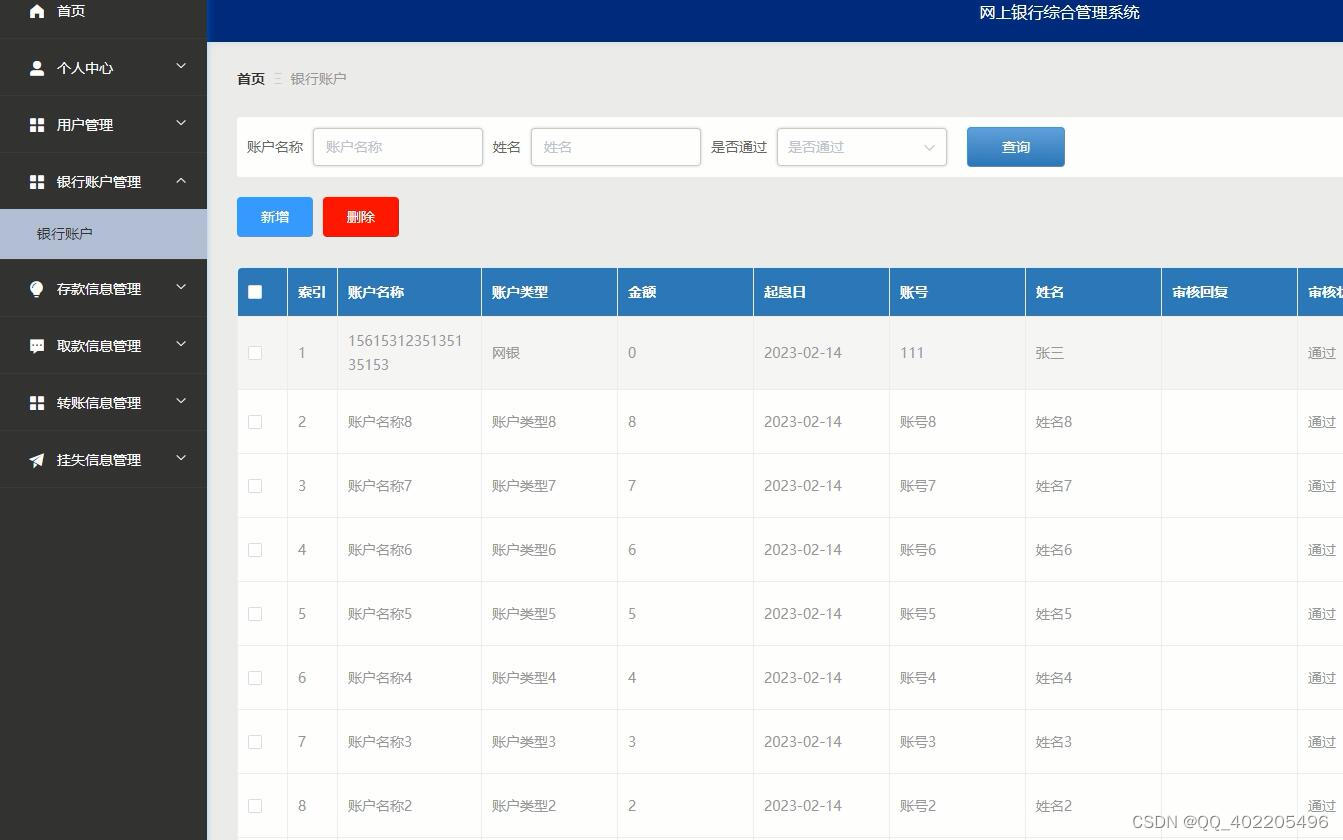
python+django网上银行业务综合管理系统vue_bvj8b
本课题主要研究如何用信息化技术改善传统网上银行综合管理行业的经营和管理模式,简化网上银行综合管理的难度,根据管理实际业务需求,调研、分析和编写系统需求文档,设计编写符合银行需要的系统说明书,绘制数据库结构模…...

【软件工程】走进瀑布模型:传统软件开发的经典之路
🍎个人博客:个人主页 🏆个人专栏: 软件工程 ⛳️ 功不唐捐,玉汝于成 目录 前言: 正文 主要阶段: 优点: 缺点: 应用范围: 结语 我的其他博客 前言&am…...
C卷 (JavaPythonNode.jsC语言C++))
两个字符串间的最短路径问题 (100%用例)C卷 (JavaPythonNode.jsC语言C++)
给定两个字符串,分别为字符串A与字符串B。例如A字符串为ABCABBA,B字符串为CBABAC可以得到下图m*n的二维数组,定义原点为(0,0),终点为(m,n),水平与垂直的每一条边距离为1,映射成坐标系如下图 从原点(0,0)到(0,A)为水平边,距离为1,从(0,A)到(A,C)为垂直边,距离为1;假设两…...

通过ADB来实现脚本来控制手机
ADB 简介 adb的全称为Android Debug Bridge,安卓调试桥,可以通过调试命令来控制手机,诸如开机,关机等按键控制;或者启动,关闭应用;异或进行触摸模拟. 通过学习adb,可以实现简单的脚本控制,最大的特点是不需要root,对于普通手机都可以进行,帮助我们完成一些简单的重复性事件,…...
机器学习之K-means聚类
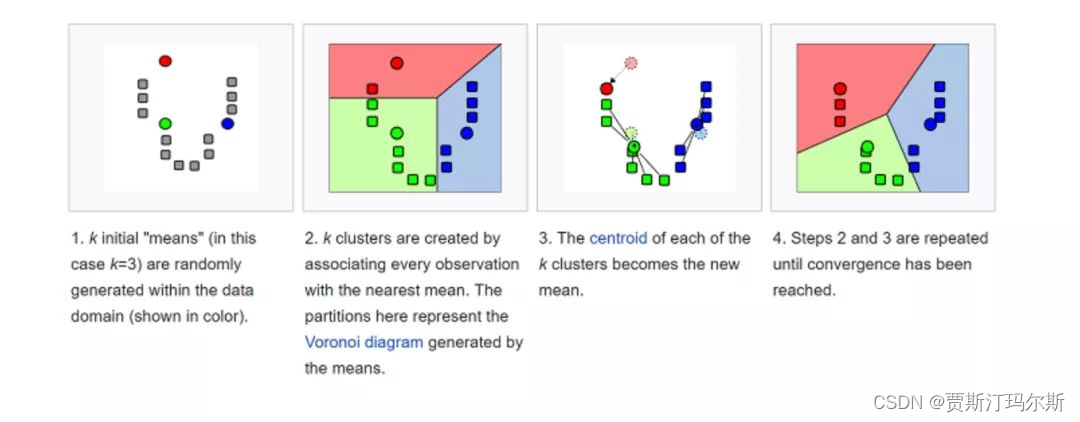
概念 K-means是一种常用的机器学习算法,用于聚类分析。聚类是一种无监督学习方法,它试图将数据集中的样本划分为具有相似特征的组(簇)。K-means算法的目标是将数据集划分为K个簇,其中每个样本属于与其最近的簇中心。 以下是K-means算法的基本步骤: 选择簇的数量(K值)…...

SSH 端口转发:如何将服务绑定到本地 IP 地址
在日常工作中,我们经常需要访问位于远程服务器上的服务,如数据库、Web 应用程序或其他类型的服务器。直接访问这些服务可能会因为安全限制或网络配置而变得复杂或不可能。这时,SSH 端口转发就成了我们的得力助手。在本篇博客中,我…...
回归预测 | MATLAB实ZOA-LSTM基于斑马优化算法优化长短期记忆神经网络的多输入单输出数据回归预测模型 (多指标,多图)
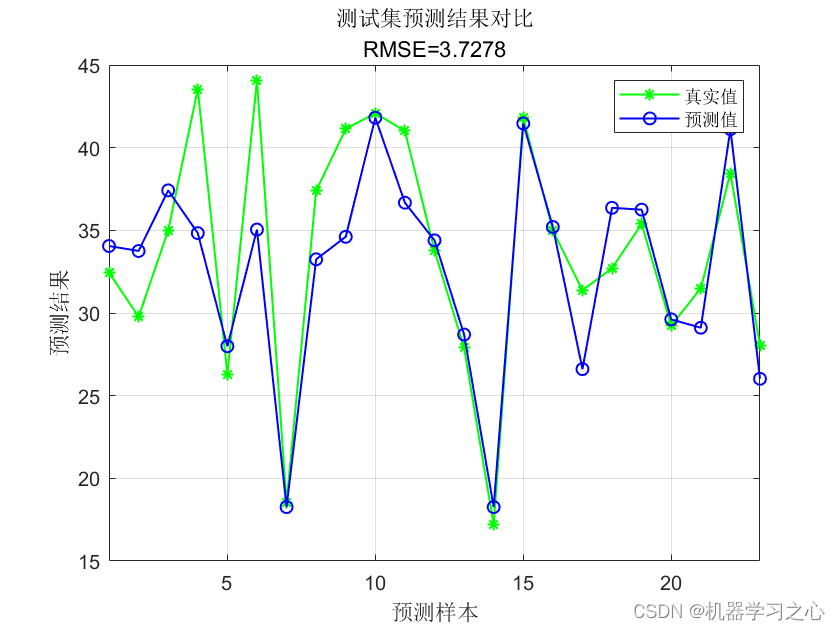
回归预测 | MATLAB实ZOA-LSTM基于斑马优化算法优化长短期记忆神经网络的多输入单输出数据回归预测模型 (多指标,多图) 目录 回归预测 | MATLAB实ZOA-LSTM基于斑马优化算法优化长短期记忆神经网络的多输入单输出数据回归预测模型 (…...
python实现图像的二维傅里叶变换——冈萨雷斯数字图像处理
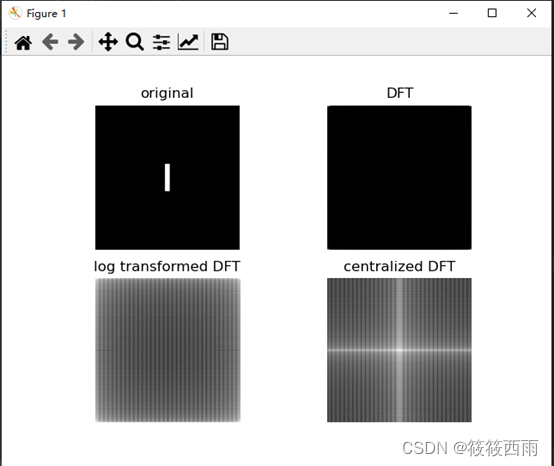
原理 二维傅里叶变换是一种在图像处理中常用的数学工具,它将图像从空间域(我们通常看到的像素排列)转换到频率域。这种变换揭示了图像的频率成分,有助于进行各种图像分析和处理,如滤波、图像增强、边缘检测等。 在数学…...

We are a team - 华为OD统一考试
OD统一考试 题解: Java / Python / C 题目描述 总共有 n 个人在机房,每个人有一个标号 (1<标号<n) ,他们分成了多个团队,需要你根据收到的 m 条消息判定指定的两个人是否在一个团队中,具体的: 消息构成为 a b …...

NFC物联网智慧校园解决方案
近场通信(Near Field Communication,NFC)又称近距离无线通信,是一种短距离的高频无线通信技术,允许电子设备之间进行非接触式点对点数据传输交换数据。这个技术由免接触式射频识别(RFID)发展而来,并兼容 RFID,主要用于…...

Flowable7.x实战指南:从部署到前端渲染,详解流程图可视化全链路
1. Flowable7.x流程图可视化全流程解析 第一次接触Flowable7.x的流程图可视化功能时,我完全被它强大的业务建模能力震撼到了。想象一下,你只需要在可视化编辑器里拖拽几个节点,就能构建出复杂的业务流程,这比直接写XML定义要直观…...

TradingAgents-CN终极教程:10分钟搭建你的AI股票投资分析系统
TradingAgents-CN终极教程:10分钟搭建你的AI股票投资分析系统 【免费下载链接】TradingAgents-CN 基于多智能体LLM的中文金融交易框架 - TradingAgents中文增强版 项目地址: https://gitcode.com/GitHub_Trending/tr/TradingAgents-CN 还在为复杂的金融量化系…...

从零搭建Binance Trade Bot:精通加密货币自动交易工具配置与使用
从零搭建Binance Trade Bot:精通加密货币自动交易工具配置与使用 【免费下载链接】binance-trade-bot Automated cryptocurrency trading bot 项目地址: https://gitcode.com/gh_mirrors/bi/binance-trade-bot 一、核心功能解析:Binance Trade Bo…...

2026 AI关键词搜索排名优化行业专业测评:中之网科技江苏有限公司——技术驱动,万词霸屏,全链路AI获客解决方案
2026 AI关键词搜索排名优化行业专业测评:中之网科技江苏有限公司——技术驱动,万词霸屏,全链路AI获客解决方案一、测评背景与核心维度随着AI大模型(DeepSeek、豆包、腾讯元宝、Kimi、文心一言、通义千问等)成为企业获客…...

如何用Qlib快速打造你的AI量化交易系统:新手完整指南
如何用Qlib快速打造你的AI量化交易系统:新手完整指南 【免费下载链接】qlib Qlib 是一个面向人工智能的量化投资平台,其目标是通过在量化投资中运用AI技术来发掘潜力、赋能研究并创造价值,从探索投资策略到实现产品化部署。该平台支持多种机器…...

3个场景解锁BongoCat:让呆萌猫咪成为你的终极桌面生产力伙伴
3个场景解锁BongoCat:让呆萌猫咪成为你的终极桌面生产力伙伴 【免费下载链接】BongoCat 让呆萌可爱的 Bongo Cat 陪伴你的键盘敲击与鼠标操作,每一次输入都充满趣味与活力! 项目地址: https://gitcode.com/gh_mirrors/bong/BongoCat 在…...

G-Helper终极指南:5分钟解决ROG游戏本色彩配置文件丢失问题
G-Helper终极指南:5分钟解决ROG游戏本色彩配置文件丢失问题 【免费下载链接】g-helper Lightweight Armoury Crate alternative for Asus laptops. Control tool for ROG Zephyrus G14, G15, G16, M16, Flow X13, Flow X16, TUF, Strix, Scar and other models 项…...

基于Docker与Orthanc构建轻量级医学影像PACS系统实践
1. 为什么选择DockerOrthanc搭建PACS系统 第一次接触医学影像管理系统时,我被传统PACS的复杂部署流程吓到了——需要配置数据库、安装依赖库、调试网络参数,光是环境准备就要花上大半天。直到发现Orthanc这个宝藏工具,配合Docker容器化技术&a…...

WebPlotDigitizer实战指南:从科研图表中智能提取数据的完整方案
WebPlotDigitizer实战指南:从科研图表中智能提取数据的完整方案 【免费下载链接】WebPlotDigitizer WebPlotDigitizer: 一个基于 Web 的工具,用于从图形图像中提取数值数据,支持 XY、极地、三角图和地图。 项目地址: https://gitcode.com/g…...

4090D显存无忧!Guohua Diffusion优化策略详解,小白也能稳定运行
4090D显存无忧!Guohua Diffusion优化策略详解,小白也能稳定运行 1. 工具概览:专为4090D优化的国风绘画神器 Guohua Diffusion是一款基于原生国风扩散模型开发的本地绘画生成工具,针对NVIDIA RTX 4090D显卡进行了深度优化。不同于…...