
骑砍战团MOD开发(29)-module_scenes.py游戏场景
骑砍1战团mod开发-场景制作方法_哔哩哔哩_bilibili https://www.bilibili.com/video/BV1Cw411N7G4/
一.骑砍游戏场景
骑砍战团中进入城堡,乡村,战斗地图都被定义为场景,由module_scenes.py进行管理。
scene(游戏场景) = 天空盒(Skyboxes.py) + 地形(terrain code) + 场景物(scene_obj)
#  Each scene record contains the following fields:
#  1) Scene id {string}: used for referencing scenes in other files. The prefix scn_ is automatically added before each scene-id.
#  2) Scene flags {int}. See header_scenes.py for a list of available flags
#  3) Mesh name {string}: This is used for indoor scenes only. Use the keyword "none" for outdoor scenes.
#  4) Body name {string}: This is used for indoor scenes only. Use the keyword "none" for outdoor scenes.
#  5) Min-pos {(float,float)}: minimum (x,y) coordinate. Player can't move beyond this limit.
#  6) Max-pos {(float,float)}: maximum (x,y) coordinate. Player can't move beyond this limit.
#  7) Water-level {float}.
#  8) Terrain code {string}: You can obtain the terrain code by copying it from the terrain generator screen
#  9) List of other scenes accessible from this scene {list of strings}.
#     (deprecated. This will probably be removed in future versions of the module system)
#     (In the new system passages are used to travel between scenes and
#     the passage's variation-no is used to select the game menu item that the passage leads to.)
# 10) List of chest-troops used in this scene {list of strings}. You can access chests by placing them in edit mode.
#     The chest's variation-no is used with this list for selecting which troop's inventory it will access.
通过scene_flags标识为室内场景/室外场景,出生点随机生成等
#flags
##室内室外场景,进入城堡为室内场景,野外战斗为室外场景
sf_indoors           = 0x00000001   #The scene shouldn't have a skybox and lighting by sun.##是否加载天空盒
sf_force_skybox      = 0x00000002   #Force adding a skybox even if indoors flag is set.
sf_generate          = 0x00000100   #Generate terrain by terran-generator
sf_randomize         = 0x00000200   #Randomize terrain generator key##是否随机出生点
sf_auto_entry_points = 0x00000400   #Automatically create entry points
sf_no_horses         = 0x00000800   #Horses are not avaible
sf_muddy_water       = 0x00001000   #Changes the shader of the river mesh
二.场景天空盒
CommonRes\skyboxes.brf 存放天空盒模型,骑砍天空盒是一个球体,材质支持RGB,HDR等天空盒纹理。
Skyboxes.py 存放天空盒配置,高光和反射程度,实现夜晚,白天等不同时间的天空盒效果.也提供API实现天空盒的设置.
# Scene parameters handlingscene_set_day_time                           = 1266  # (scene_set_day_time, <value>),# Defines the time for the scene to force the engine to select a different skybox than the one dictated by current game time. Must be called within ti_before_mission_start trigger in module_mission_templates.py. Value should be in range 0..23.
set_rain                                     = 1797  # (set_rain, <rain-type>, <strength>),# Sets a new weather for the mission. Rain_type values: 0 = clear, 1 = rain, 2 = snow. Strength is typically used in range 0..100 but is actually unlimited. Affects number of particles and fog density.
set_fog_distance                             = 1798  # (set_fog_distance, <distance_in_meters>, [fog_color]),# Sets the density (and optionally color) of the fog for the mission.set_skybox                                   = 2389  # (set_skybox, <non_hdr_skybox_index>, <hdr_skybox_index>),# Version 1.153+. Forces the scene to be rendered with specified skybox. Index of -1 will disable.
set_startup_sun_light                        = 2390  # (set_startup_sun_light, <r>, <g>, <b>),# Version 1.153+. Defines the sunlight color for the scene.
set_startup_ambient_light                    = 2391  # (set_startup_ambient_light, <r>, <g>, <b>),# Version 1.153+. Defines the ambient light level and colour for the scene. Expects Fixed Point values between 0 and 1.
set_startup_ground_ambient_light             = 2392  # (set_startup_ground_ambient_light, <r>, <g>, <b>),# Version 1.153+. Defines the ambient light color for the ground.
get_startup_sun_light                        = 2394  # (get_startup_sun_light, <position_no>),# Version 1.165+. Returns startup sunlight color in (x, y, z) coordinates of position register.
get_startup_ambient_light                    = 2395  # (get_startup_ambient_light, <position_no>),# Version 1.165+. Returns startup ambient light color in (x, y, z) coordinates of position register.
get_startup_ground_ambient_light             = 2396  # (get_startup_ground_ambient_light, <position_no>),# Version 1.165+. Returns startup ambient ground lighting color in (x, y, z) coordinates of position register.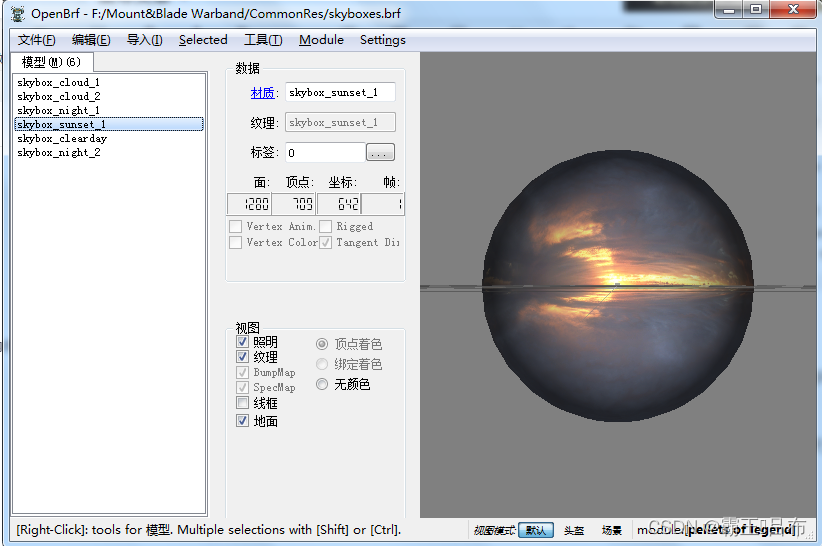
三.场景地形
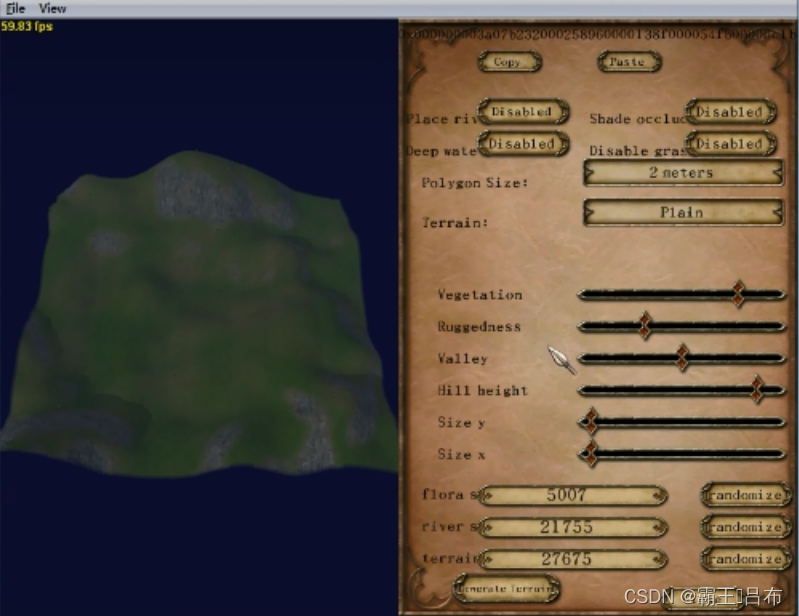
骑砍引擎中地形不采用静态模型进行实现,为了管理不同的情况下的地形,通过地形代码terrain code进行控制,地形代码包含地形长宽,地形植被茂密程度,高低起伏比例等特征,在大地图左下角的地形tab页进行编辑生成.
四.场景物
骑砍引擎将定义的场景名添加scn前缀实现场景物的管理.场景物不仅包含静态的模型如门,城墙等,还包含地形增量,出生点,通道,AI网格等信息.
场景物(scene_obj) = 静态模型房子/门(scene_prop) + 出生点(entry_point) + AI网格(控制AI自动游荡) + 通道(Passage).
例如城堡town1的对应的scene_obj为scn_town1.sco,存放在SceneObj\scn_town1.sco中
sco文件暂无编辑工具进行编辑,需调整骑砍战团为编辑作弊模式,进入场景后Ctrl + E进行编辑.
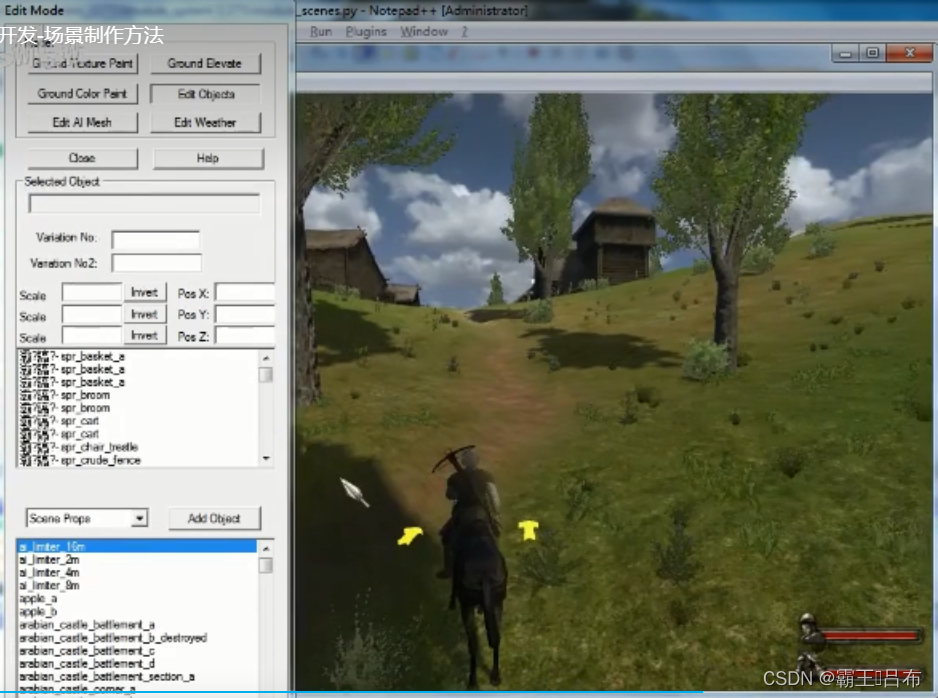
骑砍引擎场景编辑操作指导如下,例如:C/E/WASD 上下左右前后移动摄像机
Left Mouse Button: While pressed, mouse movements rotate
the camera.
H: Hides/unhides the highlights and user interface objects
(Good for taking a screenshot).
CTRL + Any movement key: Speeds up the camera
movements, slows down the object movements.Edit Objects Mode
----------------------
Right Mouse Button: Selects objects.
CTRL + Right Mouse Button: Selects multiple objects.
Double Click on Scene Objects list: Selects the clicked
object and moves the camera towards it.
A,S,D,W: Moves the camera.
C,E: Increases/decreases the height of the camera.
G: While pressed, mouse movements move the selected
object(s) parallel to the ground.
T: While pressed, mouse movements increase/decrease the
height of the selected object(s).
X,Y,Z: While pressed, mouse movements rotate the selected
object(s) with respect to the object's X, Y and Z axis.
U: While pressed, mouse movements rotate the selected
object(s) with respect to the "Up" axis of the world.
R: Resets the selected object's rotation.
B: Scale selected object.
B + X: Scale selected object along X axis.
B + Y: Scale selected object along Y axis.
B + Z: Scale selected object along Z axis.
Alt + B: Resets the selected object's scale.
Delete: Deletes selected object(s).
Space: Enables add object mode.Add Object Mode
-------------------
Right Mouse Button: Adds current object to scene.
Space: Disables add object mode.
T, U, X, Y, Z, R and B can also be used in this mode.Ground Elevate and Ground Paint Mode
-----------------------------------------------
Right Mouse Button: Elevates the ground up or down in
"Ground Elevate" mode and paints the ground in "Ground
Paint" mode.
Midle Mouse Button: Clears the elevation in "Ground Elevate"
mode and clears the paints in "Ground Paint" mode.Edit AI Mesh Mode
---------------------
Right Mouse Button: Selects AI mesh objects.
CTRL + Right Mouse Button: Selects multiple AI mesh objects.
1: Activates Vertex Editing Mode
2: Activates Edge Editing Mode
3: Activates Face Editing Mode
G, T, X, Y, Z, B and Delete can also be used in this mode.Additional Help
------------------
- You can save your changes only when you leave the edit
mode.- You can not undo your works, you can only discard changes
while leaving the edit mode. So you should save your work
occasionally by leaving the edit mode and re-entering it.- Scene files are located under [Current Module]\SceneObj
foler. When you save your changes, the related scene file
under this folder will be updated.- Create AI Mesh button works only on outdoor scenes
相关文章:
骑砍战团MOD开发(29)-module_scenes.py游戏场景
骑砍1战团mod开发-场景制作方法_哔哩哔哩_bilibilihttps://www.bilibili.com/video/BV1Cw411N7G4/ 一.骑砍游戏场景 骑砍战团中进入城堡,乡村,战斗地图都被定义为场景,由module_scenes.py进行管理。 scene(游戏场景) 天空盒(Skyboxes.py) 地形(terrain code) 场景物(scene_…...
ROS学习记录:ROS系统中的激光雷达消息包的数据格式
一、在工作空间中输入source ./devel/setup.bash 二、输入roslaunch wpr_simulation wpb_simple.launch打开机器人仿真环境 三、机器人仿真环境打开成功 四、给机器人围上一圈障碍物 五、再打开一个工作空间终端 六、输入roslaunch wpr_simulation wpb_rviz.launch打开RViz 七、…...
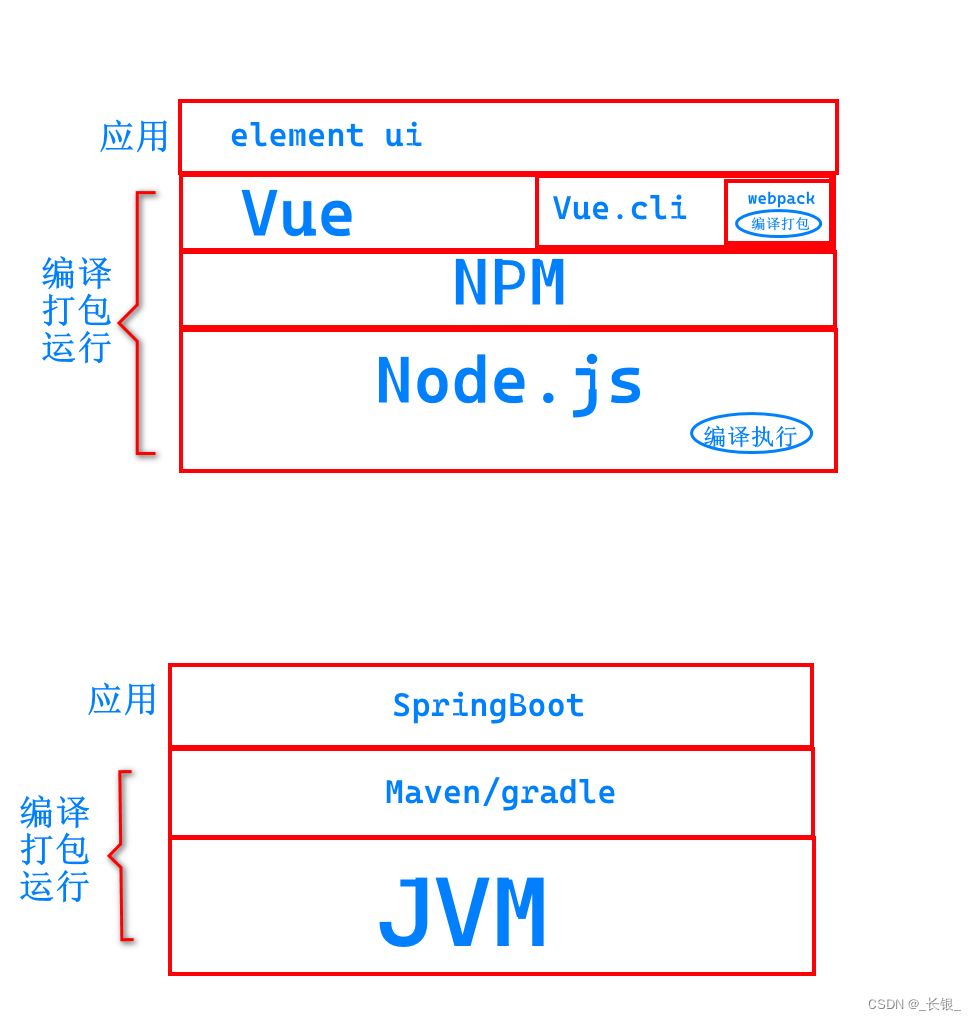
Vue.js和Node.js的关系--类比Java系列
首先我们看一张图 这里我们类比了Java的jvm和JavaScript的node.js。 可以看到,node.js是基础,提供了基础的编译执行的能力。vue,js是实际上定义了一种他自己的代码格式,以加速开发。...

我的笔记本电脑死机问题折腾记录
两年前,买了一台笔记本电脑。直到今年4月份,不到两年的时间,便出现了花屏的情况,然后就到官方售后去维修,换屏。然后在6月份,屏幕问题再次出现,又去售后维修。 经过两次维修,笔记本…...

uniApp中uView组件库的丰富布局方法
目录 基本使用 #分栏间隔 #混合布局 #分栏偏移 #对齐方式 API #Row Props #Col Props #Row Events #Col Events UniApp的uView组件库是一个丰富的UI组件库,提供了各种常用的UI组件和布局方法,帮助开发者快速构建美观、灵活的界面。下面给你写一…...
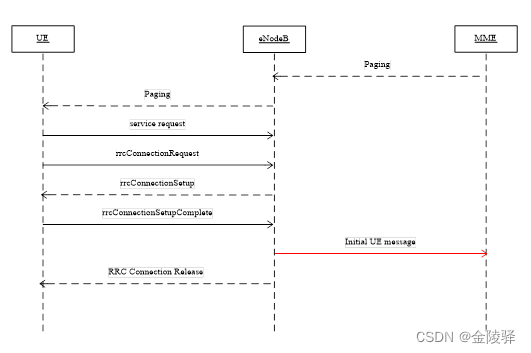
TDD-LTE 寻呼流程
目录 1. 寻呼成功流程 1.1 空闲态寻呼 1.2 连接态寻呼 2. 寻呼失败流程 2.1 Paging消息不可达 2.2 RRC建立失败 2.3 eNodeB未上发Initial UE message或达到超时 1. 寻呼成功流程 1.1 空闲态寻呼 寻呼成功:MME发起寻呼(S1 接口发送Paing 消息&…...
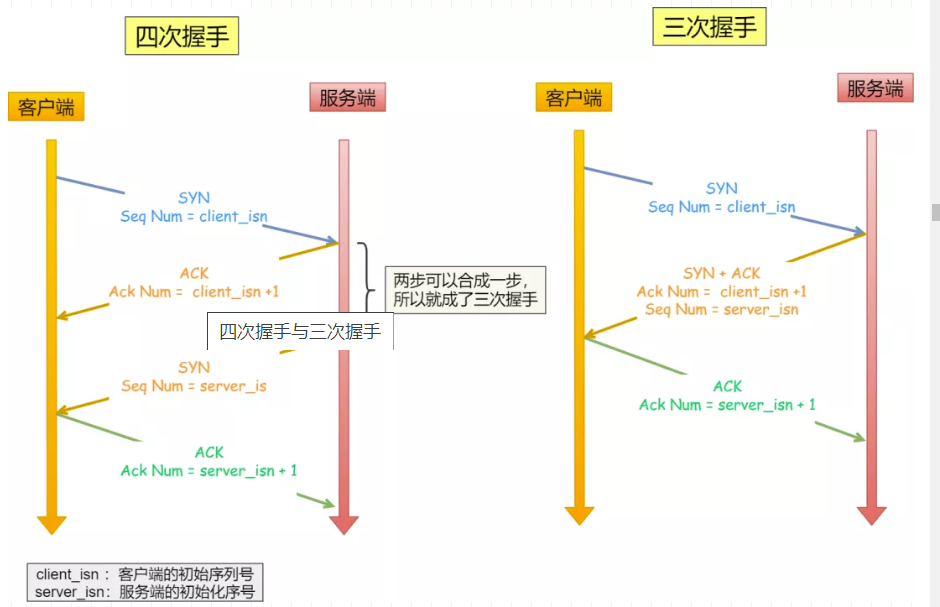
TCP中的三次握手和四次挥手
TCP中的连接和断开可以说是在面试中经常被问到的问题之一,正好有空就总结一下,首先回顾一下TCP的相关知识点 1. TCP的基础知识 1.1 TCP的基本概念 我们知道TCP是运输层的面向连接的可靠的传输协议。面向连接的,指的就是在两个进程发送数据…...
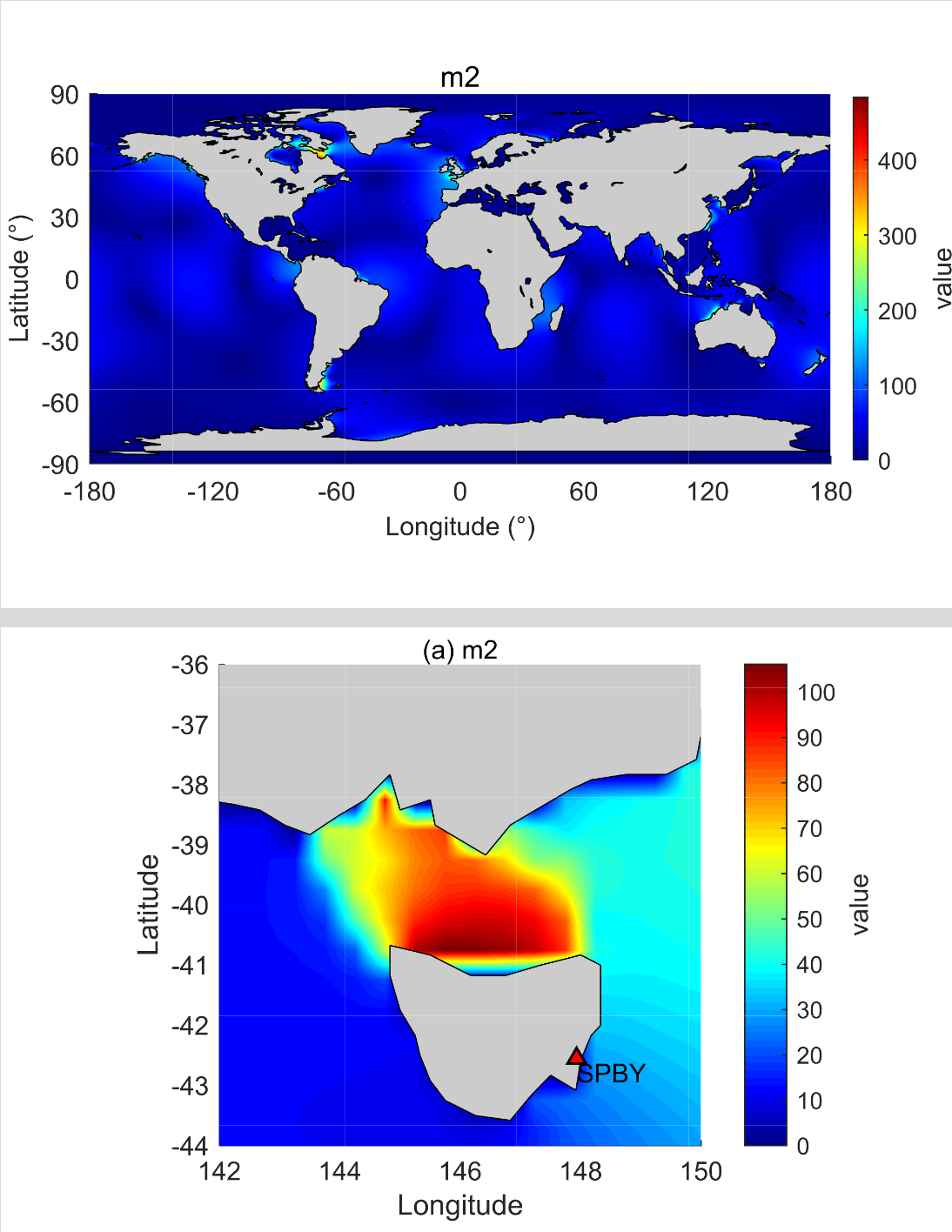
NAO.99b海潮模型的详解教程
NAO.99b模型是由日本国家天文台开发的全球潮汐模式,基于二维非线性浅水方程。该模型具有较高的分辨率,网格间距为0.50.5,网格数为720360,覆盖的经度范围为0.25~359.75E,纬度范围为89.75S~89.75N…...
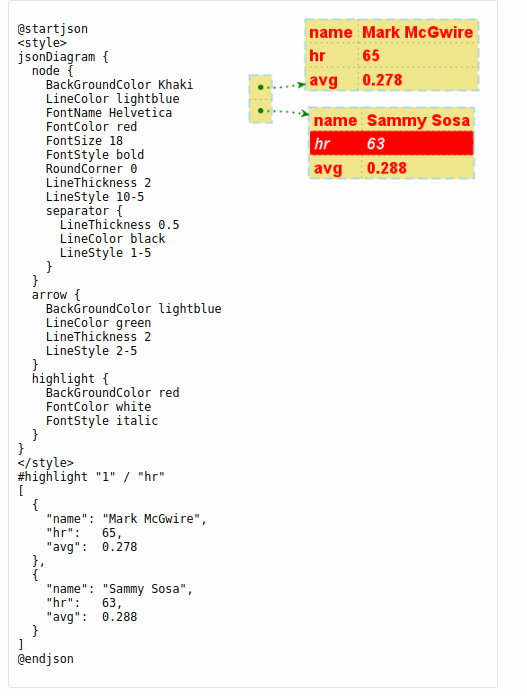
Plantuml之JSON数据语法介绍(二十五)
简介: CSDN博客专家,专注Android/Linux系统,分享多mic语音方案、音视频、编解码等技术,与大家一起成长! 优质专栏:Audio工程师进阶系列【原创干货持续更新中……】🚀 优质专栏:多媒…...
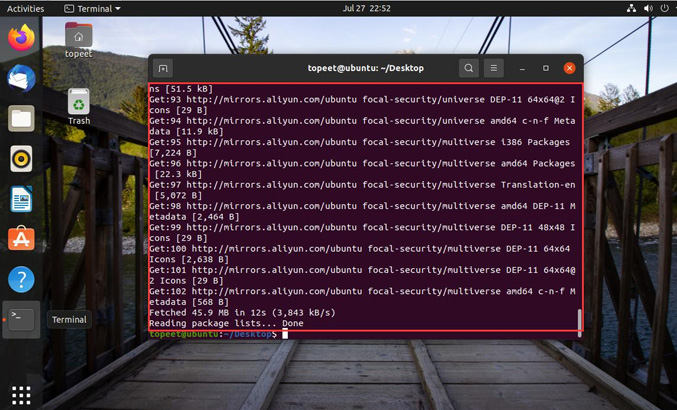
迅为龙芯2K1000开发板虚拟机 ubuntu 更换下载源
Ubuntu 系统软件的下载安装我们通常使用命令“apt-get” , 该命令可以实现软件自动下载, 安装, 配置。 该命令采用客户端/服务器的模式, 我们的 Ubuntu 系统作为客户端, 当需要下载软件的时候就向服务器发起请求&#…...

你好!Apache Seata
北京时间 2023 年 10 月 29 日,分布式事务开源项目 Seata 正式通过 Apache 基金会的投票决议,以全票通过的优秀表现正式成为 Apache 孵化器项目! 根据 Apache 基金会邮件列表显示,在包含 13 个约束性投票 (binding votes) 和 6 个…...
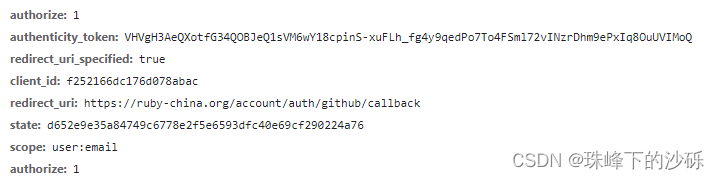
RFC6749-OAuth2.0
前言 最近在项目中需要实现SSO(单点登录)功能,以实现一处注册,即可在任何平台之间登录的功能。我们项目中并没有直接对接第三方认证系统而是通过集成keycloak 完成一系类安全协议的对接工作。如果我们在代码级别自己完成各种安全协议的对接是一项十分大的工程。不仅要走统一的…...
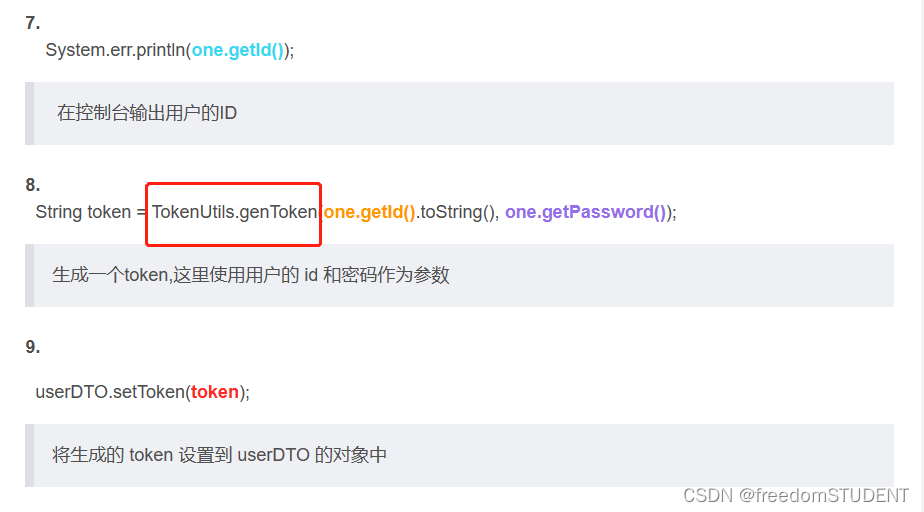
【代码解析】代码解析之生成token(1)
本篇文章主要解析上一篇:代码解析之登录(1)里的第8行代码调用 TokenUtils 类里的genToken 方法 https://blog.csdn.net/m0_67930426/article/details/135327553?spm1001.2014.3001.5501 genToken方法代码如下: public static S…...
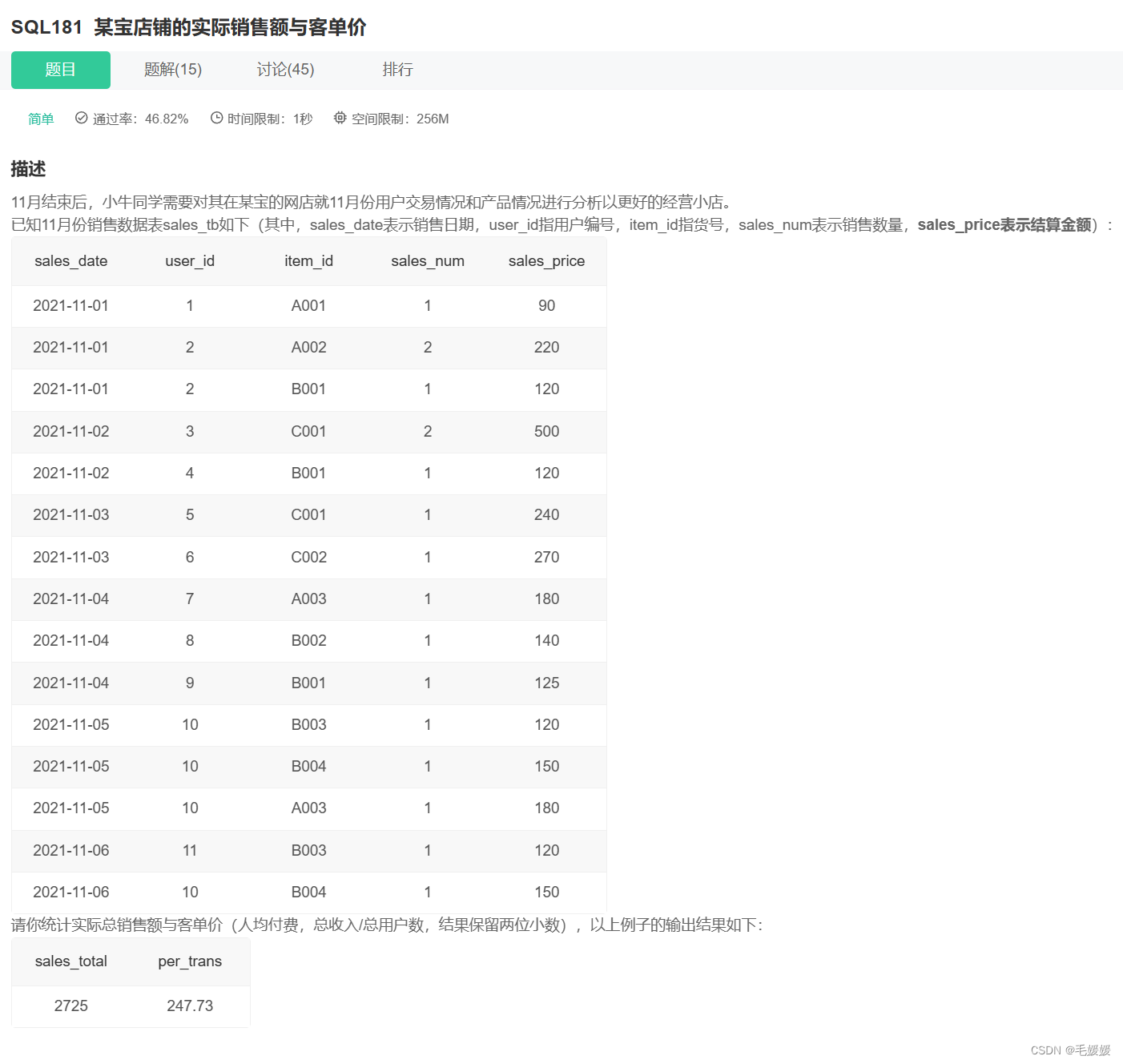
牛客网SQL训练5—SQL大厂面试真题
文章目录 一、某音短视频1.各个视频的平均完播率2.平均播放进度大于60%的视频类别3.每类视频近一个月的转发量/率4.每个创作者每月的涨粉率及截止当前的总粉丝量5.国庆期间每类视频点赞量和转发量6.近一个月发布的视频中热度最高的top3视频 二、用户增长场景(某度信…...
kubeadm来搭建k8s集群。
我们采用了二进制包搭建出的k8s集群,本次我们采用更为简单的kubeadm的方式来搭建k8s集群。 二进制的搭建更适合50台主机以上的大集群,kubeadm更适合中小型企业的集群搭建 主机配置建议:2c 4G 主机节点 IP …...
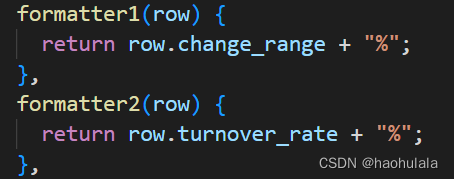
【java爬虫】使用element-plus进行个股详细数据分页展示
前言 前面的文章我们讲述了获取详细个股数据的方法,并且使用echarts对个股的价格走势图进行了展示,本文将编写一个页面,对个股详细数据进行展示。别问涉及到了element-plus中分页的写法,对于这部分知识将会做重点讲解。 首先看一…...

Python使用余弦相似度比较两个图片
为了使用余弦相似度来找到与样例图片相似的图片,我们需要先进行一些预处理,然后计算每两张图片之间的余弦相似度。以下是一个简单的实现: 读取样例图片和目标文件夹中的所有图片。对每张图片进行预处理,例如灰度化、降噪等。计算…...
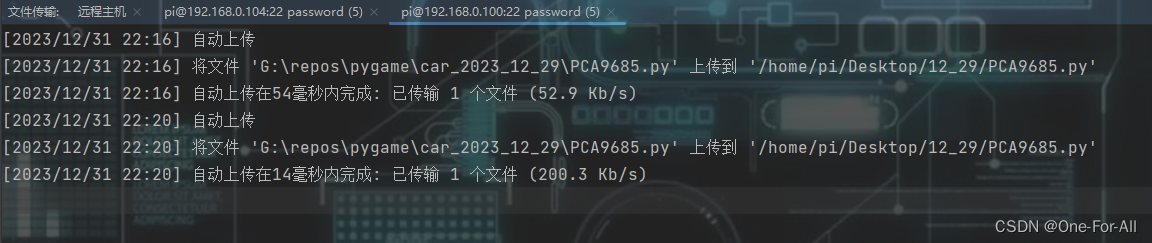
树莓派4B-Python使用PyCharm的SSH协议在电脑上远程编辑程序
目录 前言一、pycharm的选择二、添加SSH的解释器使用总结 前言 树莓派的性能始终有限,不好安装与使用高级一点的程序编辑器,如果只用thonny的话,本人用得不习惯,还不如PyCharm,所以想着能不能用电脑中的pycharm来编写…...

Servlet的自动加载、ServletConfig对象、ServletContext对象
一、 Servlet的自动加载 默认情况下,第一次访问servlet的时候,创建servlet对象。如果servlet构造函数里面的代码或者init方法里面的代码比较多,就会导致用户第一次访问servlet的时候比较慢。这个时候,我们可以改变servlet对象的创…...

Vue - Class和Style绑定详解
1. 模板部分 <template><div><!-- Class 绑定示例 --><div :class"{ active: isActive, text-danger: hasError }">Hello, Vue!</div><!-- Class 绑定数组示例 --><div :class"[activeClass, errorClass]">Cla…...

如何在不同终端里面使用claude code并使用不同模型
在使用 Claude Code 开发项目时,我们可能会遇到这样的需求:一个终端使用速度更快、成本更低的模型处理日常代码修改,另一个终端使用推理能力更强的模型处理复杂问题。比如:一个终端用 deepseek-v4-pro[1m],另一个终端用…...
)
用STM32和RDM6300模块DIY一个EM4100 ID卡读卡器(附完整代码和避坑指南)
用STM32和RDM6300打造高稳定性EM4100读卡器:从硬件连接到算法优化 在智能门禁、仓储管理和物联网设备身份识别等领域,低频RFID技术因其稳定性和低成本始终占据重要地位。EM4100作为最经典的125kHz只读ID卡芯片,其兼容读卡器的DIY实现一直是嵌…...

LaTeX引用中文文献总出乱码?可能是你的.bib文件编码和编译顺序没搞对
LaTeX中文文献引用乱码全解析:从编码原理到实战排错 当你熬夜赶论文,终于把参考文献列表整理进.bib文件,满心期待地按下编译键——结果引用位置跳出一串问号,参考文献列表变成乱码战场。这种崩溃瞬间,每个用LaTeX写过中…...

GDB 符号检视三件套:`ptype` / `info variables` / `info functions`
调试 NuttX/Vela 这类嵌入式系统时,光会 bt 和 print 远远不够。真正能让你在陌生代码里快速定位、看清结构、批量布点的,是 GDB 的符号检视命令。本文整理三件最常用的: ptype —— 看类型长什么样info variables —— 找全局/静态变量在哪…...

面向28nm ELK晶圆的WLCSP封装激光开槽质量与可靠性研究
2017 — Investigation of Production Quality and Reliability Risk of ELK Wafer WLCSP Package Research and Development, Taiwan Semiconductor Manufacturing Company, Ltd., Hsinchu Science Park, Hsinchu, Taiwan, R.O.C. 摘要 本文系统研究了28nm工艺ELK(极端低k)…...

文档下载革命:kill-doc浏览器脚本让你的学习资料一键保存
文档下载革命:kill-doc浏览器脚本让你的学习资料一键保存 【免费下载链接】kill-doc 看到经常有小伙伴们需要下载一些免费文档,但是相关网站浏览体验不好各种广告,各种登录验证,需要很多步骤才能下载文档,该脚本就是为…...

打破偏见!Java做AI不是不行,是2026年最被低估的红利
长久以来,行业里一直有个固有认知:AI是Python的主场,Java做AI笨重、生态弱、落地难。很多Java企业团队看着AI浪潮席卷各行各业,要么束手观望,要么被迫切换Python技术栈重构系统,不仅成本高昂,还…...

企业级AI智能体评测平台AgentLab:构建、评估与部署实战指南
1. 项目概述:当AI遇上企业级自动化最近在折腾企业级自动化流程时,发现了一个非常有意思的开源项目,叫AgentLab。它来自大名鼎鼎的ServiceNow,没错,就是那个做IT服务管理(ITSM)和企业工作流平台的…...

我们团队的技术债已经堆成山,我用这四步说服老板给时间重构
在软件测试的日常工作中,我们或许是技术债最敏锐的感知者。每一次回归测试的漫长等待,每一个在“祖传代码”上小心翼翼打补丁的深夜,每一份因环境不稳定而飘红的测试报告,都在无声地控诉着那座压得团队喘不过气的“屎山”。然而&a…...

【Midjourney光照提示词黄金法则】:20年AI视觉工程师亲授7类光效参数组合,92%新手3天提升质感层级
更多请点击: https://intelliparadigm.com 第一章:光照提示词在Midjourney中的底层作用机制 光照提示词(Lighting Prompts)并非简单的修饰性描述,而是直接参与 Midjourney V6 模型的 latent 空间引导与风格解耦的关键…...