
支持 input 函数的在线 python 运行环境 - 基于队列
支持 input 函数的在线 python 运行环境 - 基于队列
- 思路
- 两次用户输入
- 三次用户输入
- 实现
- 前端使用 vue + element ui
- Windows 环境的执行器
- 子进程需要执行的代码
- 代码仓库
- 参考
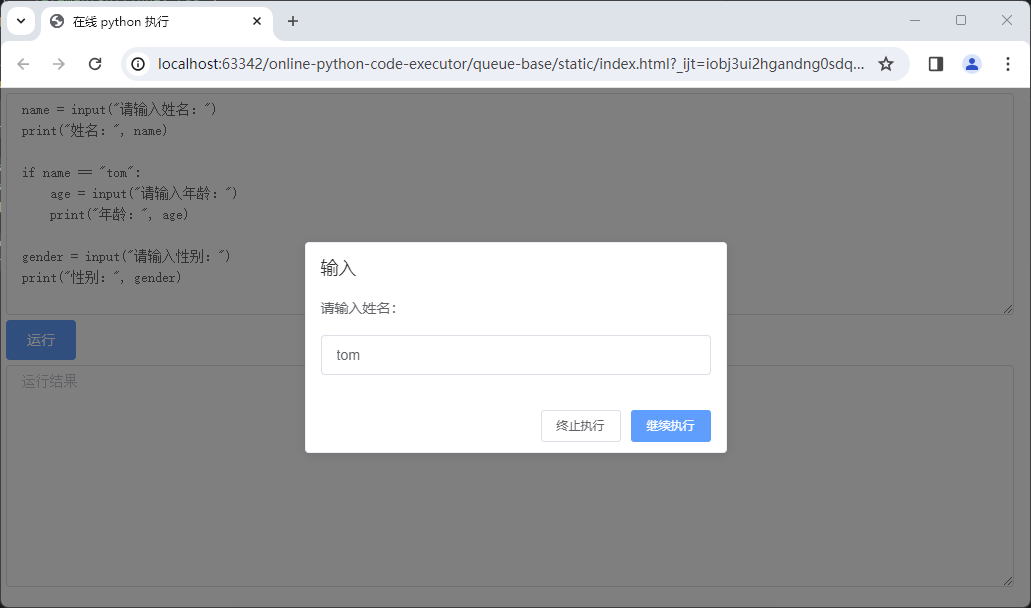
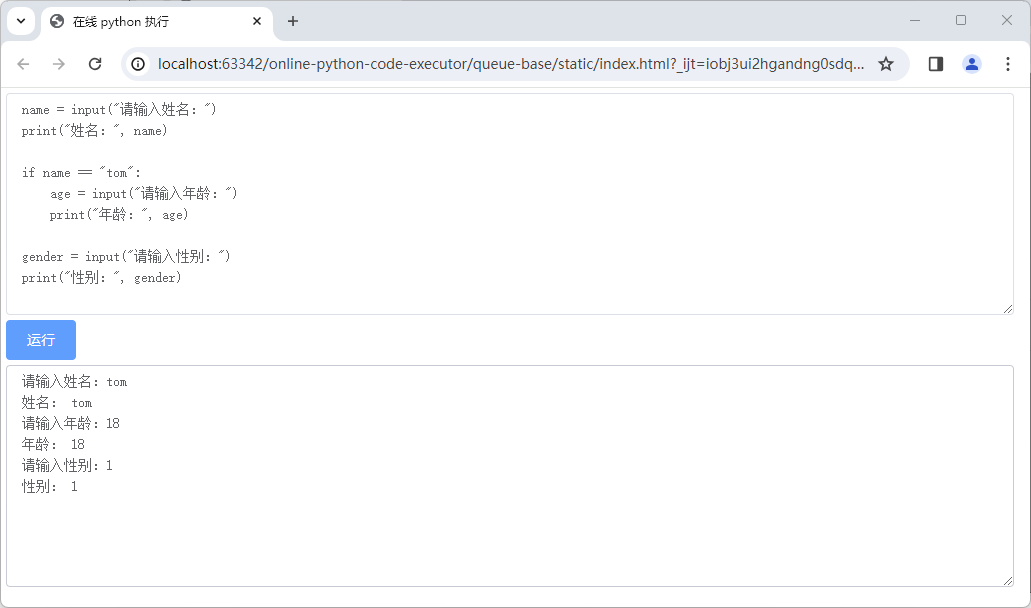
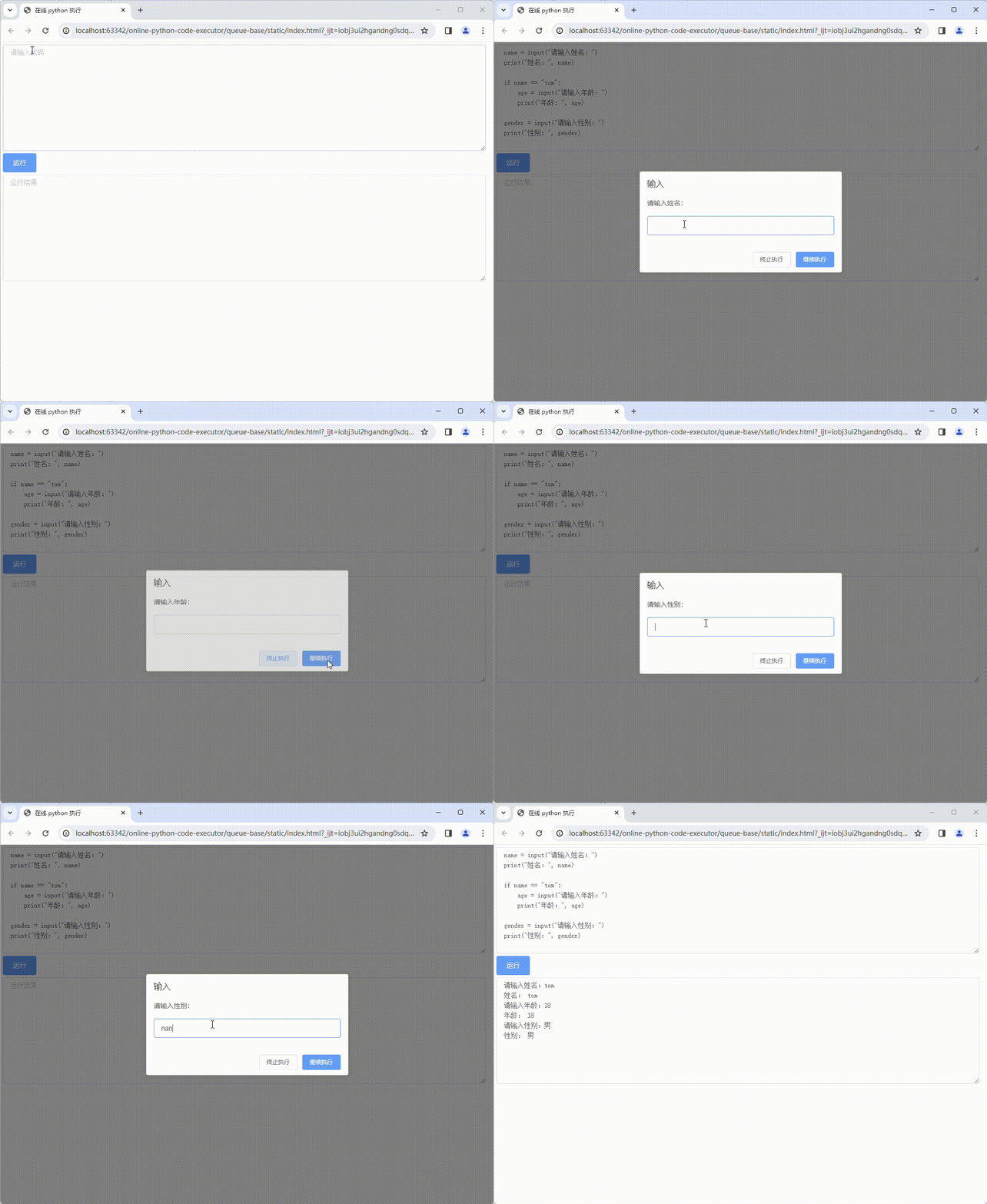
本文提供了一种方式来实现支持 input 函数,即支持用户输的在线 python 运行环境。效果如下图所示:
思路
-
前端使用一个数组
input_queue记录用户从点击运行按钮到现在的所有输入 -
点击运行按钮时将
code、input_queue传给后端 -
后端将参数传给执行 python 代码的子进程
-
子进程重写
input()函数,假设新的实现为input_wrapper,代码如下,到用户代码运行到input()函数时,会执行重写的input_wrapper(), 在input_wrapper中获取到input_queue,然后使用input_queue.pop(0)弹出用户输入最早的信息,如果input_queue为空,则说明需要用户输入,通过抛出InputRequestException异常的方式通知后端def input_wrapper(prompt=''):if input_queue:input_str = input_queue.pop(0)sys.stdout.write(str(prompt) + input_str + "\n")return input_strraise InputRequestException(str(prompt)) -
后端通过处理子进程的标准输出、标准错误,知晓需要用户输入,然后向前端返回以下 json,
event.type为 input_request 代表需要用户输入,prompt是提示信息{"is_timeout": false,"done": false,"event": {"type": "input_request","prompt": "请输入姓名:"} } -
前端弹出弹框提示用户输入,用户输入并点击继续执行按钮时,会将本次的输入追加到
input_queue的末尾,然后再次调用运行接口,这样循环往复直到程序结束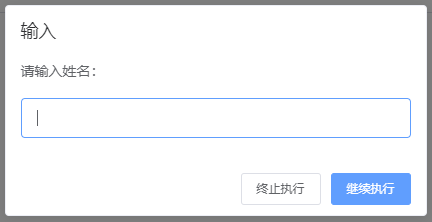
在执行以下代码时,可能需要两次用户输入,也可能需要三次。
name = input("请输入姓名:")
print("姓名:", name)if name == "tom":age = input("请输入年龄:")print("年龄:", age)gender = input("请输入性别:")
print("性别:", gender)
两次用户输入
点击运行按钮
请求参数中的 input_queue 为 []{"code": "name = input(\"请输入姓名:\")\nprint(\"姓名:\", name)\n\nif name == \"tom\":\n age = input(\"请输入年龄:\")\n print(\"年龄:\", age)\n\ngender = input(\"请输入性别:\")\nprint(\"性别:\", gender)","input_queue": []
}返回值
{"is_timeout": false,"done": false,"event": {"type": "input_request","prompt": "请输入姓名:"}
}
输入 jack
请求参数中的 input_queue 为 ["jack"]{"code": "name = input(\"请输入姓名:\")\nprint(\"姓名:\", name)\n\nif name == \"tom\":\n    age = input(\"请输入年龄:\")\n    print(\"年龄:\", age)\n\ngender = input(\"请输入性别:\")\nprint(\"性别:\", gender)","input_queue": ["jack"]
}返回值
{"is_timeout": false,"done": false,"event": {"type": "input_request","prompt": "请输入性别:"}
}
输入 男
请求参数中的 input_queue 为 ["jack", "男"]
{"code": "name = input(\"请输入姓名:\")\nprint(\"姓名:\", name)\n\nif name == \"tom\":\n    age = input(\"请输入年龄:\")\n    print(\"年龄:\", age)\n\ngender = input(\"请输入性别:\")\nprint(\"性别:\", gender)","input_queue": ["jack","男"]
}返回值
{"is_timeout": false,"done": true,"output": "请输入姓名:jack\r\n姓名: jack\r\n请输入性别:男\r\n性别: 男\r\n"
}
三次用户输入
点击运行按钮
请求参数中的 input_queue 为 []
{"code": "name = input(\"请输入姓名:\")\nprint(\"姓名:\", name)\n\nif name == \"tom\":\n    age = input(\"请输入年龄:\")\n    print(\"年龄:\", age)\n\ngender = input(\"请输入性别:\")\nprint(\"性别:\", gender)","input_queue": []
}返回值
{"is_timeout": false,"done": false,"event": {"type": "input_request","prompt": "请输入姓名:"}
}
输入 tom
请求参数中的 input_queue 为 ["tom"]
{"code": "name = input(\"请输入姓名:\")\nprint(\"姓名:\", name)\n\nif name == \"tom\":\n    age = input(\"请输入年龄:\")\n    print(\"年龄:\", age)\n\ngender = input(\"请输入性别:\")\nprint(\"性别:\", gender)","input_queue": ["tom"]
}返回值
{"is_timeout": false,"done": false,"event": {"type": "input_request","prompt": "请输入年龄:"}
}
输入 18
请求参数中的 input_queue 为 ["tom", "18"]
{"code": "name = input(\"请输入姓名:\")\nprint(\"姓名:\", name)\n\nif name == \"tom\":\n    age = input(\"请输入年龄:\")\n    print(\"年龄:\", age)\n\ngender = input(\"请输入性别:\")\nprint(\"性别:\", gender)","input_queue": ["tom","18"]
}返回值
{"is_timeout": false,"done": false,"event": {"type": "input_request","prompt": "请输入性别:"}
}
输入 男
请求参数中的 input_queue 为 ["tom", "18", "男"]
{"code": "name = input(\"请输入姓名:\")\nprint(\"姓名:\", name)\n\nif name == \"tom\":\n    age = input(\"请输入年龄:\")\n    print(\"年龄:\", age)\n\ngender = input(\"请输入性别:\")\nprint(\"性别:\", gender)","input_queue": ["tom","18","男"]
}返回值
{"is_timeout": false,"done": true,"output": "请输入姓名:tom\r\n姓名: tom\r\n请输入年龄:18\r\n年龄: 18\r\n请输入性别:男\r\n性别: 男\r\n"
}
实现
前端使用 vue + element ui
<!DOCTYPE html>
<html lang="" style="height: 100%;">
<head><meta charset="UTF-8"><link rel="stylesheet" href="./element-ui/index.css"><title>在线 python 执行</title>
</head>
<body style="height: 100%;margin: 0;">
<div id="app" style="height: 98%;width: 98%;padding: 5px"><el-inputtype="textarea":autosize="{ minRows: 10, maxRows: 100}"placeholder="请输入代码"v-model="code"></el-input><el-button type="primary" style="margin-top: 5px;margin-bottom: 5px" @click="exec()">运行</el-button><el-inputtype="textarea":autosize="{ minRows: 10, maxRows: 100}"placeholder="运行结果"v-model="result"></el-input>
</div>
</body>
<script src="./axios.min.js"></script>
<script src="./vue.js"></script>
<script src="./element-ui/index.js"></script>
<script>new Vue({el: '#app',mounted() {},methods: {exec() {const params = {code: this.code,input_queue: this.input_queue}axios.post('http://localhost:8080/exec', params).then(res => {console.log("exec", res)if (res.data.done) {// 执行结束了,需要清空队列this.clearQueue()if (res.data.is_timeout) {// 执行超时this.$message("执行超时");} else {// 正常执行结束this.result = res.data.output}} else {// 执行中,需要用户输入const event = res.data.eventif (event.type === 'input_request') {// 弹框提示用户输入this.$prompt(event.prompt, '输入', {confirmButtonText: '继续执行',cancelButtonText: '终止执行',showClose: false,closeOnClickModal: false,closeOnPressEscape: false}).then(({value}) => {// 继续执行,将本次输入的信息追加进队列,然后再次执行this.input_queue.push(value)this.exec()}).catch((action) => {// 终止执行,需要清空队列console.log("action ", action)this.clearQueue()this.$message("终止执行")});}}})},clearQueue() {this.input_queue = []}},data() {return {code:
`name = input("请输入姓名:")
print("姓名:", name)if name == "tom":age = input("请输入年龄:")print("年龄:", age)gender = input("请输入性别:")
print("性别:", gender)
`,input_queue: [],result: null,}}})</script>
</html>
Windows 环境的执行器
import json
import os
import subprocess
import threading
from threading import Timerimport psutilclass AbstractExecutor:def __init__(self, param):# param 包括 code、input_queueself.param = param# 用于保护 is_timeout 的锁self.lock = threading.Lock()# 是否执行超时了self.is_timeout = Nonedef timeout_callback(self, p: subprocess.Popen):"""执行超时时的回调,会终止执行 python 代码的进程组:param p: 执行 python 代码的进程"""with self.lock:if self.is_timeout is None:self.is_timeout = Trueif self.is_timeout:try:# 终止执行 python 代码的进程组self.terminating_process_group(p)except Exception as e:print("超时回调异常, error: %s", e)def terminating_process_group(self, p: subprocess.Popen):"""终止进程 p 及其子进程:param p: 要终止的进程"""raise NotImplementedError()def create_popen(self) -> subprocess.Popen:"""创建 subprocess.Popen,必须将 stderr 重定向到 stdout"""raise NotImplementedError()def output(self, stdout):if stdout is not None:return stdout.decode("utf-8")else:return ""def execute(self):p = self.create_popen()timer = Timer(3, self.timeout_callback, [p])timer.start()try:# 从标准输入传入 json 参数:code、input_queuep.stdin.write(json.dumps(self.param).encode(encoding="utf-8"))stdout, stderr = p.communicate()with self.lock:if self.is_timeout is None:self.is_timeout = Falsefinally:timer.cancel()return self.is_timeout, self.output(stdout)class WindowsExecutor(AbstractExecutor):__output_prefix = "Active code page: 65001\r\n"def create_popen(self) -> subprocess.Popen:filename = r"D:\project\python\online-python-code-executor\queue-base\exec_py.py"cmd = 'chcp 65001 & set PYTHONIOENCODING=utf-8 & python ' + filename# 将 stderr 重定向到了 stdoutreturn subprocess.Popen(cmd, stdin=subprocess.PIPE, stdout=subprocess.PIPE, stderr=subprocess.STDOUT,shell=True)def terminating_process_group(self, p: subprocess.Popen):proc_pid = p.pidparent_proc = psutil.Process(proc_pid)for child_proc in parent_proc.children(recursive=True):print(child_proc.pid)child_proc.kill()parent_proc.kill()print(parent_proc.pid)def output(self, stdout):output = super().output(stdout)if output.startswith(self.__output_prefix):return output.removeprefix(self.__output_prefix)else:return outputif os.name == "nt":executor_cls = WindowsExecutordef execute(param):# 执行用户代码is_timeout, stdout = executor_cls(param).execute()if is_timeout:# 执行超时了return {"is_timeout": is_timeout,"done": True,"output": stdout,}else:arr = stdout.split("InputRequestException")if len(arr) > 1:# 需要用户输入return {"is_timeout": is_timeout,"done": False,"event": {"type": "input_request","prompt": arr[-1]}}else:# 正常执行结束return {"is_timeout": is_timeout,"done": True,"output": stdout,}
子进程需要执行的代码
import json
import sysinput_queue = []class InputRequestException(Exception):"""抛出此异常表示需要用户输入"""passdef execute(param):# 重写 input 函数__builtins__.input = input_wrapper# input_queueglobal input_queueinput_queue = param["input_queue"]try:# 执行代码exec(param["code"])except InputRequestException as e:# 如果需要用户输入,则直接退出sys.stdout.write("\n" + "InputRequestException" + e.args[0])exit()def input_wrapper(prompt=''):# 从 input_queue 中弹出if input_queue:input_str = input_queue.pop(0)sys.stdout.write(str(prompt) + input_str + "\n")return input_str# 需要用户输入raise InputRequestException(str(prompt))if __name__ == '__main__':# 从标准输入读取 json 参数:code、input_queuearg = sys.stdin.read()# 执行execute(json.loads(arg))
代码仓库
- online-python-code-executor/queue-base (github.com)
参考
- https://pythontutor.com
- https://github.com/seamile/PyTutor
相关文章:
支持 input 函数的在线 python 运行环境 - 基于队列
支持 input 函数的在线 python 运行环境 - 基于队列 思路两次用户输入三次用户输入 实现前端使用 vue element uiWindows 环境的执行器子进程需要执行的代码 代码仓库参考 本文提供了一种方式来实现支持 input 函数,即支持用户输的在线 python 运行环境。效果如下图…...

欧拉Euler release 21.10 (LTS-SP2)升级openssh至9版本记录
背景:安扫漏洞,需要对openssh经行升级 1.先查看升级前的openssh版本 2.避免升级失败断开远程登录,先开启telnt服务用于远程连接(这步可查看其他博客) 3.从欧拉官网下载rpm包,https://www.openeuler.org/zh…...
php 数组中的元素进行排列组合
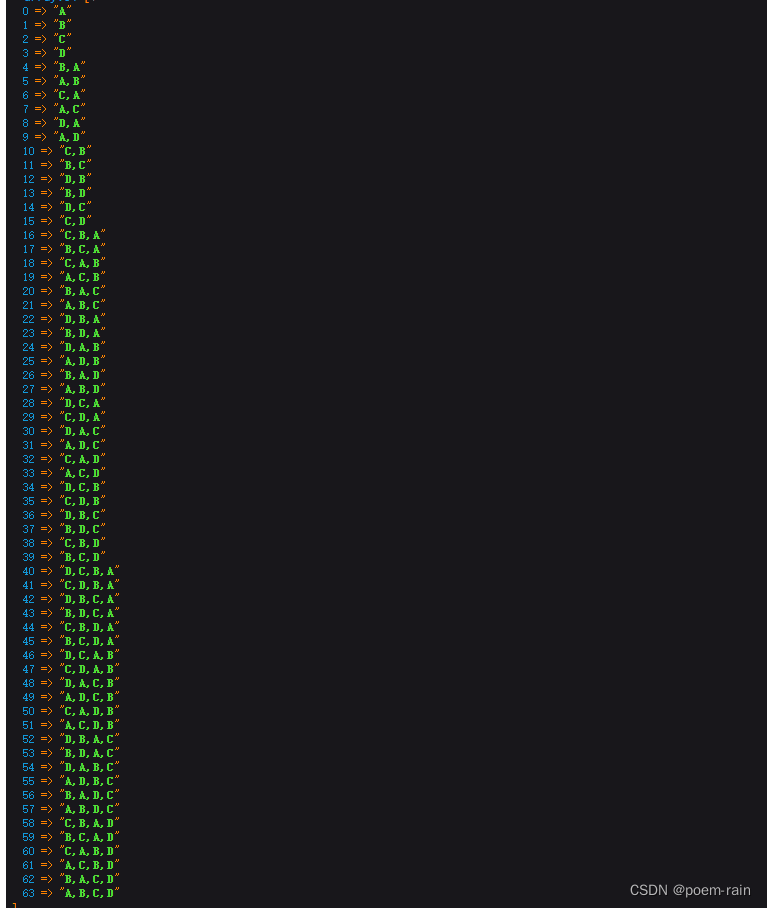
需求背景:计算出数组[A,B,C,D]各种排列组合,希望得到的是数据如下图 直接上代码: private function finish_combination($array, &$groupResult [], $splite ,){$result [];$finish_result [];$this->diffArrayItems($array, $…...

Python从入门到网络爬虫(OS模块详解)
前言 本章介绍python自带模块os,os为操作系统 operating system 的简写,意为python与电脑的交互。os 模块提供了非常丰富的方法用来处理文件和目录。通过使用 os 模块,一方面可以方便地与操作系统进行交互,另一方面页可以极大增强…...

人机交互不是人机融合智能
一、人机交互和人机融合智能是两个不同的概念 人机交互是指人类与计算机之间的信息交流和操作方式,包括输入和输出界面、交互技术、用户体验等方面。人机交互的目标是提供用户友好的界面和自然的交互方式,使人类能够与计算机更加高效地进行沟通和协作。 …...
RabbitMQ解决消息丢失以及重复消费问题
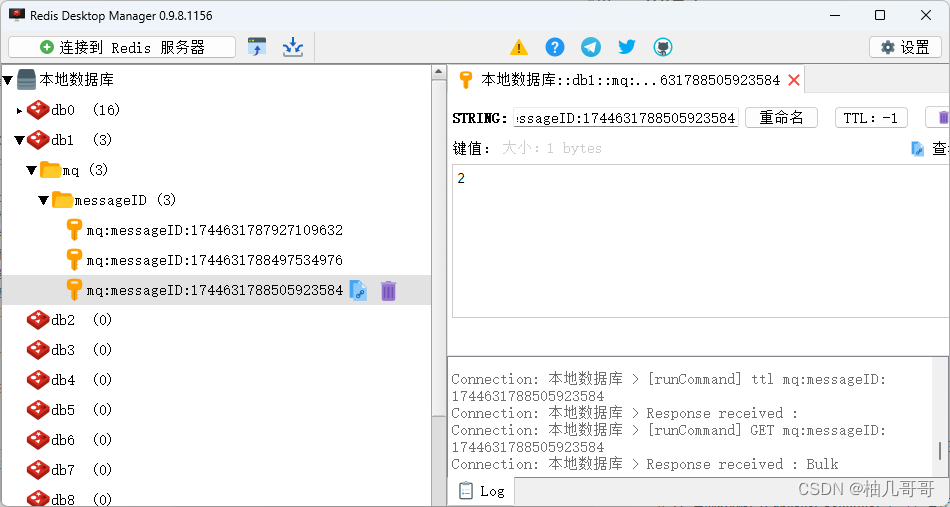
文章目录 1、概念2、基于ACK/NACK机制2.1 基于Spring AMQP框架整合ACK/NACK机制2.2 测试消费失败1.02.3 测试结果1.02.4 测试MQ宕机2.5 测试结果2.0 3、RabbitMQ 如何实现幂等性设计3.1 幂等服务设计思路3.1.1 通过雪花算法生成分布式唯一ID3.1.2 通过枚举类,设计Me…...

docker 安装redis集群
一、准备6台机器 二、6台机器分别拉取镜像: docker pull redis三、6台机器分别建立挂载文件夹 mkdir -p /home/redis/data四、6台机器分别执行容器操作 docker run --restartalways -d --name redis-node-1 --net host --privilegedtrue -v /home/redis/data:/da…...

锂电池制造设备中分布式IO模块优势
在“碳达峰、碳中和”目标推动下,新能源汽车当下发展势头正盛,而纯电动车的核心部件则是:锂电池。动力型锂电池作为新能源汽车核心零部件,其发展与新能源汽车行业息息相关,迎来广阔的市场空间。 为何采用I/O模块&#…...

Android Room数据库升级Migration解决方案
一、介绍 Android Room 是 Android 官方提供的一个轻量级数据库框架,用于在 Android 应用程序中管理数据持久性。它简化了数据库访问,提供了更安全、更快速的数据存储方式,并使得数据操作更加便捷。 二、Room的特点(八股文可以参考) 以下是…...

离线安装docker和docker-compose
1.下载 docker Index of linux/static/stable/x86_64/ docker-compose Overview of installing Docker Compose | Docker Docs 2.docker /etc/systemd/system/docker.service [Unit] DescriptionDocker Application Container Engine Documentationhttps://docs.docker.…...

奇怪的事情记录:外置网卡和外置显示器不兼容
身为程序员,不应该对世界上的稀奇古怪的事情感到惊讶(毕竟,大部分都是程序员自己搞出来的)。 外置网卡和外置显示器不兼容 mbp2019intel版,win10,外接有线网卡,平时用得很好,接上外…...
【大数据进阶第三阶段之Hive学习笔记】Hive基础入门
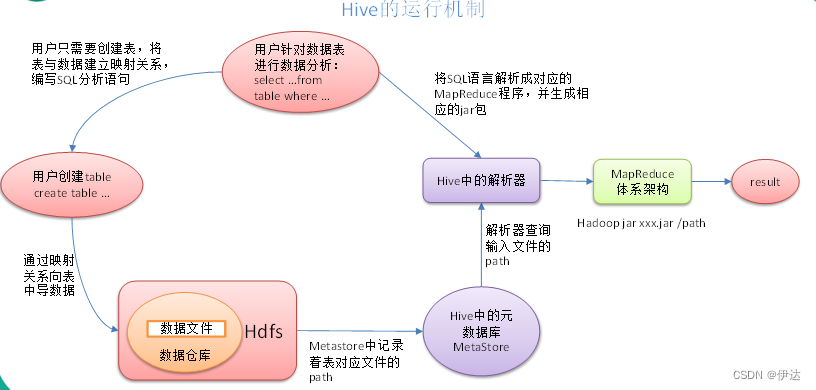
目录 1、什么是Hive 2、Hive的优缺点 2.1、 优点 2.2、 缺点 2.2.1、Hive的HQL表达能力有限 2.2.2、Hive的效率比较低 3、Hive架构原理 3.1、用户接口:Client 3.2、元数据:Metastore 3.3、Hadoop 3.4、驱动器:Driver Hive运行机制…...

第三代量子计算机交付,中国芯片开辟新道路,光刻机难挡中国芯
日前安徽本源量子宣布第三代超导量子计算系统正式上线,这是中国最先进的量子计算机,计算量子比特已达到72个,在全球已居于较为领先的水平,这对于中国芯片在原来的硅基芯片受到光刻机阻碍无疑是巨大的鼓舞。 据悉本源量子的第一代、…...
react native中使用tailwind并配置自动补全
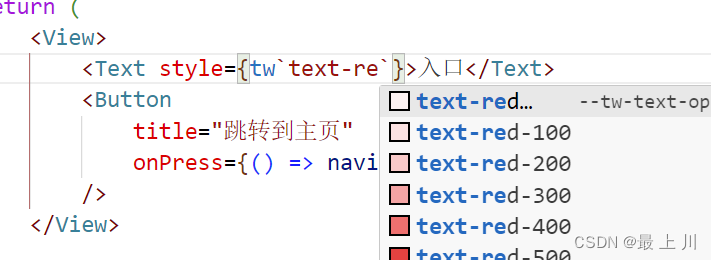
使用的第三方库是tailwind-react-native-classnames,同类的也有tailwind-rn,但是我更喜欢前者官方demo: import { View, Text } from react-native; import tw from twrnc;const MyComponent () > (<View style{twp-4 android:pt-2 b…...
数据分析——火车信息
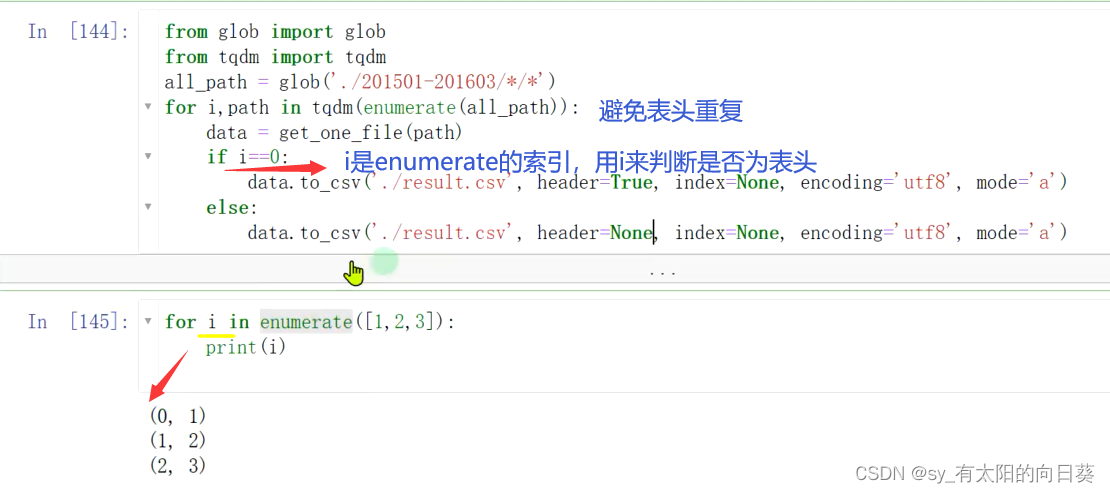
任务目标 任务 1、整理火车发车信息数据,结果的表格形式为: 2、并输出最终的发车信息表 难点 1、多文件 一个文件夹,多个月的发车信息,一个excel,放一天的发车情况 2、数据表的格式特殊 如何分析表是一个难点 数…...
Bert-vits2最终版Bert-vits2-2.3云端训练和推理(Colab免费GPU算力平台)
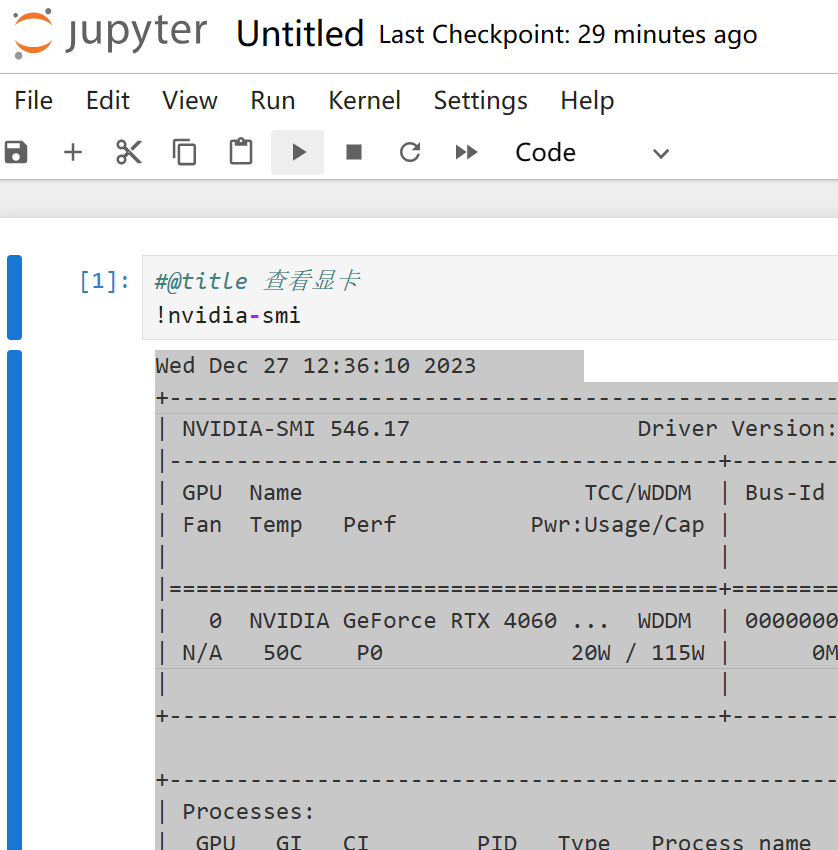
对于深度学习初学者来说,JupyterNoteBook的脚本运行形式显然更加友好,依托Python语言的跨平台特性,JupyterNoteBook既可以在本地线下环境运行,也可以在线上服务器上运行。GoogleColab作为免费GPU算力平台的执牛耳者,更…...
Asp .Net Web应用程序(.Net Framework4.8)网站发布到IIS
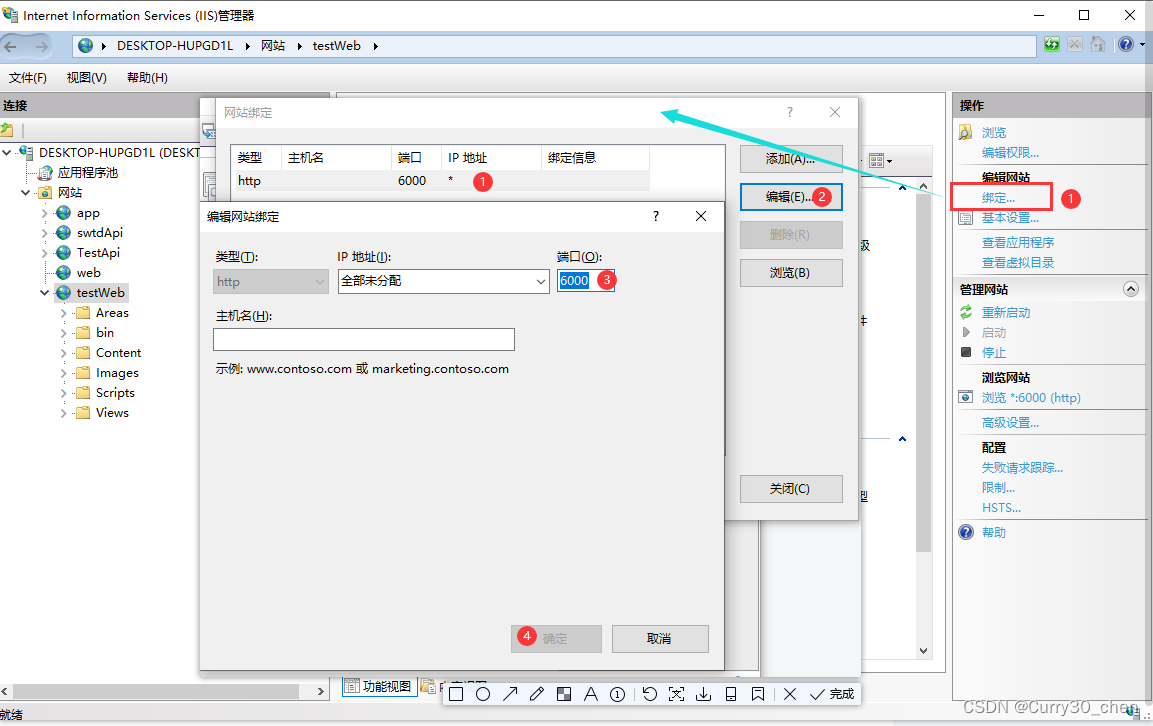
开启IIS 如果已开启跳过这步 打开控制面板-程序 打开IIS 发布Web程序(.Net Framework 4.8 web网页) 进入IIS管理器新建一个应用池 新建一个网站 网站创建完毕 为文件夹添加访问权限 如果不添加访问权限,运行时将会得到如下错误 设置权限 勾…...

vue element plus Typography 排版
我们对字体进行统一规范,力求在各个操作系统下都有最佳展示效果。 字体# 字号# LevelFont SizeDemoSupplementary text12px Extra SmallBuild with ElementBody (small)13px SmallBuild with ElementBody14px BaseBuild with ElementSmall Title16px MediumBuild w…...
理论U3 决策树
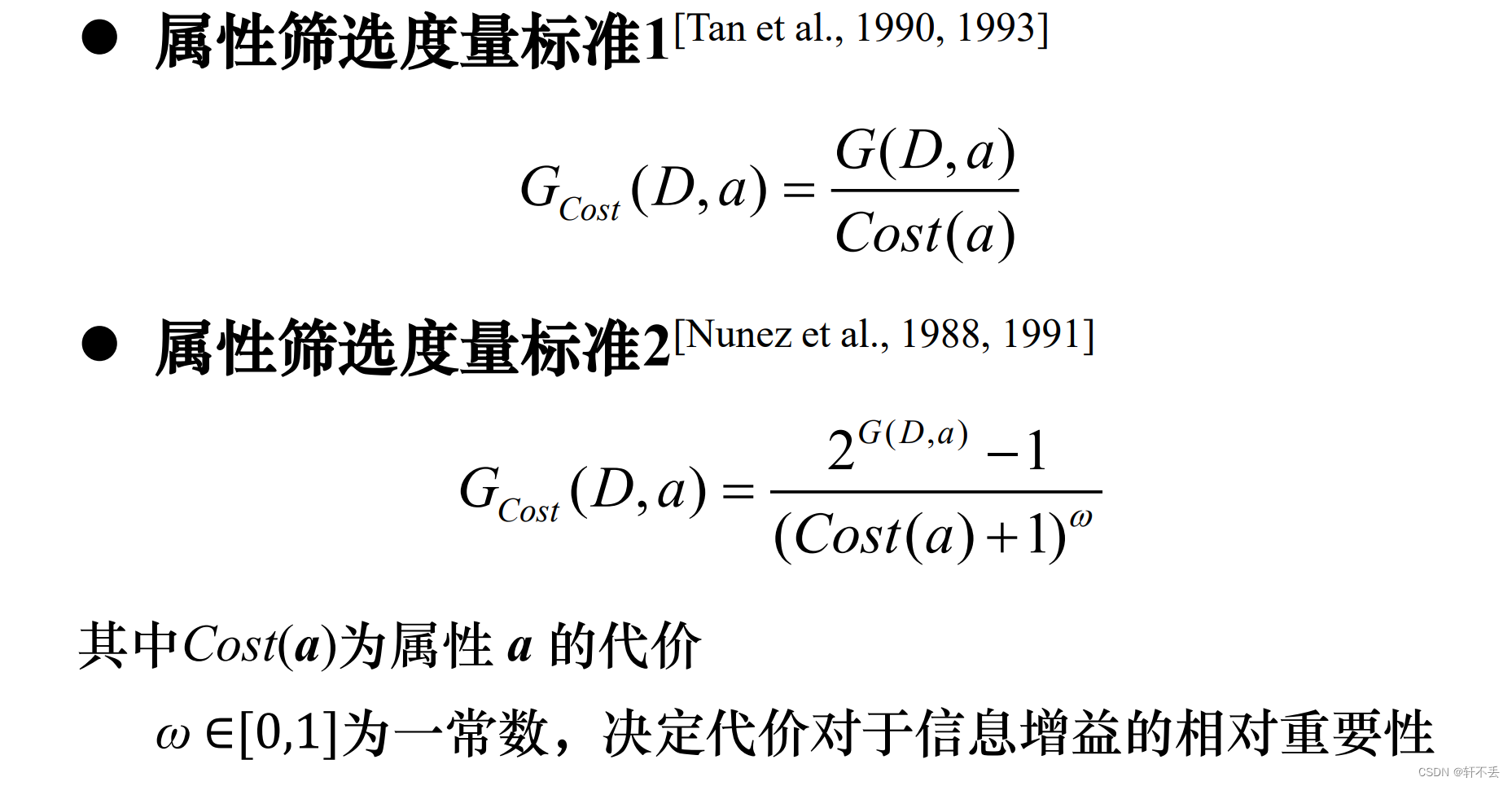
文章目录 一、决策树算法1、基本思想2、构成1)节点3)有向边/分支 3、分类步骤1)第1步-决策树生成/学习、训练2)第2步-分类/测试 4、算法关键 二、信息论基础1、概念2、信息量3、信息熵: 二、ID3 (Iterative Dichotomis…...

Redis 常用操作
一、Redis常用的5种数据类型 字符串(String):最基本的数据类型,可以存储字符串、整数或浮点数。哈希(Hash):键值对的集合,可以在一个哈希数据结构中存储多个字段和值。列表…...

无国界技术创业:构建全球化产品支持与远程协作体系
1. 从“车库”到“云端”:无国界创业的底层逻辑变迁 十年前,如果你在硅谷创立一家芯片设计工具(EDA)或嵌入式软件公司,头两年的客户拜访路线图大概就是101号公路沿线。工程师可以早上开车去圣何塞的客户办公室…...

轻量级索引引擎flyto-indexer:从倒排索引原理到私有数据检索实战
1. 项目概述:一个为数据检索而生的索引引擎最近在折腾一个数据聚合类的项目,需要从海量的、结构不一的文档里快速找到特定信息。试过直接用数据库的模糊查询,也试过一些开源的全文检索引擎,但总觉得差点意思:要么是配置…...

C盘空间管理完全指南:从清理到预防,根治飘红
你的C盘是否在不知不觉中已经飘红?在清理文件的路上,你是否曾因误删系统文件而追悔莫及? C盘告急的普遍困境 每当Windows系统运行缓慢,或安装新软件时弹出磁盘空间不足的提示,用户的第一反应往往是查看C盘使用情况。…...

疫情如何重塑GPU市场:从游戏硬件到数字基础设施的演变
1. 市场预期的“扭曲”:疫情如何重塑GPU行业逻辑如果你在2020年初问任何一位半导体行业的分析师,他们对当年第二季度GPU(图形处理器)市场的预测,大概率会得到一个基于历史季节性规律的保守或平稳的答案。然而ÿ…...

Go语言构建高效命令行工具集:从设计到工程化实践
1. 项目概述:一个“好用的”开源工具集最近在GitHub上闲逛,发现了一个挺有意思的仓库,叫ImGoodBai/goodable。光看这个名字,就透着一股子“实用主义”的气息——“好用的”。作为一名常年混迹于开源社区,喜欢折腾各种工…...

2026届学术党必备的六大降重复率平台推荐榜单
Ai论文网站排名(开题报告、文献综述、降aigc率、降重综合对比) TOP1. 千笔AI TOP2. aipasspaper TOP3. 清北论文 TOP4. 豆包 TOP5. kimi TOP6. deepseek 令AI精确执行任务的基础,是下达精准的指令,此即降AI指令。降AI指令专…...

【Oracle数据库指南】第06篇:Oracle DML语句与事务控制——数据操作与ACID特性深度解析
上一篇【第05篇】Oracle子查询与集合操作——嵌套查询与结果合并全解析 下一篇【第07篇】SQL*Plus基础——登录、环境设置与缓冲区操作 摘要 本文全面讲解Oracle DML(数据操作语言)语句,包括INSERT、UPDATE、DELETE和MERGE的详细用法&#x…...

工程师幽默竞赛:从技术梗到团队文化的创意表达
1. 项目概述:一场工程师的幽默竞赛如果你在电子工程行业待过一段时间,大概率在《EE Times》这样的行业媒体上,见过那种线条简洁、寓意深刻的单格漫画。漫画本身往往描绘一个充满电子元件、示波器或一脸困惑的工程师的实验室场景,但…...

ComfyUI-Impact-Pack终极指南:快速掌握AI图像增强的完整教程
ComfyUI-Impact-Pack终极指南:快速掌握AI图像增强的完整教程 【免费下载链接】ComfyUI-Impact-Pack Custom nodes pack for ComfyUI This custom node helps to conveniently enhance images through Detector, Detailer, Upscaler, Pipe, and more. 项目地址: ht…...

重塑Cherry MX键帽个性化生态:从开源3D模型到无限定制可能
重塑Cherry MX键帽个性化生态:从开源3D模型到无限定制可能 【免费下载链接】cherry-mx-keycaps 3D models of Chery MX keycaps 项目地址: https://gitcode.com/gh_mirrors/ch/cherry-mx-keycaps 传统机械键盘键帽市场长期被少数厂商垄断,个性化选…...