
openssl3.2 - 官方demo学习 - cipher - aesccm.c
文章目录
- openssl3.2 - 官方demo学习 - cipher - aesccm.c
- 概述
- 笔记
- END
openssl3.2 - 官方demo学习 - cipher - aesccm.c
概述
aesccm.c 是 AES-192-CCM 的加解密应用例子, 用的EVP接口.
看到不仅仅要用到key, iv, data, 在此之前还要设置 nonce, tag, 认证数据.
为啥需要设置tag和认证数据啊? 普通的对称加解密, 有key, iv, data不就足够了么? 问题先放这里, 看看往后实验是否能有答案?
笔记
/*! \file aesccm.c *//** Copyright 2013-2023 The OpenSSL Project Authors. All Rights Reserved.** Licensed under the Apache License 2.0 (the "License").  You may not use* this file except in compliance with the License.  You can obtain a copy* in the file LICENSE in the source distribution or at* https://www.openssl.org/source/license.html*//** Simple AES CCM authenticated encryption with additional data (AEAD)* demonstration program.*/#include <stdio.h>
#include <openssl/err.h>
#include <openssl/bio.h>
#include <openssl/evp.h>
#include <openssl/core_names.h>#include "my_openSSL_lib.h"/* AES-CCM test data obtained from NIST public test vectors *//* AES key */
static const unsigned char ccm_key[] = {0xce, 0xb0, 0x09, 0xae, 0xa4, 0x45, 0x44, 0x51, 0xfe, 0xad, 0xf0, 0xe6,0xb3, 0x6f, 0x45, 0x55, 0x5d, 0xd0, 0x47, 0x23, 0xba, 0xa4, 0x48, 0xe8
};/* Unique nonce to be used for this message */
static const unsigned char ccm_nonce[] = {0x76, 0x40, 0x43, 0xc4, 0x94, 0x60, 0xb7
};/** Example of Additional Authenticated Data (AAD), i.e. unencrypted data* which can be authenticated using the generated Tag value.*/
static const unsigned char ccm_adata[] = {0x6e, 0x80, 0xdd, 0x7f, 0x1b, 0xad, 0xf3, 0xa1, 0xc9, 0xab, 0x25, 0xc7,0x5f, 0x10, 0xbd, 0xe7, 0x8c, 0x23, 0xfa, 0x0e, 0xb8, 0xf9, 0xaa, 0xa5,0x3a, 0xde, 0xfb, 0xf4, 0xcb, 0xf7, 0x8f, 0xe4
};/* Example plaintext to encrypt */
static const unsigned char ccm_pt[] = {0xc8, 0xd2, 0x75, 0xf9, 0x19, 0xe1, 0x7d, 0x7f, 0xe6, 0x9c, 0x2a, 0x1f,0x58, 0x93, 0x9d, 0xfe, 0x4d, 0x40, 0x37, 0x91, 0xb5, 0xdf, 0x13, 0x10
};/* Expected ciphertext value */
static const unsigned char ccm_ct[] = {0x8a, 0x0f, 0x3d, 0x82, 0x29, 0xe4, 0x8e, 0x74, 0x87, 0xfd, 0x95, 0xa2,0x8a, 0xd3, 0x92, 0xc8, 0x0b, 0x36, 0x81, 0xd4, 0xfb, 0xc7, 0xbb, 0xfd
};/* Expected AEAD Tag value */
static const unsigned char ccm_tag[] = {0x2d, 0xd6, 0xef, 0x1c, 0x45, 0xd4, 0xcc, 0xb7, 0x23, 0xdc, 0x07, 0x44,0x14, 0xdb, 0x50, 0x6d
};/** A library context and property query can be used to select & filter* algorithm implementations. If they are NULL then the default library* context and properties are used.*/
OSSL_LIB_CTX *libctx = NULL;
const char *propq = NULL;int aes_ccm_encrypt(void)
{int ret = 0;EVP_CIPHER_CTX *ctx;EVP_CIPHER *cipher = NULL;int outlen, tmplen;size_t ccm_nonce_len = sizeof(ccm_nonce);size_t ccm_tag_len = sizeof(ccm_tag);unsigned char outbuf[1024];unsigned char outtag[16];OSSL_PARAM params[3] = {OSSL_PARAM_END, OSSL_PARAM_END, OSSL_PARAM_END};printf("AES CCM Encrypt:\n");printf("Plaintext:\n");BIO_dump_fp(stdout, ccm_pt, sizeof(ccm_pt)); /*!< 对给定的buffer[len], 进行16进制的格式打印, 类似于 winhex *//*! 0000 - c8 d2 75 f9 19 e1 7d 7f-e6 9c 2a 1f 58 93 9d fe   ..u...}...*.X...0010 - 4d 40 37 91 b5 df 13 10-                          M@7.....*//* Create a context for the encrypt operation */if ((ctx = EVP_CIPHER_CTX_new()) == NULL)goto err;/* Fetch the cipher implementation */if ((cipher = EVP_CIPHER_fetch(libctx, "AES-192-CCM", propq)) == NULL)goto err;/* Set nonce length if default 96 bits is not appropriate */params[0] = OSSL_PARAM_construct_size_t(OSSL_CIPHER_PARAM_AEAD_IVLEN,&ccm_nonce_len);/* Set tag length */params[1] = OSSL_PARAM_construct_octet_string(OSSL_CIPHER_PARAM_AEAD_TAG,NULL, ccm_tag_len);/** Initialise encrypt operation with the cipher & mode,* nonce length and tag length parameters.*/if (!EVP_EncryptInit_ex2(ctx, cipher, NULL, NULL, params))goto err;/* Initialise key and nonce */if (!EVP_EncryptInit_ex(ctx, NULL, NULL, ccm_key, ccm_nonce))goto err;/* Set plaintext length: only needed if AAD is used *//*! 参数4是NULL ? 那加密啥数据 ?内部调用 ccm_set_iv(ctx, len), 设置向量, 用的是ctx中的向量和sizeof(ccm_pt)* 跟到内部, 发现 ((out == NULL) && (in == NULL)) 时, 设置向量*/if (!EVP_EncryptUpdate(ctx, NULL, &outlen, NULL, sizeof(ccm_pt)))goto err;/* Zero or one call to specify any AAD *//*! 参数2为空, 是输出为空. 应该也是设置一个参数* 看给出的后2个参数, 是设置未加密的附加认证数据.* 跟到内部, 发现 ((out == NULL) && (in != NULL)) 时, 设置认证数据*/if (!EVP_EncryptUpdate(ctx, NULL, &outlen, ccm_adata, sizeof(ccm_adata)))goto err;/* Encrypt plaintext: can only be called once *//*! EVP_EncryptUpdate 可以调用多次, 为啥官方注释(上面一行)说只能调用一次? 等一会试试, 将明文拆成2块, 加密update2次试试 *//*! 跟到内部, 发现 ((out != NULL) && (in != NULL)) 时, 是加密明文 */if (!EVP_EncryptUpdate(ctx, outbuf, &outlen, ccm_pt, sizeof(ccm_pt)))goto err;/* Output encrypted block */printf("Ciphertext:\n");BIO_dump_fp(stdout, outbuf, outlen);/* Finalise: note get no output for CCM */if (!EVP_EncryptFinal_ex(ctx, NULL, &tmplen))goto err;/* Get tag */params[0] = OSSL_PARAM_construct_octet_string(OSSL_CIPHER_PARAM_AEAD_TAG,outtag, ccm_tag_len);params[1] = OSSL_PARAM_construct_end();if (!EVP_CIPHER_CTX_get_params(ctx, params))goto err;/* Output tag */printf("Tag:\n");BIO_dump_fp(stdout, outtag, ccm_tag_len);ret = 1;
err:if (!ret)ERR_print_errors_fp(stderr);EVP_CIPHER_free(cipher); /*! EVP_CIPHER_fetch() 出来的东西要释放 */EVP_CIPHER_CTX_free(ctx); /*! EVP_CIPHER_CTX_new() 出来的东西要释放 */return ret;
}int aes_ccm_decrypt(void)
{int ret = 0;EVP_CIPHER_CTX *ctx;EVP_CIPHER *cipher = NULL;int outlen, rv;unsigned char outbuf[1024];size_t ccm_nonce_len = sizeof(ccm_nonce);OSSL_PARAM params[3] = {OSSL_PARAM_END, OSSL_PARAM_END, OSSL_PARAM_END};printf("AES CCM Decrypt:\n");printf("Ciphertext:\n");BIO_dump_fp(stdout, ccm_ct, sizeof(ccm_ct));if ((ctx = EVP_CIPHER_CTX_new()) == NULL)goto err;/* Fetch the cipher implementation */if ((cipher = EVP_CIPHER_fetch(libctx, "AES-192-CCM", propq)) == NULL)goto err;/* Set nonce length if default 96 bits is not appropriate */params[0] = OSSL_PARAM_construct_size_t(OSSL_CIPHER_PARAM_AEAD_IVLEN,&ccm_nonce_len);/* Set tag length */params[1] = OSSL_PARAM_construct_octet_string(OSSL_CIPHER_PARAM_AEAD_TAG,(unsigned char *)ccm_tag,sizeof(ccm_tag));/** Initialise decrypt operation with the cipher & mode,* nonce length and expected tag parameters.*/if (!EVP_DecryptInit_ex2(ctx, cipher, NULL, NULL, params))goto err;/* Specify key and IV */if (!EVP_DecryptInit_ex(ctx, NULL, NULL, ccm_key, ccm_nonce))goto err;/* Set ciphertext length: only needed if we have AAD */if (!EVP_DecryptUpdate(ctx, NULL, &outlen, NULL, sizeof(ccm_ct)))goto err;/* Zero or one call to specify any AAD */if (!EVP_DecryptUpdate(ctx, NULL, &outlen, ccm_adata, sizeof(ccm_adata)))goto err;/* Decrypt plaintext, verify tag: can only be called once */rv = EVP_DecryptUpdate(ctx, outbuf, &outlen, ccm_ct, sizeof(ccm_ct));/* Output decrypted block: if tag verify failed we get nothing */if (rv > 0) {printf("Tag verify successful!\nPlaintext:\n");BIO_dump_fp(stdout, outbuf, outlen);} else {printf("Tag verify failed!\nPlaintext not available\n");goto err;}ret = 1;
err:if (!ret)ERR_print_errors_fp(stderr);EVP_CIPHER_free(cipher);EVP_CIPHER_CTX_free(ctx);return ret;
}int main(int argc, char **argv)
{if (!aes_ccm_encrypt())return EXIT_FAILURE;if (!aes_ccm_decrypt())return EXIT_FAILURE;return EXIT_SUCCESS;
}
END
相关文章:

openssl3.2 - 官方demo学习 - cipher - aesccm.c
文章目录 openssl3.2 - 官方demo学习 - cipher - aesccm.c概述笔记END openssl3.2 - 官方demo学习 - cipher - aesccm.c 概述 aesccm.c 是 AES-192-CCM 的加解密应用例子, 用的EVP接口. 看到不仅仅要用到key, iv, data, 在此之前还要设置 nonce, tag, 认证数据. 为啥需要设置…...
)
点云从入门到精通技术详解100篇-基于多传感器融合的智能汽车 环境感知(下)
目录 基于激光雷达点云的目标检测 4.1 点云神经网络检测模型 4.2 点云预处理...
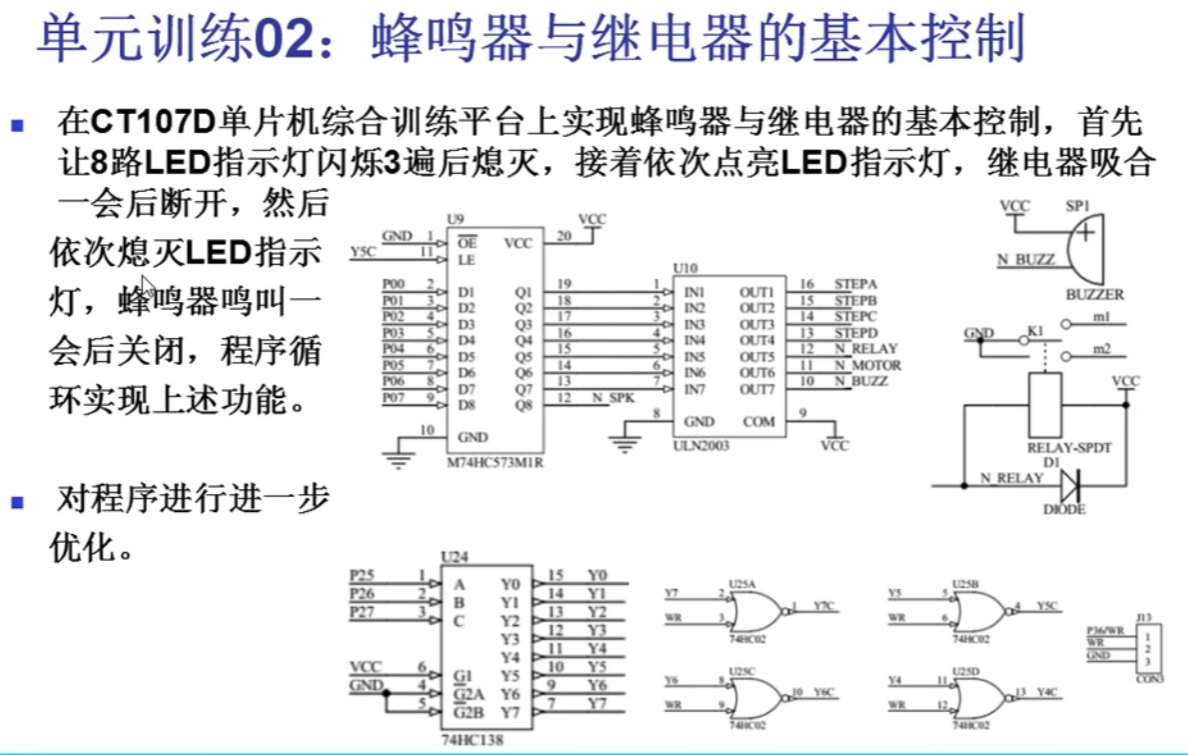
蓝桥杯单片机组备赛——蜂鸣器和继电器的基本控制
文章目录 一、蜂鸣器和继电器电路介绍二、题目与答案2.1 题目2.2 答案2.3 重点函数解析 一、蜂鸣器和继电器电路介绍 可以发现两个电路一端都接着VCC,所以我们只要给另一端接上低电平就可以让蜂鸣器和继电器进行工作。与操作LED类似,只不过换了一个74HC5…...

嵌入式linux 编译qt5(以v851s为例)
本文参考Blev大神的博客:Yuzuki Lizard V851S开发板 --移植 QT5.12.9教程(群友Blev提供) - Allwinner / 柚木PI-V851S - 嵌入式开发问答社区 (100ask.net) 一. 环境准备 1.下载qt5源码:Open Source Development | Open Source …...

uniapp 实战 -- app 的自动升级更新(含生成 app 发布页)
uniapp 提供了 App升级中心 uni-upgrade-center ,可以便捷实现app 的自动升级更新,具体编码和配置如下: 1. 用户端 – 引入升级中心插件 下载安装插件 uni-upgrade-center - App https://ext.dcloud.net.cn/plugin?id4542 pages.json 中添加…...

微服务http调用其他服务的方法
在对应需要调的服务配置文件加上路径 #审批方案微服务配置 server.port: 9004 upload.path: /alldev/u01/ schedule.cron.countDown: 0 0 8-18 * * ? statistics.syskey: ywsp schedule.countDown.isExecute: true post.url.updateStatus: http://10.3.2.222:8888/ecological…...

vagrant 用户名密码登录
正常登录后 sudo -i 切换到root权限 vim /etc/ssh/vim sshd_config 将PasswordAuthentication no设置 为yes 重启sshd.service服务 systemctl restart sshd.service...

强化学习应用(三):基于Q-learning的无人机物流路径规划研究(提供Python代码)
一、Q-learning简介 Q-learning是一种强化学习算法,用于解决基于马尔可夫决策过程(MDP)的问题。它通过学习一个价值函数来指导智能体在环境中做出决策,以最大化累积奖励。 Q-learning算法的核心思想是通过不断更新一个称为Q值的…...
探索SQL性能优化之道:实用技巧与最佳实践
SQL性能优化可能是每个数据库管理员和开发者在日常工作中必不可少的一个环节。在大数据时代,为确保数据库系统的响应速度和稳定性,掌握一些实用的SQL优化技巧至关重要。 本文将带着开发人员走进SQL性能优化的世界,深入剖析实用技巧和最佳实践…...
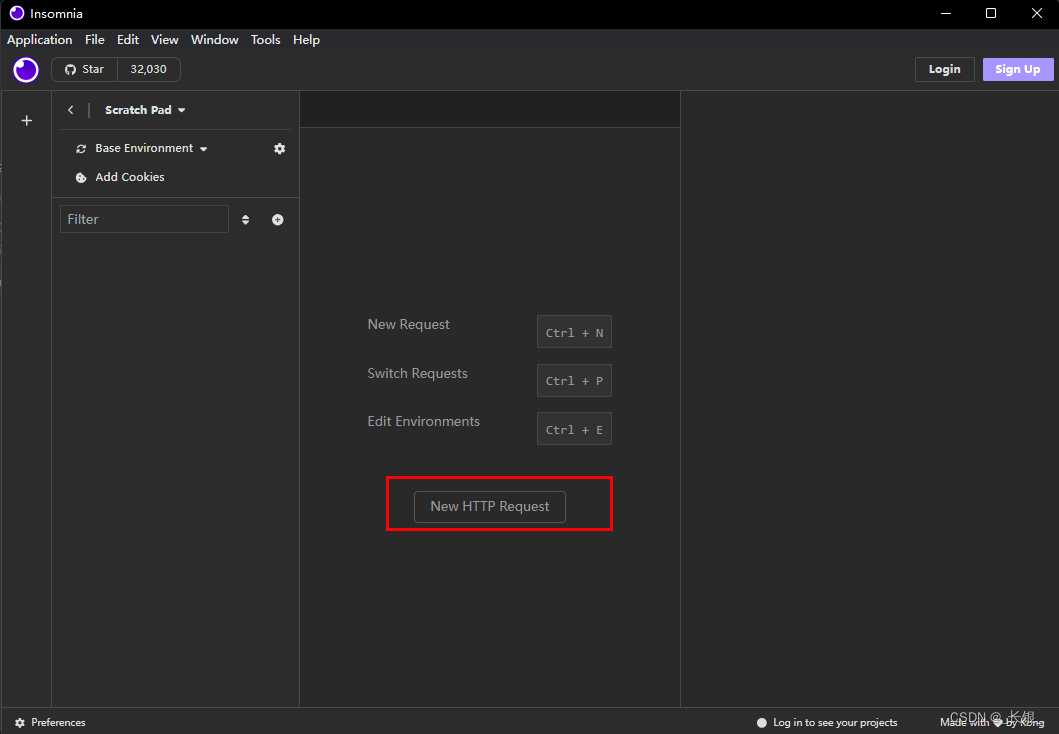
Github项目推荐-Insomnia
项目地址 GitHub地址:GitHub - Kong/insomnia 官网:The Collaborative API Development Platform - Insomnia 项目简述 想必大家都知道PostMan吧。Insomnia可以说是PostMan的开源平替。页面ui很不错,功能强大,使用也比较方便。…...
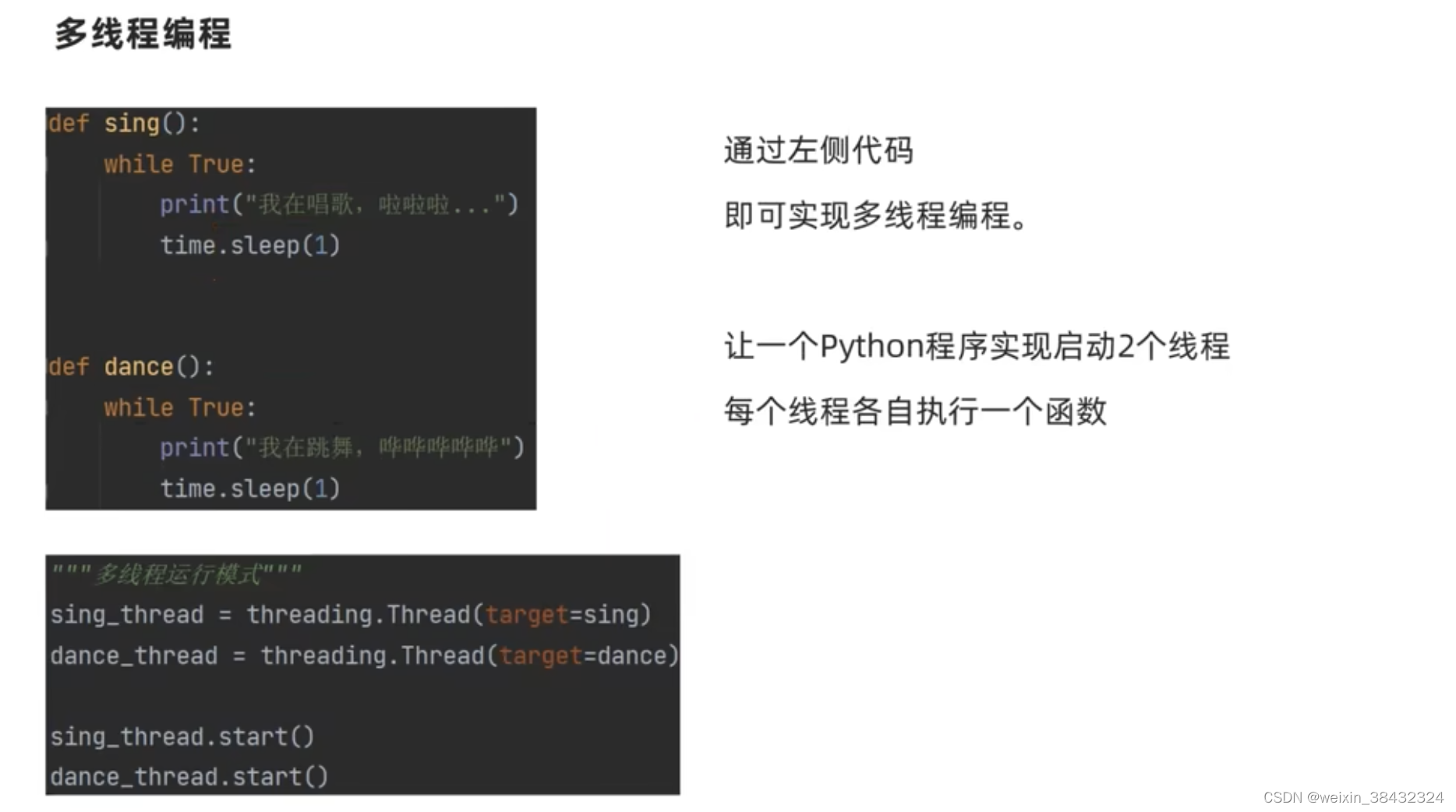
python 语法
闭包 在函数嵌套的前提下,内部函数使用了外部函数的变量,并且外部函数返回了内部函数,我们把这个使用外部函数变量的内部函数称为闭包。 def outfunc(arg):def innerFunc(msg):print(f"<{msg}> {arg} <{msg}>")retu…...
Mac下载Navicat premium提示文件损坏的解决方案
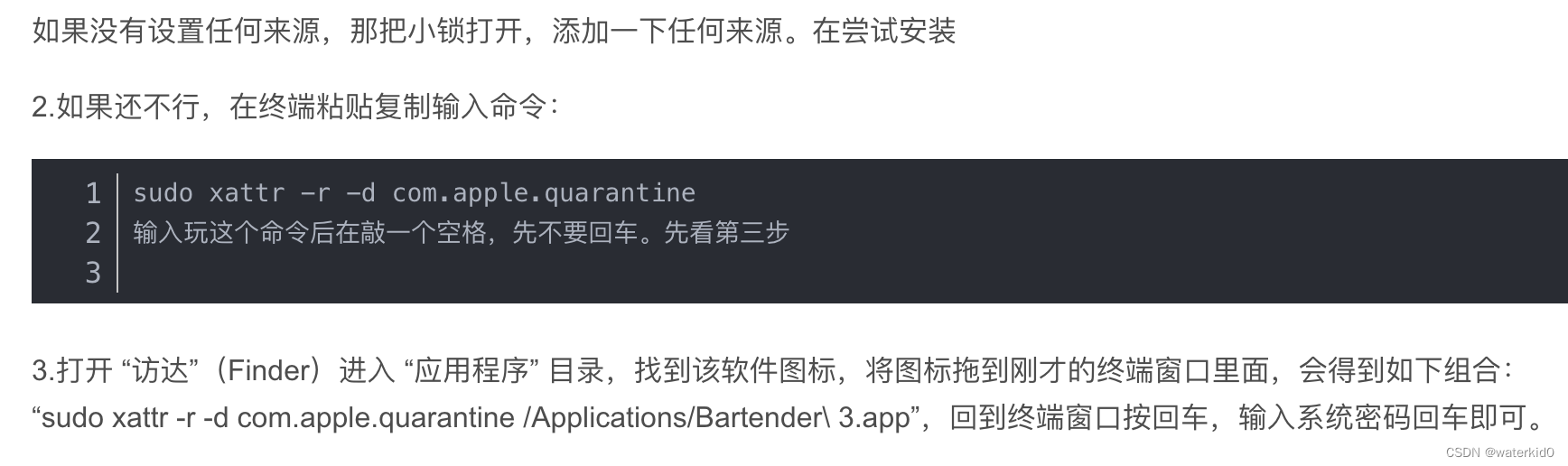
引用:https://blog.csdn.net/weixin_44898291/article/details/120879508 sudo xattr -r -d com.apple.quarantine...

算法——贪心法(Greedy)
贪心法 把整个问题分解成多个步骤,在每个步骤都选取当前步骤的最优方案,直到所有步骤结束;在每一步都不考虑对后续步骤的影响,在后续步骤中也不再回头改变前面的选择。不足之处: 贪心算法并不能保证获得全局最优解&…...
VmWare虚拟机的安装
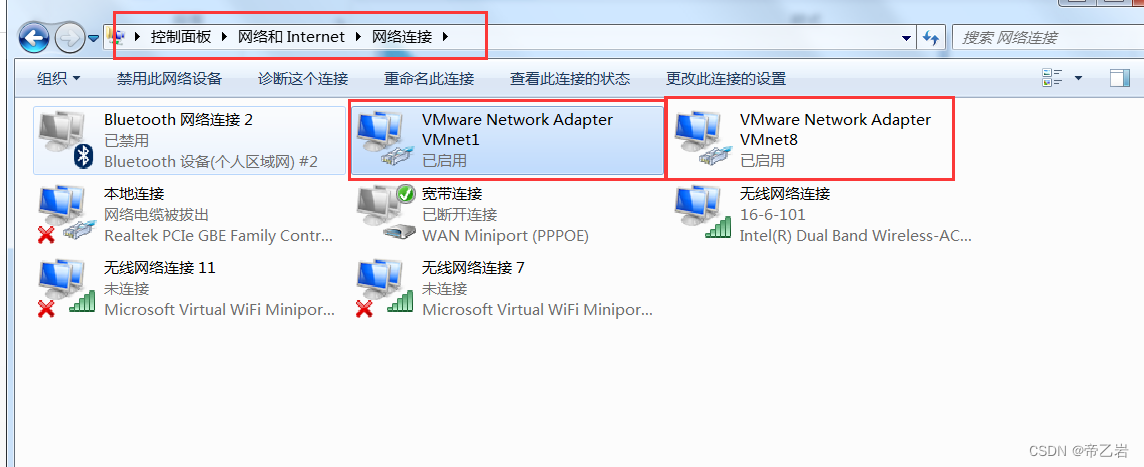
VmWare官方最新版下载地址 vmware官方下载地址 安装流程 安装成功验证 安装完成之后,打开网络中心,一定要确认这里多出两个网络连接,才证明Vmware已经安装成功...
Vue.js轻量级框架:快速搭建可扩展的管理系统
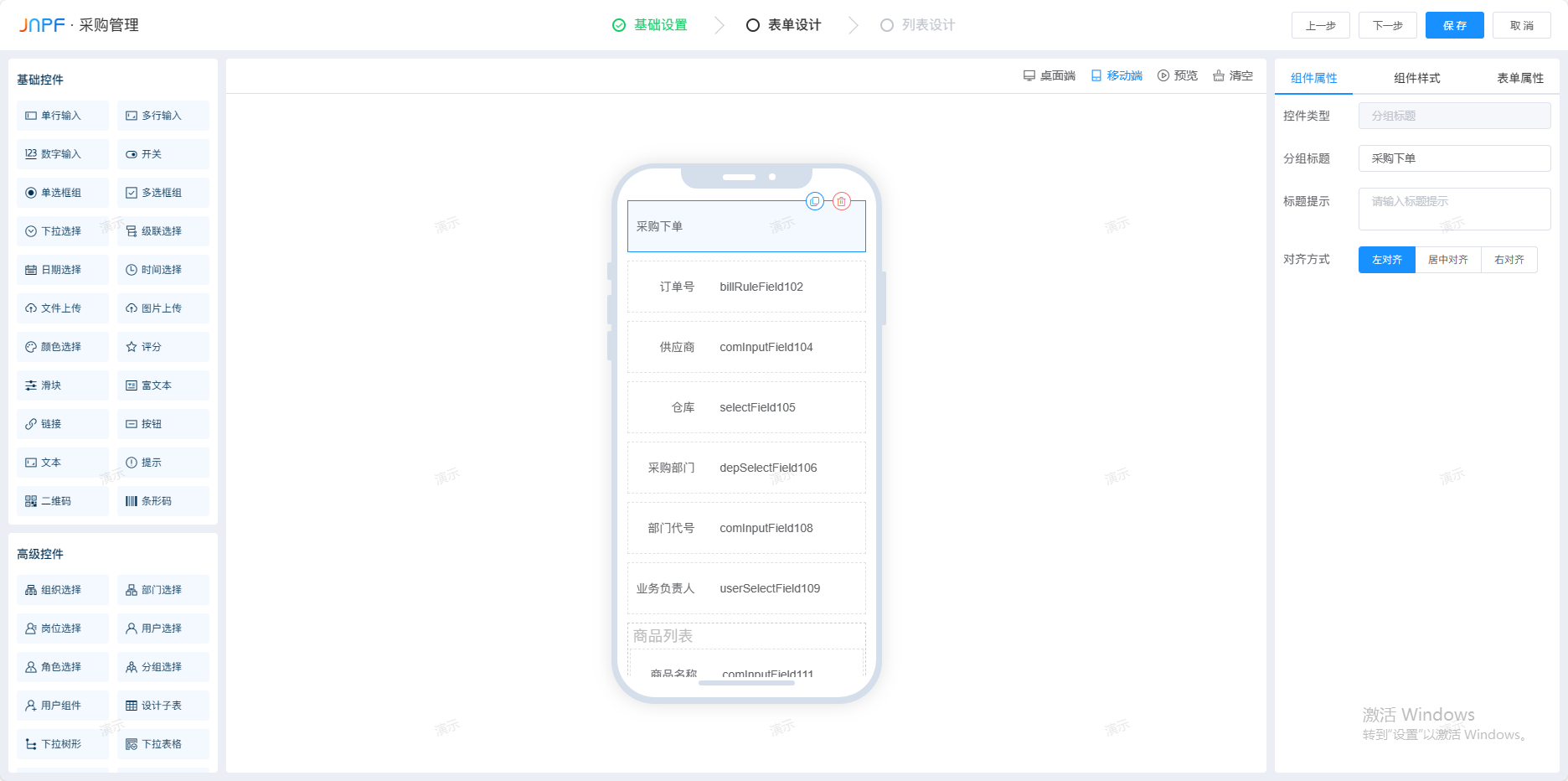
一、前言 在项目实战开发中,尤其是大平台系统的搭建,针对不同业务场景,需要为用户多次编写用于录入、修改、展示操作的相应表单页面。一旦表单需求过多,对于开发人员来说,算是一种重复开发,甚至是繁杂的工作…...
Android-多线程
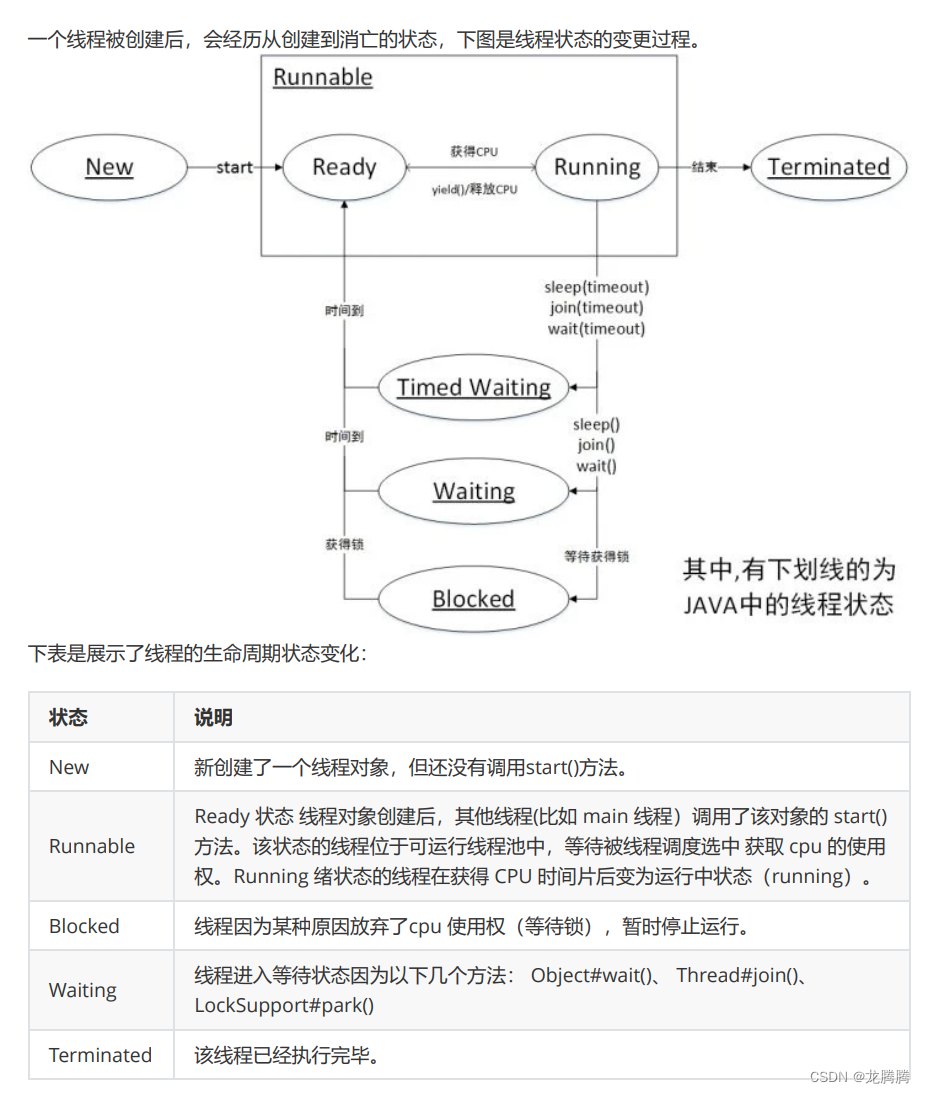
线程是进程中可独立执行的最小单位,也是 CPU 资源(时间片)分配的基本单位,同一个进程中的线程可以共享进程中的资源,如内存空间和文件句柄。线程有一些基本的属性,如id、name、以及priority。 id࿱…...

sqlalchemy 监听所有实体插入以及更新事件
这边使用的是flaskdependency-injectersqlalchemy,有一个公共类,想插入或者更新的时候对公共类某些字段进行统一操作 这个是公共类:包括一些基础字段,所有的实体都会继承这个类 """Models module.""&q…...

go怎么结束很多个协程呢
在Go语言中,可以通过使用context来结束多个协程。context包提供了用于跟踪、取消和传递截止日期的机制,可用于协程的生命周期管理。 以下是一个使用context取消多个协程的示例: package mainimport ("context""fmt"&qu…...

springboot 项目访问静态资源遇到的问题,WebMvcConfigurer和WebMvcConfigurationSupport
之前发过通过继承WebMvcConfigurationSupport来访问静态资源的文章——img标签访问静态资源,代码如下 Configuration public class LocalPathWebMvcConfigurer extends WebMvcConfigurationSupport {/*** 在springboot项目中,允许浏览器访问指定本地文件…...
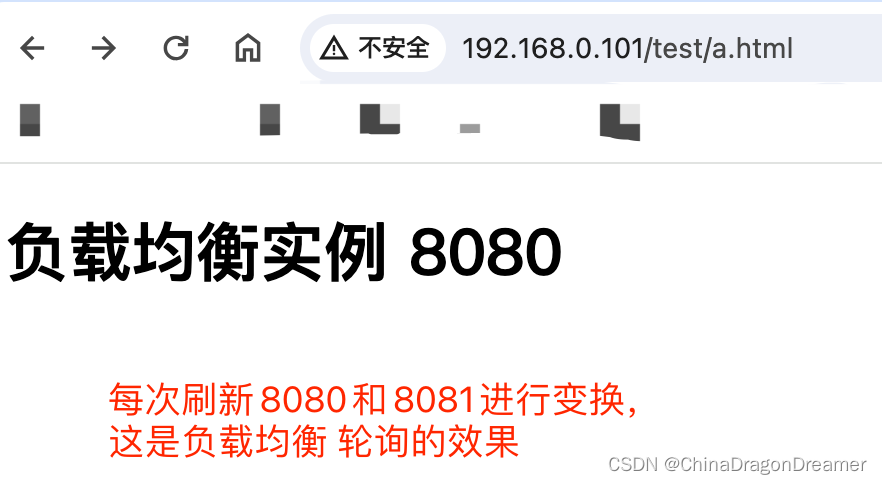
Nginx配置负载均衡实例
Nginx配置反向代理实例二 提醒一下:下面实例讲解是在Mac系统演示的; 负载均衡实例实现的效果 浏览器地址栏输入地址http://192.168.0.101/test/a.html,刷新页面进行多次请求,负载均衡效果,平均分配到8080端口服务和8…...

使用Chandra构建数学建模助手:美赛备战全攻略
使用Chandra构建数学建模助手:美赛备战全攻略 1. 引言 数学建模竞赛就像一场智力马拉松,需要在有限时间内解决复杂问题。每年美赛期间,无数团队熬夜奋战,只为找到最优解决方案。但现实往往是:选题纠结、算法选择困难…...

突破性AMD Ryzen硬件调试方案:SMUDebugTool深度解析与实战指南
突破性AMD Ryzen硬件调试方案:SMUDebugTool深度解析与实战指南 【免费下载链接】SMUDebugTool A dedicated tool to help write/read various parameters of Ryzen-based systems, such as manual overclock, SMU, PCI, CPUID, MSR and Power Table. 项目地址: ht…...

COSL超声相控阵列的声场分布与聚焦深度仿真
cosmol超声相控阵列声场分布和聚焦深度仿真 (可根据需求修改)超声相控阵列这玩意儿在工业检测和医疗领域用得贼多,核心就是通过控制不同阵元的发射时序实现声波聚焦。今天咱们用COMSOL搞个简单的二维仿真,看看怎么让声场在特定深度…...

实时口罩检测系统性能优化:从算法到工程全链路调优
实时口罩检测系统性能优化:从算法到工程全链路调优 1. 引言 在公共场所疫情防控中,实时口罩检测系统发挥着重要作用。但在实际部署中,很多开发者会遇到性能瓶颈:检测速度跟不上视频流帧率、GPU资源占用过高、误报漏报频发等问题…...

Thorium浏览器:重新定义Chromium性能的颠覆性优化方案
Thorium浏览器:重新定义Chromium性能的颠覆性优化方案 【免费下载链接】thorium Chromium fork named after radioactive element No. 90. Windows and MacOS/Raspi/Android/Special builds are in different repositories, links are towards the top of the READM…...
实战:让分子动力学模拟速度提升10倍)
别只盯着训练!DeePMD-kit模型压缩(graph.pb)实战:让分子动力学模拟速度提升10倍
突破计算瓶颈:DeePMD-kit模型压缩技术实战指南 当你在分子动力学模拟中投入数周时间训练出一个高精度DeePMD模型后,是否遇到过这样的困境:想要扩大模拟体系规模或延长模拟时间,却受限于计算资源的瓶颈?模型压缩技术正是…...

Open UI5 源代码解析之740:SearchManager.js
源代码仓库: https://github.com/SAP/openui5 源代码位置:src\sap.f\src\sap\f\SearchManager.js SearchManager.js 深度解析:在 openUI5 中的职责、机制与落地价值 文件定位与总体判断 这个文件定义了一个名为 sap.f.SearchManager 的类。它位于 sap.f 库路径下,却明…...

深求·墨鉴快速部署指南:3步搞定,体验优雅的文档图片转文字
深求墨鉴快速部署指南:3步搞定,体验优雅的文档图片转文字 1. 引言:当OCR遇见东方美学 在日常办公和学习中,我们经常需要将纸质文档、书籍图片或手写笔记转换为可编辑的电子文本。传统OCR工具往往只注重功能实现,而忽…...

nlp_gte_sentence-embedding_chinese-large保姆级教程:免配置镜像启动+Web界面使用详解
nlp_gte_sentence-embedding_chinese-large保姆级教程:免配置镜像启动Web界面使用详解 你是不是经常遇到这样的问题:手里有一堆文档,想快速找到和某个问题最相关的内容,却只能靠关键词搜索,结果要么漏掉,要…...

OpenWrt SDK实战:如何用SDK高效开发自定义驱动和应用
OpenWrt SDK实战:如何用SDK高效开发自定义驱动和应用 在嵌入式开发领域,OpenWrt因其高度模块化和可定制性成为路由器及物联网设备的首选操作系统。但对于需要频繁修改驱动或开发定制应用的工程师来说,每次完整编译整个系统不仅耗时耗力&#…...