
openssl3.2 - 官方demo学习 - encode - rsa_encode.c
文章目录
- openssl3.2 - 官方demo学习 - encode - rsa_encode.c
- 概述
- 笔记
- END
openssl3.2 - 官方demo学习 - encode - rsa_encode.c
概述
命令行参数 server_priv_key.pem client_priv_key.pem
这2个证书是前面certs目录里面做的
官方这个程序有bug, 给出2个证书, 还要从屏幕上输入
if (OSSL_DECODER_from_fp(dctx, f) == 0) { /*< 在这里阻塞住了, 让在屏幕上输入东西, 让我输入啥啊 ?
关键是输入了, 回车也不返回程序.
先放这里, 等整明白了, 再来修正这个工程.
笔记
/*!
\file rsa_encode.c
\note openssl3.2 - 官方demo学习 - encode - rsa_encode.c
命令行参数 server_priv_key.pem client_priv_key.pem
这2个证书是前面certs目录里面做的
官方这个程序有bug, 给出2个证书, 还要从屏幕上输入
if (OSSL_DECODER_from_fp(dctx, f) == 0) { /*< 在这里阻塞住了, 让在屏幕上输入东西, 让我输入啥啊 ?
关键是输入了, 回车也不返回程序.
先放这里, 等整明白了, 再来修正这个工程.
*//*-* Copyright 2022-2023 The OpenSSL Project Authors. All Rights Reserved.** Licensed under the Apache License 2.0 (the "License").  You may not use* this file except in compliance with the License.  You can obtain a copy* in the file LICENSE in the source distribution or at* https://www.openssl.org/source/license.html*/
#include <string.h>
#include <openssl/decoder.h>
#include <openssl/encoder.h>
#include <openssl/evp.h>#include "my_openSSL_lib.h"/** Example showing the encoding and decoding of RSA public and private keys. A* PEM-encoded RSA key is read in from stdin, decoded, and then re-encoded and* output for demonstration purposes. Both public and private keys are accepted.** This can be used to load RSA keys from a file or save RSA keys to a file.*//* A property query used for selecting algorithm implementations. */
static const char* propq = NULL;/** Load a PEM-encoded RSA key from a file, optionally decrypting it with a* supplied passphrase.*/
static EVP_PKEY* load_key(OSSL_LIB_CTX* libctx, FILE* f, const char* passphrase)
{int ret = 0;EVP_PKEY* pkey = NULL;OSSL_DECODER_CTX* dctx = NULL;int selection = 0;/** Create PEM decoder context expecting an RSA key.** For raw (non-PEM-encoded) keys, change "PEM" to "DER".** The selection argument here specifies whether we are willing to accept a* public key, private key, or either. If it is set to zero, either will be* accepted. If set to EVP_PKEY_KEYPAIR, a private key will be required, and* if set to EVP_PKEY_PUBLIC_KEY, a public key will be required.*/dctx = OSSL_DECODER_CTX_new_for_pkey(&pkey, "PEM", NULL, "RSA",selection,libctx, propq);if (dctx == NULL) {fprintf(stderr, "OSSL_DECODER_CTX_new_for_pkey() failed\n");goto cleanup;}/** Set passphrase if provided; needed to decrypt encrypted PEM files.* If the input is not encrypted, any passphrase provided is ignored.** Alternative methods for specifying passphrases exist, such as a callback* (see OSSL_DECODER_CTX_set_passphrase_cb(3)), which may be more useful for* interactive applications which do not know if a passphrase should be* prompted for in advance, or for GUI applications.*/if (passphrase != NULL) {if (OSSL_DECODER_CTX_set_passphrase(dctx,(const unsigned char*)passphrase,strlen(passphrase)) == 0) {fprintf(stderr, "OSSL_DECODER_CTX_set_passphrase() failed\n");goto cleanup;}}/* Do the decode, reading from file. */if (OSSL_DECODER_from_fp(dctx, f) == 0) { /*< 在这里阻塞住了, 让在屏幕上输入东西, 让我输入啥啊 ? */ fprintf(stderr, "OSSL_DECODER_from_fp() failed\n");goto cleanup;}ret = 1;
cleanup:OSSL_DECODER_CTX_free(dctx);/** pkey is created by OSSL_DECODER_CTX_new_for_pkey, but we* might fail subsequently, so ensure it's properly freed* in this case.*/if (ret == 0) {EVP_PKEY_free(pkey);pkey = NULL;}return pkey;
}/** Store an RSA public or private key to a file using PEM encoding.** If a passphrase is supplied, the file is encrypted, otherwise* it is unencrypted.*/
static int store_key(EVP_PKEY* pkey, FILE* f, const char* passphrase)
{int ret = 0;int selection;OSSL_ENCODER_CTX* ectx = NULL;/** Create a PEM encoder context.** For raw (non-PEM-encoded) output, change "PEM" to "DER".** The selection argument controls whether the private key is exported* (EVP_PKEY_KEYPAIR), or only the public key (EVP_PKEY_PUBLIC_KEY). The* former will fail if we only have a public key.** Note that unlike the decode API, you cannot specify zero here.** Purely for the sake of demonstration, here we choose to export the whole* key if a passphrase is provided and the public key otherwise.*/selection = (passphrase != NULL)? EVP_PKEY_KEYPAIR: EVP_PKEY_PUBLIC_KEY;ectx = OSSL_ENCODER_CTX_new_for_pkey(pkey, selection, "PEM", NULL, propq);if (ectx == NULL) {fprintf(stderr, "OSSL_ENCODER_CTX_new_for_pkey() failed\n");goto cleanup;}/** Set passphrase if provided; the encoded output will then be encrypted* using the passphrase.** Alternative methods for specifying passphrases exist, such as a callback* (see OSSL_ENCODER_CTX_set_passphrase_cb(3), just as for OSSL_DECODER_CTX;* however you are less likely to need them as you presumably know whether* encryption is desired in advance.** Note that specifying a passphrase alone is not enough to cause the* key to be encrypted. You must set both a cipher and a passphrase.*/if (passphrase != NULL) {/* Set cipher. AES-128-CBC is a reasonable default. */if (OSSL_ENCODER_CTX_set_cipher(ectx, "AES-128-CBC", propq) == 0) {fprintf(stderr, "OSSL_ENCODER_CTX_set_cipher() failed\n");goto cleanup;}/* Set passphrase. */if (OSSL_ENCODER_CTX_set_passphrase(ectx,(const unsigned char*)passphrase,strlen(passphrase)) == 0) {fprintf(stderr, "OSSL_ENCODER_CTX_set_passphrase() failed\n");goto cleanup;}}/* Do the encode, writing to the given file. */if (OSSL_ENCODER_to_fp(ectx, f) == 0) {fprintf(stderr, "OSSL_ENCODER_to_fp() failed\n");goto cleanup;}ret = 1;
cleanup:OSSL_ENCODER_CTX_free(ectx);return ret;
}int main(int argc, char** argv)
{int ret = EXIT_FAILURE;OSSL_LIB_CTX* _ossl_lib_ctx = NULL;EVP_PKEY* _evp_pkey = NULL;const char* passphrase_in = NULL, * passphrase_out = NULL;/* usage: rsa_encode <passphrase-in> <passphrase-out> */if (argc > 1 && argv[1][0])passphrase_in = argv[1];if (argc > 2 && argv[2][0])passphrase_out = argv[2];/* Decode PEM key from stdin and then PEM encode it to stdout. */_evp_pkey = load_key(_ossl_lib_ctx, stdin, passphrase_in);if (_evp_pkey == NULL) {fprintf(stderr, "Failed to decode key\n");goto cleanup;}if (store_key(_evp_pkey, stdout, passphrase_out) == 0) {fprintf(stderr, "Failed to encode key\n");goto cleanup;}ret = EXIT_SUCCESS;
cleanup:EVP_PKEY_free(_evp_pkey);OSSL_LIB_CTX_free(_ossl_lib_ctx);return ret;
}
END
相关文章:

openssl3.2 - 官方demo学习 - encode - rsa_encode.c
文章目录 openssl3.2 - 官方demo学习 - encode - rsa_encode.c概述笔记END openssl3.2 - 官方demo学习 - encode - rsa_encode.c 概述 命令行参数 server_priv_key.pem client_priv_key.pem 这2个证书是前面certs目录里面做的 官方这个程序有bug, 给出2个证书, 还要从屏幕上输…...
Day03
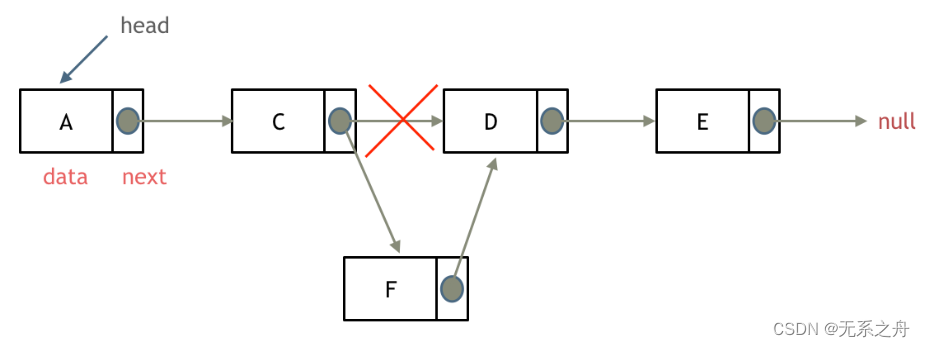
今日任务 链表理论基础203.移除链表元素707.设计链表206.反转链表 链表理论基础 1)单链表 单链表中的指针域只能指向节点的下一个节点 2)双链表 双链表:每一个节点有两个指针域,一个指向下一个节点,一个指向上一个…...

adb 常用命令汇总
目录 adb 常用命令 1、显示已连接的设备列表 2、进入设备 3、安装 APK 文件到设备 4、卸载指定包名的应用 5、从设备中复制文件到本地 6、将本地文件复制到设备 7、查看设备日志信息 8、重启设备 9、截取设备屏幕截图 10、屏幕分辨率 11、屏幕密度 12、显示设备的…...

ubuntu 2022.04 安装vcs2018和verdi2018
主要参考网站朋友们的作业。 安装时参考: ubuntu18.04安装vcs、verdi2018_ubuntu安装vcs-CSDN博客https://blog.csdn.net/qq_24287711/article/details/130017583 编译时参考: 【ASIC】VCS报Error-[VCS_COM_UNE] Cannot find VCS compiler解决方法_e…...

品牌推广与情绪价值的深度结合:市场大局下的新趋势与“准”原则
随着社会经济的快速发展和消费者心理的复杂化,品牌推广已经不再是单一的信息传递,而是一个与消费者建立情感连接、传达品牌价值的过程。在这个过程中,情绪价值起到了至关重要的作用。它不仅影响着消费者的购买决策,更是品牌与消费…...

React16源码: React中的不同的expirationTime的源码实现
不同的 expirationTime 1 )概述 在React中不仅仅有异步任务大部分情况下都是同步的任务,所以会有不同 expirationTime 的存在 2 )种类 A. Sync 模式,优先级最高 任务创建完成之后,立马更新到真正的dom里面是一个创建…...
TRB 2024论文分享:基于生成对抗网络和Transformer模型的交通事件检测混合模型
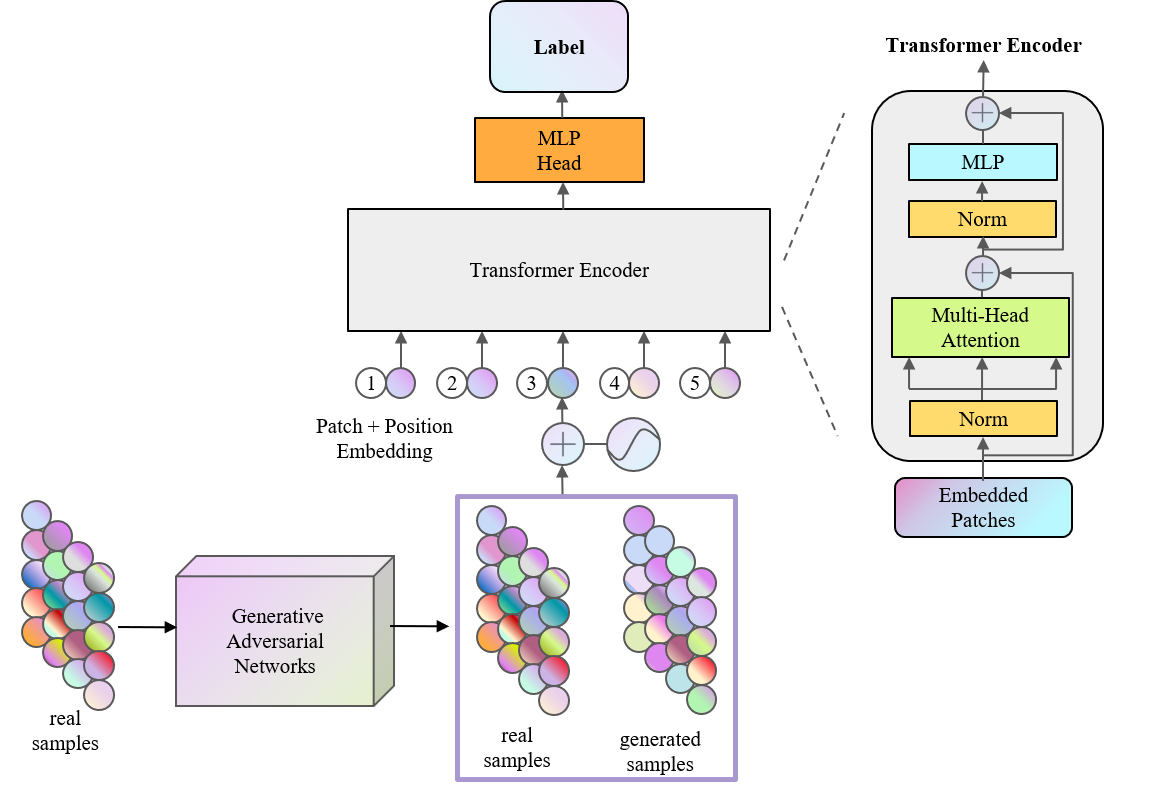
TRB(Transportation Research Board,美国交通研究委员会,简称TRB)会议是交通研究领域知名度最高学术会议之一,近年来的参会人数已经超过了2万名,是参与人数和国家最多的学术盛会。TRB会议几乎涵盖了交通领域…...

Golang 打包
构建/打包 使用 Go 的构建命令: go build在包含 main 函数的包的目录下执行,它会生成一个可执行文件。文件名默认与包所在的目录名相同,但也可以使用 -o 选项来指定输出的文件名 交叉编译 Windows 环境下进行交叉编译以构建其他平台的可执…...
力扣每日一练(24-1-14)
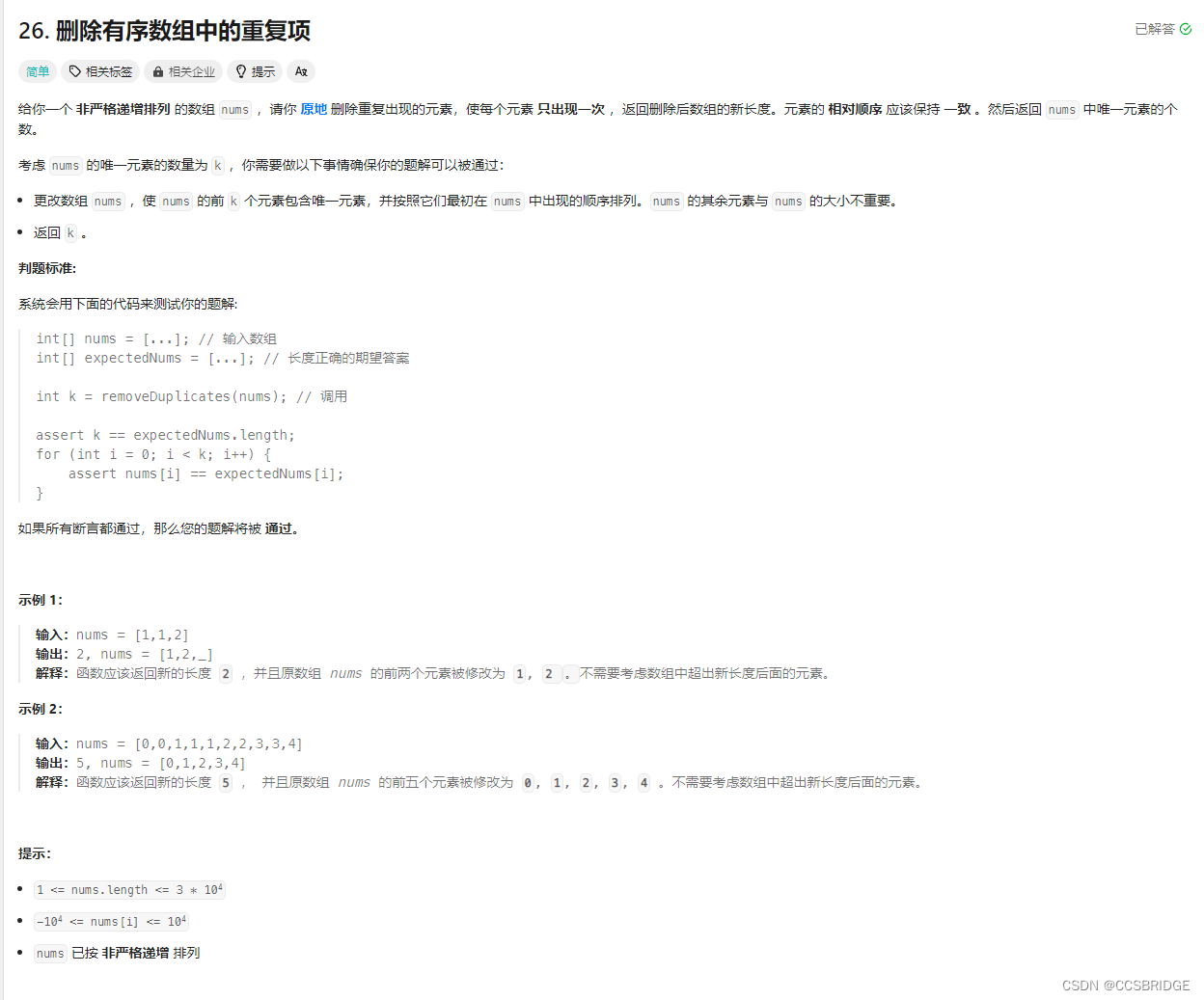
做过类似的题,一眼就是双指针,刚好也就是题解。 if not nums:return 0p1 0 for p2 in range(1, len(nums)):if nums[p2] ! nums[p1]:p1 1nums[p1] nums[p2]return p1 1 根据规律,重复的数字必定相连,那么只要下一个数字与上一…...
K 个一组翻转链表(链表反转,固定长度反转)(困难)
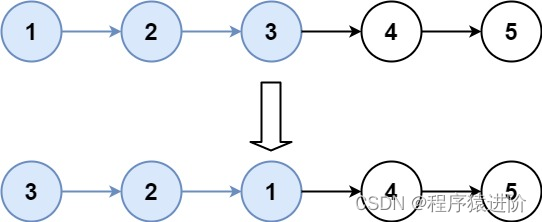
优质博文:IT-BLOG-CN 一、题目 给你链表的头节点head,每k个节点一组进行翻转,请你返回修改后的链表。 k是一个正整数,它的值小于或等于链表的长度。如果节点总数不是k的整数倍,那么请将最后剩余的节点保持原有顺序。…...
Spring Boot - 利用Resilience4j-RateLimiter进行流量控制和服务降级
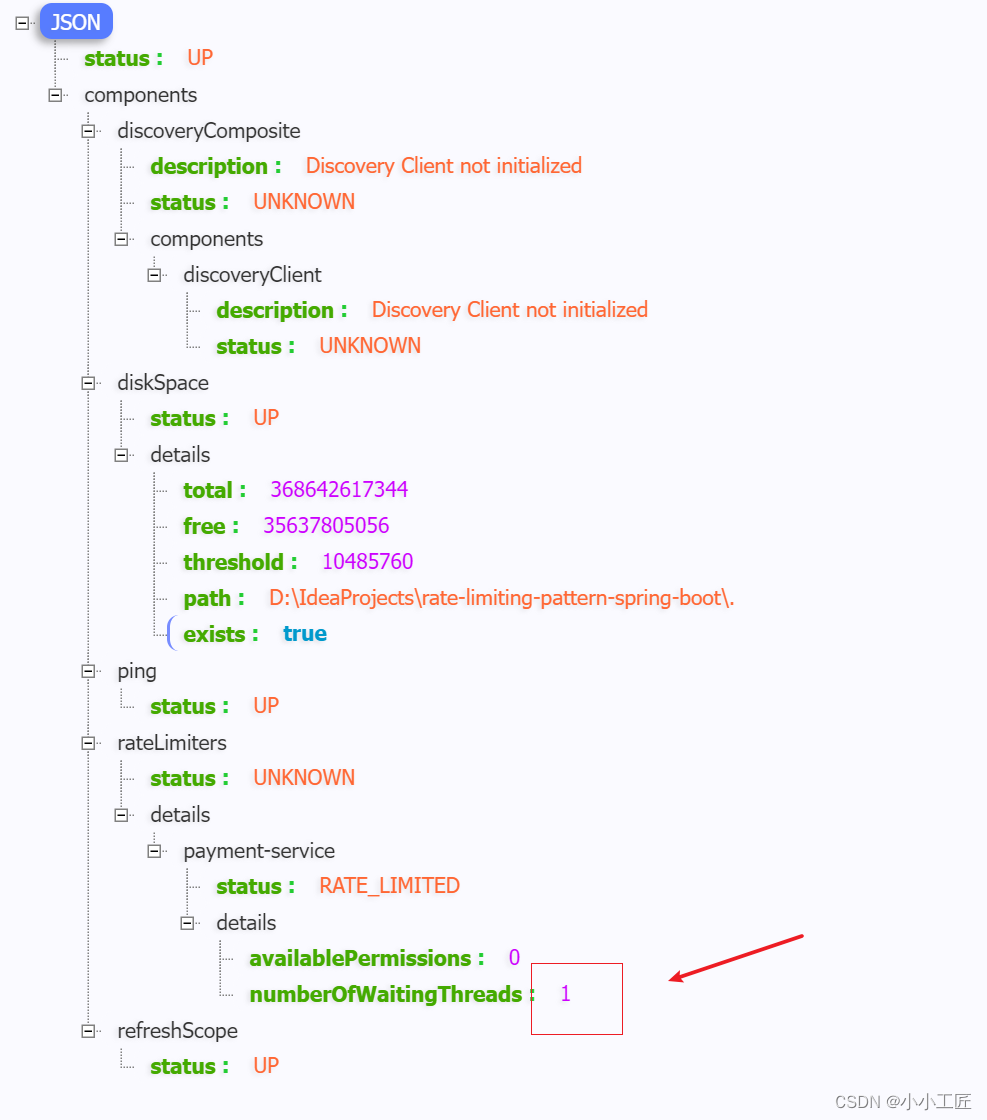
文章目录 Resilience4j概述Resilience4j官方地址Resilience4j-RateLimiter微服务演示Payment processorPOM配置文件ServiceController Payment servicePOMModelServiceRestConfigController配置验证 探究 Rate Limiting请求三次 ,观察等待15秒连续访问6次 Resilienc…...
概率论与数理统计————1.随机事件与概率
一、随机事件 随机试验:满足三个特点 (1)可重复性:可在相同的条件下重复进行 (2)可预知性:每次试验的可能不止一个,事先知道试验的所有可能结果 (3)不确定…...
【生存技能】git操作
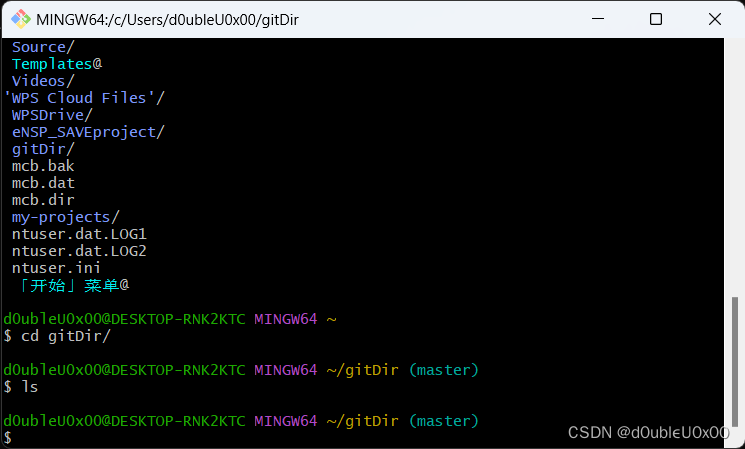
先下载git https://git-scm.com/downloads 我这里是win64,下载了相应的直接安装版本 64-bit Git for Windows Setup 打开git bash 设置用户名和邮箱 查看设置的配置信息 获取本地仓库 在git bash或powershell执行git init,初始化当前目录成为git仓库…...

docker 将镜像打包为 tar 包
目录 1 实现 1 实现 要将镜像导出为.tar包,可以使用Docker命令行工具进行操作。下面是导出镜像的步骤: 首先,使用以下命令列出当前系统上的镜像,并找到要导出的镜像的ID或名称: docker images使用以下命令将镜像导出为…...
)
341. 最优贸易(dp思想运用,spfa,最短路)
341. 最优贸易 - AcWing题库 C 国有 n 个大城市和 m 条道路,每条道路连接这 n 个城市中的某两个城市。 任意两个城市之间最多只有一条道路直接相连。 这 m 条道路中有一部分为单向通行的道路,一部分为双向通行的道路,双向通行的道路在统计…...
FineBI实战项目一(19):每小时订单笔数分析开发
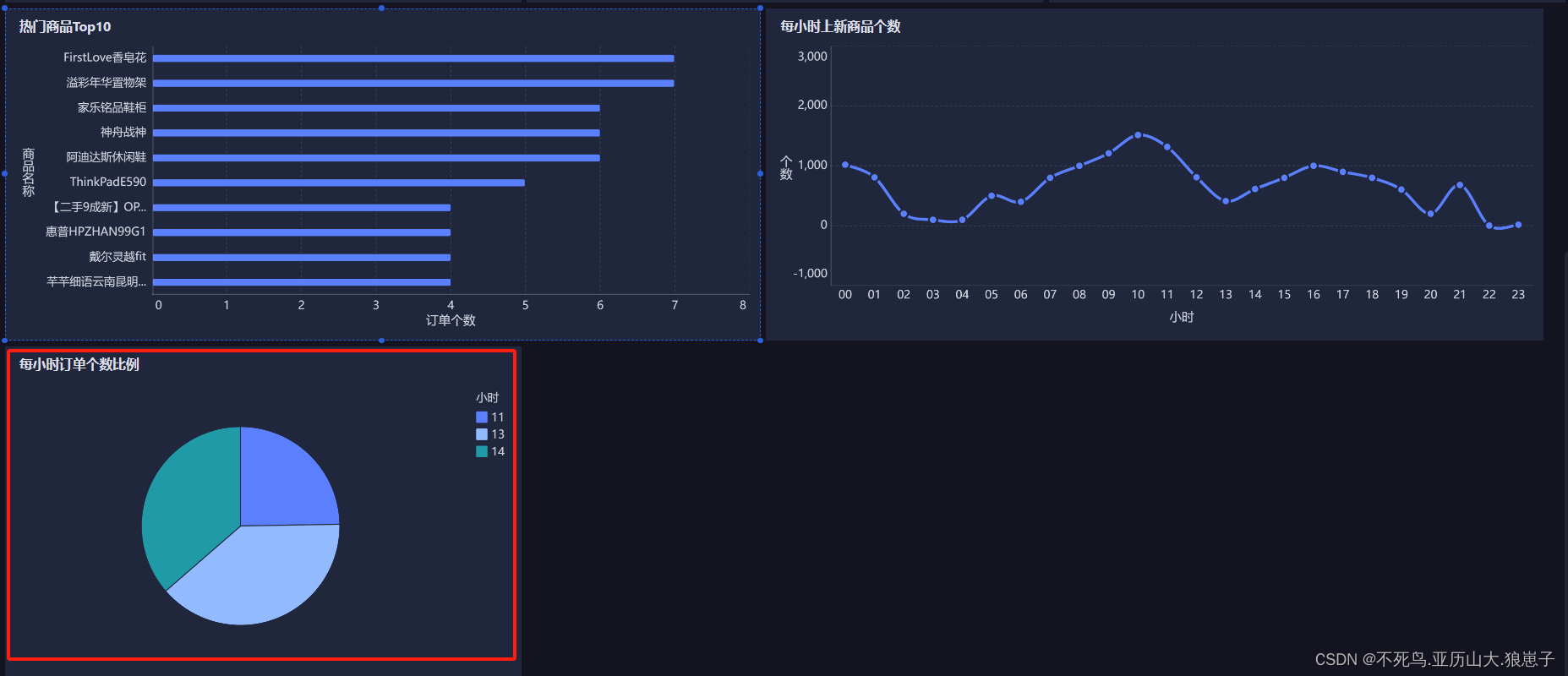
点击新建组件,创建下每小时订单笔数组件。 选择饼图,拖拽cnt(总数)到角度,拖拽hourstr到颜色,调节内径。 修改现在的文字 拖拽组件到仪表盘。 效果如下:...

What is `@RequestBody ` does?
RequestBody 是SpringMVC框架中的注解,通常与POST、PUT等方法配合使用。当客户端发送包含JSON或XML格式数据的请求时,可以通过该注解将请求体内容绑定到Controller方法参数上 作用 自动反序列化: SpringMVC会根据RequestBody注解的参数类型&…...

Windows安装Rust环境(详细教程)
一、 安装mingw64(C语言环境) Rust默认使用的C语言依赖Visual Studio,但该工具占用空间大安装也较为麻烦,可以选用轻便的mingw64包。 1.1 安装地址 (1) 下载地址1-GitHub:Releases niXman/mingw-builds-binaries GitHub (2) 下载地址2-W…...
Marin说PCB之传输线损耗---趋肤效应和导体损耗01
大家在做RF上的PCB走线或者是车载相机的上走线的时候经常会听那些硬件工程师们说你这个走线一定要保证50欧姆的阻抗匹配啊,还有就是记得加粗走做隔层参考。 有的公司的EE硬件同事会很贴心的把RF走线的注意事项给你备注在原理图上或者是layoutguide上,遇到…...

八:分布式锁
1、为什么要使用分布式锁 锁是多线程代码中的概念,只有多任务访问同一个互斥的共享资源时才需要锁。单机应用开发时一般使用synchronized或lock。多线程的运行都是在同一个JVM之下。应用是分布式集群,属于多JVM的工作环境,JVM之间已经无法通过…...

QtScrcpy终极指南:如何免费实现高清Android投屏与多设备控制
QtScrcpy终极指南:如何免费实现高清Android投屏与多设备控制 【免费下载链接】QtScrcpy Android实时投屏软件,此应用程序提供USB(或通过TCP/IP)连接的Android设备的显示和控制。它不需要任何root访问权限 项目地址: https://gitcode.com/barry-ran/QtS…...

Dism++实战指南:一站式Windows系统维护的5大专业解决方案
Dism实战指南:一站式Windows系统维护的5大专业解决方案 【免费下载链接】Dism-Multi-language Dism Multi-language Support & BUG Report 项目地址: https://gitcode.com/gh_mirrors/di/Dism-Multi-language Dism作为Windows系统维护的专业工具…...

接口响应慢排查指南:从分层框架到实战优化
1. 问题定位:从现象到根源的排查框架接口响应慢,这几乎是每个后端开发者、运维工程师乃至测试同学都会遇到的“经典”问题。它不像一个明确的错误,会直接抛出异常或返回错误码,而是像一个隐形的性能瓶颈,悄无声息地拖慢…...

STM32CubeMX生成代码后,Keil编译烧写的那些“隐藏”步骤与调试器避坑
STM32CubeMX生成代码后,Keil编译烧写的那些“隐藏”步骤与调试器避坑 当你用STM32CubeMX生成代码后,以为万事大吉,结果在Keil里编译烧写时却频频碰壁——这几乎是每个STM32开发者都会经历的“成人礼”。那些教程里一笔带过的“编译”、“烧写…...

如何解决神界原罪2模组冲突问题:Divinity Mod Manager终极指南
如何解决神界原罪2模组冲突问题:Divinity Mod Manager终极指南 【免费下载链接】DivinityModManager A mod manager for Divinity: Original Sin - Definitive Edition. 项目地址: https://gitcode.com/gh_mirrors/di/DivinityModManager Divinity Mod Manag…...

closure-compiler-js迁移指南:如何从弃用版本平稳过渡到官方版本
closure-compiler-js迁移指南:如何从弃用版本平稳过渡到官方版本 【免费下载链接】closure-compiler-js Package for the JS version of closure-compiler for use via NPM 项目地址: https://gitcode.com/gh_mirrors/cl/closure-compiler-js 如果你正在使用…...

5分钟终极指南:永久免费使用Cursor Pro功能的完整解决方案
5分钟终极指南:永久免费使用Cursor Pro功能的完整解决方案 【免费下载链接】cursor-free-vip [Support 0.45](Multi Language 多语言)自动注册 Cursor Ai ,自动重置机器ID , 免费升级使用Pro 功能: Youve reached your…...
全攻略)
手把手教你配置Jitsi Meet的.env文件:从安全密码生成到Nginx反代(含SSL证书)全攻略
Jitsi Meet生产级部署实战:安全配置与Nginx反代全解析 当内部测试的Jitsi Meet需要面向公网提供服务时,.env文件的精细配置与Nginx反向代理的深度整合就成为关键分水岭。许多团队在过渡阶段常遇到视频卡顿、安全漏洞或证书配置错误等问题,本…...

【独家首发】Midjourney像素艺术训练数据集反向推演报告:基于12,843张高质量样本的风格迁移规律白皮书
更多请点击: https://intelliparadigm.com 第一章:Midjourney像素艺术风格的定义与边界判定 像素艺术(Pixel Art)在 Midjourney 中并非原生风格类别,而是一种通过提示词工程、参数约束与后处理协同达成的视觉范式。其…...

从数据同步工具往后看,NineData 社区版 V5.0.0 这次补齐了什么
从数据同步工具和 ChatDBA 这类能力往后看,V5.0.0 更像一次连续补强,而不是单点加功能。再结合异构数据库迁移工具这类需求,链路扩展、迁移评估和智能诊断一起往前推,社区版的可用边界也随之往前走了一步。落地之前先看这套能力框…...