
Mybatis之关联
一、一对多关联
eg:一个用户对应多个订单
建表语句
CREATE TABLE `t_customer` (`customer_id` INT NOT NULL AUTO_INCREMENT, `customer_name` CHAR(100), PRIMARY KEY (`customer_id`)
);
CREATE TABLE `t_order` ( `order_id` INT NOT NULL AUTO_INCREMENT, `order_name` CHAR(100), `customer_id` INT, PRIMARY KEY (`order_id`)
);
INSERT INTO `t_customer` (`customer_name`) VALUES ('张三');
INSERT INTO `t_order` (`order_name`, `customer_id`) VALUES ('o1', '1');
INSERT INTO `t_order` (`order_name`, `customer_id`) VALUES ('o2', '1');
INSERT INTO `t_order` (`order_name`, `customer_id`) VALUES ('o3', '1');
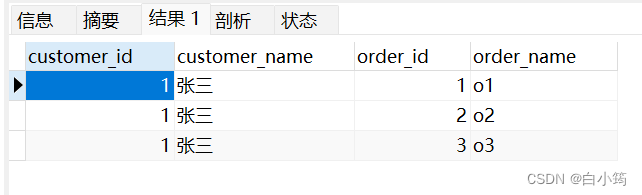
关联查询:查询custmoer_id=1的用户的所有订单信息和用户信息
select t_customer.customer_id,customer_name,order_id,order_name from t_customer left JOIN t_order on t_customer.customer_id=t_order.customer_id
where t_customer.customer_id=1
Customer实体类:
@Data
public class Customer {private Integer customerId;private String customerName;
//一个顾客的所有订单private List<Order> orderList;
}
Order实体类:
@Data
public class Order {private Integer orderId;private String orderName;private Integer customerId;}
mapper接口:
Customer getCustomerWithOrders(Integer customerId);
xml配置文件:
<resultMap id="CustomerMap" type="Customer"><id property="customerId" column="customer_id"></id><result property="customerName" column="customer_name"></result><collection property="orderList" ofType="Order"><id property="orderId" column="order_id"></id><result property="orderName" column="order_name"></result></collection></resultMap><select id="getCustomerWithOrders" resultMap="CustomerMap">select t_customer.customer_id,customer_name,order_id,order_name from t_customer left JOIN t_order on t_customer.customer_id=t_order.customer_idwhere t_customer.customer_id=#{customerId}</select>
测试:
@Testpublic void test01(){Customer customerWithOrders = orderMapper.getCustomerWithOrders(1);System.out.println(customerWithOrders);}
在“对多”关联关系中,同样有很多配置,但是提炼出来最关键的就是:“collection”和“ofType”
二、对一关联
eg:一个订单对应一个用户
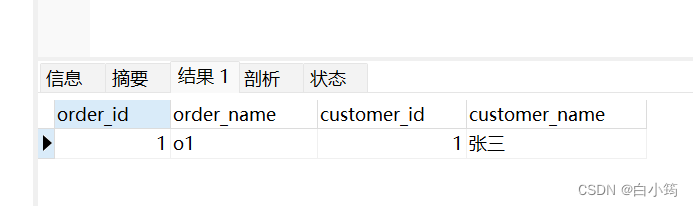
sql语句:查询订单号为1的订单和用户信息
select t_order.* ,t_customer.customer_name from t_order LEFT JOIN t_customer on t_order.customer_id=t_customer.customer_id
where order_id=1;
查询结果:
order实体类新增Customer属性
@Data
public class Order {private Integer orderId;private String orderName;private Integer customerId;//对一关系,用户信息private Customer customer;
}
mapper接口:
Order getOrderWithCustomer(Integer orderId);
xml配置文件:
<resultMap id="OrderMap" type="Order"><id property="orderId" column="order_id"></id><result property="orderName" column="order_name"></result><association property="customer" javaType="Customer"><id property="customerId" column="customer_id"></id><result property="customerName" column="customer_name"></result></association></resultMap><select id="getOrderWithCustomer" resultMap="OrderMap">select t_order.* ,t_customer.customer_name from t_order LEFT JOIN t_customer on t_order.customer_id=t_customer.customer_idwhere order_id=#{orderId};</select>
测试:
@Testpublic void test02(){Order orderWithCustomer = orderMapper.getOrderWithCustomer(1);System.out.println(orderWithCustomer);}
三、OGNL风格的对一关联
<!-- OGNL风格的对一关联--><select id="getOrderWithCustomer2" resultType="Order">select t_order.order_id,t_order.order_name,t_order.customer_id as 'customer.customerId',t_customer.customer_name as 'customer.customerName' from t_order LEFT JOIN t_customer on t_order.customer_id=t_customer.customer_idwhere order_id=#{orderId};</select>
注意起别名时,对象属性costomer.customerId要加上引号
四、多对多关联
eg:一本书对应多个种类,一个种类对应多本书
建立中间表将书和种类对应起来
①根据书的id,查询对应的具体信息和所属种类的信息:
mapper接口:
/*** 根据书的id,查询对应的具体信息和所属种类的信息* @param bookId* @return*/BookEntity selectBookOfCategories(Integer bookId);
xml配置文件:
<resultMap id="BookMap" type="BookEntity"><id property="id" column="book_id"></id><result property="name" column="name"></result><collection property="categoryEntityList" ofType="CategoryEntity"><id property="categoryId" column="category_id"></id><result property="categoryName" column="category_name"></result></collection></resultMap><select id="selectBookOfCategories" resultMap="BookMap">select book_id,category.category_id,category_name,namefrom books,category,category_bookWHERE books.id=category_book.book_idand category_book.category_id=category.category_idand books.id=#{value}</select>
②根据种类的id,查询所有对应书的信息
mapper接口:
CategoryEntity getCategory(Integer id);
xml配置文件
<resultMap id="CategoryMap" type="CategoryEntity"><id property="categoryId" column="category_id"></id><result property="categoryName" column="category_name"></result><collection property="bookEntityList" ofType="BookEntity"><id property="id" column="book_id"></id><result property="name" column="name"></result></collection></resultMap><select id="getCategory" resultMap="CategoryMap">SELECT name,category.category_id ,category_name,book_idfrom books,category,category_bookWHERE books.id=category_book.book_idand category_book.category_id=category.category_idand category.category_id=#{value};</select>
五、分步查询
①分步查询对多关联
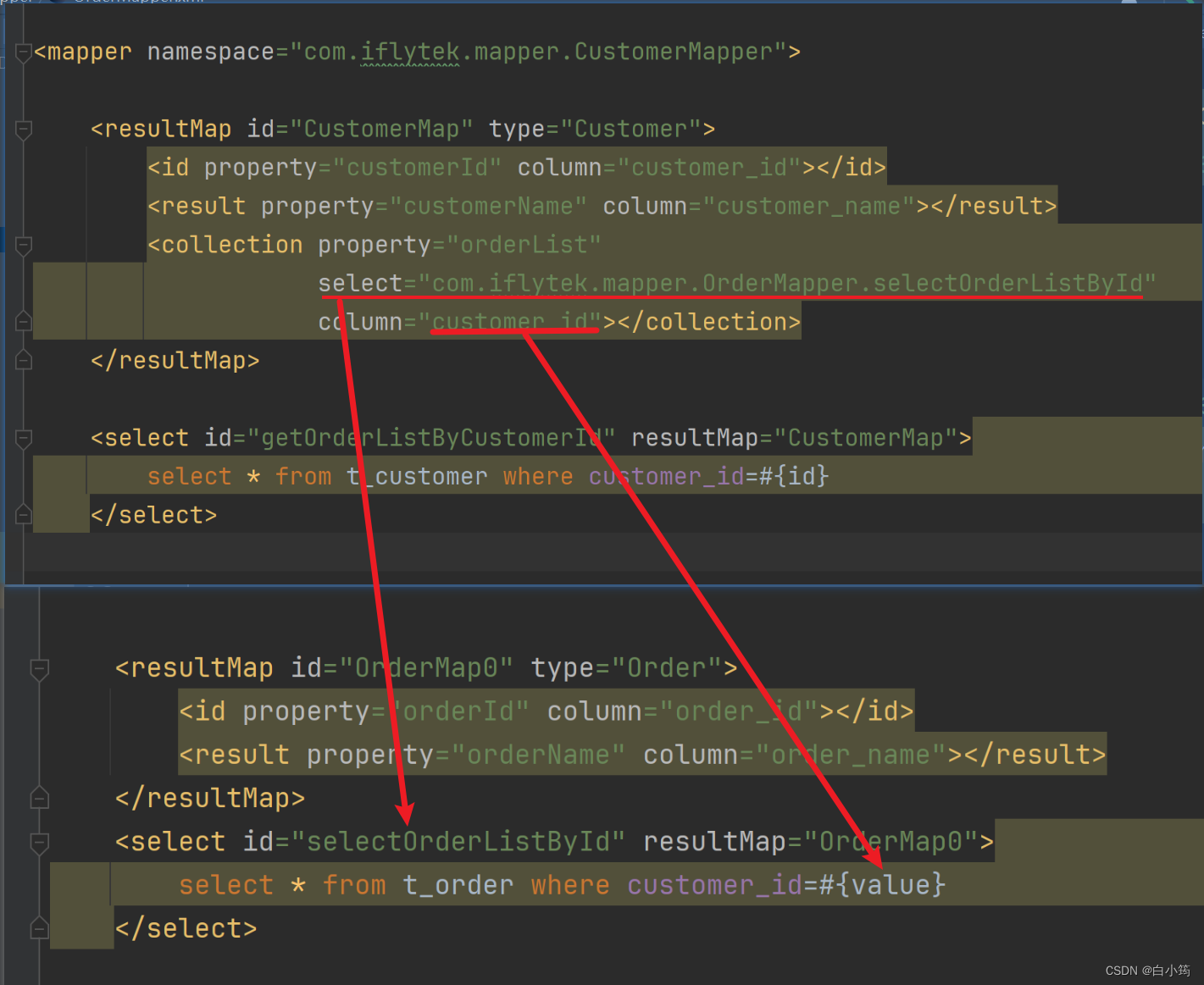
根据id查询顾客=>设置resultMap=>collection中的select指定OrderMapper.xml中的根据顾客id查询所有订单的select语句=>column指定传参(顾客id)
CustomerMapper.xml
<resultMap id="CustomerMap" type="Customer"><id property="customerId" column="customer_id"></id><result property="customerName" column="customer_name"></result><collection property="orderList" select="com.iflytek.mapper.OrderMapper.selectOrderListById" column="customer_id"></collection>
</resultMap><select id="getOrderListByCustomerId" resultMap="CustomerMap">select * from t_customer where customer_id=#{id}
</select>
OrderMapper.xml
<select id="selectOrderListById" resultMap="OrderMap0">select * from t_order where customer_id=#{value}
</select>
<resultMap id="OrderMap0" type="Order"><id property="orderId" column="order_id"></id><result property="orderName" column="order_name"></result>
</resultMap>
关系总览:
②分步查询对一关联
OrderMapper.xml
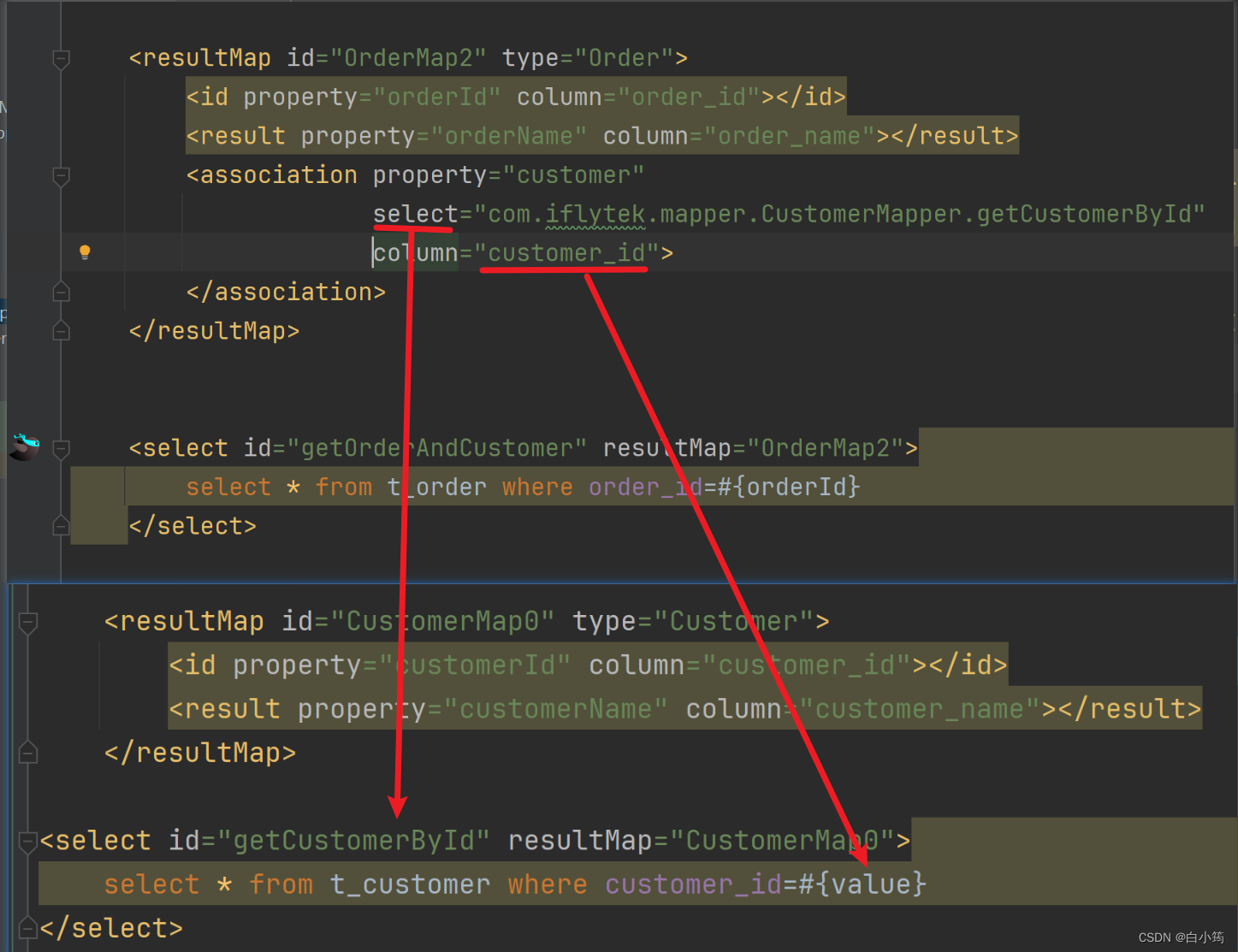
根据订单id查询订单具体信息=>association标签中的select指定CustomerMapper.xml中的根据customer_id查询顾客信息的slecect语句=>column指定传参customer_id
<resultMap id="OrderMap2" type="Order"><id property="orderId" column="order_id"></id><result property="orderName" column="order_name"></result><association property="customer" select="com.iflytek.mapper.CustomerMapper.getCustomerById" column="customer_id"></association></resultMap><select id="getOrderAndCustomer" resultMap="OrderMap2">select * from t_order where order_id=#{orderId}</select>
CustomerMapper.xml
根据用户id查询用户具体信息
    <resultMap id="CustomerMap0" type="Customer"><id property="customerId" column="customer_id"></id><result property="customerName" column="customer_name"></result></resultMap><select id="getCustomerById" resultMap="CustomerMap0">select * from t_customer where customer_id=#{value}
</select>
关系总览:
六、延迟加载
查询到Customer的时候,不一定会使用Order的List集合数据。如果Order的集合数据始终没有使用,那么这部分数据占用的内存就浪费了。对此,我们希望不一定会被用到的数据,能够在需要使用的时候再去查询。
延迟加载的概念:对于实体类关联的属性到需要使用时才查询。也叫懒加载。
yml配置文件中开启懒加载
mybatis:configuration:#开启懒加载lazy-loading-enabled: true
测试:
@Test
public void testSelectCustomerWithOrderList() throws InterruptedException {//对多关联Customer customer = mapper.selectCustomerWithOrderList(1);// 这里必须只打印“customerId或customerName”这样已经加载的属性才能看到延迟加载的效果// 这里如果打印Customer对象整体则看不到效果System.out.println("customer = " + customer.getCustomerName());// 先指定具体的时间单位,然后再让线程睡一会儿TimeUnit.SECONDS.sleep(5);List<Order> orderList = customer.getOrderList();for (Order order : orderList) {System.out.println("order = " + order);}
}
效果:刚开始先查询Customer本身,需要用到OrderList的时候才发送SQL语句去查询
DEBUG 11-30 11:25:31,127 ==>  Preparing: select customer_id,customer_name from t_customer where customer_id=?   (BaseJdbcLogger.java:145)
DEBUG 11-30 11:25:31,193 ==> Parameters: 1(Integer)  (BaseJdbcLogger.java:145)
DEBUG 11-30 11:25:31,314 <==      Total: 1  (BaseJdbcLogger.java:145)
customer = c01
DEBUG 11-30 11:25:36,316 ==>  Preparing: select order_id,order_name from t_order where customer_id=?   (BaseJdbcLogger.java:145)
DEBUG 11-30 11:25:36,316 ==> Parameters: 1(Integer)  (BaseJdbcLogger.java:145)
DEBUG 11-30 11:25:36,321 <==      Total: 3  (BaseJdbcLogger.java:145)
order = Order{orderId=1, orderName='o1'}
order = Order{orderId=2, orderName='o2'}
order = Order{orderId=3, orderName='o3'}
相关文章:
Mybatis之关联
一、一对多关联 eg:一个用户对应多个订单 建表语句 CREATE TABLE t_customer (customer_id INT NOT NULL AUTO_INCREMENT, customer_name CHAR(100), PRIMARY KEY (customer_id) ); CREATE TABLE t_order ( order_id INT NOT NULL AUTO_INCREMENT, order_name C…...
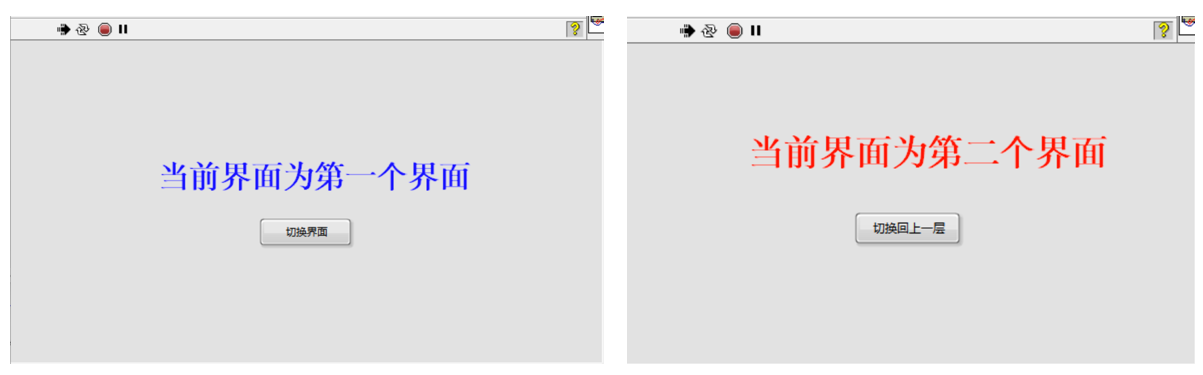
Labview实现用户界面切换的几种方式---通过VI间相互调用
在做用户界面时我们的程序往往面对的对象是程序使用者,复杂程序如果放在同一个页面中,往往会导致程序冗长卡顿,此时通过多个VI之间的切换就可以实现多个界面之间的转换,也会显得程序更加的高大上。 本文所有程序均可下载ÿ…...
)
点云从入门到精通技术详解100篇-基于点云和图像融合的智能驾驶目标检测(中)
目录 2.1.2 数据源选型分析 2.2 环境感知系统分析 2.2.1 传感器布置方案分析...

Apache-iotdb物联网数据库的安装及使用
一、简介 >Apache IoTDB (Database for Internet of Things) is an IoT native database with high performance for data management and analysis, deployable on the edge and the cloud. Due to its light-weight architecture, high performance and rich feature set…...

项目管理流程
优质博文 IT-BLOG-CN 一、简介 项目是为提供某项独特产品【独特指:创造出与以往不同或者多个方面与以往有所区别产品或服务,所以日复一日重复的工作就不属于项目】、服务或成果所做的临时性【临时性指:项目有明确的开始时间和明确的结束时间,不会无限期…...
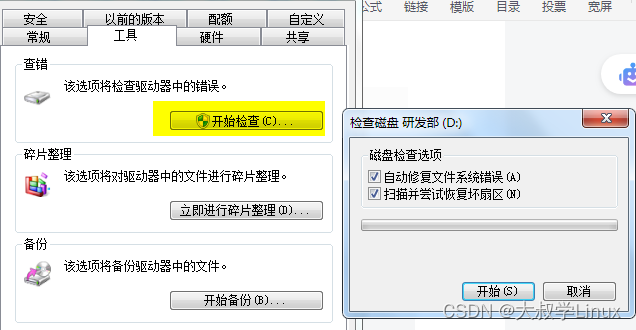
0004.电脑开机提示按F1
常用的电脑主板不知道什么原因,莫名其妙的启动不了了。尝试了很多方法,没有奏效。没有办法我就只能把硬盘拆了下来,装到了另一台电脑上面。但是开机以后却提示F1,如下图: 根据上面的提示,应该是驱动有问题…...

中国电子学会2022年12月份青少年软件编程Scratch图形化等级考试试卷一级真题(含答案)
一、单选题(共25题,共50分) 1. 小明想在开始表演之前向大家问好并做自我介绍,应运行下列哪个程序?(2分) A. B. C. D. 2. 舞台有两个不同的背景,小猫角色的哪个积木能够切换舞台背景?(2分) A. B. C. D. 3. …...
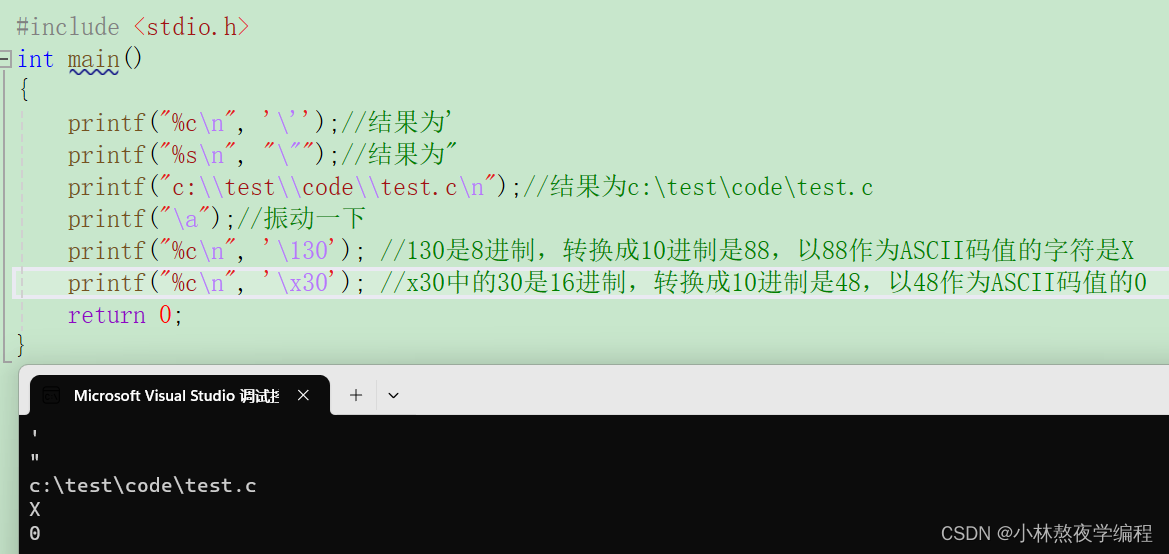
C语言第二弹---C语言基本概念(下)
✨个人主页: 熬夜学编程的小林 💗系列专栏: 【C语言详解】 【数据结构详解】 C语言基本概念 1、字符串和\02、转义字符3、语句和语句分类3.1、空语句3.2、表达式语句3.3、函数调⽤语句3.4、复合语句3.5、控制语句 4、注释4.1、注释的两种形…...
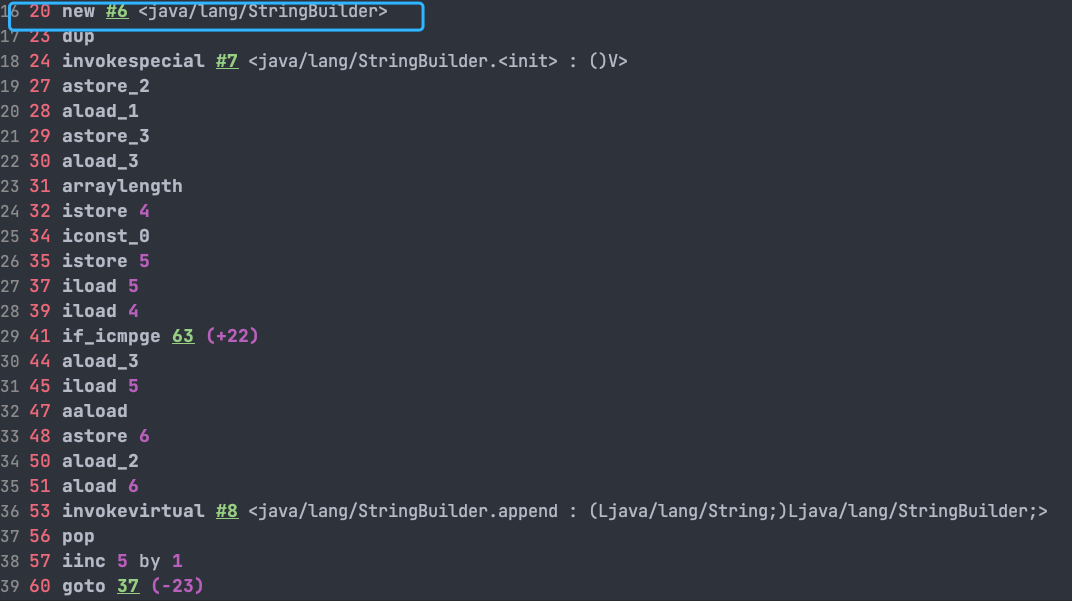
Java 基础面试题 String(一)
Java 基础面试题 String(一) 文章目录 Java 基础面试题 String(一)String、StringBuffer、StringBuilder 的区别?String 为什么是不可变的?字符串拼接用“” 还是 StringBuilder? 文章来自Java Guide 用于学习如有侵…...

QT中QApplication对象有且只有一个
QT中QApplication对象有且只有一个 QApplication对象 QApplication对象 QApplication是应用程序对象 #include <QApplication> int main(int argc,char* argv[]); {//a对象在一个程序中有且只有一个,QT中要求必须有一个QApplication a(argc,argv…...
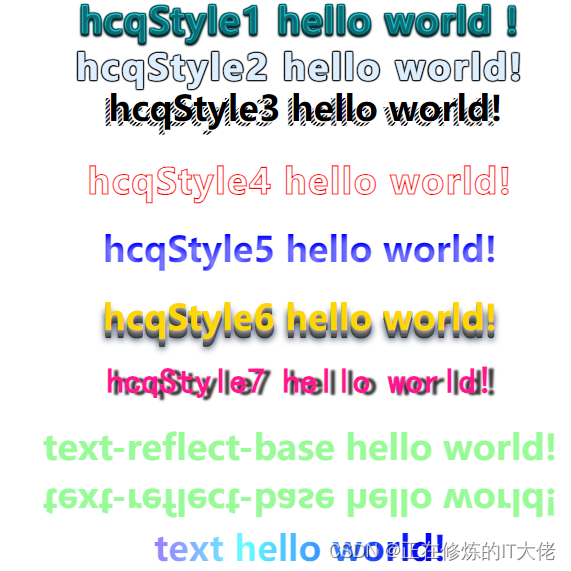
HTML CSS 发光字头特效
效果展示: 代码: <html><head> </head><style>*{margin: 0;padding: 0;}body {text-align: center;}h1{/* border: 3px solid rgb(201, 201, 201); */margin-bottom: 20px;}.hcqFont {position: relative;letter-spacing: 0.07…...
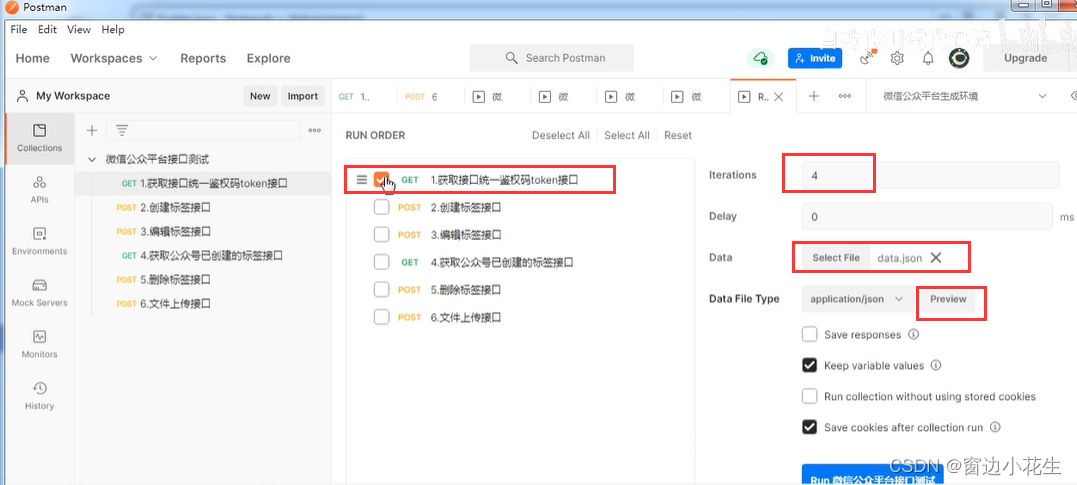
4.postman批量运行及json、cvs文件运行
一、批量运行collection 1.各个接口设置信息已保存,在collection中点击run collection 2.编辑并运行集合 集合运行时,单独上传图片时报错。需修改postman设置 二、csv文件运行 可新建记事本,输入测试数据,后另存为新的文本文件&…...

Superset二次开发之集成链路追踪TraceID技术
config.py ##时间-日志级别-完整路径-文件名字-文件行-函数名字-信息 LOG_FORMAT = "%(asctime)s:%(levelname)s:%(pathname)s:%(module)s:%(lineno)d:%(funcName)s:%(message)s" 字符串详细信息 格式字符串作用%(name)s日志记录器的名称(记录通道)%(levelno)s日…...
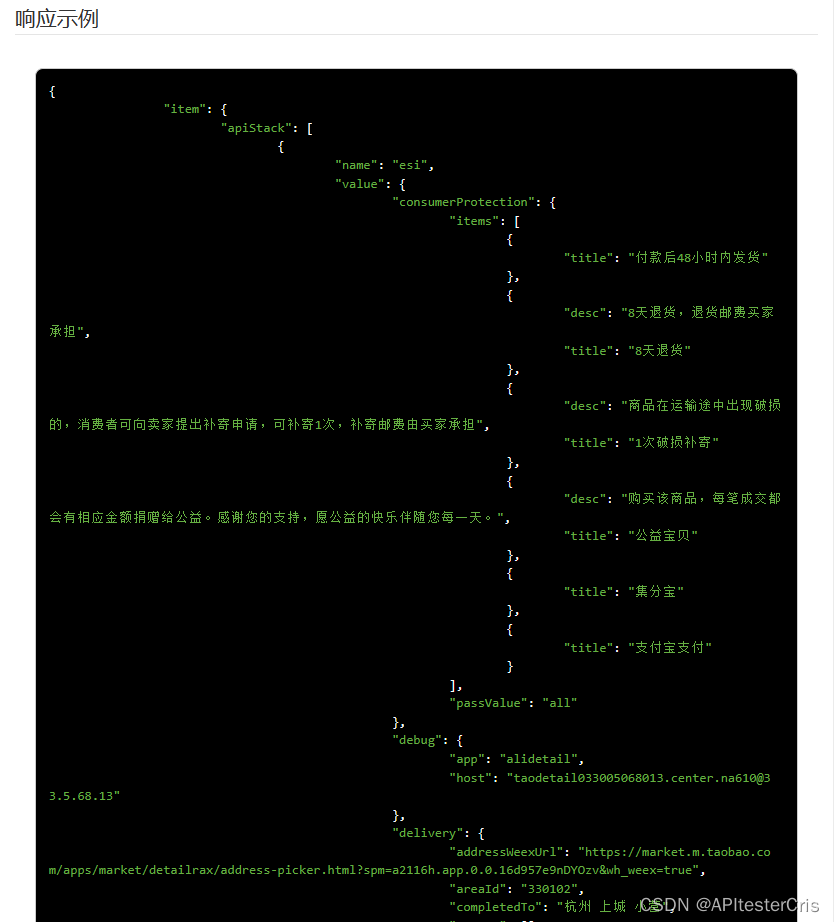
商品详情APP端原数据淘宝数据采集API接口代码接入示例
商品详情APP端原数据API接口(接口接入入口)的作用是提供APP端商品的详细信息,包括价格、描述、图片、折后价、优惠券信息等。通过调用这个API接口,开发者可以获取到APP端商品详情相关的数据,从而进行数据分析ÿ…...

企业官网搭建:打造专业形象的关键步骤
企业官网是企业在数字世界中的门面,搭建一个专业、功能齐全的官网对于企业的形象和业务发展至关重要。以下是一些关键的步骤: 一、确定目标和需求 明确网站的目标、受众和主要功能,为设计和内容提供指导。 二、域名和主机选择 选择易于记忆和…...
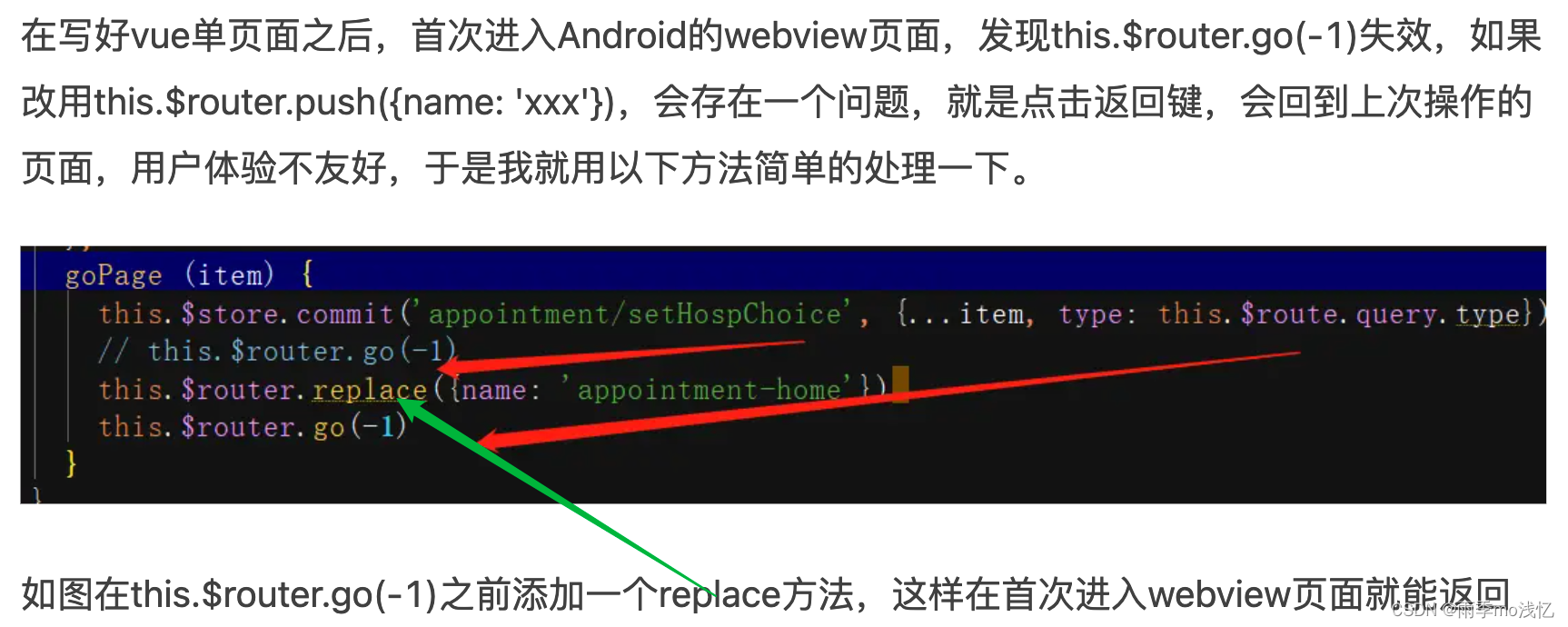
Vue2移动端项目使用$router.go(-1)不生效问题记录
目录 1、this.$router.go(-1) 改成 this.$router.back() 2、存储 from.path,使用 this.$router.push 3、hash模式中使用h5新增的onhashchange事件做hack处理 4、this.$router.go(-1) 之前添加一个 replace 方法 问题背景 : 在 Vue2 的一个移动端开发…...
ChatGPT与文心一言:AI助手之巅的对决
随着科技的飞速发展,人工智能助手已经渗透到我们的日常生活和工作中。 而在这个充满竞争的领域里,ChatGPT和文心一言无疑是最引人注目的两款产品。它们各自拥有独特的优势,但在智能回复、语言准确性、知识库丰富度等方面却存在差异。那么&am…...
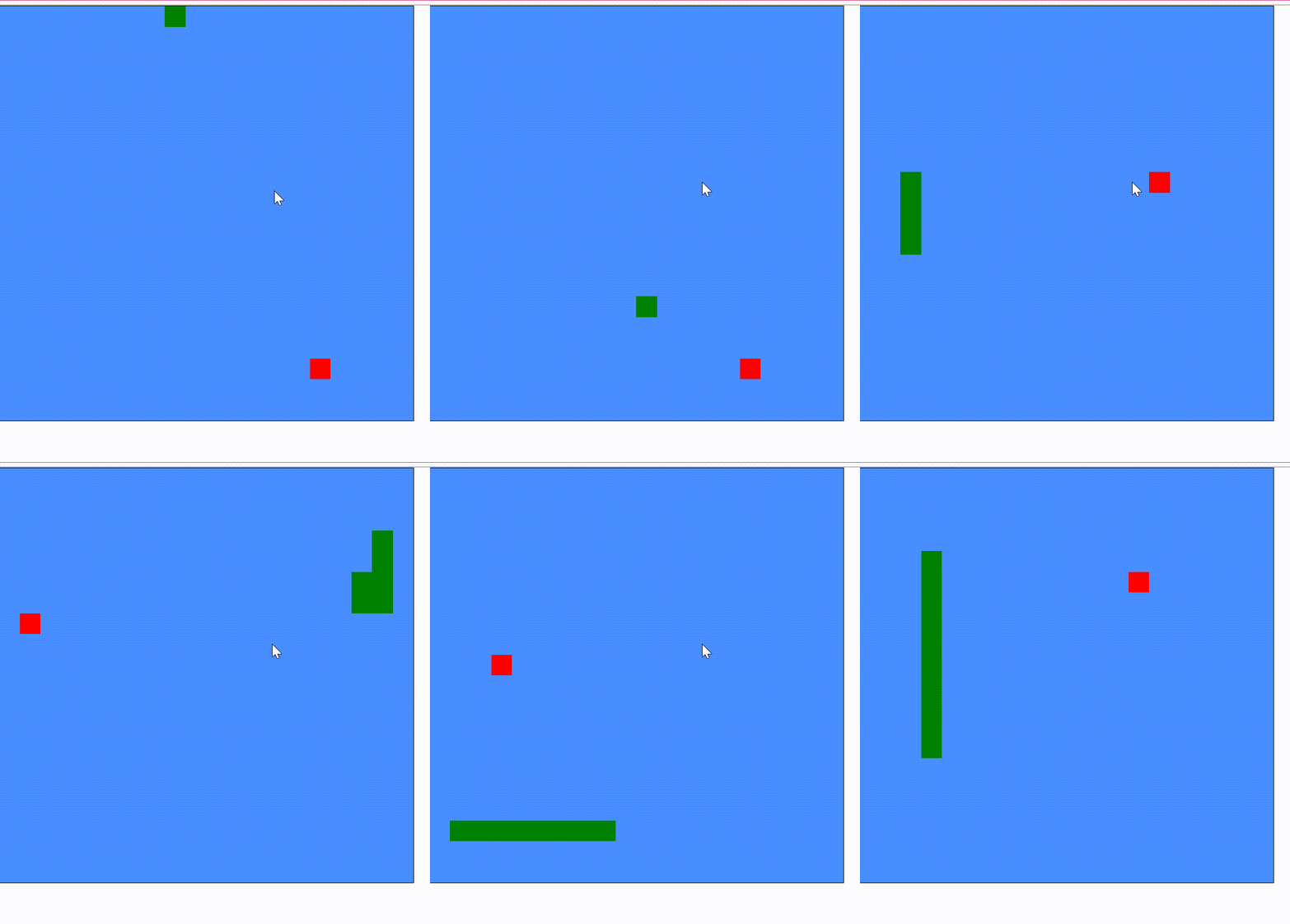
前端实现贪吃蛇功能
大家都玩过贪吃蛇小游戏,控制一条蛇去吃食物,然后蛇在吃到食物后会变大。本篇博客将会实现贪吃蛇小游戏的功能。 1.实现效果 2.整体布局 /*** 游戏区域样式*/ const gameBoardStyle {gridTemplateColumns: repeat(${width}, 1fr),gridTemplateRows: re…...

文件操作(上)
目录 文件的必要性: 文件分类: 程序文件: 数据文件: 文件的打开与关闭: fopen函数分析: 编辑 FILE*: char*filename: char*mode: fclose函数: 应用: 文件编译 Fgetc Fputc 应用…...

用CHAT写年终总结
问CHAT:写一份政企经理年度总结 CHAT回复:尊敬的同事和领导: 大家好,我是负责政企业务的经理,全年一直坚守在销售一线,为公司带来更多的企业客户并拓展业务领域。感谢领导和同事在工作中的大力支持与热情协…...
驱动安装与验证)
保姆级教程:在Ubuntu 22.04上搞定DCU-Z100(ZiFang)驱动安装与验证
保姆级教程:在Ubuntu 22.04上搞定DCU-Z100(ZiFang)驱动安装与验证 国产DCU(Deep Computing Unit)正逐渐成为高性能计算领域的新选择,而DCU-Z100(代号ZiFang)作为其中的代表产品&…...

避坑指南:在Ubuntu 22.04上用Anaconda配置Vision-Mamba环境,解决‘bimamba_type‘报错
深度避坑:Ubuntu 22.04下Vision-Mamba环境配置全攻略 在深度学习项目部署过程中,环境配置往往是第一个拦路虎。最近在配置Vision-Mamba环境时,我遇到了几个令人头疼的问题,特别是那个让人摸不着头脑的bimamba_type报错。经过一番折…...

零碳园区绿电直供技术的挑战与解决方案
一、难点问题 二次系统+储能推高初投 篇幅有限仅展示了部分 根据650号文 ,绿电直连项目必须配置继电保护、安全稳定控制装置和通信设备等二次系统 ,以确保项目的安全性和稳定性。这些强制性配置显著增加了项目的初始投资成本。 专线造价与全周…...

Python 高级编程 014:isinstance 与 type 的核心差异
Python 高级编程 014:isinstance 与 type 的核心差异一、先明确:二者的核心定位差异二、实战代码:一眼看清区别1. 定义继承类2. 用 isinstance () 判断(推荐)3. 用 type () 判断(易踩坑)三、关键…...

告别SAP GUI!Notepad++配置ABAP语法高亮,离线查看代码更高效
告别SAP GUI!Notepad配置ABAP语法高亮,离线查看代码更高效 对于ABAP开发者而言,代码阅读和分析是日常工作中不可或缺的部分。然而,传统的SAP GUI环境并非总是最便捷的选择——无论是通勤途中、客户现场无系统访问权限,…...

碳化硅肖特基二极管B1D06065KS在PFC电路中的高效应用与设计要点
1. 项目概述:从一颗二极管到高效能电源的心脏最近在做一个服务器电源的优化项目,客户对效率和功率密度要求近乎苛刻。传统的硅基器件在高压、高频下的损耗和温升成了瓶颈,团队讨论后决定在关键的前级功率因数校正(PFC)…...

Mem Reduct下载官网最新版|免费电脑内存清理工具使用教程
着急下载 Mem Reduct 软件的,直接提供下载地址:Mem Reduct中文版安装包 Mem Reduct 是一款轻量级的 Windows 内存清理工具,通过调用底层 Native API 深度释放非活动内存数据,缓解系统卡顿。它的核心优势是极致轻量(安装…...
)
Adams新手避坑指南:从Box到拉伸体,教你正确给几何模型‘赋予灵魂’(含质量设置)
Adams新手避坑指南:从几何体到动力学构件的关键转换 在Adams中创建几何模型时,许多新手用户会遇到一个令人困惑的现象:明明已经画好了精致的Box、Cylinder等几何体,但进行动力学仿真时,这些模型要么纹丝不动࿰…...

【DBC专题】-12-基于Cantools的CAN/CANFD DBC文件自动化C代码生成实战指南
1. 环境准备与工具链搭建 第一次接触CAN总线开发时,我被DBC文件到C代码的手动转换折磨得够呛。直到发现Cantools这个神器,才真正体会到什么叫"一劳永逸"。这个Python工具链能自动将DBC描述文件转换为可直接编译的C代码,特别适合需要…...

从Struts2漏洞看Java Web安全:一个OGNL表达式注入引发的十年“血案”
OGNL表达式注入:Struts2框架安全漏洞的十年演进与启示 2006年,当Struts2作为Struts框架的下一代产品首次亮相时,开发者社区对其寄予厚望。这个基于MVC架构的Java Web框架承诺提供更简洁的代码结构和更强大的功能扩展性。然而,很少…...