
动态添加字段和注解,形成class类,集合对象动态创建Excel列
一.需求
动态生成Excel列,因为Excel列是通过类对象字段注解来添加,在不确定Excel列数的情况下,就需要动态生成列,对应类对象字段也需要动态生成;
二.ByteBuddy字节码增强动态创建类
1.依赖
<dependencies><dependency><groupId>net.bytebuddy</groupId><artifactId>byte-buddy</artifactId><version>1.11.17</version></dependency>
</dependencies>
2.动态创建类
public Class<? extends ExcelRecordDynamicDTO> getDynamicClass(ChatBatchRequestVO chatBatchRequest) throws NoSuchFieldException, IllegalAccessException, InstantiationException {DynamicType.Builder<ExcelRecordDynamicDTO> dynamicClass = new ByteBuddy().subclass(ExcelRecordDynamicDTO.class);dynamicClass = dynamicClass.defineField("question", String.class, Visibility.PUBLIC).annotateField(AnnotationDescription.Builder.ofType(ExcelColumn.class).define("value", new String("问题")).define("col", 1).build()).defineMethod("getQuestion", String.class, Visibility.PUBLIC).intercept(FieldAccessor.ofBeanProperty()).defineMethod("setQuestion", void.class, Visibility.PUBLIC).withParameters(String.class).intercept(FieldAccessor.ofBeanProperty());for (int i = 0; i < chatBatchRequest.getModelTypeId().length; i++) {dynamicClass = dynamicClass.defineField("answer" + i, String.class, Visibility.PUBLIC).annotateField(AnnotationDescription.Builder.ofType(ExcelColumn.class).define("value", new String(ChatModelTypeEnum.getmodelShowNameByType(chatBatchRequest.getModelTypeId()[i]))).define("col", i + 2).build()).defineMethod("getAnswer" + i, String.class, Visibility.PUBLIC).intercept(FieldAccessor.ofBeanProperty()).defineMethod("setAnswer" + i, void.class, Visibility.PUBLIC).withParameters(String.class).intercept(FieldAccessor.ofBeanProperty());}Class<? extends ExcelRecordDynamicDTO> d = dynamicClass.make().load(ExcelRecordDynamicDTO.class.getClassLoader()).getLoaded();return d;}动态类如下所示:
public class ExcelRecordDynamicDTO implements Serializable {//动态生成的字段和注解如下所示//@ExcelColum(value="第一列", col=1)//private String col1;
}
3.实例化赋值
//实例化
Class<? extends ExcelRecordDynamicDTO> dy = getDynamicClass(chatBatchRequest);
ExcelRecordDynamicDTO dtp = dy.newInstatnce();//赋值
Field[] cityCode = dto.getClass().getDeclaredFields();
for (Filed f : cityCode) {f.setAccessible(true)f.set(dto, "赋值");
}//获取值
dto.getClass().getDeclaredField("question").get(dto)
4.创建Excel
List<ExcelRecordDynamicDTO> resultList = new ArrayList<>();
resultList.add(dto);ExcelUtil.writeExcel(resultList,dy.newInstance());
三.Excel工具类
1.依赖
<dependencies><dependency><groupId>org.apache.poi</groupId><artifactId>poi</artifactId><version>3.13</version></dependency><dependency><groupId>org.apache.poi</groupId><artifactId>poi-ooxml</artifactId><version>3.13</version></dependency>
</dependencies>
2.Excel代码
注解如下:
@Target({ElementType.FIELD})
@Retention(RetentionPolicy.RUNTIME)
@Documented
public @interface ExcelColumn {//标题String value() default "";//Excel从左往右排列位置int col() default 0;
}
Excel工具类:使用apache.poi
public class ExcelUtil {private final static String EXCEL2003 = "xls";private final static EXCEL2007 = "xlsx";public static <T> List<T> readExcel(String path, Class<T> cls, File file) {String fileName = file.getName();if (!fileName.matches("^.+\\.)?i)(xls)$") && !fineName.matches("^.+\\.(?i)(xlsx)$")) {log.error("格式错误");}List<T> dataList = new ArrayList<>();Workbook workbook = null;try {if (fileName.endsWith(EXCEL2007)) {InputStream is = new FileInputStream(new File(path));workbook = new XSSFWorkbook(is);}if (fileName.endsWith(EXCEL2003)) {InputStream is = new FileInputStream(new File(path));workbook = new HSSFWorkbook(is);} if (workbook != null ) {Map<String, List<Field>> classMap = new HashMap<>();List<Field> fields = Stream.of(cls.getDeclaredFields()).collectors.toList());fields.forEach(field -> {ExcelColumn annotaion = field.getAnnotation(ExcelColum.class);if (annotaion != null) {String value = annotation.value();if (StringUtils.isBlank(value)) {return;}if (!classMap.containsKey(value)) {classMap.put(value, new ArrayList<>());}field.setAccessible(true);classMap.get(value).add(field);}});//索引---columnsMap<Integer, List<Field>> refectionMap = new HashMap<>(16);//默认读取第一个sheetSheet sheet = workbook.getSheetAt(0);booleasn firstRow = true;for (int i = sheet.getFirstRowNum(); i <= sheet.getLastRowNum(); i++) {Row row = sheet.getRow(i);//首行 提取注解if (firstRow) {for (int j = row.getFirstCellNum(); j <= row.getLastCellNum(); j++) {Cell cell = row.getCell(j);String cellValue = getCellValue(cell);if (classMap.containsKey(cellValue) {reflectionMap.put(j, classMap.get(cellValue));}}firstRow false;} else {//忽略空白行if (row == null) {continue;}try {T t = cls.newInstance();//判断是否为空白行boolean allBlank = true;for (int j = row.getFirstCellNum(); j <= row.getLastCellNum(); j++) {if (reflectionMap.containsKey(j)) {Cell cell = row.getCell(j);String cellValue = getCellValue(cell);if (StringUtils.isNotBlank(cellValue)) {allBlank = false;}List<Field> fieldList = reflectionMap.get(j);fieldList.foeEach(x -> {try {handleField(t, cellValue, x);} catch (Exception e) {log.error(e);}});}}if (!allBlank) {dataList.add(t);} else {log.warn("ignore!");} } catch (Exception e) {log.error(e);}}}}} catch (Exception e) {log.error(e);} finally {if (workbook != null) {try {workbook.close();} catch (Exception e) {log.error(e);}}}return dataList;}public static <T> List<T> readExcel(Class<T> cls, MultipartFile file) {String fileName = file.getOriginalFilename();if (!fileName.matches("^.+\\.)?i)(xls)$") && !fineName.matches("^.+\\.(?i)(xlsx)$")) {log.error("格式错误");}List<T> dataList = new ArrayList<>();Workbook workbook = null;try {InputStream is = file.getInputStream();if (fileName.endsWith(EXCEL2007)) {workbook = new XSSFWorkbook(is);}if (fileName.endsWith(EXCEL2003)) {workbook = new HSSFWorkbook(is);} if (workbook != null ) {Map<String, List<Field>> classMap = new HashMap<>();List<Field> fields = Stream.of(cls.getDeclaredFields()).collectors.toList());fields.forEach(field -> {ExcelColumn annotaion = field.getAnnotation(ExcelColum.class);if (annotaion != null) {String value = annotation.value();if (StringUtils.isBlank(value)) {return;}if (!classMap.containsKey(value)) {classMap.put(value, new ArrayList<>());}field.setAccessible(true);classMap.get(value).add(field);}});//索引---columnsMap<Integer, List<Field>> refectionMap = new HashMap<>(16);//默认读取第一个sheetSheet sheet = workbook.getSheetAt(0);booleasn firstRow = true;for (int i = sheet.getFirstRowNum(); i <= sheet.getLastRowNum(); i++) {Row row = sheet.getRow(i);//首行 提取注解if (firstRow) {for (int j = row.getFirstCellNum(); j <= row.getLastCellNum(); j++) {Cell cell = row.getCell(j);String cellValue = getCellValue(cell);if (classMap.containsKey(cellValue) {reflectionMap.put(j, classMap.get(cellValue));}}firstRow false;} else {//忽略空白行if (row == null) {continue;}try {T t = cls.newInstance();//判断是否为空白行boolean allBlank = true;for (int j = row.getFirstCellNum(); j <= row.getLastCellNum(); j++) {if (reflectionMap.containsKey(j)) {Cell cell = row.getCell(j);String cellValue = getCellValue(cell);if (StringUtils.isNotBlank(cellValue)) {allBlank = false;}List<Field> fieldList = reflectionMap.get(j);fieldList.foeEach(x -> {try {handleField(t, cellValue, x);} catch (Exception e) {log.error(e);}});}}if (!allBlank) {dataList.add(t);} else {log.warn("ignore!");} } catch (Exception e) {log.error(e);}}}}} catch (Exception e) {log.error(e);} finally {if (workbook != null) {try {workbook.close();} catch (Exception e) {log.error(e);}}}return dataList;}private static <T> void handleField(T t, String value, Field field) trows Exception {Class<?> type = field.getType();if (type == null || type== void.class || StringUtils.isBlank(value)) {return;}if (type == Object.class) {field.set(t, value);} else if (type.getSuperclass() == null || type.getSuperclass() == Number.calss) {if (type == int.class || type == Integer.class) {field.set(t, NumberUtils.toInt(value));} else if (type == long.class || type == Long.calss ) {field.set(t, NumberUtils.toLong(value));} else if (type == byte.class || type == Byte.calss ) {field.set(t, NumberUtils.toByte(value));} else if (type == short.class || type == Short.calss ) {field.set(t, NumberUtils.toShort(value));} else if (type == double.class || type == Double.calss ) {field.set(t, NumberUtils.toDouble(value));} else if (type == float.class || type == Float.calss ) {field.set(t, NumberUtils.toFloat(value));} else if (type == char.class || type == Character.calss ) {field.set(t, NumberUtils.toChar(value));} else if (type == boolean.class) {field.set(t, NumberUtils.toBoolean(value));} else if (type == BigDecimal.class) {field.set(t, new BigDecimal(value));}} else if (type == Boolean.class) {field.set(t, BooleanUtils.toBoolean(value));} else if (type == Data.class) {SimpleDateFprmat format = new SimpleDateFormat("EEE MMM dd HH:mm:ss zzz yyyy", Locale.US);field.set(t, format.parse(value));} else if (type == String.class) {field.set(t, value);} else {Constructor<?> constructor = type.getConstructor(String.class);field.set(t, constructor .newInstance(value));}}private static String getCellValue(Cell cell) {if (cell == null) {return "";}if (cell.getCellType() == Cell CELL_TYPE_NUMERIC) {if (HSSFDateUtil.isCellDateFormatted(cell)) {return HSSDateUtil.getJavaDate(cell.getNumericCellValue()).toString();}else {return new BigDecimal(cell.getNumericCellValue()).toString();}} else if (cell.getCellType() == Cell.CELL_TYPE_STRING) {return StringUtils.trimToEmpty(cell.getStringCellValue());} else if (cell.getCellType() == Cell.CELL_TYPE_FORMULA) {return StringUtils.trimToEmpty(cell.getCellFormula());} else if (cell.getCellType() == Cell.CELL_TYPE_BLANK) {return "";} else if (cell.getCellType() == Cell.CELL_TYPE_BOOLEAN) {return StringUtils.trimToEmpty(cell.getBooleanCellValue());} else if (cell.getCellType() == Cell.CELL_TYPE_ERROR) {return "ERROR";} else {return cell.toString().trim;}}public static <T> void writeExcel(String filePathName, List<T> dataList, ExcelRecordDynamicDTO excelRecordDTO) {Field[] fields = excelRecordDTO.getClass().getDeclaredFields();List<Field> fieldList = Arrays.stream(fields).filter(field -> {ExcelColumn annotaion = field.getAnnoation(ExcelColum.class);if (annotation != null && annotation.col() > 0) {field.setAccessible(true);return true;}return false;}).sorted(Comparator.comparing(field -> {int col = 0;ExcelColumn annotation = field.getAnnotation(ExcelColumn.class);if (annotation != null) {col = annotation.col();}return col;})).collect(Collectors.toList());Workbook wb = new XSSFWorkbook();Sheet sheet = wb.createSheet("Sheet1");AtomicInteger ai = new AtomicInteger();{Row row = sheet.createRow(ai.getAndIncrement());AtomicInteger aj = new AtomicInteger();//写入头部fieldList.forEach(field -> {ExcelColumn annotation = field.getAnnotation(ExcelColumn.class);String columnName = "";if (annotation != null) {columnName = annotation.value();}Cell cell = row.createCell(aj.getAndIncreament());CellStyle cellStyle = wb.createCellStyle();cellStyle.setFillForegroundColor(IndexedColors.WHITE.getIndex());cellSty;e.setFillPattern(CellStyle.SOLID_FOREGROUND);cellSty;e.setAlignment(CellStyle.ALIGN_CENTER);Font font = wb.createFont();font.setBoldweight(Font.BOLDWEIGHT_NORMAL);cellStyle.setFont(font);cell.setCellStyle(cellStyle);cell.setCellValue(columnName);});}if (CollectionUtils.isNatEmpty(dataList)) {dataList.forEach(t -> {Row row1 = sheet.createRow(ai.getAndIncrement());AtomicInteger aj = new AtomicInteger();fieldList.forEach(field -> {Class<?> type = field.getType();Object value = "";try {value = field.get(t);} catch (Exception e) {e.printStackTrace();}Cell cell = row1.createCell(aj.getAndIncrement());if (value != null) {if (type == Date.class) {cell.setCellValue(value.toString());} else {cell.setCellValue(value.toString());}cell.setCellValue(value.toString());}});});}//冻结窗格wb.getSheet("Sheet1").createFreezePane(0, 1, 0, 1);//浏览器下载excel//buildExcelDocument("abbot.xlsx", wb, response);//生成Excel文件buildExcelFile(filePathName, wb);} private static void buildExcelFile(String path, Workbook wb) {File file = new File(path);if (file.exists()) {file.delete();}try {wb.write(newFileOutputStream(file));} catch (Exception e) {e.printStackTrace();}}}四.附
使用ClassPool动态生成类,实测暂未解决的问题:
1.无法给字段注解属性为int类型的赋值;
2.只能一次创建,无法清除上次动态创建的字段
代码如下:
<dependency><groupId>javassist</groupId><artifactId>javassist</artifactId><version>3.12.1.GA</version></dependency>
public Object getExcelRecordDynamicClass(ChatBatchRequestVO chatBatchRequest) throws NotFoundException, CannotCompileException, IllegalAccessException, InstantiationException {//默认的类搜索路径ClassPool pool = ClassPool.getDefault();//获取一个ctClass对象 com.example.demo.excel.entity.CitiesVo 这个是包的相对路径
//        CtClass ctClass = pool.makeClass("ExcelRecordDynamicDTO");CtClass ctClass = pool.get("cn.com.wind.ai.platform.aigc.test.pojo.excel.ExcelRecordDynamicDTO");for (int i = 0; i < chatBatchRequest.getModelTypeId().length; i++) {//添加属性ctClass.addField(CtField.make("public String answer"+ i +";", ctClass));//添加set方法ctClass.addMethod(CtMethod.make("public void setAnswer"+ i +"(String answer"+ i +"){this.answer"+ i +" = answer"+ i +";}", ctClass));//添加get方法ctClass.addMethod(CtMethod.make("public String getAnswer"+ i +"(){return this.answer"+ i +";}", ctClass));//获取这个字段CtField answer = ctClass.getField("answer"+ i);FieldInfo fieldInfo = answer.getFieldInfo();ConstPool cp = fieldInfo.getConstPool();AnnotationsAttribute attribute = (AnnotationsAttribute) fieldInfo.getAttribute(AnnotationsAttribute.visibleTag);//这里进行了判断 如果说当前字段没有注解的时候 AnnotationsAttribute 这个对象是为空的//所以要针对这个进行新创建 一个 AnnotationsAttribute 对象if(ObjectUtils.isEmpty(attribute)){List<AttributeInfo> attributeInfos =fieldInfo.getAttributes();attribute = !attributeInfos.isEmpty()?(AnnotationsAttribute) attributeInfos.get(0):new AnnotationsAttribute(fieldInfo.getConstPool(), AnnotationsAttribute.visibleTag);}// Annotation 默认构造方法  typeName:表示的是注解的路径Annotation bodyAnnot = new Annotation("cn.com.wind.ai.platform.aigc.test.framework.aop.excel.ExcelColumn", cp);// name 表示的是自定义注解的 方法  new StringMemberValue("名字", cp) 表示给name赋值bodyAnnot.addMemberValue("value", new StringMemberValue(ChatModelTypeEnum.getmodelShowNameByType(chatBatchRequest.getModelTypeId()[i]), cp));
//            IntegerMemberValue colValue = new IntegerMemberValue(i + 2, cp);
//            bodyAnnot.addMemberValue("col", colValue);attribute.addAnnotation(bodyAnnot);fieldInfo.addAttribute(attribute);}pool.clearImportedPackages();return ctClass.toClass().newInstance();}
相关文章:

动态添加字段和注解,形成class类,集合对象动态创建Excel列
一.需求 动态生成Excel列,因为Excel列是通过类对象字段注解来添加,在不确定Excel列数的情况下,就需要动态生成列,对应类对象字段也需要动态生成; 二.ByteBuddy字节码增强动态创建类 1.依赖 <dependencies><…...
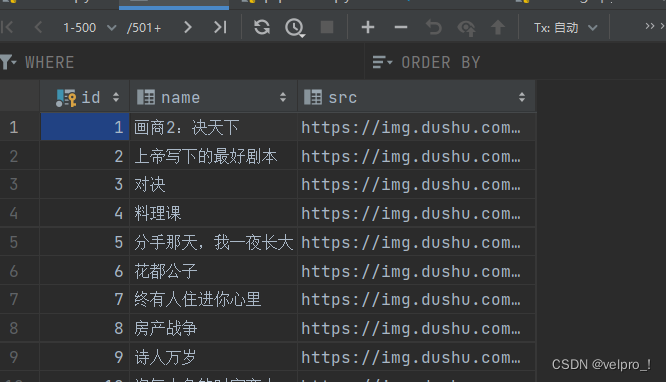
Python爬虫---Scrapy框架---CrawlSpider
CrawlSpider 1. CrawlSpider继承自scrapy.Spider 2. CrawlSpider可以定义规则,再解析html内容的时候,可以根据链接规则提取出指定的链接,然后再向这些链接发送请求,所以,如果有需要跟进链接的需求,意思就是…...

关机恶搞小程序
1. system("shutdown")的介绍 当system函数的参数是"shutdown"时,它将会执行系统的关机命令。 具体来说,system("shutdown")的功能是向操作系统发送一个关机信号,请求关闭计算机。这将触发操作系统执行一系列…...

《HTML 简易速速上手小册》第9章:HTML5 新特性(2024 最新版)
文章目录 9.1 HTML5 新增标签和属性9.1.1 基础知识9.1.2 案例 1:创建一个结构化的博客页面9.1.3 案例 2:使用新的表单元素创建事件注册表单9.1.4 案例 3:创建一个具有高级搜索功能的搜索表单 9.2 HTML5 表单增强9.2.1 基础知识9.2.2 案例 1&a…...

计算机网络之NAT
NAT(网络地址转换,Network Address Translation)是一种网络技术,用于在一个网络与另一个网络之间重新映射IP地址。NAT最常见的应用是在家庭和小型办公室的路由器中,用于将私有(内部)IP地址转换为…...

SQL - 数据操作语句
SQL - 数据操作语句 文章目录 SQL - 数据操作语句数据操作语言-DML1 新增2 修改3 删除4 清空 数据类型1 数值类型2 字符串类型3 日期时间类型 数据操作语言-DML 概念: DML(Data Manipulation Language), 数据操作语言。对数据表数据的增、删…...
【Python笔记-设计模式】单例模式
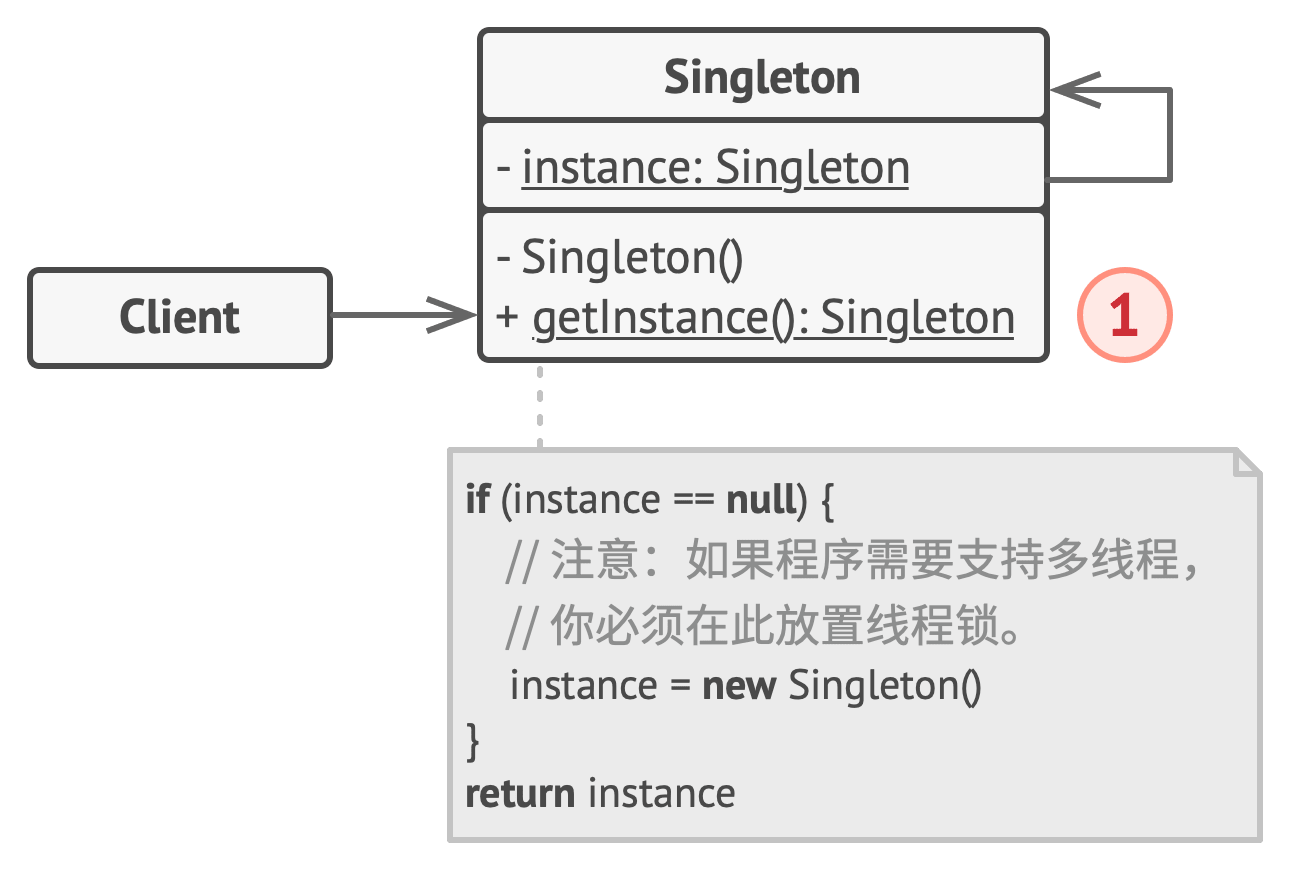
一、说明 单例是一种创建型设计模式,能够保证一个类只有一个实例, 并提供一个访问该实例的全局节点。 (一) 解决问题 维护共享资源(数据库或文件)的访问权限,避免多个实例覆盖同一变量,引发程序崩溃。 …...

Java使用io流生成pdf文件
首先生成pdf和正常请求接口一样,直接写~ Controller层: 第一个注解:最顶层增加 Controller 注解(控制器)不多讲了 直接加上。 第二个注解:最顶层增加 CrossOrigin 注解此注解是为了浏览器请求的时候防…...
STL-priority_queue
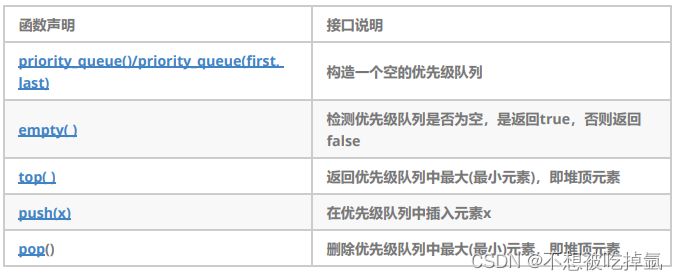
文档 目录 1.关于priority_queued1的定义 2.priority_queue的使用 1.关于priority_queued1的定义 1. 优先队列是一种容器适配器,根据严格的弱排序标准,它的第一个元素总是它所包含的元素中最大的。 2. 此上下文类似于堆,在堆中可以随时插入元…...

SpringBoot基于注解形式配置多数据源@DS
TOC() 1.引入依赖 <!-- dynamic-datasource 多数据源--><dependency><groupId>com.baomidou</groupId><artifactId>dynamic-datasource-spring-boot-starter</artifactId><version>3.5.2</version></dependency>2.配置…...

华清远见作业第三十四天——C++(第三天)
思维导图: 题目: 设计一个Per类,类中包含私有成员:姓名、年龄、指针成员身高、体重,再设计一个Stu类,类中包含私有成员:成绩、Per类对象p1,设计这两个类的构造函数、析构函数和拷贝构造函数。 代码&#…...
Shell中正则表达式
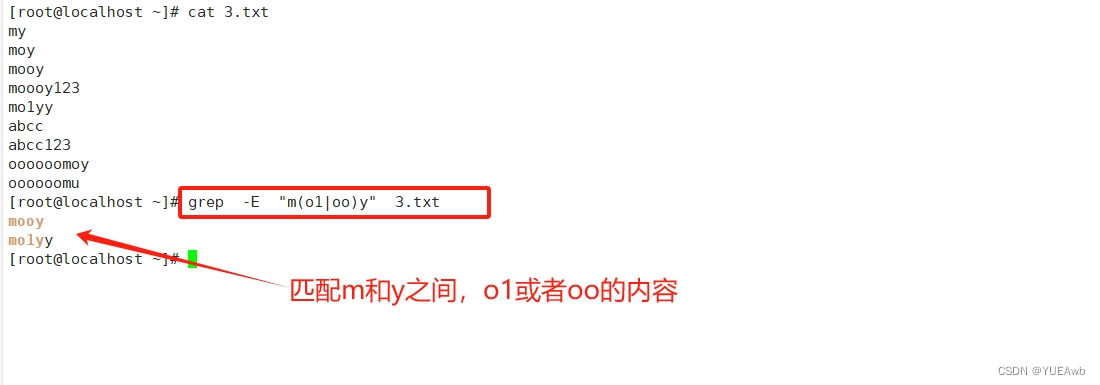
1.正则表达式介绍 1、正则表达式---通常用于判断语句中,用来检查某一字符串是否满足某一格式 2、正则表达式是由普通字符与元字符组成 3、普通字符包括大小写字母、数字、标点符号及一些其他符号 4、元字符是指在正则表达式中具有特殊意义的专用字符,…...

Flutter Canvas 属性详解与实际运用
在Flutter中,Canvas是一个强大的绘图工具,允许我们以各种方式绘制图形、文字和图像。了解Canvas的属性是开发高度定制化UI的关键。在本篇博客中,我们将深入探讨Flutter中Canvas的一些重要属性,并展示它们在实际应用中的使用。 1.…...

Django配置websocket时的错误解决
基于移动群智感知的网络图谱构建系统需要手机app不断上传数据到服务器并把数据推到前端标记在百度地图上,由于众多手机向同一服务器发送数据,如果使用长轮询,则实时性差、延迟高且服务器的负载过大,而使用websocket则有更好的性能…...
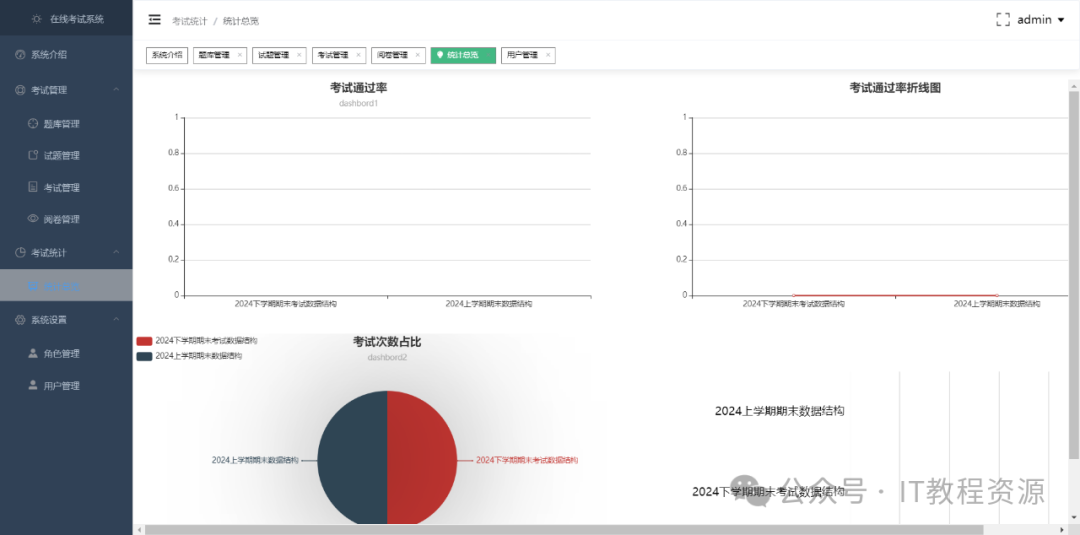
(免费分享)springboot,vue在线考试系统
springboot 在线考试系统 前后端分离 一、项目简介 基于SpringBoot的在线考试系统 二、技术实现 后台框架:SpringBoot,mybatis-plus UI界面:Vue、ElementUI、Axios、Node.js(前后端分离) 数据库:MySQ…...
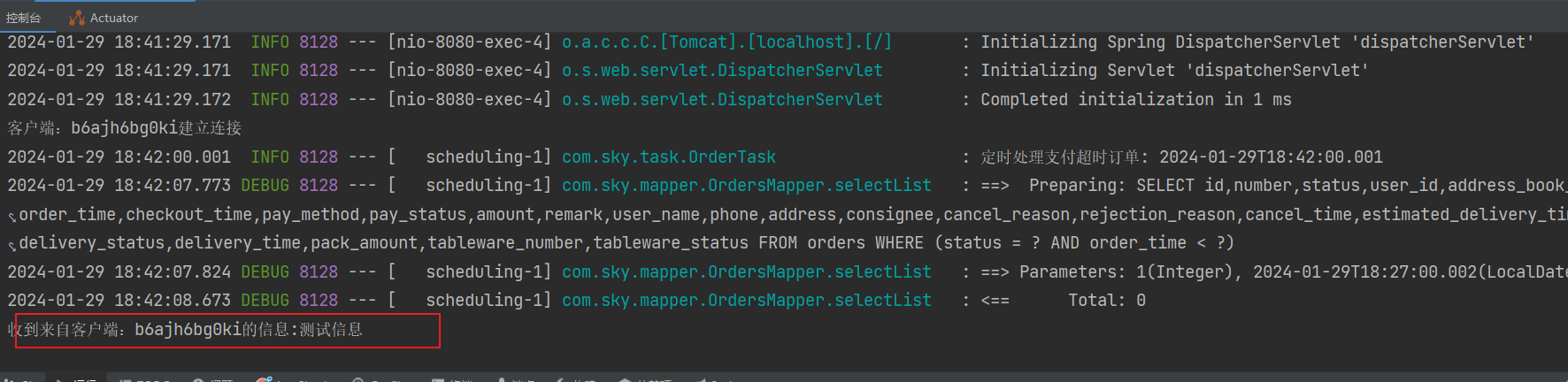
WebSocket 整合 记录用法
WebSocket 介绍 WebSocket 是基于tcp的一种新的网络协议,可以让浏览器 和 服务器进行通信,然后区别于http需要三次握手,websocket只用一次握手,就可以创建持久性的连接,并进行双向数据传输 Http和WebSocket的区别 Http是短连接,WebSocket’是长连接Http通信是单向的,基于请求…...
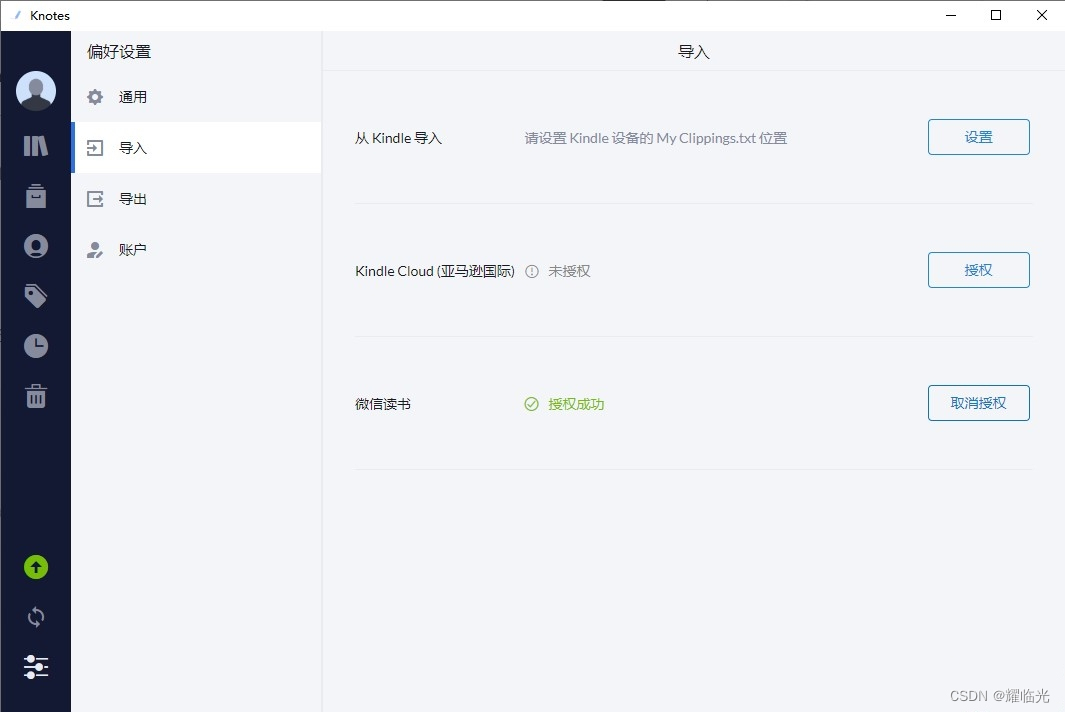
推荐5个我常用的软件,简单高效
今天给大家推荐5个我自己也常用的软件,可以解决很多问题,给你的学习和办公带来巨大帮助。 1.快速启动——Keypirinha Keypirinha是一款快速启动软件,可以让用户通过输入关键词来快速打开程序、文件、网页、搜索引擎等。Keypirinha支持…...

代码随想录训练营第三十一天|122.买卖股票的最佳时机II55.跳跃游戏45.跳跃游戏II
122.买卖股票的最佳时机II class Solution { public:int maxProfit(vector<int>& prices) {int earn0;for(int i 0; i < prices.size()-1;i){int x prices[i 1] - prices[i];if(x>0){earnx;}}return earn;} }; 55.跳跃游戏 本题关键在于看覆盖的范围 利…...

python17-Python的字符串格式化
Python提供了“%”对各种类型的数据进行格式化输出,例如如下代码。 # !/usr/bin/env python# -*- coding: utf-8 -*-# @Time : 2024/01# @Author : Laopiweight = 180print(老师傅的体重是 %s % weight) 上面程序就是格式化输出的关键代码,这行代码中的 print 函数包含三个部…...

HTTPS 之fiddler抓包--jmeter请求
一、浅谈HTTPS 我们都知道HTTP并非是安全传输,在HTTPS基础上使用SSL协议进行加密构成的HTTPS协议是相对安全的。目前越来越多的企业选择使用HTTPS协议与用户进行通信,如百度、谷歌等。HTTPS在传输数据之前需要客户端(浏览器)与服…...

AI智能体架构设计:从成本黑洞到价值引擎的解耦之道
1. 从成本黑洞到价值引擎:为什么你的AI智能体架构正在吞噬预算又到了季度技术复盘会,财务那边递过来的云账单和工程人力成本,是不是又让你倒吸一口凉气?你看着报表上那个名为“AI智能体平台”的项目,它的资源消耗曲线几…...

小说下载器终极指南:一站式解决100+网站小说保存难题
小说下载器终极指南:一站式解决100网站小说保存难题 【免费下载链接】novel-downloader 一个可扩展的通用型小说下载器。 项目地址: https://gitcode.com/gh_mirrors/no/novel-downloader 在数字阅读时代,你是否曾因小说突然下架、网站404或网络中…...

CANN-昇腾NPU-RAG推理-检索增强生成怎么部署
RAG(Retrieval-Augmented Generation)是 LLM 知识库的组合:先检索相关文档,再让 LLM 基于文档回答。昇腾NPU 上部署 RAG 需要两个组件:Embedding 模型(做向量检索)和 LLM(做生成&am…...

从入门到实践:EEG公开数据集分类与应用场景全解析
1. EEG公开数据集入门指南刚接触脑电信号分析的研究者,常常会被一个问题困扰:"我应该从哪里获取可靠的EEG数据?"作为一个在这个领域摸爬滚打多年的研究者,我完全理解这种困惑。记得我第一次接触EEG研究时,光…...

终极鼠标连点器使用指南:3分钟掌握高效自动化技巧
终极鼠标连点器使用指南:3分钟掌握高效自动化技巧 【免费下载链接】MouseClick 🖱️ MouseClick 🖱️ 是一款功能强大的鼠标连点器和管理工具,采用 QT Widget 开发 ,具备跨平台兼容性 。软件界面美观 ,操作…...

学术写作创新突破!2026全流程AI论文工具精选指南
2026 年 AI 论文写作工具已进入全流程闭环 学术合规时代,千笔 AI(综合评分 99 分)中文学术场景标杆;Grammarly Academic与Elicit为英文论文写作首选;按需求匹配度 - 数据可信度 - 成本承受力三维模型选型,…...

独立站内容分层:一层给 SEO,一层给 GEO
你的内容在喂两个完全不同的"阅读者" 你的博客文章,从来都不只有一个读者。 传统认知里,独立站内容的读者只有两类:真人访客和搜索引擎爬虫。SEO 优化的一切工作,本质上都是在讨好后者,顺带服务前者。 但…...

Gazebo Sim多旋翼控制:四轴飞行器动力学建模与PID调参
Gazebo Sim多旋翼控制:四轴飞行器动力学建模与PID调参 【免费下载链接】gz-sim Open source robotics simulator. The latest version of Gazebo. 项目地址: https://gitcode.com/gh_mirrors/gz/gz-sim Gazebo Sim是一款功能强大的开源机器人模拟器ÿ…...

具身智能:面向新兴交叉学科建设的思考与建议 2026
这份由 CCF YOCSEF 长三角五地学术委员会 2026 年 5 月发布的白皮书,聚焦具身智能作为新兴交叉学科的建设,明确其并非 AI 与机器人学的简单拼接,而是围绕物理交互中的智能行为形成的新问题域,提出 “三大基本问题 一个应用需求”…...

TV Bro电视浏览器:为智能电视打造的最佳遥控器上网解决方案
TV Bro电视浏览器:为智能电视打造的最佳遥控器上网解决方案 【免费下载链接】tv-bro Simple web browser for android optimized to use with TV remote 项目地址: https://gitcode.com/gh_mirrors/tv/tv-bro 还在为智能电视上网操作不便而烦恼吗?…...