
Spring Cloud Gateway:使用RestController动态更新路由
相关类介绍
动态路由(自己控制,非注册中心控制)涉及两个很重要的Bean:
- RouteDefinitionWriter:用于添加、修改、删除路由规则。
- RouteDefinitionLocator:用于查询路由规则。
以及一个相关事件:
- RefreshRoutesEvent:用于更新路由规则,使上述的操作生效。
依赖及配置
先引入相关依赖:
<?xml version="1.0" encoding="UTF-8"?>
<project xmlns="http://maven.apache.org/POM/4.0.0"xmlns:xsi="http://www.w3.org/2001/XMLSchema-instance"xsi:schemaLocation="http://maven.apache.org/POM/4.0.0 http://maven.apache.org/xsd/maven-4.0.0.xsd"><modelVersion>4.0.0</modelVersion><groupId>com.chilun</groupId><artifactId>API_OPEN_SPACE_GATEWAY</artifactId><version>1.0-SNAPSHOT</version><properties><java.version>17</java.version><maven.compiler.source>17</maven.compiler.source><maven.compiler.target>17</maven.compiler.target></properties><dependencyManagement><dependencies><dependency><groupId>org.springframework.boot</groupId><artifactId>spring-boot-dependencies</artifactId><version>2.7.9</version><type>pom</type><scope>import</scope></dependency><dependency><groupId>org.springframework.cloud</groupId><artifactId>spring-cloud-dependencies</artifactId><version>2021.0.5</version><type>pom</type><scope>import</scope></dependency><dependency><groupId>com.alibaba.cloud</groupId><artifactId>spring-cloud-alibaba-dependencies</artifactId><version>2021.0.5.0</version><type>pom</type><scope>import</scope></dependency></dependencies></dependencyManagement><dependencies><dependency><groupId>org.springframework.cloud</groupId><artifactId>spring-cloud-starter-gateway</artifactId></dependency><dependency><groupId>com.alibaba.cloud</groupId><artifactId>spring-cloud-starter-alibaba-nacos-config</artifactId></dependency><dependency><groupId>com.alibaba.cloud</groupId><artifactId>spring-cloud-starter-alibaba-nacos-discovery</artifactId><version>2021.0.5.0</version></dependency><dependency><groupId>org.springframework.cloud</groupId><artifactId>spring-cloud-starter-bootstrap</artifactId></dependency><dependency><groupId>org.projectlombok</groupId><artifactId>lombok</artifactId></dependency><dependency><groupId>com.github.xiaoymin</groupId><artifactId>knife4j-spring-boot-starter</artifactId><version>3.0.3</version></dependency></dependencies>
</project>
以及配置文件application.yml:
server:port: 8002
logging:level:org.springframework.cloud.gateway: DEBUG
myGateway:RoutePrefix: api
spring:profiles:active: devmvc:pathmatch:matching-strategy: ant_path_matchercloud:gateway:enabled: true
服务中心相关配置:
spring.cloud.nacos.config.server-addr=127.0.0.1:8848
spring.application.name=gateway
核心代码
定义服务层接口:
import com.chilun.apiopenspace.gateway.entity.dto.DeleteRouteRequest;
import com.chilun.apiopenspace.gateway.entity.dto.InitRouteRequest;
import com.chilun.apiopenspace.gateway.entity.dto.SaveOrUpdateRouteRequest;
import com.chilun.apiopenspace.gateway.entity.pojo.RoutePOJO;
import reactor.core.publisher.Mono;import java.util.List;/*** @author 齿轮* @date 2024-02-08-22:39*/
public interface RouteService {void init(InitRouteRequest request);void saveOrUpdate(SaveOrUpdateRouteRequest request);void delete(DeleteRouteRequest request);void refresh();Mono<List<RoutePOJO>> getAll();
}
实现类(适配器模式):
package com.chilun.apiopenspace.gateway.service.impl;import com.chilun.apiopenspace.gateway.entity.dto.DeleteRouteRequest;
import com.chilun.apiopenspace.gateway.entity.dto.InitRouteRequest;
import com.chilun.apiopenspace.gateway.entity.dto.SaveOrUpdateRouteRequest;
import com.chilun.apiopenspace.gateway.entity.pojo.RoutePOJO;
import com.chilun.apiopenspace.gateway.service.RouteService;
import org.springframework.beans.factory.annotation.Value;
import org.springframework.cloud.gateway.event.RefreshRoutesEvent;
import org.springframework.cloud.gateway.filter.FilterDefinition;
import org.springframework.cloud.gateway.handler.predicate.PredicateDefinition;
import org.springframework.cloud.gateway.route.RouteDefinition;
import org.springframework.cloud.gateway.route.RouteDefinitionLocator;
import org.springframework.cloud.gateway.route.RouteDefinitionWriter;
import org.springframework.context.ApplicationEventPublisher;
import org.springframework.context.ApplicationEventPublisherAware;
import org.springframework.stereotype.Service;
import reactor.core.publisher.Mono;import javax.annotation.PostConstruct;
import javax.annotation.Resource;
import java.net.URI;
import java.util.Collections;
import java.util.List;
import java.util.stream.Collectors;/*** @author 齿轮* @date 2024-02-08-22:43*/
@Service
public class RouteServiceAdepter implements RouteService, ApplicationEventPublisherAware {@Resourceprivate RouteDefinitionWriter routeDefinitionWriter;@Resourceprivate RouteDefinitionLocator locator;@Value("${myGateway.RoutePrefix}")private String routePrefix;//    @PostConstruct
//    public void test(){
//        SaveOrUpdateRouteRequest saveOrUpdateRouteRequest = new SaveOrUpdateRouteRequest();
//        saveOrUpdateRouteRequest.setUri("https://www.baidu.com");
//        saveOrUpdateRouteRequest.setId("1");
//        saveOrUpdate(saveOrUpdateRouteRequest);
//    }@Overridepublic void init(InitRouteRequest request) {request.getList().forEach(this::saveOrUpdate);this.publisher.publishEvent(new RefreshRoutesEvent(this));}@Overridepublic void saveOrUpdate(SaveOrUpdateRouteRequest request) {RouteDefinition routeDefinition = new RouteDefinition();routeDefinition.setId(request.getId());routeDefinition.setUri(URI.create(request.getUri()));String Path = "/" + routePrefix + "/" + request.getId();routeDefinition.setPredicates(Collections.singletonList(new PredicateDefinition("Path=" + Path)));routeDefinition.setFilters(Collections.singletonList(new FilterDefinition("SetPath=/")));routeDefinitionWriter.save(Mono.just(routeDefinition)).subscribe();}@Overridepublic void delete(DeleteRouteRequest request) {routeDefinitionWriter.delete(Mono.just(request.getId())).subscribe();this.publisher.publishEvent(new RefreshRoutesEvent(this));}@Overridepublic void refresh() {this.publisher.publishEvent(new RefreshRoutesEvent(this));}@Overridepublic Mono<List<RoutePOJO>> getAll() {return locator.getRouteDefinitions().map(routeDefinition -> {RoutePOJO routePOJO = new RoutePOJO();routePOJO.setId(routeDefinition.getId());routePOJO.setURI(routeDefinition.getUri().toString());routePOJO.setPredicates(routeDefinition.getPredicates().stream().map(predicate -> predicate.getArgs().values().toString()).collect(Collectors.toList()));routePOJO.setFilters(routeDefinition.getFilters().stream().map(FilterDefinition::getName).collect(Collectors.toList()));return routePOJO;}).collectList();}private ApplicationEventPublisher publisher;@Overridepublic void setApplicationEventPublisher(ApplicationEventPublisher applicationEventPublisher) {this.publisher = applicationEventPublisher;}
}
Controller层代码:
package com.chilun.apiopenspace.gateway.controller;import com.chilun.apiopenspace.gateway.entity.dto.DeleteRouteRequest;
import com.chilun.apiopenspace.gateway.entity.dto.InitRouteRequest;
import com.chilun.apiopenspace.gateway.entity.dto.SaveOrUpdateRouteRequest;
import com.chilun.apiopenspace.gateway.entity.pojo.RoutePOJO;
import com.chilun.apiopenspace.gateway.service.RouteService;
import org.springframework.web.bind.annotation.*;
import reactor.core.publisher.Mono;import javax.annotation.Resource;
import java.util.List;/*** @author 齿轮* @date 2024-02-13-22:13*/
@RestController
@RequestMapping("/manage")
public class RouteController {@ResourceRouteService service;@PostMapping("/update")public void add(@RequestBody SaveOrUpdateRouteRequest request) {service.saveOrUpdate(request);}@PostMapping("/init")public void init(@RequestBody InitRouteRequest request) {service.init(request);}@PostMapping("/delete")public void delete(@RequestBody DeleteRouteRequest request) {service.delete(request);}@GetMapping("/getAll")public Mono<List<RoutePOJO>> getAll() {return service.getAll();}@GetMapping("/refresh")public void refresh(){service.refresh();}
}
代码请自行查看,看不懂就问大语言模型。
代码逻辑较简单,仅基本增删改查功能,其他延伸方面如安全等请自行探索。
其他代码
实体类:
package com.chilun.apiopenspace.gateway.entity.dto;import lombok.Data;/*** @author 齿轮* @date 2024-02-13-20:01*/
@Data
public class DeleteRouteRequest {String id;
}package com.chilun.apiopenspace.gateway.entity.dto;import lombok.Data;import java.util.List;/*** @author 齿轮* @date 2024-02-13-20:00*/
@Data
public class InitRouteRequest {List<SaveOrUpdateRouteRequest> list;
}package com.chilun.apiopenspace.gateway.entity.dto;import lombok.Data;/*** @author 齿轮* @date 2024-02-13-19:55*/
@Data
public class SaveOrUpdateRouteRequest {String id;String uri;
}package com.chilun.apiopenspace.gateway.entity.pojo;import lombok.Data;import java.util.List;/**** Route实体类,用于远程调用接受参数* @author 齿轮* @date 2024-02-13-19:53*/
@Data
public class RoutePOJO {String id;String URI;List<String> Predicates;List<String> Filters;
}
swagger文档配置类:
package com.chilun.apiopenspace.gateway.config;import org.springframework.context.annotation.Bean;
import org.springframework.context.annotation.Configuration;
import org.springframework.context.annotation.Profile;
import springfox.documentation.builders.ApiInfoBuilder;
import springfox.documentation.builders.PathSelectors;
import springfox.documentation.builders.RequestHandlerSelectors;
import springfox.documentation.service.Contact;
import springfox.documentation.spi.DocumentationType;
import springfox.documentation.spring.web.plugins.Docket;
import springfox.documentation.swagger2.annotations.EnableSwagger2;/*** @author 齿轮* @date 2024-02-14-1:32*/
@Configuration
@EnableSwagger2
@Profile({"dev"})
public class Knife4jConfig {@Beanpublic Docket defaultApi2() {return new Docket(DocumentationType.SWAGGER_2).apiInfo(new ApiInfoBuilder().title("API开放平台接口文件").description("API开放平台").contact(new Contact("chilun", "http://home.shoumingchilun.cn", "2265501251@qq.com")).version("1.0").build()).select()// 指定 Controller 扫描包路径.apis(RequestHandlerSelectors.basePackage("com.chilun.apiopenspace.gateway.controller")).paths(PathSelectors.any()).build();}
}
相关文章:

Spring Cloud Gateway:使用RestController动态更新路由
相关类介绍 动态路由(自己控制,非注册中心控制)涉及两个很重要的Bean: RouteDefinitionWriter:用于添加、修改、删除路由规则。RouteDefinitionLocator:用于查询路由规则。 以及一个相关事件:…...
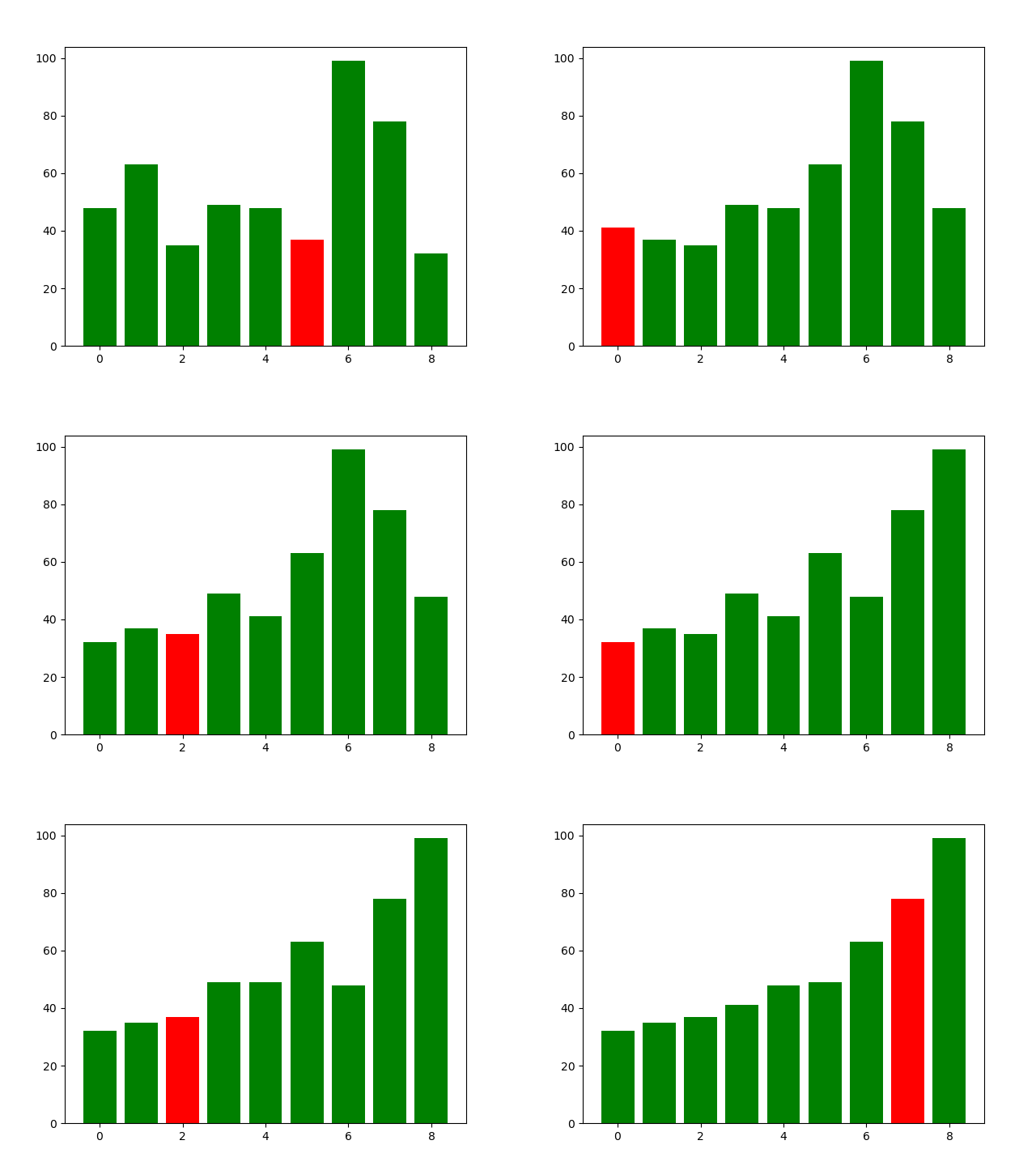
用Python动态展示排序算法
文章目录 选择冒泡插入排序归并排序希尔排序 经常看到这种算法可视化的图片,但往往做不到和画图的人心灵相通,所以想自己画一下,本文主要实现归并排序和希尔排序,如果想实现其他算法可参考这篇 C语言实现各种排序算法[选择&#x…...

vscode代码快捷键
1、 log console.log()2、edf export default (first)>{ second } 或者 export default function(params)>{ }可以使用tab键切换修改项 3、ednf export default function first(second) {third}4、! 生成html模板 5、div#app <div id"app"></di…...

深入了解C++:形参、内联、重载、引用、const和指针、new和delete
形参带默认值的函数 1.给默认值的时候从右向左给。 2.定义出可以给形参默认值,声明也可以给形参默认值。 3.形参默认值只能出现一次。 4.参数调用的效率问题 #sum(10,20)对应了五条汇编指令 mov eax,dword ptr[ebp-8] push eax mov ecx dword ptr[ebp-4] push …...

Linux 目录结构结构
Linux 目录结构结构 概念 Linux 没有 C、D、E...盘符,只有一个目录树。通过挂载,将不同的磁盘挂载到目录树下,通过目录访问磁盘。 不同目录的作用 目录存放内容/作用/根目录,目录树的起点,存放所有文件。…...
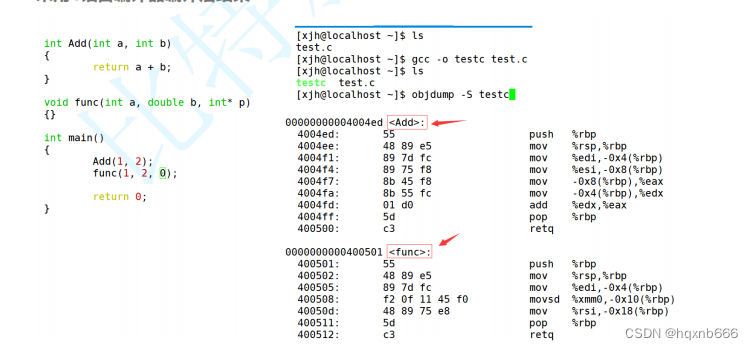
C++基础入门:掌握核心概念(超全!)
C作为一门广泛使用的编程语言,以其高性能和灵活性在软件开发领域占据重要地位。无论是游戏开发、系统编程还是实时应用,C都是一个不可或缺的工具。本博客旨在为初学者提供C编程语言的核心概念,帮助你建立坚实的基础。 C关键字 C关键字是编程…...
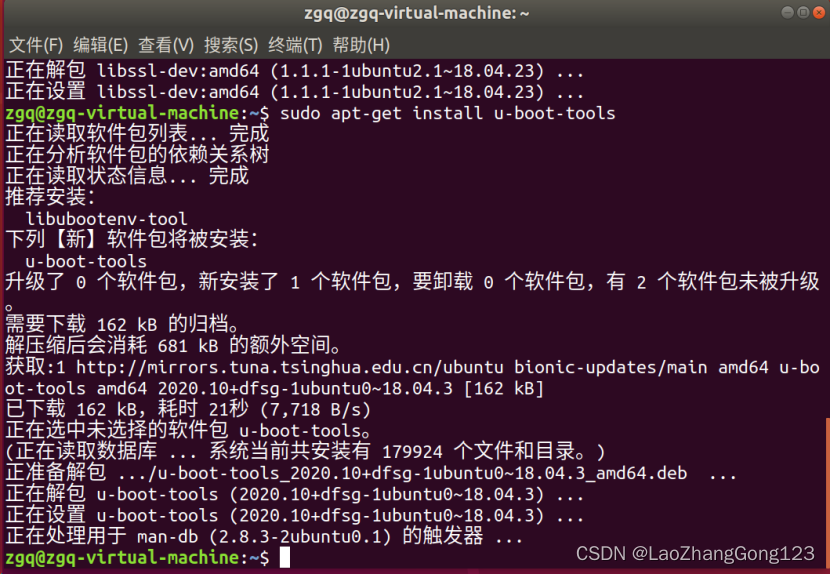
Linux第47步_安装支持linux的第三方库和mkimage工具
安装支持linux的第三方库和mkimage工具,做好移植前的准备工作。 编译linux内核之前,需要先在 ubuntu上安装“lzop库”和“libssl-dev库”,否则内核编译会失败。 mkimage工具会在zImage镜像文件的前面添加0x40个字节的头部信息,就可以得到uI…...
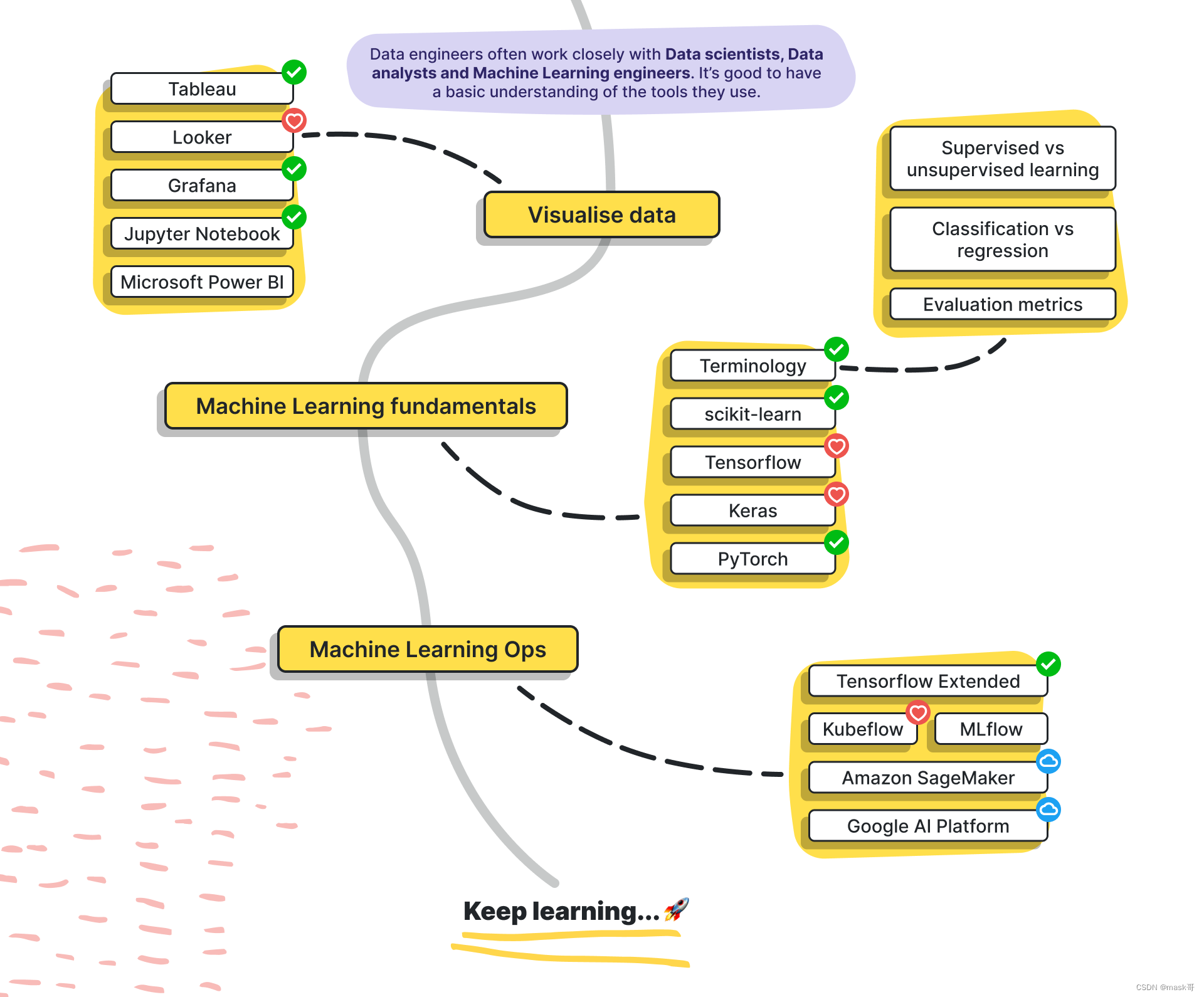
数据工程工程师学习路线图
数据工程岗位要求 Skill Sets required: - Hands on experience enabling data via Adobe Analytics and/or Google Analytics - Understanding of how customer level data is captured and stitched with behavioural data - Experience working with Testing (QA) and D…...
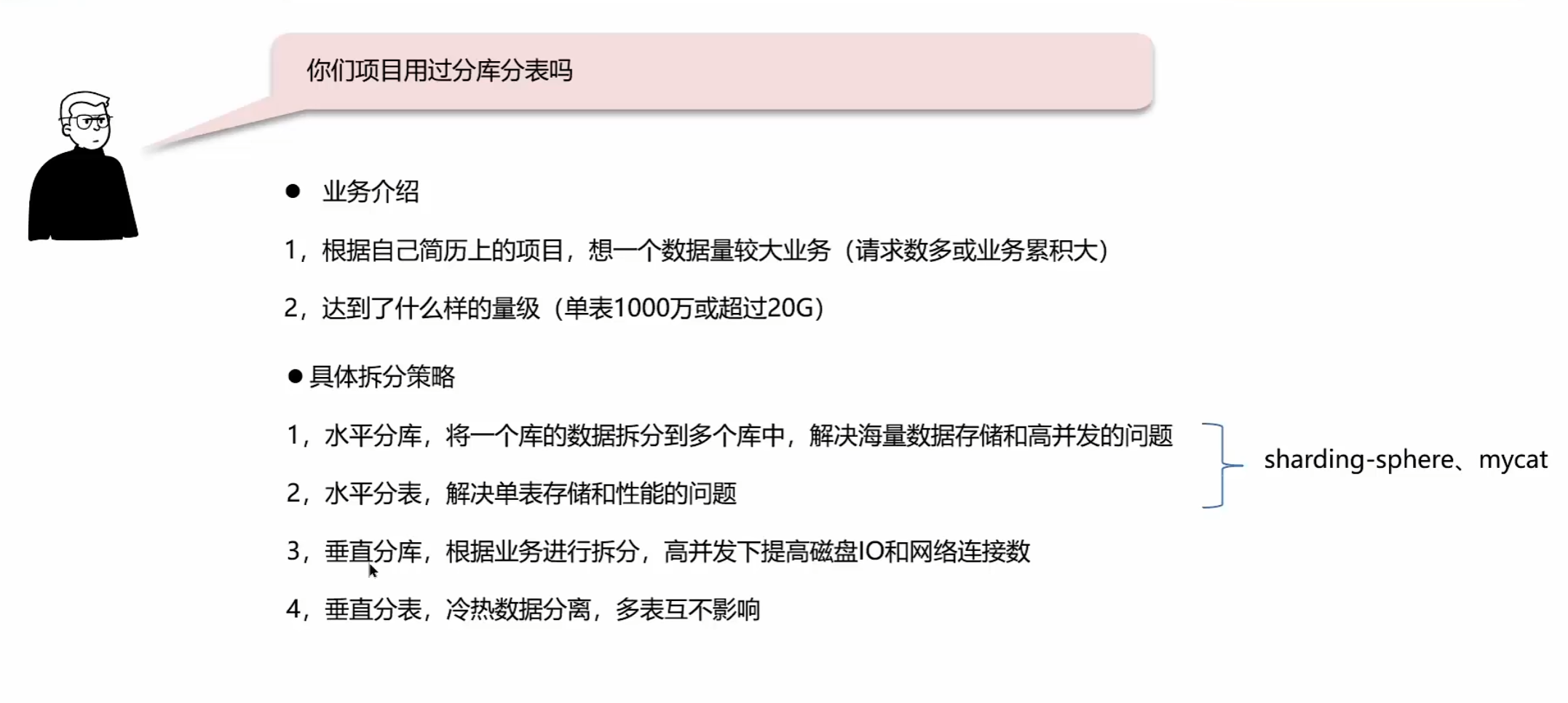
MySQL主从同步与分库分表
分库分表...
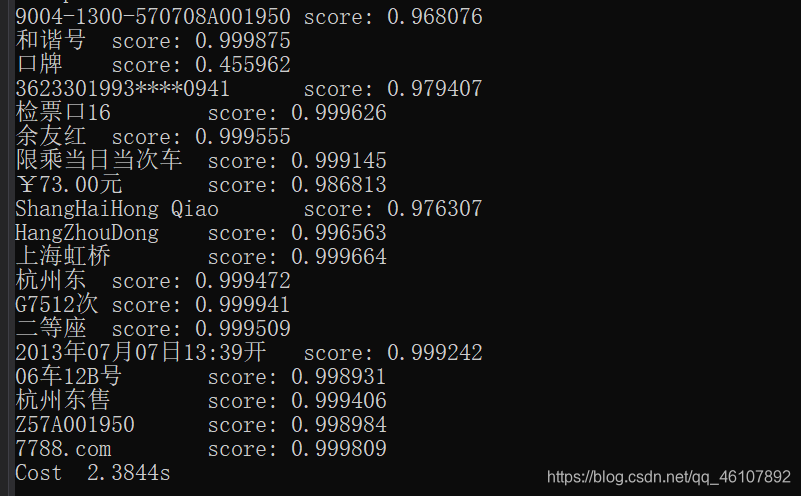
百度PaddleOCR字符识别推理部署(C++)
1 环境 1.opencv(https://sourceforge.net/projects/opencvlibrary/) 2.cmake(https://cmake.org/download/) 3.vs2019((https://github.com/PaddlePaddle/PaddleOCR/tree/release/2.1) 4.paddleOCR项目-建议2.0(http…...

C++ Qt框架开发 | 基于Qt框架开发实时成绩显示排序系统(2)折线图显示
对上一篇的工作C学习笔记 | 基于Qt框架开发实时成绩显示排序系统1-CSDN博客继续优化,增加一个显示运动员每组成绩的折线图。 1)在Qt Creator的项目文件(.pro文件)中添加对Qt Charts模块的支持: QT charts 2…...
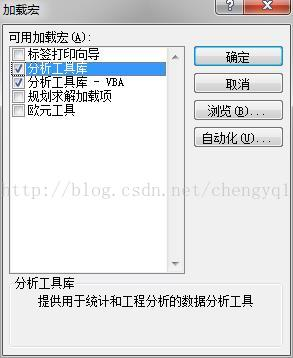
Microsoft Excel 加载数据分析工具
Microsoft Excel 加载数据分析工具 1. 打开 Excel,文件 -> 选项2. 加载项 -> 转到…3. 分析工具库、分析工具库 - VBA4. 打开 Excel,数据 -> 数据分析References 1. 打开 Excel,文件 -> 选项 2. 加载项 -> 转到… 3…...

Day32 贪心算法part02
买卖股票的最佳时机 太牛了我,随随便便双指针秒杀 md题解里面双指针都没用直接for循环秒杀 跳跃游戏 写成这样纯粹是没有看到第一次跳跃必须从第一个开始 class Solution:def canJump(self, nums: List[int]) -> bool:if len(nums) 1:return Truefor i in …...
)
3分钟带你了解Vue3的nextTick()
前言 Vue 实现响应式并不是数据发生变化之后 DOM 立即变化,而是按一定的策略进行 DOM 的更新。简单来说,Vue在修改数据后,视图不会立刻更新,而是等同一事件循环中的所有数据变化完成之后,再统一进行视图更新ÿ…...

数据库的使用方法
sqlite3 API: 头文件: #include <sqlite3.h> 编译时候要加上-lsqlite3 gcc a.c -lsqlite3 1)sqlite3_open int sqlite3_open(const char *filename, /* Database filename (UTF-8) */ sqlite3 **ppDb /* OUT: SQLite db …...

HTML5和CSS3强化知识总结
HTML5的新特性 HTML5的新增特性主要是针对于以前的不足,增一些新的标签、新的表单和新的表单属性等。这些新特性都有兼容性问题,基本是IE9以上版本的浏览器才支持,如果不考虑兼容性问题,可以大量使用这些新特性。 HTML5新增的语义…...
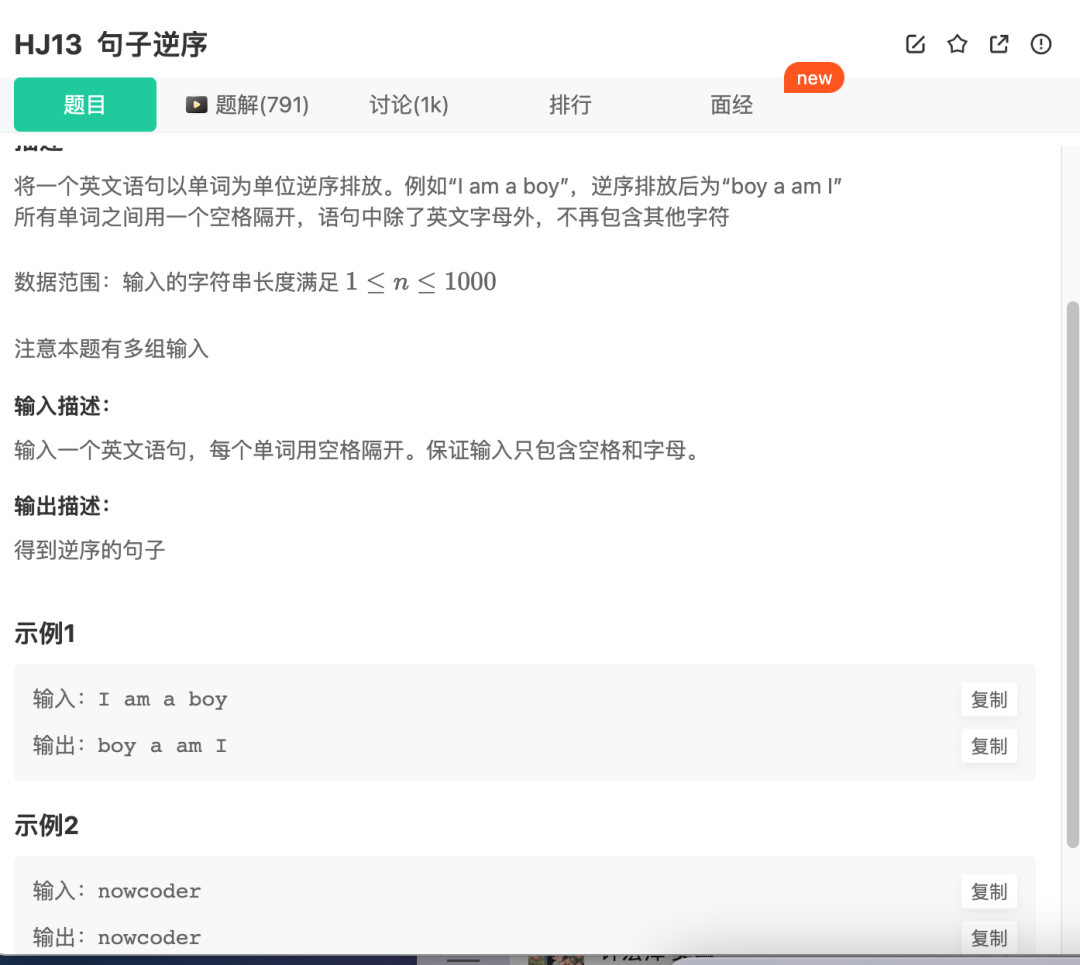
华为机考入门python3--(13)牛客13-句子逆序
分类:列表 知识点: 列表逆序(和字符串逆序是一样的) my_list[::-1] 题目来自【牛客】 def reverse_sentence(sentence): # 将输入的句子分割words sentence.split() # 将单词逆序排列 words words[::-1] # 将单词用空…...
文件上传、断点续传、断网重传)
javaScript实现客户端直连AWS S3(亚马逊云)文件上传、断点续传、断网重传
写在前面:在做这个调研时我遇到的需求是前端直接对接亚马逊平台实现文件上传功能。上传视频文件通常十几个G、客户工作环境网络较差KB/s,且保证上传是稳定的,支持网络异常断点重试、文件断开支持二次拖入自动重传等。综合考虑使用的Aws S3的分…...

从基建发力,CESS 如何推动 RWA 发展?
2023 年 11 月 30 日,Web3 基金会(Web3 Foundation)宣布通过 Centrifuge 将部分资金投资于 RWA(Real World Assets,真实世界资产),试点投资为 100 万美元。Web3 基金会旨在通过支持专注于隐私、…...
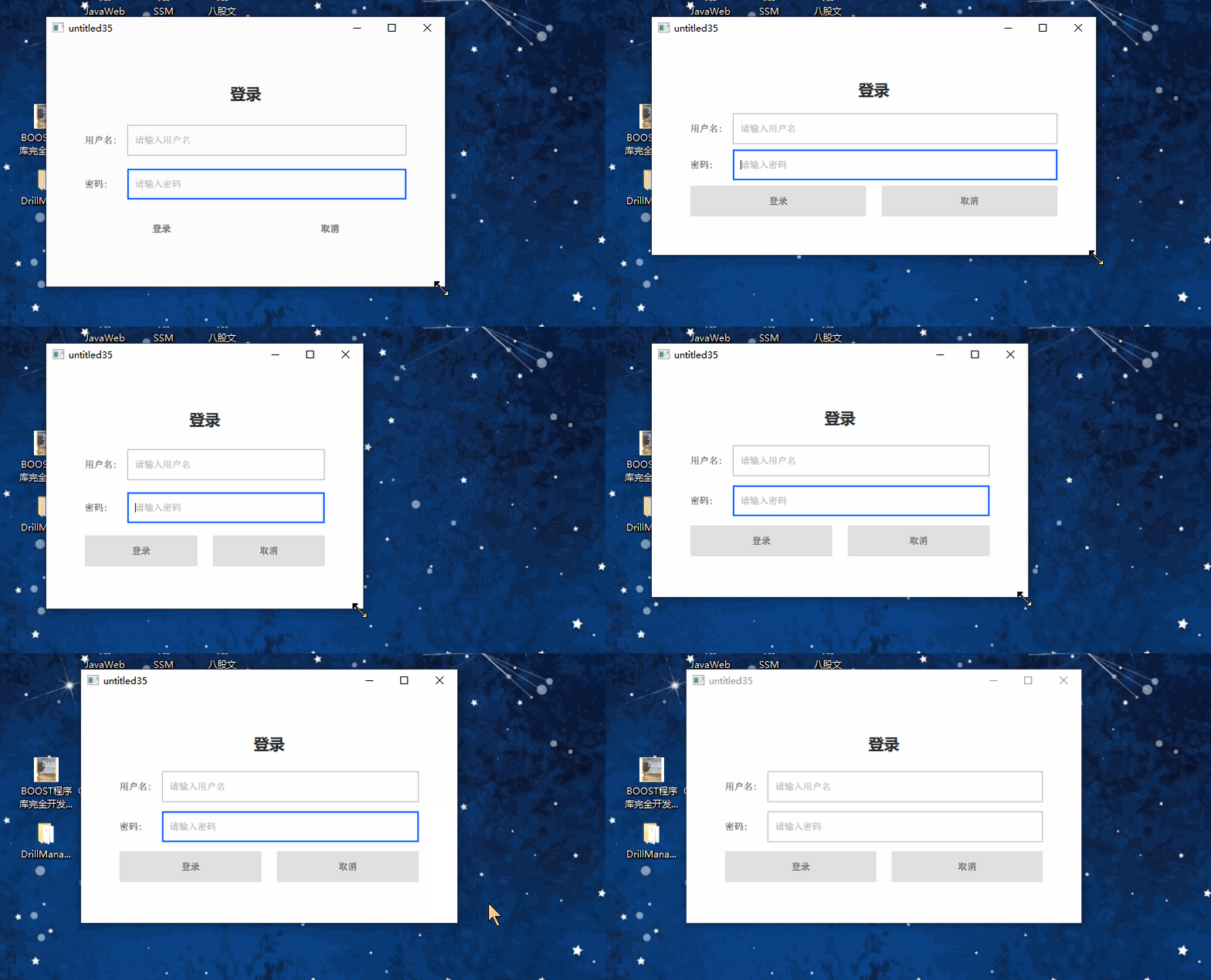
qml写一个自适应登录框
1、前言 写一个可自由伸缩的登录框,,(横向上) 关键:给相关控件赋予 Layout.fillWidth: true 属性 即可。 2、代码 //main.qml import QtQuick 2.12 import QtQuick.Controls 2.12 import QtQml 2.12 import QtQuic…...

从0开始详解网络安全自学全流程!附对应的视频教程和学习笔记
从0开始详解网络安全自学全流程!附对应的视频教程和学习笔记 今天给大家梳理了从0开始详解网络安全自学全流程!对应的视频教程和学习笔记也都整理好了,大家去文末自取就行。 第一步:刑法 为什么学:划清合法与违法的红…...

详解:XSS 攻击和 CSRF 攻击
一、先看看核心区别 XSS:偷你的身份-》在你的浏览器里面跑恶意JS ,主动拿你的Cookie,冒充你。CSRF:借你的身份-》不偷你的Cookie,而是利用浏览器自带Cookie 的属性,骗网站替你做事。 二、XSS 讲解 1、核心本…...

基于GAN的AI图像水印移除工具VeoWatermarkRemover实战指南
1. 项目概述:一个开源图像水印移除工具 最近在整理一些老照片和网上下载的素材时,经常被图片上那些碍眼的水印、Logo或者时间戳困扰。手动用PS处理,费时费力,而且对批量操作极不友好。直到我发现了GitHub上一个名为“VeoWatermar…...

OpenSTA静态时序分析引擎技术深度解析:开源时序验证核心架构揭秘
OpenSTA静态时序分析引擎技术深度解析:开源时序验证核心架构揭秘 【免费下载链接】OpenSTA OpenSTA engine 项目地址: https://gitcode.com/gh_mirrors/op/OpenSTA OpenSTA作为一款开源的静态时序分析引擎,为数字集成电路设计提供了工业级的时序验…...

共享麻将室无人化运营:技术架构、硬件选型与实战避坑指南
1. 项目概述:当传统棋牌室遇上“无人化”浪潮最近几年,如果你留意过城市里的商业形态,会发现一个挺有意思的现象:那些曾经需要前台、服务员、保洁阿姨的传统棋牌室,特别是麻将馆,正在悄然“变身”。它们门口…...

Python迭代器实战:构建高性能懒加载积分榜系统
1. 项目概述:从“可迭代”到“可控制”的数据流在Python的世界里,处理数据集合是家常便饭。无论是从数据库拉取用户列表,还是逐行读取一个巨大的日志文件,我们总在和各种序列打交道。但你是否想过,当你写下一个简单的f…...

如何快速安全弹出USB设备:Windows用户的完整USB设备管理工具指南
如何快速安全弹出USB设备:Windows用户的完整USB设备管理工具指南 【免费下载链接】USB-Disk-Ejector A program that allows you to quickly remove drives in Windows. It can eject USB disks, Firewire disks and memory cards. It is a quick, flexible, portab…...

PCIe调试避坑指南:当你的设备报Malformed TLP/UR/UC错误时,到底发生了什么?
PCIe调试实战:Malformed TLP/UR/UC错误排查全解析 当PCIe设备突然抛出Malformed TLP、UR(Unsupported Request)或UC(Unexpected Completion)错误时,很多工程师的第一反应往往是翻查协议手册。但真实调试场景…...

你的STM32调试信息用对了吗?深入对比.axf文件与addr2line.exe的配合之道
STM32调试进阶:解密.axf文件与addr2line的黄金组合 调试嵌入式系统时,最令人沮丧的莫过于设备突然崩溃,而你却对问题源头一无所知。作为一名长期与STM32打交道的开发者,我经历过无数次这样的时刻,直到真正理解了调试信…...

深度解析:三合一技术方案破解Cursor AI编辑器限制的终极指南
深度解析:三合一技术方案破解Cursor AI编辑器限制的终极指南 【免费下载链接】cursor-free-vip [Support 0.45](Multi Language 多语言)自动注册 Cursor Ai ,自动重置机器ID , 免费升级使用Pro 功能: Youve reached yo…...