
微服务OAuth 2.1认证授权可行性方案(Spring Security 6)
文章目录
- 一、背景
- 二、微服务架构介绍
- 三、认证服务器
- 1. 数据库创建
- 2. 新建模块
- 3. 导入依赖和配置
- 4. 安全认证配置类
- 四、认证服务器测试
- 1. AUTHORIZATION_CODE(授权码模式)
- 1. 获取授权码
- 2. 获取JWT
- 2. CLIENT_CREDENTIALS(客户端凭证模式)
- 五、Gateway
- 1. 引入依赖
- 2. 添加白名单文件
- 3. 全局过滤器
- 4. 获取远程JWKS
- 5. 校验JWT
- 6. 测试(如何携带JWT)
- 六、后记
一、背景
Oauth2停止维护,基于OAuth 2.1 和 OpenID Connect 1.0的Spring Authorization Server模块独立于SpringCloud。
本文开发环境如下:
| Version | |
|---|---|
| Java | 17 |
| SpringCloud | 2023.0.0 |
| SpringBoot | 3.2.1 |
| Spring Authorization Server | 1.2.1 |
| Spring Security | 6.2.1 |
| mysql | 8.2.0 |
https://spring.io/projects/spring-security#learn
https://spring.io/projects/spring-authorization-server#learn
二、微服务架构介绍
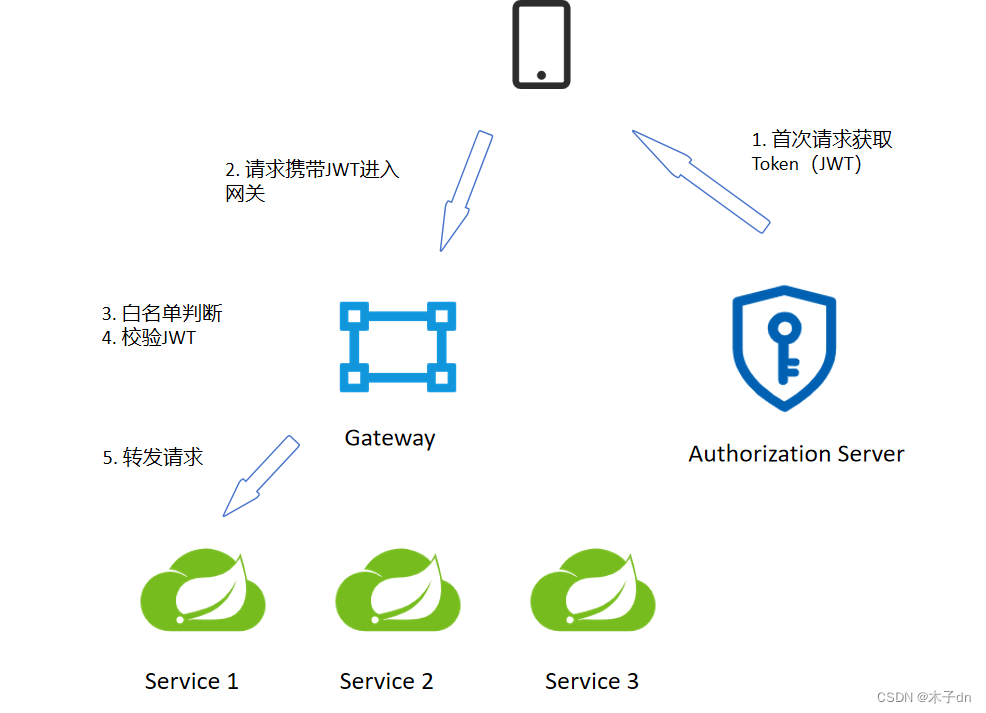
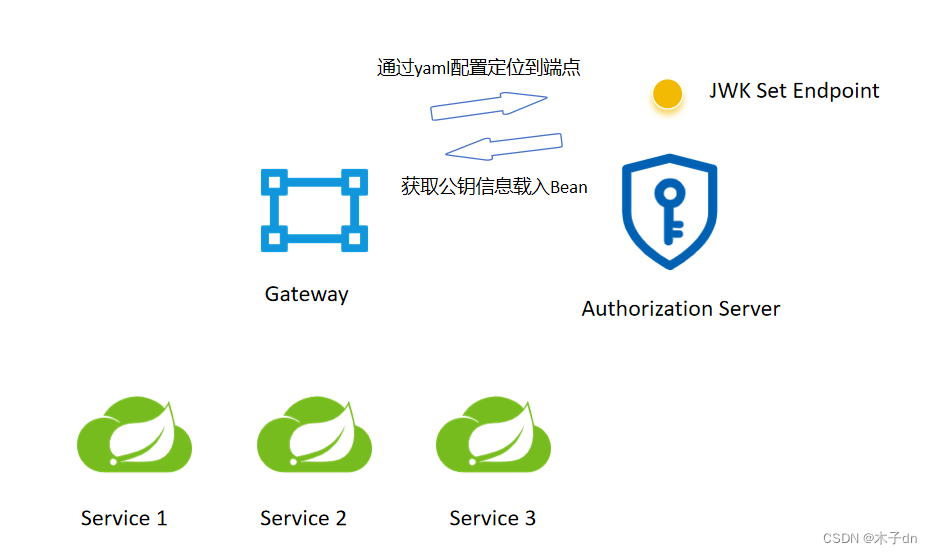
一个认证服务器(也是一个微服务),专门用于颁发JWT。
一个网关(也是一个微服务),用于白名单判断和JWT校验。
若干微服务。
本文的关键在于以下几点:
- 搭建认证服务器
- 网关白名单判断
- 网关验证JWT
- 认证服务器如何共享公钥,让其余微服务有JWT自校验的能力。
三、认证服务器
这里是官方文档https://spring.io/projects/spring-authorization-server#learn
基本上跟着Getting Started写完就可以。
1. 数据库创建
新建一个数据库xc_users。
然后执行jar里自带的三个sql。
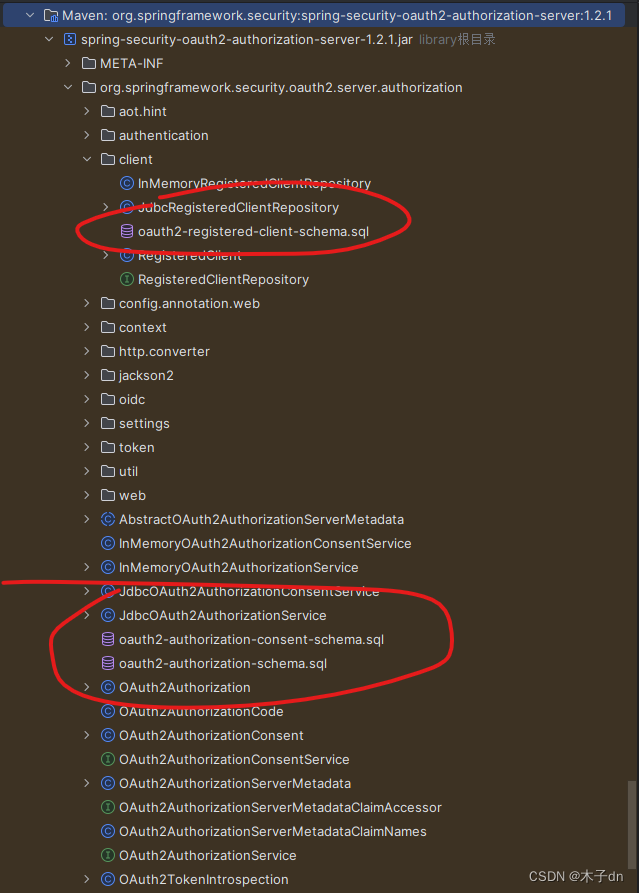
这一步官方并没有给出,大概因为可以使用内存存储,在简单demo省去了持久化。不建立数据库可能也是可行的,我没试过。
2. 新建模块
新建一个auth模块,作为认证服务器。
3. 导入依赖和配置
<dependency><groupId>com.mysql</groupId><artifactId>mysql-connector-j</artifactId></dependency><dependency><groupId>org.springframework.boot</groupId><artifactId>spring-boot-starter-security</artifactId></dependency><dependency><groupId>org.springframework.boot</groupId><artifactId>spring-boot-starter-oauth2-authorization-server</artifactId></dependency>
server:servlet:context-path: /authport: 63070
spring:application:name: auth-serviceprofiles:active: devdatasource:driver-class-name: com.mysql.cj.jdbc.Driverurl: jdbc:mysql://192.168.101.65:3306/xc_users?serverTimezone=UTC&userUnicode=true&useSSL=false&username: rootpassword: 1009
4. 安全认证配置类
@Configuration
@EnableWebSecurity
public class AuthServerSecurityConfig {}
里面包含诸多内容,有来自Spring Security的,也有来自的Spring Authorization Server的。
UserDetailsService的实例,用于检索用户进行身份验证。
@Beanpublic UserDetailsService userDetailsService() {UserDetails userDetails = User.withUsername("lisi").password("456").roles("read").build();return new InMemoryUserDetailsManager(userDetails);}
- 密码编码器(可选,本文不用)
    @Beanpublic PasswordEncoder passwordEncoder() {// 密码为明文方式return NoOpPasswordEncoder.getInstance();// 或使用 BCryptPasswordEncoder
//         return new BCryptPasswordEncoder();}
- 协议端点的
Spring Security过滤器链
@Bean@Order(1)public SecurityFilterChain authorizationServerSecurityFilterChain(HttpSecurity http)throws Exception {OAuth2AuthorizationServerConfiguration.applyDefaultSecurity(http);http.getConfigurer(OAuth2AuthorizationServerConfigurer.class).oidc(Customizer.withDefaults()); // Enable OpenID Connect 1.0http// Redirect to the login page when not authenticated from the// authorization endpoint.exceptionHandling((exceptions) -> exceptions.defaultAuthenticationEntryPointFor(new LoginUrlAuthenticationEntryPoint("/login"),new MediaTypeRequestMatcher(MediaType.TEXT_HTML)))// Accept access tokens for User Info and/or Client Registration.oauth2ResourceServer((resourceServer) -> resourceServer.jwt(Customizer.withDefaults()));return http.build();}
- 用于身份验证的
Spring Security过滤器链。
至于哪些要校验身份,哪些不用,根据自己需求写。
@Bean@Order(2)public SecurityFilterChain defaultFilterChain(HttpSecurity http) throws Exception {http.authorizeHttpRequests((authorize) ->authorize.requestMatchers(new AntPathRequestMatcher("/actuator/**")).permitAll().requestMatchers(new AntPathRequestMatcher("/login")).permitAll().requestMatchers(new AntPathRequestMatcher("/oauth2/**")).permitAll().requestMatchers(new AntPathRequestMatcher("/**/*.html")).permitAll().requestMatchers(new AntPathRequestMatcher("/**/*.json")).permitAll().requestMatchers(new AntPathRequestMatcher("/auth/**")).permitAll().anyRequest().authenticated()).formLogin(Customizer.withDefaults()).oauth2ResourceServer(oauth2 -> oauth2.jwt(jwt -> jwt.jwtAuthenticationConverter(jwtAuthenticationConverter())));return http.build();}
- 自定义验证转化器(可选)
private JwtAuthenticationConverter jwtAuthenticationConverter() {JwtAuthenticationConverter jwtConverter = new JwtAuthenticationConverter();// 此处可以添加自定义逻辑来提取JWT中的权限等信息// jwtConverter.setJwtGrantedAuthoritiesConverter(...);return jwtConverter;}
- 用于管理客户端的
RegisteredClientRepository实例
	@Beanpublic RegisteredClientRepository registeredClientRepository() {RegisteredClient registeredClient = RegisteredClient.withId(UUID.randomUUID().toString()).clientId("XcWebApp")
//                .clientSecret("{noop}XcWebApp").clientSecret("XcWebApp").clientAuthenticationMethod(ClientAuthenticationMethod.CLIENT_SECRET_BASIC).authorizationGrantType(AuthorizationGrantType.AUTHORIZATION_CODE).authorizationGrantType(AuthorizationGrantType.REFRESH_TOKEN).authorizationGrantType(AuthorizationGrantType.CLIENT_CREDENTIALS).redirectUri("http://www.51xuecheng.cn")
//                .postLogoutRedirectUri("http://localhost:63070/login?logout").scope("all").scope(OidcScopes.OPENID).scope(OidcScopes.PROFILE).scope("message.read").scope("message.write").scope("read").scope("write").clientSettings(ClientSettings.builder().requireAuthorizationConsent(true).build()).tokenSettings(TokenSettings.builder().accessTokenTimeToLive(Duration.ofHours(2))  // 设置访问令牌的有效期.refreshTokenTimeToLive(Duration.ofDays(3))  // 设置刷新令牌的有效期.reuseRefreshTokens(true)                   // 是否重用刷新令牌.build()).build();return new InMemoryRegisteredClientRepository(registeredClient);}
- 用于对访问令牌进行签名的实例
@Beanpublic JWKSource<SecurityContext> jwkSource() {KeyPair keyPair = generateRsaKey();RSAPublicKey publicKey = (RSAPublicKey) keyPair.getPublic();RSAPrivateKey privateKey = (RSAPrivateKey) keyPair.getPrivate();RSAKey rsaKey = new RSAKey.Builder(publicKey).privateKey(privateKey).keyID(UUID.randomUUID().toString()).build();JWKSet jwkSet = new JWKSet(rsaKey);return new ImmutableJWKSet<>(jwkSet);}private static KeyPair generateRsaKey() {KeyPair keyPair;try {KeyPairGenerator keyPairGenerator = KeyPairGenerator.getInstance("RSA");keyPairGenerator.initialize(2048);keyPair = keyPairGenerator.generateKeyPair();}catch (Exception ex) {throw new IllegalStateException(ex);}return keyPair;}
- 用于解码签名访问令牌的
JwtDecoder实例
@Beanpublic JwtDecoder jwtDecoder(JWKSource<SecurityContext> jwkSource) {return OAuth2AuthorizationServerConfiguration.jwtDecoder(jwkSource);}
- 用于配置
Spring Authorization Server的AuthorizationServerSettings实例
@Beanpublic AuthorizationServerSettings authorizationServerSettings() {return AuthorizationServerSettings.builder().build();}
这里可以设置各种端点的路径,默认路径点开builder()即可看到,如下
public static Builder builder() {return new Builder().authorizationEndpoint("/oauth2/authorize").deviceAuthorizationEndpoint("/oauth2/device_authorization").deviceVerificationEndpoint("/oauth2/device_verification").tokenEndpoint("/oauth2/token").jwkSetEndpoint("/oauth2/jwks").tokenRevocationEndpoint("/oauth2/revoke").tokenIntrospectionEndpoint("/oauth2/introspect").oidcClientRegistrationEndpoint("/connect/register").oidcUserInfoEndpoint("/userinfo").oidcLogoutEndpoint("/connect/logout");}
这里我必须吐槽一下,qnmd /.well-known/jwks.json,浪费我一下午。获取公钥信息的端点现在已经替换成了/oauth2/jwks。
四、认证服务器测试
基本上跟着Getting Started走就行。只不过端点的变动相较于Oauth2很大,还有使用方法上不同。
在配置RegisteredClient的时候,我们设置了三种GrantType,这里只演示两种AUTHORIZATION_CODE和CLIENT_CREDENTIALS。
1. AUTHORIZATION_CODE(授权码模式)
1. 获取授权码
用浏览器打开以下网址,
http://localhost:63070/auth/oauth2/authorize?client_id=XcWebApp&response_type=code&scope=all&redirect_uri=http://www.51xuecheng.cn
对应oauth2/authorize端点,后面的参数和当时设置RegisteredClient 保持对应就行。response_type一定是code。
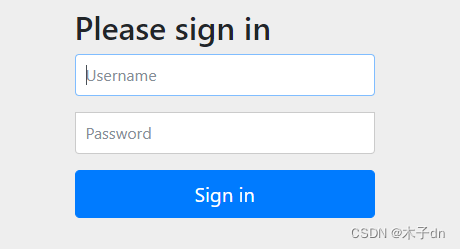
进入到登陆表单,输入lisi - 456登陆。
选择all,同意请求。
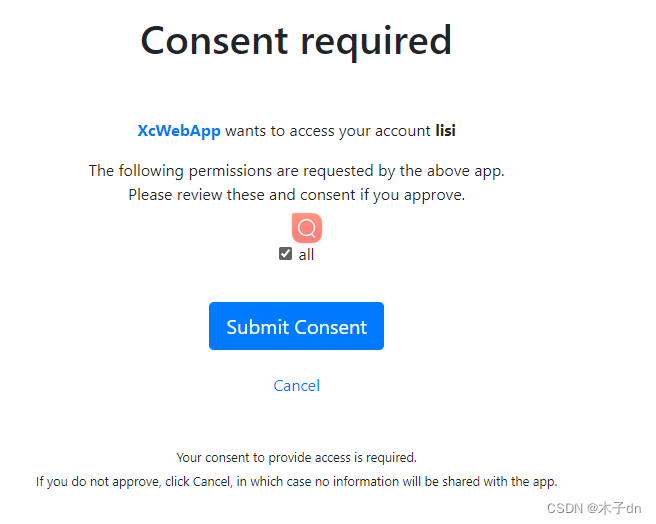
url被重定向到http://www.51xuecheng.cn,并携带一个code,这就是授权码。
http://www.51xuecheng.cn/?code=9AexK_KFH1m3GiNBKsc0FU2KkedM2h_6yR-aKF-wPnpQT5USKLTqoZiSkHC3GUvt-56_ky-E3Mv5LbMeH9uyd-S1UV6kfJO6znqAcCAF43Yo4ifxTAQ8opoPJTjLIRUC
2. 获取JWT
使用apifox演示,postman,idea-http都可以。
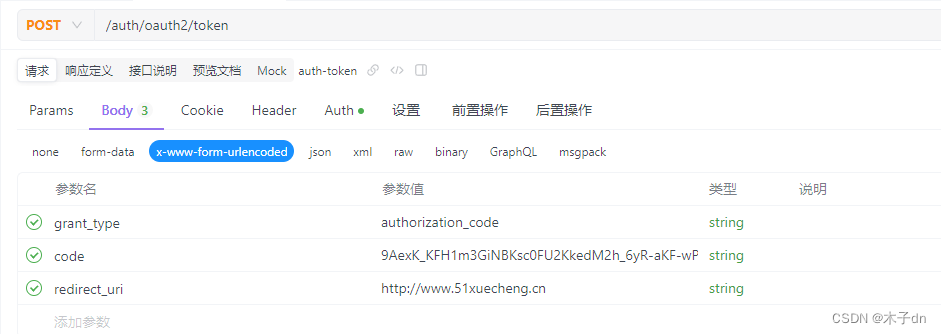
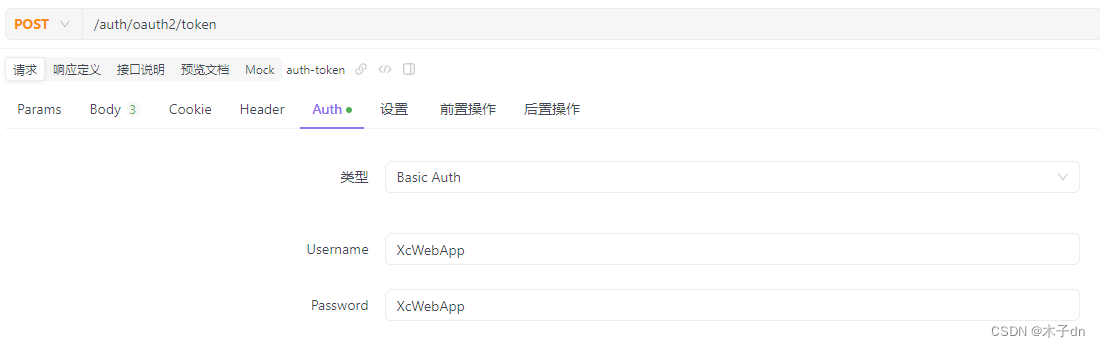
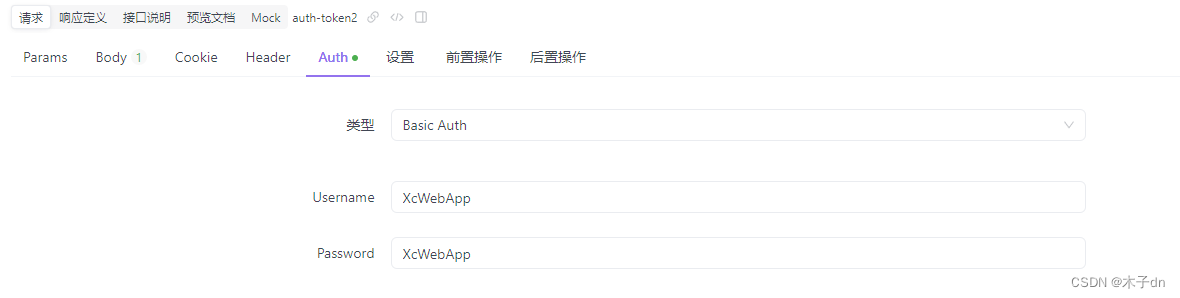
向localhost:63070/auth服务的/oauth2/token端点发送Post请求,同时需要携带认证信息。
认证信息可以如图所填的方法,也可以放到Header中,具体做法是将客户端ID和客户端密码用冒号(:)连接成一个字符串,进行Base64编码放入HTTP请求的Authorization头部中,前缀为Basic 。比如
Authorization: Basic bXlDbGllbnRJZDpteUNsaWVudFNlY3JldA==
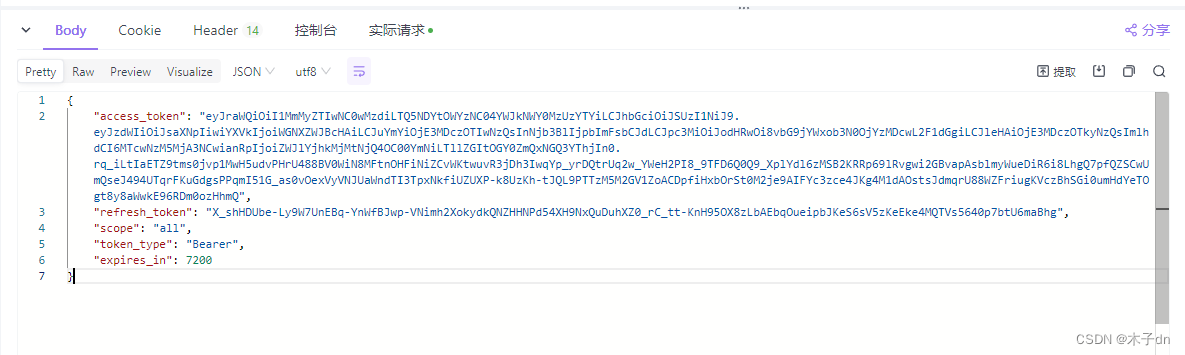
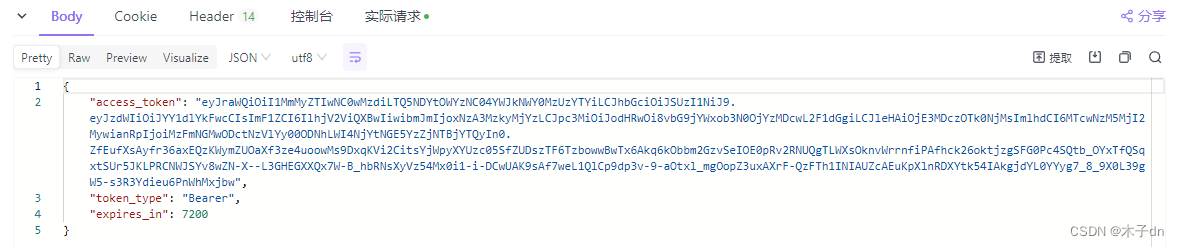
得到JWT
2. CLIENT_CREDENTIALS(客户端凭证模式)
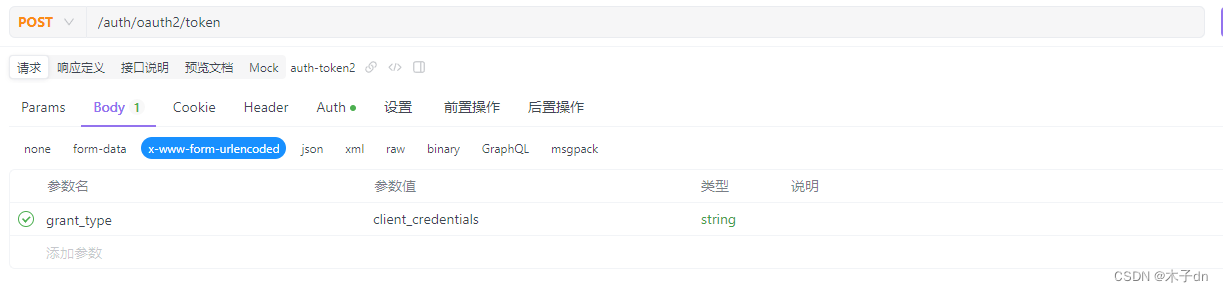
不需要授权码,直接向localhost:63070/auth服务的/oauth2/token端点发送Post请求,同时需要携带认证信息。
五、Gateway
至于gateway基础搭建步骤和gateway管理的若干微服务本文不做指导。
相较于auth模块(也就是Authorization Server),gateway的角色是Resource Server。
1. 引入依赖
<dependency><groupId>org.springframework.boot</groupId><artifactId>spring-boot-starter-oauth2-resource-server</artifactId></dependency><dependency><groupId>org.springframework.boot</groupId><artifactId>spring-boot-starter-security</artifactId></dependency>
2. 添加白名单文件
在resource下添加security-whitelist.properties文件。
写入以下内容
/auth/**=????
/content/open/**=??????????
/media/open/**=??????????
3. 全局过滤器
在全局过滤器中,加载白名单,然后对请求进行判断。
@Component
@Slf4j
public class GatewayAuthFilter implements GlobalFilter, Ordered {//白名单private static List<String> whitelist = null;static {//加载白名单try (InputStream resourceAsStream = GatewayAuthFilter.class.getResourceAsStream("/security-whitelist.properties");) {Properties properties = new Properties();properties.load(resourceAsStream);Set<String> strings = properties.stringPropertyNames();whitelist= new ArrayList<>(strings);} catch (Exception e) {log.error("加载/security-whitelist.properties出错:{}",e.getMessage());e.printStackTrace();}}@Overridepublic Mono<Void> filter(ServerWebExchange exchange, GatewayFilterChain chain) {String requestUrl = exchange.getRequest().getPath().value();log.info("请求={}",requestUrl);AntPathMatcher pathMatcher = new AntPathMatcher();//白名单放行for (String url : whitelist) {if (pathMatcher.match(url, requestUrl)) {return chain.filter(exchange);}}}private Mono<Void> buildReturnMono(String error, ServerWebExchange exchange) {ServerHttpResponse response = exchange.getResponse();String jsonString = JSON.toJSONString(new RestErrorResponse(error));byte[] bits = jsonString.getBytes(StandardCharsets.UTF_8);DataBuffer buffer = response.bufferFactory().wrap(bits);response.setStatusCode(HttpStatus.UNAUTHORIZED);response.getHeaders().add("Content-Type", "application/json;charset=UTF-8");return response.writeWith(Mono.just(buffer));}@Overridepublic int getOrder() {return 0;}
}
4. 获取远程JWKS
在yml配置中添加jwk-set-uri属性。
spring:security:oauth2:resourceserver:jwt:jwk-set-uri: http://localhost:63070/auth/oauth2/jwks
新建配置类,自动注入JwtDecoder。
@Configuration
public class JwtDecoderConfig {@Value("${spring.security.oauth2.resourceserver.jwt.jwk-set-uri}")String jwkSetUri;@Beanpublic JwtDecoder jwtDecoderLocal() {return NimbusJwtDecoder.withJwkSetUri(jwkSetUri).build();}
}
5. 校验JWT
在全局过滤器中补全逻辑。
@Component
@Slf4j
public class GatewayAuthFilter implements GlobalFilter, Ordered {@Lazy@Autowiredprivate JwtDecoder jwtDecoderLocal;@Overridepublic Mono<Void> filter(ServerWebExchange exchange, GatewayFilterChain chain) {String requestUrl = exchange.getRequest().getPath().value();log.info("请求={}",requestUrl);AntPathMatcher pathMatcher = new AntPathMatcher();//白名单放行for (String url : whitelist) {if (pathMatcher.match(url, requestUrl)) {return chain.filter(exchange);}}//检查token是否存在String token = getToken(exchange);log.info("token={}",token);if (StringUtils.isBlank(token)) {return buildReturnMono("没有携带Token,没有认证",exchange);}
//        return chain.filter(exchange);try {Jwt jwt = jwtDecoderLocal.decode(token);// 如果没有抛出异常,则表示JWT有效// 此时,您可以根据需要进一步检查JWT的声明log.info("token有效期至:{}", formatInstantTime(jwt.getExpiresAt()));return chain.filter(exchange);} catch (JwtValidationException e) {log.info("token验证失败:{}",e.getMessage());return buildReturnMono("认证token无效",exchange);}}/*** 从请求头Authorization中获取token*/private String getToken(ServerWebExchange exchange) {String tokenStr = exchange.getRequest().getHeaders().getFirst("Authorization");if (StringUtils.isBlank(tokenStr)) {return null;}String token = tokenStr.split(" ")[1];if (StringUtils.isBlank(token)) {return null;}return token;}/*** 格式化Instant时间** @param expiresAt 在到期* @return {@link String}*/public String formatInstantTime(Instant expiresAt) {// 将Instant转换为系统默认时区的LocalDateTimeLocalDateTime dateTime = LocalDateTime.ofInstant(expiresAt, ZoneId.systemDefault());// 定义日期时间的格式DateTimeFormatter formatter = DateTimeFormatter.ofPattern("yyyy-MM-dd HH:mm:ss");// 格式化日期时间并打印return dateTime.format(formatter);}}
6. 测试(如何携带JWT)
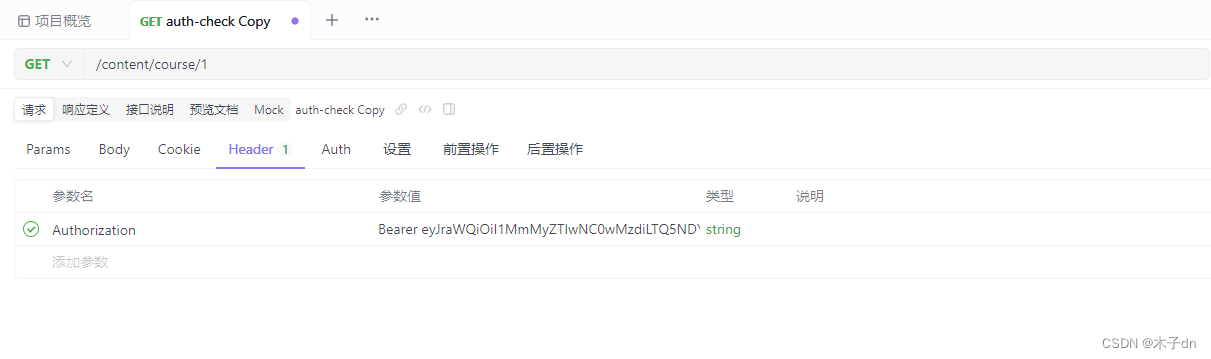
携带一个正确的JWT向gateway发送请求。
把JWT写到Header的Authorization字段中,添加前缀Bearer(用空格隔开),向gateway微服务所在地址发送请求。
gateway日志输出。

六、后记
颁发JWT都归一个认证服务器管理,校验JWT都归Gateway管理,至于授权,则由各个微服务自己定义。耦合性低、性能较好。
关于授权,可以接着这篇文章。
微服务OAuth 2.1认证授权Demo方案(Spring Security 6)
相关文章:
微服务OAuth 2.1认证授权可行性方案(Spring Security 6)
文章目录 一、背景二、微服务架构介绍三、认证服务器1. 数据库创建2. 新建模块3. 导入依赖和配置4. 安全认证配置类 四、认证服务器测试1. AUTHORIZATION_CODE(授权码模式)1. 获取授权码2. 获取JWT 2. CLIENT_CREDENTIALS(客户端凭证模式) 五、Gateway1.…...
Maui blazor ios 按设备类型设置是否启用safeArea
需求,新做了个app, 使用的是maui blazor技术,里面用了渐变背景,在默认启用SafeArea情况下,底部背景很突兀 由于现版本maui在SafeArea有点bug,官方教程的<ContentPage SafeAreafalse不生效,于…...
C#系列-使用 Minio 做图片服务器实现图片上传 和下载(13)
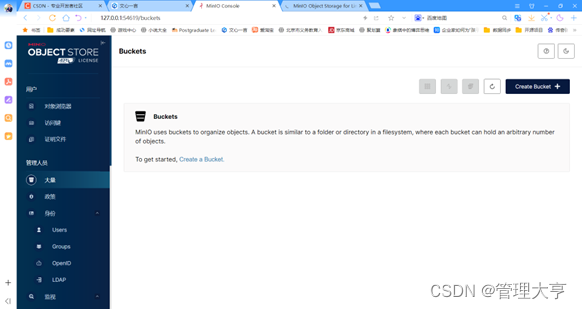
1、Minio 服务器下载和安装 要在本地安装和运行 MinIO 服务器,你可以按照以下 步骤进行操作: 1. 访问 MinIO 的官方网站:https://min.io/,然后 点击页面上的”Download”按钮。 2. 在下载页面上,选择适合你操作系统的 …...

生活篇——华为手机去除负一屏
华为手机去除如下图的恶心负一屏 打开华为的应用市场app 进入:我的-设置-国家/地区(改为俄罗斯)-进入智慧助手检查更新并更新智慧助手。 然后重复开始的操作,将地区改回中国,这样就没有负一屏了。...
2024牛客寒假算法基础集训营2-c Tokitsukaze and Min-Max XOR
来源 题目 Tokitsukaze 有一个长度为 n 的序列 a1,a2,…,an和一个整数 k。 她想知道有多少种序列 b1,b2,…,bm满足: 其中 ⊕\oplus⊕ 为按位异或,具体参见 百度百科:异或 答案可能很大,请输出 mod1e97 后的结果。 输入描述…...
C语言:指针的基础详解
目录 1. 内存 2. 取地址& 3. 指针变量 4. 解引用 4.1 *解引用 4.2 []解引用 4.3 ->解引用 5. 指针变量的大小 5.1 结论 6. 指针运算 7. void* 指针 8. const修饰指针 8.1 const修饰变量 8.2 const修饰指针变量 8.3 结论 9. 野指针 9.1 为什么会出现野指…...
PHP+vue+mysql校园学生社团管理系统574cc
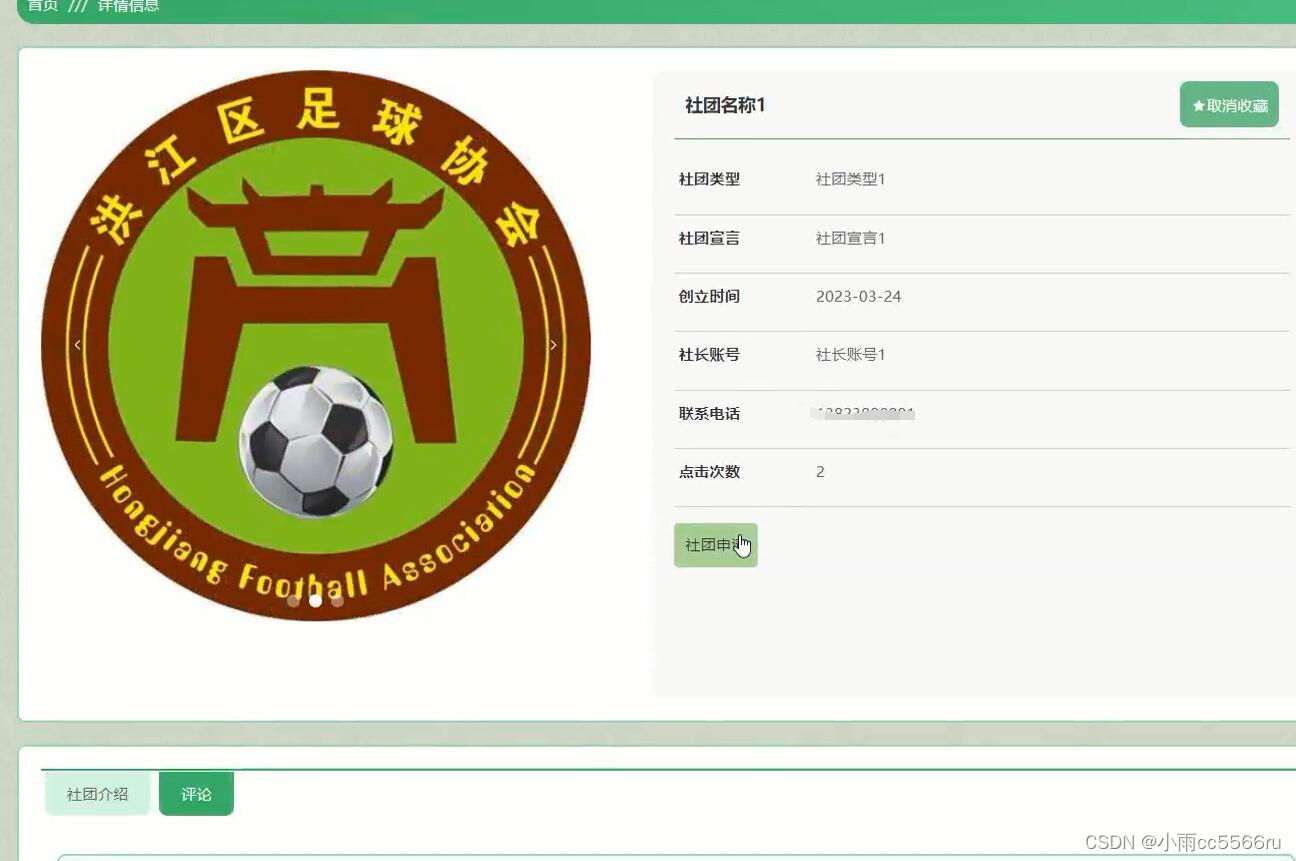
运行环境:phpstudy/wamp/xammp等 开发语言:php 后端框架:Thinkphp 前端框架:vue.js 服务器:apache 数据库:mysql 数据库工具:Navicat/phpmyadmin 前台功能: 首页:展示社团信息和活动…...
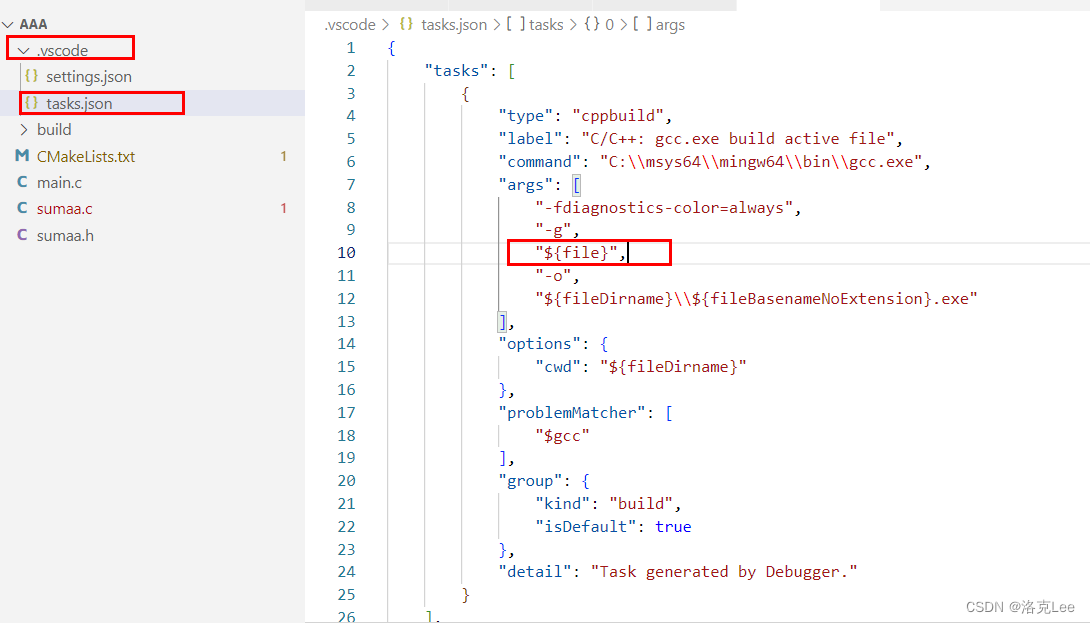
VS Code中主程序C文件引用了另一个.h头文件,编译时报错找不到函数
目录 一、问题描述二、问题原因三、解决方法四、扩展五、通过CMake进行配置 一、问题描述 VS Code中主程序C文件引用了另一个.h头文件,编译时报错找不到函数 主程序 main.c #include <stdio.h> #include "sumaa.h"int main(int, char**){printf(&q…...

边缘计算:重塑数字世界的未来
引言 随着物联网(IoT)设备的激增和5G网络的普及,我们正站在一个计算模式的新纪元门槛上——边缘计算。这一技术范式将数据处理和分析推向网络的边缘,即设备或终端,为实时性要求较高的应用提供了前所未有的可能性。 目…...

2024 前端面试题 附录3
这里记录的是昨天和今天原篇的知识点补充 原篇地址: 2024 前端面试题(GPT回答 示例代码 解释)No.41 - No.60 2024 前端面试题(GPT回答 示例代码 解释)No.61 - No.100 2024 前端面试题(GPT回答 示例代…...
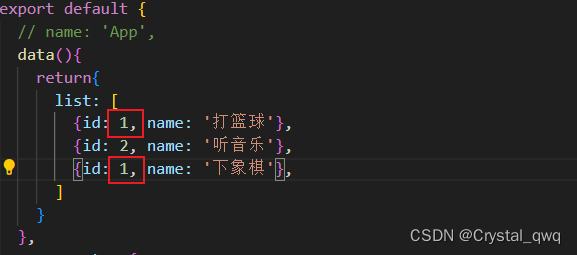
[Vue warn]: Duplicate keys detected: ‘1‘. This may cause an update error.
[Vue warn]: Duplicate keys detected: ‘1‘. This may cause an update error.——> Vue报错,key关键字不唯一: 解决办法:修改一下重复的id值!!!...

Docker-Learn(二)保存、导入、使用Docker镜像
1.保存镜像 根据上一节内容,将创建好镜像进行保存,需要退出当前的已经在运行的docer命令行中断里面,可以通过在终端里面输入指令exit或者按下键盘上的 ctrlD建退出: 回到自己的终端里面,输入指令: docker…...
第三百一十五回
文章目录 1. 概念介绍2. 基本用法3. 补充用法4. 内容总结 我们在上一章回中介绍了"再谈ListView中的分隔线",本章回中将介绍showMenu的用法.闲话休提,让我们一起Talk Flutter吧。 1. 概念介绍 我们在第一百六十三回中介绍了showMenu相关的内容…...
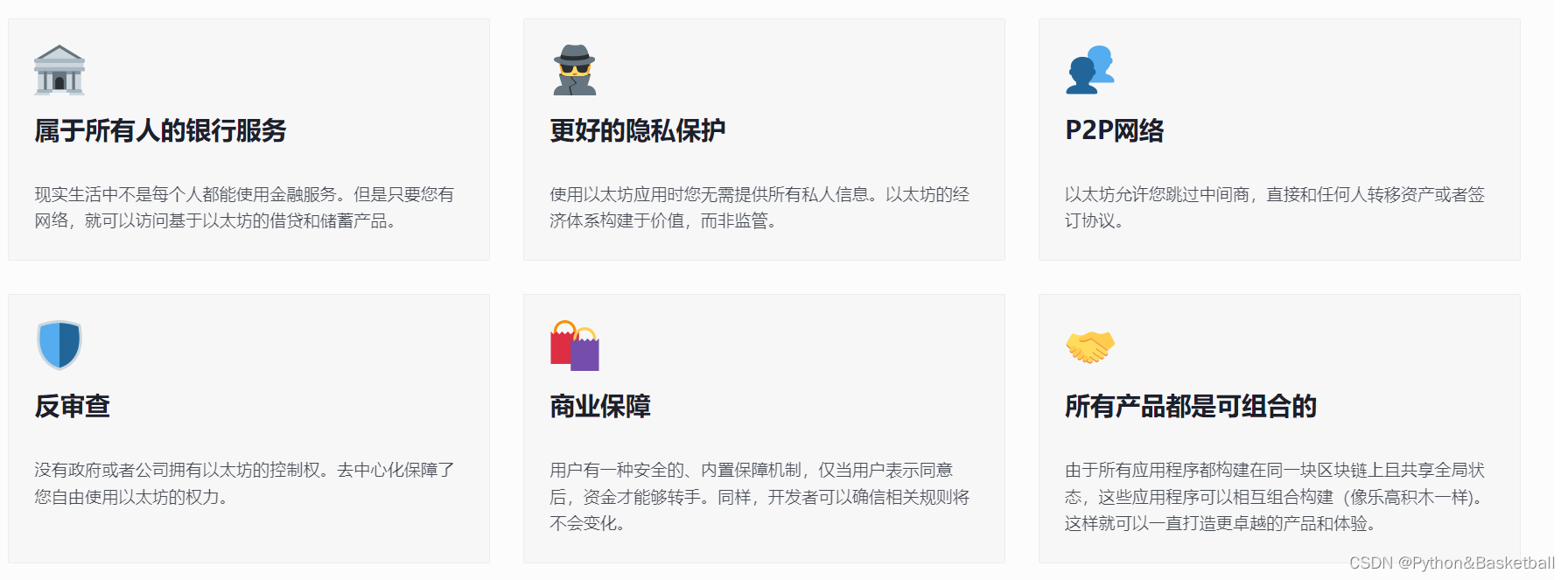
区块链(一): 以太坊基础知识
目录 什么是区块链?什么是以太坊?什么是加密货币?以太坊与比特币有什么不同?以太坊能做什么?什么是智能合约?以太坊社区以太坊白皮书 什么是区块链? 区块链是一个交易数据库,在网络…...
高级FPGA开发之基础协议PCIe
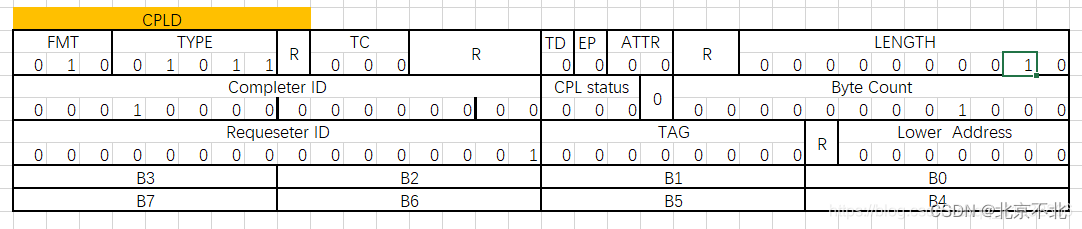
基础协议之PCIe部分 一、TLP包的包头 在PCIe的系统中,tlp包的包头的结构有许多部分是相似的,通过掌握这些常规的包头,能帮助理解在PCIe总线上各个设备之间如何进行数据的收发。 通用的字段 通用字段作用Fmt决定了包头是3DW还是3DWÿ…...
Vue核心基础1:数据代理
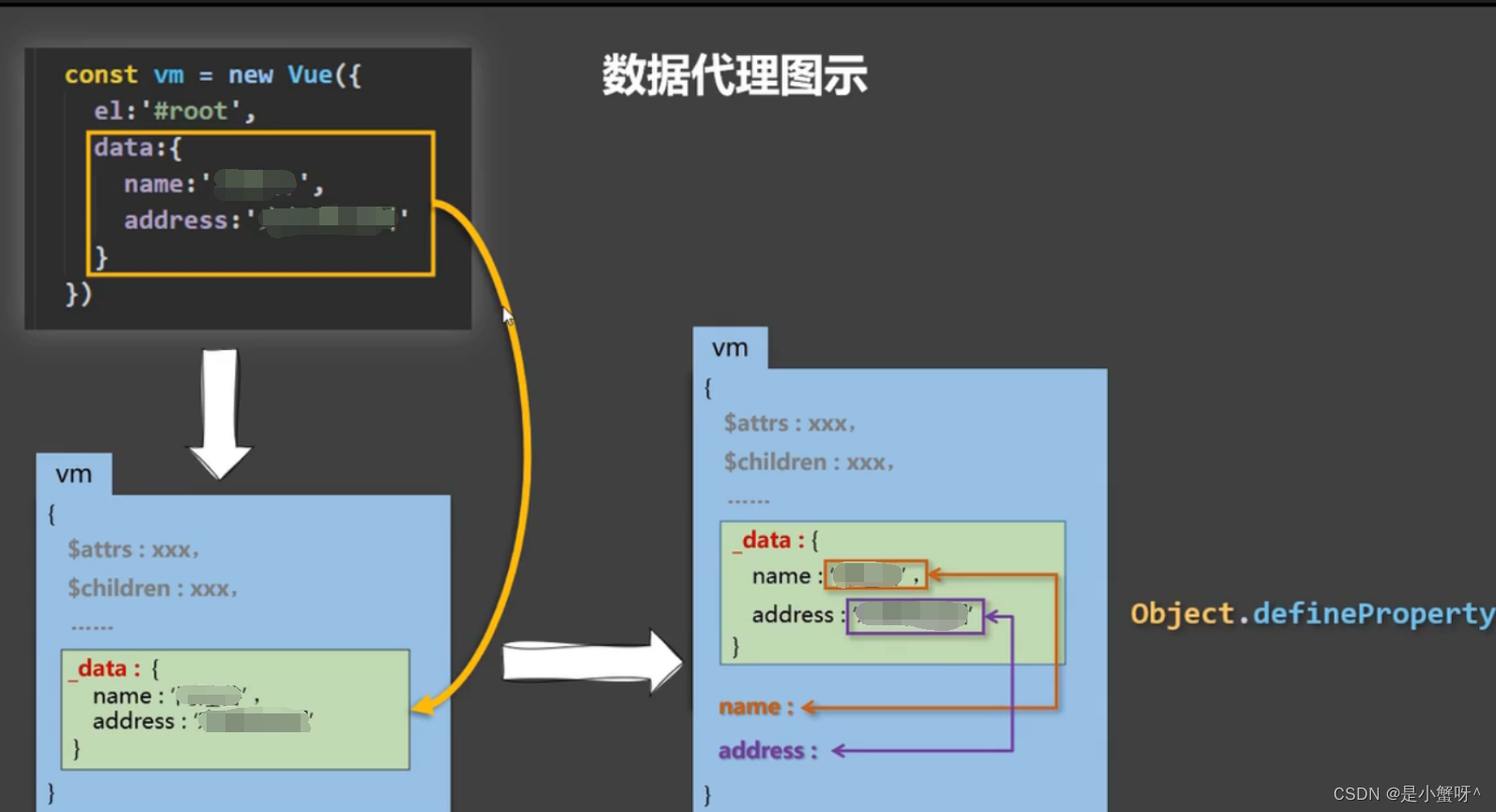
1 回顾Object.defineProperty方法 let str hello const person {name: 张三,age: 18 } Object.defineProperty(person, sex, {// value: 男,// enumerable: true, // 控制属性是否可以枚举,默认值是false// writable: true, // 控制属性是否可以被修改࿰…...
12 ABC串口接收原理与思路
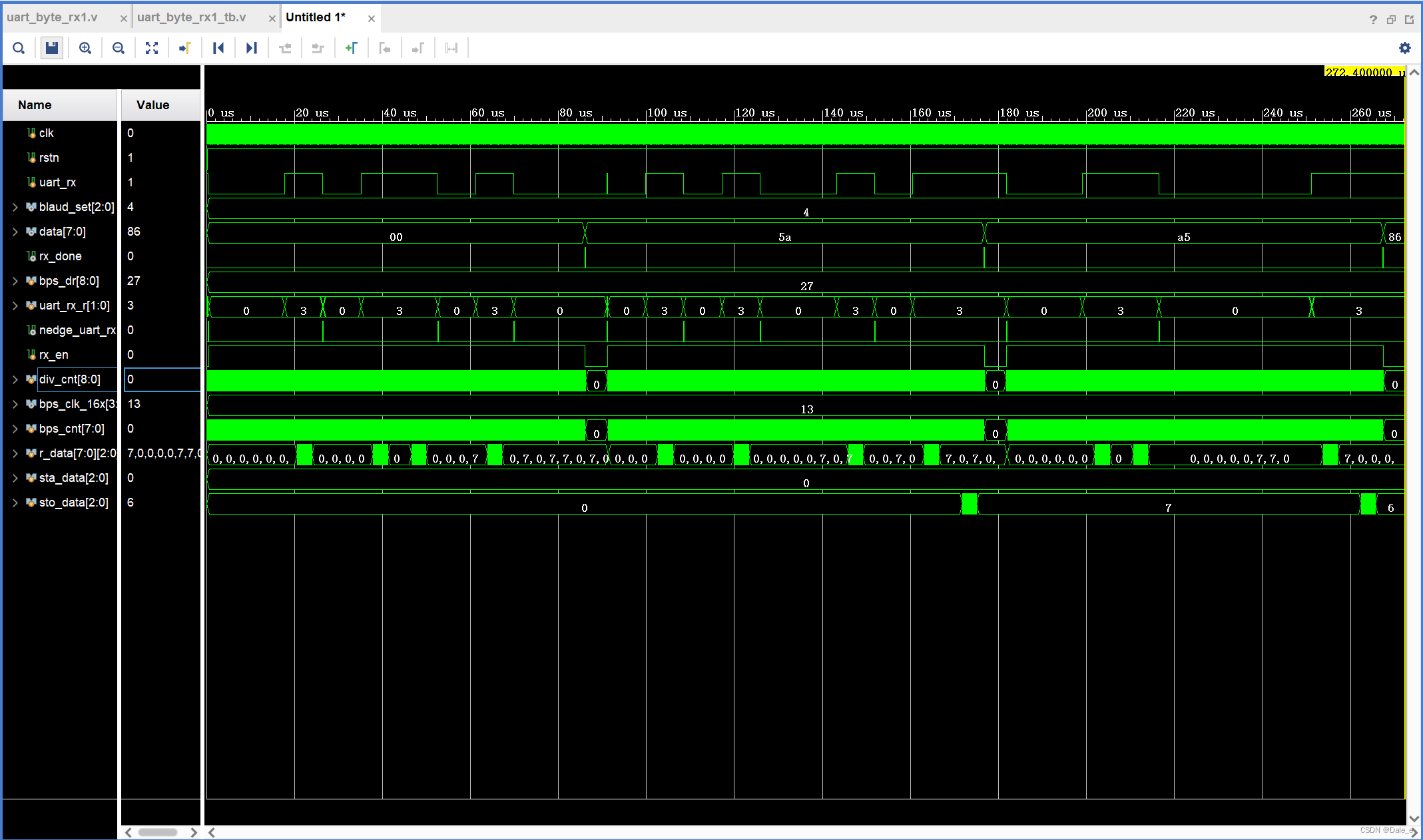
1. 串口接收原理 基本原理:通过数据起始位判断要是否要开始接收的数据,通过采样的方式确定每一位数据是0还是1。 如何判断数据起始位到来:通过边沿检测电路检测起始信号的下降沿 如何采样:一位数据采多次,统计得到高…...
leetcode(二分查找)34.在排序数组中查找元素的第一个和最后一个位置(C++详细解释)DAY11
文章目录 1.题目示例提示 2.解答思路3.实现代码结果 4.总结 1.题目 给你一个按照非递减顺序排列的整数数组 nums,和一个目标值 target。请你找出给定目标值在数组中的开始位置和结束位置。 如果数组中不存在目标值 target,返回 [-1, -1]。 你必须设计…...

算法刷题框架
前言:最近积累了一些算法题量,正在刷东神的算法笔记,监督自己记录下读后启发,顺便帮助道友们阅读 数据结构 这一部分老生常谈,数据的存储方式只有顺序存储和链式存储。 最基本的数组和链表对应这两者,栈…...
跟着cherno手搓游戏引擎【24】开启2D引擎前的项目总结(包括前置知识汇总)
前置技术: c动态链接和静态链接: 隐藏的细节:编译与链接_哔哩哔哩_bilibili 【底层】动态链接库(dll)是如何工作的?_哔哩哔哩_bilibili 预编译,编译,汇编,链接 预编译头文件: 为…...

RISC-V开发板深度测评指南:从硬件解析到生态实战
1. 项目概述:一次深度参与RISC-V生态的实战机会最近,电子发烧友社区联合多家厂商发起的第二届RISC-V开发板测评大赛,吸引了圈内不少工程师和爱好者的目光。其中,昊芯(Haawking)作为一家专注于RISC-V处理器I…...

FanControl风扇控制软件:Windows电脑散热优化终极指南
FanControl风扇控制软件:Windows电脑散热优化终极指南 【免费下载链接】FanControl.Releases This is the release repository for Fan Control, a highly customizable fan controlling software for Windows. 项目地址: https://gitcode.com/GitHub_Trending/fa…...
)
别再死记ResNet结构了!用PyTorch手把手带你复现ResNet-50(附完整代码与可视化)
从零构建ResNet-50:PyTorch实战与架构解密 当你第一次看到ResNet的残差连接时,是否曾被那个"跳跃"的结构所困惑?为什么简单的跨层连接就能解决深度网络的退化问题?本文将以工程师视角,带你用PyTorch从第一行…...

二维码坏了别着急扔!3步教你用QRazyBox免费修复损坏的二维码
二维码坏了别着急扔!3步教你用QRazyBox免费修复损坏的二维码 【免费下载链接】qrazybox QR Code Analysis and Recovery Toolkit 项目地址: https://gitcode.com/gh_mirrors/qr/qrazybox 你有没有遇到过这样的情况?打印出来的二维码被水弄湿了&am…...

别焦虑,也别躺平:给年轻程序员的一封信
2026年了,程序员这个行业,和前几年的感觉已经完全不一样了。以前大家更多的是在想: 谁会的框架多谁加班狠谁能把CRUD写得飞快 现在很多东西,AI十几秒就能生成。不少年轻程序员开始焦虑: “以后是不是不需要程序员了&am…...
)
手把手教你给咪咕盒子MGV2000刷机,S905L3芯片也能焕发新生(保姆级图文教程)
让老旧咪咕盒子重获新生的全流程刷机指南 前言:为什么我们需要给电视盒子刷机? 家里那台运营商赠送的咪咕MGV2000电视盒子,是不是已经让你忍无可忍了?开机慢得像老牛拉车,操作卡顿到让人抓狂,内置应用一大…...

CANape测量启动报错“存储空间不足”的系统性排查与解决方案
1. 问题现象与根源剖析如果你是一名汽车电子工程师,或者从事车辆标定、诊断与测试工作,那么CANape这个软件对你来说,就像吃饭用的筷子一样熟悉。它强大的测量、标定和诊断功能,是我们在开发过程中不可或缺的利器。然而,…...
)
【电脑自动化助手】 OpenClaw 一键部署教程(包含安装包)
OpenClaw(小龙虾)Windows 一键部署保姆级教程 | 10 分钟养出你的数字员工 2026 年备受关注的开源 AI 智能体 OpenClaw(昵称小龙虾),GitHub 星标超 28 万,凭借本地运行 零代码 自动执行任务的特点收获大量…...

用Obsidian+Templater插件打造你的专属日记系统:从脚本编写到自动归档
用ObsidianTemplater打造全自动日记管理系统:从脚本开发到智能归档 在数字时代,个人知识管理已成为现代人的必修课。当大多数日记应用将你的私人记忆锁在云端服务器时,一种更自主、更灵活的选择正在技术爱好者中流行——用Obsidian配合Templa…...

实战复盘:我们如何定位并彻底解决Spring Gateway的‘262144字节’缓冲区限制问题
深度解析:Spring Gateway缓冲区限制问题的工程化解决方案 1. 问题背景与现象分析 去年夏天,我们的电商平台在促销活动期间突然遭遇了一系列诡异的API请求失败。前端团队报告称,部分包含大型商品列表的JSON请求在通过Spring Cloud Gateway时被…...