
华为配置WDS手拉手业务示例
配置WDS手拉手业务示例
组网图形
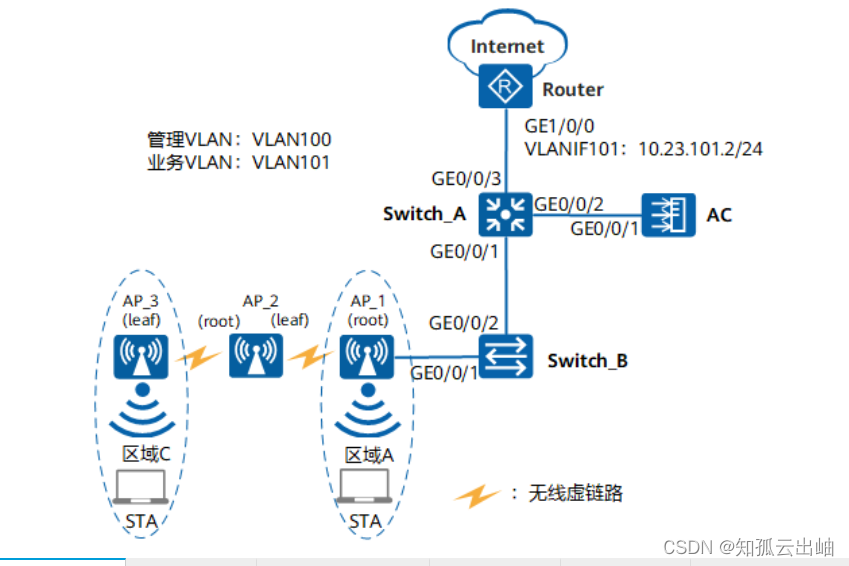
数据规划
| AP | 类型 | MAC |
|---|---|---|
| AP_1 | AP8130DN | 60de-4474-9640 |
| AP_2 | AP8130DN | dcd2-fc04-b500 |
| AP_3 | AP8130DN | dcd2-fc96-e4c0 |
| 配置项 | 数据 |
|---|---|
| AP管理VLAN | VLAN100 |
| STA业务VLAN | VLAN101 |
| DHCP服务器 | AC作为AP的DHCP服务器,Switch_A作为STA的DHCP服务器。 |
| AP地址池 | 10.23.100.2~10.23.100.254/24 |
| STA地址池 | 10.23.101.3~10.23.101.254/24 |
| AC源接口 | VLANIF100 |
| WDS角色 |
|
| 域管理模板 |
|
| SSID模板 |
|
| WLAN无线业务安全模板 |
|
| VAP模板 |
|
| WDS链路安全模板 |
|
| WDS白名单模板 |
|
| |
| WDS模板 |
|
| |
| AP组 |
|
| |
|
配置注意事项
-
建议在与AP直连的设备接口上配置端口隔离,如果不配置端口隔离,尤其是业务数据转发方式采用直接转发时,可能会在VLAN内形成大量不必要的广播报文,导致网络阻塞,影响用户体验。
-
隧道转发模式下,管理VLAN和业务VLAN不能配置为同一VLAN,且AP和AC之间只能放通管理VLAN,不能放通业务VLAN。
- 请按照WDS网络网规设计选用合适的天线,并选用天线校准工具进行校准。
操作步骤
- 配置周边设备
# 配置接入交换机Switch_B的GE0/0/1和GE0/0/2接口加入VLAN100和VLAN101,GE0/0/1的缺省VLAN为VLAN100。
<span style="color:#333333"><span style="background-color:#dddddd"><HUAWEI> <strong id="ZH-CN_TASK_0176912378__zh-cn_task_0176912382_b1141689396190921">system-view</strong>
[HUAWEI] <strong id="ZH-CN_TASK_0176912378__zh-cn_task_0176912382_b1956857707190921">sysname Switch_B</strong>
[Switch_B] <strong id="ZH-CN_TASK_0176912378__zh-cn_task_0176912382_b402801205190921">vlan batch 100 to 101</strong>
[Switch_B] <strong id="ZH-CN_TASK_0176912378__zh-cn_task_0176912382_b611115067190921">interface gigabitEthernet 0/0/1</strong>
[Switch_B-GigabitEthernet0/0/1] <strong id="ZH-CN_TASK_0176912378__zh-cn_task_0176912382_b212116232190921">port link-type trunk</strong>
[Switch_B-GigabitEthernet0/0/1] <strong id="ZH-CN_TASK_0176912378__zh-cn_task_0176912382_b1767714945190921">port trunk pvid vlan 100</strong>
[Switch_B-GigabitEthernet0/0/1] <strong id="ZH-CN_TASK_0176912378__zh-cn_task_0176912382_b1214832445190921">port trunk allow-pass vlan 100 to 101</strong>
[Switch_B-GigabitEthernet0/0/1] <strong id="ZH-CN_TASK_0176912378__zh-cn_task_0176912382_b36947418190921">port-isolate enable</strong>
[Switch_B-GigabitEthernet0/0/1] <strong id="ZH-CN_TASK_0176912378__zh-cn_task_0176912382_b1464937259190921">quit</strong>
[Switch_B] <strong id="ZH-CN_TASK_0176912378__zh-cn_task_0176912382_b1250273224190921">interface gigabitEthernet 0/0/2</strong>
[Switch_B-GigabitEthernet0/0/2] <strong id="ZH-CN_TASK_0176912378__zh-cn_task_0176912382_b541902358190921">port link-type trunk</strong>
[Switch_B-GigabitEthernet0/0/2] <strong id="ZH-CN_TASK_0176912378__zh-cn_task_0176912382_b1749851799190921">port trunk allow-pass vlan 100 to 101</strong>
[Switch_B-GigabitEthernet0/0/2] <strong id="ZH-CN_TASK_0176912378__zh-cn_task_0176912382_b809501523190921">quit</strong></span></span>
# 配置汇聚交换机Switch_A的GE0/0/1接口加入VLAN100和VLAN101,GE0/0/2接口加入VLAN100,GE0/0/3接口加入VLAN101。
<span style="color:#333333"><span style="background-color:#dddddd"><HUAWEI> <strong id="ZH-CN_TASK_0176912378__zh-cn_task_0176912382_b511548958190921">system-view</strong>
[HUAWEI] <strong id="ZH-CN_TASK_0176912378__zh-cn_task_0176912382_b489891529190921">sysname Switch_A</strong>
[Switch_A] <strong id="ZH-CN_TASK_0176912378__zh-cn_task_0176912382_b1311387655190921">vlan batch 100 to 101</strong>
[Switch_A] <strong id="ZH-CN_TASK_0176912378__zh-cn_task_0176912382_b1243101138190921">interface gigabitEthernet 0/0/1</strong>
[Switch_A-GigabitEthernet0/0/1] <strong id="ZH-CN_TASK_0176912378__zh-cn_task_0176912382_b1931666829190921">port link-type trunk</strong>
[Switch_A-GigabitEthernet0/0/1] <strong id="ZH-CN_TASK_0176912378__zh-cn_task_0176912382_b1503245325190921">port trunk allow-pass vlan 100 to 101</strong>
[Switch_A-GigabitEthernet0/0/1] <strong id="ZH-CN_TASK_0176912378__zh-cn_task_0176912382_b289486029190921">quit</strong>
[Switch_A] <strong id="ZH-CN_TASK_0176912378__zh-cn_task_0176912382_b458500069190921">interface gigabitEthernet 0/0/2</strong>
[Switch_A-GigabitEthernet0/0/2] <strong id="ZH-CN_TASK_0176912378__zh-cn_task_0176912382_b779944513190921">port link-type trunk</strong>
[Switch_A-GigabitEthernet0/0/2] <strong id="ZH-CN_TASK_0176912378__zh-cn_task_0176912382_b85068874190921">port trunk allow-pass vlan 100</strong>
[Switch_A-GigabitEthernet0/0/2] <strong id="ZH-CN_TASK_0176912378__zh-cn_task_0176912382_b2034823831190921">quit</strong>
[Switch_A] <strong id="ZH-CN_TASK_0176912378__zh-cn_task_0176912382_b929617411190921">interface gigabitEthernet 0/0/3</strong>
[Switch_A-GigabitEthernet0/0/3] <strong id="ZH-CN_TASK_0176912378__zh-cn_task_0176912382_b766152642190921">port link-type trunk</strong>
[Switch_A-GigabitEthernet0/0/3] <strong id="ZH-CN_TASK_0176912378__zh-cn_task_0176912382_b1952032455190921">port trunk allow-pass vlan 101</strong>
[Switch_A-GigabitEthernet0/0/3] <strong id="ZH-CN_TASK_0176912378__zh-cn_task_0176912382_b204948751190921">quit</strong></span></span>
# 配置Router的接口GE1/0/0加入VLAN101,创建接口VLANIF101并配置IP地址为10.23.101.2/24。<span style="color:#333333"><span style="background-color:#dddddd"><Huawei> <strong id="ZH-CN_TASK_0176912378__zh-cn_task_0176912351_b118005268190921">system-view</strong> [Huawei] <strong id="ZH-CN_TASK_0176912378__zh-cn_task_0176912351_b1176501588190921">sysname Router</strong> [Router] <strong id="ZH-CN_TASK_0176912378__zh-cn_task_0176912351_b995805857190921">vlan batch 101</strong> [Router] <strong id="ZH-CN_TASK_0176912378__zh-cn_task_0176912351_b906637926190921">interface gigabitethernet 1/0/0</strong> [Router-GigabitEthernet1/0/0] <strong id="ZH-CN_TASK_0176912378__zh-cn_task_0176912351_b406876624190921">port link-type trunk</strong> [Router-GigabitEthernet1/0/0] <strong id="ZH-CN_TASK_0176912378__zh-cn_task_0176912351_b1226529678190921">port trunk allow-pass vlan 101</strong> [Router-GigabitEthernet1/0/0] <strong id="ZH-CN_TASK_0176912378__zh-cn_task_0176912351_b1131638750190921">quit</strong> [Router] <strong id="ZH-CN_TASK_0176912378__zh-cn_task_0176912351_b648829236190921">interface vlanif 101</strong> [Router-Vlanif101] <strong id="ZH-CN_TASK_0176912378__zh-cn_task_0176912351_b1969966747190921">ip address 10.23.101.2 24</strong> [Router-Vlanif101] <strong id="ZH-CN_TASK_0176912378__zh-cn_task_0176912351_b1246477905190921">quit</strong></span></span> - 配置AC与其它网络设备互通
# 配置AC的接口GE0/0/1,允许携带VLAN100的报文通过。
<span style="color:#333333"><span style="background-color:#dddddd"><HUAWEI> <strong id="ZH-CN_TASK_0176912378__b570291284190921">system-view</strong> [HUAWEI] <strong id="ZH-CN_TASK_0176912378__b1926118503190921">sysname AC</strong> [AC] <strong id="ZH-CN_TASK_0176912378__b96916095190921">vlan batch 100 101</strong> [AC] <strong id="ZH-CN_TASK_0176912378__b404498836190921">interface gigabitEthernet 0/0/1</strong> [AC-GigabitEthernet0/0/1] <strong id="ZH-CN_TASK_0176912378__b651322997190921">port link-type trunk</strong> [AC-GigabitEthernet0/0/1] <strong id="ZH-CN_TASK_0176912378__b2619200190921">port trunk allow-pass vlan 100</strong> [AC-GigabitEthernet0/0/1] <strong id="ZH-CN_TASK_0176912378__b987613193190921">quit</strong></span></span> - 配置DHCP服务器为STA和AP分配IP地址 DNS服务器地址请根据实际需要配置。常用配置方法如下:
- 接口地址池场景,需要在VLANIF接口视图下执行命令dhcp server dns-list ip-address &<1-8>。
- 全局地址池场景,需要在IP地址池视图下执行命令dns-list ip-address &<1-8>。
# 配置Switch_A作为DHCP服务器,通过接口地址池为STA分配IP地址。<span style="color:#333333"><span style="background-color:#dddddd">[Switch_A] <strong id="ZH-CN_TASK_0176912378__b585097426190921">dhcp enable</strong> [Switch_A] <strong id="ZH-CN_TASK_0176912378__b189439435190921">interface vlanif 101</strong> [Switch_A-Vlanif101] <strong id="ZH-CN_TASK_0176912378__b686378840190921">ip address 10.23.101.1 24</strong> [Switch_A-Vlanif101] <strong id="ZH-CN_TASK_0176912378__b1172640232190921">dhcp select interface</strong> [Switch_A-Vlanif101] <strong id="ZH-CN_TASK_0176912378__b685516536190921">dhcp server gateway-list 10.23.101.2</strong> [Switch_A-Vlanif101] <strong id="ZH-CN_TASK_0176912378__b116615007190921">quit</strong></span></span># 在AC上使能DHCP功能,并通过接口地址池为AP分配IP地址。
<span style="color:#333333"><span style="background-color:#dddddd">[AC] <strong id="ZH-CN_TASK_0176912378__b535076932190921">dhcp enable</strong> [AC] <strong id="ZH-CN_TASK_0176912378__b1294910917190921">interface vlanif 100</strong> [AC-Vlanif100] <strong id="ZH-CN_TASK_0176912378__b1403704681190921">ip address 10.23.100.1 24</strong> [AC-Vlanif100] <strong id="ZH-CN_TASK_0176912378__b1618518344190921">dhcp select interface</strong> [AC-Vlanif100] <strong id="ZH-CN_TASK_0176912378__b1710882234190921">quit</strong></span></span> - 配置AP上线
# 创建AP组“ap-group1”、“ap-group2”和“ap-group3”。
<span style="color:#333333"><span style="background-color:#dddddd">[AC] <strong id="ZH-CN_TASK_0176912378__b1083860828190921">wlan</strong>
[AC-wlan-view] <strong id="ZH-CN_TASK_0176912378__b333966974190921">ap-group name ap-group1</strong>
[AC-wlan-ap-group-ap-group1] <strong id="ZH-CN_TASK_0176912378__b2129810468190921">quit</strong>
[AC-wlan-view] <strong id="ZH-CN_TASK_0176912378__b1905879936190921">ap-group name ap-group2</strong>
[AC-wlan-ap-group-ap-group2] <strong id="ZH-CN_TASK_0176912378__b228340447190921">quit</strong>
[AC-wlan-view] <strong id="ZH-CN_TASK_0176912378__b54960352190921">ap-group name ap-group3</strong>
[AC-wlan-ap-group-ap-group3] <strong id="ZH-CN_TASK_0176912378__b1032751598190921">quit</strong></span></span>
# 创建域管理模板,在域管理模板下配置AC的国家码并在AP组下引用域管理模板。
<span style="color:#333333"><span style="background-color:#dddddd">[AC-wlan-view] <strong id="ZH-CN_TASK_0176912378__b1230094218190921">regulatory-domain-profile name default</strong>
[AC-wlan-regulate-domain-default] <strong id="ZH-CN_TASK_0176912378__b602460734190921">country-code cn</strong>
[AC-wlan-regulate-domain-default] <strong id="ZH-CN_TASK_0176912378__b1938077640190921">quit</strong>
[AC-wlan-view] <strong id="ZH-CN_TASK_0176912378__b1312519707190921">ap-group name ap-group1</strong>
[AC-wlan-ap-group-ap-group1] <strong id="ZH-CN_TASK_0176912378__b204151839190921">regulatory-domain-profile default</strong>
Warning: Modifying the country code will clear channel, power and antenna gain configurations of the radio and reset the AP. Continue?[Y/N]:<strong id="ZH-CN_TASK_0176912378__zh-cn_task_0175818418_b17491131153716">y</strong>
[AC-wlan-ap-group-ap-group1] <strong id="ZH-CN_TASK_0176912378__b594088353190921">quit</strong>
[AC-wlan-view] <strong id="ZH-CN_TASK_0176912378__b817937082190921">ap-group name ap-group2</strong>
[AC-wlan-ap-group-ap-group2] <strong id="ZH-CN_TASK_0176912378__b815776022190921">regulatory-domain-profile default</strong>
Warning: Modifying the country code will clear channel, power and antenna gain configurations of the radio and reset the AP. Continue?[Y/N]:<strong id="ZH-CN_TASK_0176912378__zh-cn_task_0175818418_b17491131153716_1">y</strong>
[AC-wlan-ap-group-ap-group2] <strong id="ZH-CN_TASK_0176912378__b1262782621190921">quit</strong>
[AC-wlan-view] <strong id="ZH-CN_TASK_0176912378__b435925290190921">ap-group name ap-group3</strong>
[AC-wlan-ap-group-ap-group3] <strong id="ZH-CN_TASK_0176912378__b436826727190921">regulatory-domain-profile default</strong>
Warning: Modifying the country code will clear channel, power and antenna gain configurations of the radio and reset the AP. Continue?[Y/N]:<strong id="ZH-CN_TASK_0176912378__zh-cn_task_0175818418_b17491131153716_2">y</strong>
[AC-wlan-ap-group-ap-group3] <strong id="ZH-CN_TASK_0176912378__b1227479814190921">quit</strong>
[AC-wlan-view] <strong id="ZH-CN_TASK_0176912378__b741675262190921">quit</strong></span></span>
# 配置AC的源接口。
<span style="color:#333333"><span style="background-color:#dddddd">[AC] <strong id="ZH-CN_TASK_0176912378__b1601735634190921">capwap source interface vlanif 100</strong></span></span># 将AP_1加入到AP组“ap-group1”,AP_2加入到AP组“ap-group2”,AP_3加入到AP组“ap-group3”。<span style="color:#333333"><span style="background-color:#dddddd">[AC] <strong id="ZH-CN_TASK_0176912378__b1374021969190921">wlan</strong> [AC-wlan-view] <strong id="ZH-CN_TASK_0176912378__b1265509873190921">ap auth-mode mac-auth</strong> [AC-wlan-view] <strong id="ZH-CN_TASK_0176912378__b706866964190921">ap-id 1 ap-mac 60de-4474-9640</strong> [AC-wlan-ap-1] <strong id="ZH-CN_TASK_0176912378__b176619692190921">ap-name AP_1</strong> [AC-wlan-ap-1] <strong id="ZH-CN_TASK_0176912378__b600538503190921">ap-group ap-group1</strong> Warning: This operation may cause AP reset. If the country code changes, it will clear channel, power and antenna gain configuration s of the radio, Whether to continue? [Y/N]:<strong id="ZH-CN_TASK_0176912378__zh-cn_task_0175818418_b1651706244190906">y</strong> [AC-wlan-ap-1] <strong id="ZH-CN_TASK_0176912378__b435831157190921">quit</strong> [AC-wlan-view] <strong id="ZH-CN_TASK_0176912378__b1734348834190921">ap-id 2 ap-mac dcd2-fc04-b500</strong> [AC-wlan-ap-2] <strong id="ZH-CN_TASK_0176912378__b1101981659190921">ap-name AP_2</strong> [AC-wlan-ap-2] <strong id="ZH-CN_TASK_0176912378__b1077418825190921">ap-group ap-group2</strong> Warning: This operation may cause AP reset. If the country code changes, it will clear channel, power and antenna gain configuration s of the radio, Whether to continue? [Y/N]:<strong id="ZH-CN_TASK_0176912378__zh-cn_task_0175818418_b1651706244190906_1">y</strong> [AC-wlan-ap-2] <strong id="ZH-CN_TASK_0176912378__b1999555100190921">quit</strong> [AC-wlan-view] <strong id="ZH-CN_TASK_0176912378__b1250311975190921">ap-id 3 ap-mac dcd2-fc96-e4c0</strong> [AC-wlan-ap-3] <strong id="ZH-CN_TASK_0176912378__b1533697021190921">ap-name AP_3</strong> [AC-wlan-ap-3] <strong id="ZH-CN_TASK_0176912378__b1508108276190921">ap-group ap-group3</strong> Warning: This operation may cause AP reset. If the country code changes, it will clear channel, power and antenna gain configuration s of the radio, Whether to continue? [Y/N]:<strong id="ZH-CN_TASK_0176912378__zh-cn_task_0175818418_b1651706244190906_2">y</strong> [AC-wlan-ap-3] <strong id="ZH-CN_TASK_0176912378__b1982018367190921">quit</strong></span></span> - 配置WDS业务参数 # 配置WDS节点使用的主要射频参数。本例中使用AP_1和AP_3的是AP8130DN的射频1,AP_2使用AP8130DN的射频0和射频1。配置AP_2的射频0工作在5GHz频段,为了减少信道干扰配置AP_2的射频0和射频1在不同的信道,射频1用于和AP_1建立WDS链路,射频0用于和AP_3建立WDS链路。“coverage distance”参数为射频覆盖距离,缺省情况下是3,单位是100m。本例中使用参数为4,用户可以根据实际情况配置该参数。
在WDS网络中,建立WDS链路的射频必须为同一信道。
<span style="color:#333333"><span style="background-color:#dddddd">[AC-wlan-view] <strong id="ZH-CN_TASK_0176912378__b973163930190921">ap-id 2</strong>
[AC-wlan-ap-2] <strong id="ZH-CN_TASK_0176912378__b1881699822190921">radio 0</strong>
[AC-wlan-radio-2/0] <strong id="ZH-CN_TASK_0176912378__b594094206190921">frequency 5g</strong>
Warning: Modifying the frequency band will delete the channel, power, and antenn
a gain configurations of the current radio on the AP and reboot the AP. Continue
?[Y/N]:<strong id="ZH-CN_TASK_0176912378__b1855572944920">y</strong>
[AC-wlan-radio-2/0] <strong id="ZH-CN_TASK_0176912378__b1918124164190921">quit</strong>
[AC-wlan-ap-2] <strong id="ZH-CN_TASK_0176912378__b2038603550190921">quit</strong>
[AC-wlan-view] <strong id="ZH-CN_TASK_0176912378__b1099814393190921">ap-id 1</strong>
[AC-wlan-ap-1] <strong id="ZH-CN_TASK_0176912378__b1669668313190921">radio 1</strong>
[AC-wlan-radio-1/1] <strong id="ZH-CN_TASK_0176912378__b1295367688190921">channel 40mhz-plus 157</strong>
Warning: This action may cause service interruption. Continue?[Y/N]<strong id="ZH-CN_TASK_0176912378__zh-cn_task_0175818418_b1384307436190906">y</strong>
[AC-wlan-radio-1/1] <strong id="ZH-CN_TASK_0176912378__b1221378632190921">coverage distance 4</strong>
[AC-wlan-radio-1/1] <strong id="ZH-CN_TASK_0176912378__b1620252618190921">quit</strong>
[AC-wlan-ap-1] <strong id="ZH-CN_TASK_0176912378__b990496967190921">quit</strong>
[AC-wlan-view] <strong id="ZH-CN_TASK_0176912378__b1896739578190921">ap-id 2</strong>
[AC-wlan-ap-2] <strong id="ZH-CN_TASK_0176912378__b2050334401190921">radio 0</strong>
[AC-wlan-radio-2/0] <strong id="ZH-CN_TASK_0176912378__b1449906778190921">channel 40mhz-plus 149</strong>
Warning: This action may cause service interruption. Continue?[Y/N]<strong id="ZH-CN_TASK_0176912378__zh-cn_task_0175818418_b1384307436190906_1">y</strong>
[AC-wlan-radio-2/0] <strong id="ZH-CN_TASK_0176912378__b1331953824190921">coverage distance 4</strong>
[AC-wlan-radio-2/0] <strong id="ZH-CN_TASK_0176912378__b713880646190921">quit</strong>
[AC-wlan-ap-2] <strong id="ZH-CN_TASK_0176912378__b1137368453190921">radio 1</strong>
[AC-wlan-radio-2/1] <strong id="ZH-CN_TASK_0176912378__b823627637190921">channel 40mhz-plus 157</strong>
Warning: This action may cause service interruption. Continue?[Y/N]<strong id="ZH-CN_TASK_0176912378__zh-cn_task_0175818418_b1384307436190906_2">y</strong>
[AC-wlan-radio-2/1] <strong id="ZH-CN_TASK_0176912378__b1762660870190921">coverage distance 4</strong>
[AC-wlan-radio-2/1] <strong id="ZH-CN_TASK_0176912378__b1281892212190921">quit</strong>
[AC-wlan-ap-2] <strong id="ZH-CN_TASK_0176912378__b1863079157190921">quit</strong>
[AC-wlan-view] <strong id="ZH-CN_TASK_0176912378__b1502886139190921">ap-id 3</strong>
[AC-wlan-ap-3] <strong id="ZH-CN_TASK_0176912378__b604612192190921">radio 1</strong>
[AC-wlan-radio-3/1] <strong id="ZH-CN_TASK_0176912378__b298941086190921">channel 40mhz-plus 149</strong>
Warning: This action may cause service interruption. Continue?[Y/N]<strong id="ZH-CN_TASK_0176912378__zh-cn_task_0175818418_b1384307436190906_3">y</strong>
[AC-wlan-radio-3/1] <strong id="ZH-CN_TASK_0176912378__b1153657628190921">coverage distance 4</strong>
[AC-wlan-radio-3/1] <strong id="ZH-CN_TASK_0176912378__b1519769423190921">quit</strong>
[AC-wlan-ap-3] <strong id="ZH-CN_TASK_0176912378__b1134031871190921">quit</strong></span></span>
# 配置WDS链路使用的安全模板“wds-security”,“wds-security”的安全策略为WPA2+PSK+AES。
<span style="color:#333333"><span style="background-color:#dddddd">[AC-wlan-view] <strong id="ZH-CN_TASK_0176912378__b403659190190921">security-profile name wds-security</strong>
[AC-wlan-sec-prof-wds-security] <strong id="ZH-CN_TASK_0176912378__b680615166190921">security wpa2 psk pass-phrase a1234567 aes</strong>
[AC-wlan-sec-prof-wds-security] <strong id="ZH-CN_TASK_0176912378__b1709946791190921">quit</strong></span></span>
# 配置WDS白名单。配置AP_1绑定的WDS白名单“wds-list1”,仅允许AP_2接入。配置AP_2绑定的WDS白名单“wds-list2”,仅允许AP_3接入。
<span style="color:#333333"><span style="background-color:#dddddd">[AC-wlan-view] <strong id="ZH-CN_TASK_0176912378__b36601203190921">wds-whitelist-profile name wds-list1</strong>
[AC-wlan-wds-whitelist-wds-list1] <strong id="ZH-CN_TASK_0176912378__b1735750903190921">peer-ap mac dcd2-fc04-b500</strong>
[AC-wlan-wds-whitelist-wds-list1] <strong id="ZH-CN_TASK_0176912378__b916949979190921">quit</strong>
[AC-wlan-view] <strong id="ZH-CN_TASK_0176912378__b685098719190921">wds-whitelist-profile name wds-list2</strong>
[AC-wlan-wds-whitelist-wds-list2] <strong id="ZH-CN_TASK_0176912378__b1881723973190921">peer-ap mac dcd2-fc96-e4c0</strong>
[AC-wlan-wds-whitelist-wds-list2] <strong id="ZH-CN_TASK_0176912378__b1433362236190921">quit</strong></span></span>
# 配置WDS模板“wds-root”。网桥标识为“wlan-wds”,网桥模式为“root”,引用安全模板“wds-security”,以tagged形式允许无线业务VLAN101通过。
<span style="color:#333333"><span style="background-color:#dddddd">[AC-wlan-view] <strong id="ZH-CN_TASK_0176912378__b1038160682190921">wds-profile name wds-root</strong>
[AC-wlan-wds-prof-wds-root] <strong id="ZH-CN_TASK_0176912378__b1316032594190921">wds-name wlan-wds</strong>
[AC-wlan-wds-prof-wds-root] <strong id="ZH-CN_TASK_0176912378__b447826258190921">wds-mode root</strong>
[AC-wlan-wds-prof-wds-root] <strong id="ZH-CN_TASK_0176912378__b2069070593190921">security-profile wds-security</strong>
[AC-wlan-wds-prof-wds-root] <strong id="ZH-CN_TASK_0176912378__b146100745190921">vlan tagged 101</strong>
[AC-wlan-wds-prof-wds-root] <strong id="ZH-CN_TASK_0176912378__b1070862885190921">quit</strong></span></span>
# 配置WDS模板“wds-leaf”。网桥标识为“wlan-wds”,网桥模式为“leaf”,引用安全模板“wds-security”,以tagged形式允许无线业务VLAN101通过。
<span style="color:#333333"><span style="background-color:#dddddd">[AC-wlan-view] <strong id="ZH-CN_TASK_0176912378__b1978990317190921">wds-profile name wds-leaf</strong>
[AC-wlan-wds-prof-wds-leaf] <strong id="ZH-CN_TASK_0176912378__b209671589190921">wds-name wlan-wds</strong>
[AC-wlan-wds-prof-wds-leaf] <strong id="ZH-CN_TASK_0176912378__b1205789701190921">wds-mode leaf</strong>
[AC-wlan-wds-prof-wds-leaf] <strong id="ZH-CN_TASK_0176912378__b1124331768190921">security-profile wds-security</strong>
[AC-wlan-wds-prof-wds-leaf] <strong id="ZH-CN_TASK_0176912378__b1747517715190921">vlan tagged 101</strong>
[AC-wlan-wds-prof-wds-leaf] <strong id="ZH-CN_TASK_0176912378__b180610353190921">quit</strong></span></span>
# 配置AP组“ap-group1”的射频1引用WDS白名单“wds-list1”。配置AP组“ap-group2”的射频0引用WDS白名单“wds-list2”。
<span style="color:#333333"><span style="background-color:#dddddd">[AC-wlan-view] <strong id="ZH-CN_TASK_0176912378__b61345628190921">ap-group name ap-group1</strong> [AC-wlan-ap-group-ap-group1] <strong id="ZH-CN_TASK_0176912378__b21897143190921">radio 1</strong> [AC-wlan-group-radio-ap-group1/1] <strong id="ZH-CN_TASK_0176912378__b1700089180190921">wds-whitelist-profile wds-list1</strong> [AC-wlan-group-radio-ap-group1/1] <strong id="ZH-CN_TASK_0176912378__b1318962636190921">quit</strong> [AC-wlan-ap-group-ap-group1] <strong id="ZH-CN_TASK_0176912378__b7517099190921">quit</strong> [AC-wlan-view] <strong id="ZH-CN_TASK_0176912378__b25484107190921">ap-group name ap-group2</strong> [AC-wlan-ap-group-ap-group2] <strong id="ZH-CN_TASK_0176912378__b1891047689190921">radio 0</strong> [AC-wlan-group-radio-ap-group2/0] <strong id="ZH-CN_TASK_0176912378__b715150691190921">wds-whitelist-profile wds-list2</strong> [AC-wlan-group-radio-ap-group2/0] <strong id="ZH-CN_TASK_0176912378__b2099109151190921">quit</strong> [AC-wlan-ap-group-ap-group2] <strong id="ZH-CN_TASK_0176912378__b781464261190921">quit</strong></span></span> - 在AP组引用相关模板,使WDS业务生效
# 配置AP组“ap-group1”,引用WDS模板“wds-root”。
<span style="color:#333333"><span style="background-color:#dddddd">[AC-wlan-view] <strong id="ZH-CN_TASK_0176912378__b1602084839190921">ap-group name ap-group1</strong>
[AC-wlan-ap-group-ap-group1] <strong id="ZH-CN_TASK_0176912378__b2053795237190921">wds-profile wds-root radio 1</strong>
Warning: This action may cause service interruption. Continue?[Y/N]<strong id="ZH-CN_TASK_0176912378__b1345959752190921">y</strong>
[AC-wlan-ap-group-ap-group1] <strong id="ZH-CN_TASK_0176912378__b153560152190921">quit</strong></span></span>
# 配置AP组“ap-group2”,引用WDS模板“wds-root”和“wds-leaf”。
<span style="color:#333333"><span style="background-color:#dddddd">[AC-wlan-view] <strong id="ZH-CN_TASK_0176912378__b435889682190921">ap-group name ap-group2</strong>
[AC-wlan-ap-group-ap-group2] <strong id="ZH-CN_TASK_0176912378__b1308033525190921">wds-profile wds-leaf radio 1</strong>
Warning: This action may cause service interruption. Continue?[Y/N]<strong id="ZH-CN_TASK_0176912378__b1195614921190921">y</strong>
[AC-wlan-ap-group-ap-group2] <strong id="ZH-CN_TASK_0176912378__b1295779174190921">wds-profile wds-root radio 0</strong>
Warning: This action may cause service interruption. Continue?[Y/N]<strong id="ZH-CN_TASK_0176912378__b1778551390190921">y</strong>
[AC-wlan-ap-group-ap-group2] <strong id="ZH-CN_TASK_0176912378__b174749758190921">quit</strong></span></span>
# 配置AP组“ap-group3”,引用WDS模板“wds-leaf”。
<span style="color:#333333"><span style="background-color:#dddddd">[AC-wlan-view] <strong id="ZH-CN_TASK_0176912378__b299621465190921">ap-group name ap-group3</strong> [AC-wlan-ap-group-ap-group3] <strong id="ZH-CN_TASK_0176912378__b1283922214190921">wds-profile wds-leaf radio 1</strong> Warning: This action may cause service interruption. Continue?[Y/N]<strong id="ZH-CN_TASK_0176912378__b10513943190921">y</strong> [AC-wlan-ap-group-ap-group3] <strong id="ZH-CN_TASK_0176912378__b618593862190921">quit</strong></span></span> - 配置WLAN业务参数 # 创建名为“wlan-net”的安全模板,并配置安全策略。
举例中以配置WPA-WPA2+PSK+AES的安全策略为例,密码为“a1234567”,实际配置中请根据实际情况,配置符合实际要求的安全策略。
<span style="color:#333333"><span style="background-color:#dddddd">[AC-wlan-view] <strong id="ZH-CN_TASK_0176912378__zh-cn_task_0176912351_b1991067776190921">security-profile name wlan-net</strong>
[AC-wlan-sec-prof-wlan-net] <strong id="ZH-CN_TASK_0176912378__zh-cn_task_0176912351_b851752672190921">security wpa-wpa2 psk pass-phrase a1234567 aes</strong>
[AC-wlan-sec-prof-wlan-net] <strong id="ZH-CN_TASK_0176912378__zh-cn_task_0176912351_b337241812190921">quit</strong></span></span>
# 创建名为“wlan-net”的SSID模板,并配置SSID名称为“wlan-net”。<span style="color:#333333"><span style="background-color:#dddddd">[AC-wlan-view] <strong id="ZH-CN_TASK_0176912378__zh-cn_task_0176912351_b69022931190921">ssid-profile name wlan-net</strong> [AC-wlan-ssid-prof-wlan-net] <strong id="ZH-CN_TASK_0176912378__zh-cn_task_0176912351_b36723145190921">ssid wlan-net</strong> [AC-wlan-ssid-prof-wlan-net] <strong id="ZH-CN_TASK_0176912378__zh-cn_task_0176912351_b1738903244190921">quit</strong></span></span># 创建名为“wlan-net”的VAP模板,配置业务数据转发模式、业务VLAN,并且引用安全模板和SSID模板。<span style="color:#333333"><span style="background-color:#dddddd">[AC-wlan-view] <strong id="ZH-CN_TASK_0176912378__b325802584190921">vap-profile name wlan-net</strong> [AC-wlan-vap-prof-wlan-net] <strong id="ZH-CN_TASK_0176912378__b977737230190921">forward-mode direct-forward</strong> [AC-wlan-vap-prof-wlan-net] <strong id="ZH-CN_TASK_0176912378__b1495141052190921">service-vlan vlan-id 101</strong> [AC-wlan-vap-prof-wlan-net] <strong id="ZH-CN_TASK_0176912378__b694670004190921">security-profile wlan-net</strong> [AC-wlan-vap-prof-wlan-net] <strong id="ZH-CN_TASK_0176912378__b411554548190921">ssid-profile wlan-net</strong> [AC-wlan-vap-prof-wlan-net] <strong id="ZH-CN_TASK_0176912378__b1808978522190921">quit</strong></span></span># 配置AP组引用VAP模板,本例中AP_1和AP_3使用射频1作为WDS回传频段,射频0作为无线业务覆盖射频。AP_1和AP_3上射频0都使用VAP模板“wlan-net”的配置。<span style="color:#333333"><span style="background-color:#dddddd">[AC-wlan-view] <strong id="ZH-CN_TASK_0176912378__b908252767190921">ap-group name ap-group1</strong> [AC-wlan-ap-group-ap-group1] <strong id="ZH-CN_TASK_0176912378__b1382046263190921">vap-profile wlan-net wlan 1 radio 0</strong> [AC-wlan-ap-group-ap-group1] <strong id="ZH-CN_TASK_0176912378__b1809376582190921">quit</strong> [AC-wlan-view] <strong id="ZH-CN_TASK_0176912378__b65311999190921">ap-group name ap-group3</strong> [AC-wlan-ap-group-ap-group3] <strong id="ZH-CN_TASK_0176912378__b102213109190921">vap-profile wlan-net wlan 3 radio 0</strong> [AC-wlan-ap-group-ap-group3] <strong id="ZH-CN_TASK_0176912378__b340378414190921">quit</strong></span></span> - 配置AP 2.4G射频的信道和功率
举例中AP射频的信道和功率仅为示例,实际配置中请根据AP的国家码和网规结果进行配置。
# 关闭AP射频的信道和功率自动调优功能。<span style="color:#333333"><span style="background-color:#dddddd">[AC-wlan-view] <strong id="ZH-CN_TASK_0176912378__b1952682364190921">ap-id 1</strong> [AC-wlan-ap-1] <strong id="ZH-CN_TASK_0176912378__b1706775230190921">radio 0</strong> [AC-wlan-radio-1/0] <strong id="ZH-CN_TASK_0176912378__b1242645581190921">calibrate auto-channel-select disable</strong> [AC-wlan-radio-1/0] <strong id="ZH-CN_TASK_0176912378__b1300815155190921">calibrate auto-txpower-select disable</strong> [AC-wlan-radio-1/0] <strong id="ZH-CN_TASK_0176912378__b665627777190921">quit</strong> [AC-wlan-ap-1] <strong id="ZH-CN_TASK_0176912378__b1937134891190921">radio 1</strong> [AC-wlan-radio-1/1] <strong id="ZH-CN_TASK_0176912378__b964854892190921">calibrate auto-channel-select disable</strong> [AC-wlan-radio-1/1] <strong id="ZH-CN_TASK_0176912378__b1162033439190921">calibrate auto-txpower-select disable</strong> [AC-wlan-radio-1/1] <strong id="ZH-CN_TASK_0176912378__b165350850190921">quit</strong> [AC-wlan-ap-1]<strong id="ZH-CN_TASK_0176912378__b621637696190921">quit</strong> [AC-wlan-view] <strong id="ZH-CN_TASK_0176912378__b1234068911190921">ap-id 2</strong> [AC-wlan-ap-2] <strong id="ZH-CN_TASK_0176912378__b229842564190921">radio 0</strong> [AC-wlan-radio-2/0] <strong id="ZH-CN_TASK_0176912378__b1342934364190921">calibrate auto-channel-select disable</strong> [AC-wlan-radio-2/0] <strong id="ZH-CN_TASK_0176912378__b1711548828190921">calibrate auto-txpower-select disable</strong> [AC-wlan-radio-2/0] <strong id="ZH-CN_TASK_0176912378__b1360369703190921">quit</strong> [AC-wlan-ap-2] <strong id="ZH-CN_TASK_0176912378__b1588443530190921">radio 1</strong> [AC-wlan-radio-2/1] <strong id="ZH-CN_TASK_0176912378__b588981595190921">calibrate auto-channel-select disable</strong> [AC-wlan-radio-2/1] <strong id="ZH-CN_TASK_0176912378__b1840220766190921">calibrate auto-txpower-select disable</strong> [AC-wlan-radio-2/1] <strong id="ZH-CN_TASK_0176912378__b1725333130190921">quit</strong> [AC-wlan-ap-2]<strong id="ZH-CN_TASK_0176912378__b1261464425190921">quit</strong> [AC-wlan-view] <strong id="ZH-CN_TASK_0176912378__b622120274190921">ap-id 3</strong> [AC-wlan-ap-3] <strong id="ZH-CN_TASK_0176912378__b171438672190921">radio 0</strong> [AC-wlan-radio-3/0] <strong id="ZH-CN_TASK_0176912378__b2132985172190921">calibrate auto-channel-select disable</strong> [AC-wlan-radio-3/0] <strong id="ZH-CN_TASK_0176912378__b271202200190921">calibrate auto-txpower-select disable</strong> [AC-wlan-radio-3/0] <strong id="ZH-CN_TASK_0176912378__b1526864825190921">quit</strong> [AC-wlan-ap-3] <strong id="ZH-CN_TASK_0176912378__b91027589190921">radio 1</strong> [AC-wlan-radio-3/1] <strong id="ZH-CN_TASK_0176912378__b1535412287190921">calibrate auto-channel-select disable</strong> [AC-wlan-radio-3/1] <strong id="ZH-CN_TASK_0176912378__b1762757286190921">calibrate auto-txpower-select disable</strong> [AC-wlan-radio-3/1] <strong id="ZH-CN_TASK_0176912378__b85195689190921">quit</strong> [AC-wlan-ap-3]<strong id="ZH-CN_TASK_0176912378__b78324845190921">quit</strong></span></span># 配置AP射频0的信道和功率。<span style="color:#333333"><span style="background-color:#dddddd">[AC-wlan-view] <strong id="ZH-CN_TASK_0176912378__b586443666190921">ap-id 1</strong> [AC-wlan-ap-1] <strong id="ZH-CN_TASK_0176912378__b423411733190921">radio 0</strong> [AC-wlan-radio-1/0] <strong id="ZH-CN_TASK_0176912378__b2007086283190921">channel 20mhz 6</strong> Warning: This action may cause service interruption. Continue?[Y/N]y [AC-wlan-radio-1/0] <strong id="ZH-CN_TASK_0176912378__b1030138178190921">eirp 127</strong> [AC-wlan-radio-1/0] <strong id="ZH-CN_TASK_0176912378__b1917905811190921">quit</strong> [AC-wlan-ap-1]<strong id="ZH-CN_TASK_0176912378__b559165017190921">quit</strong></span></span> - 验证WDS业务配置结果
完成配置后,执行命令display ap all,查看WDS各节点是否成功上线,当“State”字段显示为“nor”,则表示AP已成功上线。
<span style="color:#333333"><span style="background-color:#dddddd">[AC-wlan-view] <strong id="ZH-CN_TASK_0176912378__b1107332355190921">display ap all</strong> Total AP information: nor : normal [3] Extra information: P : insufficient power supply -------------------------------------------------------------------------------------------------- ID MAC Name Group IP Type State STA Uptime ExtraInfo -------------------------------------------------------------------------------------------------- 1 60de-4474-9640 AP_1 ap-group1 10.23.100.254 AP8130DN <strong id="ZH-CN_TASK_0176912378__b58094169190921">nor</strong> 0 20M:16S - 2 dcd2-fc04-b500 AP_2 ap-group2 10.23.100.253 AP8130DN <strong id="ZH-CN_TASK_0176912378__b2093037571190921">nor</strong> 0 17S - 3 dcd2-fc96-e4c0 AP_3 ap-group3 10.23.100.252 AP8130DN <strong id="ZH-CN_TASK_0176912378__b1074348771190921">nor</strong> 0 3M:55S - -------------------------------------------------------------------------------------------------- Total: 3 </span></span>执行命令display wlan wds link all,查看WDS链路相关信息。
<span style="color:#333333"><span style="background-color:#dddddd">[AC-wlan-view] <strong id="ZH-CN_TASK_0176912378__b1520620916190921">display wlan wds link all</strong> Rf : radio ID Dis : coverage distance(100m) Ch : channel Per : drop percent(%) TSNR : total SNR(dB) P- : peer WDS : WDS mode Re : retry ratio(%) RSSI : RSSI(dBm) MaxR : max RSSI(dBm) ------------------------------------------------------------------------------------------------- APName P-APName Rf Dis Ch WDS P-Status RSSI MaxR Per Re TS NR SNR(Ch0~3:dB) ------------------------------------------------------------------------------------------------- AP_1 AP_2 1 4 157 root normal -39 -30 0 5 55 42/57/-/- AP_2 AP_3 0 4 149 root normal -56 -40 0 9 59 45/40/60/- AP_2 AP_1 1 4 157 leaf normal -32 -30 0 15 58 41/36/60/- AP_3 AP_2 1 4 149 leaf normal -33 -32 0 7 59 51/59/-/- --------------------------------------------------------------------------------------------------- Total: 4</span></span>WLAN业务配置会自动下发给AP,配置完成后,通过执行命令display vap ssid wlan-net查看如下信息,当“Status”项显示为“ON”时,表示AP对应的射频上的VAP已创建成功。
<span style="color:#333333"><span style="background-color:#dddddd">[AC-wlan-view] <strong id="ZH-CN_TASK_0176912378__b287801376190921">display vap ssid wlan-net</strong> WID : WLAN ID -------------------------------------------------------------------------------- AP ID AP name RfID WID BSSID Status Auth type STA SSID -------------------------------------------------------------------------------- 1 AP_1 0 1 60DE-4474-9640 <strong id="ZH-CN_TASK_0176912378__b32085512190921">ON</strong> WPA/WPA2-PSK 0 wlan-net 3 AP_3 0 3 DCD2-FC96-E4C0 <strong id="ZH-CN_TASK_0176912378__b1358396375190921">ON</strong> WPA/WPA2-PSK 0 wlan-net ------------------------------------------------------------------------------- Total: 2</span></span>STA搜索到名为“wlan-net”的无线网络,输入密码“a1234567”并正常关联后,在AC上执行display station ssid wlan-net命令,可以查看到用户已经接入到无线网络“wlan-net”中。
<span style="color:#333333"><span style="background-color:#dddddd">[AC-wlan-view] <strong id="ZH-CN_TASK_0176912378__b277077308190921">display station ssid wlan-net</strong>
Rf/WLAN: Radio ID/WLAN ID
Rx/Tx: link receive rate/link transmit rate(Mbps)
---------------------------------------------------------------------------------
STA MAC         AP ID Ap name   Rf/WLAN  Band  Type  Rx/Tx      RSSI  VLAN  IP address
---------------------------------------------------------------------------------
e019-1dc7-1e08  1     AP_1      0/1      2.4G  11n   3/34       -68   101   10.23.101.254
---------------------------------------------------------------------------------
Total: 1 2.4G: 1 5G: 0</span></span>
配置文件
-
<span style="color:#333333"><span style="background-color:#dddddd"># sysname Switch_A #vlan batch 100 to 101 # dhcp enable # interface Vlanif101ip address 10.23.101.1 255.255.255.0dhcp select interface # interface GigabitEthernet0/0/1port link-type trunkport trunk allow-pass vlan 100 to 101 # interface GigabitEthernet0/0/2port link-type trunkport trunk allow-pass vlan 100 # interface GigabitEthernet0/0/3port link-type trunkport trunk allow-pass vlan 101 # return</span></span> -
<span style="color:#333333"><span style="background-color:#dddddd"># sysname Switch_B #vlan batch 100 to 101 # interface GigabitEthernet0/0/1port link-type trunkport trunk pvid vlan 100port trunk allow-pass vlan 100 to 101port-isolate enable group 1 # interface GigabitEthernet0/0/2port link-type trunkport trunk allow-pass vlan 100 to 101 # return</span></span> -
<span style="color:#333333"><span style="background-color:#dddddd"># sysname Router # vlan batch 101 # interface Vlanif101ip address 10.23.101.2 255.255.255.0 # interface GigabitEthernet1/0/0port link-type trunkport trunk allow-pass vlan 101 # return </span></span> -
<span style="color:#333333"><span style="background-color:#dddddd">#sysname AC
#vlan batch 100 to 101
#
dhcp enable
#
interface Vlanif100ip address 10.23.100.1 255.255.255.0dhcp select interface
#
interface GigabitEthernet0/0/1port link-type trunkport trunk allow-pass vlan 100
#
capwap source interface vlanif100
#
wlansecurity-profile name wlan-netsecurity wpa-wpa2 psk pass-phrase %^%#m"tz0f>~7.[`^6RWdzwCy16hJj/Mc!,}s`X*B]}A%^%# aessecurity-profile name wds-securitysecurity wpa2 psk pass-phrase %^%#n}5+DgC3wLB.hJ34j5;*QMv<8"9#{Bq@ghBI3L9K%^%# aesssid-profile name wlan-netssid wlan-netvap-profile name wlan-netservice-vlan vlan-id 101ssid-profile wlan-netsecurity-profile wlan-netwds-whitelist-profile name wds-list1peer-ap mac dcd2-fc04-b500wds-whitelist-profile name wds-list2peer-ap mac dcd2-fc96-e4c0wds-profile name wds-leafsecurity-profile wds-securityvlan tagged 101wds-name wlan-wdswds-profile name wds-rootsecurity-profile wds-securityvlan tagged 101wds-name wlan-wdswds-mode rootregulatory-domain-profile name defaultap-group name ap-group1radio 0vap-profile wlan-net wlan 3radio 1wds-profile wds-rootwds-whitelist-profile wds-list1ap-group name ap-group2radio 0wds-profile wds-rootwds-whitelist-profile wds-list2radio 1wds-profile wds-leafap-group name ap-group3radio 0vap-profile wlan-net wlan 1radio 1wds-profile wds-leafap-id 1 type-id 39 ap-mac 60de-4474-9640 ap-sn 210235554710CB000042ap-name AP_1ap-group ap-group1radio 0channel 20mhz 6eirp 127calibrate auto-channel-select disable    calibrate auto-txpower-select disableradio 1channel 40mhz-plus 157coverage distance 4calibrate auto-channel-select disable    calibrate auto-txpower-select disableap-id 2 type-id 39 ap-mac dcd2-fc04-b500 ap-sn 210235555310CC000094ap-name AP_2ap-group ap-group2radio 0frequency 5gchannel 40mhz-plus 149eirp 127coverage distance 4 calibrate auto-channel-select disable    calibrate auto-txpower-select disableradio 1channel 40mhz-plus 157eirp 127coverage distance 4 calibrate auto-channel-select disable    calibrate auto-txpower-select disableap-id 3 type-id 39 ap-mac dcd2-fc96-e4c0 ap-sn 210235557610DB000046ap-name AP_3ap-group ap-group3radio 0channel 20mhz 11eirp 127calibrate auto-channel-select disable    calibrate auto-txpower-select disableradio 1channel 40mhz-plus 149coverage distance 4 calibrate auto-channel-select disable    calibrate auto-txpower-select disable
#
return</span></span>
相关文章:
华为配置WDS手拉手业务示例
配置WDS手拉手业务示例 组网图形 图1 配置WDS手拉手业务示例组网图 业务需求组网需求数据规划配置思路配置注意事项操作步骤配置文件 业务需求 企业用户通过WLAN接入网络,以满足移动办公的最基本需求。但企业考虑到AP通过有线部署的成本较高,所以通过建立…...
Apache celeborn 安装及使用教程
1.下载安装包 https://celeborn.apache.org/download/ 测0.4.0时出现https://github.com/apache/incubator-celeborn/issues/835 2.解压 tar -xzvf apache-celeborn-0.3.2-incubating-bin.tgz 3.修改配置文件 cp celeborn-env.sh.template celeborn-env.shcp log4j2.xml.…...

数据保护:如何有效应对.BecSec-P-XXXXXXXX勒索病毒的威胁
导言: 随着网络安全威胁的不断增加,勒索软件成为了网络犯罪分子的一种常见手段之一。.BecSec-P-XXXXXXXX勒索病毒(简称.BecSec勒索病毒)作为其中之一,对用户的数据安全构成了严重威胁。本文91数据恢复将介绍.BecSec勒…...
-继承的优缺点)
流畅的Python(十二)-继承的优缺点
一、核心要义 1. 子类化内置类型的缺点 2.多重继承和方法解析顺序 二、代码示例 1. 子类化内置类型的缺点 #!/usr/bin/env python # -*- coding: utf-8 -*- # Time : 2024/2/24 7:29 # Author : Maple # File : 01-子类化内置类型的问题.py # Software: PyCharm fr…...
机器学习基础(三)监督学习的进阶探索
导语:上一节我们深入地探讨监督学习和非监督学习的知识,重点关注它们的理论基础、常用算法及实际应用场景,详情可见: 机器学习基础(二)监督与非监督学习-CSDN博客文章浏览阅读769次,点赞15次&a…...

avidemux-一个免费的视频编辑器,用于剪切、过滤和编码项目
avidemux-一个免费的视频编辑器,用于剪切、过滤和编码项目 avidemux-一个免费的视频编辑器,用于剪切、过滤和编码项目avidemux下载avidemux源代码参考资料 avidemux-一个免费的视频编辑器,用于剪切、过滤和编码项目 avidemux下载 avidemux …...
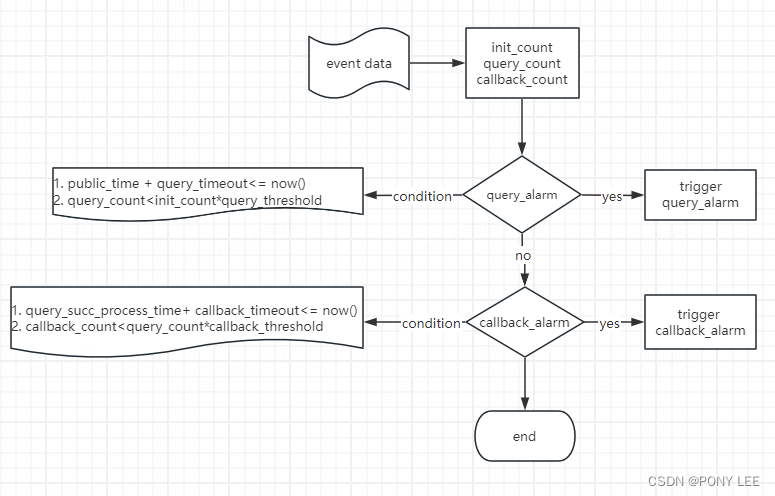
RisingWave最佳实践-利用Dynamic filters 和 Temporal filters 实现监控告警
心得的体会 刚过了年刚开工,闲暇之余调研了分布式SQL流处理数据库–RisingWave,本人是Flink(包括FlinkSQL和Flink DataStream API)的资深用户,但接触到RisingWave令我眼前一亮,并且拿我们生产上的监控告警…...
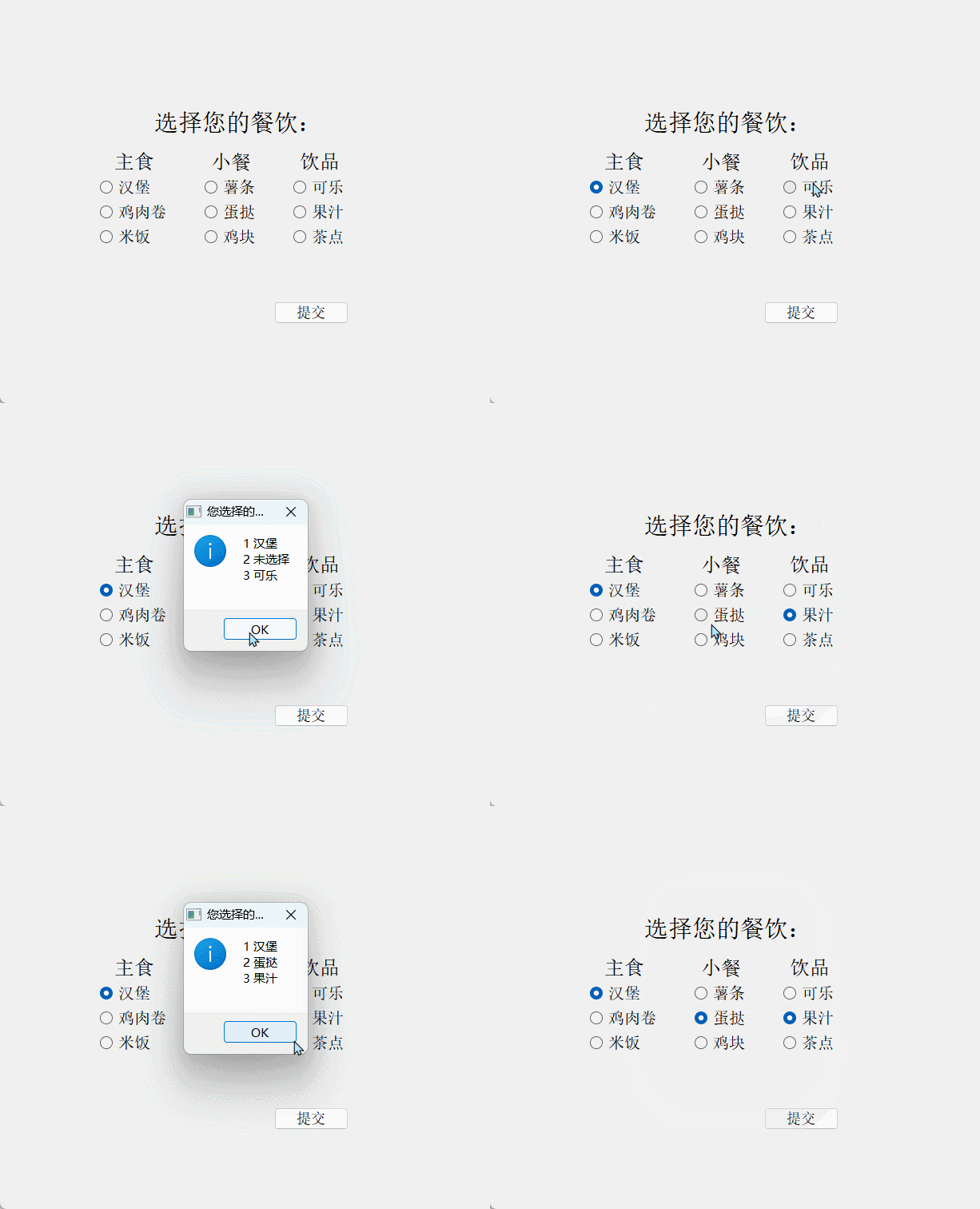
【Qt学习】QRadioButton 的介绍与使用(性别选择、模拟点餐)
文章目录 介绍实例使用实例1(性别选择 - 单选 隐藏)实例2(模拟点餐,多组单选) 相关资源文件 介绍 这里简单对QRadioButton类 进行介绍: QRadioButton 继承自 QAbstractButton ,用于创建单选按…...
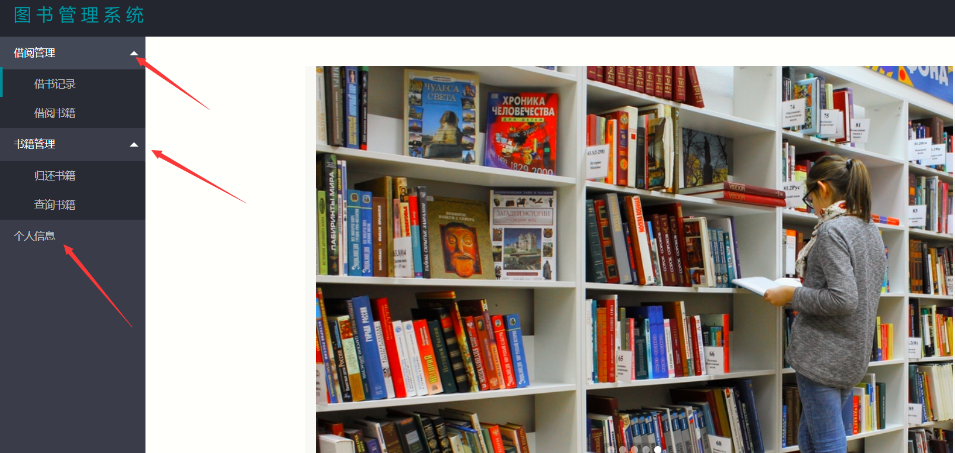
基于java springboot的图书管理系统设计和实现
基于java springboot的图书管理系统设计和实现 博主介绍:5年java开发经验,专注Java开发、定制、远程、文档编写指导等,csdn特邀作者、专注于Java技术领域 作者主页 央顺技术团队 Java毕设项目精品实战案例《1000套》 欢迎点赞 收藏 ⭐留言 文末获取源码联…...
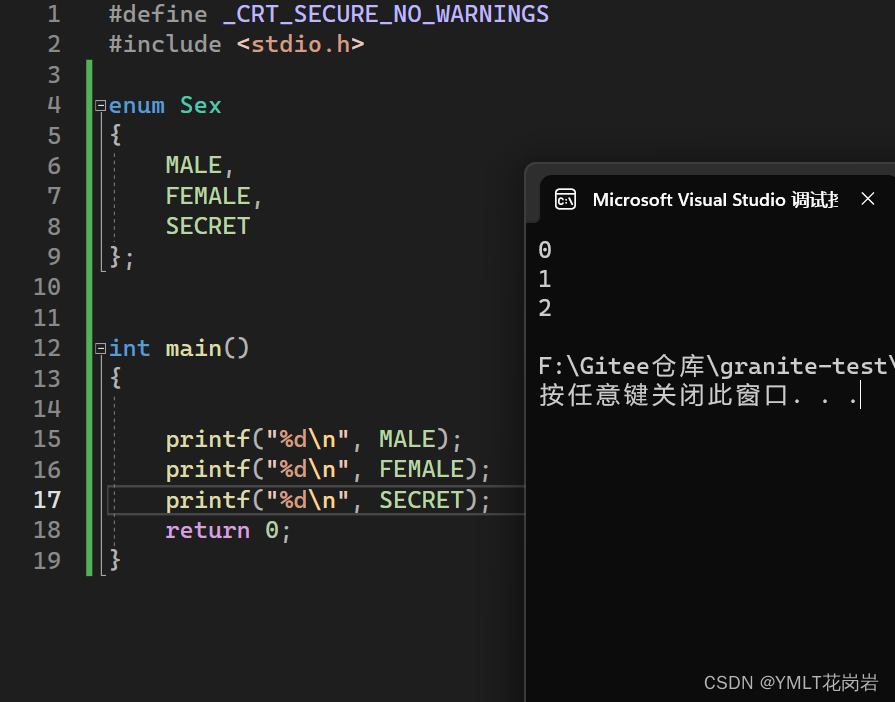
自定义类型:联合和枚举
目录 1. 联合体 1.1 联合体类型的声明及特点 1.2 相同成员的结构体和联合体对比 1.3 联合体大小的计算 1.4 联合体的应用举例 2. 枚举类型 2.1 枚举类型的声明 2.2 枚举类型的优点 1. 联合体 1.1 联合体类型的声明及特点 像结构体一样,联合体也是由一个或…...

每日一学—由面试题“Redis 是否为单线程”引发的思考
文章目录 📋 前言🌰 举个例子🎯 什么是 Redis(知识点补充)🎯 Redis 中的多线程🎯 I/O 多线程🎯 Redis 中的多进程📝 结论🎯书籍推荐🔥参与方式 &a…...
chatGPT PLUS 绑卡提示信用卡被拒的解决办法
chatGPT PLUS 绑卡提示信用卡被拒的解决办法 一、 ChatGPT Plus介绍 作为人工智能领域的一项重要革新,ChatGPT Plus的上线引起了众多用户的关注,其背后的OpenAI表现出傲娇的态度,被誉为下一个GTP 4.0。总的来说,ChatGPT Plus的火…...
opencv鼠标操作与响应
//鼠标事件 Point sp(-1, -1); Point ep(-1, -1); Mat temp; static void on_draw(int event, int x, int y, int flags, void *userdata) {Mat image *((Mat*)userdata);if (event EVENT_LBUTTONDOWN) {sp.x x;sp.y y;std::cout << "start point:"<<…...
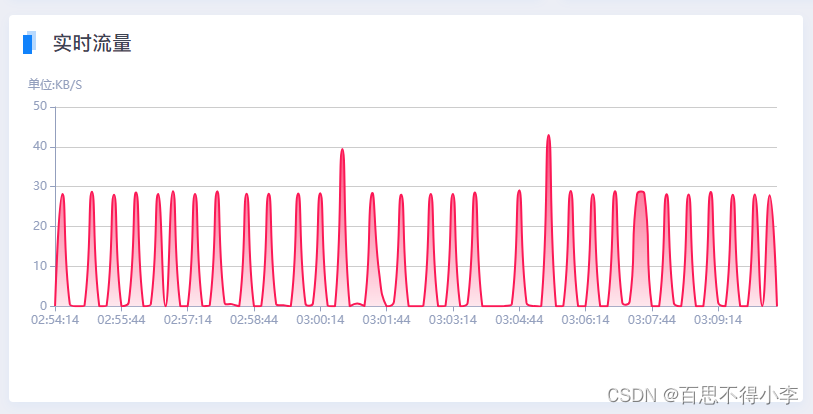
vue里echarts的使用:画饼图和面积折线图
vue里echarts的使用,我们要先安装echarts,然后在main.js里引入: //命令安装echarts npm i echarts//main.js里引入挂载到原型上 import echarts from echarts Vue.prototype.$echarts = echarts最终我们实现的效果如下: 头部标题这里我们封装了一个全局公共组件common-he…...
插件unplugin-auto-import的使用)
个人建站前端篇(六)插件unplugin-auto-import的使用
vue3日常项目中定义变量需要引入ref,reactive等等比较麻烦,可以通过unplugin-auto-import给我们自动引入 * unplugin-auto-import 解决了vue3-hook、vue-router、useVue等多个插件的自动导入,也支持自定义插件的自动导入,是一个功能强大的typ…...
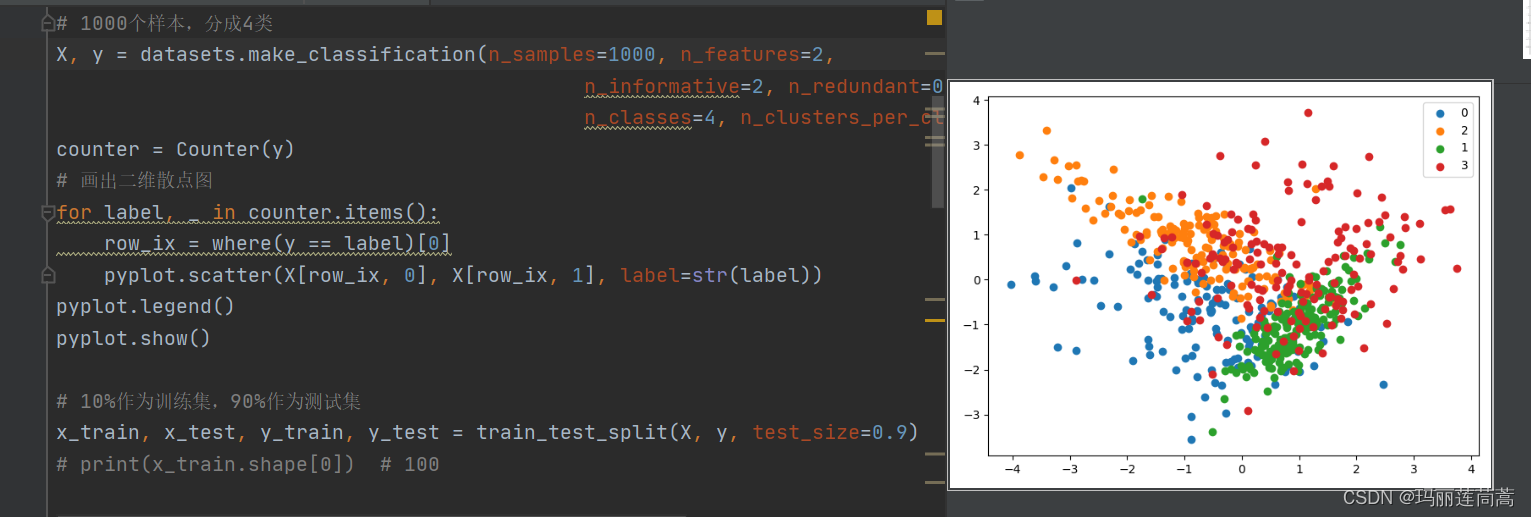
【Python】 剪辑法欠采样 CNN压缩近邻法欠采样
借鉴:关于K近邻(KNN),看这一篇就够了!算法原理,kd树,球树,KNN解决样本不平衡,剪辑法,压缩近邻法 - 知乎 但是不要看他里面的代码,因为作者把代码…...
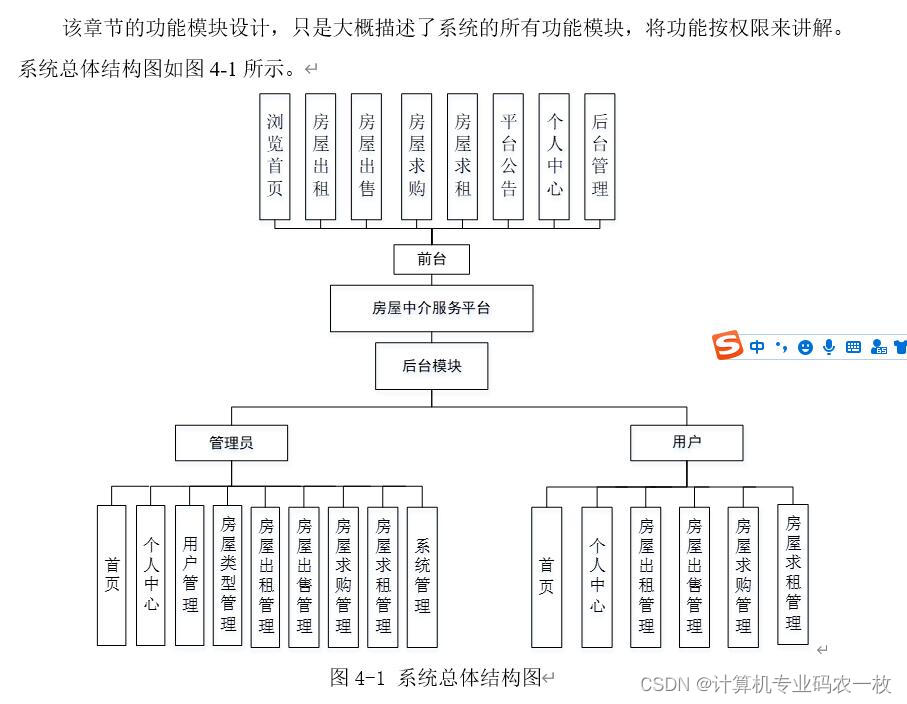
springmvc+ssm+springboot房屋中介服务平台的设计与实现 i174z
本论文拟采用计算机技术设计并开发的房屋中介服务平台,主要是为用户提供服务。使得用户可以在系统上查看房屋出租、房屋出售、房屋求购、房屋求租,管理员对信息进行统一管理,与此同时可以筛选出符合的信息,给笔者提供更符合实际的…...

挑战30天学完Python:Day19 文件处理
📘 Day 19 🎉 本系列为Python基础学习,原稿来源于 30-Days-Of-Python 英文项目,大奇主要是对其本地化翻译、逐条验证和补充,想通过30天完成正儿八经的系统化实践。此系列适合零基础同学,或仅了解Python一点…...
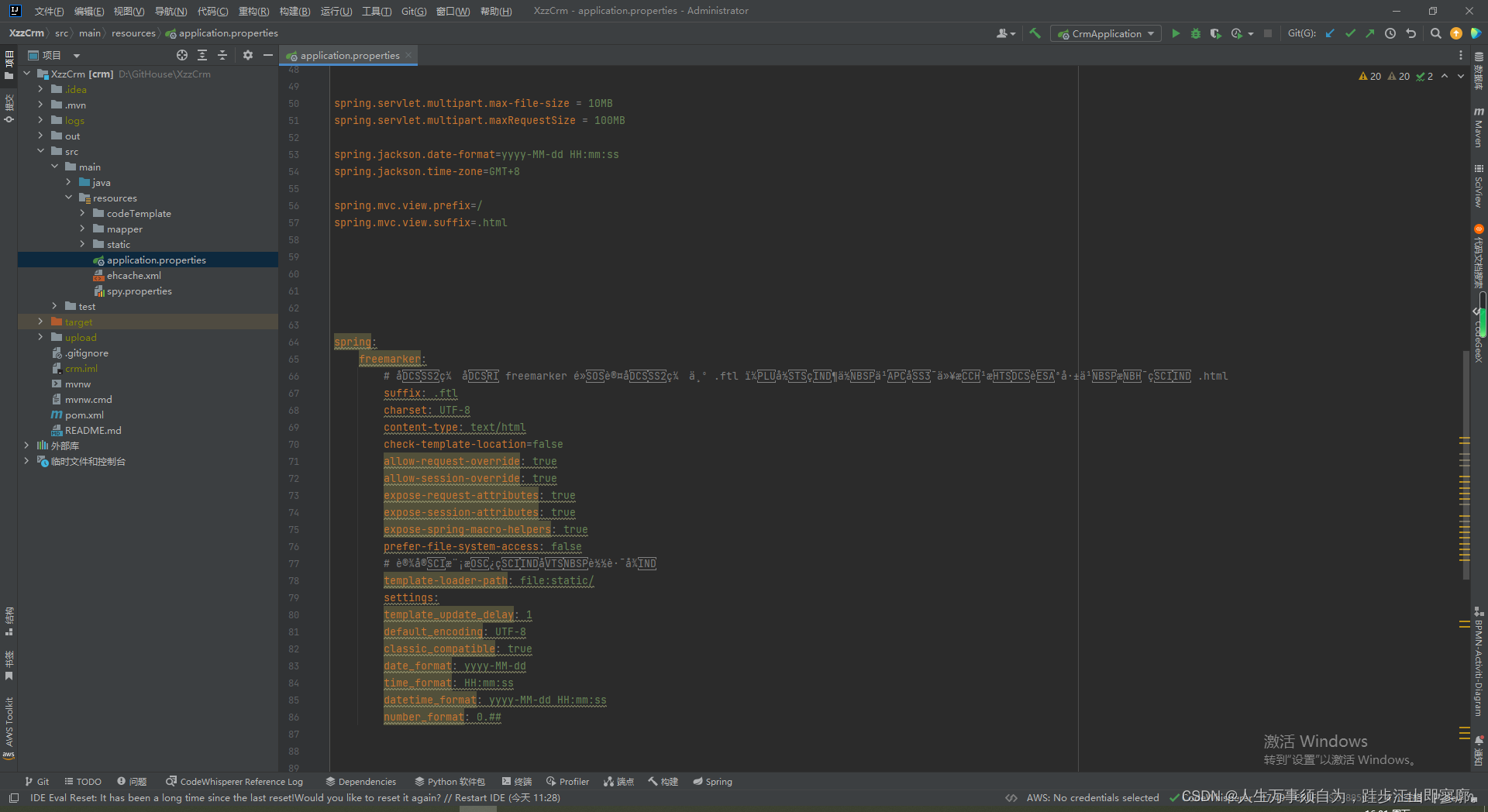
Spring Boot application.properties和application.yml文件的配置
在Spring Boot中,application.properties 和 application.yml 文件用于配置应用程序的各个方面,如服务器端口、数据库连接、日志级别等。这两个文件是Spring Boot的配置文件,位于 src/main/resources 目录下。 application.properties 示例 …...

Unity单元测试
Unity单元测试是一个专门用于嵌入式单元测试的库, 现在简单讲下移植以及代码结构. 源码地址: GitHub - ThrowTheSwitch/Unity: Simple Unit Testing for C 1.我们只需要移植三个文件即可: unity.c, unity.h, unity_internals.h 2.然后添加需要测试的函数. 3.在main.c中添加…...
)
ElevenLabs语音合成效果翻倍的秘密(行业未公开的声学参数调优矩阵)
更多请点击: https://intelliparadigm.com 第一章:ElevenLabs英文语音合成效果翻倍的核心洞察 关键瓶颈在于语音上下文建模粒度 ElevenLabs 的高质量语音合成并非单纯依赖更大模型参数量,而是通过细粒度的语义-韵律联合编码实现自然度跃升。…...
安装与中文环境配置实战)
Halcon深度学习工具(DLT)安装与中文环境配置实战
1. Halcon DLT安装前的准备工作 第一次接触Halcon深度学习工具(DLT)时,我完全被各种专业术语搞晕了。后来才发现,只要做好前期准备,安装过程其实比想象中简单得多。首先需要确认的是你的Windows系统版本,DLT目前支持Windows 10和1…...

3分钟高效恢复Windows 11 LTSC微软商店:完整解决方案指南
3分钟高效恢复Windows 11 LTSC微软商店:完整解决方案指南 【免费下载链接】LTSC-Add-MicrosoftStore Add Windows Store to Windows 11 24H2 LTSC 项目地址: https://gitcode.com/gh_mirrors/ltscad/LTSC-Add-MicrosoftStore 你是否在使用Windows 11 24H2 LT…...

GURU-Ai:面向开发者的AI命令行工具集,提升代码理解与运维效率
1. 项目概述:一个面向开发者的AI助手工具集最近在GitHub上看到一个挺有意思的项目,叫“Guru322/GURU-Ai”。光看名字,你可能会觉得这又是一个大而全的AI模型或者聊天机器人,但点进去仔细研究后,我发现它的定位其实非常…...

构建轻量级LLM工具集:模块化设计、多模型集成与本地化部署实践
1. 项目概述:一个面向日常的轻量级LLM工具集最近在GitHub上闲逛,发现了一个挺有意思的项目,叫“Daily-LLM”。光看名字,你可能会觉得这又是一个庞大的、需要海量算力才能跑起来的“大模型”项目。但点进去仔细研究后,我…...

终极罗技PUBG鼠标宏配置指南:5步告别压枪烦恼
终极罗技PUBG鼠标宏配置指南:5步告别压枪烦恼 【免费下载链接】logitech-pubg PUBG no recoil script for Logitech gaming mouse / 绝地求生 罗技 鼠标宏 项目地址: https://gitcode.com/gh_mirrors/lo/logitech-pubg 还在为《绝地求生》中疯狂上跳的枪口而…...

开源PCB自动布线神器FreeRouting:5分钟上手,效率提升300%
开源PCB自动布线神器FreeRouting:5分钟上手,效率提升300% 【免费下载链接】freerouting Advanced PCB auto-router 项目地址: https://gitcode.com/gh_mirrors/fr/freerouting FreeRouting是一款功能强大的开源PCB自动布线工具,它能帮…...
)
多语种出海必备,ElevenLabs菲律宾文语音质量实测对比:Wavenet vs. Instant Voice vs. Custom Model(附MOS评分表)
更多请点击: https://intelliparadigm.com 第一章:多语种出海语音技术演进与菲律宾语本地化挑战 随着全球数字服务加速出海,语音交互系统正从单语种向多语种、低资源语言深度拓展。菲律宾语(Filipino/Tagalog)作为东…...

Akebi-GC游戏辅助工具:免费开源的游戏体验增强终极指南
Akebi-GC游戏辅助工具:免费开源的游戏体验增强终极指南 【免费下载链接】Akebi-GC (Fork) The great software for some game that exploiting anime girls (and boys). 项目地址: https://gitcode.com/gh_mirrors/ak/Akebi-GC Akebi-GC是一款开源免费的游戏…...

WarcraftHelper:魔兽争霸3终极增强插件5分钟快速上手指南
WarcraftHelper:魔兽争霸3终极增强插件5分钟快速上手指南 【免费下载链接】WarcraftHelper Warcraft III Helper , support 1.20e, 1.24e, 1.26a, 1.27a, 1.27b 项目地址: https://gitcode.com/gh_mirrors/wa/WarcraftHelper WarcraftHelper是一款专为魔兽争…...