
基于springboot接口的编写
目录
1、模糊分页查询
2、批量删除
3、新增
4、编辑
此接口非彼接口。此接口是MVC的设计模式中的Controller层,一般我们会叫Controller层里的方法为接口。他们是负责接收前端或者其它服务的传来的请求,并对请求进行相应的处理,最终再将处理结果返回给前端或者其它服务。
1、模糊分页查询
1)Controller层
@RestController
@RequestMapping("camera")
public class CameraAlarmController {@Autowiredprivate IWarehouseOutService warehouseOutService; //注入接口/*** 获取设备相关信息* @param equipAttribute* @param equipType* @param keywords* @param pageNum* @param pageSize* @return*/@GetMapping("getOutboundEquipmentInfo")public Result getOutboundEquipmentInfo(@RequestParam(value ="operationType",required = false) Integer operationType,@RequestParam(value ="warehouseId",required = false) Integer warehouseId,@RequestParam(value ="equipAttribute",required = false) String equipAttribute,@RequestParam(value ="equipTypeId",required = false) Integer equipTypeId,@RequestParam(value = "keywords", required = false) String keywords,@RequestParam(value ="pageNum",required = false, defaultValue = "1") Integer pageNum,@RequestParam(value ="pageSize", required = false, defaultValue = "10") Integer pageSize){PageHelper.startPage(pageNum,pageSize);PageInfo<OutboundEquipmentInfoVo> pageInfo=new PageInfo<>(warehouseOutService.getOutboundEquipmentInfo(equipAttribute,equipTypeId,warehouseId,operationType,keywords));return new SuccessResult(pageInfo);}
}
在进行模糊查询操作的时候,往往有时候需要查询的参数很多,这时候也可以考虑使用实体类接收前端传参,更改如下:
@PostMapping("/getOutboundEquipmentInfo")//这里改成post请求public Result getOutboundEquipmentInfo(@RequestBody EquipInfoVo vo){PageHelper.startPage(vo.getPageNum(),vo.getPageSize());PageInfo<OutboundEquipmentInfoVo> pageInfo=new PageInfo<>(warehouseOutService.getOutboundEquipmentInfo(vo));return new SuccessResult(pageInfo);}接收前端传参实体类代码如下:
@Data
@Accessors(chain = true)
public class EquipInfoVo {@JsonProperty(value = "operationType")private Integer operationType;@JsonProperty(value = "warehouseId")private Integer warehouseId;@JsonProperty(value = "equipAttribute")private String equipAttribute;@JsonProperty(value = "equipTypeId")private Integer equipTypeId;@JsonProperty(value = "keywords")private String keywords;@JsonProperty(value = "pageNum")private Integer pageNum=1;@JsonProperty(value = "pageSize")private Integer pageSize=10;
}
2)service层
定义service层接口(此接口就是我们Java中用intrerface关键字定义的接口了)
//这里不用加service注解
public interface IWarehouseOutService {List<OutboundEquipmentInfoVo> getOutboundEquipmentInfo(String equipAttribute,Integer equipTypeId,Integer warehouseId,Integer operationType,String keywords);}
定义service接口实现
@Service
@Slf4j
public class WarehouseOutServiceImpl implements IWarehouseOutService {@Autowiredprivate WmEquipInfoMapper wmEquipInfoMapper;@Overridepublic List<OutboundEquipmentInfoVo> getOutboundEquipmentInfo(String equipAttribute,Integer equipTypeId,Integer warehouseId,Integer operationType,String keywords) {//入库操作if (operationType==WmConstant.EQUIPMENT_INFO_INCOME){List<OutboundEquipmentInfoVo> outList=wmEquipInfoMapper.getEquipmentInformation(equipAttribute,equipTypeId,keywords);List<WmRepertoryInfoDto> allEquip = wmRepertoryInfoMapper.getAllEquip(warehouseId);outList.forEach(info->{Optional<WmRepertoryInfoDto> wmRepertoryInfoDto = allEquip.stream().filter(all -> all.getEquipId().equals(info.getId())).findFirst();if (wmRepertoryInfoDto.isPresent()){info.setInventoryQuantity(wmRepertoryInfoDto.get().getNum());info.setDamagesNum(wmRepertoryInfoDto.get().getDamagesNum());}else {info.setInventoryQuantity(0);info.setDamagesNum(0);}});return outList;}else{//出库操作List<OutboundEquipmentInfoVo> outboundEquipmentInfo = wmEquipInfoMapper.getOutboundEquipmentInfo(equipAttribute, warehouseId, equipTypeId, keywords);List<WmRelationEquipDto> relationEquipDtos=wmOutWarehouseMapper.getOutboundApproval(warehouseId);outboundEquipmentInfo.forEach(out-> relationEquipDtos.forEach(re->{if (Integer.valueOf(re.getEquipId().toString()).equals(out.getId())){Integer num=out.getInventoryQuantity()-re.getNum();out.setInventoryQuantity(num<0?0:num);}}));return outboundEquipmentInfo;}}
}
3)mapper层
//这上面不加@Mapper注解就要,在启动类上加这个注解@MapperScan("com.zcloud.dao.mapper")
public interface WmEquipInfoMapper {List<OutboundEquipmentInfoVo> getOutboundEquipmentInfo(@Param("equipAttribute") String equipAttribute,@Param("warehouseId") Integer warehouseId,@Param("equipTypeId") Integer equipTypeId,@Param("keywords") String keywords);
}
<select id="getOutboundEquipmentInfo" resultType="com.zcloud.domain.warehousemanage.vo.OutboundEquipmentInfoVo">SELECTt2.num inventoryQuantity,t2.damages_num,( SELECT `name` FROM t_dic_item WHERE type_code = "equip_attribute" AND CODE = t1.equip_attribute ) `equipAttributeName`,( SELECT `name` FROM t_dic_item WHERE type_code = "equip_unit" AND CODE = t1.equip_unit ) equipUnitName,t1.equip_name,t1.equip_brand,t1.id,t1.equip_model,t3.`name` equipTypeNameFROMt_common_wm_equip_info t1LEFT JOIN t_common_wm_repertory_info t2 ON t1.id = t2.equip_idLEFT JOIN t_common_wm_equip_type t3 ON t1.equip_type_id = t3.idWHEREt1.removed = 0AND t2.removed =0AND t3.removed=0AND t2.warehouse_id=#{warehouseId}<if test="equipAttribute!=null and equipAttribute!=''">AND t1.equip_attribute=#{equipAttribute}</if>//注意Interge类型的条件判断是否为空的时候一定不要加非空字符串判断,因为当你传的值为0的时候,mybatis会把它判断为空字符串<if test="equipTypeId!=null"> AND t1.equip_type_id=#{equipTypeId}</if><if test="keywords!=null and keywords!=''">AND (t1.equip_name like concat('%',#{keywords})OR t1.equip_model like concat('%',#{keywords})OR t1.equip_brand like concat('%',#{keywords}))</if>
</select>2、批量删除
1) Controller层
@DeleteMapping(value = "/delete", name = "仓库管理,删除仓库信息")public Result deleteWareHouseInfo(@RequestParam(value = "ids") String ids,HttpServletRequest request) {Integer userId = (Integer) RequestUtils.getCurrentUser(request).get("userId");return new SuccessResult(wareHouseInfoService.deleteWareHouseInfo(ids,userId));}2) service层
@Transactional //单表删除不加这个注解可以,多表关联删除一定要加
public Object deleteWareHouseInfo(Integer ids, Integer userId) {List<Integer> idList = Arrays.stream(ids.split(",")).map(s -> Integer.parseInt(s.trim())).collect(Collectors.toList());return warehouseInfoMapper.deleteByIds(idList,userId);}
3)mapper层
Integer deleteByIds(@Param("idList") List<Integer> idList,@Param("userId") Integer userId);<update id="deleteByIds" parameterType="java.lang.Integer"><foreach collection="idList" item="item" separator=";">update t_warehouse_infoset removed = 1,rm_uid = #{userId},rm_time = NOW(),up_time = now()where id =#{item.id}</foreach></update>3、新增
1) Controller层
@PostMapping(value = "/add", name = "仓库管理,新增采购")public Result addPurchaseInfo(@RequestBody WmPurchaseInfoAddVo dto, HttpServletRequest request) {Integer userId = (Integer) RequestUtils.getCurrentUser(request).get("userId");return new SuccessResult(wmPurchaseInfoService.addPurchaseInfo(dto,userId));}2) service层
@Override@Transactionalpublic Integer addPurchaseInfo(WmPurchaseInfoAddVo dto, Integer userId) { Integer result;String orderCode = wmUtils.generateWmCode(WmConstant.PURCHASE_CODE_PREFIX, 1);dto.setOrderCode(orderCode).setCrUid(userId).setUpUid(userId);//插入采购基本信息,返回id//需要注意的是,如果待插入数据的表未设置主键自增,则在这里需要设置主键的值//而这里是设置了主键自增,所以就需要在mapper层配置sql语句的时候,设置返回自增的主键值purchaseInfoMapper.insertSelective(dto);List<WmRelationEquipDto> wmRelationEquipDtos = dto.getRelationEquip();//设置关联设备的,关联id,以及关联类型wmRelationEquipDtos.forEach(e -> {e.setRelationId(dto.getId()).setType(WmConstant.PURCHASE_RELATION).setStockPendingNum(e.getNum());});//插入关联设备信息result = relationEquipMapper.insertBatch(wmRelationEquipDtos);return result >= 1 ? 1 : 0;}
3) mapper层
单个新增
<insert id="insertSelective" useGeneratedKeys="true" keyProperty="id" keyColumn="id"parameterType="vip.dtcloud.domain.warehousemanage.vo.WmPurchaseInfoAddVo">insert into t_common_wm_purchase_info<trim prefix="(" suffix=")" suffixOverrides=","><if test="addVo.orderCode != null">order_code,</if><if test="addVo.orderName != null">order_name,</if><if test="addVo.purchaseMethod != null">purchase_method,</if><if test="addVo.purchaseManager != null">purchase_manager,</if><if test="addVo.orderDate != null">order_date,</if><if test="addVo.contractId != null">contract_id,</if><if test="addVo.biddingDocumentIds != null">bidding_document_ids,</if><if test="addVo.purchaseContractIds != null">purchase_contract_ids,</if><if test="addVo.meetingSummaryIds != null">meeting_summary_ids,</if><if test="addVo.otherFilesIds != null">other_files_ids,</if><if test="addVo.remark != null">remark,</if>up_time,cr_time,<if test="addVo.upUid != null">up_uid,</if><if test="addVo.crUid != null">cr_uid,</if></trim><trim prefix="values (" suffix=")" suffixOverrides=","><if test="addVo.orderCode != null">#{addVo.orderCode,jdbcType=VARCHAR},</if><if test="addVo.orderName != null">#{addVo.orderName,jdbcType=VARCHAR},</if><if test="addVo.purchaseMethod != null">#{addVo.purchaseMethod,jdbcType=VARCHAR},</if><if test="addVo.purchaseManager != null">#{addVo.purchaseManager,jdbcType=VARCHAR},</if><if test="addVo.orderDate != null">#{addVo.orderDate,jdbcType=TIMESTAMP},</if><if test="addVo.contractId != null">#{addVo.contractId,jdbcType=INTEGER},</if><if test="addVo.biddingDocumentIds != null">#{addVo.biddingDocumentIds,jdbcType=VARCHAR},</if><if test="addVo.purchaseContractIds != null">#{addVo.purchaseContractIds,jdbcType=VARCHAR},</if><if test="addVo.meetingSummaryIds != null">#{addVo.meetingSummaryIds,jdbcType=VARCHAR},</if><if test="addVo.otherFilesIds != null">#{addVo.otherFilesIds,jdbcType=VARCHAR},</if><if test="addVo.remark != null">#{addVo.remark,jdbcType=VARCHAR},</if>now(),now(),<if test="addVo.upUid != null">#{addVo.upUid,jdbcType=INTEGER},</if><if test="addVo.crUid != null">#{addVo.crUid,jdbcType=INTEGER},</if></trim></insert>批量新增
<insert id="insertBatch">insert into t_common_wm_relation_equip (relation_id, type,equip_id, equip_serial, equip_code,num, stock_pending_num, up_time)values<foreach collection="dtoList" item="item" separator=",">( #{item.relationId,jdbcType=INTEGER}, #{item.type,jdbcType=INTEGER},#{item.equipId,jdbcType=BIGINT}, #{item.equipSerial,jdbcType=VARCHAR}, #{item.equipCode,jdbcType=VARCHAR},#{item.num,jdbcType=INTEGER}, #{item.stockPendingNum,jdbcType=INTEGER}, now())</foreach></insert>注意 : 做批量插入的时候,插入的数量不能太多,否则会因为sql语句过长而出现无法执行的问题。一般超过5000条的话就可以使用分页去插入了。比如,可以改成如下这样的插入:
List<List<EquipRealVariableDto>> lists = splitList(wmRelationEquipDtos, 5000);lists.forEach(e -> {result += relationEquipMapper.insertBatch(e);});splitList方法代码如下:
private static <T> List<List<T>> splitList(List<T> list, int splitCount) {int length = list.size();long totalLength = (long)length + (long)splitCount - 1L;long num = totalLength / (long)splitCount;List<List<T>> newList = new ArrayList();for(int i = 0; (long)i < num; ++i) {int fromIndex = i * splitCount;int toIndex = (i + 1) * splitCount < length ? (i + 1) * splitCount : length;newList.add(list.subList(fromIndex, toIndex));}return newList;}4、编辑
1) Controller层
@PutMapping(value = "/edit", name = "仓库管理,修改仓库信息")public Result editWareHouseInfo(@RequestBody WmWarehouseInfoDto dto,HttpServletRequest request) {Integer userId = (Integer) RequestUtils.getCurrentUser(request).get("userId");return new SuccessResult(wareHouseInfoService.editWareHouseInfo(dto,userId));}2) service层
@Overridepublic Integer editWareHouseInfo(WmWarehouseInfoDto dto, Integer userId) {dto.setUpUid(userId);return warehouseInfoMapper.updateByPrimaryKeySelective(dto);}3) mapper层
<update id="updateByPrimaryKeySelective" parameterType="vip.dtcloud.domain.warehousemanage.dto.WmWarehouseInfoDto">update t_common_wm_warehouse_info<set><if test="warehouseName != null">warehouse_name = #{warehouseName,jdbcType=VARCHAR},</if><if test="warehouseLocation != null">warehouse_location = #{warehouseLocation,jdbcType=VARCHAR},</if><if test="warehouseManager != null">warehouse_manager = #{warehouseManager,jdbcType=VARCHAR},</if><if test="phone != null">phone = #{phone,jdbcType=VARCHAR},</if><if test="departmentId != null">department_id = #{departmentId,jdbcType=VARCHAR},</if><if test="warehouseStatus != null">warehouse_status = #{warehouseStatus,jdbcType=INTEGER},</if>up_time = now(),<if test="upUid != null">up_uid = #{upUid,jdbcType=INTEGER},</if></set>where id = #{id,jdbcType=INTEGER}</update>相关文章:

基于springboot接口的编写
目录 1、模糊分页查询 2、批量删除 3、新增 4、编辑 此接口非彼接口。此接口是MVC的设计模式中的Controller层,一般我们会叫Controller层里的方法为接口。他们是负责接收前端或者其它服务的传来的请求,并对请求进行相应的处理,最终再将处…...
【HarmonyOS】鸿蒙开发之Video组件——第3.7章
Video组件内VideoOptions属性简介 src:设置视频地址。currentProgressRate:设置视频播放倍速,参数说明如下: number|string:只支持 0.75 , 1.0 , 1.25 , 1.75 , 2.0 。P…...

React引入css的几种方式以及应用
1.直接引入css文件 import "./parent.css" 2.引入css模块,定义文件名[组件名.module.css];该方式可避免类名的重复,每个组件都有独立的作用域,避免了全局污染,保证了类名的唯一性 import styles from &qu…...

[算法沉淀记录] 排序算法 —— 冒泡排序
排序算法 —— 冒泡排序 基本概念 冒泡排序是一种简单的排序算法。它重复地遍历要排序的列表,一次比较两个元素,并交换它们的位置,如果它们不是按照升序排列的。这步遍历是重复进行的,直到没有再需要交换,也就是说该…...
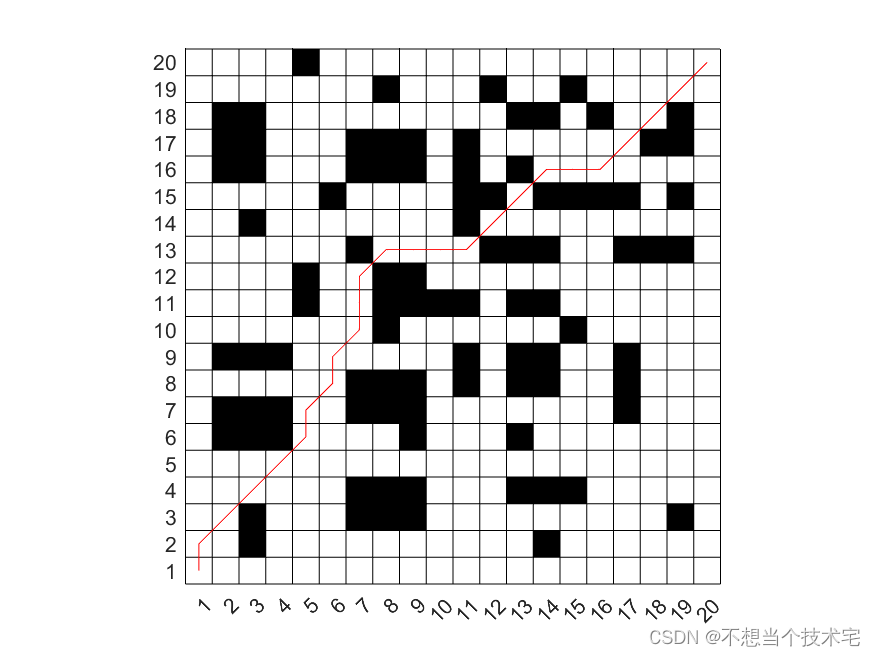
【机器人最短路径规划问题(栅格地图)】基于遗传算法求解
基于遗传算法求解机器人最短路径规划问题(栅格地图)的仿真结果 仿真结果: 路径长度的变化曲线: 遗传算法优化后的机器人避障路径:...

如何做代币分析:以 TRX 币为例
作者:lesleyfootprint.network 编译:cicifootprint.network 数据源:TRX 代币仪表板 (仅包括以太坊数据) 在加密货币和数字资产领域,代币分析起着至关重要的作用。代币分析指的是深入研究与代币相关的数据…...

关于地址引用与值引用的坑
List<UserInfo> userInfoList new List<UserInfo>(); List<UserInfo> userInfoList_new new List<UserInfo>(userInfoList);userInfoList_new 与userInfoList 指的是相同的内存吗? 答: 在C#中,userInfoList_new …...

初谈软件工程(一)
我就读于兰州交通大学的软件工程专业。虽然在全国众多的985、211高校中,兰州交通大学可能并不显眼,似乎未能跻身这些所谓的“顶尖”行列就意味着不被认可。然而,在甘肃省的教育领域中,它无疑是一座璀璨的明珠,名列前茅…...

自动化开展思路
自动化开展思路 本人在公司一直从事自动化测试推进工作,最近在好友的邀请下去其就职的公司分享如何开展自动化测试! 希望能帮其解决如下几个痛点: 1.上线周期长; 2.测试时间紧张,上线信心不足,测试覆盖…...
安装使用zookeeper
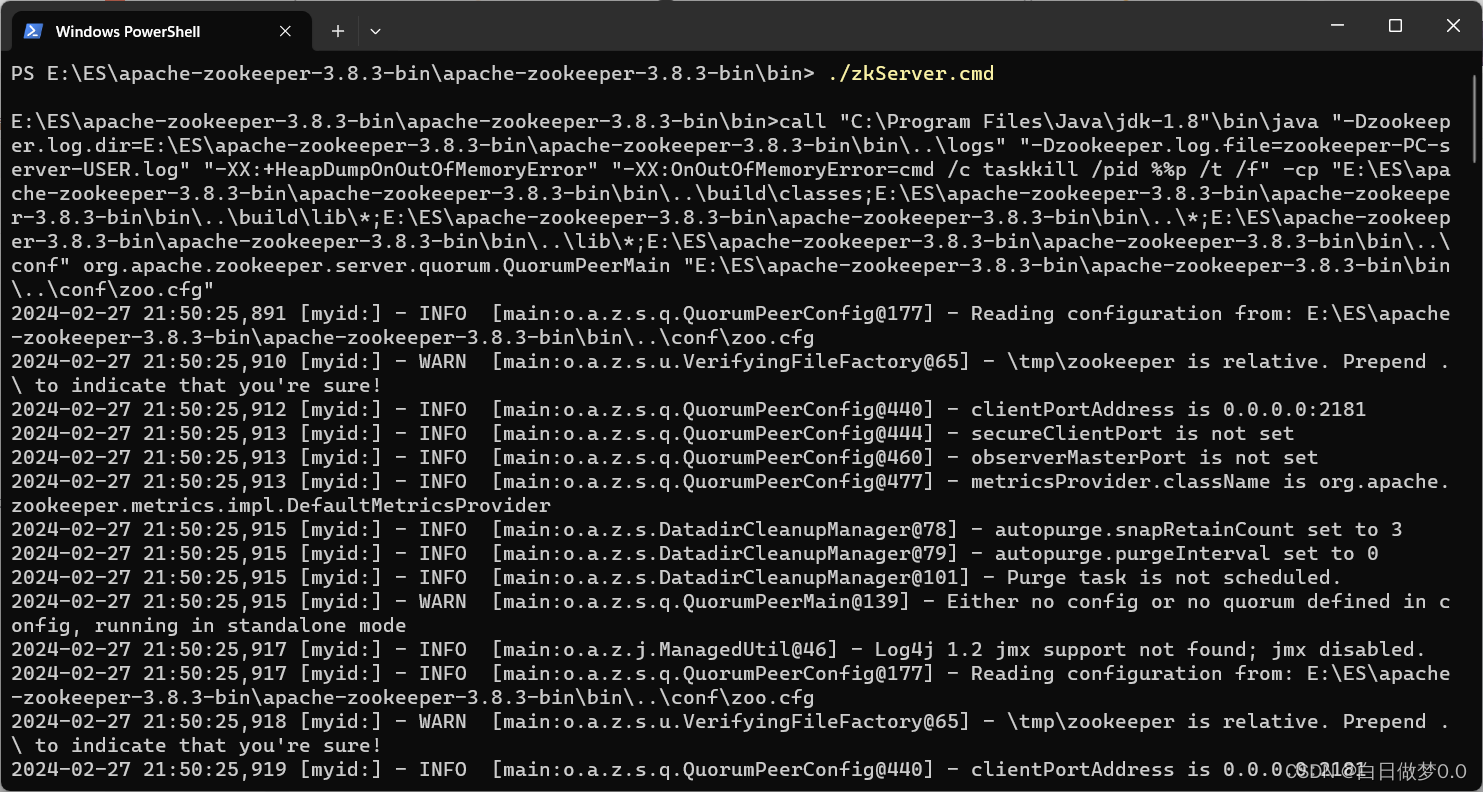
先去官网下载zookeeper:Apache ZooKeeper 直接进入bin目录,使用powerShell打开。 输入: ./zkServer.cmd 命令,启动zookeeper。 zookeeper一般需要配合Dubbo一起使用,作为注册中心使用,可以参考另一篇博客…...
nginx实现http反向代理及负载均衡
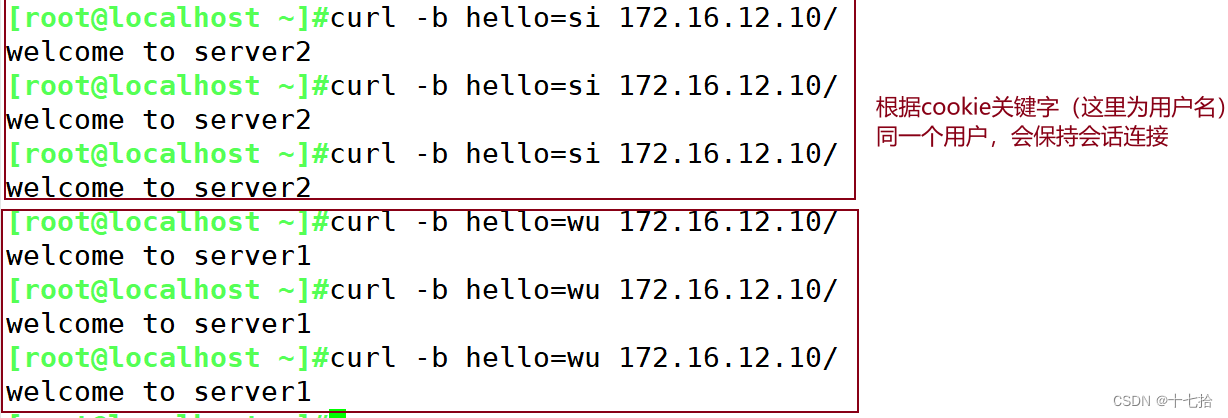
目录 一、代理概述 1、代理概念 1.1 正向代理(Forward Proxy) 1.2 反向代理(Reverse Proxy) 1.3 正向代理与反向代理的区别 2、同构代理与异构代理 2.1 同构代理 2.2 异构代理 2.3 同构代理与异构代理的区别 二、四层代…...
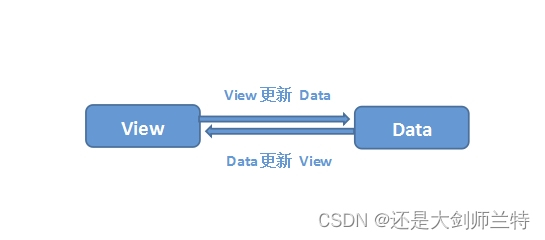
vue组件中data为什么必须是一个函数
查看本专栏目录 关于作者 还是大剑师兰特:曾是美国某知名大学计算机专业研究生,现为航空航海领域高级前端工程师;CSDN知名博主,GIS领域优质创作者,深耕openlayers、leaflet、mapbox、cesium,canvas&#x…...
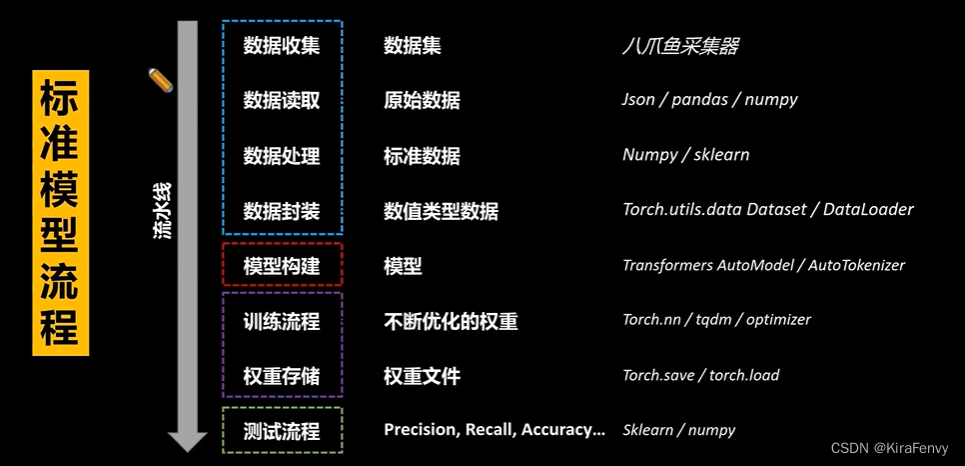
科技论文编写思路
科技论文编写思路 1.基本框架2.课题可行性评估1.研究目标和意义2.研究方法和技术3.可行性和可操作性4.风险和不确定性5.经济性和资源投入6.成果预期和评估 3.写作思路4.利用AI读论文5.实验流程 1.基本框架 IntroductionRelated worksMethodExperiment and analysisDiscussionC…...
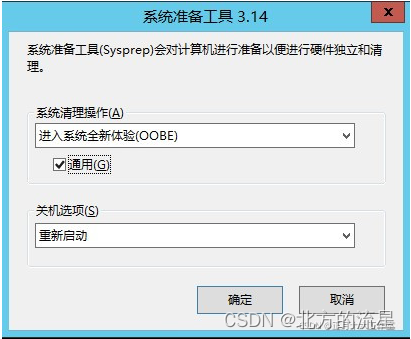
Windows虚拟机克隆后修改SID
在日常使用VMware Workstation我们经常会去克隆一些Windows操作系统的虚拟机,克隆的虚拟机和源虚拟机的系统安全标识符(Security Identifiers,SID)相同,SID是标识用户、组和计算机账户的唯一的号码。 如果两台虚拟机都…...

前端架构: 脚手架工具rxjs的快速上手应用
rxjs rxjs 是一个异步的库和Promise是非常的相似 文档:https://www.npmjs.com/package/rxjs Weekly Downloads 44,474,389 (动态数据) 说明这个库也是非常的流行 安装 $ npm i -S rxjs 使用 import { range, filter, map } from rxjs;range(1, 200).pipe(filte…...
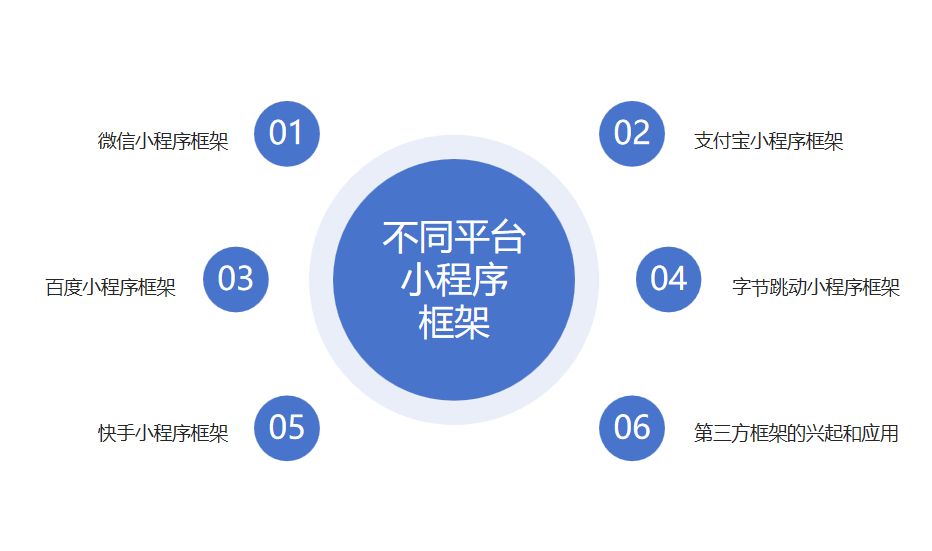
小程序框架(概念、工作原理、发展及应用)
引言 移动应用的普及使得用户对于轻量级、即时可用的应用程序需求越来越迫切。在这个背景下,小程序应运而生,成为一种无需下载安装、即点即用的应用形式,为用户提供了更便捷的体验。小程序的快速发展离不开强大的开发支持,而小程…...
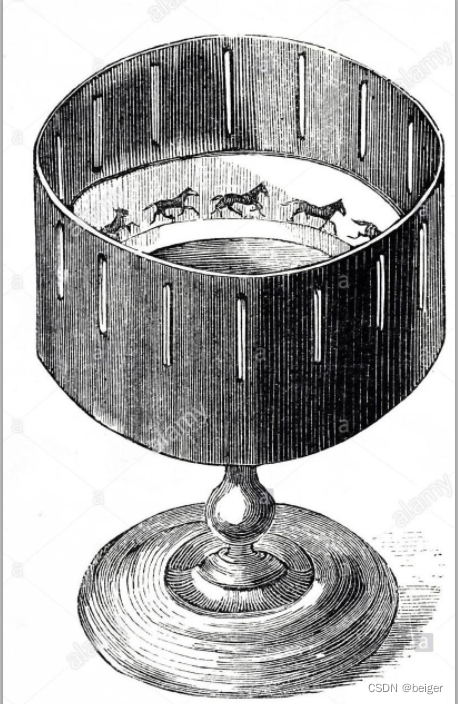
音视频数字化(数字与模拟-电影)
针对电视屏幕,电影被称为“大荧幕”,也是娱乐行业的顶尖产业。作为一项综合艺术,从被发明至今,近200年的发展史中,无人可以替代,并始终走在时代的前列。 电影回放的原理就是“视觉残留”,也就是快速移过眼前的画面,会在人的大脑中残留短暂的时间,随着画面不断地移过,…...

在 Ubuntu 中, 使用 fsck 命令来修复磁盘文件系统
在 Ubuntu 中,可以使用 fsck 命令来修复磁盘文件系统。fsck 是用于检查和修复文件系统的工具。 使用 fsck 命令修复磁盘文件系统的步骤如下: 首先,您需要在命令行终端窗口中以 root 用户身份登录。 使用 fdisk -l 命令列出所有磁盘设备。 …...

LED电子显示屏连接方式解析
LED电子显示屏作为现代化数字展示设备的重要组成部分,其连接方式对于显示效果和稳定性至关重要。正确选择和实施连接方式不仅可以确保LED显示屏系统的正常运行,还可以提高其可靠性和持久性。本文将介绍LED电子显示屏常见的连接方式,以帮助读者…...
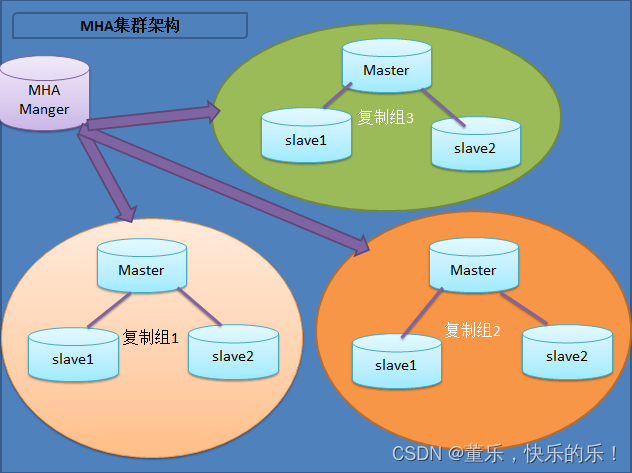
Mysql运维篇(五) 部署MHA--主机环境配置
一路走来,所有遇到的人,帮助过我的、伤害过我的都是朋友,没有一个是敌人。如有侵权,请留言,我及时删除! 大佬博文 https://www.cnblogs.com/gomysql/p/3675429.html MySQL 高可用(MHA&#x…...

SIW2016系统监测软件:硬件检测软件教你快速查看硬件信息与诊断系统故障
当你网购了一台电脑,担心商家偷换配置;当电脑频繁蓝屏重启,想查看CPU温度是否过高;当你想升级内存,却不知道主板支持什么型号;或者你忘记了浏览器中保存的某个网站密码。这些场景下,你需要一款专…...

Windows 10终极去臃肿方案:Windows10Debloater专业深度指南
Windows 10终极去臃肿方案:Windows10Debloater专业深度指南 【免费下载链接】Windows10Debloater Script to remove Windows 10 bloatware. 项目地址: https://gitcode.com/gh_mirrors/wi/Windows10Debloater Windows 10系统预装的"臃肿软件"问题一…...

嵌入式开发者的Git避坑指南:如何优雅地管理Keil μVision5工程?
嵌入式开发者的Git避坑指南:如何优雅地管理Keil μVision5工程? 在嵌入式开发领域,版本控制是团队协作和项目管理的基石。然而,Keil μVision5工程的特殊性常常让开发者陷入Git使用的误区——要么仓库体积膨胀到难以维护ÿ…...

如何用SOCD Cleaner优化键盘输入:提升游戏操作精度的终极指南
如何用SOCD Cleaner优化键盘输入:提升游戏操作精度的终极指南 【免费下载链接】socd Key remapper for epic gamers 项目地址: https://gitcode.com/gh_mirrors/so/socd 你是否在玩格斗游戏时因为同时按下W和S键导致角色卡顿?是否在射击游戏中急停…...
给锂电池做一次“深度体检”)
别再只测内阻了!用交流阻抗谱(EIS)给锂电池做一次“深度体检”
锂电池深度诊断:交流阻抗谱(EIS)技术实战解析 当电池工程师面对性能衰减的电芯时,传统的内阻测试就像用体温计量发烧——只能告诉你"病了",却无法揭示病因。而交流阻抗谱(EIS)技术则如…...

如何快速获取网盘直链下载地址:8大平台完整解析指南
如何快速获取网盘直链下载地址:8大平台完整解析指南 【免费下载链接】Online-disk-direct-link-download-assistant 一个基于 JavaScript 的网盘文件下载地址获取工具。基于【网盘直链下载助手】修改 ,支持 百度网盘 / 阿里云盘 / 中国移动云盘 / 天翼云…...

手把手拆解DAMA语境关系图:用一张表搞定你的数据治理项目方案
数据治理实战:用DAMA语境关系图打造高效项目方案 数据治理项目的成败往往取决于方案设计的清晰度和说服力。面对复杂的业务需求和多变的利益相关方期望,项目经理常常陷入方案反复修改却始终无法获得认可的困境。DAMA体系中的语境关系图(Conte…...

DoL汉化美化整合包构建指南:5分钟掌握自动化打包技巧
DoL汉化美化整合包构建指南:5分钟掌握自动化打包技巧 【免费下载链接】DOL-CHS-MODS Degrees of Lewdity 整合 项目地址: https://gitcode.com/gh_mirrors/do/DOL-CHS-MODS DoL-Lyra 构建系统是一个专为 Degrees of Lewdity 游戏打造的自动化打包工具&#x…...

AI 知道我但不主动推荐我:从识别到推荐之间还差哪些关键条件?
如果点名问品牌时 AI 能认出你,换成“预算有限先看哪类供应商”“本地装修先看哪几家公司”时它不带你,这通常不是收录问题,而是推荐层问题。 按刘佬的复盘口径,这类现象最好拆成两步看: AI 有没有认出你。AI 有没有足…...

llama.cpp部署QWEN3.5-9B和Gemma4-e4b,用Claude Code对比测试
昨天部署了Gemma4:26B和E4B,一是自己显存不够,部署的时候总是爆显存。二是claude code与Gemma4配合有问题,claude爆内存,任务进行不下去。 所以今天我又通过llama.cpp部署了QWEN3.9-9B,并做了些测试。 结论:…...