
nav2_gps_waypoint_follower_demo 不能在ros2 humble中直接使用的解决方法
GIT上的nav2_gps_waypoint_follower_demo是基于ros-iron编写的,其中followGpsWaypoints(wps) service只能在Iron上使用。
解决方法:
第一步:将interactive_waypoint_follower.py修改为如下代码:
import rclpy
from rclpy.node import Node
from nav2_simple_commander.robot_navigator import BasicNavigator
from geometry_msgs.msg import PointStamped
from nav2_gps_waypoint_follower_demo.utils.gps_utils import latLonYaw2Geopose
from nav2_msgs.action import FollowWaypoints
from geometry_msgs.msg import PoseStamped
from robot_localization.srv import FromLLclass InteractiveGpsWpCommander(Node):"""ROS2 node to send gps waypoints to nav2 received from mapviz's point click publisher"""def __init__(self):super().__init__(node_name="gps_wp_commander")self.navigator = BasicNavigator("basic_navigator")self.mapviz_wp_sub = self.create_subscription(PointStamped, "/clicked_point", self.mapviz_wp_cb, 1)self.localizer = self.create_client(FromLL,  '/fromLL')while not self.localizer.wait_for_service(timeout_sec=1.0):self.get_logger().info('Service not available, waiting again...')self.client_futures = []self.get_logger().info('Ready for waypoints...')def mapviz_wp_cb(self, msg: PointStamped):"""clicked point callback, sends received point to nav2 gps waypoint follower if its a geographic point"""if msg.header.frame_id != "wgs84":self.get_logger().warning("Received point from mapviz that ist not in wgs84 frame. This is not a gps point and wont be followed")returnwps = [latLonYaw2Geopose(msg.point.y, msg.point.x)]for wp in wps:self.req = FromLL.Request()self.req.ll_point.longitude = wp.position.longitudeself.req.ll_point.latitude = wp.position.latitudeself.req.ll_point.altitude = wp.position.altitudeself.get_logger().info("Waypoint added to conversion queue...")self.client_futures.append(self.localizer.call_async(self.req))def command_send_cb(self, future):self.resp = PoseStamped()self.resp.header.frame_id = 'map'self.resp.header.stamp = self.get_clock().now().to_msg()self.resp.pose.position = future.result().map_pointself.navigator.goToPose(self.resp)def spin(self):while rclpy.ok():rclpy.spin_once(self)incomplete_futures = []for f in self.client_futures:if f.done():self.client_futures.remove(f)self.get_logger().info("Following converted waypoint...")self.command_send_cb(f)else:incomplete_futures.append(f)self.client_futures = incomplete_futuresdef main():rclpy.init()gps_wpf = InteractiveGpsWpCommander()gps_wpf.spin()if __name__ == "__main__":main()
将logged_waypoint_follower.py改为如下代码:
import rclpy
from nav2_simple_commander.robot_navigator import BasicNavigator
import yaml
from ament_index_python.packages import get_package_share_directory
import os
import sys
import time
from robot_localization.srv import FromLL
from rclpy.node import Node
from nav2_gps_waypoint_follower_demo.utils.gps_utils import latLonYaw2Geopose
from nav2_msgs.action import FollowWaypoints
from geometry_msgs.msg import PoseStampedclass YamlWaypointParser:"""Parse a set of gps waypoints from a yaml file"""def __init__(self, wps_file_path: str) -> None:with open(wps_file_path, 'r') as wps_file:self.wps_dict = yaml.safe_load(wps_file)def get_wps(self):"""Get an array of geographic_msgs/msg/GeoPose objects from the yaml file"""gepose_wps = []for wp in self.wps_dict["waypoints"]:latitude, longitude, yaw = wp["latitude"], wp["longitude"], wp["yaw"]gepose_wps.append(latLonYaw2Geopose(latitude, longitude, yaw))return gepose_wpsclass GpsWpCommander(Node):"""Class to use nav2 gps waypoint follower to follow a set of waypoints logged in a yaml file"""def __init__(self, wps_file_path):super().__init__('minimal_client_async')self.navigator = BasicNavigator("basic_navigator")self.wp_parser = YamlWaypointParser(wps_file_path)self.localizer = self.create_client(FromLL, '/fromLL')while not self.localizer.wait_for_service(timeout_sec=1.0):self.get_logger().info('service not available, waiting again...')def start_wpf(self):"""Function to start the waypoint following"""self.navigator.waitUntilNav2Active(localizer='controller_server')wps = self.wp_parser.get_wps()wpl = []for wp in wps:self.req = FromLL.Request()self.req.ll_point.longitude = wp.position.longitudeself.req.ll_point.latitude = wp.position.latitudeself.req.ll_point.altitude = wp.position.altitudelog = 'long{:f}, lat={:f}, alt={:f}'.format(self.req.ll_point.longitude, self.req.ll_point.latitude, self.req.ll_point.altitude)self.get_logger().info(log)self.future = self.localizer.call_async(self.req)rclpy.spin_until_future_complete(self, self.future)self.resp = PoseStamped()self.resp.header.frame_id = 'map'self.resp.header.stamp = self.get_clock().now().to_msg()self.resp.pose.position = self.future.result().map_pointlog = 'x={:f}, y={:f}, z={:f}'.format(self.future.result().map_point.x, self.future.result().map_point.y, self.future.result().map_point.z)self.get_logger().info(log)self.resp.pose.orientation = wp.orientationwpl += [self.resp]self.navigator.followWaypoints(wpl)print("wps completed successfully")def main():rclpy.init()# allow to pass the waypoints file as an argumentdefault_yaml_file_path = os.path.join(get_package_share_directory("node"), "config", "demo_waypoints.yaml")if len(sys.argv) > 1:yaml_file_path = sys.argv[1]else:yaml_file_path = default_yaml_file_pathgps_wpf = GpsWpCommander(yaml_file_path)gps_wpf.start_wpf()if __name__ == "__main__":main()第二步:除了上述代码需要修改,nav2_no_map_params.yaml也需要修改,该文件中bt_navigator节点下的内容改为nav2 humble里面默认的部分,另外,建议global_costmap中的width/height改大,例如从50改到500,不然容易出现超出global_costmap范围的提示。
参考链接(tks LuukBerkel ):nav2_gps_waypoint_follower_demo does not work on ros2 humble???! · Issue #77 · ros-planning/navigation2_tutorials · GitHub
相关文章:

nav2_gps_waypoint_follower_demo 不能在ros2 humble中直接使用的解决方法
GIT上的nav2_gps_waypoint_follower_demo是基于ros-iron编写的,其中followGpsWaypoints(wps) service只能在Iron上使用。 解决方法: 第一步:将interactive_waypoint_follower.py修改为如下代码: import rclpy from rclpy.node …...

华为OD机试 - 螺旋数字矩阵
1 题目描述 疫情期间,小明隔离在家,百无聊赖,在纸上写数字玩。他发明了一种写法: 给出数字个数 n (0 < n ≤ 999)和行数 m(0 < m ≤ 999),从左上角的 1 开始&…...

Vue响应式内容丢失处理
对数组和对象进行不当的修改会使Vue的对象丢失响应式,这时可以直接console.log丢失的对象,看是否有getter和setter 对于数组和对象,只有使用 Vue 提供的一些方法(如 push()、pop()、splice()、set() 等)进行修改才会触…...

Linux安装Rabbitmq
说明:本文章主要是rabbitmq在Linux系统上的安装,文章中包含了rabbitmq的下载及依赖下载 1.版本选取,这里的选取主要是版本的兼容问题 去这个网址查看mq和erlang版本兼容:RabbitMQ Erlang Version Requirements | RabbitMQ 2.相…...

在nginx 服务器部署vue项目
以人人快速开发的开源项目:renren-fast-vue 为例 注:这里开始认为各位都会使用nginx 打包vue项目 npm run build 测试打包的项目是否可以运行 serve dist 可以正常运行 编译报错请移步到:renren-fast-vue1.2.2 项目编译报错: build g…...
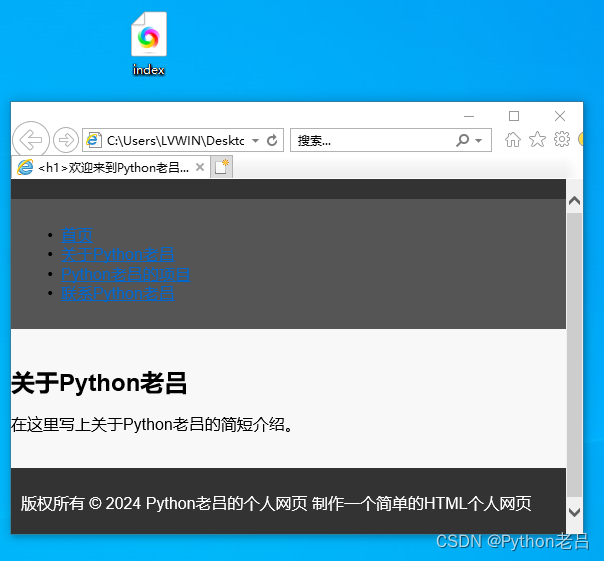
制作一个简单的HTML个人网页
制作一个简单的HTML个人网页 1.1 硬件1.1.1 一台电脑1.1.2 配置要求 1.2 系统1.3 软件 二、制作一个简单的HTML个人网页1.创建一个HTML网页1.1 新建文本文档1.2 另存文本文档1.3 命名为index.html 2.编写HTML代码2.1 打开HTML2.2 复制HTML代码2.3 粘贴HTML代码2.4 保存HTML 3.预…...
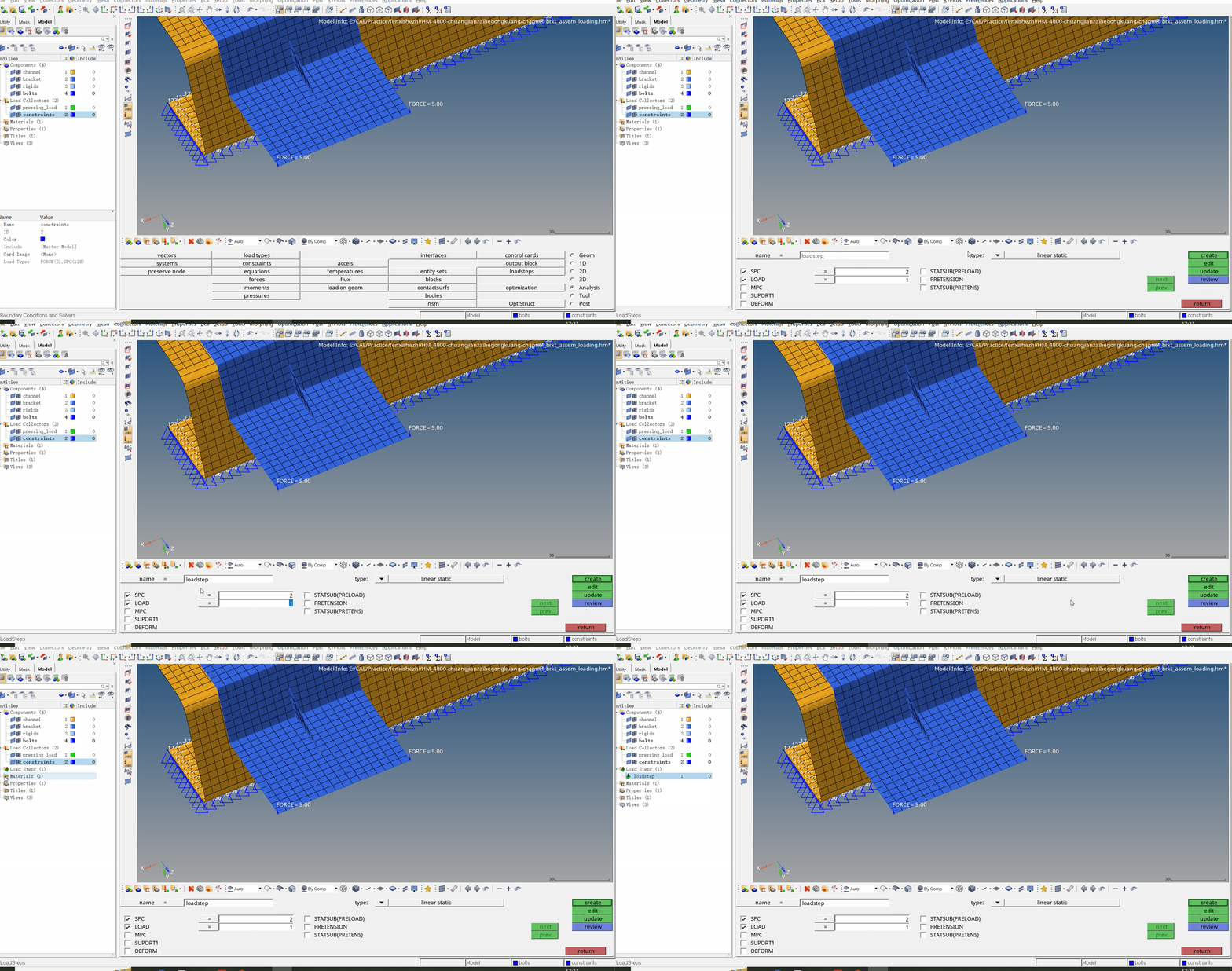
HM2019创建载荷工况
该案例中将介绍载荷、工况、约束的创建 步骤一:首先创建两个载荷集(Load Collector)用来存放载荷和约束 步骤二:在Analysis面板下创建约束(Analysis→constraints) 注意:Load type选择SPC表示统计过程控制(Statistical Process Control) 步…...

Effective C++ 学习笔记 条款14 在资源管理类中小心copying行为
条款13导入这样的观念:“资源取得时机便是初始化时机”(Resource Acquisition Is Initialization,RAII),并以此作为“资源管理类”的脊柱,也描述了auto_ptr和tr1::shared_ptr如何将这个观念表现在heap-base…...
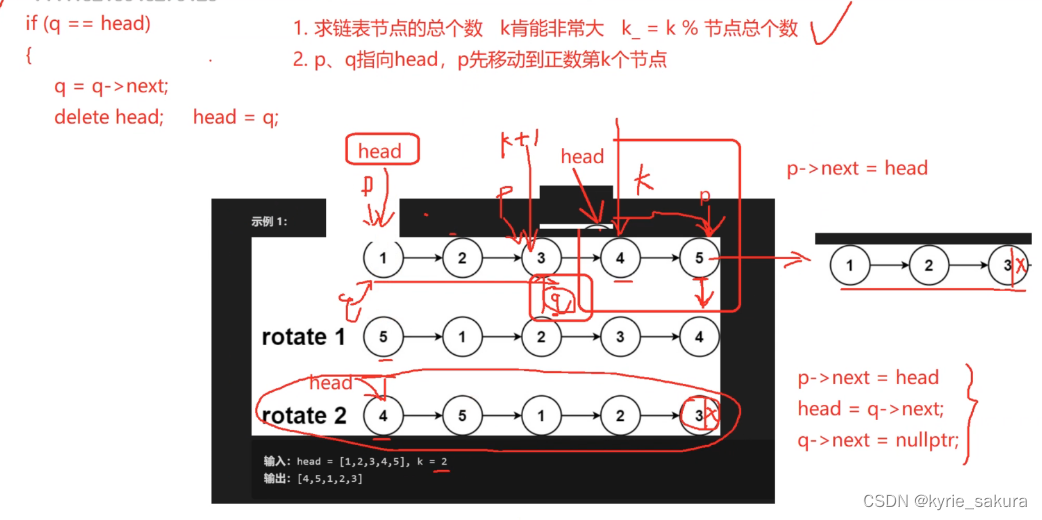
c++数据结构算法复习基础-- 3 --线性表-单向链表-笔试面试常见问题
1、单链表逆序 思路图 代码实现 //著: 链表结构里记得加 friend void ReverseLink(Clink& link); void ReverseLink(Clink& link) {Node* p link.head_->next_;while( p nullptr){return;}Node* q p->next_;link.head_->next_ nullptr;while(p ! nullpt…...

【踩坑专栏】追根溯源,从Linux磁盘爆满排查故障:mycat2与navicat不兼容导致日志暴增
昨天遇到了一个比较奇怪的问题,就是在挂起虚拟机的时候,虚拟机提示我XX脚本正在运行,很奇怪,我没有运行脚本,为什么会提示我这个呢。今天恢复虚拟机,也提示了一下脚本的问题,而且发现Linux明显异…...
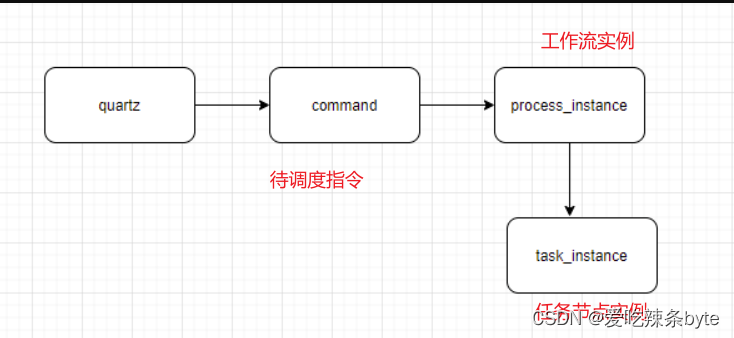
DolphinScheduler——奇富科技的调度实践
目录 一、技术架构 二、业务挑战 2.1 调度任务量大 2.2 运维复杂 2.3 SLA要求高 三、调度优化实践 3.1 重复调度 3.2 漏调度 3.3 Worker服务卡死 3.4 任务重复运行 四、服务监控 4.1 方法耗时监控 4.2 任务调度链路监控 五、用户收益 原文大佬的这篇调度系统案例…...
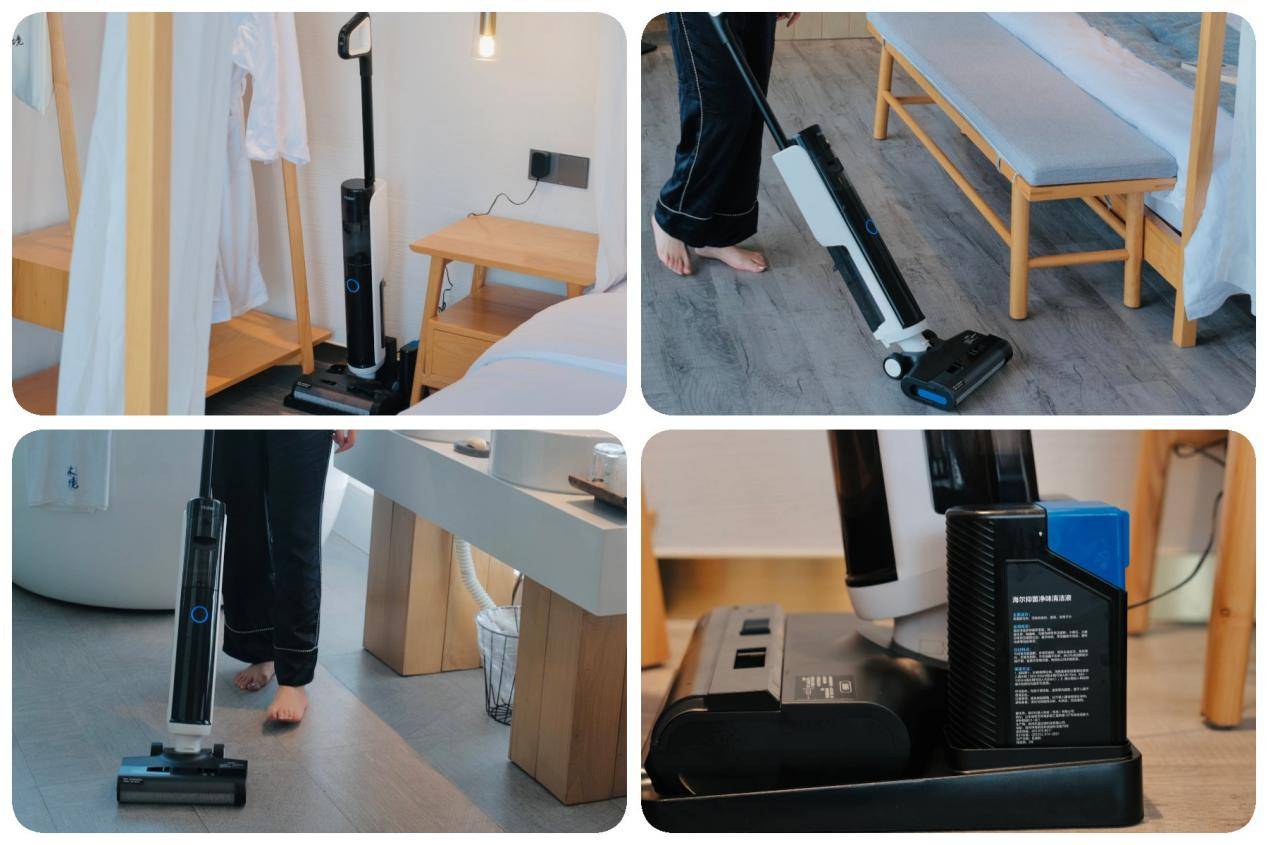
2024年最全洗地机选购攻略盘点丨希亦、小米、云鲸、海尔洗地机哪款值得入手?
在现代家居清洁中,洗地机是不可或缺的得力助手,它融合了吸尘、拖地等多种功能。面对市场上琳琅满目的洗地机品牌和型号,选择一个可靠的品牌至关重要。优质的品牌能够提供高品质的产品,使您的清洁工作更加轻松高效。本文将向您推荐…...

HTML笔记3
21,label标签 <label for"...">...</label> <label>...</label> <!DOCTYPE html> <html lang"en"> <head> <meta charset"UTF-8"> <meta name"viewport" content&qu…...

利用Python副业赚钱,看完这篇你就懂了!
Python都可以做哪些副业? 1、兼职处理数据Excel整理数据功能虽然很强大,但在Python面前,曾经统治职场的它也的败下阵来。因为Python在搜集数据整理分析数据的过程中更加便捷,通过几行代码还可以实现自动化操作。 如果你学会Pyth…...
、FP32(单精度浮点数)和INT8)
FP16(半精度浮点数)、FP32(单精度浮点数)和INT8
在深度学习和计算机视觉领域中,FP16(半精度浮点数)、FP32(单精度浮点数)和INT8(8 位整数)是常见的数据类型或精度表示方式。它们在不同的场景下有各自的优势和用途。 FP16(半精度浮…...

MySQL数据管理二
1.数据库的完整性 数据库中的数据是从外界输入的,而数据的输入由于种种原因,会发生输入无效或错误信息。保证输入的数据符合规定,成为了数据库系统,尤其是多用户的关系数据库系统首要关注的问题。 它是应防止数据库中存在不符合语…...

sqoop-import 详解
文章目录 前言一、介绍1. sqoop简介2. sqoop import的作用3. 语法3.1 sqoop import 语法3.2 导入配置属性 二、导入参数1. 常见参数2. 验证参数3. 导入控制参数4. 用于覆盖映射的参数5. 增量导入参数6. 输出行格式参数7. 输入解析参数8. Hive 参数9. HBase 参数10. Accumulo 参…...
第二周opencv
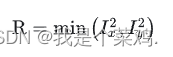
一、边缘检测算子 边缘检测算子是用于检测图像中物体边界的工具。边缘通常表示图像中灰度值或颜色发生显著变化的地方。边缘检测有助于识别图像中的物体形状、轮廓和结构。这些算子通过分析图像的灰度或颜色梯度来确定图像中的边缘。 梯度算子 要得到一幅图像的梯度,…...
python_读取txt文件绘制多条曲线II
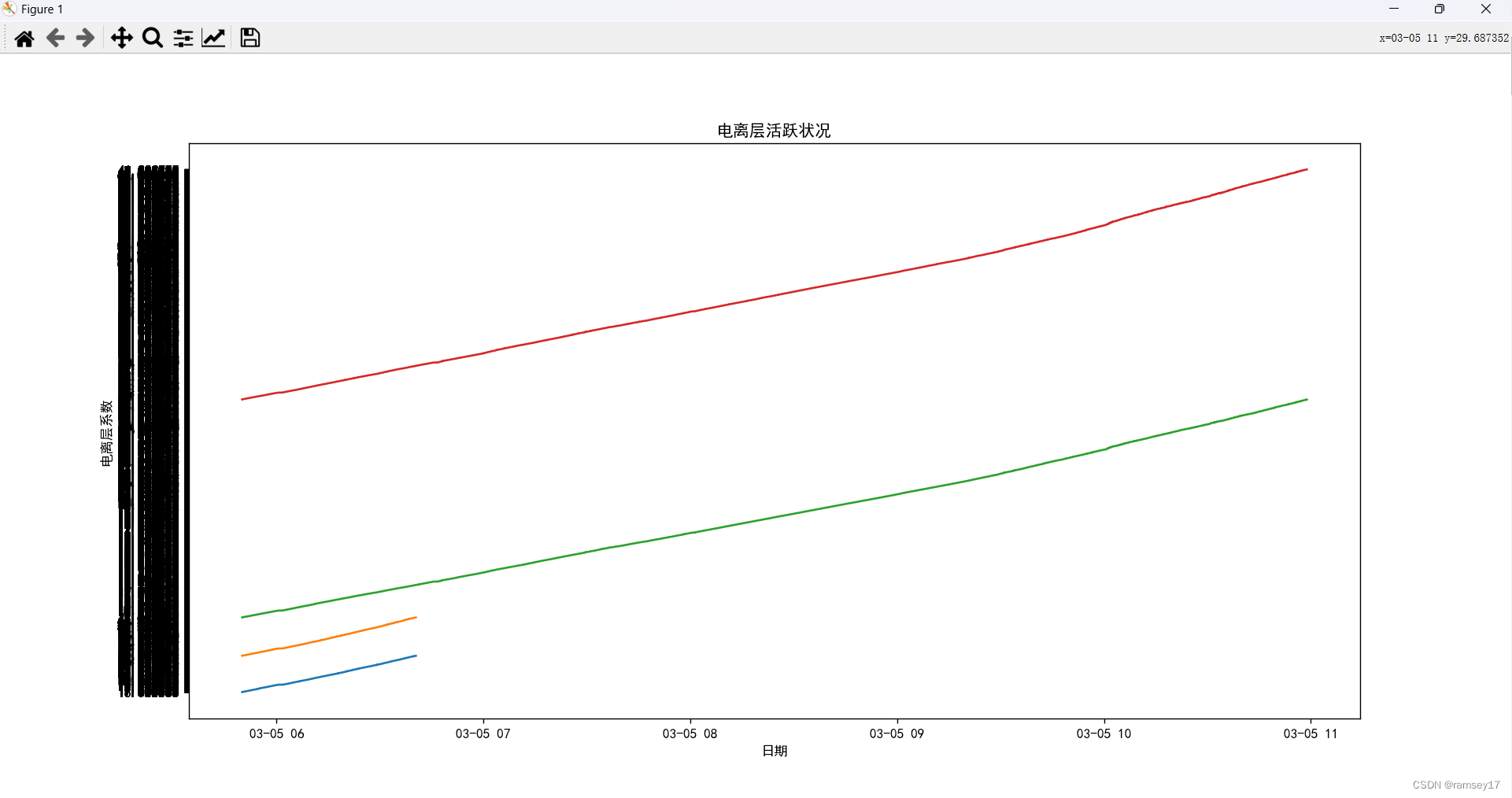
从给定的列表中来匹配txt文件对应列的数据; import matplotlib.pyplot as plt import re from datetime import datetime from pylab import mplmpl.rcParams["font.sans-serif"] ["SimHei"] # 设置显示中文字体 mpl.rcParams["axes.un…...
)
java排序简单总结和推荐使用套路(数据排序,结构体排序)
了解int和Integer的区别 int是Java的基本数据类型,用于表示整数值。Integer是int的包装类,它是一个对象,可以包含一个int值并提供一些额外的功能。 Java集合框架中的集合类(如List、Set、Map)只能存储对象,…...

终极指南:如何在Windows电脑上安装APK文件,告别臃肿安卓模拟器!
终极指南:如何在Windows电脑上安装APK文件,告别臃肿安卓模拟器! 【免费下载链接】APK-Installer An Android Application Installer for Windows 项目地址: https://gitcode.com/GitHub_Trending/ap/APK-Installer 你是否曾经想在Wind…...

别再死磕CNN了!用Python从零实现一个3层GCN,带你理解图数据怎么玩
从传统CNN到图卷积:用Python实战3层GCN的底层逻辑 当我们在处理社交网络中的用户关系、电商平台上的购买行为或是蛋白质分子结构时,数据的拓扑关系往往比像素网格复杂得多。传统的卷积神经网络(CNN)在规则网格上表现出色ÿ…...
)
Midjourney团队协作功能深度解析(仅限Beta内测成员验证的7层工作流架构)
更多请点击: https://kaifayun.com 第一章:Midjourney团队协作功能的演进逻辑与Beta内测准入机制 Midjourney自V5.2起将协作能力从“单用户提示工程”转向“多角色协同创作范式”,其核心演进逻辑围绕权限粒度、上下文继承性与资产归属治理三…...

Linux内核平台设备深度盘点:从原理到实战的全面解析
1. 项目概述:一次对Linux内核“家底”的深度盘点在Linux内核开发的日常工作中,无论是为一块新的开发板适配驱动,还是排查一个诡异的硬件初始化问题,我们常常会面临一个基础却又关键的问题:当前系统里到底有哪些“平台设…...

从CentOS 7/8老用户视角:快速上手CentOS 9 Stream的3个界面变化与5个安装配置新坑
从CentOS 7/8老用户视角:快速上手CentOS 9 Stream的3个界面变化与5个安装配置新坑 作为一名长期与CentOS打交道的系统管理员,第一次接触CentOS 9 Stream时,那种"熟悉又陌生"的感觉尤为明显。表面上看,它延续了红帽系一贯…...
)
从USB2.0到USB3.0:硬件工程师必须知道的电源管理与布线升级要点(含电平转换案例)
从USB2.0到USB3.0:硬件工程师必须掌握的电源管理与布线升级实战指南 在硬件设计领域,接口技术的迭代往往带来性能的飞跃,但同时也伴随着设计复杂度的显著提升。USB3.0作为当前主流的高速接口标准,其传输速率相比USB2.0提升了近10倍…...

别再只会用OpenCV的equalizeHist了!用Python实战图像增强,让你的目标检测模型精度提升一个台阶
突破OpenCV基础操作:Python图像增强实战与目标检测精度优化 在目标检测项目的实际开发中,我们常常遇到这样的困境:模型在标准测试集上表现优异,一旦部署到真实场景,面对复杂光照、低对比度的图像时,性能却…...

基于ARM核心板的T-BOX系统设计:从硬件选型到软件实现
1. 项目概述与核心价值最近几年,车联网的概念已经从实验室和展会,实实在在地走进了我们的日常生活。作为一名在嵌入式领域摸爬滚打了十几年的工程师,我亲眼见证了从简单的GPS定位模块,到如今功能高度集成的车载T-BOX(T…...
)
嵌入式网络硬件设计避坑指南:如何为你的SOC选配合适的PHY芯片与接口(MII/RMII实战解析)
嵌入式网络硬件设计避坑指南:如何为你的SOC选配合适的PHY芯片与接口(MII/RMII实战解析) 在嵌入式系统设计中,网络功能已成为现代智能设备的标配需求。无论是工业控制、物联网终端还是消费电子产品,稳定可靠的网络连接往…...

LAMMPS模拟聚乙烯拉伸:从in文件参数设置到应力-应变曲线绘制的完整避坑指南
LAMMPS模拟聚乙烯拉伸:从参数优化到数据分析的全流程实战 聚乙烯作为最常见的聚合物材料之一,其力学性能研究对工业应用具有重要意义。分子动力学模拟能够从微观角度揭示聚乙烯在拉伸过程中的结构演变和力学响应,而LAMMPS作为一款开源的分子…...