
oneMKL--FFT 基本使用
oneMKL–FFT 基本使用
本人基于官方文档的摘录与理解
oneMKL--FFT基本使用
- oneMKL--FFT 基本使用
- 1. Both FFT and Cluster FFT functions compute an FFT in five steps
- 2 Computing an FFT
- 2.1 缺省值
- 2.2 Fourier Transform Funcions Code Examples
- 2.2.1 One_dimentional In-place FFT(一维的原地的FFT,原地指输出覆盖原始数据)
- 2.2.2 One_dimentional Out-of-place FFT(一维的异地的FFT,异地指输出在准备好的地方) and Changing default setting
- 2.2.3 Two-dimentional FFT
- 2.2.4 Changing Default Settings
- 3 Using Status Checking Functions
- 4 Computing 2D FFT by One-Dimensional Transforms
- 5 Examples of Using OpenMP* Threading for FFT Computation
- 6 oneMKL 中 FFT 的所有函数
- 7 参数解释
- Configuration settings
1. Both FFT and Cluster FFT functions compute an FFT in five steps
-
为计算分配一个全新的描述器,通过调用DftiCreateDescriptor or DftiCreateDescriptorDM
- 这个描述器定义了快速傅里叶变换中的参数,比如 维度(dimensionality)、大小(sizes)、转换次数(number of transforms)、输入输出数据的存储布局(指layout,行优先还是列优先)、比例因子(scaling factors)。这些配置参数很多都分配了默认值,有需要的话要再程序中修改。
-
需要时,选择性的调整描述器的配置,通过调用DftiSetValue or DftiSetValueDM
- 通常,你必须仔细定义用于FFT的数据存储布局(指layout)或 用于Cluster FFT过程中的数据分布。描述器的配置参数,比如默认值,可以通过DftiGetValue or DftiGetValueDM 函数来获得
-
提交描述器,通过调用DfticommitDescriptor or DftiCommitDescriptorDM
- 这使描述器ready for transform computation。
- 一旦提交了描述器,变换(transform)的参数就会被冻结于描述器中,比如变换的类型和数值(type and number of transforms)、步幅(strides)和距离(distances)、数据的类型和存储布局(layout)等等。
-
开始计算变换,通过调用DfticomputeForward/DftiComputeBackward or DftiComputeForwardDM/DftiComputeBackwardDM,根据需要来设置运算次数
- 因为描述器是分开定义和提交的,计算函数做的所有工作就是接受输入和输出并且按照定义来计算变换。
- 想要修改另一个计算函数的调用的任何配置参数,就使用DftiSetValue后面跟着DftiCommitDescriptor(DftiSetValueDM后面就跟着DftiCommitDescriptorDM)来修改,或者 创建并提交另一个描述器。
-
释放描述器,通过调用DftiFreeDescriptor or DftiFreeDescriptorDM
- 描述器内部消耗的内存将被释放掉
上述所有方法都会返回一个整形的状态值(status value),该值在操作成功完成时为0。
你可以通过DftiErrorClass or DftiErrorMessage 来了解非0状态的意义。
2 Computing an FFT
2.1 缺省值
描述器的数据结构在创建时就包含了FFT的长度和域(domain,复数或实数)的信息,也包含了一些配置参数。这些参数的一些缺省值如下:
- Scale factor :none (that is, σ=1)
- Number of data sets:one (数据集数量)
- Data storage: contiguous(连续的)
- Placement of results: in-place(the computed result overwrites the input data,计算出来的结果覆盖输入数据)
这些默认设置想要改变可以通过 DftiSetValue
2.2 Fourier Transform Funcions Code Examples
2.2.1 One_dimentional In-place FFT(一维的原地的FFT,原地指输出覆盖原始数据)
complex<float> c2c_data[32];
//float _Complex c2c_data[32]; //c风格写法,vs识别有问题
float r2c_data[34];
DFTI_DESCRIPTOR_HANDLE my_desc1_handle = NULL;
DFTI_DESCRIPTOR_HANDLE my_desc2_handle = NULL;
MKL_LONG status;
for (int i = 0; i <= 31; i++) c2c_data[i] = i;
for (int i = 0; i <= 31; i++) r2c_data[i] = i;//complex operation
status = DftiCreateDescriptor(&my_desc1_handle, DFTI_SINGLE, DFTI_COMPLEX, 1, 32);
status = DftiCommitDescriptor(my_desc1_handle);
status = DftiComputeForward(my_desc1_handle, c2c_data);
status = DftiFreeDescriptor(&my_desc1_handle);//reall operation
status = DftiCreateDescriptor(&my_desc2_handle, DFTI_SINGLE, DFTI_REAL, 1, 32);
status = DftiCommitDescriptor(my_desc2_handle);
status = DftiComputeForward(my_desc2_handle, r2c_data);cout << "c2c:" << endl;
for (int i = 0; i < 32; i++) {cout << c2c_data[i] << " ";
}
cout << endl << endl;cout << "r2c:" << endl;
for (int i = 0; i < 34; i++) {cout << r2c_data[i] << " ";
}
cout << endl;}
输出:

总结: example中一个数据类型是复数类型complex,一个数据类型是float。输出结果的不同应该是受fft算法的影响,不是很懂。
2.2.2 One_dimentional Out-of-place FFT(一维的异地的FFT,异地指输出在准备好的地方) and Changing default setting
#include <iostream>
#include <mkl_dfti.h>
#include <stdio.h>
#include <complex>
using namespace std;void main() {complex<float> c2c_input[32];complex<float> c2c_output[32];float r2c_input[32];float r2c_output[32];DFTI_DESCRIPTOR_HANDLE my_desc1_handle = NULL;DFTI_DESCRIPTOR_HANDLE my_desc2_handle = NULL;MKL_LONG status;//store the number of command execution status. MKL_LONG is long int.//assign values to arraysfor (int i = 0; i <= 31; i++) c2c_input[i] = i;for (int i = 0; i <= 31; i++) r2c_input[i] = i;// real operation/*create a descriptorsynax:status = DftiCreateDescriptor(&desc_handle, precision, forward_domain, dimension,length);the first parameter &desc_handle is the operation handle of a descriptorthe second parameter DFTI_PRECSION is the precision of FFT operation. DFTI_PRECESION has two enumeration types:DFTI_SINGLE、DFTI_DOUBLE the third parameter DFTI_FORWARD_DOMAIN is the domain of FFT operation. It means the type of fft.DFTI_FORWARD_DOMAIN has two enumeration types:DFTI_COMPLEX、DFTI_REALthe fourth parameter dimention is the dimension of FFT operationthe fifth parameter length is the length of the transform for a one-dimensional transform.the lengths of each dimension for a multi-dimensional transform.*/status = DftiCreateDescriptor(&my_desc1_handle,DFTI_SINGLE, DFTI_COMPLEX, 1, 32);//create a descriptor/*FFT Descriptor Configuration FunctionSyntax: status = DftiSetValue(desc_handle, config_param, config_val);The desc_handle's type is DFTI_DESCRIPTOR_HANDLE. The previous commande had initialized the DFTI_DESCRIPTOR_HANDLE.The DFTI_PlACEMENT is the config_param.The function only can set one particular parameter with a specified configuration value.*/status = DftiSetValue(my_desc1_handle, DFTI_PLACEMENT, DFTI_NOT_INPLACE);status = DftiCommitDescriptor(my_desc1_handle);/*Syntax:status = DftiComputeForward(desc_handle, x_inout);status = DftiComputeForward(desc_handle, x_in, y_out);status = DftiComputeForward(desc_handle, xre_inout, xim_inout);status = DftiComputeForward(desc_handle, xre_in, xim_in, yre_out, yim_out);x_inout,x_in: array of type float or double depending on the precision of the transformData to be transformed in case of a real forward domain or, in the case of a complex forwarddomain in association with FTI_COMPLEX_COMPLEX, set for DFTI_COMPLEX_STORAGE.xre_inout,xim_inout,xre_in, xim_in:Real and imaginary parts of the data tobe transformed in the case of acomplex forward domain.*/status = DftiComputeForward(my_desc1_handle, c2c_input, c2c_output);status = DftiFreeDescriptor(&my_desc1_handle);//complex operationstatus = DftiCreateDescriptor(&my_desc2_handle, DFTI_SINGLE, DFTI_REAL, 1, 32);status = DftiSetValue(my_desc2_handle,DFTI_PLACEMENT,DFTI_NOT_INPLACE);status = DftiCommitDescriptor(my_desc2_handle);status = DftiComputeForward(my_desc2_handle, r2c_input, r2c_output);status = DftiFreeDescriptor(&my_desc2_handle);cout << "c2c:" << endl;for (int i = 0; i < 32; i++) {cout << c2c_output[i] << " ";}cout << endl << endl;cout << "r2c:" << endl;for (int i = 0; i < 32; i++) {cout << r2c_output[i] << " ";}//cout << endl;
}
输出:

2.2.3 Two-dimentional FFT
#include "mkl_dfti.h"
#include <stdio.h>
#include <iostream>
#include <complex>
using namespace std;void main() {complex<float> c2c_data[32][100];float r2c_data[34][102];DFTI_DESCRIPTOR_HANDLE my_desc1_handle = NULL;DFTI_DESCRIPTOR_HANDLE my_desc2_handle = NULL;MKL_LONG status;MKL_LONG dim_sizes[2] = { 32,100 };for (int i = 0; i < 32; i++) {for (int j = 0; j < 100; j++) {c2c_data[i][j] = i * 100 + j;}}for (int i = 0; i < 34; i++) {for (int j = 0; j < 102; j++) {r2c_data[i][j] = i * 100 + j;}}status = DftiCreateDescriptor(&my_desc1_handle, DFTI_SINGLE, DFTI_COMPLEX, 2, dim_sizes);status = DftiCommitDescriptor(my_desc1_handle);status = DftiComputeForward(my_desc1_handle, c2c_data);status = DftiFreeDescriptor(&my_desc1_handle);status = DftiCreateDescriptor(&my_desc2_handle, DFTI_SINGLE, DFTI_REAL, 2, dim_sizes);status = DftiCommitDescriptor(my_desc2_handle);status = DftiComputeForward(my_desc2_handle, r2c_data);status = DftiFreeDescriptor(&my_desc2_handle);for (int i = 0; i < 32; i++) {for (int j = 0; j < 100; j++) {cout << r2c_data[i][j] << " ";}cout << endl;}for (int i = 0; i < 32; i++) {for (int j = 0; j < 100; j++) {cout << c2c_data[i][j] << " ";}cout << endl;}
}
2.2.4 Changing Default Settings
/* C99 example */
#include "mkl_dfti.h"
float _Complex x_in[32], x_out[32];
DFTI_DESCRIPTOR_HANDLE my_desc_handle = NULL;
MKL_LONG status;
/* ...put values into x_in[i] 0<=i<=31 */
status = DftiCreateDescriptor(&my_desc_handle, DFTI_SINGLE,DFTI_COMPLEX, 1, 32);
status = DftiSetValue(my_desc_handle, DFTI_PLACEMENT, DFTI_NOT_INPLACE);
status = DftiCommitDescriptor(my_desc_handle);
status = DftiComputeForward(my_desc_handle, x_in, x_out);
status = DftiFreeDescriptor(&my_desc_handle);
/* result is the complex value x_out[i], 0<=i<=31 */
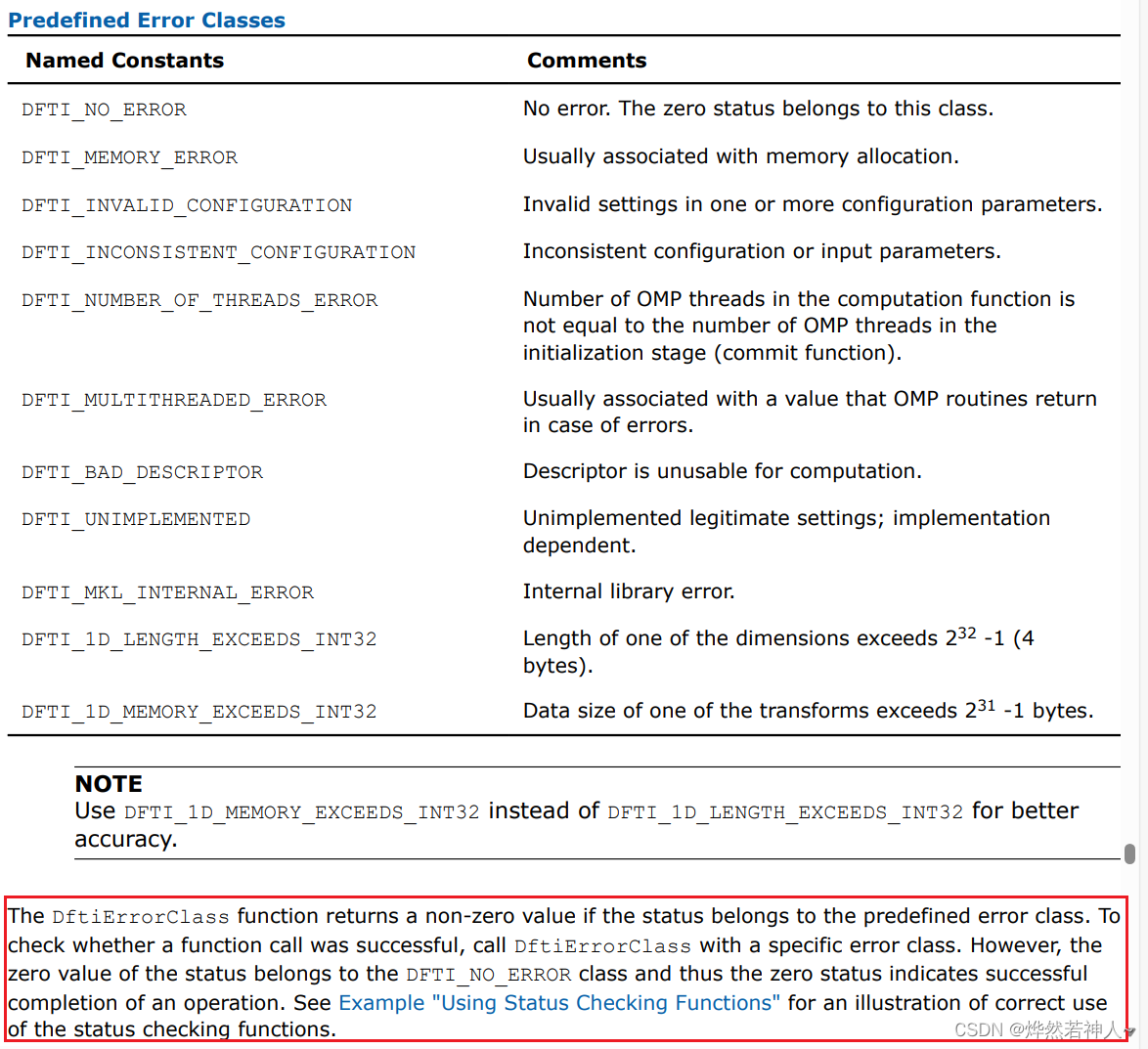
3 Using Status Checking Functions
This example illustrates the use of status checking functions described in “Fourier Transform Functions”
#include "mkl_dfti.h"
#include <complex>
//#include <stdio.h>
#include <iostream>
using namespace std;void main() {complex<float> c2c_data[32];DFTI_DESCRIPTOR_HANDLE desc = NULL;MKL_LONG status;//status = DftiCreateDescriptor(&desc, DFTI_SINGLE, DFTI_COMPLEX, 1, 32);status = DftiCommitDescriptor(desc);/*predicate = DftiErrorClass(status, error_class);error_class: predefined error class which type is MKL_LONGpredicate : result of checking which type is MKL_LONG*/if (status && !DftiErrorClass(status, DFTI_NO_ERROR)) {cout << "Error: " << DftiErrorMessage(status) << endl;}
}
4 Computing 2D FFT by One-Dimensional Transforms
略
5 Examples of Using OpenMP* Threading for FFT Computation
略
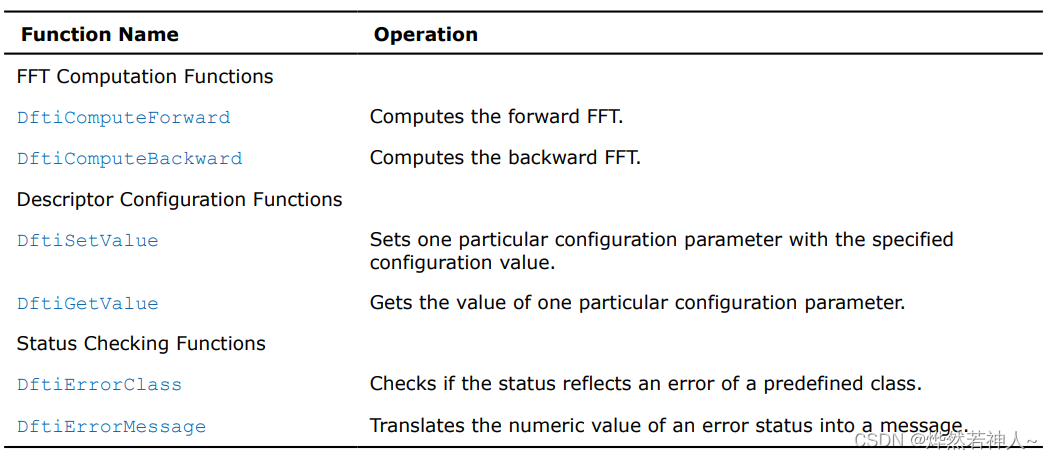
6 oneMKL 中 FFT 的所有函数
FFT函数的头文件是mkl_dfti.h

7 参数解释
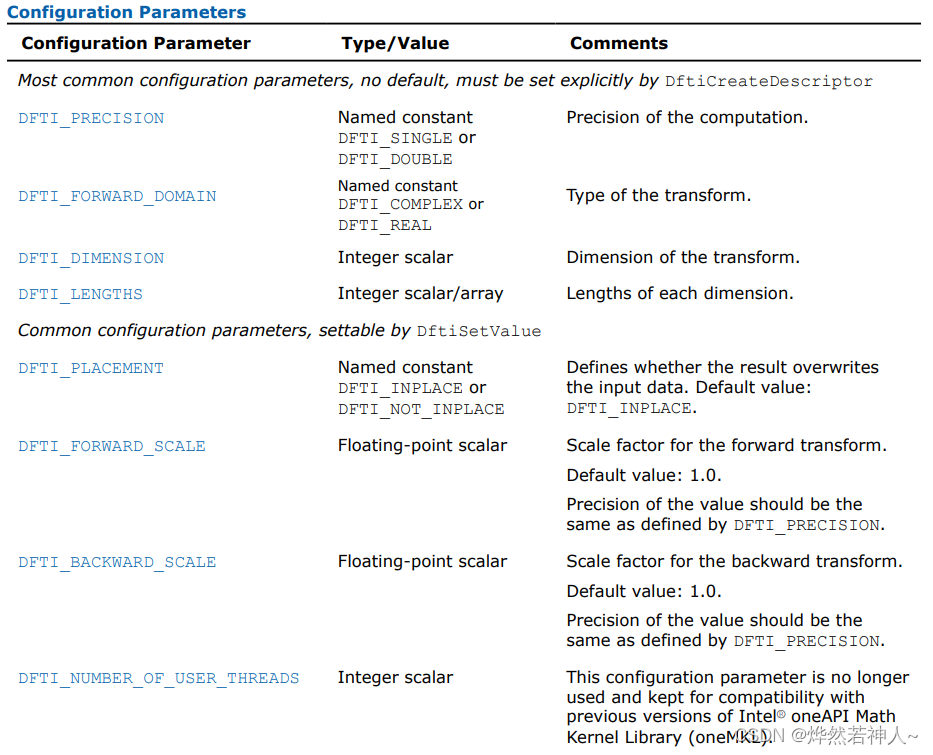
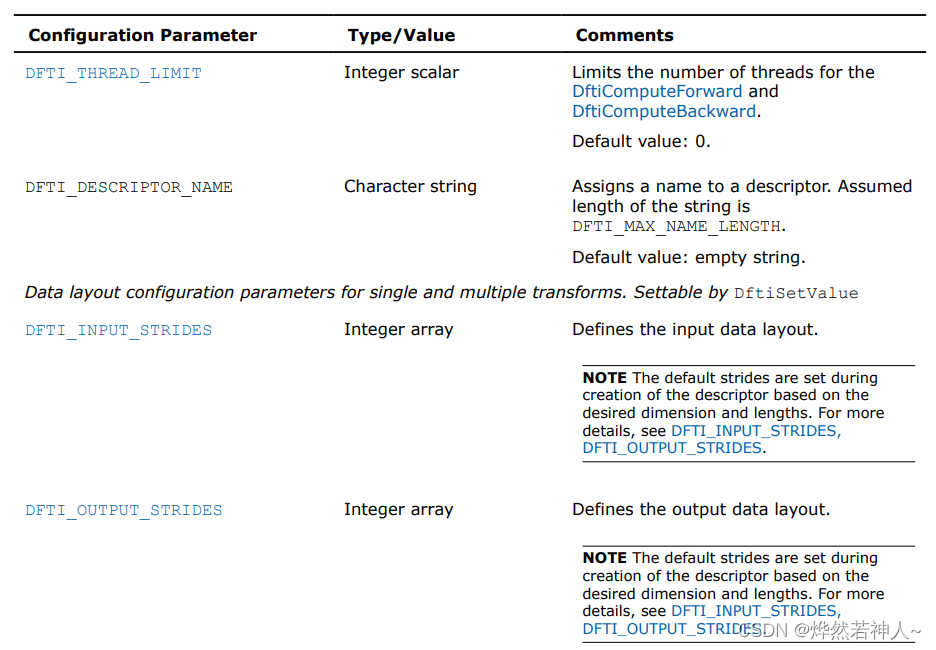
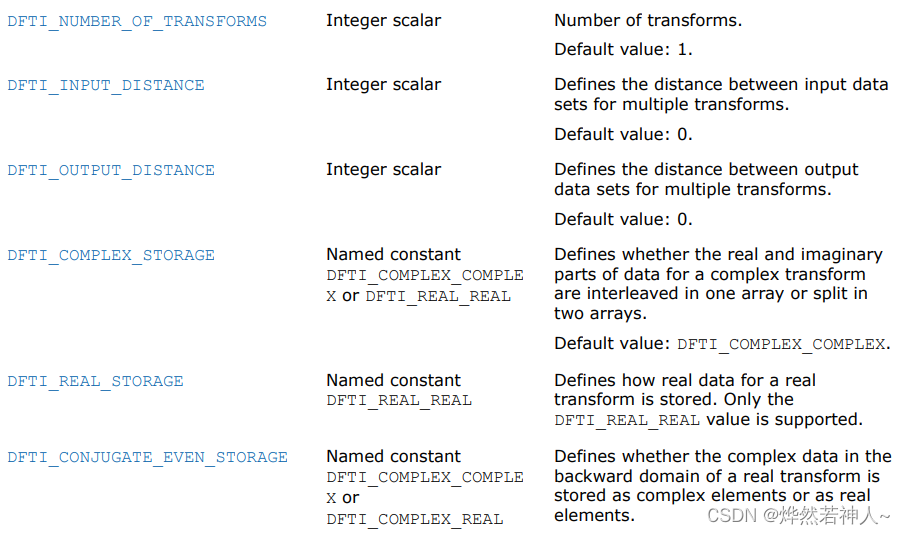
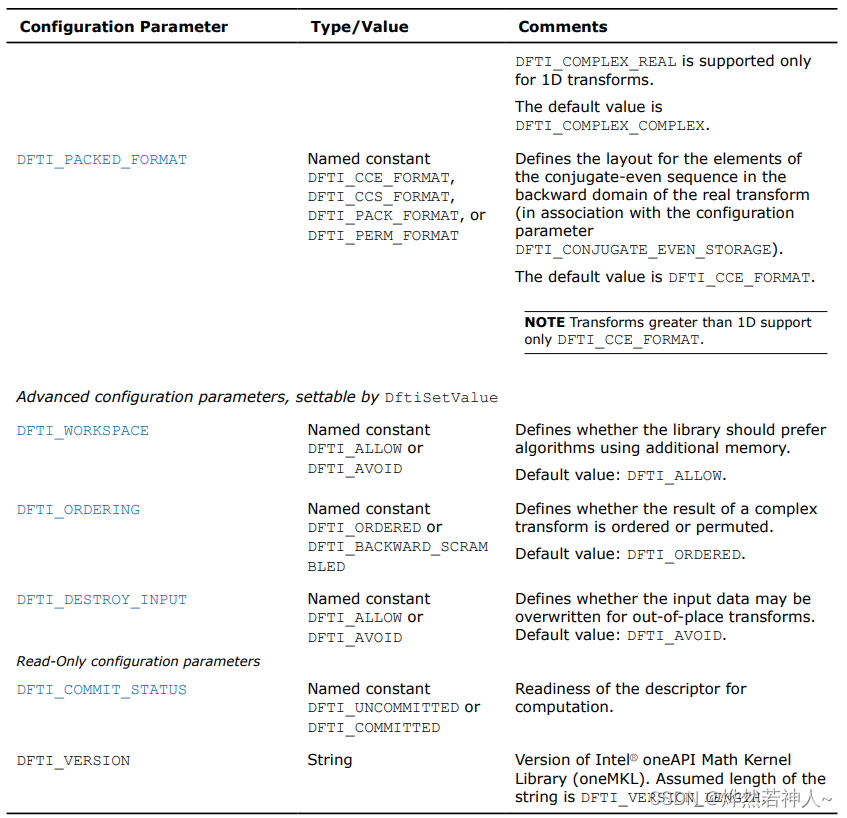
Configuration settings
在MKL_DFTI模型中,每一个配置参数都由一个命名了的常量(named constant)所确定。这些常量都有一个枚举类型(enumeration type)DFTI_CONFIG_PARAM 并且被定义在mkl_dfti.h头文件中。
相关文章:
oneMKL--FFT 基本使用
oneMKL–FFT 基本使用 本人基于官方文档的摘录与理解 oneMKL--FFT基本使用 oneMKL--FFT 基本使用1. Both FFT and Cluster FFT functions compute an FFT in five steps2 Computing an FFT2.1 缺省值2.2 Fourier Transform Funcions Code Examples2.2.1 One_dimentional In-p…...

软件测试工程师面试汇总Linux篇
Linux 命令篇 cd:切换目录 cd / #进入到系统根目录 cd . #进入到当前目录 cd .. #返回上层目录 cd /tmp #进入指定目录/tmp cd ~ #进入当前用户的家目录 2ls:列出当前目录的所有文件、文件夹(目录)信息; -l 列出目录或…...

【python】使用代理IP爬取猫眼电影专业评分数据
前言 我们为什么需要使用IP代理服务? 在编写爬虫程序的过程中,IP封锁无疑是一个常见且棘手的问题。尽管网络上存在大量的免费IP代理网站,但其质量往往参差不齐,令人堪忧。许多代理IP的延迟过高,严重影响了爬虫的工作…...
和结构体(struct)的异同)
C/C++中枚举(enum)和结构体(struct)的异同
一、枚举 enum 1.普通枚举,枚举在C中使用比C使用简单 C语言: enum Color {red,green,blue }; enum Color c red;C语言 enum Color {red,green,blue }; Color c red;C认为这种枚举方式会污染名字,即:枚举使用的名字,在同一个作…...
【数据可视化】使用Python + Gephi,构建中医方剂关系网络图!
代码和示例数据下载 前言 在这篇文章中,我们将会可视化 《七版方剂学》 的药材的关系,我们将使用Python制作节点和边的数据,然后在Gephi中绘制出方剂的网络图。 Gephi是一个专门用于构建网络图的工具,只要你能提供节点和边的数…...

部署prometheus+Grafana可视化仪表盘监控服务
一、部署prometheus及监控仪表盘 简介 Prometheus是开源监控报警系统和时序列数据库(TSDB)。 Prometheus的基本原理是通过HTTP协议周期性抓取被监控组件的状态,任意组件只要提供对应的HTTP接口就可以接入监控,输出被监控组件信息的HTTP接口被叫做expo…...

python中的类与对象
前言 在Python中,类是一种用于创建新类型对象的结构,它允许我们将数据和功能(属性和方法)封装到一个单独的逻辑单元中。类可以被看作是创建对象(实例)的蓝图或模板。类(Class)和对象…...
sentry-cli - error: Failed to load .sentryclirc file from project path
Xcode 15.2 warning sentry-cli - error: Failed to load .sentryclirc file from project path (/Users/zhuhongwei/Desktop/pandabill/.sentryclirc)推荐一下刚上线的 App 熊猫小账本,里面有用到这篇博客讲的内容 熊猫小账本 一个简洁的记账 App,用于…...
回归预测 | Matlab实现SO-BP蛇算法优化BP神经网络多变量回归预测
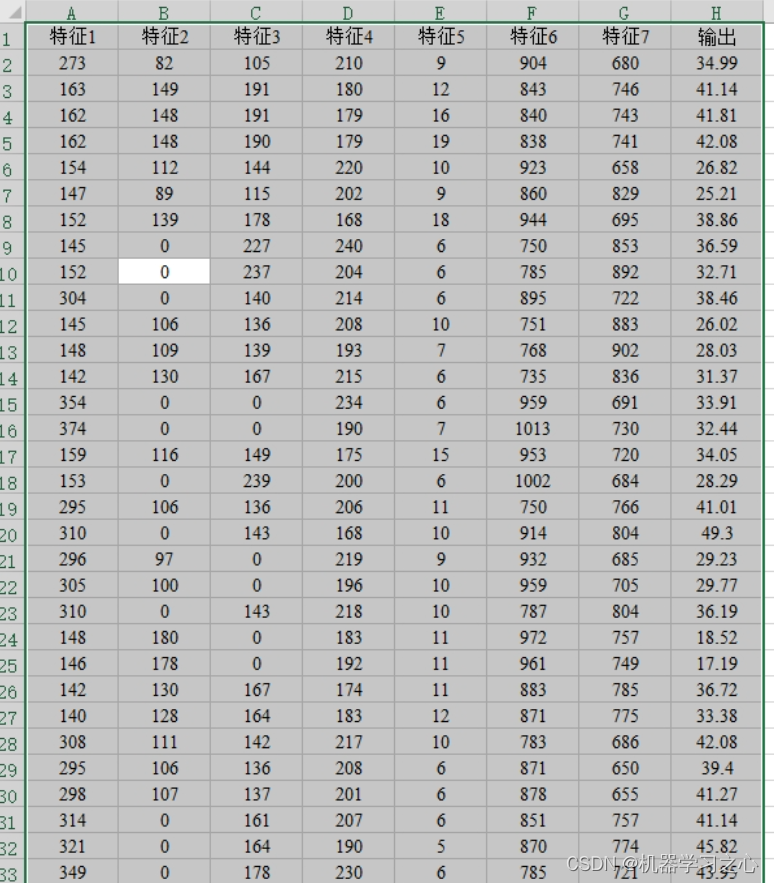
回归预测 | Matlab实现SO-BP蛇算法优化BP神经网络多变量回归预测 目录 回归预测 | Matlab实现SO-BP蛇算法优化BP神经网络多变量回归预测预测效果基本描述程序设计参考资料 预测效果 基本描述 1.Matlab实现SO-BP蛇算法优化BP神经网络多变量回归预测(完整源码和数据) …...

如何添加 Android Native 系统服务
如何添加 Android Native 系统服务 工作学习过程中,我们可能需要去阅读不同类型的 Native 系统服务,也有可能会自己去完成一个 Native 系统服务。无论哪种情况都需要我们了解基本的 Native 如何去添加。就像我们写 Android App 得先了解一下四大组件才行…...

【力扣】189.轮转数组
题目描述 给定一个整数数组 nums,将数组中的元素向右轮转 k 个位置,其中 k 是非负数。 示例 1: 输入: nums [1,2,3,4,5,6,7], k 3 输出: [5,6,7,1,2,3,4] 解释: 向右轮转 1 步: [7,1,2,3,4,5,6] 向右轮转 2 步: [6,7,1,2,3,4,5] 向右轮转 3 步: [5,6…...
C语言字符函数和字符串函数详解
Hello, 大家好,我是一代,今天给大家带来有关字符函数和字符串函数的有关知识 所属专栏:C语言 创作不易,望得到各位佬们的互三呦 一.字符函数 在C语言中有一些函数是专门为字符设计的,这些函数的使用都需要包含一个头文…...
【CKA模拟题】查询消耗CPU最多的Pod
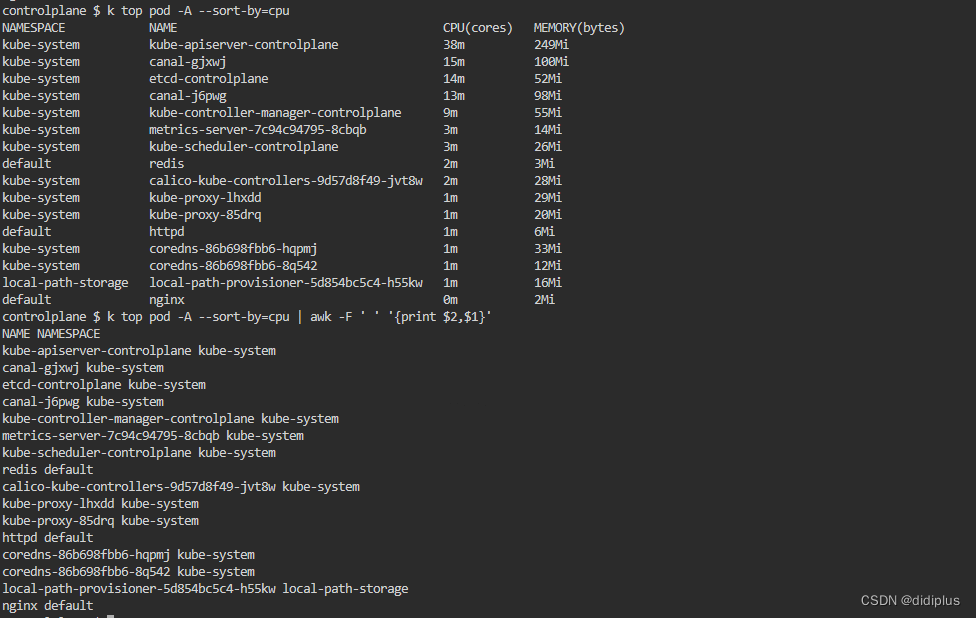
题干 For this question, please set this context (In exam, diff cluster name) 对于此问题,请设置此上下文(在考试中,diff 集群名称) kubectl config use-context kubernetes-adminkubernetesFind the pod that consumes the …...
网络简略总结
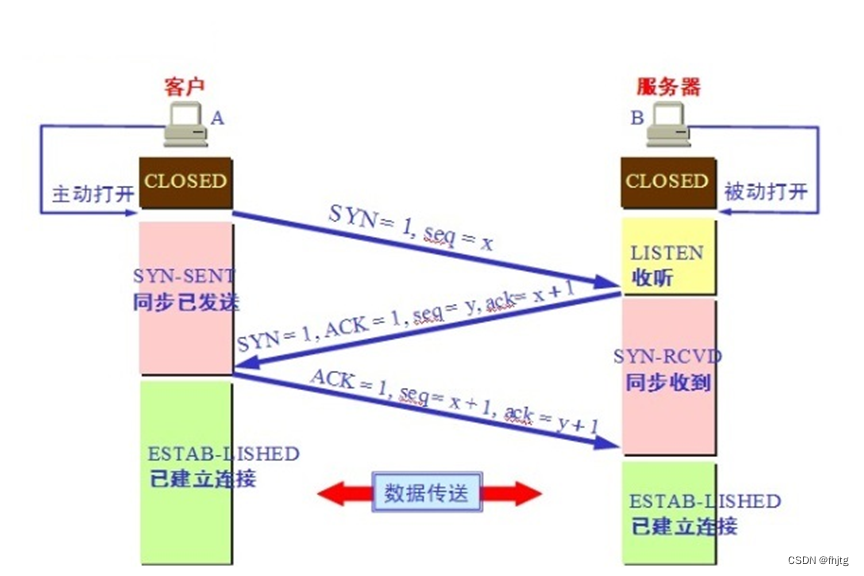
目录 一、三次握手 四次挥手 1、三次握手:为了建立长链接进行交互即建立一个会话,使用http/https协议 2、四次挥手是一个断开连接释放服务器资源的过程 3、如果已经建立了连接,但是客户端突然出现故障了怎么办? 4、谁可以中断连接?客户端还是服务端还是都可以? 5、…...

如何处理错误情况
处理错误情况是确保自动窗帘系统稳定运行的重要一环。在编写代码时,你需要考虑可能发生的各种错误情况,并编写相应的错误处理代码。下面是一些处理错误情况的常见方法: (1)错误检测: 首先,你需要能够检测到错误的发生。…...

【Greenhills】MULTI IDE-GHS最新版本Compiler 23.5.4的兼容性问题
【更多软件使用问题请点击亿道电子官方网站查询】 1、 文档目标 关于GHS推出的最新编译器版本 Compiler 2023.5.4在GHS以前版本的MULTI IDE上面能否使用的问题 2、 问题场景 针对于,客户使用MULTI IDE 8.1.4以前的IDE版本,想要搭载使用最新版本的编译器…...

用连续自然数之和来表达整数 - 华为OD统一考试(C卷)
OD统一考试(C卷) 分值: 100分 题解: Java / Python / C++ 题目描述 一个整数可以由连续的自然数之和来表示。给定一个整数,计算该整数有几种连续自然数之和的表达式,且打印出每种表达式。 输入描述 一个目标整数T (1 <=T<= 1000) 输出描述 该整数的所有表达式…...

SQLiteC/C++接口详细介绍之sqlite3类(十二)
返回目录:SQLite—免费开源数据库系列文章目录 上一篇:SQLiteC/C接口详细介绍之sqlite3类(十一) 下一篇:SQLiteC/C接口详细介绍之sqlite3类(十三) 37.sqlite3_load_extension 用于在SQLit…...
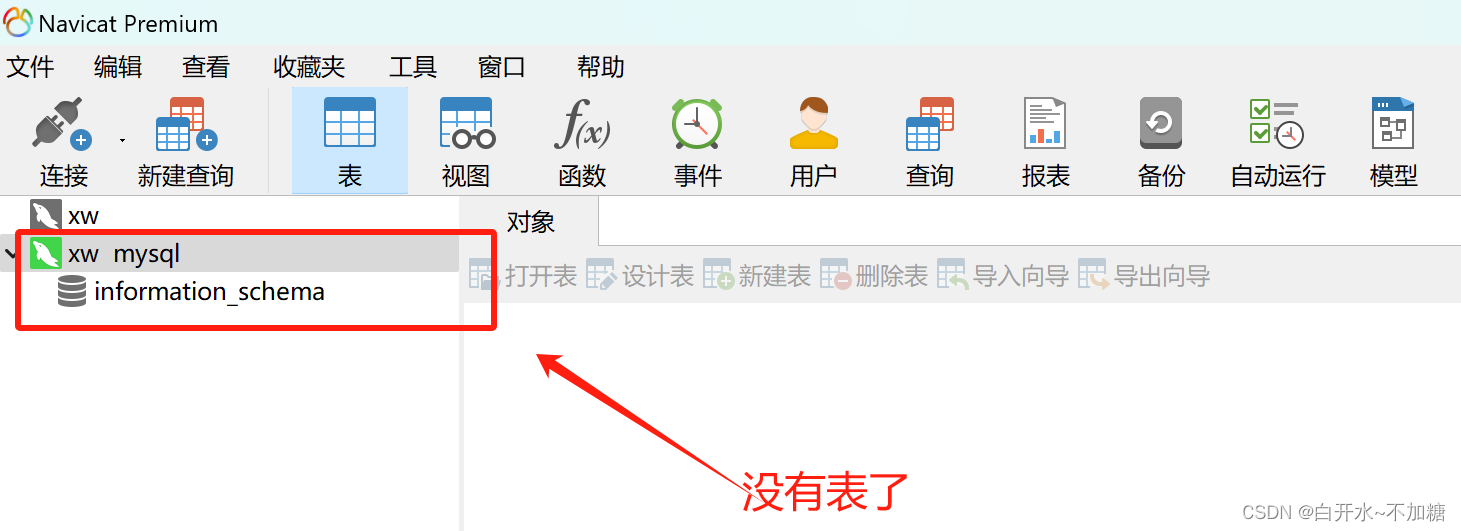
linux系统--------------mysql数据库管理
目录 一、SQL语句 1.1SQL语言分类 1.2查看数据库信息 1.3登录到你想登录的库 1.4查看数据库中的表信息 1.5显示数据表的结构(字段) 1.5.1数据表的结构 1.5.2常用的数据类型: 二、关系型数据库的四种语言 2.1DDL:数据定义语言&am…...
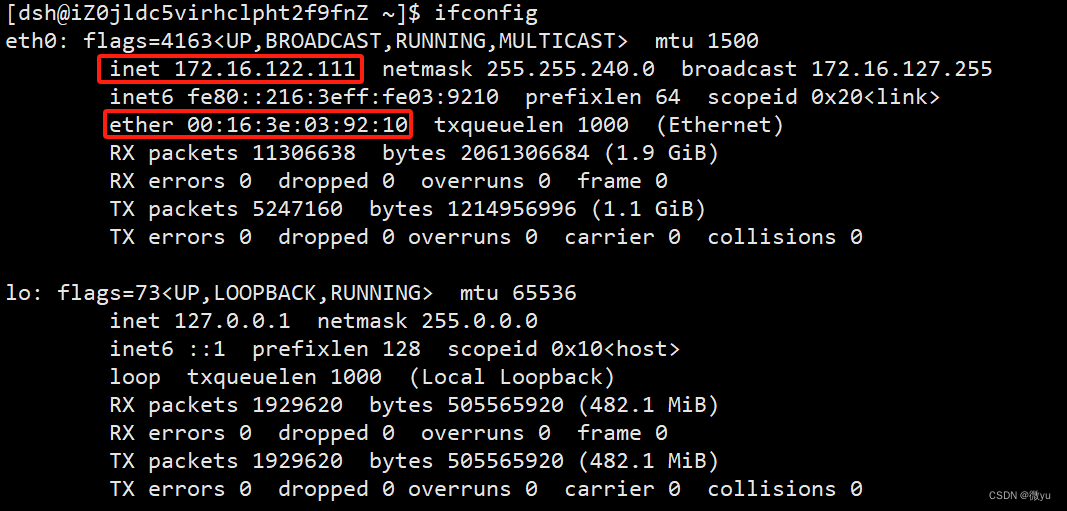
网络——入门基础
目录 协议 网络协议 OSI七层模型 网络传输基本流程 网络传输流程图 局域网通信 数据包的封装和解包 广域网通信 网络地址管理 IP地址 MAC地址 协议 关于什么是局域网,什么是广域网,我这里就不过多赘述了,我们直接来谈一下什么…...

【CP-05】RTE运行时环境 - SWC的操作系统接口
CP-05_RTE运行时环境【CP-05】RTE运行时环境 - SWC的“操作系统接口”前言在AUTOSAR架构中,RTE(Runtime Environment,运行时环境)是一个常被提及却难以理解的概念。它像是应用层软件组件(SW-C)与底层基础软…...
 第五篇:声明时的键值设计技巧:结构与内表的主键、非主键配置指南)
SAP-ABAP:变量、常量、结构与内表声明(10篇博客合集) 第五篇:声明时的键值设计技巧:结构与内表的主键、非主键配置指南
变量、常量、结构与内表声明(10篇博客合集) 第五篇:声明时的键值设计技巧:结构与内表的主键、非主键配置指南如果把内表比作一张内存中的“数据库表”,那么键就是这张表的索引甚至主键。键的设计直接决定了数据的唯一性…...

3步解锁专业级MMD创作:Blender插件如何重塑二次元动画工作流
3步解锁专业级MMD创作:Blender插件如何重塑二次元动画工作流 【免费下载链接】blender_mmd_tools MMD Tools is a blender addon for importing/exporting Models and Motions of MikuMikuDance. 项目地址: https://gitcode.com/gh_mirrors/bl/blender_mmd_tools …...

嵌入式快速原型开发:基于Sceptre平台与LPC2148的实战指南
1. 项目概述:Sceptre,一个被低估的嵌入式快速原型利器 在嵌入式开发的世界里,我们总是在寻找那个“刚刚好”的平台:它要足够强大,能跑复杂的算法;要足够小巧,能塞进各种外壳;要足够便…...

人类防伪指南:为什么你越写错字,HR越信你是真人?
前言各位码农、算法侠、CtrlC/V十级学者请注意:你有没有过这样的经历?辛辛苦苦肝了一晚上文档,逻辑严密、语法丝滑、连Markdown都对齐得像军训方阵,结果老板幽幽来一句:“这真是你自己写的?”那一刻&#x…...

别再只用递归了!用C语言栈实现非递归快速排序,内存效率提升实战
从递归到迭代:C语言栈实现非递归快速排序的工程实践 在嵌入式开发和大规模数据处理场景中,递归实现的快速排序常常面临栈溢出风险。当排序10万个元素的数组时,递归深度可能达到log₂100000≈17层,在仅有2KB栈空间的STM32F103上极易…...

Hermes Agent 框架如何对接 Taotoken 作为自定义模型供应商并配置环境变量
🚀 告别海外账号与网络限制!稳定直连全球优质大模型,限时半价接入中。 👉 点击领取海量免费额度 Hermes Agent 框架如何对接 Taotoken 作为自定义模型供应商并配置环境变量 Hermes Agent 是一个流行的 AI 代理开发框架࿰…...

实测对比,使用Taotoken聚合接口后Agent任务延迟与稳定性观感
🚀 告别海外账号与网络限制!稳定直连全球优质大模型,限时半价接入中。 👉 点击领取海量免费额度 实测记录:使用 Taotoken 聚合接口后 Agent 任务延迟与稳定性观感 效果展示类,记录将原有基于单一 API 的 A…...

[特殊字符] 高效统计排序数组中目标元素的出现次数
给定一个已排序的数组和一个目标值,如何快速统计该目标值在数组中出现的次数?这是面试中非常经典的一道题,今天就来聊聊两种解法:线性搜索和二分搜索。 问题描述 假设有一个已排序的数组 arr[] 和一个整数 target,需…...

如何高效使用开源电路仿真工具:CircuitJS1桌面版新手快速入门指南
如何高效使用开源电路仿真工具:CircuitJS1桌面版新手快速入门指南 【免费下载链接】circuitjs1 Standalone (offline) version of the Circuit Simulator with small modifications based on modified NW.js. 项目地址: https://gitcode.com/gh_mirrors/circ/circ…...