
webrtcP2P通话流程
文章目录
- webrtcP2P通话流程
- webrtc多对多 mesh方案
- webrtc多对多 mcu方案
- webrtc多对多 sfu方案
- webrtc案例测试
- getUserMedia
- getUserMedia基础示例-打开摄像头
- getUserMedia + canvas - 截图
- 打开共享屏幕
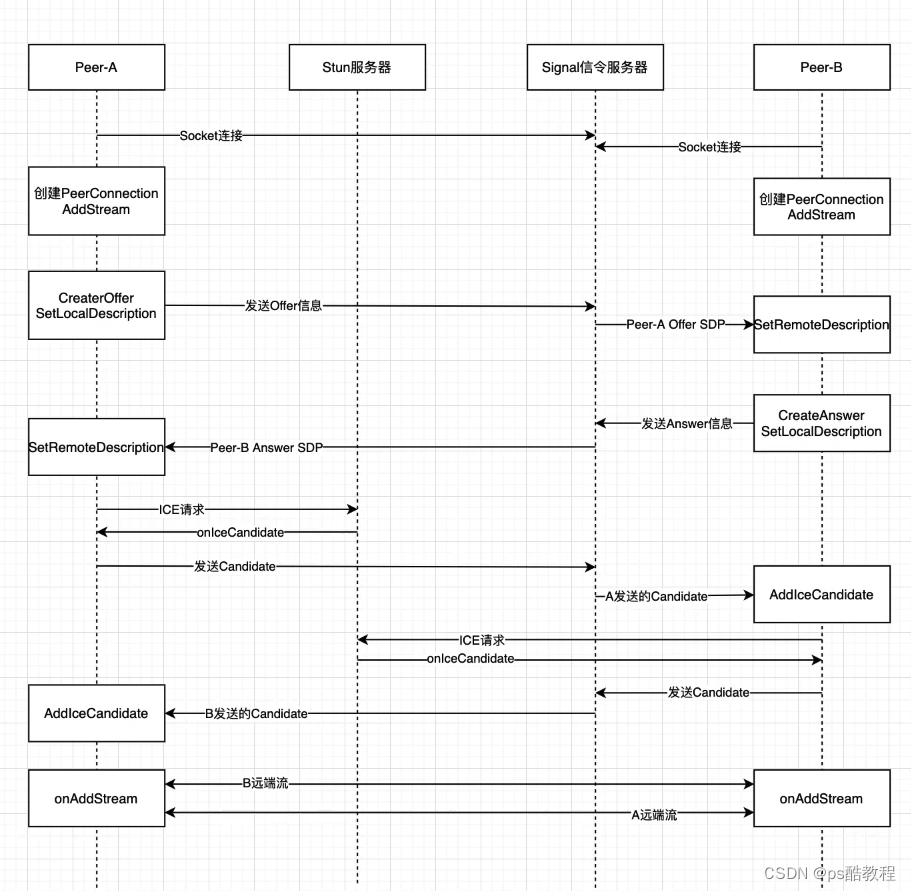
webrtcP2P通话流程
在这里,stun服务器包括stun服务和turn转发服务。信令服服务还包括im等功能
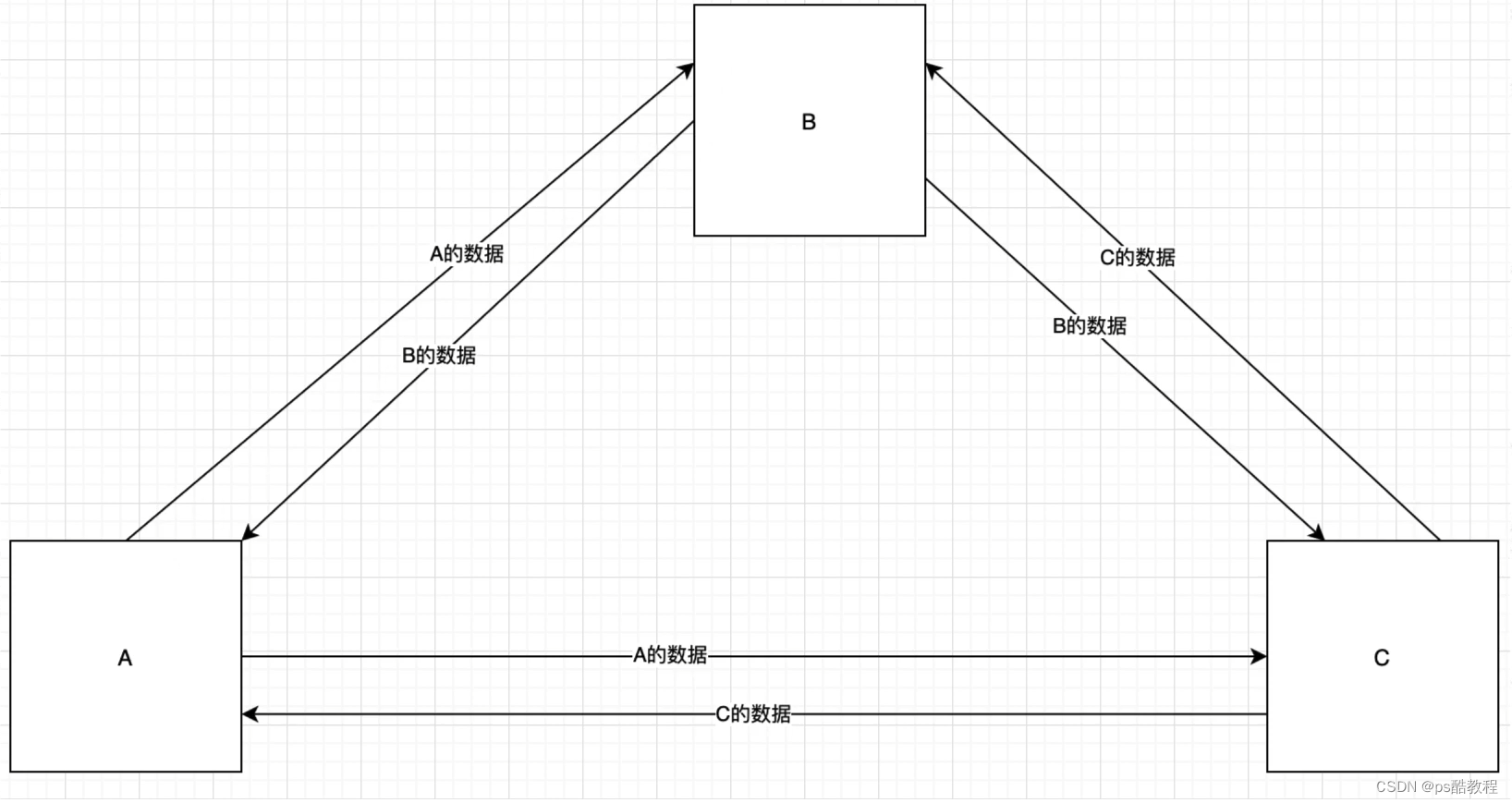
webrtc多对多 mesh方案
适合人数较少的场景
webrtc多对多 mcu方案
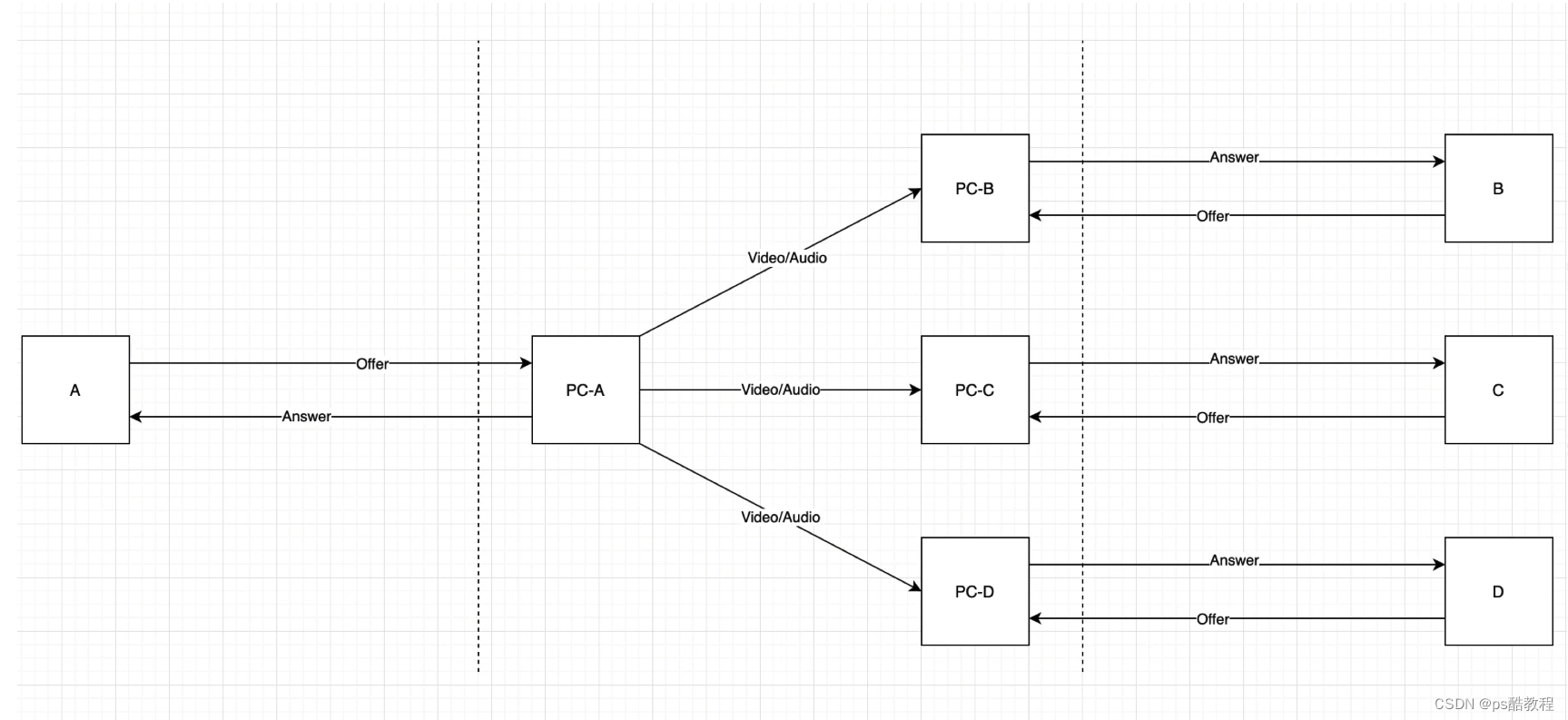
(multipoint control point)将上行的视频/音频合成,然后分发。对客户端来说压力不大,但对服务器消耗较大,但节省带宽。适合开会人多会议场景。

webrtc多对多 sfu方案
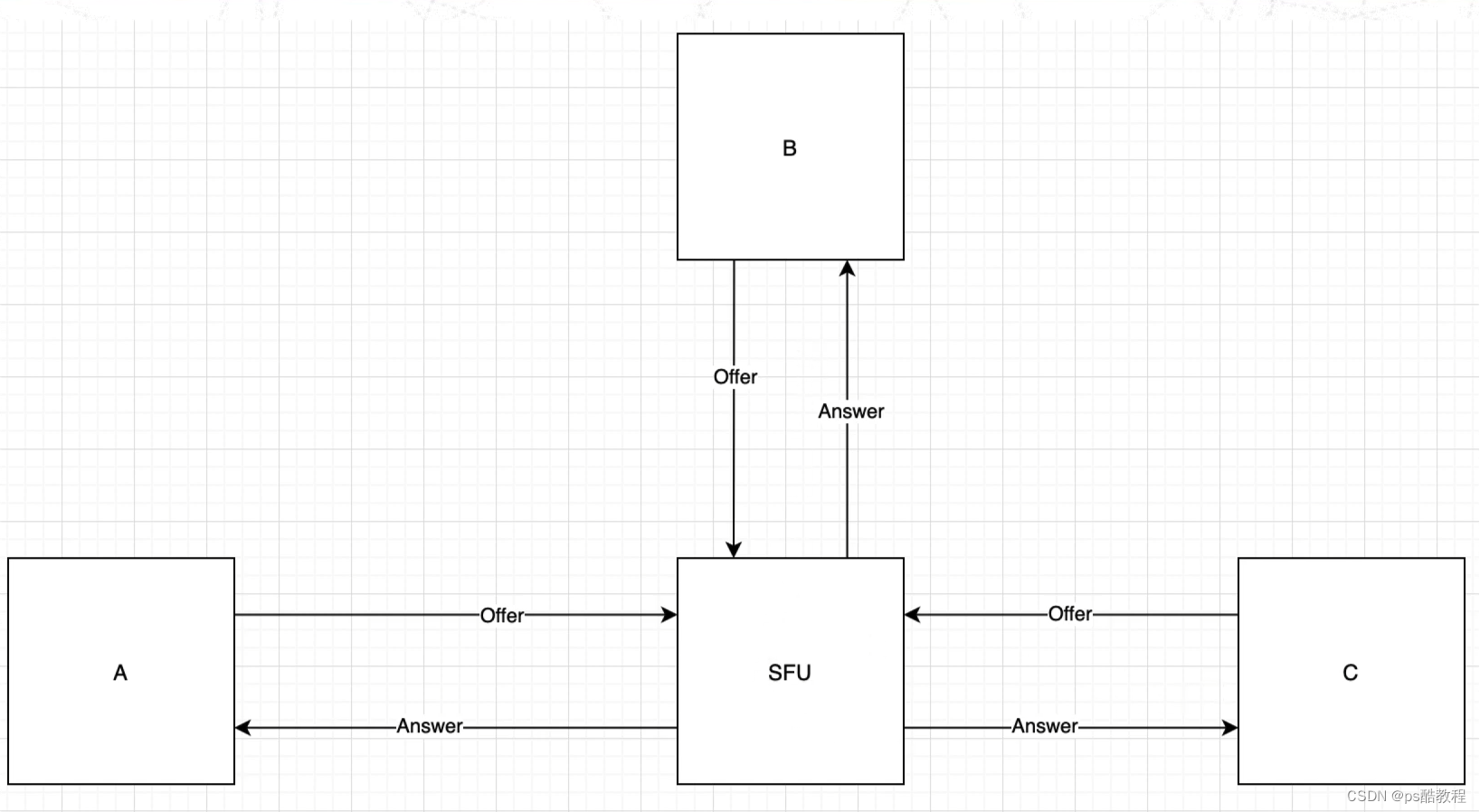
(selective forwarding unit)对服务器压力小,不需要太高配置,但对带宽要求较高,流量消耗大。

在sfu中,它们的通信过程如下
再单独看下客户端与sfu的通信过程,并且在sfu内部的流媒体转发过程
webrtc案例测试
samples代码 https://github.com/webrtc/samples?tab=readme-ov-file
案例页面地址
要注意的一点是,如果不是本机地址,那就需要https,否则获取媒体的方法会调用不了
里面有不少示例,需要花时间看看
<!DOCTYPE html>
<!--*  Copyright (c) 2015 The WebRTC project authors. All Rights Reserved.**  Use of this source code is governed by a BSD-style license*  that can be found in the LICENSE file in the root of the source*  tree.
-->
<html>
<head><meta charset="utf-8"><meta name="description" content="WebRTC Javascript code samples"><meta name="viewport" content="width=device-width, user-scalable=yes, initial-scale=1, maximum-scale=1"><meta itemprop="description" content="Client-side WebRTC code samples"><meta itemprop="image" content="src/images/webrtc-icon-192x192.png"><meta itemprop="name" content="WebRTC code samples"><meta name="mobile-web-app-capable" content="yes"><meta id="theme-color" name="theme-color" content="#ffffff"><base target="_blank"><title>WebRTC samples</title><link rel="icon" sizes="192x192" href="src/images/webrtc-icon-192x192.png"><link href="https://fonts.googleapis.com/css?family=Roboto:300,400,500,700" rel="stylesheet" type="text/css"><link rel="stylesheet" href="src/css/main.css"/><style>h2 {font-size: 1.5em;font-weight: 500;}h3 {border-top: none;}section {border-bottom: 1px solid #eee;margin: 0 0 1.5em 0;padding: 0 0 1.5em 0;}section:last-child {border-bottom: none;margin: 0;padding: 0;}</style>
</head><body>
<div id="container"><h1>WebRTC samples</h1><section><p>This is a collection of small samples demonstrating various parts of the <ahref="https://developer.mozilla.org/en-US/docs/Web/API/WebRTC_API">WebRTC APIs</a>. The code for allsamples are available in the <a href="https://github.com/webrtc/samples">GitHub repository</a>.</p><p>Most of the samples use <a href="https://github.com/webrtc/adapter">adapter.js</a>, a shim to insulate appsfrom spec changes and prefix differences.</p><p><a href="https://webrtc.org/getting-started/testing" title="Command-line flags for WebRTC testing">https://webrtc.org/getting-started/testing</a>lists command line flags useful for development and testing with Chrome.</p><p>Patches and issues welcome! See <a href="https://github.com/webrtc/samples/blob/gh-pages/CONTRIBUTING.md">CONTRIBUTING.md</a>for instructions.</p><p class="warning"><strong>Warning:</strong> It is highly recommended to use headphones when testing thesesamples, as it will otherwise risk loud audio feedback on your system.</p></section><section><h2 id="getusermedia"><a href="https://developer.mozilla.org/en-US/docs/Web/API/MediaDevices/getUserMedia">getUserMedia():</a></h2><p class="description">Access media devices</p><ul><li><a href="src/content/getusermedia/gum/">Basic getUserMedia demo</a></li><li><a href="src/content/getusermedia/canvas/">Use getUserMedia with canvas</a></li><li><a href="src/content/getusermedia/filter/">Use getUserMedia with canvas and CSS filters</a></li><li><a href="src/content/getusermedia/resolution/">Choose camera resolution</a></li><li><a href="src/content/getusermedia/audio/">Audio-only getUserMedia() output to local audio element</a></li><li><a href="src/content/getusermedia/volume/">Audio-only getUserMedia() displaying volume</a></li><li><a href="src/content/getusermedia/record/">Record stream</a></li><li><a href="src/content/getusermedia/getdisplaymedia/">Screensharing with getDisplayMedia</a></li><li><a href="src/content/getusermedia/pan-tilt-zoom/">Control camera pan, tilt, and zoom</a></li><li><a href="src/content/getusermedia/exposure/">Control exposure</a></li></ul><h2 id="devices">Devices:</h2><p class="description">Query media devices</p><ul><li><a href="src/content/devices/input-output/">Choose camera, microphone and speaker</a></li><li><a href="src/content/devices/multi/">Choose media source and audio output</a></li></ul><h2 id="capture">Stream capture:</h2><p class="description">Stream from canvas or video elements</p><ul><li><a href="src/content/capture/video-video/">Stream from a video element to a video element</a></li><li><a href="src/content/capture/video-pc/">Stream from a video element to a peer connection</a></li><li><a href="src/content/capture/canvas-video/">Stream from a canvas element to a video element</a></li><li><a href="src/content/capture/canvas-pc/">Stream from a canvas element to a peer connection</a></li><li><a href="src/content/capture/canvas-record/">Record a stream from a canvas element</a></li><li><a href="src/content/capture/video-contenthint/">Guiding video encoding with content hints</a></li></ul><h2 id="peerconnection"><a href="https://developer.mozilla.org/en-US/docs/Web/API/RTCPeerConnection">RTCPeerConnection:</a></h2><p class="description">Controlling peer connectivity</p><ul><li><a href="src/content/peerconnection/pc1/">Basic peer connection demo in a single tab</a></li><li><a href="src/content/peerconnection/channel/">Basic peer connection demo between two tabs</a></li><li><a href="src/content/peerconnection/perfect-negotiation/">Peer connection using Perfect Negotiation</a></li><li><a href="src/content/peerconnection/audio/">Audio-only peer connection demo</a></li><li><a href="src/content/peerconnection/bandwidth/">Change bandwidth on the fly</a></li><li><a href="src/content/peerconnection/change-codecs/">Change codecs before the call</a></li><li><a href="src/content/peerconnection/upgrade/">Upgrade a call and turn video on</a></li><li><a href="src/content/peerconnection/multiple/">Multiple peer connections at once</a></li><li><a href="src/content/peerconnection/multiple-relay/">Forward the output of one PC into another</a></li><li><a href="src/content/peerconnection/munge-sdp/">Munge SDP parameters</a></li><li><a href="src/content/peerconnection/pr-answer/">Use pranswer when setting up a peer connection</a></li><li><a href="src/content/peerconnection/constraints/">Constraints and stats</a></li><li><a href="src/content/peerconnection/old-new-stats/">More constraints and stats</a></li><li><a href="src/content/peerconnection/per-frame-callback/">RTCPeerConnection and requestVideoFrameCallback()</a></li><li><a href="src/content/peerconnection/create-offer/">Display createOffer output for various scenarios</a></li><li><a href="src/content/peerconnection/dtmf/">Use RTCDTMFSender</a></li><li><a href="src/content/peerconnection/states/">Display peer connection states</a></li><li><a href="src/content/peerconnection/trickle-ice/">ICE candidate gathering from STUN/TURN servers</a></li><li><a href="src/content/peerconnection/restart-ice/">Do an ICE restart</a></li><li><a href="src/content/peerconnection/webaudio-input/">Web Audio output as input to peer connection</a></li><li><a href="src/content/peerconnection/webaudio-output/">Peer connection as input to Web Audio</a></li><li><a href="src/content/peerconnection/negotiate-timing/">Measure how long renegotiation takes</a></li><li><a href="src/content/extensions/svc/">Choose scalablilityMode before call - Scalable Video Coding (SVC) Extension </a></li></ul><h2 id="datachannel"><ahref="https://developer.mozilla.org/en-US/docs/Web/API/RTCDataChannel">RTCDataChannel:</a></h2><p class="description">Send arbitrary data over peer connections</p><ul><li><a href="src/content/datachannel/basic/">Transmit text</a></li><li><a href="src/content/datachannel/filetransfer/">Transfer a file</a></li><li><a href="src/content/datachannel/datatransfer/">Transfer data</a></li><li><a href="src/content/datachannel/channel/">Basic datachannel demo between two tabs</a></li><li><a href="src/content/datachannel/messaging/">Messaging</a></li></ul><h2 id="videoChat">Video chat:</h2><p class="description">Full featured WebRTC application</p><ul><li><a href="https://github.com/webrtc/apprtc/">AppRTC video chat client</a> that you can run out of a Docker image</li></ul><h2 id="capture">Insertable Streams:</h2><p class="description">API for processing media</p><ul><li><a href="src/content/insertable-streams/endtoend-encryption">End to end encryption using WebRTC Insertable Streams</a></li> (Experimental)<li><a href="src/content/insertable-streams/video-analyzer">Video analyzer using WebRTC Insertable Streams</a></li> (Experimental)<li><a href="src/content/insertable-streams/video-processing">Video processing using MediaStream Insertable Streams</a></li> (Experimental)<li><a href="src/content/insertable-streams/audio-processing">Audio processing using MediaStream Insertable Streams</a></li> (Experimental)<li><a href="src/content/insertable-streams/video-crop">Video cropping using MediaStream Insertable Streams in a Worker</a></li> (Experimental)<li><a href="src/content/insertable-streams/webgpu">Integrations with WebGPU for custom video rendering:</a></li> (Experimental)</ul>   </section></div><script src="src/js/lib/ga.js"></script></body>
</html>
getUserMedia
getUserMedia基础示例-打开摄像头
<template><video ref="videoRef" autoplay playsinline></video><button @click="openCamera">打开摄像头</button><button @click="closeCamera">关闭摄像头</button>
</template><script lang="ts" setup name="gum">import { ref } from 'vue';const videoRef = ref()let stream = null // 打开摄像头
const openCamera = async function () {stream = await navigator.mediaDevices.getUserMedia({audio: false,video: true});const videoTracks = stream.getVideoTracks();console.log(`Using video device: ${videoTracks[0].label}`);videoRef.value.srcObject = stream}// 关闭摄像头
const closeCamera = function() {const videoTracks = stream.getVideoTracks();stream.getTracks().forEach(function(track) {track.stop();});
}</script>
getUserMedia + canvas - 截图
<template><video ref="videoRef" autoplay playsinline></video><button @click="shootScreen">截图</button><button @click="closeCamera">关闭摄像头</button><canvas ref="canvasRef"></canvas>
</template><script lang="ts" setup name="gum">import { ref, onMounted } from 'vue';const videoRef = ref()
const canvasRef = ref()
let stream = nullonMounted(() => {canvasRef.value.width = 480;canvasRef.value.height = 360;// 打开摄像头const openCamera = async function () {stream = await navigator.mediaDevices.getUserMedia({audio: false,video: true});const videoTracks = stream.getVideoTracks();console.log(`Using video device: ${videoTracks[0].label}`);videoRef.value.srcObject = stream}openCamera()})// 截图
const shootScreen = function () {canvasRef.value.width = videoRef.value.videoWidth;canvasRef.value.height = videoRef.value.videoHeight;canvasRef.value.getContext('2d').drawImage(videoRef.value, 0, 0, canvasRef.value.width, canvasRef.value.height);
}// 关闭摄像头
const closeCamera = function() {const videoTracks = stream.getVideoTracks();stream.getTracks().forEach(function(track) {track.stop();});
}
</script>
打开共享屏幕
<template><video ref="myVideoRef" autoPlay playsinline  width="50%"></video><button @click="openCarmera">打开共享屏幕</button>
</template><script lang="ts" setup name="App">import {ref} from 'vue'const myVideoRef = ref()// 打开共享屏幕的代码const openScreen = async ()=>{const constraints = {video: true}try{const stream = await navigator.mediaDevices.getDisplayMedia(constraints);const videoTracks = stream.getTracks();console.log('使用的设备是: ' + videoTracks[0].label)myVideoRef.value.srcObject = stream}catch(error) {}}</script>
相关文章:
webrtcP2P通话流程
文章目录 webrtcP2P通话流程webrtc多对多 mesh方案webrtc多对多 mcu方案webrtc多对多 sfu方案webrtc案例测试getUserMediagetUserMedia基础示例-打开摄像头getUserMedia canvas - 截图 打开共享屏幕 webrtcP2P通话流程 在这里,stun服务器包括stun服务和turn转发服…...
游戏引擎中的物理系统
一、物理对象与形状 1.1 对象 Actor 一般来说,游戏中的对象(Actor)分为以下四类: 静态对象 Static Actor动态对象 Dynamic Actor ---- 可能受到力/扭矩/冲量的影响检测器 TriggerKinematic Actor 运动学对象 ---- 忽略物理法则…...
【C++ STL有序关联容器】map 映射
文章目录 【 1. 基本原理 】【 2. map 的创建 】2.1 调用默认构造函数,创建一个空的 map2.2 map 被构造的同时初始化2.3 通过一个 queue 初始化另一个 queue2.4 取已建 map 中指定区域内的键值对,初始化新的 map2.5 指定排序规则 【 2. map 元素的操作 】…...
)
【ZZULIOJ】1041: 数列求和2(Java)
目录 题目描述 输入 输出 样例输入 Copy 样例输出 Copy code 题目描述 输入一个整数n,输出数列1-1/31/5-……前n项的和。 输入 输入只有一个整数n。 输出 结果保留2为小数,单独占一行。 样例输入 Copy 3 样例输出 Copy 0.87 code import java.util…...
C++【适配器模式】
简单介绍 适配器模式是一种结构型设计模式 | 它能使接口不兼容的对象能够相互合作。(是适配各种不同接口的一个中间件) 基础理解 举个例子:当你引用了一个第三方数据分析库,但这个库的接口只能兼容JSON 格式的数据。但你需要它…...
go | 上传文件分析 | http协议分析 | 使用openssl 实现 https 协议 server.key、server.pem
是这样的,现在分析抓包数据 test.go package mainimport ("fmt""log""github.com/gin-gonic/gin" )func main() {r : gin.Default()// Upload single filer.MaxMultipartMemory 8 << 20r.POST("/upload", func(c *g…...
Chatgpt掘金之旅—有爱AI商业实战篇|专业博客|(六)
演示站点: https://ai.uaai.cn 对话模块 官方论坛: www.jingyuai.com 京娱AI 一、AI技术创业博客领域有哪些机会? 人工智能(AI)技术作为当今科技创新的前沿领域,为创业者提供了广阔的机会和挑战。随着AI技…...

单例模式 JAVA
单例模式 什么是单例模式? 1、单例类只能有一个实例。2、单例类必须自己创建自己的唯一实例。3、单例类必须给所有其他对象提供这一实例。 应用:数据库的连接类,这样就可以确保只创建一次。节省资源。 单例模式代码:涉及懒加载…...
C++从入门到精通——初步认识面向对象及类的引入
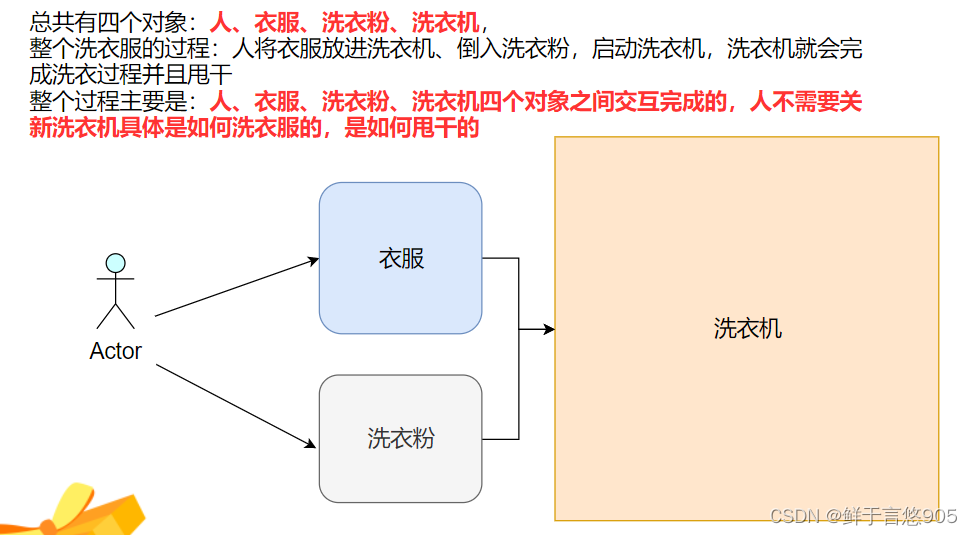
初步认识面向对象及类的引入 前言一、面向过程和面向对象初步认识C语言C 二、类的引入C的类名代表什么示例 C与C语言的struct的比较成员函数访问权限继承默认构造函数默认成员初始化结构体大小 总结 前言 面向过程注重任务的流程和控制,适合简单任务和流程固定的场…...
GitHub入门与实践
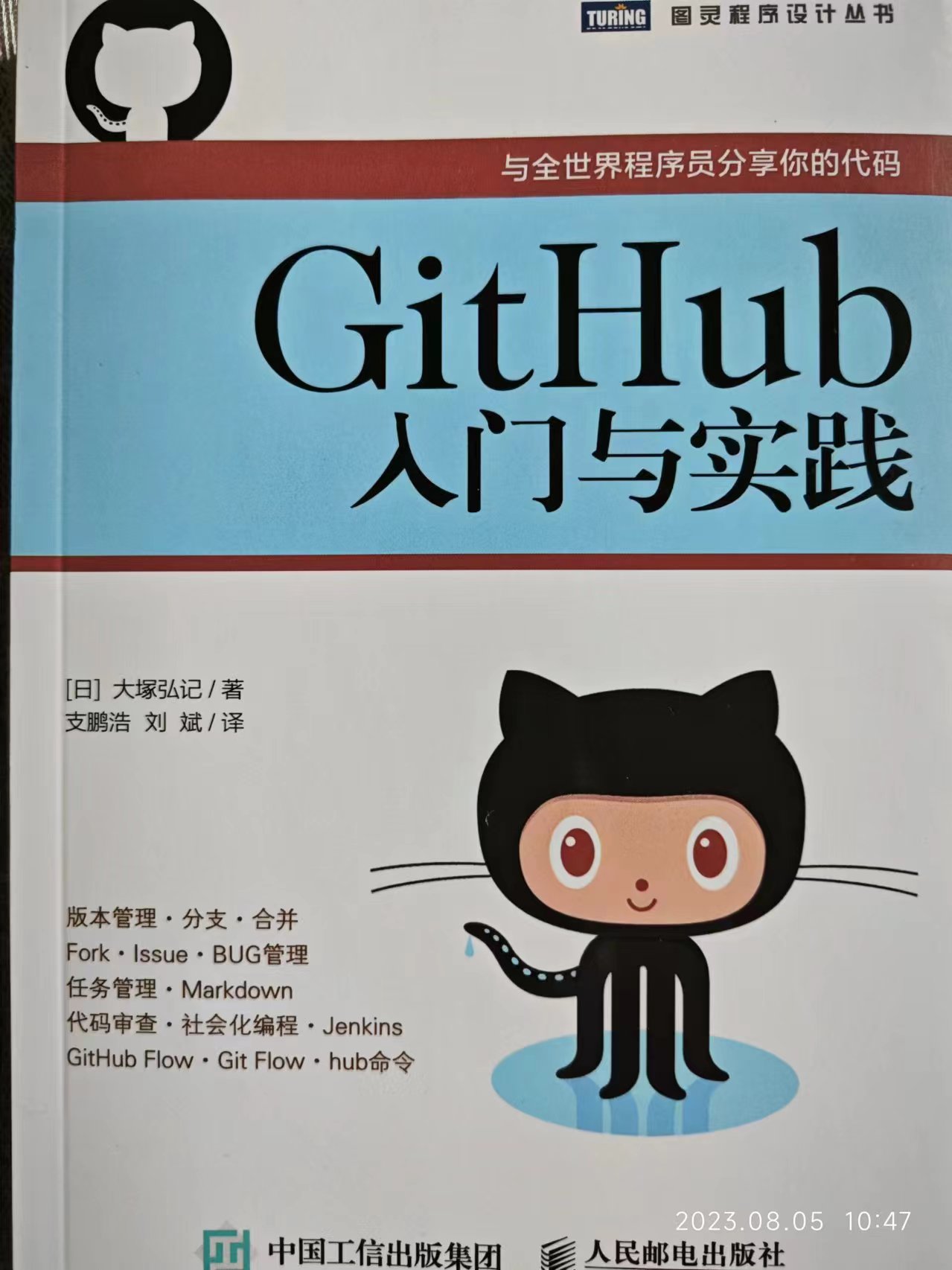
ISBN: 978-7-115-39409-5 作者:【日】大塚弘记 译者:支鹏浩、刘斌 页数:255页 阅读时间:2023-08-05 推荐指数:★★★★★ 好久之前读完的了,一直没有写笔记。 这本入门Git的书籍还是非常推荐的,…...

centos 安装 stable-diffusion 详细流程
一、安装git 新版 先安装git 工具来更新git源码 , 载下源码后卸载git 版本(centos 默认1.8版本,说是安装会引起失败) 安装git 命令,可使用 git --version查看版本 sudo yum install git -y 卸载git命令 sudo yum remove git 正式源码安装…...

CSS编写登录框样式
/* 重置浏览器默认样式 */ * { margin: 0; padding: 0; box-sizing: border-box; } /* 设置登录框的基本样式 */ .login-box { width: 100%; max-width: 400px; margin: 50px auto; background-color: #f4f4f4; padding: 20px; box-shad…...
)
Python|OpenCV-获取鼠标点击位置的坐标,并绘制图像(13)
前言 本文是该专栏的第14篇,后面将持续分享OpenCV计算机视觉的干货知识,记得关注。 本文主要来详细说明,基于OpenCV来获取鼠标点击位置的坐标,并按坐标的位置进行自动绘制图像。具体怎么实现,笔者在正文中将结合实际代码案例进行详细说明。 具体细节部分以及完整代码的实…...
:命令模式)
设计模式(14):命令模式
介绍 将一个请求封装为一个对象,从而使我们可用不同的请求对象客户进行参数化;对请求排队或者记录请求日志,以及支持可撤销的操作。也称之为:动作Action模式,事务transaction模式。 命令模式角色 抽象命令类(Comman…...

关于阿里云云数据库自动扩缩容和自动SQL优化的20道面试题
1. 请解释阿里云云数据库自动扩缩容的概念及其工作原理。 阿里云云数据库自动扩缩容是一种基于数据库实例的实时性能数据,能够发现流量异常并提供合理的数据库规格建议和磁盘容量建议的功能。其工作原理如下: 性能监控:系统会实时监控数据库…...
mkcert生成ssl证书+nginx部署局域网内的https服务访问问题
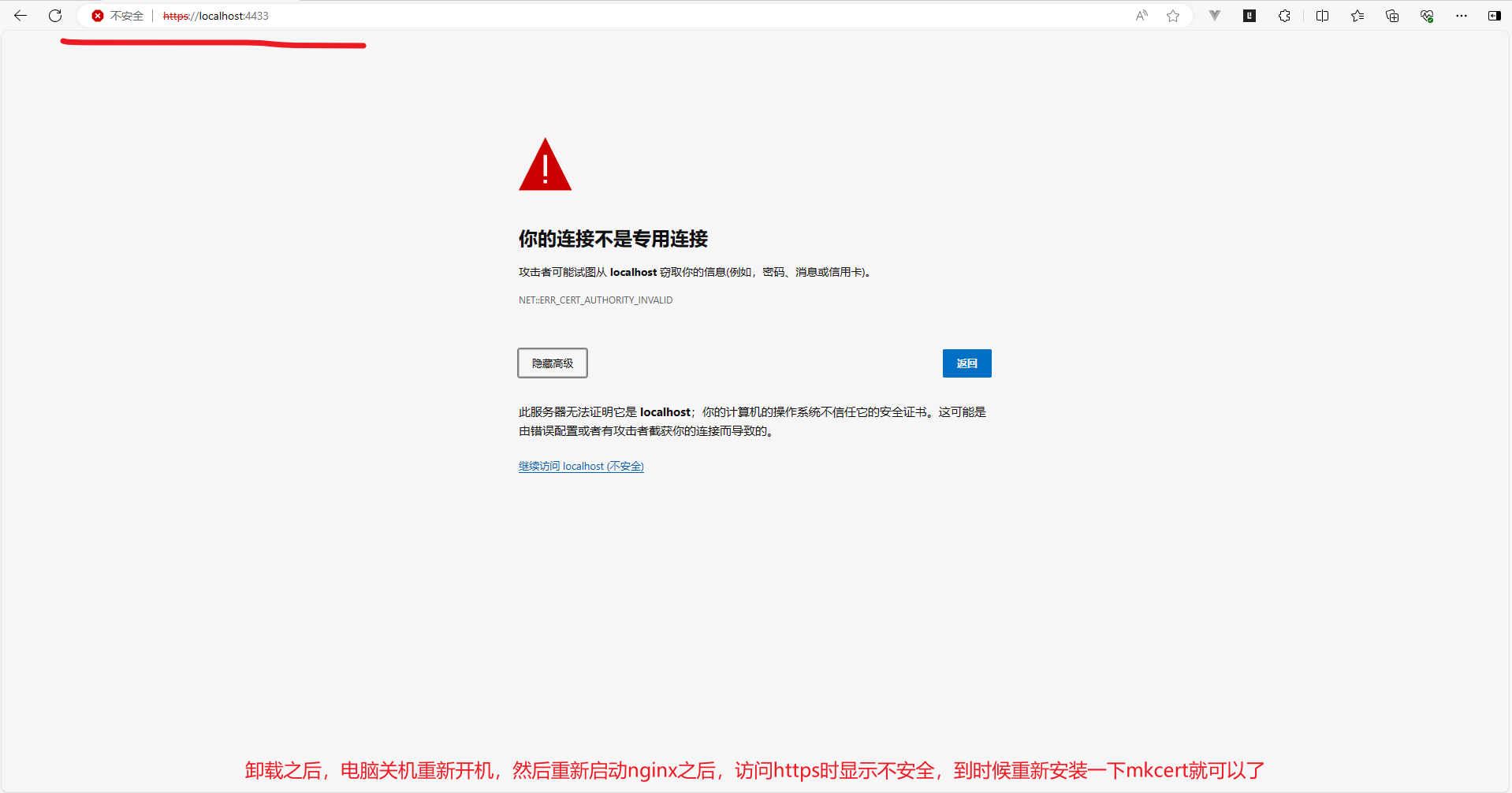
文章目录 mkcert生成ssl证书nginx部署局域网内的https服务访问问题1、下载mkcert查看自己的电脑是arm还是amd架构 2、安装mkcert3、测试mkcert是否安装成功4、查看CA证书存放位置5、打开windows的证书控制台6、生成自签证书,可供局域网内使用其他主机访问以下是nginx部署https服…...
PTA C 1050 螺旋矩阵(思路与优化)
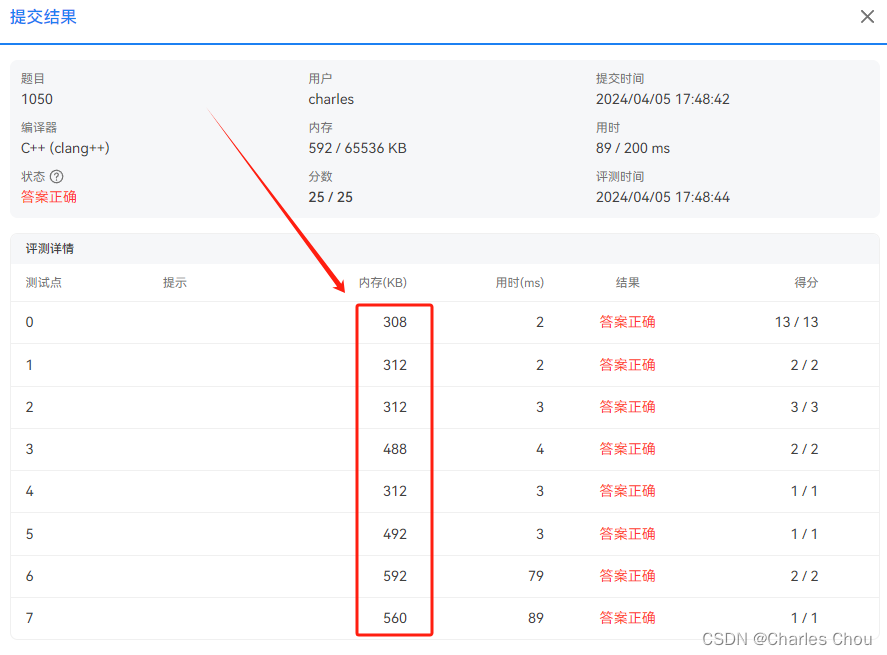
本题要求将给定的 N 个正整数按非递增的顺序,填入“螺旋矩阵”。所谓“螺旋矩阵”,是指从左上角第 1 个格子开始,按顺时针螺旋方向填充。要求矩阵的规模为 m 行 n 列,满足条件:mn 等于 N;m≥n;且…...
神经网络分类和回归任务实战
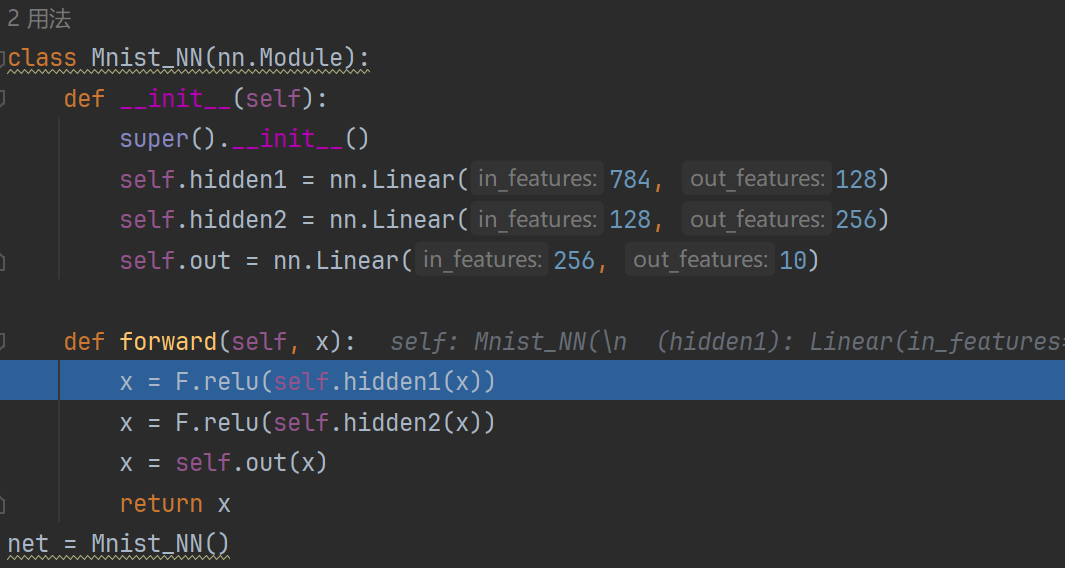
学习方法:torch 边用边学,边查边学 真正用查的过程才是学习的过程 直接上案例,先来跑,遇到什么解决什么 数据集Minist 数据集 做简单的任务 Minist 分类任务 总体代码(可以跑通) from pathlib import …...
【数据结构】考研真题攻克与重点知识点剖析 - 第 4 篇:串
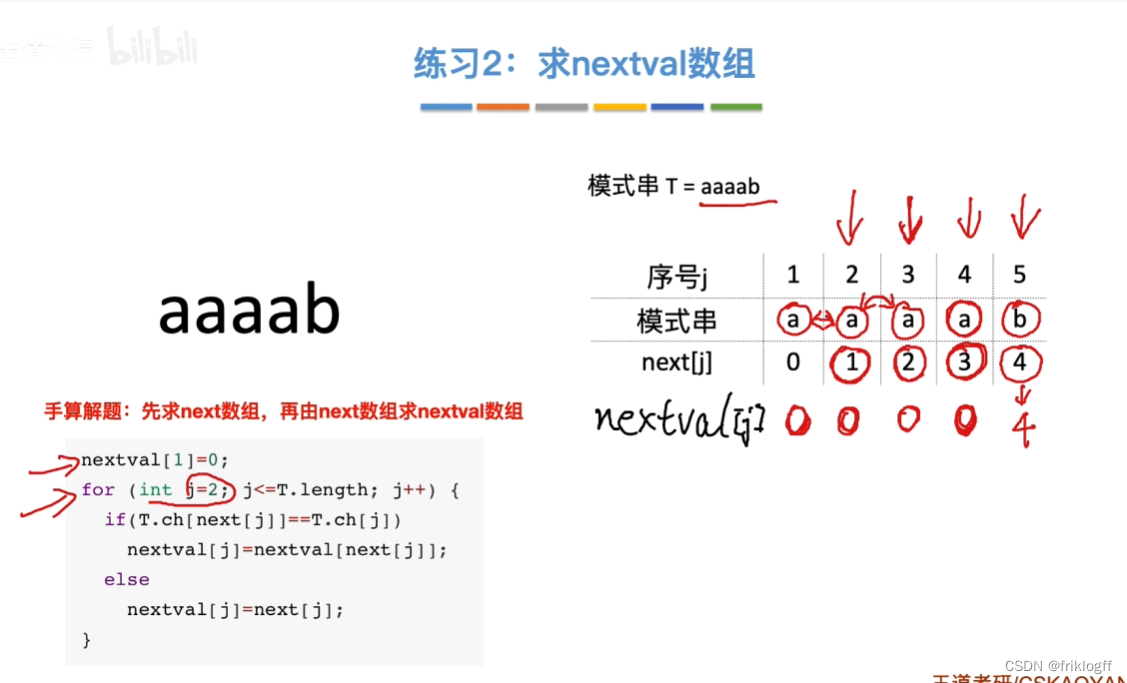
前言 本文基础知识部分来自于b站:分享笔记的好人儿的思维导图与王道考研课程,感谢大佬的开源精神,习题来自老师划的重点以及考研真题。此前我尝试了完全使用Python或是结合大语言模型对考研真题进行数据清洗与可视化分析,本人技术…...

深入浅出 -- 系统架构之分布式多形态的存储型集群
一、多形态的存储型集群 在上阶段,我们简单聊了下集群的基本知识,以及快速过了一下逻辑处理型集群的内容,下面重点来看看存储型集群,毕竟这块才是重头戏,集群的形态在其中有着多种多样的变化。 逻辑处理型的应用&…...

终极浏览器资源嗅探指南:解锁网页媒体捕获的完整方案
终极浏览器资源嗅探指南:解锁网页媒体捕获的完整方案 【免费下载链接】cat-catch 猫抓 浏览器资源嗅探扩展 / cat-catch Browser Resource Sniffing Extension 项目地址: https://gitcode.com/GitHub_Trending/ca/cat-catch 在数字内容无处不在的今天&#x…...

ARM核心板存储选型实战:从DDR到eMMC的避坑指南
1. 项目概述:一个被低估的硬件选型难题在嵌入式系统开发,尤其是基于ARM架构的工控和核心板设计中,存储选型常常被新手甚至一些有经验的工程师视为一个“小问题”。不就是选个Flash和RAM吗?很多人会这么想。然而,在我十…...
)
DeepSeek SSO权限同步失效深度复盘(附完整日志追踪链路图)
更多请点击: https://intelliparadigm.com 第一章:DeepSeek SSO权限同步失效深度复盘(附完整日志追踪链路图) 问题现象与影响范围 2024年10月17日 02:48 UTC,DeepSeek内部SSO系统(基于Keycloak 22.0.5&am…...

如何用AI语音修复工具VoiceFixer:快速拯救受损音频的完整指南
如何用AI语音修复工具VoiceFixer:快速拯救受损音频的完整指南 【免费下载链接】voicefixer General Speech Restoration 项目地址: https://gitcode.com/gh_mirrors/vo/voicefixer 还在为嘈杂的录音、失真的语音或老旧音频而烦恼吗?VoiceFixer是一…...

TEngine与服务器集成:.NET Core 8.0前后端一体化开发指南
TEngine与服务器集成:.NET Core 8.0前后端一体化开发指南 【免费下载链接】TEngine Unity 商用级别开发框架,原生内置 AI 工作流支持,集成 HybridCLR 高性能热更、Obfuz 代码混淆加固、YooAssets 企业级资源管理方案,构建高效、安…...

使用openclaw配置taotoken实现自动化agent工作流的实践指南
🚀 告别海外账号与网络限制!稳定直连全球优质大模型,限时半价接入中。 👉 点击领取海量免费额度 使用OpenClaw配置Taotoken实现自动化Agent工作流的实践指南 1. 概述:OpenClaw与Taotoken的集成价值 OpenClaw是一个用…...

Cursor设备标识重置技术:3分钟解决试用限制的完整方案
Cursor设备标识重置技术:3分钟解决试用限制的完整方案 【免费下载链接】go-cursor-help 解决Cursor在免费订阅期间出现以下提示的问题: Your request has been blocked as our system has detected suspicious activity / Youve reached your trial request limit. …...

给程序员和数据分析师的气象学入门:搞懂城市边界层,让你的天气API数据不再‘失真’
给程序员和数据分析师的气象学入门:搞懂城市边界层,让你的天气API数据不再‘失真’ 当你在调用天气API时,是否遇到过这样的困惑:明明获取的是同一个城市的温度数据,为什么市中心的气温总比郊区高出几度?为什…...

终极指南:如何免费搭建专业的电子实验室笔记本系统
终极指南:如何免费搭建专业的电子实验室笔记本系统 【免费下载链接】elabftw :notebook: eLabFTW is the most popular open source electronic lab notebook for research labs. 项目地址: https://gitcode.com/gh_mirrors/el/elabftw eLabFTW是一款功能强大…...

全志D1s开发板RT-Smart环境搭建:从工具链到烧录的完整实践指南
1. 项目概述与核心价值最近在折腾一块搭载了全志D1s芯片的开发板,目标是在上面跑RT-Smart实时操作系统。这听起来像是一个标准的嵌入式开发流程,但实际操作下来,从环境搭建到第一个程序跑起来,中间踩的坑一个接一个,远…...