
Debian mariadb 10.11设定表名 大小写不敏感方法
目录
问题表现:应用中查询 表提示 表不存在
处理步骤:
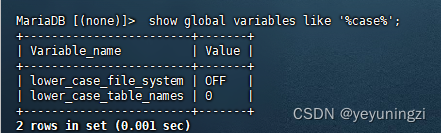
1、查询表名大小写敏感情况: show global variables like '%case%';
2、修改mariadb 配置设置大小写 不敏感
mysql 配置大小写不敏感
mariadb 10.11设置表名大小写不敏感
/etc/mysql/mariadb.conf.d/ 目录下的文件
总结:在mariadb 10.11以及以后的版本中,要配置表名大小写敏感问题,一般修改修改配置文件:/etc/mysql/mariadb.conf.d/50-server.cnf 在 [mysqld] 段 添加属性:lower_case_table_names=1 然后重启服务
问题表现:应用中查询 表提示 表不存在
问题处理办法: 1、先确认表存在,然后再确认数据库中表名的大小写。与mysql 一致再 mariadb中:
lower_case_file_system:表示当前系统文件是否大小写敏感(ON为不敏感,OFF为敏感),只读参数,无法修改。
lower_case_table_names:表示表名是否大小写敏感,可以修改。
lower_case_table_names = 0时,mysql会根据表名直接操作,大小写敏感
lower_case_table_names = 1时,大小写不敏感,mysql会先把表名转为小写,再执行操作。
处理步骤:
1、查询表名大小写敏感情况: show global variables like '%case%';
2、mariadb 配置设置大小写 不敏感
mariadb虽说与mysql类似,但是从mariadb 10.11开始,与mysql配置是有明显区别的(至少我这里看到是这样,具体哪个版本开始不一样,我也不知道...)
mysql 配置大小写不敏感
mysql 配置大小写不敏感操作如下:实际上以前版本的mariadb也可以这样做:
vi /etc/my.cnf 通过配置文件/etc/my.cnf下的【mysqld】添加如下内容:
| lower_case_table_names=1 |
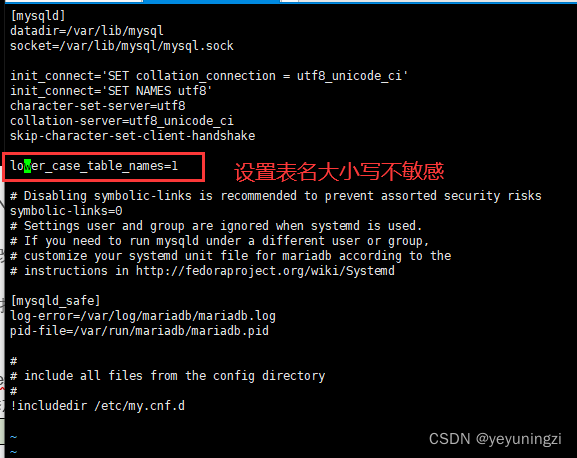
设置好之后,重启数据库服务。
mariadb 10.11设置表名大小写不敏感
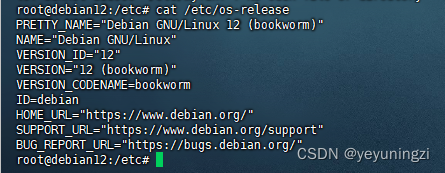
在 debian 12环境中,mariadb 10.11已经没有 /etc/my.cnf配置文件了 :

通过find / -name my.cnf 可以查询到 :
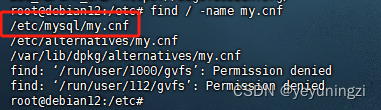
配置文件变成了:/etc/mysql/my.cnf
查看配置文件:/etc/mysql/my.cnf
可以发现内容如下:
# The MariaDB configuration file
#
# The MariaDB/MySQL tools read configuration files in the following order:
# 0. "/etc/mysql/my.cnf" symlinks to this file, reason why all the rest is read.
# 1. "/etc/mysql/mariadb.cnf" (this file) to set global defaults,
# 2. "/etc/mysql/conf.d/*.cnf" to set global options.
# 3. "/etc/mysql/mariadb.conf.d/*.cnf" to set MariaDB-only options.
# 4. "~/.my.cnf" to set user-specific options.
#
# If the same option is defined multiple times, the last one will apply.
#
# One can use all long options that the program supports.
# Run program with --help to get a list of available options and with
# --print-defaults to see which it would actually understand and use.
#
# If you are new to MariaDB, check out https://mariadb.com/kb/en/basic-mariadb-articles/#
# This group is read both by the client and the server
# use it for options that affect everything
#
[client-server]
# Port or socket location where to connect
port = 3306
socket = /run/mysqld/mysqld.sock[mysqld]
lower_case_table_names=1# Import all .cnf files from configuration directory
!includedir /etc/mysql/conf.d/
!includedir /etc/mysql/mariadb.conf.d/
关键信息:# The MariaDB/MySQL tools read configuration files in the following order:
# 0. "/etc/mysql/my.cnf" symlinks to this file, reason why all the rest is read.
# 1. "/etc/mysql/mariadb.cnf" (this file) to set global defaults,
# 2. "/etc/mysql/conf.d/*.cnf" to set global options.
# 3. "/etc/mysql/mariadb.conf.d/*.cnf" to set MariaDB-only options.
# 4. "~/.my.cnf" to set user-specific options.
可以看到 读取的配置文件顺序为:
1、 /etc/mysql/my.cnf、
2、/etc/mysql/mariadb.cnf、
3、/etc/mysql/conf.d/*.cnf
4、/etc/mysql/mariadb.conf.d/ 以及 ~/.my.cnf
结合说明,可以发现 以往的
[mysqld]
lower_case_table_names=1 在 /etc/mysql/my.cnf 是没有生效的。
查看其他配置文件: cat /etc/mysql/mariadb.cnf
| cat /etc/mysql/mariadb.cnf # [mysqld] # Import all .cnf files from configuration directory |
可以看到 在 /etc/mysql/mariadb.cnf 中设置 [mysqld]
lower_case_table_names=1 也是无效的。
查看其他配置文件:
在/etc/mysql/conf.d文件夹下有:mysql.cnf 以及 mysqldump.cnf

cat mysql.cnf 
可见:mysql段的设定单独提取到了:/etc/mysql/conf.d/mysql.cnf 里:
尝试 在/etc/mysql/conf.d/mysql.cnf 里加上 lower_case_table_names=1 :
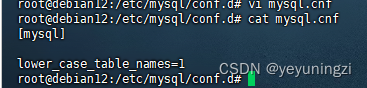
然后重启 mariadb 服务再验证:
直接报错:mysql: unknown variable 'lower_case_table_names=1' 可见这种方式也不行。需要把配置文件 /etc/mysql/conf.d/mysql.cnf 还原回来。
/etc/mysql/mariadb.conf.d/ 目录下的文件
先看一下 /etc/mysql/mariadb.conf.d/ 目录下的文件:

实在不知道 文件用处,直接cat 查看,比如,当前我使用的这个mariadb 10.11的版本
50-client.cnf文件内容:
#
# This group is read by the client library
# Use it for options that affect all clients, but not the server
#[client]
# Example of client certificate usage
#ssl-cert = /etc/mysql/client-cert.pem
#ssl-key = /etc/mysql/client-key.pem
#
# Allow only TLS encrypted connections
#ssl-verify-server-cert = on# This group is *never* read by mysql client library, though this
# /etc/mysql/mariadb.cnf.d/client.cnf file is not read by Oracle MySQL
# client anyway.
# If you use the same .cnf file for MySQL and MariaDB,
# use it for MariaDB-only client options
[client-mariadb]
default-character-set=utf8mb4
50-server.cnf 文件内容如下:
#
# These groups are read by MariaDB server.
# Use it for options that only the server (but not clients) should see# this is read by the standalone daemon and embedded servers
[server]# this is only for the mysqld standalone daemon
[mysqld]#
# * Basic Settings
##user = mysql
pid-file = /run/mysqld/mysqld.pid
basedir = /usr
#datadir = /var/lib/mysql
#tmpdir = /tmp# Broken reverse DNS slows down connections considerably and name resolve is
# safe to skip if there are no "host by domain name" access grants
#skip-name-resolve# Instead of skip-networking the default is now to listen only on
# localhost which is more compatible and is not less secure.
bind-address = 127.0.0.1#
# * Fine Tuning
##key_buffer_size = 128M
#max_allowed_packet = 1G
#thread_stack = 192K
#thread_cache_size = 8
# This replaces the startup script and checks MyISAM tables if needed
# the first time they are touched
#myisam_recover_options = BACKUP
#max_connections = 100
#table_cache = 64#
# * Logging and Replication
## Note: The configured log file or its directory need to be created
# and be writable by the mysql user, e.g.:
# $ sudo mkdir -m 2750 /var/log/mysql
# $ sudo chown mysql /var/log/mysql# Both location gets rotated by the cronjob.
# Be aware that this log type is a performance killer.
# Recommend only changing this at runtime for short testing periods if needed!
#general_log_file = /var/log/mysql/mysql.log
#general_log = 1# When running under systemd, error logging goes via stdout/stderr to journald
# and when running legacy init error logging goes to syslog due to
# /etc/mysql/conf.d/mariadb.conf.d/50-mysqld_safe.cnf
# Enable this if you want to have error logging into a separate file
#log_error = /var/log/mysql/error.log
# Enable the slow query log to see queries with especially long duration
#log_slow_query_file = /var/log/mysql/mariadb-slow.log
#log_slow_query_time = 10
#log_slow_verbosity = query_plan,explain
#log-queries-not-using-indexes
#log_slow_min_examined_row_limit = 1000# The following can be used as easy to replay backup logs or for replication.
# note: if you are setting up a replication slave, see README.Debian about
# other settings you may need to change.
#server-id = 1
#log_bin = /var/log/mysql/mysql-bin.log
expire_logs_days = 10
#max_binlog_size = 100M#
# * SSL/TLS
## For documentation, please read
# https://mariadb.com/kb/en/securing-connections-for-client-and-server/
#ssl-ca = /etc/mysql/cacert.pem
#ssl-cert = /etc/mysql/server-cert.pem
#ssl-key = /etc/mysql/server-key.pem
#require-secure-transport = on#
# * Character sets
## MySQL/MariaDB default is Latin1, but in Debian we rather default to the full
# utf8 4-byte character set. See also client.cnf
character-set-server = utf8mb4
collation-server = utf8mb4_general_ci#
# * InnoDB
## InnoDB is enabled by default with a 10MB datafile in /var/lib/mysql/.
# Read the manual for more InnoDB related options. There are many!
# Most important is to give InnoDB 80 % of the system RAM for buffer use:
# https://mariadb.com/kb/en/innodb-system-variables/#innodb_buffer_pool_size
#innodb_buffer_pool_size = 8G# this is only for embedded server
[embedded]# This group is only read by MariaDB servers, not by MySQL.
# If you use the same .cnf file for MySQL and MariaDB,
# you can put MariaDB-only options here
[mariadb]# This group is only read by MariaDB-10.11 servers.
# If you use the same .cnf file for MariaDB of different versions,
# use this group for options that older servers don't understand
[mariadb-10.11]
发现在 50-server.cnf文件中 有 [mysqld] 段的配置,尝试把 表名 大小写 敏感设定写在这里:
即:/etc/mysql/mariadb.conf.d/50-server.cnf
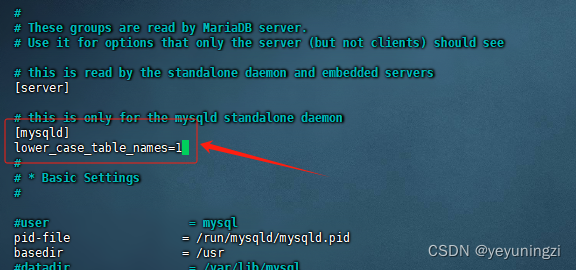
然后重启: systemctl restart mariadb
再登录,查看表名大小写敏感设置: show global variables like '%case%';
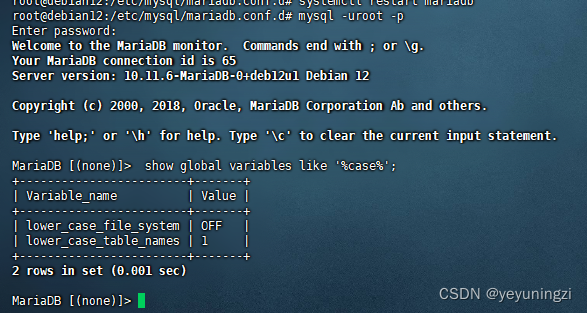
总结:在mariadb 10.11以及以后的版本中,要配置表名大小写敏感问题,一般修改修改配置文件:/etc/mysql/mariadb.conf.d/50-server.cnf 在 [mysqld] 段 添加属性:lower_case_table_names=1 然后重启服务
相关文章:
Debian mariadb 10.11设定表名 大小写不敏感方法
目录 问题表现:应用中查询 表提示 表不存在 处理步骤: 1、查询表名大小写敏感情况: show global variables like %case%; 2、修改mariadb 配置设置大小写 不敏感 mysql 配置大小写不敏感 mariadb 10.11设置表名大小写不敏感 /etc/mysq…...

常用六大加密软件排行榜|好用加密文件软件分享
为了保障数据安全,越来越多的企业开始使用文件加密软件。哪款加密软件适合企业哪些办公场景呢? 今天就给大家推荐一下文件加密软件排行榜的前六名: 1.域智盾 这款软件专为企业和政府机构设计,提供全面的文件保护解决方案。 点…...
百川2模型解读
简介 Baichuan 2是多语言大模型,目前开源了70亿和130亿参数规模的模型。在公开基准如MMLU、CMMLU、GSM8K和HumanEval上的评测,Baichuan 2达到或超过了其他同类开源模型,并在医学和法律等垂直领域表现优异。此外,官方还发布所有预…...
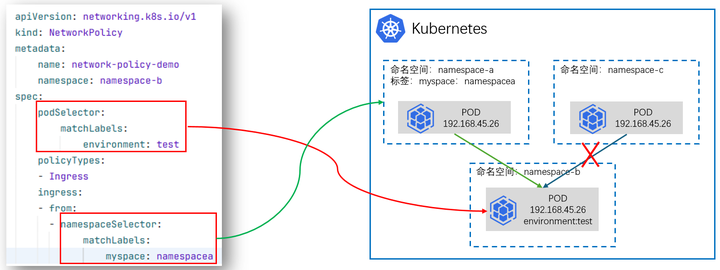
云原生专栏丨基于K8s集群网络策略的应用访问控制技术
在当今云计算时代,Kubernetes已经成为容器编排的事实标准,它为容器化应用提供了强大的自动化部署、扩展和管理能力。在Kubernetes集群中,网络策略(Network Policy)作为对Pod间通信进行控制的关键功能,对保障应用安全和隔离性起到了…...

MySQL 优化 - index_merge 导致查询偶发变慢
文章目录 前言问题描述原因分析总结 前言 今天遇到了一个有意思的问题,线上数据库 CPU 出现了偶发的抖动。定位到原因是一条查询语句偶发变慢造成的,随后通过调整表中的索引解决。 问题描述 下方是脱敏后的 SQL 语句: select oss_path f…...

SpringBoot自动连接数据库的解决方案
在一次学习设计模式的时候,沿用一个旧的boot项目,想着简单,就把数据库给关掉了,结果报错 Consider the following: If you want an embedded database (H2, HSQL or Derby), please put it on the classpath. 没有数据库的需…...

Docker-10 Docker Compose
一、前言 通过前面几篇文章的学习,我们可以通过Dockerfile文件让用户很方便的定义一个单独的应用容器。然而,在日常工作中,经常会碰到需要多个容器相互配合来完成某项任务的情况,或者开发一个Web应用,除了Web服务容器本身,还需要数据库服务容器、缓存容器,甚至还包括负…...

new mars3d.control.MapSplit({实现点击卷帘两侧添加不同图层弹出不同的popup
new mars3d.control.MapSplit({实现点击卷帘两侧添加不同图层弹出不同的popup效果: 左侧: 右侧: 说明:mars3d的3.7.12以上版本才支持该效果。 示例链接: 功能示例(Vue版) | Mars3D三维可视化平台 | 火星科技 相关代…...

数据库中虚拟表和临时表的区别?
虚拟表(Virtual Table)和临时表(Temporary Table)在数据库系统中都用于处理暂时性的数据存储需求,但它们的概念和用途有所不同: 虚拟表(通常是视图View): 虚拟表&#…...
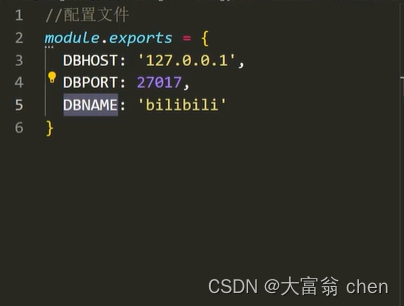
Node.js -- mongoose
文章目录 1. 介绍2. mongoose 连接数据库3. 插入文件4. 字段类型5. 字段值验证6. 文档处理6.1 删除文档6.2 更新文档6.3 读取文档 7. 条件控制8. 个性化读取9. 代码模块化 1. 介绍 Mongoose是一个对象文档模型库,官网http://www.mongoosejs.net/ 方便使用代码操作mo…...
保持亮灯:监控工具如何确保 DevOps 中的高可用性
在快速发展的 DevOps 领域,保持高可用性 (HA) 至关重要。消费者期望应用程序具有全天候响应能力和可访问性。销售损失、客户愤怒和声誉受损都是停机的后果。为了使 DevOps 团队能够在问题升级为中断之前主动检测、排除故障并解决问题,监控工具成为这种情…...
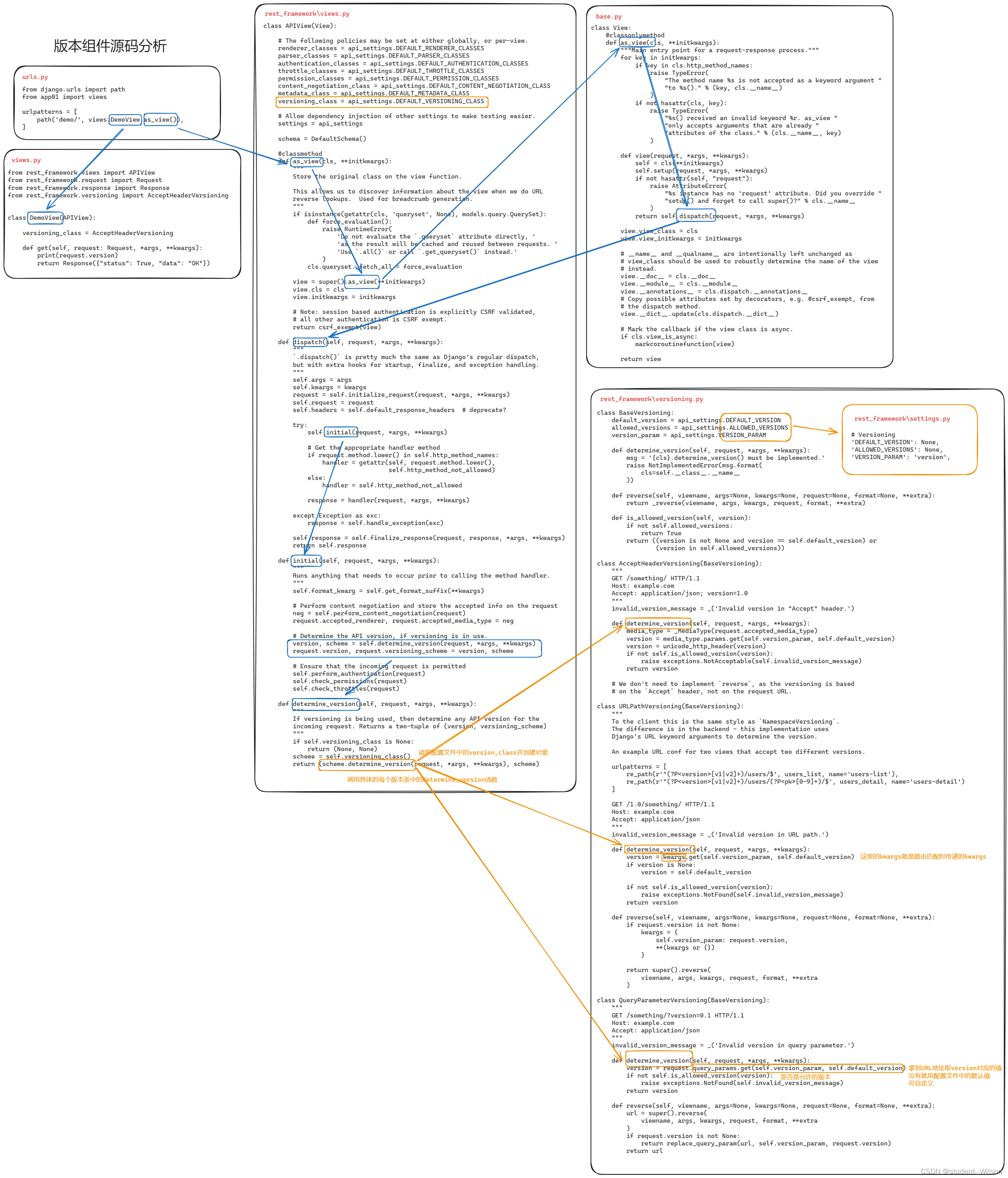
DRF版本组件源码分析
DRF版本组件源码分析 在restful规范中要去,后端的API中需要体现版本。 3.6.1 GET参数传递版本 from rest_framework.versioning import QueryParameterVersioning单视图应用 多视图应用 # settings.pyREST_FRAMEWORK {"VERSION_PARAM": "versi…...

C#算法之希尔排序
算法释义:希尔排序,也被称为缩小增量排序,是一种有效的排序算法,它是插入排序的一种更高效的改进版,通过比较一定间隔的元素来工作,然后逐步较少间隔来排序。 小编的理解啊,希尔排序的本质就是不…...
)
校园餐厅预约系统(请打开git自行访问)
校园餐厅预约系统详细介绍 项目地址:https://gitee.com/zhang—xuan/online_booking_system 服务端部分 Socket类 作用:创建socket连接,作为服务端与客户端通信的基础。 Sock_Obj类 基类:定义了服务端需要的基本操作和属性。 派生…...
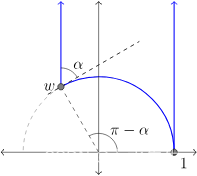
【双曲几何-05 庞加莱模型】庞加来上半平面模型的几何属性
文章目录 一、说明二、双曲几何的上半平面模型三、距离问题四、弧长微分五、面积问题 一、说明 庞加莱圆盘模型是表示双曲几何的一种方法,对于大多数用途来说它都非常适合几何作图。然而,另一种模型,称为上半平面模型,使一些计算变…...

Bookends for Mac:文献管理工具
Bookends for Mac,一款专为学术、研究和写作领域设计的文献管理工具,以其强大而高效的功能深受用户喜爱。这款软件支持多种文件格式,如PDF、DOC、RTF等,能够自动提取文献的关键信息,如作者、标题、出版社等,…...

SpringEL表达式编译模式SpelCompilerMode详解
目前网上没有搜到关于SpringEL表达式编译模式SpelCompilerMode的详细讲解,都是对官方文档的翻译,并没有详细说明根本差异。 该文章为个人原创,谢绝抄袭 SpringEL表达式官方文档:https://docs.spring.io/spring-framework/reference/core/expressions.html 在构建SpringE…...

物联网实战--平台篇之(一)架构设计
本项目的交流QQ群:701889554 物联网实战--入门篇https://blog.csdn.net/ypp240124016/category_12609773.html 物联网实战--驱动篇https://blog.csdn.net/ypp240124016/category_12631333.html 一、平台简介 物联网平台这个概念比较宽,大致可以分为两大类&#x…...

spi 驱动-数据发送流程分析
总结 核心函数是spi_sync, 设备驱动->核心函数-> 控制器驱动 实例分析 (gdb) c Continuing.Thread 115 hit Breakpoint 1, bcm2835_spi_transfer_one (master0xffffffc07b8e6000, spi0xffffffc07b911800, tfr0xffffff8009f53c40) at drivers/spi/spi-bcm2835…...
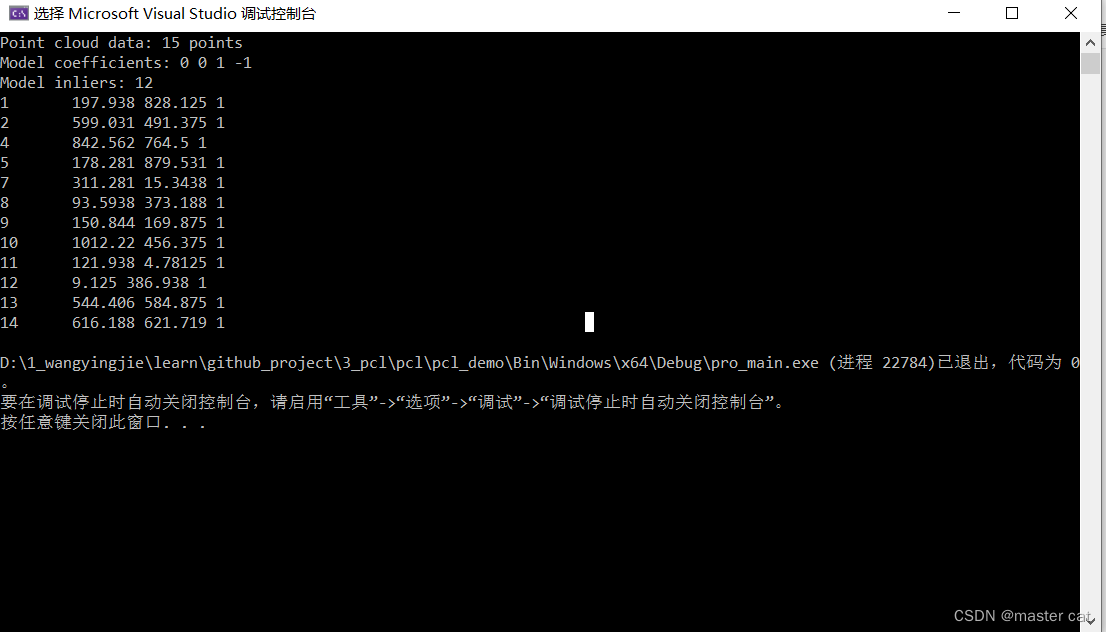
平面分割--------PCL
平面分割 bool PclTool::planeSegmentation(pcl::PointCloud<pcl::PointXYZ>::Ptr cloud, pcl::ModelCoefficients::Ptr coefficients, pcl::PointIndices::Ptr inliers) {std::cout << "Point cloud data: " << cloud->points.size() <<…...

day23 模拟2
...
)
LVGL 7.11.0 Chart控件实战:5分钟搞定动态心率折线图(附完整代码)
LVGL 7.11.0 Chart控件实战:5分钟搞定动态心率折线图(附完整代码) 在嵌入式设备上实现流畅的数据可视化一直是开发者的痛点。LVGL作为轻量级图形库,其Chart控件能完美解决这一问题。本文将手把手教你用LVGL 7.11.0的Chart控件&am…...
)
Matlab实战:5步搞定微电网源储荷协调调度(附完整CPLEX调用代码)
Matlab实战:微电网源储荷协调调度的5个工程化技巧 微电网调度是新能源时代的核心技术难题之一。面对风光发电的波动性和负荷需求的多变性,如何实现源、储、荷三者的动态平衡,成为电力工程师们每天都要应对的挑战。不同于学术论文中复杂的理论…...

AD21实战:3种方法搞定Keepout和机械层互转,最后一种能救急
AD21实战:3种高效解决Keepout与机械层互转难题的方法 在PCB设计过程中,Keepout层和机械层的正确使用与转换是确保设计准确性的关键环节。许多工程师都遇到过这样的困境:当设计文件中包含复杂图形元素时,简单的层切换或属性批量修…...

AD7124多通道配置实战:从寄存器映射到混合模式应用
1. AD7124多通道配置的核心价值 第一次接触AD7124时,我被它复杂的寄存器结构弄得晕头转向。这款24位Σ-Δ ADC芯片在工业测温、多路数据采集等场景表现优异,但想要充分发挥其性能,必须吃透通道与配置寄存器的映射关系。实际项目中,…...

QT窗口特效实战:从透明到异形控件的全方位实现指南
1. 从零开始理解QT窗口特效 第一次接触QT窗口特效时,我被那些酷炫的透明和异形界面深深吸引。记得当时看到Mac OS X的Dock栏那种毛玻璃效果,就特别想在自己的QT应用中实现类似效果。经过多年实战,我发现QT实现这些特效其实比想象中简单得多。…...

Realtek RTL8125 2.5GbE网卡驱动技术指南
Realtek RTL8125 2.5GbE网卡驱动技术指南 【免费下载链接】realtek-r8125-dkms A DKMS package for easy use of Realtek r8125 driver, which supports 2.5 GbE. 项目地址: https://gitcode.com/gh_mirrors/re/realtek-r8125-dkms 1. 问题诊断:网络设备识别…...

OpenClaw调试技巧:Qwen3-32B任务失败排查手册
OpenClaw调试技巧:Qwen3-32B任务失败排查手册 1. 为什么需要这份手册? 上周我尝试用OpenClaw自动整理项目文档时,遇到了一个诡异现象:同样的任务在白天能顺利完成,深夜运行时却频繁报错。经过72小时的问题追踪&#…...

谈谈你对springAop动态代理的理解?
面试 你要调用目标方法,不直接调用,而是交给代理对象,代理对象会先做额外功能,再调用原方法,最后再收尾。 至于叫动态代理的原因,是因为这个代理不是你手动写死的,而是程序在运行期间动态生成…...

打破BIM模型Web化壁垒:Revit2GLTF的轻量化转换技术革新
打破BIM模型Web化壁垒:Revit2GLTF的轻量化转换技术革新 【免费下载链接】Revit2GLTF view demo 项目地址: https://gitcode.com/gh_mirrors/re/Revit2GLTF 在数字化建筑设计流程中,BIM模型的高效协作与展示一直是行业痛点。设计团队常常面临这样的…...