
springmvc Web上下文初始化
Web上下文初始化
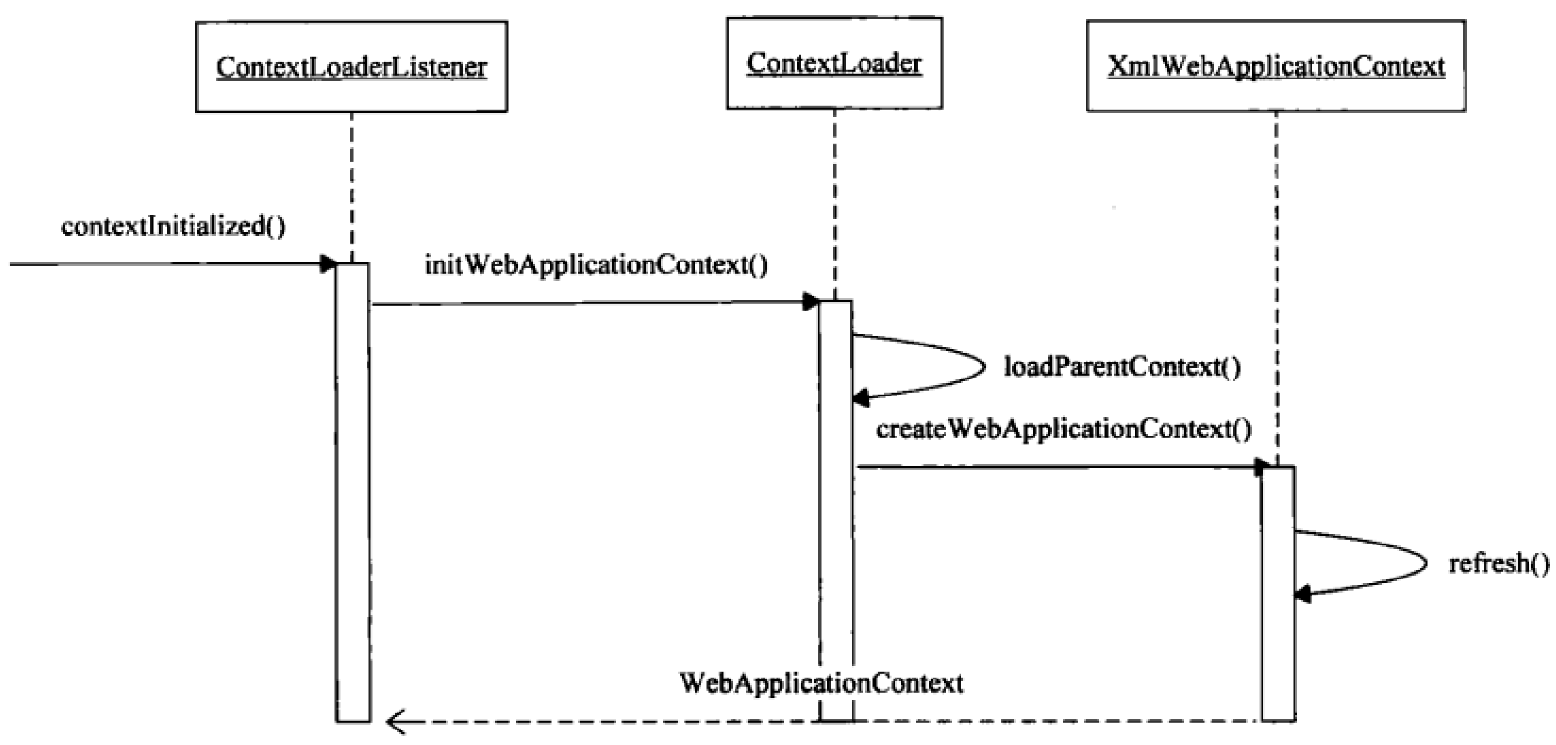
web上下文与SerlvetContext的生命周期应该是相同的,springmvc中的web上下文初始化是由ContextLoaderListener来启动的
在web.xml中配置ContextLoaderListener
<listener>
    <listener-class>org.springframework.web.context.ContextLoaderListener</listener-class>
</listener>
<context-param>
        <param-name>contextConfigLocation</param-name>
        <param-value>classpath:applicationContext.xml</param-value>
</context-param>
ContextLoaderListener
ContextLoaderListener实现了ServletContextListener接口,ServletContextListener是Servlet定义的,提供了与Servlet生命周期结合的回调,contextInitialized方法和contextDestroyed方法;ContextLoaderListener继承了ContextLoader类,通过ContextLoader来完成实际的WebApplicationContext的初始化工作,并将WebApplicationContext存放至ServletContext中,ContextLoader就像是spring应用在web容器中的启动器
从spring3.x起就不需要配置监听器ContextLoaderListener,只需要配置DispatcherServlet就可以了,只是没有父容器了而已,只读取mvc配置文件。如果想要spring父容器时,才需要配置ContextLoaderListener
可参考文章 spring与springmvc整合
public class ContextLoaderListener extends ContextLoader implements ServletContextListener {

   /**
    * Initialize the root web application context.
    */
  // ServletContext被创建时触发,初始化web上下文
   @Override
   public void contextInitialized(ServletContextEvent event) {
      initWebApplicationContext(event.getServletContext());
   }

   /**
    * Close the root web application context.
    */
  // ServletContext被销毁时触发,关闭web上下文
   @Override
   public void contextDestroyed(ServletContextEvent event) {
      closeWebApplicationContext(event.getServletContext());
      ContextCleanupListener.cleanupAttributes(event.getServletContext());
   }

}
在启动时会创建一个WebApplicationContext作为IOC容器,默认的实现类是XmlWebApplicationContext
/** Default config location for the root context */
// 默认的配置位置,如果不进行配置,就会读取这个文件
public static final String DEFAULT_CONFIG_LOCATION = "/WEB-INF/applicationContext.xml";

/** Default prefix for building a config location for a namespace */
// 配置文件默认在/WEB-INF/目录下
public static final String DEFAULT_CONFIG_LOCATION_PREFIX = "/WEB-INF/";

/** Default suffix for building a config location for a namespace */
// 配置文件默认后缀名是.xml
public static final String DEFAULT_CONFIG_LOCATION_SUFFIX = ".xml";
initWebApplicationContext初始化
public WebApplicationContext initWebApplicationContext(ServletContext servletContext) {
  // WebApplicationContext.ROOT_WEB_APPLICATION_CONTEXT_ATTRIBUTE是WebApplicationContext.class.getName() + ".ROOT"
  // 如果servletContext中已经存在根上下文属性,则说明已经有一个根上下文存在了
   if (servletContext.getAttribute(WebApplicationContext.ROOT_WEB_APPLICATION_CONTEXT_ATTRIBUTE) != null) {
      throw new IllegalStateException(
            "Cannot initialize context because there is already a root application context present - " +
            "check whether you have multiple ContextLoader* definitions in your web.xml!");
   }

   Log logger = LogFactory.getLog(ContextLoader.class);
   servletContext.log("Initializing Spring root WebApplicationContext");

   long startTime = System.currentTimeMillis();

   try {
      // Store context in local instance variable, to guarantee that
      // it is available on ServletContext shutdown.
      if (this.context == null) {
        // 初始化context
         this.context = createWebApplicationContext(servletContext);
      }
      if (this.context instanceof ConfigurableWebApplicationContext) {
         ConfigurableWebApplicationContext cwac = (ConfigurableWebApplicationContext) this.context;
         if (!cwac.isActive()) {
            // The context has not yet been refreshed -> provide services such as
            // setting the parent context, setting the application context id, etc
            if (cwac.getParent() == null) {
               // The context instance was injected without an explicit parent ->
               // determine parent for root web application context, if any.
               ApplicationContext parent = loadParentContext(servletContext);
               cwac.setParent(parent);
            }
            configureAndRefreshWebApplicationContext(cwac, servletContext);
         }
      }
     // 记录在servletContext中
      servletContext.setAttribute(WebApplicationContext.ROOT_WEB_APPLICATION_CONTEXT_ATTRIBUTE, this.context);

      ClassLoader ccl = Thread.currentThread().getContextClassLoader();
      if (ccl == ContextLoader.class.getClassLoader()) {
         currentContext = this.context;
      }
      else if (ccl != null) {
         currentContextPerThread.put(ccl, this.context);
      }


      return this.context;
   }
   catch (RuntimeException ex) {
      logger.error("Context initialization failed", ex);
      servletContext.setAttribute(WebApplicationContext.ROOT_WEB_APPLICATION_CONTEXT_ATTRIBUTE, ex);
      throw ex;
   }
   catch (Error err) {
      logger.error("Context initialization failed", err);
      servletContext.setAttribute(WebApplicationContext.ROOT_WEB_APPLICATION_CONTEXT_ATTRIBUTE, err);
      throw err;
   }
}
创建WebApplicationContext上下文
protected WebApplicationContext createWebApplicationContext(ServletContext sc) {
  // 如果在web.xml中有配置contextClass,则使用配置的类
  // 如果没有配置,则使用默认的配置 ContextLoader.properties
  // org.springframework.web.context.WebApplicationContext=org.springframework.web.context.support.XmlWebApplicationContext

   Class<?> contextClass = determineContextClass(sc);
   if (!ConfigurableWebApplicationContext.class.isAssignableFrom(contextClass)) {
      throw new ApplicationContextException("Custom context class [" + contextClass.getName() +
            "] is not of type [" + ConfigurableWebApplicationContext.class.getName() + "]");
   }
   return (ConfigurableWebApplicationContext) BeanUtils.instantiateClass(contextClass);
}
servlet3.0规范
servlet3.0后支持不使用web.xml的方式配置。
在spring-web中services下配置有javax.servlet.ServletContainerInitializer文件,其内容为org.springframework.web.SpringServletContainerInitializer,找到该类发现Servlet容器(例如tomcat)启动时,会将SPI注册的Java EE接口ServletContainerInitializer的所有的实现类(例如,SpringServletContainerInitializer)挨个回调其onStartup方法。
而onStartup方法是需要参数的,这时@HandlesTypes就派上用场了。onStartup方法所需要的参数就通过@HandlesTypes注解传入
@HandlesTypes(WebApplicationInitializer.class)
public class SpringServletContainerInitializer implements ServletContainerInitializer
该类会调用所有WebApplicationInitializer的onStartup方法
for (WebApplicationInitializer initializer : initializers) {
   initializer.onStartup(servletContext);
}
找到WebApplicationInitializer的子类AbstractAnnotationConfigDispatcherServletInitializer,我们需要继承AbstractAnnotationConfigDispatcherServletInitializer实现其三个抽象方法
public class MyWebAppInitializer extends AbstractAnnotationConfigDispatcherServletInitializer {

 /*
  * 获取根容器的配置类,该配置类就类似于我们以前经常写的Spring的配置文件,然后创建出一个父容器
  * 带有@Configuration注解的类用来配置ContextLoaderListener
  */
 @Override
 protected Class<?>[] getRootConfigClasses() {
  // TODO Auto-generated method stub
  return null;
 }

 /*
  * 获取web容器的配置类,该配置类就类似于我们以前经常写的Spring MVC的配置文件,然后创建出一个子容器
  * 带有@Configuration注解的类用来配置DispatcherServlet
  */
 @Override
 protected Class<?>[] getServletConfigClasses() {
  // TODO Auto-generated method stub
  return null;
 }

 // 获取DispatcherServlet的映射信息
 @Override
 protected String[] getServletMappings() {
  // TODO Auto-generated method stub
  return new String[]{"/"};
 }

}
这样我们就不需要配置web.xml配置文件了,其会同时创建DispatcherServlet和ContextLoaderListener
https://zhhll.icu/2020/框架/springmvc/底层剖析/0.Web上下文初始化/
本文由 mdnice 多平台发布
相关文章:
springmvc Web上下文初始化
Web上下文初始化 web上下文与SerlvetContext的生命周期应该是相同的,springmvc中的web上下文初始化是由ContextLoaderListener来启动的 web上下文初始化流程 在web.xml中配置ContextLoaderListener <listener> <listener-class>org.springframework.…...

Verilog实战学习到RiscV - 2 : wire 和 reg 的区别
Verilog: wire 和 reg 的区别 1 引言 看Verilog例子过程中,总是分不清 wire 和 reg 的区别。这篇文章把两者放在一起总结一下,并且对比何时使用它们。 1.1 wire :组合逻辑 wire 是 Verilog 设计中的简单导线(或任意宽度的总线…...

OpenGL给定直线起点和终点不同的颜色,使用中点Bresenham画线
用鼠标左键按下确定直线起点,鼠标左键抬起确定直线终点。放一部分代码。 // 中点Bresenham算法.cpp : 定义控制台应用程序的入口点。 //#include "stdafx.h" #include <GL/glut.h> #include <iostream> #include <cmath>int windowWidt…...

IT行业的现状与未来发展趋势:从云计算到量子计算的技术变革
随着技术的不断进步,IT行业已经成为推动全球经济和社会发展的关键力量。从云计算、大数据、人工智能到物联网、5G通信和区块链,这些技术正在重塑我们的生活和工作方式。本文将深入探讨当前IT行业的现状,并展望未来发展趋势,旨在为…...
电脑远程控制另一台电脑怎么弄?
可以远程控制另一台电脑吗? “你好,我对远程访问技术不太了解。现在,我希望我的朋友可以远程控制我的Windows 10电脑,以便她能帮我解决一些问题。请问,有没有免费的方法可以实现这种远程控制?我该如何操作…...
软件设计师备考 | 案例专题之面向对象设计 概念与例题
相关概念 关系 依赖:一个事物的语义依赖于另一个事物的语义的变化而变化 关联:一种结构关系,描述了一组链,链是对象之间的连接。分为组合和聚合,都是部分和整体的关系,其中组合事物之间关系更强。两个类之…...

UniApp 2.0可视化开发工具:引领前端开发新纪元
一、引言 在移动互联网迅猛发展的今天,移动应用开发已经成为前端开发的重要方向之一。为了简化移动应用开发流程,提高开发效率,各大开发平台不断推出新的工具和框架。UniApp作为一款跨平台的移动应用开发框架,自诞生以来就备受开…...
)
前端调用浏览器录音功能且生成文件(vue)
如果可以实现记得点赞分享,谢谢老铁~ 首先在页面中给两个按钮,分别是“开始录音”,“结束录音”。以及录音成功后生成一个下载语音的链接。 1. 先看页面展示 <template><div><button click"startRecording…...

「大数据」Kappa架构
Kappa架构是一种处理大数据的架构,它作为Lambda架构的替代方案出现。Kappa架构的核心思想是简化数据处理流程,通过使用单一的流处理层来同时处理实时和批量数据,从而避免了Lambda架构中需要维护两套系统(批处理层和速度层…...

详细分析Element Plus中的ElMessageBox弹窗用法(附Demo及模版)
目录 前言1. 基本知识2. Demo3. 实战4. 模版 前言 由于需要在登录时,附上一些用户说明书的弹窗 对于ElMessageBox的基本知识详细了解 可通过官网了解基本的语法知识ElMessageBox官网基本知识 1. 基本知识 Element Plus 是一个基于 Vue 3 的组件库,其中…...
Python自动化工具(桌面自动化、Web自动化、游戏辅助)
工具介绍 连点工具是一款可以模拟键鼠后台操作的连点器工具。支持鼠标连点、键鼠脚本录制,支持辅助您实现办公自动化以及辅助游戏操作。功能简洁易用,非常方便操作。连点工具让您在在玩游戏、网购抢购的时候全自动点击鼠标!主要功能有&#…...

opencv进阶 ——(五)图像处理之马赛克
一、遍历图像并对每个马赛克区域进行像素化处理 for (int y 0; y < image.rows; y blockSize) {for (int x 0; x < image.cols; x blockSize) {cv::Rect rect cv::Rect(x, y, std::min(blockSize, image.cols - x), std::min(blockSize, image.rows - y));cv::Scal…...

电机控制系列模块解析(22)—— 零矢量刹车
一、零矢量刹车 基本概念 逆变器通常采用三相桥式结构,包含六个功率开关元件(如IGBT或MOSFET),分为上桥臂和下桥臂。每个桥臂由两个反并联的开关元件组成,上桥臂和下桥臂对应于电机三相绕组的正负端。正常工作时&…...

自定义一个SpringBoot场景启动器
前言 一个刚刚看完SpringBoot自动装配原理的萌新依据自己的理解写下的文章,如有大神发现错误,敬请斧正,不胜感激。 分析SpringBoot自动配置原理 SpringBoot的启动从被SpringBootApplication修饰的启动类开始,SpringBootApplicaiotn注解中最…...
UDP的报文结构和注意事项
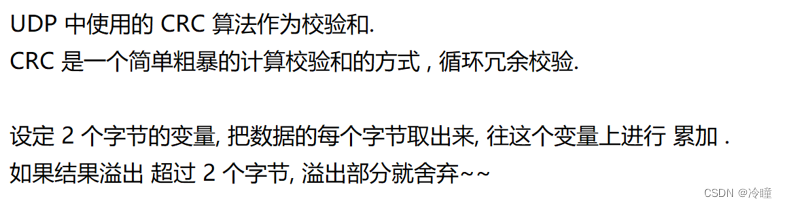
UDP协议是在传输层的协议。 UDP无连接,不可靠传输,面向数据报,全双工。 UDP的报文结构 学习网络协议,最主要的就是报文格式。 对于UDP来说,应用层的数据到达,UDP之后,就会给应用层的数据报前面…...

rust语言一些规则学习
目录 rust中迭代器的使用(iter().map()与for循环的区别)map()与for的描述区别总结 最后更新时间2024-05-24 rust中迭代器的使用(iter().map()与for循环的区别) map()与for的描述 rust源码中关于iter().map()函数的解释ÿ…...

QML基本语法介绍
为什么使用QML 开发者效率 将前后端分离,QML和JavaScript语言主要用于前度UI的方法,后端有C++来完成绘制。将JavaScript和C++分开能够快速迭代开发; 跨平台移植性 基于Qt平台的统一抽象概念,现在可以更加容易和快速和将Qt移植到更多的平台上。 开发的开放 Qt是由Qt-Proje…...
)
学习和分享关于 Vue.js 的路由(vue-router)
学习和分享关于 Vue.js 的路由(vue-router)是一个非常有价值的主题,因为路由是构建单页应用程序(SPA)的核心部分。本文将介绍 Vue.js 路由的基本概念和实现,并展示一个典型的项目目录结构。 目录 Vue.js 路…...
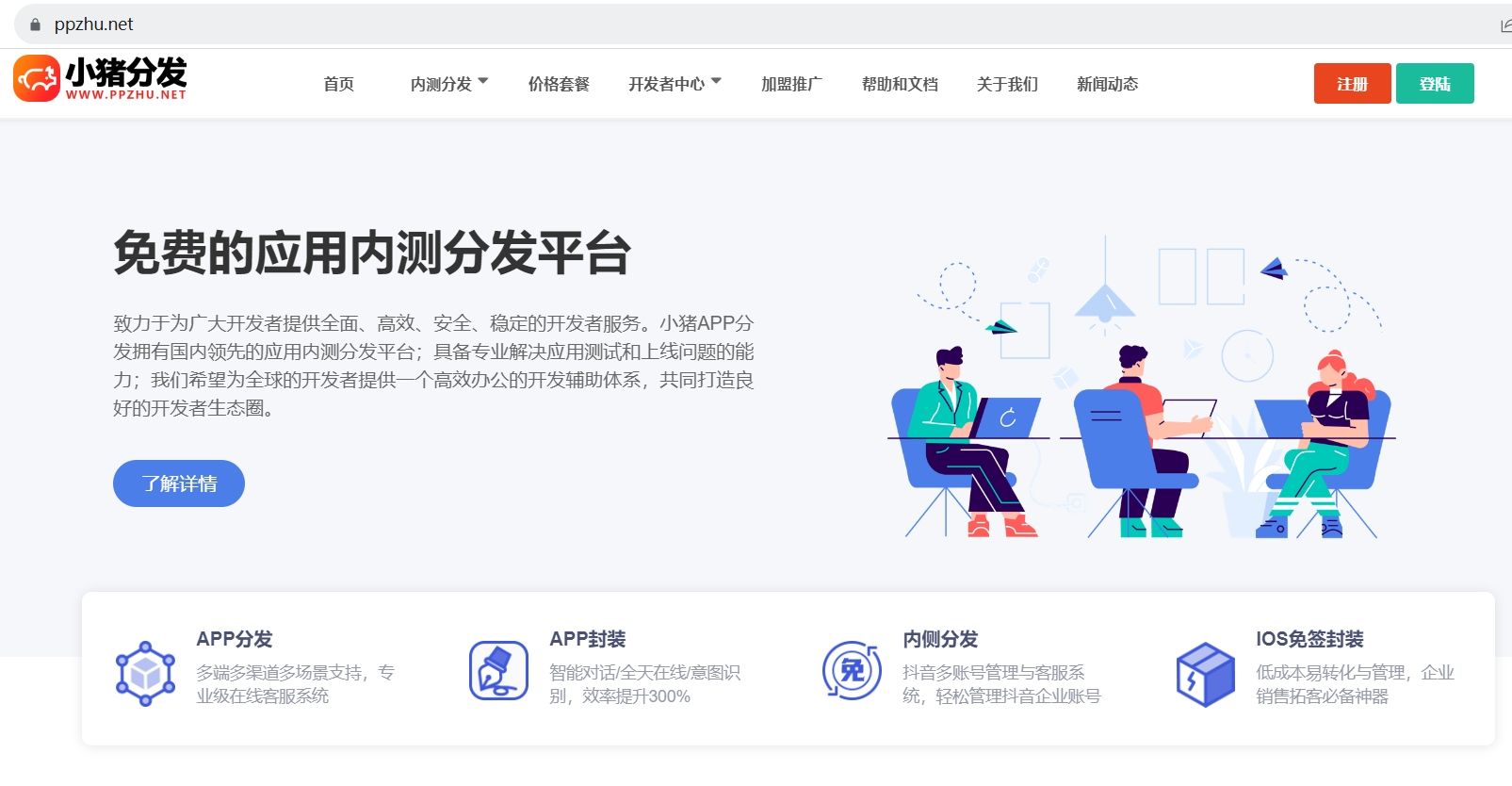
小猪APP分发:一站式免费应用推广解决方案
在竞争激烈的移动应用市场中,寻找一个高效且成本友好的方式来推广自己的应用程序,成为了众多开发者面临的共同挑战。幸运的是,像"小猪APP分发www.appzhu.cn"这样的平台应运而生,为开发者提供了一个全面、免费的应用分发…...

新抖:抖音的数据分析平台,敢用深色系,别的真不敢!
举报 评论 0...

UE5 BaseEditorSettings.ini加载原理与配置生效机制
1. 为什么你改了BaseEditorSettings.ini却没生效?——从UE5编辑器启动流程讲起很多人在UE5项目里折腾半天,把BaseEditorSettings.ini文件翻来覆去改了十几遍,重启编辑器后发现:缩放比例还是不对、网格间距没变、甚至“启用实时预览…...
)
UOS系统下WPS卸载不干净?手把手教你用命令行精准清理(附dpkg/apt组合拳)
UOS系统下WPS卸载不干净?手把手教你用命令行精准清理 在UOS系统日常使用中,WPS Office作为常用办公软件,有时因版本更新或功能调整需要彻底卸载。但不少用户发现,通过图形界面或简单命令卸载后,系统中仍残留配置文件、…...

从Gamma函数到泊松分布:一个概率论中的含参量积分实用案例解析
Gamma函数与泊松分布:概率论中的数学之美 在数据科学和机器学习的实践中,概率分布构成了建模的基石。当我们深入探究这些分布背后的数学原理时,Gamma函数以其优雅的性质和广泛的应用脱颖而出。它不仅连接了离散与连续概率世界,更在…...

WPF虚拟桌宠组件:可嵌入、高性能、工程化UI生命体
1. 这不是“桌面宠物”,而是一个可嵌入的WPF UI组件化生命体你可能在Windows XP时代见过那只晃着尾巴、偶尔打哈欠的3D小猫,也可能在Win10系统托盘里点开过一个会眨眼的像素狐狸——但那些是独立进程、是系统级小工具、是“看一眼就关掉”的轻量娱乐。而…...

Unity UI交互进阶:手把手教你打造一个支持单击、双击、长按的万能按钮组件
Unity UI交互进阶:手把手教你打造一个支持单击、双击、长按的万能按钮组件在游戏开发中,UI交互的流畅性和多样性直接影响玩家的游戏体验。想象一下,当你在开发一个RPG游戏的背包系统时,需要实现道具的单击查看详情、双击快速使用、…...

MeloTTS实战:多语言语音合成的高效解决方案
MeloTTS实战:多语言语音合成的高效解决方案 【免费下载链接】MeloTTS High-quality multi-lingual text-to-speech library by MyShell.ai. Support English, Spanish, French, Chinese, Japanese and Korean. 项目地址: https://gitcode.com/GitHub_Trending/me/…...

终极Chrome画中画扩展:如何在浏览器中实现高效视频多任务处理
终极Chrome画中画扩展:如何在浏览器中实现高效视频多任务处理 【免费下载链接】picture-in-picture-chrome-extension 项目地址: https://gitcode.com/gh_mirrors/pi/picture-in-picture-chrome-extension 想要在浏览网页、处理文档的同时继续观看视频内容吗…...

武汉国电华美串联谐振试验装置,现场用着心里有底
在高压试验现场干了这么多年,这位老师傅常说,一台好的串联谐振装置,就是试验人员的胆。面对GIS、大型变压器、超高压电缆这些大电容试品,没有趁手的谐振设备,交流耐压试验根本没法干。16875kVA/225kV这个规格ÿ…...

NanaZip:现代Windows文件压缩问题的终极解决方案
NanaZip:现代Windows文件压缩问题的终极解决方案 【免费下载链接】NanaZip The 7-Zip derivative intended for the modern Windows experience 项目地址: https://gitcode.com/gh_mirrors/na/NanaZip 还在为Windows文件压缩工具界面老旧、功能单一而烦恼吗&…...

独立开发者如何利用Taotoken的TokenPlan在项目初期有效控制AI实验成本
🚀 告别海外账号与网络限制!稳定直连全球优质大模型,限时半价接入中。 👉 点击领取海量免费额度 独立开发者如何利用Taotoken的TokenPlan在项目初期有效控制AI实验成本 对于独立开发者或学生而言,在构建AI应用原型时&…...