
PostgreSQL源码分析——物化视图
我们前面分析完视图后,这里再继续分析一下物化视图,其实现原理是不相同的,需要注意,物化视图等于是将返回的结果集缓存起来,而视图是查询重写,结果需要重新进行计算。
create materialized view matvt1 as select * from t1
语法解析部分
主流程如下:
exec_simple_query
--> pg_parse_query--> raw_parser--> base_yyparse
--> pg_analyze_and_rewrite--> parse_analyze--> transformStmt--> transformCreateTableAsStmt--> transformStmt   // 对查询语句进行语义分析,将其转换为查询树Query--> pg_rewrite_query
--> pg_plan_queries
定义物化视图的语法如下:
/*******************************************************************************		QUERY :*				CREATE MATERIALIZED VIEW relname AS SelectStmt******************************************************************************/
CreateMatViewStmt:CREATE OptNoLog MATERIALIZED VIEW create_mv_target AS SelectStmt opt_with_data{CreateTableAsStmt *ctas = makeNode(CreateTableAsStmt);  ctas->query = $7;ctas->into = $5;ctas->relkind = OBJECT_MATVIEW;ctas->is_select_into = false;ctas->if_not_exists = false;/* cram additional flags into the IntoClause */$5->rel->relpersistence = $2;$5->skipData = !($8);$$ = (Node *) ctas;}
创建物化视图的语法,抽象语法树表示CreateTableAsStmt,创建物化视图的流程与CREATE TABLE AS 相同,等于新创建一个表(UNLOGGED TABLE),保存查询到的结果集。可以看到SELECT INTO,与CREATE TABLE AS也是用此进行表示。
/* ----------------------*		CREATE TABLE AS Statement (a/k/a SELECT INTO)** A query written as CREATE TABLE AS will produce this node type natively.* A query written as SELECT ... INTO will be transformed to this form during* parse analysis.* A query written as CREATE MATERIALIZED view will produce this node type,* during parse analysis, since it needs all the same data.** The "query" field is handled similarly to EXPLAIN, though note that it* can be a SELECT or an EXECUTE, but not other DML statements.* ----------------------*/
typedef struct CreateTableAsStmt
{NodeTag		type;Node	   *query;			/* the query (see comments above) */IntoClause *into;			/* destination table */ObjectType	relkind;		/* OBJECT_TABLE or OBJECT_MATVIEW */bool		is_select_into; /* it was written as SELECT INTO */bool		if_not_exists;	/* just do nothing if it already exists? */
} CreateTableAsStmt;/** IntoClause - target information for SELECT INTO, CREATE TABLE AS, and* CREATE MATERIALIZED VIEW** For CREATE MATERIALIZED VIEW, viewQuery is the parsed-but-not-rewritten* SELECT Query for the view; otherwise it's NULL.  (Although it's actually* Query*, we declare it as Node* to avoid a forward reference.)*/
typedef struct IntoClause
{NodeTag		type;RangeVar   *rel;			/* target relation name */List	   *colNames;		/* column names to assign, or NIL */char	   *accessMethod;	/* table access method */List	   *options;		/* options from WITH clause */OnCommitAction onCommit;	/* what do we do at COMMIT? */char	   *tableSpaceName; /* table space to use, or NULL */Node	   *viewQuery;		/* materialized view's SELECT query */bool		skipData;		/* true for WITH NO DATA */
} IntoClause;
执行部分——创建物化视图
主流程如下:
exec_simple_query
--> pg_parse_query
--> pg_analyze_and_rewrite
--> pg_plan_queries
--> PortalStart
--> PortalRun--> PortalRunUtility    // Execute a utility statement inside a portal.--> ProcessUtility--> standard_ProcessUtility--> ProcessUtilitySlow/** 执行步骤:*         1. 创建表,准备存储结果集*         2. 查询重写(物化视图中的查询语句)*         3. 生成查询的执行计划*         4. 执行获取查询语句的结果集*/--> ExecCreateTableAs  // Create the tuple receiver object and insert info it will need-->  CreateIntoRelDestReceiver  // 结果集输入到IntoRel中,新建的表中--> QueryRewrite--> pg_plan_query--> standard_planner--> subquery_planner--> grouping_planner--> query_planner--> make_one_rel--> create_plan--> create_scan_plan--> CreateQueryDesc  /* Create a QueryDesc, redirecting output to our tuple receiver */--> ExecutorStart--> ExecutorRun--> standard_ExecutorRun// 1. 建表--> intorel_startup--> create_ctas_internal    //Actually create the target table--> DefineRelation // 建表--> heap_create_with_catalog--> heap_create--> StoreViewQuery  // Use the rules system to store the query for the view.--> UpdateRangeTableOfViewParse --> DefineViewRules--> DefineQueryRewrite  // Set up the ON SELECT rule.--> InsertRule // 插入的规则,重写为新的物化表,并不是源表--> SetMatViewPopulatedState// 2. 执行查询语句,结果集存入物化的表中--> ExecutePlan--> ExecScan    // 扫描获取tuple--> ExecScanFetch--> SeqNext--> table_beginscan--> intorel_receive  // receive one tuple--> table_tuple_insert  // 将查询到的tuple slot插入到创建的表中--> heapam_tuple_insert--> ExecFetchSlotHeapTuple--> tts_buffer_heap_materialize--> heap_copytuple--> tts_buffer_heap_get_heap_tuple--> heap_insert // 插入到表中,找到指定的page,插入tuple。--> heap_prepare_insert--> RelationPutHeapTuple    --> ExecutorEnd--> PortalDrop
对于结果集中如何存入物化的新表中,可查看dest.c、createas.c等源码,查询到的结果可以按照需求发送到不同的地方,可查看下面的枚举,可以看到有个DestIntoRel的值,即使将结果send to relation。
/* ----------------*		CommandDest is a simplistic means of identifying the desired*		destination.  Someday this will probably need to be improved.** Note: only the values DestNone, DestDebug, DestRemote are legal for the* global variable whereToSendOutput.   The other values may be used* as the destination for individual commands.* ----------------*/
typedef enum
{DestNone,					/* results are discarded */DestDebug,					/* results go to debugging output */DestRemote,					/* results sent to frontend process */DestRemoteExecute,			/* sent to frontend, in Execute command */DestRemoteSimple,			/* sent to frontend, w/no catalog access */DestSPI,					/* results sent to SPI manager */DestTuplestore,				/* results sent to Tuplestore */DestIntoRel,				/* results sent to relation (SELECT INTO) */DestCopyOut,				/* results sent to COPY TO code */DestSQLFunction,			/* results sent to SQL-language func mgr */DestTransientRel,			/* results sent to transient relation */DestTupleQueue				/* results sent to tuple queue */
} CommandDest;
其中还有一个非常重要的函数需要列出来CreateIntoRelDestReceiver,查询返回的结果输入到IntoClause节点指定的表中。
/** CreateIntoRelDestReceiver -- create a suitable DestReceiver object** intoClause will be NULL if called from CreateDestReceiver(), in which* case it has to be provided later.  However, it is convenient to allow* self->into to be filled in immediately for other callers.*/
DestReceiver *
CreateIntoRelDestReceiver(IntoClause *intoClause)
{DR_intorel *self = (DR_intorel *) palloc0(sizeof(DR_intorel));self->pub.receiveSlot = intorel_receive;self->pub.rStartup = intorel_startup;self->pub.rShutdown = intorel_shutdown;self->pub.rDestroy = intorel_destroy;self->pub.mydest = DestIntoRel;self->into = intoClause;/* other private fields will be set during intorel_startup */return (DestReceiver *) self;
}typedef struct
{DestReceiver pub;			/* publicly-known function pointers */IntoClause *into;			/* target relation specification *//* These fields are filled by intorel_startup: */Relation	rel;			/* relation to write to */ObjectAddress reladdr;		/* address of rel, for ExecCreateTableAs */CommandId	output_cid;		/* cmin to insert in output tuples */int			ti_options;		/* table_tuple_insert performance options */BulkInsertState bistate;	/* bulk insert state */
} DR_intorel;
最后我们看一下系统表pg_class、pg_rewrite中的相关信息:
-- 物化视图matvt1
postgres@postgres=# select oid,relname,relkind,relhasrules from pg_class where relname='matvt1';
-[ RECORD 1 ]-------
oid         | 16391
relname     | matvt1
relkind     | m
relhasrules | t
-- 表t1
postgres@postgres=# select oid,relname,relkind,relhasrules,relrewrite from pg_class where relname='t1';
-[ RECORD 1 ]------
oid         | 16384     -- 表OID
relname     | t1        -- 表名
relkind     | r         -- 表示是普通表
relhasrules | f         -- 表是否定义了规则
relrewrite  | 0
-- 查看系统表pg_rewrite,查看插入的规则
postgres@postgres=# select * from pg_rewrite order by oid desc limit 1;
-[ RECORD 1 ]
oid        | 16394
rulename   | _RETURN
ev_class   | 16391
ev_type    | 1
ev_enabled | O
is_instead | t
ev_qual    | <>
ev_action  | ({QUERY :commandType 1 :querySource 0 :canSetTag true :utilityStmt <> :resultRelation 0 :hasAggs false :hasWindowFuncs false :hasTargetSRFs false :hasSubLinks false :hasDistinctOn false :hasRecursive false :hasModifyingCTE false :hasForUpdate false :hasRowSecurity false :cteList <> :rtable ({RTE :alias {ALIAS :aliasname old :colnames <>} :eref {ALIAS :aliasname old :colnames ("a" "b")} :rtekind 0 :relid 16391 :relkind m :rellockmode 1 :tablesample <> :lateral false :inh false :inFromCl false :requiredPerms 0 :checkAsUser 0 :selectedCols (b) :insertedCols (b) :updatedCols (b) :extraUpdatedCols (b) :securityQuals <>} {RTE :alias {ALIAS :aliasname new :colnames <>} :eref {ALIAS :aliasname new :colnames ("a" "b")} :rtekind 0 :relid 16391 :relkind m :rellockmode 1 :tablesample <> :lateral false :inh false :inFromCl false :requiredPerms 0 :checkAsUser 0 :selectedCols (b) :insertedCols (b) :updatedCols (b) :extraUpdatedCols (b) :securityQuals <>} {RTE :alias <> :eref {ALIAS :aliasname t1 :colnames ("a" "b")} :rtekind 0 :relid 16384 :relkind r :rellockmode 1 :tablesample <> :lateral false :inh true :inFromCl true :requiredPerms 2 :checkAsUser 0 :selectedCols (b 8 9) :insertedCols (b) :updatedCols (b) :extraUpdatedCols (b) :securityQuals <>}) :jointree {FROMEXPR :fromlist ({RANGETBLREF :rtindex 3}) :quals <>} :targetList ({TARGETENTRY :expr {VAR :varno 3 :varattno 1 :vartype 23 :vartypmod -1 :varcollid 0 :varlevelsup 0 :varnosyn 3 :varattnosyn 1 :location 42} :resno 1 :resname a :ressortgroupref 0 :resorigtbl 16384 :resorigcol 1 :resjunk false} {TARGETENTRY :expr {VAR :varno 3 :varattno 2 :vartype 23 :vartypmod -1 :varcollid 0 :varlevelsup 0 :varnosyn 3 :varattnosyn 2 :location 42} :resno 2 :resname b :ressortgroupref 0 :resorigtbl 16384 :resorigcol 2 :resjunk false}) :override 0 :onConflict <> :returningList <> :groupClause <> :groupingSets <> :havingQual <> :windowClause <> :distinctClause <> :sortClause <> :limitOffset <> :limitCount <> :limitOption 0 :rowMarks <> :setOperations <> :constraintDeps <> :withCheckOptions <>})
物化视图与普通视图不同的地方在于,创建物化视图时,要建立一张物理表存储查询语句的结果集。
相关文章:

PostgreSQL源码分析——物化视图
我们前面分析完视图后,这里再继续分析一下物化视图,其实现原理是不相同的,需要注意,物化视图等于是将返回的结果集缓存起来,而视图是查询重写,结果需要重新进行计算。 create materialized view matvt1 as…...

操作系统入门系列-MIT6.828(操作系统工程)学习笔记(七)---- 系统调用函数与GDB(Lab: system calls)
系列文章目录 操作系统入门系列-MIT6.828(操作系统工程)学习笔记(一)---- 操作系统介绍与接口示例 操作系统入门系列-MIT6.828(操作系统工程)学习笔记(二)---- 课程实验环境搭建&am…...

ORA-12560: TNS:协议适配器错误
项目场景: 由于最近一直没有连接oracle,然后之前windows也是正常可以启动oracle,正常连接。无论是SQL Developer还是SQL PLUS命令,都能正常连接和操作。 问题描述 这两天刚好用SQL Developer工具连接,然后报错&#…...

不容小觑的“白纸黑字”:银行重空凭证的风险与防控
一、定义与重要性 定义: 银行重空凭证,也称为重要空白凭证,是银行专业术语,指银行印制的无面额、经银行或单位填写金额并签章后,即具有支取款项效力的空白凭证。 重要性: 它是银行资金支付的重要工具&a…...

30v-180V降3.3V100mA恒压WT5107
30v-180V降3.3V100mA恒压WT5107 WT5107是一款恒压单片机供电芯片,它可以30V-180V直流电转换成稳定的3.3V直流电(最大输出电流300mA),为各种单片机供电。WT5107的应用也非常广泛。它可以用于智能家居、LED照明、电子玩具等领域。比…...

Spring Boot 和 Spring Cloud 的区别及选型
Spring Boot 和 Spring Cloud 是现代 Java 开发中非常流行的两个框架,它们分别解决了不同层次的问题。本文将详细介绍 Spring Boot 和 Spring Cloud 的区别,以及在不同场景下如何选择合适的技术。 Spring Boot 什么是 Spring Boot Spring Boot 是一个…...
【神经网络】图像的数字视角
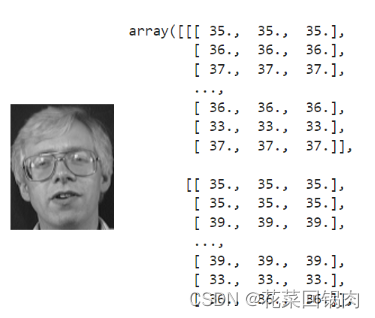
文章目录 图像的数字视角引言直观感受内在剖析图像常用函数图像三维层次 经验总结 图像的数字视角 引言 在机器视觉和目标识别领域,需要处理的对象都是图像,但这些领域的模型都是针对数值进行训练的,那么图像和数值之间是什么关系呢?答案是…...
ChatGPT的问题与回复的内容导出(Chorme)
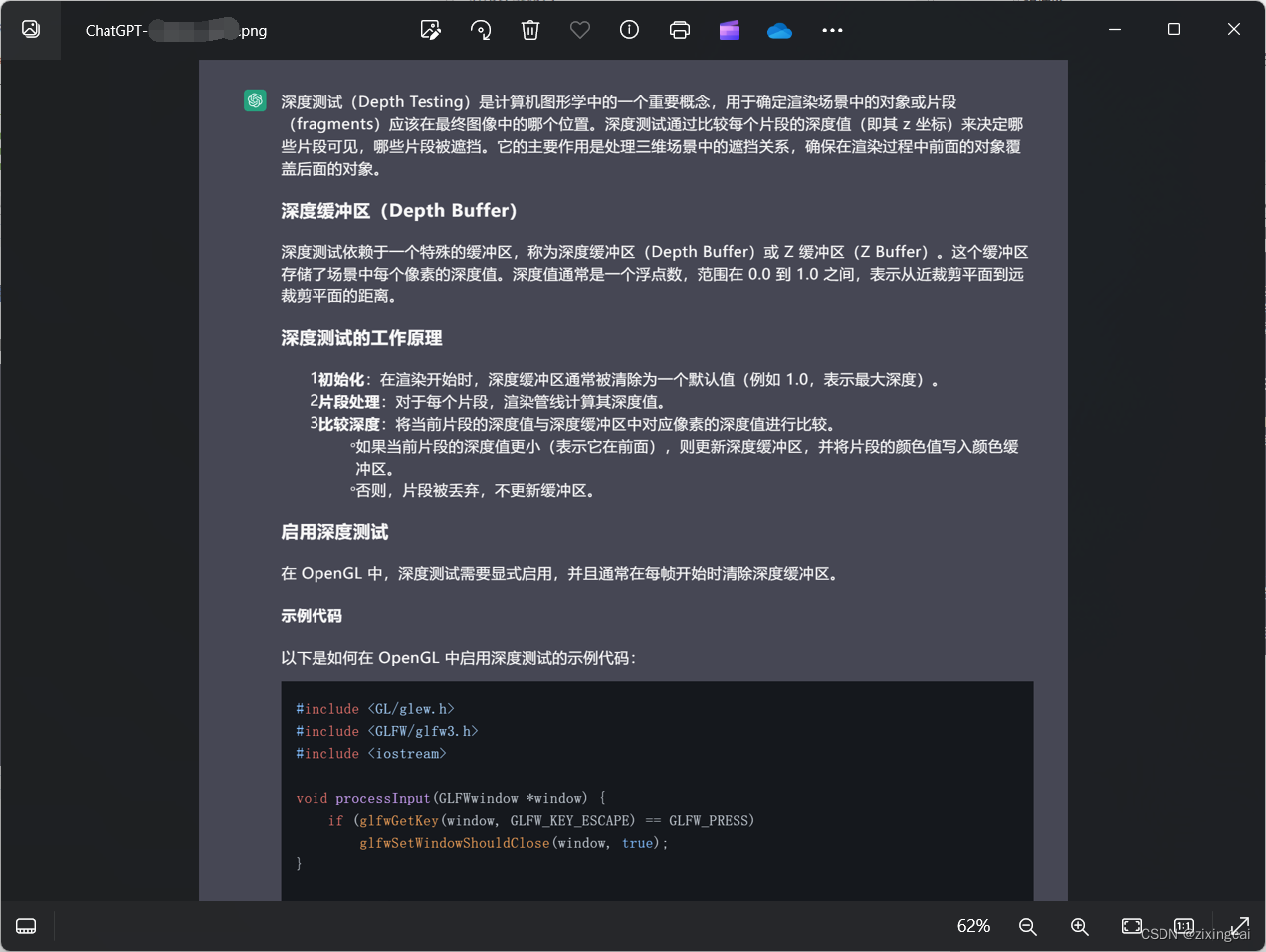
我给出两种方式,第一种方式无使用要求,第二种方式必须安装Chorme 个人更推荐第二种方式 第一种方式:使用chatgpt自带的数据导出 缺点:会将当前未归档的所有聊天记录导出,发送到你的电子邮箱中 第二种方式:…...

游戏开发中的坑之十四 photoshop的javascript脚本批量修改分辨率
原因:美术提交大量2048x2048的贴图,导致工程臃肿。 方案:使用photoshop的javascript脚本批量把指定的文件夹以及所有子文件夹的贴图进行压缩。 脚本中指定针对2048x2048的贴图进行处理。 // Photoshop JavaScript to resize TGA images with…...
、518. 零钱兑换 II、377. 组合总和 Ⅳ、爬楼梯(第八期模拟笔试))
leetcode打卡#day45 携带研究材料(第七期模拟笔试)、518. 零钱兑换 II、377. 组合总和 Ⅳ、爬楼梯(第八期模拟笔试)
携带研究材料(第七期模拟笔试) #include<iostream> #include<algorithm> #include<vector>using namespace std;int main() {int N, V;cin >> N >> V;vector<int> weights(N1);vector<int> values(V1);int w…...
Vite+Vue3安装且自动按需引入Element Plus组件库
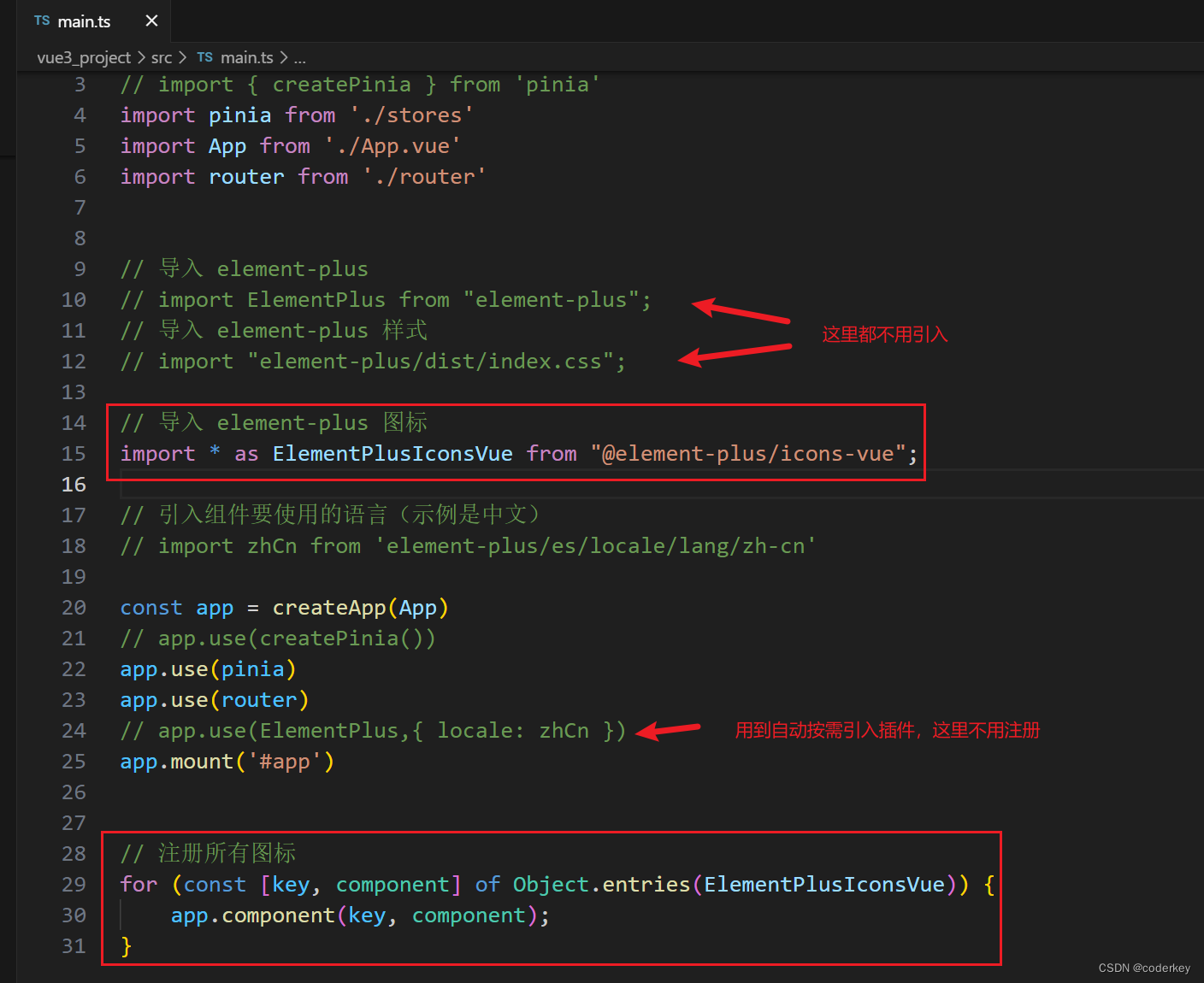
一,安装Element Plus npm install element-plus //node环境16二,安装插件 npm install unplugin-auto-import unplugin-vue-components -D三,配置vite.config.ts文件 //按需引入element-plus组件 import AutoImport from unplugin-auto-i…...

敬酒词大全绝对实用 万能敬酒词
举杯共饮,友情初识;再续一杯,情深似海,朋友相伴人生路更宽。酒逢知己千杯少,一饮而尽显真意,浅尝则留情,深情则尽欢。友情到深处,千杯不倒,若情浅则饮少,醉卧…...

【Java】已解决com.mysql.cj.jdbc.exceptions.CommunicationsException异常
文章目录 一、分析问题背景二、可能出错的原因三、错误代码示例四、正确代码示例五、注意事项 已解决com.mysql.cj.jdbc.exceptions.CommunicationsException异常 一、分析问题背景 com.mysql.cj.jdbc.exceptions.CommunicationsException是Java程序在使用MySQL Connector/J与…...

Leetcode 76. 最小覆盖子串
76. 最小覆盖子串 - 力扣(LeetCode) class Solution {/**也是滑动窗口,思路简单,但实现起来容易出错。一个tmap记录目标串t的各个字符出现的次数;一个smap记录原串的某个滑动窗口里字符出现次数。两个指针left&#x…...

JAVAWEB--Mybatis03
Mybatis映射 什么是映射器 MyBatis的映射器就是用来解决这一问题,映射器其实是一个Interface接口,我们通过编写简单的映射器接口,就可以将我们之前在Dao中做的重复的,看起来比较低级的代码给替换掉。也就是说我们以后不用向之前那样写代码&…...
论文学习_Fuzz4All: Universal Fuzzing with Large Language Models
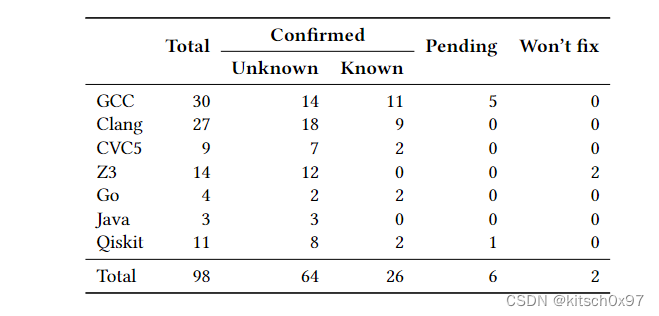
论文名称发表时间发表期刊期刊等级研究单位Fuzz4All: Universal Fuzzing with Large Language Models2024年arXiv-伊利诺伊大学 0.摘要 研究背景模糊测试再发现各种软件系统中的错误和漏洞方面取得了巨大的成功。以编程或形式语言作为输入的被测系统(SUTÿ…...
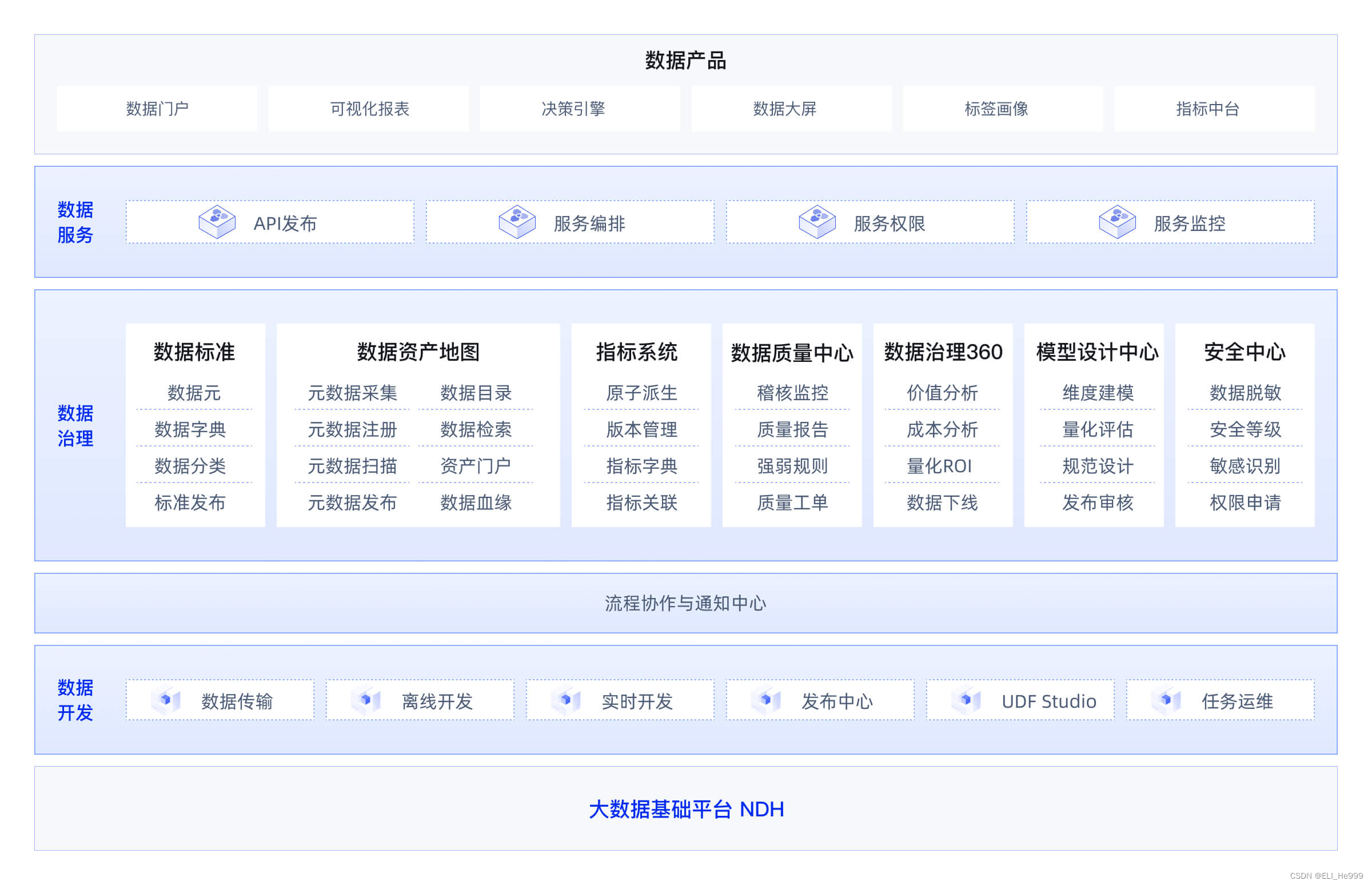
元数据相关资料整理 metadata
目录 定义和特点 关注点 流程 使用场景 元数据影响分析 元数据冷热度分析 元数据关联度分析 血缘分析 数据地图 元数据接口 相关产品的架构图 定义和特点 元数据(Metadata)是指关于数据的数据,或者说是描述数据的数据。它提供了一…...

【Android面试八股文】谈一谈你对http和https的关系理解
文章目录 HTTPHTTPSSSL/TLS协议HTTPS加密、解密流程HTTP 和 HTTPS 的关系具体的差异实际应用总结扩展阅读HTTP(HyperText Transfer Protocol)和HTTPS(HyperText Transfer Protocol Secure)是用于在网络上进行通信的两种协议。 它们在很多方面是相似的,但关键的区别在于安全…...

Vue3 中 setup 函数与 script setup 用法总结
在 Vue3 中,setup 函数和 script setup 是两种新引入的编写组件的方式,它们都是 Composition API 的一部分。 setup 函数: setup 函数是一个新的组件选项,它作为在组件内使用 Composition API 的入口。在 setup 函数中,我们可以定…...
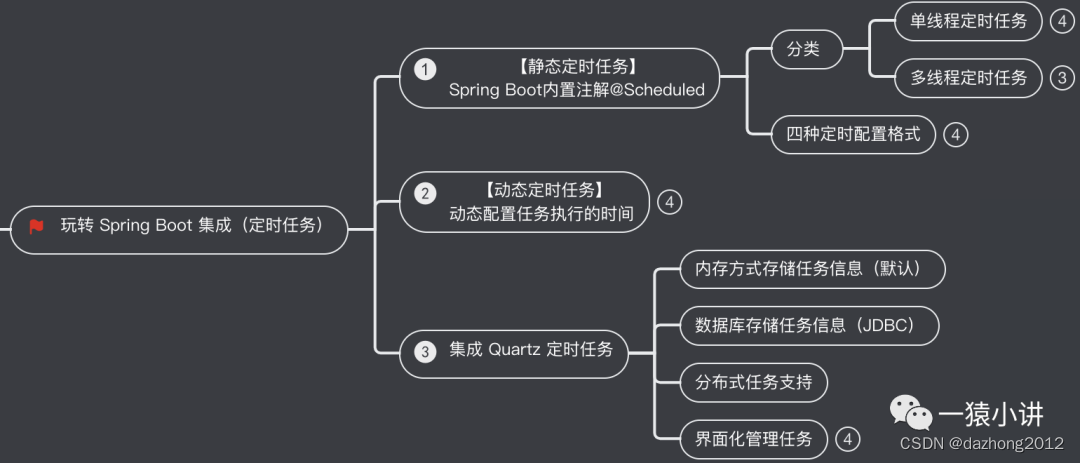
Springboot 开发之任务调度框架(一)Quartz 简介
一、引言 常见的定时任务框架有 Quartz、elastic-job、xxl-job等等,本文主要介绍 Spirng Boot 集成 Quartz 定时任务框架。 二、Quartz 简介 Quartz 是一个功能强大且灵活的开源作业调度库,广泛用于 Java 应用中。它允许开发者创建复杂的调度任务&…...

Proof Engine:简化零知识证明开发,降低区块链应用门槛
1. 项目概述:Proof Engine,一个为现代开发者设计的证明引擎如果你和我一样,在构建需要复杂逻辑验证、状态证明或零知识证明(ZKP)相关应用时,常常感到头疼——工具链复杂、学习曲线陡峭、不同框架间的兼容性…...

如何让Photoshop图层批量导出速度提升3倍?这个开源脚本做到了!
如何让Photoshop图层批量导出速度提升3倍?这个开源脚本做到了! 【免费下载链接】Photoshop-Export-Layers-to-Files-Fast This script allows you to export your layers as individual files at a speed much faster than the built-in script from Ado…...

安得医疗冲刺港股:年营收9亿,利润1.5亿 上海亿瑞控制41%股权
雷递网 雷建平 5月16日山东安得医疗用品股份有限公司(简称:“安得医疗”)日前递交招股书,准备在港交所上市。截至2023年、2024年及2025年12月31日止年度,安得医疗分别宣派及派付股息6670万元、4670万元及4000万元。年营…...

基于CircuitPython与MagTag的电子墨水屏俳句显示器项目实践
1. 项目概述与核心价值如果你对嵌入式开发感兴趣,但又觉得传统的C/C开发环境配置繁琐、学习曲线陡峭,那么CircuitPython绝对是一个值得尝试的入口。它本质上是一个运行在微控制器上的Python 3解释器,由Adafruit主导开发,目标就是让…...

2026年冰袋吸水粉厂家大揭秘:选择指南与行业趋势题
随着冷链物流行业的快速发展,冰袋吸水粉作为冷链运输中不可或缺的保冷材料,其市场需求持续增长。然而,市场上冰袋吸水粉的质量参差不齐,如何选择一家值得信赖的厂家成为许多采购商关注的重点。本文将从行业背景、技术特点及市场趋…...

WarcraftHelper:魔兽争霸3现代化增强插件,解锁经典游戏新体验
WarcraftHelper:魔兽争霸3现代化增强插件,解锁经典游戏新体验 【免费下载链接】WarcraftHelper Warcraft III Helper , support 1.20e, 1.24e, 1.26a, 1.27a, 1.27b 项目地址: https://gitcode.com/gh_mirrors/wa/WarcraftHelper WarcraftHelper是…...

基于树莓派与电子墨水屏的慢速电影播放器制作全攻略
1. 项目概述:当电影遇见电子墨水如果你和我一样,对电子墨水(eInk)屏幕那种独特的、像印刷品一样的显示效果着迷,同时又是个喜欢折腾树莓派(Raspberry Pi)的玩家,那么这个项目绝对能让…...

如何用Photoshop图层批量导出工具提升3倍工作效率 [特殊字符]
如何用Photoshop图层批量导出工具提升3倍工作效率 🚀 【免费下载链接】Photoshop-Export-Layers-to-Files-Fast This script allows you to export your layers as individual files at a speed much faster than the built-in script from Adobe. 项目地址: http…...

KLOGG:专业开发者的海量日志分析利器
KLOGG:专业开发者的海量日志分析利器 【免费下载链接】klogg Really fast log explorer based on glogg project 项目地址: https://gitcode.com/gh_mirrors/kl/klogg 你是否曾为在数十GB的日志文件中寻找关键错误信息而头痛不已?面对海量日志数据…...

Cadence Allegro铺铜实战:从动态避让到静态优化,我的多层板效率提升心得
Cadence Allegro铺铜实战:从动态避让到静态优化,我的多层板效率提升心得 在高速PCB设计领域,Cadence Allegro作为行业标准工具,其铺铜功能直接影响设计效率与产品质量。当板层超过8层、元件密度突破500pin/inch时,动态…...