
分层Agent
分层Teams
- 分层Agent
- 创建tool
- 研究团队工具
- 文档编写团队工具
- 通用能力
- 定义Agent团队
- 研究团队
- 文档编写团队
- 添加图层
分层Agent
在前面的示例(Agent管理)中,我们引入了单个管理节点的概念,用于在不同工作节点之间路由工作。
但是,如果单个worker的工作变得过于复杂怎么办?如果worker数量过多怎么办?
对于某些应用程序,如果工作按层次分布,系统可能会更有效。
您可以通过组合不同的子图并创建顶级管理和中级管理来实现此目的。
为此,让我们构建一个简单的研究助手!该图表将如下所示:
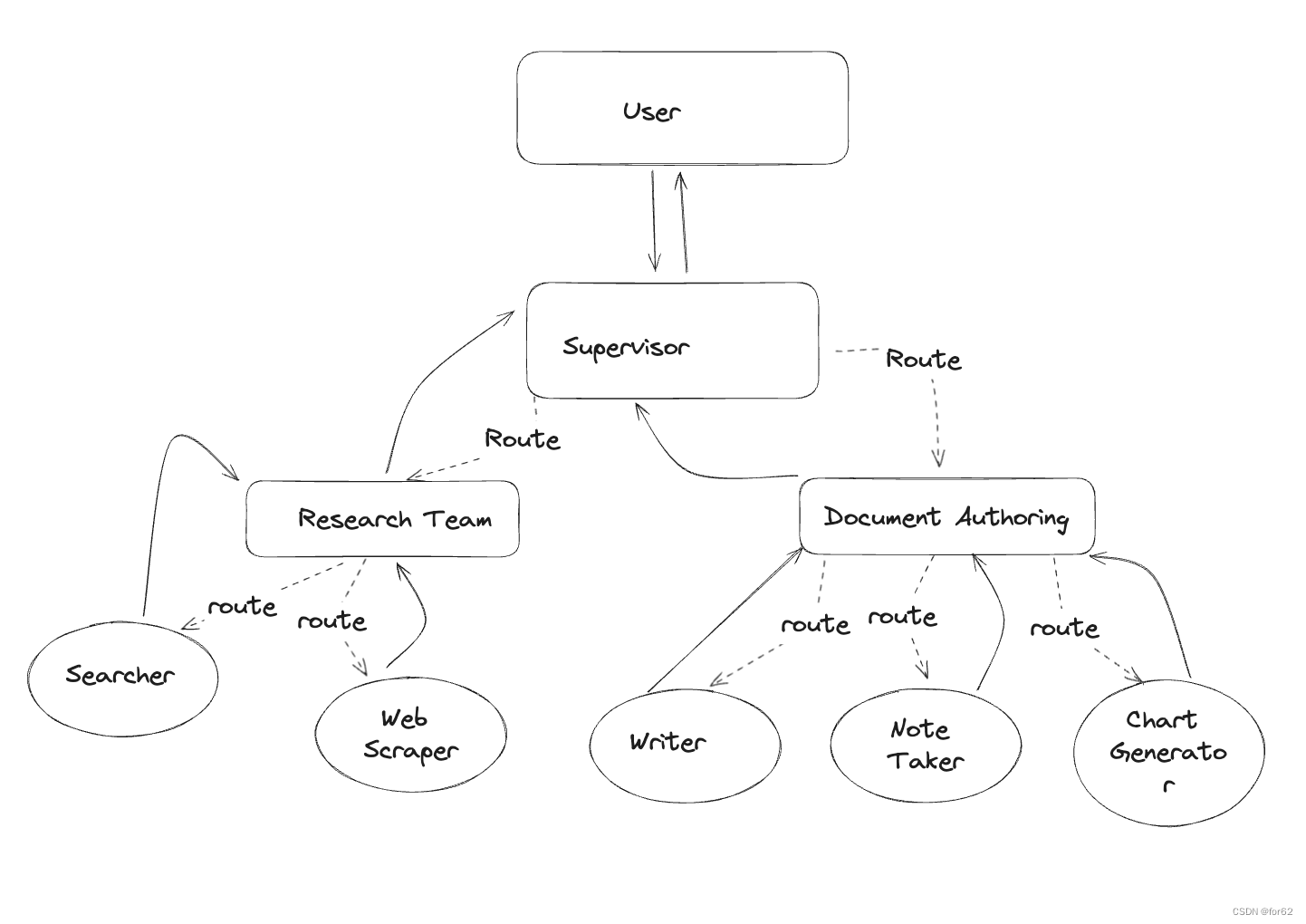
本笔记的灵感来自于 Wu 等人的论文《AutoGen:通过多代理对话启用下一代 LLM 应用程序》。等人。在本笔记的其余部分中,您将:
- 定义Agent访问网络和写入文件的工具
- 定义一些实用程序来帮助创建图形和代理
- 创建并定义每个团队(网络研究+文档写作)
- 将所有内容组合在一起。
创建tool
每个团队将由一名或多名Agent组成,每个Agent拥有一种或多种工具。下面定义了不同团队要使用的所有工具。
研究团队工具
研究团队可以使用搜索引擎和 URL 抓取工具在网络上查找信息。请随意添加以下附加功能以提高团队性能!
from typing import Annotated, Listfrom langchain_community.document_loaders import WebBaseLoader
from langchain_community.tools.tavily_search import TavilySearchResults
from langchain_core.tools import tooltavily_tool = TavilySearchResults(max_results=5)@tool
def scrape_webpages(urls: List[str]) -> str:"""Use requests and bs4 to scrape the provided web pages for detailed information."""loader = WebBaseLoader(urls)docs = loader.load()return "\n\n".join([f'\n{doc.page_content}\n'for doc in docs])
文档编写团队工具
接下来,我们将提供一些工具供文档编写团队使用。我们在下面定义了一些基本的文件访问工具。
请注意,这使Agent可以访问您的文件系统,这可能是不安全的。我们还没有针对性能优化工具描述。
from pathlib import Path
from tempfile import TemporaryDirectory
from typing import Dict, Optional, Annotated, Listfrom langchain_core.tools import tool
from langchain_experimental.utilities import PythonREPL
from typing_extensions import TypedDict_TEMP_DIRECTORY = TemporaryDirectory()
WORKING_DIRECTORY = Path(_TEMP_DIRECTORY.name)@tool
def create_outline(points: Annotated[List[str], "List of main points or sections."],file_name: Annotated[str, "File path to save the outline."],
) -> Annotated[str, "Path of the saved outline file."]:"""Create and save an outline."""with (WORKING_DIRECTORY / file_name).open("w") as file:for i, point in enumerate(points):file.write(f"{i + 1}. {point}\n")return f"大纲保存到 {file_name}"@tool
def read_document(file_name: Annotated[str, "File path to save the document."],start: Annotated[Optional[int], "The start line. Default is 0"] = None,end: Annotated[Optional[int], "The end line. Default is None"] = None,
) -> str:"""Read the specified document."""with (WORKING_DIRECTORY / file_name).open("r") as file:lines = file.readlines()if start is not None:start = 0return "\n".join(lines[start:end])@tool
def write_document(content: Annotated[str, "Text content to be written into the document."],file_name: Annotated[str, "File path to save the document."],
) -> Annotated[str, "Path of the saved document file."]:"""Create and save a text document."""with (WORKING_DIRECTORY / file_name).open("w") as file:file.write(content)return f"文档保存到 {file_name}"@tool
def edit_document(file_name: Annotated[str, "Path of the document to be edited."],inserts: Annotated[Dict[int, str],"Dictionary where key is the line number (1-indexed) and value is the text to be inserted at that line.",],
) -> Annotated[str, "Path of the edited document file."]:"""Edit a document by inserting text at specific line numbers."""with (WORKING_DIRECTORY / file_name).open("r") as file:lines = file.readlines()sorted_inserts = sorted(inserts.items())for line_number, text in sorted_inserts:if 1 <= line_number <= len(lines) + 1:lines.insert(line_number - 1, text + "\n")else:return f"错误: 行号{Line_number}超出范围。"with (WORKING_DIRECTORY / file_name).open("w") as file:file.writelines(lines)return f"文档编辑并保存到 {file_name}"# Warning: This executes code locally, which can be unsafe when not sandboxedrepl = PythonREPL()@tool
def python_repl(code: Annotated[str, "The python code to execute to generate your chart."],
):"""Use this to execute python code. If you want to see the output of a value,you should print it out with `print(...)`. This is visible to the user."""try:result = repl.run(code)except BaseException as e:return f"执行失败,错误: {repr(e)}"return f"执行成功:\n```python\n{code}\n```\nStdout: {result}"
通用能力
当我们想要执行以下操作时,我们将创建一些实用函数以使其更加简洁:
- 创建一个worker agent
- 为子图创建一个管理者
这些将为我们简化最后的图形组合代码,以便更容易看到发生了什么。
from typing import List, Optionalfrom langchain.agents import AgentExecutor, create_openai_functions_agent
from langchain.output_parsers.openai_functions import JsonOutputFunctionsParser
from langchain_core.messages import HumanMessage
from langchain_core.prompts import ChatPromptTemplate, MessagesPlaceholder
from langchain_openai import ChatOpenAIfrom langgraph.graph import END, StateGraphdef create_agent(llm: ChatOpenAI,tools: list,system_prompt: str,
) -> str:"""创建一个函数调用代理并将其添加到图中。"""system_prompt += "\n根据自己的专业,使用可用的工具自主工作。""不要询问说明。""您的其他团队成员(以及其他团队)将根据自己的专长与你合作。""你被选中是有原因的!你是以下团队成员之一: {team_members}。"prompt = ChatPromptTemplate.from_messages([("system",system_prompt,),MessagesPlaceholder(variable_name="messages"),MessagesPlaceholder(variable_name="agent_scratchpad"),])agent = create_openai_functions_agent(llm, tools, prompt)executor = AgentExecutor(agent=agent, tools=tools)return executordef agent_node(state, agent, name):result = agent.invoke(state)return {"messages": [HumanMessage(content=result["output"], name=name)]}# 创建团队管理
def create_team_supervisor(llm: ChatOpenAI, system_prompt, members) -> str:"""An LLM-based router."""options = ["FINISH"] + membersfunction_def = {"name": "route","description": "选择下一个角色。","parameters": {"title": "routeSchema","type": "object","properties": {"next": {"title": "Next","anyOf": [{"enum": options},],},},"required": ["next"],},}prompt = ChatPromptTemplate.from_messages([("system", system_prompt),MessagesPlaceholder(variable_name="messages"),("system","鉴于上述对话,下一步谁应该采取行动?""还是应该结束?选择其中一个:: {options}",),]).partial(options=str(options), team_members=", ".join(members))return (prompt| llm.bind_functions(functions=[function_def], function_call="route")| JsonOutputFunctionsParser())
定义Agent团队
现在我们可以开始定义我们的分层团队了。 “选择你的玩家!”
研究团队
研究团队将有一个搜索代理和一个网络抓取“research_agent”作为两个工作节点。让我们创建这些以及团队主管。
import functools
import operator
from typing import TypedDict, Annotated, Listfrom langchain_core.messages import BaseMessage
from langchain_openai.chat_models import ChatOpenAIfrom common.common import API_KEY, PROXY_URL
from researchteam_tool1 import scrape_webpages, tavily_tool
from utilities3 import create_team_supervisor, create_agent, agent_node# ResearchTeam graph state
class ResearchTeamState(TypedDict):# A message is added after each team member finishesmessages: Annotated[List[BaseMessage], operator.add]# The team members are tracked so they are aware of# the others' skill-setsteam_members: List[str]# Used to route work. The supervisor calls a function# that will update this every time it makes a decisionnext: strllm = ChatOpenAI(model_name="gpt-4o", api_key=API_KEY, base_url=PROXY_URL)search_agent = create_agent(llm,[tavily_tool],"你是一名研究助理,可以使用tavily搜索引擎搜索最新信息。",
)
search_node = functools.partial(agent_node, agent=search_agent, name="Search")research_agent = create_agent(llm,[scrape_webpages],"你是一名研究助理,可以使用scrape_webpages功能抓取指定的URL以获取更详细的信息。",
)
research_node = functools.partial(agent_node, agent=research_agent, name="WebScraper")supervisor_agent = create_team_supervisor(llm,"您是一名主管,负责管理以下worker之间的对话:Search、WebScraper。""给定以下用户请求,请与该工作人员一起响应以执行下一步操作。""每个工作人员将执行一项任务,并以其结果和状态进行响应。""完成后,以FINISH进行响应。",["Search", "WebScraper"],
)
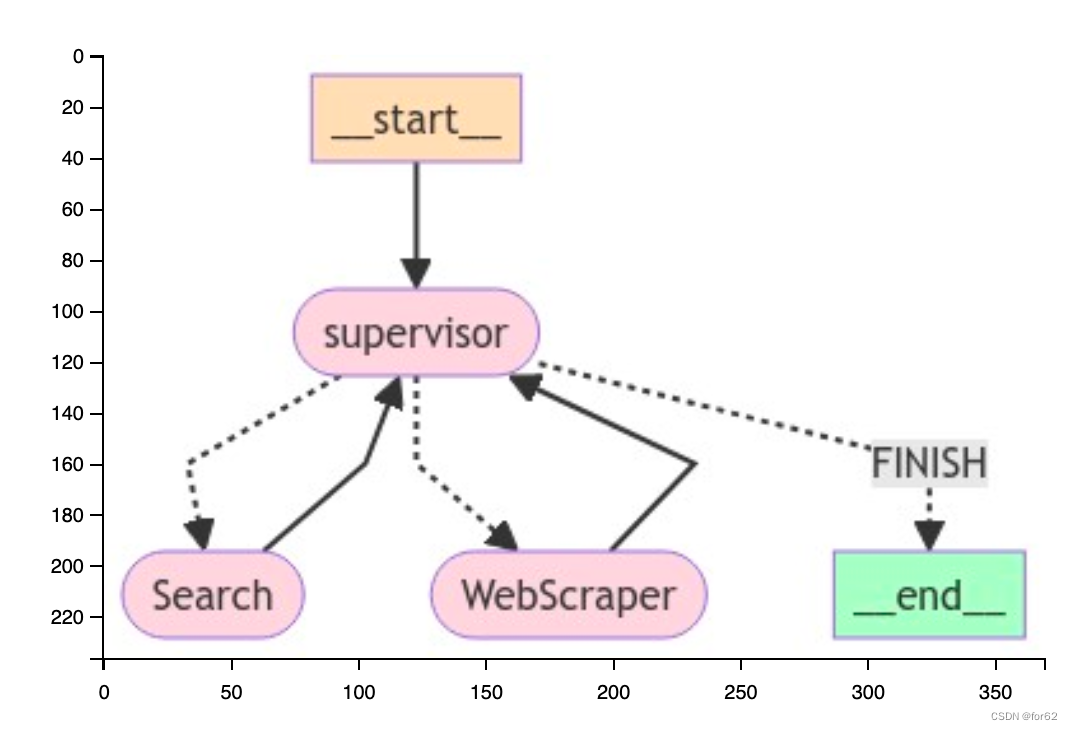
现在我们已经创建了必要的组件,定义它们的交互就很容易了。将节点添加到团队图中,并定义边,这确定了转换标准。
import functools
import operator
from typing import TypedDict, Annotated, Listfrom langchain_core.messages import BaseMessage, HumanMessage
from langchain_openai.chat_models import ChatOpenAI
from langgraph.constants import END
from langgraph.graph import StateGraphfrom common.common import API_KEY, PROXY_URL, show_img
from researchteam_tool1 import scrape_webpages, tavily_tool
from utilities3 import create_team_supervisor, create_agent, agent_node# ResearchTeam graph state
class ResearchTeamState(TypedDict):# A message is added after each team member finishesmessages: Annotated[List[BaseMessage], operator.add]# The team members are tracked so they are aware of# the others' skill-setsteam_members: List[str]# Used to route work. The supervisor calls a function# that will update this every time it makes a decisionnext: strllm = ChatOpenAI(model_name="gpt-4o", api_key=API_KEY, base_url=PROXY_URL)search_agent = create_agent(llm,[tavily_tool],"你是一名研究助理,可以使用tavily搜索引擎搜索最新信息。",
)
search_node = functools.partial(agent_node, agent=search_agent, name="Search")research_agent = create_agent(llm,[scrape_webpages],"你是一名研究助理,可以使用scrape_webpages功能抓取指定的URL以获取更详细的信息。",
)
research_node = functools.partial(agent_node, agent=research_agent, name="WebScraper")supervisor_agent = create_team_supervisor(llm,"您是一名主管,负责管理以下worker之间的对话:Search、WebScraper。""给定以下用户请求,请与该工作人员一起响应以执行下一步操作。""每个工作人员将执行一项任务,并以其结果和状态进行响应。""完成后,以FINISH进行响应。",["Search", "WebScraper"],
)research_graph = StateGraph(ResearchTeamState)
research_graph.add_node("Search", search_node)
research_graph.add_node("WebScraper", research_node)
research_graph.add_node("supervisor", supervisor_agent)# Define the control flow
research_graph.add_edge("Search", "supervisor")
research_graph.add_edge("WebScraper", "supervisor")
research_graph.add_conditional_edges("supervisor",lambda x: x["next"],{"Search": "Search", "WebScraper": "WebScraper", "FINISH": END},
)research_graph.set_entry_point("supervisor")
chain = research_graph.compile()# The following functions interoperate between the top level graph state
# and the state of the research sub-graph
# this makes it so that the states of each graph don't get intermixed
def enter_chain(message: str):results = {"messages": [HumanMessage(content=message)],}return resultsresearch_chain = enter_chain | chain
文档编写团队
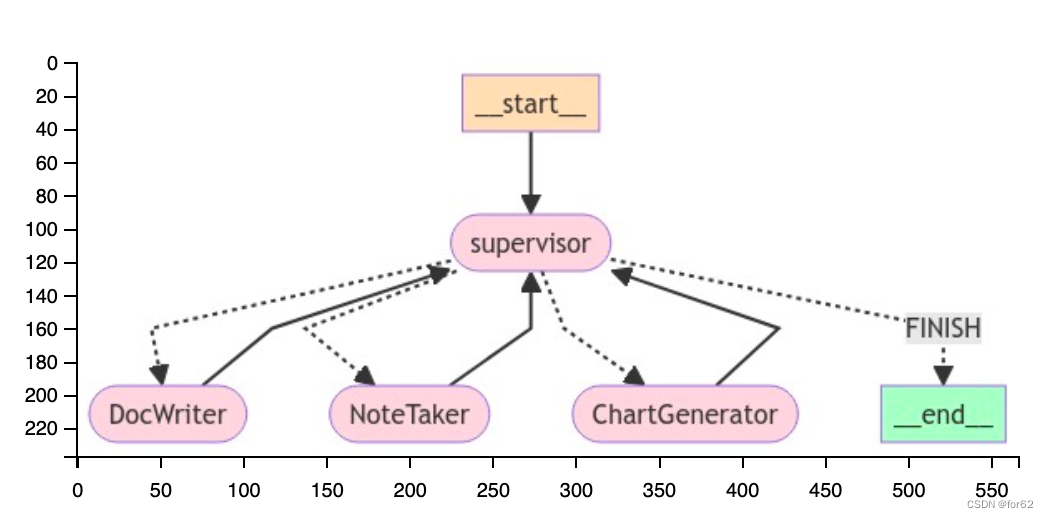
使用类似的方法创建下面的文档编写团队。这次,我们将为每个代理提供不同的文件写入工具的访问权限。
请注意,我们在这里向Agent授予文件系统访问权限,这在任何情况下并不安全。
import functools
import operator
from pathlib import Path
from typing import TypedDict, Annotated, Listfrom langchain_core.messages import BaseMessage, HumanMessage
from langchain_openai import ChatOpenAI
from langgraph.constants import END
from langgraph.graph import StateGraphfrom common.common import API_KEY, PROXY_URL, show_img
from doc_writing_team_tool2 import WORKING_DIRECTORY, write_document, edit_document, read_document, create_outline, \python_repl
from utilities3 import create_agent, agent_node, create_team_supervisor# Document writing team graph state
class DocWritingState(TypedDict):# This tracks the team's conversation internallymessages: Annotated[List[BaseMessage], operator.add]# This provides each worker with context on the others' skill setsteam_members: str# This is how the supervisor tells langgraph who to work nextnext: str# This tracks the shared directory statecurrent_files: str# This will be run before each worker agent begins work
# It makes it so they are more aware of the current state
# of the working directory.
def prelude(state):written_files = []if not WORKING_DIRECTORY.exists():WORKING_DIRECTORY.mkdir()try:written_files = [f.relative_to(WORKING_DIRECTORY) for f in WORKING_DIRECTORY.rglob("*")]except Exception:passif not written_files:return {**state, "current_files": "没有文件被写"}return {**state,"current_files": "\n以下是您的团队已写入目录的文件:\n"+ "\n".join([f" - {f}" for f in written_files]),}llm = ChatOpenAI(model_name="gpt-4o", api_key=API_KEY, base_url=PROXY_URL)doc_writer_agent = create_agent(llm,[write_document, edit_document, read_document],"你是一个写文档研究的专家。\n"# The {current_files} value is populated automatically by the graph state"以下是当前在您目录中的文件:\n{current_files}",
)
# Injects current directory working state before each call
context_aware_doc_writer_agent = prelude | doc_writer_agent
doc_writing_node = functools.partial(agent_node, agent=context_aware_doc_writer_agent, name="DocWriter"
)note_taking_agent = create_agent(llm,[create_outline, read_document],"你是一名专业的高级研究员,负责撰写论文提纲并做笔记,以撰写一篇完美的论文。{current_files}",
)
context_aware_note_taking_agent = prelude | note_taking_agent
note_taking_node = functools.partial(agent_node, agent=context_aware_note_taking_agent, name="NoteTaker"
)chart_generating_agent = create_agent(llm,[read_document, python_repl],"你是一名数据专家,负责为研究项目生成图表。""{current_files}",
)
context_aware_chart_generating_agent = prelude | chart_generating_agent
chart_generating_node = functools.partial(agent_node, agent=context_aware_note_taking_agent, name="ChartGenerator"
)doc_writing_supervisor = create_team_supervisor(llm,"你是一名主管,负责管理以下worker之间的对话: {team_members}。""给定以下用户请求,请与工作人员一起响应以执行下一步操作。""每个工作人员将执行一项任务,并以其结果和状态作出响应。""完成后,回复FINISH。",["DocWriter", "NoteTaker", "ChartGenerator"],
)# Create the graph here:
# Note that we have unrolled the loop for the sake of this doc
authoring_graph = StateGraph(DocWritingState)
authoring_graph.add_node("DocWriter", doc_writing_node)
authoring_graph.add_node("NoteTaker", note_taking_node)
authoring_graph.add_node("ChartGenerator", chart_generating_node)
authoring_graph.add_node("supervisor", doc_writing_supervisor)# Add the edges that always occur
authoring_graph.add_edge("DocWriter", "supervisor")
authoring_graph.add_edge("NoteTaker", "supervisor")
authoring_graph.add_edge("ChartGenerator", "supervisor")# Add the edges where routing applies
authoring_graph.add_conditional_edges("supervisor",lambda x: x["next"],{"DocWriter": "DocWriter","NoteTaker": "NoteTaker","ChartGenerator": "ChartGenerator","FINISH": END,},
)authoring_graph.set_entry_point("supervisor")
chain = authoring_graph.compile()# The following functions interoperate between the top level graph state
# and the state of the research sub-graph
# this makes it so that the states of each graph don't get intermixed
def enter_chain(message: str, members: List[str]):results = {"messages": [HumanMessage(content=message)],"team_members": ", ".join(members),}return results# We reuse the enter/exit functions to wrap the graph
authoring_chain = (functools.partial(enter_chain, members=authoring_graph.nodes)| authoring_graph.compile()
)
添加图层
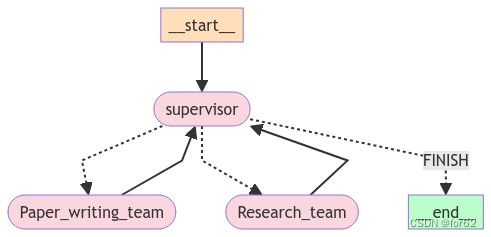
在这个设计中,我们正在执行自上而下的规划政策。我们已经创建了两个图表,但我们必须决定如何在两个图表之间分配工作。
我们将创建第三个图来编排前两个图,并添加一些连接器来定义如何在不同图之间共享此顶级状态。
import operator
from typing import TypedDict, Annotated, Listfrom langchain_core.messages import BaseMessage
from langchain_openai.chat_models import ChatOpenAI
from langgraph.constants import END
from langgraph.graph import StateGraphfrom common.common import API_KEY, PROXY_URL, show_img
from research_team_agent4 import research_chain
from doc_writing_team_agent5 import authoring_chainllm = ChatOpenAI(model_name="gpt-4o", api_key=API_KEY, base_url=PROXY_URL)from utilities3 import create_team_supervisorsupervisor_node = create_team_supervisor(llm,"你是一名主管,负责管理以下团队之间的对话: {team_members}。""给定以下用户请求,与工作人员一起响应以执行下一步操作。""每个工作人员都将执行一项任务,并以其结果和状态作出响应。""完成后,回复FINISH。",["ResearchTeam", "PaperWritingTeam"],
)# Top-level graph state
class State(TypedDict):messages: Annotated[List[BaseMessage], operator.add]next: strdef get_last_message(state: State) -> str:return state["messages"][-1].contentdef join_graph(response: dict):return {"messages": [response["messages"][-1]]}# Define the graph.
super_graph = StateGraph(State)
# First add the nodes, which will do the work
super_graph.add_node("ResearchTeam", get_last_message | research_chain | join_graph)
super_graph.add_node("PaperWritingTeam", get_last_message | authoring_chain | join_graph
)
super_graph.add_node("supervisor", supervisor_node)# Define the graph connections, which controls how the logic
# propagates through the program
super_graph.add_edge("ResearchTeam", "supervisor")
super_graph.add_edge("PaperWritingTeam", "supervisor")
super_graph.add_conditional_edges("supervisor",lambda x: x["next"],{"PaperWritingTeam": "PaperWritingTeam","ResearchTeam": "ResearchTeam","FINISH": END,},
)
super_graph.set_entry_point("supervisor")
super_graph = super_graph.compile()
相关文章:
分层Agent
分层Teams 分层Agent创建tool研究团队工具文档编写团队工具 通用能力定义Agent团队研究团队文档编写团队 添加图层 分层Agent 在前面的示例(Agent管理)中,我们引入了单个管理节点的概念,用于在不同工作节点之间路由工作。 但是&a…...
OS复习笔记ch11-1
外围设备的管理和磁盘调度 外围设备 从CPU的角度来看,外设有几个比较重要的I/O接口(interfaces) 状态reg:向CPU报告设备的状态(忙碌/空闲)命令reg:接收CPU命令,存储 CPU 需要执行的…...

Docker Compose 使用
一、简介 Docker Compose 是一个工具,用于定义和运行多容器 Docker 应用程序。它允许用户使用 YAML 文件来配置应用程序需要的所有服务,然后使用一个命令来从 YAML 文件配置中创建并启动所有服务。其主要目的是为了简化了多容器 Docker 应用程序的部署和…...

KEIL5.39 5.40 fromelf 不能生成HEX bug
使用AC6 编译,只要勾选了生成HEX。 结果报如下错误 暂时没有好的解决办法 1.替换法 2.在编译完后用命令生成HEX...

mongosh 和mongo 命令行连接MongoDB
Mongoshell MongoDB的Shell工具mongosh是一个全功能的JavaScript和Node.js的14.x REPL与MongoDB的部署交互环境。我们通过它可以直接对数据库进行查询和操作。这个工具是需要在安装玩MongoDB后单独安装的。 与传统的mongo方式连接MongoDB更加丰富。 官网 https://www.mongodb.…...

DOM 改变节点
DOM 改变节点 文档对象模型(DOM)是 HTML 和 XML 文档的编程接口。它提供了对文档的结构化表示,并定义了一种方式,允许程序和脚本动态地访问和更新文档的内容、结构和样式。在网页开发中,DOM 操作是核心技能之一&#…...

【面试题分享】重现 string.h 库常用的函数
文章目录 【面试题分享】重现 string.h 库常用的函数一、字符串复制1. strcpy(复制字符串直到遇到 null 终止符)2. strncpy(复制固定长度的字符串) 二、字符串连接1. strcat(将一个字符串连接到另一个字符串的末尾&…...
6.21 移动语义与智能指针
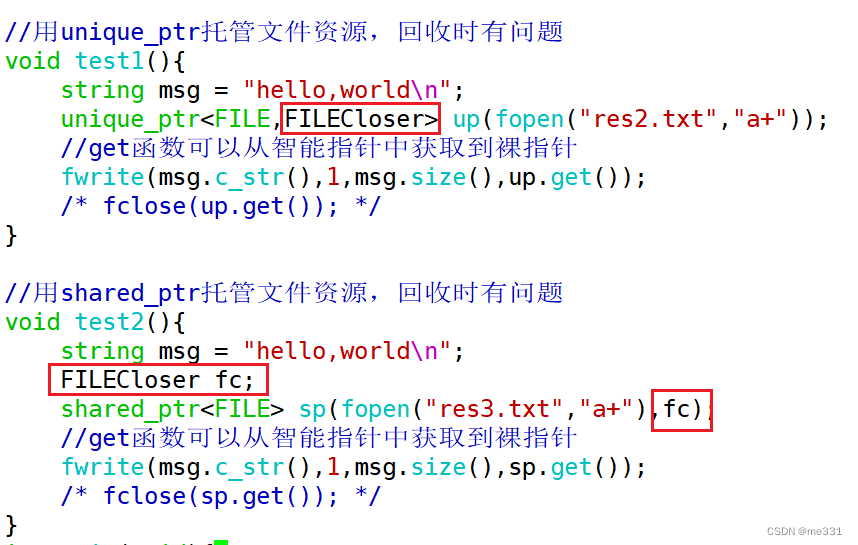
//先构造,再拷贝构造//利用"hello"这个字符串创建了一个临时对象//并复制给了s3//这一步实际上new了两次String s3 "hello"; 背景需求: 这个隐式创建的字符串出了该行就直接销毁掉,效率比较低 可以让_pstr指向这个空间…...

Kimi还能对学术论文进行润色?我来教你!
学境思源,一键生成论文初稿: AcademicIdeas - 学境思源AI论文写作 一、引言 在学术界,论文的质量往往决定了研究的可信度和影响力。Kimi作为一款人工智能助手,可以为学术论文的润色提供有效的帮助。本文将详细介绍如何利用Kimi进…...

智汇云舟成为中煤集团中煤智能创新联盟成员单位
6月21日,第八届世界智能产业博览会平行会议暨中煤智能创新联盟交流会在天津水游城丽筠酒店顺利举行。智汇云舟受邀参与,并由中国中煤能源集团授予荣誉证书,正式成为中煤智能创新联盟成员单位。会议上,清华大学、中国矿业大学&…...
【文心智能体大赛】迎接属于你的休闲娱乐导师!
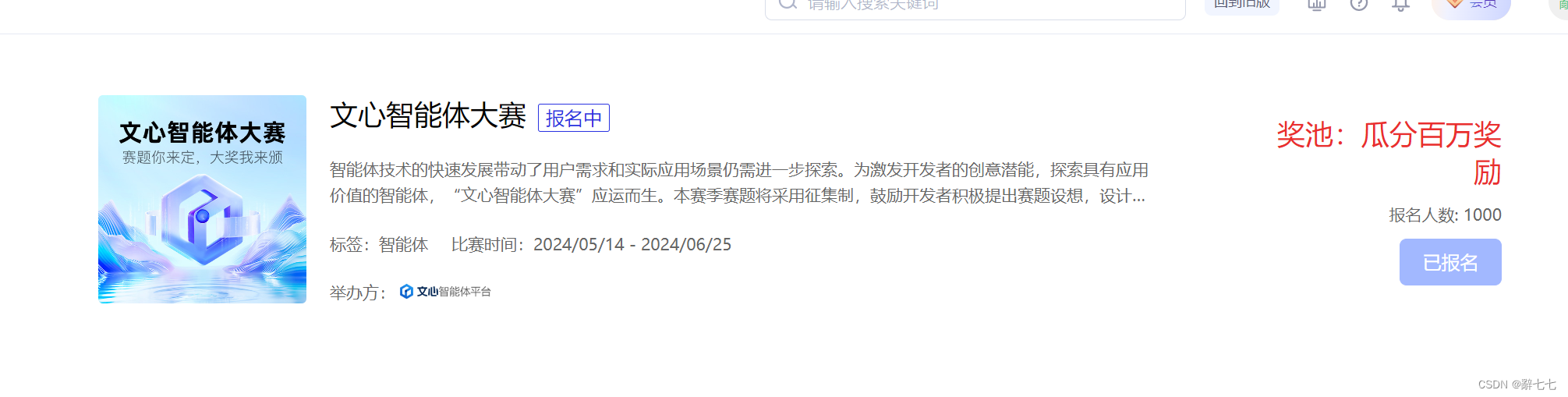
迎接属于你的休闲娱乐导师! 前言创建智能体发布智能体最后结语 前言 文心智能体平台AgentBuilder 是百度推出的基于文心大模型的智能体(Agent)平台,支持广大开发者根据自身行业领域、应用场景,选取不同类型的开发方式&…...

AI:音乐创作的未来还是毁灭的序曲?
AI:音乐创作的未来还是毁灭的序曲? 随着人工智能(AI)技术的飞速发展,它已经渗透到了我们生活的方方面面,包括音乐领域。然而,AI在音乐创作中的角色引发了广泛的讨论和争议。一些人认为AI为音乐…...

如何通过AI进行智能日志异常检测
智能日志异常检测是一种利用人工智能(AI)技术来自动识别日志数据中异常模式或行为的方法。传统日志监控依赖于预定义规则,而智能日志异常检测可以适应不同的日志模式和异常类型,提高检测准确性和效率。下面是一个完整的步骤指南&a…...

C++ GPU编程(英伟达CUDA)
安装编译环境 https://developer.download.nvidia.com/compute/cuda/12.5.0/local_installers/cuda_12.5.0_555.85_windows.exe CMakeLists.txt cmake_minimum_required(VERSION 3.10)set(CMAKE_CXX_STANDARD 17) set(CMAKE_BUILD_TYPE Release) #set(CMAKE_CUDA_ARCHITECTUR…...
肾虚学习实验第T1周:实现mnist手写数字识别
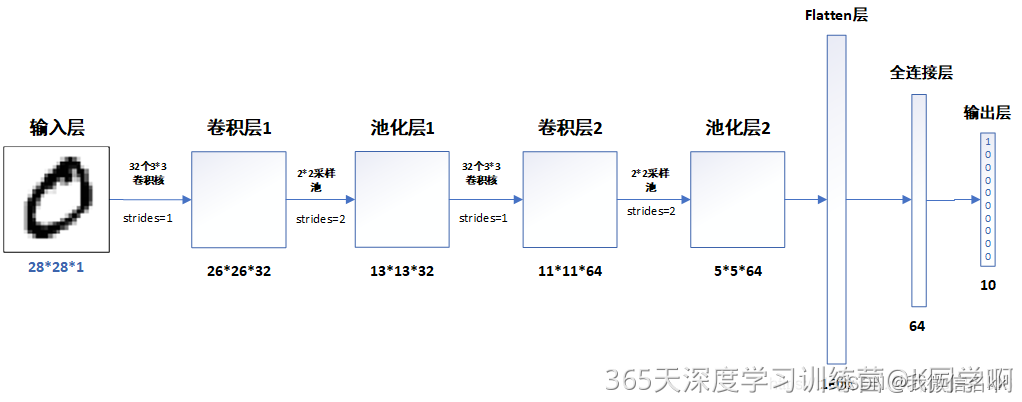
>- **🍨 本文为[🔗365天深度学习训练营](https://mp.weixin.qq.com/s/0dvHCaOoFnW8SCp3JpzKxg) 中的学习记录博客** >- **🍖 原作者:[K同学啊](https://mtyjkh.blog.csdn.net/)** 目录 一、前言 作为一名研究牲࿰…...
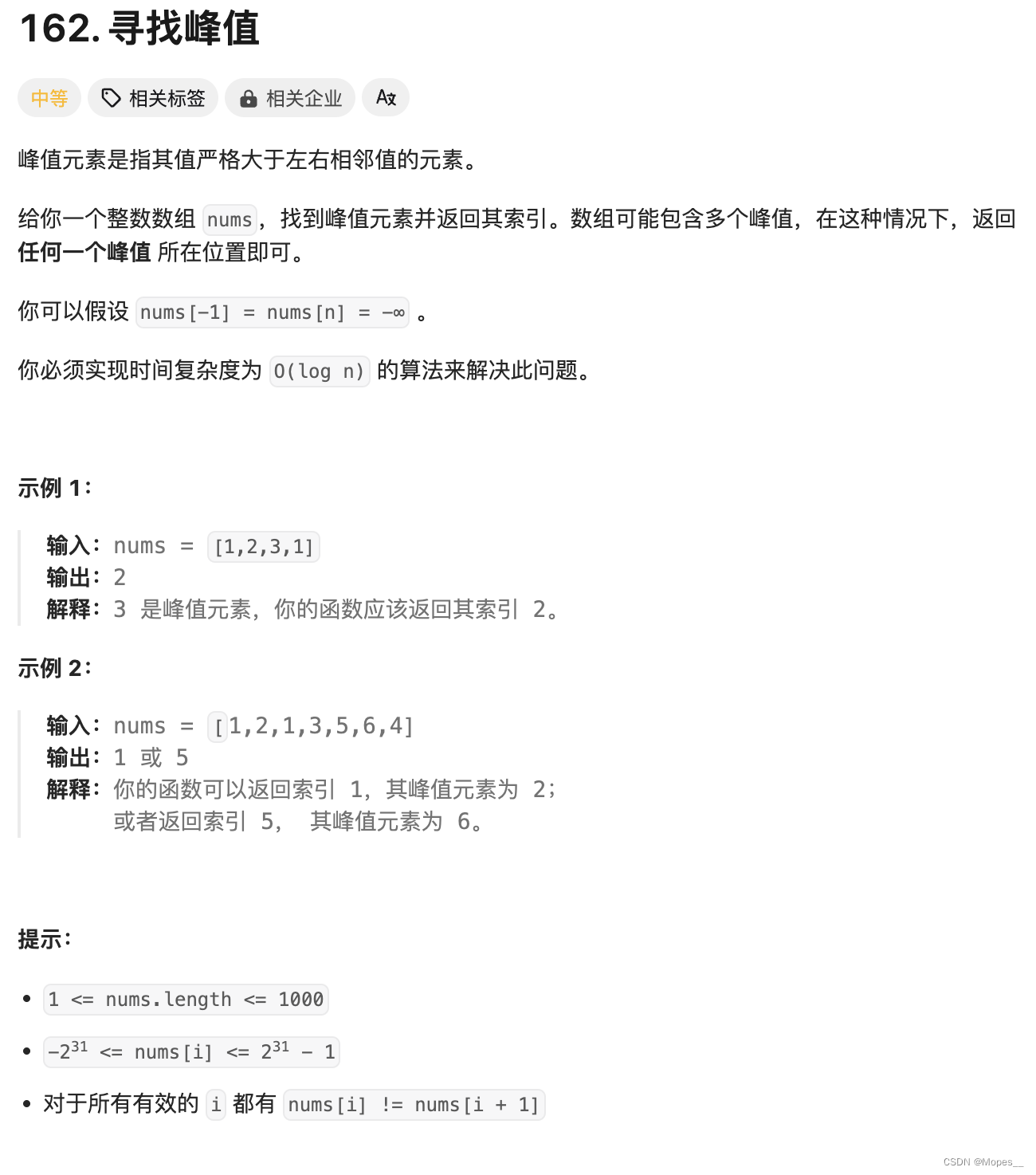
Python | Leetcode Python题解之第162题寻找峰值
题目: 题解: class Solution:def findPeakElement(self, nums: List[int]) -> int:n len(nums)# 辅助函数,输入下标 i,返回 nums[i] 的值# 方便处理 nums[-1] 以及 nums[n] 的边界情况def get(i: int) -> int:if i -1 or…...
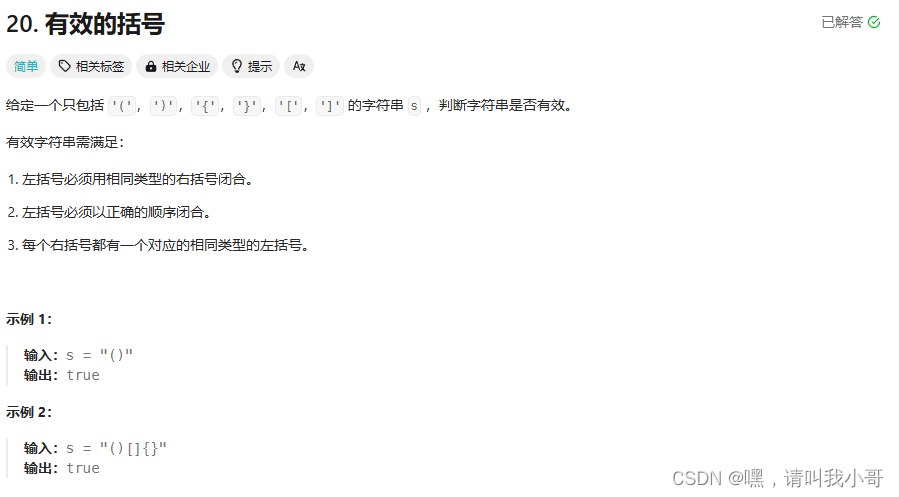
定个小目标之刷LeetCode热题(26)
这道题属于一道简单题,可以使用辅助栈法,代码如下所示 class Solution {public boolean isValid(String s) {if (s.isEmpty())return false;// 创建字符栈Stack<Character> stack new Stack<Character>();// 遍历字符串数组for (char c : …...
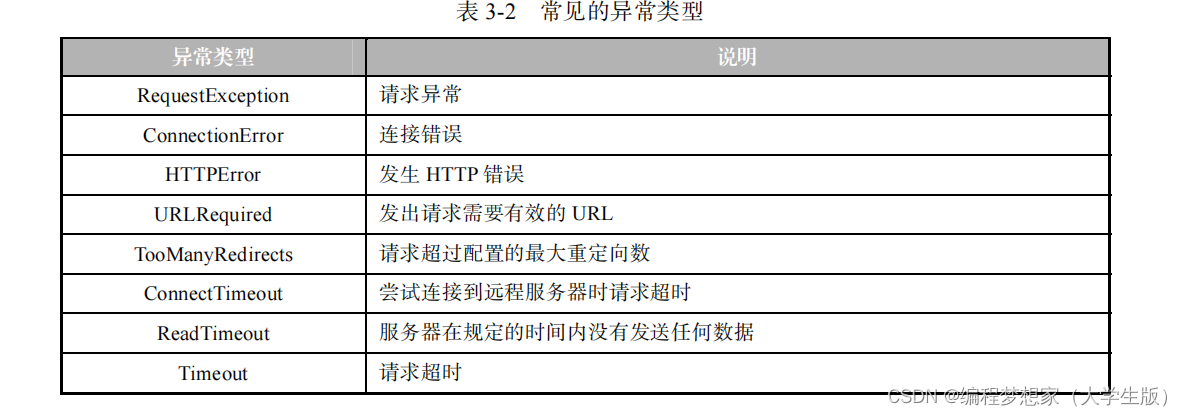
网络爬虫设置代理服务器
目录 1.获取代理 IP 2.设置代理 IP 3. 检测代理 IP 的有效性 4. 处理异常 如果希望在网络爬虫程序中使用代理服务器,就需要为网络爬虫程序设置代理服务器。 设置代理服务器一般分为获取代理 IP 、设置代理 IP 两步。接下来,分…...

3、matlab单目相机标定原理、流程及实验
1、单目相机标定流程及步骤 单目相机标定是通过确定相机的内部和外部参数,以便准确地在图像空间和物体空间之间建立映射关系。下面是单目相机标定的流程及步骤: 搜集标定图像:使用不同角度、距离和姿态拍摄一组标定图像,并确保标…...

【gdb 如何生成并查看core dump】
生成core dump 使用ulimit命令来设置core dump文件的大小。 ulimit -c unlimitedcore dump位置 如果程序崩溃,系统会生成一个名为core的文件。可以通过以下命令查看core文件位置, cat /proc/sys/kernel/core_pattern查看core dump gdb /path/to/you…...

HPM6750 CAN FD实战:从波特率配置到高效收发,避坑指南
1. 项目概述:从经典CAN到CAN FD的实战入门作为一名长期在嵌入式领域摸爬滚打的开发者,我深知现场总线技术,尤其是CAN总线,在工业控制、汽车电子等领域的核心地位。随着数据吞吐量需求的激增,经典CAN的1Mbps带宽逐渐捉襟…...

大语言模型推理加速:SpecPipe技术解析与实践
1. 大语言模型推理加速的技术困局在2023年ChatGPT引爆全球AI热潮后,大语言模型(LLM)的推理效率成为制约实际应用的关键瓶颈。一个70B参数的模型生成100个token可能需要数十秒,这种延迟在实时对话、代码补全等场景中完全不可接受。…...

崩坏星穹铁道终极自动化指南:三月七小助手完整使用教程
崩坏星穹铁道终极自动化指南:三月七小助手完整使用教程 【免费下载链接】March7thAssistant 崩坏:星穹铁道全自动 三月七小助手 项目地址: https://gitcode.com/gh_mirrors/ma/March7thAssistant 还在为《崩坏:星穹铁道》中繁琐的日常…...

别死记硬背!用‘小明小红在操场’的JavaScript题,彻底搞懂this、call和箭头函数
从操场运动到代码执行:用生活场景拆解JavaScript的this与箭头函数 操场上的小明和小红正在运动,这个看似简单的场景却暗藏JavaScript中this指向的玄机。当我们把人物动作转化为代码时,this的指向问题往往成为初学者的"绊脚石"。本文…...


AWS实战|从零搭建高可用Web应用网络架构
1. 为什么需要高可用Web应用架构? 最近帮朋友公司迁移电商平台到AWS时,他们最担心的就是大促期间服务器挂掉。这让我想起三年前自己踩过的坑——当时用单可用区部署的官网,因为一次区域级故障直接宕机8小时。现在回头看,其实只要在…...

Taotoken的Token Plan套餐如何帮助个人开发者更可控地规划AI支出
🚀 告别海外账号与网络限制!稳定直连全球优质大模型,限时半价接入中。 👉 点击领取海量免费额度 Taotoken的Token Plan套餐如何帮助个人开发者更可控地规划AI支出 对于个人开发者或小型项目团队而言,大模型API的调用成…...

别再死记硬背了!用这5个真实项目案例,彻底搞懂Python函数参数与返回值
别再死记硬背了!用这5个真实项目案例,彻底搞懂Python函数参数与返回值 函数是Python编程的基石,但很多初学者在学完基础语法后,面对实际项目依然无从下手。本文将通过5个真实开发场景,带你从"会用"到"懂…...

【ZYNQ】AXI4总线协议实战:从握手时序到PS-PL高效通信
1. AXI4总线协议基础:从握手信号到通道架构 第一次接触ZYNQ的PS-PL通信时,我被AXI4协议里那些VALID/READY信号搞得头晕眼花。直到在示波器上抓到真实的握手波形,才突然理解这个看似复杂的协议其实像极了我们日常的对话机制——只有当说话方准…...

Fast-GitHub:打破GitHub访问壁垒的智能加速方案
Fast-GitHub:打破GitHub访问壁垒的智能加速方案 【免费下载链接】Fast-GitHub 国内Github下载很慢,用上了这个插件后,下载速度嗖嗖嗖的~! 项目地址: https://gitcode.com/gh_mirrors/fa/Fast-GitHub 你是否曾因GitHub仓库克…...