
Spring——Spring整合Mybatis(XML和注解两种方式)
框架整合spring的目的:把该框架常用的工具对象交给spring管理,要用时从IOC容器中取mybatis对象。
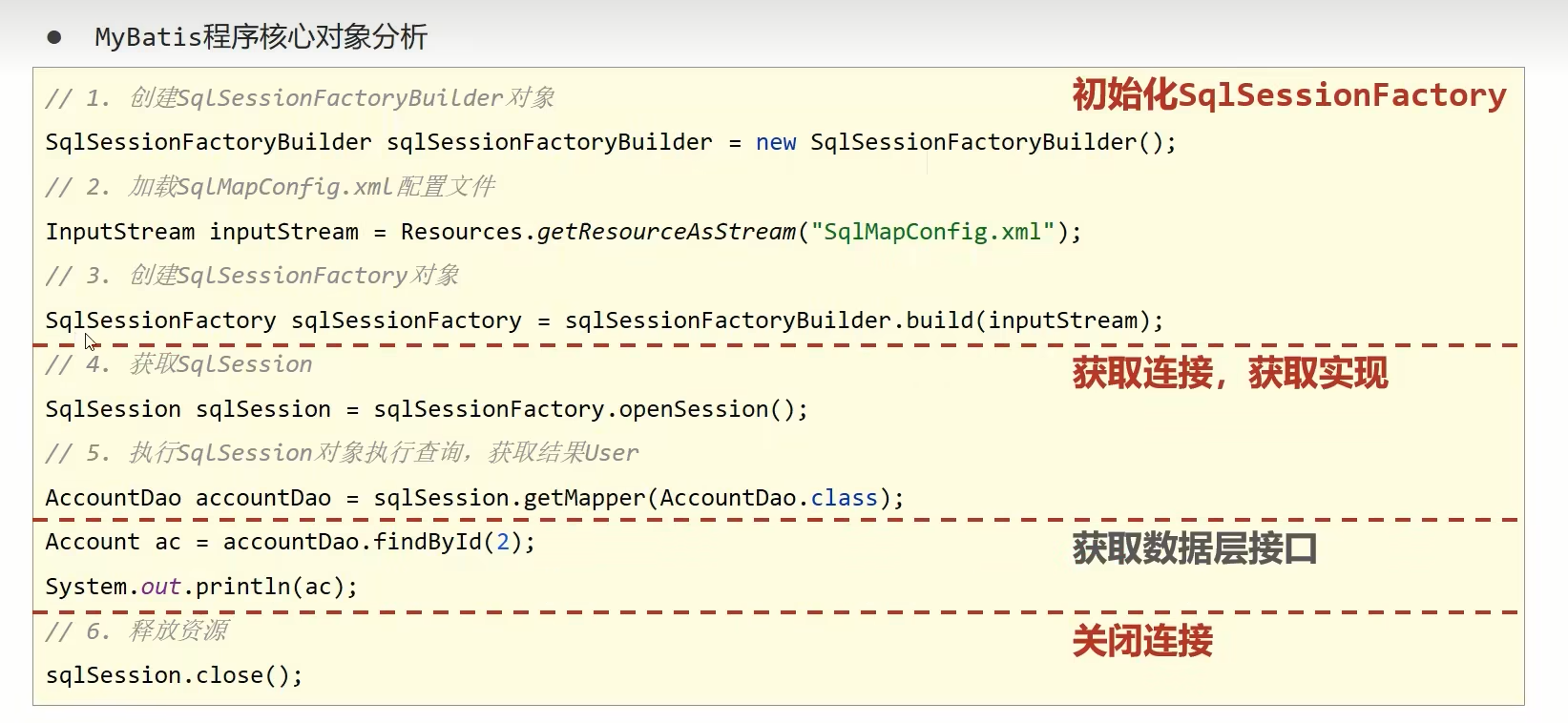
在spring中应该管理的对象是sqlsessionfactory对象,工厂只允许被创建一次,所以需要创建一个工具类,把创建工厂的代码放在里面,后续直接调用工厂即可。
环境配置
先准备个数据库
CREATE TABLE `student` (`id` int NOT NULL,`name` varchar(30) COLLATE utf8mb3_bin DEFAULT NULL,`age` int DEFAULT NULL,PRIMARY KEY (`id`)
) ENGINE=InnoDB DEFAULT CHARSET=utf8mb3 COLLATE=utf8mb3_bin
依赖引入:
<!--spring需要的坐标--><dependency><groupId>org.springframework</groupId><artifactId>spring-context</artifactId><version>5.2.18.RELEASE</version></dependency><!--2.mybatis需要的坐标--><dependency><groupId>mysql</groupId><artifactId>mysql-connector-java</artifactId><version>8.0.31</version></dependency><dependency><groupId>com.alibaba</groupId><artifactId>druid</artifactId> <!--为mybatis配置的数据源--><version>1.2.8</version></dependency><dependency><groupId>org.mybatis</groupId><artifactId>mybatis</artifactId><version>3.5.3</version></dependency><!--3.spring整合mybatis需要的--><dependency><groupId>org.springframework</groupId><artifactId>spring-jdbc</artifactId><version>5.1.9.RELEASE</version></dependency><dependency><groupId>org.mybatis</groupId><artifactId>mybatis-spring</artifactId><version>1.3.0</version></dependency>项目结构
创建相应的dao层,service层,pojo层
pojo
对应数据库的student表的属性写相应的setter和getter还有tostring以及一个无参构造
public class seudent {private int id;private String name;private int age;public int getId() {return id;}public seudent() {}@Overridepublic String toString() {return "seudent{" +"id=" + id +", name='" + name + '\'' +", age=" + age +'}';}public void setId(int id) {this.id = id;}public String getName() {return name;}public void setName(String name) {this.name = name;}public int getAge() {return age;}public void setAge(int age) {this.age = age;}
}
dao层
实现对应的增删改查的接口语句,还要写mapper映射与接口语句对应,使mybatis能通过点的方式获取方法
public interface StudentDao {public List<Student> selectAll();public void insert(Student student);public int delete(int id);
}
映射文件StudentDao.xml
<?xml version="1.0" encoding="UTF-8" ?>
<!DOCTYPE mapperPUBLIC "-//mybatis.org//DTD Mapper 3.0//EN""https://mybatis.org/dtd/mybatis-3-mapper.dtd">
<!--namespqce:名称空间id:sql语句的唯一标识resultType:返回结果的类型
-->
<mapper namespace="org.example.dao.StudentDao"><insert id="insert" parameterType="org.example.pojo.Student">insert into student values(#{id},#{name},#{age});</insert><delete id="delete" parameterType="int">delete from student where id=#{id};</delete><select id="selectAll" resultType="org.example.pojo.Student" parameterType="org.example.pojo.Student">select * from student;</select></mapper>
service层
需要操作持久层或实现查询,需要与dao层的方法对应
先写接口方法
public interface StudentService {public List<Student> findAll();public void add(Student student);public int remove(int id);
}
再写实现类,需要调用Dao层的方法,所以需要先获取一个StudentDao对象通过对象调用方法
package org.example.service.impl;import org.example.dao.StudentDao;
import org.example.pojo.Student;
import org.example.service.StudentService;import java.util.List;public class StudentServiceImpl implements StudentService {private StudentDao studentDao;public StudentDao getStudentDao() {return studentDao;}public void setStudentDao(StudentDao studentDao) {this.studentDao = studentDao;}@Overridepublic List<Student> findAll() {return studentDao.selectAll();}@Overridepublic void add(Student student) {studentDao.insert(student);}@Overridepublic int remove(int id) {return studentDao.delete(id);}
}
配置applicationContext.xml
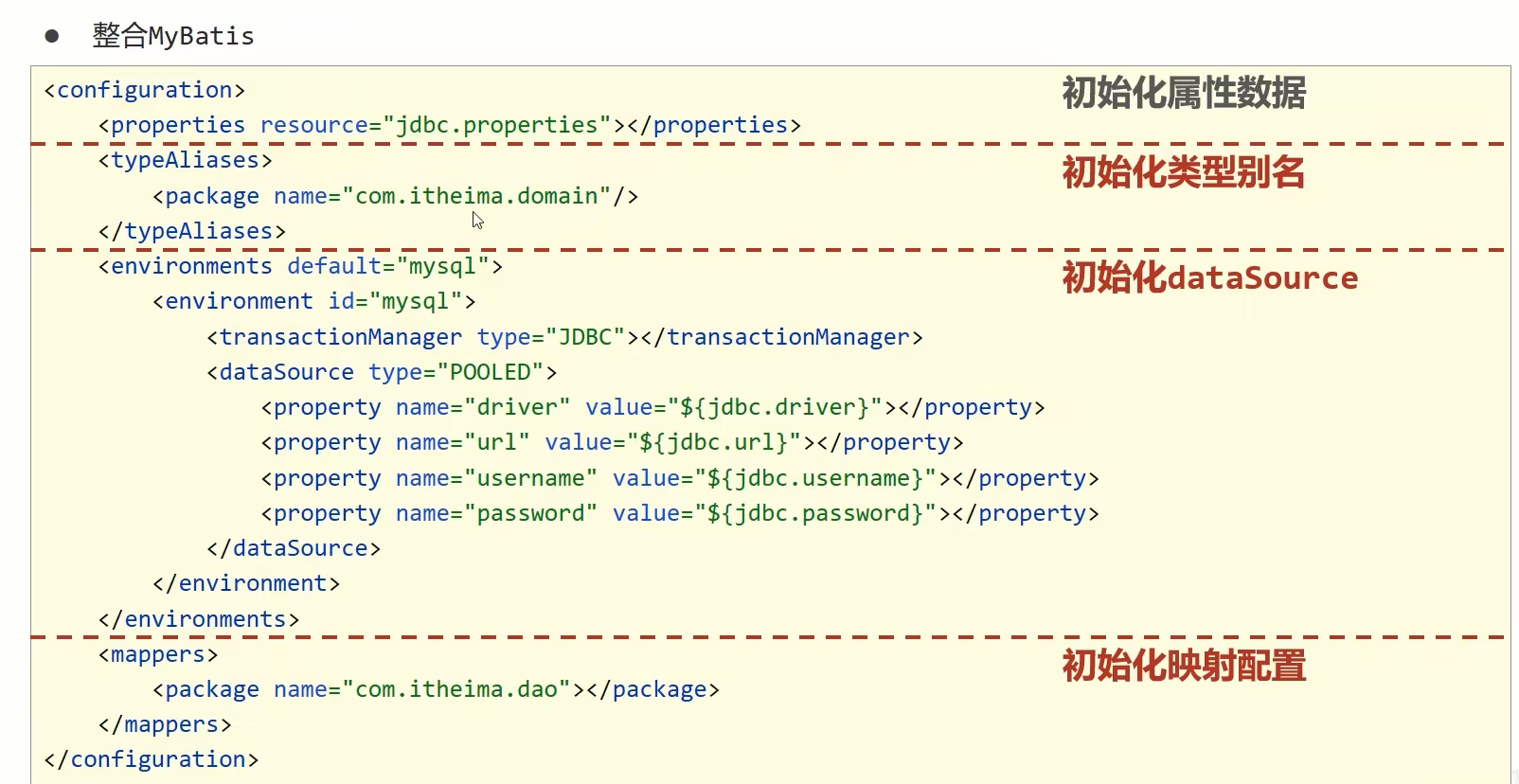
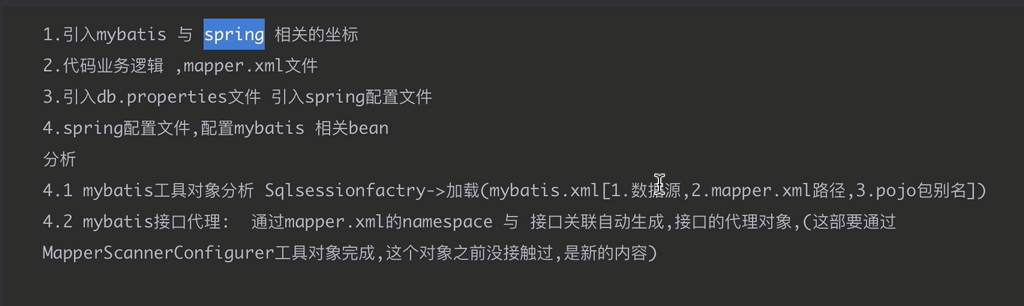
SqlSessionFactoryBean有一个必须属性dataSource,另外其还有一个通用属性configLocation(用来指定mybatis的xml配置文件路径)。
其中dataSource使用阿里巴巴的druid作为数据源,druid需要db.propertis文件的内容如下
jdbc.driver=com.mysql.cj.jdbc.Driver
jdbc.url=jdbc:mysql://localhost:3306/test1
jdbc.username=root
jdbc.password=234799
<bean class="org.mybatis.spring.SqlSessionFactoryBean"><property name="mapperLocations" value="mapper/*xml"/> <!--默认查找resources下xml--><property name="dataSource" ref="dataSource"/><property name="typeAliasesPackage" value="org.example.pojo"/></bean><!--使用阿里巴巴提供的druid作为数据源,通过引入外部properties文件进行加载,并使用${}参数占位符的方式去读取properties中的值--><context:property-placeholder location="classpath:db.properties"/><bean id="dataSource" class="com.alibaba.druid.pool.DruidDataSource"><property name="driverClassName" value="${jdbc.driver}"/><property name="url" value="${jdbc.url}"/><property name="username" value="${jdbc.username}"/><property name="password" value="${jdbc.password}"/></bean>还需要生成dao层接口实现类的bean对象
<!--扫描接口包路径,生成包下所有接口的代理对象,并且放入spring容器中,后面可以直接用,自动生成mapper层(dao层)的代理对象--><bean class="org.mybatis.spring.mapper.MapperScannerConfigurer"><property name="basePackage" value="org.example.dao"/></bean>还有service的接口实现类也要交给spring管理
service里面的依赖注入就交给spring来完成
<!--spring管理其他bean studentDao是spring根据mybatis自动生成的对象--><!--来自于MapperScannerConfigurer--><bean class="org.example.service.impl.StudentServiceImpl" id="studentService"><property name="studentDao" ref="studentDao"/></bean>在测试类中执行业务层操作
添加两个学生后查询一次所有元素输出,然后删除一个学生后再一次查询一次所有元素输出,成功输出,如下图所示
public class Main {public static void main(String[] args) {ApplicationContext ctx=new ClassPathXmlApplicationContext("applicationContext.xml");StudentService studentService= (StudentService)ctx.getBean("studentService");Student student=new Student();student.setId(1);student.setName("yhy");student.setAge(18);Student student2=new Student();student2.setId(2);student2.setName("yxc");student2.setAge(30);studentService.add(student);studentService.add(student2);List<Student> students=studentService.findAll();System.out.println(students);studentService.remove(2);students=studentService.findAll();System.out.println(students);}
}
以上就是用XML的方式spring整合mybatis,在applicationContext中进行了mybatis工具类的相关配置,不需要mybatis的配置文件
接下来就是用注解的方式整合mybatis
就是在上面的条件下把applicationContext.xml配置文件当中的内容转换成注解
第一步
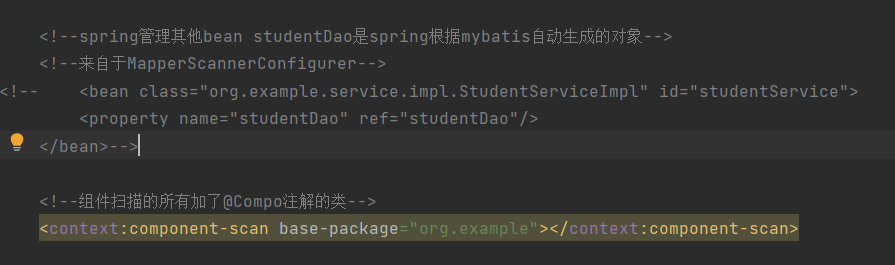
将service层的bean对象改用注解和组件扫描的方式创建,表现为将原本的service的bean标签去除,并在studentserviceImpl中加个@service注解,并定义一个名字,方便主函数中调用
(组件扫描就是把所有加了相应注解的东西放到容器中去)
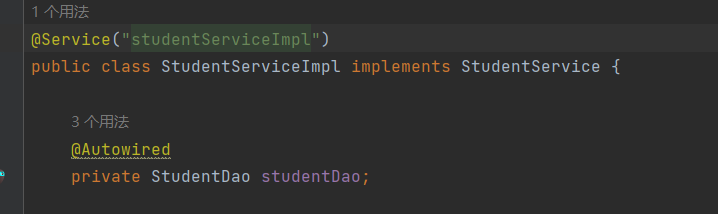
对于studentserviceImpl中的stduentDao对象使用@Autowired实现自动装配,同时,setter和getter方法也可以删除了
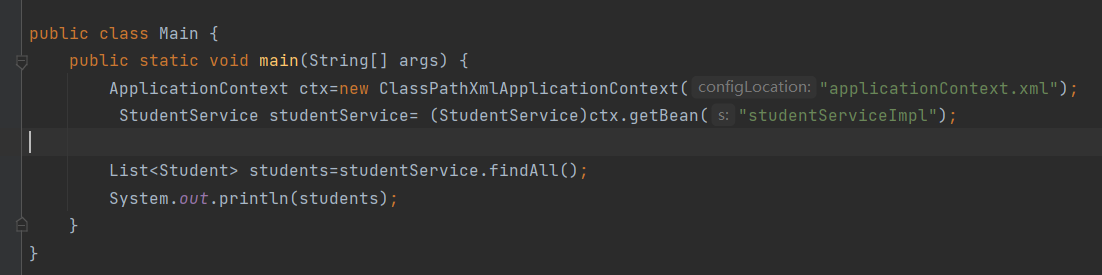
在主文件中使用组件名获取bean,不再是使用bean标签里面的id属性去获取,如下
第二步
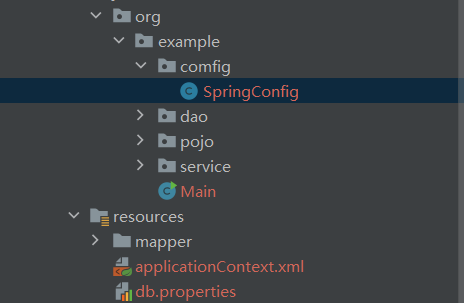
新建一个配置类SpringConfig.calss而不是使用配置文件,加上
@Configuration 表明是一个配置类
@ComponentScan(value = {"org.example"}) 扫包的标签
然后将配置文件里面的bean全部移植到SpringConfig中去
首先是SqlSessionFactoryBean对象,写一个方法返回该对象,对于SqlSessionFactoryBean需要的属性都在里面一一赋予它,对于datasource先暂时置为空,下面要先完成datasource的bean管理,加上一个@bean放入容器管理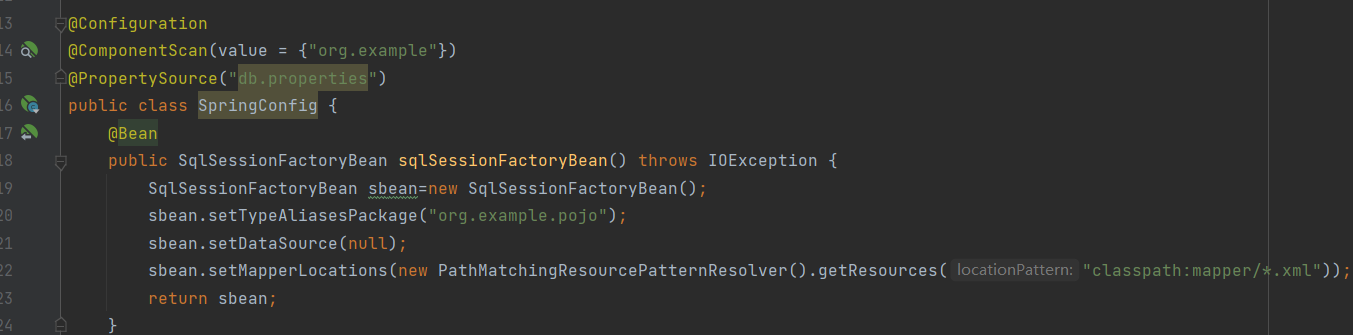
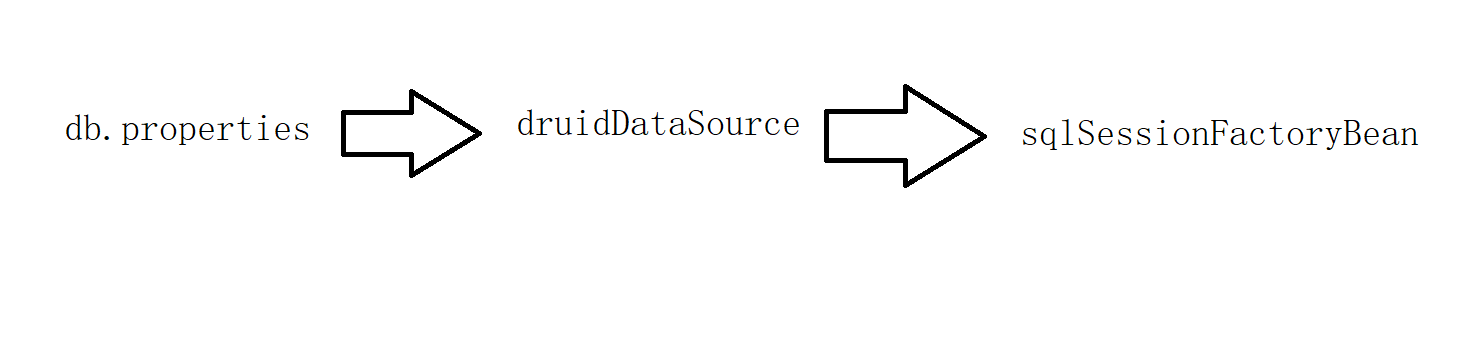
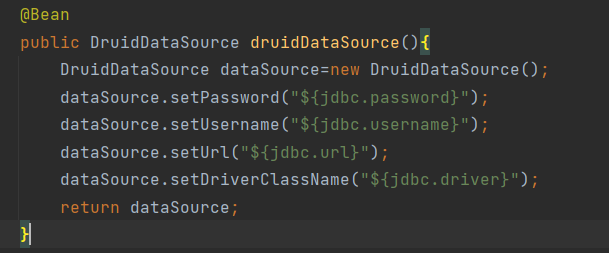
datasource的bean方法创建,datasource依赖于外部的数据源druid,所以又要先创建一个DruidDataSource的bean方法,DruidDataSource又依赖于一个db.properties,这里可以在配置类上使用一个注解@PropertySource("db.properties")把需要的信息加载进来,在里面再使用参数占位符${}的方式加载信息,再加上一个@bean放入容器
ps:下面运行测试时发现不对劲,不能使用@PropertySource注解加载properties文件
上面第二步的依赖注入的流程图大概就是
第三步
将扫包的MapperScannerConfigurer也加入容器进行bean管理,对于需要mapper接口的路径也一起作为参数给它

最后就是SpringConfig里面所有的信息
ps:经过下面测试,三个方法都要加上static
@Configuration
@ComponentScan(value = {"org.example"})
@PropertySource("db.properties")
public class SpringConfig {@Beanpublic static SqlSessionFactoryBean sqlSessionFactoryBean() throws IOException {SqlSessionFactoryBean sbean=new SqlSessionFactoryBean();sbean.setTypeAliasesPackage("org.example.pojo");sbean.setDataSource(druidDataSource());sbean.setMapperLocations(new PathMatchingResourcePatternResolver().getResources("classpath:mapper/*.xml"));return sbean;}@Beanpublic static  DruidDataSource druidDataSource(){DruidDataSource dataSource=new DruidDataSource();dataSource.setPassword("${jdbc.password}");dataSource.setUsername("${jdbc.username}");dataSource.setUrl("${jdbc.url}");dataSource.setDriverClassName("${jdbc.driver}");return dataSource;}@Beanpublic static  MapperScannerConfigurer mapperScannerConfigurer(){MapperScannerConfigurer mapperScannerConfigurer = new MapperScannerConfigurer();mapperScannerConfigurer.setBasePackage("org.example.dao");return mapperScannerConfigurer;}
}
测试注解Spring整合mybatis的功能
测试里面出现了两个大的错误
第一个错误
Exception in thread "main" org.mybatis.spring.MyBatisSystemException: nested exception is org.apache.ibatis.exceptions.PersistenceException:
### Error querying database.  Cause: org.springframework.jdbc.CannotGetJdbcConnectionException: Failed to obtain JDBC Connection; nested exception is java.sql.SQLException: ${jdbc.driver}
### The error may exist in file [F:\acwing——project\spring\tmp\mybatis_demo\spring02mybatis\target\classes\mapper\StudentDao.xml]
### The error may involve org.example.dao.StudentDao.selectAll
### The error occurred while executing a query
主要是Failed to obtain JDBC Connection; nested exception is java.sql.SQLException: ${jdbc.driver}
经过debug发现不知为什么不能使用
@PropertySource(value = {"db.properties"})
的方式引入properties文件后使用参数占位符,只能使用字符串的方式
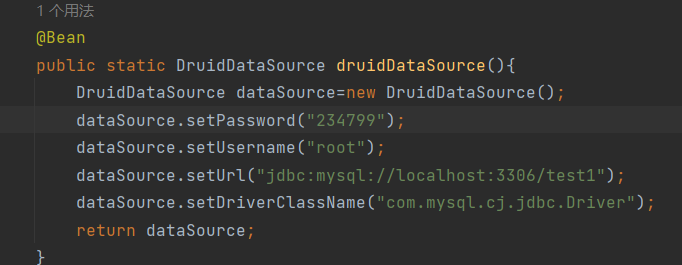 这是正确写法
第二个错误
该错误不会影响操作执行
Cannot enhance @Configuration bean definition 'springConfig' since its singleton instance has been created too early.
无法增强 Bean 定义 'springConfig@Configuration因为它的单例实例创建得太早了。
经过查证是因为原因是当获取SqlSessionFactoryBean接口的bean时,会调用SqlSessionFactoryBean()方法创建Bean,而调用该方法前同样需要先实例化SpringConfig,导致了SpringConfig在被增强之前被实例化了, 而如果把方法修饰为static,static方法属于类方法,就不会触发SpringConfig被提前实例化也就不会出现警告信息了.
在SpringConfig中的三个方法都是这种类型,所以都要加上static。
相关文章:
Spring——Spring整合Mybatis(XML和注解两种方式)
框架整合spring的目的:把该框架常用的工具对象交给spring管理,要用时从IOC容器中取mybatis对象。 在spring中应该管理的对象是sqlsessionfactory对象,工厂只允许被创建一次,所以需要创建一个工具类,把创建工厂的代码放在里面&…...
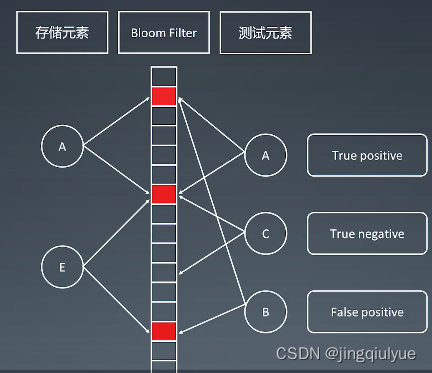
【专项训练】布隆过滤器和LRU缓存
布隆过滤器:与哈希表类似 哈希表是一个没有误差的数据结构! 有哈希函数得到index,会把要存的整个元素放在哈希表里面 有多少元素,每个元素有多大,所有的这些元素需要占的内存空间,在哈希表中都要找相应的内存大小给存起来 事实上,我们并不需要存所有的元素本身,而是只…...

从一道面试题看 TCP 的吞吐极限
分享一个 TCP 面试题:单条 TCP 流如何打满香港到旧金山的 320Gbps 专线?(补充,写成 400Gbps 更具迷惑性,但预测大多数人都会跑偏,320Gbps 也就白给了) 这个题目是上周帮一个朋友想的,建议他别问三次握手&a…...

rsync 的用法
rsync 介绍下 用法 rsync是一个常用的数据同步工具,它能够在本地和远程系统之间同步文件和目录。以下是rsync的基本用法: 同步本地文件夹: bash Copy code rsync -av /path/to/source /path/to/destination其中,-a表示归档模式&…...
【LeetCode每日一题:[面试题 17.05] 字母与数字-前缀和+Hash表】
题目描述 给定一个放有字母和数字的数组,找到最长的子数组,且包含的字母和数字的个数相同。 返回该子数组,若存在多个最长子数组,返回左端点下标值最小的子数组。若不存在这样的数组,返回一个空数组。 示例 1: 输入…...
| 机考必刷)
华为OD机试题 - 简易压缩算法(JavaScript)| 机考必刷
更多题库,搜索引擎搜 梦想橡皮擦华为OD 👑👑👑 更多华为OD题库,搜 梦想橡皮擦 华为OD 👑👑👑 更多华为机考题库,搜 梦想橡皮擦华为OD 👑👑👑 华为OD机试题 最近更新的博客使用说明本篇题解:简易压缩算法题目输入输出示例一输入输出说明示例二输入输出说明…...
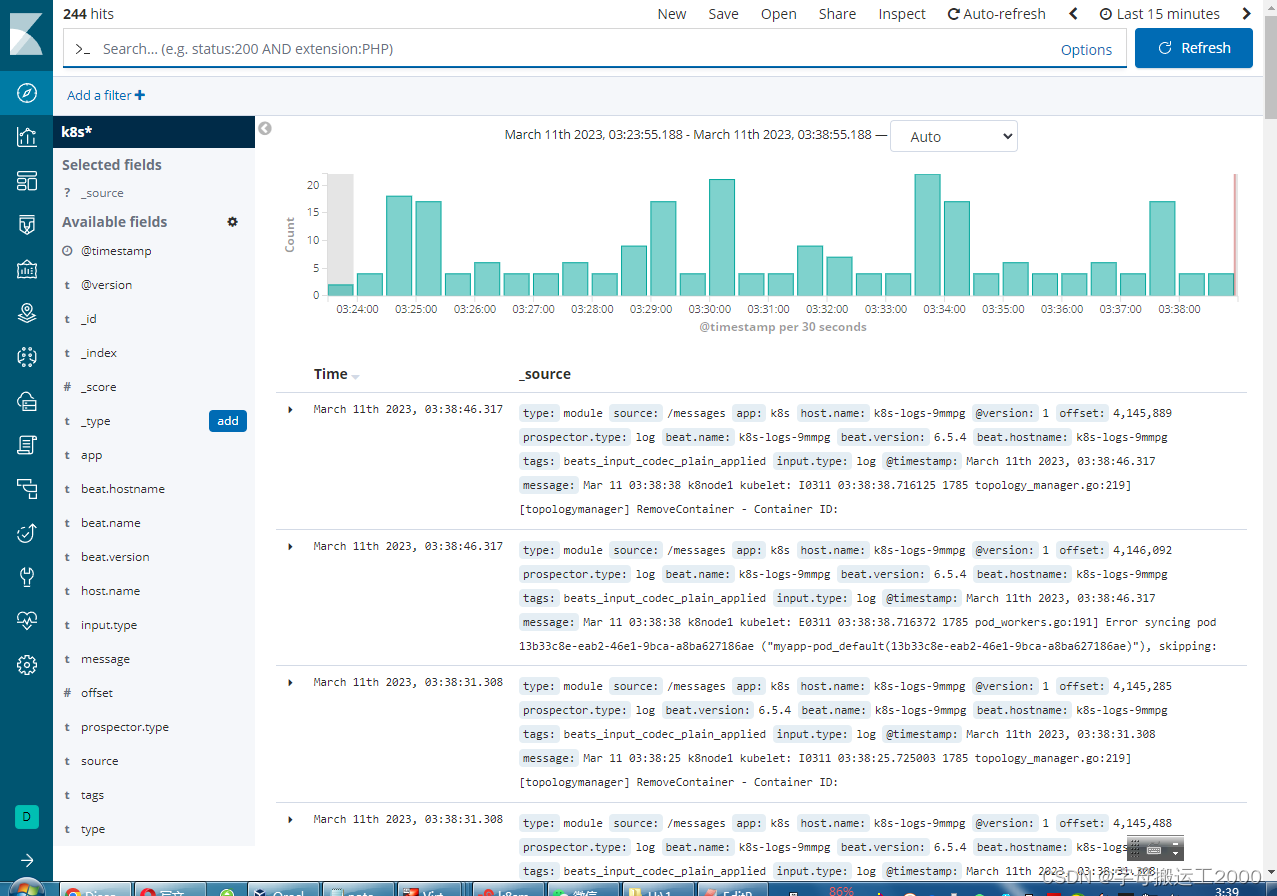
Kubenates中的日志收集方案ELK(下)
1、rpm安装Logstash wget https://artifacts.elastic.co/downloads/logstash/logstash-6.8.7.rpm yum install -y logstash-6.8.7.rpm2、创建syslog配置 input {beats{port> 5044 } }output {elasticsearch {hosts > ["http://localhost:9200"]index …...
LeetCode - 42 接雨水
目录 题目来源 题目描述 示例 提示 题目解析 算法源码 题目来源 42. 接雨水 - 力扣(LeetCode) 题目描述 给定 n 个非负整数表示每个宽度为 1 的柱子的高度图,计算按此排列的柱子,下雨之后能接多少雨水。 示例1 输入&…...
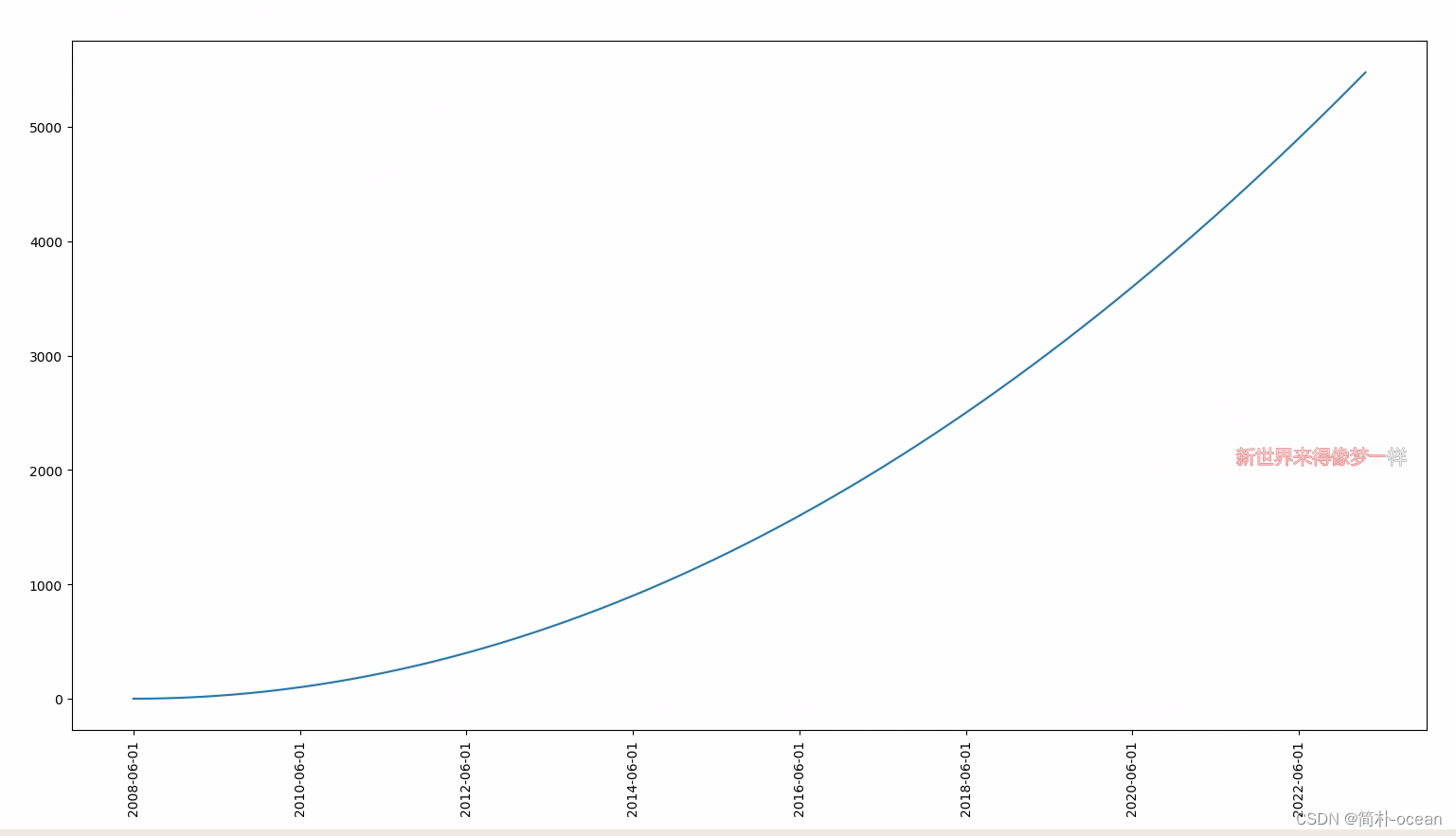
python --生成时间序列,作为横轴的标签。时间跨越2008-2022年,生成每年的6-10月的第一天作为时间序列
python 生成制定的时间序列作为绘图时x轴的标签 问题需求 在绘图时,需要对于x轴的标签进行专门的设置,整体时间跨越2008年-2022年,将每年的6-10月的第一天生成一条时间序列,绘制成图。 解决思路 对于时间序列的生成࿰…...
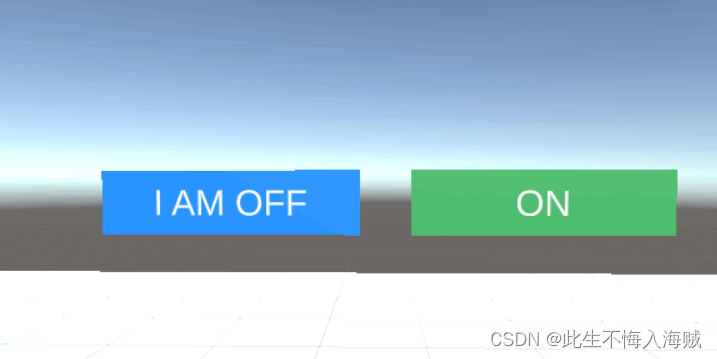
【Unity VR开发】结合VRTK4.0:创建一个按钮(Togglr Button)
语录: 有人感激过你的善良吗,貌似他们只会得寸进尺。 前言: Toggle按钮是提供简单空间 UI 选项的另一种方式,在该选项中,按钮将保持其状态,直到再次单击它。这允许按钮处于激活状态或停用状态的情况&#…...
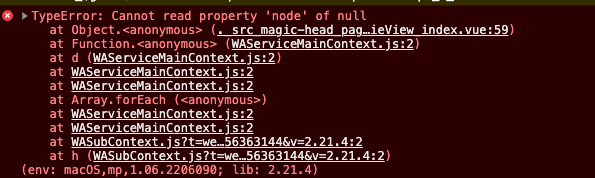
lottie-miniprogram在taro+vue的小程序中怎么使用
把一个json的动图展示在页面上。使用的是插件lottie-miniprogramhttps://blog.csdn.net/qq_33769914/article/details/128705922之前介绍过。但是发现使用在taro使用的时候他会报错。那可能是因为我们 wx.createSelectorQuery().select(#canvas).node(res > {console.log(re…...
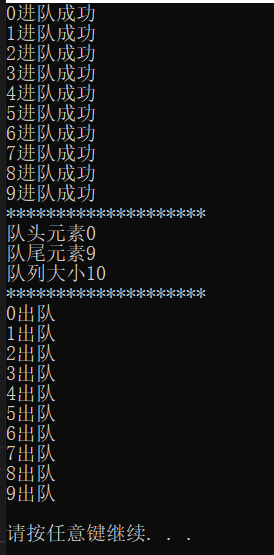
C++回顾(二十二)—— stack容器 与 queue容器
22.1 stack容器 (1) stack容器简介 stack是堆栈容器,是一种“先进后出”的容器。stack是简单地装饰deque容器而成为另外的一种容器。添加头文件:#include <stack> (2)stack对象的默认构造 stack…...
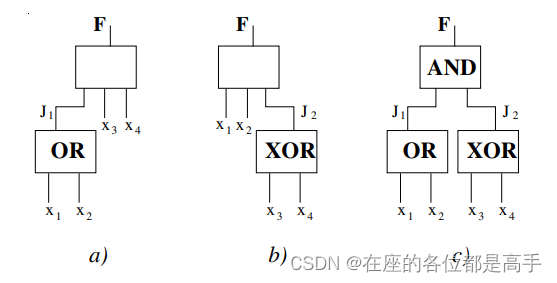
逻辑优化基础-disjoint support decomposition
先遣兵 在了解 disjoint support decomposition 之前,先学习两个基本的概念。 disjoint 数学含义上的两个集合交集,所谓非相交,即交集为空集。 A∩BC⊘A \cap B C \oslash A∩BC⊘ support 逻辑综合中的 supportsupportsupport 概念是…...
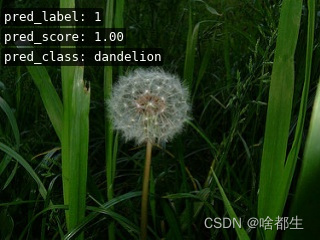
保姆级使用PyTorch训练与评估自己的DaViT网络教程
文章目录前言0. 环境搭建&快速开始1. 数据集制作1.1 标签文件制作1.2 数据集划分1.3 数据集信息文件制作2. 修改参数文件3. 训练4. 评估5. 其他教程前言 项目地址:https://github.com/Fafa-DL/Awesome-Backbones 操作教程:https://www.bilibili.co…...

Java8新特性:Stream流处理使用总结
一. 概述 Stream流是Java8推出的、批量处理数据集合的新特性,在java.util.stream包下。结合着Java8同期推出的另一项新技术:行为参数化(包括函数式接口、Lambda表达式、方法引用等),Java语言吸收了函数式编程的语法特…...

Java基准测试工具JMH高级使用
去年,我们写过一篇关于JMH的入门使用的文章:Java基准测试工具JMH使用,今天我们再来聊一下关于JMH的高阶使用。主要我们会围绕着以下几点来讲: 对称并发测试非对称并发测试阻塞并发测试Map并发测试 关键词 State 在很多时候我们…...
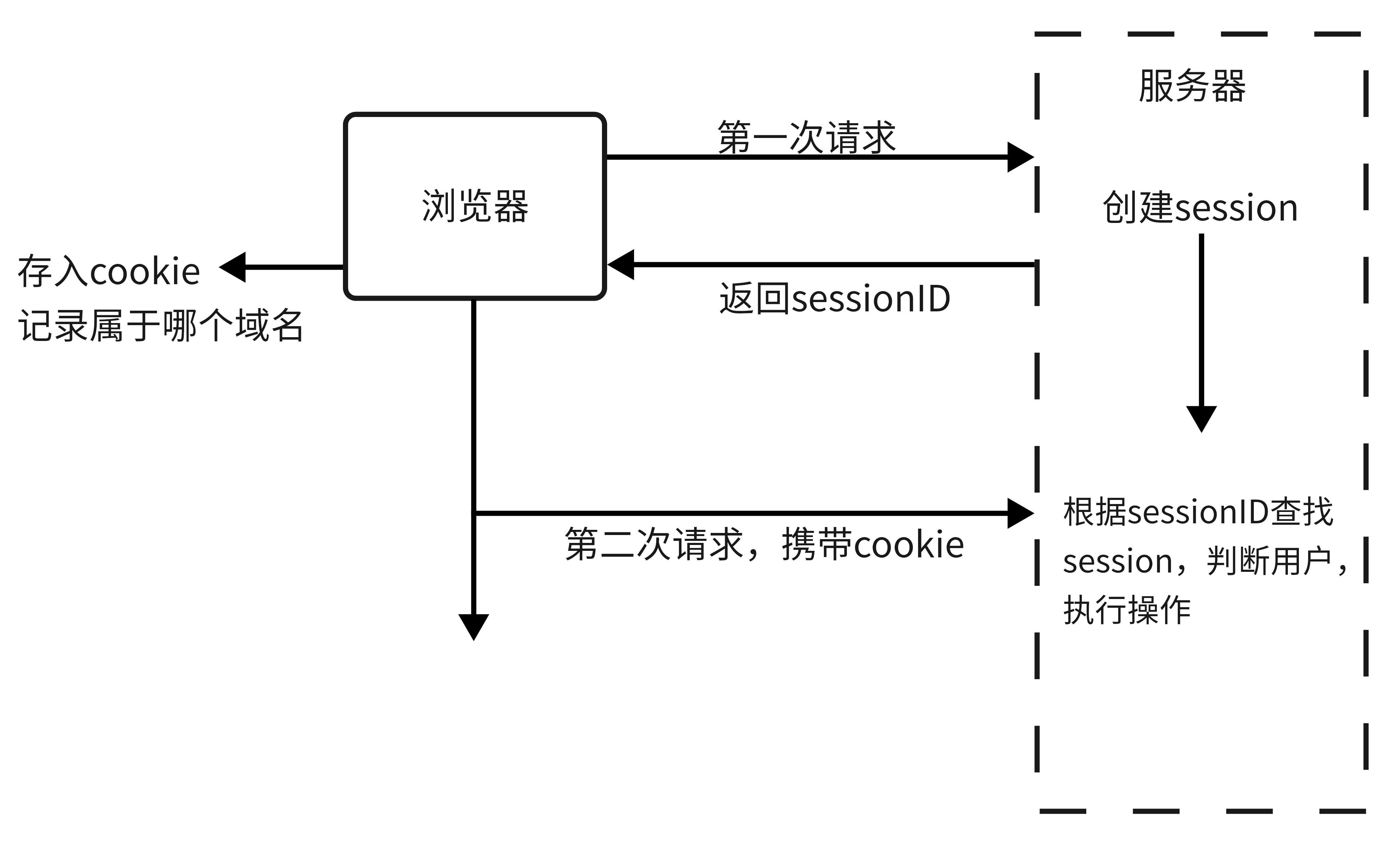
问心 | 再看token、session和cookie
什么是cookie HTTP Cookie(也叫 Web Cookie或浏览器 Cookie)是服务器发送到用户浏览器并保存在本地的一小块数据,它会在浏览器下次向同一服务器再发起请求时被携带并发送到服务器上。 什么是session Session 代表着服务器和客户端一次会话…...

Ubuntu 安装 CUDA and Cudnn
文章目录0 查看 nvidia驱动版本1 下载Cuda2 下载cudnn参考:0 查看 nvidia驱动版本 nvidia-smi1 下载Cuda 安装之前先安装 gcc g gdb 官方:https://developer.nvidia.com/cuda-toolkit-archive,与驱动版本进行对应,我这里是12.0…...
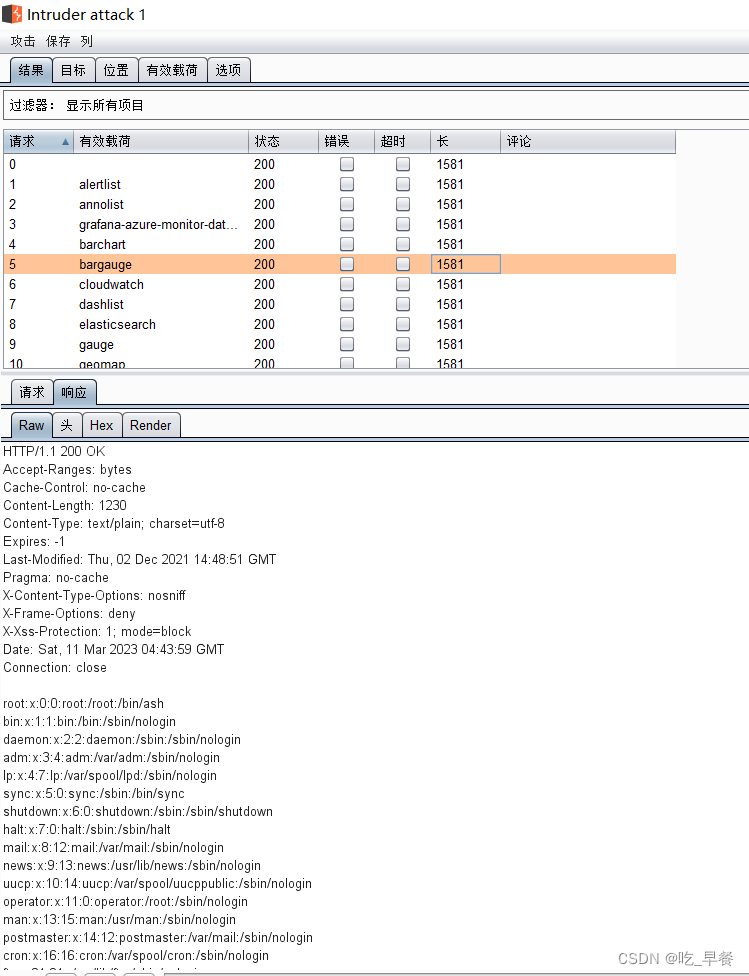
【漏洞复现】Grafana任意文件读取(CVE-2021-43798)
docker环境搭建 #进入环境 cd vulhub/grafana/CVE-2021-43798#启动环境,这个过程可能会有点慢,保持网络通畅 docker-compose up -d#查看环境 docker-compose ps直接访问虚拟机 IP地址:3000 目录遍历原理 目录遍历原理:攻击者可以通过将包含…...

磨金石教育摄影技能干货分享|春之旅拍
春天来一次短暂的旅行,你会选择哪里呢?春天的照片又该如何拍呢?看看下面的照片,或许能给你答案。照片的构图很巧妙,画面被分成两部分,一半湖泊,一半绿色树林。分开这些的是一条斜向的公路&#…...

5个宝藏级3D模型下载站:从GLB到Blender,一站式解决你的建模素材需求
1. 为什么你需要这些3D模型资源站? 作为一个在3D建模领域摸爬滚打多年的老手,我深知找素材的痛苦。记得刚入行时,为了找一个简单的沙发模型,我花了整整三天翻遍各种论坛和资源站。现在回头看,如果当时有人给我一份靠谱…...

YOLO12开源模型合规部署:离线环境+审计日志+模型版本固化方案
YOLO12开源模型合规部署:离线环境审计日志模型版本固化方案 1. 项目背景与核心价值 YOLO12作为Ultralytics在2025年推出的最新实时目标检测模型,在保持高速推理性能的同时显著提升了检测精度。其引入的注意力机制优化了特征提取网络,nano版…...
腾讯WorkBuddy 阿里JVS Claw 百度DuMate)
整理 主流国产AI龙虾的核心能力对比表(支持平台/部署方式/适用场景)腾讯WorkBuddy 阿里JVS Claw 百度DuMate
根据当前的资料,腾讯WorkBuddy和百度的DuMate当前有一定一定量的免费额度,大家可以用起来! 主流国产AI龙虾的核心能力对比表 五款主流国产AI龙虾的核心能力对比表已整理完成,涵盖支持平台、部署方式与适用场景三大维度ÿ…...

3步实现GitHub全界面中文化:高效本地化工具提升开发效率指南
3步实现GitHub全界面中文化:高效本地化工具提升开发效率指南 【免费下载链接】github-chinese GitHub 汉化插件,GitHub 中文化界面。 (GitHub Translation To Chinese) 项目地址: https://gitcode.com/gh_mirrors/gi/github-chinese 在全球化协作…...

Phi-3-mini-4k-instruct-gguf实操手册:短问答/改写/摘要三大高频场景落地
Phi-3-mini-4k-instruct-gguf实操手册:短问答/改写/摘要三大高频场景落地 1. 模型简介与核心能力 Phi-3-mini-4k-instruct-gguf是微软推出的轻量级文本生成模型,基于Phi-3系列优化而来。这个GGUF版本特别适合处理短文本任务,具有以下特点&a…...

如何通过手机号快速查询QQ号:3分钟解决账号遗忘难题
如何通过手机号快速查询QQ号:3分钟解决账号遗忘难题 【免费下载链接】phone2qq 项目地址: https://gitcode.com/gh_mirrors/ph/phone2qq 在数字时代,QQ账号作为重要的社交和工作工具,其安全性与可访问性至关重要。然而,更…...

VideoAgentTrek Screen Filter 大规模部署成本分析:GPU资源优化配置指南
VideoAgentTrek Screen Filter 大规模部署成本分析:GPU资源优化配置指南 最近和几个做视频内容审核的朋友聊天,大家聊得最多的不是技术有多牛,而是“这玩意儿跑起来到底要花多少钱”。确实,像VideoAgentTrek Screen Filter这类视…...

SmolVLA开发环境搭建:从操作系统安装到模型运行的完整路径
SmolVLA开发环境搭建:从操作系统安装到模型运行的完整路径 如果你刚拿到一台新电脑,或者想把旧机器彻底清理干净,从头开始搭建一个能跑SmolVLA模型的环境,那这篇文章就是为你准备的。很多教程都假设你已经有了一个可用的系统&…...

AI读脸术多国面孔适配:跨种族识别优化部署实战
AI读脸术多国面孔适配:跨种族识别优化部署实战 1. 引言 你有没有遇到过这样的情况:一个在亚洲人脸识别上表现不错的AI模型,拿到一张欧洲人或非洲人的照片时,识别结果就开始"犯迷糊"了?性别判断出错&#x…...

Phi-4-mini-reasoning企业落地案例:集成至内部知识库的逻辑问答模块
Phi-4-mini-reasoning企业落地案例:集成至内部知识库的逻辑问答模块 1. 项目背景与需求 企业内部知识库系统通常面临一个共同挑战:员工在查找专业问题时,往往需要花费大量时间筛选信息,特别是涉及数学计算、逻辑推理等需要多步分…...