
SpringAop实战(xml文件/纯注解两种方式)
AOP的概述
什么是AOP?
在软件业,AOP为Aspect Oriented Programming的缩写,意为:面向切面编程
• AOP是一种编程范式,隶属于软工范畴,指导开发者如何组织程序结构
• AOP最早由AOP联盟的组织提出的,制定了一套规范.Spring将AOP思想引入到框架中,必须遵守AOP联盟的规范
• 通过预编译方式或者运行期动态代理实现程序功能的统一维护的一种技术
• AOP是OOP的延续,是软件开发中的一个热点,也是Spring框架中的一个重要内容,是函数式编程的一种衍生范型
• 利用AOP可以对业务逻辑的各个部分进行隔离,从而使得业务逻辑各部分之间的耦合度降低,提高程序的可重用性,同时提高了开发的效率
AOP:面向切面编程.(思想.—解决OOP遇到一些问题)
AOP采取横向抽取机制,取代了传统纵向继承体系重复性代码(性能监视、事务管理、安全检查、缓存)
AOP,可以在不修改源代码的前提下,对程序进行增强!
AOP的底层实现
JDK的动态代理技术
1、为接口创建代理类的字节码文件(.class文件)
2、使用ClassLoader类加载器将字节码文件加载到JVM
3、创建代理类实例对象(proxyObject),执行对象的目标方法
AOP的底层实现是动态代理,Spring框架的动态代理是基于JDK的接口动态代理(还有基于继承的cglib动态代理,有兴趣的读者可以自行学习)
接口实现的动态代理相比于单继承的cglib实现的动态代理更为灵活
AOP的优势
运行期间,不修改源代码的情况下对已有的方法进行增强
优势
- 减少重复的代码
- 提供开发的效率
- 维护方便
SpringAop的相关名词解释
Joinpoint(连接点)
所谓连接点是指那些被拦截到的点。在spring中,这些点指的是方法,因为spring只支持方法类型的连接点
Pointcut(切入点)
所谓切入点是指我们要对哪些Joinpoint进行拦截的定义(其实和连接点基本上是一回事,Pointcut = Joinpoint拦截)
Advice(通知/增强)
所谓通知是指拦截到Joinpoint之后所要做的事情。
通知分为
前置通知(如开启事务),
后置通知(如提交事务),
异常通知(如回滚事务),
最终通知(如关闭资源),
环绕通知(上面所有通知的集合体,但是需要自己完整写出环绕通知方法)
Target(目标对象)
代理的目标对象,也就是代理类对象代理的目标类对象
Weaving(织入)
是指把增强应用到目标对象来创建新的代理对象的过程
大白话就是代理类实现接口(重写的方法包含增强的部分)+ 创建代理类对象的过程
Proxy(代理)
一个类被AOP织入增强后,就产生一个结果代理类
Aspect(切面)
是切入点和通知的结合,以后咱们自己来编写和配置的(代理类)
AOP实战
以mysql的事务管理为例
1. 需要用到的maven依赖
以下依赖中,最重要的是AOP相关的依赖
<dependencies><dependency><groupId>org.springframework</groupId><artifactId>spring-context</artifactId><version>5.0.2.RELEASE</version></dependency><dependency><groupId>commons-logging</groupId><artifactId>commons-logging</artifactId><version>1.2</version></dependency><dependency><groupId>log4j</groupId><artifactId>log4j</artifactId><version>1.2.12</version></dependency><!--有单元测试的环境,Spring5版本,Junit4.12版本--><dependency><groupId>junit</groupId><artifactId>junit</artifactId><version>4.12</version><scope>test</scope></dependency><!--连接池--><dependency><groupId>com.alibaba</groupId><artifactId>druid</artifactId><version>1.1.10</version></dependency><!--mysql驱动包--><dependency><groupId>mysql</groupId><artifactId>mysql-connector-java</artifactId><version>5.1.6</version></dependency><!-- Spring整合Junit测试的jar包 --><dependency><groupId>org.springframework</groupId><artifactId>spring-test</artifactId><version>5.0.2.RELEASE</version><scope>test</scope></dependency><!--AOP相关依赖--><!-- AOP联盟 --><dependency><groupId>aopalliance</groupId><artifactId>aopalliance</artifactId><version>1.0</version></dependency><!-- Spring Aspects --><dependency><groupId>org.springframework</groupId><artifactId>spring-aspects</artifactId><version>5.0.2.RELEASE</version></dependency><!-- aspectj --><dependency><groupId>org.aspectj</groupId><artifactId>aspectjweaver</artifactId><version>1.8.3</version></dependency></dependencies>2. ApplicationContext.xml配置文件
引入具体的AOP的schema约束
<?xml version=”1.0” encoding=”UTF-8”?>
<beans xmlns=”http://www.springframework.org/schema/beans”xmlns:xsi=”http://www.w3.org/2001/XMLSchema-instance”xmlns:context=”http://www.springframework.org/schema/context”xmlns:aop=”http://www.springframework.org/schema/aop”xsi:schemaLocation=”http://www.springframework.org/schema/beanshttp://www.springframework.org/schema/beans/spring-beans.xsdhttp://www.springframework.org/schema/contexthttp://www.springframework.org/schema/context/spring-context.xsdhttp://www.springframework.org/schema/aophttp://www.springframework.org/schema/aop/spring-aop.xsd”></beans>
3. 实体类,实体Dao,实体DaoImpl,实体对应的Service,Service对应的ServiceIImpl
mysql连接池模拟工具类TxUtils(因为我们要模拟的就是mysql的事务(提交/回滚),所以事务相关的原子方法需要我们独自实现)
真实开发场景下,我们要么使用Spring自带的事务管理机制,要么使用mybatis管理事务,不会这样赤裸裸地封装连接池
package com.qcby.mySpring03.utils;import com.alibaba.druid.pool.DruidDataSource;import javax.sql.DataSource;
import java.sql.Connection;
import java.sql.SQLException;/*** 事务的工具类*/
public class TxUtils {private static DruidDataSource ds = null;// 使用ThreadLocal存储当前线程中的Connection对象private static ThreadLocal<Connection> threadLocal = new ThreadLocal<Connection>();// 在静态代码块中创建数据库连接池static {try {ds = new DruidDataSource();ds.setDriverClassName("com.mysql.cj.jdbc.Driver");ds.setUrl("jdbc:mysql:///mybatis_demo?serverTimezone=UTC");ds.setUsername("root");ds.setPassword("980708");ds.setInitialSize(5);ds.setMaxActive(10);ds.setMaxWait(3000);} catch (Exception e) {throw new ExceptionInInitializerError(e);}}/*** @Method: getConnection* @Description: 从数据源中获取数据库连接* @Anthor:* @return Connection* @throws SQLException*/public static Connection getConnection() throws SQLException {// 从当前线程中获取ConnectionConnection conn = threadLocal.get();if (conn == null) {// 从数据源中获取数据库连接conn = getDataSource().getConnection();// 将conn绑定到当前线程threadLocal.set(conn);}return conn;}/*** @Method: startTransaction* @Description: 开启事务* @Anthor:**/public static void startTransaction() {try {Connection conn = threadLocal.get();if (conn == null) {conn = getConnection();// 把 conn绑定到当前线程上threadLocal.set(conn);}// 开启事务conn.setAutoCommit(false);} catch (Exception e) {throw new RuntimeException(e);}}/*** @Method: rollback* @Description:回滚事务* @Anthor:*/public static void rollback() {try {// 从当前线程中获取ConnectionConnection conn = threadLocal.get();if (conn != null) {// 回滚事务conn.rollback();}} catch (Exception e) {throw new RuntimeException(e);}}/*** @Method: commit* @Description:提交事务* @Anthor:*/public static void commit() {try {// 从当前线程中获取ConnectionConnection conn = threadLocal.get();if (conn != null) {// 提交事务conn.commit();}} catch (Exception e) {throw new RuntimeException(e);}}/*** @Method: close* @Description:关闭数据库连接(注意,并不是真的关闭,而是把连接还给数据库连接池)* @Anthor:**/public static void close() {try {// 从当前线程中获取ConnectionConnection conn = threadLocal.get();if (conn != null) {conn.close();// 解除当前线程上绑定connthreadLocal.remove();}} catch (Exception e) {throw new RuntimeException(e);}}/*** @Method: getDataSource* @Description: 获取数据源* @Anthor:* @return DataSource*/public static DataSource getDataSource() {// 从数据源中获取数据库连接return ds;}}
实体类Car
public class Car {private int id;private String carName;private int size;private String color;@Overridepublic String toString() {return "Car{" +"carName='" + carName + '\'' +", size=" + size +", color='" + color + '\'' +'}';}public Car(int id, String carName, int size, String color) {this.id = id;this.carName = carName;this.size = size;this.color = color;}public Car() {}public Car(String carName, int size, String color) {this.carName = carName;this.size = size;this.color = color;}public int getId() {return id;}public void setId(int id) {this.id = id;}public String getCarName() {return carName;}public void setCarName(String carName) {this.carName = carName;}public int getSize() {return size;}public void setSize(int size) {this.size = size;}public String getColor() {return color;}public void setColor(String color) {this.color = color;}
}
CarDao接口
import java.sql.SQLException;
import java.util.List;public interface CarDao {List<Car> findAll();Car getById(Integer id);Integer insert(Car car) throws SQLException;Integer update(Car car);Integer delete(Integer id);}
CarDaoImpl实现类
import java.sql.Connection;
import java.sql.PreparedStatement;
import java.sql.ResultSet;
import java.sql.SQLException;
import java.util.ArrayList;
import java.util.List;@Repository("carDao")
public class CarDaoImpl implements CarDao {//    @Autowired
//    private DataSource dataSource;public List<Car> findAll() {//jdbc  查询数据库  拿到数据//1.加载驱动  连接池
//        dataSource.setDriverClassName("com.mysql.cj.jdbc.Driver");
//        dataSource.setUrl("jdbc:mysql:///spring_db");
//        dataSource.setUsername("root");
//        dataSource.setPassword("root");Connection conn = null;PreparedStatement stmt = null;ResultSet rs = null;List<Car> carList = new ArrayList<Car>();//2.获取连接对象try {conn = TxUtils.getConnection();//3.编写sqlString sql = "select * from car";//4.获取执行sql的stmt对象stmt = conn.prepareStatement(sql);//5.执行sqlrs = stmt.executeQuery();//6.遍历结果集while (rs.next()) {//实体类  account的实体类Car car = new Car();car.setId(rs.getInt("id"));car.setCarName(rs.getString("car_name"));car.setSize(rs.getInt("size"));car.setColor(rs.getString("color"));// 存储carList.add(car);}//7.关闭conn.close();stmt.close();rs.close();} catch (Exception e) {e.printStackTrace();}System.out.println("持久层:操作数据库保存订单");return carList;}public Car getById(Integer id) {return null;}public Integer insert(Car car) throws SQLException {Integer result = null;//jdbc  工具类实现获取连接 操作数据库  完成新增数据Connection connection = TxUtils.getConnection();// 编写sql语句String sql = "insert into car values (null,?,?,?)";// 预编译SQL语句PreparedStatement stmt = connection.prepareStatement(sql);// 设置值stmt.setString(1, car.getCarName());stmt.setInt(2, car.getSize());stmt.setString(3, car.getColor());// 执行操作result = stmt.executeUpdate();// 关闭资源 ,conn不能关闭stmt.close();return result;}public Integer update(Car car) {return null;}public Integer delete(Integer id) {return null;}
}
CarService接口
import java.sql.SQLException;
import java.util.List;public interface CarService {List<Car> findAll();void saveAll(Car car1, Car car2) throws SQLException;void saveAllTransaction(Car car1, Car car2);
}
CarServiceImpl实现类
package com.qcby.mySpring03.service.impl;import com.qcby.mySpring03.entity.Car;
import com.qcby.mySpring03.mapper.CarDao;
import com.qcby.mySpring03.service.CarService;
import com.qcby.mySpring03.utils.TxUtils;
import org.springframework.beans.factory.annotation.Autowired;
import org.springframework.stereotype.Service;import java.sql.SQLException;
import java.util.List;@Service("carService")
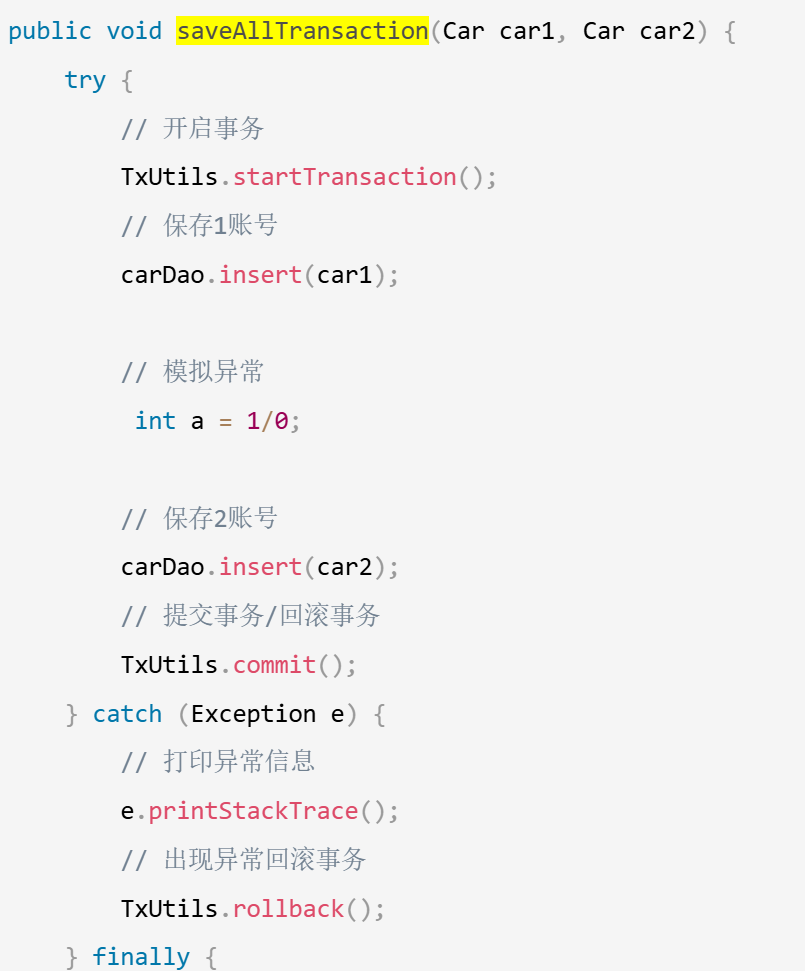
public class CarServiceImpl implements CarService {@Autowiredprivate CarDao carDao;public void setCarDao(CarDao carDao) {this.carDao = carDao;}public List<Car> findAll() {return carDao.findAll();}// 不使用事务的情况下public void saveAll(Car car1, Car car2) throws SQLException {carDao.insert(car1);// 模拟异常// int a = 1 / 0;carDao.insert(car2);}public void saveAllTransaction(Car car1, Car car2) {try {// 开启事务TxUtils.startTransaction();// 保存1账号carDao.insert(car1);// 模拟异常int a = 1/0;// 保存2账号carDao.insert(car2);// 提交事务/回滚事务TxUtils.commit();} catch (Exception e) {// 打印异常信息e.printStackTrace();// 出现异常回滚事务TxUtils.rollback();} finally {// 关闭资源TxUtils.close();}}}
3.2 bean导入到ApplicationContext.xml中
<bean id="carDao" class="com.qcby.mySpring03.mapper.impl.CarDaoImpl"/><bean id="carService" class="com.qcby.mySpring03.service.impl.CarServiceImpl"/>
4. 自定义切面类(切入点表达式+通知/增强方法实现);在ApplicationContext.xml中配置AOP
这一部分是最重要的
4.1 自定义切面类(切入点表达式+通知/增强方法实现)
// 自定义切面类
public class MyAspect {/*** 通知/增强的方法*/public void log() {// 发送手机短信// 发送邮件/记录日志/事务管理System.out.println("xml增强的方法执行了...");}
}
切入点表达式
切入点表达式的格式如下:
- execution([修饰符] 返回值类型 包名.类名.方法名(参数))
- 修饰符可以省略不写,不是必须要出现的。
- 返回值类型是不能省略不写的,根据你的方法来编写返回值。可以使用
*代替。 - 包名例如:com.tx.demo3.BookDaoImpl
- 首先com是不能省略不写的,但是可以使用
*代替 - 中间的包名可以使用
*号代替 - 如果想省略中间的包名可以使用
* - 类名也可以使用
*号代替,也有类似的写法:*DaoImpl - 方法也可以使用
*号代替 - 参数如果是一个参数可以使用
*号代替,如果想代表任意参数使用..
举例,所有省略都不写的切入点表达式:
execution(public void com.qcby.mySpring03.service .impl.UserServiceImpl.findAll())
简写过后:
execution(* *.qcby.*.service .impl.*ServiceImpl.*(..))
AOP配置
<!--自定义切面类导入-->
<bean id="myAspect" class="com.qcby.mySpring03.aop.MyAspect"/>
<!--AOP配置-->
<aop:config><aop:aspect ref="myAspect"><aop:before method="log"pointcut="execution( * *.qcby.*.service.impl.*ServiceImpl.*(..))"/></aop:aspect></aop:config>
测试
import org.junit.Test;
import org.junit.runner.RunWith;
import org.springframework.beans.factory.annotation.Autowired;
import org.springframework.test.context.ContextConfiguration;
import org.springframework.test.context.junit4.SpringJUnit4ClassRunner;@RunWith(SpringJUnit4ClassRunner.class)
@ContextConfiguration(value = {"classpath:ApplicationContext.xml"})
public class XmlAopTest {@Autowiredprivate UserService userService;@Autowiredprivate CarService carService;@Testpublic void xmlAopTest() {carService.findAll();}
}
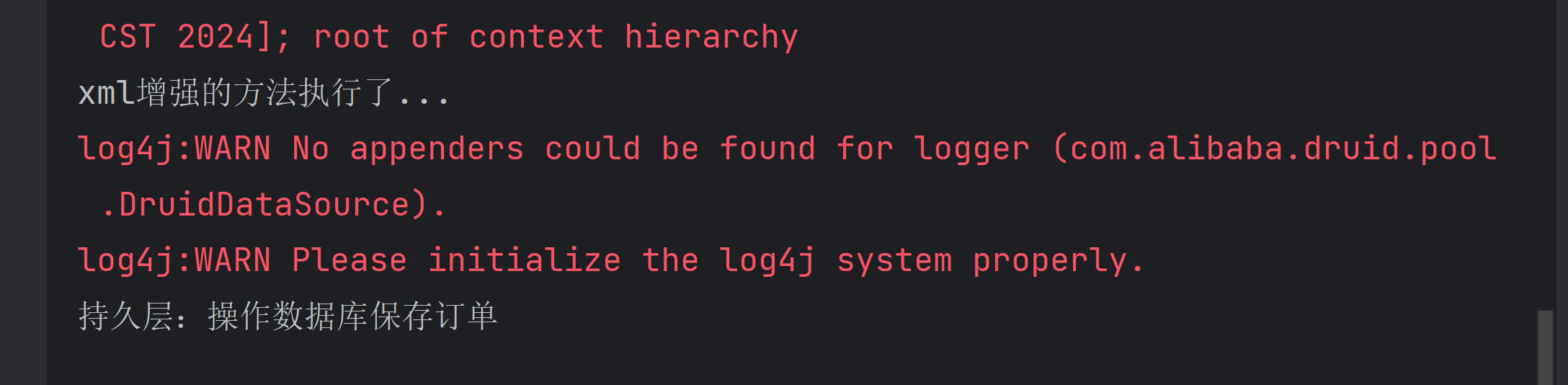
运行结果
5. 纯注解AOP实战
通知类型注解
@Before—前置通知
@AfterReturing—后置通知
@Around—环绕通知(目标对象方法默认不执行的,需要手动执行)
@After—最终通知
@AfterThrowing—异常抛出通知
注解自定义切面类
@Component
@Aspect
public class MyAnnoAspect {/*** 通知*/@Before(value = "execution( * com.qcby.*.service.impl.*ServiceImpl.*(..))")public void startTransaction() {System.out.println("===前置通知执行:开启事务......");TxUtils.startTransaction();}@AfterReturning(value = "execution( * com.qcby.*.service.impl.*ServiceImpl.*(..))")public void commit() {System.out.println("===后置通知执行:提交事务......");TxUtils.commit();}@AfterThrowing(value = "execution( * com.qcby.*.service.impl.*ServiceImpl.*(..))")public void rollback() {System.out.println("===异常抛出通知执行:回滚事务......");TxUtils.rollback();}@After(value = "execution( * com.qcby.*.service.impl.*ServiceImpl.*(..))")public void close() {System.out.println("===最终通知执行:关闭资源......");TxUtils.close();}}
AOP配置类(开启AOP)
import org.springframework.context.annotation.Configuration;
import org.springframework.context.annotation.EnableAspectJAutoProxy;@Configuration
@EnableAspectJAutoProxy
public class SpringAopConfig {
}
Spring扫描包配置类(顺便引入上一个配置类)
@Configuration
@ComponentScan("com.qcby")
@Import(value = {SpringAopConfig.class})
public class SpringJunit4Config {
}
在CarServiceImpl(@Service),CarDaoImpl(@Repository)上控制反转的注解,并配置各自的依赖注入的注解(@Autowired)
@Service("carService")
public class CarServiceImpl implements CarService {@Autowiredprivate CarDao carDao;
@Repository("carDao")
public class CarDaoImpl implements CarDao {// 	有连接池工具类就不需要注入DataSource了
//    @Autowired
//    private DataSource dataSource;
测试
import org.junit.Test;
import org.junit.runner.RunWith;
import org.springframework.beans.factory.annotation.Autowired;
import org.springframework.test.context.ContextConfiguration;
import org.springframework.test.context.junit4.SpringJUnit4ClassRunner;import java.sql.SQLException;@RunWith(SpringJUnit4ClassRunner.class)
@ContextConfiguration(classes = SpringJunit4Config.class)
public class TransactionTest {@Autowiredprivate CarService carService;@Testpublic void shiwuTest() throws SQLException {Car car1 = new Car("car1", 100, "green");Car car2 = new Car("car2", 100, "yellow");carService.saveAll(car1, car2);}
}
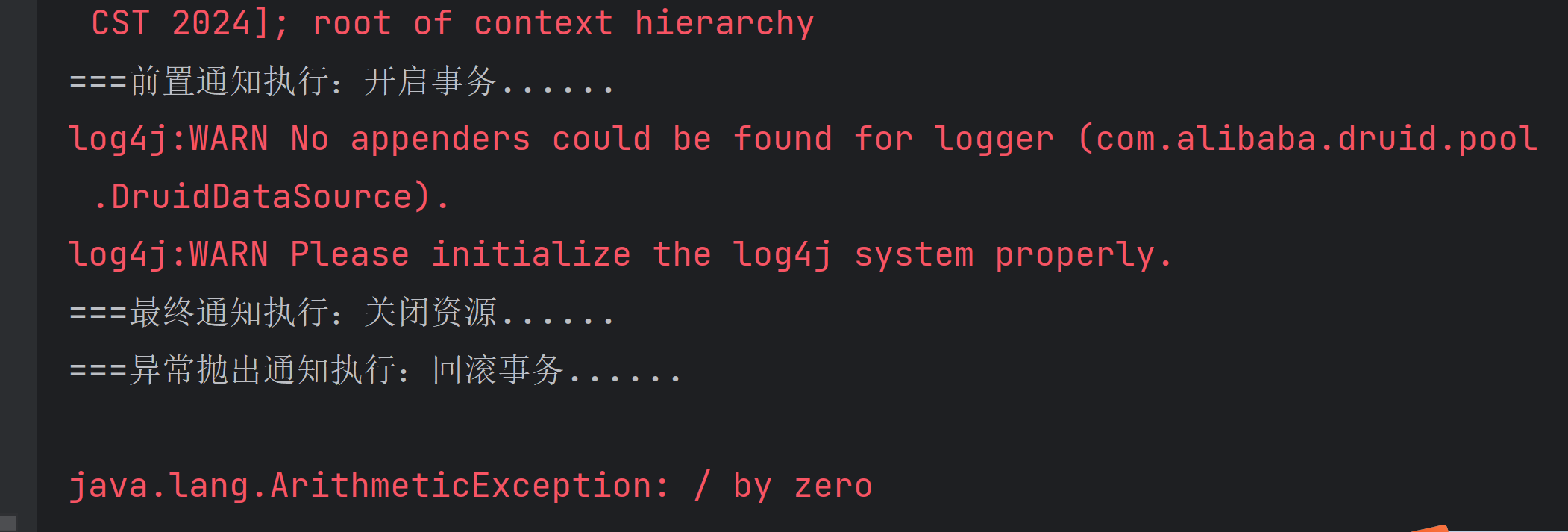
由于存在除0异常,所以事务应该会回滚
执行结果
出现除0异常,事务回滚
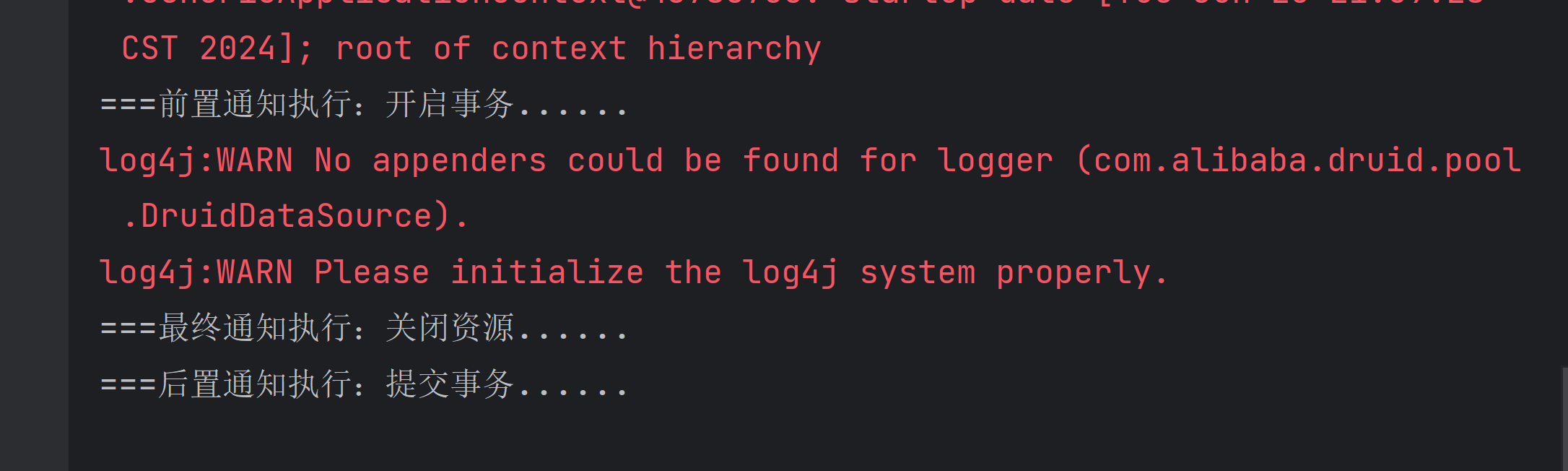
没有出现异常,事务提交
相关文章:
SpringAop实战(xml文件/纯注解两种方式)
AOP的概述 什么是AOP? 在软件业,AOP为Aspect Oriented Programming的缩写,意为:面向切面编程 • AOP是一种编程范式,隶属于软工范畴,指导开发者如何组织程序结构 • AOP最早由AOP联盟的组织提出的,制定了…...
Linux的进程与线程)
(八)Linux的进程与线程
多任务处理是指用户可以在同一时间内运行多个应用程序,每个正在执行的程序被称为一个任务。一个任务包含一个或多个完成独立功能的子任务,其中子任务可以是进程或线程。Linux就是一个支持多任务的操作系统,比起单任务系统它的功能增强许多。 一.进程 进程:一个具有独立功…...
Map-JAVA面试常问
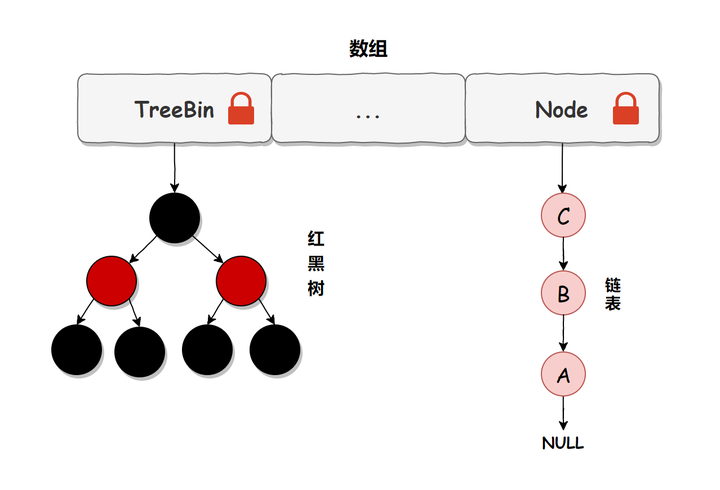
1.HashMap底层实现 底层实现在jdk1.7和jdk1.8是不一样的 jdk1.7采用数组加链表的方式实现 jdk1.8采用数组加链表或者红黑树实现 HashMap中每个元素称之为一个哈希桶(bucket),哈希桶包含的内容有以下4项 hash值(哈希函数计算出来的值) Key value next(…...
prometheus+grafana搭建监控系统
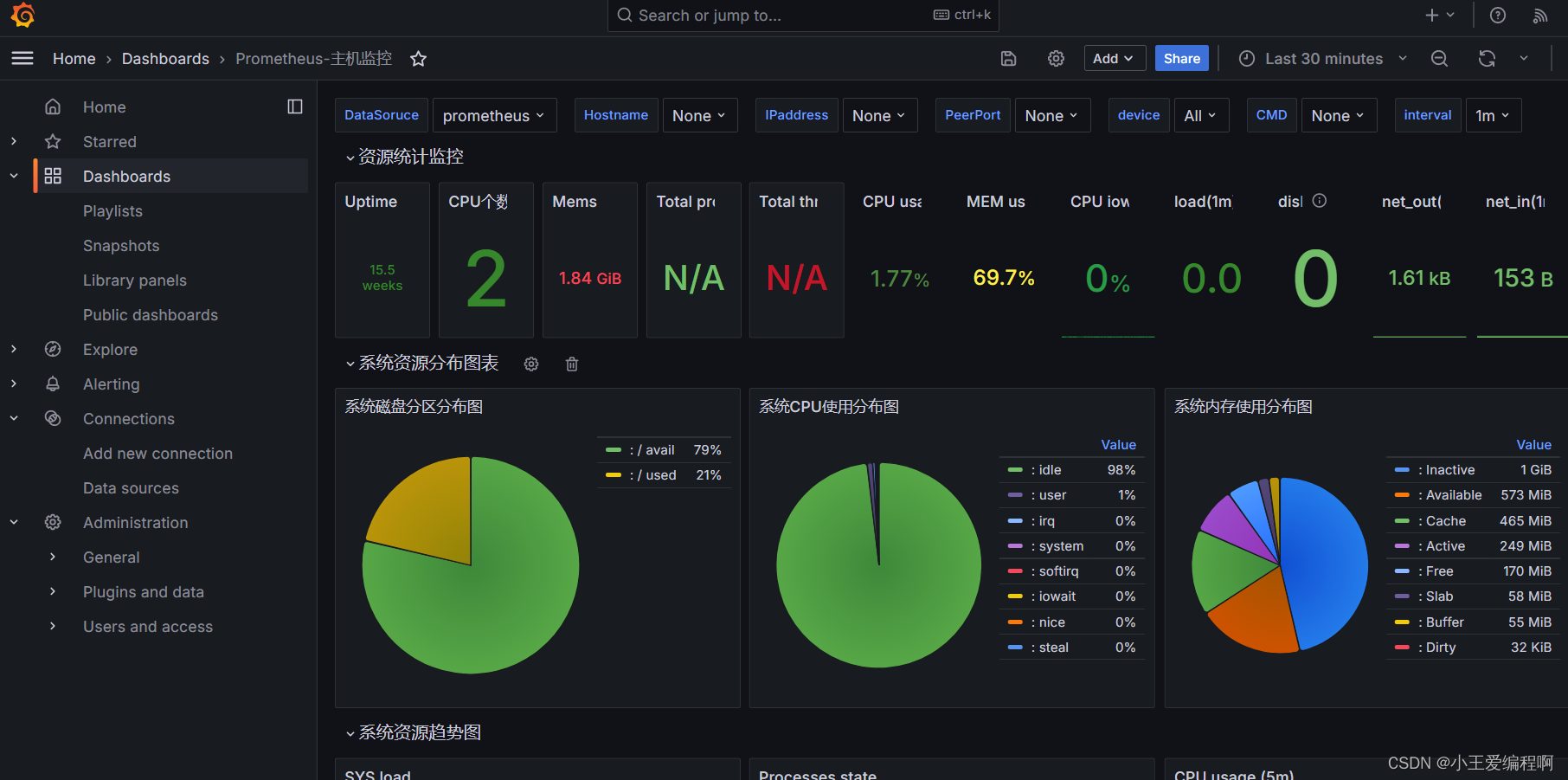
1.prometheus服务端安装 1.1下载包 使用wget下载 (也可以直接去官网下载包Download | Prometheus) wget https://github.com/prometheus/prometheus/releases/download/v2.44.0/prometheus-2.44.0.linux-amd64.tar.gz1.2解压 tar xf prometheus-2.44…...

flink学习-flink sql
动态表 在flink的数据处理中,数据流是源源不断的,是无界的,所以对于flink处理的数据表是一张动态表,所以对于动态表的查询也是持续的,每接收一条新数据会进行一次新的查询。 持续查询 因为数据在一直源源不动的到来…...

高考填报志愿攻略,5个步骤选专业和院校
在高考完毕出成绩的时候,很多人会陷入迷茫中,好像努力了这么多年,却不知道怎么规划好未来。怎么填报志愿合适?在填报志愿方面有几个内容需要弄清楚,按部就班就能找到方向,一起来了解一下正确的步骤吧。 第…...

Kubernetes排错(十)-处理容器数据磁盘被写满
容器数据磁盘被写满造成的危害: 不能创建 Pod (一直 ContainerCreating)不能删除 Pod (一直 Terminating)无法 exec 到容器 如何判断是否被写满? 容器数据目录大多会单独挂数据盘,路径一般是 /var/lib/docker,也可能是 /data/docker 或 /o…...

使用QtGui显示QImage的几种方法
问题描述 我是一名刚学习Qt的新手,正在尝试创建一个简单的GUI应用程序。当点击一个按钮时,显示一张图片。我可以使用QImage对象读取图片,但是否有简单的方法调用一个Qt函数,将QImage作为输入并显示它? 方法一:使用QLabel显示QImage 最简单的方式是将QImage添加到QLabe…...

C++ lamda
1 lamada 的函数指针存在哪里?需要通过分析编译后的二进制; 2 捕获了什么? 为什么捕获?捕获的范围是什么? 捕获的生命周期是什么? lambda 定义匿名函数,使得代码更加灵活简洁; lam…...
Linux_应用篇(27) CMake 入门与进阶
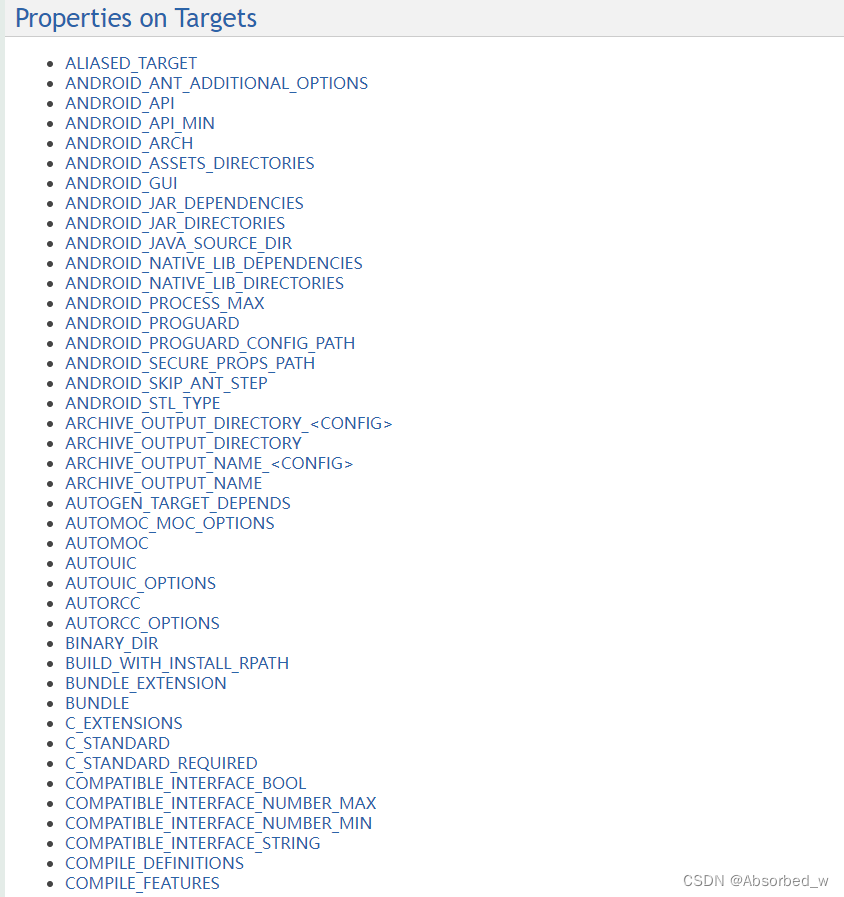
在前面章节内容中,我们编写了很多示例程序,但这些示例程序都只有一个.c 源文件,非常简单。 所以,编译这些示例代码其实都非常简单,直接使用 GCC 编译器编译即可,连 Makefile 都不需要。但是,在实…...
51单片机STC89C52RC——8.1 8*8 LED点阵模块(点亮一个LED)
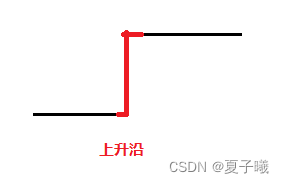
目录 目的/效果 一,STC单片机模块 二,8*8 LED点阵模块 2.1 电路图 2.1.1 8*8 点阵模块电路图 2.1.2 74HC595(串转并)模块 电路图 2.1.3 芯片引脚 2.2 引脚电平分析 2.3 74HC595 串转并模块 2.3.1 装弹(移位…...

2024最新免费版轻量级Navicat Premium Lite 下载和安装教程
2024最新免费版轻量级Navicat Premium Lite 下载和安装教程 关于猫头虎 大家好,我是猫头虎,别名猫头虎博主,擅长的技术领域包括云原生、前端、后端、运维和AI。我的博客主要分享技术教程、bug解决思路、开发工具教程、前沿科技资讯、产品评…...

PHP+laravel 生成word
此功能较为繁琐我会从源头讲起 首先是数据库设置,下面是我的数据库结构 合同模版表 CREATE TABLE contract_tpl (id bigint unsigned NOT NULL AUTO_INCREMENT,name varchar(191) COLLATE utf8_unicode_ci DEFAULT NULL COMMENT 合同名称,file varchar(191) COLL…...
redis集群简单介绍及其搭建过程
Redis集群 1、哨兵模式 哨兵可以有多个,从服务器也可以有多个,从服务器也可以有多个,在Redis3.0以前的版本要实现集群一般是借助哨兵sentinel工具来监控master节点的状态,如果master节点异常,则会实现主从切换&#x…...

linux桌面运维----第五天
1、创建用户命令useradd: 作用:创建用户 语法:useradd [选项名] 用户名 选项: -d<登入目录> 指定用户登入时的起始目录。 【掌握】 -g<群组> 指定用户所属的群组(基本组)。【掌握】…...
【SQL Server数据库】简单查询
目录 用SQL语句完成下列查询。使用数据库为SCHOOL数据库 1. 查询学生的姓名、性别、班级名称,并把结果存储在一张新表中。 2. 查询男生的资料。 3. 查询所有计算机系的班级信息。 4.查询艾老师所教的课程号。 5. 查询年龄小于30岁的女同学的学号和姓名。…...

Docker 从入门到精通(大全)
一、概述 1.1 基本概念 Docker 是一个开源的应用容器引擎,基于 Go 语言 并遵从 Apache2.0 协议开源。 Docker 可以让开发者打包他们的应用以及依赖包到一个轻量级、可移植的容器中,然后发布到任何流行的 Linux 机器上,也可以实现虚拟化。…...
基于JSP的在线教育资源管理系统
开头语: 你好呀,我是计算机学长猫哥!如果你对在线教育资源管理系统感兴趣或者有相关需求,欢迎在文末找到我的联系方式。 开发语言:Java 数据库:MySQL 技术:JSP技术 工具:IDE、N…...

在java中代理http请求,如何避免陷入循环?
在 Java 中,代理 HTTP 请求时,如果不小心配置不当,可能会导致循环请求。循环请求通常发生在代理服务器将请求再次发送回自己,形成一个死循环。为了避免这种情况,可以采取以下几种方法: 将域名设置为指定的…...

国内镜像源网址
腾讯:腾讯软件源 (tencent.com) 阿里:阿里巴巴开源镜像站-OPSX镜像站-阿里云开发者社区 (aliyun.com) 清华:清华大学开源软件镜像站 | Tsinghua Open Source Mirror...

【多智能体】基于matlab多智能体多视角三维空间定位的神经动力学方法【含Matlab源码 15447期】
💥💥💥💥💥💥💞💞💞💞💞💞💞💞欢迎来到海神之光博客之家💞💞💞Ὁ…...

金融技能学习路径:从财务基础到Python建模的实战指南
1. 项目概述:为什么我们需要一个“金融技能”清单?如果你在金融行业工作,或者对个人理财、投资分析、公司财务感兴趣,你大概率有过这样的经历:面对海量的在线课程、书籍、论坛帖子和工具推荐,感到无所适从。…...

机器学习40讲-总结课:机器学习的模型体系
用17讲的篇幅,我和你分享了目前机器学习中的大多数主流模型。可是除开了解了各自的原理,这些模型背后的共性规律在哪里,这些规律又将如何指导对于新模型的理解呢?这就是今天这篇总结的主题。 要想在纷繁复杂的模型万花筒中梳理出一条清晰的脉络,还是要回到最原始的出发点…...

初创公司如何借助Taotoken管理多模型API调用与成本
🚀 告别海外账号与网络限制!稳定直连全球优质大模型,限时半价接入中。 👉 点击领取海量免费额度 初创公司如何借助Taotoken管理多模型API调用与成本 对于资源有限的初创技术团队而言,快速迭代产品并集成多种AI能力是常…...

从碎片化到知识体系:微信读书笔记助手如何重塑你的数字阅读体验
从碎片化到知识体系:微信读书笔记助手如何重塑你的数字阅读体验 【免费下载链接】wereader 一个浏览器扩展:主要用于微信读书做笔记,对常使用 Markdown 做笔记的读者比较有帮助。 项目地址: https://gitcode.com/gh_mirrors/wer/wereader …...

Roborock 与 Ecovacs 机器人吸尘器多维度对比,谁更适合你?
选购机器人吸尘器:Roborock 与 Ecovacs 多维度对比,谁更适合你?当考虑购买机器人吸尘器时,面对众多品牌和型号,可能会让人无从下手。十年前,购买机器人吸尘器的选择范围还局限于少数几个竞争品牌࿰…...

Nexus Mods App 终极指南:告别模组冲突,打造完美游戏体验
Nexus Mods App 终极指南:告别模组冲突,打造完美游戏体验 【免费下载链接】NexusMods.App Home of the development of the Nexus Mods App 项目地址: https://gitcode.com/gh_mirrors/ne/NexusMods.App 还在为模组冲突导致游戏崩溃而烦恼吗&…...

从Axure原型到智能运营:构建共享充电桩后台管理系统的核心模块与实战场景
1. 从Axure原型到智能运营的完整链路 第一次接触共享充电桩后台管理系统设计时,我和很多产品经理一样,以为画完Axure原型就万事大吉。直到实际开发阶段才发现,原型设计只是万里长征的第一步。真正考验人的是如何把静态的线框图转化为具备智能…...

开源监控面板OpenClaw:从架构设计到生产部署实战指南
1. 项目概述:一个开源监控面板的诞生 在运维和开发的世界里,监控面板就像是驾驶舱里的仪表盘。没有它,你就是在盲飞。今天要聊的这个项目 xingrz/openclaw-dashboard ,就是一个由社区驱动的开源监控面板解决方案。它的名字很有意…...

Java并发编程:CompletableFuture实战
Java并发编程:CompletableFuture实战 引言 Java 8引入的CompletableFuture是现代异步编程的重要工具,它不仅解决了Future的局限性,还提供了丰富的API用于组合、转换和处理异步结果。相比传统的Future,CompletableFuture支持流式调…...