
SpringBoot连接PostgreSQL+MybatisPlus入门案例
项目结构

一、Java代码
pom.xml
<?xml version="1.0" encoding="UTF-8"?>
<project xmlns="http://maven.apache.org/POM/4.0.0"xmlns:xsi="http://www.w3.org/2001/XMLSchema-instance"xsi:schemaLocation="http://maven.apache.org/POM/4.0.0 http://maven.apache.org/xsd/maven-4.0.0.xsd"><modelVersion>4.0.0</modelVersion><groupId>org.example</groupId><artifactId>jdservice</artifactId><version>1.0-SNAPSHOT</version><properties><maven.compiler.source>8</maven.compiler.source><maven.compiler.target>8</maven.compiler.target><project.build.sourceEncoding>UTF-8</project.build.sourceEncoding></properties><dependencies><dependency><groupId>org.springframework.boot</groupId><artifactId>spring-boot-starter-web</artifactId><version>2.0.3.RELEASE</version></dependency><dependency><groupId>org.springframework.boot</groupId><artifactId>spring-boot-starter</artifactId><version>2.0.3.RELEASE</version></dependency><!-- https://mvnrepository.com/artifact/org.postgresql/postgresql --><dependency><groupId>org.postgresql</groupId><artifactId>postgresql</artifactId><version>42.6.0</version></dependency><dependency><groupId>org.projectlombok</groupId><artifactId>lombok</artifactId><version>1.18.12</version></dependency><!--mybatis‐plus的springboot支持--><dependency><groupId>com.baomidou</groupId><artifactId>mybatis-plus-boot-starter</artifactId><version>3.1.0</version></dependency></dependencies>
</project>
controller层
package org.example.jd.controller;import org.example.jd.pojo.TUser;
import org.example.jd.service.TUserService;
import org.springframework.beans.factory.annotation.Autowired;
import org.springframework.web.bind.annotation.*;import java.util.List;@CrossOrigin(origins = "http://localhost:8080")
@RestController
public class UserController {@Autowiredprivate TUserService tUserService;@PostMapping("/api/userLogin")public String login(@RequestBody TUser tUser) {// 实际业务逻辑处理String username = tUser.getUsername();String password = tUser.getPassword();// 这里可以进行用户名密码验证等操作System.out.println("========Login successful=====");System.out.println(username + "," + password);return "Login successful"; // 返回登录成功信息或者其他响应}@GetMapping("/api/getUserList")public List<TUser> getUserList() {List<TUser> tUserList = tUserService.getUserList();return tUserList;}}
mapper层
package org.example.jd.mapper;import com.baomidou.mybatisplus.core.mapper.BaseMapper;
import org.example.jd.pojo.TUser;public interface TUserMapper extends BaseMapper<TUser> { //参数为实体类}
pojo层
package org.example.jd.pojo;import com.baomidou.mybatisplus.annotation.TableId;
import com.baomidou.mybatisplus.annotation.TableName;
import lombok.AllArgsConstructor;
import lombok.Data;
import lombok.NoArgsConstructor;import java.time.LocalDate;@Data
@AllArgsConstructor
@NoArgsConstructor
@TableName("tuser")   //指定数据库表
public class TUser {@TableId(value = "uid") //指定主键private int uid;private String username;private String password;private int age;private String gender;private LocalDate birthday;private String address;
}
service层
TUserService
package org.example.jd.service;import org.example.jd.pojo.TUser;import java.util.List;public interface TUserService {List<TUser> getUserList();
}
TUserServiceImp
package org.example.jd.service;import org.example.jd.mapper.TUserMapper;
import org.example.jd.pojo.TUser;
import org.springframework.beans.factory.annotation.Autowired;
import org.springframework.stereotype.Service;import java.util.List;@Service
public class TUserServiceImp implements TUserService {@Autowiredprivate TUserMapper tUserMapper;@Overridepublic List<TUser> getUserList() {return tUserMapper.selectList(null);}
}
Application启动类
package org.example.jd;import org.mybatis.spring.annotation.MapperScan;
import org.springframework.boot.SpringApplication;
import org.springframework.boot.autoconfigure.SpringBootApplication;@SpringBootApplication
@MapperScan("org.example.jd.mapper") //扫描mapper层
public class Application {public static void main(String[] args) {SpringApplication.run(Application.class, args);}
}
TUserMapper.xml
<?xml version="1.0" encoding="UTF-8" ?>
<!DOCTYPE mapperPUBLIC "-//mybatis.org//DTD Mapper 3.0//EN""http://mybatis.org/dtd/mybatis-3-mapper.dtd"><!--namespace是mapper层对应的接口名-->
<mapper namespace="org.example.jd.mapper.TUserMapper"><!--id是mapper层对应的接口名中对应的方法名-->
<!--    <select id="myFindUserById" resultType="User">-->
<!--        select *-->
<!--        from tb_user-->
<!--        where id = #{id}-->
<!--    </select>-->
</mapper>
mybatis-config.xml
<?xml version="1.0" encoding="UTF-8" ?>
<!DOCTYPE configurationPUBLIC "-//mybatis.org//DTD Config 3.0//EN" "http://mybatis.org/dtd/mybatis-3-config.dtd">
<configuration><!--设置驼峰匹配,MybatisPlus默认开启驼峰匹配--><!--    <settings>--><!--        <setting name="mapUnderscoreToCamelCase" value="true"/>--><!--    </settings>--></configuration>
application.yml配置文件
server:port: 8090
spring:datasource:url: jdbc:postgresql://localhost:5432/myjdusername: postgrespassword: 123456driver-class-name: org.postgresql.Driver#设置mybatis-plus
mybatis-plus:config-location: classpath:mybatis/mybatis-config.xml  #配置文件mapper-locations: classpath:mybatis/mapper/*.xml  #设置mapper层对应的接口对应的mapper.xml的路径type-aliases-package: org.example.jd.pojo  #设置别名,mapper.xml中resultType="org.example.jd.pojo.TUser"可省去包,即resultType="TUser"#开启自动驼峰映射,注意:配置configuration.map-underscore-to-camel-case则不能配置config-location,可写到mybatis-config.xml中
#  configuration:
#    map-underscore-to-camel-case: true
二、SQL
/*Navicat Premium Data TransferSource Server         : myPgSQLSource Server Type    : PostgreSQLSource Server Version : 160003 (160003)Source Host           : localhost:5432Source Catalog        : myjdSource Schema         : publicTarget Server Type    : PostgreSQLTarget Server Version : 160003 (160003)File Encoding         : 65001Date: 19/07/2024 22:15:18
*/-- ----------------------------
-- Table structure for tuser
-- ----------------------------
DROP TABLE IF EXISTS "public"."tuser";
CREATE TABLE "public"."tuser" ("uid" int4 NOT NULL,"username" varchar(255) COLLATE "pg_catalog"."default","age" int4,"gender" varchar(1) COLLATE "pg_catalog"."default","birthday" date,"address" varchar(255) COLLATE "pg_catalog"."default","password" varchar(255) COLLATE "pg_catalog"."default"
)
;-- ----------------------------
-- Records of tuser
-- ----------------------------
INSERT INTO "public"."tuser" VALUES (1, 'jack', 24, '男', '2021-10-19', '深圳', '123');-- ----------------------------
-- Primary Key structure for table tuser
-- ----------------------------
ALTER TABLE "public"."tuser" ADD CONSTRAINT "user_pkey" PRIMARY KEY ("uid");
三、运行
浏览器或者postman请求地址。
注意:浏览器只能测试get请求,如果有put、post、delete请使用postman测试。
http://localhost:8090/api/getUserList
相关文章:
SpringBoot连接PostgreSQL+MybatisPlus入门案例
项目结构 一、Java代码 pom.xml <?xml version"1.0" encoding"UTF-8"?> <project xmlns"http://maven.apache.org/POM/4.0.0"xmlns:xsi"http://www.w3.org/2001/XMLSchema-instance"xsi:schemaLocation"http://mave…...

vue3里将table表格中的数据导出为excel
想要实现前端对表格中的数据进行导出,这里推荐使用xlsx这个依赖库实现。 1、安装 pnpm install xlsx 2、使用 import * as XLSX from "xlsx"; 直接在组件里导入XLSX库,然后给表格table通过ref创建响应式数据拿到table实例,将实…...

【算法】分布式共识Paxos
一、引言 在分布式系统中,一致性是至关重要的一个问题。Paxos算法是由莱斯利兰伯特(Leslie Lamport)在1990年提出的一种解决分布式系统中一致性问题的算法。 二、算法原理 Paxos算法的目标是让一个分布式系统中的多个节点就某个值达成一致。算…...

软考:软件设计师 — 5.计算机网络
五. 计算机网络 1. OSI 七层模型 层次名称主要功能主要设备及协议7应用层实现具体的应用功能 POP3、FTP、HTTP、Telent、SMTP DHCP、TFTP、SNMP、DNS 6表示层数据的格式与表达、加密、压缩5会话层建立、管理和终止会话4传输层端到端的连接TCP、UDP3网络层分组传输和路由选择 三…...

C++ //练习 15.28 定义一个存放Quote对象的vector,将Bulk_quote对象传入其中。计算vector中所有元素总的net_price。
C Primer(第5版) 练习 15.28 练习 15.28 定义一个存放Quote对象的vector,将Bulk_quote对象传入其中。计算vector中所有元素总的net_price。 环境:Linux Ubuntu(云服务器) 工具:vim 代码块&am…...

Midjourney绘画提示词精选
Midjourney绘画提示词精选 在探索Midjourney这一强大的AI绘画工具时,选择合适的提示词是创作出令人惊艳作品的关键。这些提示词不仅能够帮助Midjourney理解你的创作意图,还能引导它生成出符合你期望的图像。以下是对Midjourney绘画提示词的精选与解析&a…...

Kylin中的RBAC:为大数据安全加把锁
Kylin中的RBAC:为大数据安全加把锁 Apache Kylin是一个开源的分布式分析引擎,旨在为Hadoop平台提供快速的大数据量SQL查询能力。随着企业对数据安全和访问控制需求的增加,基于角色的访问控制(Role-Based Access Controlÿ…...

DDoS 攻击下的教育网站防护策略
随着互联网的普及,教育网站成为学生和教师获取信息、进行在线学习的重要平台。然而,这些网站也成为了网络攻击的目标,尤其是分布式拒绝服务(DDoS)攻击。本文将探讨DDoS攻击对教育网站的影响,并提出一系列有…...

Android13以太网静态IP不保存的问题
最近在做Amlogic T982的样机,关于以太网部分,系统Settings只有一个Ethernet的条目,没有其他任何信息,什么以太网mac地址,开关,IP地址,子网掩码,默认网关,dns, 设置代理&a…...

Redis 7.x 系列【31】LUA 脚本
有道无术,术尚可求,有术无道,止于术。 本系列Redis 版本 7.2.5 源码地址:https://gitee.com/pearl-organization/study-redis-demo 文章目录 1. 概述2. 常用命令2.1 EVAL2.2 SCRIPT LOAD2.3 EVALSHA2.4 SCRIPT FLUSH2.5 其他 3. …...

mysql中You can’t specify target table for update in FROM clause错误
mysql中You can’t specify target table for update in FROM clause错误 You cannot update a table and select directly from the same table in a subquery. mysql官网中有这句话,我们不能在一个语句中先在子查询中从某张表查出一些值,再update这张表…...

Linux Vim最全面的教程
Vim 是一个非常强大的文本编辑器,它在 Linux 环境中尤其受欢迎。Vim 支持高度定制,并且拥有丰富的功能,包括多级撤销、宏、脚本语言支持等。下面是关于 Vim 的一个较为全面的教程。 Vim 的启动 要启动 Vim,你可以在终端中输入 v…...

setsockopt选项对tcp速度
GPT-4 (OpenAI) 每个setsockopt调用都涉及到一个套接字描述符,一个指定网络层的常数(如IPPROTO_IP, IPPROTO_TCP, IPPROTO_IPV6, SOL_SOCKET等),一个指定需配置的选项的常数,一个指向配置值的指针,以及那个…...

HarmonyOS应用开发者高级认证,Next版本发布后最新题库 - 多选题序号3
基础认证题库请移步:HarmonyOS应用开发者基础认证题库 注:有读者反馈,题库的代码块比较多,打开文章时会卡死。所以笔者将题库拆分,单选题20个为一组,多选题10个为一组,题库目录如下,…...

bool数组的理解和应用[C++]
文章目录 bool数组的用法bool数组的定义声明bool数组的初始化访问和修改数组元素遍历数组 运用bool数组简单代码 在今天做题中发现了bool类不仅能用于函数类型还能用于数组类型,好奇查了查发现bool还有很多用处:基本变量,在枚举类型中会用到&…...

JavaScript模拟滑动手势
双击回到顶部 左滑动 右滑动 代码展示 <!DOCTYPE html> <html lang"en"><head><meta charset"UTF-8" /><meta name"viewport" content"widthdevice-width, initial-scale1.0" /><title>Gesture…...
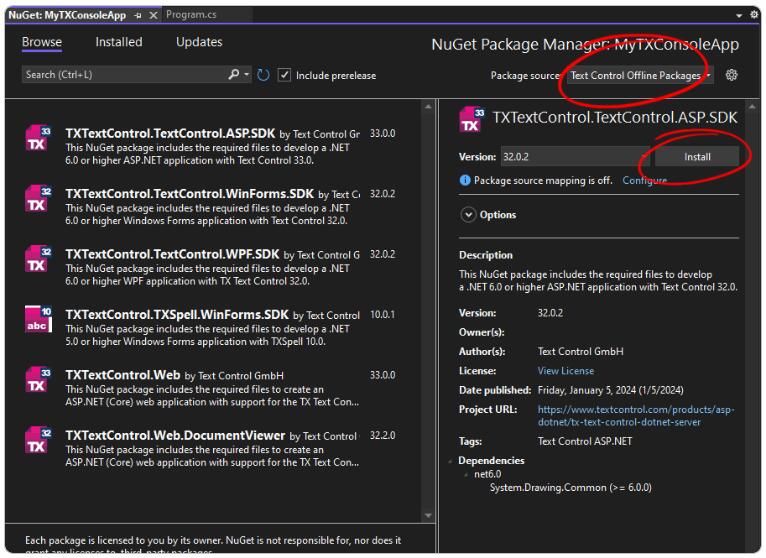
Text Control 控件教程:使用 .NET C# 中的二维码和条形码增强文档
QR 码和条形码非常适合为文档和 PDF 文件增加价值,因为它们提供轻松的信息访问、验证信息、跟踪项目和提高交互性。条形码可以弥补纸质或数字人类可读文档与网络门户或网络应用程序中的数字信息之间的差距。大多数用户都熟悉 QR 码和条形码,它们在许多过…...

最新爆火的开源AI项目 | LivePortrait 本地安装教程
LivePortrait 本地部署教程,强大且开源的可控人像AI视频生成 1,准备工作,本地下载代码并准备环境,运行命令前需安装git 以下操作不要安装在C盘和容量较小的硬盘,可以找个大点的硬盘装哟 2,需要安装FFmp…...

揭秘Django与Neo4j:构建智能知识图谱的终极指南
揭秘Django与Neo4j:构建智能知识图谱的终极指南 前言 图是一种用于对象之间的成对关系进行建模的数学结构。 它由两个主要元素组成:节点和关系。 节点:节点可以看作是传统数据库中的记录。每个节点代表一个对象或实体,例如一个人或一个地方。节点按标签分类,这有助于根…...

项目一缓存商品
文章目录 概要整体架构流程技术细节小结 概要 因为商品是经常被浏览的,所以数据库的访问量就问大大增加,造成负载过大影响性能,所以我们需要把商品缓存到redis当中,因为redis是存在内存中的,所以效率会比MySQL的快. 整体架构流程 技术细节 我们在缓存时需要保持数据的一致性所…...

免费AI图像放大神器Upscayl:让模糊照片瞬间清晰的终极指南
免费AI图像放大神器Upscayl:让模糊照片瞬间清晰的终极指南 【免费下载链接】upscayl 🆙 Upscayl - #1 Free and Open Source AI Image Upscaler for Linux, MacOS and Windows. 项目地址: https://gitcode.com/GitHub_Trending/up/upscayl 你是否…...

初探Taotoken平台提供的APIKey管理与访问控制功能
🚀 告别海外账号与网络限制!稳定直连全球优质大模型,限时半价接入中。 👉 点击领取海量免费额度 初探Taotoken平台提供的APIKey管理与访问控制功能 效果展示类,作者以新用户视角,探索并描述在Taotoken控制…...
预处理小工具)
告别手动处理!用MATLAB App Designer打造你的专属数据(图片/表格)预处理小工具
告别手动处理!用MATLAB App Designer打造你的专属数据预处理小工具 在数据分析与科研工作中,我们常常陷入重复性劳动的泥潭:每次收到新数据集都要用不同软件打开图片查看尺寸、用Excel检查表格结构、用统计工具计算基础指标。这种碎片化操作不…...

深入解析 magic-cli:基于模板的自动化代码生成工具设计与实践
1. 项目概述:一个能“变魔术”的命令行工具最近在折腾一些自动化脚本和项目脚手架时,发现了一个挺有意思的开源项目,叫magic-cli。乍一看这个名字,你可能会觉得有点玄乎,命令行工具还能玩出什么“魔法”来?…...

如何让QtScrcpy投屏画质提升300%?3个隐藏参数解锁超清体验
如何让QtScrcpy投屏画质提升300%?3个隐藏参数解锁超清体验 【免费下载链接】QtScrcpy Android实时投屏软件,此应用程序提供USB(或通过TCP/IP)连接的Android设备的显示和控制。它不需要任何root访问权限 项目地址: https://gitcode.com/barry-ran/QtScr…...

从公式到代码:傅里叶级数系数的完整推导与实现
1. 从三角函数到傅里叶级数:数学基础回顾 第一次接触傅里叶级数时,我被那一堆积分符号和三角函数搞得头晕眼花。后来才发现,理解它的关键其实藏在高中数学课本里——那些看似简单的三角函数公式,正是打开傅里叶变换大门的钥匙。 让…...

独立硬件看门狗芯片Air153C:提升嵌入式系统可靠性的终极方案
1. 项目概述:为什么我们需要一颗独立的看门狗芯片?最近在做一个户外数据采集终端的项目,设备部署在野外,需要长期稳定运行。最头疼的问题不是功能实现,而是如何应对各种意想不到的“死机”。电源波动、电磁干扰、程序跑…...

DDoS攻击:企业与个人都应了解的基本知识
一、DDoS攻击的基本原理 DDoS攻击的基本原理在于通过超载目标系统、服务或网络的资源,使其无法正常响应合法用户的请求。这类攻击通常涉及大量计算机或设备,这些设备被操纵成一个庞大的“僵尸网络”(botnet)。攻击者利用这个庞大…...

Chatmark:Slack聊天记录自动化转Markdown文档的利器
1. 项目概述:从“聊天记录”到“结构化文档”的桥梁如果你和我一样,经常需要从各种即时通讯工具(比如Slack、Teams,甚至是微信工作群)的聊天记录里,整理会议纪要、提取待办事项,或者把一次技术讨…...

蜡笔变蜡烛:DIY分层香薰蜡烛的材料原理与制作实践
1. 项目概述:当蜡笔遇见蜡烛,一次关于气味与色彩的记忆重塑不知道你有没有过这样的体验:打开一盒崭新的蜡笔,那股混合着油脂、黏土与淡淡皂感的独特气味扑面而来,瞬间就能将你拉回铺满画纸的童年午后。Crayola蜡笔的官…...