
[AI Mem0] 源码解读,带你了解 Mem0 的实现
Mem0 的 CRUD 到底是如何实现的?我们来看下源码。
使用
先来看下,如何使用 Mem0
import os
os.environ["OPENAI_API_KEY"] = "sk-xxx"from mem0 import Memorym = Memory()# 1. Add: Store a memory from any unstructured text
result = m.add("I am working on improving my tennis skills. Suggest some online courses.", user_id="alice", metadata={"category": "hobbies"})# Created memory --> 'Improving her tennis skills.' and 'Looking for online suggestions.'# 2. Update: update the memory
result = m.update(memory_id=<memory_id_1>, data="Likes to play tennis on weekends")# Updated memory --> 'Likes to play tennis on weekends.' and 'Looking for online suggestions.'# 3. Search: search related memories
related_memories = m.search(query="What are Alice's hobbies?", user_id="alice")# Retrieved memory --> 'Likes to play tennis on weekends'# 4. Get all memories
all_memories = m.get_all()
memory_id = all_memories[0]["id"] # get a memory_id# All memory items --> 'Likes to play tennis on weekends.' and 'Looking for online suggestions.'# 5. Get memory history for a particular memory_id
history = m.history(memory_id=<memory_id_1>)# Logs corresponding to memory_id_1 --> {'prev_value': 'Working on improving tennis skills and interested in online courses for tennis.', 'new_value': 'Likes to play tennis on weekends' }
MemoryBase
MemoryBase 是一个抽象类,定义了一些接口方法
- get
- get_all
- update
- delete
- history
class MemoryBase(ABC):@abstractmethoddef get(self, memory_id):"""Retrieve a memory by ID.Args:memory_id (str): ID of the memory to retrieve.Returns:dict: Retrieved memory."""pass@abstractmethoddef get_all(self):"""List all memories.Returns:list: List of all memories."""pass@abstractmethoddef update(self, memory_id, data):"""Update a memory by ID.Args:memory_id (str): ID of the memory to update.data (dict): Data to update the memory with.Returns:dict: Updated memory."""pass@abstractmethoddef delete(self, memory_id):"""Delete a memory by ID.Args:memory_id (str): ID of the memory to delete."""pass@abstractmethoddef history(self, memory_id):"""Get the history of changes for a memory by ID.Args:memory_id (str): ID of the memory to get history for.Returns:list: List of changes for the memory."""pass
Memory
Memory 实现 MemoryBase 接口
class Memory(MemoryBase):
init
def __init__(self, config: MemoryConfig = MemoryConfig()):self.config = configself.embedding_model = EmbedderFactory.create(self.config.embedder.provider)# Initialize the appropriate vector store based on the configurationvector_store_config = self.config.vector_store.configif self.config.vector_store.provider == "qdrant":self.vector_store = Qdrant(host=vector_store_config.host,port=vector_store_config.port,path=vector_store_config.path,url=vector_store_config.url,api_key=vector_store_config.api_key,)else:raise ValueError(f"Unsupported vector store type: {self.config.vector_store_type}")self.llm = LlmFactory.create(self.config.llm.provider, self.config.llm.config)self.db = SQLiteManager(self.config.history_db_path)self.collection_name = self.config.collection_nameself.vector_store.create_col(name=self.collection_name, vector_size=self.embedding_model.dims)self.vector_store.create_col(name=self.collection_name, vector_size=self.embedding_model.dims)capture_event("mem0.init", self)
初始化 embedding_model, vector_store(这里只能是 Qdrant), llm, db, collection_name
add
def add(self,data,user_id=None,agent_id=None,run_id=None,metadata=None,filters=None,prompt=None,):"""Create a new memory.Args:data (str): Data to store in the memory.user_id (str, optional): ID of the user creating the memory. Defaults to None.agent_id (str, optional): ID of the agent creating the memory. Defaults to None.run_id (str, optional): ID of the run creating the memory. Defaults to None.metadata (dict, optional): Metadata to store with the memory. Defaults to None.filters (dict, optional): Filters to apply to the search. Defaults to None.Returns:str: ID of the created memory."""
- 将用户 data 发给 llm ,得到 extracted_memories
- 将用户 data 转成 embeddings
- vector_store 根据 embeddings search 得到 existing_memories
- 将新,老 memory 发给 llm 来 merge
- 调用函数 _create_memory_tool 进行实际操作
- vector_store insert
- db add_history
get
def get(self, memory_id):"""Retrieve a memory by ID.Args:memory_id (str): ID of the memory to retrieve.Returns:dict: Retrieved memory."""
- vector_store 根据 memory_id 去 get
get_all
def get_all(self, user_id=None, agent_id=None, run_id=None, limit=100):"""List all memories.Returns:list: List of all memories."""
- vector_store 根据 collection_name, filters, limit 调用 list 接口
search
def search(self, query, user_id=None, agent_id=None, run_id=None, limit=100, filters=None):"""Search for memories.Args:query (str): Query to search for.user_id (str, optional): ID of the user to search for. Defaults to None.agent_id (str, optional): ID of the agent to search for. Defaults to None.run_id (str, optional): ID of the run to search for. Defaults to None.limit (int, optional): Limit the number of results. Defaults to 100.filters (dict, optional): Filters to apply to the search. Defaults to None.Returns:list: List of search results."""
- embedding_model 将 query 转 embeddings
- vector_store 根据 embeddings search
update
def update(self, memory_id, data):"""Update a memory by ID.Args:memory_id (str): ID of the memory to update.data (dict): Data to update the memory with.Returns:dict: Updated memory."""
- 调用 _update_memory_tool
- existing_memory = self.vector_store.get
- embeddings = self.embedding_model.embed(data)
- self.vector_store.update
- self.db.add_history
delete
def delete(self, memory_id):"""Delete a memory by ID.Args:memory_id (str): ID of the memory to delete."""
- 调用 _delete_memory_tool
- existing_memory = self.vector_store.get
- self.vector_store.delete
- self.db.add_history
delete_all
def delete_all(self, user_id=None, agent_id=None, run_id=None):"""Delete all memories.Args:user_id (str, optional): ID of the user to delete memories for. Defaults to None.agent_id (str, optional): ID of the agent to delete memories for. Defaults to None.run_id (str, optional): ID of the run to delete memories for. Defaults to None."""
- memories = self.vector_store.list
- foreach memories
- _delete_memory_tool
history
def history(self, memory_id):"""Get the history of changes for a memory by ID.Args:memory_id (str): ID of the memory to get history for.Returns:list: List of changes for the memory."""
- self.db.get_history
reset
def reset(self):"""Reset the memory store."""
- self.vector_store.delete_col
- self.db.reset()
AnonymousTelemetry
- capture_event 收集信息
- telemetry 用的是 Posthog(https://us.i.posthog.com)
SQLiteManager
- db 用的是 sqlite3
- 一个记录历史的表
CREATE TABLE IF NOT EXISTS history (id TEXT PRIMARY KEY,memory_id TEXT,prev_value TEXT,new_value TEXT,event TEXT,timestamp DATETIME,is_deleted INTEGER
)
MemoryClient
class MemoryClient:"""Client for interacting with the Mem0 API.This class provides methods to create, retrieve, search, and delete memoriesusing the Mem0 API.Attributes:api_key (str): The API key for authenticating with the Mem0 API.host (str): The base URL for the Mem0 API.client (httpx.Client): The HTTP client used for making API requests."""
- 主要用于跟平台(https://api.mem0.ai/v1)交互
- 接口
- add
- get
- get_all
- search
- delete
- delete_all
- history
- reset
Embedding
class EmbeddingBase(ABC):@abstractmethoddef embed(self, text):"""Get the embedding for the given text.Args:text (str): The text to embed.Returns:list: The embedding vector."""pass
- HuggingFaceEmbedding(model_name=“multi-qa-MiniLM-L6-cos-v1”)
- Ollama(model=“nomic-embed-text”)
- OpenAI(model=“text-embedding-3-small”)
LLM
class LLMBase(ABC):def __init__(self, config: Optional[BaseLlmConfig] = None):"""Initialize a base LLM class:param config: LLM configuration option class, defaults to None:type config: Optional[BaseLlmConfig], optional"""if config is None:self.config = BaseLlmConfig()else:self.config = config@abstractmethoddef generate_response(self, messages):"""Generate a response based on the given messages.Args:messages (list): List of message dicts containing 'role' and 'content'.Returns:str: The generated response."""pass
- AWSBedrockLLM(anthropic.claude-3-5-sonnet-20240620-v1:0)
- GroqLLM(llama3-70b-8192)
- LiteLLM(gpt-4o)
- OllamaLLM(llama3)
- OpenAILLM(gpt-4o)
- TogetherLLM(mistralai/Mixtral-8x7B-Instruct-v0.1)
VectorStore
class VectorStoreBase(ABC):@abstractmethoddef create_col(self, name, vector_size, distance):"""Create a new collection."""pass@abstractmethoddef insert(self, name, vectors, payloads=None, ids=None):"""Insert vectors into a collection."""pass@abstractmethoddef search(self, name, query, limit=5, filters=None):"""Search for similar vectors."""pass@abstractmethoddef delete(self, name, vector_id):"""Delete a vector by ID."""pass@abstractmethoddef update(self, name, vector_id, vector=None, payload=None):"""Update a vector and its payload."""pass@abstractmethoddef get(self, name, vector_id):"""Retrieve a vector by ID."""pass@abstractmethoddef list_cols(self):"""List all collections."""pass@abstractmethoddef delete_col(self, name):"""Delete a collection."""pass@abstractmethoddef col_info(self, name):"""Get information about a collection."""pass
- 只有 Qdrant 一个实现
总结
- 核心就是 Memory 类,实现了 MemoryBase 接口
- 通过 embedding_model 来处理文本
- 通过 vector_store 存储 embedding
- 通过 llm 处理数据
- 通过 db 记录 Memory 的历史
- github
- doc
- AI 博客 - 从零开始学AI
- 公众号 - 从零开始学AI
相关文章:

[AI Mem0] 源码解读,带你了解 Mem0 的实现
Mem0 的 CRUD 到底是如何实现的?我们来看下源码。 使用 先来看下,如何使用 Mem0 import os os.environ["OPENAI_API_KEY"] "sk-xxx"from mem0 import Memorym Memory()# 1. Add: Store a memory from any unstructured text re…...

【LLM】-10-部署llama-3-chinese-8b-instruct-v3 大模型
目录 1、模型下载 2、下载项目代码 3、启动模型 4、模型调用 4.1、completion接口 4.2、聊天(chat completion) 4.3、多轮对话 4.4、文本嵌入向量 5、Java代码实现调用 由于在【LLM】-09-搭建问答系统-对输入Prompt检查-CSDN博客 关于提示词注入…...

C语言 之 理解指针(4)
文章目录 1. 字符指针变量2. 数组指针变量2.1 对数组指针变量的理解2.2 数组指针变量的初始化 3. 二维数组传参的本质4. 函数指针变量4.1 函数指针变量的创建4.2 函数指针变量的使用 5. 函数指针数组 1. 字符指针变量 我们在前面使用的主要是整形指针变量,现在要学…...

Java设计模式—单例模式(Singleton Pattern)
目录 一、定义 二、应用场景 三、具体实现 示例一 示例二 四、懒汉与饿汉 饿汉模式 懒汉模式 五、总结 六、说明 一、定义 二、应用场景 单例模式的应用场景主要包括以下几个方面: 日志系统:在应用程序中,通常只需要一个日…...

AV1帧间预测(二):运动补偿
运动补偿(Motion Compensation,MC)是帧间预测最基础的工具,AV1支持两种运动补偿方式,一种是传统的平移运动补偿,另一种是仿射运动补偿。下面分别介绍这两种运动补偿方法。 平移运动补偿 平移运动补偿是最传统的运动补偿方式,H.26…...
——逻辑回归)
数学建模(5)——逻辑回归
一、二分类 import numpy as np import matplotlib.pyplot as plt from sklearn import datasets from sklearn.model_selection import train_test_split from sklearn.preprocessing import StandardScaler from sklearn.linear_model import LogisticRegression from sklea…...

【C++高阶】:深入探索C++11
✨ 心似白云常自在,意如流水任东西 🌏 📃个人主页:island1314 🔥个人专栏:C学习 🚀 欢迎关注:👍点赞 Ǵ…...

6. 自定义Docker镜像
如何自定义Docker镜像:从基础到实践 Docker作为一个容器化平台,使得应用的打包、分发和运行变得更加高效和便捷。本文将详细介绍如何自定义一个Docker镜像,包括镜像的构成、分层原理、创建自定义镜像的具体步骤,并演示如何打包和…...

「12月·长沙」人工智能与网络安全国际学术会议(ISAICS 2024)
人工智能与网络安全国际学术会议(ISAICS 2024)将于2024年12月20日-2024年12月22日在湖南长沙召开。会议中发表的文章将会被收录,并于见刊后提交EI核心索引。会议旨在在为国内与国际学者搭建交流平台,推进不同学科领域的融合发展,就当今人工智能与网络安全范畴内各学…...
【技术支持案例】使用S32K144+NSD8381驱动电子膨胀阀
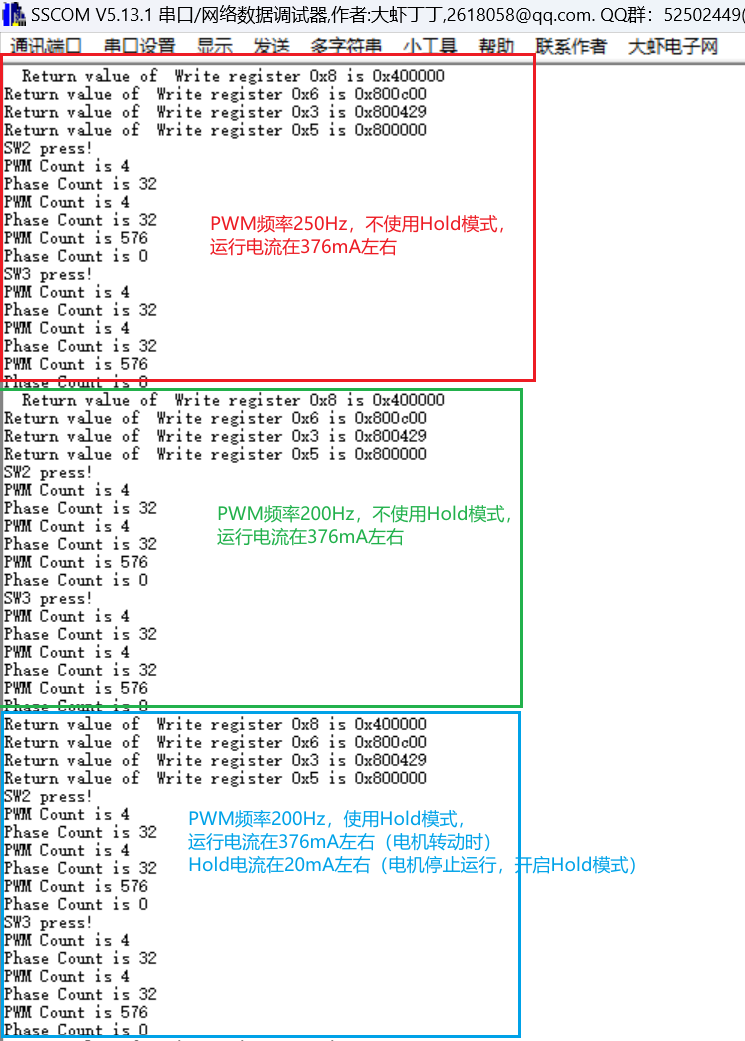
文章目录 1. 前言2. 问题描述3. 理论分析3.1 NSD8381如何连接电机3.2 S32K144和NSD8381的软件配置 4.测试验证4.1 测试环境4.2 测试效果4.3 测试记录 1. 前言 最近有客户在使用S32K144NSD8381驱动电子膨胀阀时,遇到无法正常驱动电子膨胀阀的情况。因为笔者也是刚开…...

第二期:集成电路(IC)——智能世界的微观建筑大师
嘿,小伙伴们!👋 我是你们的老朋友小竹笋,一名热爱创作和技术的工程师。上一期我们聊了聊AI芯片,这次我们要深入到更微观的层面,来探究集成电路(IC)的世界。准备好一起探索了吗&#…...

基于物联网的区块链算力网络,IGP/BGP协议
目录 基于物联网的区块链算力网络 IGP/BGP协议 IGP(内部网关协议) BGP(边界网关协议) 内部使用ISP的外部使用BGP的原因 一、网络规模和复杂性 二、路由协议的特性 三、满足业务需求 四、结论 基于物联网的区块链算力网络 通 过 多个物联网传感器将本地计算…...
)
每日一题~960 div2 A+B+C(简单奇偶博弈,构造,观察性质算贡献)
A题意: N 长的数组。 一次操作: 最开始的mx 为零。 选出一个数(使得这个数>mx) ,之后将mx 更新为这个数,将这个数置为零。 不能做这个操作的,输。 问是否有先手赢的策略。有的话,输出yes 否则no 当时一…...

音视频入门基础:H.264专题(17)——FFmpeg源码获取H.264裸流文件信息(视频压缩编码格式、色彩格式、视频分辨率、帧率)的总流程
音视频入门基础:H.264专题系列文章: 音视频入门基础:H.264专题(1)——H.264官方文档下载 音视频入门基础:H.264专题(2)——使用FFmpeg命令生成H.264裸流文件 音视频入门基础&…...
Aboboo一些操作
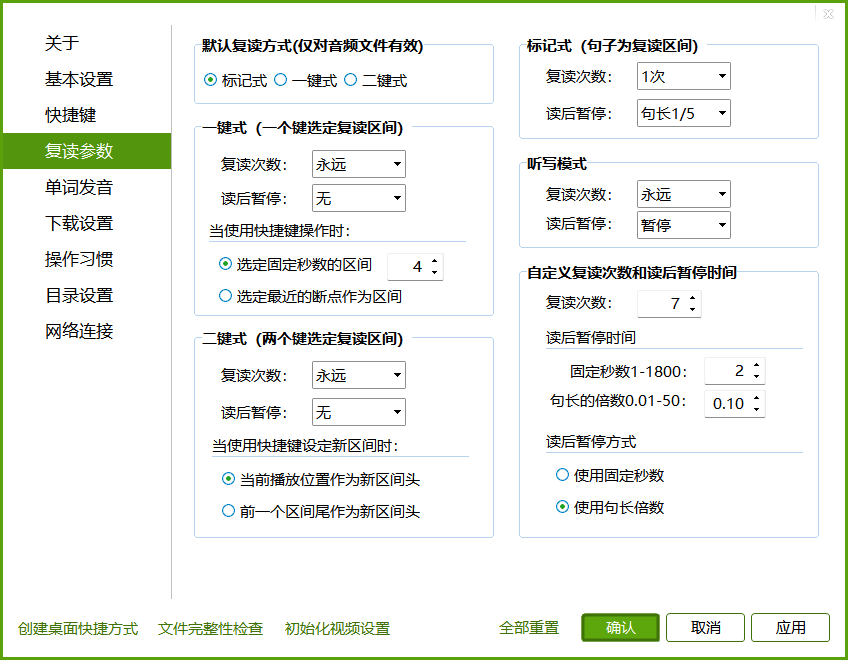
常用快捷键⌨ 快捷键/操作方式 功能 鼠标中键/Esc 进入/退出全屏 空格/Tab 暂停/恢复播放 左/右箭头 快退/快进 Ctrl-左/右箭头 30秒快退/快进 Alt-左/右箭头 60秒快退/快进 Ctrl-Alt-左/右箭头 播放速率调节 PageUp/PageDown 上一句/下一句 上下箭头/滚轮 …...

获取行号LineNumberReader
(每日持续更新)jdk api之LineNumberReader基础、应用、实战-CSDN博客...

python数据结构与算法
0.时间复杂度和空间复杂度 快速判断算法时间复杂度:算法运行时间 1.确定问题规模n 2.循环减半 logn 3.k层关于n的循环 n^k 空间复杂度:评估算法内存占用大小 使用几个变量 O(1) 使用长度为n的一维列表 O(n)…...

大数据学习之Flink基础(补充)
Flink基础 1、系统时间与事件时间 系统时间(处理时间) 在Sparksreaming的任务计算时,使用的是系统时间。 假设所用窗口为滚动窗口,大小为5分钟。那么每五分钟,都会对接收的数据进行提交任务. 但是,这里有…...

C++基础语法:友元
前言 "打牢基础,万事不愁" .C的基础语法的学习."学以致用,边学边用",编程是实践性很强的技术,在运用中理解,总结. 以<C Prime Plus> 6th Edition(以下称"本书")的内容开展学习 引入 友元提供了一种特别的方式,访问对象私有数据. 友元有三…...

【大模型系列】Video-LaVIT(2024.06)
Paper:https://arxiv.org/abs/2402.03161Github:https://video-lavit.github.io/Title:Video-LaVIT: Unified Video-Language Pre-training with Decoupled Visual-Motional TokenizationAuthor:Yang Jin, 北大&#x…...

3步搞定M3U8视频下载:告别在线播放限制的终极方案
3步搞定M3U8视频下载:告别在线播放限制的终极方案 【免费下载链接】N_m3u8DL-CLI-SimpleG N_m3u8DL-CLIs simple GUI 项目地址: https://gitcode.com/gh_mirrors/nm3/N_m3u8DL-CLI-SimpleG 你是否曾遇到过这样的烦恼?在线观看的视频无法保存&…...

K8s集群健康监控、Pod调度与配置存储卷
33.Kubernets对集群Pod和健康容器状态如何进行监控和检测的。 K8s通过kubelet节点监控,使用三种探针来监控和管理容器监控状态,每种探针在容器生命周期种的不同阶段发挥不同的作用。 34.解释LivenessProbes探针的作用及其适用场景。 LivenessProbes存活探…...

Unity UGUI Mask与3D对象Stencil裁剪失效的根因解析
1. 这不是“Stencil失效”,而是 Unity 渲染管线里一场被忽略的层级静默冲突 你有没有试过在 UGUI ScrollView 里放一个带 Mask 的滚动区域,再把一个 3D 模型(比如一个带透明材质的粒子特效、或者一个半透的 UI 面板)叠在它上面&am…...

恩智浦eIQ Time Series Studio:嵌入式时间序列AI从数据到部署的自动化实践
1. 项目概述与核心价值如果你正在为嵌入式设备开发一个基于传感器数据的智能功能,比如通过振动信号判断电机是否故障,或者通过电流波形识别家电的工作模式,你大概率会面临一个经典困境:算法模型在PC上跑得好好的,一到资…...

ncmdumpGUI:Windows平台免费NCM文件转换终极指南
ncmdumpGUI:Windows平台免费NCM文件转换终极指南 【免费下载链接】ncmdumpGUI C#版本网易云音乐ncm文件格式转换,Windows图形界面版本 项目地址: https://gitcode.com/gh_mirrors/nc/ncmdumpGUI 您是否在网易云音乐下载了喜爱的歌曲,…...

【ChatGPT SEO写作黄金法则】:20年SEO专家亲授7大不可绕过的AI内容合规红线
更多请点击: https://kaifayun.com 第一章:ChatGPT SEO写作的底层逻辑与合规本质 ChatGPT SEO写作并非简单地将关键词堆砌进AI生成文本,其底层逻辑建立在三重耦合关系之上:搜索引擎语义理解机制、用户真实搜索意图建模࿰…...

ANI-RSS自定义扩展技术深度解析:架构设计与高级定制方案
ANI-RSS自定义扩展技术深度解析:架构设计与高级定制方案 【免费下载链接】ani-rss 基于RSS自动追番、订阅、下载、刮削、洗版 项目地址: https://gitcode.com/gh_mirrors/an/ani-rss ANI-RSS作为一款基于RSS的自动化追番解决方案,其技术架构提供了…...
:文件操作、终端执行与 PDF 生成工具)
AI Agent 项目学习笔记(十):文件操作、终端执行与 PDF 生成工具
1. 本期目标 上一篇文章分析了 ai_agent 项目中的三个联网工具: WebSearchTool WebScrapingTool ResourceDownloadTool它们主要解决的是: 智能体如何从外部网络获取信息?这一期继续分析工具模块中的另一类能力: 本地执行与结果…...

ExternalDNS自动化DNS管理实践:实现Kubernetes服务自动注册
ExternalDNS自动化DNS管理实践:实现Kubernetes服务自动注册 一、ExternalDNS概述 ExternalDNS是一个Kubernetes控制器,能够自动同步Kubernetes资源(如Service和Ingress)到外部DNS服务商。它消除了手动管理DNS记录的繁琐工作&…...

终极AI音乐创作工具:5分钟生成专业级歌曲翻唱
终极AI音乐创作工具:5分钟生成专业级歌曲翻唱 【免费下载链接】AICoverGen A WebUI to create song covers with any RVC v2 trained AI voice from YouTube videos or audio files. 项目地址: https://gitcode.com/gh_mirrors/ai/AICoverGen 你是否曾经梦想…...